
Revision Year 10 Input and output Input devices





- Slides: 47
Revision Year 10
Input and output
Input devices
Output devices
Connecting to the internet.
Wired Methods �Ethernet �ADSL �Fibre Optic
Wireless methods �Wi-Fi �Bluetooth �Infrared � 3 G and 4 G (Mobile Data)
Network Name (SSID) �An SSID (service set identifier) is the name of a wireless local area network (WLAN). All wireless devices wishing to connect must use the same SSID in order to communicate with each other.
Security Key �Security keys are used to exchange messages between devices. These are commonly encrypted with WEP (Wired Equivalent Privacy). This is set through the network router setup wizard. It is a sequence of hex digits chosen by a network administrator and assists with securing the network connection. As with all technology WEP has been superseded by WPA (Wi-Fi Protected Access) and WPA 2 which provide greater security.
Storage
You can store data on. . . �CD/DVD (Optical Disk) �Memory Cards �External Hard Drives �Solid State Drives �USB/Memory Sticks �Cloud Storage
Archiving �An archive tends to be the backup of data for longterm storage. The user does not expect to retrieve this data but it is there in case they have to. In this storage the medium has to have a long shelf life.
Data Protection Act
The Data Protection Act (DPA) �The Data Protection Act 1998 sets out to protect the privacy of personal information. �It covers data held on computers and paper
What should data be?
Data must be. . . 1. fairly and lawfully processed (used) 2. used for limited purposes 3. adequate and relevant. Only what is needed may be used 4. accurate 5. not kept for longer than is necessary 6. accessible to the individual and able to be corrected or removed where necessary 7. secure 8. not transferred to countries without adequate protection.
Possible Legal Implications if any of the 8 rules are breached �For serious breaches organisations can be made to pay up to £ 500000 �The organisation can be prosecuted/fined/sued if the data is stolen and not held securely
�Data held must be protected from lost, so if the data is lost an offence has occurred. Furthermore the organisation will need to tell the person whose data it was. �The information commissioner can issue the organisation to improve their data security. �The information commissioner can serve an assessment to investigate their data security.
What are the implications for someone if their data is stolen?
What are the implications for someone if their data is stolen? �You may need to change some of your details because personal data that is lost may allow access to your bank account �Steve’s account may get money taken out as Steve’s personal details allow others to impersonate him
How can data be protected?
How can data be protected? �Antivirus – To protect files from virus’ �Access permissions and user accounts – Only let certain people view files �Password protect files – so people can’t just open them �Use secure networks – Password protect your network
Exemptions �Any personal data that is held for a national security reason is not covered. So MI 5 and MI 6 don't have to follow the rules. �The taxman or police do not have to disclose information held or processed to prevent crime or taxation fraud. Criminals cannot see their police files. Tax or VAT investigators do not have to show people their files. �A school pupil has no right of access to personal files, or to exam results before publication.
The roles of those involved �A data subject is someone who has data about them stored somewhere, outside of their direct control. e. g. a bank stores its customers' names, addresses and phone numbers. �A data controller is a person or company that collects and keeps data about people. �The Information Commissioner is the person (and his/her office) who has powers to enforce the Act.
Online Calenders
What is an online Calendar �An online calendar is a web application that allow one or more users to edit, and optionally share with other users, online access to a calendar.
Uses of an online Calendar �They can be shared between two people �Both users (Jackie and a Technician for example) can add, edit and view jobs
�You have the ability to access from anywhere �Technicians can access the calendar on their Smartphone's
�Reminders can be set up for jobs �technicians can be alerted before the job is to start
�Notes can be added to jobs/blocks �If a job is completed/there is a problem at the job, the technician can leave a note
�Online calendars include messaging systems �Users can contact each other is there is ever a problem
�Jobs are less likely to be double booked
�There is a search facility �If a job for a customer needs to be cancelled it can easily be deleted
This may come up in your exams. . .
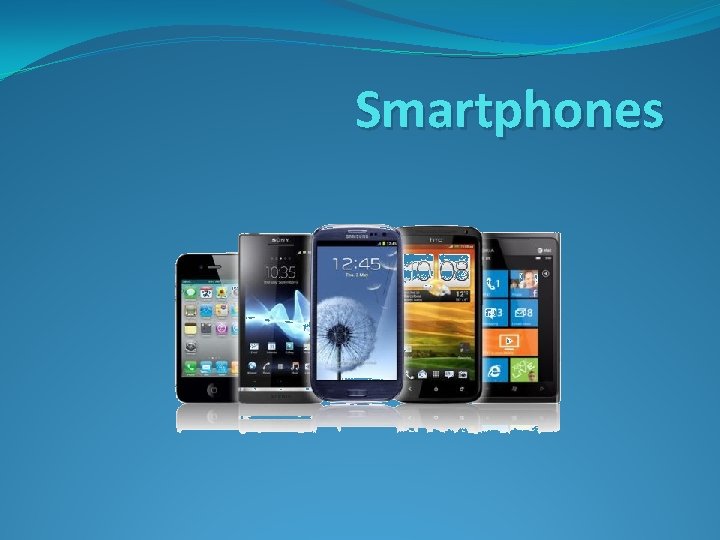
Smartphones
What is a Smartphone? �A Smartphone is a portable device that is able to perform many of the functions of a computer, typically having a relatively large touch screen and an operating system capable of running general-purpose applications
Features of a Smartphone �Internet browsing �sending emails �gaming �making calls �navigating with GPS maps �sending messages �touch screen on most devices �Any More?
How can a Smartphone track what someone does? �Call Logs �Cookies �GPS �Internet History
Call Logs �Smartphones keep a list of all your recent phone calls. They can provide a list of missed answered calls.
Cookies �A cookie, also known as an HTTP cookie, web cookie, or browser cookie, is a small piece of data sent from a website and stored in a user's web browser while the user is browsing that website.
GPS �GPS Chip in Device �GPS Chip Picks up signal from satellite to determine location �This can then be sent via internet to 3 rd Party � What Apps use GPS? � https: //youtube. googleapis. com/v/ky 4 Rg. Rv. VDo. A
Internet History �Your mobile phone keeps track of all the web pages you visited �You can then access your history if you wish to revisit a website
How can Smartphone’s connect to a Wired network �Smartphone’s can use their ‘Sync’ cable to connect to a Computer. �PCs on the other hand can connect to a wired network using Ethernet cable.
How can Smartphone’s connect to a Wireless network �Wifi - allows an electronic device to exchange data or connect to the internet wirelessly using microwaves (not microwave ovens) � 3 G or 4 G - stands for third or fourth-generation and refers to technology that allows mobile phones to access the internet �Bluetooth - short-range wireless interconnection of mobile phones, computers, and other electronic devices
How can you communicate using a Smartphone? �Calling �Texting �Emailing �Video Conferencing (Facetime, Skype) �Using messaging apps (Whats app) �Social Networks �Any other ways?
Advantages of a Smartphone �Portable Devices that can fit in your pocket �Can perform similar tasks to that of a PC (Greater functionality) �A better battery life than most portable devices �On the go access to the internet �Allows you to work on the go �Better information sharing �Access to GPS �Entertainment �Any more? �I wish I had my. . .
Disadvantages of a Smartphone �Battery may ran out �If out of signal then phone functionality drops �Some have limited storage �Easily lost (How can apps help us? ) �Easily damaged �Expensive to purchase and run (Contract)