
Review of MAC protocols channel partitioning by time
Review of MAC protocols • channel partitioning, by time, frequency or code – Time Division, Frequency Division • random access (dynamic), – ALOHA, S-ALOHA, CSMA/CD – carrier sensing: easy in some technologies (wire), hard in others (wireless) – CSMA/CD used in Ethernet – CSMA/CA used in 802. 11 • taking turns – polling from central site, token passing – Bluetooth, FDDI, IBM Token Ring Data Link Layer 5 -1
Slotted ALOHA Assumptions: • all frames same size • time divided into equal size slots (time to transmit 1 frame) • nodes start to transmit only slot beginning • nodes are synchronized • if 2 or more nodes transmit in slot, all nodes detect collision Operation: • when node obtains fresh frame, transmits in next slot – if no collision: node can send new frame in next slot – if collision: node retransmits frame in each subsequent slot with prob. p until success Data Link Layer 5 -2
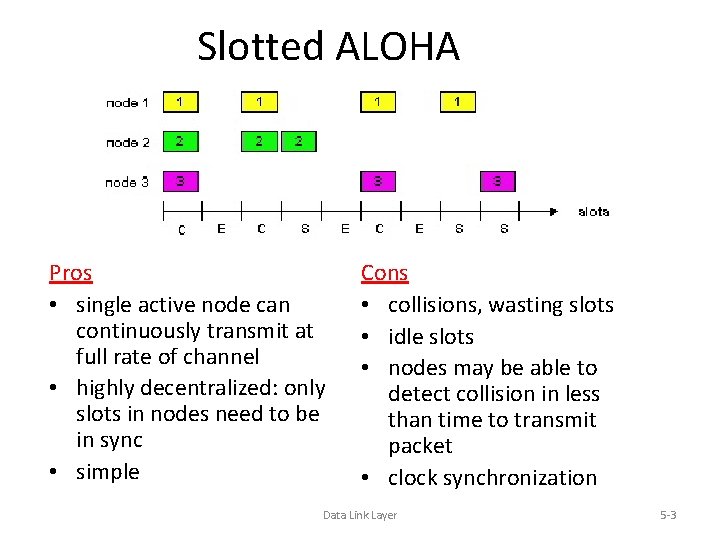
Slotted ALOHA Pros • single active node can continuously transmit at full rate of channel • highly decentralized: only slots in nodes need to be in sync • simple Cons • collisions, wasting slots • idle slots • nodes may be able to detect collision in less than time to transmit packet • clock synchronization Data Link Layer 5 -3
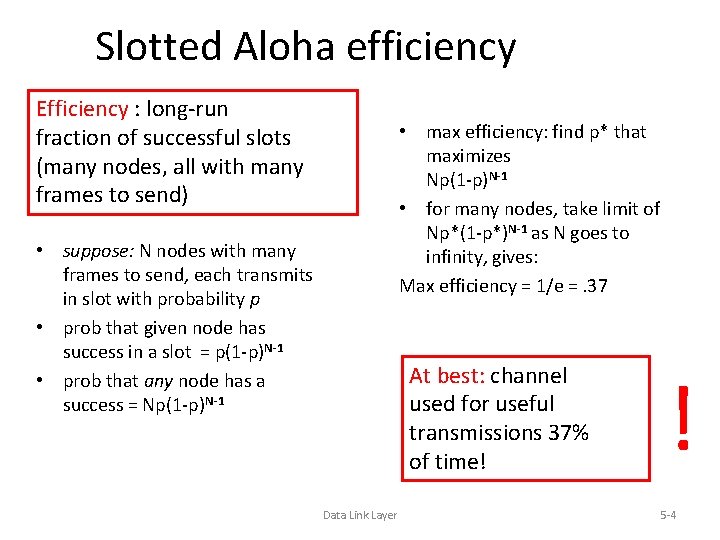
Slotted Aloha efficiency Efficiency : long-run fraction of successful slots (many nodes, all with many frames to send) • max efficiency: find p* that maximizes Np(1 -p)N-1 • for many nodes, take limit of Np*(1 -p*)N-1 as N goes to infinity, gives: Max efficiency = 1/e =. 37 • suppose: N nodes with many frames to send, each transmits in slot with probability p • prob that given node has success in a slot = p(1 -p)N-1 • prob that any node has a success = Np(1 -p)N-1 At best: channel used for useful transmissions 37% of time! Data Link Layer ! 5 -4
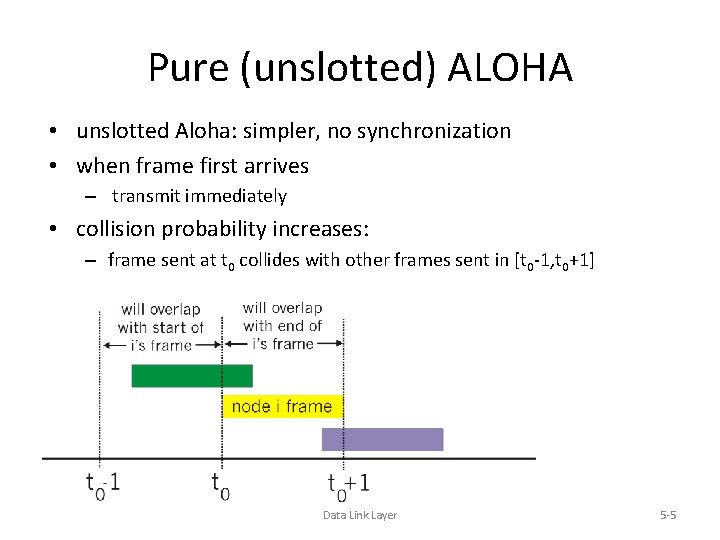
Pure (unslotted) ALOHA • unslotted Aloha: simpler, no synchronization • when frame first arrives – transmit immediately • collision probability increases: – frame sent at t 0 collides with other frames sent in [t 0 -1, t 0+1] Data Link Layer 5 -5
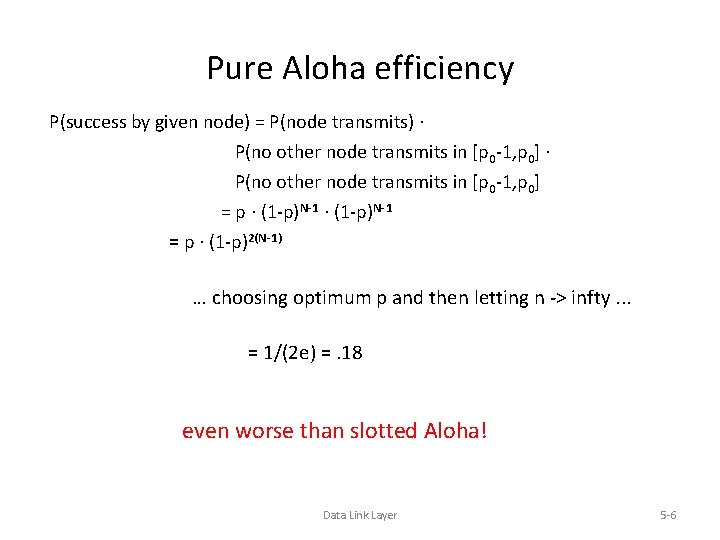
Pure Aloha efficiency P(success by given node) = P(node transmits). P(no other node transmits in [p 0 -1, p 0] = p. (1 -p)N-1 = p. (1 -p)2(N-1) … choosing optimum p and then letting n -> infty. . . = 1/(2 e) =. 18 even worse than slotted Aloha! Data Link Layer 5 -6
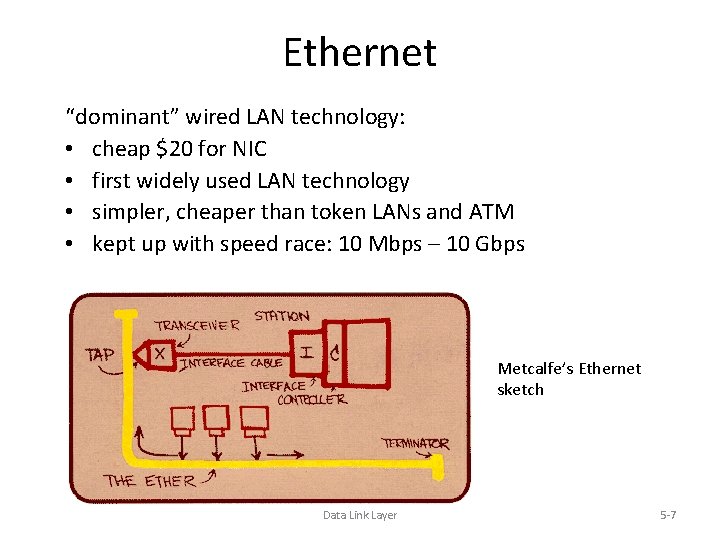
Ethernet “dominant” wired LAN technology: • cheap $20 for NIC • first widely used LAN technology • simpler, cheaper than token LANs and ATM • kept up with speed race: 10 Mbps – 10 Gbps Metcalfe’s Ethernet sketch Data Link Layer 5 -7
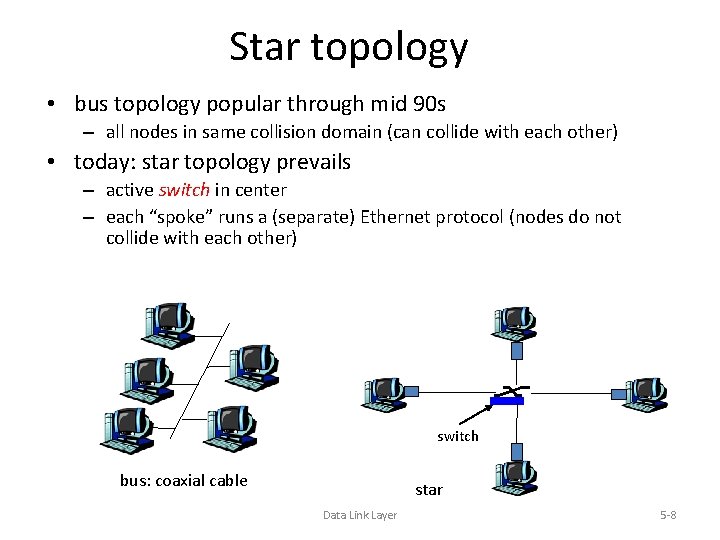
Star topology • bus topology popular through mid 90 s – all nodes in same collision domain (can collide with each other) • today: star topology prevails – active switch in center – each “spoke” runs a (separate) Ethernet protocol (nodes do not collide with each other) switch bus: coaxial cable star Data Link Layer 5 -8
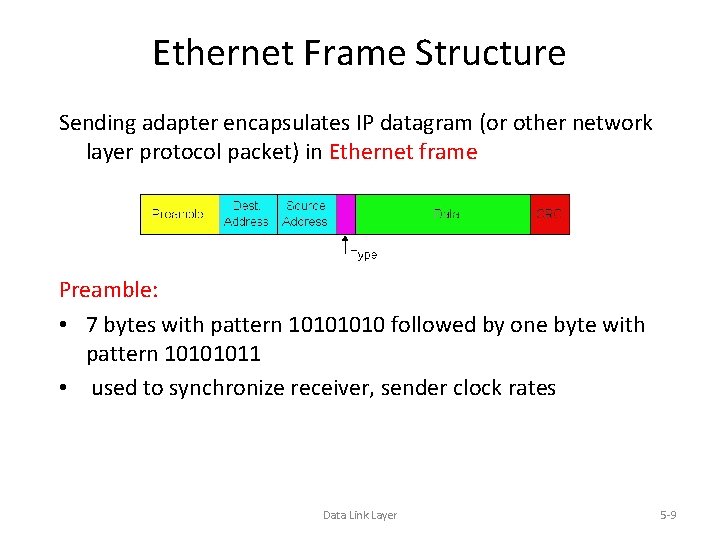
Ethernet Frame Structure Sending adapter encapsulates IP datagram (or other network layer protocol packet) in Ethernet frame Preamble: • 7 bytes with pattern 1010 followed by one byte with pattern 10101011 • used to synchronize receiver, sender clock rates Data Link Layer 5 -9
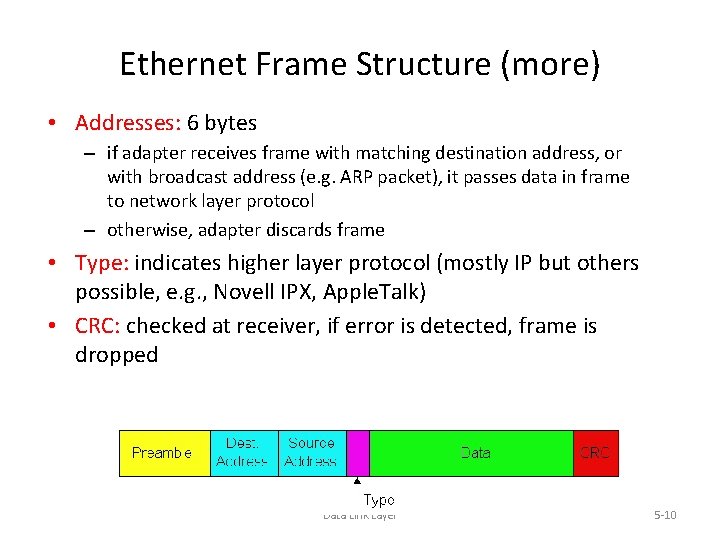
Ethernet Frame Structure (more) • Addresses: 6 bytes – if adapter receives frame with matching destination address, or with broadcast address (e. g. ARP packet), it passes data in frame to network layer protocol – otherwise, adapter discards frame • Type: indicates higher layer protocol (mostly IP but others possible, e. g. , Novell IPX, Apple. Talk) • CRC: checked at receiver, if error is detected, frame is dropped Data Link Layer 5 -10
Ethernet: Unreliable, connectionless • connectionless: No handshaking between sending and receiving NICs • unreliable: receiving NIC doesn’t send acks or nacks to sending NIC – stream of datagrams passed to network layer can have gaps (missing datagrams) – gaps will be filled if app is using TCP – otherwise, app will see gaps • Ethernet’s MAC protocol: unslotted CSMA/CD Data Link Layer 5 -11
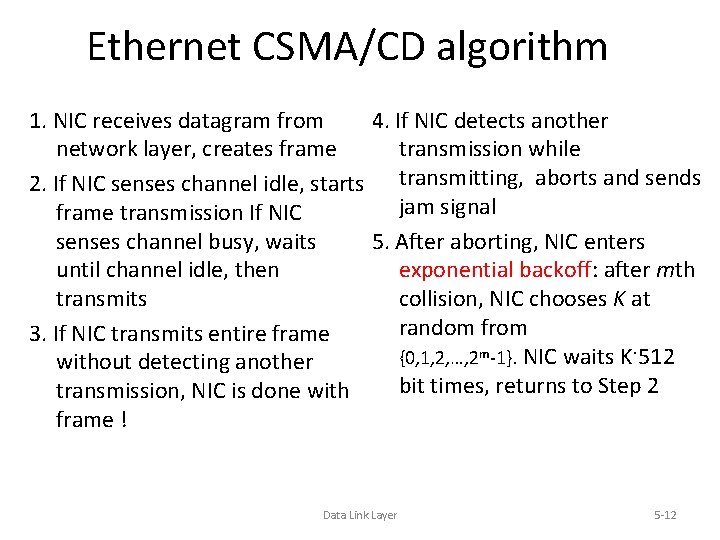
Ethernet CSMA/CD algorithm 1. NIC receives datagram from 4. If NIC detects another network layer, creates frame transmission while 2. If NIC senses channel idle, starts transmitting, aborts and sends jam signal frame transmission If NIC senses channel busy, waits 5. After aborting, NIC enters until channel idle, then exponential backoff: after mth transmits collision, NIC chooses K at random from 3. If NIC transmits entire frame {0, 1, 2, …, 2 m-1}. NIC waits K·512 without detecting another bit times, returns to Step 2 transmission, NIC is done with frame ! Data Link Layer 5 -12
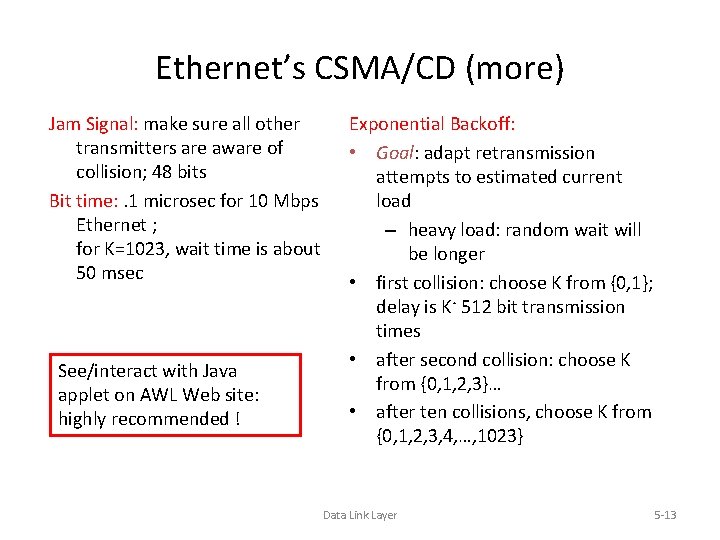
Ethernet’s CSMA/CD (more) Jam Signal: make sure all other transmitters are aware of collision; 48 bits Bit time: . 1 microsec for 10 Mbps Ethernet ; for K=1023, wait time is about 50 msec See/interact with Java applet on AWL Web site: highly recommended ! Exponential Backoff: • Goal: adapt retransmission attempts to estimated current load – heavy load: random wait will be longer • first collision: choose K from {0, 1}; delay is K· 512 bit transmission times • after second collision: choose K from {0, 1, 2, 3}… • after ten collisions, choose K from {0, 1, 2, 3, 4, …, 1023} Data Link Layer 5 -13
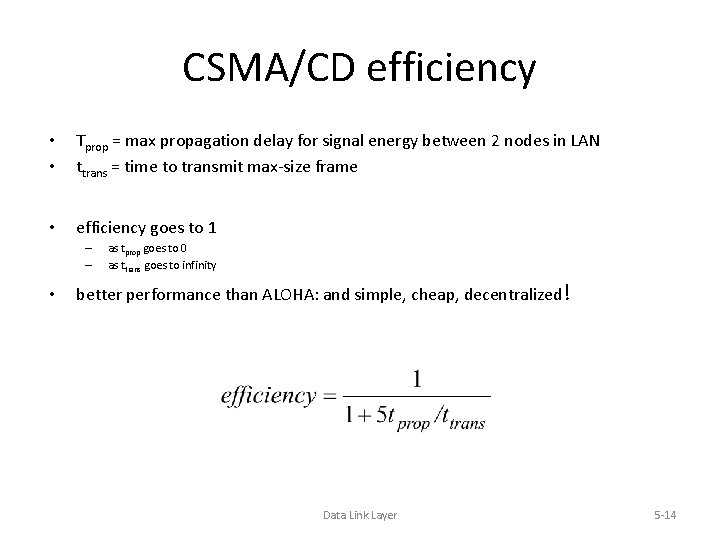
CSMA/CD efficiency • • Tprop = max propagation delay for signal energy between 2 nodes in LAN ttrans = time to transmit max-size frame • efficiency goes to 1 – – • as tprop goes to 0 as ttrans goes to infinity better performance than ALOHA: and simple, cheap, decentralized! Data Link Layer 5 -14
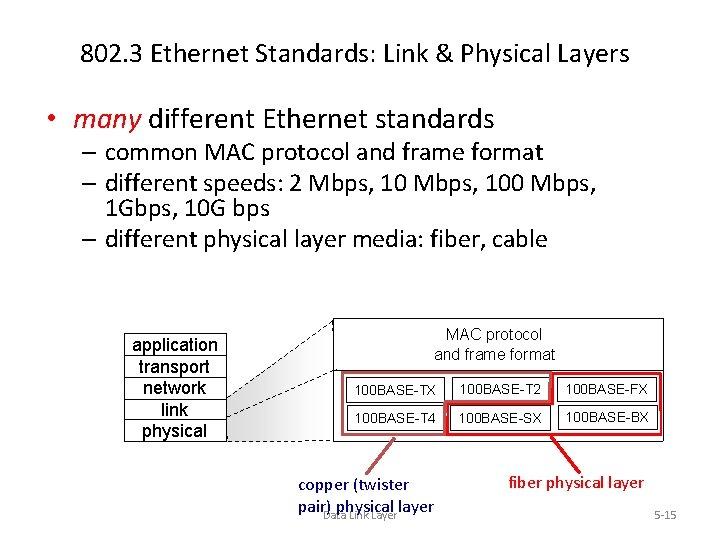
802. 3 Ethernet Standards: Link & Physical Layers • many different Ethernet standards – common MAC protocol and frame format – different speeds: 2 Mbps, 100 Mbps, 1 Gbps, 10 G bps – different physical layer media: fiber, cable application transport network link physical MAC protocol and frame format 100 BASE-TX 100 BASE-T 2 100 BASE-FX 100 BASE-T 4 100 BASE-SX 100 BASE-BX copper (twister pair)Data physical layer Link Layer fiber physical layer 5 -15
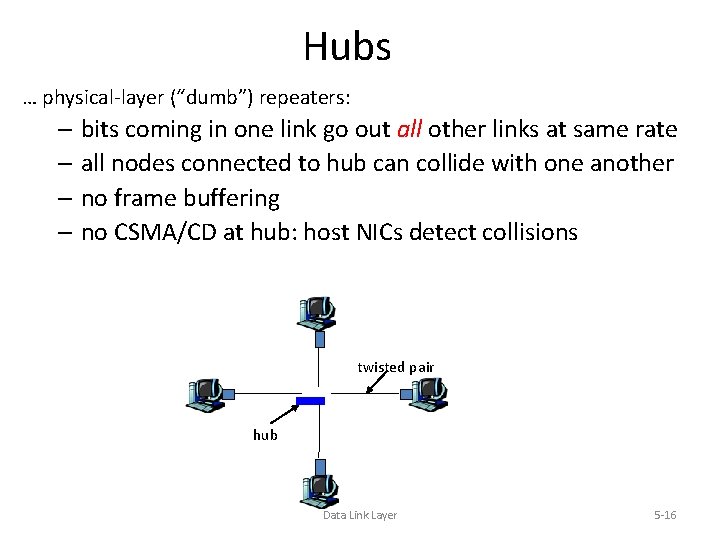
Hubs … physical-layer (“dumb”) repeaters: – bits coming in one link go out all other links at same rate – all nodes connected to hub can collide with one another – no frame buffering – no CSMA/CD at hub: host NICs detect collisions twisted pair hub Data Link Layer 5 -16
Switch • link-layer device: smarter than hubs, take active role – store, forward Ethernet frames – examine incoming frame’s MAC address, selectively forward frame to one-or-more outgoing links when frame is to be forwarded on segment, uses CSMA/CD to access segment • transparent – hosts are unaware of presence of switches • plug-and-play, self-learning – switches do not need to be configured Data Link Layer 5 -17
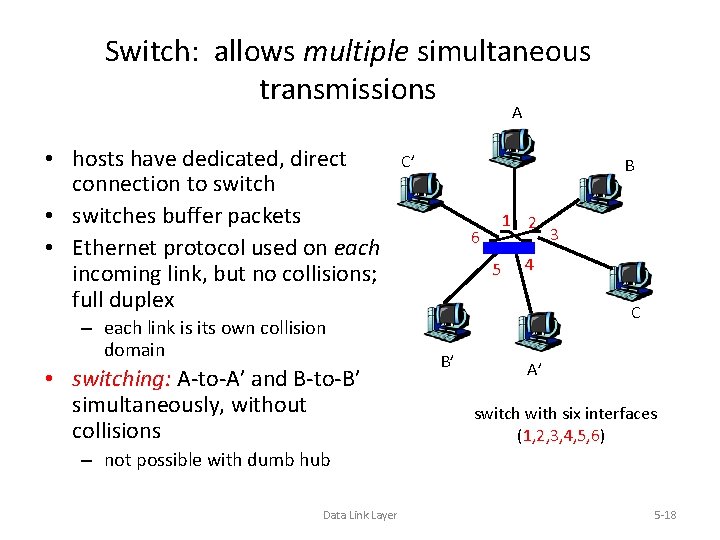
Switch: allows multiple simultaneous transmissions A • hosts have dedicated, direct connection to switch • switches buffer packets • Ethernet protocol used on each incoming link, but no collisions; full duplex – each link is its own collision domain • switching: A-to-A’ and B-to-B’ simultaneously, without collisions C’ B 1 2 6 5 3 4 C B’ A’ switch with six interfaces (1, 2, 3, 4, 5, 6) – not possible with dumb hub Data Link Layer 5 -18
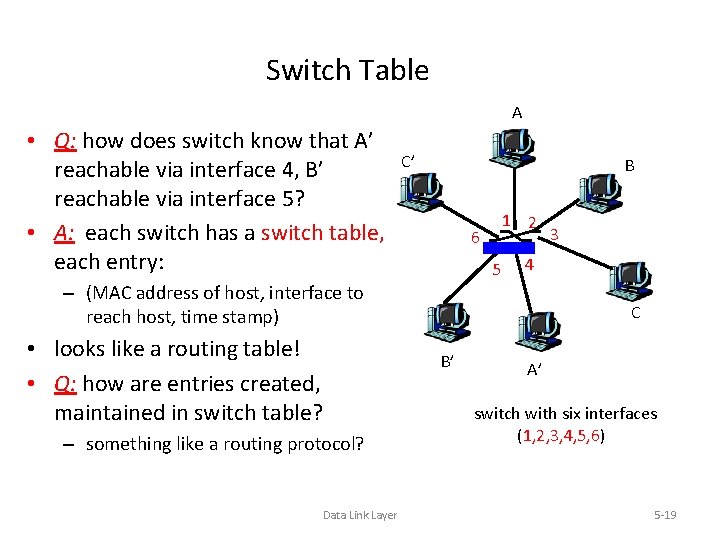
Switch Table A • Q: how does switch know that A’ reachable via interface 4, B’ reachable via interface 5? • A: each switch has a switch table, each entry: C’ B 1 2 6 5 4 – (MAC address of host, interface to reach host, time stamp) • looks like a routing table! • Q: how are entries created, maintained in switch table? – something like a routing protocol? Data Link Layer 3 C B’ A’ switch with six interfaces (1, 2, 3, 4, 5, 6) 5 -19
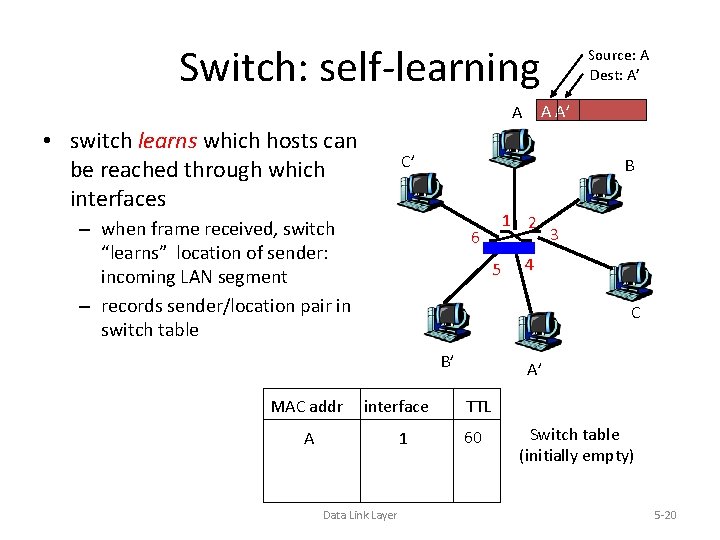
Switch: self-learning A A’ A • switch learns which hosts can be reached through which interfaces C’ B – when frame received, switch “learns” location of sender: incoming LAN segment – records sender/location pair in switch table 1 2 6 5 3 4 C B’ MAC addr Source: A Dest: A’ interface 1 A Data Link Layer A’ TTL 60 Switch table (initially empty) 5 -20
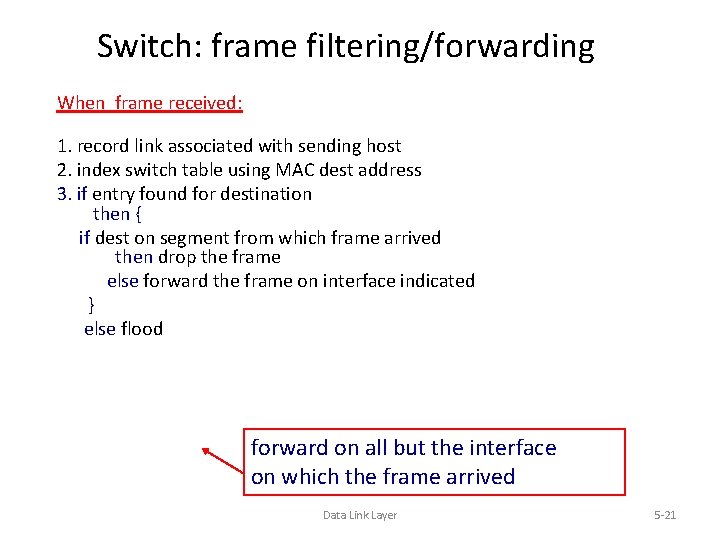
Switch: frame filtering/forwarding When frame received: 1. record link associated with sending host 2. index switch table using MAC dest address 3. if entry found for destination then { if dest on segment from which frame arrived then drop the frame else forward the frame on interface indicated } else flood forward on all but the interface on which the frame arrived Data Link Layer 5 -21
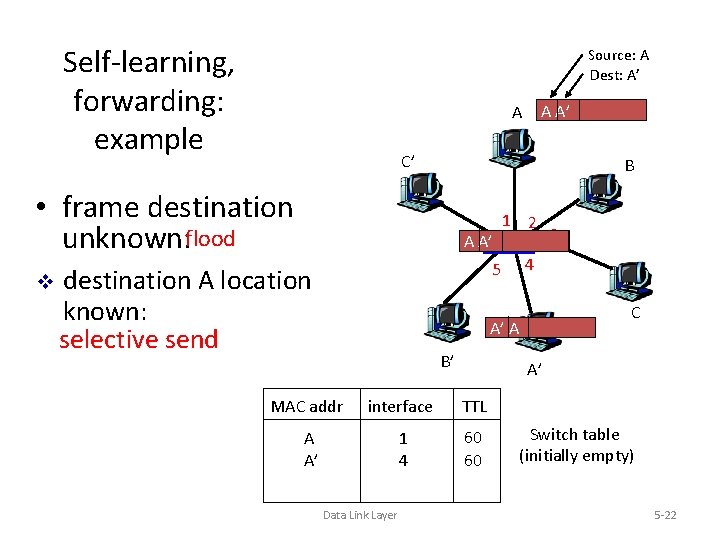
Self-learning, forwarding: example Source: A Dest: A’ C’ B • frame destination unknown: flood v A A’ A A 6 A’ 1 2 5 destination A location known: selective send 4 C A’ A B’ A’ MAC addr interface TTL A A’ 1 4 60 60 Data Link Layer 3 Switch table (initially empty) 5 -22
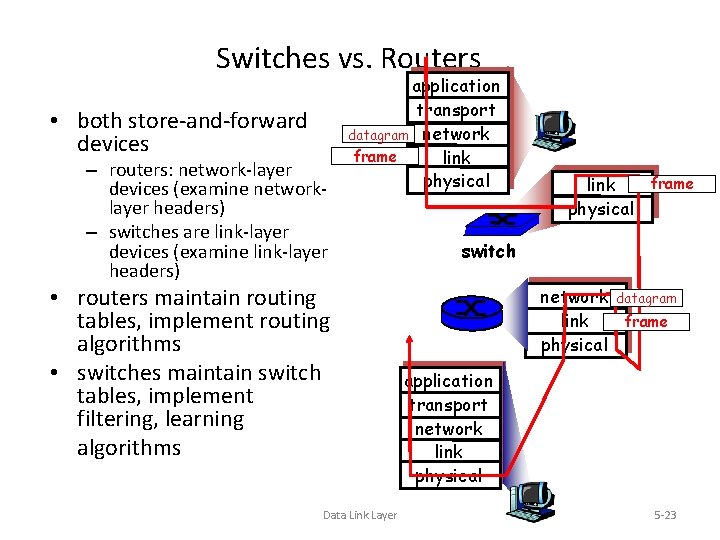
Switches vs. Routers • both store-and-forward devices – routers: network-layer devices (examine networklayer headers) – switches are link-layer devices (examine link-layer headers) application transport datagram network frame link physical • routers maintain routing tables, implement routing algorithms • switches maintain switch tables, implement filtering, learning algorithms Data Link Layer frame link physical switch network datagram link frame physical application transport network link physical 5 -23
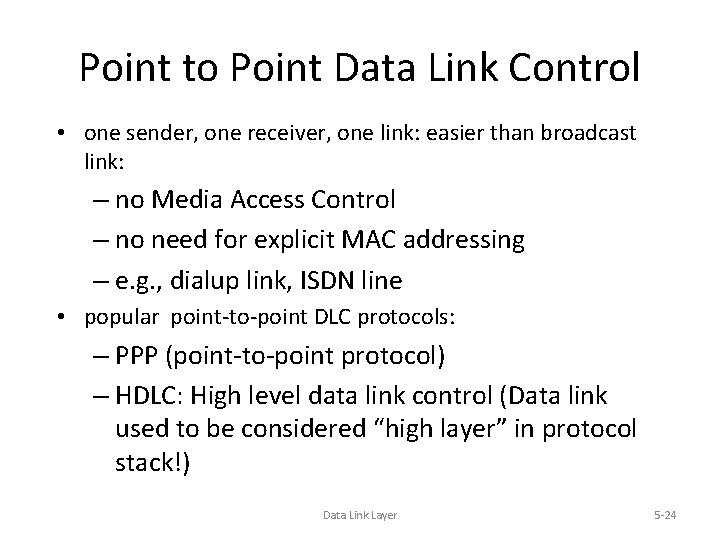
Point to Point Data Link Control • one sender, one receiver, one link: easier than broadcast link: – no Media Access Control – no need for explicit MAC addressing – e. g. , dialup link, ISDN line • popular point-to-point DLC protocols: – PPP (point-to-point protocol) – HDLC: High level data link control (Data link used to be considered “high layer” in protocol stack!) Data Link Layer 5 -24
![PPP Design Requirements [RFC 1557] • packet framing: encapsulation of network-layer datagram in data](http://slidetodoc.com/presentation_image_h/12efb095e564289102cb1ef8e211edbe/image-25.jpg "PPP Design Requirements [RFC 1557] • packet framing: encapsulation of network-layer datagram in data")
PPP Design Requirements [RFC 1557] • packet framing: encapsulation of network-layer datagram in data link frame – carry network layer data of any network layer protocol (not just IP) at same time – ability to demultiplex upwards • • bit transparency: must carry any bit pattern in the data field error detection (no correction) connection liveness: detect, signal link failure to network layer address negotiation: endpoint can learn/configure each other’s network address Data Link Layer 5 -25
PPP non-requirements • • no error correction/recovery no flow control out of order delivery OK no need to support multipoint links (e. g. , polling) Error recovery, flow control, data re-ordering all relegated to higher layers! Data Link Layer 5 -26
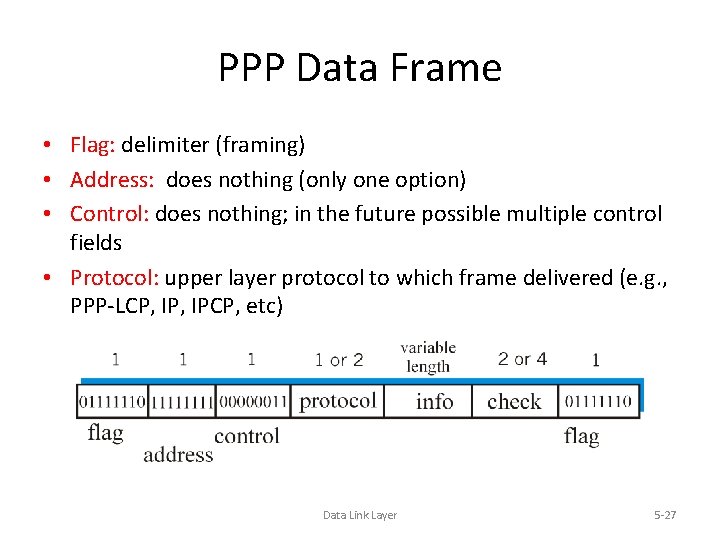
PPP Data Frame • Flag: delimiter (framing) • Address: does nothing (only one option) • Control: does nothing; in the future possible multiple control fields • Protocol: upper layer protocol to which frame delivered (e. g. , PPP-LCP, IPCP, etc) Data Link Layer 5 -27
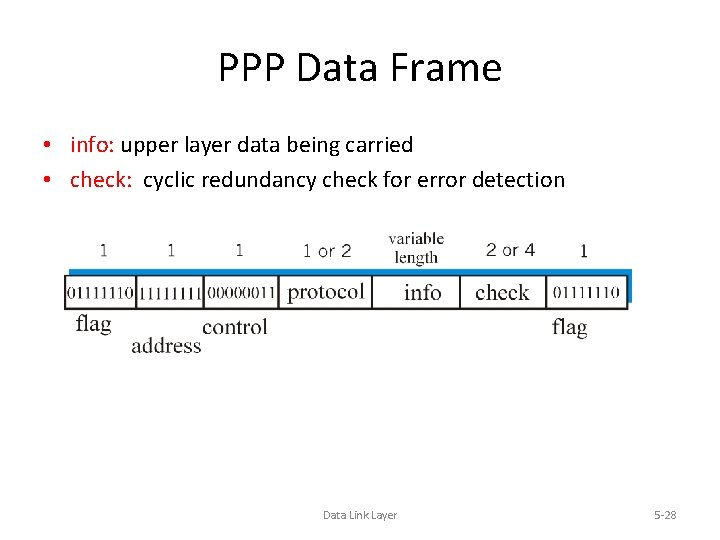
PPP Data Frame • info: upper layer data being carried • check: cyclic redundancy check for error detection Data Link Layer 5 -28
Asynchronous Transfer Mode: ATM • 1990’s/00 standard for high-speed (155 Mbps to 622 Mbps and higher) Broadband Integrated Service Digital Network architecture • Goal: integrated, end-end transport of carry voice, video, data – meeting timing/Qo. S requirements of voice, video (versus Internet best-effort model) – “next generation” telephony: technical roots in telephone world – packet-switching (fixed length packets, called “cells”) using virtual circuits Data Link Layer 5 -29
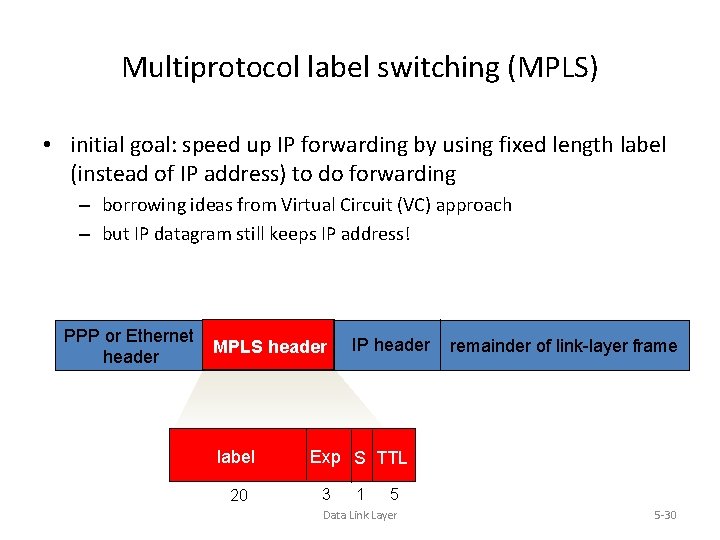
Multiprotocol label switching (MPLS) • initial goal: speed up IP forwarding by using fixed length label (instead of IP address) to do forwarding – borrowing ideas from Virtual Circuit (VC) approach – but IP datagram still keeps IP address! PPP or Ethernet header MPLS header label 20 IP header remainder of link-layer frame Exp S TTL 3 1 5 Data Link Layer 5 -30
MPLS capable routers • a. k. a. label-switched router • forwards packets to outgoing interface based only on label value (don’t inspect IP address) – MPLS forwarding table distinct from IP forwarding tables • signaling protocol needed to set up forwarding – RSVP-TE – forwarding possible along paths that IP alone would not allow (e. g. , source-specific routing) !! – use MPLS for traffic engineering • must co-exist with IP-only routers Data Link Layer 5 -31
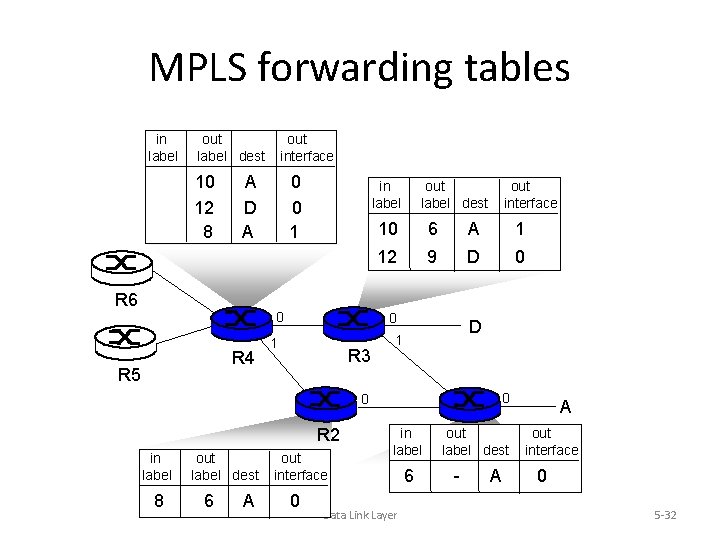
MPLS forwarding tables in label out label dest 10 12 8 out interface A D A R 6 0 0 1 in label 0 R 4 R 5 out label dest 10 6 A 1 12 9 D 0 0 1 R 3 out interface D 1 0 0 R 2 in label 8 out label dest 6 A out interface 0 in label Data Link Layer 6 out. R 1 label dest - A A out interface 0 5 -32
Synthesis: a day in the life of a web request • journey down protocol stack complete! – application, transport, network, link • putting-it-all-together: synthesis! – goal: identify, review, understand protocols (at all layers) involved in seemingly simple scenario: requesting www page – scenario: student attaches laptop to campus network, requests/receives www. google. com Data Link Layer 5 -33
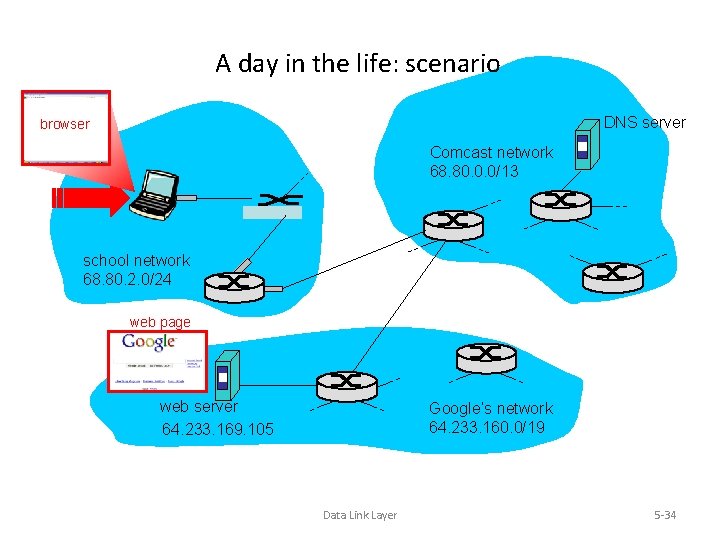
A day in the life: scenario DNS server browser Comcast network 68. 80. 0. 0/13 school network 68. 80. 2. 0/24 web page web server 64. 233. 169. 105 Google’s network 64. 233. 160. 0/19 Data Link Layer 5 -34
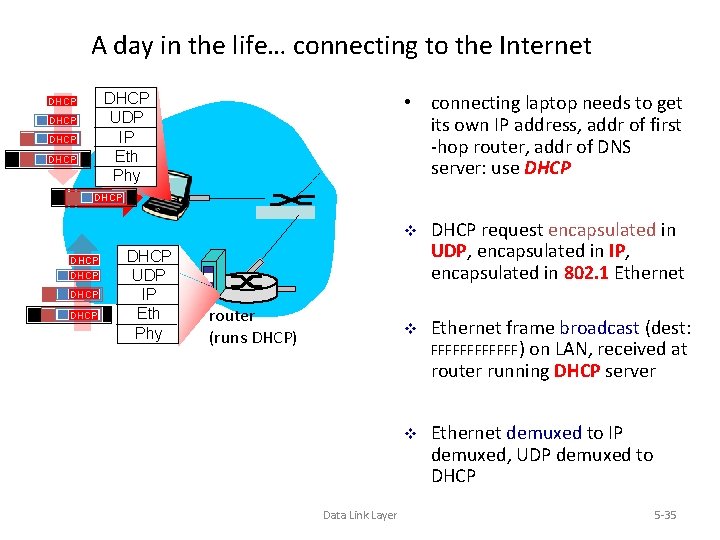
A day in the life… connecting to the Internet DHCP UDP IP Eth Phy DHCP • connecting laptop needs to get its own IP address, addr of first -hop router, addr of DNS server: use DHCP DHCP UDP IP Eth Phy router (runs DHCP) Data Link Layer v DHCP request encapsulated in UDP, encapsulated in IP, encapsulated in 802. 1 Ethernet v Ethernet frame broadcast (dest: FFFFFF) on LAN, received at router running DHCP server v Ethernet demuxed to IP demuxed, UDP demuxed to DHCP 5 -35
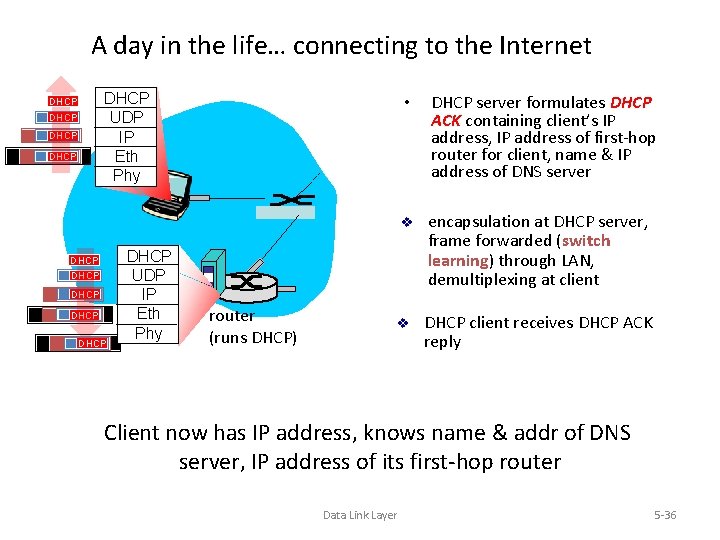
A day in the life… connecting to the Internet DHCP UDP IP Eth Phy DHCP DHCP DHCP UDP IP Eth Phy router (runs DHCP) • DHCP server formulates DHCP ACK containing client’s IP address, IP address of first-hop router for client, name & IP address of DNS server v encapsulation at DHCP server, frame forwarded (switch learning) through LAN, demultiplexing at client v DHCP client receives DHCP ACK reply Client now has IP address, knows name & addr of DNS server, IP address of its first-hop router Data Link Layer 5 -36
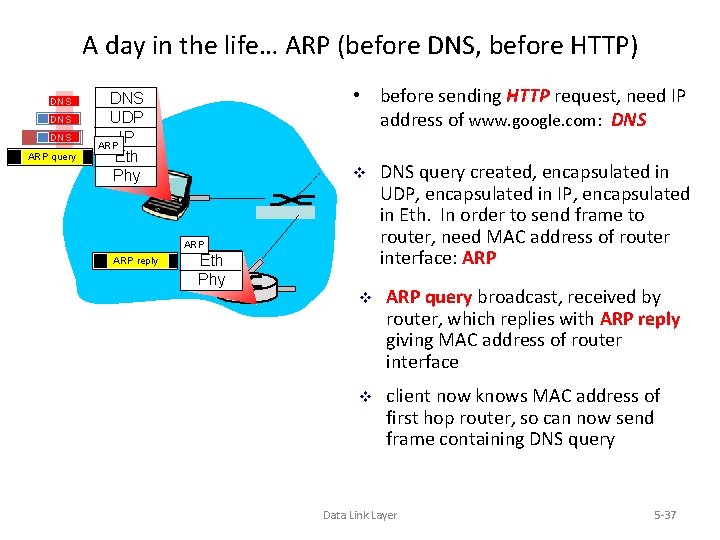
A day in the life… ARP (before DNS, before HTTP) DNS DNS ARP query • before sending HTTP request, need IP address of www. google. com: DNS UDP IP ARP Eth Phy v ARP reply Eth Phy DNS query created, encapsulated in UDP, encapsulated in IP, encapsulated in Eth. In order to send frame to router, need MAC address of router interface: ARP v ARP query broadcast, received by router, which replies with ARP reply giving MAC address of router interface v client now knows MAC address of first hop router, so can now send frame containing DNS query Data Link Layer 5 -37
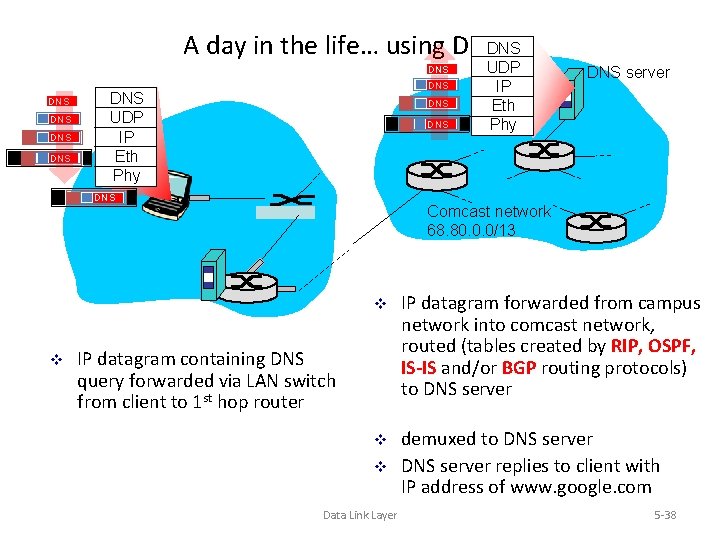
A day in the life… using DNSDNS DNS UDP IP Eth Phy DNS DNS v UDP IP Eth Phy DNS server Comcast network 68. 80. 0. 0/13 v IP datagram forwarded from campus network into comcast network, routed (tables created by RIP, OSPF, IS-IS and/or BGP routing protocols) to DNS server v demuxed to DNS server replies to client with IP address of www. google. com IP datagram containing DNS query forwarded via LAN switch from client to 1 st hop router v Data Link Layer 5 -38
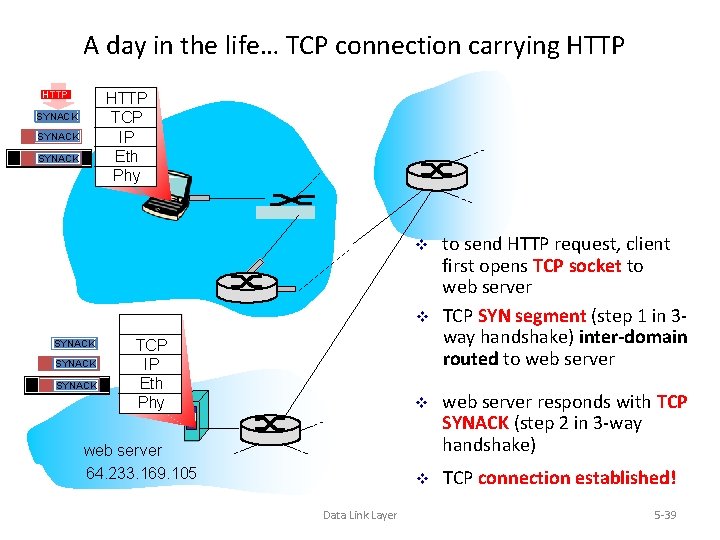
A day in the life… TCP connection carrying HTTP TCP IP Eth Phy SYNACK SYN v v SYNACK SYN TCP IP Eth Phy web server 64. 233. 169. 105 Data Link Layer to send HTTP request, client first opens TCP socket to web server TCP SYN segment (step 1 in 3 way handshake) inter-domain routed to web server v web server responds with TCP SYNACK (step 2 in 3 -way handshake) v TCP connection established! 5 -39
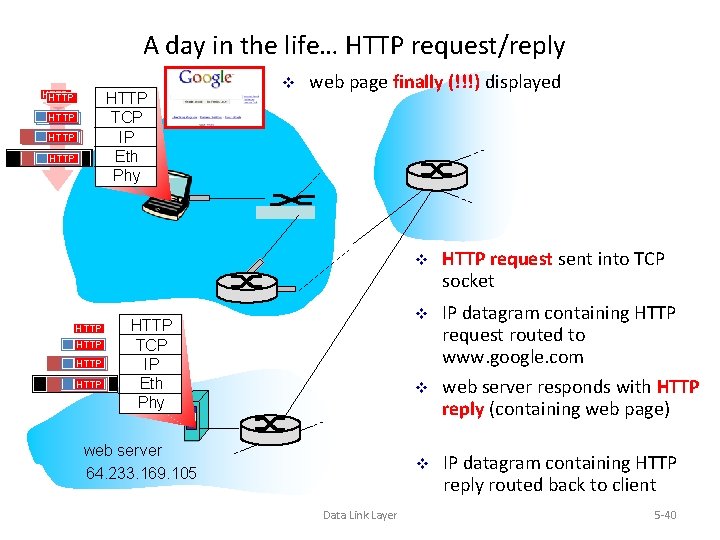
A day in the life… HTTP request/reply HTTP TCP IP Eth Phy HTTP HTTP HTTP v web page finally (!!!) displayed HTTP TCP IP Eth Phy web server 64. 233. 169. 105 Data Link Layer v HTTP request sent into TCP socket v IP datagram containing HTTP request routed to www. google. com v web server responds with HTTP reply (containing web page) v IP datagram containing HTTP reply routed back to client 5 -40
- Slides: 40