
Resource Migration Tmax Soft Co Ltd 2013 Tmax
![2. 4 Other Verification (dsview, dsedit) How to Use Usage: dsview [options] <dsname> [<member>]](https://slidetodoc.com/presentation_image_h/7388e71719b06a90183596abefdbcf98/image-21.jpg "2. 4 Other Verification (dsview, dsedit) How to Use Usage: dsview [options] <dsname> [<member>]")
![4. 1 Map Compile How to Use Usage: mscmapc [options 1] <file> | mscmapc](https://slidetodoc.com/presentation_image_h/7388e71719b06a90183596abefdbcf98/image-34.jpg "4. 1 Map Compile How to Use Usage: mscmapc [options 1] <file> | mscmapc")
- Slides: 45
Resource Migration Tmax. Soft Co. , Ltd © 2013 Tmax. Soft Co. , Ltd. All Rights Reserved. 0/24 0/37
Contents 1. MIGRATION OVERVIEW 1. 1 Migration Environment 1. 2 Migration Type 1. 3 Migration Order 2. Migration Utility 2. 1 cobgensch 2. 2 dsmigin 2. 3 dsmigout 2. 4 Other Verification (dsview, dsedit) 3. Exercise Code Conversion and Migration Exercises 3. 1 Source Migration Exercise 3. 2 Dataset Migration Exercise 3. 3 System Table Migration Exercise © 2013 Tmax. Soft Co. , Ltd. All Rights Reserved. 4. Source Compile 4. 1 Map Compile 4. 2 Compile Script Introduction 4. 3 Compile and Deploy Exercise (online/batch) 5. Migration Result Verification 5. 1 Online 5. 2 Batch
1. Migration Overview 1. 1 Migration Environment 1. 2 Migration Type 1. 3 Migration Order © 2013 Tmax. Soft Co. , Ltd. All Rights Reserved.
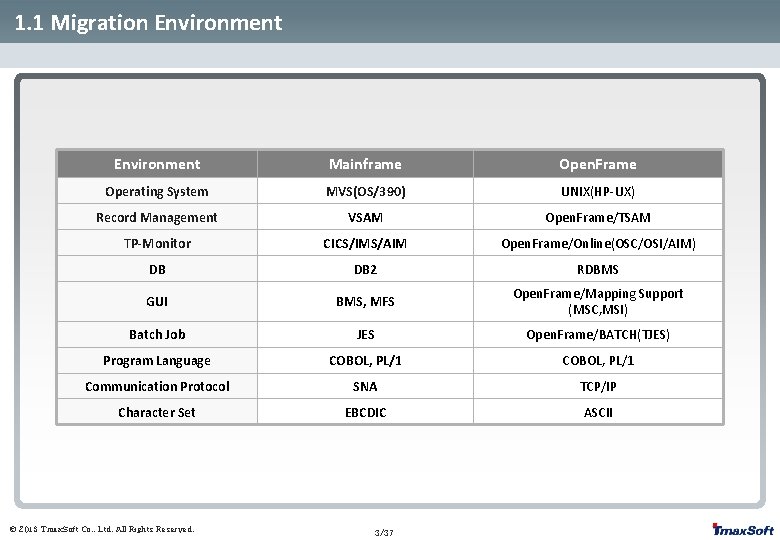
1. 1 Migration Environment Mainframe Open. Frame Operating System MVS(OS/390) UNIX(HP-UX) Record Management VSAM Open. Frame/TSAM TP-Monitor CICS/IMS/AIM Open. Frame/Online(OSC/OSI/AIM) DB DB 2 RDBMS GUI BMS, MFS Open. Frame/Mapping Support (MSC, MSI) Batch Job JES Open. Frame/BATCH(TJES) Program Language COBOL, PL/1 Communication Protocol SNA TCP/IP Character Set EBCDIC ASCII © 2013 Tmax. Soft Co. , Ltd. All Rights Reserved. 3/37
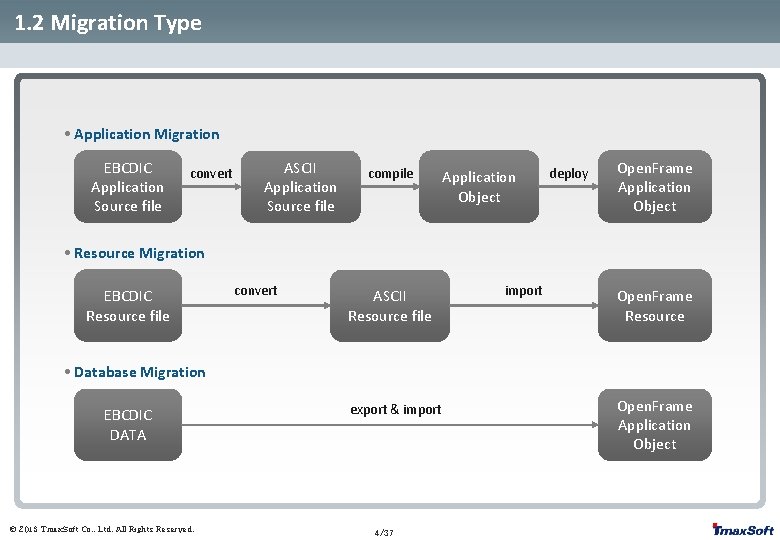
1. 2 Migration Type • Application Migration EBCDIC Application Source file convert ASCII Application Source file compile Application Object deploy Open. Frame Application Object • Resource Migration EBCDIC Resource file convert ASCII Resource file import Open. Frame Resource • Database Migration EBCDIC DATA © 2013 Tmax. Soft Co. , Ltd. All Rights Reserved. export & import 4/37 Open. Frame Application Object
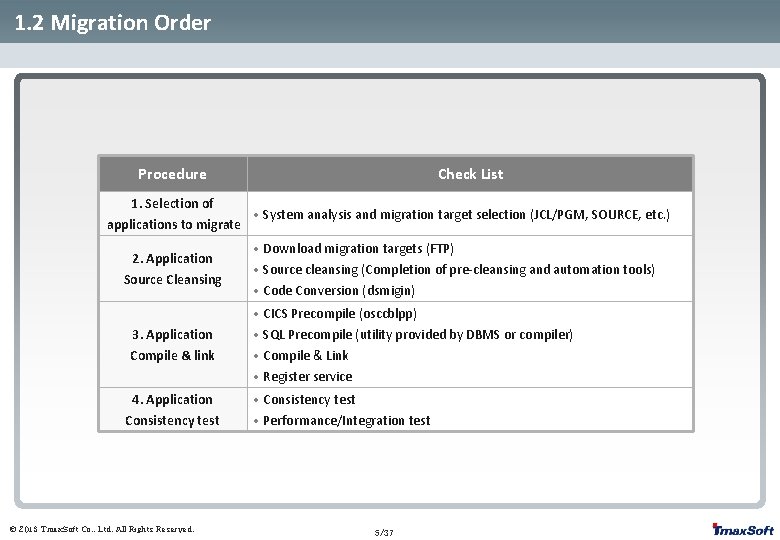
1. 2 Migration Order Procedure Check List 1. Selection of • System analysis and migration target selection (JCL/PGM, SOURCE, etc. ) applications to migrate 2. Application Source Cleansing 3. Application Compile & link 4. Application Consistency test © 2013 Tmax. Soft Co. , Ltd. All Rights Reserved. • Download migration targets (FTP) • Source cleansing (Completion of pre-cleansing and automation tools) • Code Conversion (dsmigin) • CICS Precompile (osccblpp) • SQL Precompile (utility provided by DBMS or compiler) • Compile & Link • Register service • Consistency test • Performance/Integration test 5/37
2. Migration Utility 2. 1 cobgensch 2. 2 dsmigin 2. 3 dsmigout 2. 4 Other Verification (dsview, dsedit) © 2013 Tmax. Soft Co. , Ltd. All Rights Reserved.
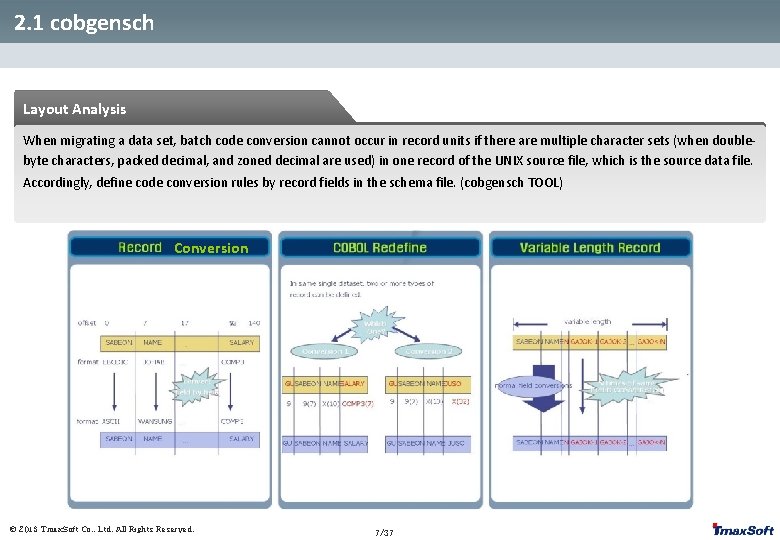
2. 1 cobgensch Layout Analysis When migrating a data set, batch code conversion cannot occur in record units if there are multiple character sets (when doublebyte characters, packed decimal, and zoned decimal are used) in one record of the UNIX source file, which is the source data file. Accordingly, define code conversion rules by record fields in the schema file. (cobgensch TOOL) Conversion © 2013 Tmax. Soft Co. , Ltd. All Rights Reserved. 7/37
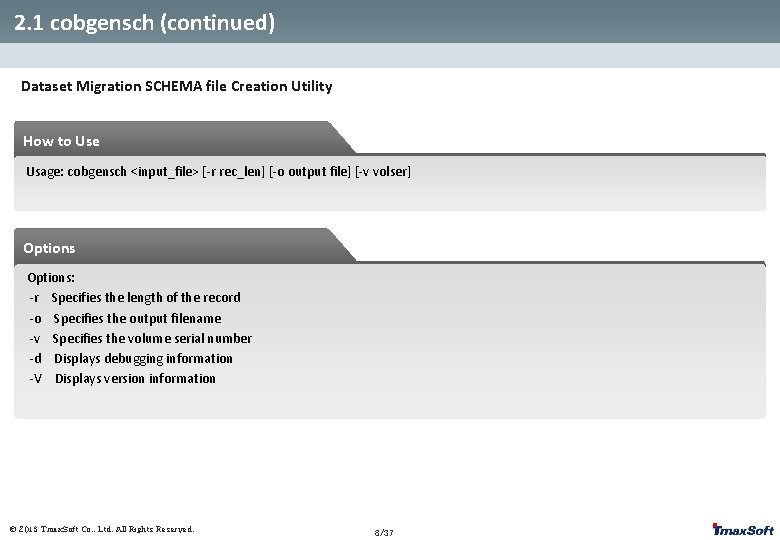
2. 1 cobgensch (continued) Dataset Migration SCHEMA file Creation Utility How to Use Usage: cobgensch <input_file> [-r rec_len] [-o output file] [-v volser] Options: -r Specifies the length of the record -o Specifies the output filename -v Specifies the volume serial number -d Displays debugging information -V Displays version information © 2013 Tmax. Soft Co. , Ltd. All Rights Reserved. 8/37
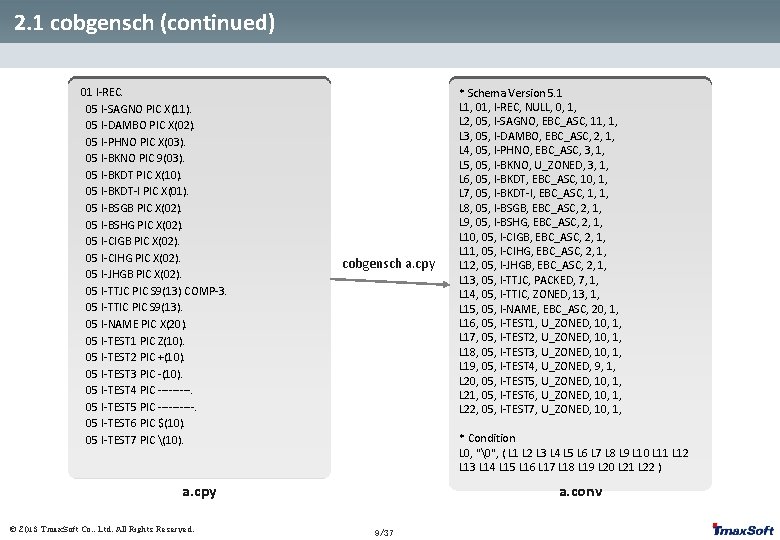
2. 1 cobgensch (continued) 01 I-REC. 05 I-SAGNO PIC X(11). 05 I-DAMBO PIC X(02). 05 I-PHNO PIC X(03). 05 I-BKNO PIC 9(03). 05 I-BKDT PIC X(10). 05 I-BKDT-I PIC X(01). 05 I-BSGB PIC X(02). 05 I-BSHG PIC X(02). 05 I-CIGB PIC X(02). 05 I-CIHG PIC X(02). 05 I-JHGB PIC X(02). 05 I-TTJC PIC S 9(13) COMP-3. 05 I-TTIC PIC S 9(13). 05 I-NAME PIC X(20). 05 I-TEST 1 PIC Z(10). 05 I-TEST 2 PIC +(10). 05 I-TEST 3 PIC -(10). 05 I-TEST 4 PIC -----. 05 I-TEST 5 PIC -----. 05 I-TEST 6 PIC $(10). 05 I-TEST 7 PIC (10). cobgensch a. cpy * Condition L 0, "", ( L 1 L 2 L 3 L 4 L 5 L 6 L 7 L 8 L 9 L 10 L 11 L 12 L 13 L 14 L 15 L 16 L 17 L 18 L 19 L 20 L 21 L 22 ) a. cpy © 2013 Tmax. Soft Co. , Ltd. All Rights Reserved. * Schema Version 5. 1 L 1, 01, I-REC, NULL, 0, 1, L 2, 05, I-SAGNO, EBC_ASC, 11, 1, L 3, 05, I-DAMBO, EBC_ASC, 2, 1, L 4, 05, I-PHNO, EBC_ASC, 3, 1, L 5, 05, I-BKNO, U_ZONED, 3, 1, L 6, 05, I-BKDT, EBC_ASC, 10, 1, L 7, 05, I-BKDT-I, EBC_ASC, 1, 1, L 8, 05, I-BSGB, EBC_ASC, 2, 1, L 9, 05, I-BSHG, EBC_ASC, 2, 1, L 10, 05, I-CIGB, EBC_ASC, 2, 1, L 11, 05, I-CIHG, EBC_ASC, 2, 1, L 12, 05, I-JHGB, EBC_ASC, 2, 1, L 13, 05, I-TTJC, PACKED, 7, 1, L 14, 05, I-TTIC, ZONED, 13, 1, L 15, 05, I-NAME, EBC_ASC, 20, 1, L 16, 05, I-TEST 1, U_ZONED, 10, 1, L 17, 05, I-TEST 2, U_ZONED, 10, 1, L 18, 05, I-TEST 3, U_ZONED, 10, 1, L 19, 05, I-TEST 4, U_ZONED, 9, 1, L 20, 05, I-TEST 5, U_ZONED, 10, 1, L 21, 05, I-TEST 6, U_ZONED, 10, 1, L 22, 05, I-TEST 7, U_ZONED, 10, 1, a. conv 9/37
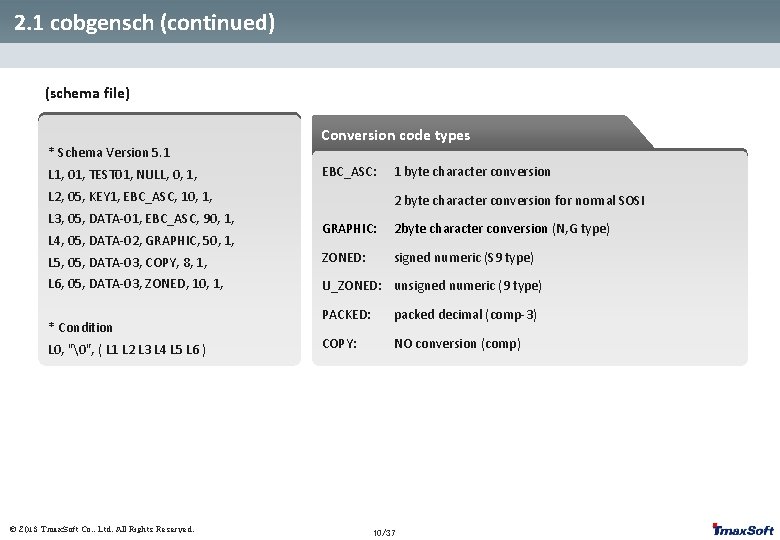
2. 1 cobgensch (continued) (schema file) Conversion code types * Schema Version 5. 1 L 1, 01, TEST 01, NULL, 0, 1, EBC_ASC: L 2, 05, KEY 1, EBC_ASC, 10, 1, L 3, 05, DATA-01, EBC_ASC, 90, 1, 1 byte character conversion 2 byte character conversion for normal SOSI GRAPHIC: 2 byte character conversion (N, G type) L 5, 05, DATA-03, COPY, 8, 1, ZONED: signed numeric (S 9 type) L 6, 05, DATA-03, ZONED, 10, 1, U_ZONED: unsigned numeric (9 type) L 4, 05, DATA-02, GRAPHIC, 50, 1, * Condition L 0, "", ( L 1 L 2 L 3 L 4 L 5 L 6 ) © 2013 Tmax. Soft Co. , Ltd. All Rights Reserved. PACKED: packed decimal (comp-3) COPY: NO conversion (comp) 10/37
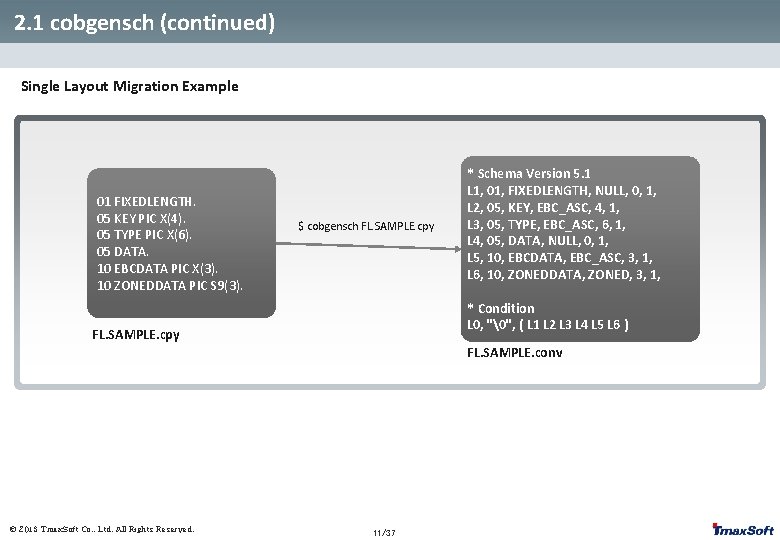
2. 1 cobgensch (continued) Single Layout Migration Example 01 FIXEDLENGTH. 05 KEY PIC X(4). 05 TYPE PIC X(6). 05 DATA. 10 EBCDATA PIC X(3). 10 ZONEDDATA PIC S 9(3). $ cobgensch FL. SAMPLE. cpy * Schema Version 5. 1 L 1, 01, FIXEDLENGTH, NULL, 0, 1, L 2, 05, KEY, EBC_ASC, 4, 1, L 3, 05, TYPE, EBC_ASC, 6, 1, L 4, 05, DATA, NULL, 0, 1, L 5, 10, EBCDATA, EBC_ASC, 3, 1, L 6, 10, ZONEDDATA, ZONED, 3, 1, * Condition L 0, "", ( L 1 L 2 L 3 L 4 L 5 L 6 ) FL. SAMPLE. cpy FL. SAMPLE. conv © 2013 Tmax. Soft Co. , Ltd. All Rights Reserved. 11/37
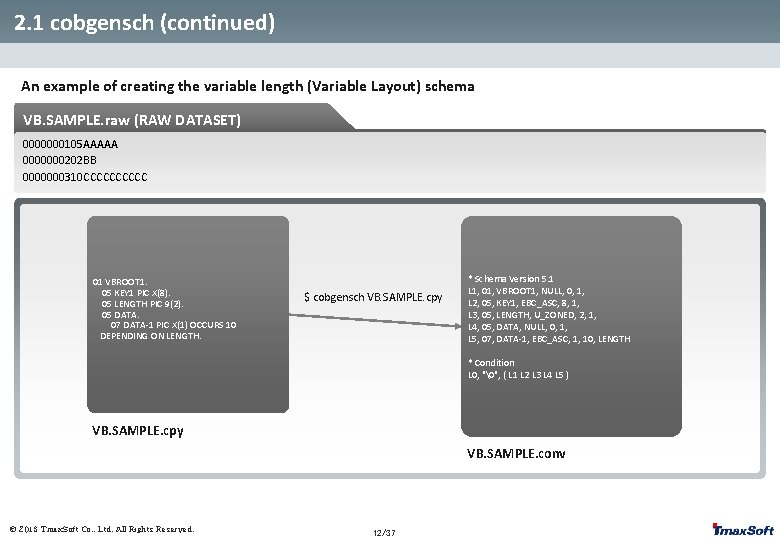
2. 1 cobgensch (continued) An example of creating the variable length (Variable Layout) schema VB. SAMPLE. raw (RAW DATASET) 0000000105 AAAAA 0000000202 BB 0000000310 CCCCC 01 VBROOT 1. 05 KEY 1 PIC X(8). 05 LENGTH PIC 9(2). 05 DATA. 07 DATA-1 PIC X(1) OCCURS 10 DEPENDING ON LENGTH. $ cobgensch VB. SAMPLE. cpy * Schema Version 5. 1 L 1, 01, VBROOT 1, NULL, 0, 1, L 2, 05, KEY 1, EBC_ASC, 8, 1, L 3, 05, LENGTH, U_ZONED, 2, 1, L 4, 05, DATA, NULL, 0, 1, L 5, 07, DATA-1, EBC_ASC, 1, 10, LENGTH * Condition L 0, "", ( L 1 L 2 L 3 L 4 L 5 ) VB. SAMPLE. cpy VB. SAMPLE. conv © 2013 Tmax. Soft Co. , Ltd. All Rights Reserved. 12/37
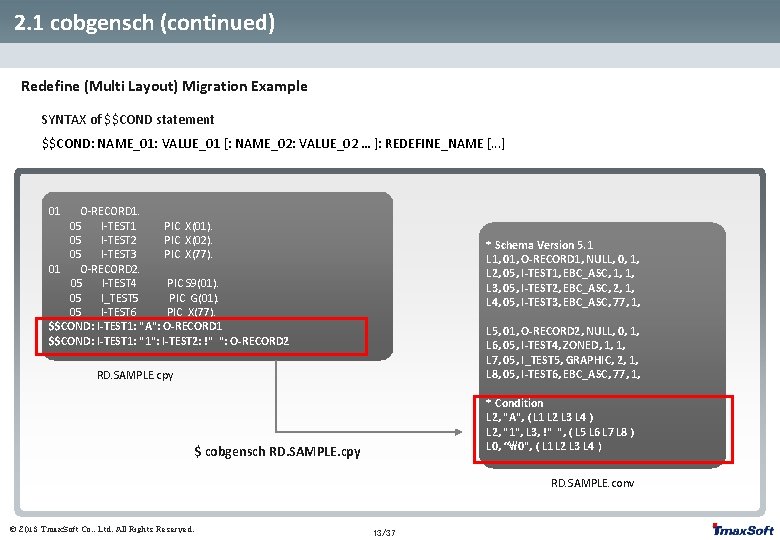
2. 1 cobgensch (continued) Redefine (Multi Layout) Migration Example SYNTAX of $$COND statement $$COND: NAME_01: VALUE_01 [: NAME_02: VALUE_02 … ]: REDEFINE_NAME [. . . ] 01 O-RECORD 1. 05 I-TEST 1 PIC X(01). 05 I-TEST 2 PIC X(02). 05 I-TEST 3 PIC X(77). 01 O-RECORD 2. 05 I-TEST 4 PIC S 9(01). 05 I_TEST 5 PIC G(01). 05 I-TEST 6 PIC X(77). $$COND: I-TEST 1: "A": O-RECORD 1 $$COND: I-TEST 1: "1": I-TEST 2: !" ": O-RECORD 2 * Schema Version 5. 1 L 1, 01, O-RECORD 1, NULL, 0, 1, L 2, 05, I-TEST 1, EBC_ASC, 1, 1, L 3, 05, I-TEST 2, EBC_ASC, 2, 1, L 4, 05, I-TEST 3, EBC_ASC, 77, 1, L 5, 01, O-RECORD 2, NULL, 0, 1, L 6, 05, I-TEST 4, ZONED, 1, 1, L 7, 05, I_TEST 5, GRAPHIC, 2, 1, L 8, 05, I-TEST 6, EBC_ASC, 77, 1, RD. SAMPLE. cpy * Condition L 2, "A", ( L 1 L 2 L 3 L 4 ) L 2, "1", L 3, !" ", ( L 5 L 6 L 7 L 8 ) L 0, “", ( L 1 L 2 L 3 L 4 ) $ cobgensch RD. SAMPLE. cpy RD. SAMPLE. conv © 2013 Tmax. Soft Co. , Ltd. All Rights Reserved. 13/37
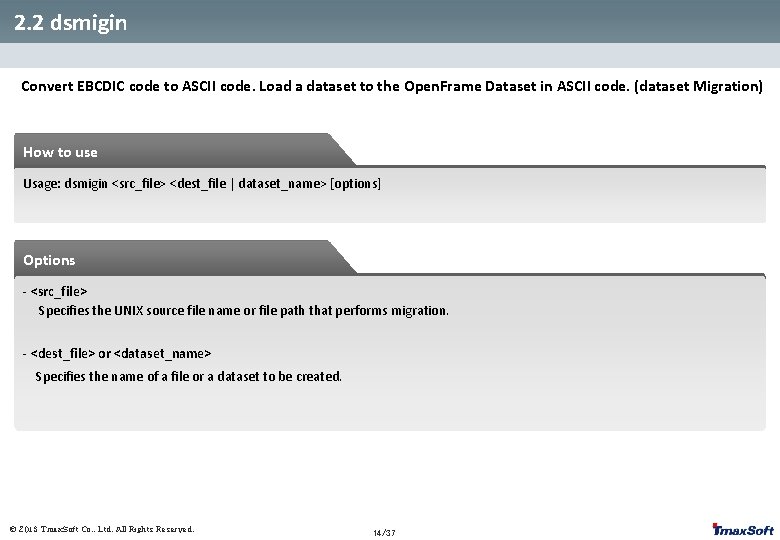
2. 2 dsmigin Convert EBCDIC code to ASCII code. Load a dataset to the Open. Frame Dataset in ASCII code. (dataset Migration) How to use Usage: dsmigin <src_file> <dest_file | dataset_name> [options] Options - <src_file> Specifies the UNIX source file name or file path that performs migration. - <dest_file> or <dataset_name> Specifies the name of a file or a dataset to be created. © 2013 Tmax. Soft Co. , Ltd. All Rights Reserved. 14/37
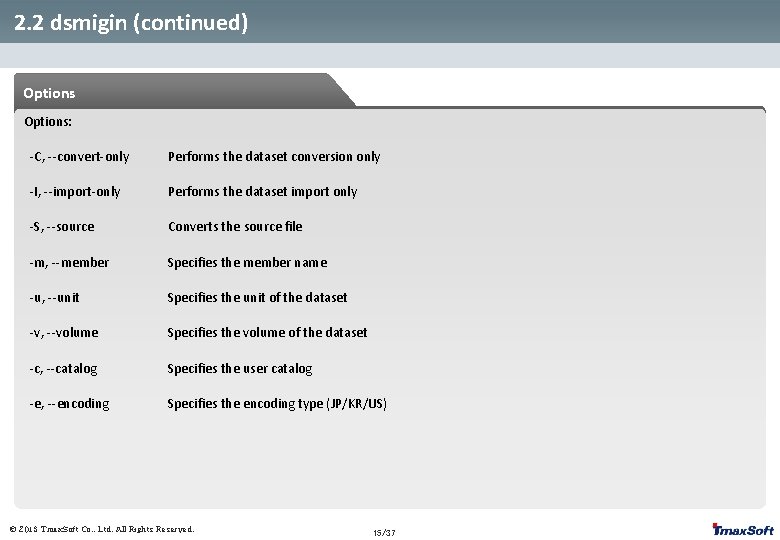
2. 2 dsmigin (continued) Options: -C, --convert-only Performs the dataset conversion only -I, --import-only Performs the dataset import only -S, --source Converts the source file -m, --member Specifies the member name -u, --unit Specifies the unit of the dataset -v, --volume Specifies the volume of the dataset -c, --catalog Specifies the user catalog -e, --encoding Specifies the encoding type (JP/KR/US) © 2013 Tmax. Soft Co. , Ltd. All Rights Reserved. 15/37
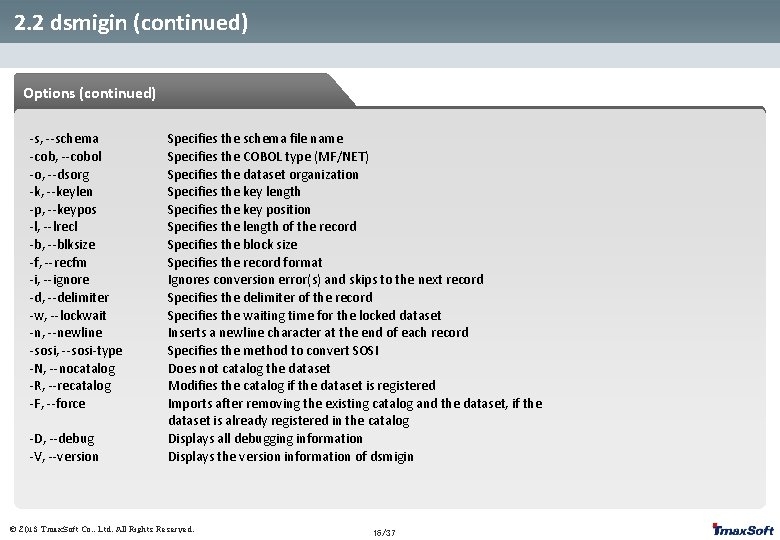
2. 2 dsmigin (continued) Options (continued) -s, --schema -cob, --cobol -o, --dsorg -k, --keylen -p, --keypos -l, --lrecl -b, --blksize -f, --recfm -i, --ignore -d, --delimiter -w, --lockwait -n, --newline -sosi, --sosi-type -N, --nocatalog -R, --recatalog -F, --force -D, --debug -V, --version Specifies the schema file name Specifies the COBOL type (MF/NET) Specifies the dataset organization Specifies the key length Specifies the key position Specifies the length of the record Specifies the block size Specifies the record format Ignores conversion error(s) and skips to the next record Specifies the delimiter of the record Specifies the waiting time for the locked dataset Inserts a newline character at the end of each record Specifies the method to convert SOSI Does not catalog the dataset Modifies the catalog if the dataset is registered Imports after removing the existing catalog and the dataset, if the dataset is already registered in the catalog Displays all debugging information Displays the version information of dsmigin © 2013 Tmax. Soft Co. , Ltd. All Rights Reserved. 16/37
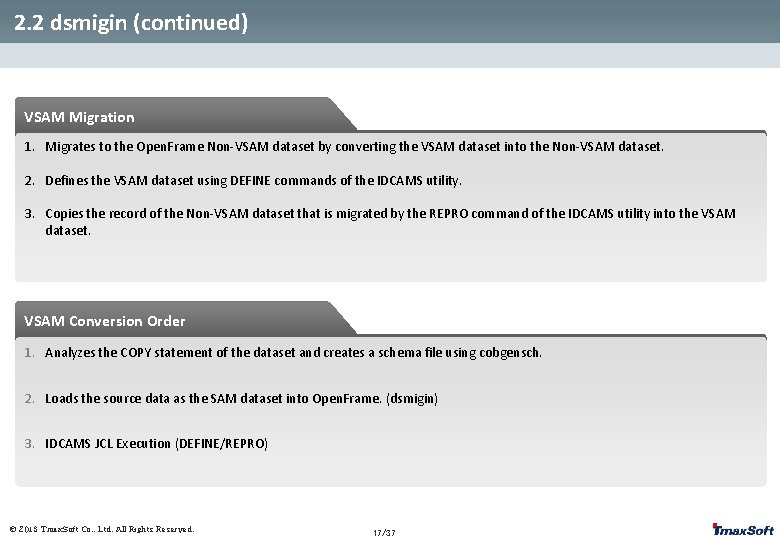
2. 2 dsmigin (continued) VSAM Migration 1. Migrates to the Open. Frame Non-VSAM dataset by converting the VSAM dataset into the Non-VSAM dataset. 2. Defines the VSAM dataset using DEFINE commands of the IDCAMS utility. 3. Copies the record of the Non-VSAM dataset that is migrated by the REPRO command of the IDCAMS utility into the VSAM dataset. VSAM Conversion Order 1. Analyzes the COPY statement of the dataset and creates a schema file using cobgensch. 2. Loads the source data as the SAM dataset into Open. Frame. (dsmigin) 3. IDCAMS JCL Execution (DEFINE/REPRO) © 2013 Tmax. Soft Co. , Ltd. All Rights Reserved. 17/37
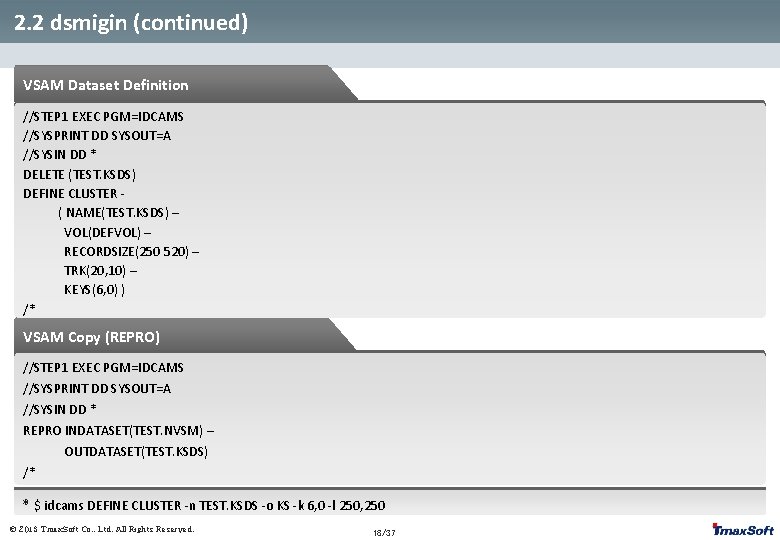
2. 2 dsmigin (continued) VSAM Dataset Definition //STEP 1 EXEC PGM=IDCAMS //SYSPRINT DD SYSOUT=A //SYSIN DD * DELETE (TEST. KSDS) DEFINE CLUSTER ( NAME(TEST. KSDS) – VOL(DEFVOL) – RECORDSIZE(250 520) – TRK(20, 10) – KEYS(6, 0) ) /* VSAM Copy (REPRO) //STEP 1 EXEC PGM=IDCAMS //SYSPRINT DD SYSOUT=A //SYSIN DD * REPRO INDATASET(TEST. NVSM) – OUTDATASET(TEST. KSDS) /* * $ idcams DEFINE CLUSTER -n TEST. KSDS -o KS -k 6, 0 -l 250, 250 © 2013 Tmax. Soft Co. , Ltd. All Rights Reserved. 18/37
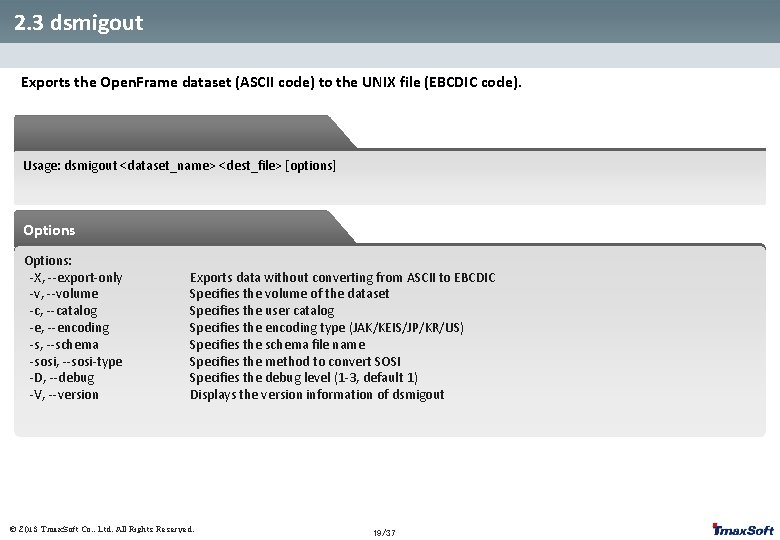
2. 3 dsmigout Exports the Open. Frame dataset (ASCII code) to the UNIX file (EBCDIC code). Usage: dsmigout <dataset_name> <dest_file> [options] Options: -X, --export-only -v, --volume -c, --catalog -e, --encoding -s, --schema -sosi, --sosi-type -D, --debug -V, --version Exports data without converting from ASCII to EBCDIC Specifies the volume of the dataset Specifies the user catalog Specifies the encoding type (JAK/KEIS/JP/KR/US) Specifies the schema file name Specifies the method to convert SOSI Specifies the debug level (1 -3, default 1) Displays the version information of dsmigout © 2013 Tmax. Soft Co. , Ltd. All Rights Reserved. 19/37
2. 4 Other Verification (dsview, dsedit) How to Use Usage: dsview [options] <dsname> [<member>] [-v <volser>] [-c <catalog>] CTRL+b CTRL+f ^ $ 125 G : 125 G h, j, k, l Previous page Next page Go to the first character of the current line. Go to the last character of the current line. Go to line 125. Go to the last row. Go above, down, left, and right (respectively). If the numeric value is entered, go as many spaces as the value. E. g. , 5 h – Go five spaces to the left. /abc Search for abc. /abc 5 Search for abc in row 5. //616263 Search using hexadecimal code. n Search the following. CTRL+l Refresh the screen. : h Help : q Quit ============================================ R The start of the Replace mode. VSAM’s key cannot change. ESC Save what is replaced. Backspace Return changes during the Replace mode. © 2013 Tmax. Soft Co. , Ltd. All Rights Reserved. 20/37
3. Code Conversion and Migration Exercises 3. 1 SOURCE Migration Exercise 3. 2 Dataset Migration Exercise 3. 3 System Migration Exercise © 2013 Tmax. Soft Co. , Ltd. All Rights Reserved.
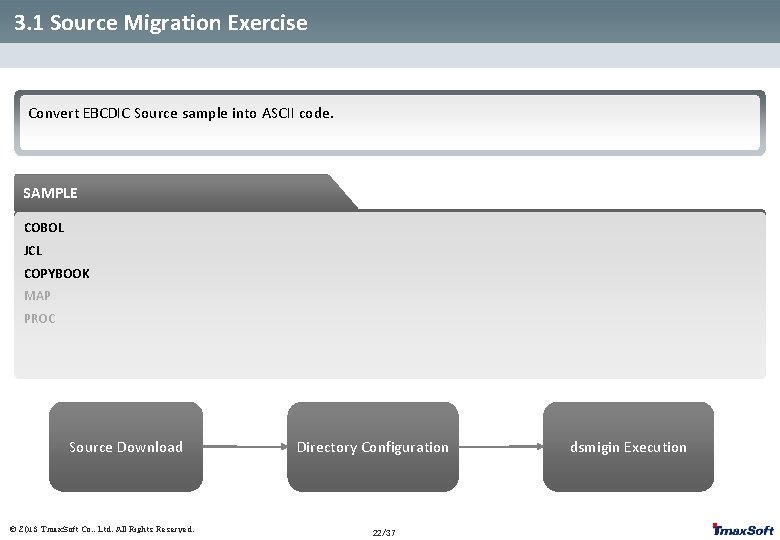
3. 1 Source Migration Exercise Convert EBCDIC Source sample into ASCII code. SAMPLE COBOL JCL COPYBOOK MAP PROC Source Download © 2013 Tmax. Soft Co. , Ltd. All Rights Reserved. Directory Configuration 22/37 dsmigin Execution
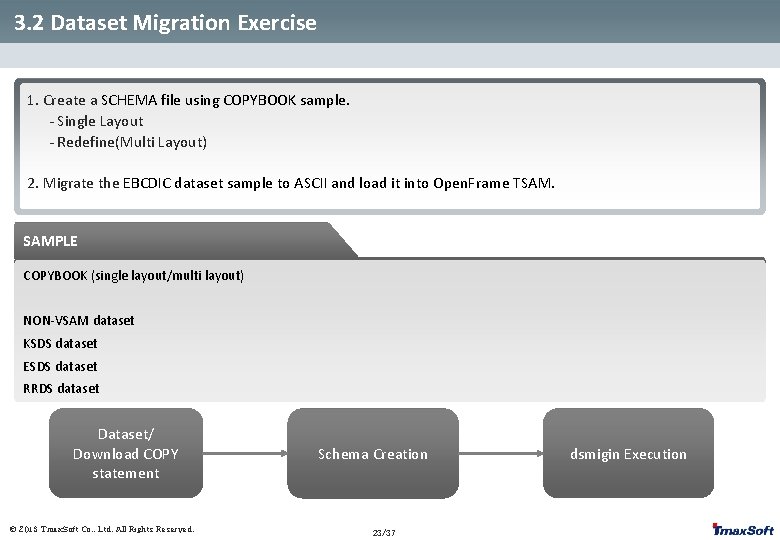
3. 2 Dataset Migration Exercise 1. Create a SCHEMA file using COPYBOOK sample. - Single Layout - Redefine(Multi Layout) 2. Migrate the EBCDIC dataset sample to ASCII and load it into Open. Frame TSAM. SAMPLE COPYBOOK (single layout/multi layout) NON-VSAM dataset KSDS dataset ESDS dataset RRDS dataset Dataset/ Download COPY statement © 2013 Tmax. Soft Co. , Ltd. All Rights Reserved. Schema Creation 23/37 dsmigin Execution
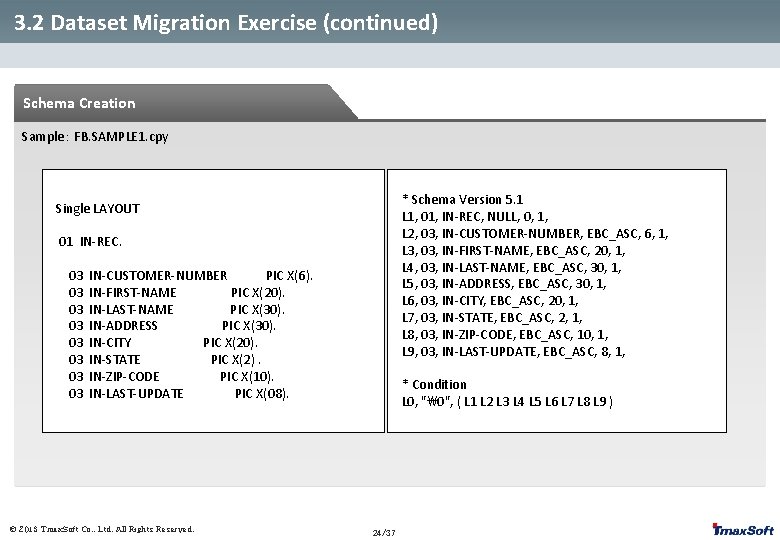
3. 2 Dataset Migration Exercise (continued) Schema Creation Sample: FB. SAMPLE 1. cpy * Schema Version 5. 1 L 1, 01, IN-REC, NULL, 0, 1, L 2, 03, IN-CUSTOMER-NUMBER, EBC_ASC, 6, 1, L 3, 03, IN-FIRST-NAME, EBC_ASC, 20, 1, L 4, 03, IN-LAST-NAME, EBC_ASC, 30, 1, L 5, 03, IN-ADDRESS, EBC_ASC, 30, 1, L 6, 03, IN-CITY, EBC_ASC, 20, 1, L 7, 03, IN-STATE, EBC_ASC, 2, 1, L 8, 03, IN-ZIP-CODE, EBC_ASC, 10, 1, L 9, 03, IN-LAST-UPDATE, EBC_ASC, 8, 1, Single LAYOUT 01 IN-REC. 03 03 IN-CUSTOMER-NUMBER PIC X(6). IN-FIRST-NAME PIC X(20). IN-LAST-NAME PIC X(30). IN-ADDRESS PIC X(30). IN-CITY PIC X(20). IN-STATE PIC X(2). IN-ZIP-CODE PIC X(10). IN-LAST-UPDATE PIC X(08). © 2013 Tmax. Soft Co. , Ltd. All Rights Reserved. * Condition L 0, "", ( L 1 L 2 L 3 L 4 L 5 L 6 L 7 L 8 L 9 ) 24/37
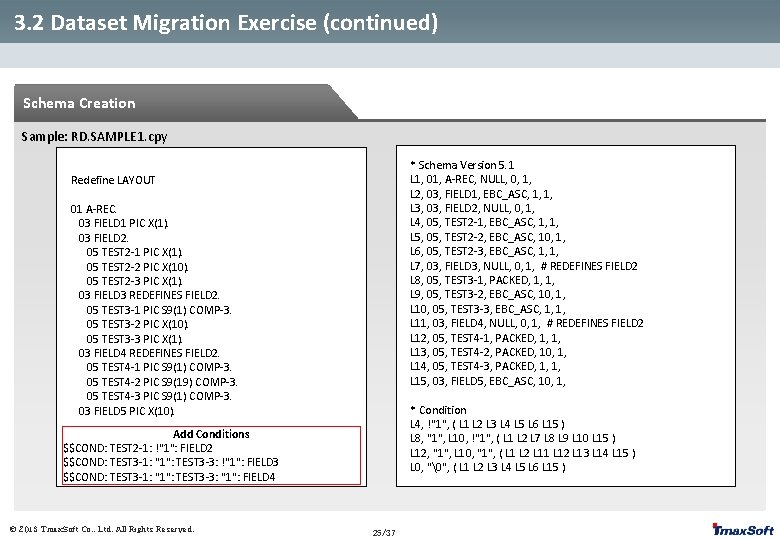
3. 2 Dataset Migration Exercise (continued) Schema Creation Sample: RD. SAMPLE 1. cpy * Schema Version 5. 1 L 1, 01, A-REC, NULL, 0, 1, L 2, 03, FIELD 1, EBC_ASC, 1, 1, L 3, 03, FIELD 2, NULL, 0, 1, L 4, 05, TEST 2 -1, EBC_ASC, 1, 1, L 5, 05, TEST 2 -2, EBC_ASC, 10, 1, L 6, 05, TEST 2 -3, EBC_ASC, 1, 1, L 7, 03, FIELD 3, NULL, 0, 1, # REDEFINES FIELD 2 L 8, 05, TEST 3 -1, PACKED, 1, 1, L 9, 05, TEST 3 -2, EBC_ASC, 10, 1, L 10, 05, TEST 3 -3, EBC_ASC, 1, 1, L 11, 03, FIELD 4, NULL, 0, 1, # REDEFINES FIELD 2 L 12, 05, TEST 4 -1, PACKED, 1, 1, L 13, 05, TEST 4 -2, PACKED, 10, 1, L 14, 05, TEST 4 -3, PACKED, 1, 1, L 15, 03, FIELD 5, EBC_ASC, 10, 1, Redefine LAYOUT 01 A-REC. 03 FIELD 1 PIC X(1). 03 FIELD 2. 05 TEST 2 -1 PIC X(1). 05 TEST 2 -2 PIC X(10). 05 TEST 2 -3 PIC X(1). 03 FIELD 3 REDEFINES FIELD 2. 05 TEST 3 -1 PIC S 9(1) COMP-3. 05 TEST 3 -2 PIC X(10). 05 TEST 3 -3 PIC X(1). 03 FIELD 4 REDEFINES FIELD 2. 05 TEST 4 -1 PIC S 9(1) COMP-3. 05 TEST 4 -2 PIC S 9(19) COMP-3. 05 TEST 4 -3 PIC S 9(1) COMP-3. 03 FIELD 5 PIC X(10). * Condition L 4, !"1", ( L 1 L 2 L 3 L 4 L 5 L 6 L 15 ) L 8, "1", L 10, !"1", ( L 1 L 2 L 7 L 8 L 9 L 10 L 15 ) L 12, "1", L 10, "1", ( L 1 L 2 L 11 L 12 L 13 L 14 L 15 ) L 0, "", ( L 1 L 2 L 3 L 4 L 5 L 6 L 15 ) Add Conditions $$COND: TEST 2 -1: !"1": FIELD 2 $$COND: TEST 3 -1: "1": TEST 3 -3: !"1": FIELD 3 $$COND: TEST 3 -1: "1": TEST 3 -3: "1": FIELD 4 © 2013 Tmax. Soft Co. , Ltd. All Rights Reserved. 25/37
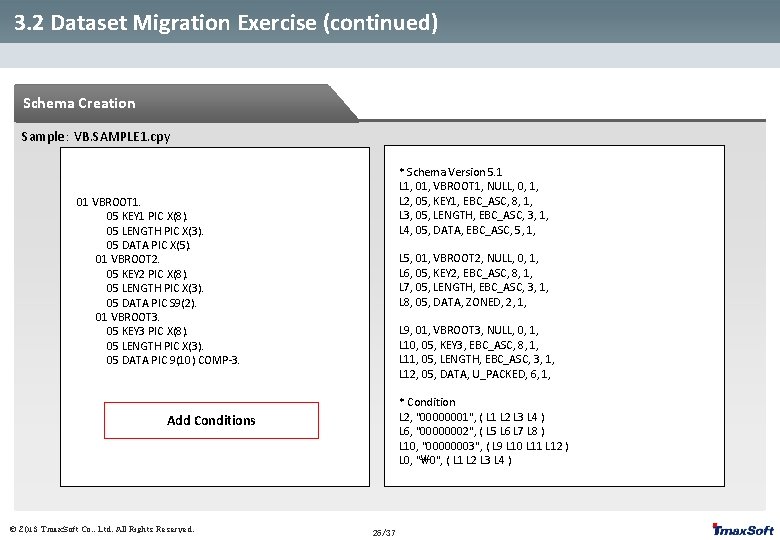
3. 2 Dataset Migration Exercise (continued) Schema Creation Sample: VB. SAMPLE 1. cpy * Schema Version 5. 1 L 1, 01, VBROOT 1, NULL, 0, 1, L 2, 05, KEY 1, EBC_ASC, 8, 1, L 3, 05, LENGTH, EBC_ASC, 3, 1, L 4, 05, DATA, EBC_ASC, 5, 1, 01 VBROOT 1. 05 KEY 1 PIC X(8). 05 LENGTH PIC X(3). 05 DATA PIC X(5). 01 VBROOT 2. 05 KEY 2 PIC X(8). 05 LENGTH PIC X(3). 05 DATA PIC S 9(2). 01 VBROOT 3. 05 KEY 3 PIC X(8). 05 LENGTH PIC X(3). 05 DATA PIC 9(10) COMP-3. L 5, 01, VBROOT 2, NULL, 0, 1, L 6, 05, KEY 2, EBC_ASC, 8, 1, L 7, 05, LENGTH, EBC_ASC, 3, 1, L 8, 05, DATA, ZONED, 2, 1, L 9, 01, VBROOT 3, NULL, 0, 1, L 10, 05, KEY 3, EBC_ASC, 8, 1, L 11, 05, LENGTH, EBC_ASC, 3, 1, L 12, 05, DATA, U_PACKED, 6, 1, * Condition L 2, "00000001", ( L 1 L 2 L 3 L 4 ) L 6, "00000002", ( L 5 L 6 L 7 L 8 ) L 10, "00000003", ( L 9 L 10 L 11 L 12 ) L 0, "", ( L 1 L 2 L 3 L 4 ) Add Conditions © 2013 Tmax. Soft Co. , Ltd. All Rights Reserved. 26/37
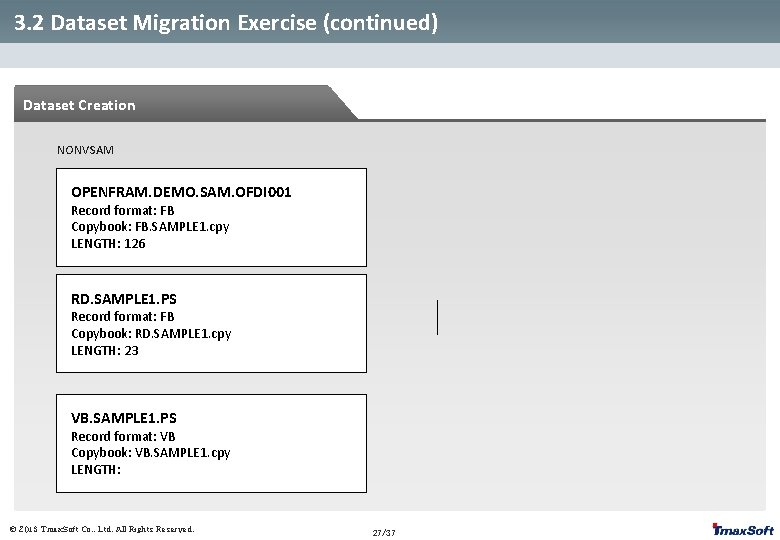
3. 2 Dataset Migration Exercise (continued) Dataset Creation NONVSAM OPENFRAM. DEMO. SAM. OFDI 001 Record format: FB Copybook: FB. SAMPLE 1. cpy LENGTH: 126 RD. SAMPLE 1. PS Record format: FB Copybook: RD. SAMPLE 1. cpy LENGTH: 23 VB. SAMPLE 1. PS Record format: VB Copybook: VB. SAMPLE 1. cpy LENGTH: © 2013 Tmax. Soft Co. , Ltd. All Rights Reserved. 27/37
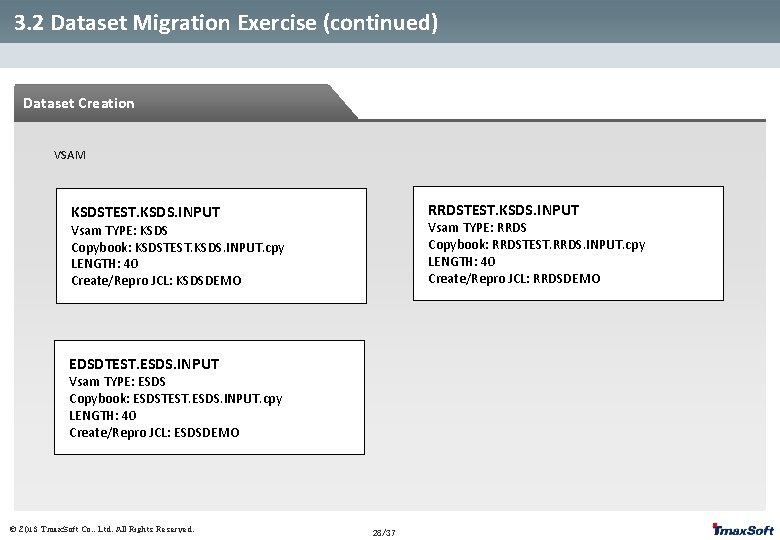
3. 2 Dataset Migration Exercise (continued) Dataset Creation VSAM RRDSTEST. KSDS. INPUT KSDSTEST. KSDS. INPUT Vsam TYPE: RRDS Copybook: RRDSTEST. RRDS. INPUT. cpy LENGTH: 40 Create/Repro JCL: RRDSDEMO Vsam TYPE: KSDS Copybook: KSDSTEST. KSDS. INPUT. cpy LENGTH: 40 Create/Repro JCL: KSDSDEMO EDSDTEST. ESDS. INPUT Vsam TYPE: ESDS Copybook: ESDSTEST. ESDS. INPUT. cpy LENGTH: 40 Create/Repro JCL: ESDSDEMO © 2013 Tmax. Soft Co. , Ltd. All Rights Reserved. 28/37
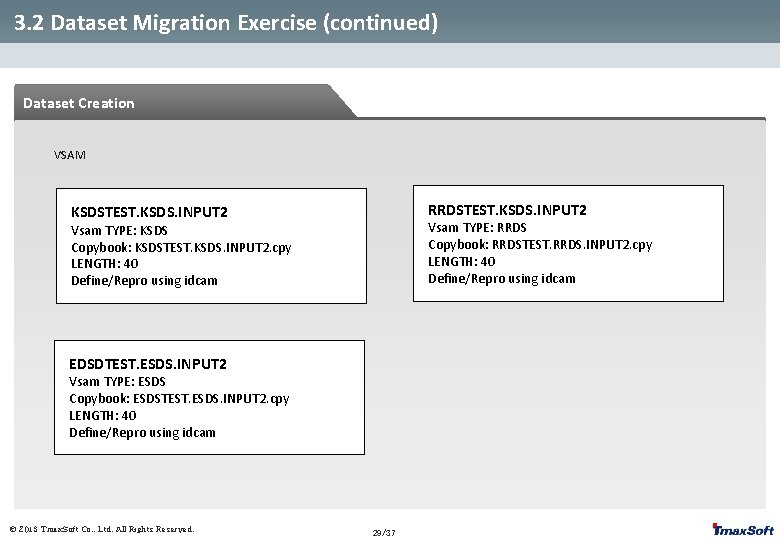
3. 2 Dataset Migration Exercise (continued) Dataset Creation VSAM RRDSTEST. KSDS. INPUT 2 KSDSTEST. KSDS. INPUT 2 Vsam TYPE: RRDS Copybook: RRDSTEST. RRDS. INPUT 2. cpy LENGTH: 40 Define/Repro using idcam Vsam TYPE: KSDS Copybook: KSDSTEST. KSDS. INPUT 2. cpy LENGTH: 40 Define/Repro using idcam EDSDTEST. ESDS. INPUT 2 Vsam TYPE: ESDS Copybook: ESDSTEST. ESDS. INPUT 2. cpy LENGTH: 40 Define/Repro using idcam © 2013 Tmax. Soft Co. , Ltd. All Rights Reserved. 29/37
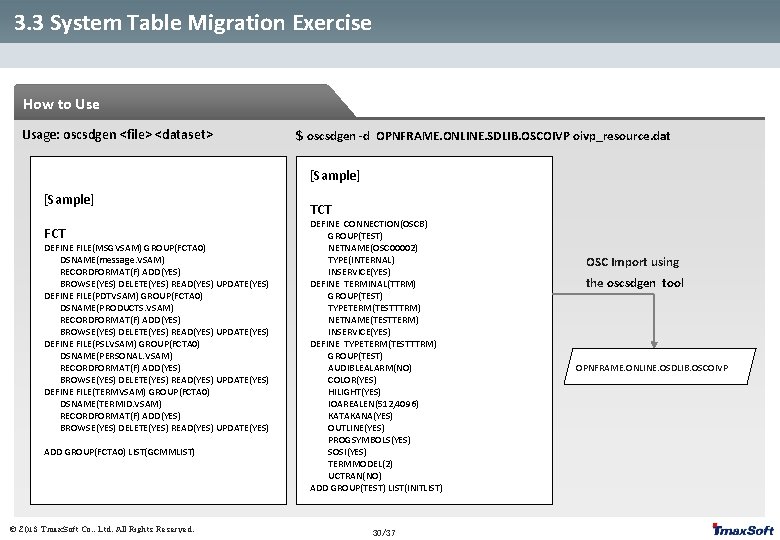
3. 3 System Table Migration Exercise How to Use Usage: oscsdgen <file> <dataset> $ oscsdgen -d OPNFRAME. ONLINE. SDLIB. OSCOIVP oivp_resource. dat [Sample] FCT DEFINE FILE(MSGVSAM) GROUP(FCTA 0) DSNAME(message. VSAM) RECORDFORMAT(F) ADD(YES) BROWSE(YES) DELETE(YES) READ(YES) UPDATE(YES) DEFINE FILE(PDTVSAM) GROUP(FCTA 0) DSNAME(PRODUCTS. VSAM) RECORDFORMAT(F) ADD(YES) BROWSE(YES) DELETE(YES) READ(YES) UPDATE(YES) DEFINE FILE(PSLVSAM) GROUP(FCTA 0) DSNAME(PERSONAL. VSAM) RECORDFORMAT(F) ADD(YES) BROWSE(YES) DELETE(YES) READ(YES) UPDATE(YES) DEFINE FILE(TERMVSAM) GROUP(FCTA 0) DSNAME(TERMID. VSAM) RECORDFORMAT(F) ADD(YES) BROWSE(YES) DELETE(YES) READ(YES) UPDATE(YES) ADD GROUP(FCTA 0) LIST(GCMMLIST) © 2013 Tmax. Soft Co. , Ltd. All Rights Reserved. TCT DEFINE CONNECTION(OSCB) GROUP(TEST) NETNAME(OSC 00002) TYPE(INTERNAL) INSERVICE(YES) DEFINE TERMINAL(TTRM) GROUP(TEST) TYPETERM(TESTTTRM) NETNAME(TESTTERM) INSERVICE(YES) DEFINE TYPETERM(TESTTTRM) GROUP(TEST) AUDIBLEALARM(NO) COLOR(YES) HILIGHT(YES) IOAREALEN(512, 4096) KATAKANA(YES) OUTLINE(YES) PROGSYMBOLS(YES) SOSI(YES) TERMMODEL(2) UCTRAN(NO) ADD GROUP(TEST) LIST(INITLIST) 30/37 OSC Import using the oscsdgen tool OPNFRAME. ONLINE. OSDLIB. OSCOIVP
4. Source Compile 4. 1 Map Compile 4. 2 Compile Script Overview 4. 3 Compilation and Deployment Exercise (Online/Batch) © 2013 Tmax. Soft Co. , Ltd. All Rights Reserved.
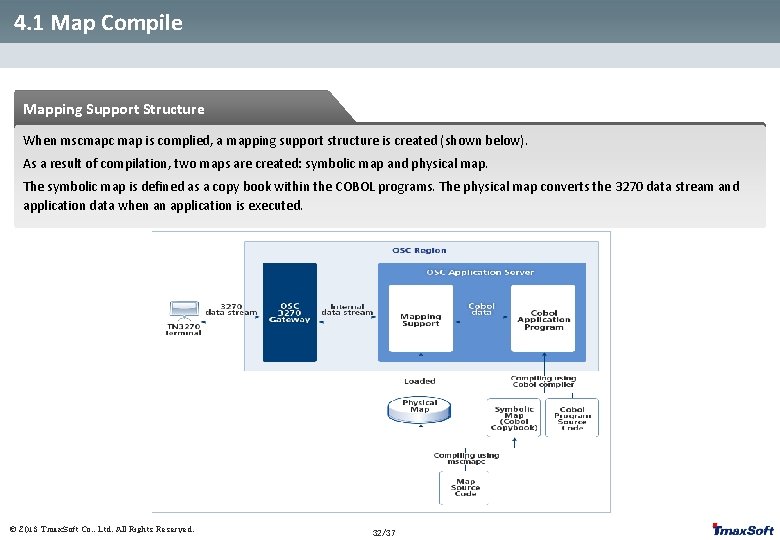
4. 1 Map Compile Mapping Support Structure When mscmapc map is complied, a mapping support structure is created (shown below). As a result of compilation, two maps are created: symbolic map and physical map. The symbolic map is defined as a copy book within the COBOL programs. The physical map converts the 3270 data stream and application data when an application is executed. © 2013 Tmax. Soft Co. , Ltd. All Rights Reserved. 32/37
4. 1 Map Compile How to Use Usage: mscmapc [options 1] <file> | mscmapc [options 2] <dir> <file> Options: -d Displays input map -h Displays options information -o <dir> Specifies the output directory for Open. Studio -p <1: 2> Previews the map (with a 1 or 2 byte character) -r <region> Specifies the OSC region name for the output directory -s <file> Specifies the output symbolic map file name -v Displays version information © 2013 Tmax. Soft Co. , Ltd. All Rights Reserved. 33/37
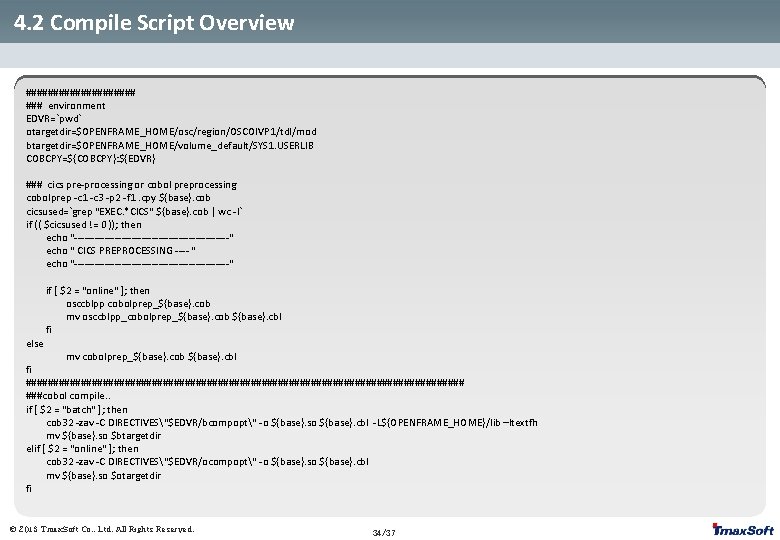
4. 2 Compile Script Overview ########## ### environment EDVR=`pwd` otargetdir=$OPENFRAME_HOME/osc/region/OSCOIVP 1/tdl/mod btargetdir=$OPENFRAME_HOME/volume_default/SYS 1. USERLIB COBCPY=${COBCPY}: ${EDVR} ### cics pre-processing or cobol preprocessing cobolprep -c 1 -c 3 -p 2 -f 1. cpy ${base}. cob cicsused=`grep "EXEC. *CICS" ${base}. cob | wc -l` if (( $cicsused != 0 )); then echo "-----------------------" echo " CICS PREPROCESSING ---- " echo "-----------------------" else if [ $2 = "online" ]; then osccblpp cobolprep_${base}. cob mv osccblpp_cobolprep_${base}. cob ${base}. cbl fi mv cobolprep_${base}. cob ${base}. cbl fi ######################################## ###cobol compile. . if [ $2 = "batch" ]; then cob 32 -zav -C DIRECTIVES"$EDVR/bcompopt" -o ${base}. so ${base}. cbl -L${OPENFRAME_HOME}/lib –ltextfh mv ${base}. so $btargetdir elif [ $2 = "online" ]; then cob 32 -zav -C DIRECTIVES"$EDVR/ocompopt" -o ${base}. so ${base}. cbl mv ${base}. so $otargetdir fi © 2013 Tmax. Soft Co. , Ltd. All Rights Reserved. 34/37
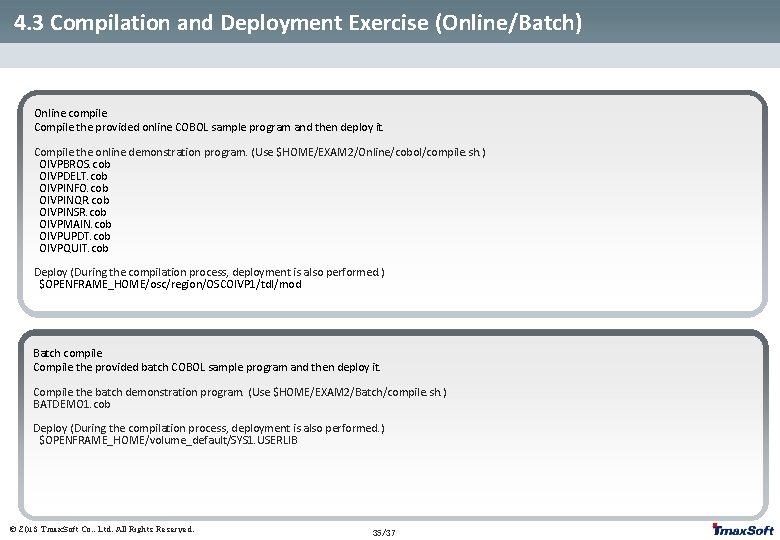
4. 3 Compilation and Deployment Exercise (Online/Batch) Online compile Compile the provided online COBOL sample program and then deploy it. Compile the online demonstration program. (Use $HOME/EXAM 2/Online/cobol/compile. sh. ) OIVPBROS. cob OIVPDELT. cob OIVPINFO. cob OIVPINQR. cob OIVPINSR. cob OIVPMAIN. cob OIVPUPDT. cob OIVPQUIT. cob Deploy (During the compilation process, deployment is also performed. ) $OPENFRAME_HOME/osc/region/OSCOIVP 1/tdl/mod Batch compile Compile the provided batch COBOL sample program and then deploy it. Compile the batch demonstration program. (Use $HOME/EXAM 2/Batch/compile. sh. ) BATDEMO 1. cob Deploy (During the compilation process, deployment is also performed. ) $OPENFRAME_HOME/volume_default/SYS 1. USERLIB © 2013 Tmax. Soft Co. , Ltd. All Rights Reserved. 35/37
5. Migration Result Verification 5. 1 Online 5. 2 Batch © 2013 Tmax. Soft Co. , Ltd. All Rights Reserved.
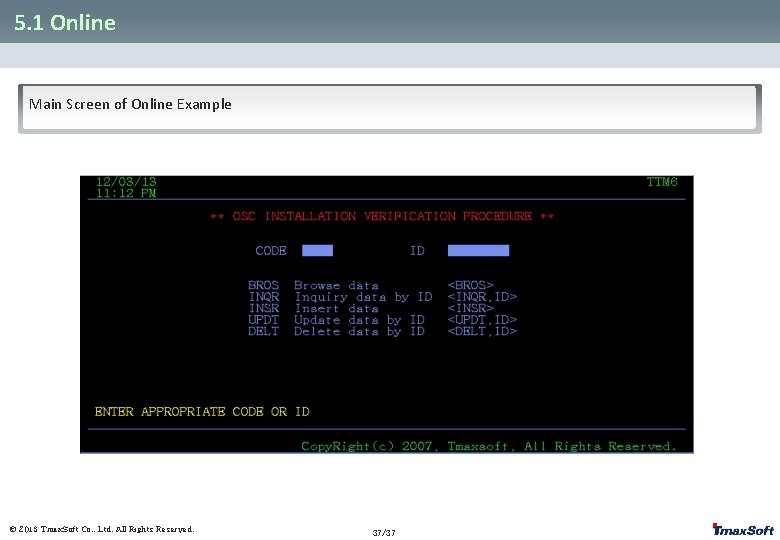
5. 1 Online Main Screen of Online Example © 2013 Tmax. Soft Co. , Ltd. All Rights Reserved. 37/37
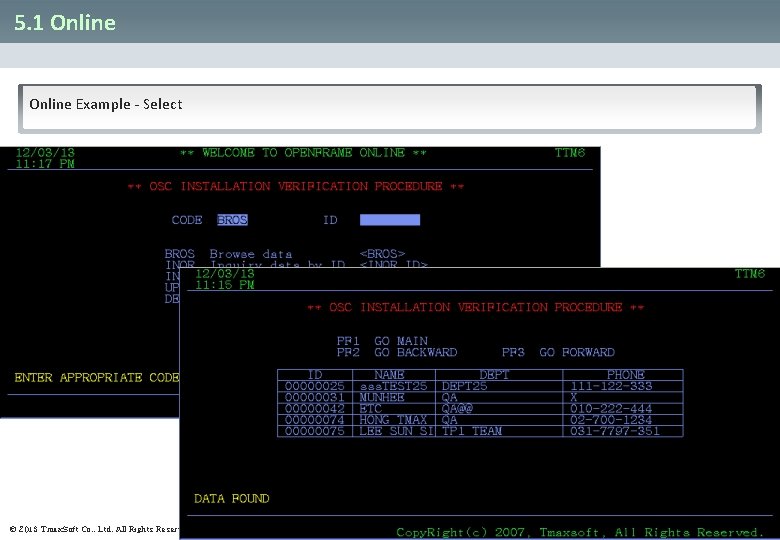
5. 1 Online Example - Select © 2013 Tmax. Soft Co. , Ltd. All Rights Reserved. 38/37
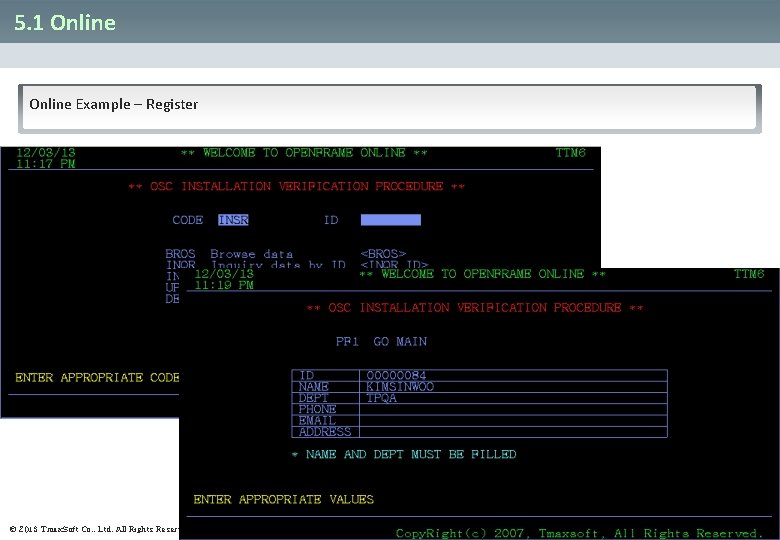
5. 1 Online Example – Register © 2013 Tmax. Soft Co. , Ltd. All Rights Reserved. 39/37
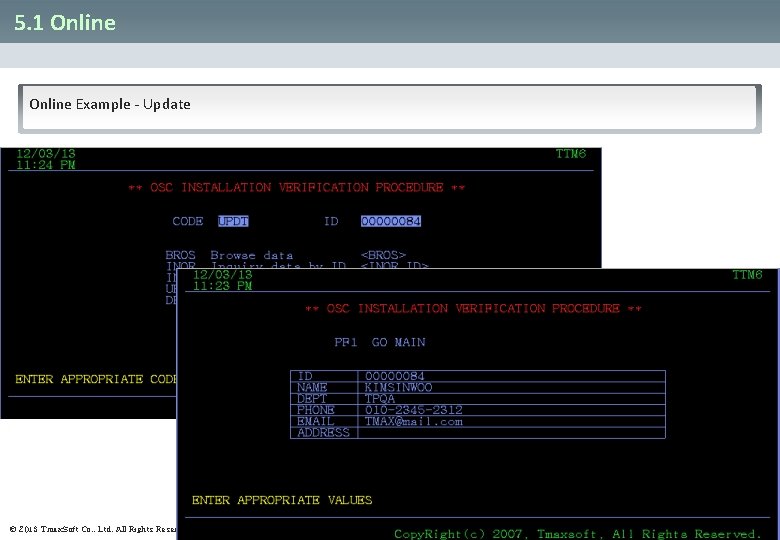
5. 1 Online Example - Update © 2013 Tmax. Soft Co. , Ltd. All Rights Reserved. 40/37
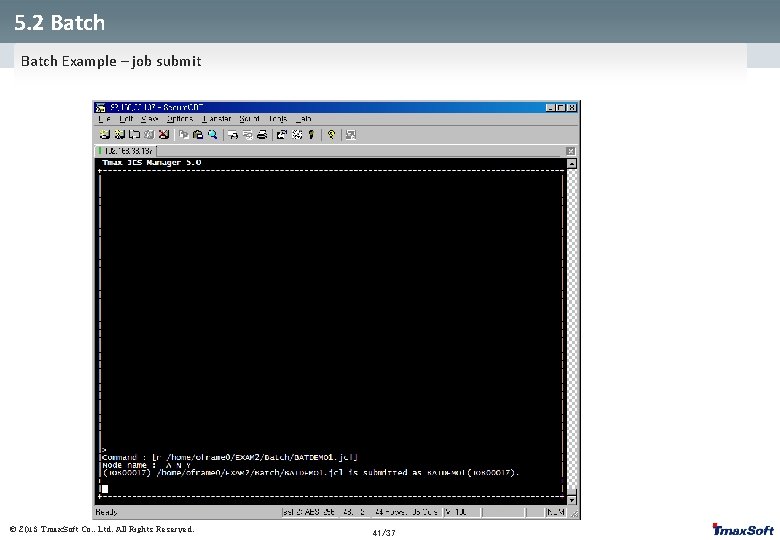
5. 2 Batch Example – job submit © 2013 Tmax. Soft Co. , Ltd. All Rights Reserved. 41/37
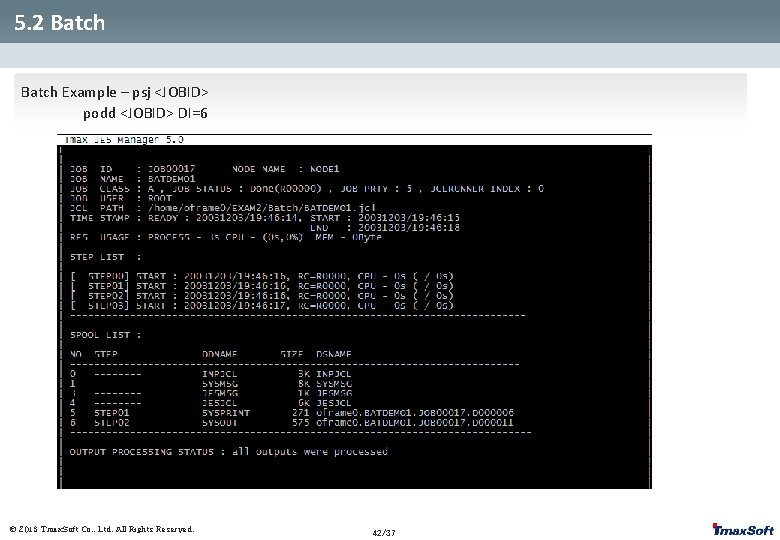
5. 2 Batch Example – psj <JOBID> 5. 2 Batch podd <JOBID> DI=6 © 2013 Tmax. Soft Co. , Ltd. All Rights Reserved. 42/37
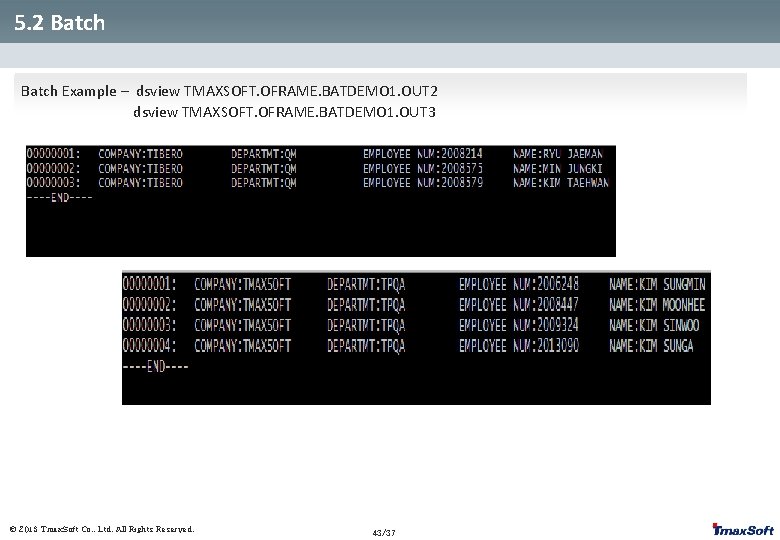
5. 2 Batch Example – dsview TMAXSOFT. OFRAME. BATDEMO 1. OUT 2 5. 2 Batch dsview TMAXSOFT. OFRAME. BATDEMO 1. OUT 3 © 2013 Tmax. Soft Co. , Ltd. All Rights Reserved. 43/37
Thank you Tmax. Soft Co. , Ltd © 2013 Tmax. Soft Co. , Ltd. All Rights Reserved. 44/37