
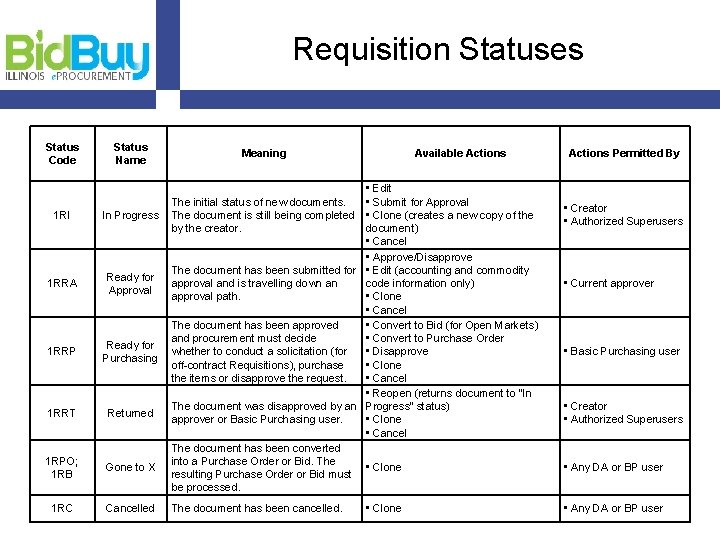
Requisition Statuses Status Code Status Name 1 RI
- Slides: 3
Requisition Statuses Status Code Status Name 1 RI In Progress 1 RRA Ready for Approval 1 RRP Ready for Purchasing 1 RRT Returned 1 RPO; 1 RB Gone to X 1 RC Cancelled Meaning Available Actions • Edit The initial status of new documents. • Submit for Approval The document is still being completed • Clone (creates a new copy of the by the creator. document) • Cancel • Approve/Disapprove The document has been submitted for • Edit (accounting and commodity approval and is travelling down an code information only) approval path. • Clone • Cancel The document has been approved • Convert to Bid (for Open Markets) and procurement must decide • Convert to Purchase Order whether to conduct a solicitation (for • Disapprove off-contract Requisitions), purchase • Clone the items or disapprove the request. • Cancel • Reopen (returns document to “In The document was disapproved by an Progress” status) approver or Basic Purchasing user. • Clone • Cancel The document has been converted into a Purchase Order or Bid. The • Clone resulting Purchase Order or Bid must be processed. The document has been cancelled. • Clone Actions Permitted By • Creator • Authorized Superusers • Current approver • Basic Purchasing user • Creator • Authorized Superusers • Any DA or BP user
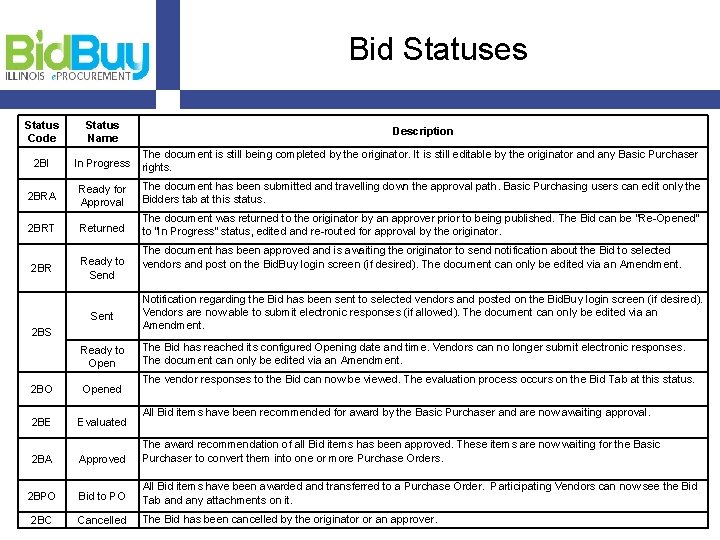
Bid Statuses Status Code Status Name Description 2 BI In Progress The document is still being completed by the originator. It is still editable by the originator and any Basic Purchaser rights. 2 BRA Ready for Approval The document has been submitted and travelling down the approval path. Basic Purchasing users can edit only the Bidders tab at this status. 2 BRT Returned The document was returned to the originator by an approver prior to being published. The Bid can be “Re-Opened” to “In Progress” status, edited and re-routed for approval by the originator. 2 BR Ready to Send Sent 2 BS Ready to Open The document has been approved and is awaiting the originator to send notification about the Bid to selected vendors and post on the Bid. Buy login screen (if desired). The document can only be edited via an Amendment. Notification regarding the Bid has been sent to selected vendors and posted on the Bid. Buy login screen (if desired). Vendors are now able to submit electronic responses (if allowed). The document can only be edited via an Amendment. The Bid has reached its configured Opening date and time. Vendors can no longer submit electronic responses. The document can only be edited via an Amendment. The vendor responses to the Bid can now be viewed. The evaluation process occurs on the Bid Tab at this status. 2 BO Opened 2 BE Evaluated 2 BA Approved The award recommendation of all Bid items has been approved. These items are now waiting for the Basic Purchaser to convert them into one or more Purchase Orders. 2 BPO Bid to PO All Bid items have been awarded and transferred to a Purchase Order. Participating Vendors can now see the Bid Tab and any attachments on it. 2 BC Cancelled The Bid has been cancelled by the originator or an approver. All Bid items have been recommended for award by the Basic Purchaser and are now awaiting approval.
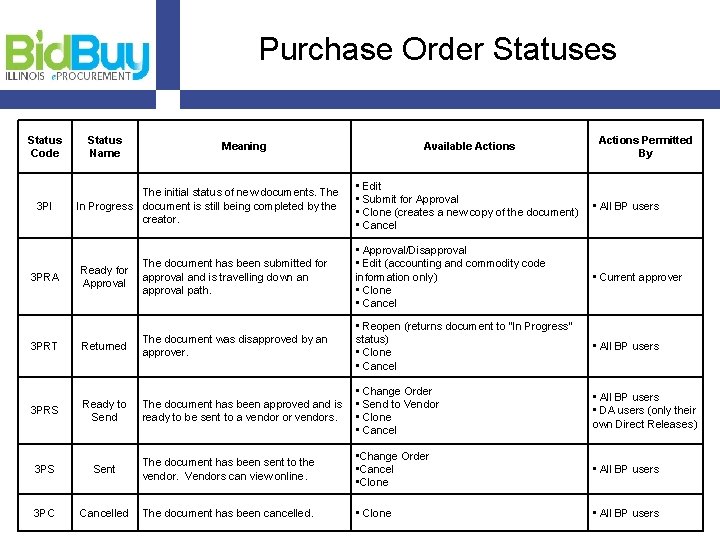
Purchase Order Statuses Status Code Status Name Meaning Available Actions Permitted By • Edit • Submit for Approval • Clone (creates a new copy of the document) • Cancel • All BP users Ready for Approval The document has been submitted for approval and is travelling down an approval path. • Approval/Disapproval • Edit (accounting and commodity code information only) • Clone • Cancel • Current approver 3 PRT Returned The document was disapproved by an approver. • Reopen (returns document to “In Progress” status) • Clone • Cancel • All BP users 3 PRS Ready to Send The document has been approved and is ready to be sent to a vendor or vendors. • Change Order • Send to Vendor • Clone • Cancel • All BP users • DA users (only their own Direct Releases) • Change Order • Cancel • Clone • All BP users 3 PI 3 PRA The initial status of new documents. The In Progress document is still being completed by the creator. 3 PS Sent The document has been sent to the vendor. Vendors can view online. 3 PC Cancelled The document has been cancelled.