
Requesting Patient Transport Access the Tele Tracking system
- Slides: 2
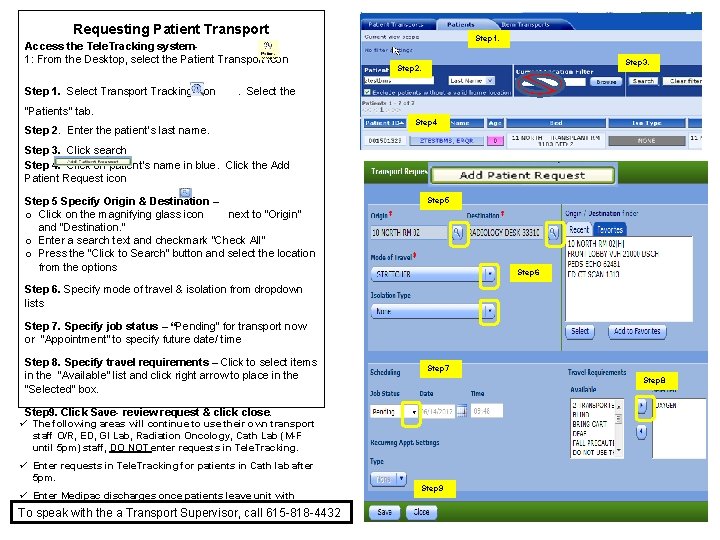
Requesting Patient Transport Access the Tele. Tracking system 1: From the Desktop, select the Patient Transport icon Step 1. Select Transport Tracking icon Step 1. Step 3. Step 2. . Select the “Patients” tab. Step 2. Enter the patient’s last name. Step 4 Step 3. Click search Step 4. Click on patient’s name in blue. Click the Add Patient Request icon Step 5 Specify Origin & Destination – o Click on the magnifying glass icon next to “Origin” and “Destination. ” o Enter a search text and checkmark “Check All” o Press the “Click to Search” button and select the location from the options Step 5 Step 6. Specify mode of travel & isolation from dropdown lists Step 7. Specify job status – “Pending” for transport now or “Appointment” to specify future date/ time Step 8. Specify travel requirements – Click to select items in the “Available” list and click right arrow to place in the “Selected” box. Step 7 Step 8 Step 9. Click Save- review request & click close. ü The following areas will continue to use their own transport staff O/R, ED, GI Lab, Radiation Oncology, Cath Lab (M-F until 5 pm) staff, DO NOT enter requests in Tele. Tracking. ü Enter requests in Tele. Tracking for patients in Cath lab after 5 pm. ü Enter Medipac discharges once patients leave unit with patient transport To speak with the a Transport Supervisor, call 615 -818 -4432 Step 9
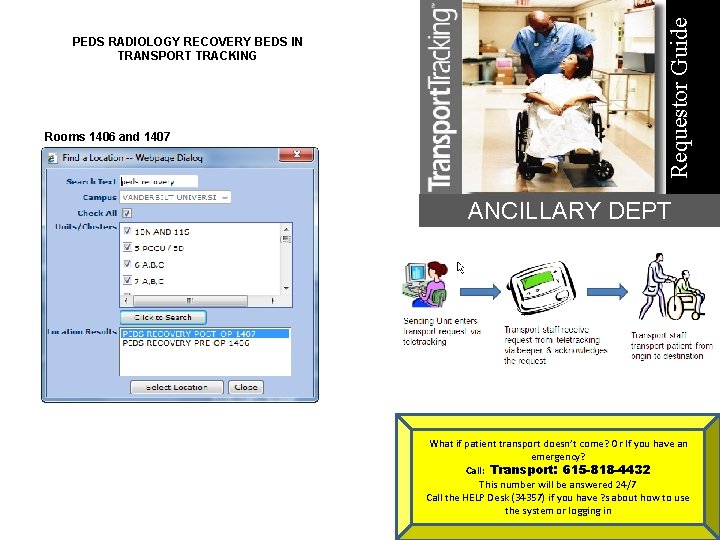
Rooms 1406 and 1407 Requestor Guide PEDS RADIOLOGY RECOVERY BEDS IN TRANSPORT TRACKING ANCILLARY DEPT What if patient transport doesn’t come? Or If you have an emergency? Call: Transport: 615 -818 -4432 This number will be answered 24/7 Call the HELP Desk (34357) if you have ? s about how to use the system or logging in