
Request for Information RFI Leasing Training Objectives a
Request for Information (RFI) Leasing Training
Objectives a. Understand the Request for Information (RFI) Leasing process within Bid. Buy a. Understand Non-RFI and Alt RFI – Leasing process a. Create a Requisition a. Create a Bid a. Create a Purchase Order a. Create a Change Order 2
What is an RFI Lease? a. The RFI Leasing process enables the State to lease space a. There are two type of RFI-Leases: o RFI – Leasing ‒ The Bid document is used to solicit vendors for information and pricing o Non-RFI & Alt RFI – Leasing ‒ The Vendor is identified on the Requisition and the Bid document is only used to post the award information to the General Public 3
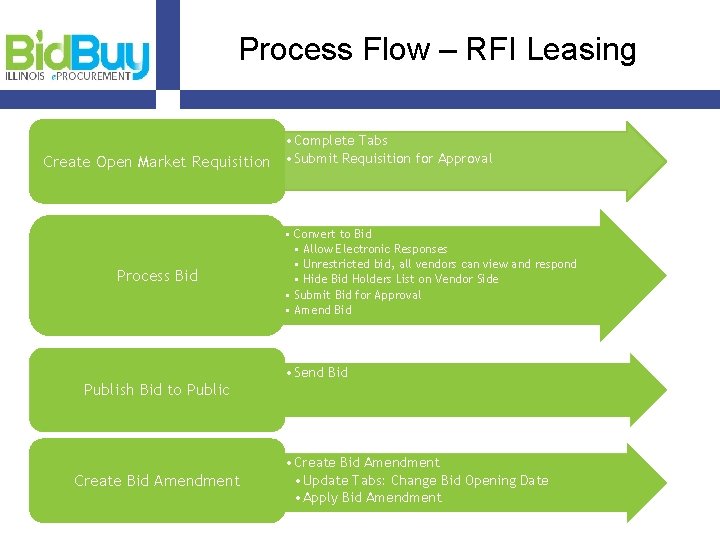
Process Flow – RFI Leasing • Complete Tabs Create Open Market Requisition • Submit Requisition for Approval Process Bid • Convert to Bid • Allow Electronic Responses • Unrestricted bid, all vendors can view and respond • Hide Bid Holders List on Vendor Side • Submit Bid for Approval • Amend Bid • Send Bid Publish Bid to Public Create Bid Amendment • Create Bid Amendment • Update Tabs: Change Bid Opening Date • Apply Bid Amendment
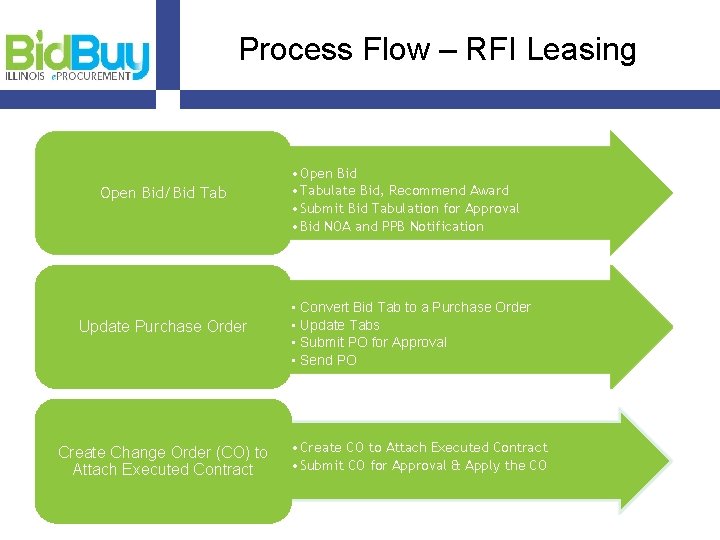
Process Flow – RFI Leasing Open Bid/Bid Tab Update Purchase Order Create Change Order (CO) to Attach Executed Contract • Open Bid • Tabulate Bid, Recommend Award • Submit Bid Tabulation for Approval • Bid NOA and PPB Notification • Convert Bid Tab to a Purchase Order • Update Tabs • Submit PO for Approval • Send PO • Create CO to Attach Executed Contract • Submit CO for Approval & Apply the CO

Process Flow - Non-RFI & Alt RFI – Leasing Create Open Market Requisition Process Bid Publish Bid Open Bid/Bid Tab Process Purchase Order PO Change Order • Complete Tabs • Submit Requisition for Approval • Convert Requistion to Bid • Update Tabs • Uncheck Allow Electronic Responses • Check Rolling Enrollment • Submit Bid for Approvals • Publish Online for public viewing only • Open Bid • Complete Negotiations • Submit Bid for Approval and Publish • Convert Bid to Purchase Order • Update Tabs • Submit PO for Approval • Change Order to Attach Executed Contract • Submit Change Order for Approval • Apply Change Order
RFI Leasing Training Example a. Request for Lease Space for DHS in Madison County. The standards for the space is 18, 000 square feet of rentable office space. ‒ See handout for details ‒ Instructor to demo 7
Log Into Bid. Buy 1. Go to Bid. Buy at https: //train. bidbuy. illinois. gov/bso/ 2. To login, enter your Login ID and your Password 3. Click Login 8
Create Open Market Requisition Step 1: Click Documents > Requisitions > New Step 2: Complete Tabs Step 3: Submit Requisition for Approval 9
Process and Publish Bid Step 1: Convert to Bid Step 2: Review and update tabs Step 3: Submit Bid for Approval and Send 10
Open Bid and Add Vendor Quotes Step 1: Open Bid and select Bid Tab Step 2: Add Vendor Quotes 11
Bid Award, NOA, PPB Step 1: Tabulate Bid and Submit for Approval Step 2: Create Bid Amendment to attach Notice of Award (NOA) Form Step 3: Create Bid Reminder to Notify PPB 12
Process Purchase Order Step 1: Convert to PO Step 2: Add Missing Info & Update Tabs Step 3: Submit for Approval and Send Step 4: Create Change Order 1. 2. Enter Contract Executed Date Attach Contract 13
Questions 14
Alt/Non - RFI Leasing Training Example a. Request for Lease Space for Springfield office space. The standards for the space is 900 square feet of rentable office space. ‒ See handout for details ‒ Instructor to demo 15
Log Into Bid. Buy 1. Go to Bid. Buy at https: //train. bidbuy. illinois. gov/bso/ 2. To login, enter your Login ID and your Password 3. Click Login 16
Create Open Market Requisition Step 1: Click Documents > Requisitions > New Step 2: Complete Tabs Step 3: Submit Requisition for Approval 17
Process and Publish Bid Step 1: Convert to Bid Step 2: Review and update tabs Step 3: Submit Bid for Approval and Send 18
Open Bid and Add Vendor Quotes Step 1: Open Bid and select Bid Tab Step 2: Add Vendor Quotes 19
Bid Award, NOA, PPB Step 1: Tabulate Bid and Submit for Approval Step 2: Create Bid Amendment to attach Notice of Award (NOA) Form Step 3: Create Bid Reminder to Notify PPB 20
Process Purchase Order Step 1: Convert to PO Step 2: Add Missing Info & Update Tabs Step 3: Submit for Approval and Send Step 4: Create Change Order 1. 2. Enter Contract Executed Date Attach Contract 21
RFI Leasing Review a. RFI – Leasing o A request for lease space that is posted and vendors respond with information and pricing in Bid. Buy a. Non-RFI & Alt RFI – Leasing o A request for lease space that is negotiated with the vendor. Bid. Buy is used to only post the award information to the General Public 22
Questions 23
Bid. Buy Resources a. State Internal User Support o CPO- GS ‒ Email: State. User. Bid. Buy@illinois. gov ‒ Phone: TBA a. Vendor Support o CMS Help Desk ‒ Email: il. bidbuy@illinois. gov ‒ Phone: 866 -455 -2897 a. Bid. Buy Support Website: o System Manuals, Process Manuals, Presentations, Examples, Forms, Reference Guides, Videos, etc. can be found here. 24
- Slides: 24