
REPRESENTING DATA IN A COMPUTER Binary Computers are
REPRESENTING DATA IN A COMPUTER
Binary Computers are 2 -state devices › Pulse – No pulse › On – Off Represented by › 1– 0 BINARY
Data All data including › › Numbers Letters Characters (, . = “ etc) Graphics Must be changed to patterns of 1’s and 0’s to be stored in a Computer
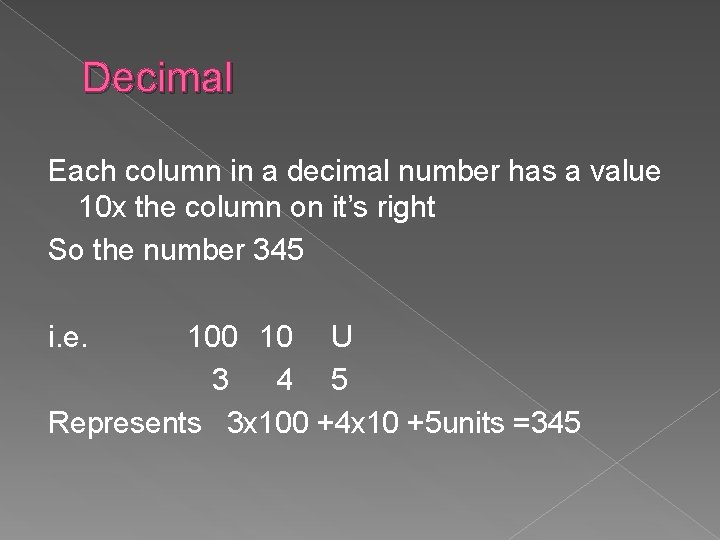
Decimal Each column in a decimal number has a value 10 x the column on it’s right So the number 345 i. e. 100 10 U 3 4 5 Represents 3 x 100 +4 x 10 +5 units =345
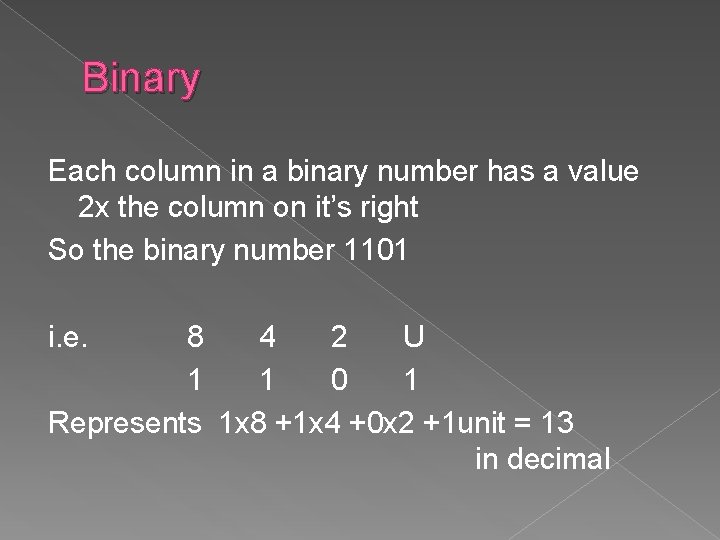
Binary Each column in a binary number has a value 2 x the column on it’s right So the binary number 1101 i. e. 8 4 2 U 1 1 0 1 Represents 1 x 8 +1 x 4 +0 x 2 +1 unit = 13 in decimal
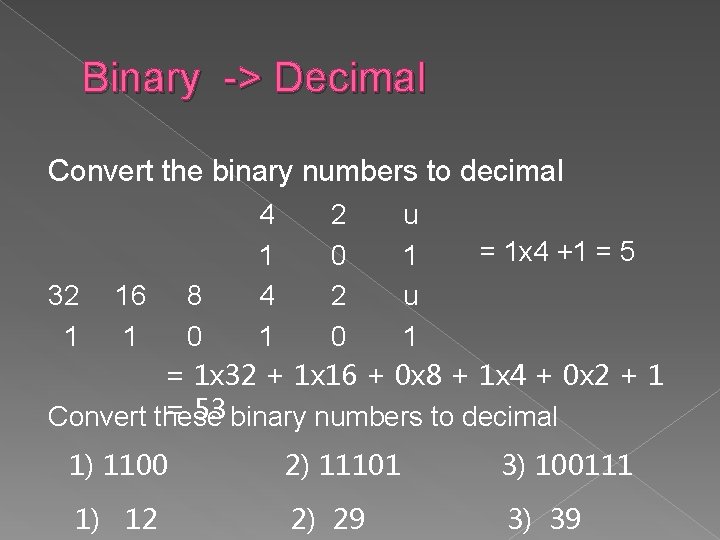
Binary -> Decimal Convert the binary numbers to decimal 4 2 u = 1 x 4 +1 = 5 1 0 1 32 16 8 4 2 u 1 1 0 1 = 1 x 32 + 1 x 16 + 0 x 8 + 1 x 4 + 0 x 2 + 1 = 53 binary numbers to decimal Convert these 1) 1100 2) 11101 3) 100111 1) 12 2) 29 3) 39
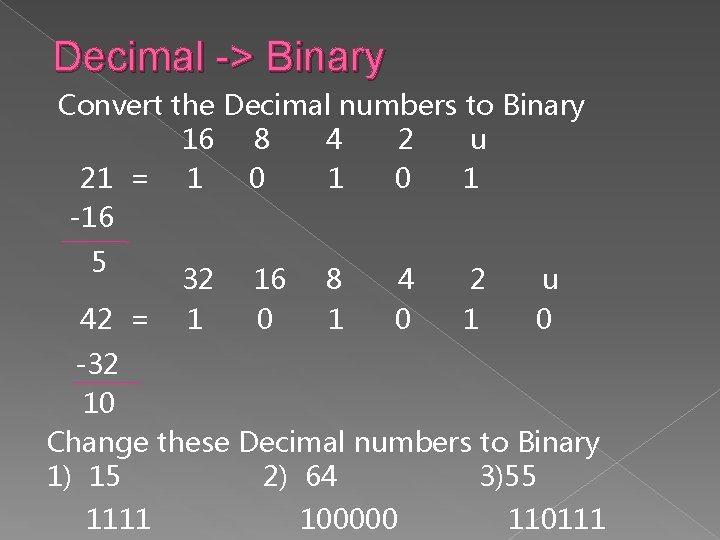
Decimal -> Binary Convert the Decimal numbers to Binary 16 8 4 2 u 21 = 1 0 1 -16 5 42 = 32 1 16 0 8 1 4 0 2 1 u 0 -32 10 Change these Decimal numbers to Binary 1) 15 2) 64 3)55 1111 100000 110111

Text & Characters - ASCII Each character is represented by a unique pattern of 1’s and 0’s This code is called ASCII – American Standard Code for Information Interchange Each ASCII code is a pattern of 7 bits (and the 8 th bit used as a parity check) This allows 128 different possibilities A is represented by 01000001 (or 65 in decimal) If more characters are required all 8 bits can be used allowing 256 possibilities
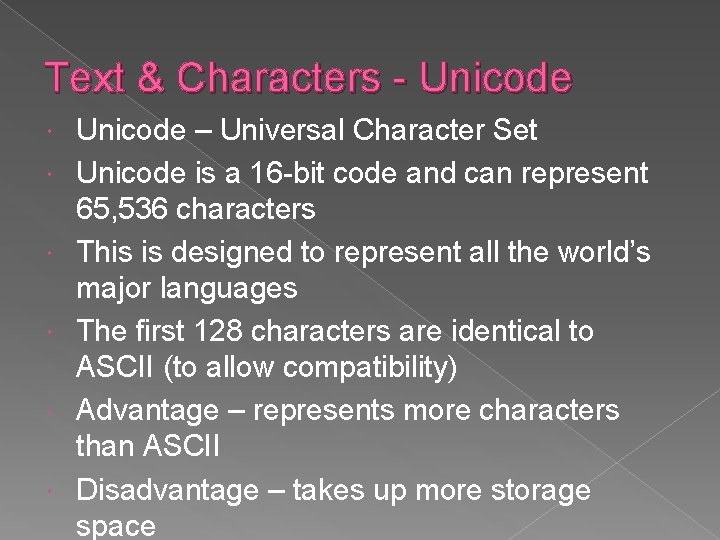
Text & Characters - Unicode – Universal Character Set Unicode is a 16 -bit code and can represent 65, 536 characters This is designed to represent all the world’s major languages The first 128 characters are identical to ASCII (to allow compatibility) Advantage – represents more characters than ASCII Disadvantage – takes up more storage space

Graphics Smallest graphics dot on screen is called a PIXEL - Picture Element A Pixel can be lit or not lit Number of Pixels – RESOLUTION of graphic High resolution – lots of small pixels Low resolution – fewer larger pixels
Resolution measured in dpi (dots per inch) e. g. 300 dpi 2 colours (monochrome) uses 1 bit per pixel › 1 – black 0 - white More colours need more bits per pixel › 2 bits – 4 colours represented by 00, 01, 10, 11 › 3 bits – 8 colours (000, 001, 010, 011, 100, 101, 110, 111) › 4 bits – 16 colours etc True Colour is represented by 24 bits and gives a range of 16, 777, 216 colours High resolution and lots of colours requires lots of memory To save memory one can be traded off against the other
More Bits and Bytes Each 1 or 0 is called a BIT (short for Binary Digit). Eight bits are called a BYTE. 1024 (approx 1000) bytes is a KILOBYTE (Kb for short) 1024 kilobytes is a MEGABYTE (Mb for short) 1024 megabytes is a GIGABYTE (Gb for short) 1024 gigabytes is a TERABYTE (Tb for short) These units are used to measure the size of storage (called CAPACITY) or storage requirements e. g. the available memory, hard disk space, program size, file size.
Calculating Storage for Graphics Calculate the storage requirement for a black and white image 600 pixels by 850 pixels Answer – Total no of pixels = 600 x 850 = 510000 Each pixel is represented by 1 bit Storage required = 510000 bits = 510000/8 bytes = 63750/1024 Kb = 62. 3 Kb (to 1 Dec Pl)
Examples Calculate the storage requirement for the following black and white graphics 1) An icon 16 x 24 pixels 2) A photograph 600 x 400 pixels 3) A poster 2350 x 1876 pixels Answers 1) 48 bytes 2) 29. 3 Kb 3) 0. 53 Mb
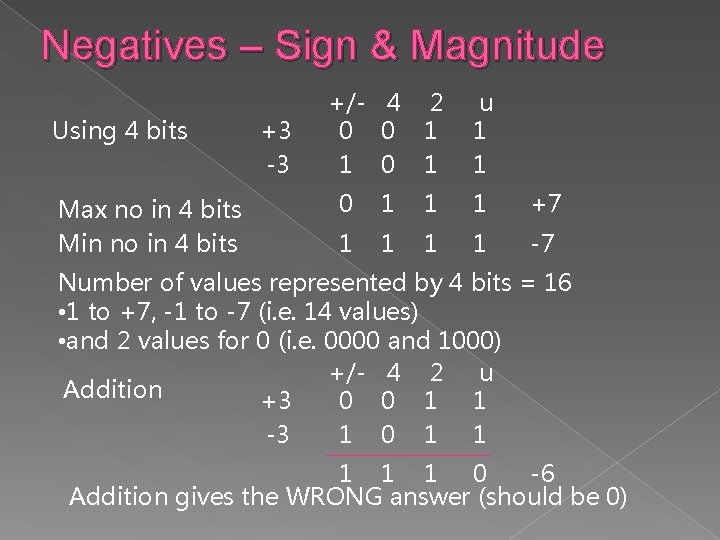
Negatives – Sign & Magnitude Using 4 bits Max no in 4 bits Min no in 4 bits +3 -3 +/- 4 2 0 0 1 1 0 1 u 1 1 0 1 1 1 +7 1 1 -7 Number of values represented by 4 bits = 16 • 1 to +7, -1 to -7 (i. e. 14 values) • and 2 values for 0 (i. e. 0000 and 1000) +/- 4 2 u Addition +3 0 0 1 1 -3 1 0 1 1 1 0 -6 Addition gives the WRONG answer (should be 0)
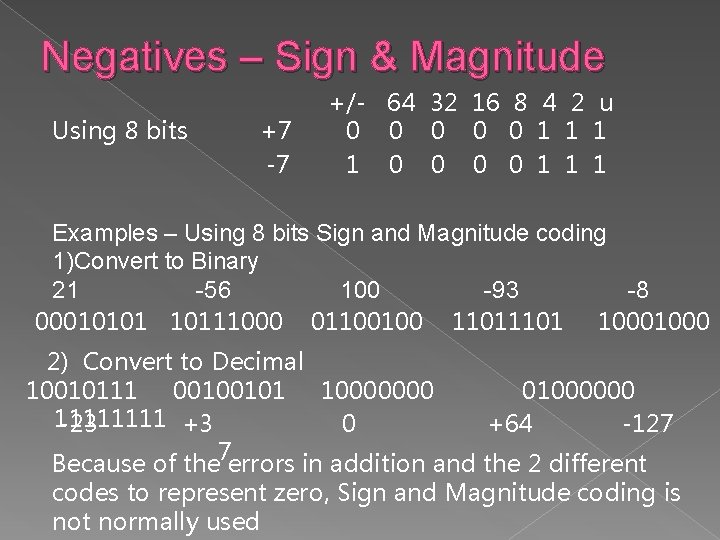
Negatives – Sign & Magnitude Using 8 bits +7 -7 +/- 64 32 16 8 4 2 u 0 0 0 1 1 1 Examples – Using 8 bits Sign and Magnitude coding 1)Convert to Binary 21 -56 100 -93 -8 00010101 10111000 01100100 1101 1000 2) Convert to Decimal 10010111 00100101 10000000 01000000 1111 -23 +3 0 +64 -127 Because of the 7 errors in addition and the 2 different codes to represent zero, Sign and Magnitude coding is not normally used
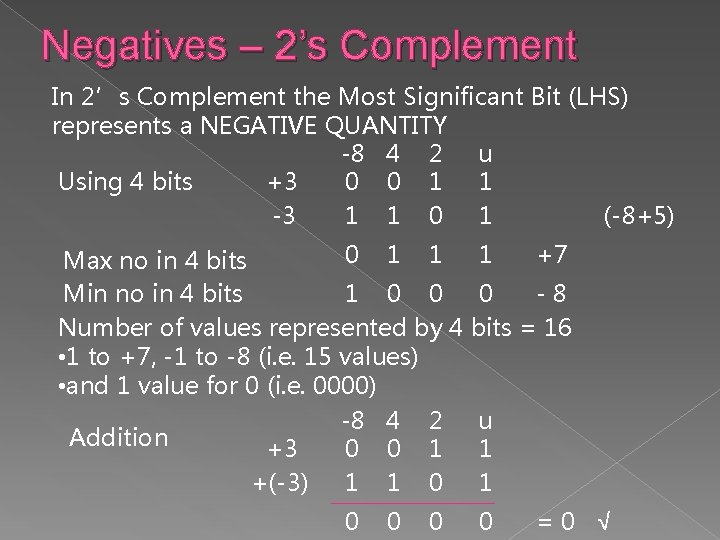
Negatives – 2’s Complement In 2’s Complement the Most Significant Bit (LHS) represents a NEGATIVE QUANTITY -8 4 2 u 0 0 1 1 Using 4 bits +3 1 1 0 1 (-8+5) -3 0 1 1 1 +7 Max no in 4 bits Min no in 4 bits 1 0 0 0 -8 Number of values represented by 4 bits = 16 • 1 to +7, -1 to -8 (i. e. 15 values) • and 1 value for 0 (i. e. 0000) -8 4 2 u Addition +3 0 0 1 1 +(-3) 1 1 0 0 0 0 =0 √
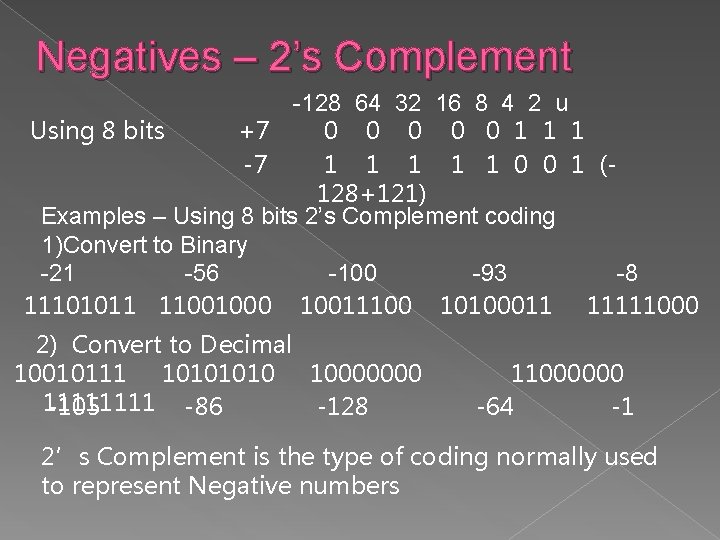
Negatives – 2’s Complement -128 64 32 16 8 4 2 u Using 8 bits +7 0 0 0 1 1 1 -7 1 1 1 0 0 1 (128+121) Examples – Using 8 bits 2’s Complement coding 1)Convert to Binary -21 -56 -100 -93 -8 11101011 11001000 10011100 10100011 11111000 2) Convert to Decimal 10010111 1010 10000000 1111 -105 -86 -128 11000000 -64 -1 2’s Complement is the type of coding normally used to represent Negative numbers
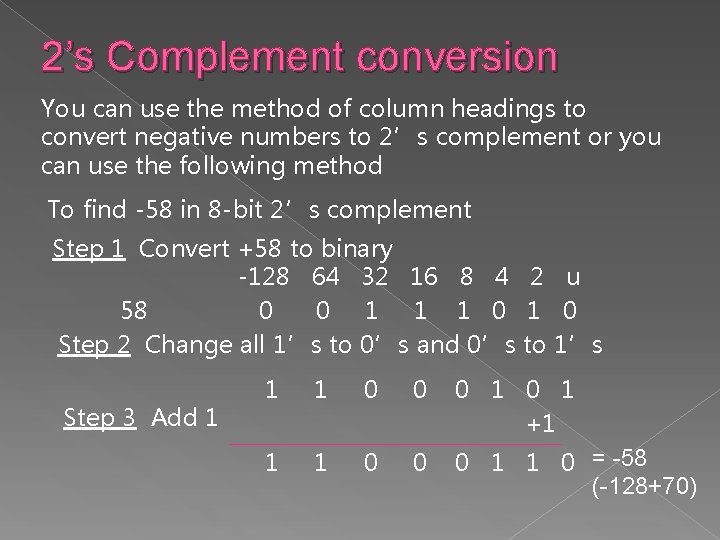
2’s Complement conversion You can use the method of column headings to convert negative numbers to 2’s complement or you can use the following method To find -58 in 8 -bit 2’s complement Step 1 Convert +58 to binary -128 64 32 16 8 4 2 u 58 0 0 1 1 1 0 Step 2 Change all 1’s to 0’s and 0’s to 1’s Step 3 Add 1 1 1 0 0 0 1 +1 1 1 0 0 0 1 1 0 = -58 (-128+70)
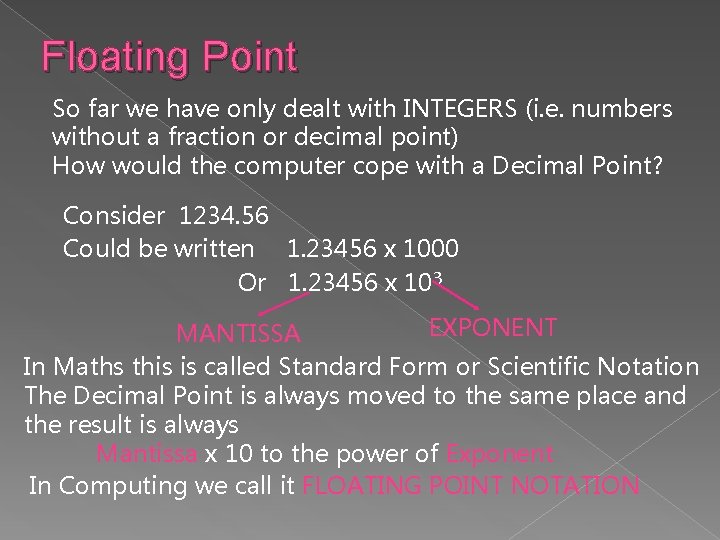
Floating Point So far we have only dealt with INTEGERS (i. e. numbers without a fraction or decimal point) How would the computer cope with a Decimal Point? Consider 1234. 56 Could be written 1. 23456 x 1000 Or 1. 23456 x 103 EXPONENT MANTISSA In Maths this is called Standard Form or Scientific Notation The Decimal Point is always moved to the same place and the result is always Mantissa x 10 to the power of Exponent In Computing we call it FLOATING POINT NOTATION
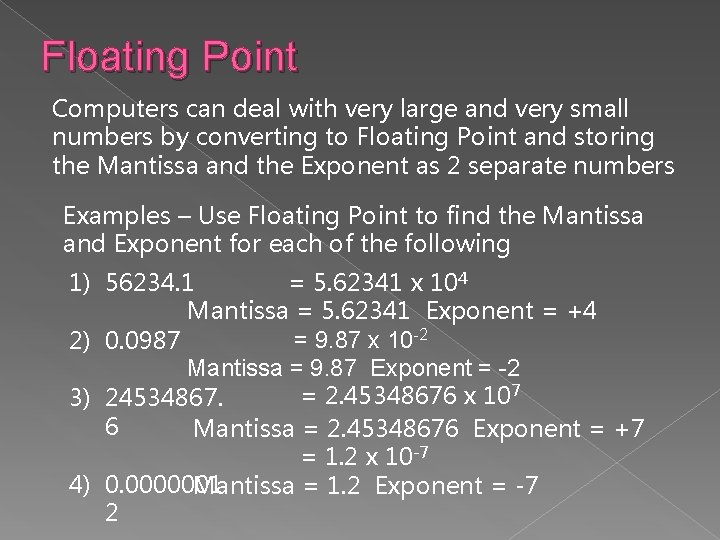
Floating Point Computers can deal with very large and very small numbers by converting to Floating Point and storing the Mantissa and the Exponent as 2 separate numbers Examples – Use Floating Point to find the Mantissa and Exponent for each of the following = 5. 62341 x 104 1) 56234. 1 Mantissa = 5. 62341 Exponent = +4 = 9. 87 x 10 -2 2) 0. 0987 Mantissa = 9. 87 Exponent = -2 = 2. 45348676 x 107 3) 24534867. 6 Mantissa = 2. 45348676 Exponent = +7 = 1. 2 x 10 -7 4) 0. 0000001 Mantissa = 1. 2 Exponent = -7 2
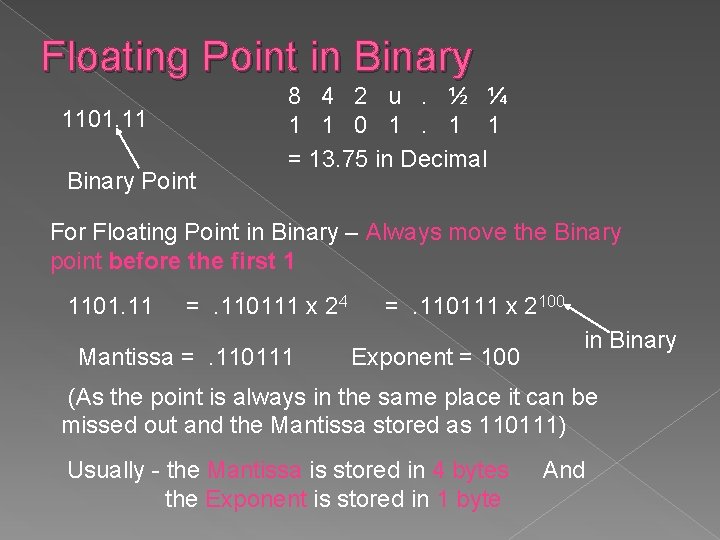
Floating Point in Binary 1101. 11 Binary Point 8 4 2 u. ½ ¼ 1 1 0 1. 1 1 = 13. 75 in Decimal For Floating Point in Binary – Always move the Binary point before the first 1 1101. 11 =. 110111 x 24 Mantissa =. 110111 x 2100 Exponent = 100 in Binary (As the point is always in the same place it can be missed out and the Mantissa stored as 110111) Usually - the Mantissa is stored in 4 bytes the Exponent is stored in 1 byte And
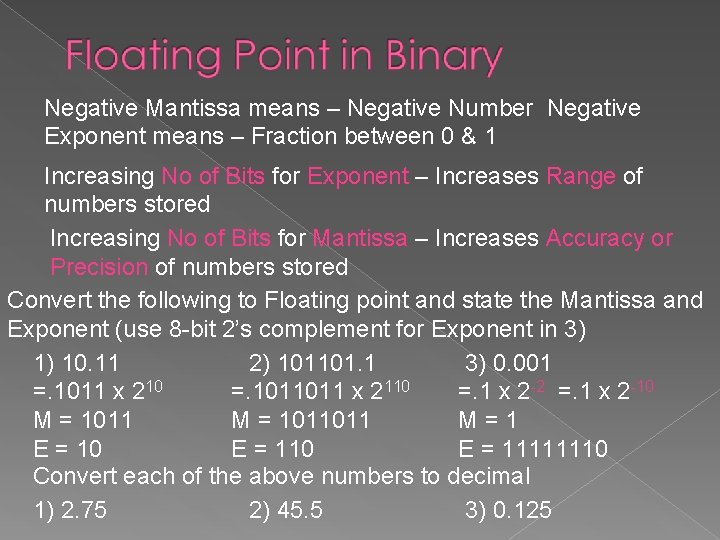
Negative Mantissa means – Negative Number Negative Exponent means – Fraction between 0 & 1 Increasing No of Bits for Exponent – Increases Range of numbers stored Increasing No of Bits for Mantissa – Increases Accuracy or Precision of numbers stored Convert the following to Floating point and state the Mantissa and Exponent (use 8 -bit 2’s complement for Exponent in 3) 1) 10. 11 2) 101101. 1 3) 0. 001 =. 1011 x 210 =. 1011011 x 2110 =. 1 x 2 -2 =. 1 x 2 -10 M = 1011011 M=1 E = 10 E = 11111110 Convert each of the above numbers to decimal 1) 2. 75 2) 45. 5 3) 0. 125
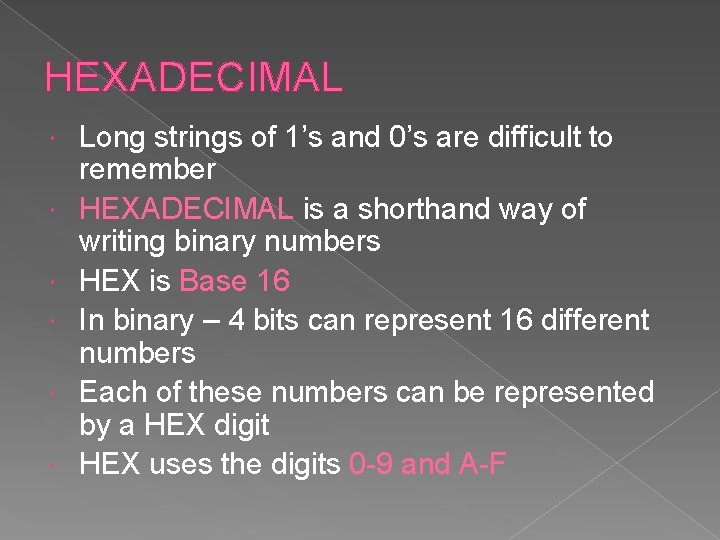
HEXADECIMAL Long strings of 1’s and 0’s are difficult to remember HEXADECIMAL is a shorthand way of writing binary numbers HEX is Base 16 In binary – 4 bits can represent 16 different numbers Each of these numbers can be represented by a HEX digit HEX uses the digits 0 -9 and A-F
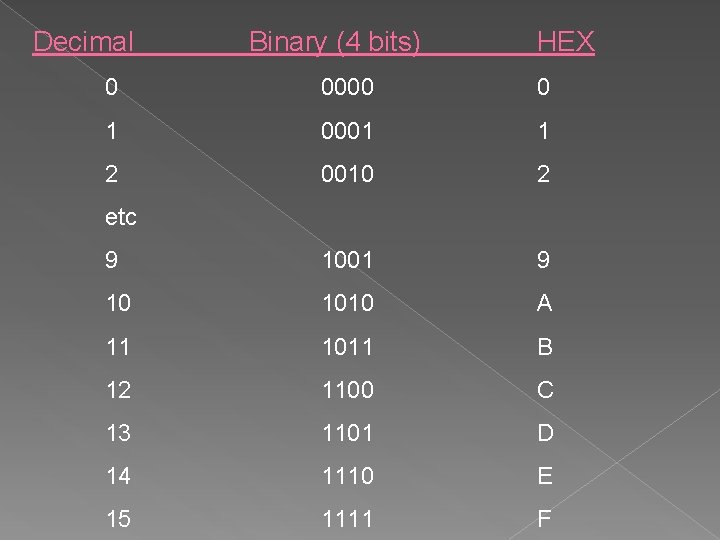
Decimal Binary (4 bits) HEX 0 0000 0 1 0001 1 2 0010 2 9 1001 9 10 1010 A 11 1011 B 12 1100 C 13 1101 D 14 1110 E 15 1111 F etc
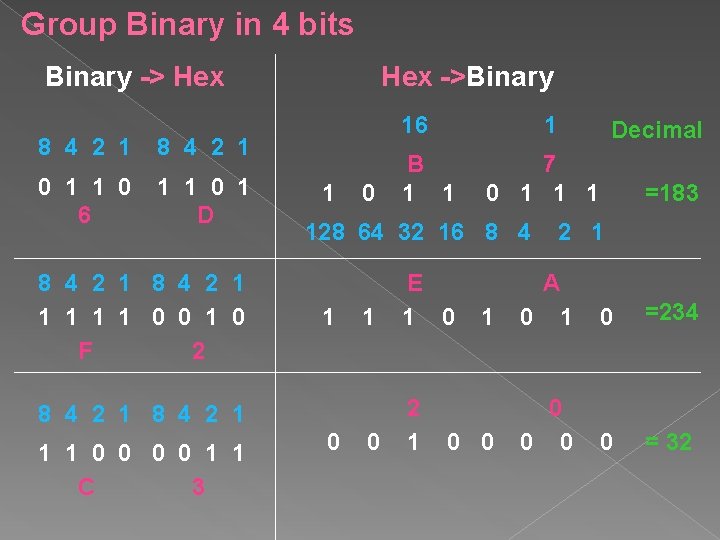
Group Binary in 4 bits Binary -> Hex 8 4 2 1 0 1 1 0 6 1 1 0 1 D 8 4 2 1 1 1 0 0 1 0 F 2 Hex ->Binary 16 1 0 B 1 1 E 1 0 0 2 1 0 Decimal 7 0 1 128 64 32 16 8 4 2 1 1 1 0 0 1 1 C 3 1 =183 2 1 1 A 0 1 0 =234 0 0 0 = 32
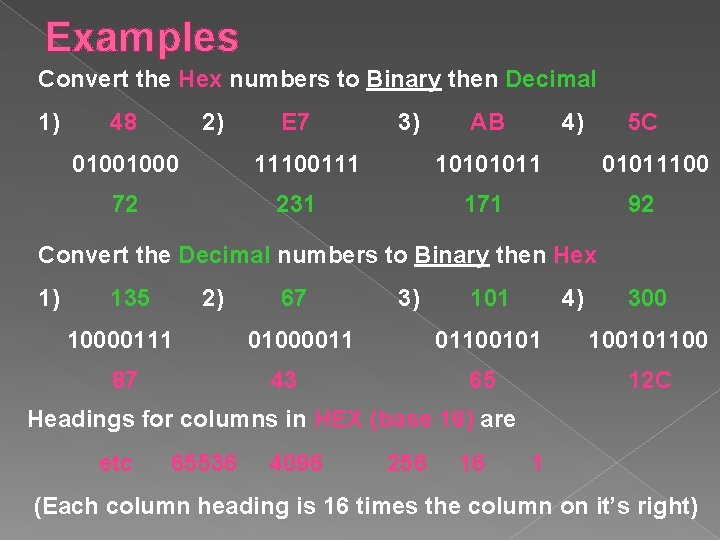
Examples Convert the Hex numbers to Binary then Decimal 1) 48 2) 01001000 E 7 3) 11100111 72 AB 4) 5 C 10101011 231 01011100 171 92 Convert the Decimal numbers to Binary then Hex 1) 135 2) 10000111 87 67 3) 01000011 43 101 4) 300 01100101100 65 12 C Headings for columns in HEX (base 16) are etc 65536 4096 256 16 1 (Each column heading is 16 times the column on it’s right)
- Slides: 27