
Reporting Services Deep Dive Deepak Kumbhar June 11
![Reporting Services Deep Dive Deepak Kumbhar [June 11 th, 2009]](https://slidetodoc.com/presentation_image_h/0d011521aa485ba20754af3fb33a8d16/image-1.jpg "Reporting Services Deep Dive Deepak Kumbhar [June 11 th, 2009]")
Reporting Services Deep Dive Deepak Kumbhar [June 11 th, 2009]
Agenda • • SQL Server 2008 Reporting Services Deep Dive Reporting Services 2008 Architecture Report Engine Improvements Report Rendering Improvements Memory Management • New Controls - Tablix [demo] - Charts and Gauges [demo] • Report Builder 2. 0 [demo]
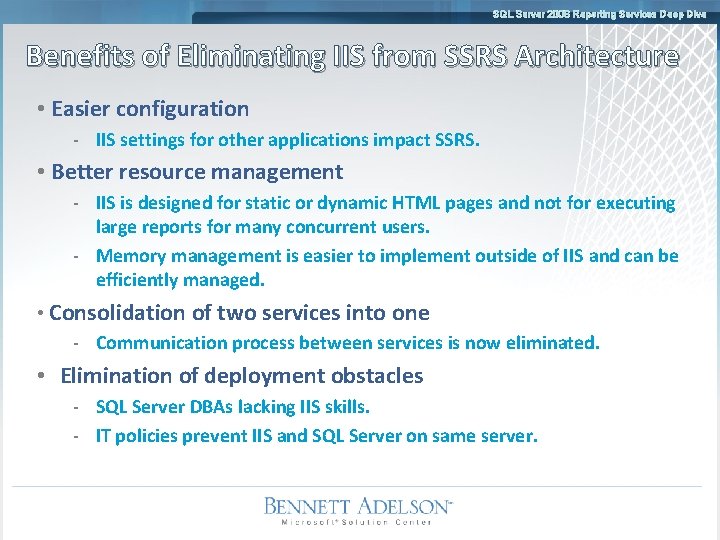
SQL Server 2008 Reporting Services Deep Dive Benefits of Eliminating IIS from SSRS Architecture • Easier configuration - IIS settings for other applications impact SSRS. • Better resource management - IIS is designed for static or dynamic HTML pages and not for executing large reports for many concurrent users. - Memory management is easier to implement outside of IIS and can be efficiently managed. • Consolidation of two services into one - Communication process between services is now eliminated. • Elimination of deployment obstacles - SQL Server DBAs lacking IIS skills. - IT policies prevent IIS and SQL Server on same server.
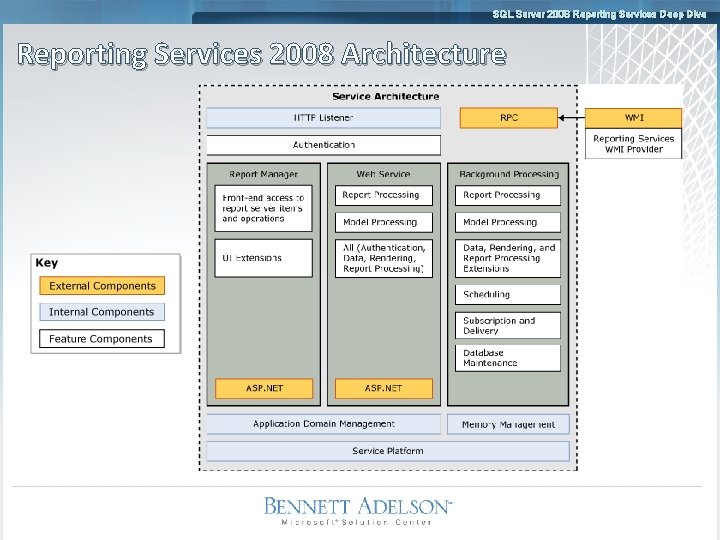
SQL Server 2008 Reporting Services Deep Dive Reporting Services 2008 Architecture
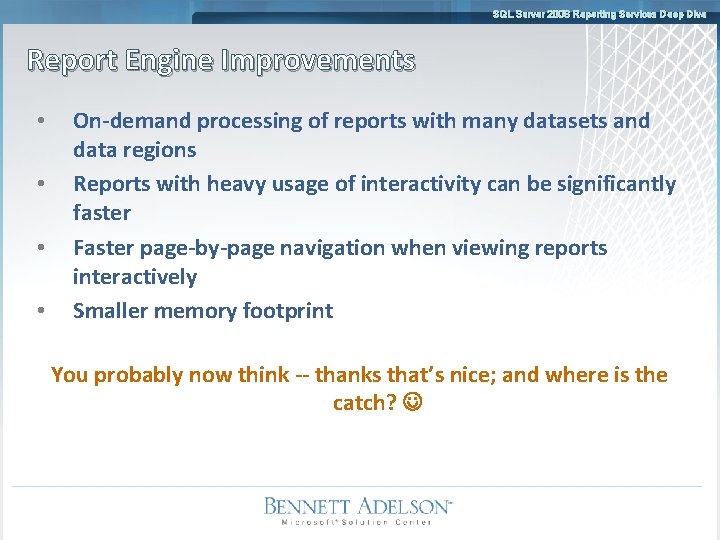
SQL Server 2008 Reporting Services Deep Dive Report Engine Improvements • • On-demand processing of reports with many datasets and data regions Reports with heavy usage of interactivity can be significantly faster Faster page-by-page navigation when viewing reports interactively Smaller memory footprint You probably now think -- thanks that’s nice; and where is the catch?
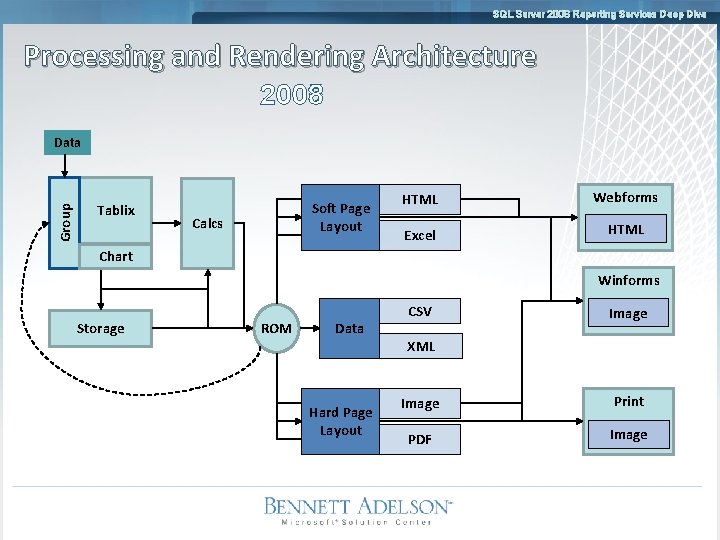
SQL Server 2008 Reporting Services Deep Dive Processing and Rendering Architecture 2008 2005 Group Data Table Tablix Matrix List Chart Soft Page Layout Calcs HTML Webforms Excel HTML Winforms Storage ROM Data Hard Page Layout CSV Image XML Image Print PDF Image
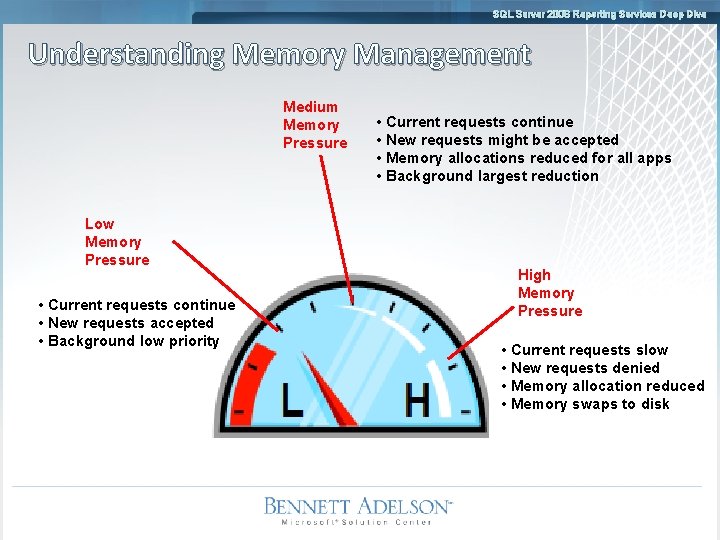
SQL Server 2008 Reporting Services Deep Dive Understanding Memory Management Medium Memory Pressure Low Memory Pressure • Current requests continue • New requests accepted • Background low priority • Current requests continue • New requests might be accepted • Memory allocations reduced for all apps • Background largest reduction High Memory Pressure • Current requests slow • New requests denied • Memory allocation reduced • Memory swaps to disk

SQL Server 2008 Reporting Services Deep Dive Configuring Memory Changes Boundaries of medium pressure % Full Memory Range KB Working. Set. Maximum High memory pressure Memory. Threshold Memory. Safety. Margin Working. Set. Minimum Medium memory pressure Low memory pressure
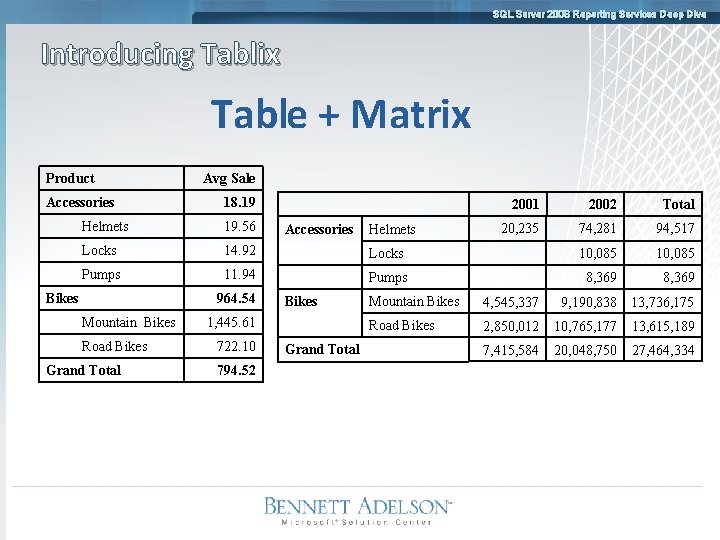
SQL Server 2008 Reporting Services Deep Dive Introducing Tablix Table + Matrix Product Accessories Avg Sale 18. 19 2001 2002 Total 20, 235 74, 281 94, 517 Helmets 19. 56 Locks 14. 92 Locks 10, 085 Pumps 11. 94 Pumps 8, 369 Bikes 964. 54 Mountain Bikes Road Bikes Grand Total Accessories Bikes 1, 445. 61 722. 10 794. 52 Grand Total Helmets Mountain Bikes 4, 545, 337 9, 190, 838 13, 736, 175 Road Bikes 2, 850, 012 10, 765, 177 13, 615, 189 7, 415, 584 20, 048, 750 27, 464, 334
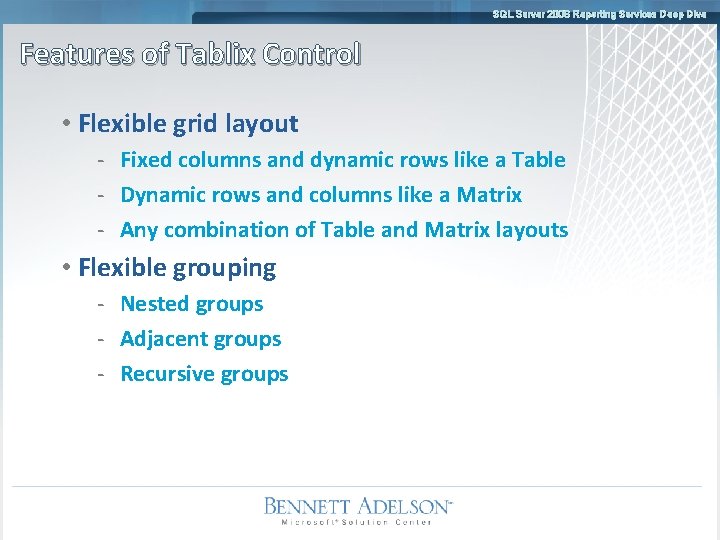
SQL Server 2008 Reporting Services Deep Dive Features of Tablix Control • Flexible grid layout - Fixed columns and dynamic rows like a Table - Dynamic rows and columns like a Matrix - Any combination of Table and Matrix layouts • Flexible grouping - Nested groups - Adjacent groups - Recursive groups
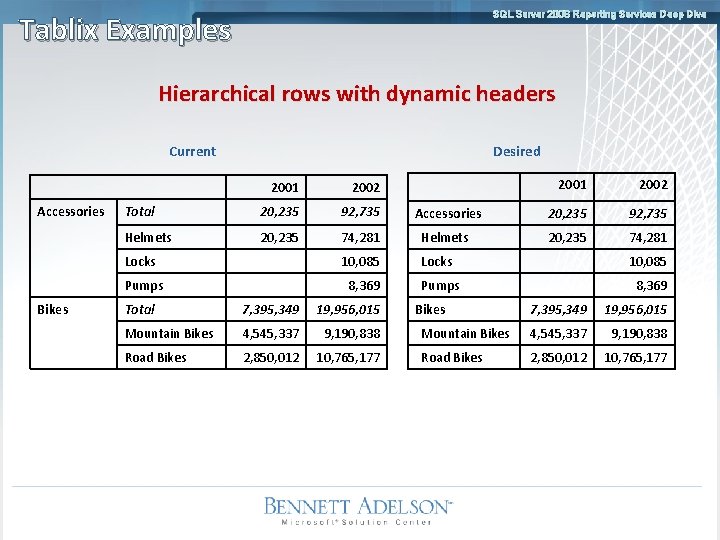
SQL Server 2008 Reporting Services Deep Dive Tablix Examples Hierarchical rows with dynamic headers Current Accessories Bikes Desired 2001 2002 Accessories 20, 235 92, 735 74, 281 Helmets 20, 235 74, 281 Locks 10, 085 Pumps 8, 369 2001 2002 Total 20, 235 92, 735 Helmets 20, 235 Total 7, 395, 349 19, 956, 015 Mountain Bikes 4, 545, 337 9, 190, 838 Road Bikes 2, 850, 012 10, 765, 177 Bikes 7, 395, 349 19, 956, 015 Mountain Bikes 4, 545, 337 9, 190, 838 Road Bikes 2, 850, 012 10, 765, 177
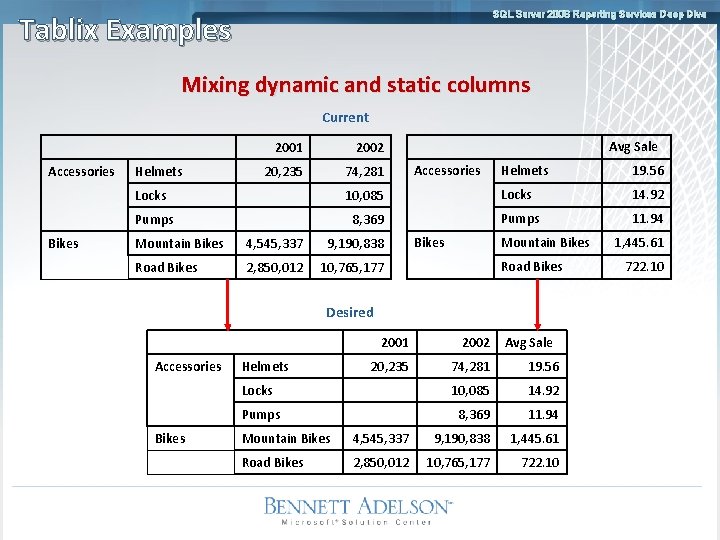
SQL Server 2008 Reporting Services Deep Dive Tablix Examples Mixing dynamic and static columns Current Accessories Bikes Helmets 2001 2002 20, 235 74, 281 Avg Sale Accessories Helmets 19. 56 Locks 10, 085 Locks 14. 92 Pumps 8, 369 Pumps 11. 94 Mountain Bikes 4, 545, 337 9, 190, 838 Road Bikes 2, 850, 012 10, 765, 177 Bikes Mountain Bikes Road Bikes Desired Accessories Bikes 2001 2002 20, 235 74, 281 19. 56 Locks 10, 085 14. 92 Pumps 8, 369 11. 94 Helmets Avg Sale Mountain Bikes 4, 545, 337 9, 190, 838 1, 445. 61 Road Bikes 2, 850, 012 10, 765, 177 722. 10 1, 445. 61 722. 10
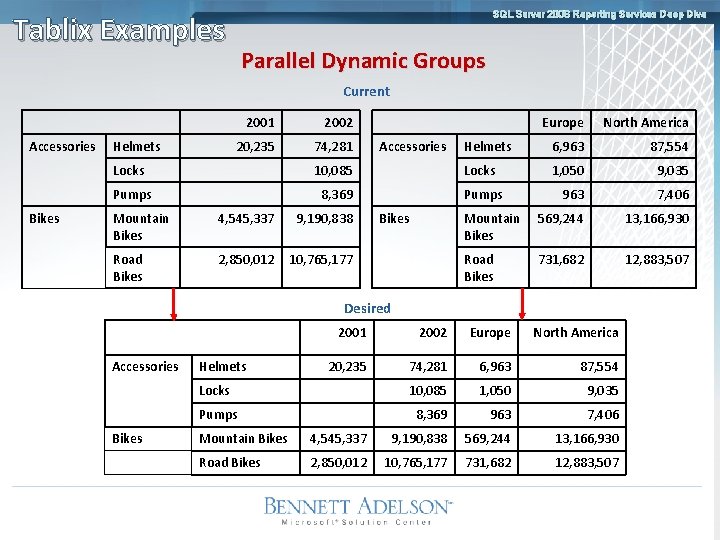
SQL Server 2008 Reporting Services Deep Dive Tablix Examples Parallel Dynamic Groups Current Accessories Bikes Helmets 2001 2002 20, 235 74, 281 Accessories Europe North America Helmets 6, 963 87, 554 1, 050 9, 035 963 7, 406 Mountain Bikes 569, 244 13, 166, 930 Road Bikes 731, 682 12, 883, 507 Locks 10, 085 Locks Pumps 8, 369 Pumps Mountain Bikes 4, 545, 337 9, 190, 838 Road Bikes 2, 850, 012 10, 765, 177 Bikes Desired Accessories Bikes 2001 2002 Europe North America 20, 235 74, 281 6, 963 87, 554 Locks 10, 085 1, 050 9, 035 Pumps 8, 369 963 7, 406 Helmets Mountain Bikes 4, 545, 337 9, 190, 838 569, 244 13, 166, 930 Road Bikes 2, 850, 012 10, 765, 177 731, 682 12, 883, 507
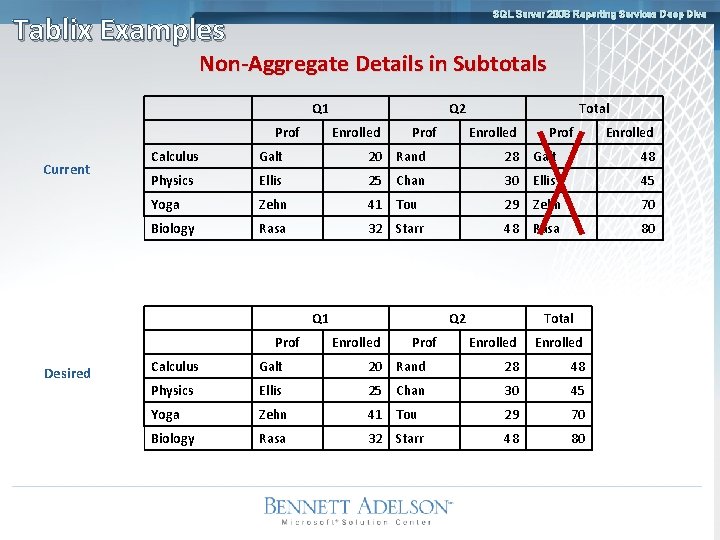
SQL Server 2008 Reporting Services Deep Dive Tablix Examples Non-Aggregate Details in Subtotals Q 1 Prof Current Q 2 Enrolled Prof Enrolled Calculus Galt 20 Rand 28 Galt 48 Physics Ellis 25 Chan 30 Ellis 45 Yoga Zehn 41 Tou 29 Zehn 70 Biology Rasa 32 Starr 48 Rasa 80 Q 1 Prof Desired Total Q 2 Enrolled Prof Total Enrolled Calculus Galt 20 Rand 28 48 Physics Ellis 25 Chan 30 45 Yoga Zehn 41 Tou 29 70 Biology Rasa 32 Starr 48 80
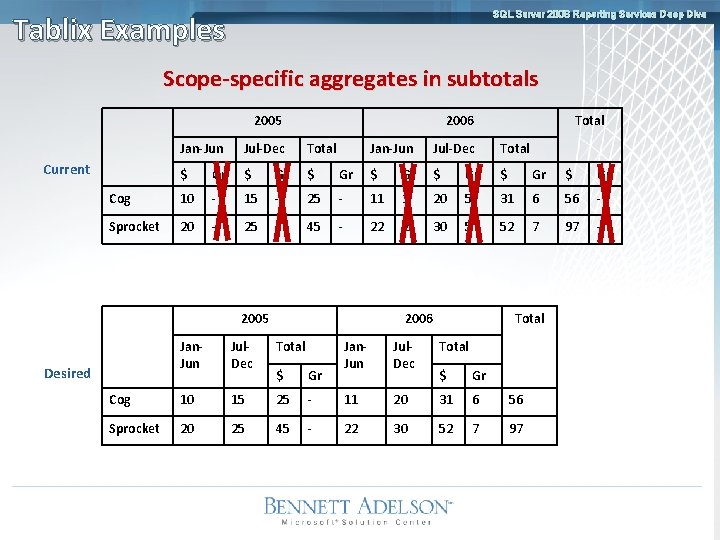
SQL Server 2008 Reporting Services Deep Dive Tablix Examples Scope-specific aggregates in subtotals 2005 2006 Jan-Jun Jul-Dec Total $ Gr $ Cog 10 - 15 - Sprocket 20 - 25 - Current Jan-Jun Jul-Dec Total Gr $ Gr 25 - 11 1 20 5 31 6 56 - 45 - 22 2 30 5 52 7 97 - 2005 2006 Jan. Jun Jul. Dec Total $ Gr Cog 10 15 25 Sprocket 20 25 45 Desired Total Jan. Jun Jul. Dec Total $ Gr - 11 20 31 6 56 - 22 30 52 7 97
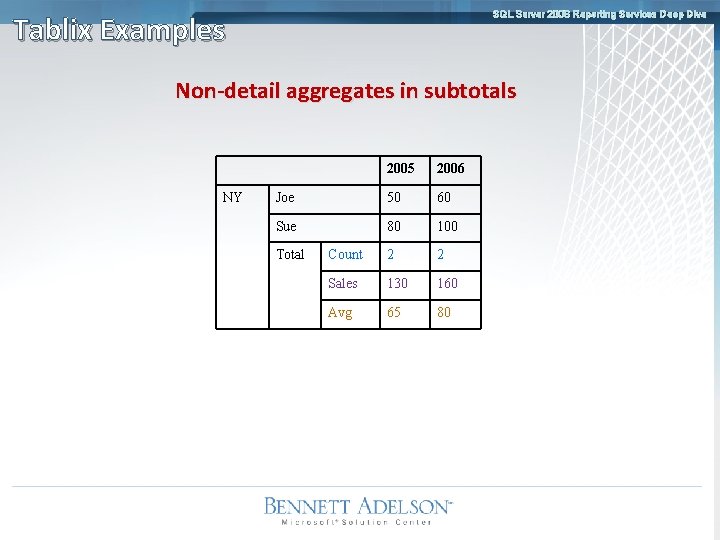
SQL Server 2008 Reporting Services Deep Dive Tablix Examples Non-detail aggregates in subtotals NY 2005 2006 Joe 50 60 Sue 80 100 Count 2 2 Sales 130 160 Avg 65 80 Total
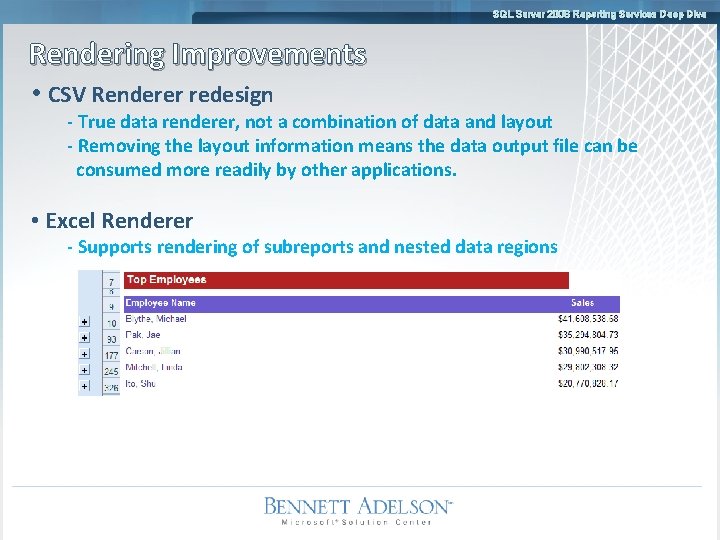
SQL Server 2008 Reporting Services Deep Dive Rendering Improvements • CSV Renderer redesign - True data renderer, not a combination of data and layout - Removing the layout information means the data output file can be consumed more readily by other applications. • Excel Renderer - Supports rendering of subreports and nested data regions
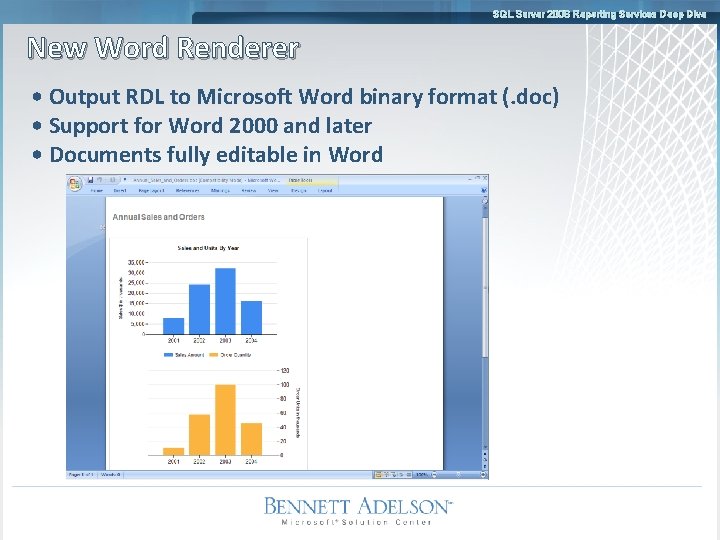
SQL Server 2008 Reporting Services Deep Dive New Word Renderer • Output RDL to Microsoft Word binary format (. doc) • Support for Word 2000 and later • Documents fully editable in Word
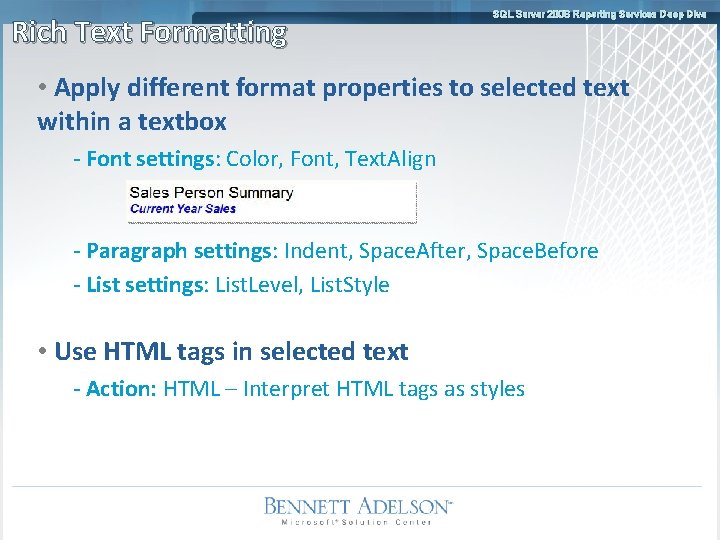
Rich Text Formatting SQL Server 2008 Reporting Services Deep Dive • Apply different format properties to selected text within a textbox - Font settings: Color, Font, Text. Align - Paragraph settings: Indent, Space. After, Space. Before - List settings: List. Level, List. Style • Use HTML tags in selected text - Action: HTML – Interpret HTML tags as styles
SQL Server 2008 Reporting Services Deep Dive Reporting Services demo Tablix Control
SQL Server 2008 Reporting Services Deep Dive Data Visualization • MS has acquired Dundas Software’s Data • Visualization products - Chart - Gauge - Map - Barcode - Calendar • New Chart and Gauge in SSRS 2008 • Other controls planned for post-2008
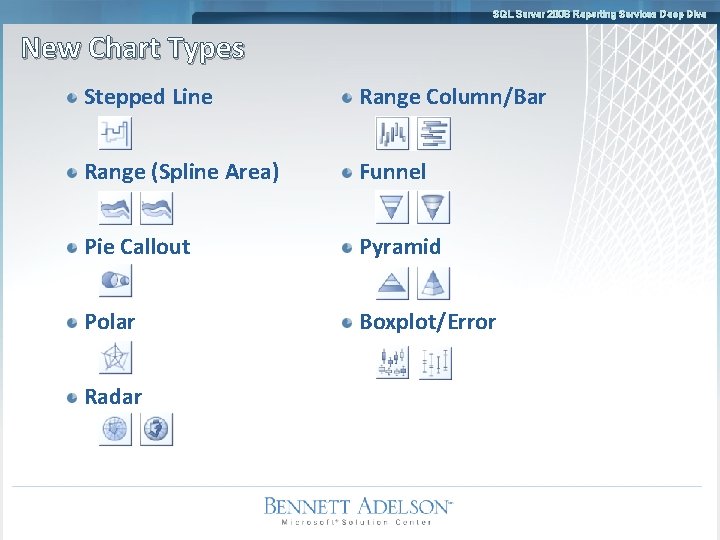
SQL Server 2008 Reporting Services Deep Dive New Chart Types Stepped Line Range Column/Bar Range (Spline Area) Funnel Pie Callout Pyramid Polar Boxplot/Error Radar
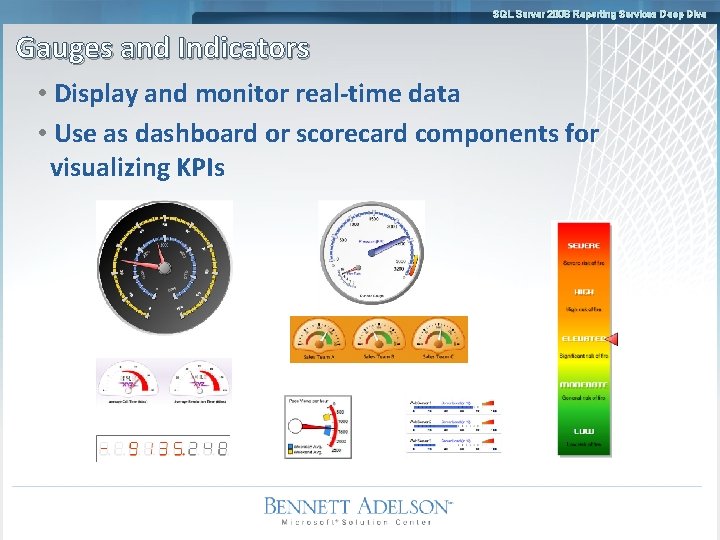
SQL Server 2008 Reporting Services Deep Dive Gauges and Indicators • Display and monitor real-time data • Use as dashboard or scorecard components for visualizing KPIs
SQL Server 2008 Reporting Services Deep Dive Reporting Services demo Data Visualization
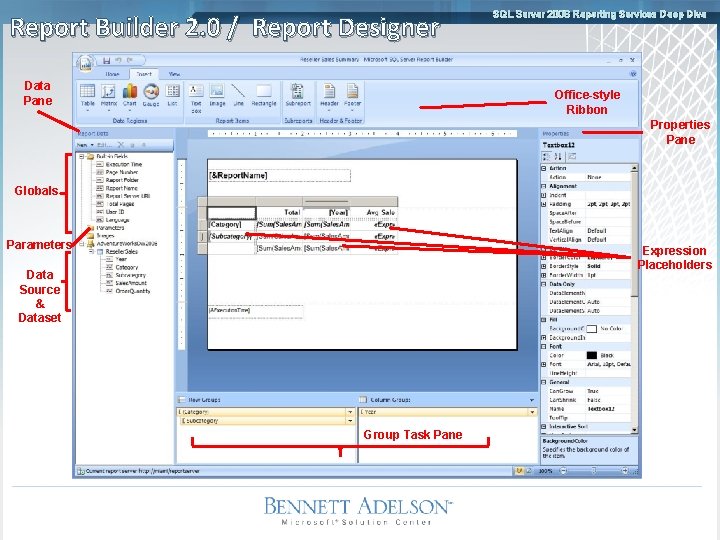
Report Builder 2. 0 / Report Designer Data Pane SQL Server 2008 Reporting Services Deep Dive Office-style Ribbon Properties Pane Globals Parameters Expression Placeholders Data Source & Dataset Group Task Pane
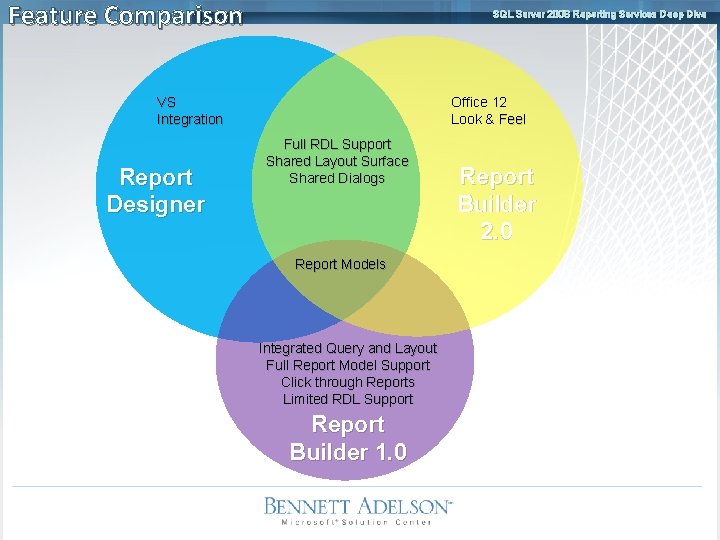
Feature Comparison SQL Server 2008 Reporting Services Deep Dive VS Integration Report Designer Office 12 Look & Feel Full RDL Support Shared Layout Surface Shared Dialogs Report Models Integrated Query and Layout Full Report Model Support Click through Reports Limited RDL Support Report Builder 1. 0 Report Builder 2. 0
SQL Server 2008 Reporting Services Deep Dive Reporting Services demo Report Builder 2. 0
Resources SQL Server 2008 Reporting Services Deep Dive • Application Domains for Report Server Applications, http: //msdn 2. microsoft. com/en-us/library/bb 934330(SQL. 100). aspx • Configuring Authentication in Reporting Services, http: //msdn 2. microsoft. com/en-us/library/bb 283249(SQL. 100). aspx • About URL Reservations and Registration (Reporting Services), http: //msdn 2. microsoft. com/en-us/library/bb 677364(SQL. 100). aspx • Group Variables in SSRS 2008 for Custom Aggregation http: //blogs. msdn. com/robertbruckner/archive/2008/07/20/Using-groupvariables-in-reporting-services-2008 -for-custom-aggregation. aspx • Reporting Services WMI Provider, http: //msdn 2. microsoft. com/en-us/library/ms 152836(SQL. 100). aspx

Thank You Deepak Kumbhar dkumbhar@bennettadelson. com
- Slides: 29