
Relational Model UNIT II Relational Model in DBMS
Relational Model UNIT - II
Relational Model in DBMS • Relational Model was proposed by E. F. Codd to model data in the form of relations or tables. • After designing the conceptual model of Database using ER diagram, we need to convert the conceptual model in the relational model which can be implemented using any RDMBS languages like Oracle SQL, My. SQL, DB 2, Postgre. SQL, Altibase etc.
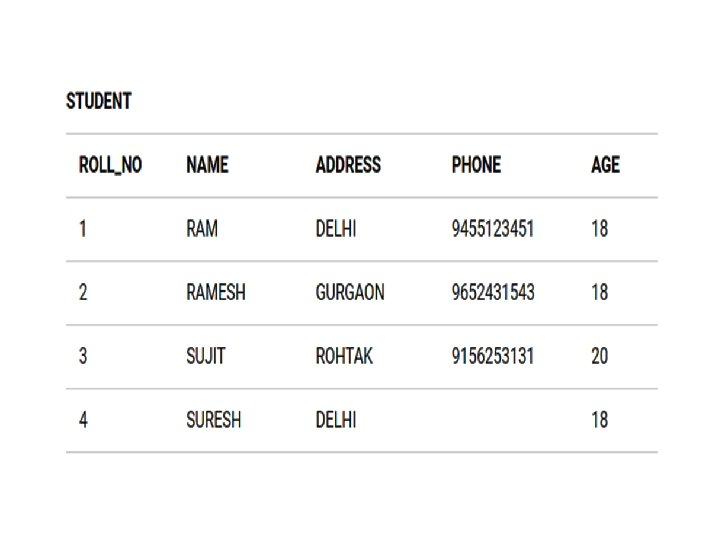
What is Relational Model? • Relational Model represents how data is stored in Relational Databases. • A relational database stores data in the form of relations (tables). • Consider a relation STUDENT with attributes ROLL_NO, NAME, ADDRESS, PHONE and AGE
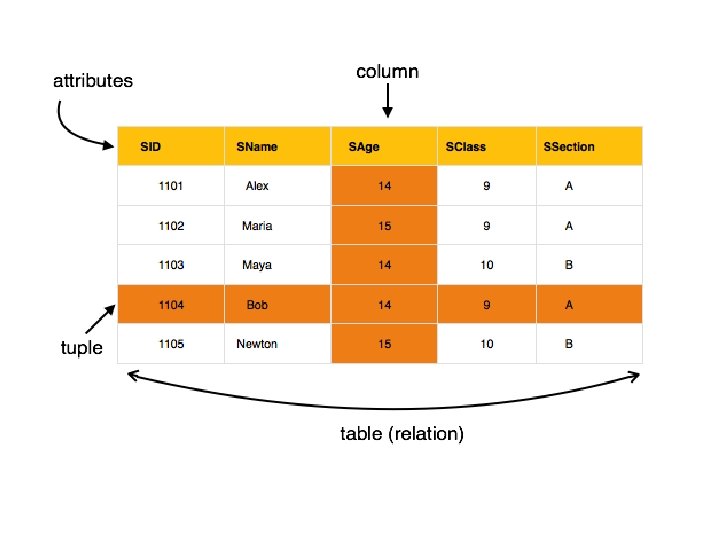
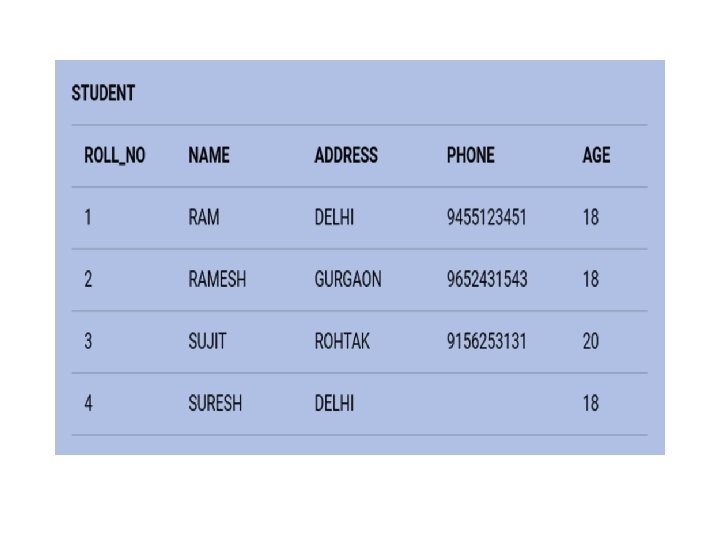
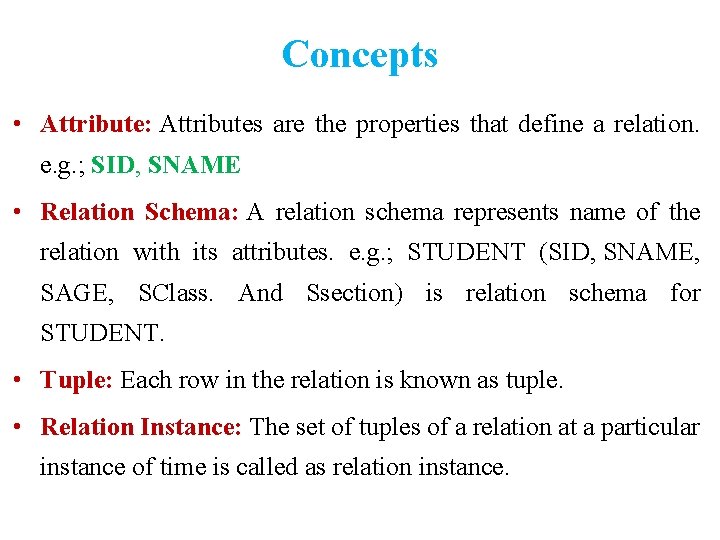
Concepts • Attribute: Attributes are the properties that define a relation. e. g. ; SID, SNAME • Relation Schema: A relation schema represents name of the relation with its attributes. e. g. ; STUDENT (SID, SNAME, SAGE, SClass. And Ssection) is relation schema for STUDENT. • Tuple: Each row in the relation is known as tuple. • Relation Instance: The set of tuples of a relation at a particular instance of time is called as relation instance.
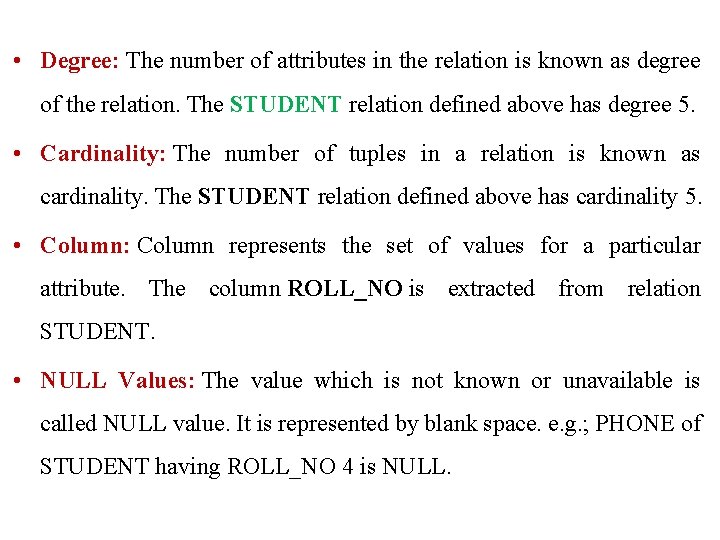
• Degree: The number of attributes in the relation is known as degree of the relation. The STUDENT relation defined above has degree 5. • Cardinality: The number of tuples in a relation is known as cardinality. The STUDENT relation defined above has cardinality 5. • Column: Column represents the set of values for a particular attribute. The column ROLL_NO is extracted from relation STUDENT. • NULL Values: The value which is not known or unavailable is called NULL value. It is represented by blank space. e. g. ; PHONE of STUDENT having ROLL_NO 4 is NULL.
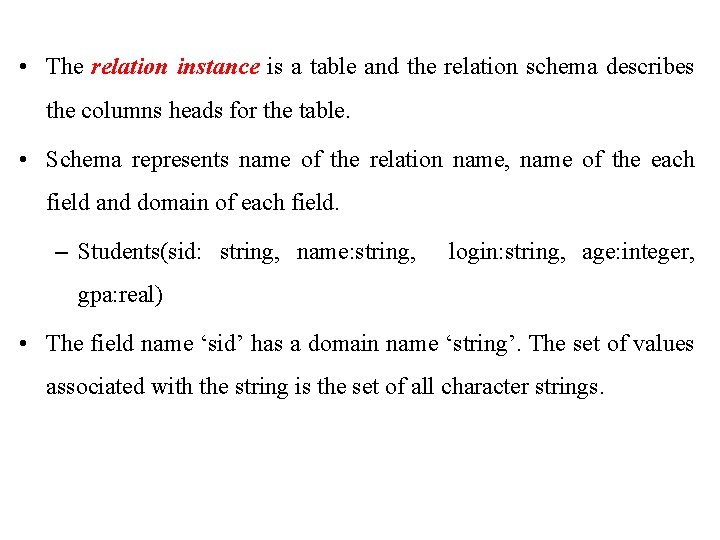
• The relation instance is a table and the relation schema describes the columns heads for the table. • Schema represents name of the relation name, name of the each field and domain of each field. – Students(sid: string, name: string, login: string, age: integer, gpa: real) • The field name ‘sid’ has a domain name ‘string’. The set of values associated with the string is the set of all character strings.
• An instance of a relation is a set of tuples also called as ‘Records’, in which each tuple has same no. of fields as the relation schema. • A relation instance can be thought as a table in which each tuple is a row, and all rows have same no. of fields. • Domain constraints in the scheme specify an important condition that we want each instance of the relation to satisfy: The value that appear in a column must be drawn from the domain associated with that column.
• A Relational Database is a collection of relations with distinct relation names. • The Relational Database Schema is the collection of schemas for the relations in the database. Example: University database with relations called Student, Faculty, Courses, Enrolled, Rooms, Teaches, Meet_IN.
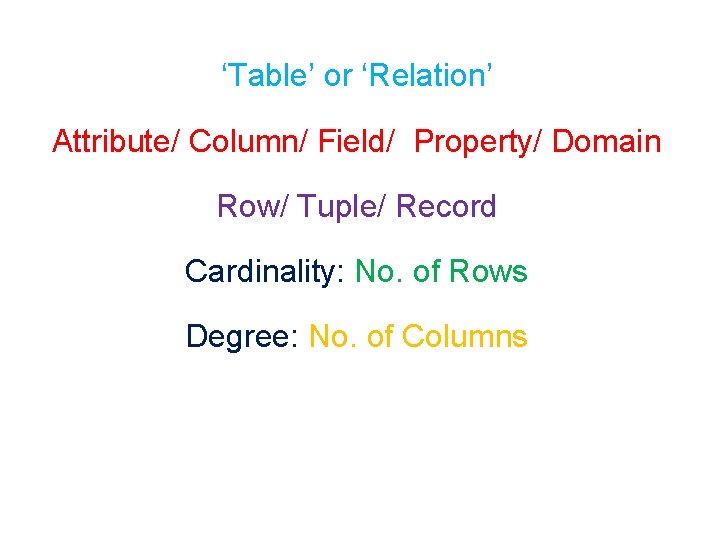
‘Table’ or ‘Relation’ Attribute/ Column/ Field/ Property/ Domain Row/ Tuple/ Record Cardinality: No. of Rows Degree: No. of Columns
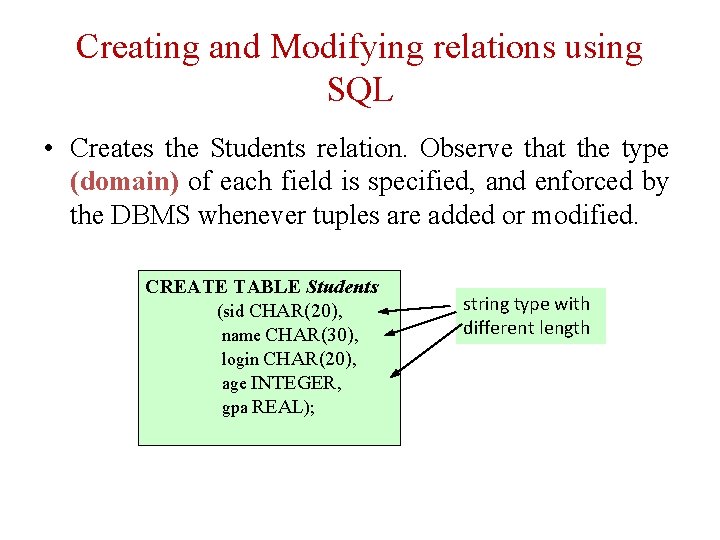
Creating and Modifying relations using SQL • Creates the Students relation. Observe that the type (domain) of each field is specified, and enforced by the DBMS whenever tuples are added or modified. CREATE TABLE Students (sid CHAR(20), name CHAR(30), login CHAR(20), age INTEGER, gpa REAL); string type with different length
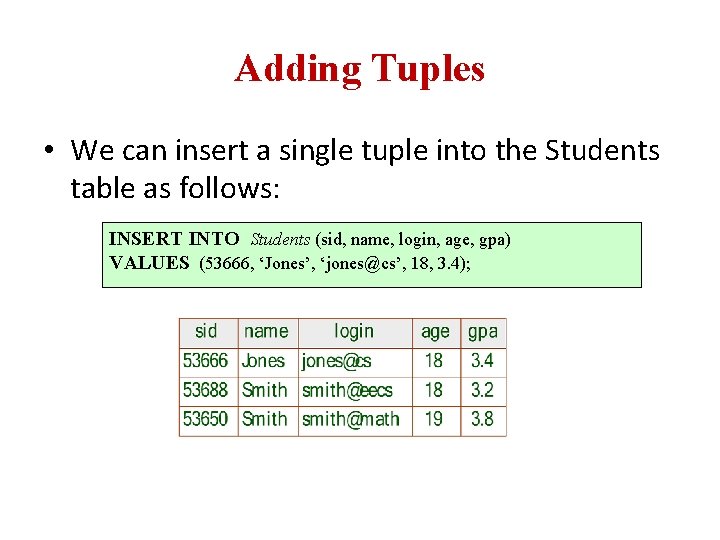
Adding Tuples • We can insert a single tuple into the Students table as follows: INSERT INTO Students (sid, name, login, age, gpa) VALUES (53666, ‘Jones’, ‘jones@cs’, 18, 3. 4);
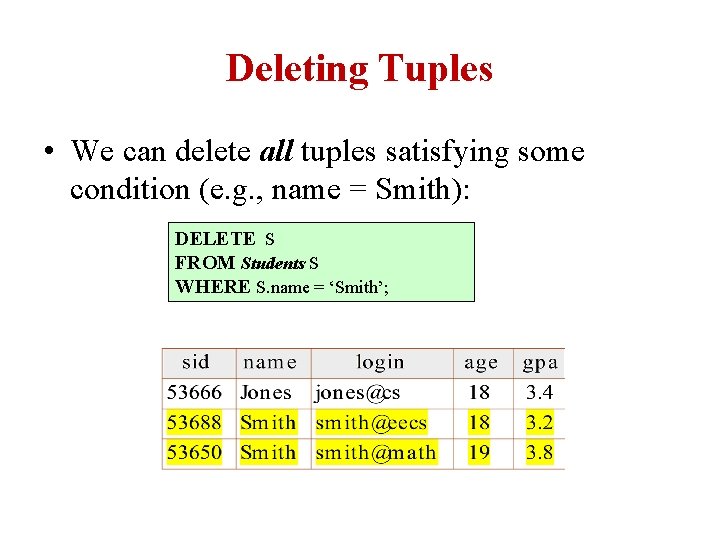
Deleting Tuples • We can delete all tuples satisfying some condition (e. g. , name = Smith): DELETE S FROM Students S WHERE S. name = ‘Smith’;
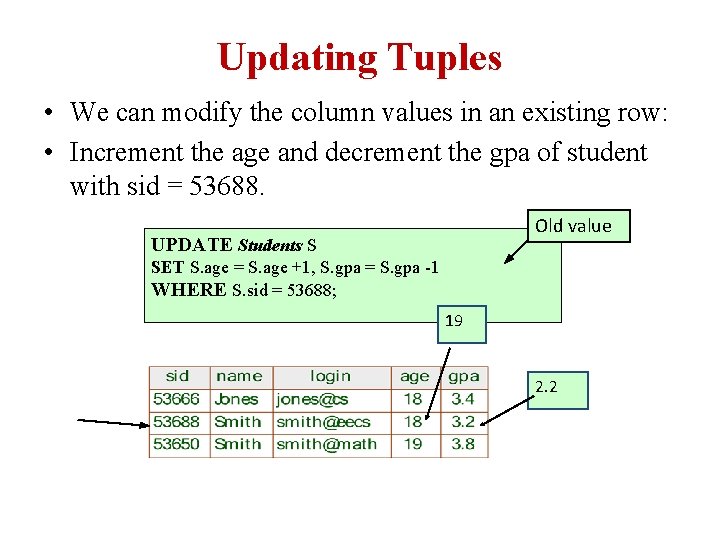
Updating Tuples • We can modify the column values in an existing row: • Increment the age and decrement the gpa of student with sid = 53688. Old value UPDATE Students S SET S. age = S. age +1, S. gpa = S. gpa -1 WHERE S. sid = 53688; 19 2. 2
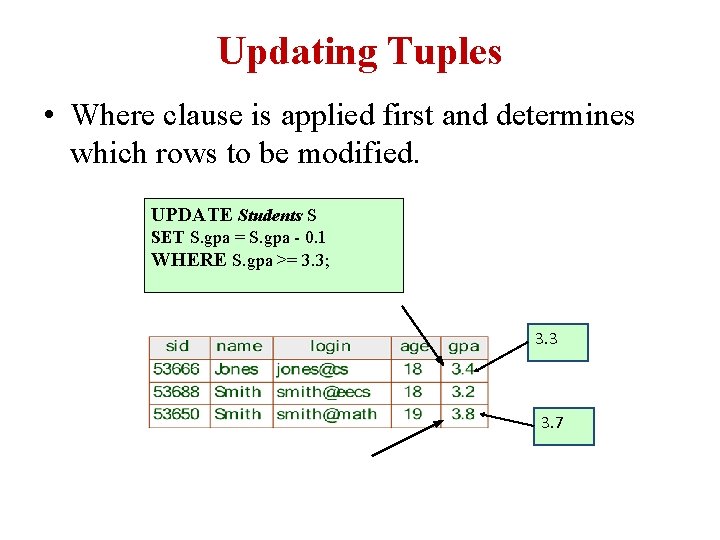
Updating Tuples • Where clause is applied first and determines which rows to be modified. UPDATE Students S SET S. gpa = S. gpa - 0. 1 WHERE S. gpa >= 3. 3; 3. 3 3. 7
Integrity Constraints (ICs) • An IC is a condition specified on a database schema and restricts the data that can be stored in an instance of the database, such as domain constraints. – ICs are specified when schema is defined. – ICs are checked when relations are modified. • A legal instance of a relation is one that satisfies all specified ICs. – DBMS should not allow illegal instances. • If the DBMS checks ICs, stored data is more faithful to real-world meaning. – Avoids data entry errors, too!
Constraints • Constraints enforce limits to the data or type of data that can be inserted/updated/deleted from a table. • The whole purpose of constraints is to maintain the data integrity during an update/delete/insert into a table.
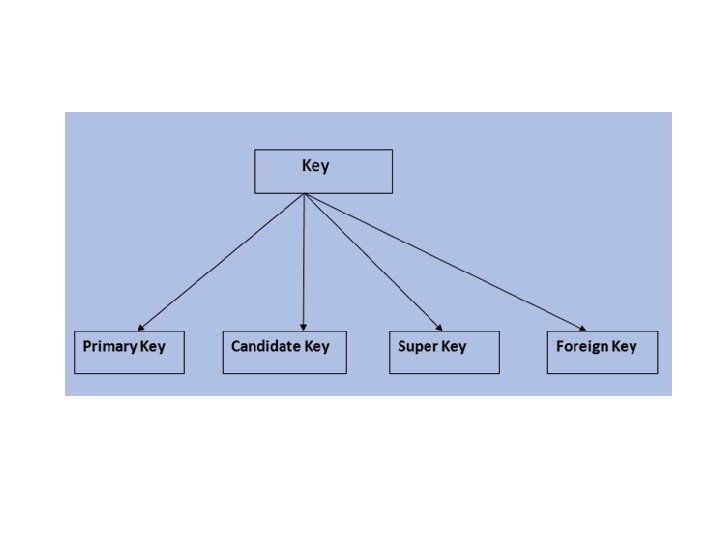
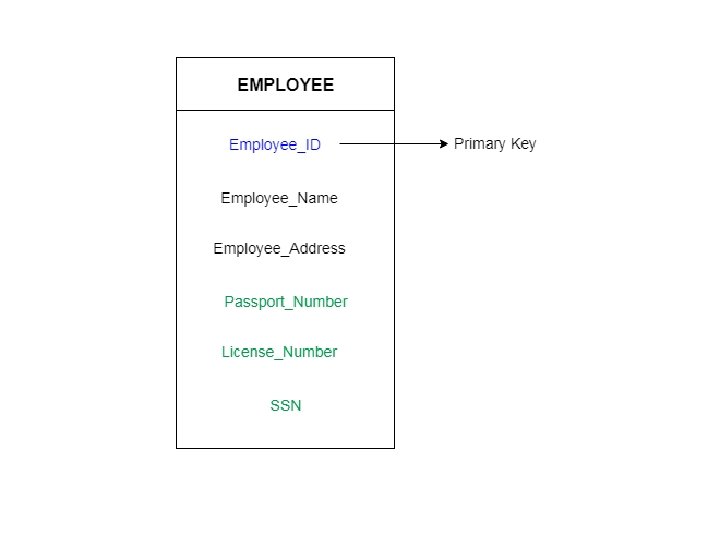
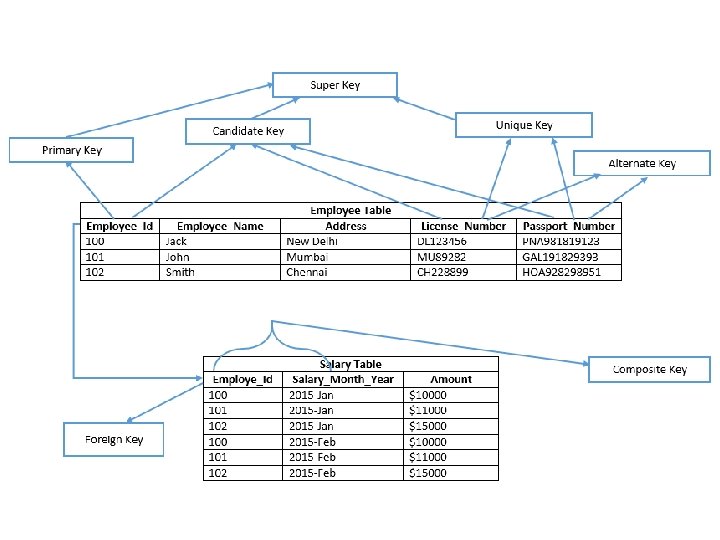
Keys • A DBMS key is an attribute or set of an attribute which helps you to identify a Row (Tuple) in a Relation (Table). • They allow you to find the relation between two tables. • Keys help you uniquely identify a row in a table by a combination of one or more columns in that table.
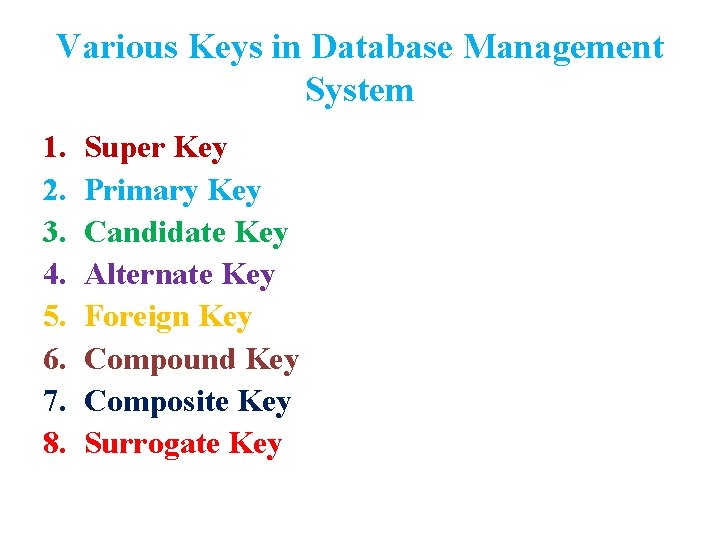
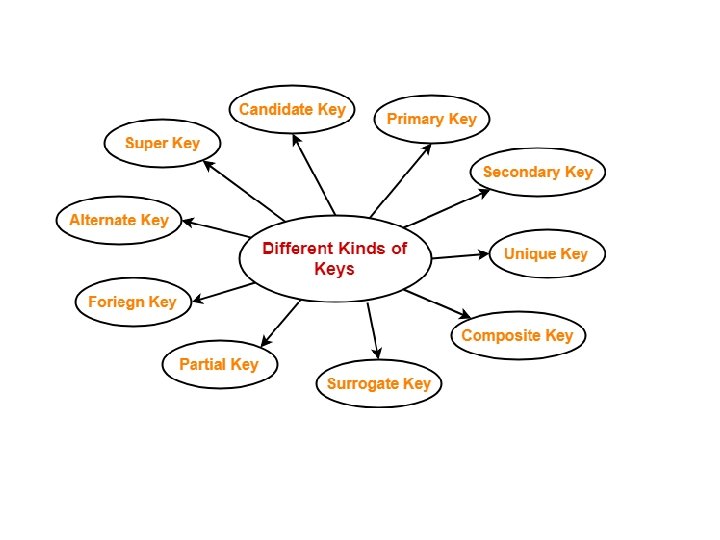
Various Keys in Database Management System 1. 2. 3. 4. 5. 6. 7. 8. Super Key Primary Key Candidate Key Alternate Key Foreign Key Compound Key Composite Key Surrogate Key
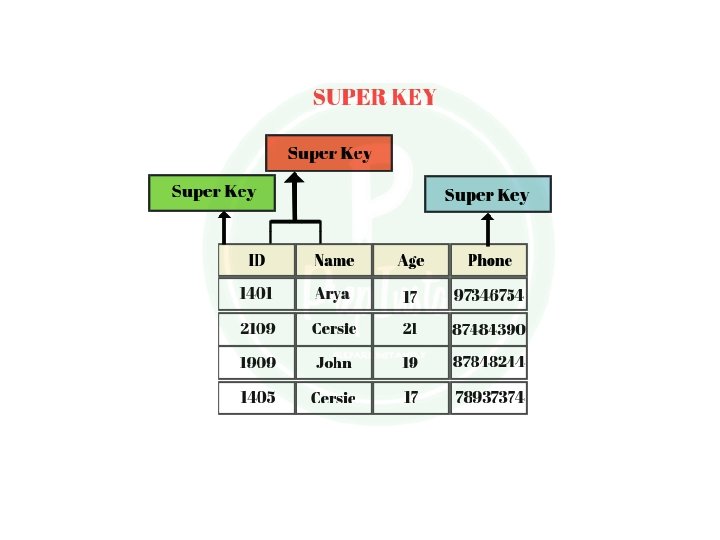
Super Key • An attribute or set of attributes which can uniquely identify a tuple is known as Super Key. • A Super key may have additional attributes that are not needed for unique identification.
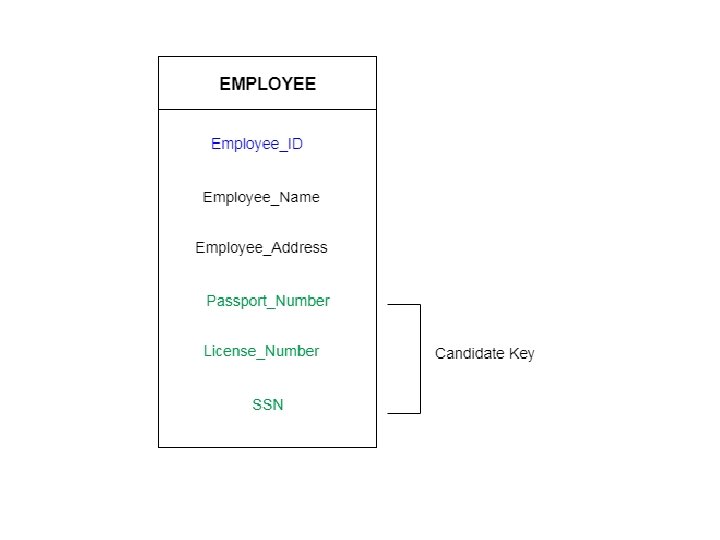
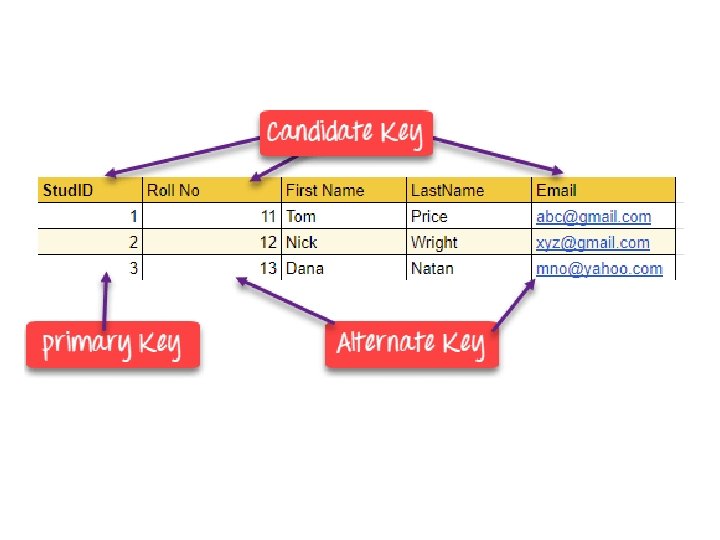
Candidate Key • It is nothing but minimal subset of super key, which can be used to identify a row of data in table. • If any proper subset of a super key is a super key then that key cannot be a candidate key. • The value of Candidate Key is unique and non-null for every tuple. • There can be more than one candidate key in a relation.
• Adding zero or more attributes to candidate key generates super key. • A candidate key is a super key but vice versa is not true.
Primary Key • There can be more than one candidate key in relation out of which one can be chosen as the primary key. Rules for defining Primary key: • Two rows can't have the same primary key value • It must for every row to have a primary key value. • The primary key field cannot be null. • The value in a primary key column can never be modified or updated if any foreign key refers to that primary key.
Alternate key • All the keys which are not primary key are called an alternate key. It is a candidate key which is currently not the primary key. However, A table may have single or multiple choices for the primary key.
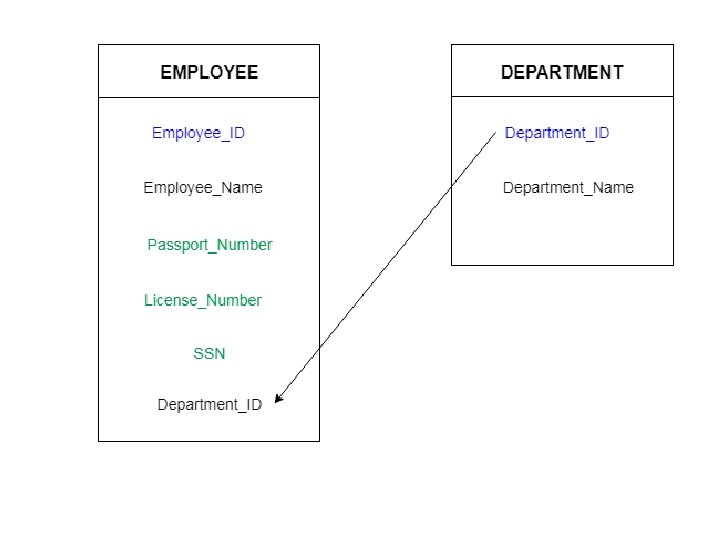
Foreign Key • It is an attribute in a table which is used to define its relationship with another table. • Using foreign key helps in maintaining data integrity for tables in relationships. • Every relationship in the model needs to be supported by a foreign key.
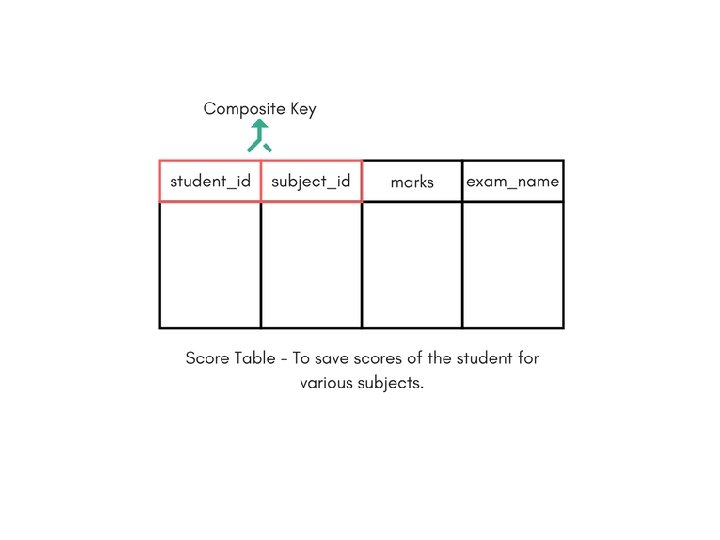
Composite key • A key which has multiple attributes to uniquely identify rows in a table is called a composite key. • Any key with more than one attribute is called composite key. • The difference between compound and the composite key is that any part of the compound key can be a foreign key, but the composite key may or maybe not a part of the foreign key.
Compound key • If a composite key has atleast one attribute which is a Foreign Key. • Compound key has many fields which allow you to uniquely recognize a specific record. • It is possible that each column may be not unique by itself within the database. However, when combined with the other column or columns the combination of composite keys become unique.
Surrogate key • An Artificial Key which aims to uniquely identify each record. • These kind of key are unique because they are created when you don't have any natural primary key. • They do not lend any meaning to the data in the table. • Surrogate key is usually an integer.
Specifying Key constraints in SQL • In SQL, we can declare that a subset of the columns of a table constitute a key by using the UNIQUE constraint.
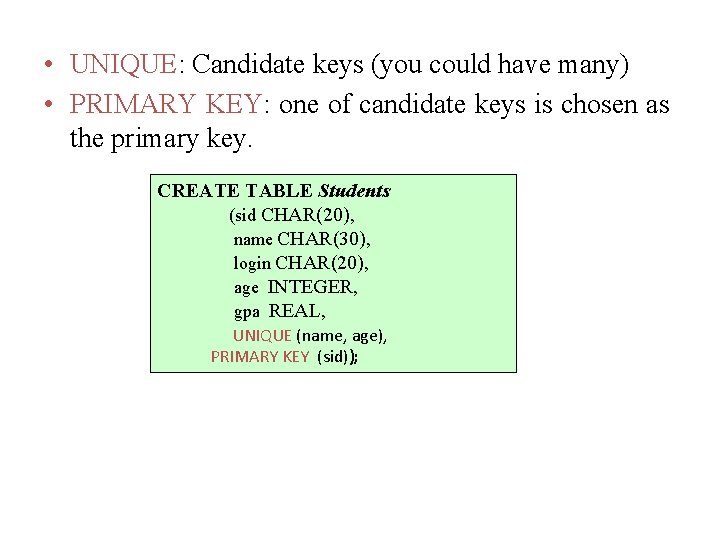
• UNIQUE: Candidate keys (you could have many) • PRIMARY KEY: one of candidate keys is chosen as the primary key. CREATE TABLE Students (sid CHAR(20), name CHAR(30), login CHAR(20), age INTEGER, gpa REAL, UNIQUE (name, age), PRIMARY KEY (sid));
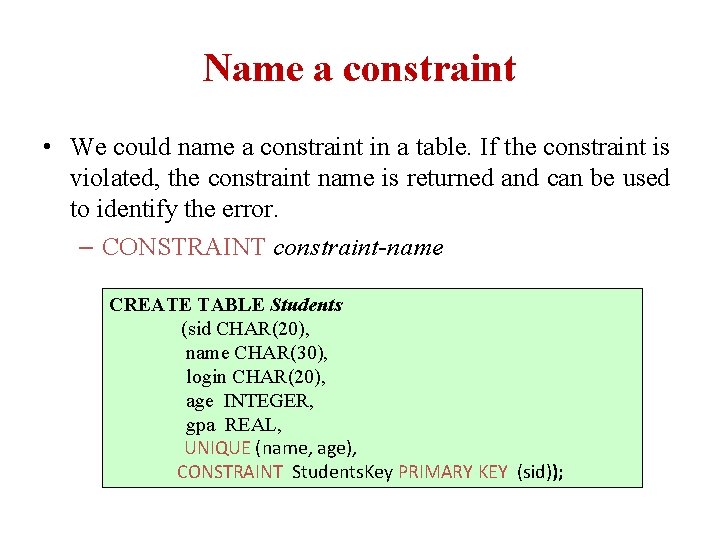
Name a constraint • We could name a constraint in a table. If the constraint is violated, the constraint name is returned and can be used to identify the error. – CONSTRAINT constraint-name CREATE TABLE Students (sid CHAR(20), name CHAR(30), login CHAR(20), age INTEGER, gpa REAL, UNIQUE (name, age), CONSTRAINT Students. Key PRIMARY KEY (sid));
Foreign Keys, Referential Integrity • Sometimes the information stored in a relation is linked to the information stored in another relation. If one of the relation is modified, the other must be checked, and perhaps modified, to keep the data consistent. • The most common IC involving two relations is a “Foreign Key” Constraint. • E. g. sid is a foreign key referring to Students: – Enrolled(sid: string, cid: string, grade: string)
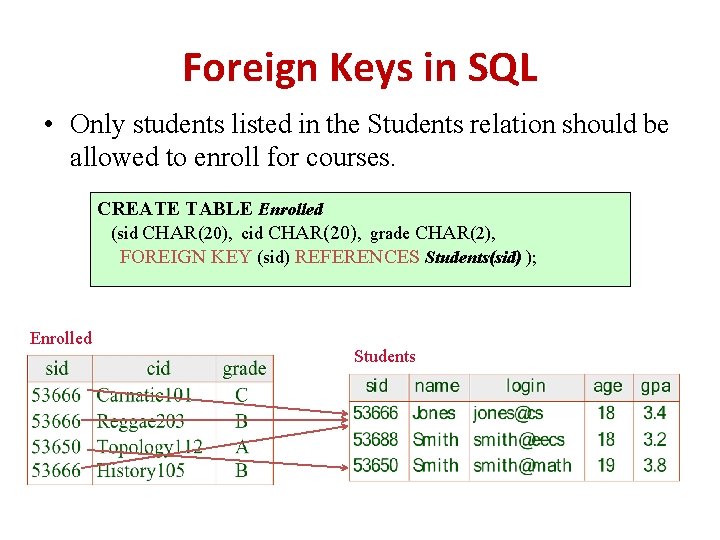
Foreign Keys in SQL • Only students listed in the Students relation should be allowed to enroll for courses. CREATE TABLE Enrolled (sid CHAR(20), cid CHAR(20), grade CHAR(2), FOREIGN KEY (sid) REFERENCES Students(sid) ); Enrolled Students
• The foreign key constraint states that every sid value in enrolled must also appear in students. • The foreign key in the referencing relation must match the primary key of the referenced relation, i. , e it must have the same no. of columns and compatible data types, although the column names are different.

Enforcing Integrity Constraints • ICs are specified when a relation is created and enforced when a relation is modified. • Violating the primary key constraint, the transaction will be rejected. • Inserting a tuple with an existing sid. INSERT INTO Students (sid, name, login, age, gpa) VALUES (53688, ‘Mike’, ‘mike@ee’, 17, 3. 4); • The insertion violates the primary key constraint because there is already a tuple with sid 53688 and it will be rejected by DBMS.
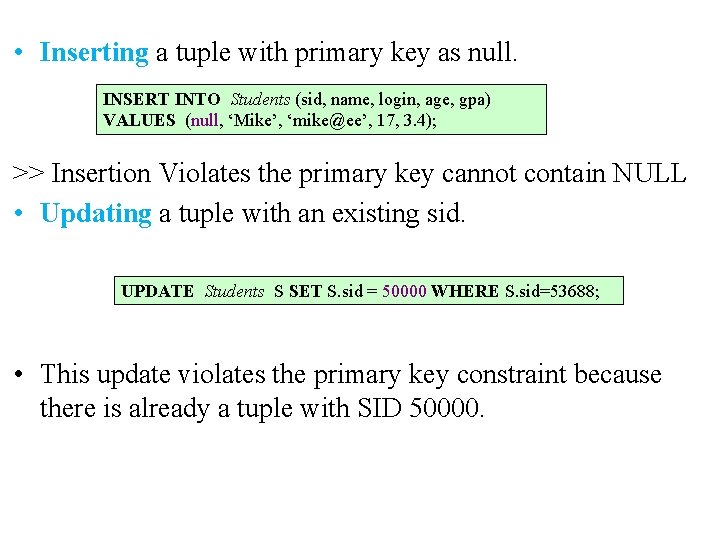
• Inserting a tuple with primary key as null. INSERT INTO Students (sid, name, login, age, gpa) VALUES (null, ‘Mike’, ‘mike@ee’, 17, 3. 4); >> Insertion Violates the primary key cannot contain NULL • Updating a tuple with an existing sid. UPDATE Students S SET S. sid = 50000 WHERE S. sid=53688; • This update violates the primary key constraint because there is already a tuple with SID 50000.
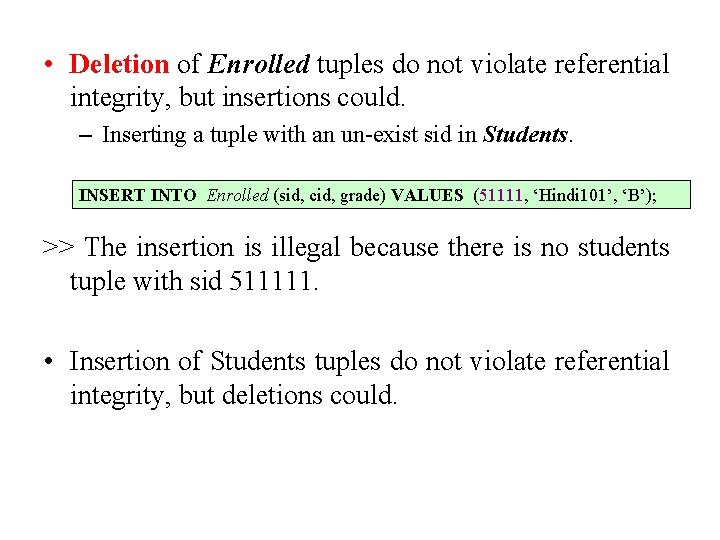
• Deletion of Enrolled tuples do not violate referential integrity, but insertions could. – Inserting a tuple with an un-exist sid in Students. INSERT INTO Enrolled (sid, cid, grade) VALUES (51111, ‘Hindi 101’, ‘B’); >> The insertion is illegal because there is no students tuple with sid 511111. • Insertion of Students tuples do not violate referential integrity, but deletions could.
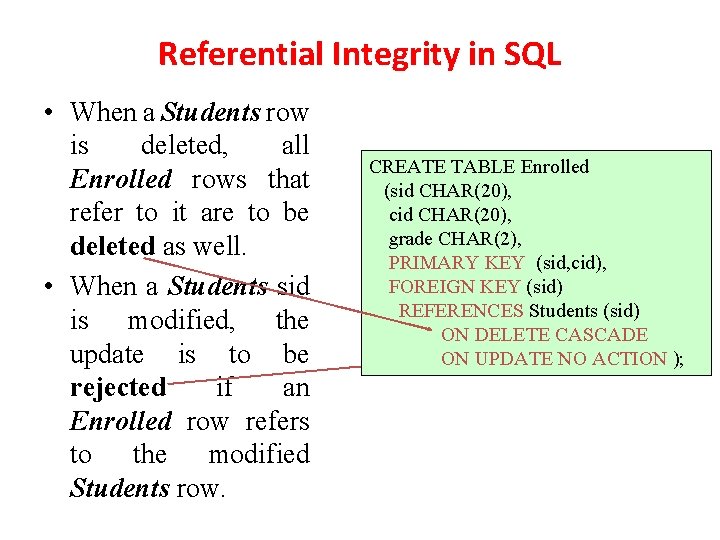
Referential Integrity in SQL • When a Students row is deleted, all Enrolled rows that refer to it are to be deleted as well. • When a Students sid is modified, the update is to be rejected if an Enrolled row refers to the modified Students row. CREATE TABLE Enrolled (sid CHAR(20), cid CHAR(20), grade CHAR(2), PRIMARY KEY (sid, cid), FOREIGN KEY (sid) REFERENCES Students (sid) ON DELETE CASCADE ON UPDATE NO ACTION );
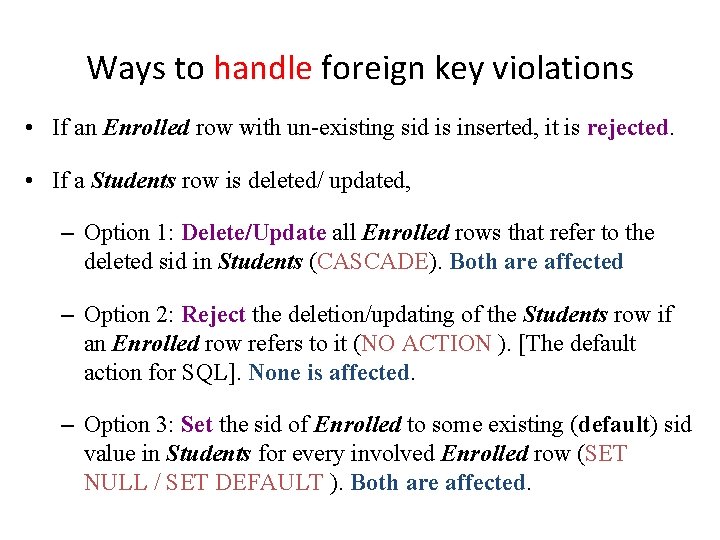
Ways to handle foreign key violations • If an Enrolled row with un-existing sid is inserted, it is rejected. • If a Students row is deleted/ updated, – Option 1: Delete/Update all Enrolled rows that refer to the deleted sid in Students (CASCADE). Both are affected – Option 2: Reject the deletion/updating of the Students row if an Enrolled row refers to it (NO ACTION ). [The default action for SQL]. None is affected. – Option 3: Set the sid of Enrolled to some existing (default) sid value in Students for every involved Enrolled row (SET NULL / SET DEFAULT ). Both are affected.
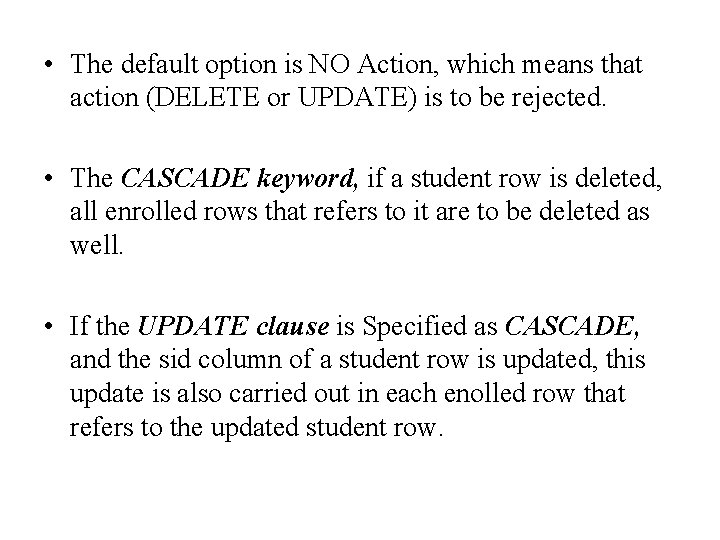
• The default option is NO Action, which means that action (DELETE or UPDATE) is to be rejected. • The CASCADE keyword, if a student row is deleted, all enrolled rows that refers to it are to be deleted as well. • If the UPDATE clause is Specified as CASCADE, and the sid column of a student row is updated, this update is also carried out in each enolled row that refers to the updated student row.
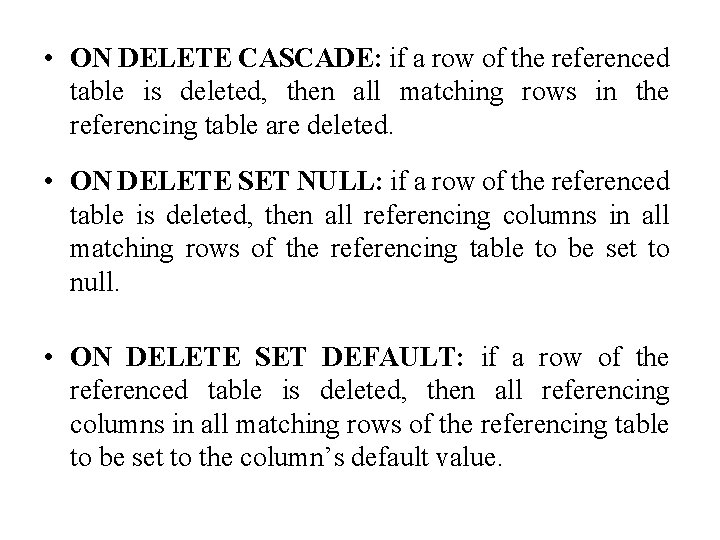
• ON DELETE CASCADE: if a row of the referenced table is deleted, then all matching rows in the referencing table are deleted. • ON DELETE SET NULL: if a row of the referenced table is deleted, then all referencing columns in all matching rows of the referencing table to be set to null. • ON DELETE SET DEFAULT: if a row of the referenced table is deleted, then all referencing columns in all matching rows of the referencing table to be set to the column’s default value.
Transactions and constraints • A program that runs against a database is called a transaction and it can contain several statements (queries, inserts, updates etc. , ) that access the database.
Querying Relational Data • A Relational database query is a question about the data, and the answer consists of a new relation containing the result. • A query language is a specialized language for writing queries. • SQL is the most popular commercial query language for a relational DBMS.
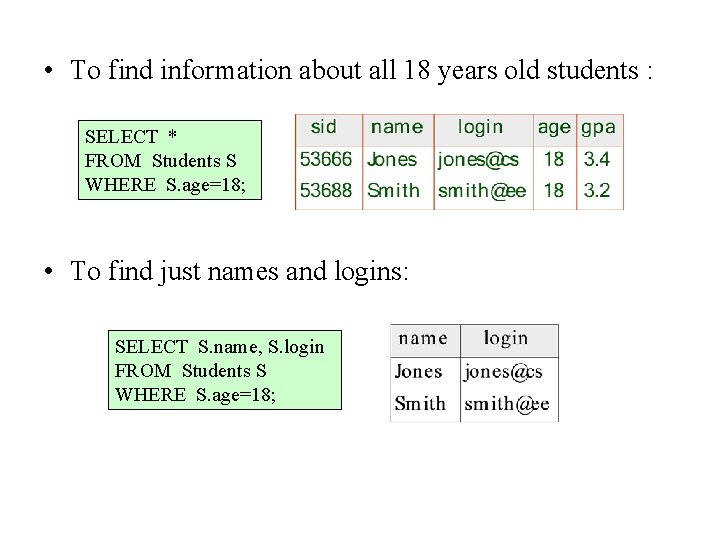
• To find information about all 18 years old students : SELECT * FROM Students S WHERE S. age=18; • To find just names and logins: SELECT S. name, S. login FROM Students S WHERE S. age=18;
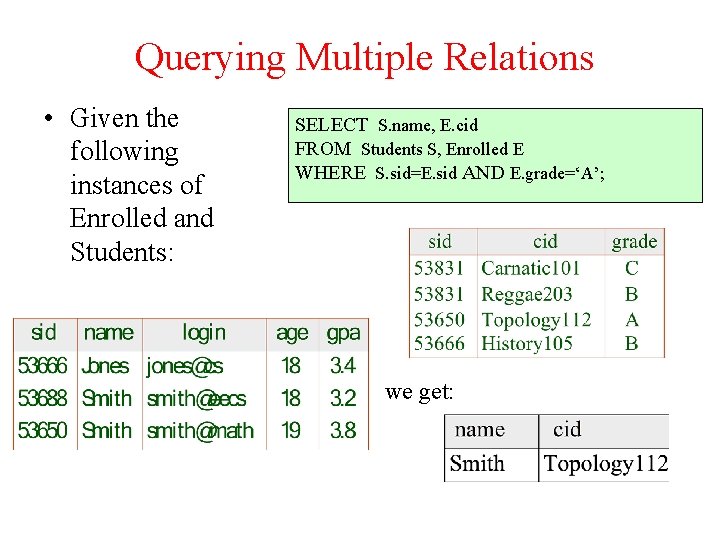
Querying Multiple Relations • Given the following instances of Enrolled and Students: SELECT S. name, E. cid FROM Students S, Enrolled E WHERE S. sid=E. sid AND E. grade=‘A’; we get:
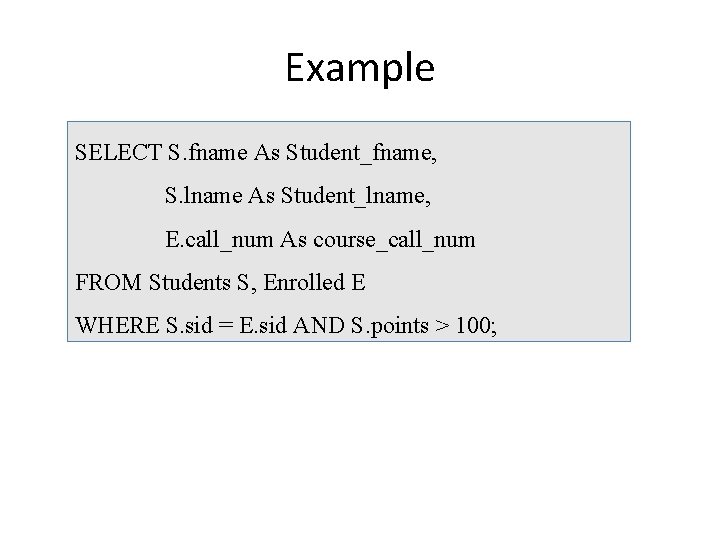
Example SELECT S. fname As Student_fname, S. lname As Student_lname, E. call_num As course_call_num FROM Students S, Enrolled E WHERE S. sid = E. sid AND S. points > 100;
Logical DB Design: ER to Relational
Relationship Sets to Tables • In translating a relationship set to a relation, attributes of the relation must include: – Keys for each participating entity set (as foreign keys). • This set of attributes forms a superkey for the relation. • The primary key is decided by the key constraint of the relationship. – All descriptive attributes.
Binary Relationship to RM • Many-to-many: The primary key of R includes all the attributes in the primary keys of A and B. • One-to-many: The primary key of R is the same as B (i. e. , the entity set on the “many” side). • One-to-one: R has two candidate keys. The first (second) one is the same as A (B). One is primary key and the other is unique.
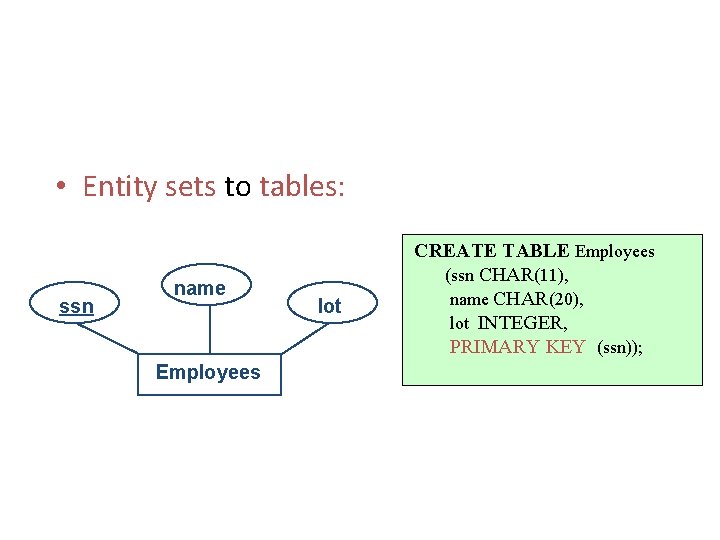
• Entity sets to tables: ssn name Employees lot CREATE TABLE Employees (ssn CHAR(11), name CHAR(20), lot INTEGER, PRIMARY KEY (ssn));
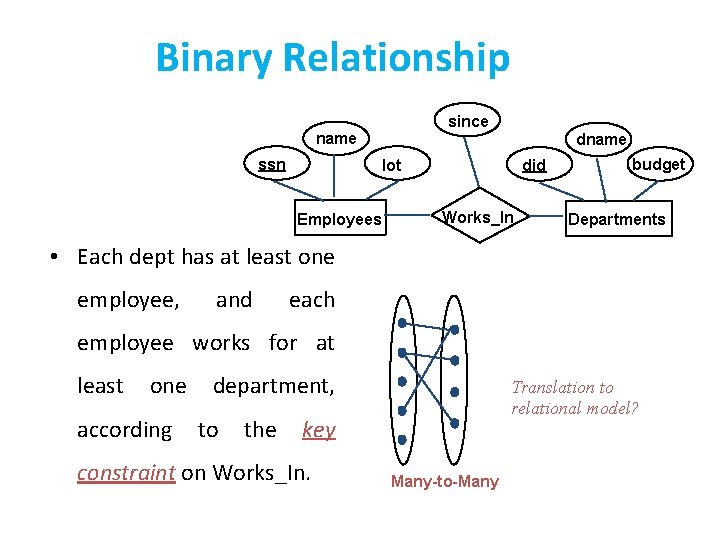
Binary Relationship since name ssn dname lot Employees did Works_In budget Departments • Each dept has at least one employee, and each employee works for at least one according department, to the Translation to relational model? key constraint on Works_In. Many-to-Many
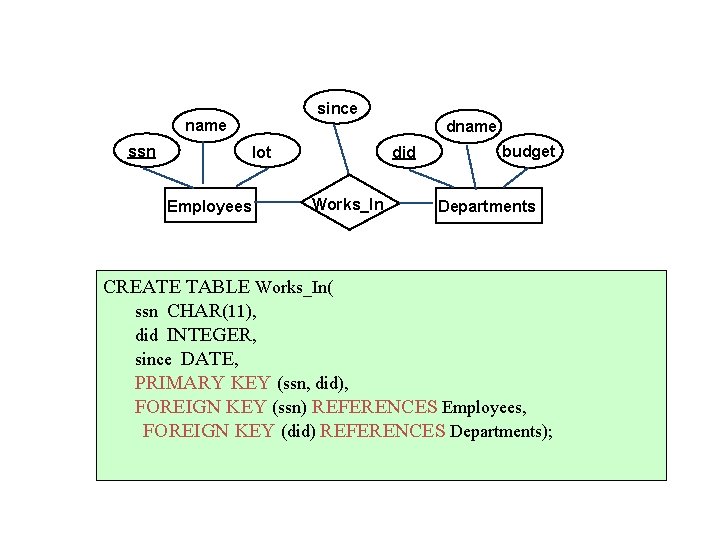
since name ssn lot Employees dname did Works_In budget Departments CREATE TABLE Works_In( ssn CHAR(11), did INTEGER, since DATE, PRIMARY KEY (ssn, did), FOREIGN KEY (ssn) REFERENCES Employees, FOREIGN KEY (did) REFERENCES Departments);
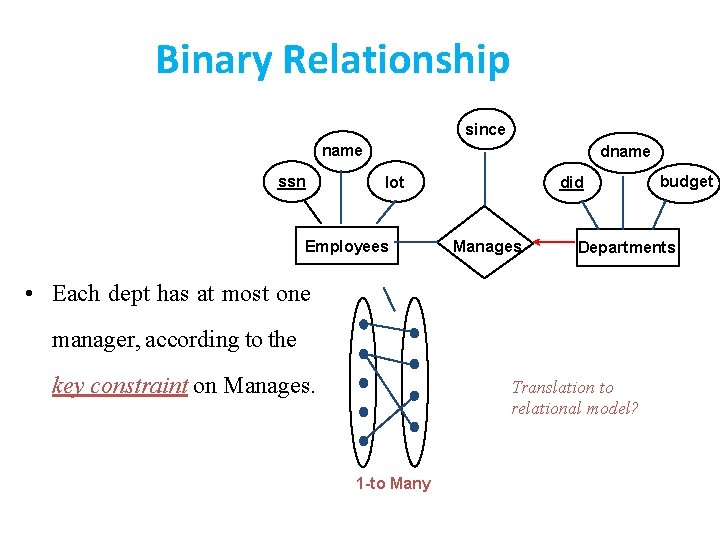
Binary Relationship since name ssn dname lot Employees did Manages Departments • Each dept has at most one manager, according to the key constraint on Manages. Translation to relational model? 1 -to Many budget
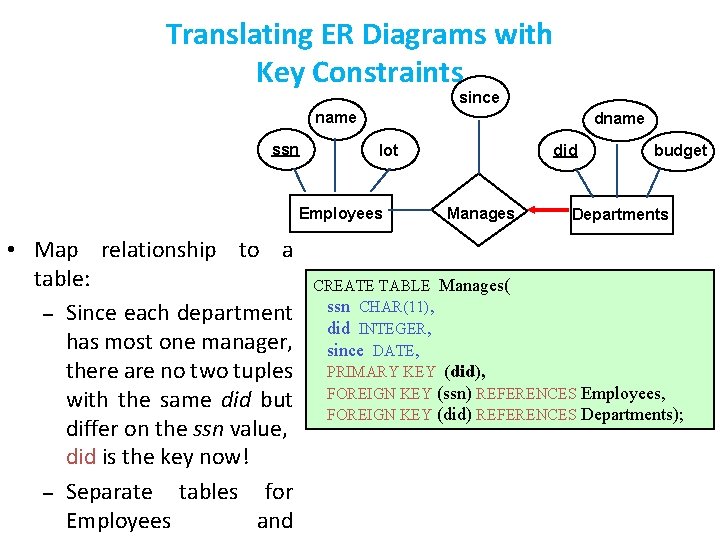
Translating ER Diagrams with Key Constraints since name ssn dname lot Employees • Map relationship to a table: – Since each department has most one manager, there are no two tuples with the same did but differ on the ssn value, did is the key now! – Separate tables for Employees and did Manages budget Departments CREATE TABLE Manages( ssn CHAR(11), did INTEGER, since DATE, PRIMARY KEY (did), FOREIGN KEY (ssn) REFERENCES Employees, FOREIGN KEY (did) REFERENCES Departments);
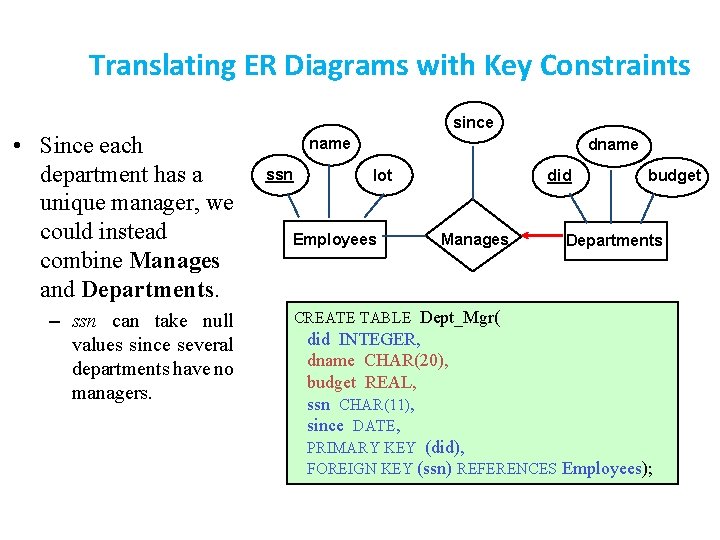
Translating ER Diagrams with Key Constraints • Since each department has a unique manager, we could instead combine Manages and Departments. – ssn can take null values since several departments have no managers. since name ssn dname lot Employees did Manages budget Departments CREATE TABLE Dept_Mgr( did INTEGER, dname CHAR(20), budget REAL, ssn CHAR(11), since DATE, PRIMARY KEY (did), FOREIGN KEY (ssn) REFERENCES Employees);
Multiple-way Relationship • Multi-way relationship set R: Create a table that includes the candidate keys of the participating entity sets the attributes of R (if any). • The primary key of the table includes all the attributes of the primary keys of the participating entity sets.
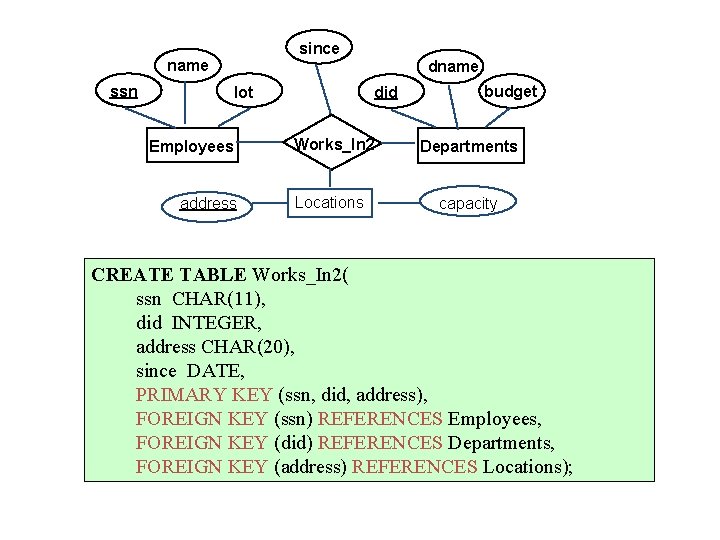
since name ssn lot Employees address dname did budget Works_In 2 Departments Locations capacity CREATE TABLE Works_In 2( ssn CHAR(11), did INTEGER, address CHAR(20), since DATE, PRIMARY KEY (ssn, did, address), FOREIGN KEY (ssn) REFERENCES Employees, FOREIGN KEY (did) REFERENCES Departments, FOREIGN KEY (address) REFERENCES Locations);
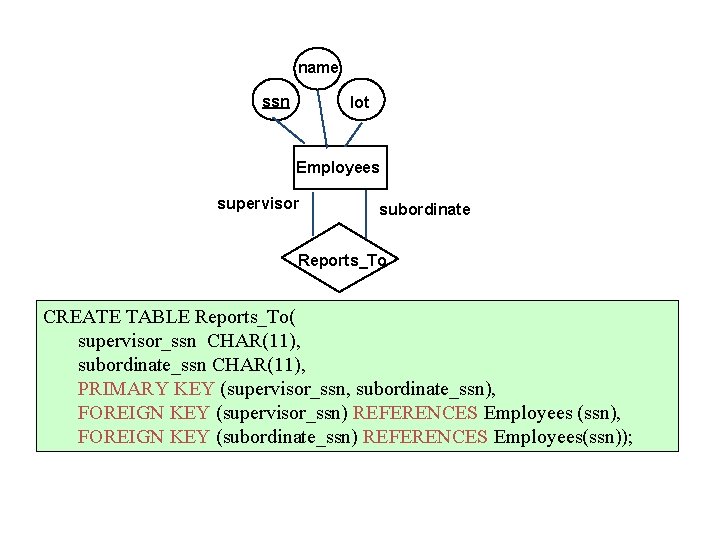
name ssn lot Employees supervisor subordinate Reports_To CREATE TABLE Reports_To( supervisor_ssn CHAR(11), subordinate_ssn CHAR(11), PRIMARY KEY (supervisor_ssn, subordinate_ssn), FOREIGN KEY (supervisor_ssn) REFERENCES Employees (ssn), FOREIGN KEY (subordinate_ssn) REFERENCES Employees(ssn));
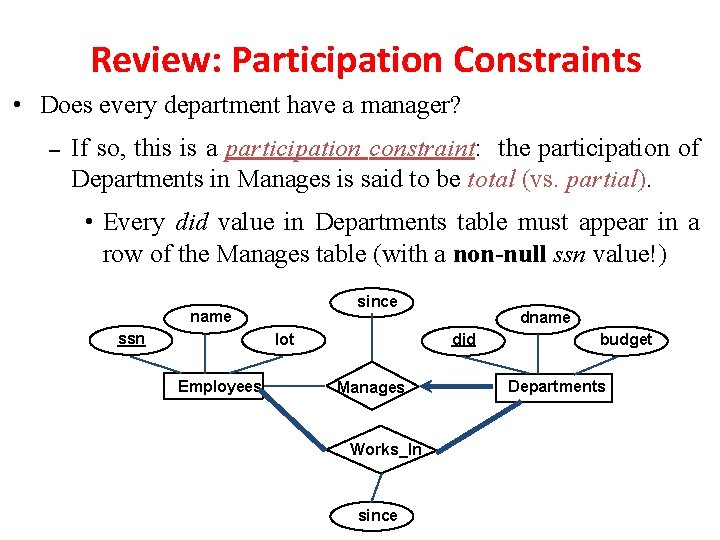
Review: Participation Constraints • Does every department have a manager? – If so, this is a participation constraint: the participation of Departments in Manages is said to be total (vs. partial). • Every did value in Departments table must appear in a row of the Manages table (with a non-null ssn value!) since name ssn did lot Employees dname Manages Works_In since budget Departments
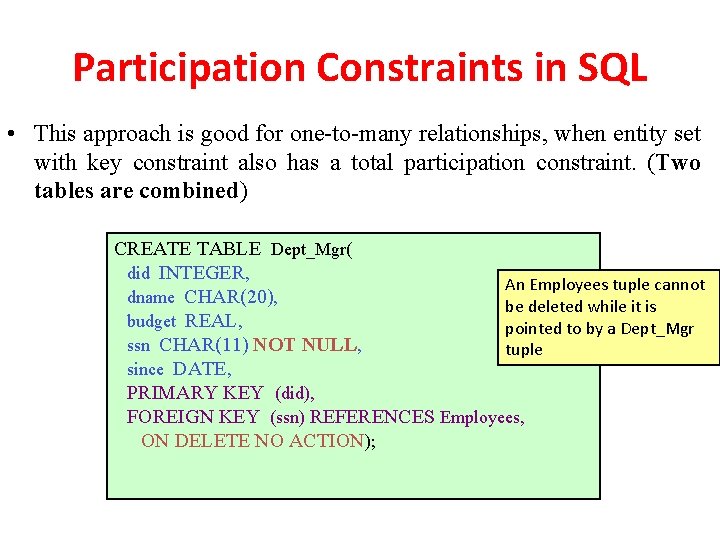
Participation Constraints in SQL • This approach is good for one-to-many relationships, when entity set with key constraint also has a total participation constraint. (Two tables are combined) CREATE TABLE Dept_Mgr( did INTEGER, An Employees tuple cannot dname CHAR(20), be deleted while it is budget REAL, pointed to by a Dept_Mgr ssn CHAR(11) NOT NULL, tuple since DATE, PRIMARY KEY (did), FOREIGN KEY (ssn) REFERENCES Employees, ON DELETE NO ACTION);
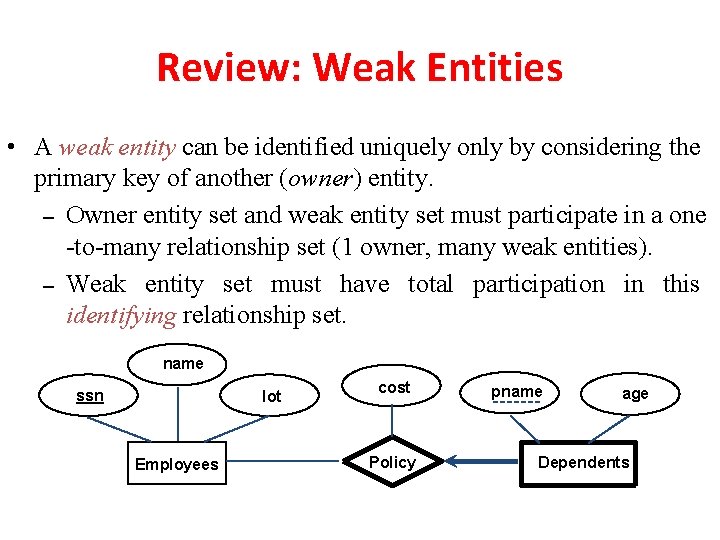
Review: Weak Entities • A weak entity can be identified uniquely only by considering the primary key of another (owner) entity. – Owner entity set and weak entity set must participate in a one -to-many relationship set (1 owner, many weak entities). – Weak entity set must have total participation in this identifying relationship set. name ssn lot Employees cost Policy pname age Dependents
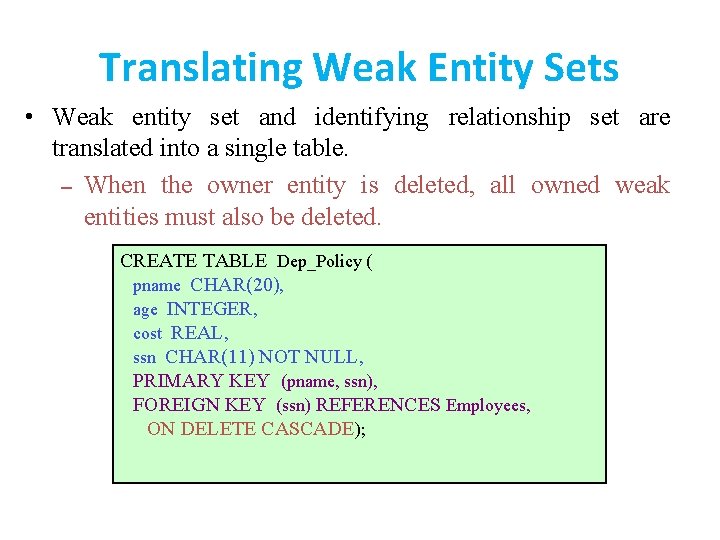
Translating Weak Entity Sets • Weak entity set and identifying relationship set are translated into a single table. – When the owner entity is deleted, all owned weak entities must also be deleted. CREATE TABLE Dep_Policy ( pname CHAR(20), age INTEGER, cost REAL, ssn CHAR(11) NOT NULL, PRIMARY KEY (pname, ssn), FOREIGN KEY (ssn) REFERENCES Employees, ON DELETE CASCADE);
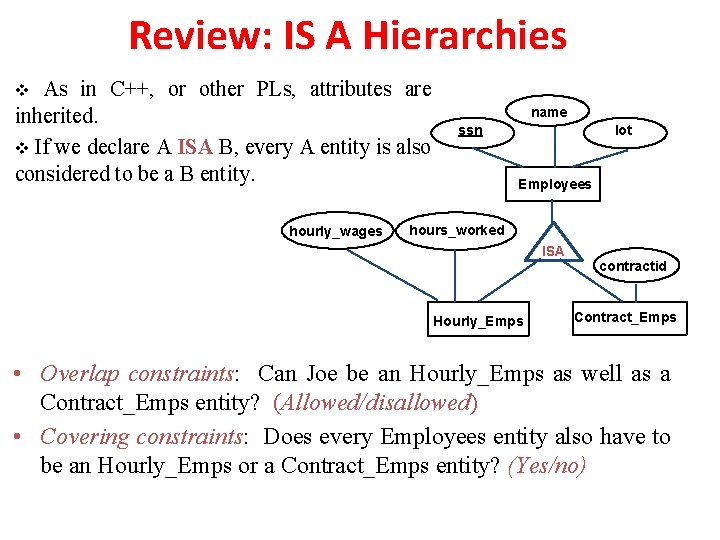
Review: IS A Hierarchies v As in C++, or other PLs, attributes are inherited. v If we declare A ISA B, every A entity is also considered to be a B entity. hourly_wages name ssn lot Employees hours_worked ISA Hourly_Emps contractid Contract_Emps • Overlap constraints: Can Joe be an Hourly_Emps as well as a Contract_Emps entity? (Allowed/disallowed) • Covering constraints: Does every Employees entity also have to be an Hourly_Emps or a Contract_Emps entity? (Yes/no)
Translating ISA Hierarchies to Relations • General approach: – 3 relations: Employees, Contract_Emps. Hourly_Emps and • Hourly_Emps: Every employee is recorded in Employees. For hourly emps, extra info recorded in Hourly_Emps (hourly_wages, hours_worked, ssn); must delete Hourly_Emps tuple if referenced Employees tuple is deleted). • Queries involving all employees easy, those involving just Hourly_Emps require a join to get some attributes.
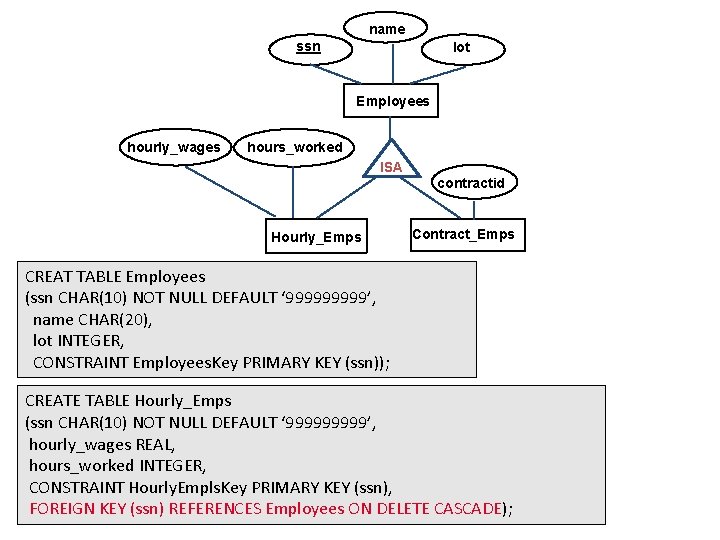
name ssn lot Employees hourly_wages hours_worked ISA Hourly_Emps contractid Contract_Emps CREAT TABLE Employees (ssn CHAR(10) NOT NULL DEFAULT ‘ 99999’, name CHAR(20), lot INTEGER, CONSTRAINT Employees. Key PRIMARY KEY (ssn)); CREATE TABLE Hourly_Emps (ssn CHAR(10) NOT NULL DEFAULT ‘ 99999’, hourly_wages REAL, hours_worked INTEGER, CONSTRAINT Hourly. Empls. Key PRIMARY KEY (ssn), FOREIGN KEY (ssn) REFERENCES Employees ON DELETE CASCADE);
Translating IS A Hierarchies to Relations • Alternative: Contract_Emps. – – Just Hourly_Emps and Hourly_Emps: ssn, name, lot, hourly_wages, hours_worked. Contract_Emps: ssn, name, lot, contract. Id. Each employee must be in one of these two subclasses. If an employee is both an Hourly_Emps and a Contract_Emps entity, then the same name and lot values are stored in two tables.
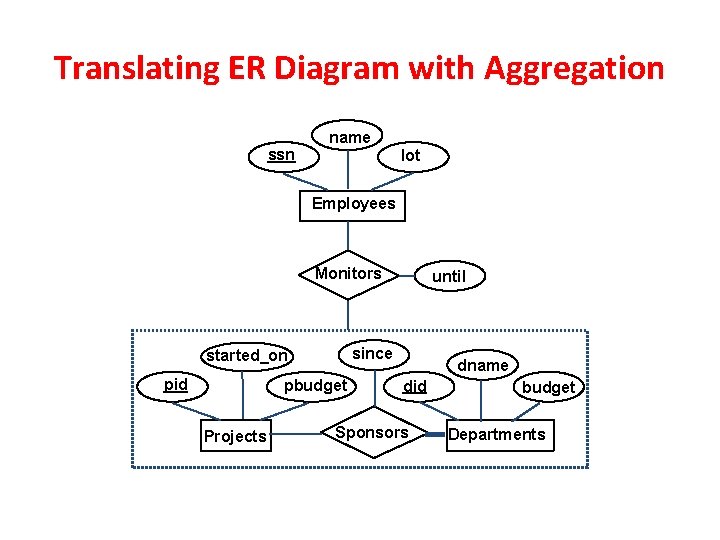
Translating ER Diagram with Aggregation ssn name lot Employees Monitors since started_on pid pbudget Projects until dname did Sponsors budget Departments
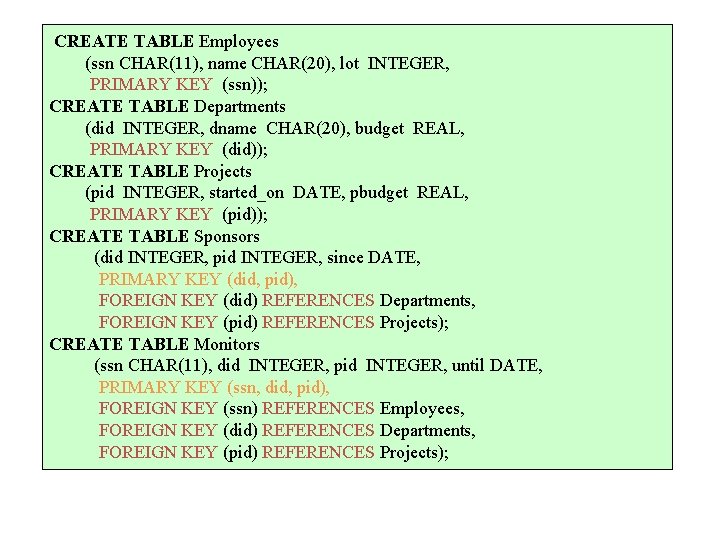
CREATE TABLE Employees (ssn CHAR(11), name CHAR(20), lot INTEGER, PRIMARY KEY (ssn)); CREATE TABLE Departments (did INTEGER, dname CHAR(20), budget REAL, PRIMARY KEY (did)); CREATE TABLE Projects (pid INTEGER, started_on DATE, pbudget REAL, PRIMARY KEY (pid)); CREATE TABLE Sponsors (did INTEGER, pid INTEGER, since DATE, PRIMARY KEY (did, pid), FOREIGN KEY (did) REFERENCES Departments, FOREIGN KEY (pid) REFERENCES Projects); CREATE TABLE Monitors (ssn CHAR(11), did INTEGER, pid INTEGER, until DATE, PRIMARY KEY (ssn, did, pid), FOREIGN KEY (ssn) REFERENCES Employees, FOREIGN KEY (did) REFERENCES Departments, FOREIGN KEY (pid) REFERENCES Projects);
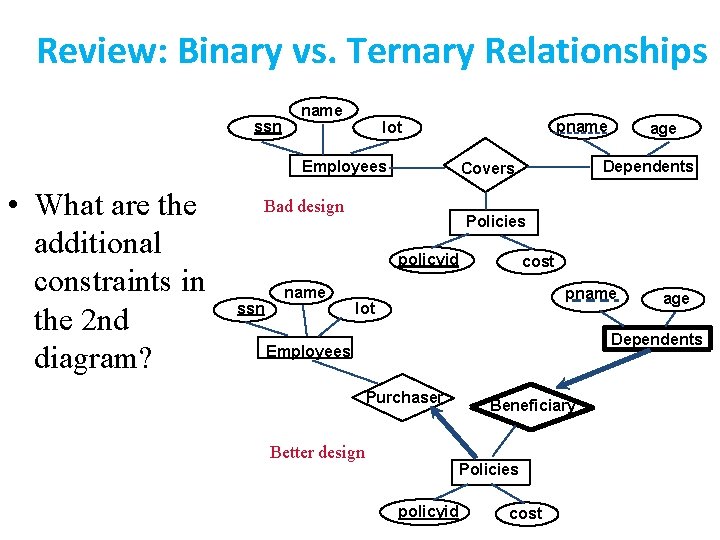
Review: Binary vs. Ternary Relationships ssn name Employees • What are the additional constraints in the 2 nd diagram? pname lot Policies policyid ssn name Dependents Covers Bad design age cost pname lot age Dependents Employees Purchaser Better design Beneficiary Policies policyid cost
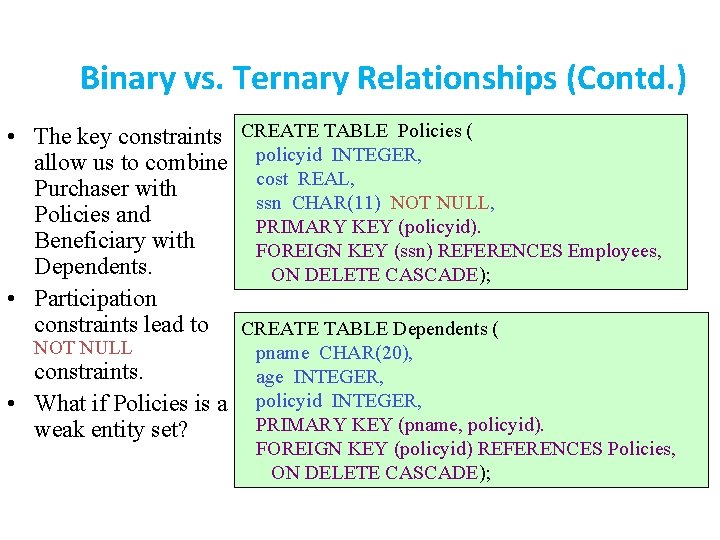
Binary vs. Ternary Relationships (Contd. ) • The key constraints CREATE TABLE Policies ( allow us to combine policyid INTEGER, cost REAL, Purchaser with ssn CHAR(11) NOT NULL, Policies and PRIMARY KEY (policyid). Beneficiary with FOREIGN KEY (ssn) REFERENCES Employees, Dependents. ON DELETE CASCADE); • Participation constraints lead to CREATE TABLE Dependents ( NOT NULL constraints. • What if Policies is a weak entity set? pname CHAR(20), age INTEGER, policyid INTEGER, PRIMARY KEY (pname, policyid). FOREIGN KEY (policyid) REFERENCES Policies, ON DELETE CASCADE);
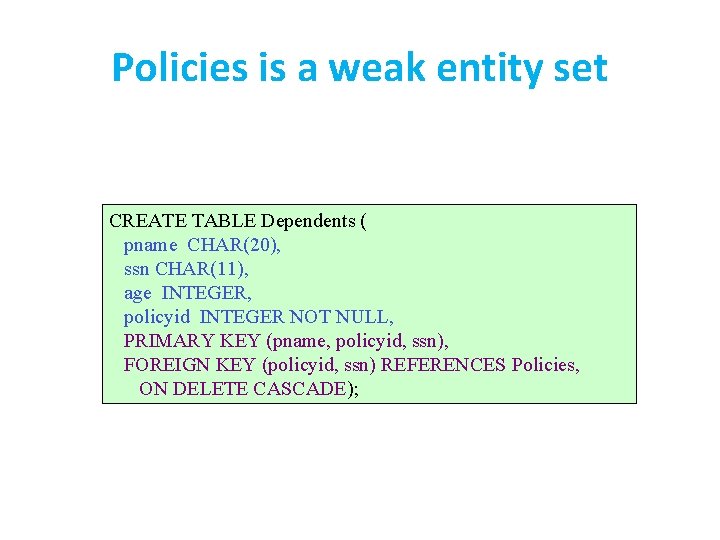
Policies is a weak entity set CREATE TABLE Dependents ( pname CHAR(20), ssn CHAR(11), age INTEGER, policyid INTEGER NOT NULL, PRIMARY KEY (pname, policyid, ssn), FOREIGN KEY (policyid, ssn) REFERENCES Policies, ON DELETE CASCADE);
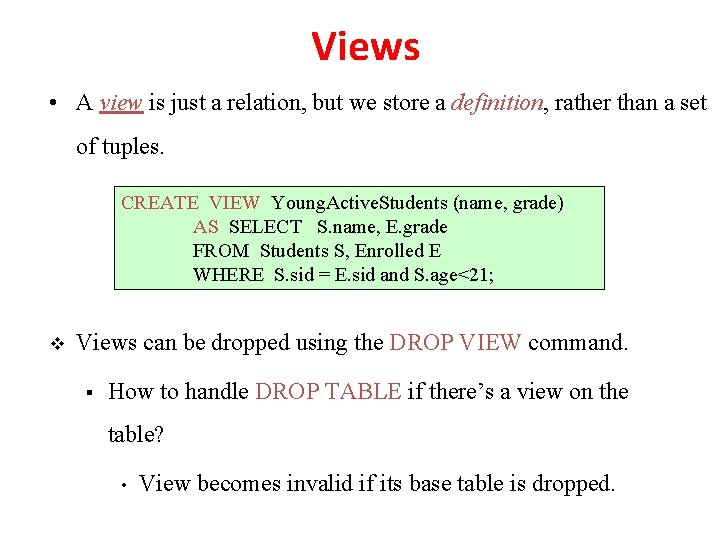
Views • A view is just a relation, but we store a definition, rather than a set of tuples. CREATE VIEW Young. Active. Students (name, grade) AS SELECT S. name, E. grade FROM Students S, Enrolled E WHERE S. sid = E. sid and S. age<21; v Views can be dropped using the DROP VIEW command. § How to handle DROP TABLE if there’s a view on the table? • View becomes invalid if its base table is dropped.
Views and Security • Views can be used to present necessary information (or a summary), while hiding details in underlying relation(s). – Given Young. Students, but not Students or Enrolled, we can find students’s who have are enrolled, but not the cid’s of the courses they are enrolled in.
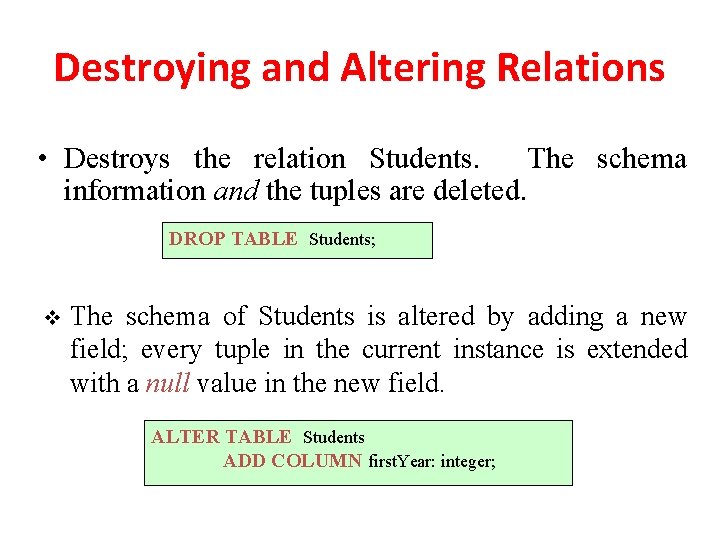
Destroying and Altering Relations • Destroys the relation Students. The schema information and the tuples are deleted. DROP TABLE Students; v The schema of Students is altered by adding a new field; every tuple in the current instance is extended with a null value in the new field. ALTER TABLE Students ADD COLUMN first. Year: integer;
Relational Model: Summary • A tabular representation of data. • Simple and intuitive, currently the most widely used. • Integrity constraints can be specified by the DBA, based on application semantics. DBMS checks for violations. – Two important ICs: primary and foreign keys – In addition, we always have domain constraints. • Powerful and natural query languages exist. • Rules to translate ER to relational model
- Slides: 86