
Relational DBs and SQL Designing Your Web Database
Relational DBs and SQL → Designing Your Web Database (Ch. 8) → Creating and Working with a My. SQL Database (Ch. 9, 10) 1
Relational DBs and SQL Topics: Relational database concepts and terminology Designing your web database Web database architecture – three-tier web applications SQL → My. SQL, command line Creating tables Inserting data into the database Updating records from the database Deleting records from the database Retrieving data from the database Dropping tables 2
Why RDMBSs? Data is central to a web-application Advantages of using a relational database instead of a flat file - RDBMSs : provide faster access to data can be easily queried to extract sets of data that fit certain criteria have built-in mechanisms for handling concurrent data access provide fast random access to data (= not sequential) have built-in privilege systems … 3
Relational DB Concepts Database = shared, integrated repository that stores: data (raw facts) and metadata (data about data): description of data characteristics and relationships that link the data within the database DBMS (database management system) = collection of programs that manage the database and control access to data Database design = activities focused on the design of the database structure that will be used to store and manage end-user data. Data model: sets of constructs for representing real-world data structures, their characteristics, relations, and constraints. allows creating a database blueprint = db structure or schema relational data model is the most commonly used data model 4
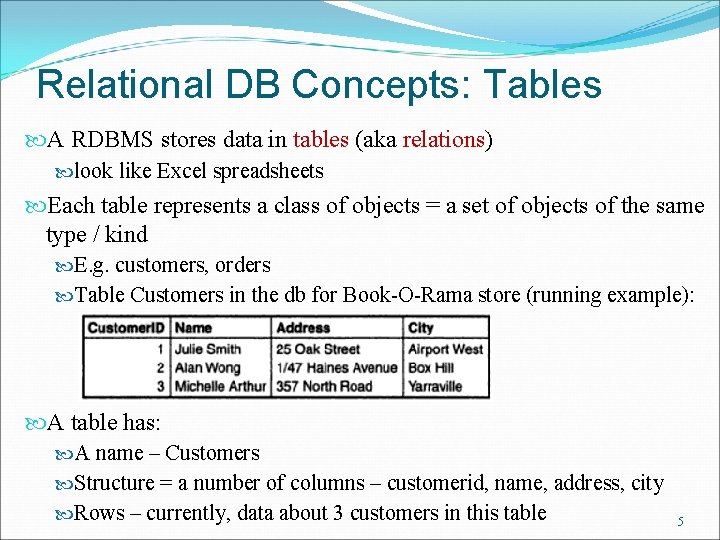
Relational DB Concepts: Tables A RDBMS stores data in tables (aka relations) look like Excel spreadsheets Each table represents a class of objects = a set of objects of the same type / kind E. g. customers, orders Table Customers in the db for Book-O-Rama store (running example): A table has: A name – Customers Structure = a number of columns – customerid, name, address, city Rows – currently, data about 3 customers in this table 5
Relational DB Concepts: Tables Each column in a table (aka field, attribute): Represents a characteristic, feature, or piece of data about the objects / entities described in the table Has a name: ex address Has a data type: ex string Each row in a table (aka record, tuple): Contains data about a different entity from the set of objects about which data is stored in the table Contains values for the same attributes as all the other rows in the same table → the tabular format! Each cell in a table is a value that must have the data type specified by its column (number, string, currency, date etc) 6
Relational DB Concepts: Primary Key There has to exist a way to uniquely identify each individual entity / record in a table; this can be: A single column in the table, representing “real” information → ex: SSN for Employee table A few pieces of real information = several columns in the table, used in combination → ex: the Name, Address and City columns in the Customer table An “artificially” created column → ex: Customer. ID in table Customer The identifying column(s) in a table is called the primary key (PK) Simple = a single column (Customer. ID, SSN) Composite = several columns in combination A declared primary key won’t be allowed to have duplicate values! 7
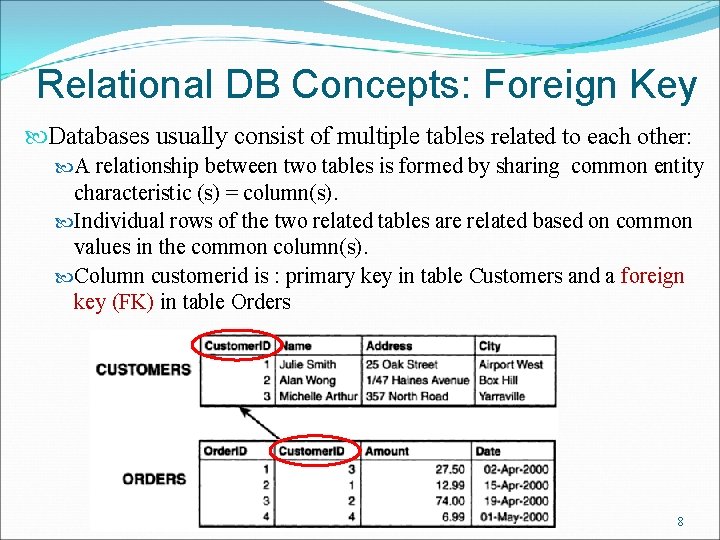
Relational DB Concepts: Foreign Key Databases usually consist of multiple tables related to each other: A relationship between two tables is formed by sharing common entity characteristic (s) = column(s). Individual rows of the two related tables are related based on common values in the common column(s). Column customerid is : primary key in table Customers and a foreign key (FK) in table Orders 8
Relational DB Concepts: DB Schema DB schema = the complete set of table designs (structures) for a database: It’s a blueprint for the database Should show the tables along with: Their columns Their primary keys – underlined The foreign keys – italic Usually is presented in a graphical form, as a relational diagram or E-R diagram Example, for the Customers and Orders tables: Customers (Customer. ID, Name, Address, City) Orders (Order. ID, Customer. ID, Amount, Date) 9
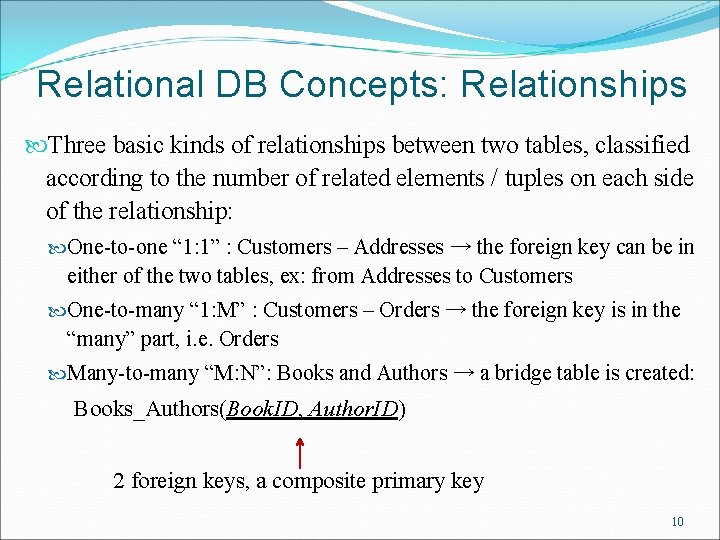
Relational DB Concepts: Relationships Three basic kinds of relationships between two tables, classified according to the number of related elements / tuples on each side of the relationship: One-to-one “ 1: 1” : Customers – Addresses → the foreign key can be in either of the two tables, ex: from Addresses to Customers One-to-many “ 1: M” : Customers – Orders → the foreign key is in the “many” part, i. e. Orders Many-to-many “M: N”: Books and Authors → a bridge table is created: Books_Authors(Book. ID, Author. ID) 2 foreign keys, a composite primary key 10
Basic DB Design Principles 1. Generally, each class of real-world objects you model needs its own table Example: for the Book-O-Rama example, information needs to be stored about customers, sold books, and orders tables: Customers (Customer. ID, Name, Address, City) Orders (Order. ID, Customer. ID, Amount, Date) Books (ISBN, Author, Title, Price) 11
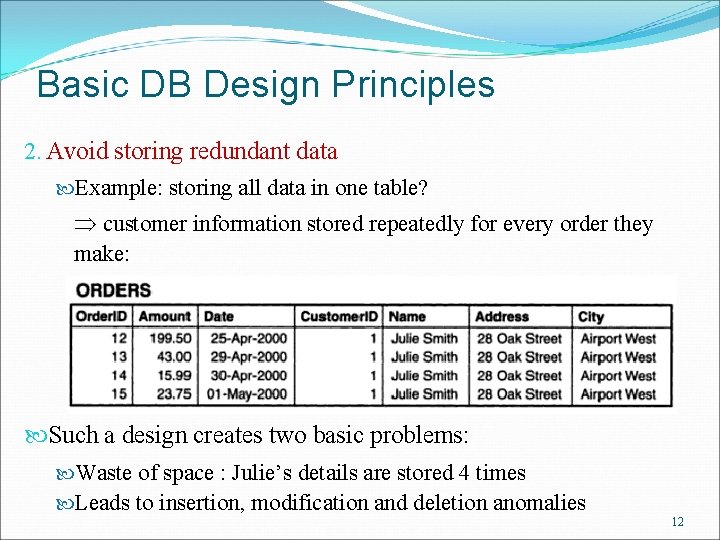
Basic DB Design Principles 2. Avoid storing redundant data Example: storing all data in one table? customer information stored repeatedly for every order they make: Such a design creates two basic problems: Waste of space : Julie’s details are stored 4 times Leads to insertion, modification and deletion anomalies 12
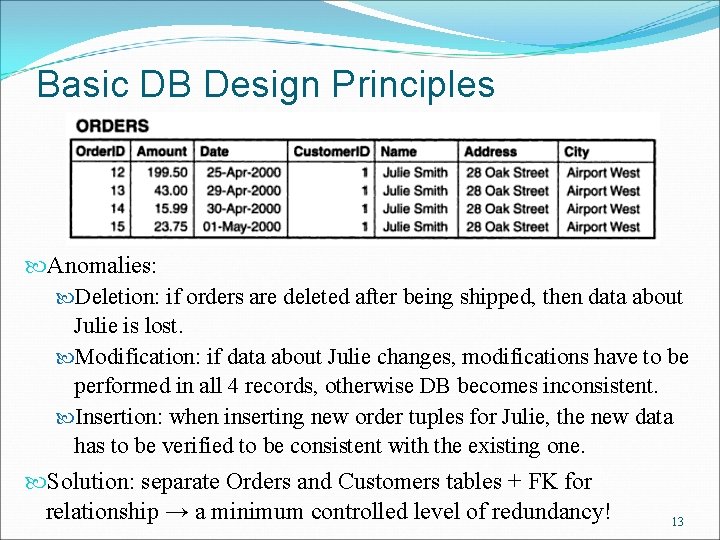
Basic DB Design Principles Anomalies: Deletion: if orders are deleted after being shipped, then data about Julie is lost. Modification: if data about Julie changes, modifications have to be performed in all 4 records, otherwise DB becomes inconsistent. Insertion: when inserting new order tuples for Julie, the new data has to be verified to be consistent with the existing one. Solution: separate Orders and Customers tables + FK for relationship → a minimum controlled level of redundancy! 13
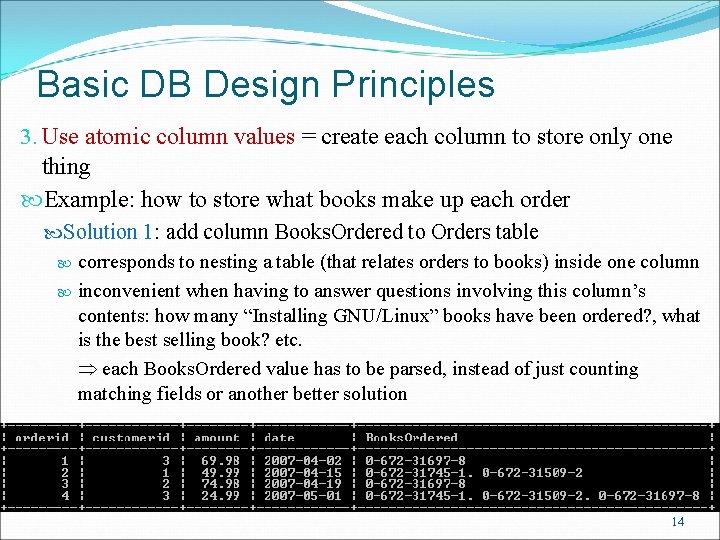
Basic DB Design Principles 3. Use atomic column values = create each column to store only one thing Example: how to store what books make up each order Solution 1: add column Books. Ordered to Orders table corresponds to nesting a table (that relates orders to books) inside one column inconvenient when having to answer questions involving this column’s contents: how many “Installing GNU/Linux” books have been ordered? , what is the best selling book? etc. each Books. Ordered value has to be parsed, instead of just counting matching fields or another better solution 14
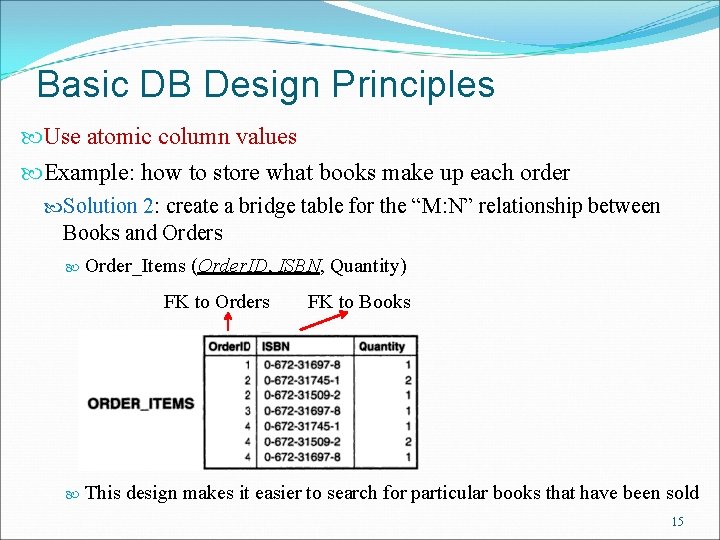
Basic DB Design Principles Use atomic column values Example: how to store what books make up each order Solution 2: create a bridge table for the “M: N” relationship between Books and Orders Order_Items (Order. ID, ISBN, Quantity) FK to Orders FK to Books This design makes it easier to search for particular books that have been sold 15
Basic DB Design Principles 4. Choose sensible keys = make sure the PKs you choose are unique: Choose an uniquely identifying attribute if one exists: ISBN Create a new special identifying attribute if the modeled entities don’t naturally have one: Customer. ID, Order. ID For bridge tables, the combination of the FKs is usually unique and can be used as a PK: Order. ID + ISBN → a specific book is ordered only once in an order, the quantity can vary 16
Basic DB Design Principles 5. Think about what you want to ask the database – make sure the database: Contains all the data required Appropriate links / relationships exist between tables The columns are atomic and allow efficient processing for the intended queries 17
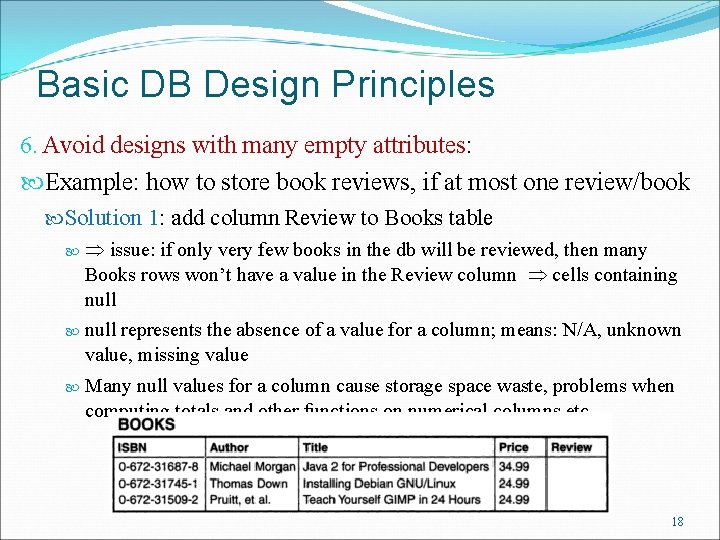
Basic DB Design Principles 6. Avoid designs with many empty attributes: Example: how to store book reviews, if at most one review/book Solution 1: add column Review to Books table issue: if only very few books in the db will be reviewed, then many Books rows won’t have a value in the Review column cells containing null represents the absence of a value for a column; means: N/A, unknown value, missing value Many null values for a column cause storage space waste, problems when computing totals and other functions on numerical columns etc. 18
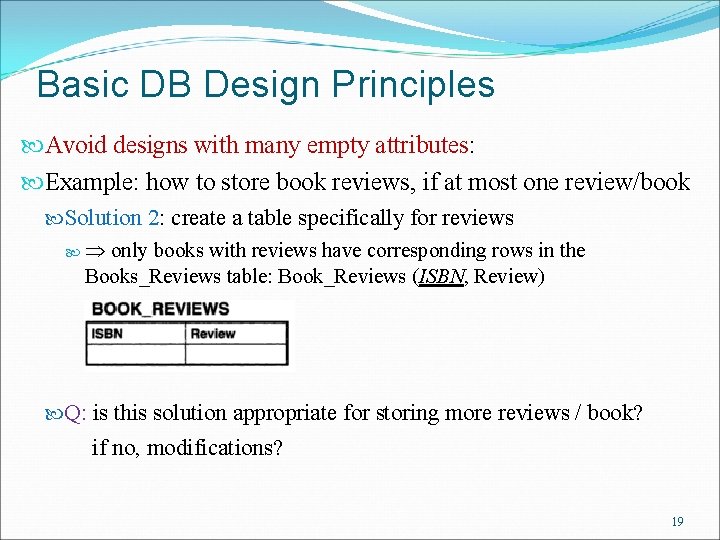
Basic DB Design Principles Avoid designs with many empty attributes: Example: how to store book reviews, if at most one review/book Solution 2: create a table specifically for reviews only books with reviews have corresponding rows in the Books_Reviews table: Book_Reviews (ISBN, Review) Q: is this solution appropriate for storing more reviews / book? if no, modifications? 19
Basic DB Design Principles 7. Summary of table types: In general, your database design ends up consisting of two types of tables “Simple” tables that describe real-world objects; Each has to have a PK; Some might contain FKs to other tables with which they have 1: 1 or 1: M relationships (the M side contains the FK!). Linking or bridge tables that describe a M: N relationship between two tables modeling two real object-sets. 20

Web Database Architecture for delivering a DB-backed website (= 3 -tier web application) 1. Browser issues HTTP request for x. php page 2. Web server receives request, retrieves page, passes it for processing to PHP engine 3. PHP engine parses script; if statements to connect to a DB and execute query PHP opens a connection to My. SQL server, sends an appropriate query 4. My. SQL server receives query, processes it, sends results to PHP engine 5. PHP finishes processing the script, which usually involves formatting query results (= usually a set of tuples!) in HTML; returns the resulting HTML to the web server 6. Web server passes the HTML document back to browser, which renders it Note: the process is same regardless of what web & DB server are used, or if they are on same or different machines 21
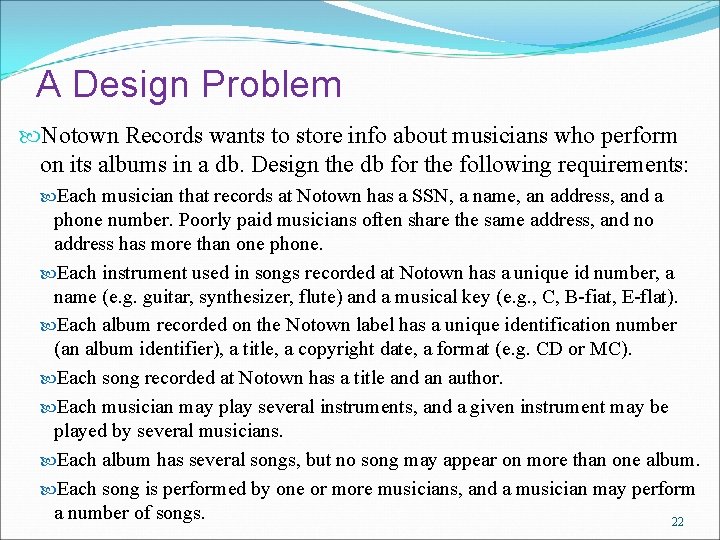
A Design Problem Notown Records wants to store info about musicians who perform on its albums in a db. Design the db for the following requirements: Each musician that records at Notown has a SSN, a name, an address, and a phone number. Poorly paid musicians often share the same address, and no address has more than one phone. Each instrument used in songs recorded at Notown has a unique id number, a name (e. g. guitar, synthesizer, flute) and a musical key (e. g. , C, B-fiat, E-flat). Each album recorded on the Notown label has a unique identification number (an album identifier), a title, a copyright date, a format (e. g. CD or MC). Each song recorded at Notown has a title and an author. Each musician may play several instruments, and a given instrument may be played by several musicians. Each album has several songs, but no song may appear on more than one album. Each song is performed by one or more musicians, and a musician may perform a number of songs. 22
- Slides: 22