
RELATIONAL DATABASE ADVANCED SQL More advanced topics VIEWS
RELATIONAL DATABASE ADVANCED SQL
More advanced topics VIEWS SUBQUERIES FUN
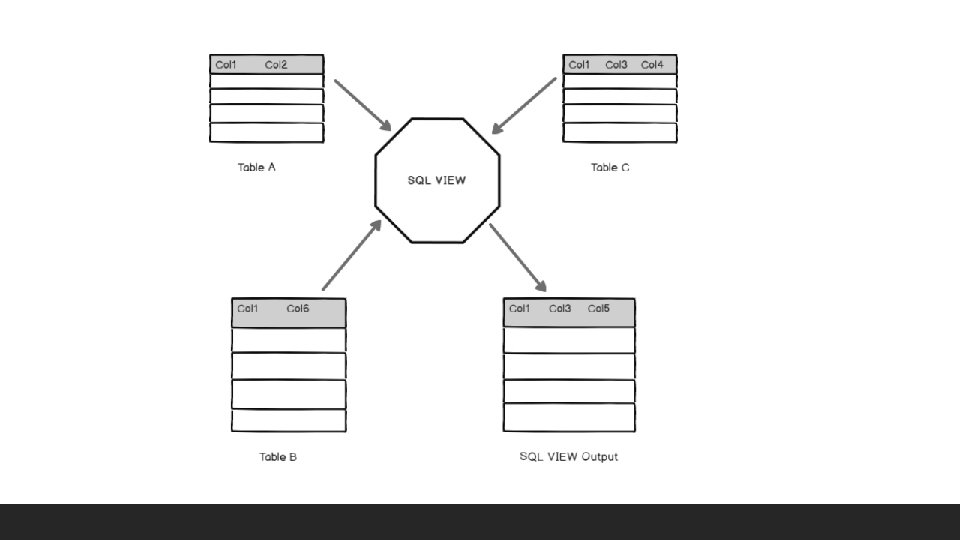
Introduction to Views A VIEW in SQL Server is like a virtual table that contains data from one or multiple tables. It does not hold any data and does not exist physically in the database. A view provides a mechanism to hide certain data from the view of certain users. A view also has rows and columns as they are in a real table in the database. We can create a view by selecting fields from one or more tables present in the database. A View can either have all the rows of a table or specific rows based on certain condition. Any relation that is not of the conceptual model but is made visible to a user as a “virtual relation” is called a view. Similar to a SQL table, the view name should be unique in a database. It contains a set of predefined SQL queries to fetch data from the database. It can contain database tables from single or multiple databases as well.
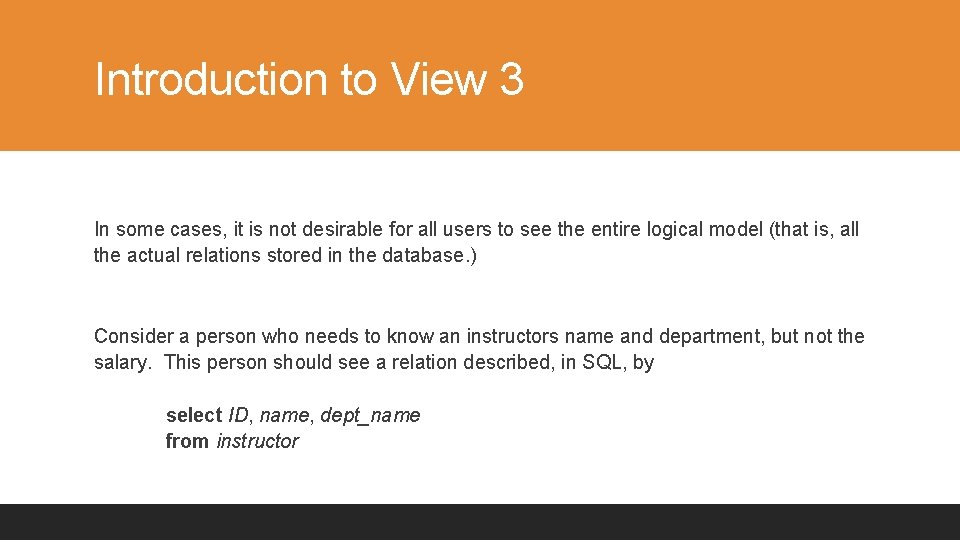
Introduction to View 3 In some cases, it is not desirable for all users to see the entire logical model (that is, all the actual relations stored in the database. ) Consider a person who needs to know an instructors name and department, but not the salary. This person should see a relation described, in SQL, by select ID, name, dept_name from instructor
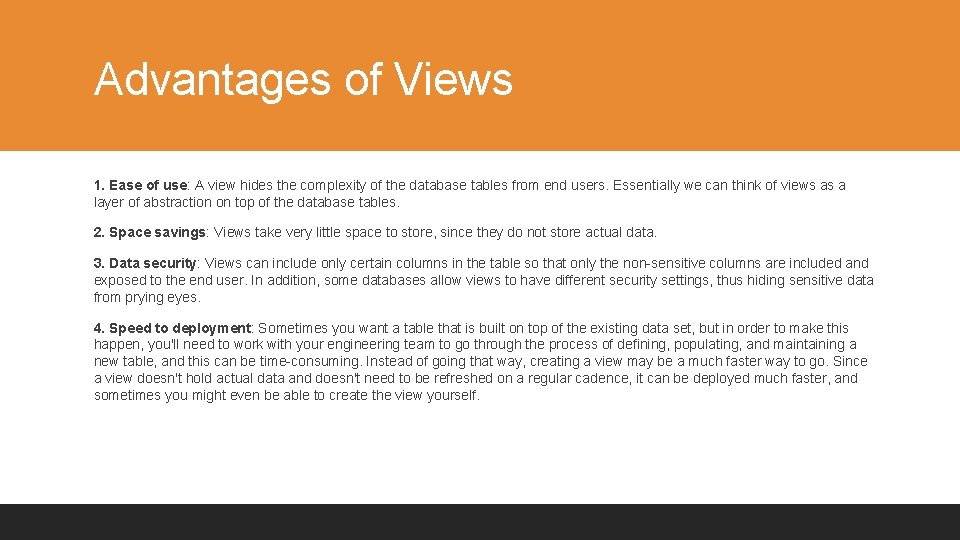
Advantages of Views 1. Ease of use: A view hides the complexity of the database tables from end users. Essentially we can think of views as a layer of abstraction on top of the database tables. 2. Space savings: Views take very little space to store, since they do not store actual data. 3. Data security: Views can include only certain columns in the table so that only the non-sensitive columns are included and exposed to the end user. In addition, some databases allow views to have different security settings, thus hiding sensitive data from prying eyes. 4. Speed to deployment: Sometimes you want a table that is built on top of the existing data set, but in order to make this happen, you'll need to work with your engineering team to go through the process of defining, populating, and maintaining a new table, and this can be time-consuming. Instead of going that way, creating a view may be a much faster way to go. Since a view doesn't hold actual data and doesn't need to be refreshed on a regular cadence, it can be deployed much faster, and sometimes you might even be able to create the view yourself.
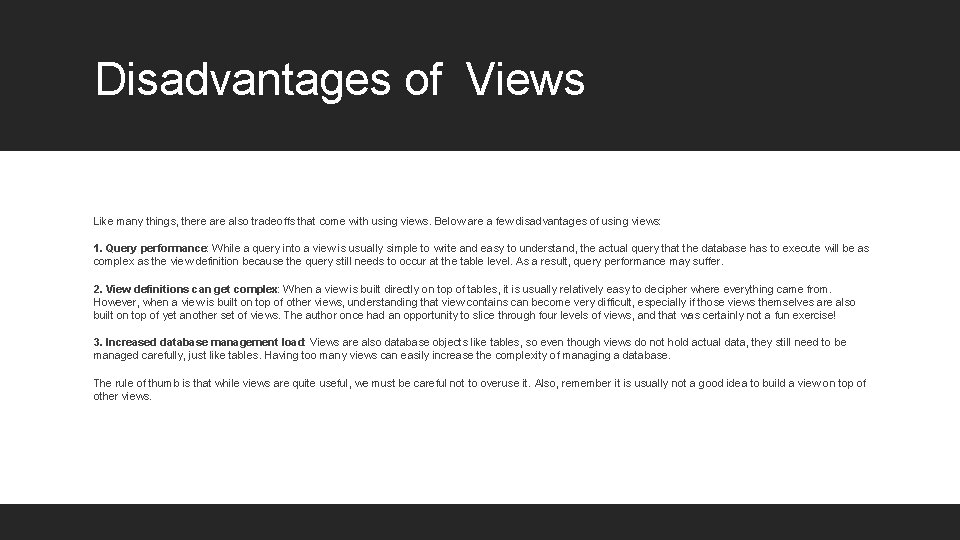
Disadvantages of Views Like many things, there also tradeoffs that come with using views. Below are a few disadvantages of using views: 1. Query performance: While a query into a view is usually simple to write and easy to understand, the actual query that the database has to execute will be as complex as the view definition because the query still needs to occur at the table level. As a result, query performance may suffer. 2. View definitions can get complex: When a view is built directly on top of tables, it is usually relatively easy to decipher where everything came from. However, when a view is built on top of other views, understanding that view contains can become very difficult, especially if those views themselves are also built on top of yet another set of views. The author once had an opportunity to slice through four levels of views, and that was certainly not a fun exercise! 3. Increased database management load: Views are also database objects like tables, so even though views do not hold actual data, they still need to be managed carefully, just like tables. Having too many views can easily increase the complexity of managing a database. The rule of thumb is that while views are quite useful, we must be careful not to overuse it. Also, remember it is usually not a good idea to build a view on top of other views.

View Definition A view is defined using the create view statement which has the form create view v as < query expression > where <query expression> is any legal SQL expression. The view name is represented by v. Once a view is defined, the view name can be used to refer to the virtual relation that the view generates. View definition is not the same as creating a new relation by evaluating the query expression ◦ Rather, a view definition causes the saving of an expression; the expression is substituted into queries using the view.

Example Views A view of instructors without their salary create view faculty as select ID, name, dept_name from instructor Find all instructors in the Innovation and Entrepreneurship (IENT) department select name from faculty where dept_name = ‘IENT’ Create a view of department salary totals create view departments_total_salary(dept_name, total_salary) as select dept_name, sum (salary) from instructor group by dept_name;
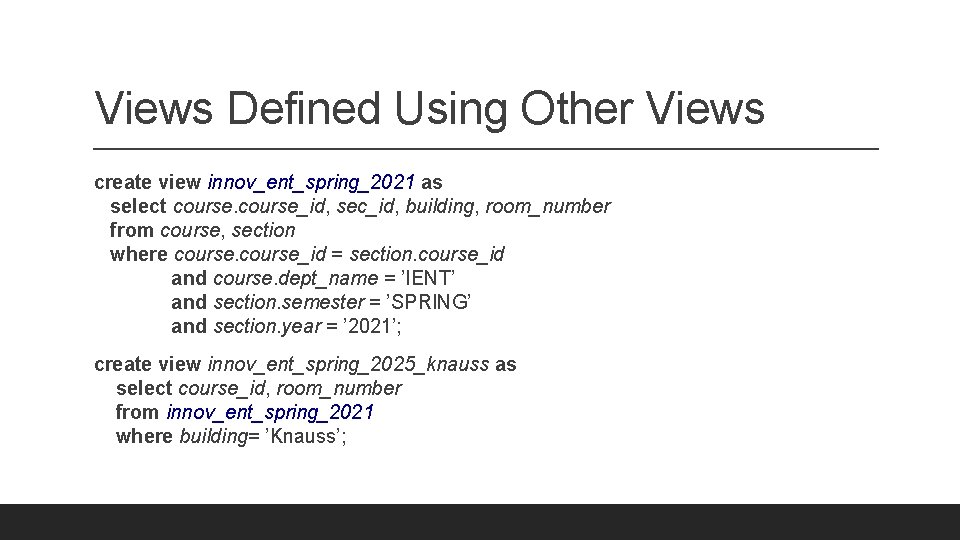
Views Defined Using Other Views create view innov_ent_spring_2021 as select course_id, sec_id, building, room_number from course, section where course_id = section. course_id and course. dept_name = ’IENT’ and section. semester = ’SPRING’ and section. year = ’ 2021’; create view innov_ent_spring_2025_knauss as select course_id, room_number from innov_ent_spring_2021 where building= ’Knauss’;
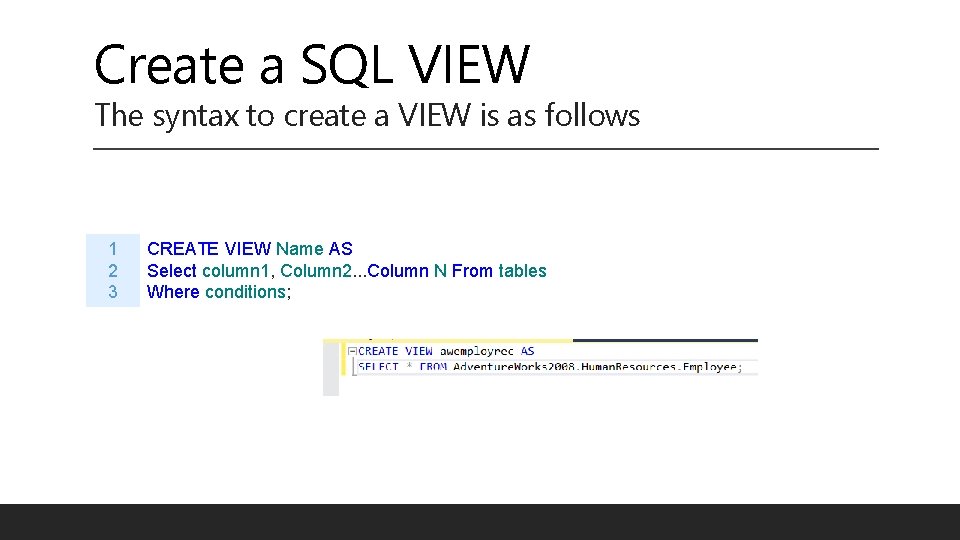
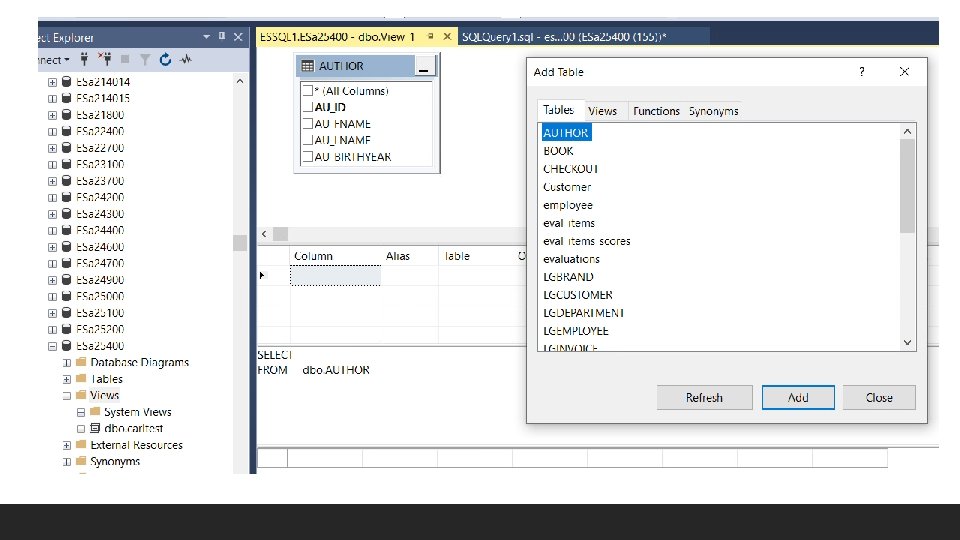
Create a SQL VIEW The syntax to create a VIEW is as follows 1 2 3 CREATE VIEW Name AS Select column 1, Column 2. . . Column N From tables Where conditions;
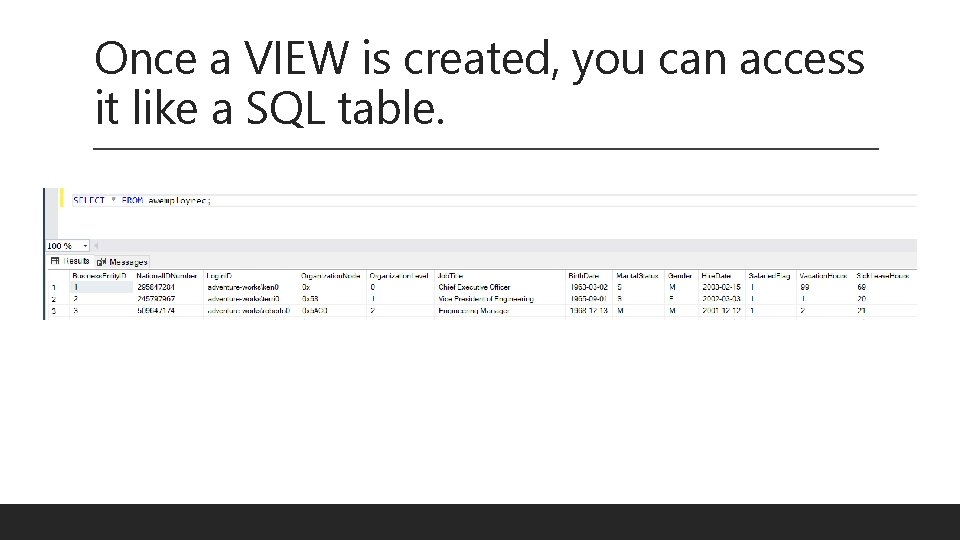
Once a VIEW is created, you can access it like a SQL table.
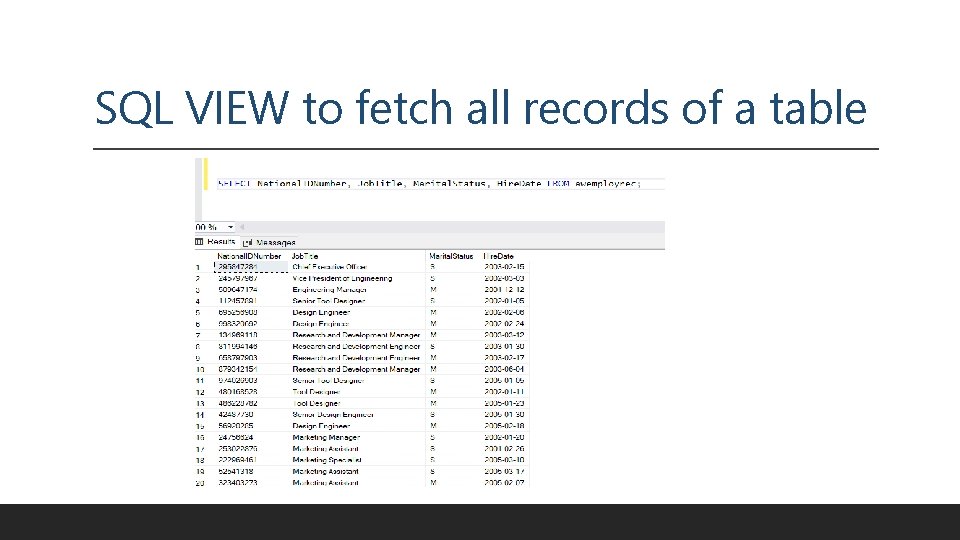
SQL VIEW to fetch all records of a table
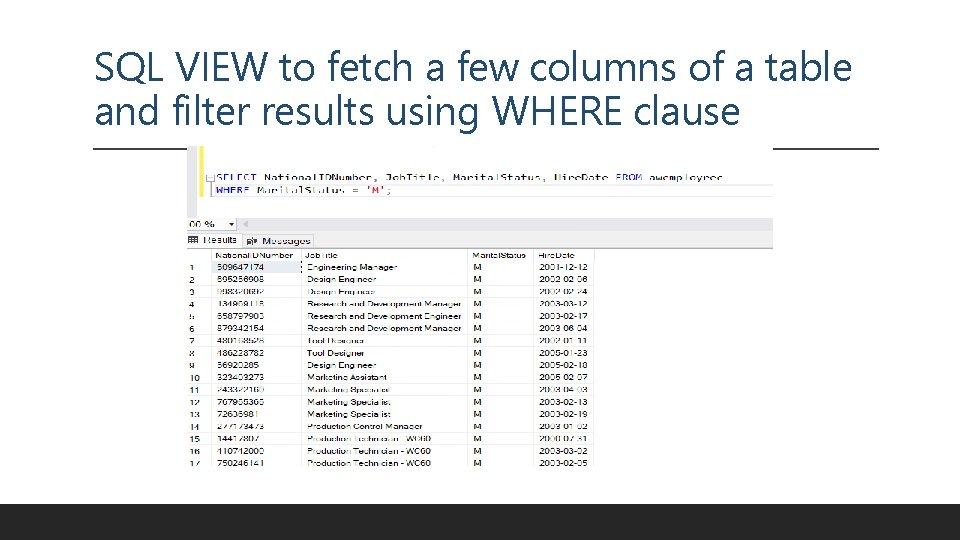
SQL VIEW to fetch a few columns of a table and filter results using WHERE clause
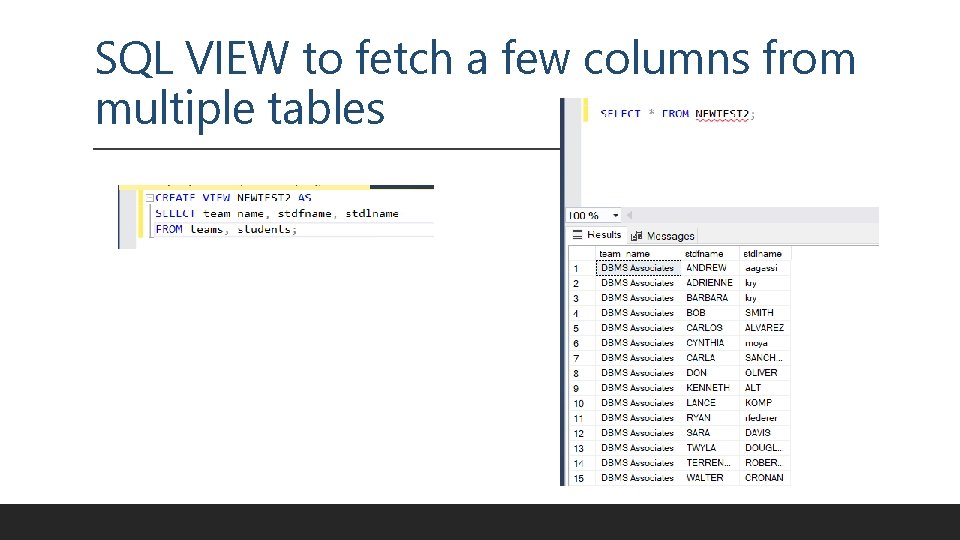
SQL VIEW to fetch a few columns from multiple tables
Uses of Views There are six primary uses of VIEWS: 1. to provide row and column level 'security' 2. to ensure efficient access paths 3. to mask complexity from the user 4. to ensure proper data derivation 5. to rename columns 6. to provide solutions that cannot be accomplished without views (i. e. , complex queries built on the results of other queries/views) It is useful to provide the users with a VIEW rather than the real table, because if they have access only to a view, they cannot corrupt or damage the real table.
Composition VIEWS can consist of: • Rows from tables, including: • • a subset of rows from a single table, all rows from a single table, a subset of rows from multiple tables, or all rows from multiple tables. • Rows from views, including the same combinations as listed above for tables. • Columns from tables, including: • • a subset of columns from a single table, all columns from a single table a subset of columns from multiple tables, or all columns from multiple tables. • Columns from views including the same combinations as listed above for tables.
Updateable Views can be read-only or designed to allow dynamic updates to the underlying table, so if the data in the original table is altered, those alterations are reflected in the VIEWs. 1. The view is defined based on one and only one table. 2. The view must include the PRIMARY KEY of the table based upon which the view has been created. 3. The view should not have any field made out of aggregate functions. 4. The view must not have any DISTINCT clause in its definition. 5. The view must not have any GROUP BY or HAVING clause in its definition. 6. The view must not have any SUBQUERIES in its definitions. 7. If the view you want to update is based upon another view, the later should be updatable. 8. Any of the selected output fields (of the view) must not use constants, strings or value expressions.
What is a subquery? §A Subquery or Inner query or Nested query is a query within SQL query and embedded within the WHERE clause. §A Subquery is a SELECT statement that is embedded in a clause of another SQL statement. §They can be very useful to select rows from a table with a condition that depends on the data in the same or another table. §A Subquery is used to return data that will be used in the main query as a condition to further restrict the data to be retrieved. §The subquery can be placed in the following SQL clauses they are WHERE clause, HAVING clause, FROM clause.
Processing Multiple Tables Using an. Subqueries Subquery–placing inner query (SELECT statement) inside an outer query Options: ◦ In a condition of the WHERE clause ◦ As a “table” of the FROM clause ◦ Within the HAVING clause Subqueries can be: ◦ Noncorrelated–executed once for the entire outer query ◦ Correlated–executed once for each row returned by the outer query 21
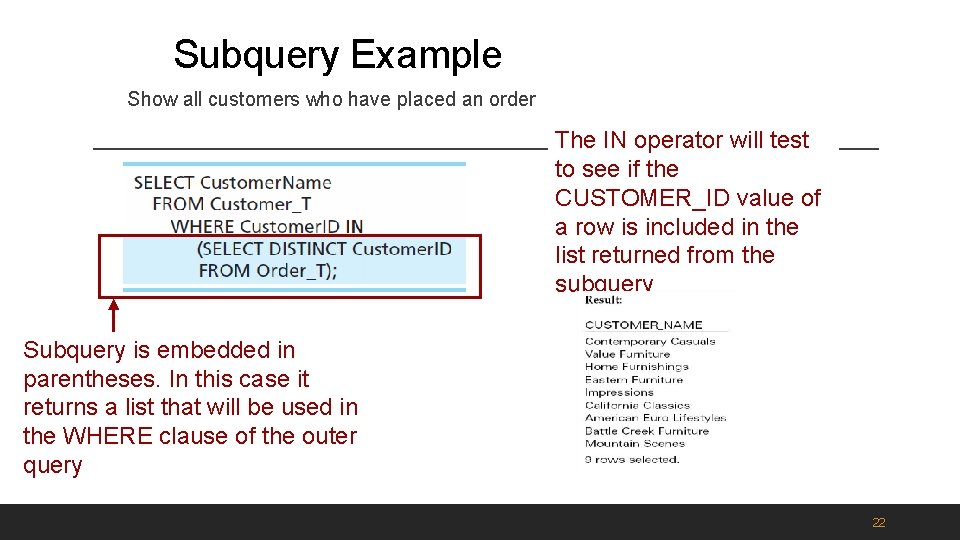
Subquery Example Show all customers who have placed an order The IN operator will test to see if the CUSTOMER_ID value of a row is included in the list returned from the subquery Subquery is embedded in parentheses. In this case it returns a list that will be used in the WHERE clause of the outer query 22
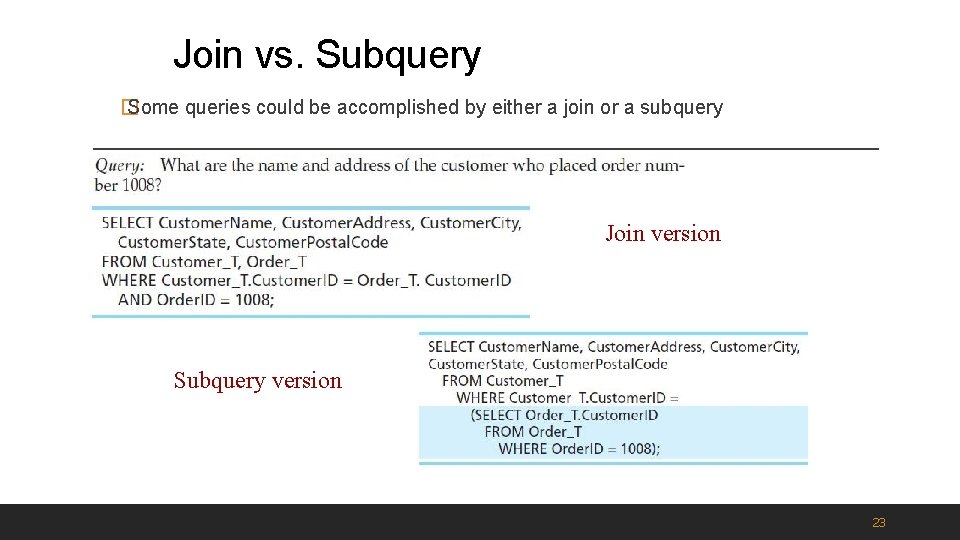
Join vs. Subquery � Some queries could be accomplished by either a join or a subquery Join version Subquery version 23
Advantages/Disadvantages Joins Advantages Of Joins: §The advantage of a join includes that it executes faster. §The retrieval time of the query using joins almost always will be faster than that of a subquery. §By using joins, you can maximize the calculation burden on the database i. e. , instead of multiple queries using one join query. This means you can make better use of the database’s abilities to search through, filter, sort, etc. Disadvantages Of Joins: § Disadvantage of using joins includes that they are not as easy to read as subqueries. § More joins in a query means the database server has to do more work, which means that it is more time-consuming process to retrieve data § As there are different types of joins, it can be confusing as to which join is the appropriate type of join to use to yield the correct desired result set. § Joins cannot be avoided when retrieving data from a normalized database, but it is important that joins are performed correctly, as incorrect joins can result in serious performance degradation and inaccurate query results.
Advantages/Disadvantages Subqueries Advantages Of Subquery: • Subqueries divide the complex query into isolated parts so that a complex query can be broken down into a series of logical steps. • It is easy to understand code maintenance is also at ease. • Subqueries allow you to use the results of another query in the outer query. • In some cases, subqueries can replace complex joins and unions. Disadvantages of Subquery: • The optimizer is more mature for joins than for subqueries, so in many cases a statement that uses a subquery can be executed more efficiently if you rewrite it as join. • We cannot modify a table and select from the same table within a subquery in the same SQL statement.
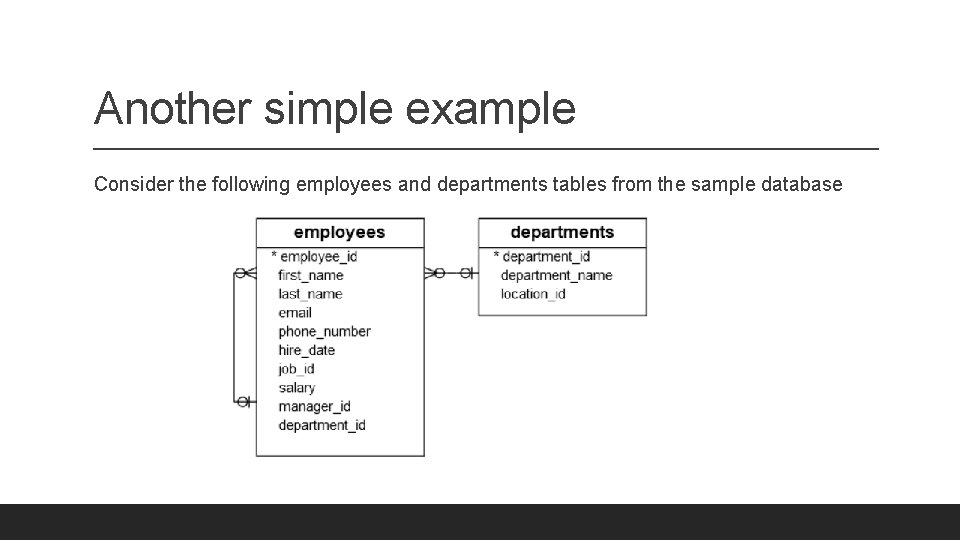
Another simple example Consider the following employees and departments tables from the sample database
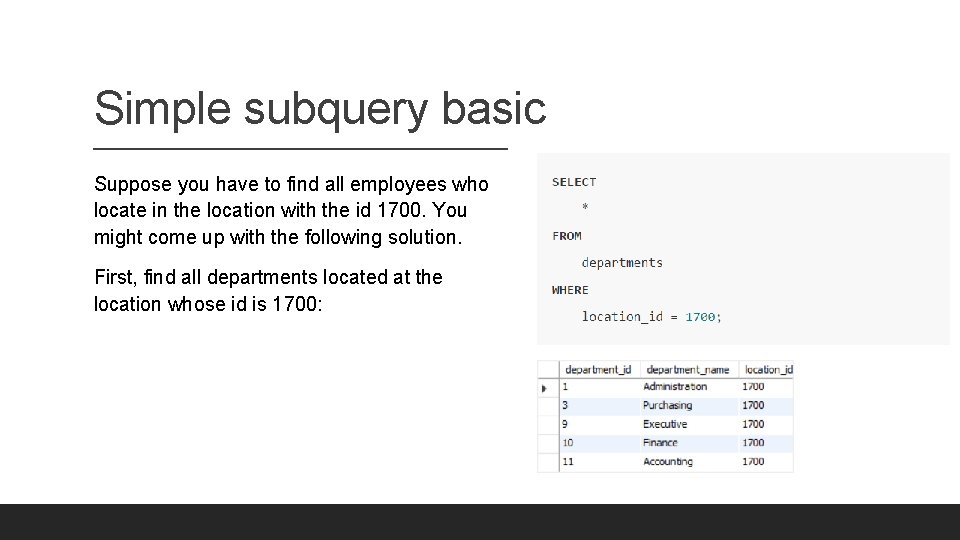
Simple subquery basic Suppose you have to find all employees who locate in the location with the id 1700. You might come up with the following solution. First, find all departments located at the location whose id is 1700:
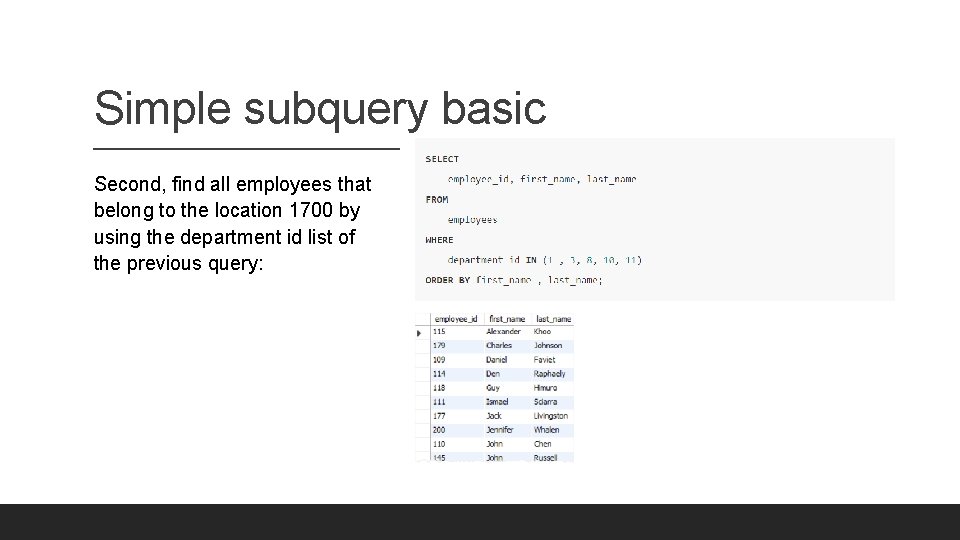
Simple subquery basic Second, find all employees that belong to the location 1700 by using the department id list of the previous query:
Simple subquery basic §This solution has two problems. To start with, you have looked at the departments table to check which department belongs to the location 1700. However, the original question was not referring to any specific departments; it referred to the location 1700. §Because of the small data volume, you can get a list of department easily. However, in the real system with high volume data, it might be problematic. §Another problem was that you have to revise the queries whenever you want to find employees who locate in a different location. §A much better solution to this problem is to use a subquery. By definition, a subquery is a query nested inside another query such as SELECT, INSERT, UPDATE, or DELETE statement. In this tutorial, we are focusing on the subquery used with the SELECT statement.
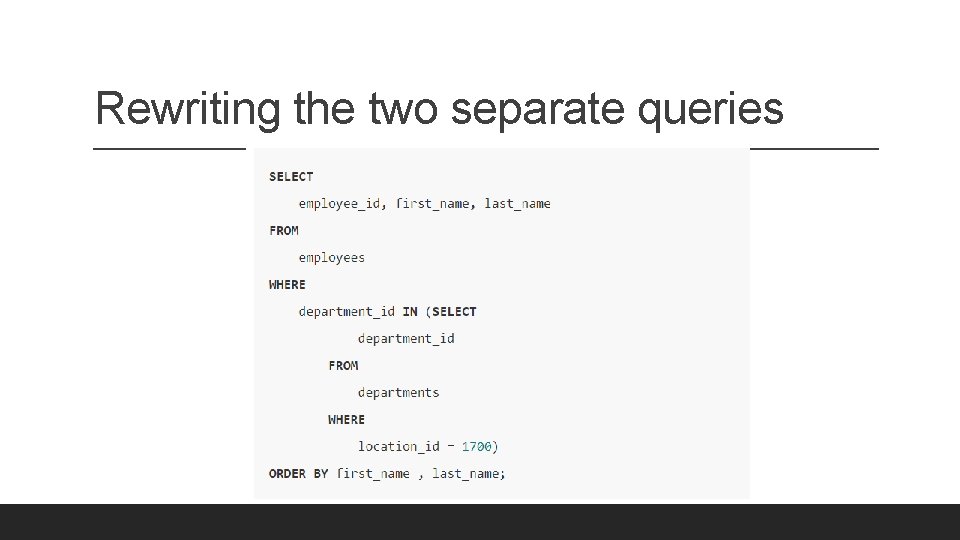
Rewriting the two separate queries
Where to use subqueries The query placed within the parentheses is called a subquery. It is also known as an inner query or inner select. The query that contains the subquery is called an outer query or an outer select. To execute the query, first, the database system has to execute the subquery and substitute the subquery between the parentheses with its result – a number of department id located at the location 1700 – and then executes the outer query. You can use a subquery in many places such as: ◦ ◦ ◦ With the IN or NOT IN operator With comparison operators With the EXISTS or NOT EXISTS operator With the ANY or ALL operator In the FROM clause In the SELECT clause
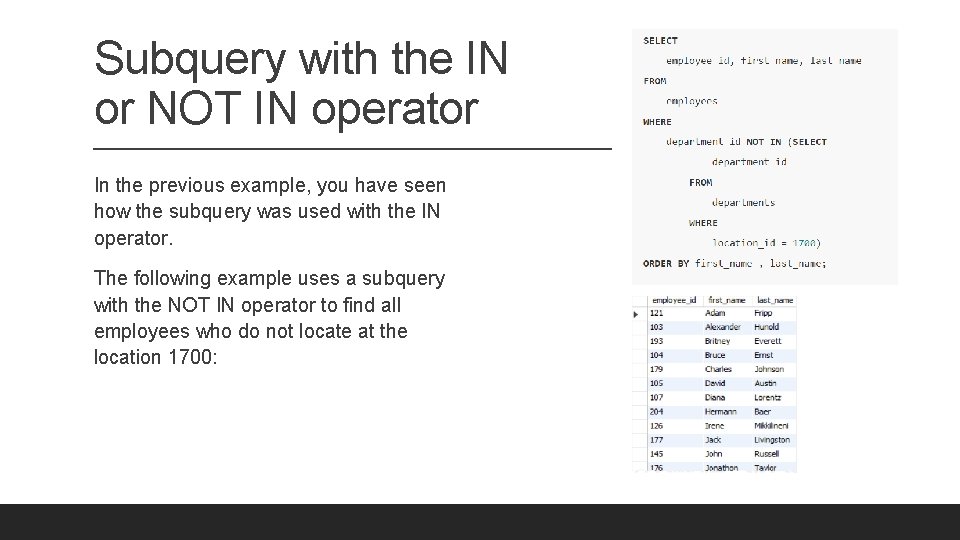
Subquery with the IN or NOT IN operator In the previous example, you have seen how the subquery was used with the IN operator. The following example uses a subquery with the NOT IN operator to find all employees who do not locate at the location 1700:
With comparison operators he following syntax illustrates how a subquery is used with a comparison operator: comparison_operator (subquery) where the comparison operator is one of these operators: ◦ ◦ ◦ Equal (=) Greater than (>) Less than (<) Greater than or equal ( >=) Less than or equal (<=) Not equal ( !=) or (<>) The following example finds the employees who have the highest salary:
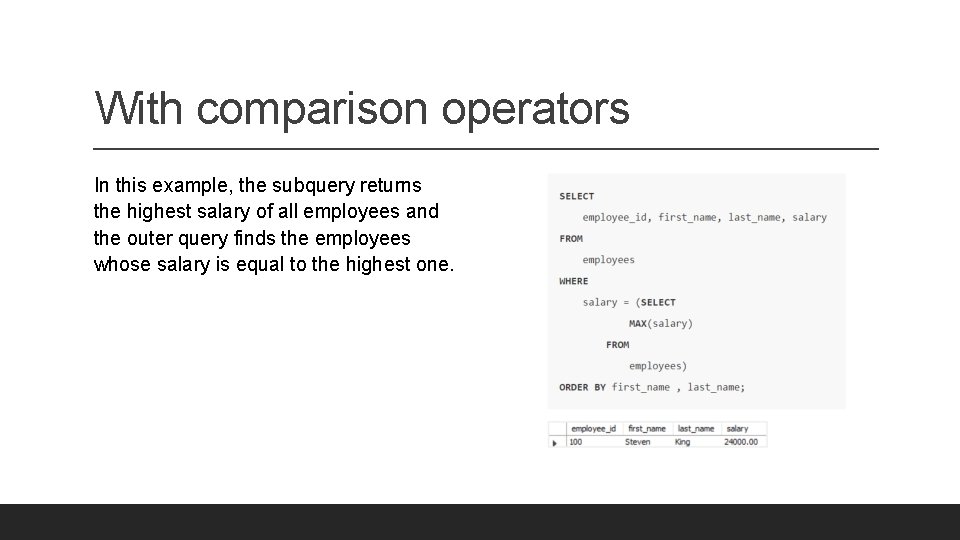
With comparison operators In this example, the subquery returns the highest salary of all employees and the outer query finds the employees whose salary is equal to the highest one.
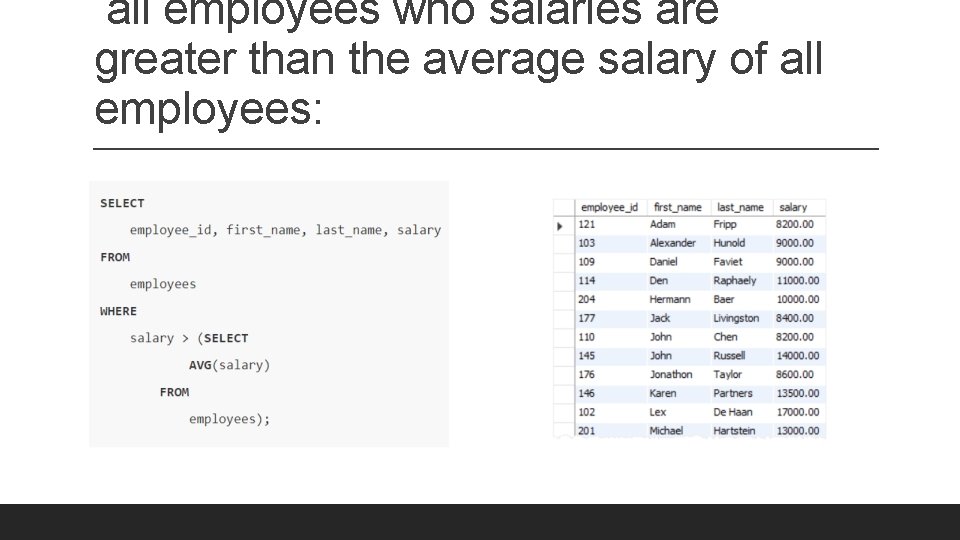
all employees who salaries are greater than the average salary of all employees:
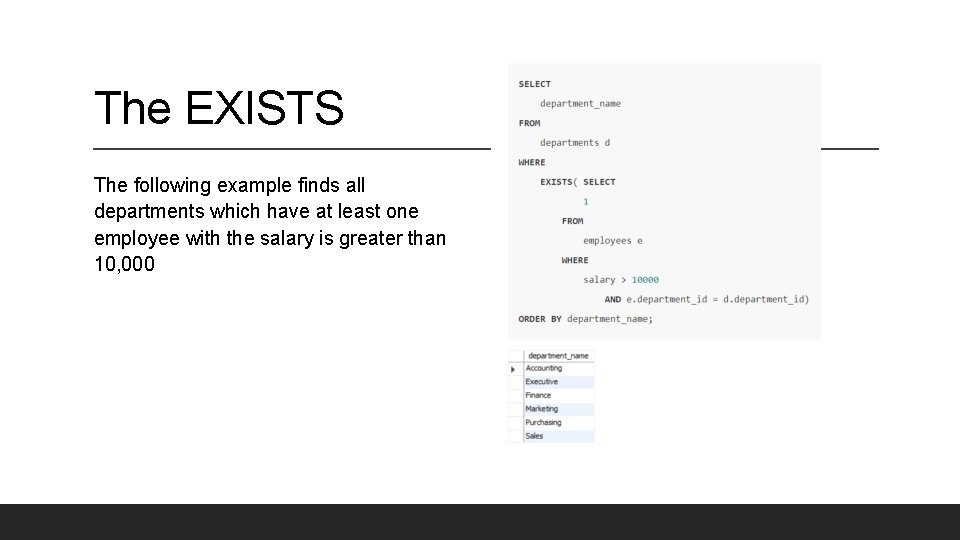
The EXISTS The following example finds all departments which have at least one employee with the salary is greater than 10, 000
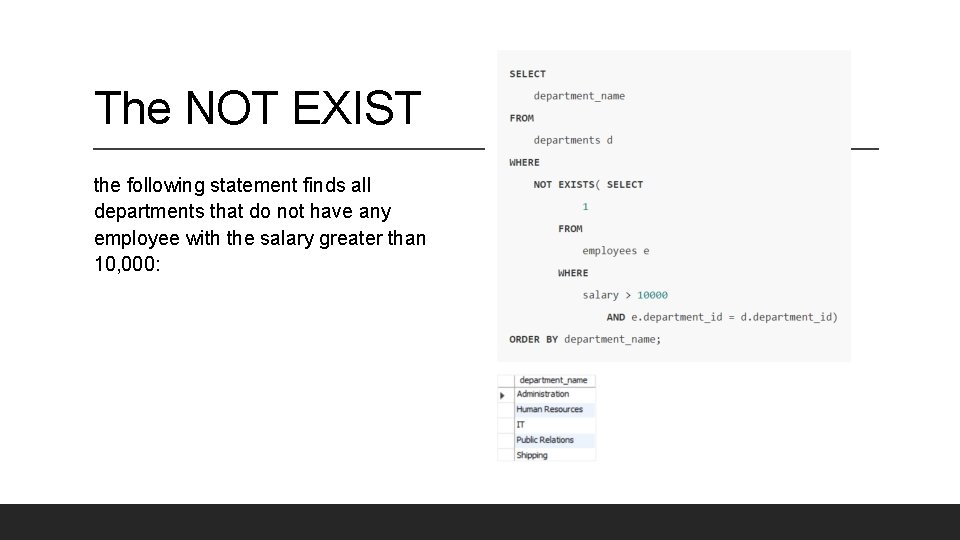
The NOT EXIST the following statement finds all departments that do not have any employee with the salary greater than 10, 000:
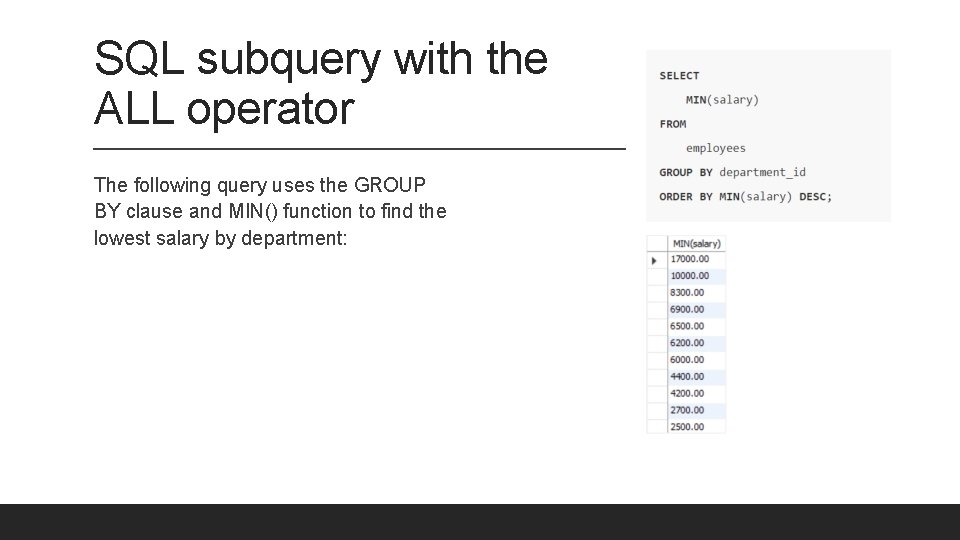
SQL subquery with the ALL operator The following query uses the GROUP BY clause and MIN() function to find the lowest salary by department:
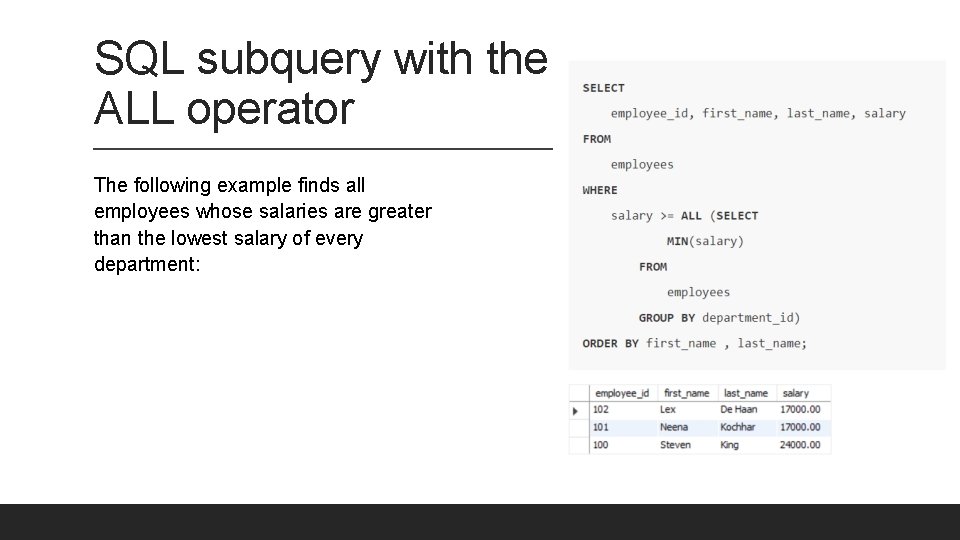
SQL subquery with the ALL operator The following example finds all employees whose salaries are greater than the lowest salary of every department:
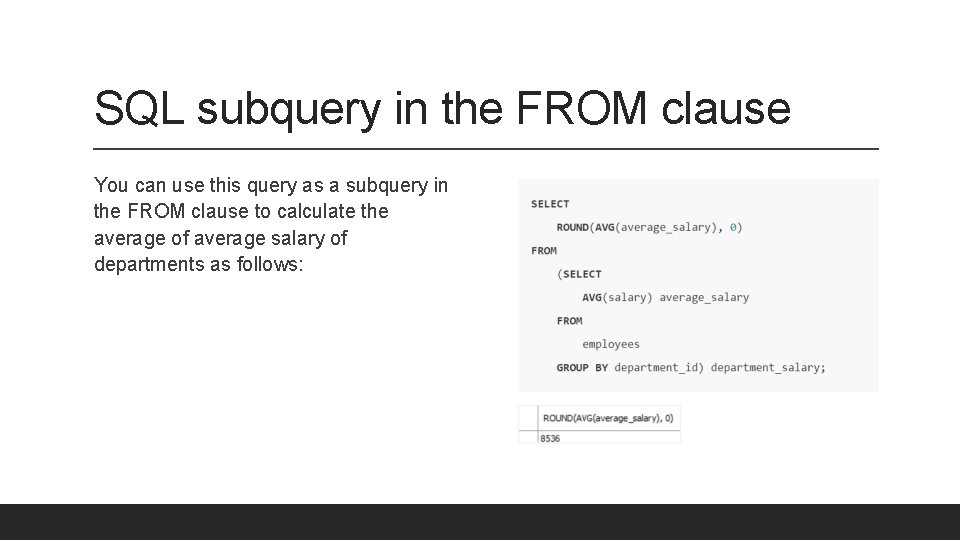
SQL subquery in the FROM clause You can use this query as a subquery in the FROM clause to calculate the average of average salary of departments as follows:
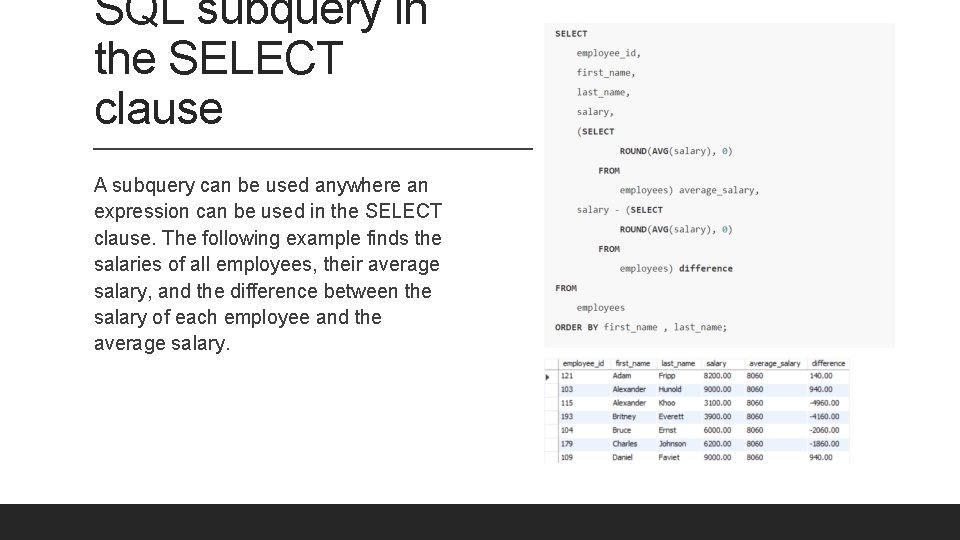
SQL subquery in the SELECT clause A subquery can be used anywhere an expression can be used in the SELECT clause. The following example finds the salaries of all employees, their average salary, and the difference between the salary of each employee and the average salary.
- Slides: 41