
Regular Expressions Regular Expression or pattern in Perl


![Regular Expressions (5) Character Class /Hello [abcde]/ matches “Hello a” or “Hello b” …](https://slidetodoc.com/presentation_image_h2/0412322438f73fdb1c1be35b09ebf258/image-5.jpg "Regular Expressions (5) Character Class /Hello [abcde]/ matches “Hello a” or “Hello b” …")
![Regular Expressions (6) Shortcuts • d digit • w word character [A-Za-z 0 -9_]](https://slidetodoc.com/presentation_image_h2/0412322438f73fdb1c1be35b09ebf258/image-6.jpg "Regular Expressions (6) Shortcuts • d digit • w word character [A-Za-z 0 -9_]")


![Examples 1. What is it? /^0 x[0 -9 a-f. A-F]+$/ 2. Date format: Month-Day-Year](https://slidetodoc.com/presentation_image_h2/0412322438f73fdb1c1be35b09ebf258/image-11.jpg "Examples 1. What is it? /^0 x[0 -9 a-f. A-F]+$/ 2. Date format: Month-Day-Year")


![Home. Work (2) Input/Output Examples: [maxshats@nova ~]$ ping -c 1 -w 3 tau. ac.](https://slidetodoc.com/presentation_image_h2/0412322438f73fdb1c1be35b09ebf258/image-22.jpg "Home. Work (2) Input/Output Examples: [maxshats@nova ~]$ ping -c 1 -w 3 tau. ac.")


![Debugger (3) s [expr] Single step. Executes until the beginning of another statement, descending](https://slidetodoc.com/presentation_image_h2/0412322438f73fdb1c1be35b09ebf258/image-26.jpg "Debugger (3) s [expr] Single step. Executes until the beginning of another statement, descending")
![Debugger (4) r Continue until the return from the current subroutine. c [line|sub] Continue,](https://slidetodoc.com/presentation_image_h2/0412322438f73fdb1c1be35b09ebf258/image-27.jpg "Debugger (4) r Continue until the return from the current subroutine. c [line|sub] Continue,")
![Debugger (5) b subname [condition] b [line] [condition] Set a breakpoint before the given](https://slidetodoc.com/presentation_image_h2/0412322438f73fdb1c1be35b09ebf258/image-28.jpg "Debugger (5) b subname [condition] b [line] [condition] Set a breakpoint before the given")

- Slides: 29
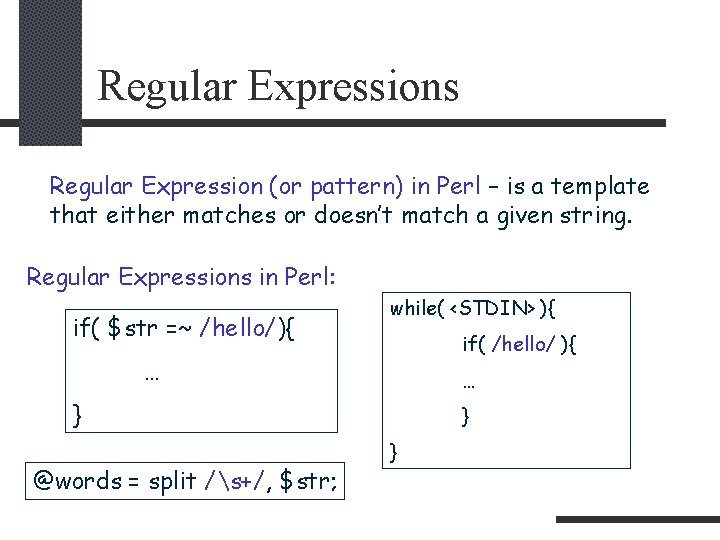
Regular Expressions Regular Expression (or pattern) in Perl – is a template that either matches or doesn’t match a given string. Regular Expressions in Perl: if( $str =~ /hello/){ while( <STDIN> ){ if( /hello/ ){ … … } @words = split /s+/, $str; } }
Regular Expressions (2) Regular Expressions in Unix: grep “include. *h” regular expression *. h globes
Regular Expressions (3) “. ” matchs any char except a newline n /hello. you/ matches any string that has ‘hello’, followed by any one (exactly one) character, followed by ‘you’. /to*ols/ last character before ‘*’ may be repeated zero or more times. Matches ‘tools’, ’tooooools’, ’tols’ (but not ‘toxols’ !!!) /to+ols/ ------//------- one or more -----//------. /to. *ols/ matches ‘to’, followed by any string, followed by ‘ols’. /to? ols/ the character before ‘? ’ is optional. Thus, there are only two matching strings – ‘tools’ and ‘tols’.
Regular Expressions (4) Grouping – parentheses ‘( )’ are used for grouping one or more characters. /(tools)+/ matches “toolstools”. Alternatives: /hello (world|Perl)/ - matches “hello world”, “hello Perl”.
Regular Expressions (5) Character Class /Hello [abcde]/ matches “Hello a” or “Hello b” … /Hello [a-e]/ the same as above Negating: [^abc] any char except a, b, c
Regular Expressions (6) Shortcuts • d digit • w word character [A-Za-z 0 -9_] • s white space Negative ^ – [^d] matches non digit
Regular Expressions (7) Quantifiers: /a{3, 6}/ - matches “a” repeated 3, 4, 5, 6 times /(abc){3, }/ - matches three or more repetitions of “abc”. /a{3}/ - matches exactly three repetitions of “a”. * = {0, } + = {1, } ? = {0, 1}
Regular Expressions (8) /^abc/ - “^” beginning of a string Anchors /a^bc/ - matches “^” /[^abc]/ - negating ^ - marks the beginning of the string $ - marks the end of the string /^Hello Perl/ - matches “Hello Perl, good by Perl”, but not “Perl Hello Perl” /^s*$/ - matches all blank lines
Regular Expressions (9) b - matches at either end of a word (matches the start or the end of a group of w characters) /b. Perlb/ - matches “Hello Perl”, “Perl” but not “Perl++” B - negative of b
Regular Expressions (10) Backreferences: /(World|Perl) 1/ - matches “World”, “Perl”. /((hello|hi) (world|Perl))/ • 1 refers to (hello|hi) (world|Perl) • 2 refers to (hello|hi) • 3 refers to (world|Perl)
Examples 1. What is it? /^0 x[0 -9 a-f. A-F]+$/ 2. Date format: Month-Day-Year -> Year: Day: Month $date = “ 12 -31 -1901”; $date =~ s/(d+)-(d+)/$3: $2: $1/;
Examples 3. Make a pattern that matches any line of input that has the same word repeated two or more times in a row. Whitespace between words may differ.
Example 3 1. /w+/ #matches a word 2. /(w+)/ #to remember later 3. /(w+)1+/ #two or more times 4. /(w+)(s+1)+/ #whitespace between words 5. “This is a test” -> /b(w+)(s+1)+/ 6. “This is theory” -> /b(w+)(s+1)+b/
Regular Expressions (11) $& $` $’ - what really was matched - what was before - the rest of the string after the matched pattern $`. $&. $’ - original string
Regular Expressions (12) Substitutions: s/T/U/; #substitutes T with U (only once) s/T/U/g; #global substitution s/s+/ /g; #collapses whitespaces s/(w+)/$2 $1/g; s/T/U/; #applied on $_ variable $str =~ s/T/U/;
Split and Join $str=“aaa bbb ccc dddd”; @words = split /s+/, $str; $str = join ‘: ‘, @words; #result is “aaa: bbb: ccc: dddd” @words = split /s+/, $_; “ aaa b” -> “”, “aaa”, “b” @words = split; “ aaa b” -> “aaa”, “b” @words = split ‘ ‘, $_; “ aaa b” -> “aaa”, “b”
Grep grep EXPR, LIST; @results = grep /^>/, @array; @results = grep /^>/, <FILE>;
CGI - Common Gateway Interface CGI – a standard that defines the protocol between a web server and a application (script). Web Browser http/ ssl … DB Web Server CG I Application search example
Sending information to CGI Two ways to submit information: • HTML form <form action="/cgi-bin/scilib. pl" method=POST> <input type=text name=searchj value=""> <input type=submit value="search"> </form> • With URL http: //www. tau. ac. il/cgi-bin/scilib. pl? searchj=protein
CGI - Simple script #!/usr/bin/perl use CGI qw(: standard); print header; $param= param('formtext'); print "<hr><p align=left>Hello CGI: $param"; print end_html;
Home. Work Write a CGI Perl script that prints IP address of submitted server name. Input is received from HTML text box. (you need to create two pages - (1) html page with the text box (2) cgi script that receives and prints the IP address. ) See: http: //www. cs. tau. ac. il/faq/home. html
Home. Work (2) Input/Output Examples: [maxshats@nova ~]$ ping -c 1 -w 3 tau. ac. il ping: unknown host tau. ac. il [maxshats@nova ~]$ ping -c 1 -w 3 www. cnn. com PING cnn. com (207. 25. 71. 25) from 132. 67. 128. 249 : 56(84) bytes of data. --- cnn. com ping statistics --4 packets transmitted, 0 packets received, 100% packet loss Use regular expression
Home. Work (3) Run Unix commands: $str=`ping -c 1 -w 3 www. cnn. com`; print $str;
Debugger On Unix: “perldoc perldebug” Invoke Perl with the -d switch: perl –d your_code. pl arg 1 arg 2 …
Debugger (2) • always displays the line it's about to execute • Any command not recognized by the debugger is directly executed (eval'd) as Perl code (for example you can print out some variables). p expr (as “print expr”) x expr - Nested data structures are printed out recursively, unlike the real print function in Perl
Debugger (3) s [expr] Single step. Executes until the beginning of another statement, descending into subroutine calls. If an expression is supplied that includes function calls, it too will be single-stepped. n [expr] Next. Executes over subroutine calls, until the beginning of the next statement. If an expression is supplied that includes function calls, those functions will be executed with stops before each statement. <CR> Repeat last n or s command.
Debugger (4) r Continue until the return from the current subroutine. c [line|sub] Continue, optionally inserting a one-time-only breakpoint at the specified line or subroutine. w [line] List window (a few lines) around the current/[line] line
Debugger (5) b subname [condition] b [line] [condition] Set a breakpoint before the given line. If line is omitted, set a breakpoint on the line about to be executed. If a condition is specified, it's evaluated each time the statement is reached: a breakpoint is taken only if the condition is true. Breakpoints may only be set on lines that begin an executable statement. b 237 $x > 30 b 237 ++$count 237 < 11 b 33 /pattern/i
Debugger (6) W expr Add a global watch-expression.