
Regular Expressions in Python By Dr Ziad AlSharif
Regular Expressions in Python By Dr. Ziad Al-Sharif
What is a Regular Expression • Regular expressions are a: – powerful language for matching text patterns and – standardized way for searching, replacing, and parsing text with complex patterns of characters • Most modern languages have similar library packages for regular expressions – E. g. , Python has the re built in module – Other popular programming languages have Regex capabilities including: Perl, Java. Script, Ruby, Tcl, C++, Java, C#, etc. • Regular Expression Features: – Used to construct compilers, interpreters and text editors – Used to search and match text patterns – Used to validate text data formats especially input data
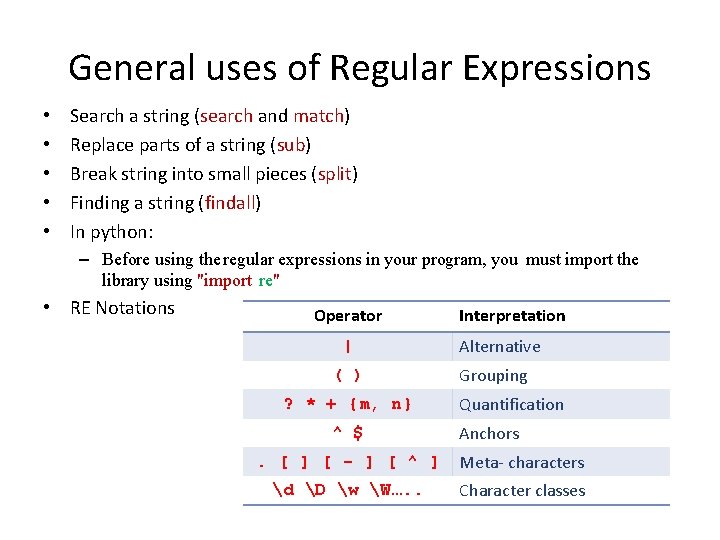
General uses of Regular Expressions • • • Search a string (search and match) Replace parts of a string (sub) Break string into small pieces (split) Finding a string (findall) In python: – Before using the regular expressions in your program, you must import the library using "import re" • RE Notations Operator | ( ) ? * + {m, n} ^ $ Interpretation Alternative Grouping Quantification Anchors . [ ] [ - ] [ ^ ] Meta- characters d D w W…. . Character classes
Introduction to Computing Using Python Example: General uses of Regular Expressions Suppose we need to find all email addresses in a web page • How do we recognize email addresses? • What string pattern do emails addresses exhibit? A email address string pattern, informally: An email address consists of: • a user ID—that is, a sequence of "allowed" characters— • followed by the @ symbol • followed by a hostname—that is, a dot-separated sequence of allowed characters A regular expression is a formal way to describe a string pattern A regular expression is a string that consists of characters and regular expression operators
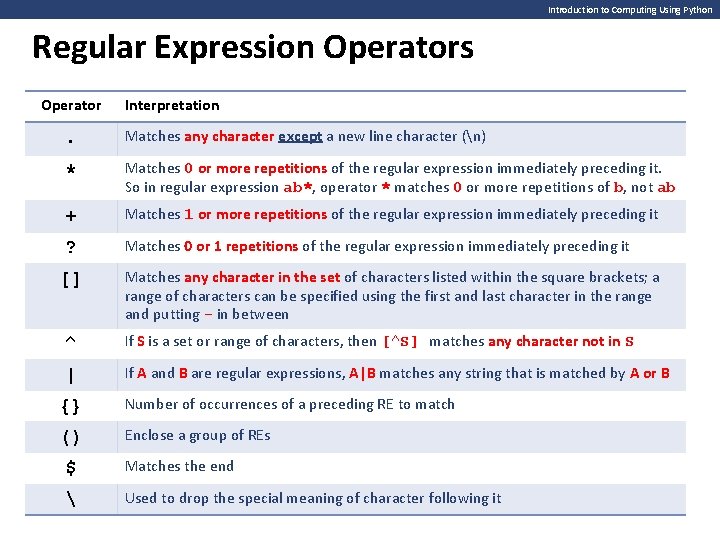
Introduction to Computing Using Python Regular Expression Operators Operator Interpretation . Matches any character except a new line character (n) * Matches 0 or more repetitions of the regular expression immediately preceding it. So in regular expression ab*, operator * matches 0 or more repetitions of b, not ab + Matches 1 or more repetitions of the regular expression immediately preceding it ? Matches 0 or 1 repetitions of the regular expression immediately preceding it [] Matches any character in the set of characters listed within the square brackets; a range of characters can be specified using the first and last character in the range and putting - in between ^ If S is a set or range of characters, then [^S] matches any character not in S | If A and B are regular expressions, A|B matches any string that is matched by A or B {} Number of occurrences of a preceding RE to match () Enclose a group of REs $ Matches the end Used to drop the special meaning of character following it
![Introduction to Computing Using Python Examples: Regular Expression Operator Interpretation [Pp]ython Match "Python" or](http://slidetodoc.com/presentation_image_h2/09cb270b3a1f4b0692157b54cd5173b6/image-6.jpg "Introduction to Computing Using Python Examples: Regular Expression Operator Interpretation [Pp]ython Match \"Python\" or")
Introduction to Computing Using Python Examples: Regular Expression Operator Interpretation [Pp]ython Match "Python" or "python" [aeiou] Operator Interpretation Match any one lowercase vowel [0 -9] Match any digit [a-z] Match any lowercase ASCII letter [A-Z] Match any uppercase ASCII letter [a-z. A-Z 0 -9] Match any of lowercase, uppercase, or digits [^aeiou] Match anything other than a lowercase vowel [^0 -9] d{3} Match exactly 3 digits d{3, } Match 3 or more digits d{3, 5} Match 3, 4, or 5 digits Match anything other than a digit Operator. Interpretation Match any character except newline d Match a digit: [0 -9] D Match a nondigit: [^0 -9] s Match a whitespace character: [ trnf] S Match nonwhitespace: [^ trnf] w Match a single word character: [A-Za-z 0 -9_] W Match a nonword character: [^A-Za-z 0 -9_]
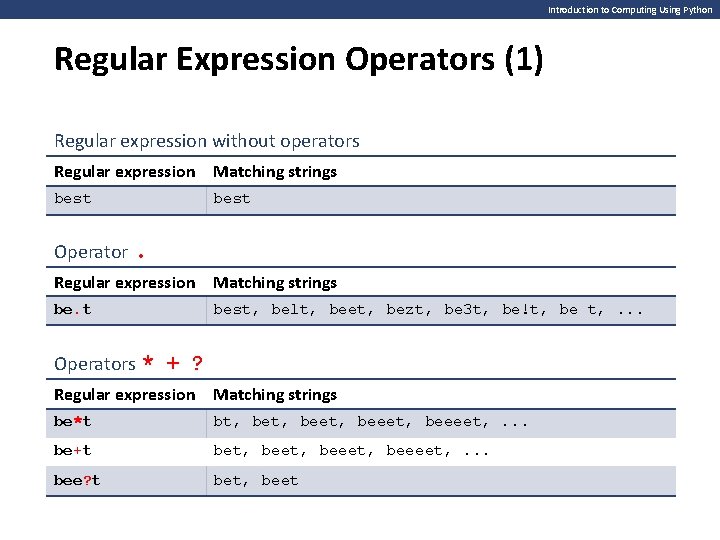
Introduction to Computing Using Python Regular Expression Operators (1) Regular expression without operators Regular expression Matching strings best Operator. Regular expression Matching strings be. t best, belt, beet, bezt, be 3 t, be!t, be t, . . . Operators * + ? Regular expression Matching strings be*t bt, beet, beeeet, . . . be+t bet, beeet, beeeet, . . . bee? t bet, beet
![Introduction to Computing Using Python Regular Expression Operators (2) Operator [] Regular expression Matching](http://slidetodoc.com/presentation_image_h2/09cb270b3a1f4b0692157b54cd5173b6/image-8.jpg "Introduction to Computing Using Python Regular Expression Operators (2) Operator [] Regular expression Matching")
Introduction to Computing Using Python Regular Expression Operators (2) Operator [] Regular expression Matching strings be[ls]t belt, best be[l-o]t belt, bemt, bent, beot be[a-cx-z]t beat, bebt, bect, bext, beyt, bezt Operator ^ Regular expression Matching strings be[^0 -9]t belt, best, be#t, . . . (but not be 4 t) be[^xyz]t belt, be 5 t, . . . (but not bext, beyt, and bezt) be[^a-z. A-Z]t be!t, be 5 t, be t, . . . (but not beat)
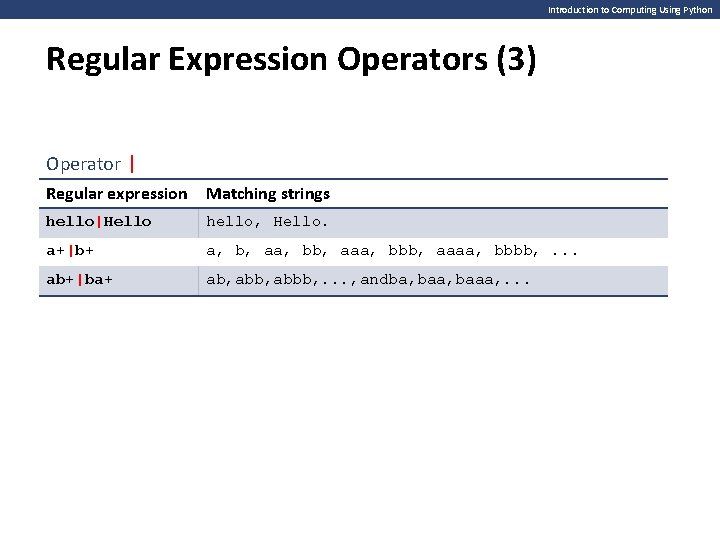
Introduction to Computing Using Python Regular Expression Operators (3) Operator | Regular expression Matching strings hello|Hello hello, Hello. a+|b+ a, b, aa, bb, aaa, bbb, aaaa, bbbb, . . . ab+|ba+ ab, abbb, . . . , andba, baaa, . . .
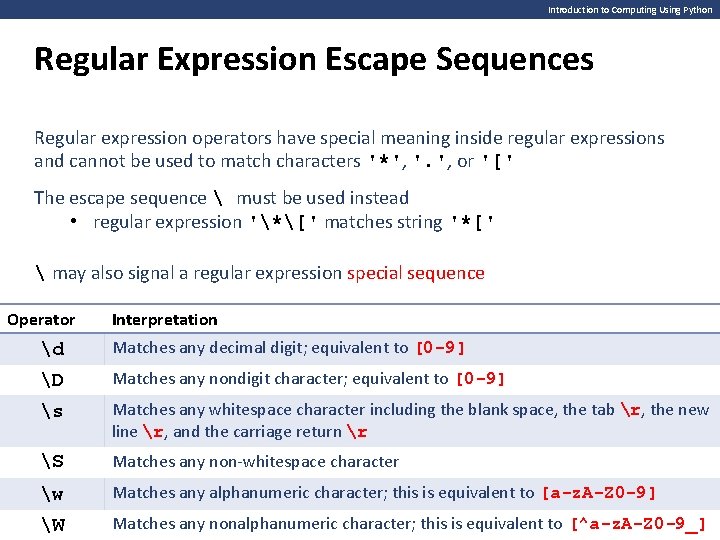
Introduction to Computing Using Python Regular Expression Escape Sequences Regular expression operators have special meaning inside regular expressions and cannot be used to match characters '*', '. ', or '[' The escape sequence must be used instead • regular expression '*[' matches string '*[' may also signal a regular expression special sequence Operator Interpretation d Matches any decimal digit; equivalent to [0 -9] D Matches any nondigit character; equivalent to [0 -9] s Matches any whitespace character including the blank space, the tab r, the new line r, and the carriage return r S Matches any non-whitespace character w Matches any alphanumeric character; this is equivalent to [a-z. A-Z 0 -9] W Matches any nonalphanumeric character; this is equivalent to [^a-z. A-Z 0 -9_]

More Example
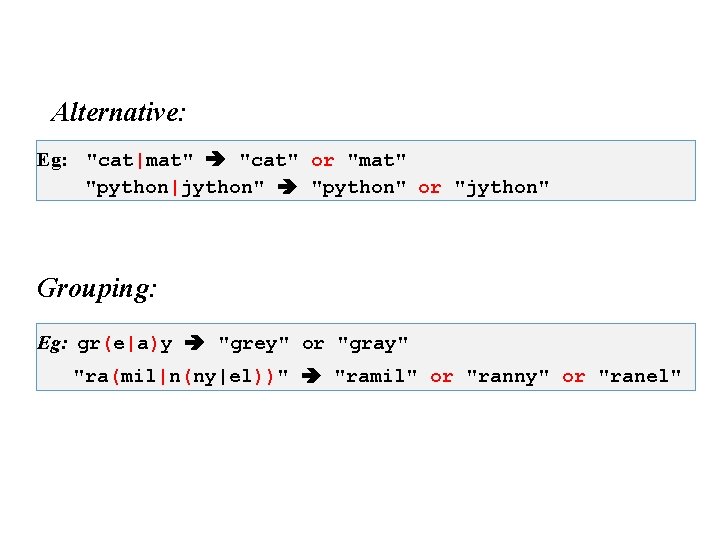
Alternative: Eg: "cat|mat" "cat" or "mat" "python|jython" "python" or "jython" Grouping: Eg: gr(e|a)y "grey" or "gray" "ra(mil|n(ny|el))" "ramil" or "ranny" or "ranel"
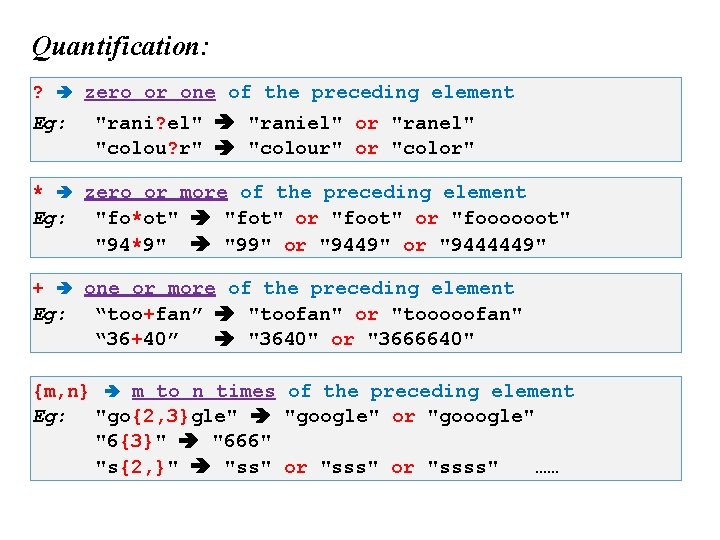
Quantification: ? Eg: zero or one of the preceding element "rani? el" "raniel" or "ranel" "colou? r" "colour" or "color" * zero or more of the preceding element Eg: "fo*ot" "fot" or "foooooot" "94*9" "99" or "9444449" + one or more of the preceding element Eg: “too+fan” "toofan" or "tooooofan" “ 36+40” "3640" or "3666640" {m, n} m to n times of the preceding element Eg: "go{2, 3}gle" "google" or "gooogle" "6{3}" "666" "s{2, }" "ss" or "ssss" ……
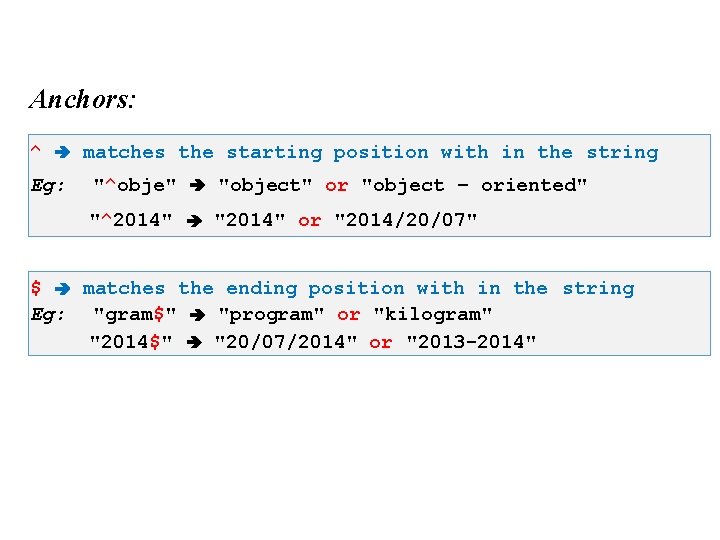
Anchors: ^ Eg: matches the starting position with in the string "^obje" "object" or "object – oriented" "^2014" "2014" or "2014/20/07" $ matches the ending position with in the string Eg: "gram$" "program" or "kilogram" "2014$" "20/07/2014" or "2013 -2014"
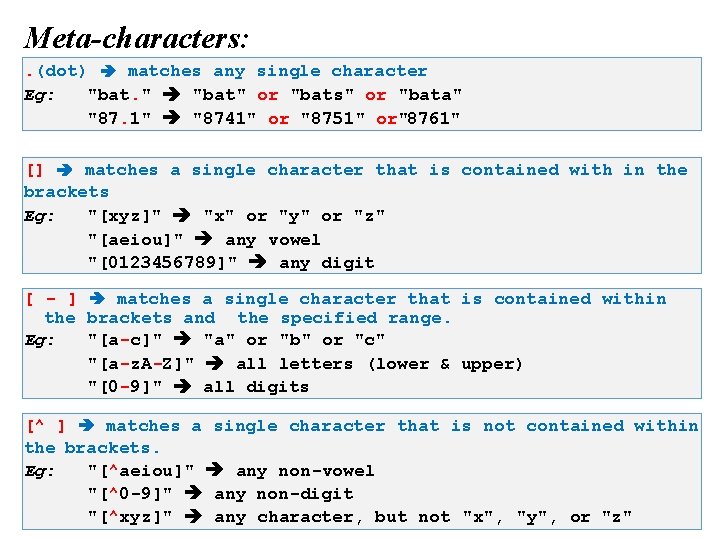
Meta-characters: . (dot) matches any single character Eg: "bat. " "bat" or "bats" or "bata" "87. 1" "8741" or "8751" or"8761" [] matches a single character that is contained with in the brackets Eg: "[xyz]" "x" or "y" or "z" "[aeiou]" any vowel "[0123456789]" any digit [ - ] matches a single character that is contained within the brackets and the specified range. Eg: "[a-c]" "a" or "b" or "c" "[a-z. A-Z]" all letters (lower & upper) "[0 -9]" all digits [^ ] matches a single character that is not contained within the brackets. Eg: "[^aeiou]" any non-vowel "[^0 -9]" any non-digit "[^xyz]" any character, but not "x", "y", or "z"
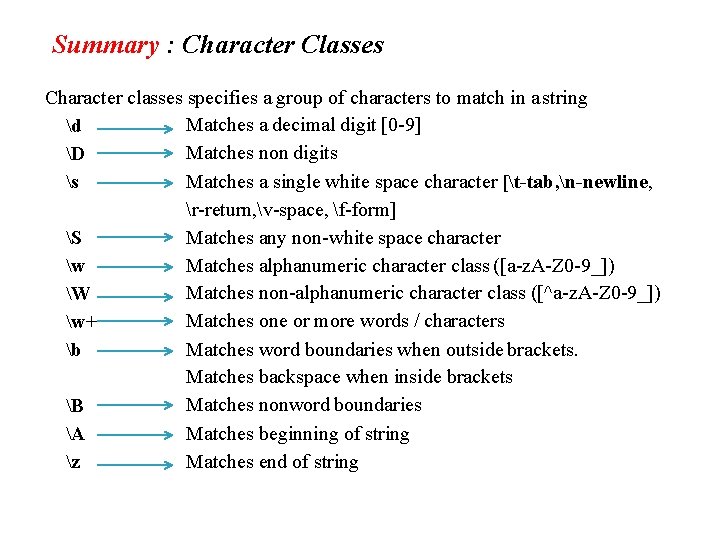
Summary : Character Classes Character classes specifies a group of characters to match in a string Matches a decimal digit [0 -9] d Matches non digits D s Matches a single white space character [t-tab, n-newline, r-return, v-space, f-form] Matches any non-white space character S Matches alphanumeric character class ([a-z. A-Z 0 -9_]) w Matches non-alphanumeric character class ([^a-z. A-Z 0 -9_]) W Matches one or more words / characters w+ Matches word boundaries when outside brackets. b Matches backspace when inside brackets Matches nonword boundaries B A Matches beginning of string z Matches end of string
RE in Python
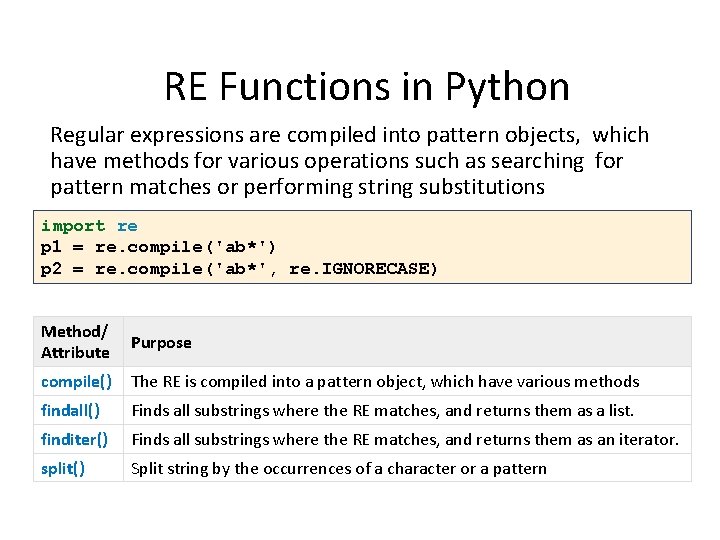
RE Functions in Python Regular expressions are compiled into pattern objects, which have methods for various operations such as searching for pattern matches or performing string substitutions import re p 1 = re. compile('ab*') p 2 = re. compile('ab*', re. IGNORECASE) Method/ Attribute Purpose compile() The RE is compiled into a pattern object, which have various methods findall() Finds all substrings where the RE matches, and returns them as a list. finditer() Finds all substrings where the RE matches, and returns them as an iterator. split() Split string by the occurrences of a character or a pattern
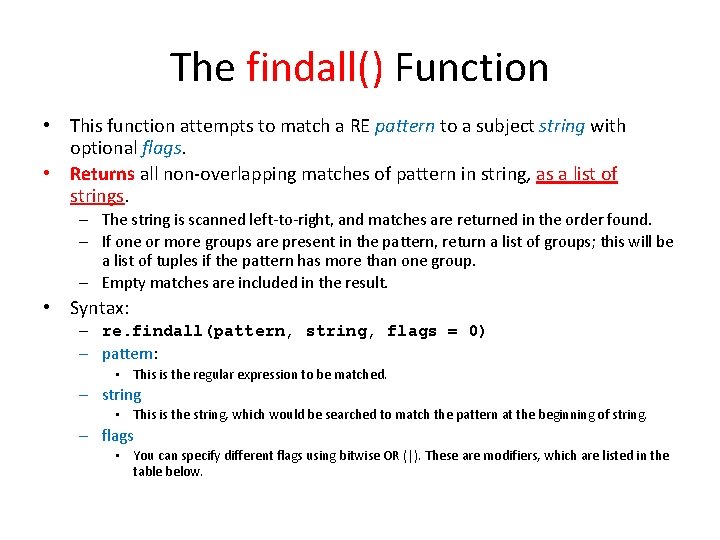
The findall() Function • This function attempts to match a RE pattern to a subject string with optional flags. • Returns all non-overlapping matches of pattern in string, as a list of strings. – The string is scanned left-to-right, and matches are returned in the order found. – If one or more groups are present in the pattern, return a list of groups; this will be a list of tuples if the pattern has more than one group. – Empty matches are included in the result. • Syntax: – re. findall(pattern, string, flags = 0) – pattern: • This is the regular expression to be matched. – string • This is the string, which would be searched to match the pattern at the beginning of string. – flags • You can specify different flags using bitwise OR (|). These are modifiers, which are listed in the table below.
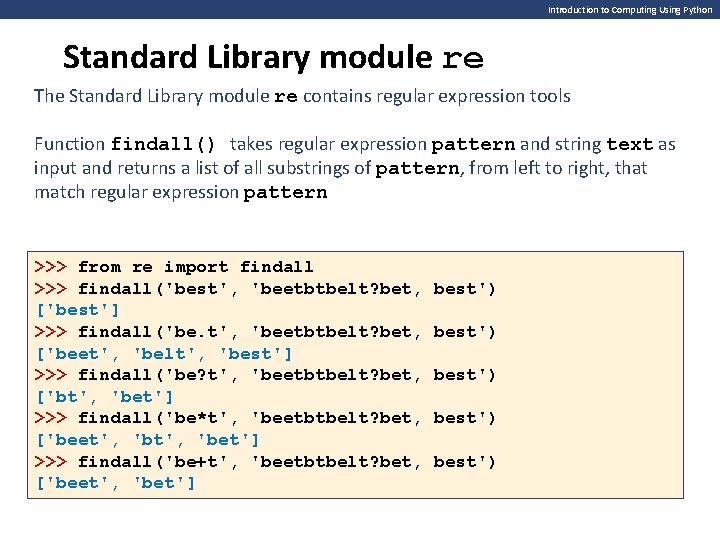
Introduction to Computing Using Python Standard Library module re The Standard Library module re contains regular expression tools Function findall() takes regular expression pattern and string text as input and returns a list of all substrings of pattern, from left to right, that match regular expression pattern >>> from re import findall >>> findall('best', 'beetbtbelt? bet, ['best'] >>> findall('be. t', 'beetbtbelt? bet, ['beet', 'belt', 'best'] >>> findall('be? t', 'beetbtbelt? bet, ['bt', 'bet'] >>> findall('be*t', 'beetbtbelt? bet, ['beet', 'bet'] >>> findall('be+t', 'beetbtbelt? bet, ['beet', 'bet'] best') best')
The finditer() Function • This function attempts to match a RE pattern to a subject string with optional flags. • Returns an iterator yielding match objects over all non-overlapping matches for the RE pattern in string. – The string is scanned left-to-right, and matches are returned in the order found. – Empty matches are included in the result. • Syntax: – re. finditer(pattern, string, flags = 0) – pattern: • This is the regular expression to be matched. – string • This is the string, which would be searched to match the pattern at the beginning of string. – flags • You can specify different flags using bitwise OR (|). These are modifiers, which are listed in the table below.
The split() Function • Split string by the occurrences of a character or a pattern, upon finding that pattern, the remaining characters from the string are returned as part of the resulting list. • Splits a string into a list delimited by the passed pattern. • This method is invaluable for converting textual data into data structures that can be easily read and modified by Python • Syntax: – re. split(pattern, string, maxsplit=0, flags=0) – pattern: • This is the regular expression to be matched. – string • This is the string, which would be searched to match the pattern at the beginning of string. – flags • You can specify different flags using bitwise OR (|). These are modifiers, which are listed in the table below.
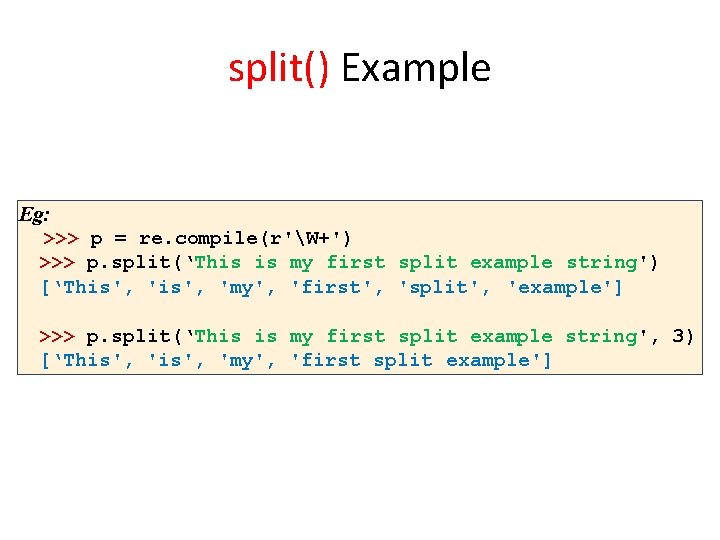
split() Example Eg: >>> p = re. compile(r'W+') >>> p. split(‘This is my first split example string') [‘This', 'my', 'first', 'split', 'example'] >>> p. split(‘This is my first split example string', 3) [‘This', 'my', 'first split example']
RE flags in Python • The modifiers are specified as an optional flag. • These are modifiers, which are: – re. I • Performs case-insensitive matching. – re. S • Makes a period (dot) match any character, including a newline. – re. U • Interprets letters according to the Unicode character set. This flag affects the behavior of w, W, b, B.
References • Regular expression operations – https: //docs. python. org/3/library/re. html • Book: Introduction to Computing Using Python (ch 11) – https: //www. oreilly. com/library/view/introduction-tocomputing/9781118213568/ • Website: Regular Expressions. – https: //www. regular-expressions. info/examples. html • Regular expression at Wikipedia – https: //en. wikipedia. org/wiki/Regular_expression • How to write Regular Expressions – https: //www. geeksforgeeks. org/write-regular-expressions/ – https: //www. geeksforgeeks. org/regular-expression-python-examples-set-1/
- Slides: 25