
RealTime rendering Chapter 4 Visual Appearance 4 4
- Slides: 24
Real-Time rendering Chapter 4. Visual Appearance 4. 4. 4. 5. 4. 6. 4. 7. Aliasing and antialiasing Transparency, alpha, and compositing Fog Gamma correction 2002. 04. 10 李珉禎
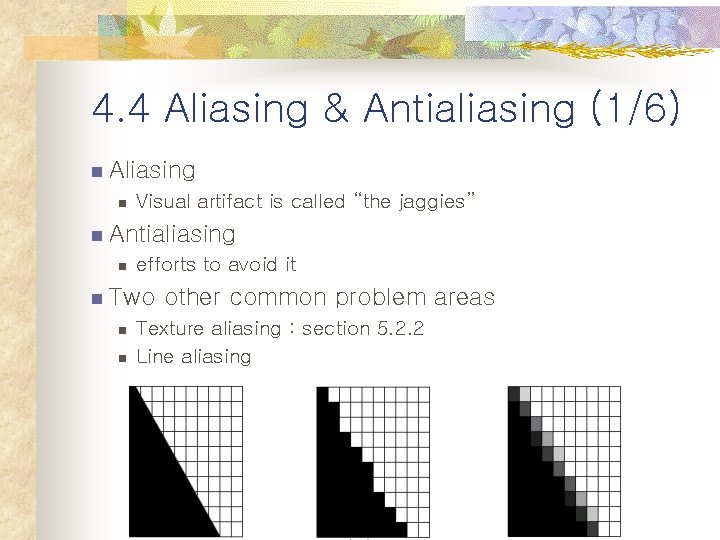
4. 4 Aliasing & Antialiasing (1/6) n Aliasing n Visual artifact is called “the jaggies” n Antialiasing n efforts to avoid it n Two n n other common problem areas Texture aliasing : section 5. 2. 2 Line aliasing
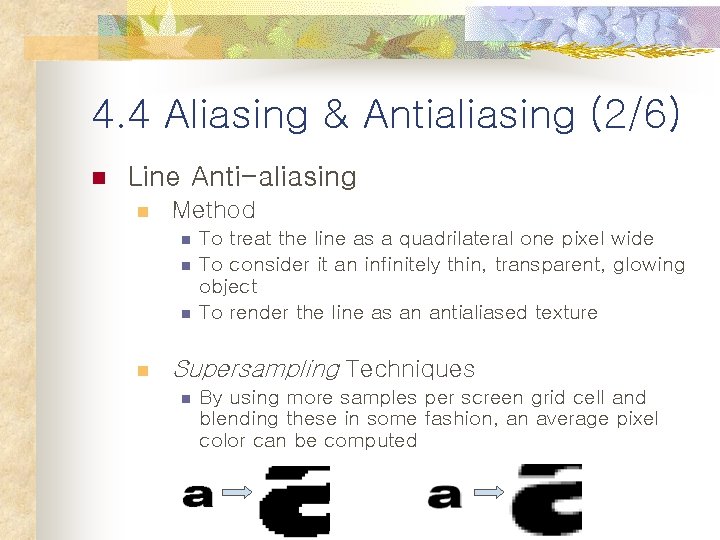
4. 4 Aliasing & Antialiasing (2/6) n Line Anti-aliasing n Method n n To treat the line as a quadrilateral one pixel wide To consider it an infinitely thin, transparent, glowing object To render the line as an antialiased texture Supersampling Techniques n By using more samples per screen grid cell and blending these in some fashion, an average pixel color can be computed
4. 4 Aliasing & Antialiasing (3/6) n To implement Higher sampling rates (1/2) n Combine the neighboring samples to create an image n n n To render the scene at a higher resolution ex) Image of 500*400 To render an image of 1000*800 generated with 4 samples per pixel (: hardware accelerator) Accumulation buffer n n n View moved half a pixel in the screen x- or ydirection as needed Such effects as motion blur and depth of field real-time rendering으로 구현하기에 expensive한 단점
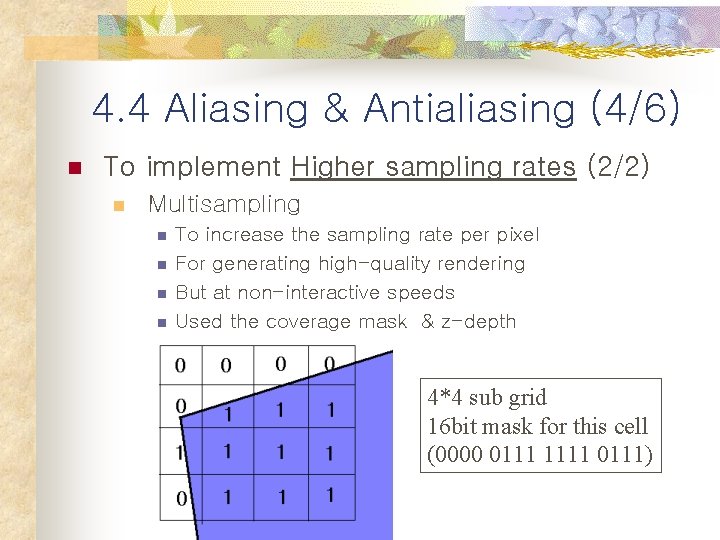
4. 4 Aliasing & Antialiasing (4/6) n To implement Higher sampling rates (2/2) n Multisampling n To increase the sampling rate per pixel For generating high-quality rendering But at non-interactive speeds Used the coverage mask & z-depth n . . n n n 4*4 sub grid 16 bit mask for this cell (0000 0111 1111 0111)
4. 4 Aliasing & Antialiasing (5/6) n n How each polygon covers a grid cell? have some limitations n Size of the Coverage mask n n n Box filter n n 9 level (common) 65 level (arbitrary) simplicity Lack of gamma correction n Discussed in Section 4. 7.
4. 4 Aliasing & Antialiasing (6/6) n Supersampling schemes n expensive to support in hard ware 다른 application단계에서 지원 n ex) Direct 3 D n n Edge antialiasing n n Problem: all edges are redrawn, application must identify likely edges to redraw Full-scene antialiasing n n n Requires the polygons be sorted from back to front Rendering with only one pass through the data Problem: Expensive
4. 5 Transparency, Alpha & Compositing (1/7) n Transparency effect in real-time rendering systems n n n Simplistic Limited Effects normally unavailable include… n semi-transparent n n The blending of light (refraction) Reflectivity Transmission changes due to the viewing angle But, powerful tool for a variety of techniques(see Chapter 6. Special effect)
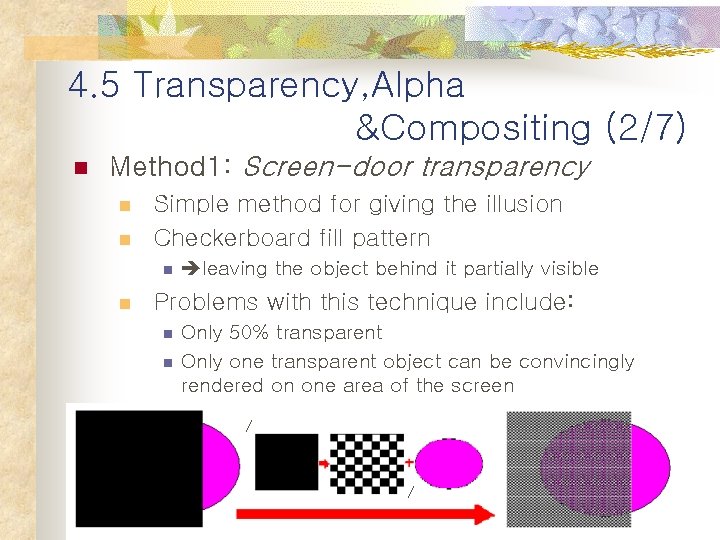
4. 5 Transparency, Alpha &Compositing (2/7) n Method 1: Screen-door transparency n n Simple method for giving the illusion Checkerboard fill pattern n n leaving the object behind it partially visible Problems with this technique include: n n Only 50% transparent Only one transparent object can be convincingly rendered on one area of the screen
4. 5 Transparency, Alpha &Compositing (3/7) n Method 2: alpha blending (1/3) n n n For more general and flexible transparency effects RGB color & Z-buffer depth are associated with each pixel alpha(a) n n Another component Value describing the degree of opacity of an object for a given pixel n n n 1. 0 means : opaque 0. 0 means : not obscured Each pixel covered : RGBa (=RGBA)
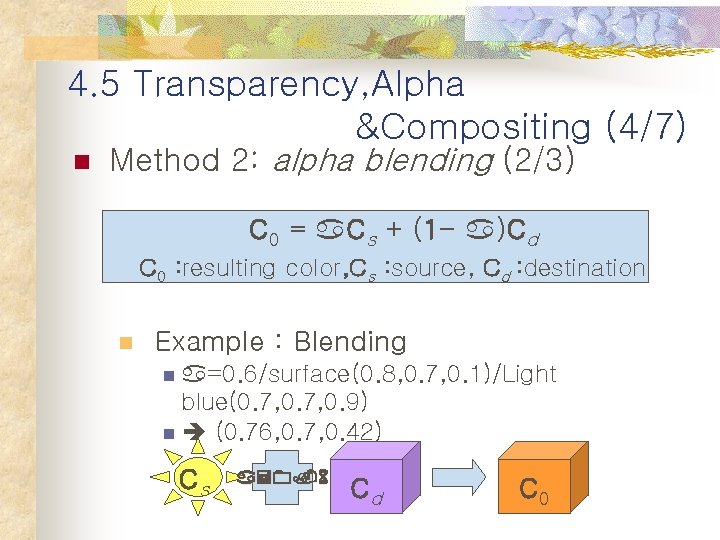
4. 5 Transparency, Alpha &Compositing (4/7) n Method 2: alpha blending (2/3) C 0 = a. Cs + (1 - a)Cd C 0 : resulting color, Cs : source, Cd : destination n Example : Blending n a=0. 6/surface(0. 8, 0. 7, 0. 1)/Light blue(0. 7, 0. 9) n (0. 76, 0. 7, 0. 42) Cs a=0. 6 Cd C 0
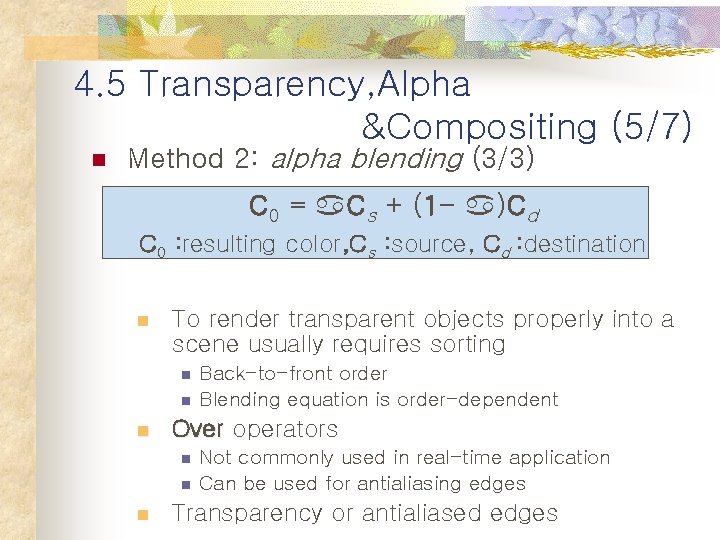
4. 5 Transparency, Alpha &Compositing (5/7) n Method 2: alpha blending (3/3) C 0 = a. Cs + (1 - a)Cd C 0 : resulting color, Cs : source, Cd : destination n To render transparent objects properly into a scene usually requires sorting n n n Over operators n n n Back-to-front order Blending equation is order-dependent Not commonly used in real-time application Can be used for antialiasing edges Transparency or antialiased edges
4. 5 Transparency, Alpha &Compositing (6/7) n Method 3: compositing (1/2) n For blending together photographs or renderings of various objects n Two ways to store the RGBa values generated [ex) surface(0. 8, 0. 7, 0. 1)/ a = 0. 6] n n Premultiplied alphas: RGBa is (0. 8, 0. 7, 0. 1, 0. 4) Unmultiplied alphas: RGBa is (0. 48, 0. 42, 0. 06, 0. 4) n Advantage of Premultiplied alphas : C = C + (1 - a)C
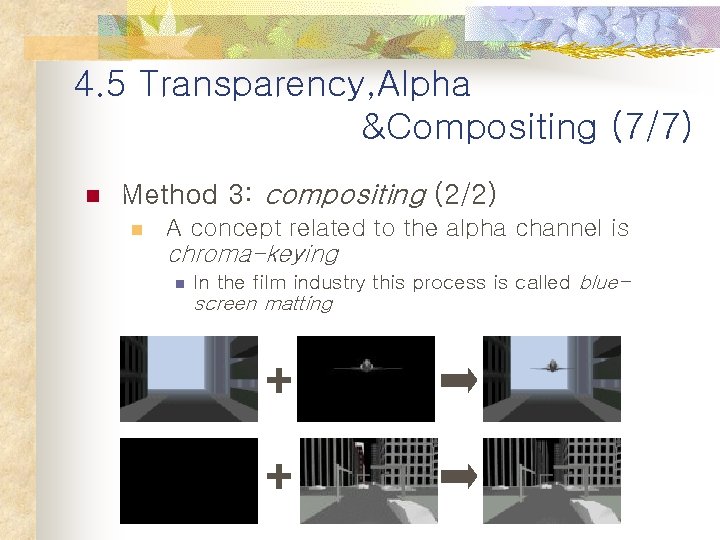
4. 5 Transparency, Alpha &Compositing (7/7) n Method 3: compositing (2/2) n A concept related to the alpha channel is chroma-keying n In the film industry this process is called blue- screen matting
4. 6. Fog n n n (1/5) Simple atmospheric effect Can be added to the final image Several purposes n n n Increases the level of realism for outdoor scenes Increases with the distance from the viewer To provide smoother culling of objects by the far plane n n without fog, a popping effect is experienced Often implemented in hardware n Little or no additional cost
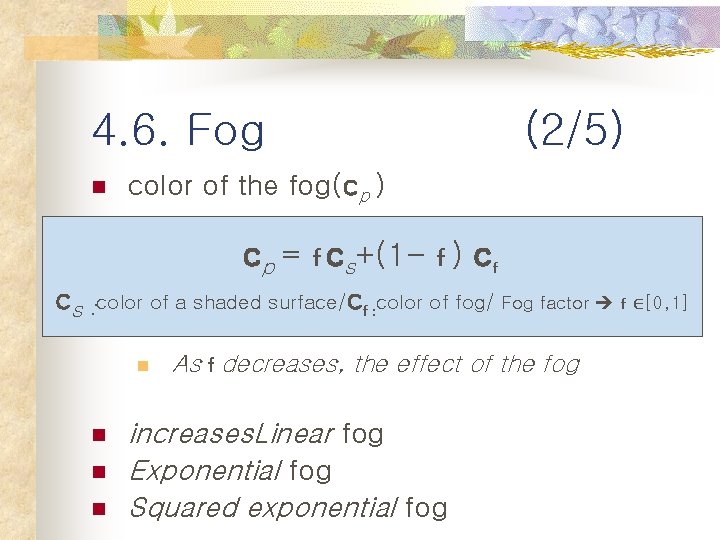
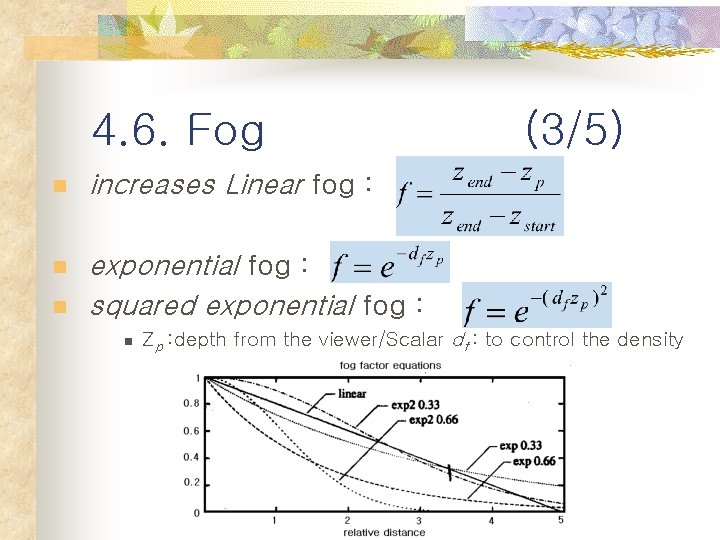
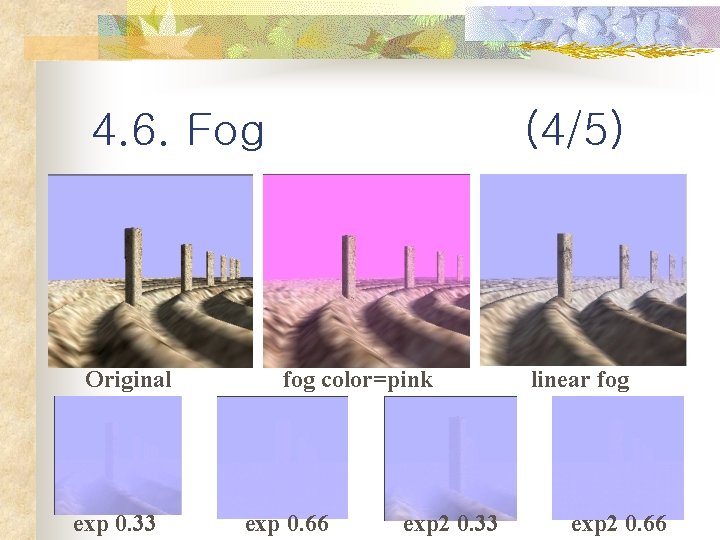
4. 6. Fog n (2/5) color of the fog(cp ) cp = f cs+(1 - f ) cf cs : color of a shaded surface/cf : color of fog/ Fog factor f ∈[0, 1] n n As f decreases, the effect of the fog increases. Linear fog Exponential fog Squared exponential fog
4. 6. Fog n increases Linear fog : n exponential fog : squared exponential fog : n n (3/5) Zp : depth from the viewer/Scalar df : to control the density
4. 6. Fog Original exp 0. 33 (4/5) fog color=pink exp 0. 66 exp 2 0. 33 linear fog exp 2 0. 66
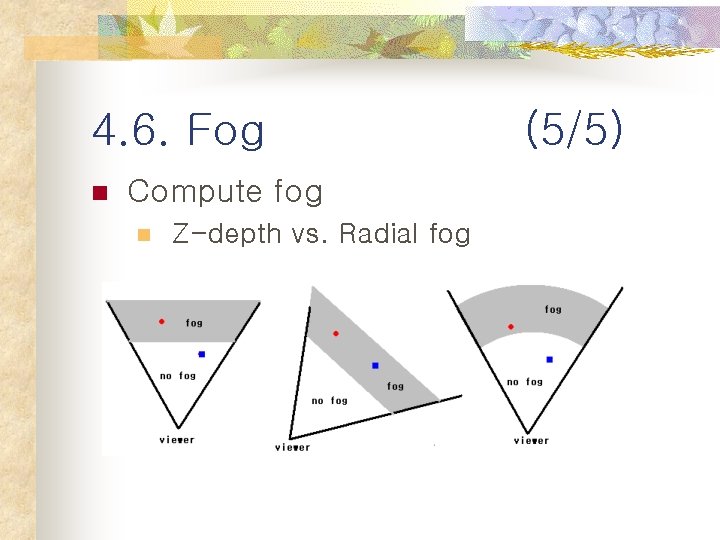
4. 6. Fog n Compute fog n Z-depth vs. Radial fog (5/5)
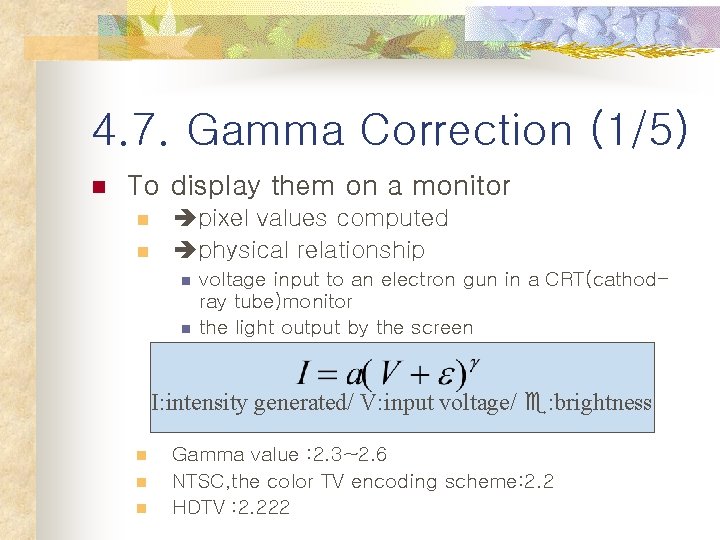
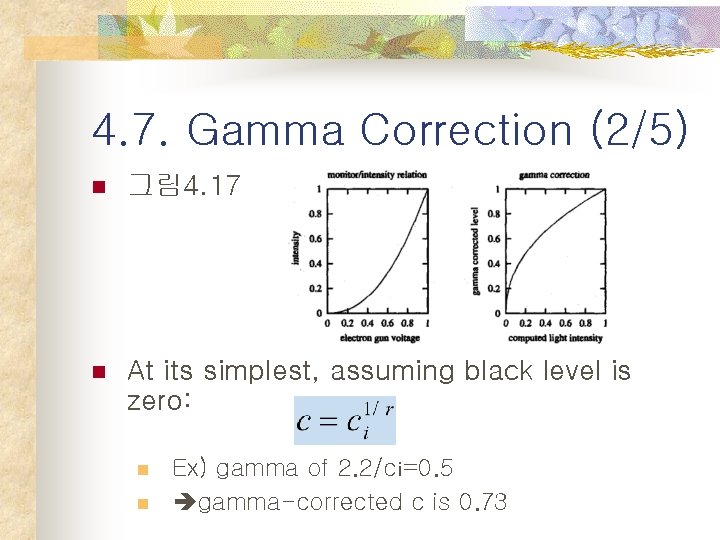
4. 7. Gamma Correction (1/5) n To display them on a monitor n n pixel values computed physical relationship n n voltage input to an electron gun in a CRT(cathodray tube)monitor the light output by the screen I: intensity generated/ V: input voltage/ e: brightness n n n Gamma value : 2. 3~2. 6 NTSC, the color TV encoding scheme: 2. 2 HDTV : 2. 222
4. 7. Gamma Correction (2/5) n 그림 4. 17 n At its simplest, assuming black level is zero: n n Ex) gamma of 2. 2/ci=0. 5 gamma-corrected c is 0. 73
4. 7. Gamma Correction (3/5) n Gamma correction is important to realtime graphics in a few areas: n n n Cross-platform compatibility : SGI, Apple Mac. Color fidelity, consistency, and interpolation Dithering Line and edge antialiasing quality Alpha blending and compositing Texturing
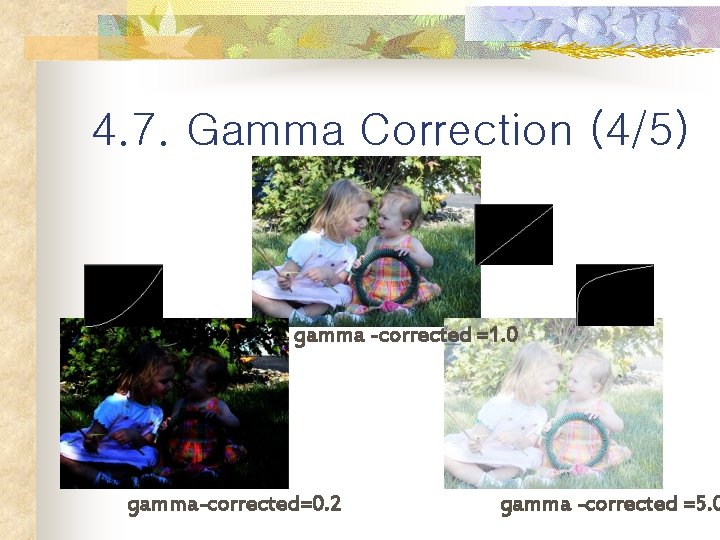
4. 7. Gamma Correction (4/5) gamma -corrected =1. 0 gamma-corrected=0. 2 gamma -corrected =5. 0
4. 7. Gamma Correction (5/5) n Problem 1 : banding(=contouring) artifacts n Implemented in some hardware n Many applications is to ignore n : some software(e. g. , games) include a control Problem 2 n not a user preference