
Real Estate MATH Barbara Grodaes 6192021 Yikes 1
Real. Estate MATH Barbara Grodaes 6/19/2021 Yikes! 1
![Calculator Press [On/C], [Set] [x], [Set] [9] Remember you only have to press [On/C]](http://slidetodoc.com/presentation_image_h2/80e4ed81edfc6d3d4ba33f879cc076ce/image-2.jpg "Calculator Press [On/C], [Set] [x], [Set] [9] Remember you only have to press [On/C]")
Calculator Press [On/C], [Set] [x], [Set] [9] Remember you only have to press [On/C] once to clear what’s on the display, twice will cancel everything EXCEPT what you have entered into Term and/or Int! Set changes the buttons to what is green ([Set] and [M+] is [M-]subtract from memory! OR [Set] and [Amort] is Balance! – LOOK at buttons) Remember to press [=] to display result 6/19/2021 Yikes! 2
![Calculator Defaults [Inc] AND [Tax] are annual you know yearly amount, enter #, press](http://slidetodoc.com/presentation_image_h2/80e4ed81edfc6d3d4ba33f879cc076ce/image-3.jpg "Calculator Defaults [Inc] AND [Tax] are annual you know yearly amount, enter #, press")
Calculator Defaults [Inc] AND [Tax] are annual you know yearly amount, enter #, press [button] you know monthly amount, enter #, press [Per], then [button] [Debt] AND [Exp] are monthly you know monthly amount, enter #, press [button] you know yearly amount, enter #, divide by [12] [=], then [button] Number of payments is 12 unless changed – turning [Off] OR pressing [On/C] DOES NOT set this back to 12 BUT [Set] [x], [Set] [9] does [Rcl] [: ] will display #Pmt/Yr to set back to 12, press [1][2] [Set] [: ] 6/19/2021 Yikes! 3
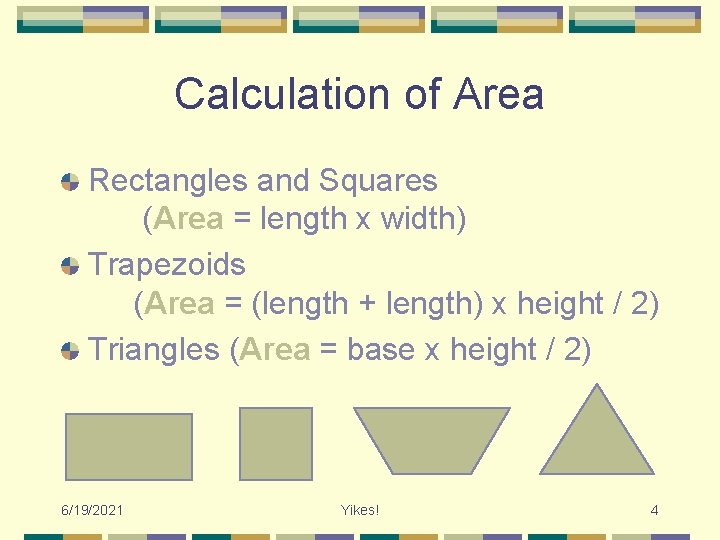
Calculation of Area Rectangles and Squares (Area = length x width) Trapezoids (Area = (length + length) x height / 2) Triangles (Area = base x height / 2) 6/19/2021 Yikes! 4

Metric Conversion tables on back of calculator Real Estate is measured by Metric, not imperial! When imperial measurement such as yards, feet and inches, change all units to feet before converting to metres (e. g. 3 yards, 2 feet, 3 inches = 11. 25 feet, then convert) 6/19/2021 Yikes! 5
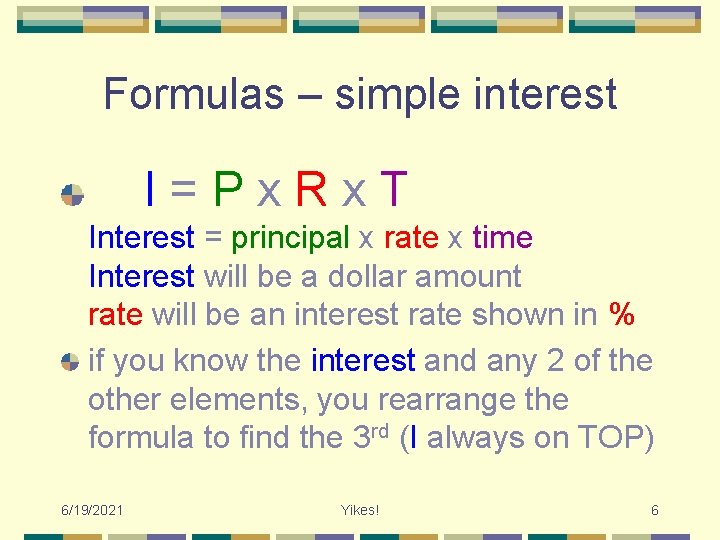
Formulas – simple interest I=Px. Rx. T Interest = principal x rate x time Interest will be a dollar amount rate will be an interest rate shown in % if you know the interest and any 2 of the other elements, you rearrange the formula to find the 3 rd (I always on TOP) 6/19/2021 Yikes! 6
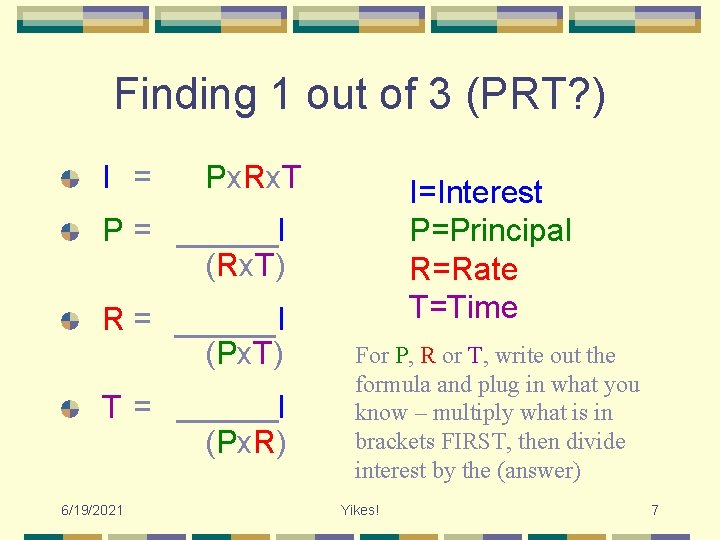
Finding 1 out of 3 (PRT? ) I = Px. Rx. T P= I (Rx. T) R= I (Px. T) T= 6/19/2021 I (Px. R) I=Interest P=Principal R=Rate T=Time For P, R or T, write out the formula and plug in what you know – multiply what is in brackets FIRST, then divide interest by the (answer) Yikes! 7

Formulas – compound interest compound semi-annual I=Px. Rx. T Interest = principal x rate x time same formula, EXCEPT time is 6/12 To calculate 1 year of compounded interest, Px. Rx. 5=? 1, then ADD this answer (? 1) to the principal new. Px. Rx. 5=? 2 add answers (? 1+? 2=interest for 1 year) 6/19/2021 Yikes! 8
![Date Math Calculate date by # of days Month[: ]Day[: ]Year ([+]or[-]) #days e.](http://slidetodoc.com/presentation_image_h2/80e4ed81edfc6d3d4ba33f879cc076ce/image-9.jpg "Date Math Calculate date by # of days Month[: ]Day[: ]Year ([+]or[-]) #days e.")
Date Math Calculate date by # of days Month[: ]Day[: ]Year ([+]or[-]) #days e. g. use this to calculate listing expiration date Calculate # of days by date Month[: ]Day[: ]Year ([+]or[-]) Month[: ]Day[: ]Year e. g. use this to calculate # of days for Interest Adjustment number of days to plug into formula 6/19/2021 Yikes! 9
![Mortgage Components [L/A] Loan Amount [Pmt] Payment [Term] Number of Amortization Years [Int] Annual](http://slidetodoc.com/presentation_image_h2/80e4ed81edfc6d3d4ba33f879cc076ce/image-10.jpg "Mortgage Components [L/A] Loan Amount [Pmt] Payment [Term] Number of Amortization Years [Int] Annual")
Mortgage Components [L/A] Loan Amount [Pmt] Payment [Term] Number of Amortization Years [Int] Annual Interest Rate Note: [Term] Number of periods [Int] periodic rate of interest [Pmt] will display PIT if annual Tax is entered be careful because if [Exp] is entered, this will display PITH 6/19/2021 Yikes! 10
![Solving Loan Problems [L/A], [Pmt], [Term] and [Int] are basis for solving loan problems](http://slidetodoc.com/presentation_image_h2/80e4ed81edfc6d3d4ba33f879cc076ce/image-11.jpg "Solving Loan Problems [L/A], [Pmt], [Term] and [Int] are basis for solving loan problems")
Solving Loan Problems [L/A], [Pmt], [Term] and [Int] are basis for solving loan problems If you enter in 3 of the 4 such as [L/A], [Term] and [Int], then press [Pmt], calculator will display blended monthly payment (PI). A second press[Pmt], will display payment including taxes (PIT) as long as annual taxes are already entered. Once entered, change any variable and recalculate your new answer with-out reentering all of the other data! Don’t press [On/C] or you will lose all inputs except [Term] and [Int]! (press only once) 6/19/2021 Yikes! 11
![Sales Price / Down Payment In conjunction with [L/A], Sales [Price] and [Dn. Pmt]](http://slidetodoc.com/presentation_image_h2/80e4ed81edfc6d3d4ba33f879cc076ce/image-12.jpg "Sales Price / Down Payment In conjunction with [L/A], Sales [Price] and [Dn. Pmt]")
Sales Price / Down Payment In conjunction with [L/A], Sales [Price] and [Dn. Pmt] Down Payment, enter any two and solve for the third [Price] stores or calculates based on [L/A] and [Dn. Pmt] stores (either % or $) or calculates based on [L/A] and [Price] [Dn. Pmt] toggles either % or $ Enter Down Payment by entering number less than 100, displays % Enter Down Payment by entering number greater than 100, displays $ 6/19/2021 Yikes! 12
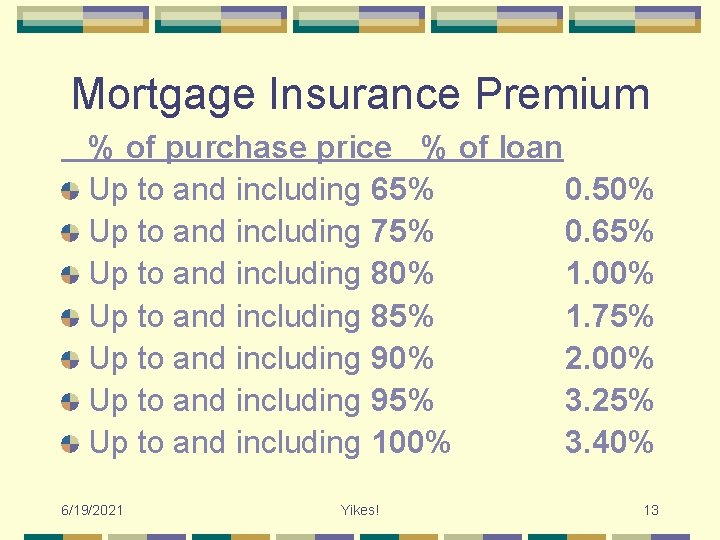
Mortgage Insurance Premium % of purchase price % of loan Up to and including 65% 0. 50% Up to and including 75% 0. 65% Up to and including 80% 1. 00% Up to and including 85% 1. 75% Up to and including 90% 2. 00% Up to and including 95% 3. 25% Up to and including 100% 3. 40% 6/19/2021 Yikes! 13
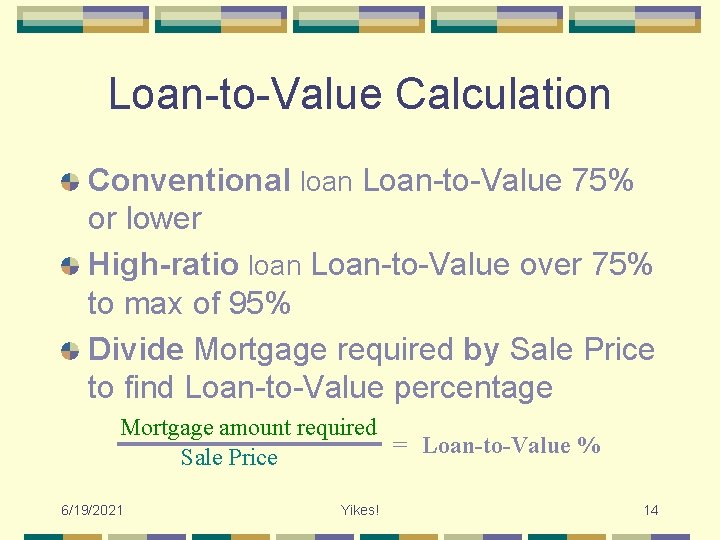
Loan-to-Value Calculation Conventional loan Loan-to-Value 75% or lower High-ratio loan Loan-to-Value over 75% to max of 95% Divide Mortgage required by Sale Price to find Loan-to-Value percentage Mortgage amount required = Loan-to-Value % Sale Price 6/19/2021 Yikes! 14
![Analyze Loan-to-Value If conventional, mortgage amount required is [L/A] to use in further calculations](http://slidetodoc.com/presentation_image_h2/80e4ed81edfc6d3d4ba33f879cc076ce/image-15.jpg "Analyze Loan-to-Value If conventional, mortgage amount required is [L/A] to use in further calculations")
Analyze Loan-to-Value If conventional, mortgage amount required is [L/A] to use in further calculations mortgage required = total loan amount If high-ratio, add Insurance premium % to mortgage amount required and this new amount becomes [L/A] to use in further calculations mortgage required + insurance premium % = total loan amount 6/19/2021 Yikes! 15
![Estimating Mortgage Balance Having already entered [L/A] [Pmt] [Term] and [Int], you can estimate](http://slidetodoc.com/presentation_image_h2/80e4ed81edfc6d3d4ba33f879cc076ce/image-16.jpg "Estimating Mortgage Balance Having already entered [L/A] [Pmt] [Term] and [Int], you can estimate")
Estimating Mortgage Balance Having already entered [L/A] [Pmt] [Term] and [Int], you can estimate balances prior/end of loan by pressing the [Amort] button [Set] [Amort] will give you the remaining balance first - continue pressing [Amort] to scroll through same displays of information as [Amort] alone. 6/19/2021 Yikes! 16
![Mortgage Balance Keystrokes [Amort] finds total interest, principal and remaining balance 1 st press](http://slidetodoc.com/presentation_image_h2/80e4ed81edfc6d3d4ba33f879cc076ce/image-17.jpg "Mortgage Balance Keystrokes [Amort] finds total interest, principal and remaining balance 1 st press")
Mortgage Balance Keystrokes [Amort] finds total interest, principal and remaining balance 1 st press shows range of periods (you can enter a new range of periods here if you want) 2 nd press shows total interest for period range 3 rd press shows total principal for range 4 th press shows remaining balance at end of range 6/19/2021 Yikes! 17
![Keystrokes Continued [Amort] and [Set] [Amort] displays information concerning years when preceded by single](http://slidetodoc.com/presentation_image_h2/80e4ed81edfc6d3d4ba33f879cc076ce/image-18.jpg "Keystrokes Continued [Amort] and [Set] [Amort] displays information concerning years when preceded by single")
Keystrokes Continued [Amort] and [Set] [Amort] displays information concerning years when preceded by single year or range of years. [#] [Amort] shows info for that (#)year starting with period range of that year – continue pressing button for more information – the total interest and total principal are total for that year only and the last press will give you the remaining balance [#] [Set] [Amort] show same information but starts with remaining balance [#] [: ] [#] [Amort] show information for that series of years starting with period range – the total interest and total principal are total for that period only and the last press will give you the remaining balance [#] [: ] [#] [Set] [Amort] show same information for that series of years but starts with remaining balance 6/19/2021 Yikes! 18
![Keystrokes Continued [Per] [Amort] displays information concerning payments when preceded by single payment or](http://slidetodoc.com/presentation_image_h2/80e4ed81edfc6d3d4ba33f879cc076ce/image-19.jpg "Keystrokes Continued [Per] [Amort] displays information concerning payments when preceded by single payment or")
Keystrokes Continued [Per] [Amort] displays information concerning payments when preceded by single payment or range of payments. [#] [Per][Amort] shows info for that (#)payment starting with period range of that payment – continue pressing button for more information – the total interest and total principal are total for that payment only and the last press will give you the remaining balance of mortgage [#] [Set] [Per] [Amort] same information but starts remaining balance [#] [: ] [#] [Per] [Amort] show information for that series of payments starting with period range – the total interest and total principal are total for that series of payment only and the last press will give you the remaining balance [#] [: ] [#] [Set] [Per] [Amort] same information for that series of payments but starts with remaining balance 6/19/2021 Yikes! 19
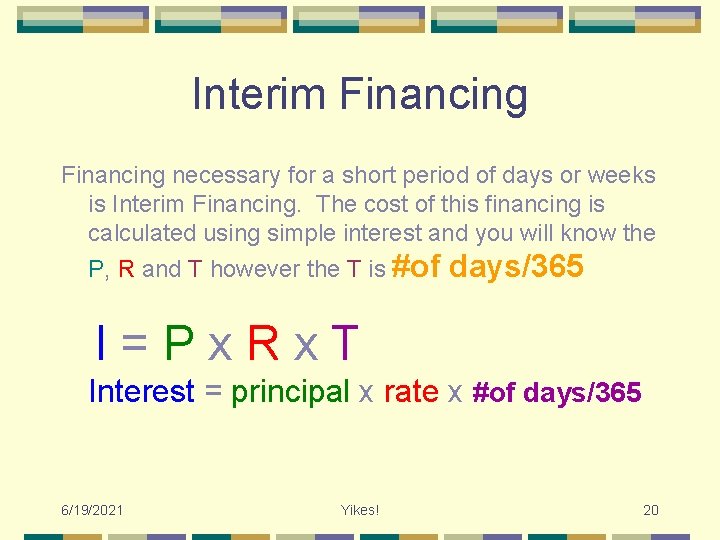
Interim Financing necessary for a short period of days or weeks is Interim Financing. The cost of this financing is calculated using simple interest and you will know the P, R and T however the T is #of days/365 I=Px. Rx. T Interest = principal x rate x #of days/365 6/19/2021 Yikes! 20
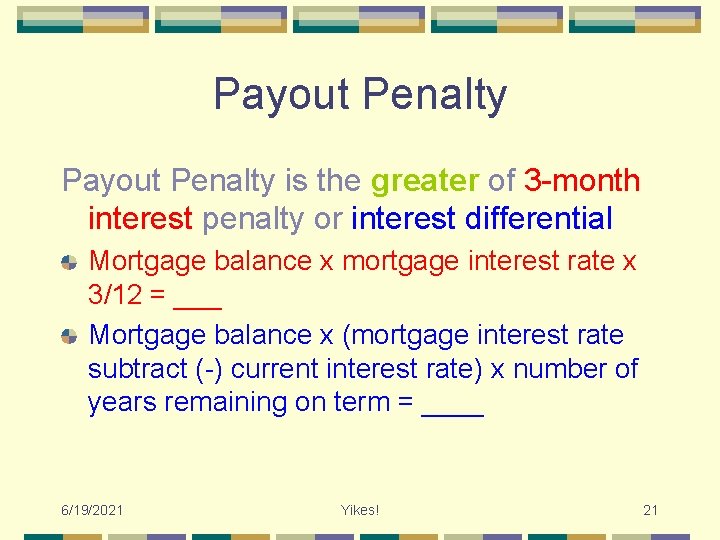
Payout Penalty is the greater of 3 -month interest penalty or interest differential Mortgage balance x mortgage interest rate x 3/12 = ___ Mortgage balance x (mortgage interest rate subtract (-) current interest rate) x number of years remaining on term = ____ 6/19/2021 Yikes! 21
Averaging Mortgage Interest You average mortgage interest to determine which is the least cost for your client – refinance a new first mortgage OR assume an existing mortgage and arrange a new 2 nd mortgage Determine what is most economical 6/19/2021 Yikes! 22
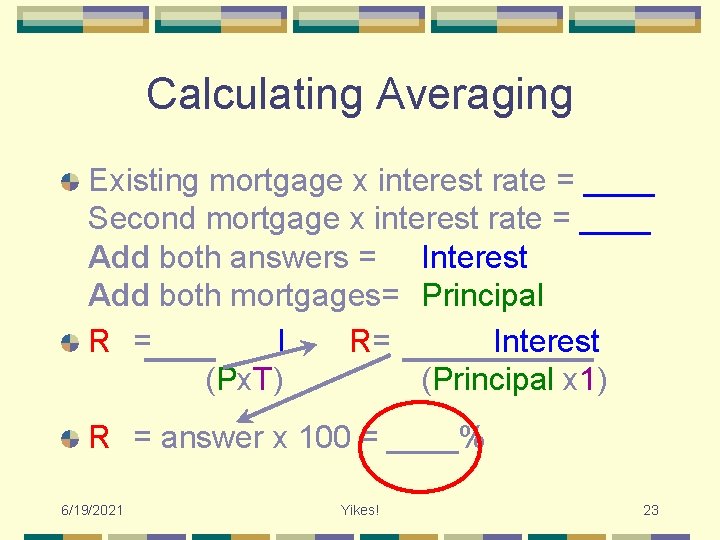
Calculating Averaging Existing mortgage x interest rate = ____ Second mortgage x interest rate = ____ Add both answers = Interest Add both mortgages= Principal R = I R= Interest (Px. T) (Principal x 1) R = answer x 100 = ____% 6/19/2021 Yikes! 23
Qualifying the Buyer Five Cs of Credit for Qualifying 1. Character 2. Capital 3. Capacity 4. Collateral 5. Credit 6/19/2021 Yikes! 24
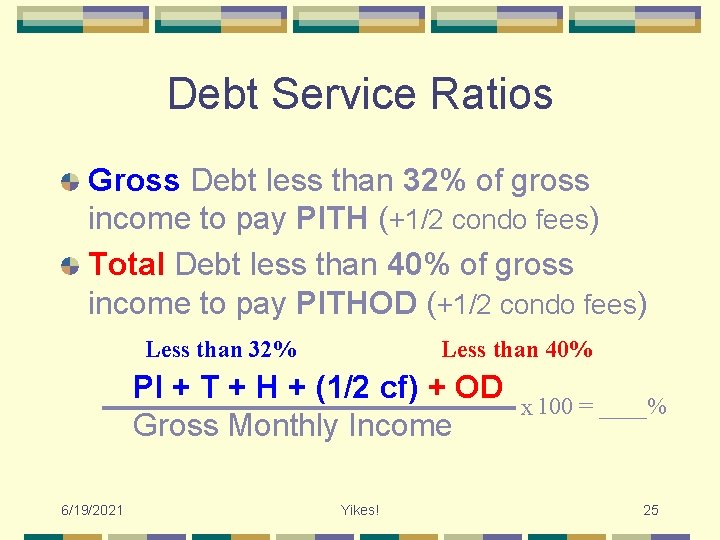
Debt Service Ratios Gross Debt less than 32% of gross income to pay PITH (+1/2 condo fees) Total Debt less than 40% of gross income to pay PITHOD (+1/2 condo fees) Less than 32% Less than 40% PI + T + H + (1/2 cf) + OD Gross Monthly Income 6/19/2021 Yikes! x 100 = ____% 25
![Remember Defaults [Inc] AND [Tax] are annual you know yearly amount, enter #, press](http://slidetodoc.com/presentation_image_h2/80e4ed81edfc6d3d4ba33f879cc076ce/image-26.jpg "Remember Defaults [Inc] AND [Tax] are annual you know yearly amount, enter #, press")
Remember Defaults [Inc] AND [Tax] are annual you know yearly amount, enter #, press [button] you know monthly amount, enter #, press [Per], then [button] [Debt] AND [Exp] are monthly you know monthly amount, enter #, press [button] you know yearly amount, enter #, divide by [12] [=], then [button] Number of payments is 12 unless changed – turning [Off] OR pressing [On/C] DOES NOT set this back to 12 BUT [Set] [x], [Set] [9] does [Rcl] [: ] will display #Pmt/Yr to set back to 12, press [1][2] [Set] [: ] 6/19/2021 Yikes! 26
![Qualify Using Calculator First, [Rcl] [Qual 1] ensure set at 32. 00 -40. 00.](http://slidetodoc.com/presentation_image_h2/80e4ed81edfc6d3d4ba33f879cc076ce/image-27.jpg "Qualify Using Calculator First, [Rcl] [Qual 1] ensure set at 32. 00 -40. 00.")
Qualify Using Calculator First, [Rcl] [Qual 1] ensure set at 32. 00 -40. 00. If not displayed as this, enter [3][2] [: ] [4][0] [Qual 1] Enter [Inc], [Debt], [Exp] [Tax] and [L/A], then [Qual 1] to display GDSR – TDSR Enter [Inc], [Debt], [Exp] [Tax] (but NOT [L/A]), then [Qual 1] to display maximum loan amount qualified for (remember this max includes ins. fees! – not net loan for deal) Enter [L/A], [Term], [Int] [Tax] and [Exp], then [Qual 1] to display Income necessary to verify a mortgage amount 6/19/2021 Yikes! 27
Qualify Continued If qualifying for condo, include ½ condo fees with heat in the [Exp] button Remember [Qual 1] displays different values depending on what you have previously entered Good idea to [On/C] first when you want the [Qual 1] to display the different values 6/19/2021 Yikes! 28
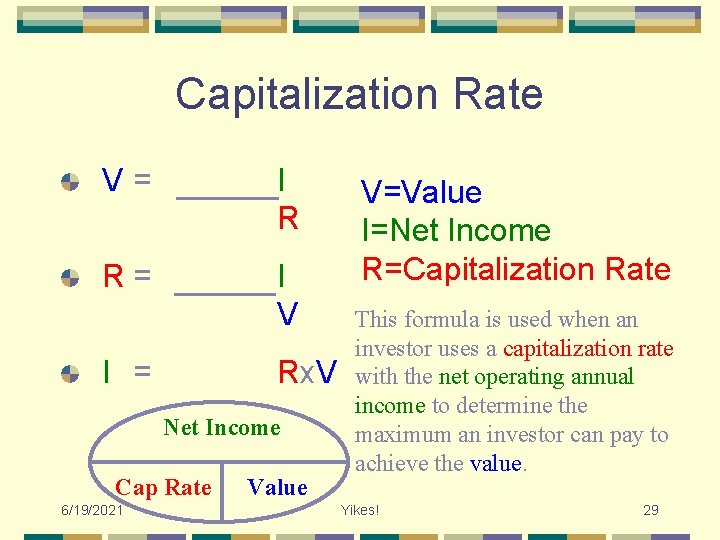
Capitalization Rate V= I R R= I V I = Rx. V Net Income Cap Rate 6/19/2021 Value V=Value I=Net Income R=Capitalization Rate This formula is used when an investor uses a capitalization rate with the net operating annual income to determine the maximum an investor can pay to achieve the value. Yikes! 29
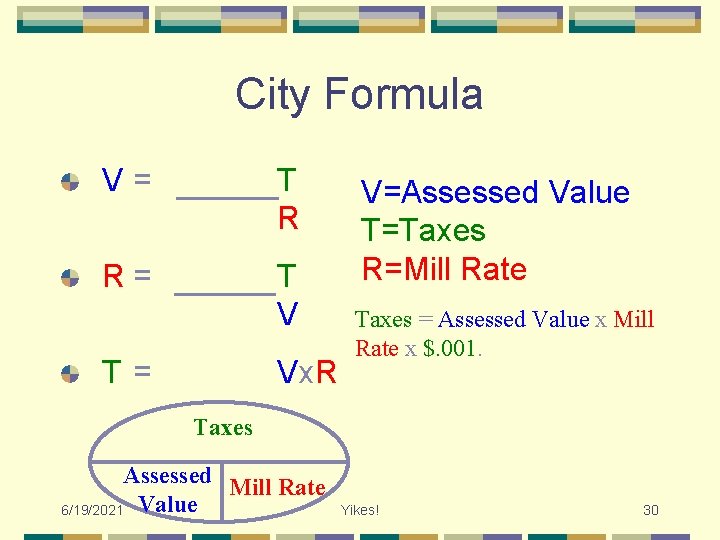
City Formula V= T R R= T V T= Vx. R V=Assessed Value T=Taxes R=Mill Rate Taxes = Assessed Value x Mill Rate x $. 001. Taxes Assessed Mill Rate 6/19/2021 Value Yikes! 30
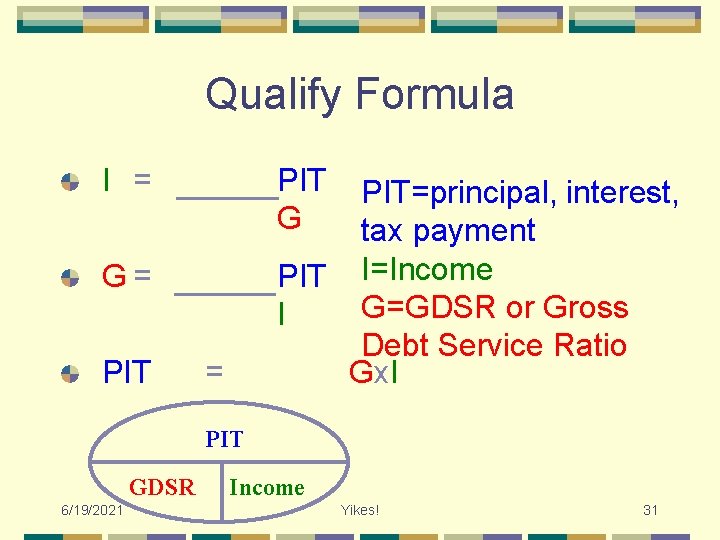
Qualify Formula I = PIT G PIT=principal, interest, tax payment PIT I=Income G=GDSR or Gross I Debt Service Ratio Gx. I G= PIT GDSR 6/19/2021 Income Yikes! 31
![Using Memory Functions recalls and displays total value in memory [M+] adds the displayed](http://slidetodoc.com/presentation_image_h2/80e4ed81edfc6d3d4ba33f879cc076ce/image-32.jpg "Using Memory Functions recalls and displays total value in memory [M+] adds the displayed")
Using Memory Functions recalls and displays total value in memory [M+] adds the displayed value to memory [Set] [M+] subtracts displayed value from value in memory or adds negative number to memory [Rcl] displays total value in memory and clears memory [Set] [Rcl] clears memory without changing displayed value [Set] [Rcl] [M+] clears memory and puts displayed value into memory [Rcl] [M+] 6/19/2021 Yikes! 32
- Slides: 32