
Rapid 3 D Insect Model Reconstruction from Minimal
- Slides: 1
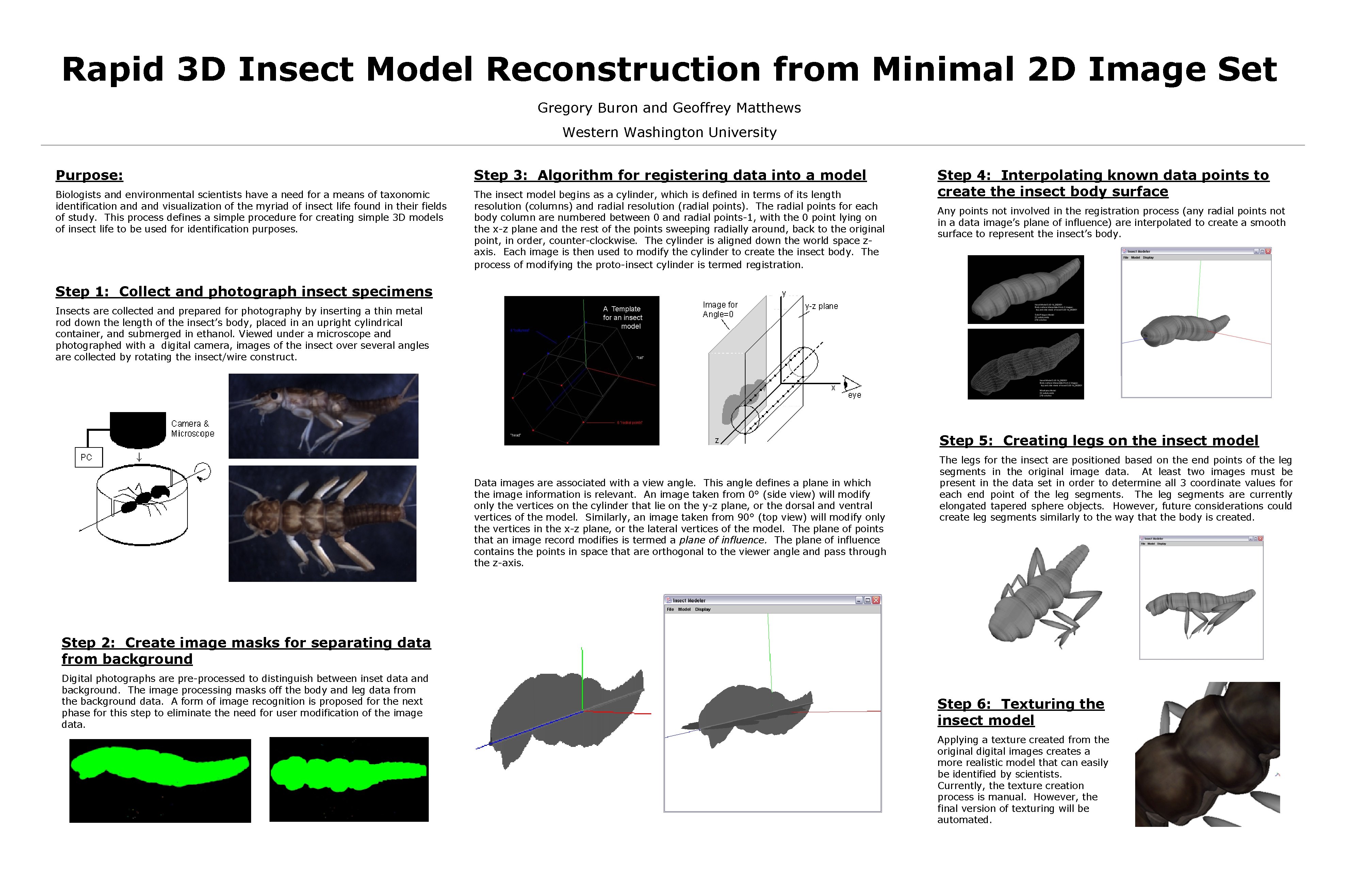
Rapid 3 D Insect Model Reconstruction from Minimal 2 D Image Set Gregory Buron and Geoffrey Matthews Western Washington University Purpose: Step 3: Algorithm for registering data into a model Biologists and environmental scientists have a need for a means of taxonomic identification and visualization of the myriad of insect life found in their fields of study. This process defines a simple procedure for creating simple 3 D models of insect life to be used for identification purposes. The insect model begins as a cylinder, which is defined in terms of its length resolution (columns) and radial resolution (radial points). The radial points for each body column are numbered between 0 and radial points-1, with the 0 point lying on the x-z plane and the rest of the points sweeping radially around, back to the original point, in order, counter-clockwise. The cylinder is aligned down the world space zaxis. Each image is then used to modify the cylinder to create the insect body. The process of modifying the proto-insect cylinder is termed registration. Step 4: Interpolating known data points to create the insect body surface Any points not involved in the registration process (any radial points not in a data image’s plane of influence) are interpolated to create a smooth surface to represent the insect’s body. Step 1: Collect and photograph insect specimens Insects are collected and prepared for photography by inserting a thin metal rod down the length of the insect’s body, placed in an upright cylindrical container, and submerged in ethanol. Viewed under a microscope and photographed with a digital camera, images of the insect over several angles are collected by rotating the insect/wire construct. Step 5: Creating legs on the insect model Data images are associated with a view angle. This angle defines a plane in which the image information is relevant. An image taken from 0° (side view) will modify only the vertices on the cylinder that lie on the y-z plane, or the dorsal and ventral vertices of the model. Similarly, an image taken from 90° (top view) will modify only the vertices in the x-z plane, or the lateral vertices of the model. The plane of points that an image record modifies is termed a plane of influence. The plane of influence contains the points in space that are orthogonal to the viewer angle and pass through the z-axis. The legs for the insect are positioned based on the end points of the leg segments in the original image data. At least two images must be present in the data set in order to determine all 3 coordinate values for each end point of the leg segments. The leg segments are currently elongated tapered sphere objects. However, future considerations could create leg segments similarly to the way that the body is created. Step 2: Create image masks for separating data from background Digital photographs are pre-processed to distinguish between inset data and background. The image processing masks off the body and leg data from the background data. A form of image recognition is proposed for the next phase for this step to eliminate the need for user modification of the image data. Step 6: Texturing the insect model Applying a texture created from the original digital images creates a more realistic model that can easily be identified by scientists. Currently, the texture creation process is manual. However, the final version of texturing will be automated.