
RAID Architecture Introduction RAID stands for Redundant Array

- Slides: 57
RAID Architecture
Introduction RAID stands for Redundant Array of Independent Disks A system of arranging multiple disks for redundancy (or performance) Term first coined in 1987 at Berkley Idea has been around since the mid 70’s RAID is now an umbrella term for various disk arrangements ◦ Not necessarily redundant
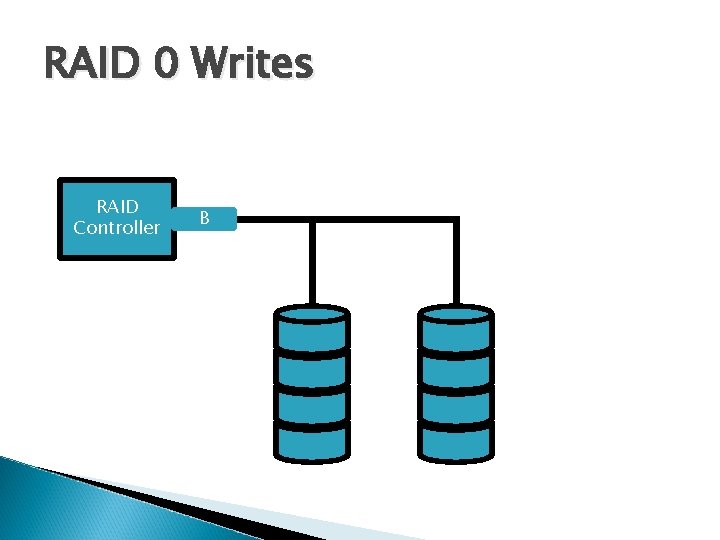
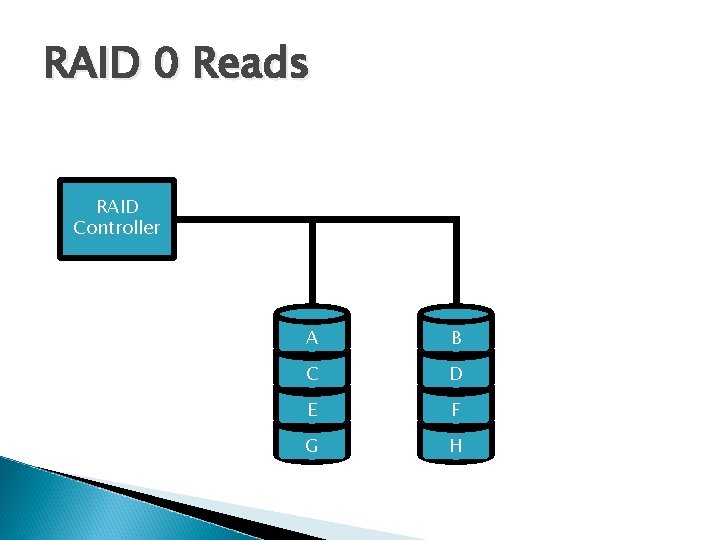
RAID 0 Also known as “Striping” Data is striped across the disks in the array Each subsequent block is written to a different disk
RAID 0 Writes RAID Controller D H G C A B E F
RAID 0 Reads RAID Controller A B C D E F G H
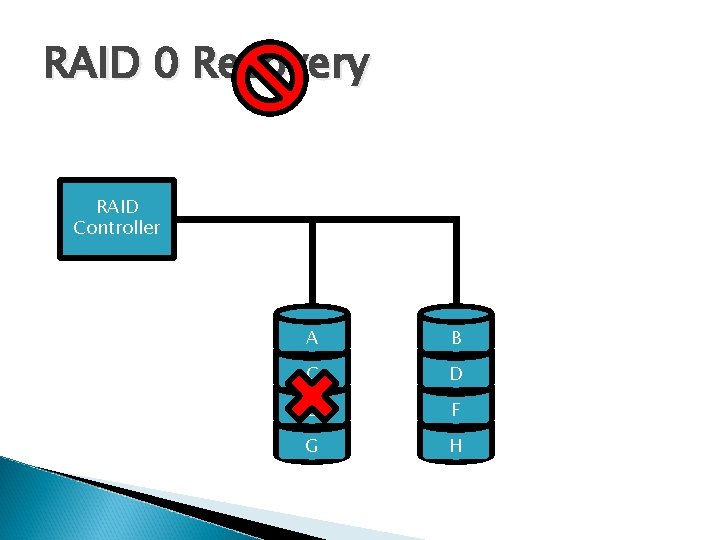
RAID 0 Recovery RAID Controller A B C D E F G H
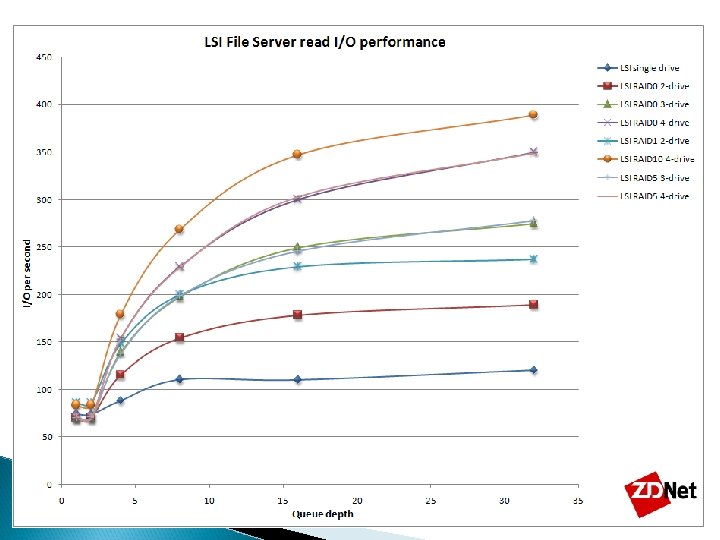
RAID 0 Pros Best use of space ◦ Every byte of the disks can be accessed in the array Very fast reads and writes ◦ The more disks you add to the array, the faster it goes Simple design and operation ◦ No parity calculation
RAID 0 Cons No redundancy Not for use in mission critical systems One disk failure means all your data is unrecoverable
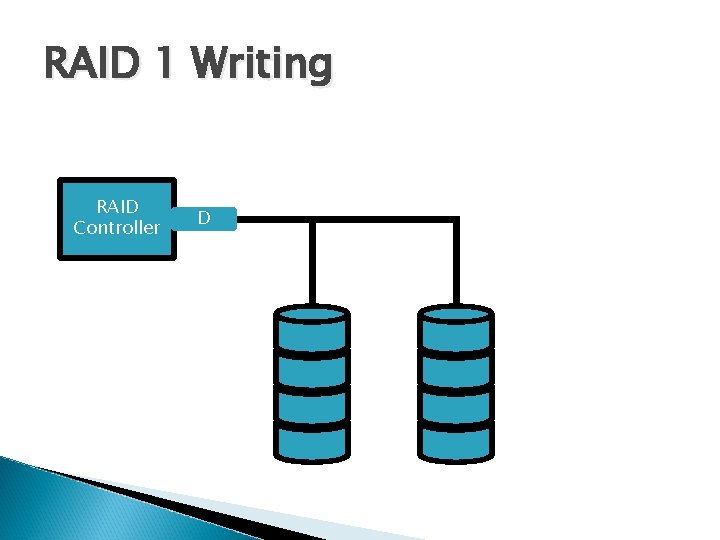
RAID 1 Known as “Mirroring” Data is written to two disks concurrently The first type of RAID developed
RAID 1 Writing RAID Controller D C A B
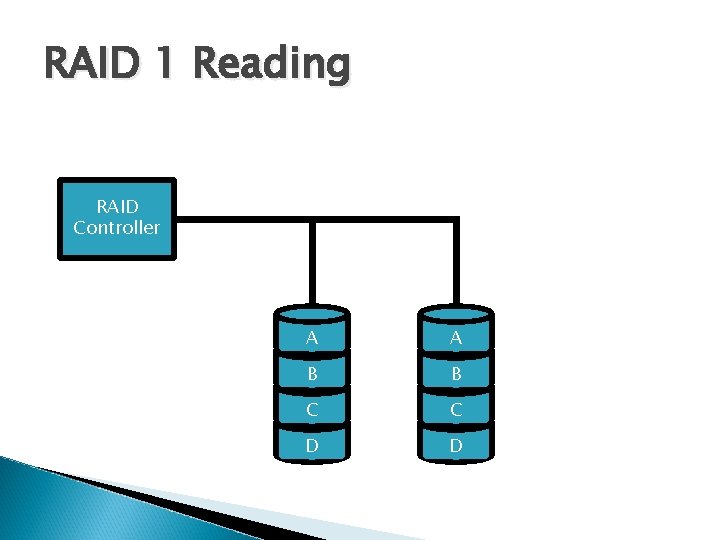
RAID 1 Reading RAID Controller A A B B C C D D
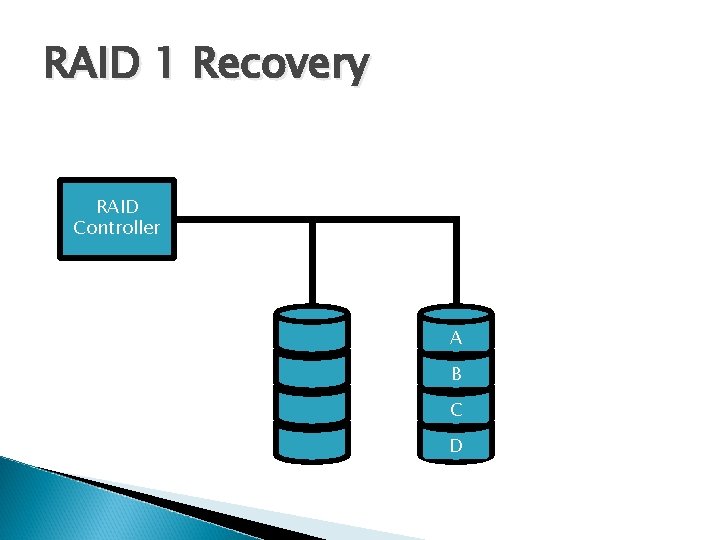
RAID 1 Recovery RAID Controller A A B B C C D D
RAID 1 Pros Good redundancy ◦ Two copies of every block Fast reads ◦ Can read 2 blocks at once (more if more disks) Writes are acceptable No intense calculation on rebuild, just copy
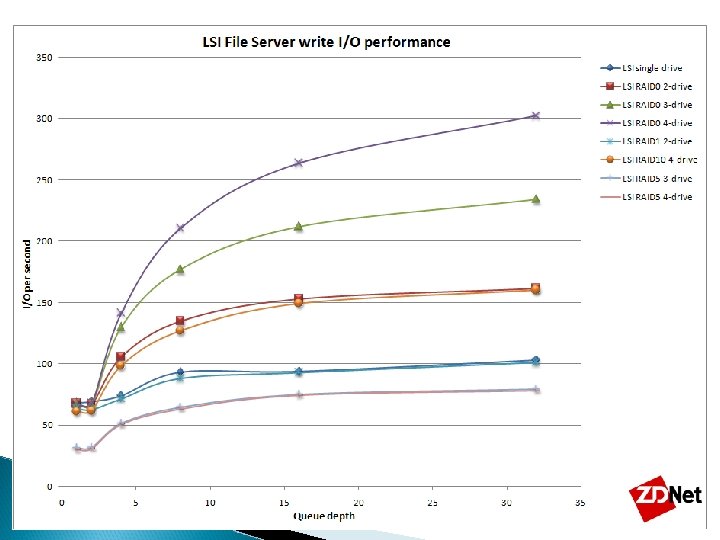
RAID 1 Cons SPACE!! Using 2 disks gives you 1/2 the space, using 3 gives 1/3 etc… Writes are not as fast as other RAID types Very expensive
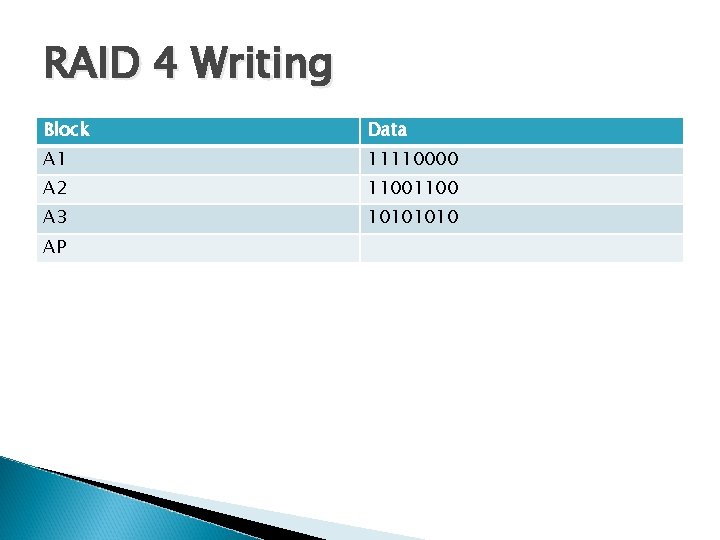
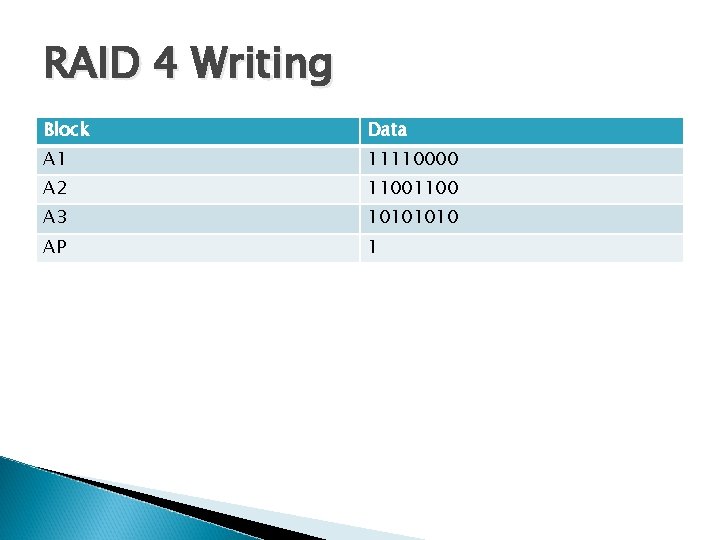
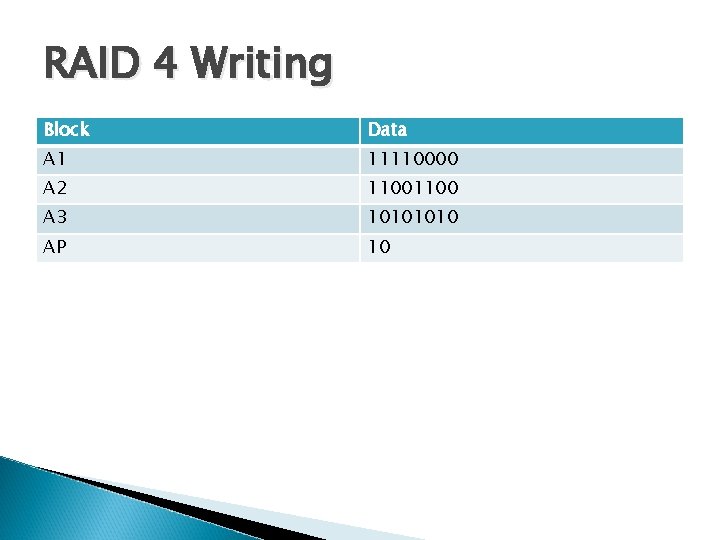
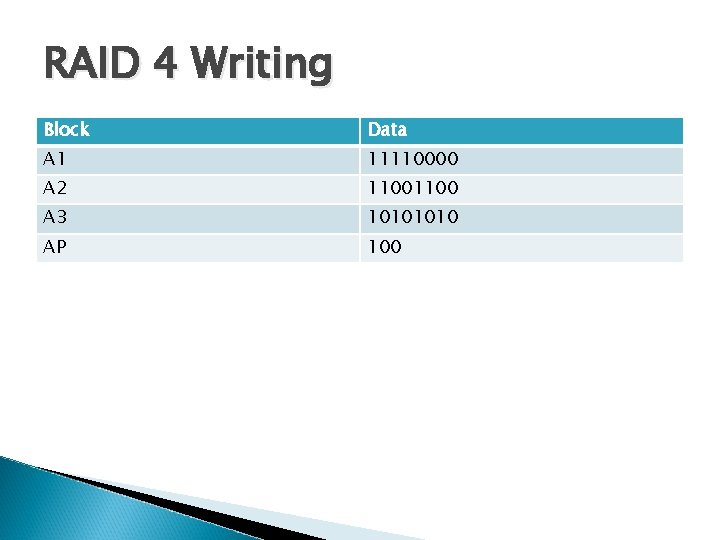
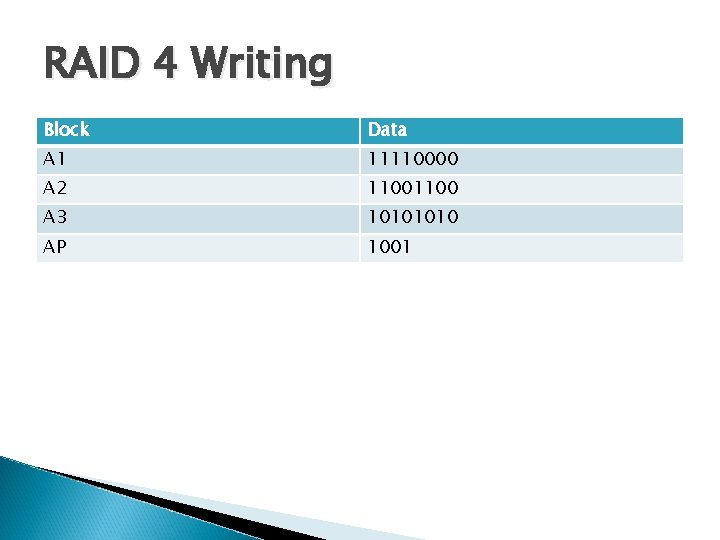
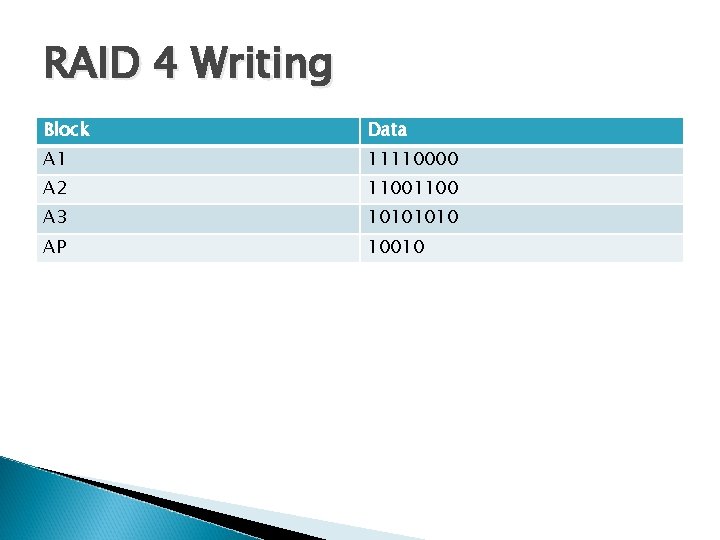
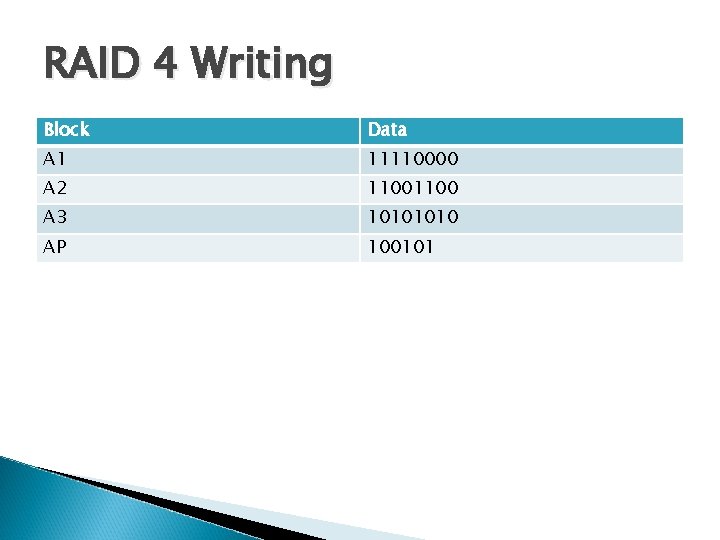
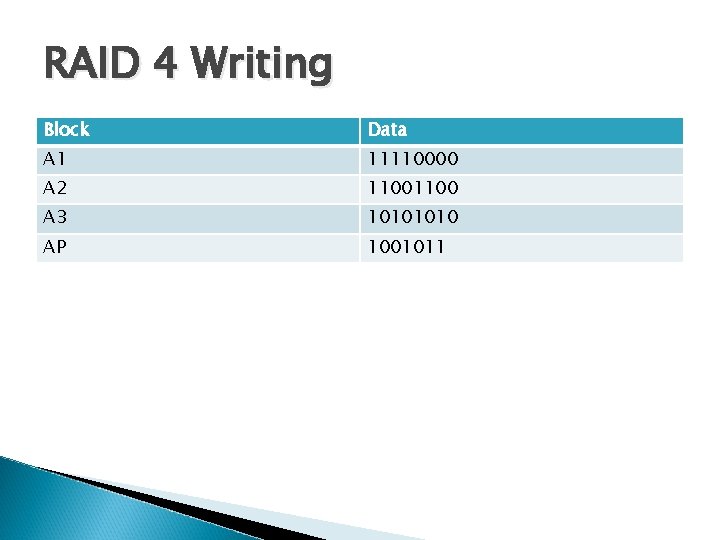
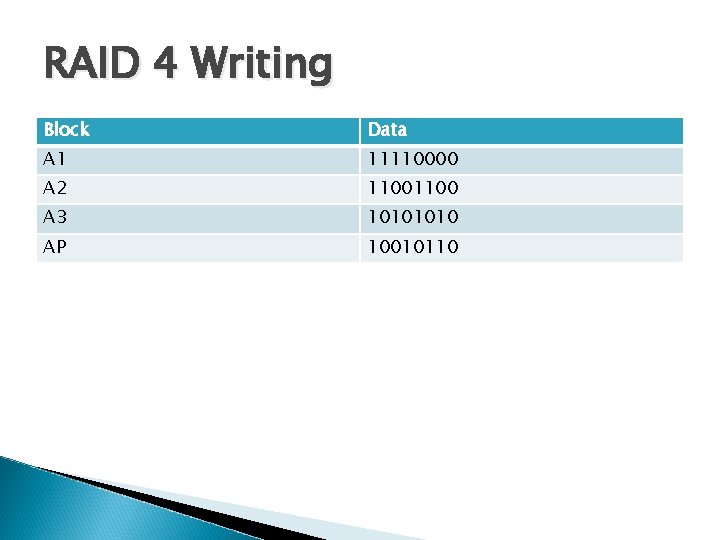
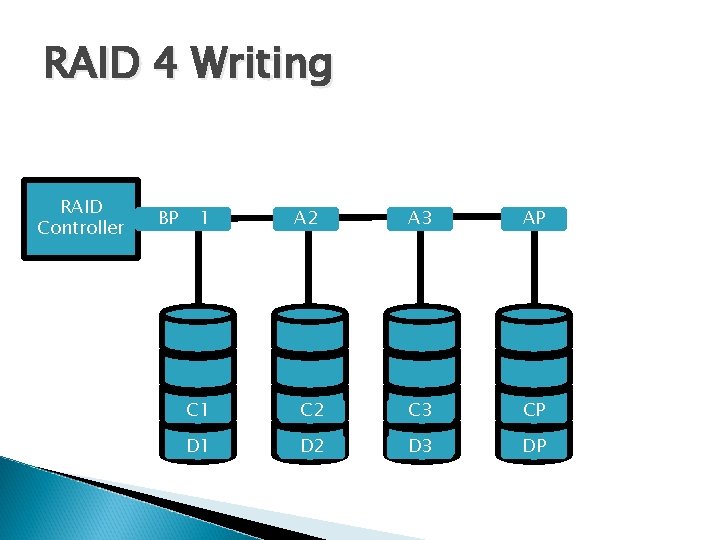
RAID 4 Striping with a dedicated parity disk Blocks are written to each subsequent disk Each block of the parity disk is the XOR value of the corresponding blocks on the data disks Not used often in the real world
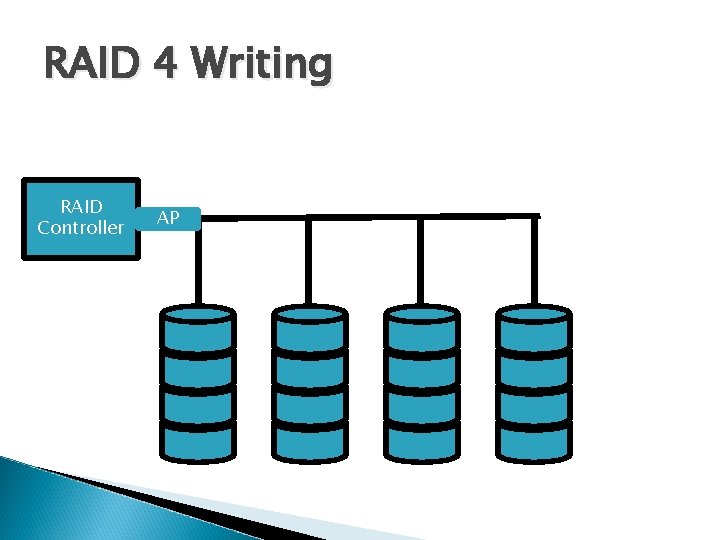
RAID 4 Writing RAID Controller A 3 A 2 A 1 AP
RAID 4 Writing Block Data A 1 11110000 A 2 1100 A 3 1010 AP
RAID 4 Writing Block Data A 1 11110000 A 2 1100 A 3 1010 AP 1
RAID 4 Writing Block Data A 1 11110000 A 2 1100 A 3 1010 AP 10
RAID 4 Writing Block Data A 1 11110000 A 2 1100 A 3 1010 AP 100
RAID 4 Writing Block Data A 1 11110000 A 2 1100 A 3 1010 AP 1001
RAID 4 Writing Block Data A 1 11110000 A 2 1100 A 3 1010 AP 10010
RAID 4 Writing Block Data A 1 11110000 A 2 1100 A 3 1010 AP 100101
RAID 4 Writing Block Data A 1 11110000 A 2 1100 A 3 1010 AP 1001011
RAID 4 Writing Block Data A 1 11110000 A 2 1100 A 3 1010 AP 10010110
RAID 4 Writing RAID Controller B 3 B 2 B 1 BP A 1 A 2 A 3 AP C 1 C 2 C 3 CP D 1 D 2 D 3 DP
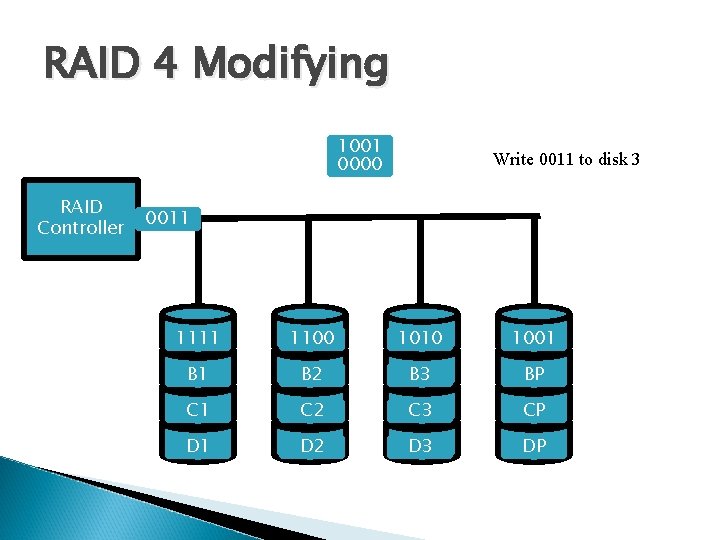
RAID 4 Modifying 1001 0000 RAID Controller Write 0011 to disk 3 0011 1111 A 1 1100 A 2 1010 A 3 1001 AP B 1 B 2 B 3 BP C 1 C 2 C 3 CP D 1 D 2 D 3 DP
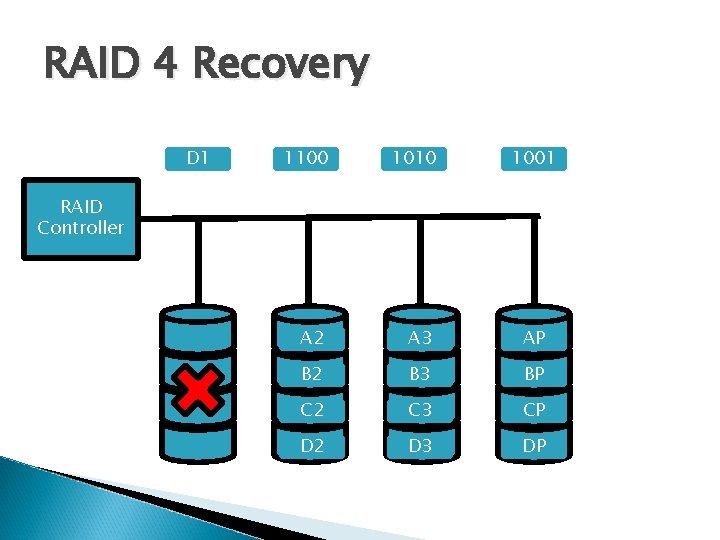
RAID 4 Recovery 1111 D 1 C 1 A 1 B 1 1100 1010 1001 A 2 A 3 AP B 1 B 2 B 3 BP C 1 C 2 C 3 CP D 1 D 2 D 3 DP RAID Controller
RAID 4 Pros High read rate Low ratio of error correction space ◦ Any number of data disks only require 1 parity disk. 4 disks gives 3/4 usable space 5 gives 4/5 Can recover from single disk failures
RAID 4 Cons Very slow writes ◦ Every write requires 2 reads and 2 writes ◦ Every write requires accessing the single parity disk Recovery is processor intensive Parity bit cannot detect multi-bit error
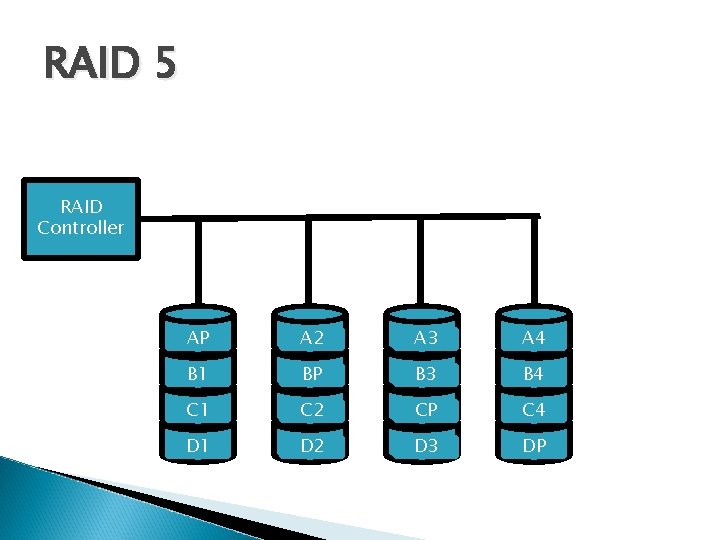
RAID 5 Striped disks with interleaved parity Much like RAID 4 except that parity blocks are spread over every disk
RAID 5 RAID Controller AP A 2 A 3 A 4 B 1 BP B 3 B 4 C 1 C 2 CP C 4 D 1 D 2 D 3 DP
RAID 5 Pros Read rates the same as RAID 4 Because parity bits are distributed, every write does not need to access a single disk ◦ Writes are marginally better than RAID 4 Like RAID 4, you need relatively little parity which allows larger arrays
RAID 5 Cons Re-writing a block still requires 2 reads and 2 writes ◦ Interleaving mitigates the penalty Rebuilding the array takes a long time Can only tolerate one disk failure
RAID 2 Striped set with dual distributed parity Defined as any form of RAID that can recover from two concurrent disk failures Different implementations ◦ Double parity, P+Q, Reed-Solomon Codes Essentially RAID 5 with an extra parity disk
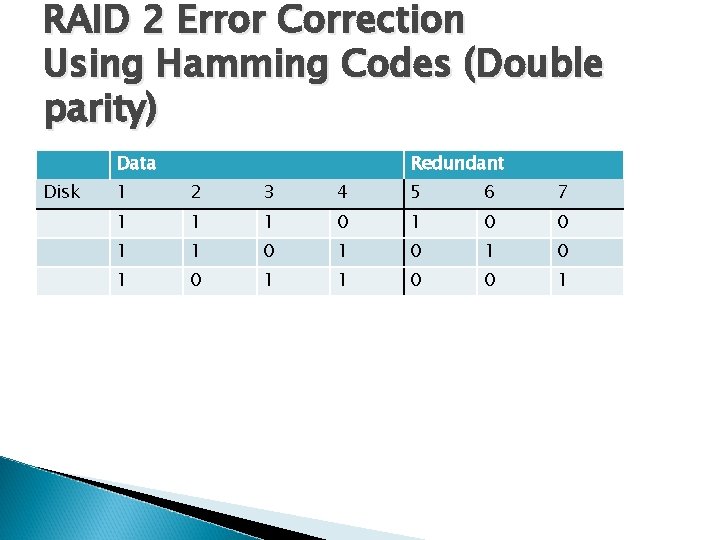
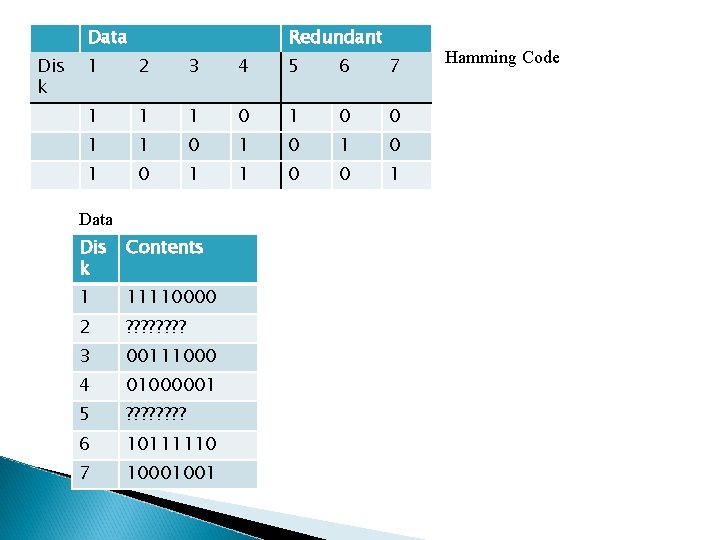
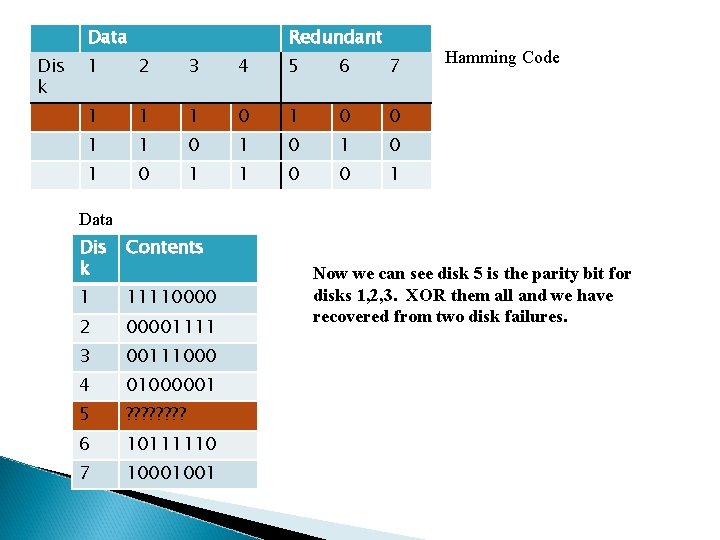
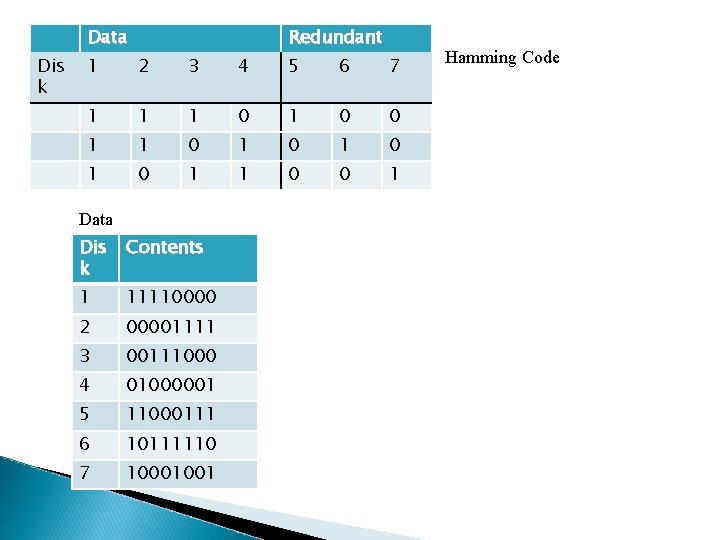
RAID 2 Error Correction Using Hamming Codes (Double parity) Data Disk Redundant 1 2 3 4 5 6 7 1 1 1 0 0 1 1 0 1 0 1 1 0 0 1
Data Dis k Redundant 1 2 3 4 5 6 7 1 1 1 0 0 1 1 0 1 0 1 1 0 0 1 Data Dis k Contents 1 11110000 2 ? ? ? ? 3 00111000 4 01000001 5 ? ? ? ? 6 10111110 7 10001001 Hamming Code
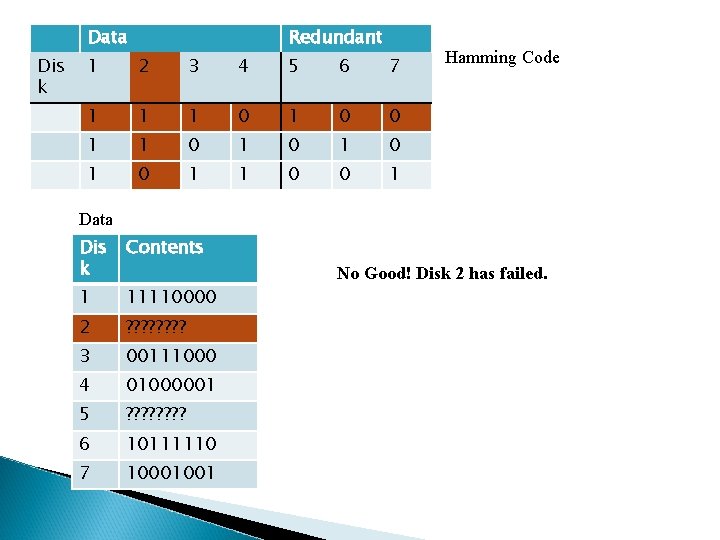
Data Dis k Redundant 1 2 3 4 5 6 7 1 1 1 0 0 1 1 0 1 0 1 1 0 0 1 Hamming Code Data Dis k Contents 1 11110000 2 ? ? ? ? 3 00111000 4 01000001 5 ? ? ? ? 6 10111110 7 10001001 No Good! Disk 2 has failed.
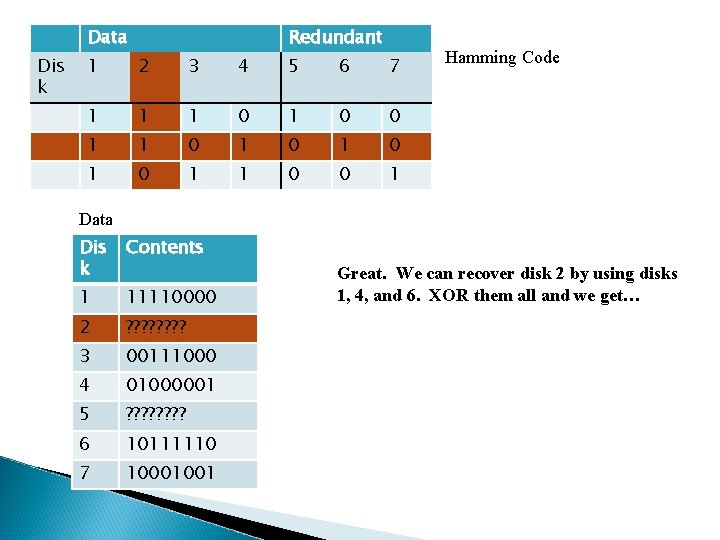
Data Dis k Redundant 1 2 3 4 5 6 7 1 1 1 0 0 1 1 0 1 0 1 1 0 0 1 Hamming Code Data Dis k Contents 1 11110000 2 ? ? ? ? 3 00111000 4 01000001 5 ? ? ? ? 6 10111110 7 10001001 Great. We can recover disk 2 by using disks 1, 4, and 6. XOR them all and we get…
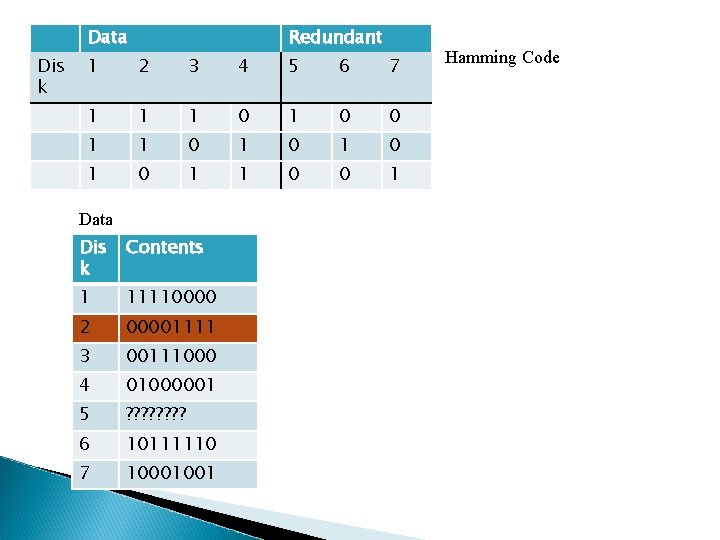
Data Dis k Redundant 1 2 3 4 5 6 7 1 1 1 0 0 1 1 0 1 0 1 1 0 0 1 Data Dis k Contents 1 11110000 2 00001111 3 00111000 4 01000001 5 ? ? ? ? 6 10111110 7 10001001 Hamming Code
Data Dis k Redundant 1 2 3 4 5 6 7 1 1 1 0 0 1 1 0 1 0 1 1 0 0 1 Hamming Code Data Dis k Contents 1 11110000 2 00001111 3 00111000 4 01000001 5 ? ? ? ? 6 10111110 7 10001001 Now we can see disk 5 is the parity bit for disks 1, 2, 3. XOR them all and we have recovered from two disk failures.
Data Dis k Redundant 1 2 3 4 5 6 7 1 1 1 0 0 1 1 0 1 0 1 1 0 0 1 Data Dis k Contents 1 11110000 2 00001111 3 00111000 4 01000001 5 11000111 6 10111110 7 10001001 Hamming Code
RAID 2 Continued In the example shown, we have not interleaved the parity information to make it easier to understand We can interleave the data in the same way we do in RAID 5 to avoid the bottleneck of writing all the parity to a small subset of disks
RAID 2 Pros Fast reads Very fault tolerant As rebuild times increase, having extra fault tolerance is becoming more important The parity method described requires 2 k-1 disks with k disks used for parity Other methods can require only 2 disks for parity
Raid 2 Cons About the same performance write speed as RAID 5. More reads and writes are required, but most can be done concurrently. Requires more parity space than RAID 5 ◦ Still less than RAID 1 Very computationally expensive
RAID 3 Bit-interleaved parity Instead of using several disks to store Hamming code, as in RAID 2, RAID 3 has a single disk check with parity information. Performance is similar between RAID 2 and 3
Hybrids RAID 1+0 Sets of drives in RAID 1 act as the drives for RAID 0 Very fast reads Faster writes than RAID 5 Redundant yet none of the overhead that comes with RAID 5 or 6 ◦ In certain cases can handle multiple failures ◦ Very expensive ◦ ◦
Hybrids Cont. Others ◦ ◦ 5+0 0+1 Hot Spares Intel Matrix Raid
Software RAID (Fake RAID) Software controllers offload their error correction calculations to the CPU Cheap Included on nearly every modern motherboard Difficult to boot from
Hardware RAID No CPU overhead Can include battery backed write cache Can appear as a single disk to the BIOS Often very expensive ◦ (Some cost more than the hard drives used to build the array) Proprietary (if your controller card fails, other manufacturers cards wont be able to read the array)
Problems Inherent in all RAIDs Correlated Failures ◦ Identical disks produced from the same assembly line and run for the exact same amount of time tend to fail together Write Atomicity ◦ What happens when there is a system crash between a block being written and its associated parity block?
Problems Cont. RAID does not protect from bad data overwriting your good data ◦ Viruses ◦ User Error RAID solves the problem of uptime and availability, not data integrity.
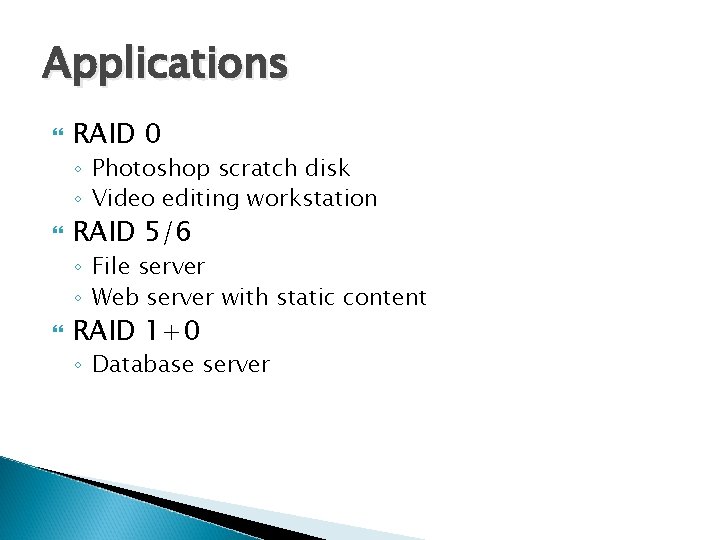
Applications RAID 0 ◦ Photoshop scratch disk ◦ Video editing workstation RAID 5/6 ◦ File server ◦ Web server with static content RAID 1+0 ◦ Database server
Source Course Text 1 Instructor’s Support Materials http: //www. zdnet. com/
Checklist What is mirroring? What is striping? What is a parity bit? How do we use Hamming code to allow identification of a single error? List 5 levels of RAID What is Hybrid, Software, Hardware RAID?