
Quick Forms System Training 12132021 Copyright 1999 Star









- Slides: 22
Quick Forms System Training 12/13/2021 Copyright © 1999 Star System Solutions Pty Ltd
Course Outline • 1 • 2 • 3 • 4 • 5 Introduction Edit stationery layout Stationery Printing Orders, Invoices & Credits Statements, Cheques & Bank Deposit slips • 6 Review 12/13/2021 Copyright © 1999 Star System Solutions Pty Ltd
Who is this course designed for ? Users of Platinum For Windows New users of Quick Forms If you previously used Quick Forms you may have to bare with me as you will appreciate that others may need to catch up 12/13/2021 Copyright © 1999 Star System Solutions Pty Ltd
Knowledge Required • Basic keyboard & mouse skills • Basic accounting terminology & concepts • Basic usage of Platinum For Windows. 12/13/2021 Copyright © 1999 Star System Solutions Pty Ltd
If uncertain of any points • EITHER: • Stop and ask the trainer • Watch the person beside you • Write down your questions and ask them during the Q&A session 12/13/2021 Copyright © 1999 Star System Solutions Pty Ltd
Quick Forms Introduction Quick Forms provides the fast and easy way to enhance Platinum For Window’s forms handling process by allowing the user to Design, Customise and Print all Platinum For Window’s stationery to your specifications. 12/13/2021 Copyright © 1999 Star System Solutions Pty Ltd
Stationary The PFW modules that Quick Forms can edit and print stationery for are: • • • 12/13/2021 Sales Orders Account Receivable Purchase Orders Accounts Payable Bank Book Copyright © 1999 Star System Solutions Pty Ltd
Course aim The aim is to learn about the features of the Quick Forms module. 12/13/2021 Copyright © 1999 Star System Solutions Pty Ltd
Quick Forms 12/13/2021 Copyright © 1999 Star System Solutions Pty Ltd
Please Note The user does not have to have PFW open on their computer when editing or printing stationery from Quick Forms 12/13/2021 Copyright © 1999 Star System Solutions Pty Ltd
Edit stationery layout • Quick Forms allows the user to edit and define the layout of a number of stationery forms to be printed with PFW data. • The form layout that can be edited include: • • • 12/13/2021 Cheques Statements Invoices Sales and Purchase orders Bank Deposit lists Copyright © 1999 Star System Solutions Pty Ltd
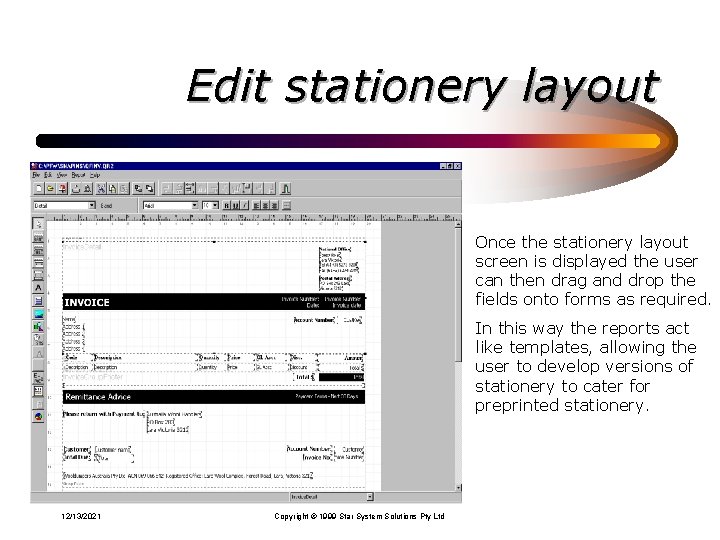
Edit stationery layout To edit the layout of a specific stationery form the user should select the stationery form and select the Edit button. 12/13/2021 Copyright © 1999 Star System Solutions Pty Ltd
Edit stationery layout Once the stationery layout screen is displayed the user can then drag and drop the fields onto forms as required. In this way the reports act like templates, allowing the user to develop versions of stationery to cater for preprinted stationery. 12/13/2021 Copyright © 1999 Star System Solutions Pty Ltd
Stationery Printing Quick Forms allows the user to print stationery forms for all of the following: Sales and Purchase Orders Invoices Statements Cheques Bank Deposit listings 12/13/2021 Copyright © 1999 Star System Solutions Pty Ltd
Stationery Printing To print a specific stationery form the user should select the stationery form and select the New button. 12/13/2021 Copyright © 1999 Star System Solutions Pty Ltd
Stationery Printing When printing stationery forms from Quick Forms the user is able to select the Document number range to be printed 12/13/2021 Copyright © 1999 Star System Solutions Pty Ltd
Stationery Printing Define any actions to be taken by Quick Forms when the Process Button is selected. 12/13/2021 Copyright © 1999 Star System Solutions Pty Ltd
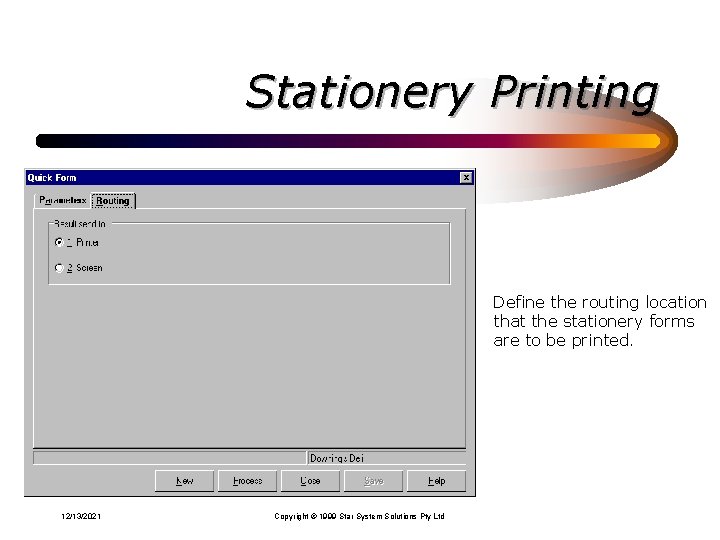
Stationery Printing Define the routing location that the stationery forms are to be printed. 12/13/2021 Copyright © 1999 Star System Solutions Pty Ltd
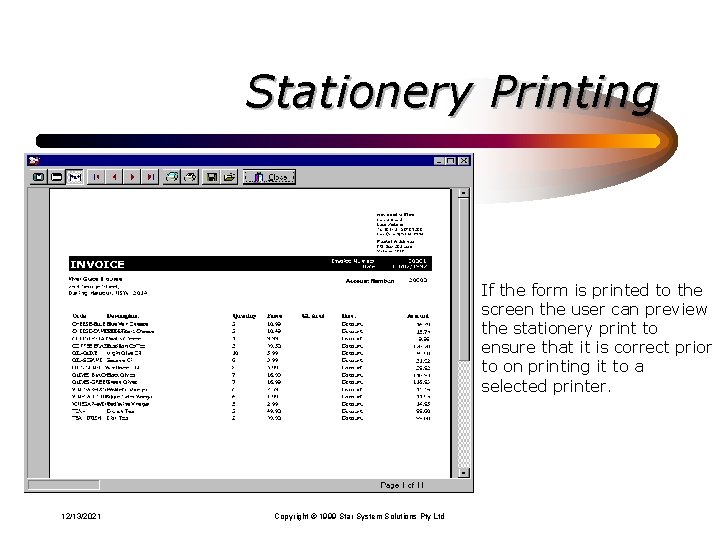
Stationery Printing If the form is printed to the screen the user can preview the stationery print to ensure that it is correct prior to on printing it to a selected printer. 12/13/2021 Copyright © 1999 Star System Solutions Pty Ltd
Review • Quick Forms allows PFW user to customise form stationery to meet both their company and preprinted form requirements. • Customised form stationery can then be printed or re-Printed at any time by the user in the saved Quick Forms format using actual PFW data. • The Quick Forms module is fast and easy to use and is an enhancement to PFW. 12/13/2021 Copyright © 1999 Star System Solutions Pty Ltd
Thankyou • That completes our Quick Forms introduction training. • If you have any questions - Please feel free to ask them. • I do hope that this training session has left you with a insight into the basic functionality of Quick Forms. Thank you so much for your attendance today. 12/13/2021 Copyright © 1999 Star System Solutions Pty Ltd
12/13/2021 Copyright © 1999 Star System Solutions Pty Ltd