
QuerybyExample QBE 1 QuerybyExample QBE v A GUI
Query-by-Example (QBE) 1

Query-by-Example (QBE) v A “GUI” for expressing queries. – – v Based on the Domain Relational Calulus (DRC)! Actually invented before GUIs. Very convenient for simple queries. Awkward for complex queries. QBE an IBM trademark. – But has influenced many projects – Especially PC Databases: Paradox, Access, etc. 2

`Example Tables’ in QBE v Users specify a query by filling in example tables, or skeletons; we will use these skeletons in our examples. 3
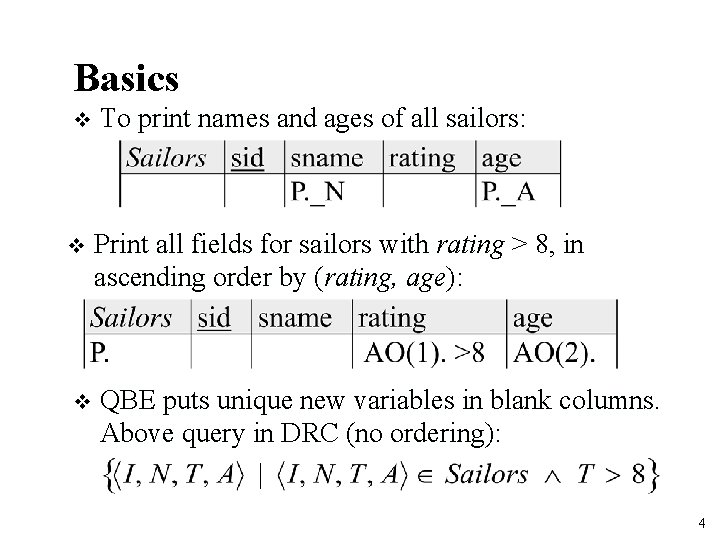
Basics v To print names and ages of all sailors: v Print all fields for sailors with rating > 8, in ascending order by (rating, age): v QBE puts unique new variables in blank columns. Above query in DRC (no ordering): 4

And/Or Queries v Names of sailors younger than 30 or older than 20: v Names of sailors younger than 30 and rating > 4: 5
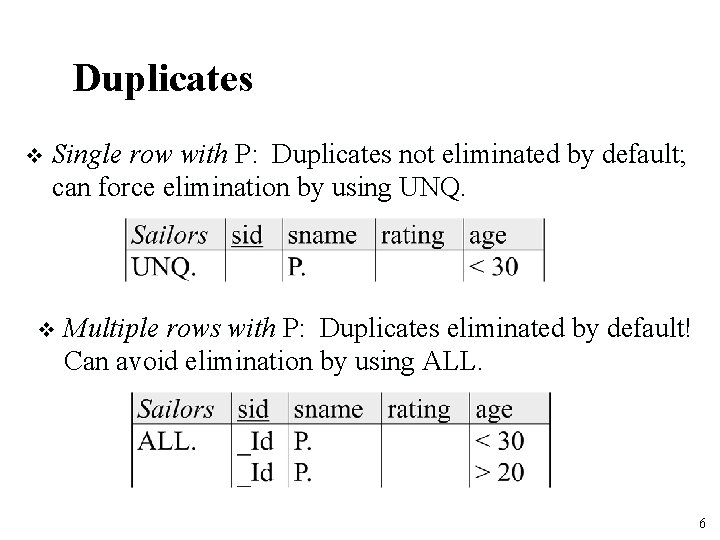
Duplicates v Single row with P: Duplicates not eliminated by default; can force elimination by using UNQ. v Multiple rows with P: Duplicates eliminated by default! Can avoid elimination by using ALL. 6
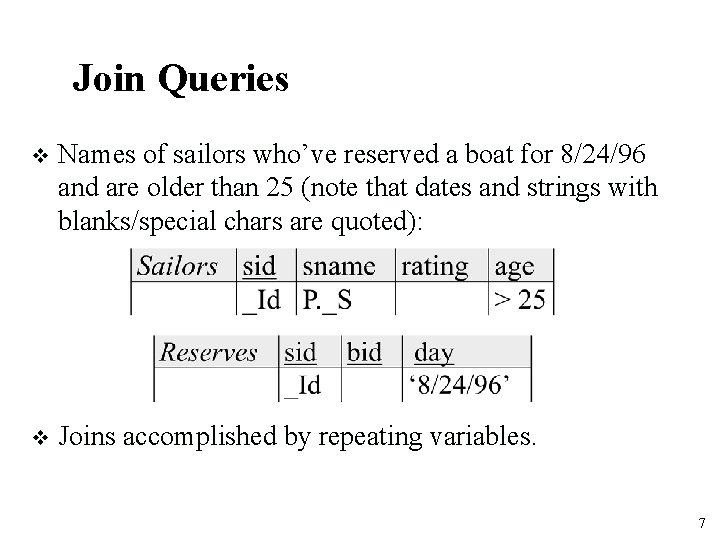
Join Queries v Names of sailors who’ve reserved a boat for 8/24/96 and are older than 25 (note that dates and strings with blanks/special chars are quoted): v Joins accomplished by repeating variables. 7
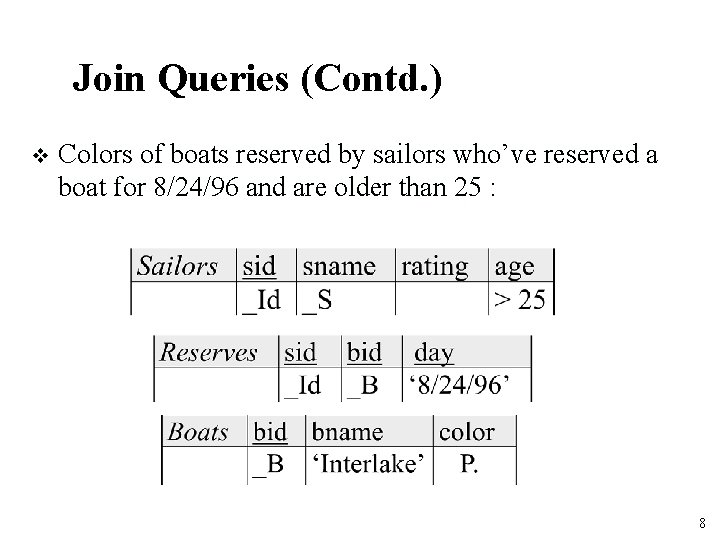
Join Queries (Contd. ) v Colors of boats reserved by sailors who’ve reserved a boat for 8/24/96 and are older than 25 : 8
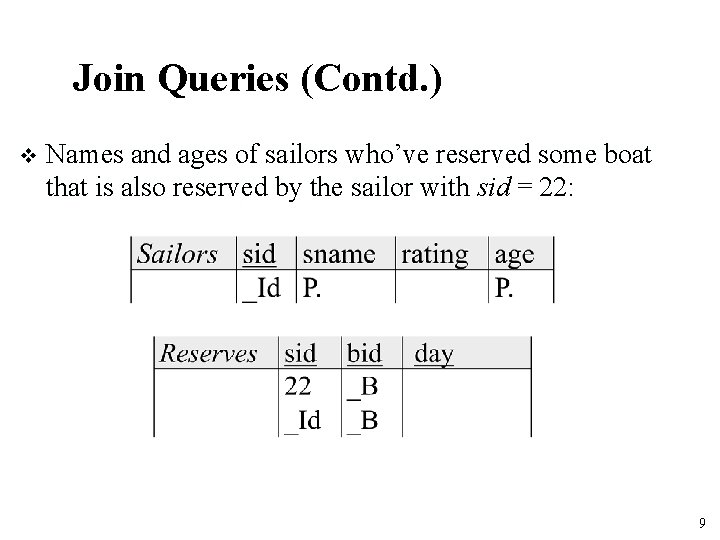
Join Queries (Contd. ) v Names and ages of sailors who’ve reserved some boat that is also reserved by the sailor with sid = 22: 9
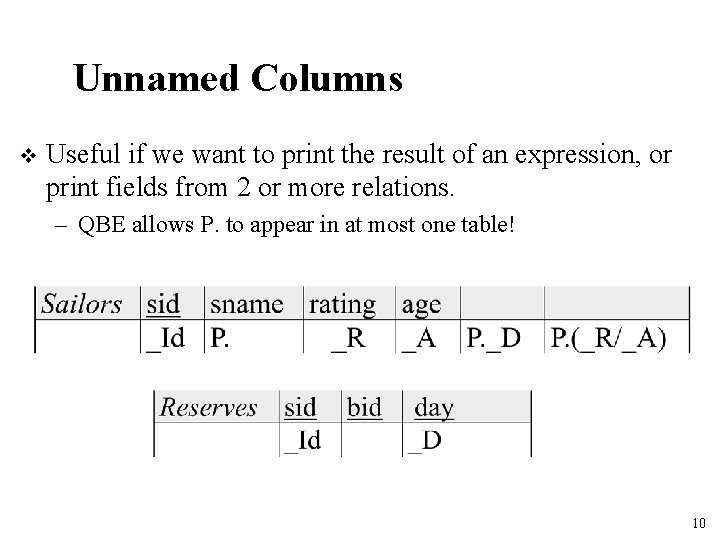
Unnamed Columns v Useful if we want to print the result of an expression, or print fields from 2 or more relations. – QBE allows P. to appear in at most one table! 10
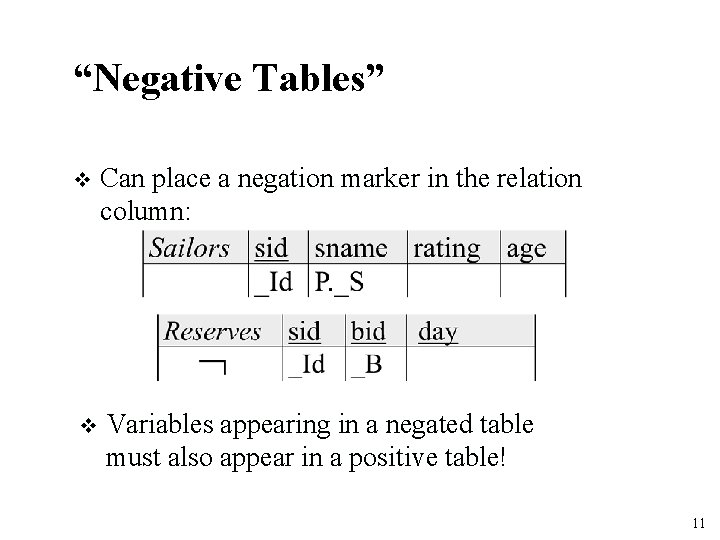
“Negative Tables” v Can place a negation marker in the relation column: v Variables appearing in a negated table must also appear in a positive table! 11
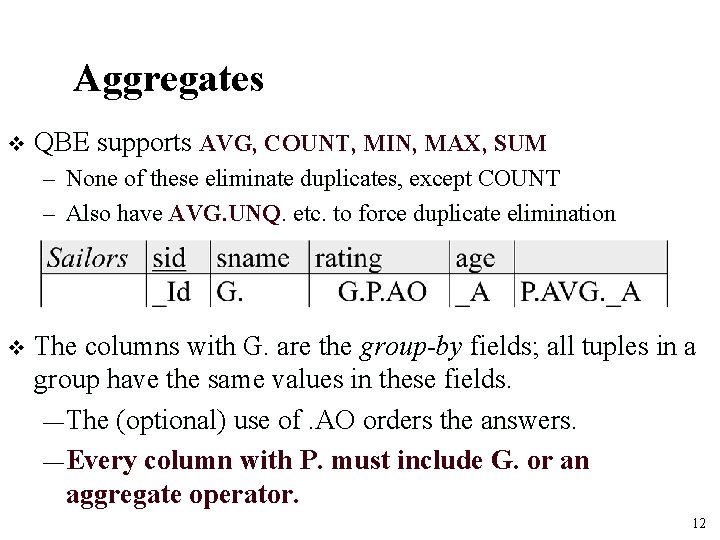
Aggregates v QBE supports AVG, COUNT, MIN, MAX, SUM – None of these eliminate duplicates, except COUNT – Also have AVG. UNQ. etc. to force duplicate elimination v The columns with G. are the group-by fields; all tuples in a group have the same values in these fields. — The (optional) use of. AO orders the answers. — Every column with P. must include G. or an aggregate operator. 12
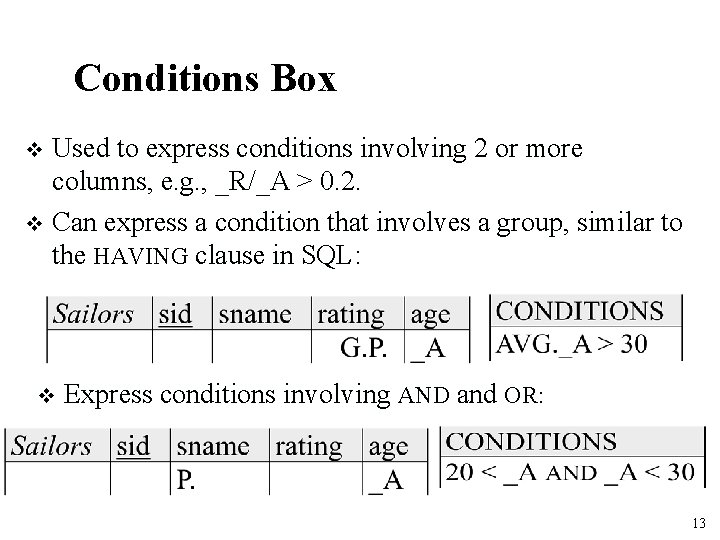
Conditions Box Used to express conditions involving 2 or more columns, e. g. , _R/_A > 0. 2. v Can express a condition that involves a group, similar to the HAVING clause in SQL: v v Express conditions involving AND and OR: 13
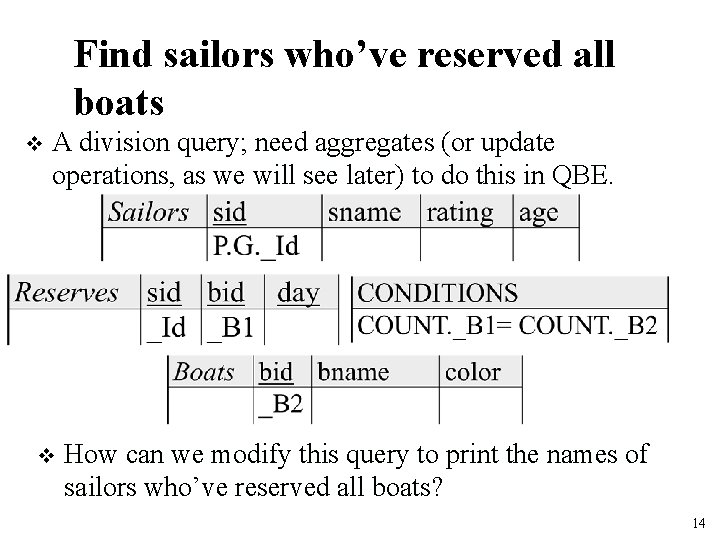
Find sailors who’ve reserved all boats v A division query; need aggregates (or update operations, as we will see later) to do this in QBE. v How can we modify this query to print the names of sailors who’ve reserved all boats? 14
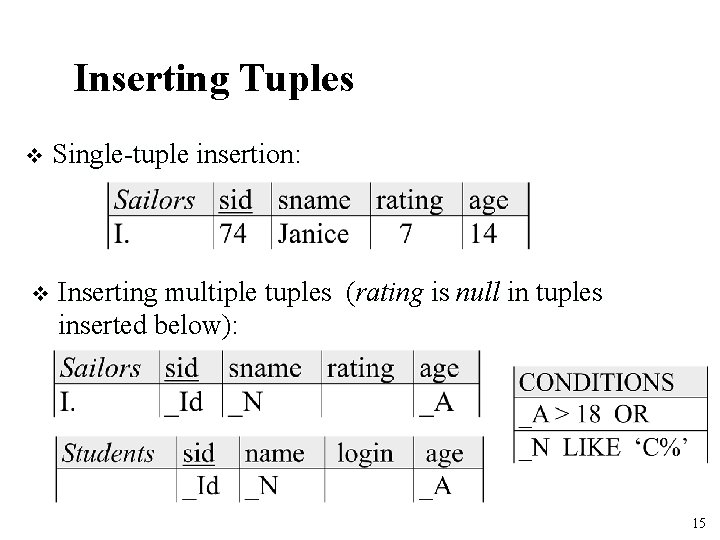
Inserting Tuples v Single-tuple insertion: v Inserting multiple tuples (rating is null in tuples inserted below): 15
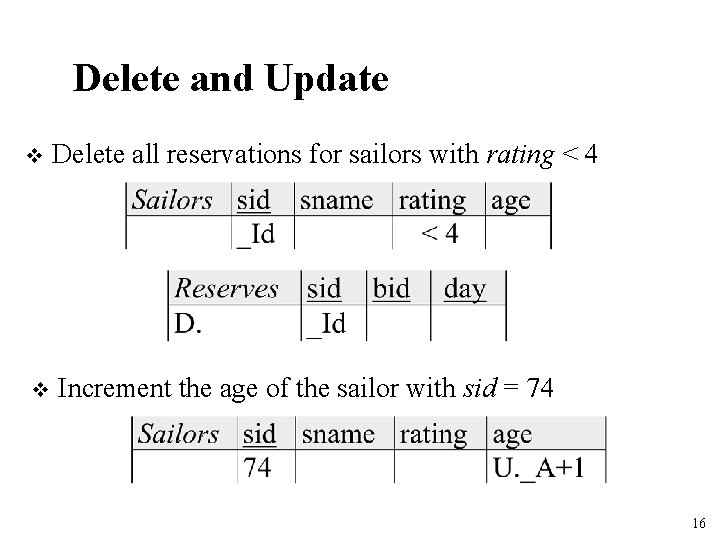
Delete and Update v Delete all reservations for sailors with rating < 4 v Increment the age of the sailor with sid = 74 16
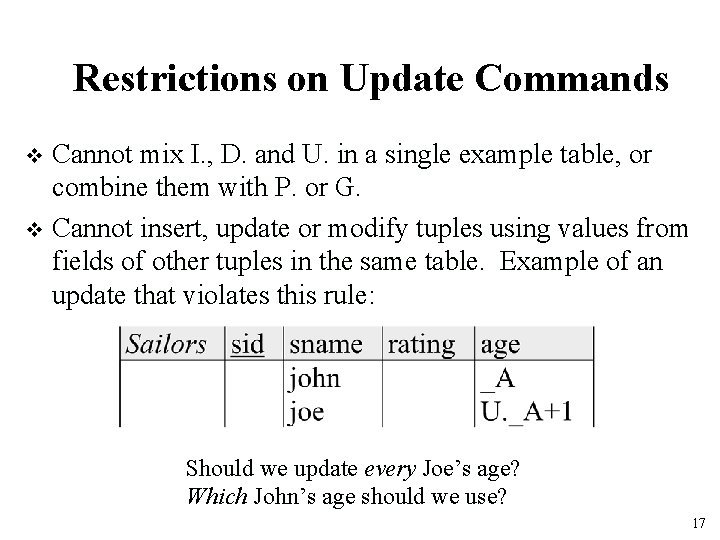
Restrictions on Update Commands Cannot mix I. , D. and U. in a single example table, or combine them with P. or G. v Cannot insert, update or modify tuples using values from fields of other tuples in the same table. Example of an update that violates this rule: v Should we update every Joe’s age? Which John’s age should we use? 17
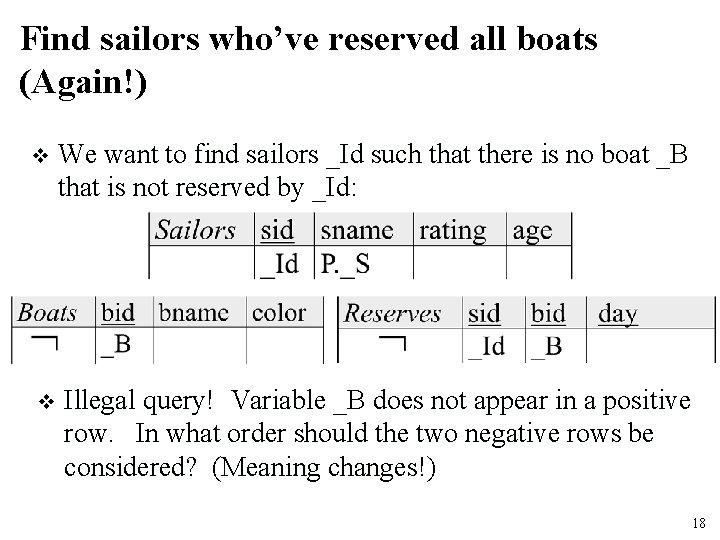
Find sailors who’ve reserved all boats (Again!) v We want to find sailors _Id such that there is no boat _B that is not reserved by _Id: v Illegal query! Variable _B does not appear in a positive row. In what order should the two negative rows be considered? (Meaning changes!) 18
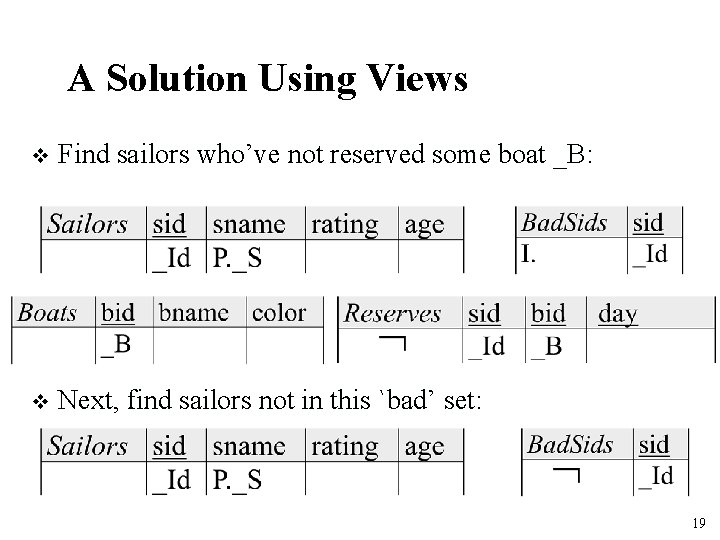
A Solution Using Views v Find sailors who’ve not reserved some boat _B: v Next, find sailors not in this `bad’ set: 19
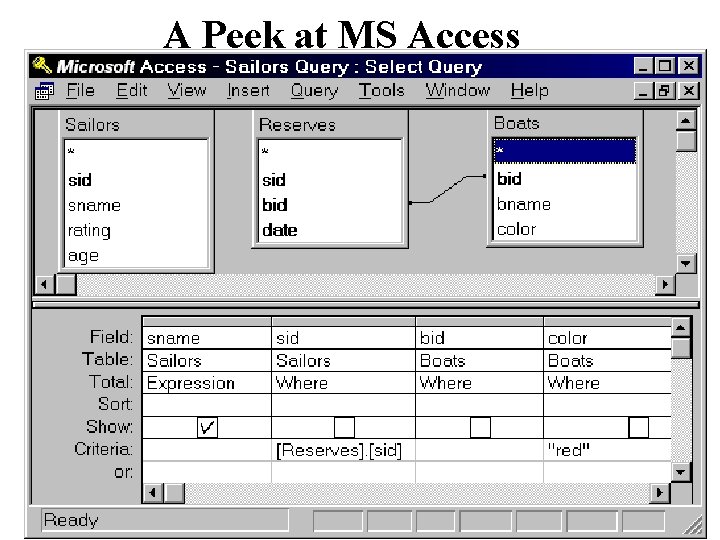
A Peek at MS Access 20
Summary QBE is an elegant, user-friendly query language based on DRC. v It is quite expressive (relationally complete, if the update features are taken into account). v Simple queries are especially easy to write in QBE, and there is a minimum of syntax to learn. v Has influenced the graphical query facilities offered in many products, including Borland’s Paradox and Microsoft’s Access. v 21
- Slides: 21