
Quartus II Software Design Series Timing Analysis Time
- Slides: 65
Quartus II Software Design Series: Timing Analysis Time. Quest Basics © 2008 Altera Corporation—Confidential
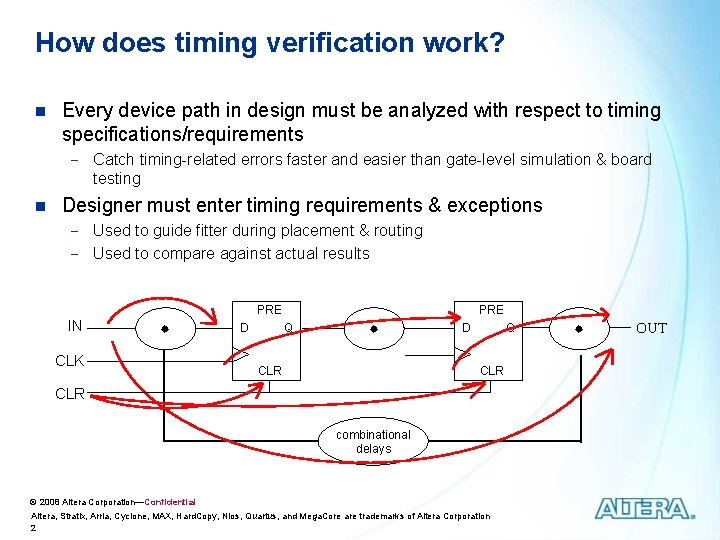
How does timing verification work? n Every device path in design must be analyzed with respect to timing specifications/requirements - Catch timing-related errors faster and easier than gate-level simulation & board testing n Designer must enter timing requirements & exceptions - Used to guide fitter during placement & routing - Used to compare against actual results PRE IN CLK D PRE Q CLR D Q CLR combinational delays © 2008 Altera Corporation—Confidential Altera, Stratix, Arria, Cyclone, MAX, Hard. Copy, Nios, Quartus, and Mega. Core are trademarks of Altera Corporation 2 OUT
Timing Analysis Agenda Time. Quest Overview n Time. Quest Basic Steps n Using Time. Quest in the Quartus II Flow n Timing Reports n © 2008 Altera Corporation—Confidential Altera, Stratix, Arria, Cyclone, MAX, Hard. Copy, Nios, Quartus, and Mega. Core are trademarks of Altera Corporation 3
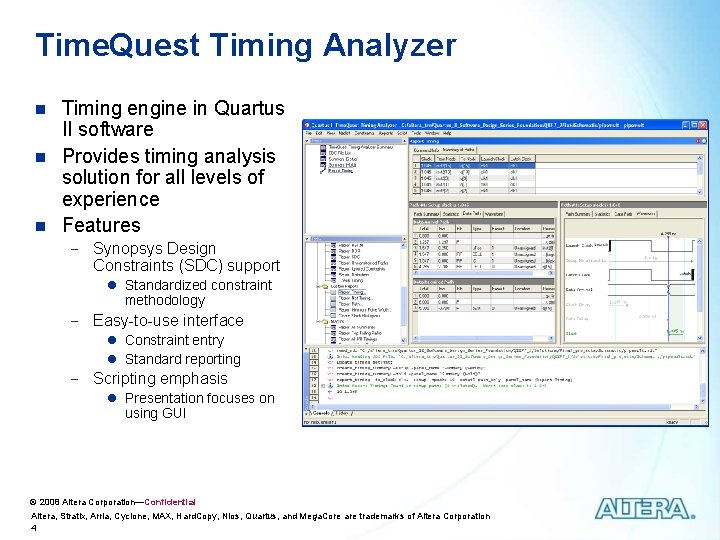
Time. Quest Timing Analyzer n n n Timing engine in Quartus II software Provides timing analysis solution for all levels of experience Features - Synopsys Design Constraints (SDC) support l Standardized constraint methodology - Easy-to-use interface l Constraint entry l Standard reporting - Scripting emphasis l Presentation focuses on using GUI © 2008 Altera Corporation—Confidential Altera, Stratix, Arria, Cyclone, MAX, Hard. Copy, Nios, Quartus, and Mega. Core are trademarks of Altera Corporation 4
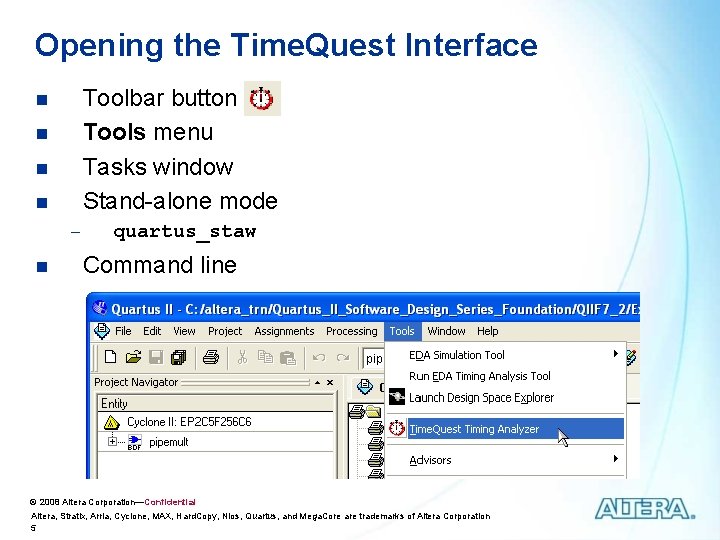
Opening the Time. Quest Interface Toolbar button Tools menu Tasks window Stand-alone mode n n n quartus_staw Command line © 2008 Altera Corporation—Confidential Altera, Stratix, Arria, Cyclone, MAX, Hard. Copy, Nios, Quartus, and Mega. Core are trademarks of Altera Corporation 5
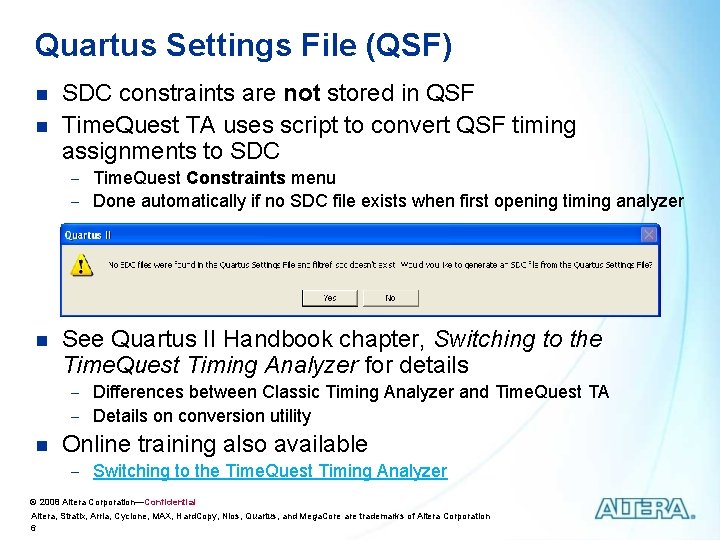
Quartus Settings File (QSF) n n SDC constraints are not stored in QSF Time. Quest TA uses script to convert QSF timing assignments to SDC - Time. Quest Constraints menu - Done automatically if no SDC file exists when first opening timing analyzer n See Quartus II Handbook chapter, Switching to the Time. Quest Timing Analyzer for details - Differences between Classic Timing Analyzer and Time. Quest TA - Details on conversion utility n Online training also available - Switching to the Time. Quest Timing Analyzer © 2008 Altera Corporation—Confidential Altera, Stratix, Arria, Cyclone, MAX, Hard. Copy, Nios, Quartus, and Mega. Core are trademarks of Altera Corporation 6
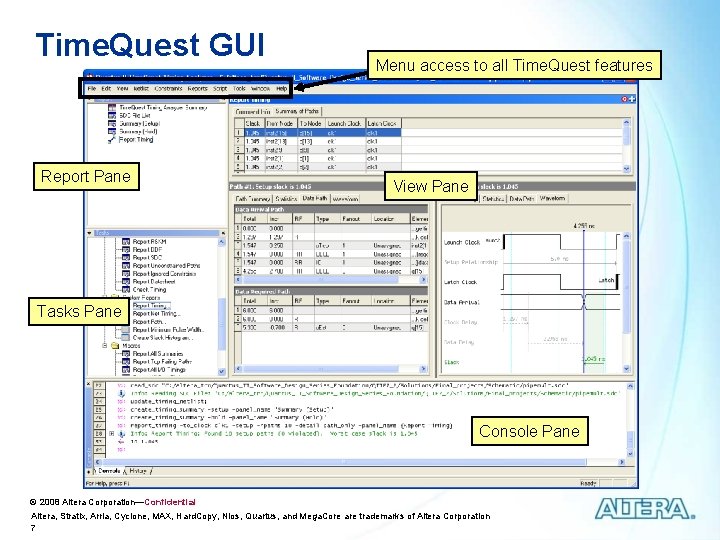
Time. Quest GUI Report Pane Menu access to all Time. Quest features View Pane Tasks Pane Console Pane © 2008 Altera Corporation—Confidential Altera, Stratix, Arria, Cyclone, MAX, Hard. Copy, Nios, Quartus, and Mega. Core are trademarks of Altera Corporation 7
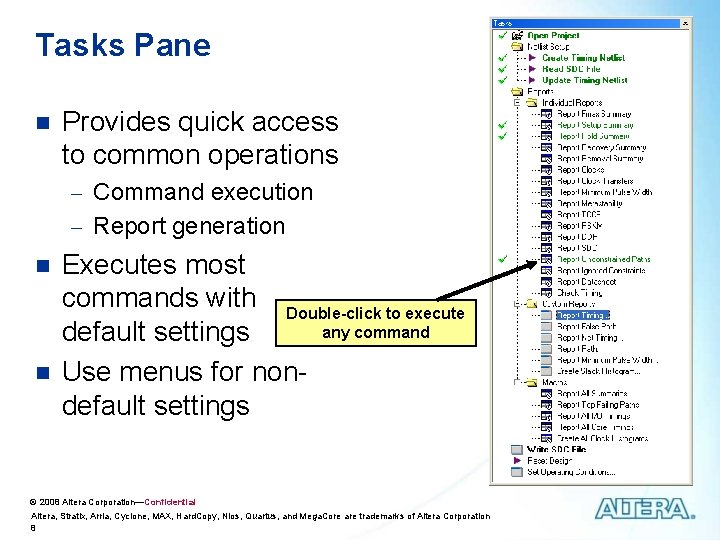
Tasks Pane n Provides quick access to common operations - Command execution - Report generation n n Executes most commands with Double-click to execute any command default settings Use menus for nondefault settings © 2008 Altera Corporation—Confidential Altera, Stratix, Arria, Cyclone, MAX, Hard. Copy, Nios, Quartus, and Mega. Core are trademarks of Altera Corporation 8
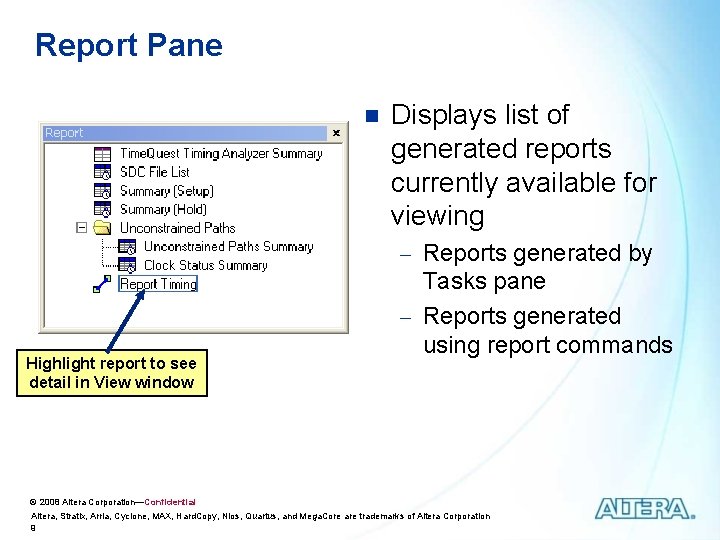
Report Pane n Displays list of generated reports currently available for viewing - Reports generated by Highlight report to see detail in View window Tasks pane - Reports generated using report commands © 2008 Altera Corporation—Confidential Altera, Stratix, Arria, Cyclone, MAX, Hard. Copy, Nios, Quartus, and Mega. Core are trademarks of Altera Corporation 9
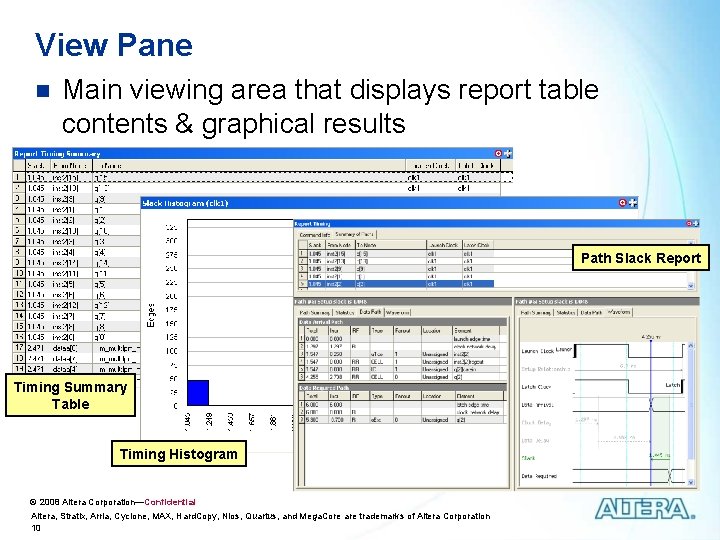
View Pane n Main viewing area that displays report table contents & graphical results Path Slack Report Timing Summary Table Timing Histogram © 2008 Altera Corporation—Confidential Altera, Stratix, Arria, Cyclone, MAX, Hard. Copy, Nios, Quartus, and Mega. Core are trademarks of Altera Corporation 10
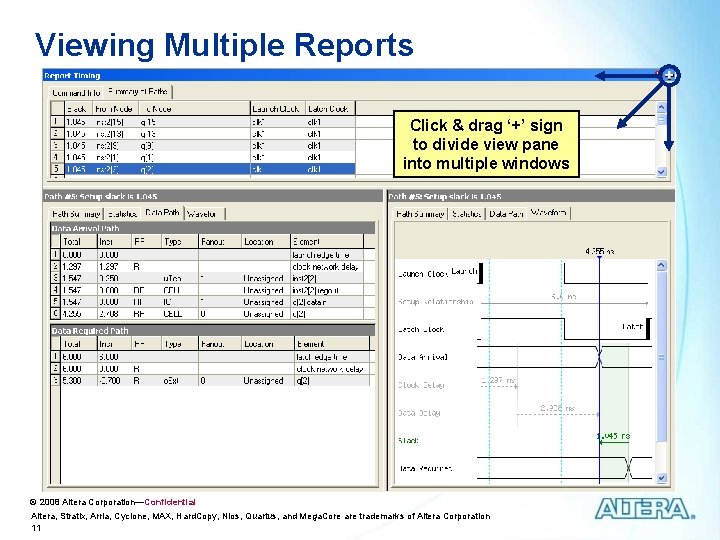
Viewing Multiple Reports Click & drag ‘+’ sign to divide view pane into multiple windows © 2008 Altera Corporation—Confidential Altera, Stratix, Arria, Cyclone, MAX, Hard. Copy, Nios, Quartus, and Mega. Core are trademarks of Altera Corporation 11
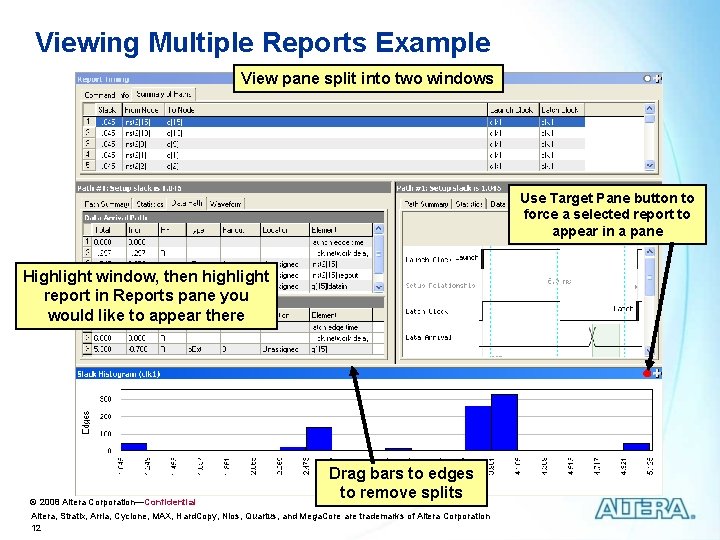
Viewing Multiple Reports Example View pane split into two windows Use Target Pane button to force a selected report to appear in a pane Highlight window, then highlight report in Reports pane you would like to appear there © 2008 Altera Corporation—Confidential Drag bars to edges to remove splits Altera, Stratix, Arria, Cyclone, MAX, Hard. Copy, Nios, Quartus, and Mega. Core are trademarks of Altera Corporation 12
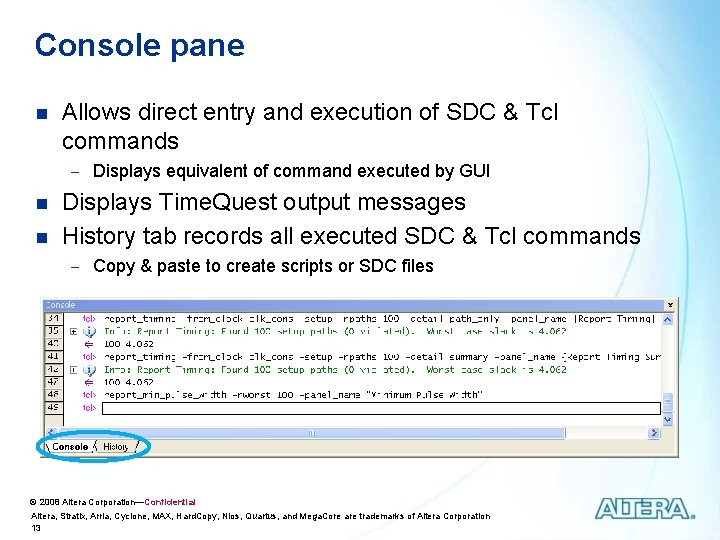
Console pane n Allows direct entry and execution of SDC & Tcl commands - Displays equivalent of command executed by GUI n n Displays Time. Quest output messages History tab records all executed SDC & Tcl commands - Copy & paste to create scripts or SDC files © 2008 Altera Corporation—Confidential Altera, Stratix, Arria, Cyclone, MAX, Hard. Copy, Nios, Quartus, and Mega. Core are trademarks of Altera Corporation 13
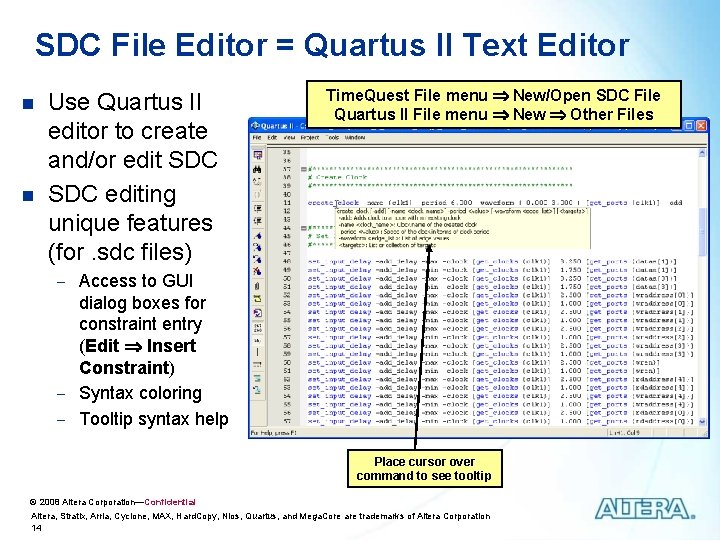
SDC File Editor = Quartus II Text Editor n n Use Quartus II editor to create and/or edit SDC editing unique features (for. sdc files) Time. Quest File menu New/Open SDC File Quartus II File menu New Other Files - Access to GUI dialog boxes for constraint entry (Edit Insert Constraint) - Syntax coloring - Tooltip syntax help Place cursor over command to see tooltip © 2008 Altera Corporation—Confidential Altera, Stratix, Arria, Cyclone, MAX, Hard. Copy, Nios, Quartus, and Mega. Core are trademarks of Altera Corporation 14
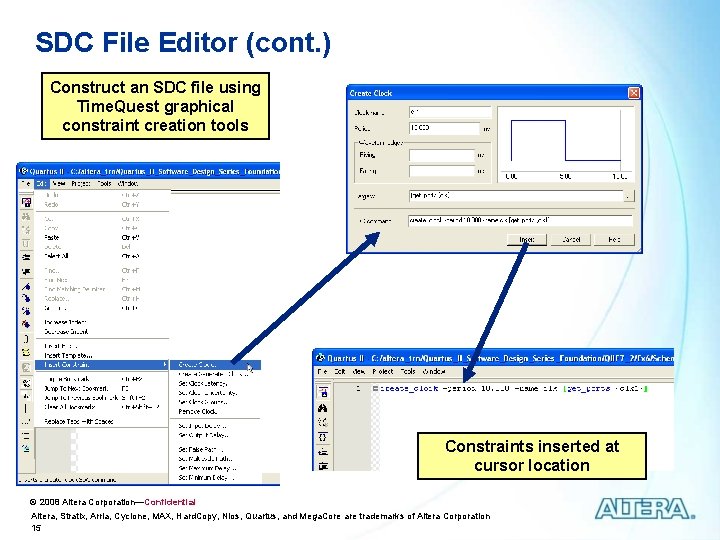
SDC File Editor (cont. ) Construct an SDC file using Time. Quest graphical constraint creation tools Constraints inserted at cursor location © 2008 Altera Corporation—Confidential Altera, Stratix, Arria, Cyclone, MAX, Hard. Copy, Nios, Quartus, and Mega. Core are trademarks of Altera Corporation 15
Timing Analysis Agenda Time. Quest Overview n Time. Quest Basic Steps n Using Time. Quest in the Quartus II Flow n Timing Reports n © 2008 Altera Corporation—Confidential Altera, Stratix, Arria, Cyclone, MAX, Hard. Copy, Nios, Quartus, and Mega. Core are trademarks of Altera Corporation 16
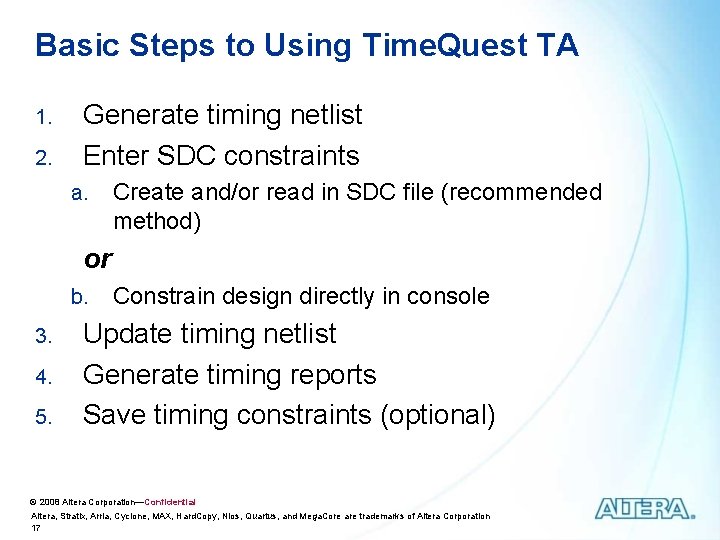
Basic Steps to Using Time. Quest TA 1. 2. Generate timing netlist Enter SDC constraints a. Create and/or read in SDC file (recommended method) or b. 3. 4. 5. Constrain design directly in console Update timing netlist Generate timing reports Save timing constraints (optional) © 2008 Altera Corporation—Confidential Altera, Stratix, Arria, Cyclone, MAX, Hard. Copy, Nios, Quartus, and Mega. Core are trademarks of Altera Corporation 17
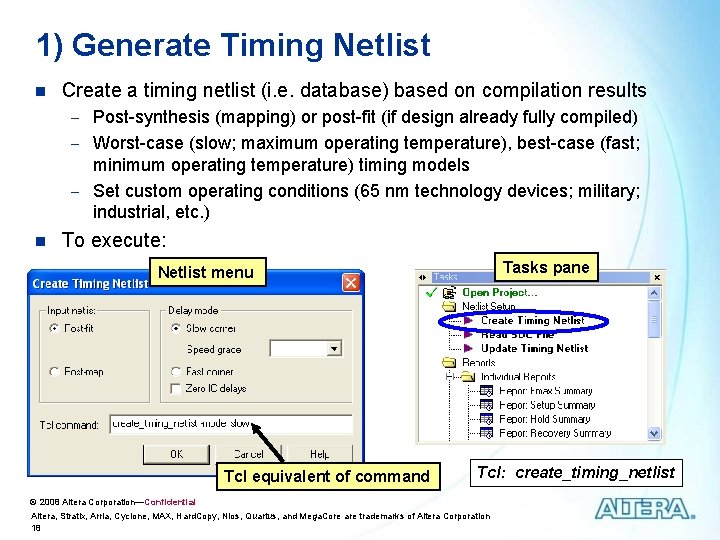
1) Generate Timing Netlist n Create a timing netlist (i. e. database) based on compilation results - Post-synthesis (mapping) or post-fit (if design already fully compiled) - Worst-case (slow; maximum operating temperature), best-case (fast; minimum operating temperature) timing models - Set custom operating conditions (65 nm technology devices; military; industrial, etc. ) n To execute: Tasks pane Netlist menu Tcl equivalent of command Tcl: create_timing_netlist © 2008 Altera Corporation—Confidential Altera, Stratix, Arria, Cyclone, MAX, Hard. Copy, Nios, Quartus, and Mega. Core are trademarks of Altera Corporation 18
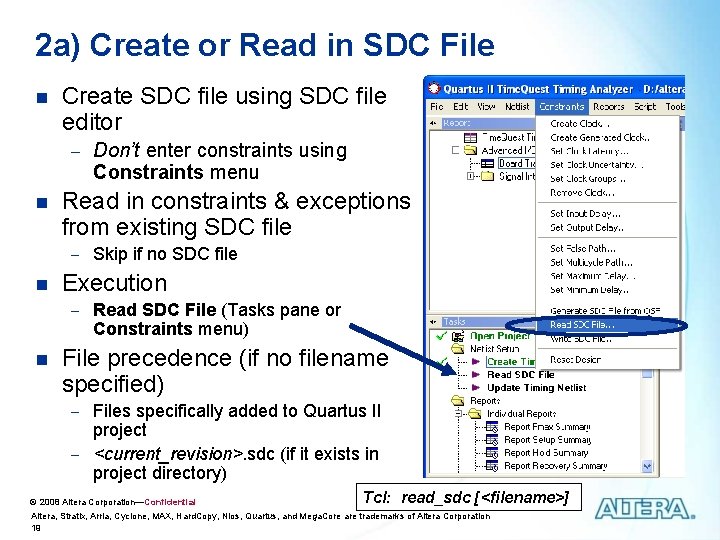
2 a) Create or Read in SDC File n Create SDC file using SDC file editor - Don’t enter constraints using Constraints menu n Read in constraints & exceptions from existing SDC file - Skip if no SDC file n Execution - Read SDC File (Tasks pane or Constraints menu) n File precedence (if no filename specified) - Files specifically added to Quartus II project - <current_revision>. sdc (if it exists in project directory) © 2008 Altera Corporation—Confidential Tcl: read_sdc [<filename>] Altera, Stratix, Arria, Cyclone, MAX, Hard. Copy, Nios, Quartus, and Mega. Core are trademarks of Altera Corporation 19
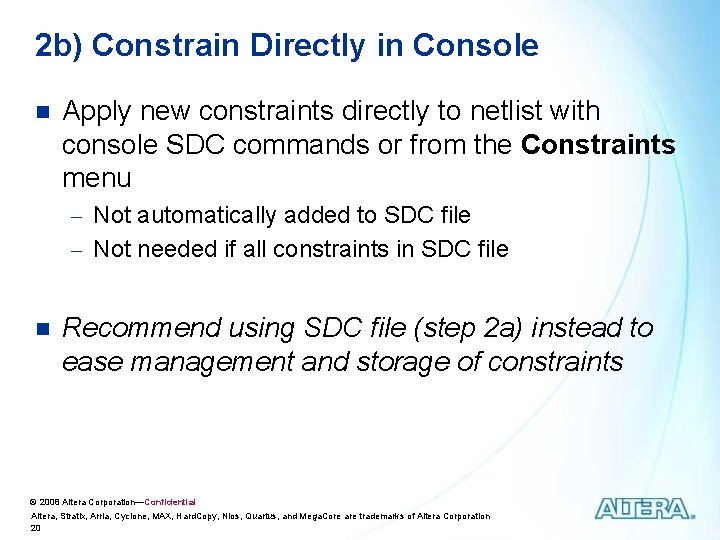
2 b) Constrain Directly in Console n Apply new constraints directly to netlist with console SDC commands or from the Constraints menu - Not automatically added to SDC file - Not needed if all constraints in SDC file n Recommend using SDC file (step 2 a) instead to ease management and storage of constraints © 2008 Altera Corporation—Confidential Altera, Stratix, Arria, Cyclone, MAX, Hard. Copy, Nios, Quartus, and Mega. Core are trademarks of Altera Corporation 20
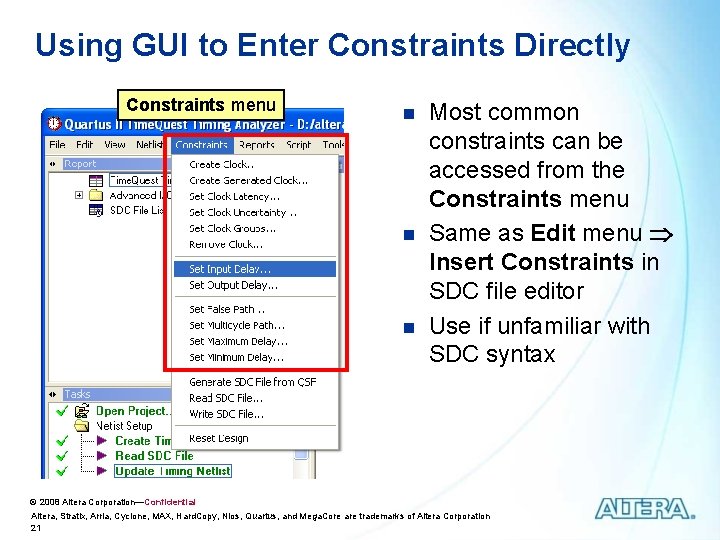
Using GUI to Enter Constraints Directly Constraints menu n n n Most common constraints can be accessed from the Constraints menu Same as Edit menu Insert Constraints in SDC file editor Use if unfamiliar with SDC syntax © 2008 Altera Corporation—Confidential Altera, Stratix, Arria, Cyclone, MAX, Hard. Copy, Nios, Quartus, and Mega. Core are trademarks of Altera Corporation 21
Constraining n User MUST enter constraints for all paths to fully analyze design - Timing analyzer only performs slack analysis on constrained design paths - Constraints guide the fitter to place & route design in order to meet timing requirements - Recommendation: Constrain all paths (at least clocks & I/O) n Not as difficult a task as it may sound - Wildcards - Single, generalized constraints cover many paths, even all paths in an entire clock domain © 2008 Altera Corporation—Confidential Altera, Stratix, Arria, Cyclone, MAX, Hard. Copy, Nios, Quartus, and Mega. Core are trademarks of Altera Corporation 22
3) Update Timing Netlist n n Apply SDC constraints/exceptions to current timing netlist Generates warnings - Undefined clocks - Partially defined I/O delays - Combinatorial loops n n Update timing netlist after adding any new constraint Execution - Update Timing Netlist (Tasks pane or Netlist menu) Tcl: update_timing_netlist © 2008 Altera Corporation—Confidential Altera, Stratix, Arria, Cyclone, MAX, Hard. Copy, Nios, Quartus, and Mega. Core are trademarks of Altera Corporation 23
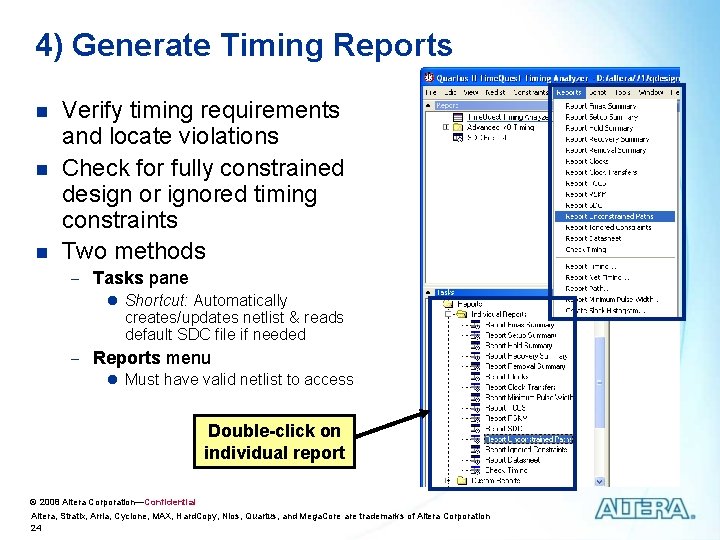
4) Generate Timing Reports n n n Verify timing requirements and locate violations Check for fully constrained design or ignored timing constraints Two methods - Tasks pane l Shortcut: Automatically creates/updates netlist & reads default SDC file if needed - Reports menu l Must have valid netlist to access Double-click on individual report © 2008 Altera Corporation—Confidential Altera, Stratix, Arria, Cyclone, MAX, Hard. Copy, Nios, Quartus, and Mega. Core are trademarks of Altera Corporation 24
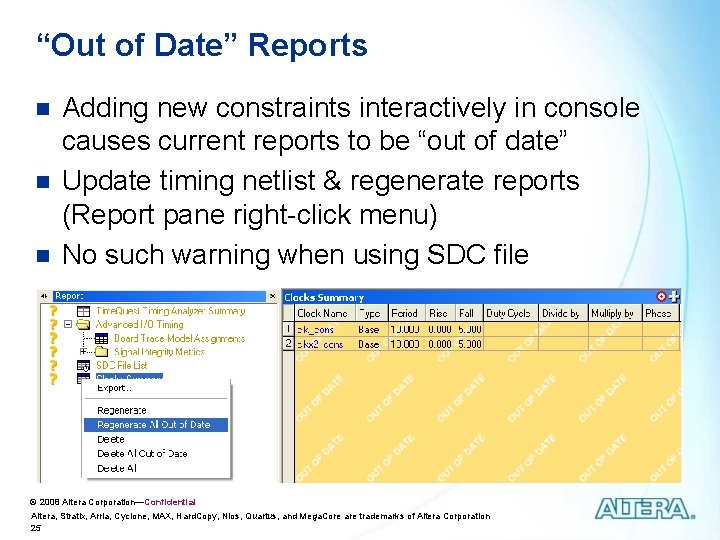
“Out of Date” Reports n n n Adding new constraints interactively in console causes current reports to be “out of date” Update timing netlist & regenerate reports (Report pane right-click menu) No such warning when using SDC file © 2008 Altera Corporation—Confidential Altera, Stratix, Arria, Cyclone, MAX, Hard. Copy, Nios, Quartus, and Mega. Core are trademarks of Altera Corporation 25
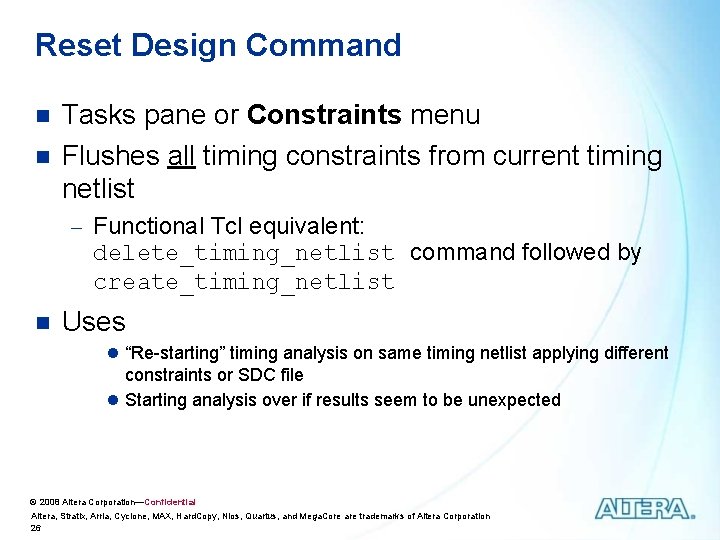
Reset Design Command n n Tasks pane or Constraints menu Flushes all timing constraints from current timing netlist - Functional Tcl equivalent: delete_timing_netlist command followed by create_timing_netlist n Uses l “Re-starting” timing analysis on same timing netlist applying different constraints or SDC file l Starting analysis over if results seem to be unexpected © 2008 Altera Corporation—Confidential Altera, Stratix, Arria, Cyclone, MAX, Hard. Copy, Nios, Quartus, and Mega. Core are trademarks of Altera Corporation 26
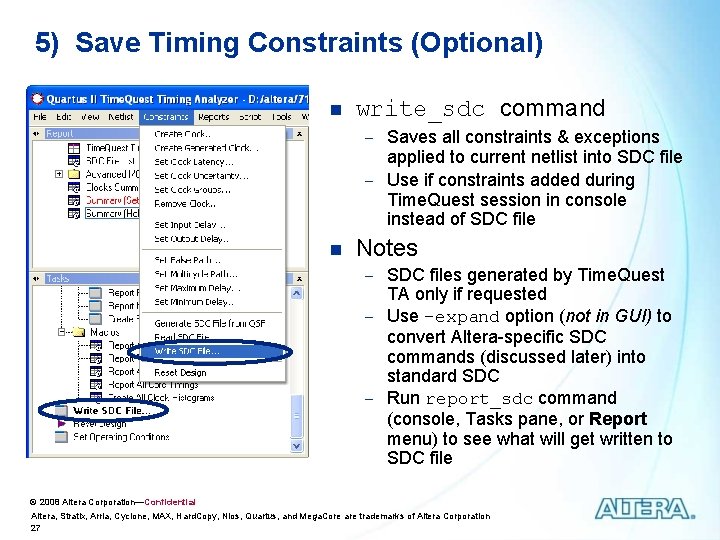
5) Save Timing Constraints (Optional) n write_sdc command - Saves all constraints & exceptions applied to current netlist into SDC file - Use if constraints added during Time. Quest session in console instead of SDC file n Notes - SDC files generated by Time. Quest TA only if requested - Use -expand option (not in GUI) to convert Altera-specific SDC commands (discussed later) into standard SDC - Run report_sdc command (console, Tasks pane, or Report menu) to see what will get written to SDC file © 2008 Altera Corporation—Confidential Altera, Stratix, Arria, Cyclone, MAX, Hard. Copy, Nios, Quartus, and Mega. Core are trademarks of Altera Corporation 27
Basic Steps to Using Time. Quest TA (Review) 1. 2. Generate timing netlist Enter SDC constraints a. Create and/or read in SDC file (recommended method) or b. 3. 4. 5. Constrain design directly in console Update timing netlist Generate timing reports Save timing constraints (optional) © 2008 Altera Corporation—Confidential Altera, Stratix, Arria, Cyclone, MAX, Hard. Copy, Nios, Quartus, and Mega. Core are trademarks of Altera Corporation 28
Timing Analysis Agenda Time. Quest Overview n Time. Quest Basic Steps n Using Time. Quest in the Quartus II Flow n Timing Reports n © 2008 Altera Corporation—Confidential Altera, Stratix, Arria, Cyclone, MAX, Hard. Copy, Nios, Quartus, and Mega. Core are trademarks of Altera Corporation 29
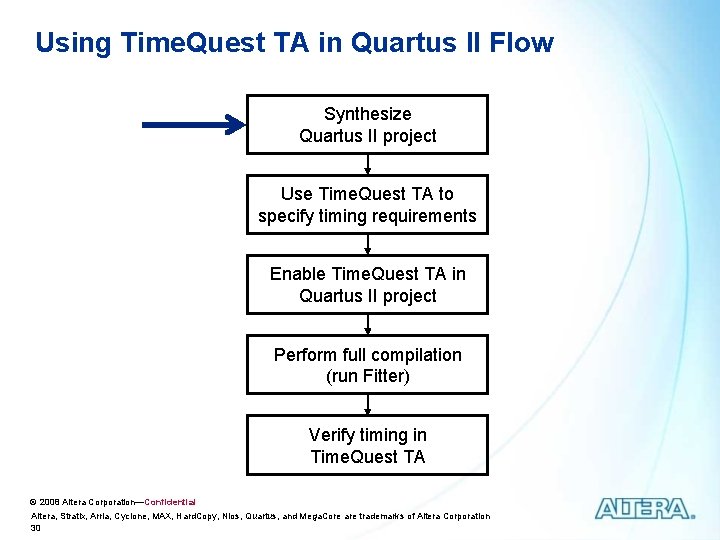
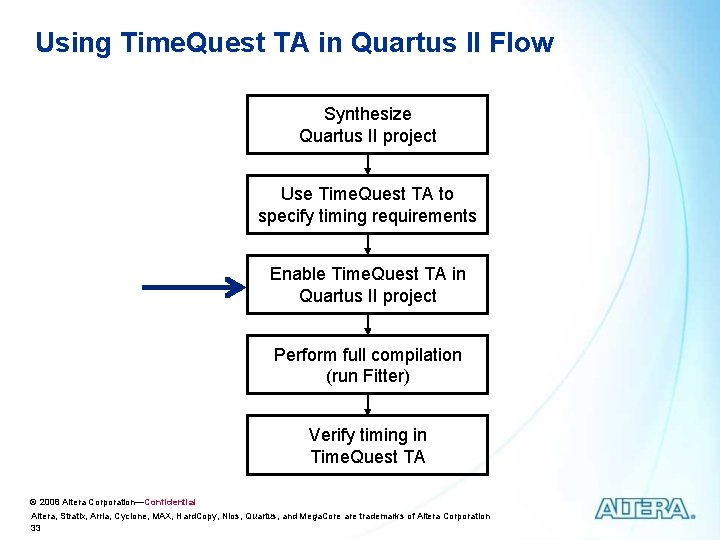
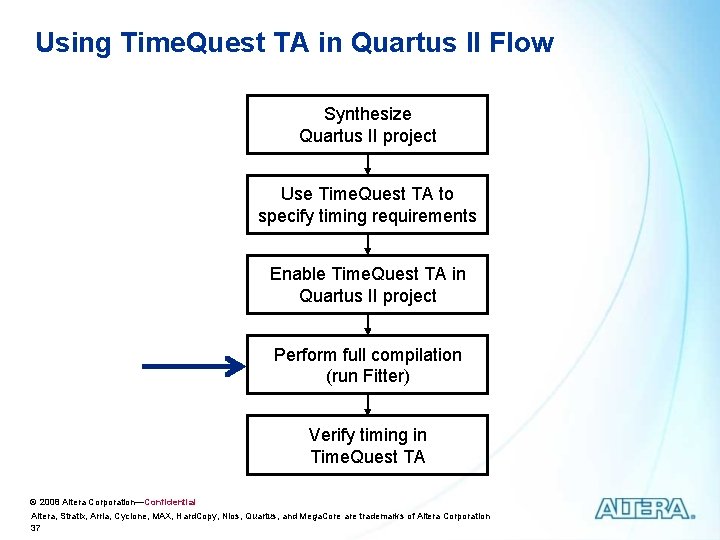
Using Time. Quest TA in Quartus II Flow Synthesize Quartus II project Use Time. Quest TA to specify timing requirements Enable Time. Quest TA in Quartus II project Perform full compilation (run Fitter) Verify timing in Time. Quest TA © 2008 Altera Corporation—Confidential Altera, Stratix, Arria, Cyclone, MAX, Hard. Copy, Nios, Quartus, and Mega. Core are trademarks of Altera Corporation 30
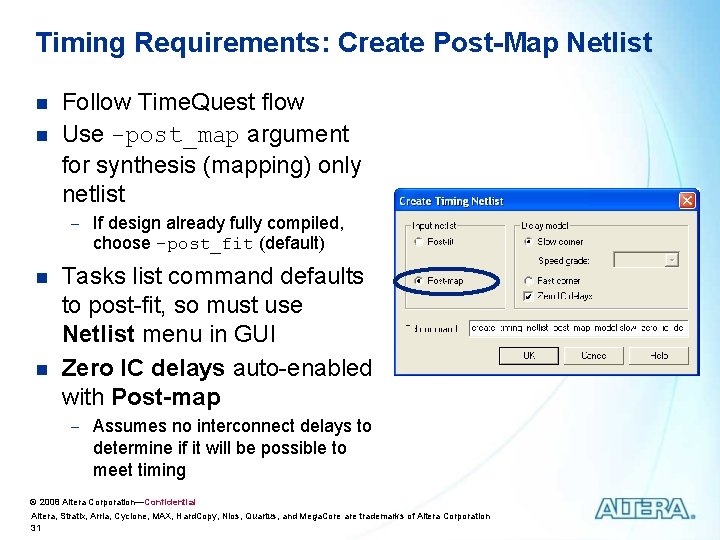
Timing Requirements: Create Post-Map Netlist n n Follow Time. Quest flow Use -post_map argument for synthesis (mapping) only netlist - If design already fully compiled, choose -post_fit (default) n n Tasks list command defaults to post-fit, so must use Netlist menu in GUI Zero IC delays auto-enabled with Post-map - Assumes no interconnect delays to determine if it will be possible to meet timing © 2008 Altera Corporation—Confidential Altera, Stratix, Arria, Cyclone, MAX, Hard. Copy, Nios, Quartus, and Mega. Core are trademarks of Altera Corporation 31
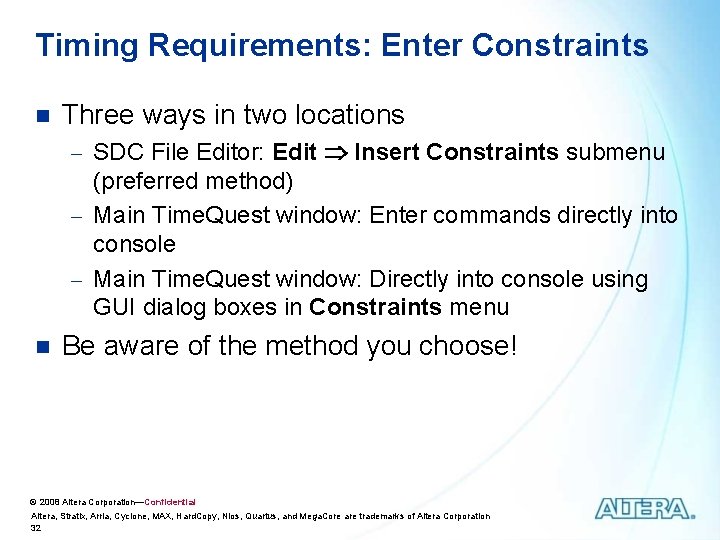
Timing Requirements: Enter Constraints n Three ways in two locations - SDC File Editor: Edit Insert Constraints submenu (preferred method) - Main Time. Quest window: Enter commands directly into console - Main Time. Quest window: Directly into console using GUI dialog boxes in Constraints menu n Be aware of the method you choose! © 2008 Altera Corporation—Confidential Altera, Stratix, Arria, Cyclone, MAX, Hard. Copy, Nios, Quartus, and Mega. Core are trademarks of Altera Corporation 32
Using Time. Quest TA in Quartus II Flow Synthesize Quartus II project Use Time. Quest TA to specify timing requirements Enable Time. Quest TA in Quartus II project Perform full compilation (run Fitter) Verify timing in Time. Quest TA © 2008 Altera Corporation—Confidential Altera, Stratix, Arria, Cyclone, MAX, Hard. Copy, Nios, Quartus, and Mega. Core are trademarks of Altera Corporation 33
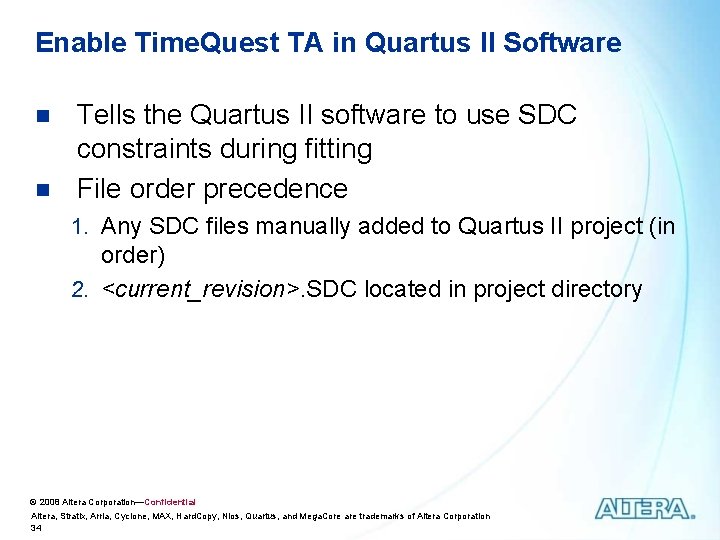
Enable Time. Quest TA in Quartus II Software n n Tells the Quartus II software to use SDC constraints during fitting File order precedence 1. Any SDC files manually added to Quartus II project (in order) 2. <current_revision>. SDC located in project directory © 2008 Altera Corporation—Confidential Altera, Stratix, Arria, Cyclone, MAX, Hard. Copy, Nios, Quartus, and Mega. Core are trademarks of Altera Corporation 34
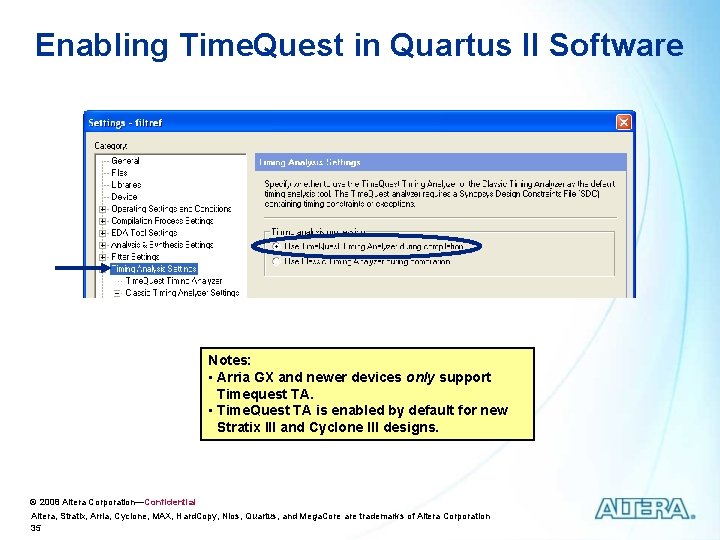
Enabling Time. Quest in Quartus II Software Notes: • Arria GX and newer devices only support Timequest TA. • Time. Quest TA is enabled by default for new Stratix III and Cyclone III designs. © 2008 Altera Corporation—Confidential Altera, Stratix, Arria, Cyclone, MAX, Hard. Copy, Nios, Quartus, and Mega. Core are trademarks of Altera Corporation 35
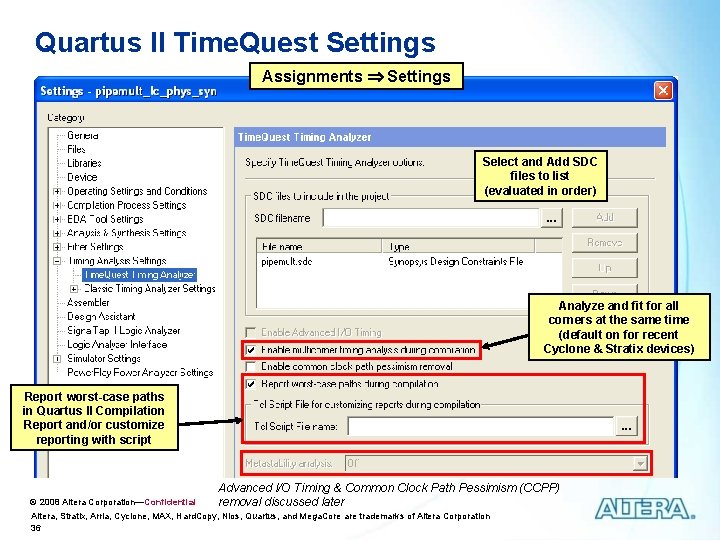
Quartus II Time. Quest Settings Assignments Settings Select and Add SDC files to list (evaluated in order) Analyze and fit for all corners at the same time (default on for recent Cyclone & Stratix devices) Report worst-case paths in Quartus II Compilation Report and/or customize reporting with script © 2008 Altera Corporation—Confidential Advanced I/O Timing & Common Clock Path Pessimism (CCPP) removal discussed later Altera, Stratix, Arria, Cyclone, MAX, Hard. Copy, Nios, Quartus, and Mega. Core are trademarks of Altera Corporation 36
Using Time. Quest TA in Quartus II Flow Synthesize Quartus II project Use Time. Quest TA to specify timing requirements Enable Time. Quest TA in Quartus II project Perform full compilation (run Fitter) Verify timing in Time. Quest TA © 2008 Altera Corporation—Confidential Altera, Stratix, Arria, Cyclone, MAX, Hard. Copy, Nios, Quartus, and Mega. Core are trademarks of Altera Corporation 37
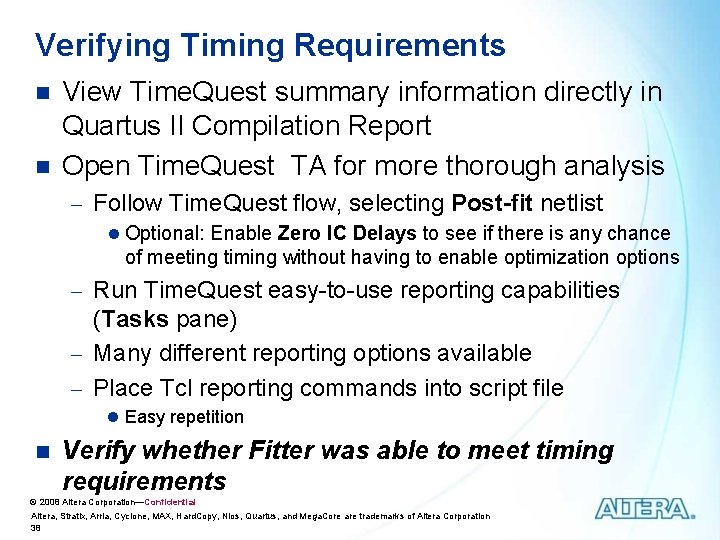
Verifying Timing Requirements n n View Time. Quest summary information directly in Quartus II Compilation Report Open Time. Quest TA for more thorough analysis - Follow Time. Quest flow, selecting Post-fit netlist l Optional: Enable Zero IC Delays to see if there is any chance of meeting timing without having to enable optimization options - Run Time. Quest easy-to-use reporting capabilities (Tasks pane) - Many different reporting options available - Place Tcl reporting commands into script file l Easy repetition n Verify whether Fitter was able to meet timing requirements © 2008 Altera Corporation—Confidential Altera, Stratix, Arria, Cyclone, MAX, Hard. Copy, Nios, Quartus, and Mega. Core are trademarks of Altera Corporation 38
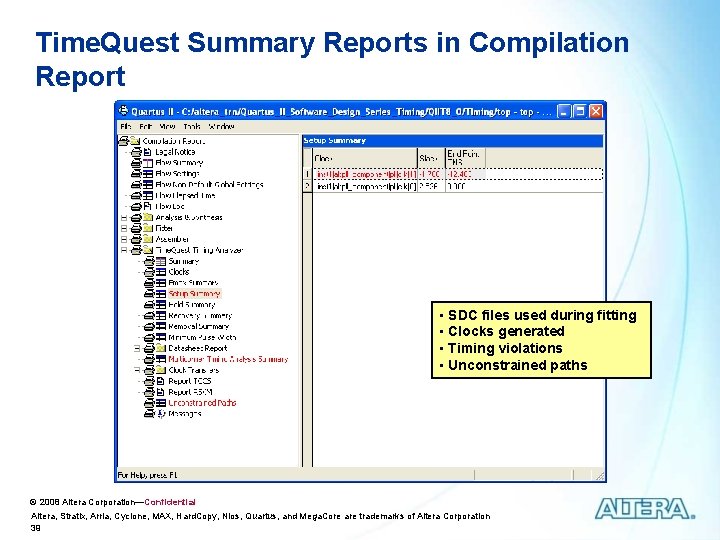
Time. Quest Summary Reports in Compilation Report • SDC files used during fitting • Clocks generated • Timing violations • Unconstrained paths © 2008 Altera Corporation—Confidential Altera, Stratix, Arria, Cyclone, MAX, Hard. Copy, Nios, Quartus, and Mega. Core are trademarks of Altera Corporation 39
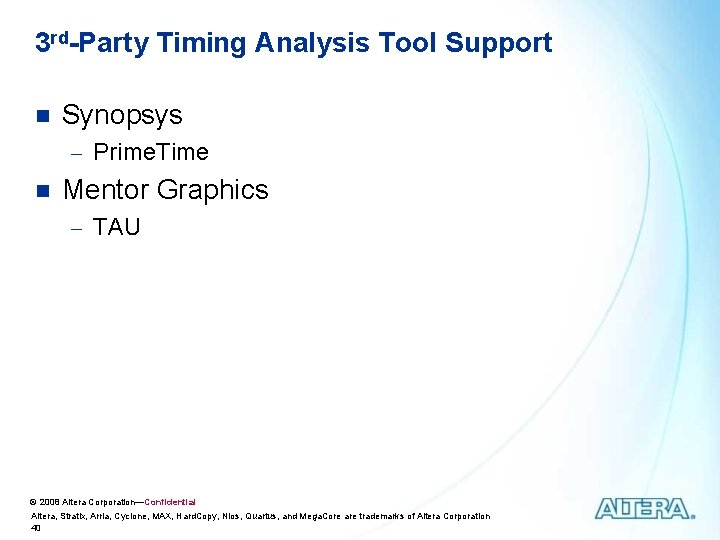
3 rd-Party Timing Analysis Tool Support n Synopsys - Prime. Time n Mentor Graphics - TAU © 2008 Altera Corporation—Confidential Altera, Stratix, Arria, Cyclone, MAX, Hard. Copy, Nios, Quartus, and Mega. Core are trademarks of Altera Corporation 40
Timing Analysis Agenda Time. Quest Overview n Time. Quest Basic Steps n Using Time. Quest in the Quartus II Flow n Timing Reports n © 2008 Altera Corporation—Confidential Altera, Stratix, Arria, Cyclone, MAX, Hard. Copy, Nios, Quartus, and Mega. Core are trademarks of Altera Corporation 41
Timing Reports n n Timing results available in both the Quartus II Compilation Report and Time. Quest GUI Time. Quest TA includes more extensive reporting capabilities Create reports while creating constraints (postmap netlist) before fitting to see if design can meet timing requirements Create reports after fitting (post-fit netlist) to verify that placed & routed design meets timing requirements © 2008 Altera Corporation—Confidential Altera, Stratix, Arria, Cyclone, MAX, Hard. Copy, Nios, Quartus, and Mega. Core are trademarks of Altera Corporation 42
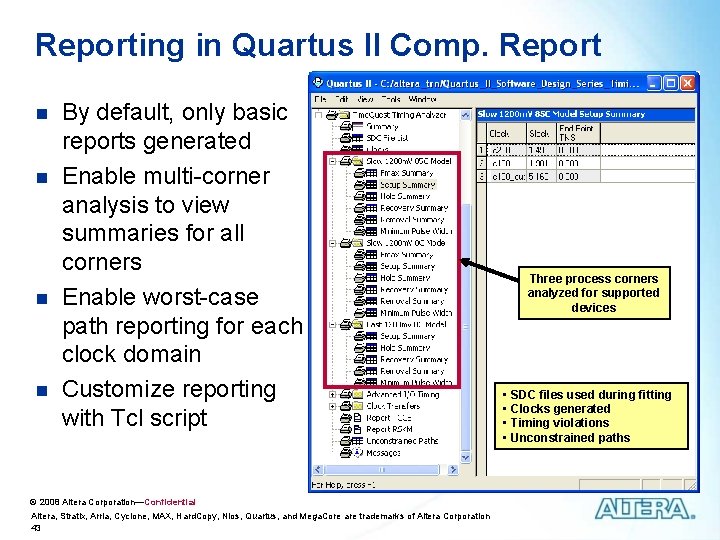
Reporting in Quartus II Comp. Report n n By default, only basic reports generated Enable multi-corner analysis to view summaries for all corners Enable worst-case path reporting for each clock domain Customize reporting with Tcl script © 2008 Altera Corporation—Confidential Altera, Stratix, Arria, Cyclone, MAX, Hard. Copy, Nios, Quartus, and Mega. Core are trademarks of Altera Corporation 43 Three process corners analyzed for supported devices • • SDC files used during fitting Clocks generated Timing violations Unconstrained paths
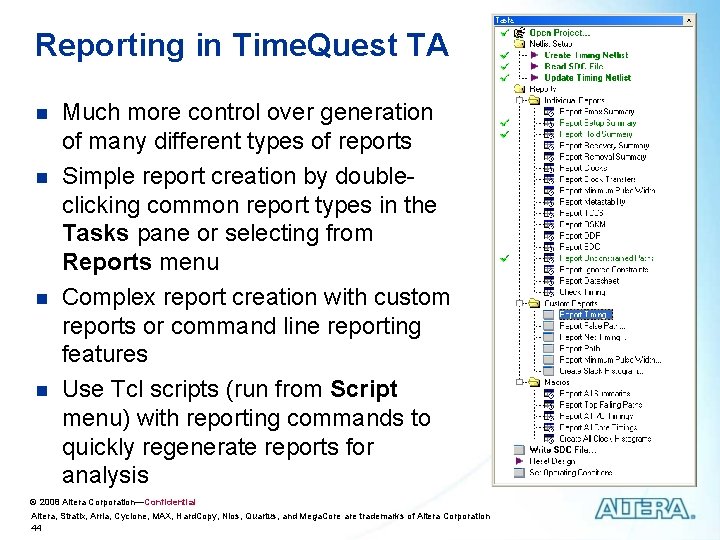
Reporting in Time. Quest TA n n Much more control over generation of many different types of reports Simple report creation by doubleclicking common report types in the Tasks pane or selecting from Reports menu Complex report creation with custom reports or command line reporting features Use Tcl scripts (run from Script menu) with reporting commands to quickly regenerate reports for analysis © 2008 Altera Corporation—Confidential Altera, Stratix, Arria, Cyclone, MAX, Hard. Copy, Nios, Quartus, and Mega. Core are trademarks of Altera Corporation 44
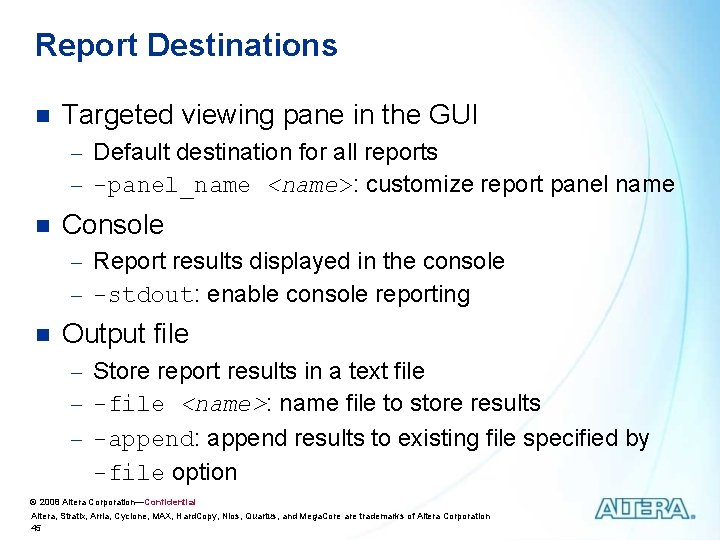
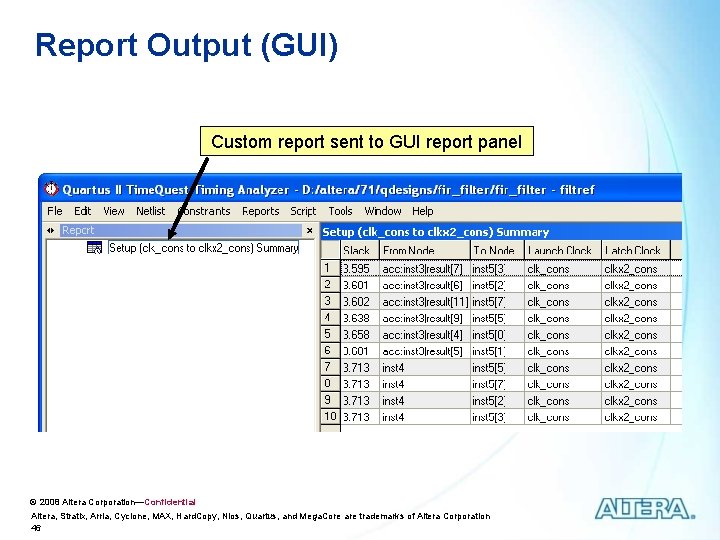
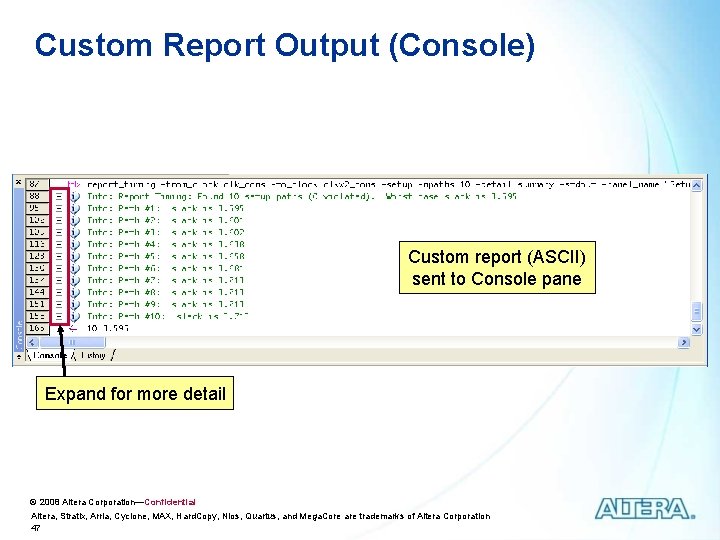
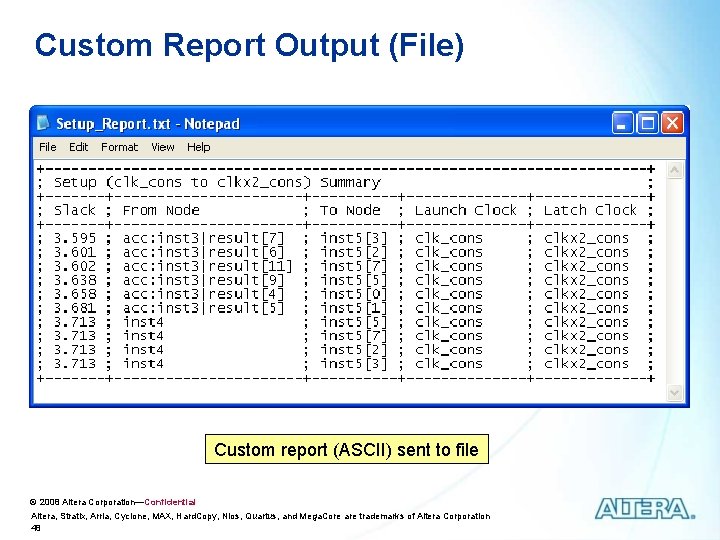
Report Destinations n Targeted viewing pane in the GUI - Default destination for all reports - -panel_name <name>: customize report panel name n Console - Report results displayed in the console - -stdout: enable console reporting n Output file - Store report results in a text file - -file <name>: name file to store results - -append: append results to existing file specified by -file option © 2008 Altera Corporation—Confidential Altera, Stratix, Arria, Cyclone, MAX, Hard. Copy, Nios, Quartus, and Mega. Core are trademarks of Altera Corporation 45
Report Output (GUI) Custom report sent to GUI report panel © 2008 Altera Corporation—Confidential Altera, Stratix, Arria, Cyclone, MAX, Hard. Copy, Nios, Quartus, and Mega. Core are trademarks of Altera Corporation 46
Custom Report Output (Console) Custom report (ASCII) sent to Console pane Expand for more detail © 2008 Altera Corporation—Confidential Altera, Stratix, Arria, Cyclone, MAX, Hard. Copy, Nios, Quartus, and Mega. Core are trademarks of Altera Corporation 47
Custom Report Output (File) Custom report (ASCII) sent to file © 2008 Altera Corporation—Confidential Altera, Stratix, Arria, Cyclone, MAX, Hard. Copy, Nios, Quartus, and Mega. Core are trademarks of Altera Corporation 48
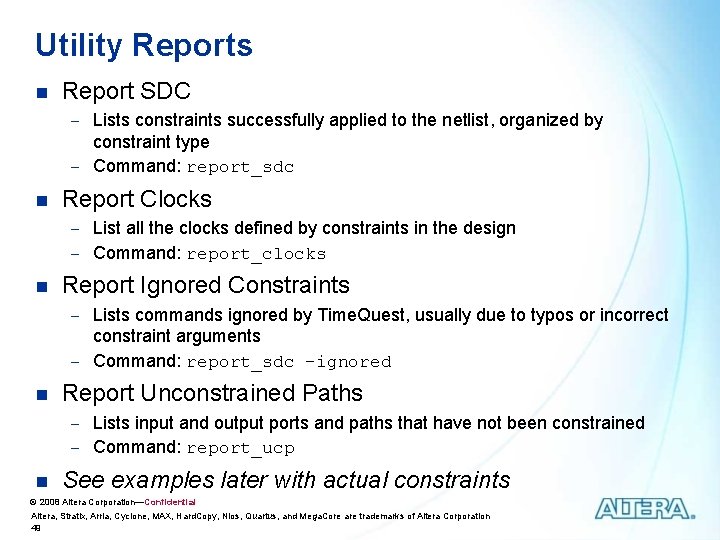
Utility Reports n Report SDC - Lists constraints successfully applied to the netlist, organized by constraint type - Command: report_sdc n Report Clocks - List all the clocks defined by constraints in the design - Command: report_clocks n Report Ignored Constraints - Lists commands ignored by Time. Quest, usually due to typos or incorrect constraint arguments - Command: report_sdc -ignored n Report Unconstrained Paths - Lists input and output ports and paths that have not been constrained - Command: report_ucp n See examples later with actual constraints © 2008 Altera Corporation—Confidential Altera, Stratix, Arria, Cyclone, MAX, Hard. Copy, Nios, Quartus, and Mega. Core are trademarks of Altera Corporation 49
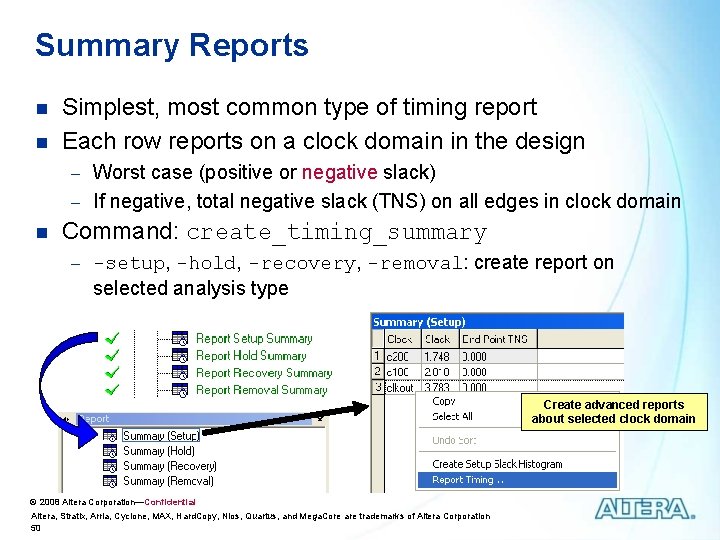
Summary Reports n n Simplest, most common type of timing report Each row reports on a clock domain in the design - Worst case (positive or negative slack) - If negative, total negative slack (TNS) on all edges in clock domain n Command: create_timing_summary - -setup, -hold, -recovery, -removal: create report on selected analysis type Create advanced reports about selected clock domain © 2008 Altera Corporation—Confidential Altera, Stratix, Arria, Cyclone, MAX, Hard. Copy, Nios, Quartus, and Mega. Core are trademarks of Altera Corporation 50
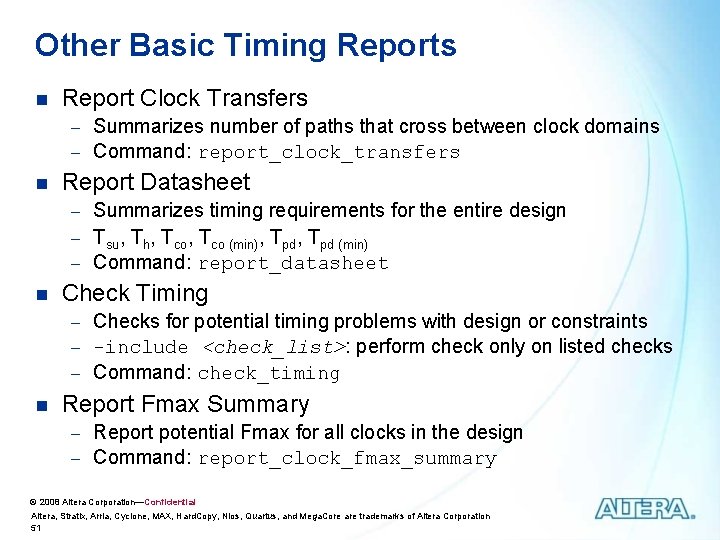
Other Basic Timing Reports n Report Clock Transfers - Summarizes number of paths that cross between clock domains - Command: report_clock_transfers n Report Datasheet - Summarizes timing requirements for the entire design - Tsu, Th, Tco (min), Tpd (min) - Command: report_datasheet n Check Timing - Checks for potential timing problems with design or constraints - -include <check_list>: perform check only on listed checks - Command: check_timing n Report Fmax Summary - Report potential Fmax for all clocks in the design - Command: report_clock_fmax_summary © 2008 Altera Corporation—Confidential Altera, Stratix, Arria, Cyclone, MAX, Hard. Copy, Nios, Quartus, and Mega. Core are trademarks of Altera Corporation 51
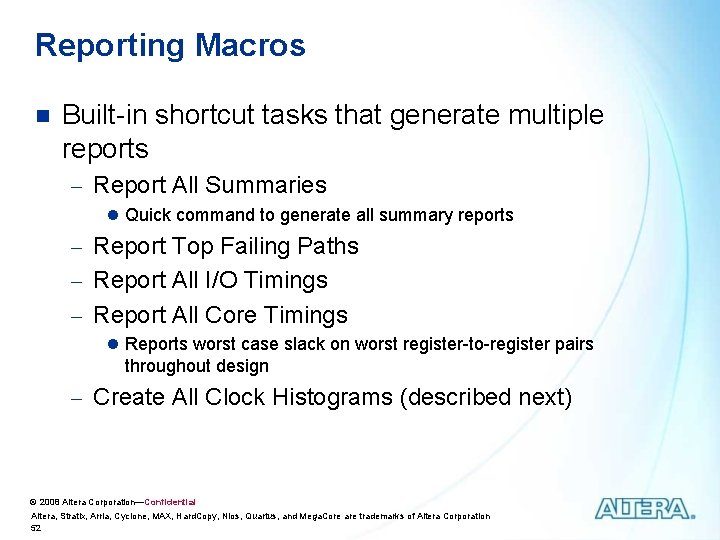
Reporting Macros n Built-in shortcut tasks that generate multiple reports - Report All Summaries l Quick command to generate all summary reports - Report Top Failing Paths - Report All I/O Timings - Report All Core Timings l Reports worst case slack on worst register-to-register pairs throughout design - Create All Clock Histograms (described next) © 2008 Altera Corporation—Confidential Altera, Stratix, Arria, Cyclone, MAX, Hard. Copy, Nios, Quartus, and Mega. Core are trademarks of Altera Corporation 52
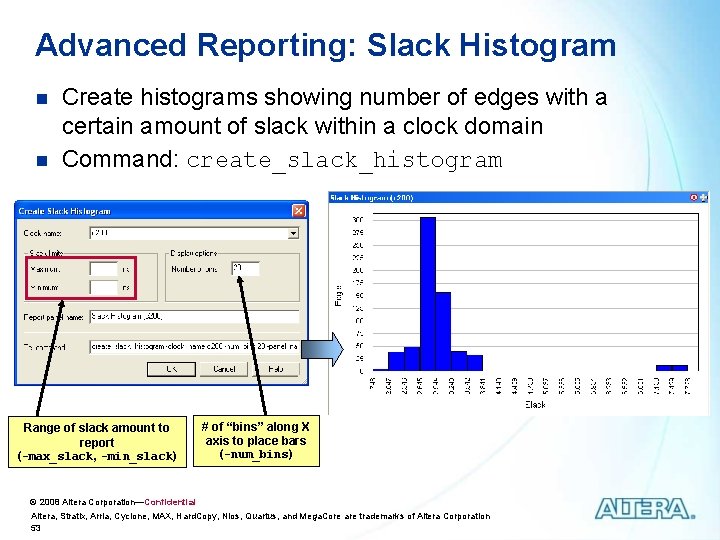
Advanced Reporting: Slack Histogram n n Create histograms showing number of edges with a certain amount of slack within a clock domain Command: create_slack_histogram Range of slack amount to report (-max_slack, -min_slack) # of “bins” along X axis to place bars (-num_bins) © 2008 Altera Corporation—Confidential Altera, Stratix, Arria, Cyclone, MAX, Hard. Copy, Nios, Quartus, and Mega. Core are trademarks of Altera Corporation 53
Detailed Slack/Path Analysis n Create more specific/detailed reports - Ex. Details on a specific clock domain - Ex. View timing paths between particular I/O & registers n Create using Tcl commands or GUI - Use GUI to see report immediately - Use Tcl file for repeatability © 2008 Altera Corporation—Confidential Altera, Stratix, Arria, Cyclone, MAX, Hard. Copy, Nios, Quartus, and Mega. Core are trademarks of Altera Corporation 54
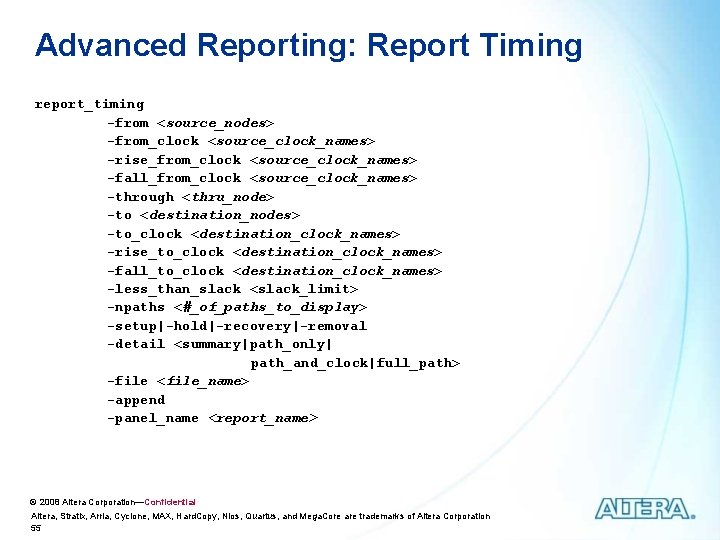
Advanced Reporting: Report Timing report_timing -from <source_nodes> -from_clock <source_clock_names> -rise_from_clock <source_clock_names> -fall_from_clock <source_clock_names> -through <thru_node> -to <destination_nodes> -to_clock <destination_clock_names> -rise_to_clock <destination_clock_names> -fall_to_clock <destination_clock_names> -less_than_slack <slack_limit> -npaths <#_of_paths_to_display> -setup|-hold|-recovery|-removal -detail <summary|path_only| path_and_clock|full_path> -file <file_name> -append -panel_name <report_name> © 2008 Altera Corporation—Confidential Altera, Stratix, Arria, Cyclone, MAX, Hard. Copy, Nios, Quartus, and Mega. Core are trademarks of Altera Corporation 55
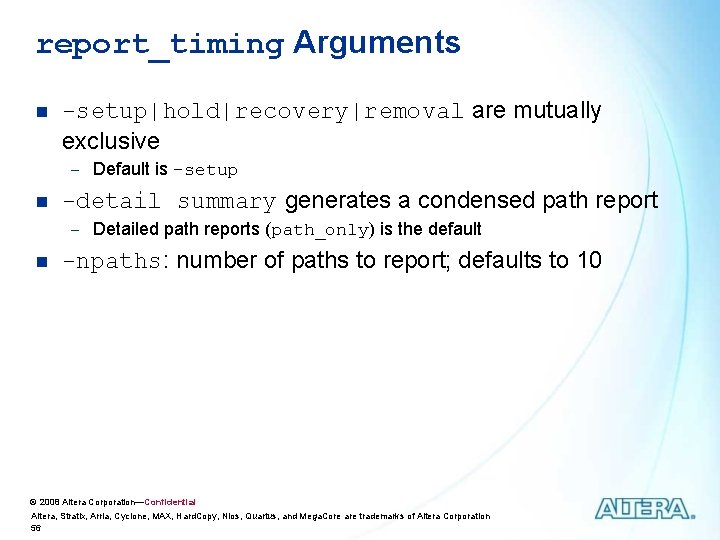
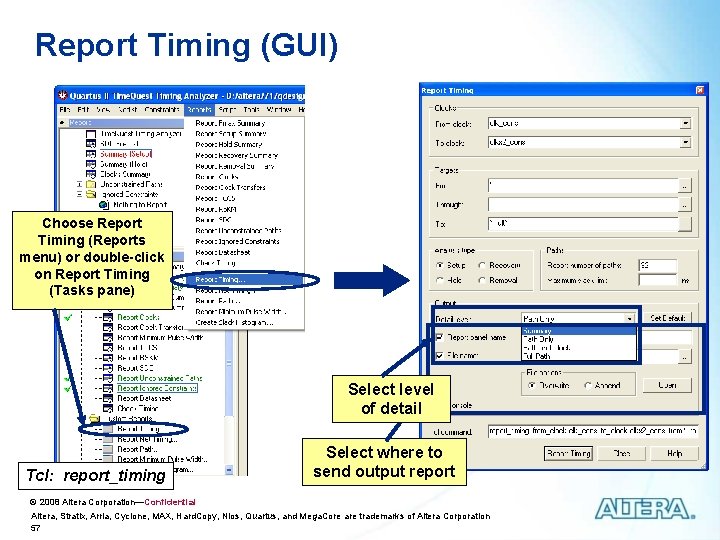
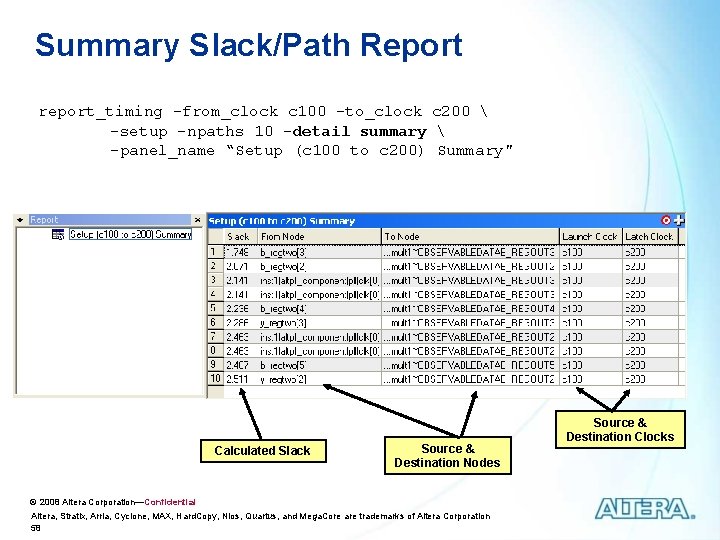
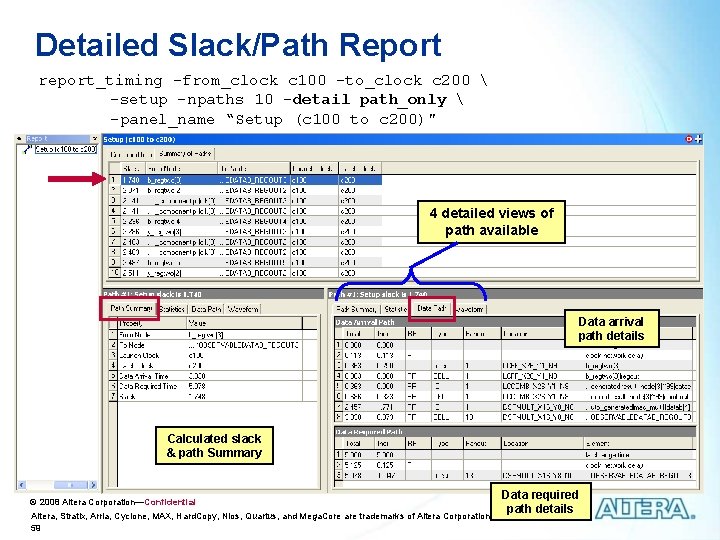
report_timing Arguments n -setup|hold|recovery|removal are mutually exclusive - Default is -setup n -detail summary generates a condensed path report - Detailed path reports (path_only) is the default n -npaths: number of paths to report; defaults to 10 © 2008 Altera Corporation—Confidential Altera, Stratix, Arria, Cyclone, MAX, Hard. Copy, Nios, Quartus, and Mega. Core are trademarks of Altera Corporation 56
Report Timing (GUI) Choose Report Timing (Reports menu) or double-click on Report Timing (Tasks pane) Select level of detail Tcl: report_timing Select where to send output report © 2008 Altera Corporation—Confidential Altera, Stratix, Arria, Cyclone, MAX, Hard. Copy, Nios, Quartus, and Mega. Core are trademarks of Altera Corporation 57
Summary Slack/Path Report report_timing -from_clock c 100 -to_clock c 200 -setup -npaths 10 -detail summary -panel_name “Setup (c 100 to c 200) Summary" Calculated Slack Source & Destination Nodes © 2008 Altera Corporation—Confidential Altera, Stratix, Arria, Cyclone, MAX, Hard. Copy, Nios, Quartus, and Mega. Core are trademarks of Altera Corporation 58 Source & Destination Clocks
Detailed Slack/Path Report report_timing -from_clock c 100 -to_clock c 200 -setup -npaths 10 -detail path_only -panel_name “Setup (c 100 to c 200)" 4 detailed views of path available Data arrival path details Calculated slack & path Summary © 2008 Altera Corporation—Confidential Altera, Stratix, Arria, Cyclone, MAX, Hard. Copy, Nios, Quartus, and Mega. Core are trademarks of Altera Corporation 59 Data required path details
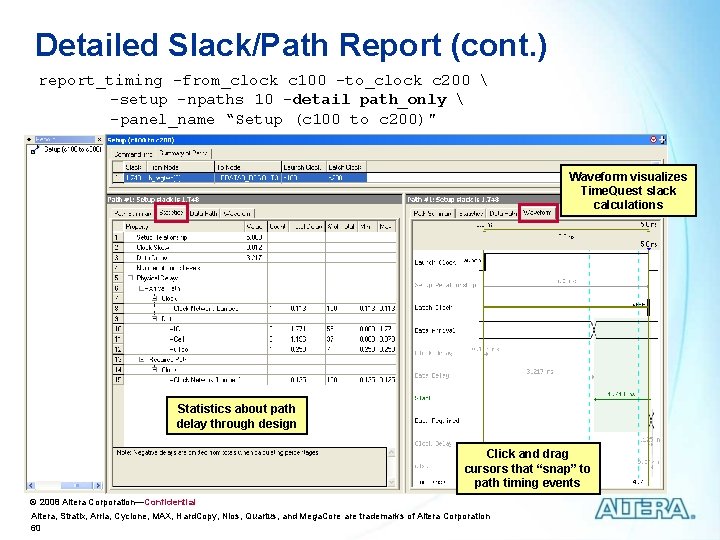
Detailed Slack/Path Report (cont. ) report_timing -from_clock c 100 -to_clock c 200 -setup -npaths 10 -detail path_only -panel_name “Setup (c 100 to c 200)" Waveform visualizes Time. Quest slack calculations Statistics about path delay through design Click and drag cursors that “snap” to path timing events © 2008 Altera Corporation—Confidential Altera, Stratix, Arria, Cyclone, MAX, Hard. Copy, Nios, Quartus, and Mega. Core are trademarks of Altera Corporation 60
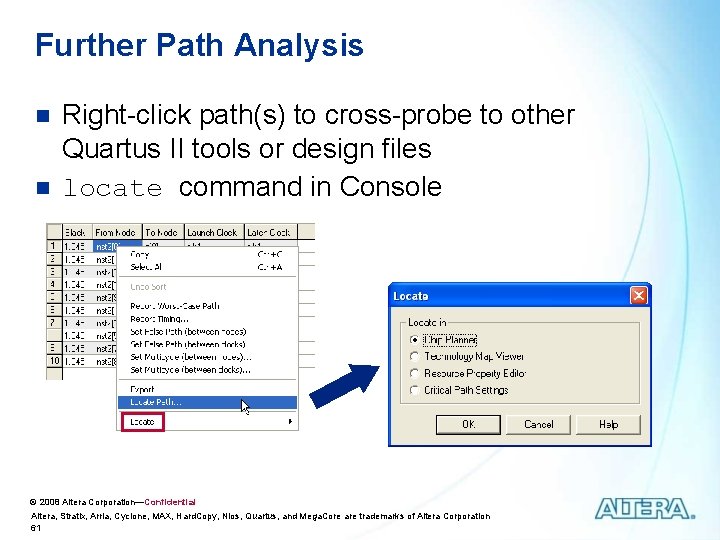
Further Path Analysis n n Right-click path(s) to cross-probe to other Quartus II tools or design files locate command in Console © 2008 Altera Corporation—Confidential Altera, Stratix, Arria, Cyclone, MAX, Hard. Copy, Nios, Quartus, and Mega. Core are trademarks of Altera Corporation 61
Other Reports n Report Metastability - Size and names of found synchronization chains and MTBF for each n Report TCCS & Report TSKM - Channel-to-channel & receiver skew margins for LVDS interfaces n Report DDR - Custom reporting for use with the ALTMEMPHY high performance memory controller megafunction n Report Minimum Pulse Width - Reports minimum widths of clock pulses required to recognize clock transitions n Report Net Timing & Report Path - Detailed information about specific nets or paths based on selected criteria n See Handbook and on-line help for details © 2008 Altera Corporation—Confidential Altera, Stratix, Arria, Cyclone, MAX, Hard. Copy, Nios, Quartus, and Mega. Core are trademarks of Altera Corporation 62
Learn More Through Technical Training Instructor-Led Training With Altera's instructor-led training courses, you can: ØListen to a lecture from an Altera technical training engineer (instructor) Online Training With Altera's online training courses, you can: ØTake a course at any time that is convenient for you ØTake a course from the comfort of your home or ØComplete hands-on exercises with guidance from an office (no need to travel as with instructor-led courses) Altera instructor ØAsk questions & receive real-time answers from an Altera instructor Each online course will take approximate one to three hours to complete. ØEach instructor-led class is one or two days in length (8 working hours per day). http: //www. altera. com/training View training class schedule & register for a class © 2008 Altera Corporation—Confidential Altera, Stratix, Arria, Cyclone, MAX, Hard. Copy, Nios, Quartus, and Mega. Core are trademarks of Altera Corporation 63
Other Quartus II Design Series courses n Quartus II Software Design Series: Foundation - n Project creation and management Design entry methods and tools Compilation and compilation results analysis Creating and editing settings and assignments I/O planning and management Introduction to timing analysis with Time. Quest Quartus II Software Design Series: Verification - Basic design simulation with Model. Sim-Altera - Power analysis - Debugging solutions n Quartus II Software Design Series: Optimization - Incremental compilation - Quartus II optimization features & techniques © 2008 Altera Corporation—Confidential Altera, Stratix, Arria, Cyclone, MAX, Hard. Copy, Nios, Quartus, and Mega. Core are trademarks of Altera Corporation 64
Altera Technical Support n n n Reference Quartus II software on-line help Quartus II Handbook Consult Altera applications (factory applications engineers) - My. Support: http: //www. altera. com/mysupport - Hotline: (800) 800 -EPLD (7: 00 a. m. - 5: 00 p. m. PST) n n Field applications engineers: contact your local Altera sales office Receive literature by mail: (888) 3 -ALTERA FTP: ftp. altera. com World-wide web: http: //www. altera. com - Use solutions to search for answers to technical problems - View design examples © 2008 Altera Corporation—Confidential Altera, Stratix, Arria, Cyclone, MAX, Hard. Copy, Nios, Quartus, and Mega. Core are trademarks of Altera Corporation 65