
PURCHASING ORDERING PROCESS Step 1 Enter Department Requisition
- Slides: 14
PURCHASING ORDERING PROCESS
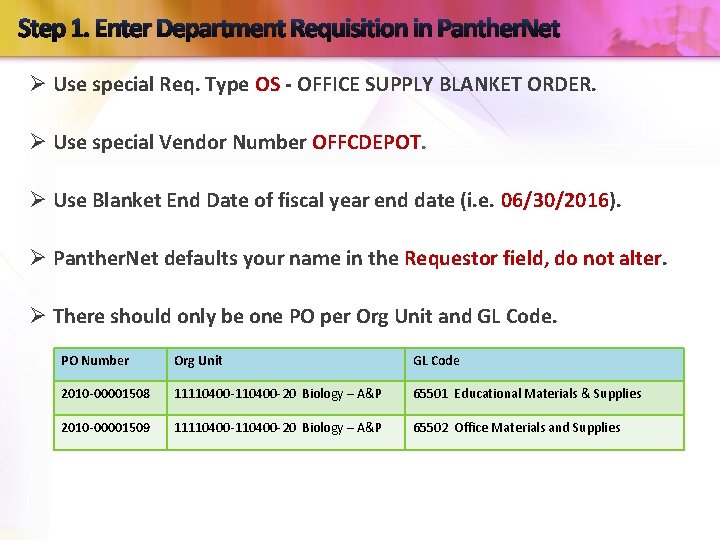
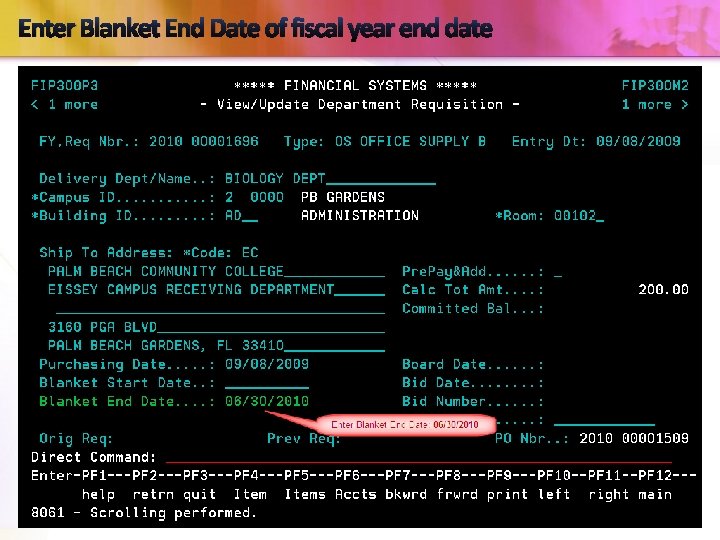
Step 1. Enter Department Requisition in Panther. Net Ø Use special Req. Type OS - OFFICE SUPPLY BLANKET ORDER. Ø Use special Vendor Number OFFCDEPOT. Ø Use Blanket End Date of fiscal year end date (i. e. 06/30/2016). Ø Panther. Net defaults your name in the Requestor field, do not alter. Ø There should only be one PO per Org Unit and GL Code. PO Number Org Unit GL Code 2010 -00001508 11110400 -20 Biology – A&P 65501 Educational Materials & Supplies 2010 -00001509 11110400 -20 Biology – A&P 65502 Office Materials and Supplies
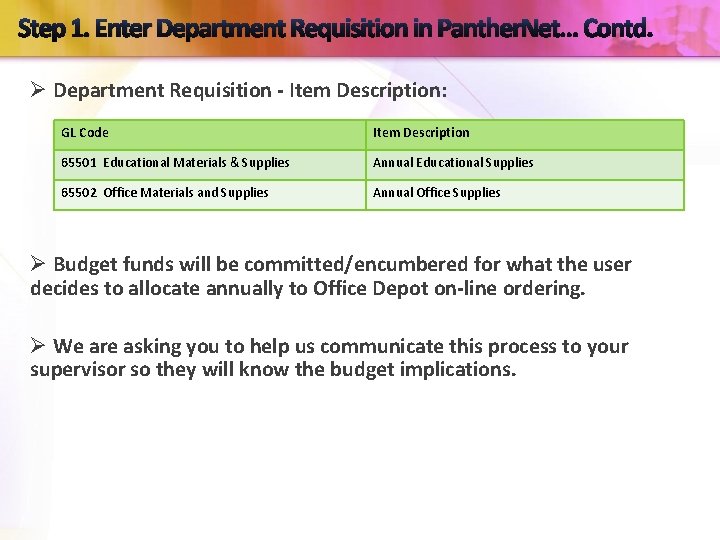
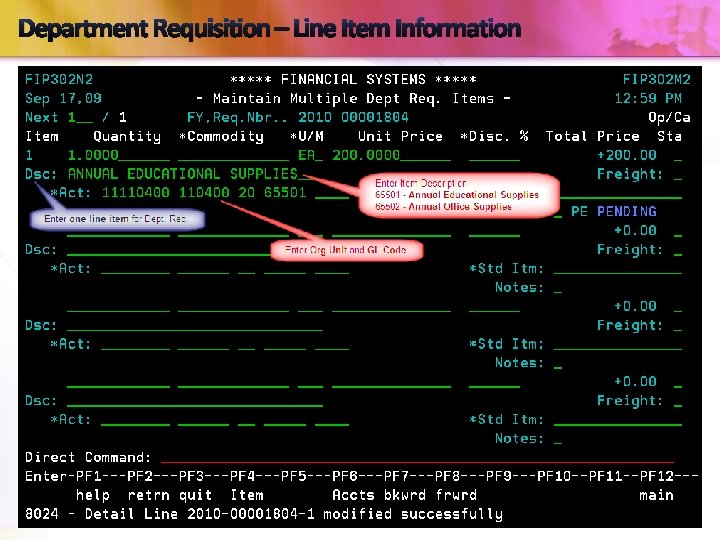
Step 1. Enter Department Requisition in Panther. Net… Contd. Ø Department Requisition - Item Description: GL Code Item Description 65501 Educational Materials & Supplies Annual Educational Supplies 65502 Office Materials and Supplies Annual Office Supplies Ø Budget funds will be committed/encumbered for what the user decides to allocate annually to Office Depot on-line ordering. Ø We are asking you to help us communicate this process to your supervisor so they will know the budget implications.
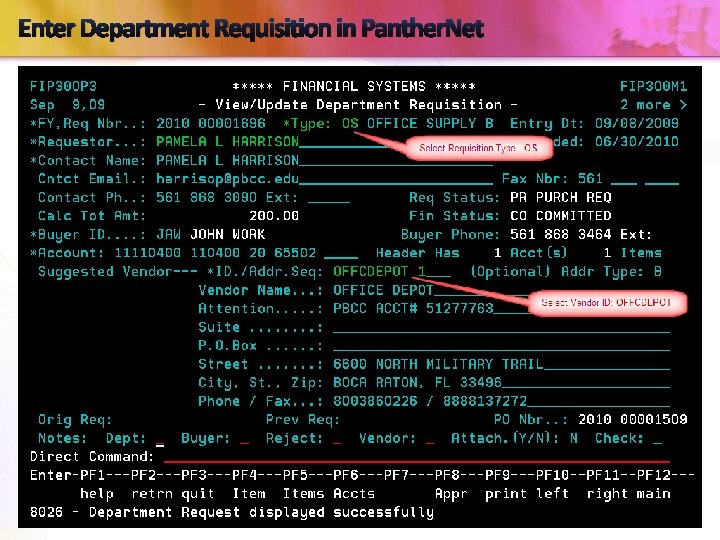
Enter Department Requisition in Panther. Net
Enter Blanket End Date of fiscal year end date
Department Requisition – Line Item Information
Step 2. Obtain PO#(s) Ø Maintain your requisition to determine when it has been converted into a purchase order. That is when you will be able to begin purchasing online with Office Depot.
Step 3. Log on to Office Depot and Begin Ordering Ø Make sure you order the correct supplies under the correct PO Number. For example, q 2010 -00001508 Biology A&P - Educational Materials and Supplies q 2010 -00001509 Biology A&P - Office Materials and Supplies Ø Your location information on Office Depot will be defaulted to the information that is on file through the Employee Web. If you moved to a new location or the information is not correct, update your information on the Employee Web so changes can be sent to Office Depot. (Personal -> Change Contact Info -> Work Location Information) Ø Refer to your Office Depot Welcome Guide for guidelines and important information.
Definition: Best Value items = Core items ØBest Value/Core items are supplies that have been identified by the Purchasing Department as items that will not require any additional approvals (pens, pencils, calendars, post-it notes, file folders etc. ). Ø A link to a listing of core items can be found on the Purchasing Web Page - https: //odams. officedepot. com/registrations/pbcc_price_lookup. php.
Where do we go from here? Ø You will receive your items from Office Depot. Signatures are required. Ø Create a file for all your Office Depot POs by PO#. For example, q 2010 -00001508 Biology A&P - Educational Materials and Supplies q 2010 -00001509 Biology A&P - Office Materials and Supplies Ø File by PO#, Packing Slip/Correspondence for audit and accounting. Ø Any changes to an already established OS type Blanket PO will be made ‘as usual’ by emailing/contacting Purchasing Department. Ø Change(s) will be made in Panther. Net first to verify budget funds, then manually adjusted on the Office Depot system by Purchasing.
Accounts Payable Process Ø No receiving in Panther. Net but still file your packing slips by PO#. Ø Office Depot Order Number will be the Invoice Number for payment purposes. Ø Detail items will still be reviewed. Same rules apply!!!! You will not find ‘questionable’ items on the core list (i. e. , cleaning supplies, disinfectant, lamps, small office furniture items, etc. )
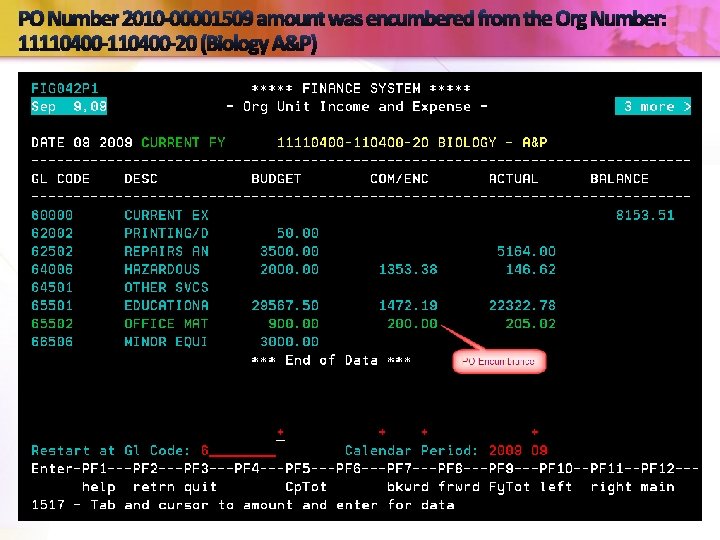
PO Number 2010 -00001509 amount was encumbered from the Org Number: 11110400 -20 (Biology A&P)
How do I benefit/How does the College benefit? How the College Benefits Ø Best Value pricing. How the User Benefits Ø No duplication of line items ordering in Panther. Net. Ø Once initial OS Blanket PO is established annually per Org Unit/per GL Code, no more input in Panther. Net. How Purchasing Benefits Ø Better Data Analysis. How Everyone Benefits Ø Web tools are available for users and Purchasing.
Looking ahead…. Ø Ordering Cut off. Ø Close of Blanket POs. Ø We will upload new PO#s to Office Depot system annually. We will set a timeframe (July 15 th). Ø Copy function. Use the purchasing requisition - CM DR CP (Purchasing Requisition = PO#) Ø Browse by Requestor.