
Purchase Requests in Alma 2018 Ex Libris Confidential
Purchase Requests in Alma © 2018 Ex Libris | Confidential & Proprietary https: //1001 libraries. files. wordpress. com/2015/04/seoul-reading-room. jpg Yoel Kortick Senior Librarian
Agenda I II IV Introduction Creating the Purchase Request in Primo Creating the Purchase Request in Alma Managing Purchase Requests © 2018 Ex Libris | Confidential & Proprietary 2
Introduction • In addition to the information here see also Purchase Requests • Purchase requests are used to request that a library purchase a resource. • The purchase request can be created by • Librarians using Alma • Instructors or patrons using Primo or Leganto © 2018 Ex Libris | Confidential & Proprietary 3
Introduction • Purchase requests may be created, for example, for • Something brand new which will have either physical or electronic inventory • Something for which the library has one type of inventory and there is a desire to purchase a different type of inventory • Something for which there is a physical item but another physical item is needed © 2018 Ex Libris | Confidential & Proprietary 4
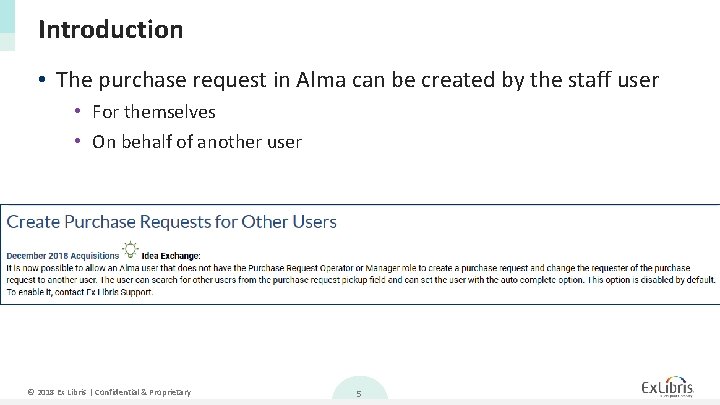
Introduction • The purchase request in Alma can be created by the staff user • For themselves • On behalf of another user © 2018 Ex Libris | Confidential & Proprietary 5
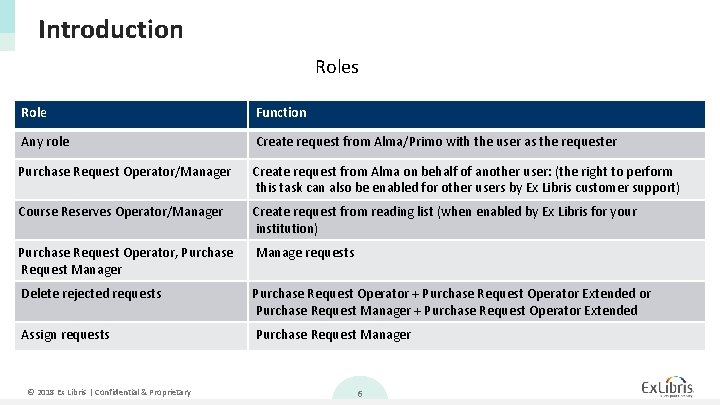
Introduction Roles Role Function Any role Create request from Alma/Primo with the user as the requester Purchase Request Operator/Manager Create request from Alma on behalf of another user: (the right to perform this task can also be enabled for other users by Ex Libris customer support) Course Reserves Operator/Manager Create request from reading list (when enabled by Ex Libris for your institution) Purchase Request Operator, Purchase Request Manager Manage requests Delete rejected requests Purchase Request Operator + Purchase Request Operator Extended or Purchase Request Manager + Purchase Request Operator Extended Assign requests Purchase Request Manager © 2018 Ex Libris | Confidential & Proprietary 6
Agenda I II IV Introduction Creating the Purchase Request in Primo Creating the Purchase Request in Alma Managing Purchase Requests © 2018 Ex Libris | Confidential & Proprietary 7
Creating the Purchase Request in Primo • A “Purchase request” link can appear in Primo as a service (in the Get. It or View. It tab). • As is the case with other services, it can be hidden from groups of users via the Display Logic Rules. • This service is initially hidden from users by default with the rule Hide Service Purchase Request. © 2018 Ex Libris | Confidential & Proprietary 8
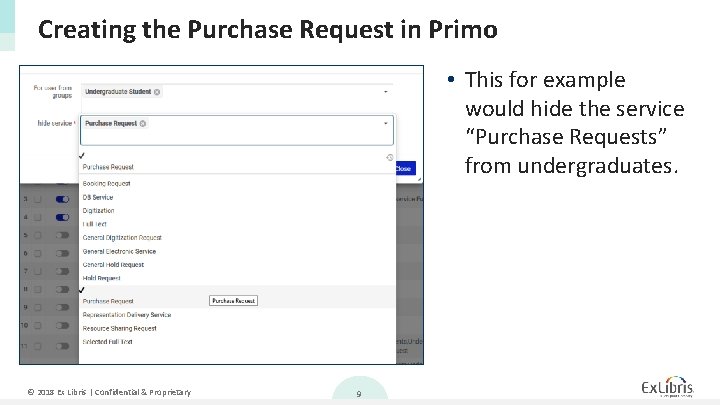
Creating the Purchase Request in Primo • This for example would hide the service “Purchase Requests” from undergraduates. © 2018 Ex Libris | Confidential & Proprietary 9
Creating the Purchase Request in Primo • In the example we will see here user Aniko Ezsias will log into Primo and create two purchase requests • First example: She searches for and finds a record, there is one item and it is on loan, she makes a purchase request for additional inventory • Second example: She searches for and does not find a bibliographic record. She then searches for it via the citation linker and from results of citation linker creates a purchase request. © 2018 Ex Libris | Confidential & Proprietary 10
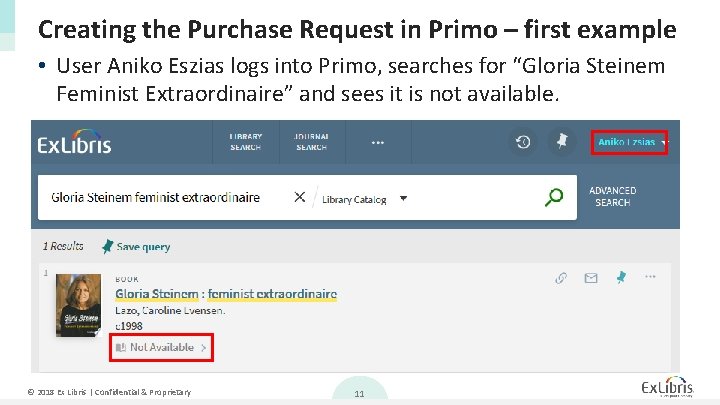
Creating the Purchase Request in Primo – first example • User Aniko Eszias logs into Primo, searches for “Gloria Steinem Feminist Extraordinaire” and sees it is not available. © 2018 Ex Libris | Confidential & Proprietary 11
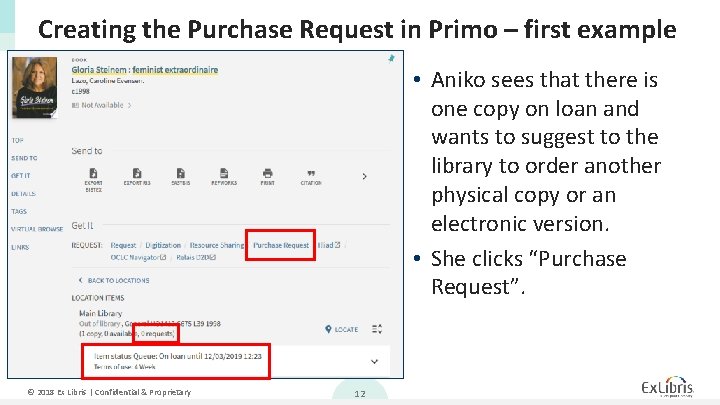
Creating the Purchase Request in Primo – first example • Aniko sees that there is one copy on loan and wants to suggest to the library to order another physical copy or an electronic version. • She clicks “Purchase Request”. © 2018 Ex Libris | Confidential & Proprietary 12
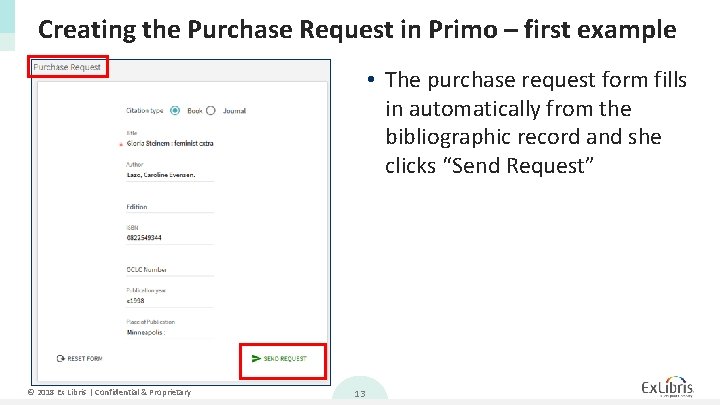
Creating the Purchase Request in Primo – first example • The purchase request form fills in automatically from the bibliographic record and she clicks “Send Request” © 2018 Ex Libris | Confidential & Proprietary 13
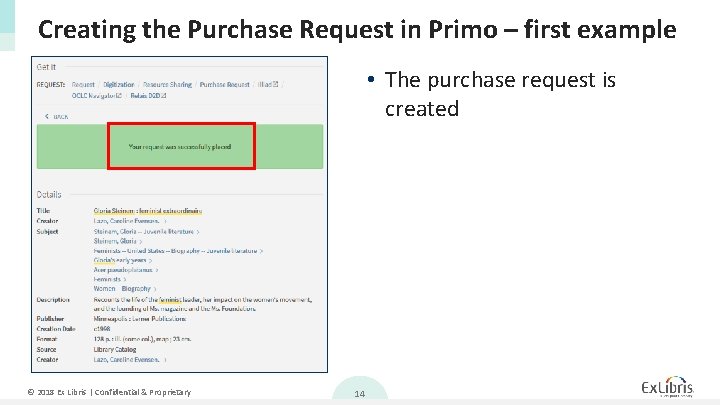
Creating the Purchase Request in Primo – first example • The purchase request is created © 2018 Ex Libris | Confidential & Proprietary 14
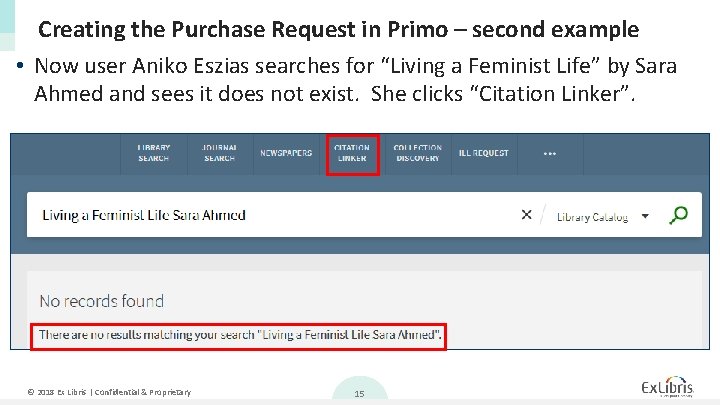
Creating the Purchase Request in Primo – second example • Now user Aniko Eszias searches for “Living a Feminist Life” by Sara Ahmed and sees it does not exist. She clicks “Citation Linker”. © 2018 Ex Libris | Confidential & Proprietary 15
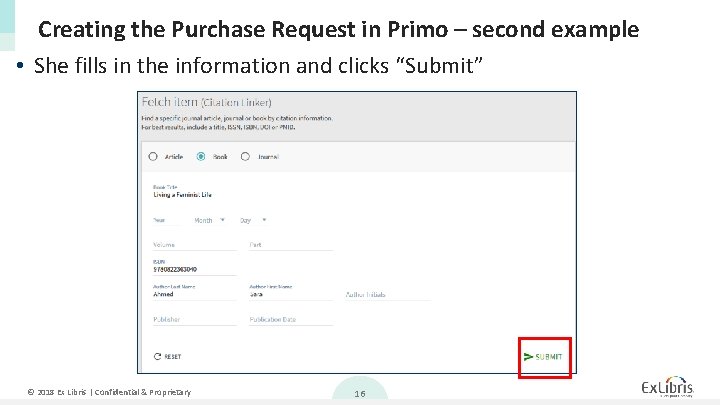
Creating the Purchase Request in Primo – second example • She fills in the information and clicks “Submit” © 2018 Ex Libris | Confidential & Proprietary 16
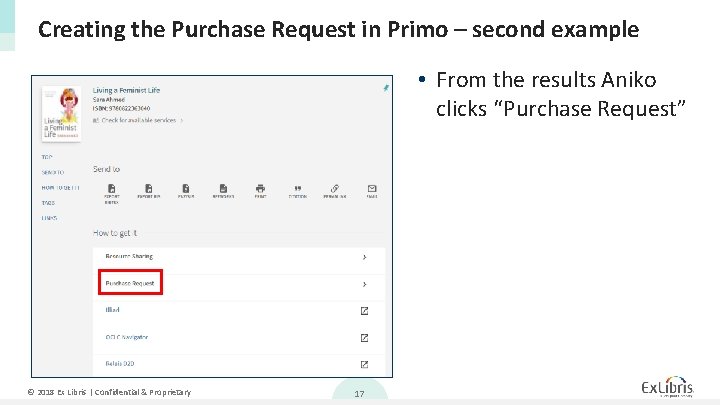
Creating the Purchase Request in Primo – second example • From the results Aniko clicks “Purchase Request” © 2018 Ex Libris | Confidential & Proprietary 17
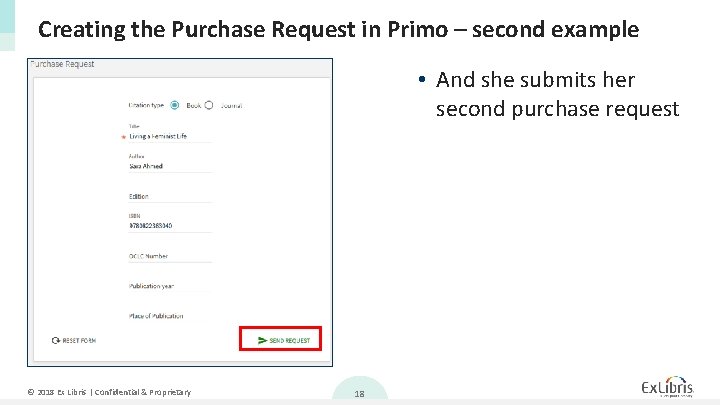
Creating the Purchase Request in Primo – second example • And she submits her second purchase request © 2018 Ex Libris | Confidential & Proprietary 18
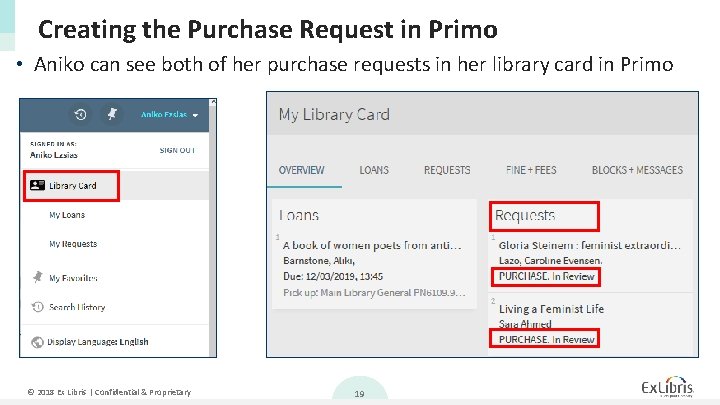
Creating the Purchase Request in Primo • Aniko can see both of her purchase requests in her library card in Primo © 2018 Ex Libris | Confidential & Proprietary 19
Agenda I II IV Introduction Creating the Purchase Request in Primo Creating the Purchase Request in Alma Managing Purchase Requests © 2018 Ex Libris | Confidential & Proprietary 20
Creating the Purchase Request in Alma • In the example here staff user Laura Jackson will create two purchase requests on behalf of patron Aniko Eszias • First example: Purchase request for electronic inventory for bibliographic record which currently does not exist • Second example: Purchase request for additional physical inventory for bibliographic record already has physical inventory © 2018 Ex Libris | Confidential & Proprietary 21
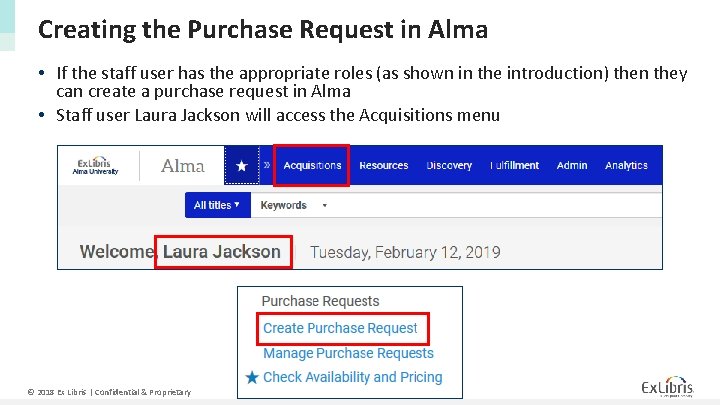
Creating the Purchase Request in Alma • If the staff user has the appropriate roles (as shown in the introduction) then they can create a purchase request in Alma • Staff user Laura Jackson will access the Acquisitions menu © 2018 Ex Libris | Confidential & Proprietary 22
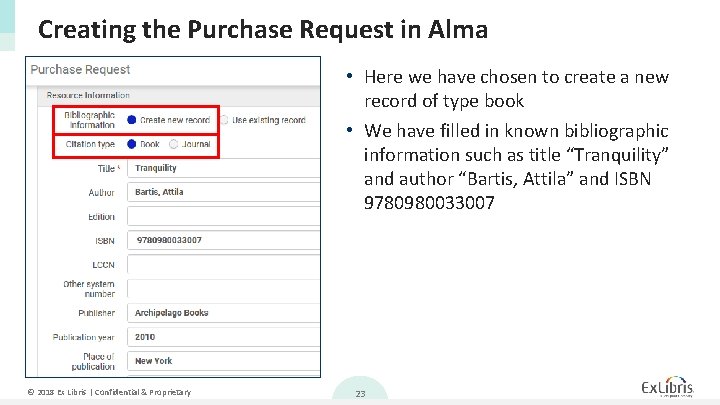
Creating the Purchase Request in Alma • Here we have chosen to create a new record of type book • We have filled in known bibliographic information such as title “Tranquility” and author “Bartis, Attila” and ISBN 9780980033007 © 2018 Ex Libris | Confidential & Proprietary 23
Creating the Purchase Request in Alma • As we will see on the next slide: • In the “Request Attributes” section we define • • • The requester Owning Library (optional) Estimated Cost (optional) Fund (optional) Vendor / Account (optional) Requester Note (optional) © 2018 Ex Libris | Confidential & Proprietary 24
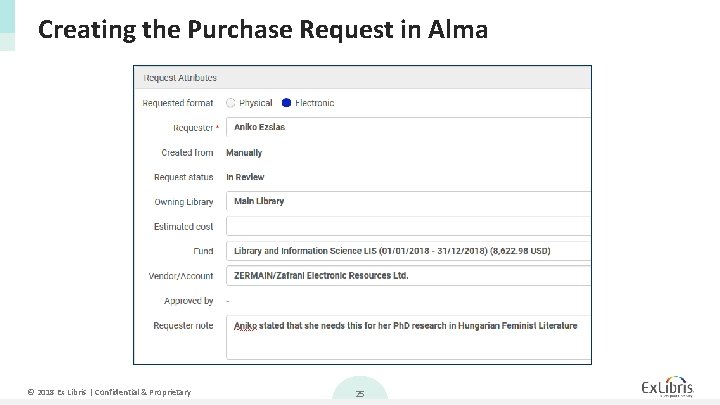
Creating the Purchase Request in Alma © 2018 Ex Libris | Confidential & Proprietary 25
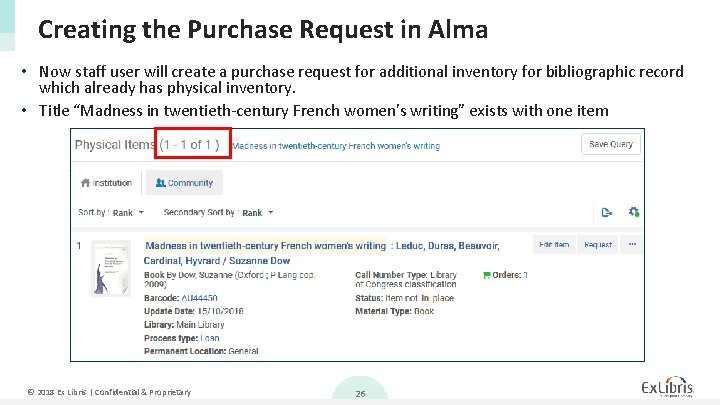
Creating the Purchase Request in Alma • Now staff user will create a purchase request for additional inventory for bibliographic record which already has physical inventory. • Title “Madness in twentieth-century French women's writing” exists with one item © 2018 Ex Libris | Confidential & Proprietary 26
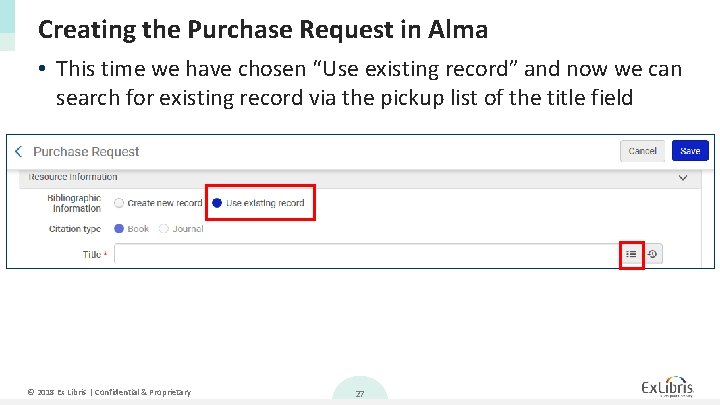
Creating the Purchase Request in Alma • This time we have chosen “Use existing record” and now we can search for existing record via the pickup list of the title field © 2018 Ex Libris | Confidential & Proprietary 27
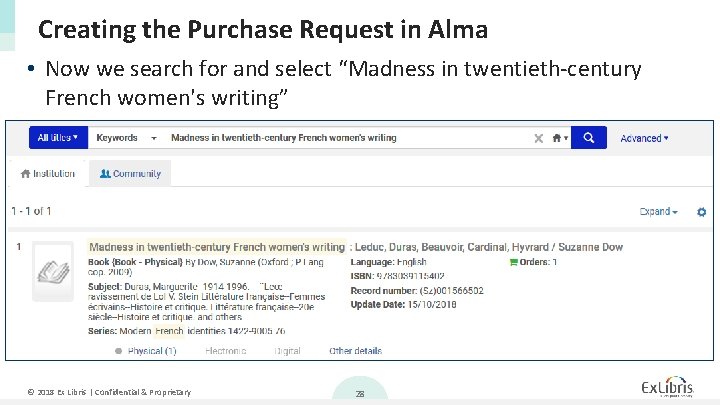
Creating the Purchase Request in Alma • Now we search for and select “Madness in twentieth-century French women's writing” © 2018 Ex Libris | Confidential & Proprietary 28
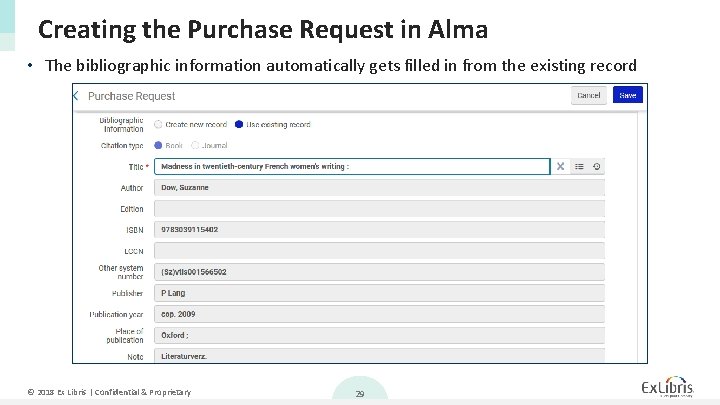
Creating the Purchase Request in Alma • The bibliographic information automatically gets filled in from the existing record © 2018 Ex Libris | Confidential & Proprietary 29
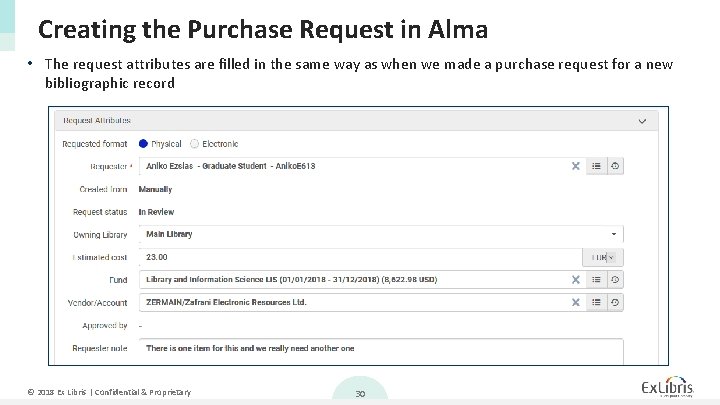
Creating the Purchase Request in Alma • The request attributes are filled in the same way as when we made a purchase request for a new bibliographic record © 2018 Ex Libris | Confidential & Proprietary 30
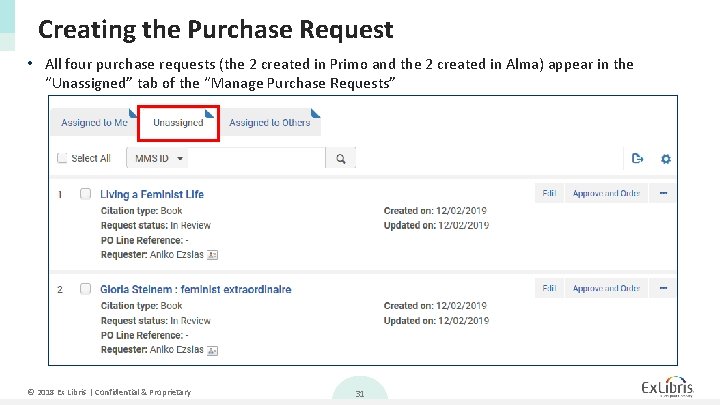
Creating the Purchase Request • All four purchase requests (the 2 created in Primo and the 2 created in Alma) appear in the “Unassigned” tab of the “Manage Purchase Requests” © 2018 Ex Libris | Confidential & Proprietary 31
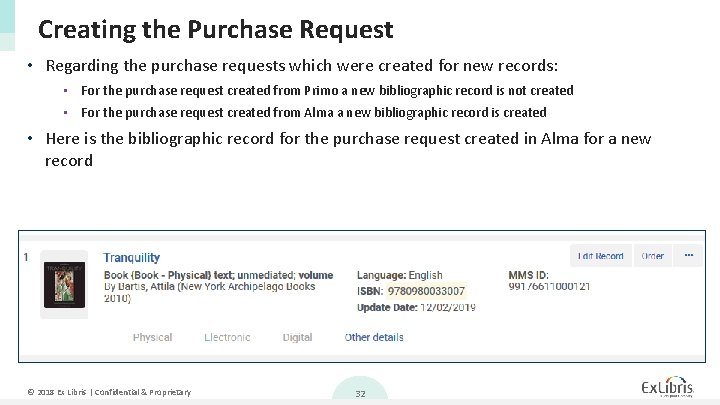
Creating the Purchase Request • Regarding the purchase requests which were created for new records: • For the purchase request created from Primo a new bibliographic record is not created • For the purchase request created from Alma a new bibliographic record is created • Here is the bibliographic record for the purchase request created in Alma for a new record © 2018 Ex Libris | Confidential & Proprietary 32
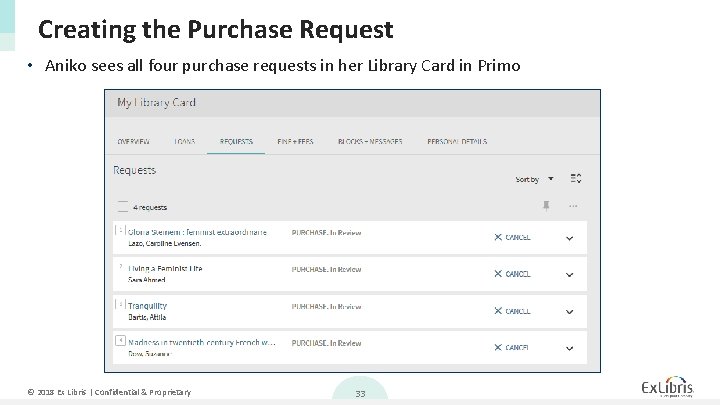
Creating the Purchase Request • Aniko sees all four purchase requests in her Library Card in Primo © 2018 Ex Libris | Confidential & Proprietary 33
Agenda I II IV Introduction Creating the Purchase Request in Primo Creating the Purchase Request in Alma Managing Purchase Requests © 2018 Ex Libris | Confidential & Proprietary 34
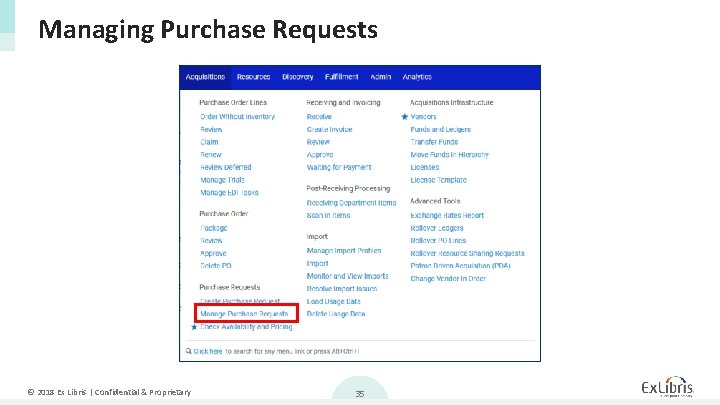
Managing Purchase Requests © 2018 Ex Libris | Confidential & Proprietary 35
Managing Purchase Requests • The “Manage Purchase Requests” screen allows the user to view pending purchase requests • It is divided into three tabs: 1. 2. 3. Assigned to you Unassigned Assigned to Others • The three Purchase Requests which we recently created will now be in the “Unassigned” tab. • The purchase requests can be faceted by various parameters. In the next slide they are faceted by Requester: Aniko Eszias © 2018 Ex Libris | Confidential & Proprietary 36
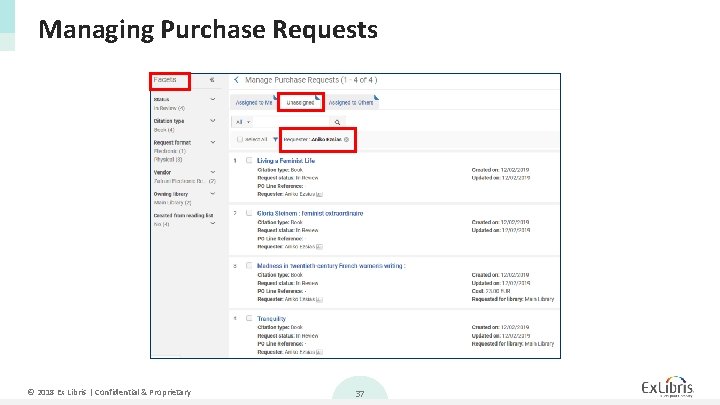
Managing Purchase Requests © 2018 Ex Libris | Confidential & Proprietary 37
Managing Purchase Requests • For each Purchase Request the staff user can 1. 2. 3. 4. 5. 6. Edit Approve and Order Reject Send query to requester Assign (to another staff user) Relink (to a different bibliographic record) • Once a staff user edits or “works on” a purchase request it will automatically be assigned to them. © 2018 Ex Libris | Confidential & Proprietary 38
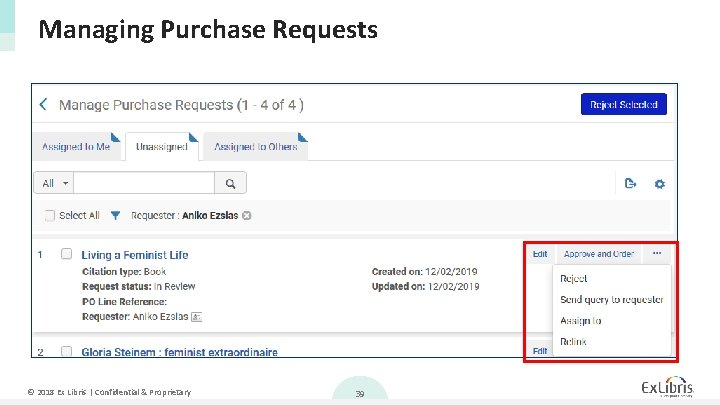
Managing Purchase Requests © 2018 Ex Libris | Confidential & Proprietary 39
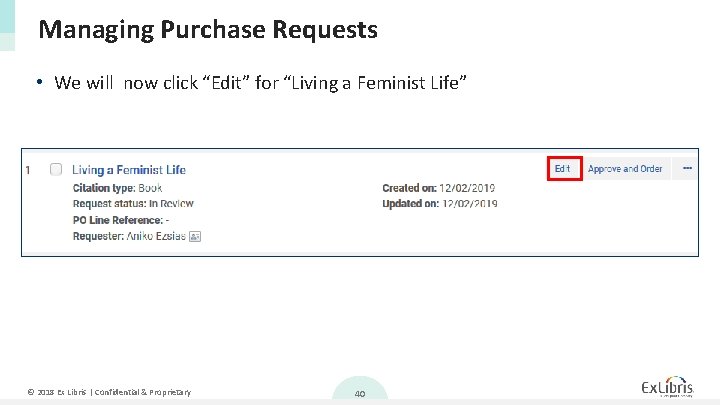
Managing Purchase Requests • We will now click “Edit” for “Living a Feminist Life” © 2018 Ex Libris | Confidential & Proprietary 40
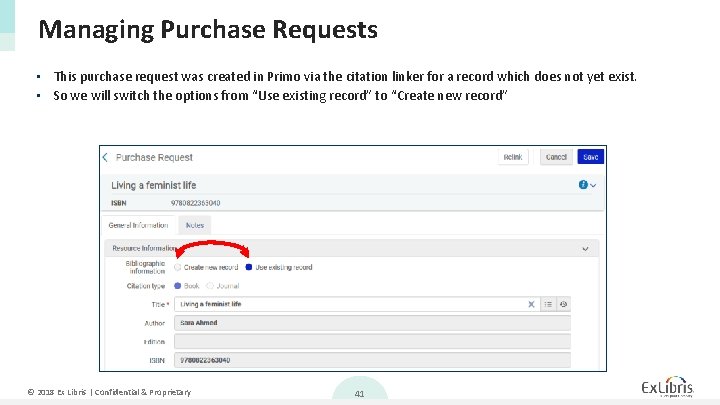
Managing Purchase Requests • This purchase request was created in Primo via the citation linker for a record which does not yet exist. • So we will switch the options from “Use existing record” to “Create new record” © 2018 Ex Libris | Confidential & Proprietary 41
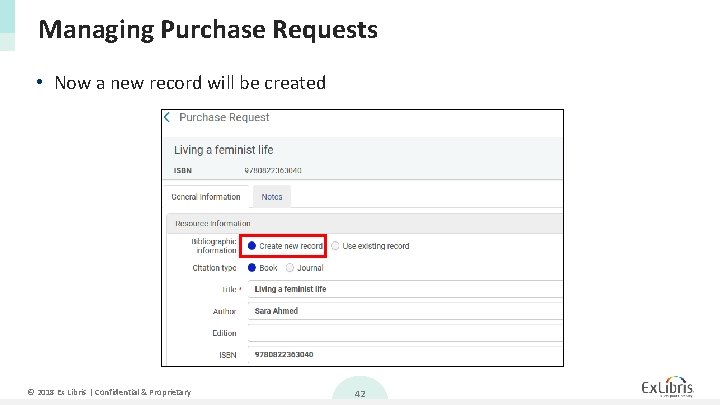
Managing Purchase Requests • Now a new record will be created © 2018 Ex Libris | Confidential & Proprietary 42
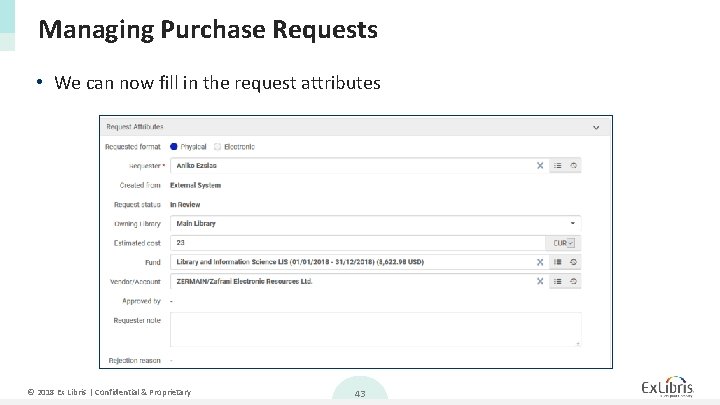
Managing Purchase Requests • We can now fill in the request attributes © 2018 Ex Libris | Confidential & Proprietary 43
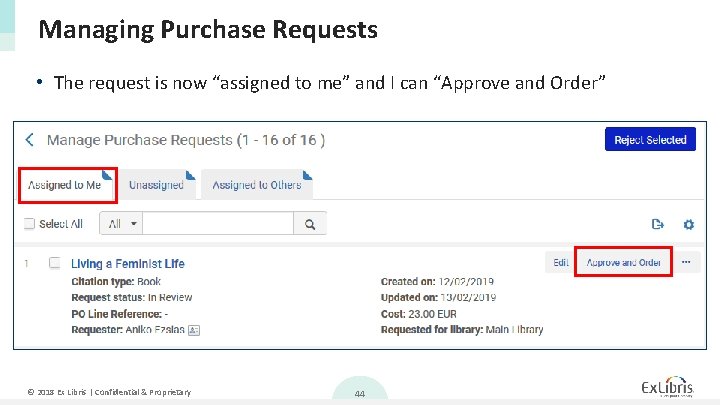
Managing Purchase Requests • The request is now “assigned to me” and I can “Approve and Order” © 2018 Ex Libris | Confidential & Proprietary 44
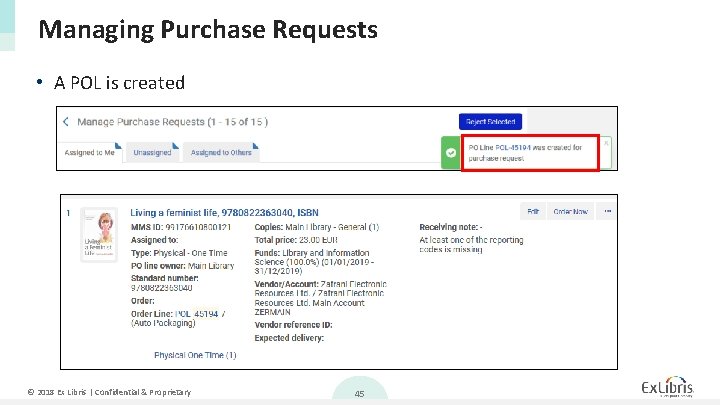
Managing Purchase Requests • A POL is created © 2018 Ex Libris | Confidential & Proprietary 45
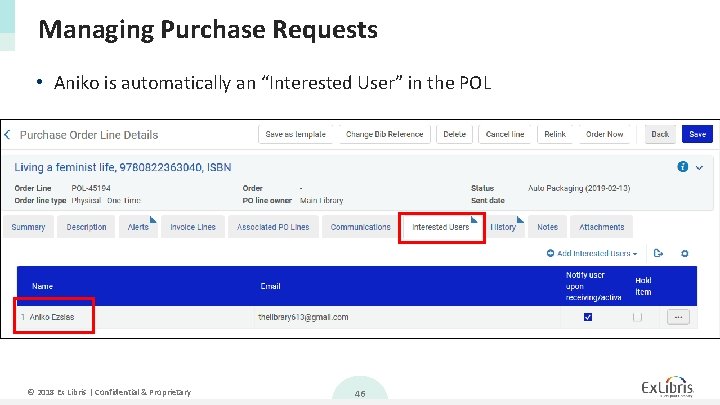
Managing Purchase Requests • Aniko is automatically an “Interested User” in the POL © 2018 Ex Libris | Confidential & Proprietary 46
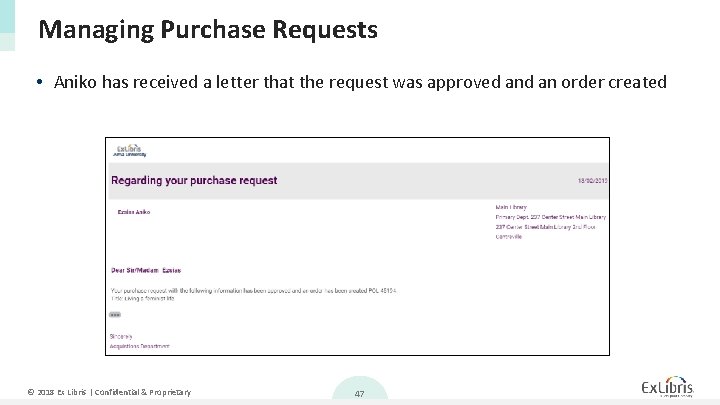
Managing Purchase Requests • Aniko has received a letter that the request was approved an order created © 2018 Ex Libris | Confidential & Proprietary 47
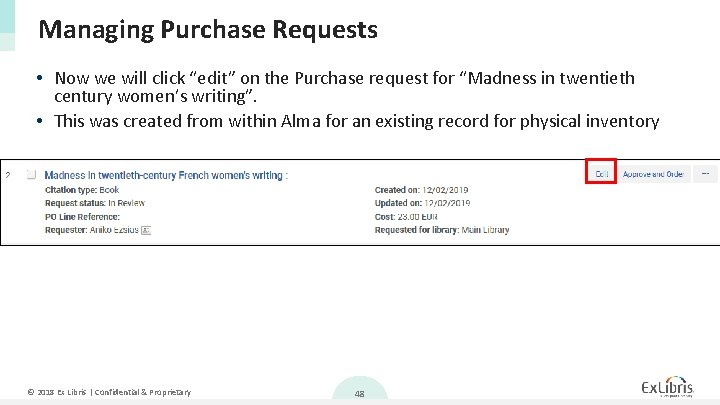
Managing Purchase Requests • Now we will click “edit” on the Purchase request for “Madness in twentieth century women’s writing”. • This was created from within Alma for an existing record for physical inventory © 2018 Ex Libris | Confidential & Proprietary 48
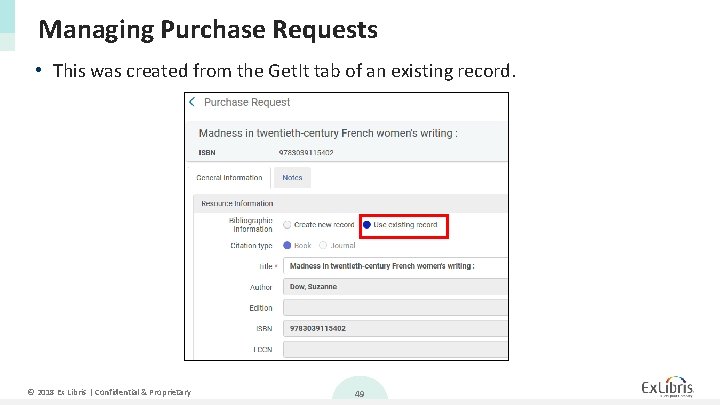
Managing Purchase Requests • This was created from the Get. It tab of an existing record. © 2018 Ex Libris | Confidential & Proprietary 49
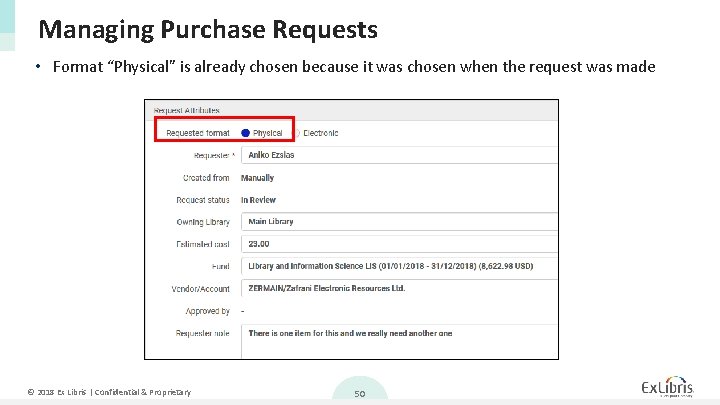
Managing Purchase Requests • Format “Physical” is already chosen because it was chosen when the request was made © 2018 Ex Libris | Confidential & Proprietary 50
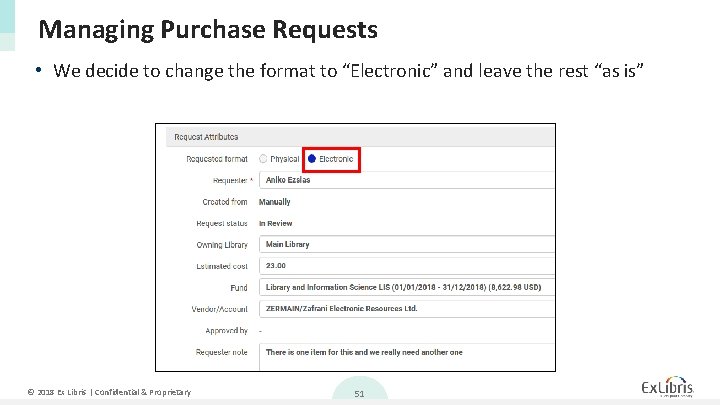
Managing Purchase Requests • We decide to change the format to “Electronic” and leave the rest “as is” © 2018 Ex Libris | Confidential & Proprietary 51
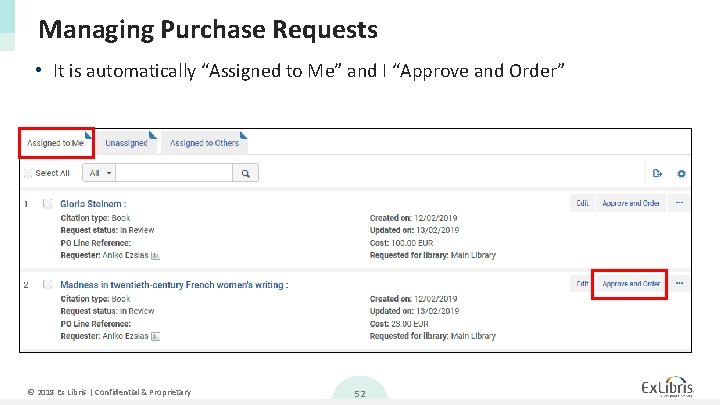
Managing Purchase Requests • It is automatically “Assigned to Me” and I “Approve and Order” © 2018 Ex Libris | Confidential & Proprietary 52
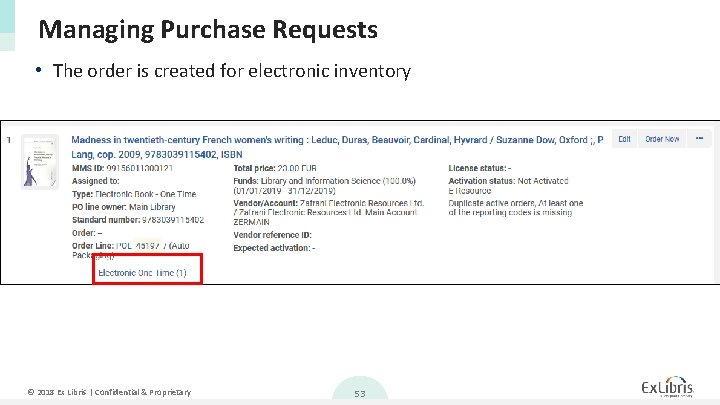
Managing Purchase Requests • The order is created for electronic inventory © 2018 Ex Libris | Confidential & Proprietary 53
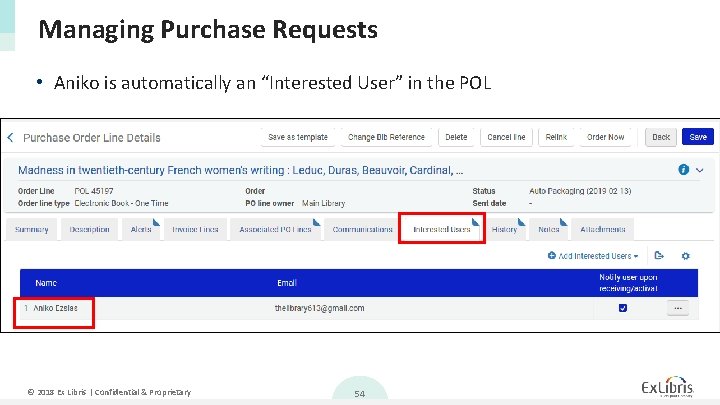
Managing Purchase Requests • Aniko is automatically an “Interested User” in the POL © 2018 Ex Libris | Confidential & Proprietary 54
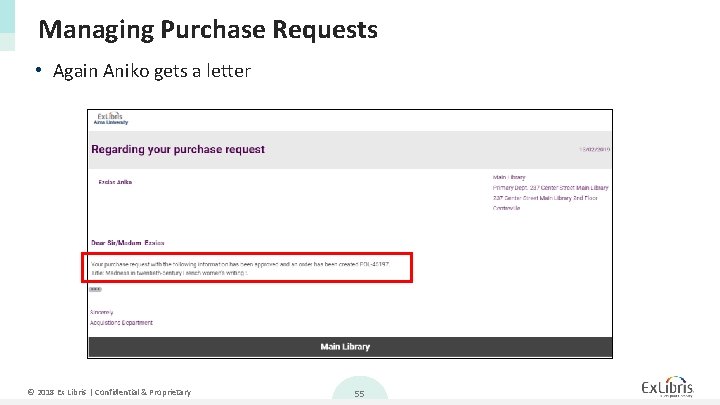
Managing Purchase Requests • Again Aniko gets a letter © 2018 Ex Libris | Confidential & Proprietary 55
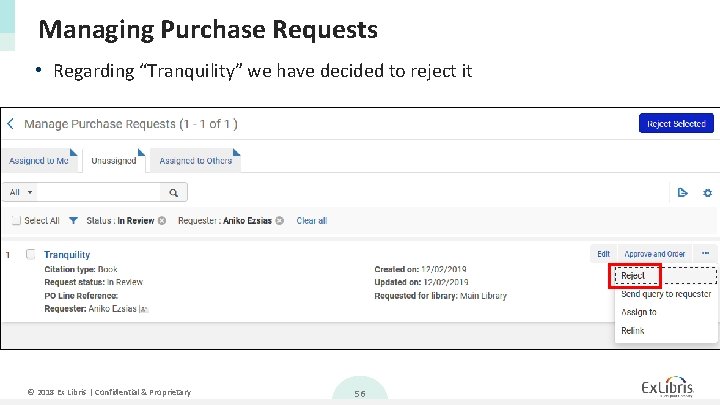
Managing Purchase Requests • Regarding “Tranquility” we have decided to reject it © 2018 Ex Libris | Confidential & Proprietary 56
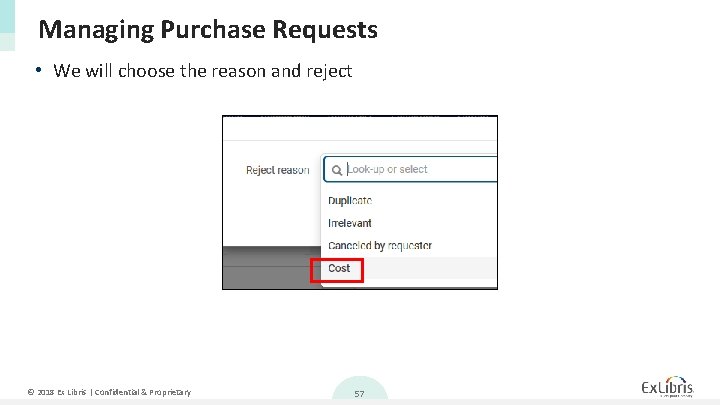
Managing Purchase Requests • We will choose the reason and reject © 2018 Ex Libris | Confidential & Proprietary 57
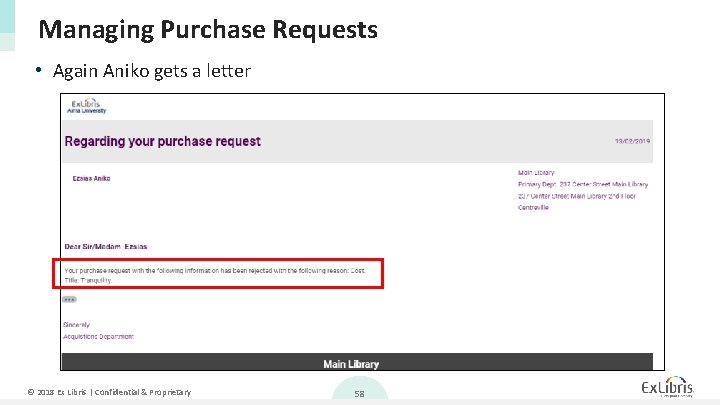
Managing Purchase Requests • Again Aniko gets a letter © 2018 Ex Libris | Confidential & Proprietary 58
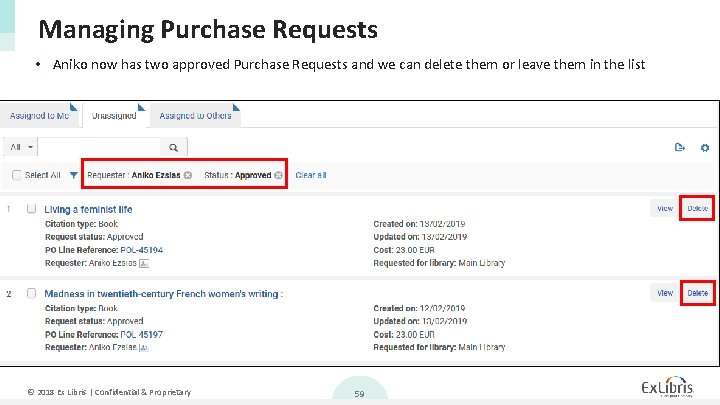
Managing Purchase Requests • Aniko now has two approved Purchase Requests and we can delete them or leave them in the list © 2018 Ex Libris | Confidential & Proprietary 59
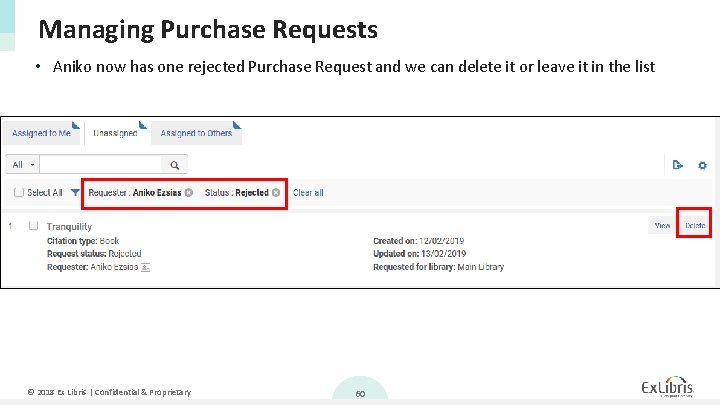
Managing Purchase Requests • Aniko now has one rejected Purchase Request and we can delete it or leave it in the list © 2018 Ex Libris | Confidential & Proprietary 60
- Slides: 60