
Pulse Code Modulation PCM We measure the amplitude
![Delta Function • Delta function (δ[n]) [also called Unit Impulse] – If n=0, δ[n]](https://slidetodoc.com/presentation_image_h2/f4470e315612dc73bc3aba22043392f4/image-18.jpg "Delta Function • Delta function (δ[n]) [also called Unit Impulse] – If n=0, δ[n]")
![Amplify y[n] = k δ[n] • Top Figure (original signal) • Bottom Figure –](https://slidetodoc.com/presentation_image_h2/f4470e315612dc73bc3aba22043392f4/image-21.jpg "Amplify y[n] = k δ[n] • Top Figure (original signal) • Bottom Figure –")
![Difference and Sum • Top Figure (FIR) – Difference – y[n] = x[n]-x[n-1] •](https://slidetodoc.com/presentation_image_h2/f4470e315612dc73bc3aba22043392f4/image-22.jpg "Difference and Sum • Top Figure (FIR) – Difference – y[n] = x[n]-x[n-1] •")
![Moving Average FIR Filter Convolution using a simple filter kernel int[] average(int x[]) {](https://slidetodoc.com/presentation_image_h2/f4470e315612dc73bc3aba22043392f4/image-23.jpg "Moving Average FIR Filter Convolution using a simple filter kernel int[] average(int x[]) {")
![Gaussian Filters • Gaussian filters remove noise and detail • g[x] = 1/(2πσ)½ *](https://slidetodoc.com/presentation_image_h2/f4470e315612dc73bc3aba22043392f4/image-35.jpg "Gaussian Filters • Gaussian filters remove noise and detail • g[x] = 1/(2πσ)½ *")
![The Ideal Frequency Filter • Inverse Fourier transform on a square wave: h[k] =](https://slidetodoc.com/presentation_image_h2/f4470e315612dc73bc3aba22043392f4/image-36.jpg "The Ideal Frequency Filter • Inverse Fourier transform on a square wave: h[k] =")
![Windowed Window Sync Filter: Truncated ideal frequency filter (F[k] = sin(2 fc π k)](https://slidetodoc.com/presentation_image_h2/f4470e315612dc73bc3aba22043392f4/image-38.jpg "Windowed Window Sync Filter: Truncated ideal frequency filter (F[k] = sin(2 fc π k)")
- Slides: 44
Pulse Code Modulation (PCM ) • We measure the amplitude of a signal at points in time and store them in an array. – Usually 2 bytes per sample big or little endian • Ulaw and Alaw takes advantage of human perception which is logarithmic – One byte per sample containing logarithmic values • To accurately represent a frequency, f, we need 2 f measurements per second to prevent aliases (Nyquest). • Compression algorithms code speech differently, but we decode to PCM for analysis.
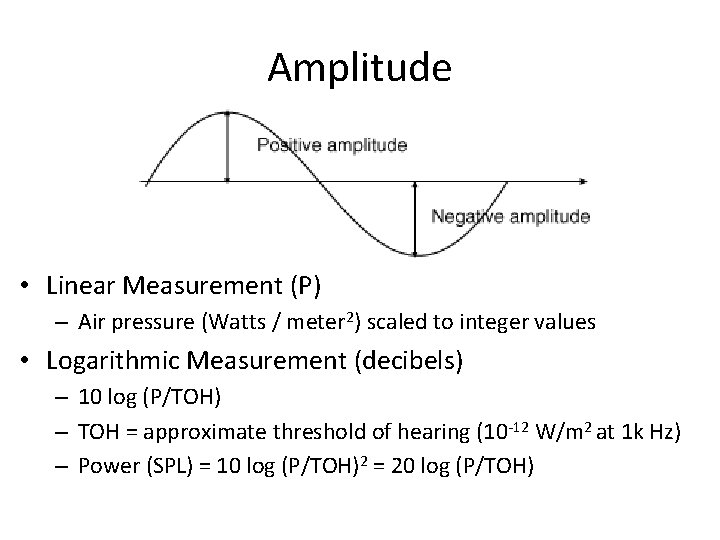
Amplitude • Linear Measurement (P) – Air pressure (Watts / meter 2) scaled to integer values • Logarithmic Measurement (decibels) – 10 log (P/TOH) – TOH = approximate threshold of hearing (10 -12 W/m 2 at 1 k Hz) – Power (SPL) = 10 log (P/TOH)2 = 20 log (P/TOH)
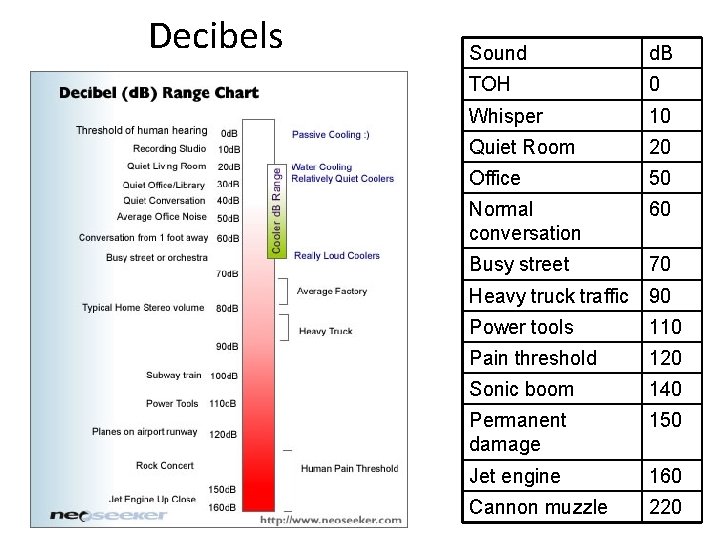
Decibels Sound d. B TOH 0 Whisper 10 Quiet Room 20 Office 50 Normal conversation 60 Busy street 70 Heavy truck traffic 90 Power tools 110 Pain threshold 120 Sonic boom 140 Permanent damage 150 Jet engine 160 Cannon muzzle 220
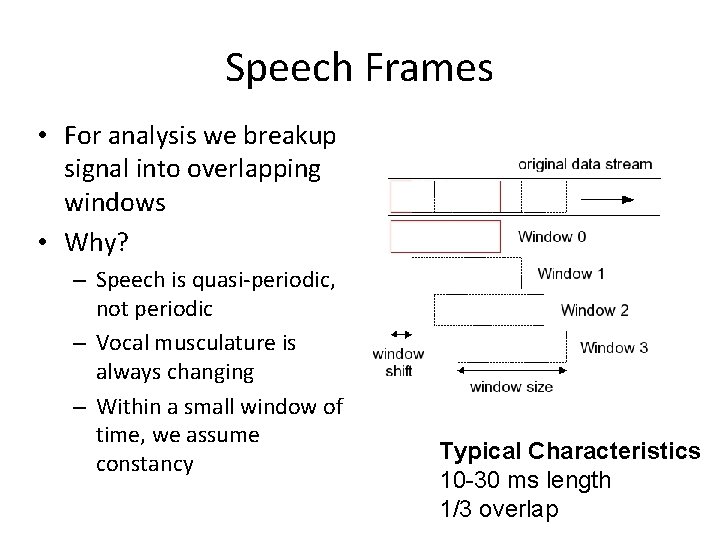
Speech Frames • For analysis we breakup signal into overlapping windows • Why? – Speech is quasi-periodic, not periodic – Vocal musculature is always changing – Within a small window of time, we assume constancy Typical Characteristics 10 -30 ms length 1/3 overlap
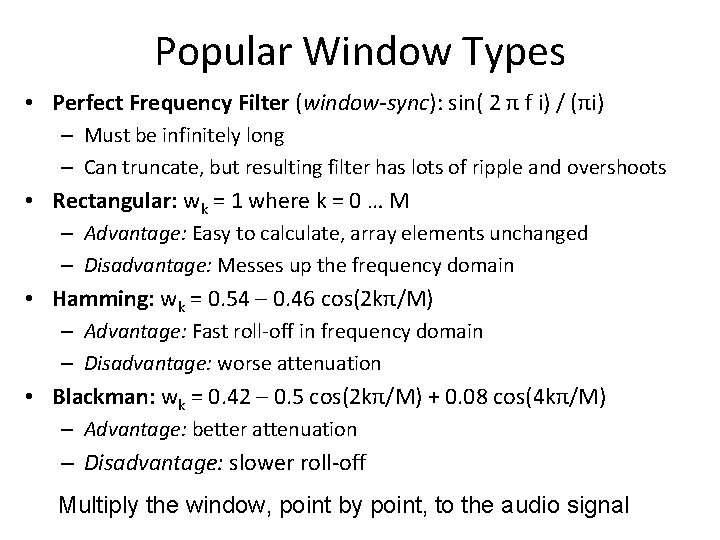
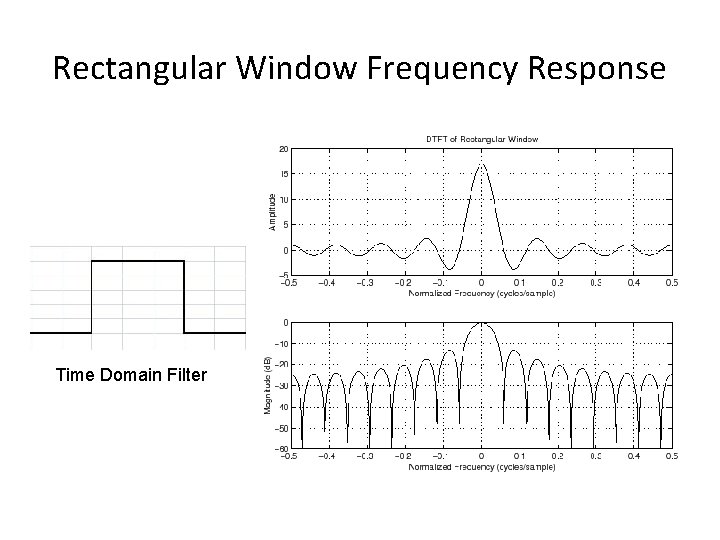
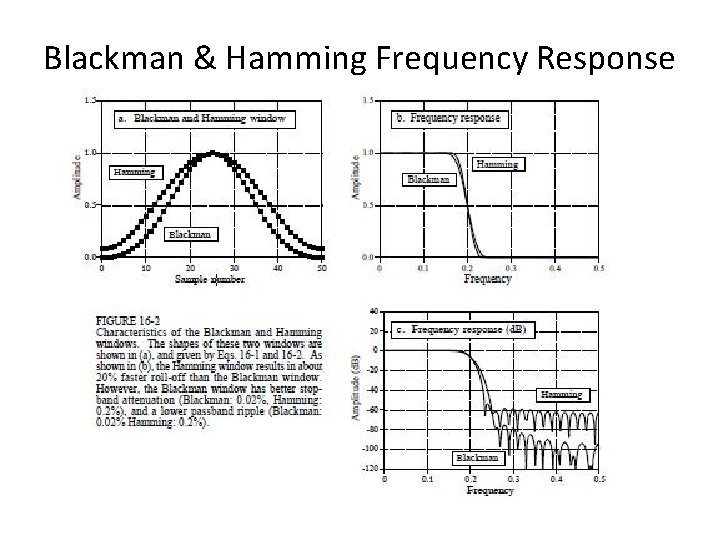
Popular Window Types • Perfect Frequency Filter (window-sync): sin( 2 π f i) / (πi) – Must be infinitely long – Can truncate, but resulting filter has lots of ripple and overshoots • Rectangular: wk = 1 where k = 0 … M – Advantage: Easy to calculate, array elements unchanged – Disadvantage: Messes up the frequency domain • Hamming: wk = 0. 54 – 0. 46 cos(2 kπ/M) – Advantage: Fast roll-off in frequency domain – Disadvantage: worse attenuation • Blackman: wk = 0. 42 – 0. 5 cos(2 kπ/M) + 0. 08 cos(4 kπ/M) – Advantage: better attenuation – Disadvantage: slower roll-off Multiply the window, point by point, to the audio signal
Rectangular Window Frequency Response Time Domain Filter
Blackman & Hamming Frequency Response
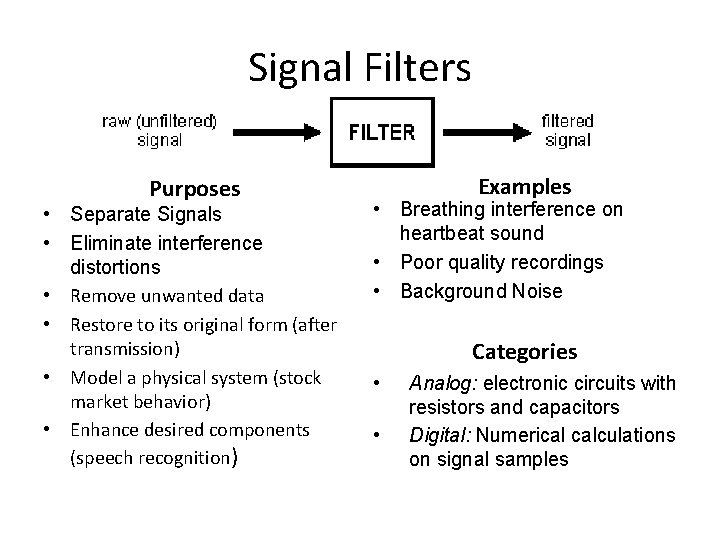
Signal Filters Purposes • Separate Signals • Eliminate interference distortions • Remove unwanted data • Restore to its original form (after transmission) • Model a physical system (stock market behavior) • Enhance desired components (speech recognition) Examples • Breathing interference on heartbeat sound • Poor quality recordings • Background Noise Categories • • Analog: electronic circuits with resistors and capacitors Digital: Numerical calculations on signal samples
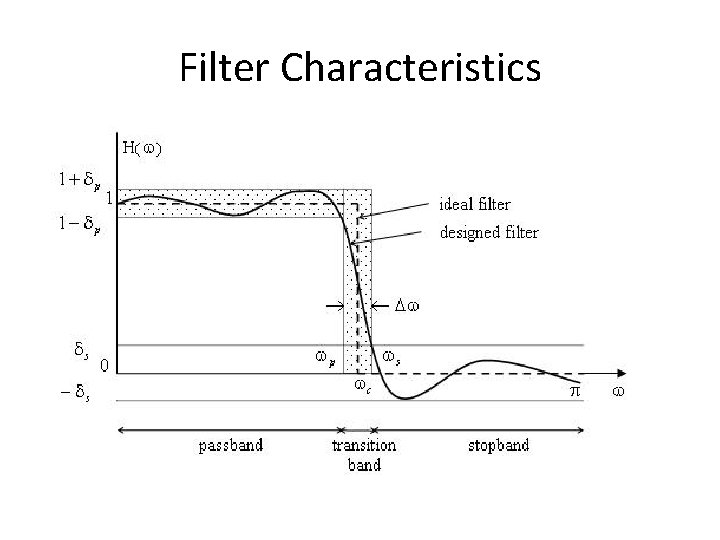
Filter Characteristics
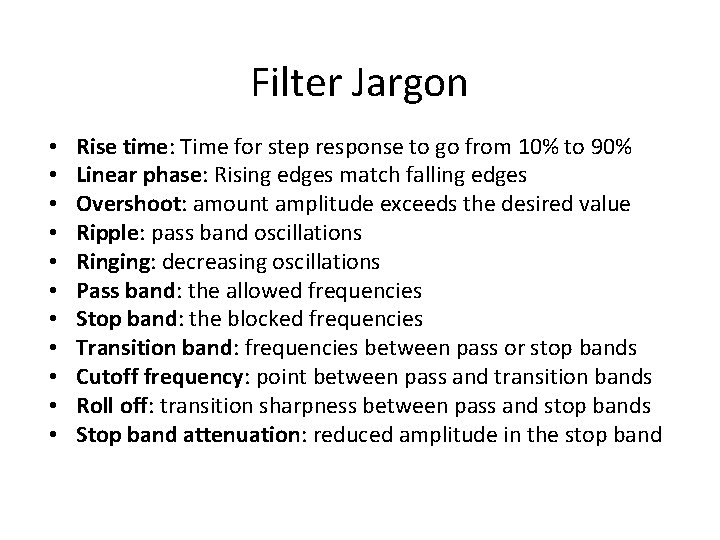
Filter Jargon • • • Rise time: Time for step response to go from 10% to 90% Linear phase: Rising edges match falling edges Overshoot: amount amplitude exceeds the desired value Ripple: pass band oscillations Ringing: decreasing oscillations Pass band: the allowed frequencies Stop band: the blocked frequencies Transition band: frequencies between pass or stop bands Cutoff frequency: point between pass and transition bands Roll off: transition sharpness between pass and stop bands Stop band attenuation: reduced amplitude in the stop band
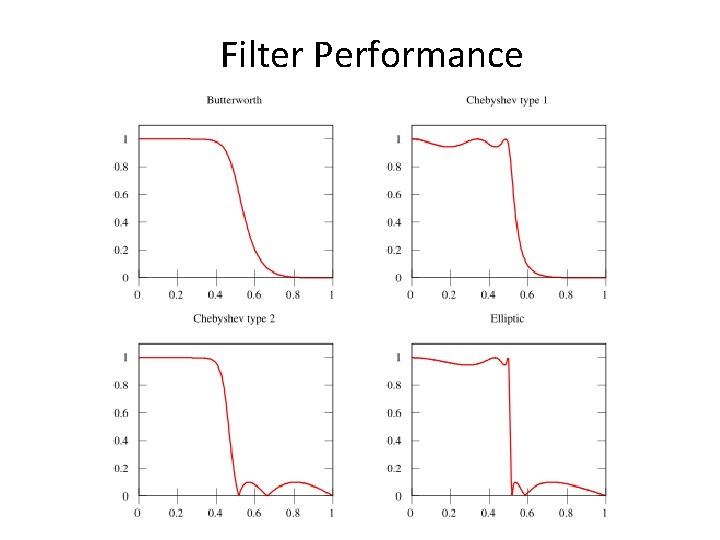
Filter Performance
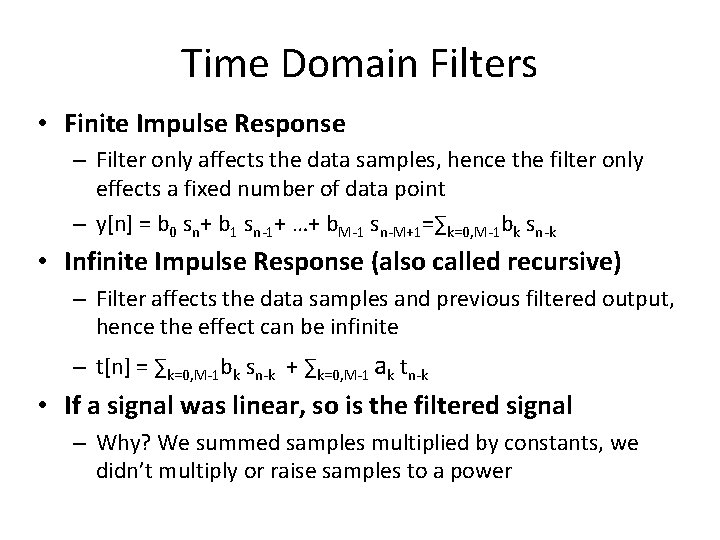
Time Domain Filters • Finite Impulse Response – Filter only affects the data samples, hence the filter only effects a fixed number of data point – y[n] = b 0 sn+ b 1 sn-1+ …+ b. M-1 sn-M+1=∑k=0, M-1 bk sn-k • Infinite Impulse Response (also called recursive) – Filter affects the data samples and previous filtered output, hence the effect can be infinite – t[n] = ∑k=0, M-1 bk sn-k + ∑k=0, M-1 ak tn-k • If a signal was linear, so is the filtered signal – Why? We summed samples multiplied by constants, we didn’t multiply or raise samples to a power
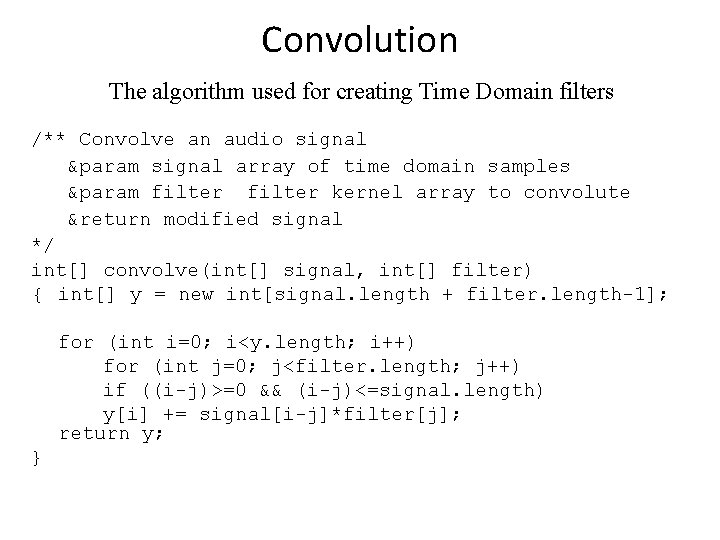
Convolution The algorithm used for creating Time Domain filters /** Convolve an audio signal ¶m signal array of time domain samples ¶m filter kernel array to convolute &return modified signal */ int[] convolve(int[] signal, int[] filter) { int[] y = new int[signal. length + filter. length-1]; for (int i=0; i<y. length; i++) for (int j=0; j<filter. length; j++) if ((i-j)>=0 && (i-j)<=signal. length) y[i] += signal[i-j]*filter[j]; return y; }
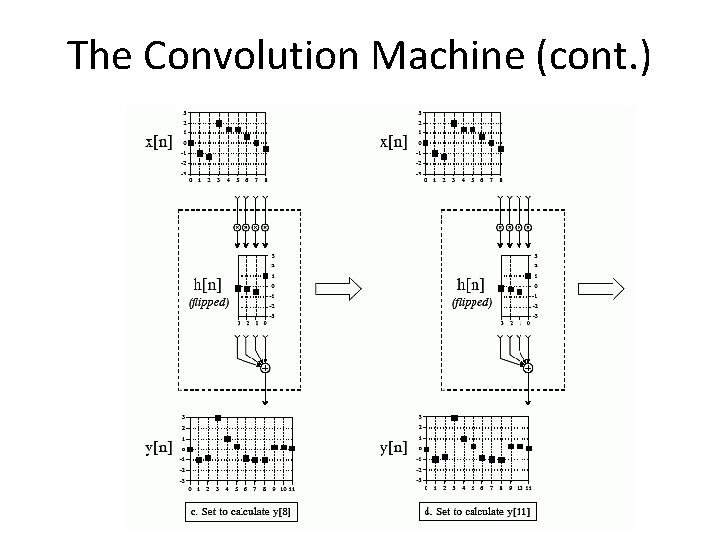
The Convolution Machine (cont. )
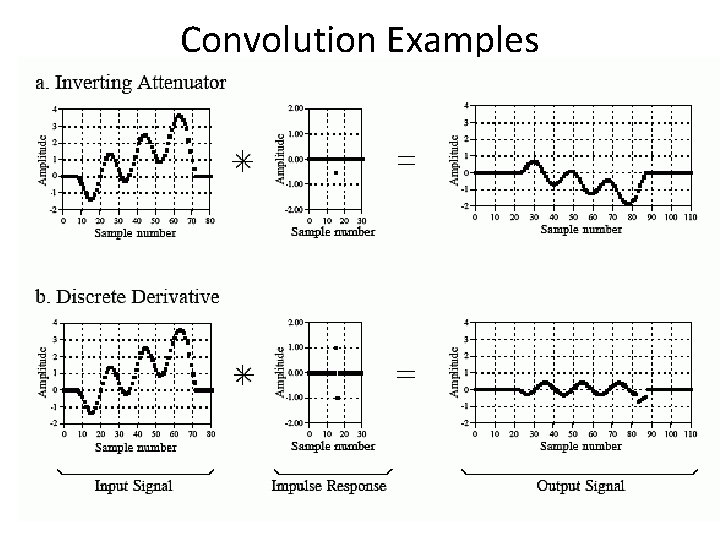
Convolution Examples
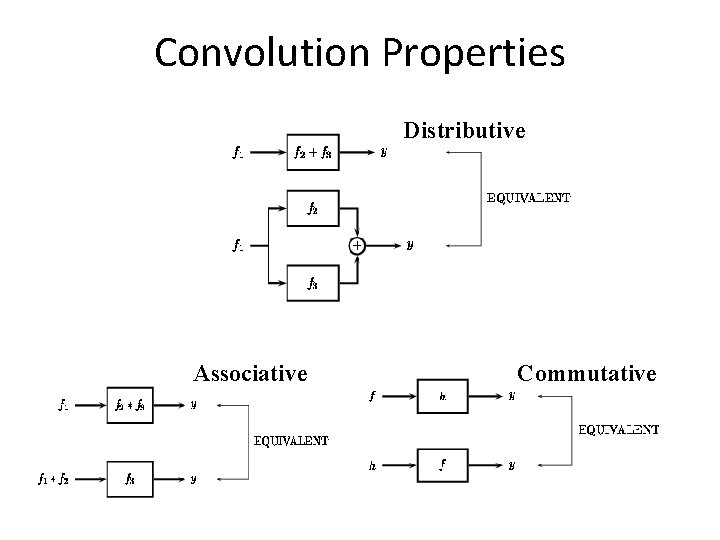
Convolution Properties Distributive Associative Commutative
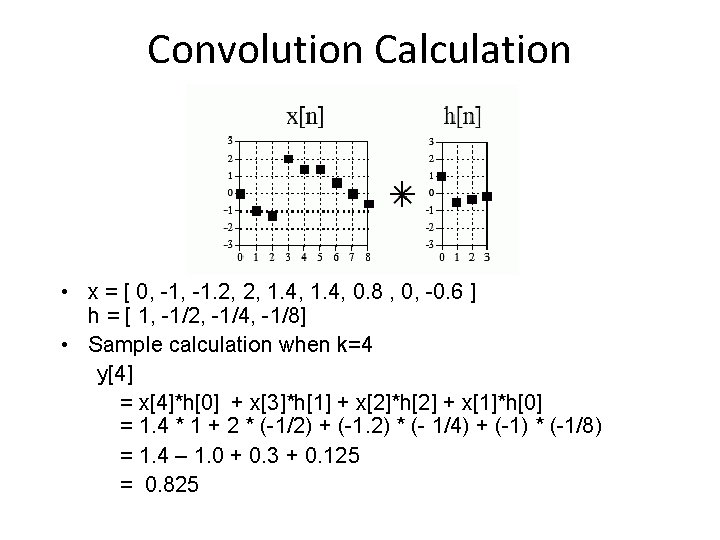
Convolution Calculation • x = [ 0, -1. 2, 2, 1. 4, 0. 8 , 0, -0. 6 ] h = [ 1, -1/2, -1/4, -1/8] • Sample calculation when k=4 y[4] = x[4]*h[0] + x[3]*h[1] + x[2]*h[2] + x[1]*h[0] = 1. 4 * 1 + 2 * (-1/2) + (-1. 2) * (- 1/4) + (-1) * (-1/8) = 1. 4 – 1. 0 + 0. 3 + 0. 125 = 0. 825
Delta Function • Delta function (δ[n]) [also called Unit Impulse] – If n=0, δ[n] = 1 – If n≠ 0, δ[n] = 0 • impulse response (h(n)) – The output generated from a delta function input – Useful to analyze filters: δ in and observe response
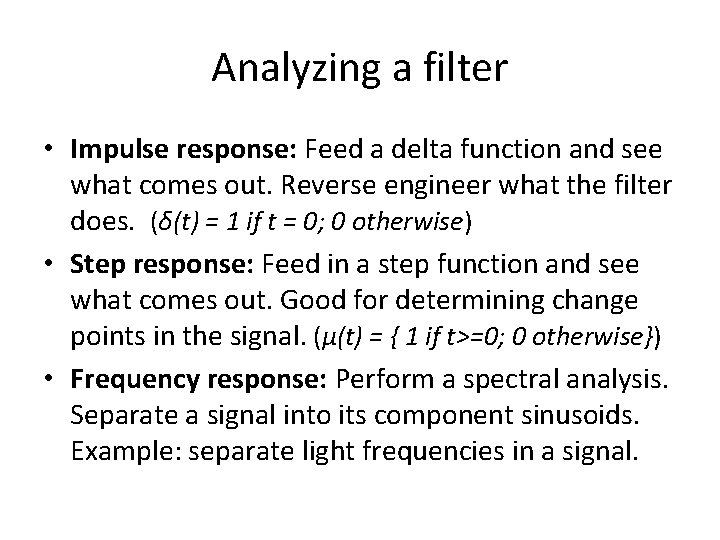
Analyzing a filter • Impulse response: Feed a delta function and see what comes out. Reverse engineer what the filter does. (δ(t) = 1 if t = 0; 0 otherwise) • Step response: Feed in a step function and see what comes out. Good for determining change points in the signal. (µ(t) = { 1 if t>=0; 0 otherwise}) • Frequency response: Perform a spectral analysis. Separate a signal into its component sinusoids. Example: separate light frequencies in a signal.
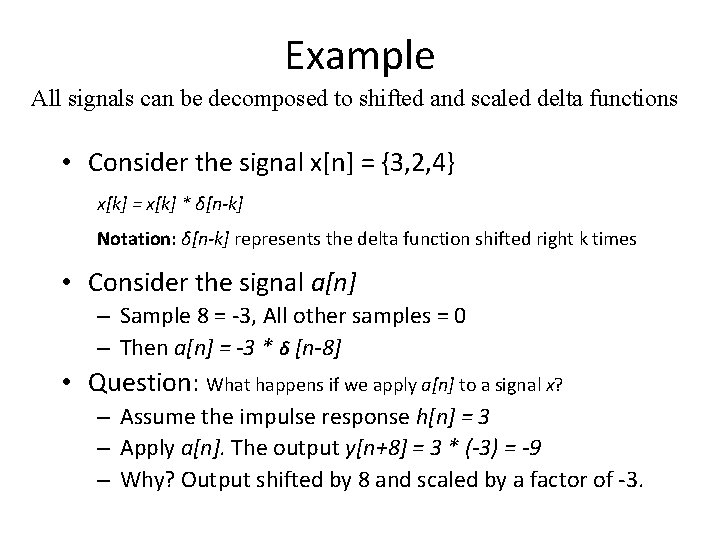
Example All signals can be decomposed to shifted and scaled delta functions • Consider the signal x[n] = {3, 2, 4} x[k] = x[k] * δ[n-k] Notation: δ[n-k] represents the delta function shifted right k times • Consider the signal a[n] – Sample 8 = -3, All other samples = 0 – Then a[n] = -3 * δ [n-8] • Question: What happens if we apply a[n] to a signal x? – Assume the impulse response h[n] = 3 – Apply a[n]. The output y[n+8] = 3 * (-3) = -9 – Why? Output shifted by 8 and scaled by a factor of -3.
Amplify y[n] = k δ[n] • Top Figure (original signal) • Bottom Figure – The signal’s amplitude is multiplied by 1. 6 – Attenuation can occur by picking a magnitude that is less than one
Difference and Sum • Top Figure (FIR) – Difference – y[n] = x[n]-x[n-1] • Bottom Figure (IIR) – Running Sum – y[n] = x[n]+y[n-1] – Impulse response is infinitely long
Moving Average FIR Filter Convolution using a simple filter kernel int[] average(int x[]) { int[] y[x. length]; for (int i=50; i<x. length-50; i++) { for (int j=-50; j<=50; j++) { y[i] += x[i + j]; } y[i] /= 101; } } Formula: Example Point (Centered):
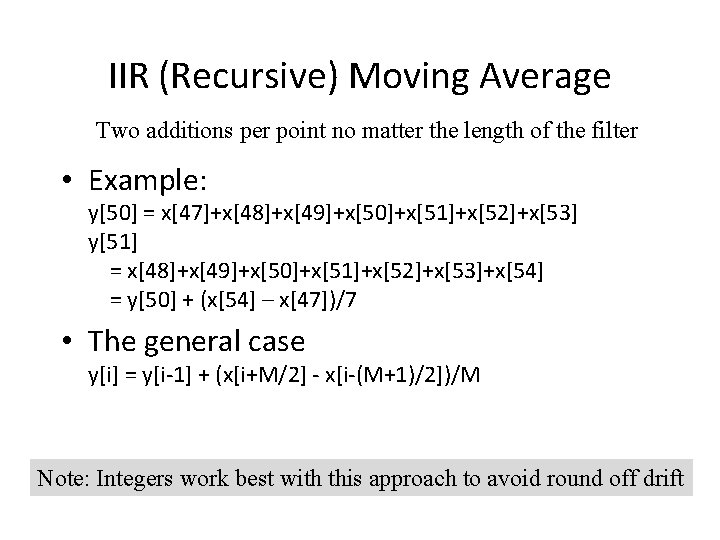
IIR (Recursive) Moving Average Two additions per point no matter the length of the filter • Example: y[50] = x[47]+x[48]+x[49]+x[50]+x[51]+x[52]+x[53] y[51] = x[48]+x[49]+x[50]+x[51]+x[52]+x[53]+x[54] = y[50] + (x[54] – x[47])/7 • The general case y[i] = y[i-1] + (x[i+M/2] - x[i-(M+1)/2])/M Note: Integers work best with this approach to avoid round off drift
Optimizations • Pass the signal through the filter more than once to improve stop band attenuation • Convolving the steps provides a one step filter • Disadvantages – Longer filter kernel – Slower roll off – Slow execution time if the filters are long
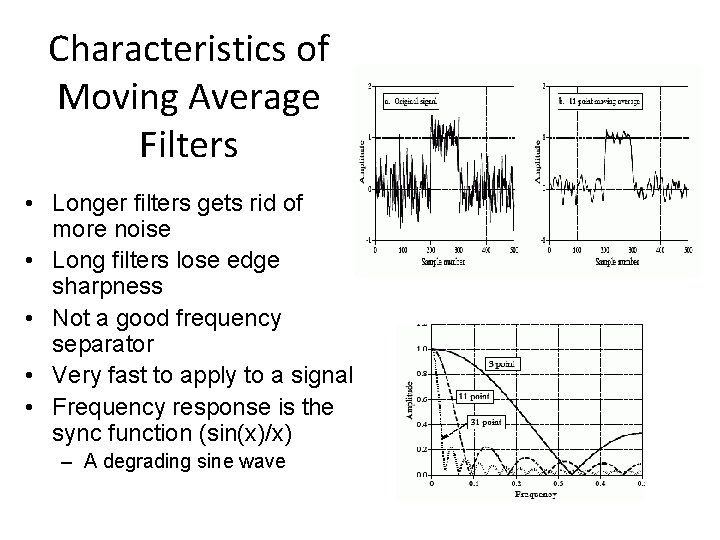
Characteristics of Moving Average Filters • Longer filters gets rid of more noise • Long filters lose edge sharpness • Not a good frequency separator • Very fast to apply to a signal • Frequency response is the sync function (sin(x)/x) – A degrading sine wave
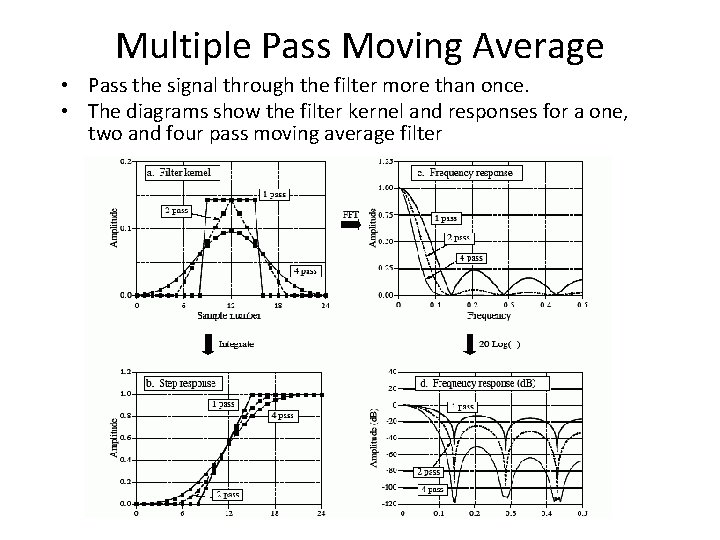
Multiple Pass Moving Average • Pass the signal through the filter more than once. • The diagrams show the filter kernel and responses for a one, two and four pass moving average filter
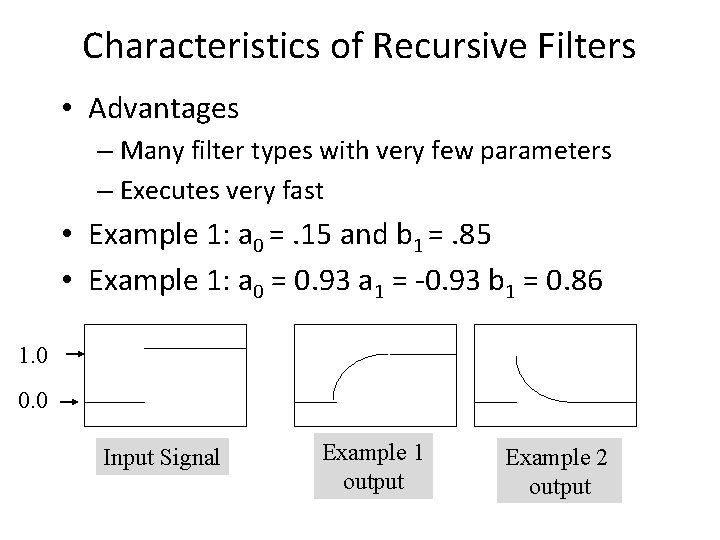
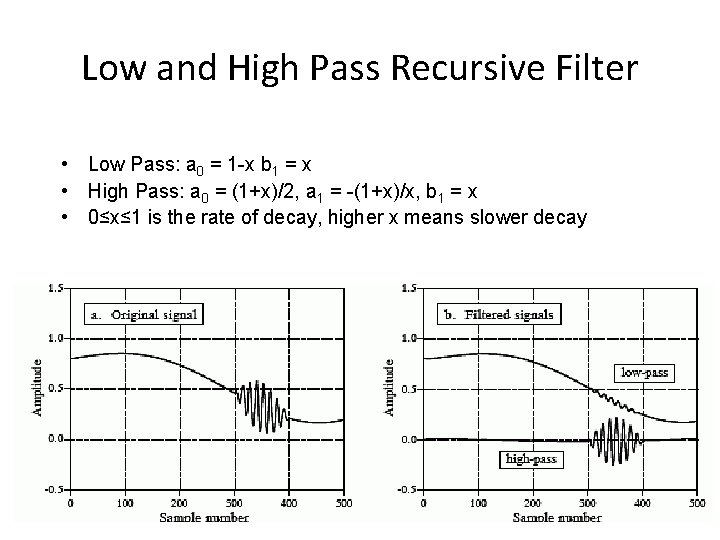
Characteristics of Recursive Filters • Advantages – Many filter types with very few parameters – Executes very fast • Example 1: a 0 =. 15 and b 1 =. 85 • Example 1: a 0 = 0. 93 a 1 = -0. 93 b 1 = 0. 86 1. 0 0. 0 Input Signal Example 1 output Example 2 output
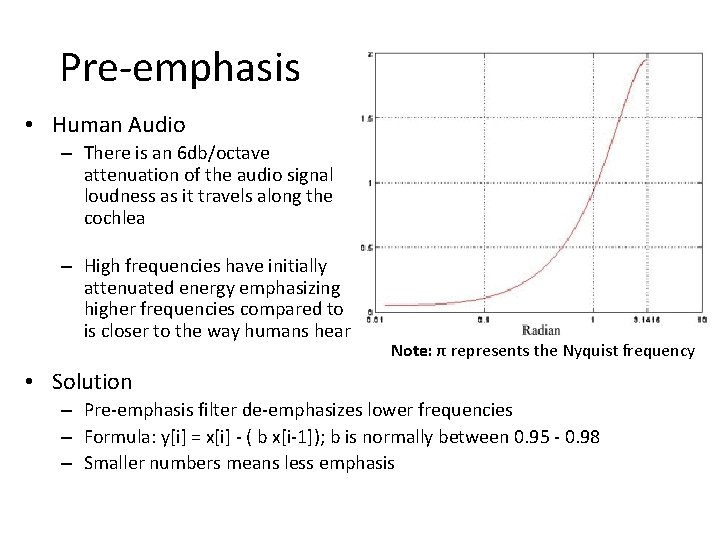
Pre-emphasis • Human Audio – There is an 6 db/octave attenuation of the audio signal loudness as it travels along the cochlea – High frequencies have initially attenuated energy emphasizing higher frequencies compared to is closer to the way humans hear Note: π represents the Nyquist frequency • Solution – Pre-emphasis filter de-emphasizes lower frequencies – Formula: y[i] = x[i] - ( b x[i-1]); b is normally between 0. 95 - 0. 98 – Smaller numbers means less emphasis
Low and High Pass Recursive Filter • Low Pass: a 0 = 1 -x b 1 = x • High Pass: a 0 = (1+x)/2, a 1 = -(1+x)/x, b 1 = x • 0≤x≤ 1 is the rate of decay, higher x means slower decay
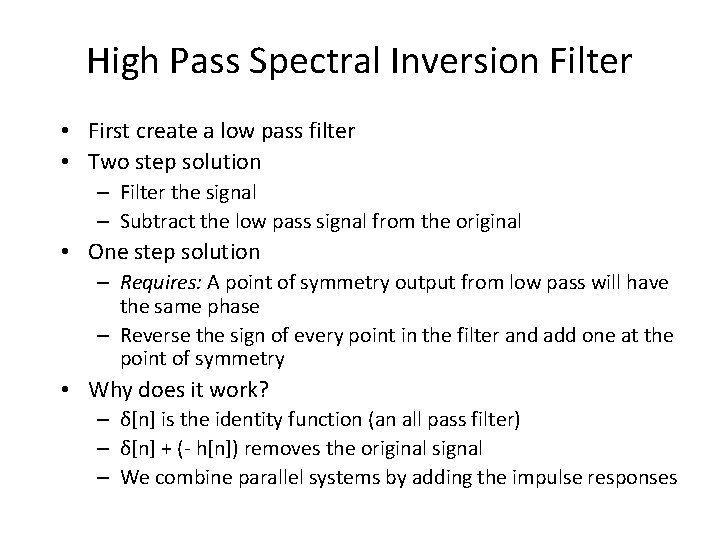
High Pass Spectral Inversion Filter • First create a low pass filter • Two step solution – Filter the signal – Subtract the low pass signal from the original • One step solution – Requires: A point of symmetry output from low pass will have the same phase – Reverse the sign of every point in the filter and add one at the point of symmetry • Why does it work? – δ[n] is the identity function (an all pass filter) – δ[n] + (- h[n]) removes the original signal – We combine parallel systems by adding the impulse responses
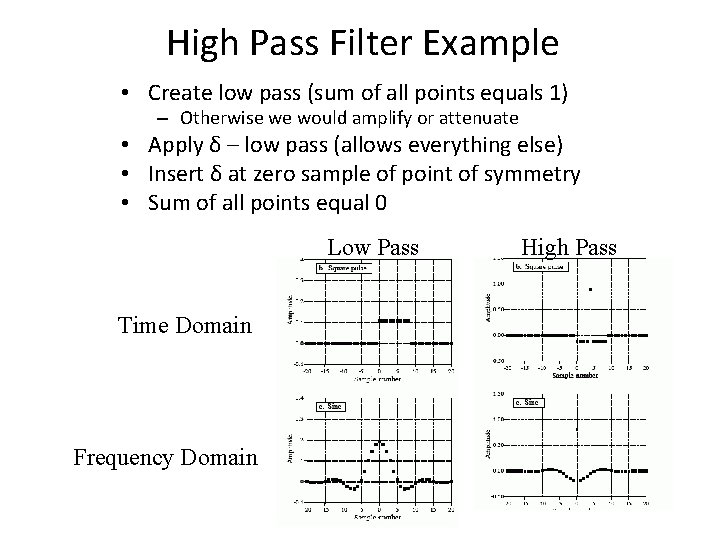
High Pass Filter Example • Create low pass (sum of all points equals 1) – Otherwise we would amplify or attenuate • Apply δ – low pass (allows everything else) • Insert δ at zero sample of point of symmetry • Sum of all points equal 0 Low Pass Time Domain Frequency Domain High Pass
High Pass Spectral Reversal Filter • Create a low pass filter • Change the sign of every other sample. • Why does it work? – Changing every other sample is the same as multiplying by a sine wave with the Nyquist frequency. – It shifts the frequencies where the top frequencies wrap around to the start creating a mirror image. – Example: suppose the Nyquist frequency is 4000. 1. Frequency 0 becomes 4000 2. Frequency 50 becomes 4050 3. Frequency 6000 becomes (6000+4000)%8000.
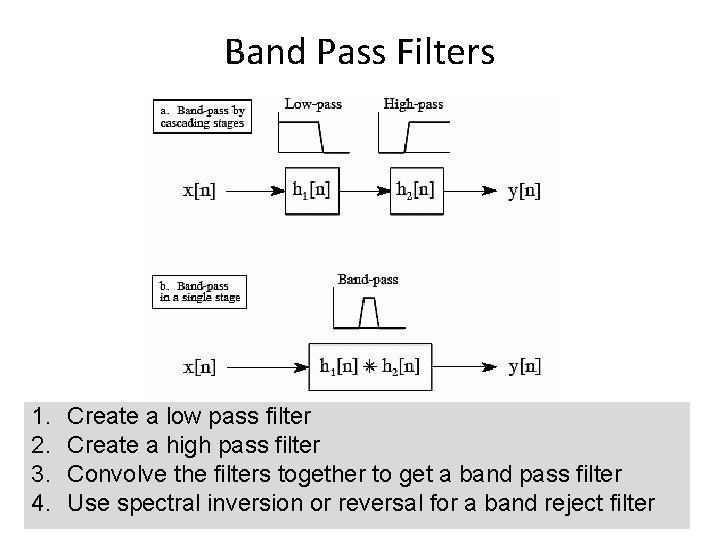
Band Pass Filters 1. 2. 3. 4. Create a low pass filter Create a high pass filter Convolve the filters together to get a band pass filter Use spectral inversion or reversal for a band reject filter
Gaussian Filters • Gaussian filters remove noise and detail • g[x] = 1/(2πσ)½ * e-z where – z = -x 2/(2σ2) – σ = standard deviation σ = 1 and mean =0 σ = 3 and mean =0
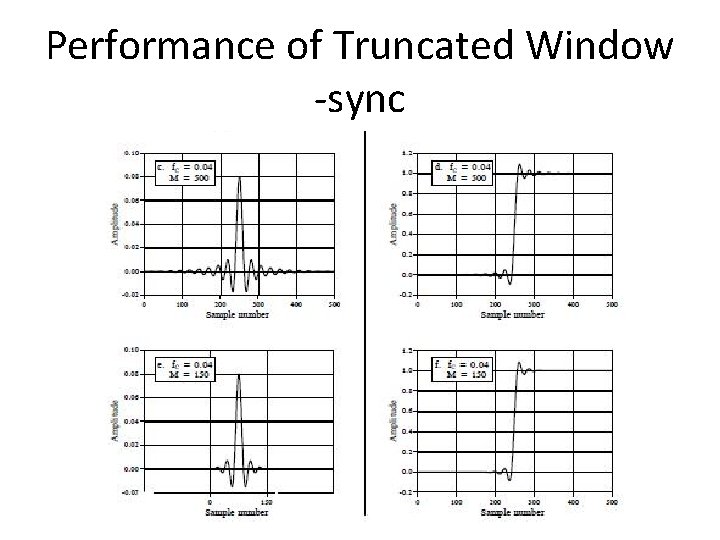
The Ideal Frequency Filter • Inverse Fourier transform on a square wave: h[k] = sin(2 fc π k) / kπ • Convolving with this filter provides a perfect low pass filter • Problems (requires infinite length, abrupt edge, excessive ripple
Performance of Truncated Window -sync
Windowed Window Sync Filter: Truncated ideal frequency filter (F[k] = sin(2 fc π k) / kπ)
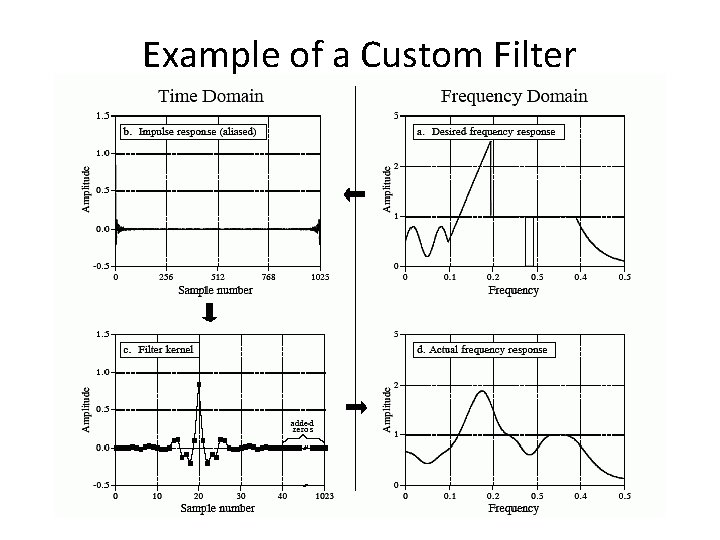
Custom Filters For any frequency response • Create the desired frequency response • Perform an inverse Fast Fourier Transform (FFT) – Can't use this because there usually are wild fluctuations in frequency between the points – For it to be perfect, the impulse response needs to be infinite • Shift to center the result about t=0, truncate, and apply a window to the result • Use that as your filter kernel • Application: Remove known frequency patterns from a signal
Example of a Custom Filter
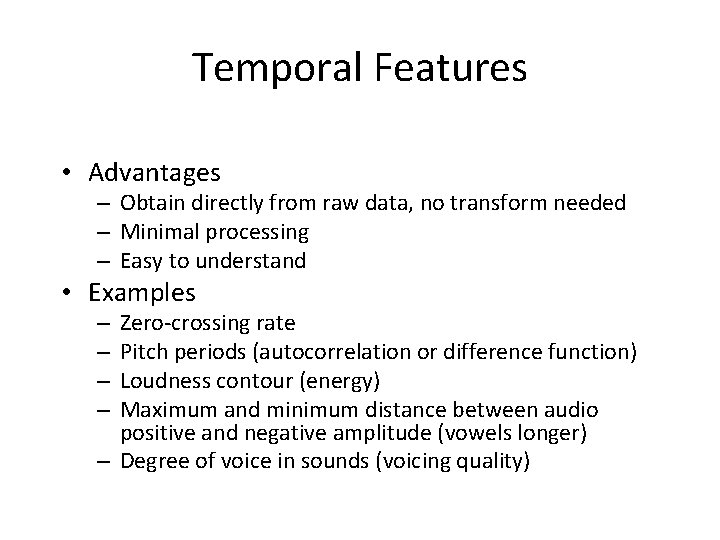
Temporal Features • Advantages – Obtain directly from raw data, no transform needed – Minimal processing – Easy to understand • Examples Zero-crossing rate Pitch periods (autocorrelation or difference function) Loudness contour (energy) Maximum and minimum distance between audio positive and negative amplitude (vowels longer) – Degree of voice in sounds (voicing quality) – –
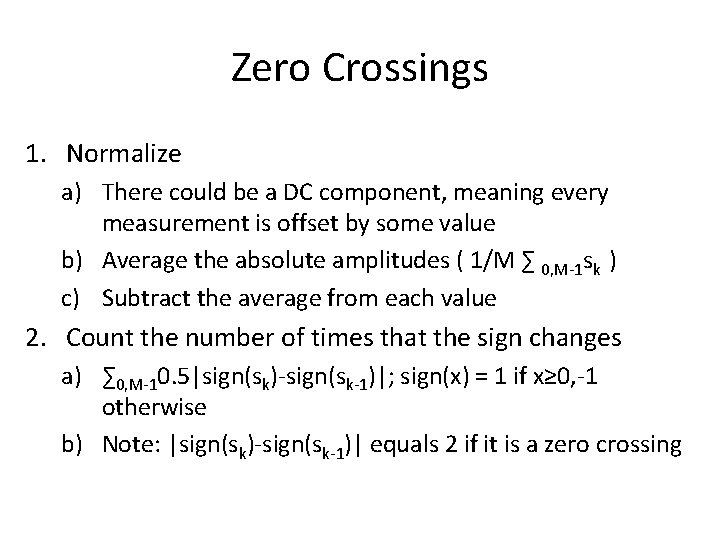
Zero Crossings 1. Normalize a) There could be a DC component, meaning every measurement is offset by some value b) Average the absolute amplitudes ( 1/M ∑ 0, M-1 sk ) c) Subtract the average from each value 2. Count the number of times that the sign changes a) ∑ 0, M-10. 5|sign(sk)-sign(sk-1)|; sign(x) = 1 if x≥ 0, -1 otherwise b) Note: |sign(sk)-sign(sk-1)| equals 2 if it is a zero crossing
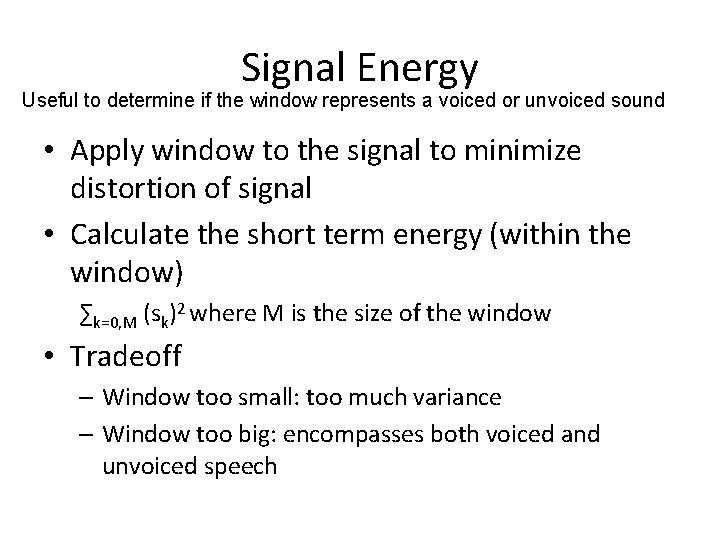
Signal Energy Useful to determine if the window represents a voiced or unvoiced sound • Apply window to the signal to minimize distortion of signal • Calculate the short term energy (within the window) ∑k=0, M (sk)2 where M is the size of the window • Tradeoff – Window too small: too much variance – Window too big: encompasses both voiced and unvoiced speech
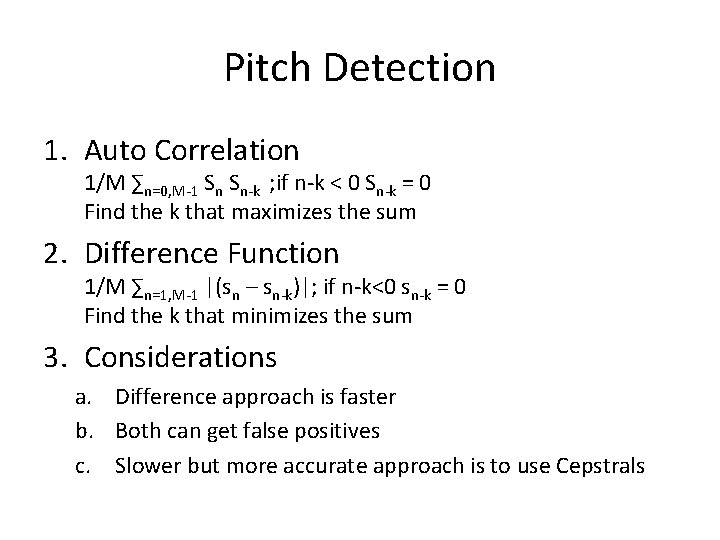
Pitch Detection 1. Auto Correlation 1/M ∑n=0, M-1 Sn Sn-k ; if n-k < 0 Sn-k = 0 Find the k that maximizes the sum 2. Difference Function 1/M ∑n=1, M-1 |(sn – sn-k)|; if n-k<0 sn-k = 0 Find the k that minimizes the sum 3. Considerations a. Difference approach is faster b. Both can get false positives c. Slower but more accurate approach is to use Cepstrals