
Publishing to OCLC using separate library codes and
Publishing to OCLC using separate library codes and symbols Yoel Kortick. Senior Librarian © 2015 Ex Libris | Confidential & Proprietary
Contents Introduction Institution OCLC Symbol Configuration The OCLC Publishing profile Scenario One Scenario Two Scenario Three © 2015 Ex Libris | Confidential & Proprietary 2
Introduction Introductory note before beginning • When using multiple symbols for one institution to publish from Alma it is recommended to first work with OCLC. • Alma has one bibliographic publishing profile for OCLC and it can be applied to one OCLC symbol. • If the institution has two OCLC holdings then this will require that the institution reach out to OCLC in order to configure the data sync collection to be able to handle two OCLC symbols. • Further, with multiple OCLC symbols it may be necessary that deletes be done manually because in this scenario OCLC cannot tell which holding to remove from the files from Alma © 2015 Ex Libris | Confidential & Proprietary 3
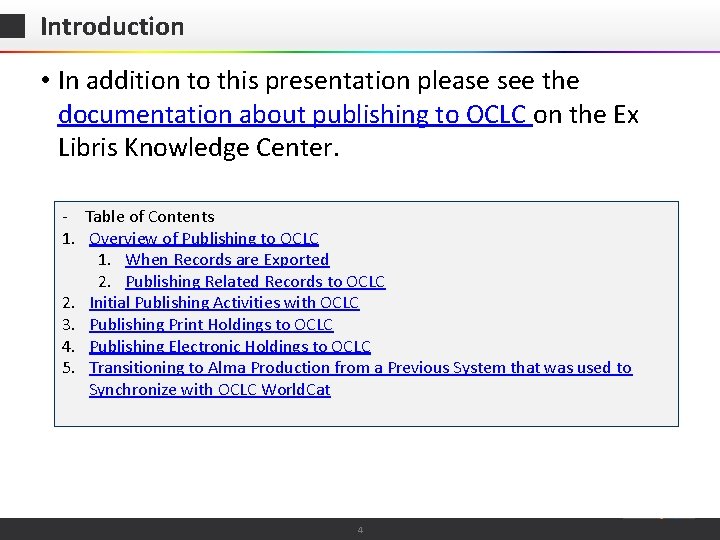
Introduction • In addition to this presentation please see the documentation about publishing to OCLC on the Ex Libris Knowledge Center. - Table of Contents 1. Overview of Publishing to OCLC 1. When Records are Exported 2. Publishing Related Records to OCLC 2. Initial Publishing Activities with OCLC 3. Publishing Print Holdings to OCLC 4. Publishing Electronic Holdings to OCLC 5. Transitioning to Alma Production from a Previous System that was used to Synchronize with OCLC World. Cat © 2015 Ex Libris | Confidential & Proprietary 4
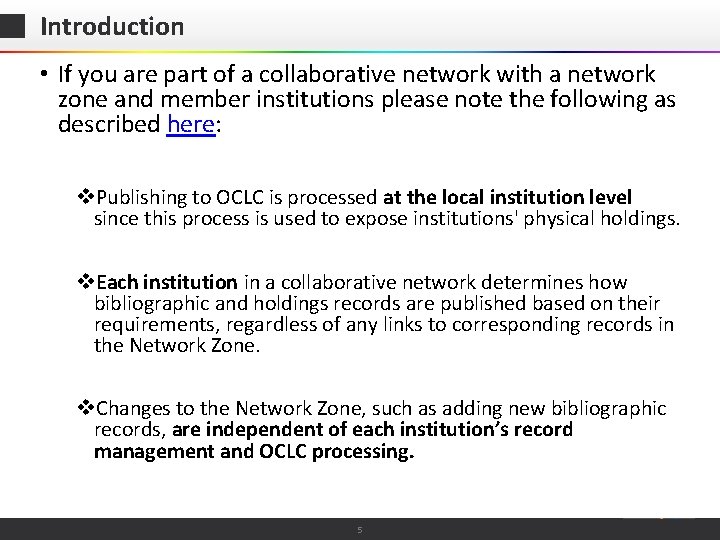
Introduction • If you are part of a collaborative network with a network zone and member institutions please note the following as described here: v. Publishing to OCLC is processed at the local institution level since this process is used to expose institutions' physical holdings. v. Each institution in a collaborative network determines how bibliographic and holdings records are published based on their requirements, regardless of any links to corresponding records in the Network Zone. v. Changes to the Network Zone, such as adding new bibliographic records, are independent of each institution’s record management and OCLC processing. © 2015 Ex Libris | Confidential & Proprietary 5
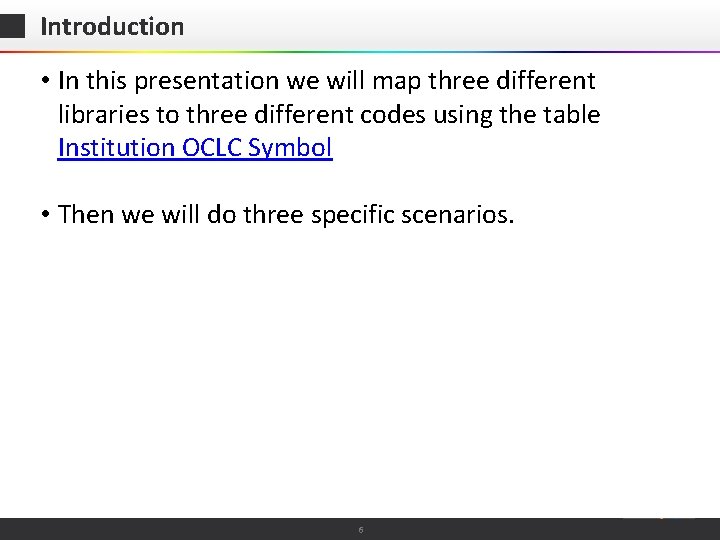
Introduction • In this presentation we will map three different libraries to three different codes using the table Institution OCLC Symbol • Then we will do three specific scenarios. © 2015 Ex Libris | Confidential & Proprietary 6
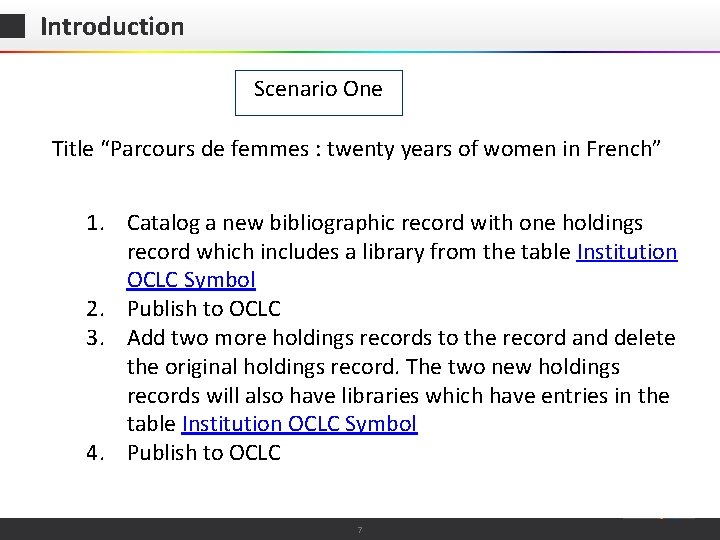
Introduction Scenario One Title “Parcours de femmes : twenty years of women in French” 1. Catalog a new bibliographic record with one holdings record which includes a library from the table Institution OCLC Symbol 2. Publish to OCLC 3. Add two more holdings records to the record and delete the original holdings record. The two new holdings records will also have libraries which have entries in the table Institution OCLC Symbol 4. Publish to OCLC © 2015 Ex Libris | Confidential & Proprietary 7
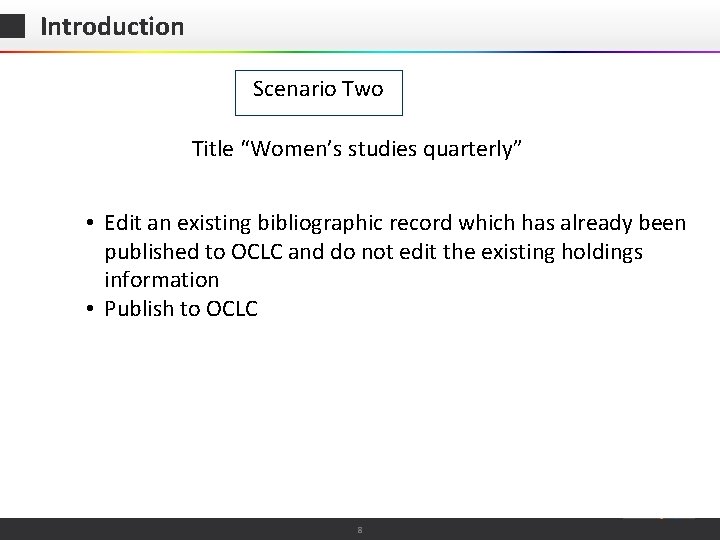
Introduction Scenario Two Title “Women’s studies quarterly” • Edit an existing bibliographic record which has already been published to OCLC and do not edit the existing holdings information • Publish to OCLC © 2015 Ex Libris | Confidential & Proprietary 8
Introduction Scenario Three Title “Religion in Latin America” • Delete all inventory of an existing bibliographic record which has already been published to OCLC • Delete the bibliographic record • Publish to OCLC © 2015 Ex Libris | Confidential & Proprietary 9
Introduction • At each of the steps where we publish to OCLC we will A. Check the contents of the file B. See how the activities performed on the records effects the publishing process. © 2015 Ex Libris | Confidential & Proprietary 10

Contents Introduction Institution OCLC Symbol Configuration The OCLC Publishing profile Scenario One Scenario Two Scenario Three © 2015 Ex Libris | Confidential & Proprietary 11
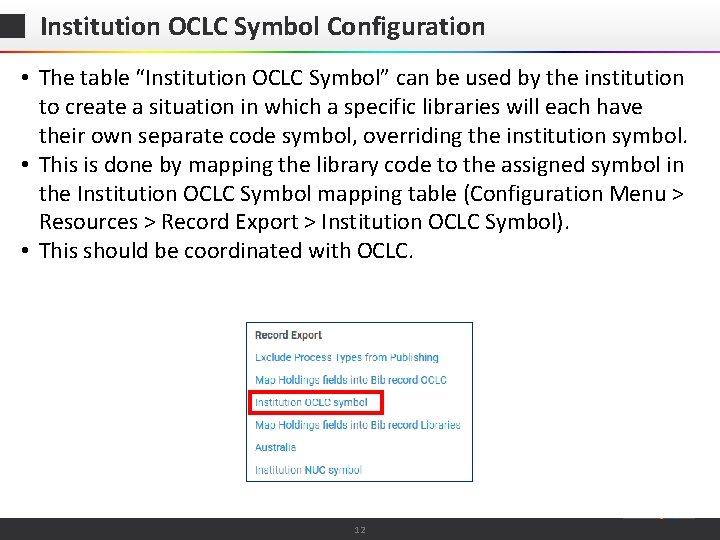
Institution OCLC Symbol Configuration • The table “Institution OCLC Symbol” can be used by the institution to create a situation in which a specific libraries will each have their own separate code symbol, overriding the institution symbol. • This is done by mapping the library code to the assigned symbol in the Institution OCLC Symbol mapping table (Configuration Menu > Resources > Record Export > Institution OCLC Symbol). • This should be coordinated with OCLC. © 2015 Ex Libris | Confidential & Proprietary 12
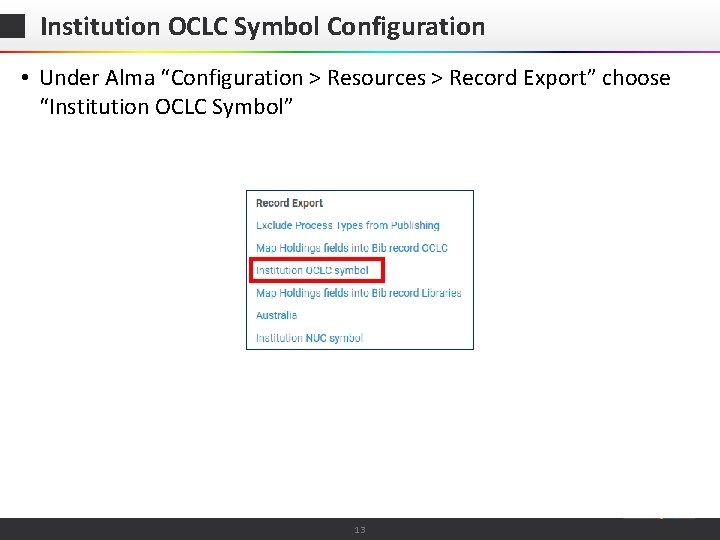
Institution OCLC Symbol Configuration • Under Alma “Configuration > Resources > Record Export” choose “Institution OCLC Symbol” © 2015 Ex Libris | Confidential & Proprietary 13
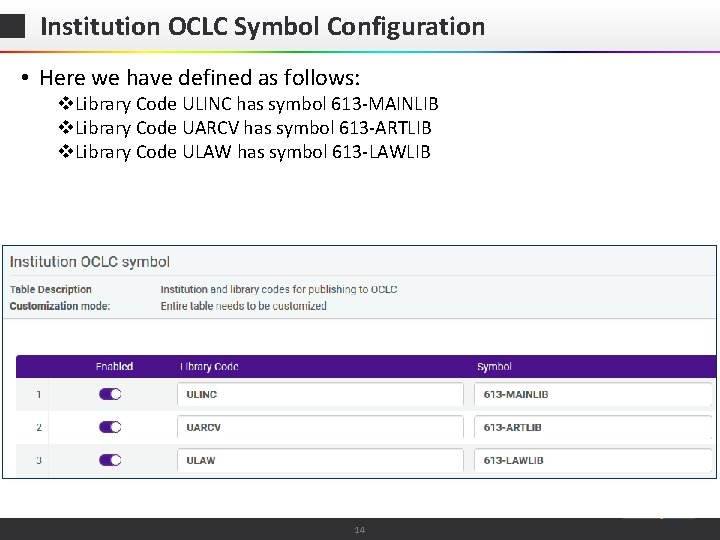
Institution OCLC Symbol Configuration • Here we have defined as follows: v. Library Code ULINC has symbol 613 -MAINLIB v. Library Code UARCV has symbol 613 -ARTLIB v. Library Code ULAW has symbol 613 -LAWLIB © 2015 Ex Libris | Confidential & Proprietary 14
Contents Introduction Institution OCLC Symbol Configuration The OCLC Publishing profile Scenario One Scenario Two Scenario Three © 2015 Ex Libris | Confidential & Proprietary 15
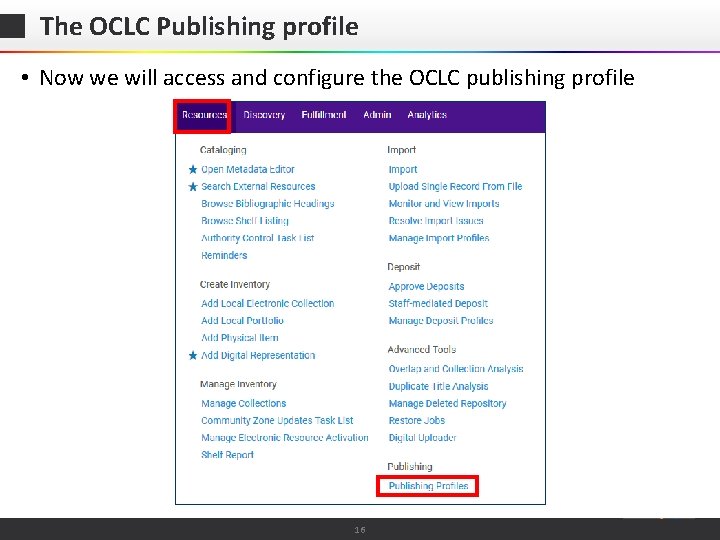
The OCLC Publishing profile • Now we will access and configure the OCLC publishing profile © 2015 Ex Libris | Confidential & Proprietary 16
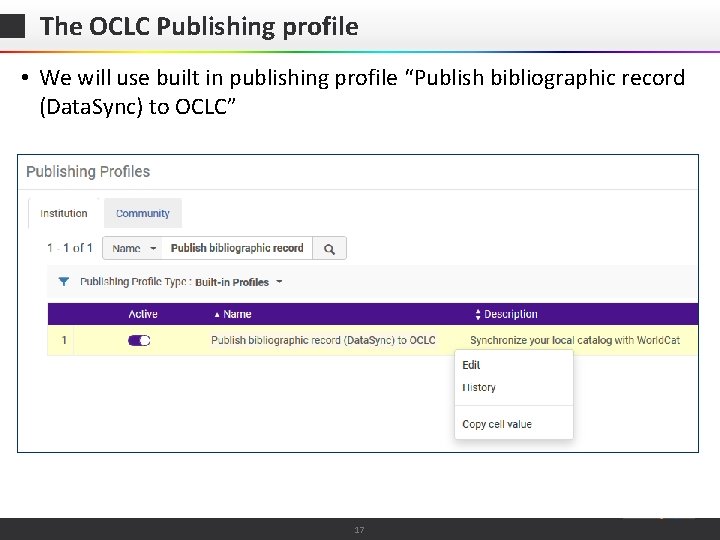
The OCLC Publishing profile • We will use built in publishing profile “Publish bibliographic record (Data. Sync) to OCLC” © 2015 Ex Libris | Confidential & Proprietary 17
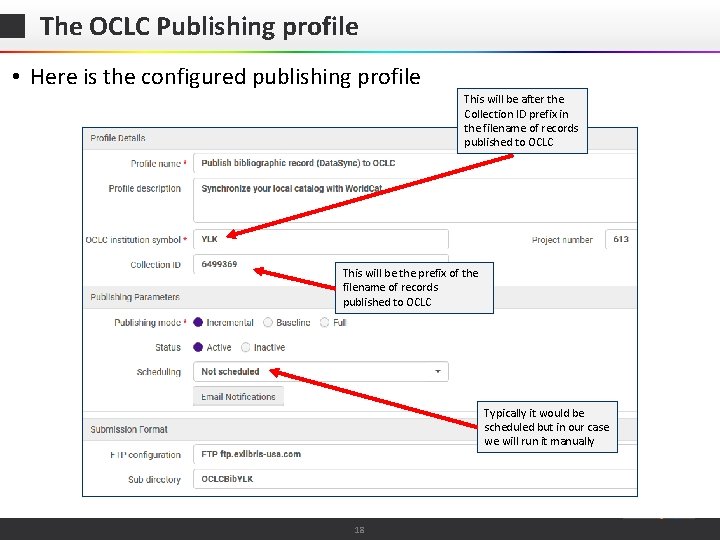
The OCLC Publishing profile • Here is the configured publishing profile This will be after the Collection ID prefix in the filename of records published to OCLC This will be the prefix of the filename of records published to OCLC Typically it would be scheduled but in our case we will run it manually © 2015 Ex Libris | Confidential & Proprietary 18
Contents Introduction Institution OCLC Symbol Configuration The OCLC Publishing profile Scenario One Scenario Two Scenario Three © 2015 Ex Libris | Confidential & Proprietary 19
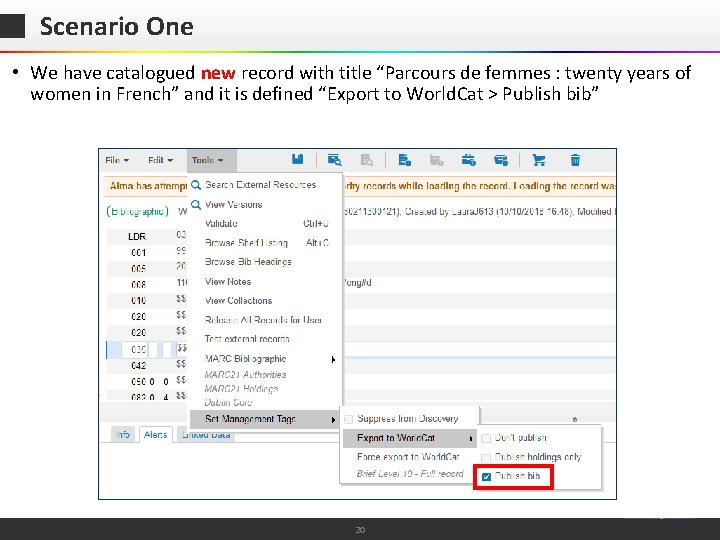
Scenario One • We have catalogued new record with title “Parcours de femmes : twenty years of women in French” and it is defined “Export to World. Cat > Publish bib” © 2015 Ex Libris | Confidential & Proprietary 20
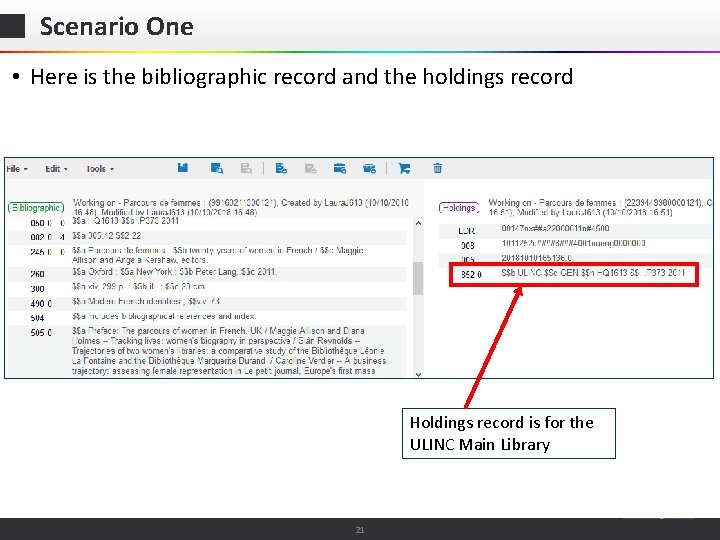
Scenario One • Here is the bibliographic record and the holdings record Holdings record is for the ULINC Main Library © 2015 Ex Libris | Confidential & Proprietary 21
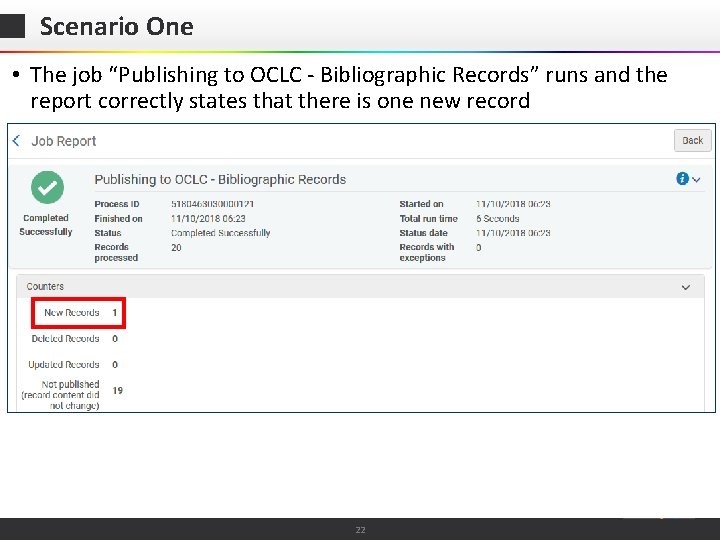
Scenario One • The job “Publishing to OCLC - Bibliographic Records” runs and the report correctly states that there is one new record © 2015 Ex Libris | Confidential & Proprietary 22
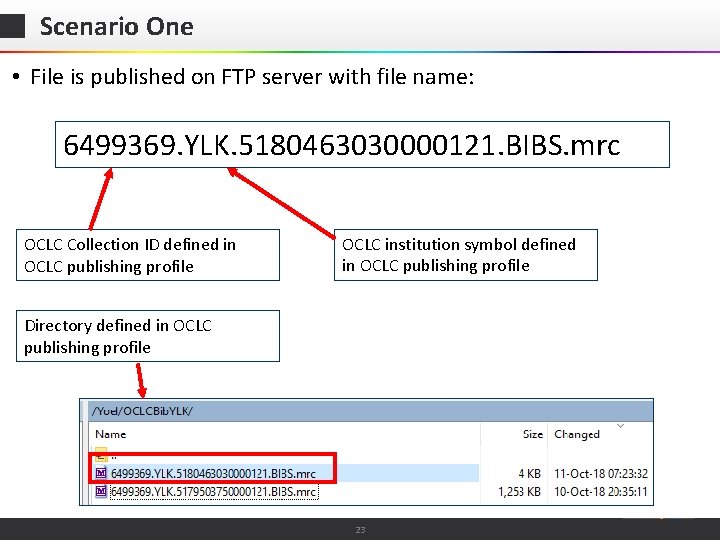
Scenario One • File is published on FTP server with file name: 6499369. YLK. 5180463030000121. BIBS. mrc OCLC Collection ID defined in OCLC publishing profile OCLC institution symbol defined in OCLC publishing profile Directory defined in OCLC publishing profile © 2015 Ex Libris | Confidential & Proprietary 23
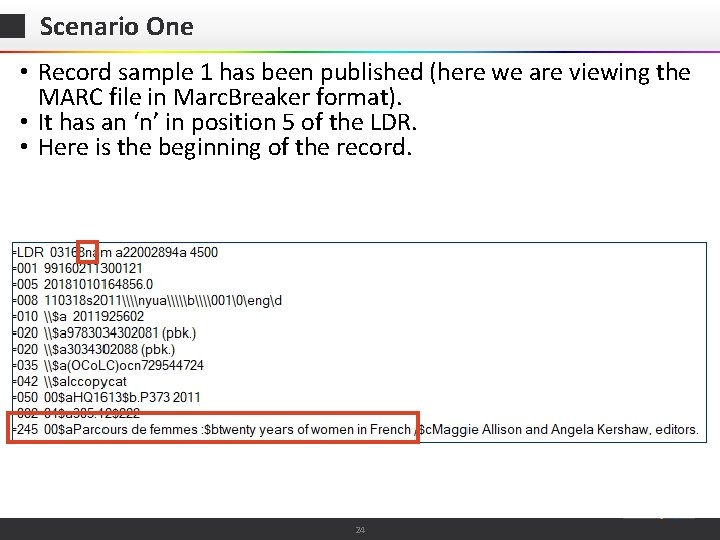
Scenario One • Record sample 1 has been published (here we are viewing the MARC file in Marc. Breaker format). • It has an ‘n’ in position 5 of the LDR. • Here is the beginning of the record. © 2015 Ex Libris | Confidential & Proprietary 24
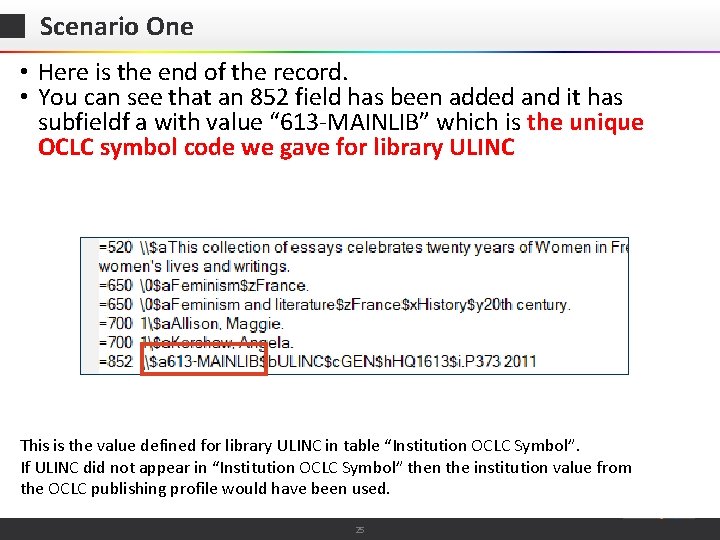
Scenario One • Here is the end of the record. • You can see that an 852 field has been added and it has subfieldf a with value “ 613 -MAINLIB” which is the unique OCLC symbol code we gave for library ULINC This is the value defined for library ULINC in table “Institution OCLC Symbol”. If ULINC did not appear in “Institution OCLC Symbol” then the institution value from the OCLC publishing profile would have been used. © 2015 Ex Libris | Confidential & Proprietary 25
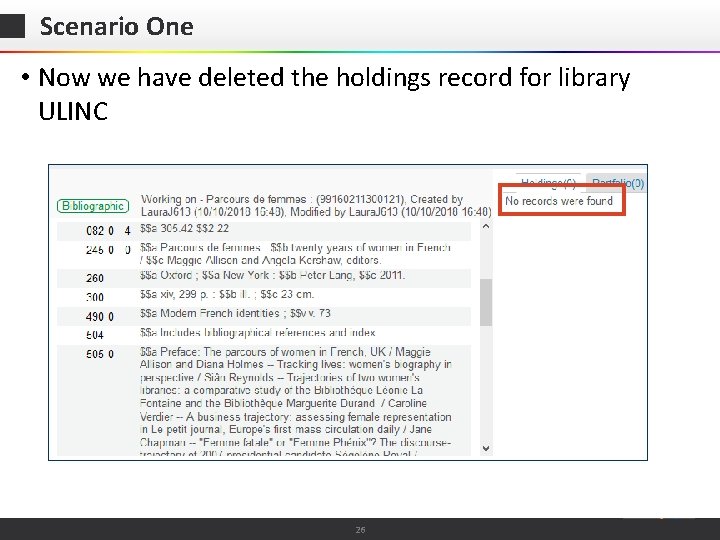
Scenario One • Now we have deleted the holdings record for library ULINC © 2015 Ex Libris | Confidential & Proprietary 26
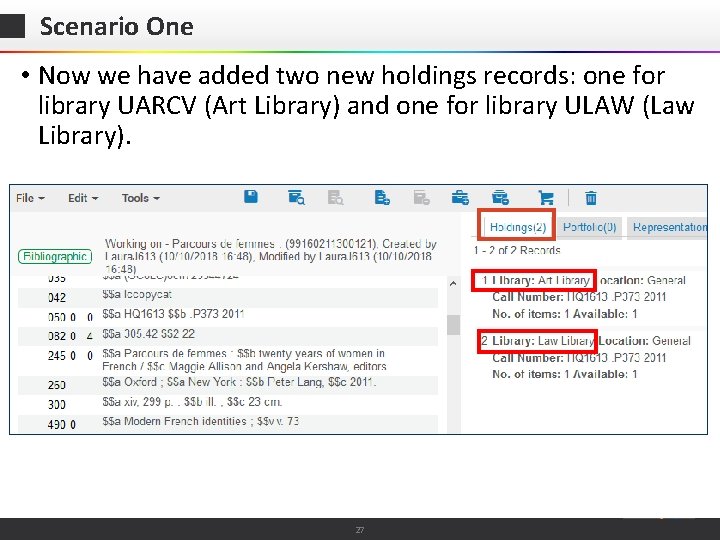
Scenario One • Now we have added two new holdings records: one for library UARCV (Art Library) and one for library ULAW (Law Library). © 2015 Ex Libris | Confidential & Proprietary 27
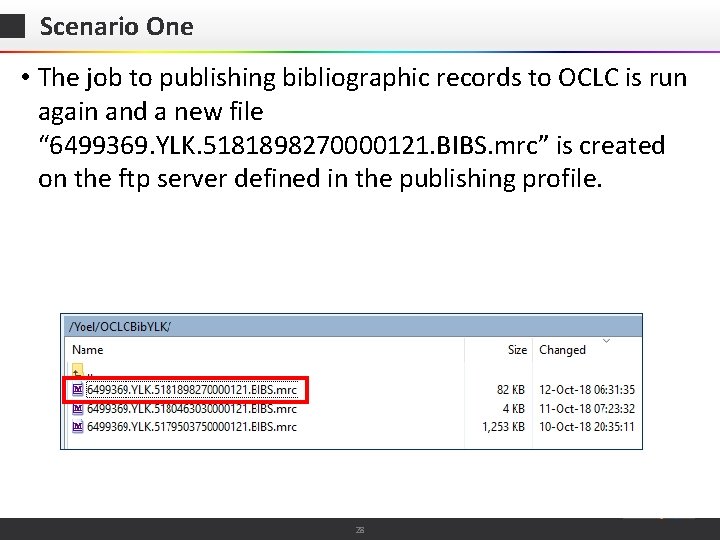
Scenario One • The job to publishing bibliographic records to OCLC is run again and a new file “ 6499369. YLK. 5181898270000121. BIBS. mrc” is created on the ftp server defined in the publishing profile. © 2015 Ex Libris | Confidential & Proprietary 28
Scenario One • As we will see in the output file, our title “Parcours de femmes: twenty years of women in French” is published again, this time with two new 852 fields. • The previous 852 field with “ 613 -MAINLIB” (which is the unique OCLC symbol code we gave for library ULINC) no longer appears because this holdings record was deleted. © 2015 Ex Libris | Confidential & Proprietary 29
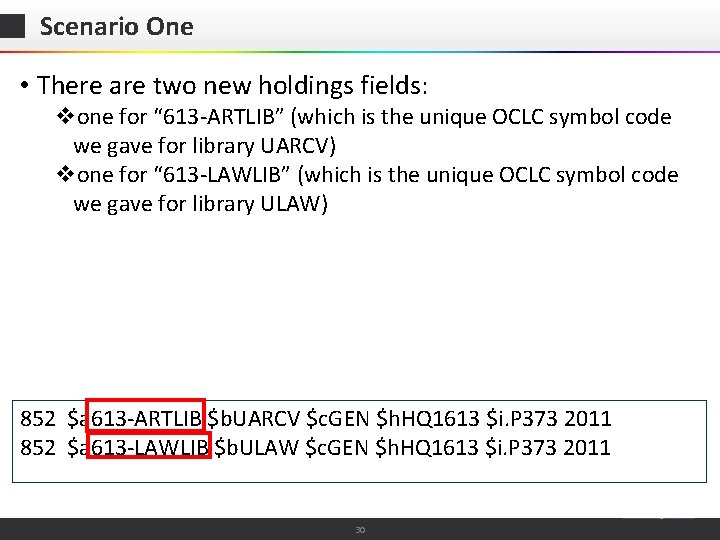
Scenario One • There are two new holdings fields: vone for “ 613 -ARTLIB” (which is the unique OCLC symbol code we gave for library UARCV) vone for “ 613 -LAWLIB” (which is the unique OCLC symbol code we gave for library ULAW) 852 $a 613 -ARTLIB $b. UARCV $c. GEN $h. HQ 1613 $i. P 373 2011 852 $a 613 -LAWLIB $b. ULAW $c. GEN $h. HQ 1613 $i. P 373 2011 © 2015 Ex Libris | Confidential & Proprietary 30
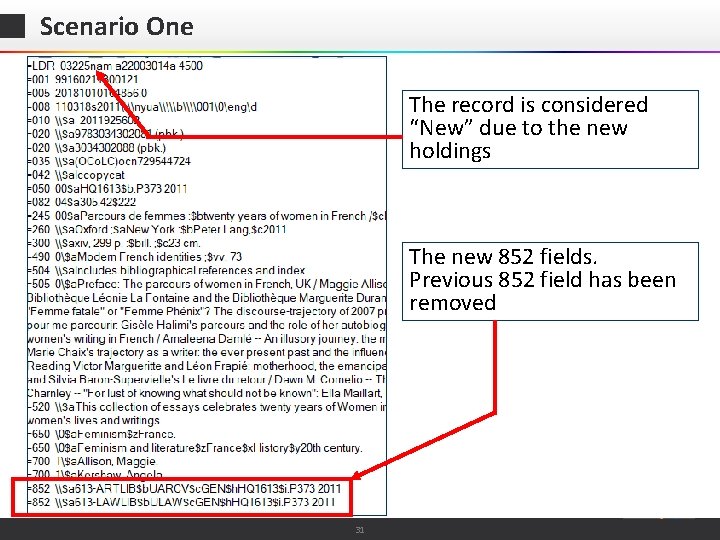
Scenario One The record is considered “New” due to the new holdings The new 852 fields. Previous 852 field has been removed © 2015 Ex Libris | Confidential & Proprietary 31
Contents Introduction Institution OCLC Symbol Configuration The OCLC Publishing profile Scenario One Scenario Two Scenario Three © 2015 Ex Libris | Confidential & Proprietary 32
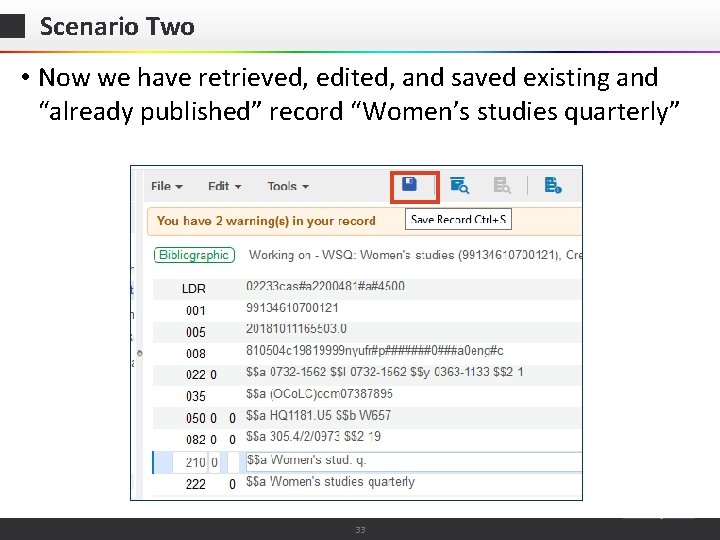
Scenario Two • Now we have retrieved, edited, and saved existing and “already published” record “Women’s studies quarterly” © 2015 Ex Libris | Confidential & Proprietary 33
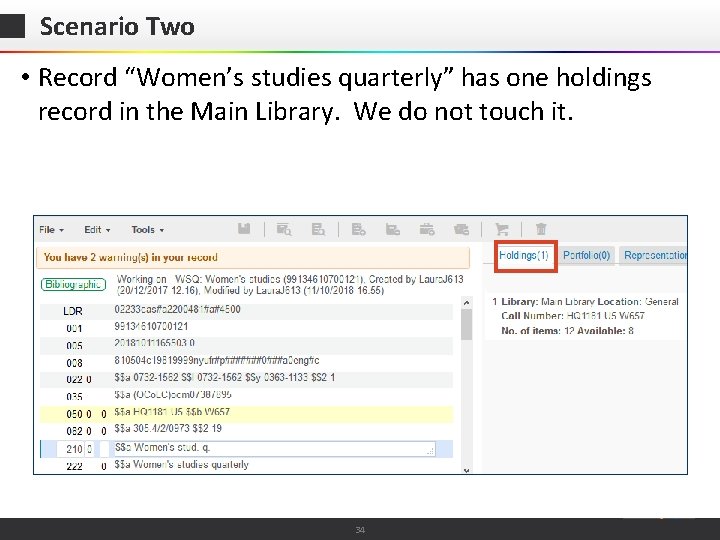
Scenario Two • Record “Women’s studies quarterly” has one holdings record in the Main Library. We do not touch it. © 2015 Ex Libris | Confidential & Proprietary 34
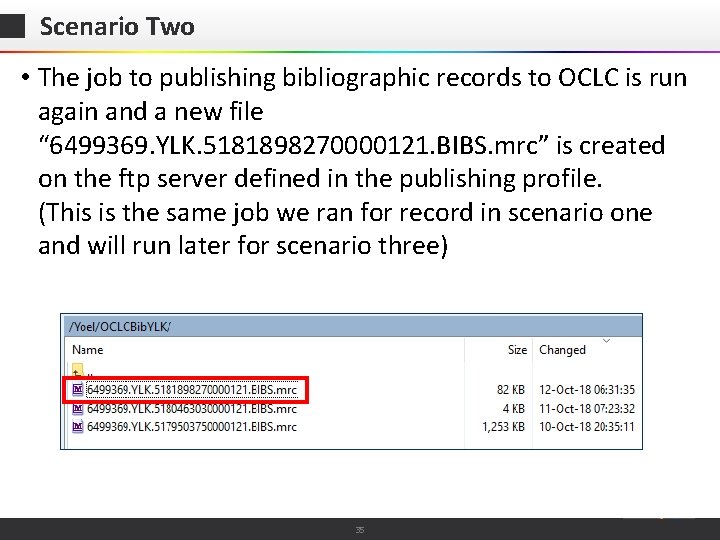
Scenario Two • The job to publishing bibliographic records to OCLC is run again and a new file “ 6499369. YLK. 5181898270000121. BIBS. mrc” is created on the ftp server defined in the publishing profile. (This is the same job we ran for record in scenario one and will run later for scenario three) © 2015 Ex Libris | Confidential & Proprietary 35
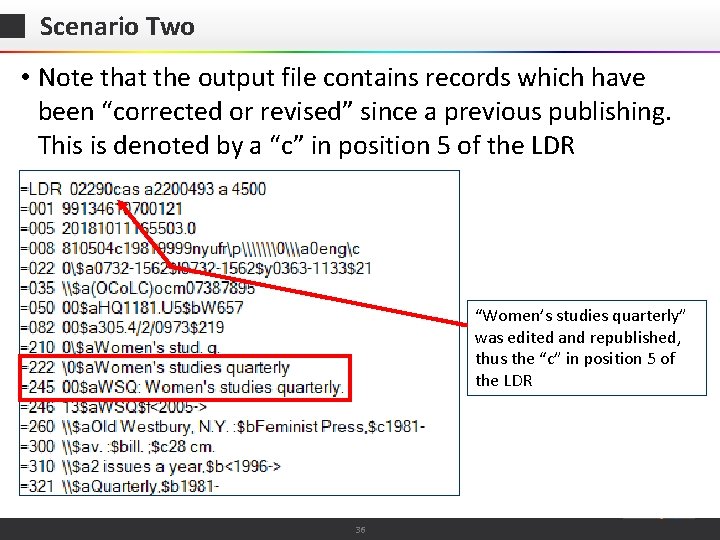
Scenario Two • Note that the output file contains records which have been “corrected or revised” since a previous publishing. This is denoted by a “c” in position 5 of the LDR “Women’s studies quarterly” was edited and republished, thus the “c” in position 5 of the LDR © 2015 Ex Libris | Confidential & Proprietary 36
Contents Introduction Institution OCLC Symbol Configuration The OCLC Publishing profile Scenario One Scenario Two Scenario Three © 2015 Ex Libris | Confidential & Proprietary 37
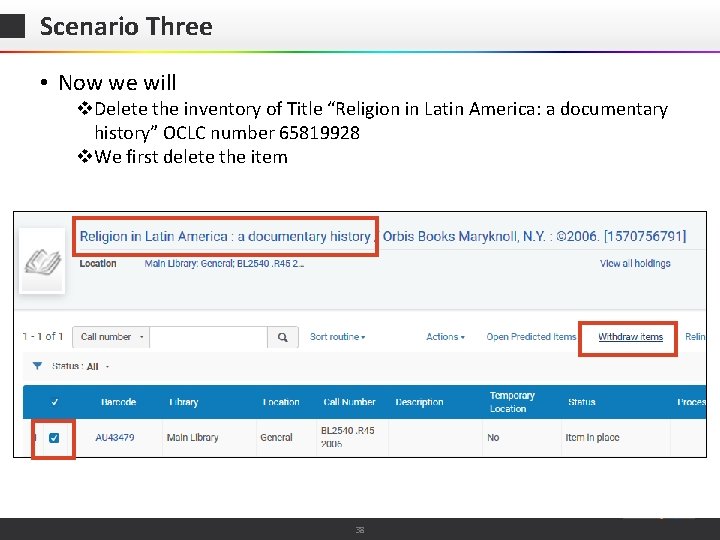
Scenario Three • Now we will v. Delete the inventory of Title “Religion in Latin America: a documentary history” OCLC number 65819928 v. We first delete the item © 2015 Ex Libris | Confidential & Proprietary 38
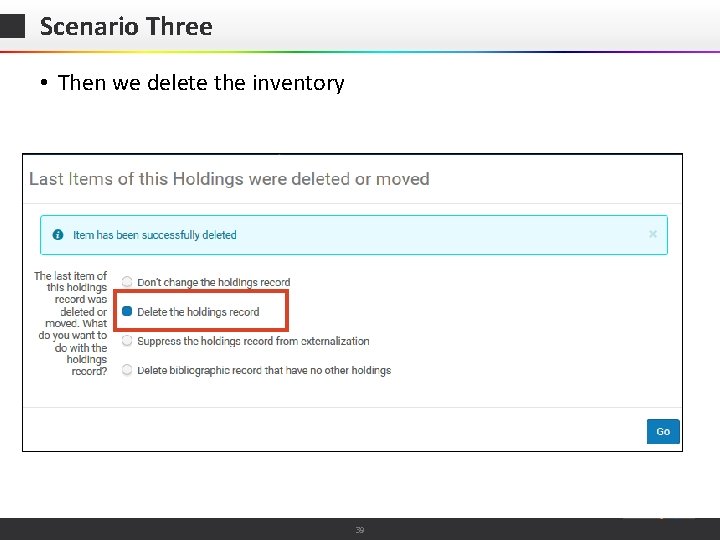
Scenario Three • Then we delete the inventory © 2015 Ex Libris | Confidential & Proprietary 39
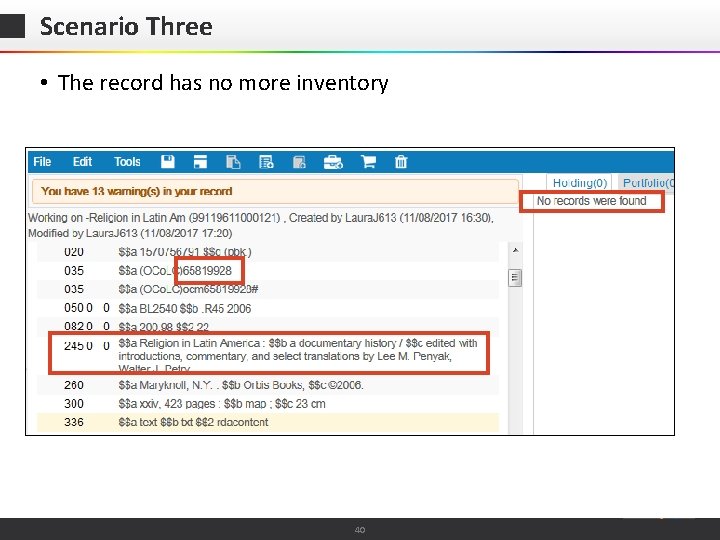
Scenario Three • The record has no more inventory © 2015 Ex Libris | Confidential & Proprietary 40
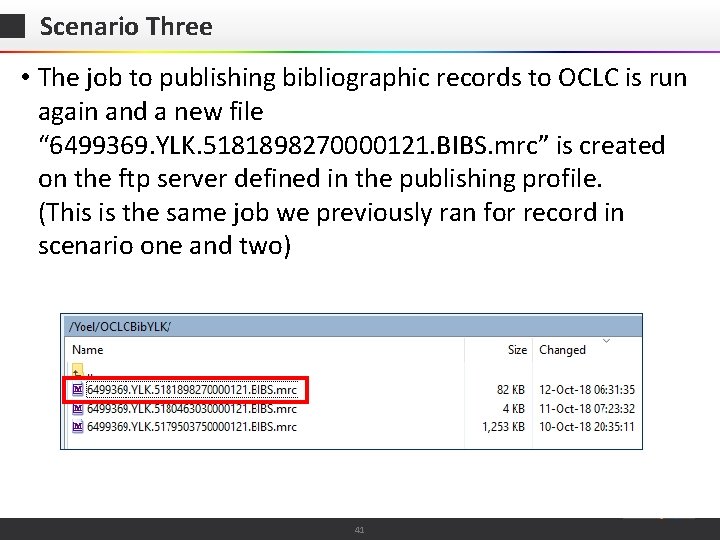
Scenario Three • The job to publishing bibliographic records to OCLC is run again and a new file “ 6499369. YLK. 5181898270000121. BIBS. mrc” is created on the ftp server defined in the publishing profile. (This is the same job we previously ran for record in scenario one and two) © 2015 Ex Libris | Confidential & Proprietary 41
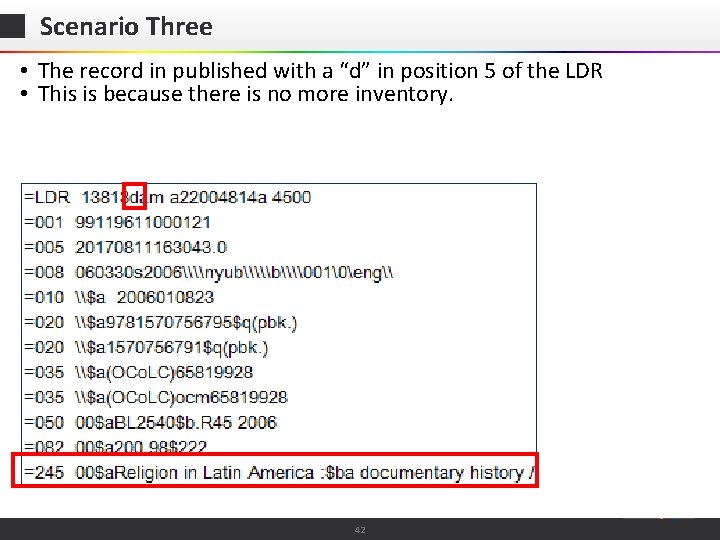
Scenario Three • The record in published with a “d” in position 5 of the LDR • This is because there is no more inventory. © 2015 Ex Libris | Confidential & Proprietary 42
- Slides: 42