
Protocols and Protocol Layering 1 Protocol Agreement about
Protocols and Protocol Layering 1
Protocol • Agreement about communication • Specifies – Format of messages – Meaning of messages – Rules for exchange – Procedures for handling problems 2
Need For Protocols • Hardware is low level • Many problems can occur – Bits corrupted or destroyed – Entire packet lost – Packet duplicated – Packets delivered out of order 3
Need For Protocols (continued) • Need mechanisms to distinguish among – Multiple computers on a network – Multiple applications on a computer – Multiple copies of a single application on a computer 4
Set Of Protocols • Work together • Each protocol solves part of communication problem • Known as – Protocol suite – Protocol family • Designed in layers 5
Plan For Protocol Design • • Intended for protocol designers Divides protocols into layers Each layer devoted to one subproblem Example: ISO 7 -layer reference model 6
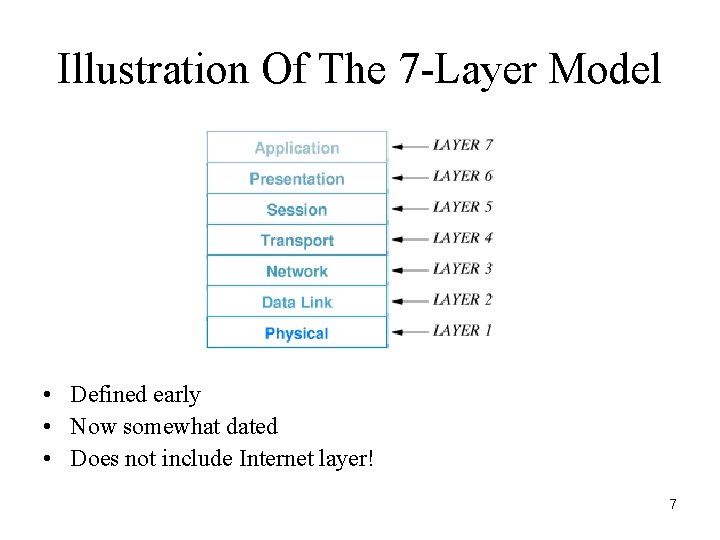
Illustration Of The 7 -Layer Model • Defined early • Now somewhat dated • Does not include Internet layer! 7
ISO Layers • Layer 1: Physical – Underlying hardware • Layer 2: Data Link (media access) – Hardware frame definitions • Layer 3: Network – Packet forwarding • Layer 4: Transport – Reliability 8
ISO Layers (continued) • Layer 5: Session – Login and passwords • Layer 6: Presentation – Data representation • Layer 7: Application – Individual application program 9
Layers And Protocol Software • Protocol software follows layering model – One software module per layer – Modules cooperate – Incoming or outgoing data passes from one module to another • Entire set of modules known as stack 10
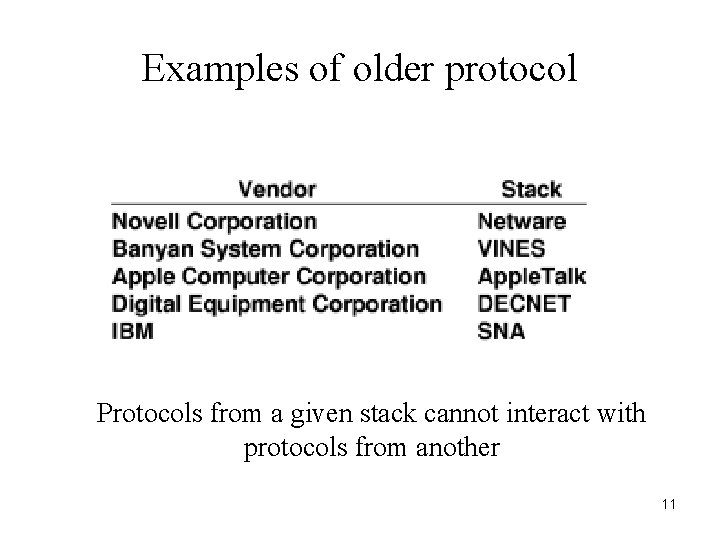
Examples of older protocol Protocols from a given stack cannot interact with protocols from another 11
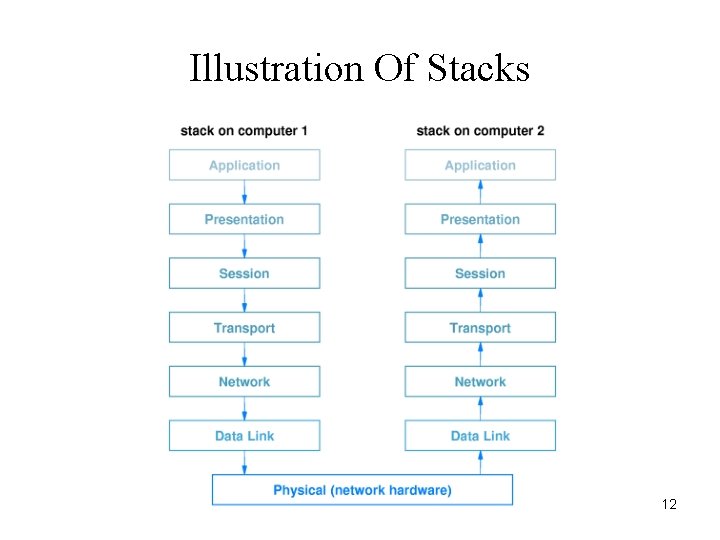
Illustration Of Stacks 12
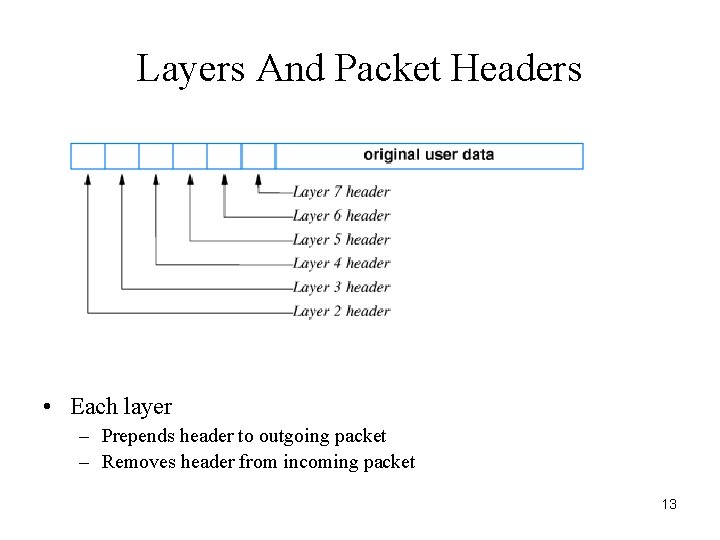
Layers And Packet Headers • Each layer – Prepends header to outgoing packet – Removes header from incoming packet 13
Scientific Layering Principle • Software implementing layer N at the destination receives exactly the message sent by software implementing layer N at the source. 14
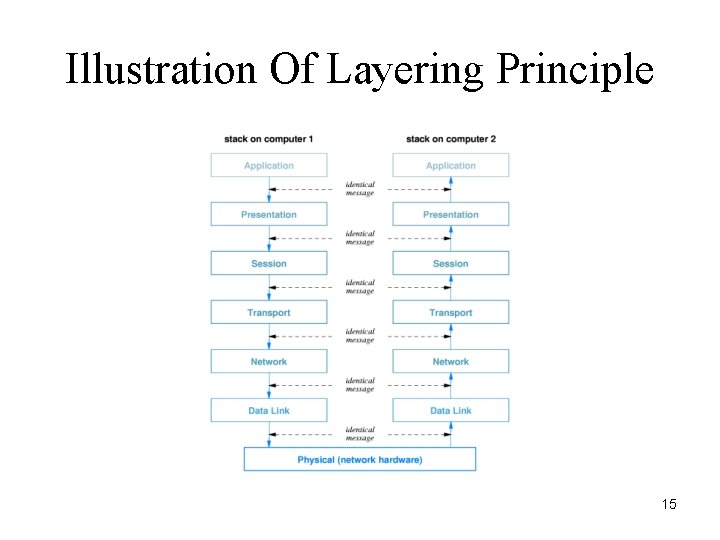
Illustration Of Layering Principle 15
Protocol Techniques • For bit corruption – Parity – Checksum – CRC • For out-of-order delivery – Sequence numbers • Duplication – Sequence numbers 16
Protocol Techniques (continued) • For lost packets – Positive acknowledge and retransmission • For replay (excessive delay) – Unique message ID • For data overrun – Flow control 17
Flow Control • Needed because – Sending computer faster than receiving computer – Sending application faster than receiving application • Related to buffering • Two forms – Stop-and-go – Sliding window 18
Stop-And-Go Flow Control • Sending side – Transmits one packet – Waits for signal from receiver • Receiving side – Receives and consumes packet – Transmits signal to sender • Inefficient 19
Sliding Window Flow Control • Receiving side – Establishes multiple buffers and informs sender • Sending side – Transmits packets for all available buffers – Only waits if no signal arrives before transmission completes • Receiving side – Sends signals as packets arrive 20
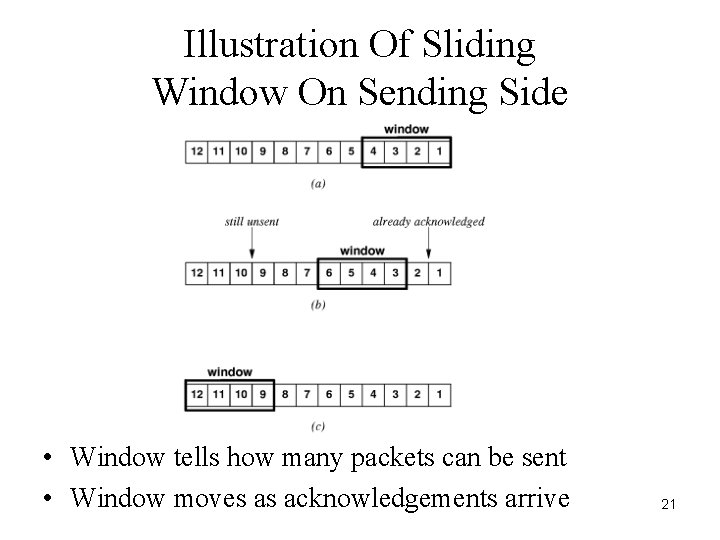
Illustration Of Sliding Window On Sending Side • Window tells how many packets can be sent • Window moves as acknowledgements arrive 21
Performance • Stop-and-go – Slow – Useful only in special cases • Sliding window – Fast – Needed in high-speed network 22
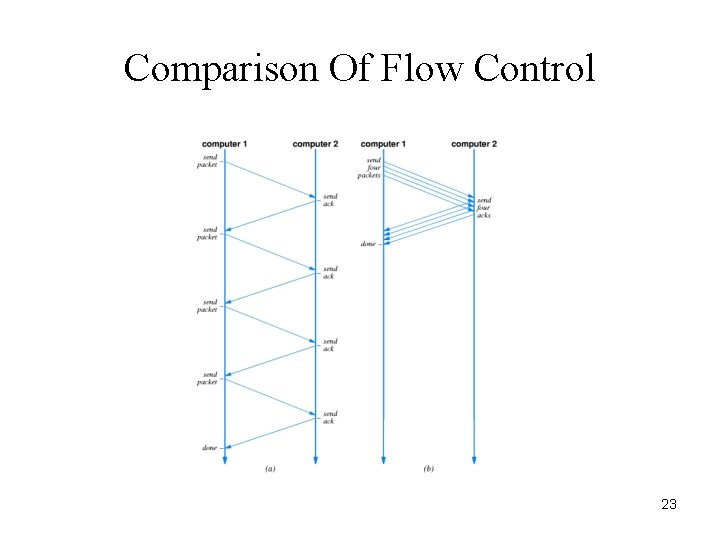
Comparison Of Flow Control 23
Why Sliding Window? • Simultaneously – Increase throughput – Control flow • Speedup – Tw = min(B, Tg x W) – where * Tw is sliding window throughput * B is underlying hardware bandwidth * Tg is stop-and-go throughput * W is window size. 24
Congestion • • Fundamental problem in networks Caused by traffic, not hardware failure Analogous to congestion on a highway Principle cause of delay 25
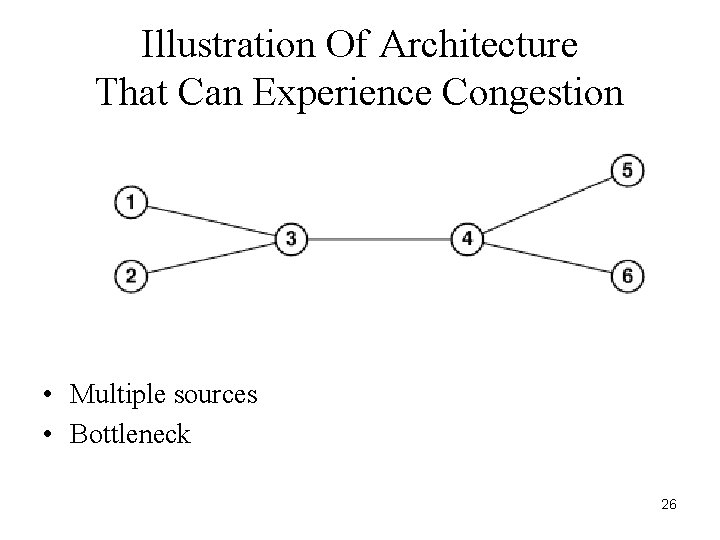
Illustration Of Architecture That Can Experience Congestion • Multiple sources • Bottleneck 26
Congestion And Loss • Modern network hardware works well; most packet loss results from congestion, not from hardware failure. 27
Avoiding Congestion • Rate control – Limit rate of data transmission – Performed by sending computer – Performed by network • Network rate control – Monitor incoming traffic – Drop or reject packets over rate – Called traffic shaping 28
- Slides: 28