
PROJECT TIME PLANNING Process and Bar Chart Technique
PROJECT TIME PLANNING Process and Bar Chart Technique
<Definition of Planning Ø Planning is the process of thinking systematically about the future in order to decide § what our goals are, and § how we are going to achieve them. Ø Planning means looking ahead, making preparations, and deciding the best course of action.
<Dimensions of Planning can be viewed from following points: Ø Subject: - Time Planning, Quality Planning, Financial Planning, Risk Planning, Product Planning, Organizational Planning, ……. Ø Organization: - Strategic Planning, Corporate Planning, Project Planning, … Ø Time: - Long-Rang Planning, Planning Short-Range Planning, Weekly Planning, ….
<Why is Time Planning necessary? 1) The increasing importance of timely completion 2) The continuous complexity and growth in the size of the project generates the necessity for specialization. Specialization may lead to a breakdown of communications. Time planning must be found to facilitate communications 3) Planning is essential for resource management 4) Planning is important for the efficient and maximum utilization of resources
<Why is Time Planning necessary? 5) Planning is basis for evaluating progress, controlling the work and making decisions. 6) For achieving an increase in production 7) Financiers require a workable plan. 8) Essential in projects when their is transfer of personnel 9) Minimum risk of the problems occurring.
<Who Needs Time Planning? Ø Customer/ Client/ Owner Ø Designer/ Consultant Ø Project management team (Manager, Engineers) Ø Cost estimating department Ø Planning and controlling department Ø Supervisors, foremen, labors Ø Supplier Ø Financiers
<Processes of Time Planning 1. Visualize and define the activities (WBS =Work breakdown Structure)) 2. Sequence the activities (Job Logic). Logic 3. Estimate the activity duration 4. Schedule the project or phase. 5. Allocate and balance resources
<Processes of Time Planning 1. Visualize and define the activities (WBS =Work breakdown Structure)) 2. Sequence the activities (Job Logic). Logic 3. Estimate the activity duration 4. Schedule the project or phase. 5. Allocate and balance resources
<1 a) Visualize and define the activities a) An activity is a single work step (element) that has a recognizable beginning and end and requires time for its accomplishment. Activity definition involves identifying and documenting the specific activities that must be performed to produce the deliverables and sub-deliverables.
<1 b) Visualize and define the activities b) The technique of decomposition (Work Breakdown) Breakdown may be used in defining activities. Decomposition involves subdividing project work packages into smaller, more manageable components to provide better management control. c) The output from activity definition is the activity list d) The Level of detail of the plan should be considered in this phase.
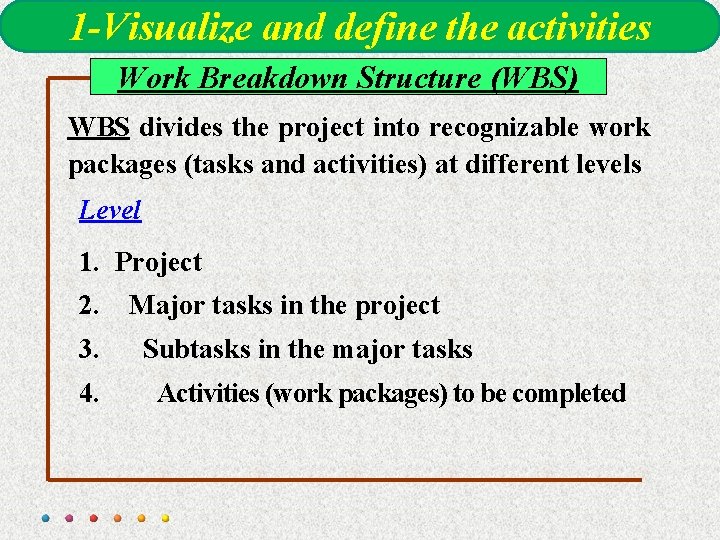
1 -Visualize and define the activities Work Breakdown Structure (WBS) WBS divides the project into recognizable work packages (tasks and activities) at different levels Level 1. Project 2. 3. 4. Major tasks in the project Subtasks in the major tasks Activities (work packages) to be completed
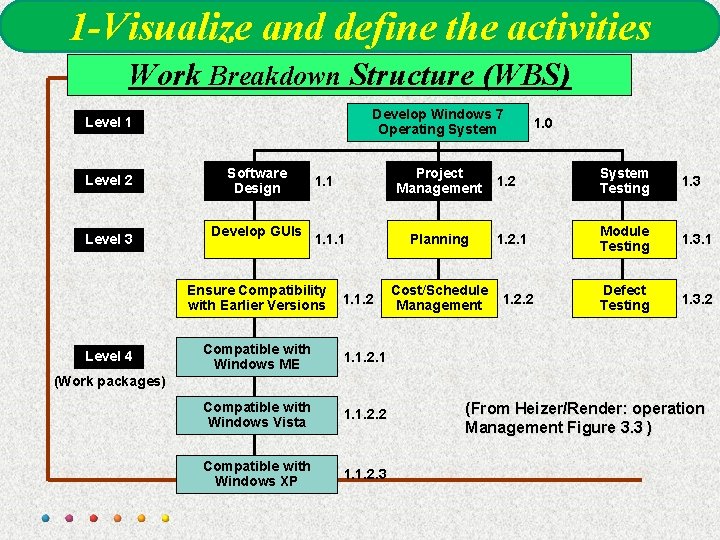
1 -Visualize and define the activities Work Breakdown Structure (WBS) Develop Windows 7 Operating System Level 1 Level 2 Level 3 Software Design Develop GUIs 1. 1. 1 Ensure Compatibility with Earlier Versions Level 4 Project Management 1. 1. 2 Compatible with Windows ME 1. 1. 2. 1 Compatible with Windows Vista 1. 1. 2. 2 Compatible with Windows XP 1. 1. 2. 3 Planning Cost/Schedule Management 1. 0 1. 2 System Testing 1. 3 1. 2. 1 Module Testing 1. 3. 1 Defect Testing 1. 3. 2 1. 2. 2 (Work packages) (From Heizer/Render: operation Management Figure 3. 3 )
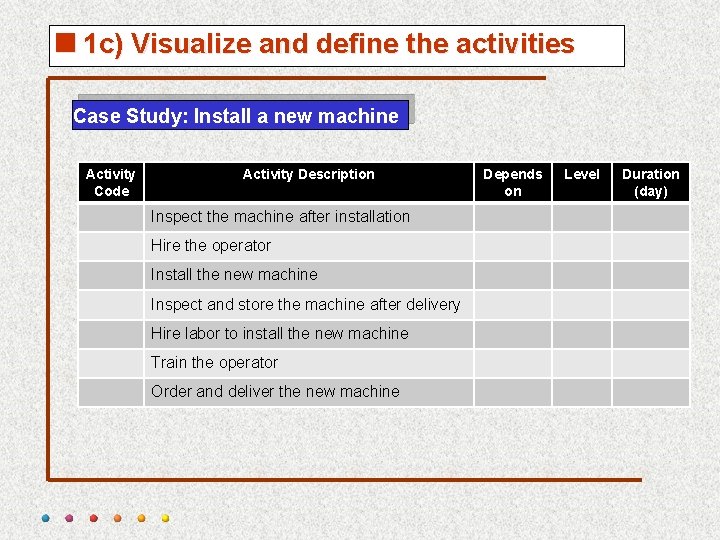
<1 c) Visualize and define the activities Case Study: Install a new machine Activity Code Activity Description Inspect the machine after installation Hire the operator Install the new machine Inspect and store the machine after delivery Hire labor to install the new machine Train the operator Order and deliver the new machine Depends on Level Duration (day)
<Processes of Time Planning 1. Visualize and define the activities (WBS =Work breakdown Structure)) 2. Sequence the activities (Job Logic). Logic 3. Estimate the activity duration 4. Schedule the project or phase. 5. Allocate and balance resources
<2 a) Sequence the activities 1. Sequence the activities or job logic refers to identifying and documenting interactivity logical relationships, relationships i. e. determined order in which the activities are to be accomplished in the project.
<2 b) Sequence the activities 2. Job plan must reflect the practical restraints or limitations that apply to most job activities. The types of restraints are: § § § Mandatory dependencies or hard logic (natural dependency), Preferred logic (Discretionary dependencies), External dependencies, Resource restraints and Safety restraints. 3. Predecessor activities mean coming before, while successor activities mean coming after. 4. Overlap the activities to reduce the project time.
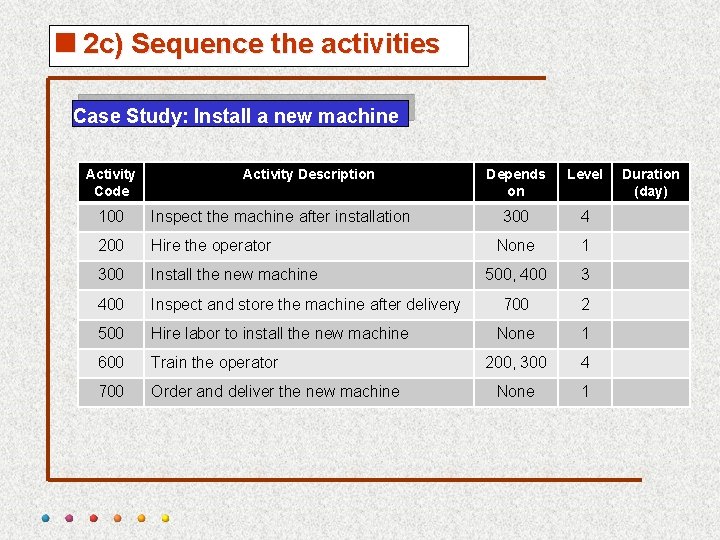
<2 c) Sequence the activities Case Study: Install a new machine Activity Code Activity Description 100 Inspect the machine after installation 200 Hire the operator 300 Install the new machine 400 Inspect and store the machine after delivery 500 Hire labor to install the new machine 600 Train the operator 700 Order and deliver the new machine Depends on Level 300 4 None 1 500, 400 3 700 2 None 1 200, 300 4 None 1 Duration (day)
<Processes of Time Planning 1. Visualize and define the activities (WBS =Work breakdown Structure)) 2. Sequence the activities (Job Logic). Logic 3. Estimate the activity duration 4. Schedule the project or phase. 5. Allocate and balance resources
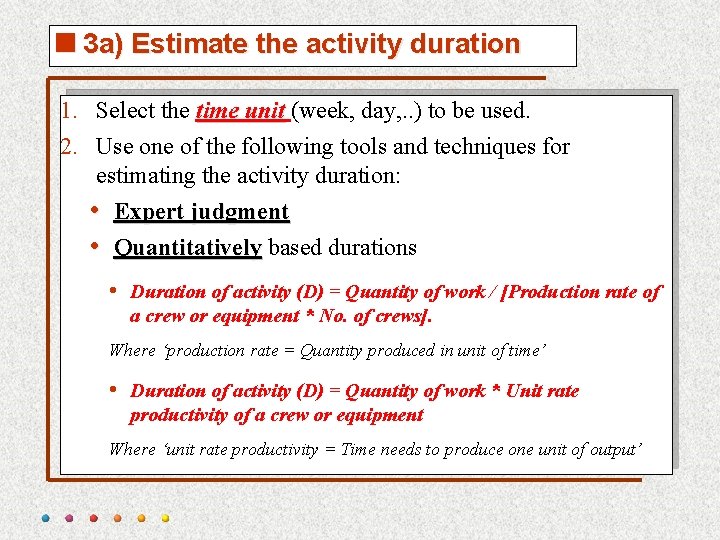
<3 a) Estimate the activity duration 1. Select the time unit (week, day, . . ) to be used. 2. Use one of the following tools and techniques for estimating the activity duration: • Expert judgment • Quantitatively based durations • Duration of activity (D) = Quantity of work / [Production rate of a crew or equipment * No. of crews]. Where ‘production rate = Quantity produced in unit of time’ • Duration of activity (D) = Quantity of work * Unit rate productivity of a crew or equipment Where ‘unit rate productivity = Time needs to produce one unit of output’
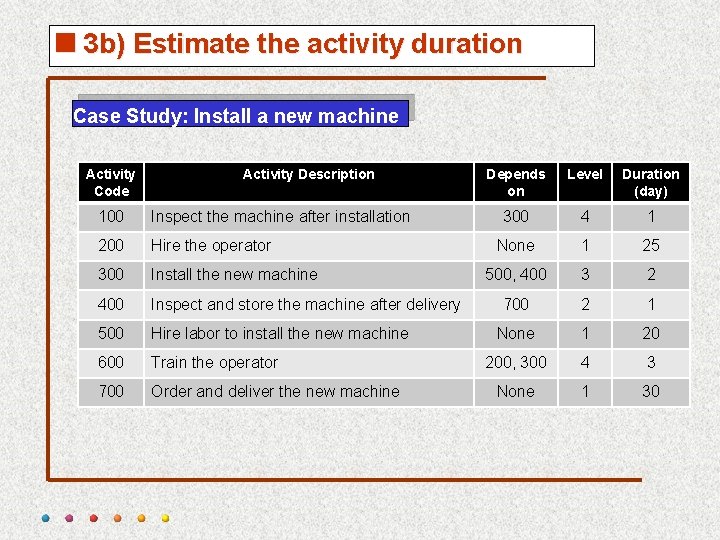
<3 b) Estimate the activity duration Case Study: Install a new machine Activity Code Activity Description 100 Inspect the machine after installation 200 Hire the operator 300 Install the new machine 400 Inspect and store the machine after delivery 500 Hire labor to install the new machine 600 Train the operator 700 Order and deliver the new machine Depends on Level Duration (day) 300 4 1 None 1 25 500, 400 3 2 700 2 1 None 1 20 200, 300 4 3 None 1 30
<Processes of Time Planning 1. Visualize and define the activities (WBS =Work breakdown Structure)) 2. Sequence the activities (Job Logic). Logic 3. Estimate the activity duration 4. Schedule the project or phase. 5. Allocate and balance resources
<4 a) Schedule the Project or Phase q Scheduling Defined It is process showing relationship of activities and determining of the project duration time and the project activities starting and finishing timings.
<4 a) Schedule the Project or Phase q Purpose of Scheduling 1. Ensure that all activities are planned for 2. Their order of performance is accounted for 3. The activity time estimates are recorded 4. The overall project time is developed q In scheduling we consider the following questions: • • How long the project is expected to take? When each activity may be scheduled (started and ended)? How resources can be used more proper? What are the critical bottlenecks in the project?
<4 b) Schedule the Project or Phase q Project Scheduling principles v Project scheduling is carried out before a project begins. It involves (1) identifying tasks, (2) estimating duration and (3) allocating resources. v The revision is done by creating milestones. Once the project is underway, the schedule may need to be revised based on initial progress. This ensures (1) cost estimates and (2) time constraints are maintained at a specific level of quality and scope.
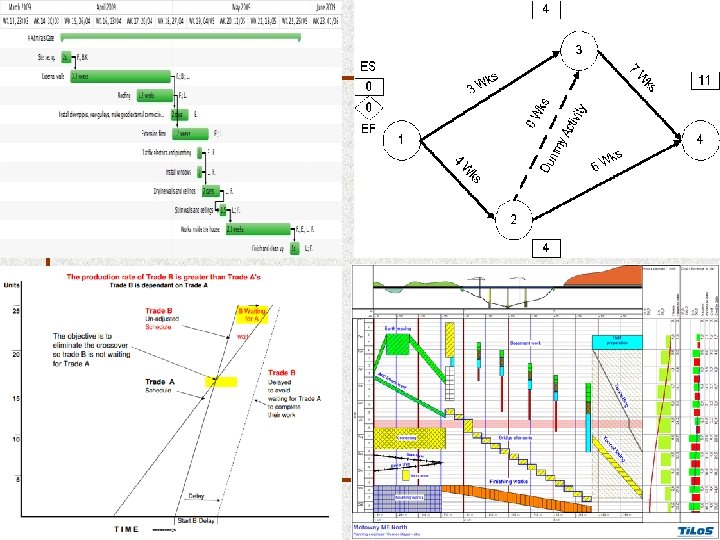
<Time Planning Techniques q To schedule the project, the planner needs a Time Planning Technique Ø Bar Charts and Linked Bar Charts; Ø Network Model (Analysis), either § Activity on arrow (AOA), § Activity on node (AON), § Precedence Diagram Ø Line of Balance; Ø Time-location Diagram.
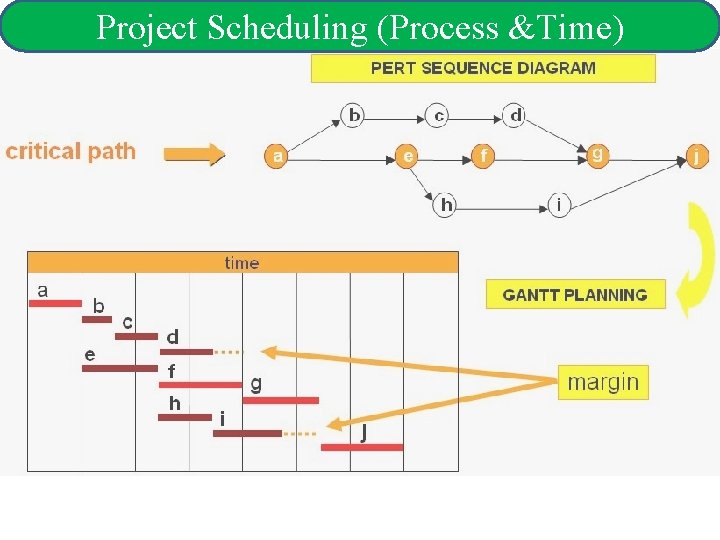
Project Scheduling (Process &Time)
<BAR CHART Ø During World War 1, Henry Gantt developed the Bar chart planning technique. Ø A bar chart graphically describes a project consisting of well-defined activities, the completion of which marks its end. Ø An activity is a task whose performance contributes to completion of the overall project.
<BAR CHART Ø All activities are listed in a column at the left side of the diagram. Ø A horizontal time scale extends to the right of the list. Ø A bar presenting each activity is drawn between its corresponding scheduled start and finish times.
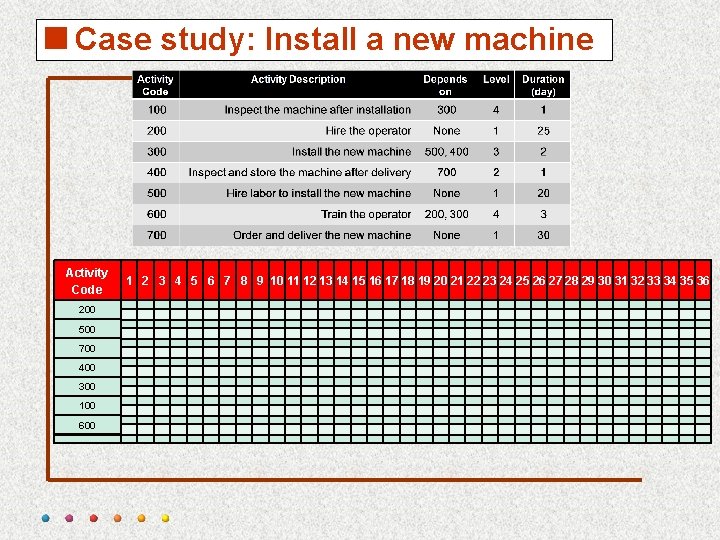
<Case study: Install a new machine Activity Code 200 500 700 400 300 100 600 1 2 3 4 5 6 7 8 9 10 11 12 13 14 15 16 17 18 19 20 21 22 23 24 25 26 27 28 29 30 31 32 33 34 35 36
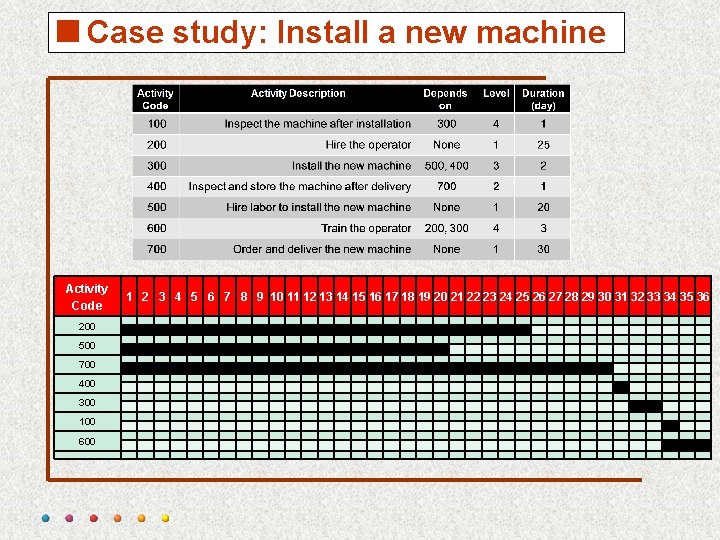
<Case study: Install a new machine Activity Code 200 500 700 400 300 100 600 1 2 3 4 5 6 7 8 9 10 11 12 13 14 15 16 17 18 19 20 21 22 23 24 25 26 27 28 29 30 31 32 33 34 35 36
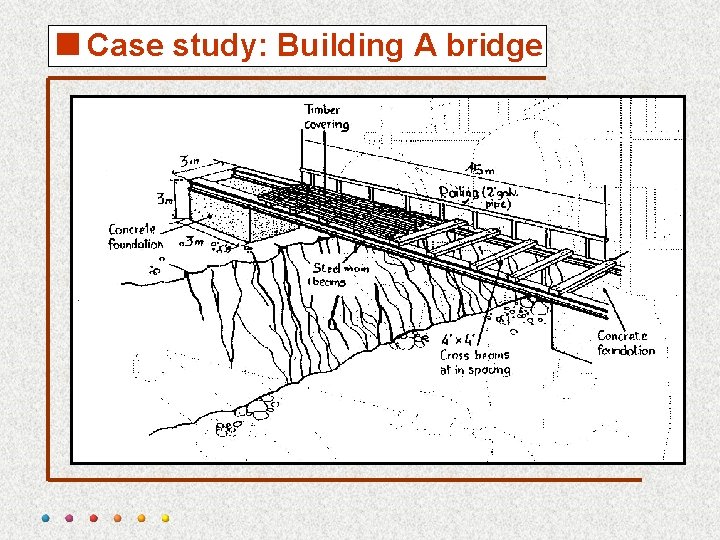
<Case study: Building A bridge
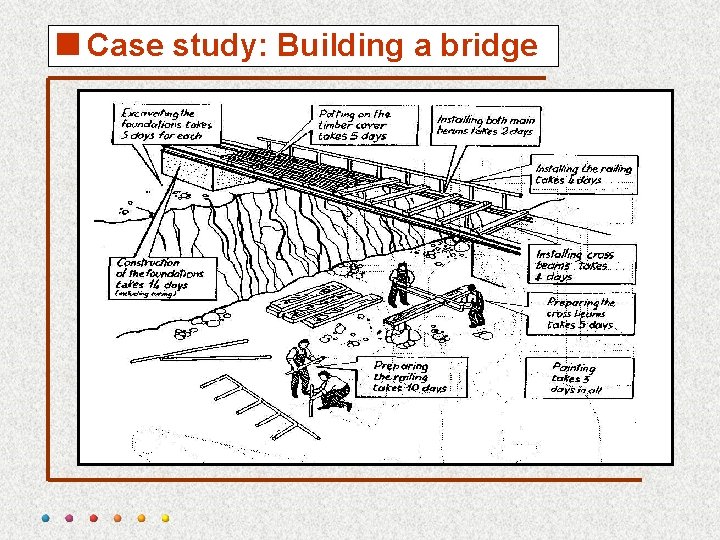
<Case study: Building a bridge
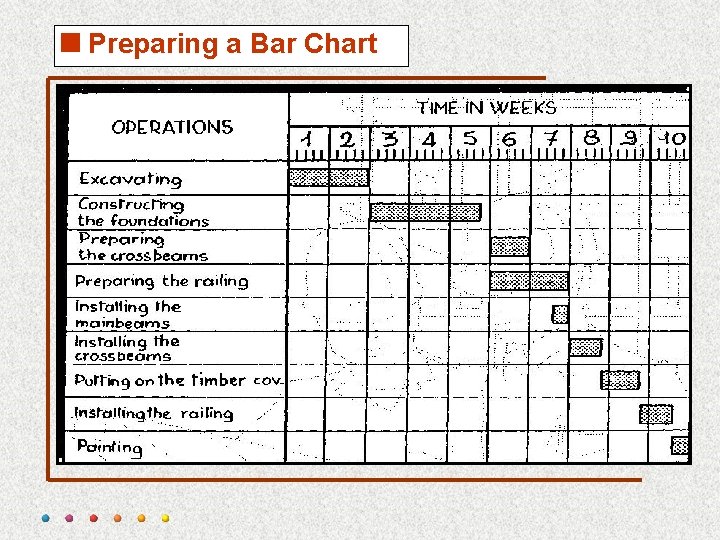
<Preparing a Bar Chart
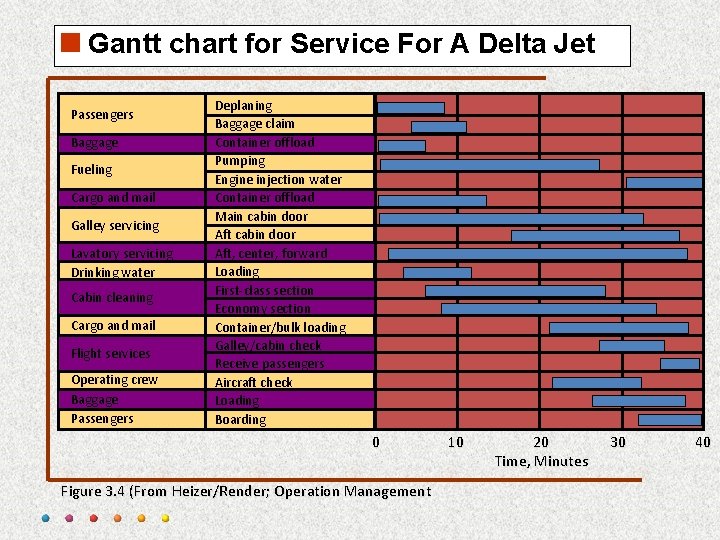
<Gantt chart for Service For A Delta Jet Passengers Baggage Fueling Cargo and mail Galley servicing Lavatory servicing Drinking water Cabin cleaning Cargo and mail Flight services Operating crew Baggage Passengers Deplaning Baggage claim Container offload Pumping Engine injection water Container offload Main cabin door Aft, center, forward Loading First-class section Economy section Container/bulk loading Galley/cabin check Receive passengers Aircraft check Loading Boarding 0 Figure 3. 4 (From Heizer/Render; Operation Management 10 20 Time, Minutes 30 40
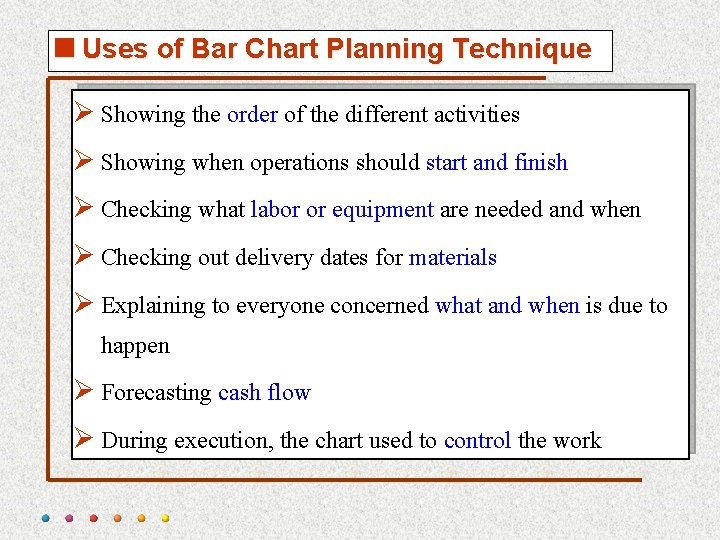
<Uses of Bar Chart Planning Technique Ø Showing the order of the different activities Ø Showing when operations should start and finish Ø Checking what labor or equipment are needed and when Ø Checking out delivery dates for materials Ø Explaining to everyone concerned what and when is due to happen Ø Forecasting cash flow Ø During execution, the chart used to control the work
<Advantages of Bar Chart Ø Simple graphical form Ø Easy understood for all levels of management Ø Good form of communication.
<Limitations of Bar Chart Ø Very cumbersome as the number of activities increases Ø Logic is not expressed in the diagram (at the initial stage of developing GS) Ø Difficult to use it forecasting the effects of changes, it is therefore limited as a control tool Ø No indication where management attention should be focused Ø Ineffective for project shortening
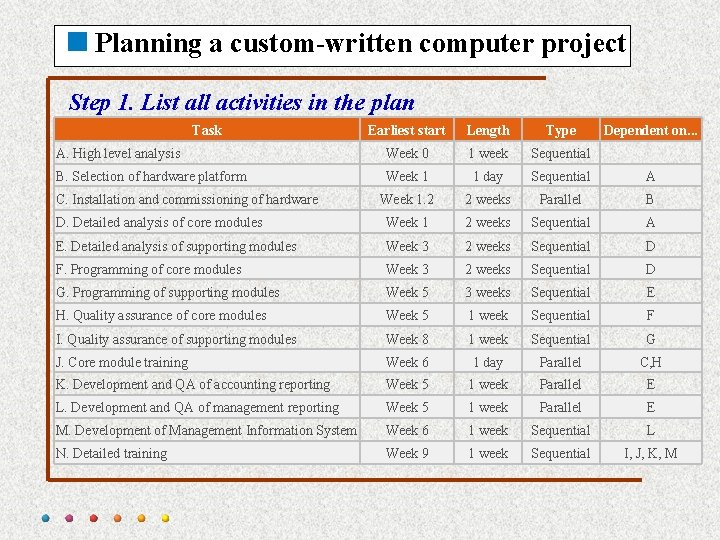
<Planning a custom-written computer project Step 1. List all activities in the plan Task Earliest start Length Type A. High level analysis Week 0 1 week Sequential B. Selection of hardware platform Week 1 1 day Sequential A Week 1. 2 2 weeks Parallel B D. Detailed analysis of core modules Week 1 2 weeks Sequential A E. Detailed analysis of supporting modules Week 3 2 weeks Sequential D F. Programming of core modules Week 3 2 weeks Sequential D G. Programming of supporting modules Week 5 3 weeks Sequential E H. Quality assurance of core modules Week 5 1 week Sequential F I. Quality assurance of supporting modules Week 8 1 week Sequential G J. Core module training Week 6 1 day Parallel C, H K. Development and QA of accounting reporting Week 5 1 week Parallel E L. Development and QA of management reporting Week 5 1 week Parallel E M. Development of Management Information System Week 6 1 week Sequential L N. Detailed training Week 9 1 week Sequential I, J, K, M C. Installation and commissioning of hardware Dependent on. . .
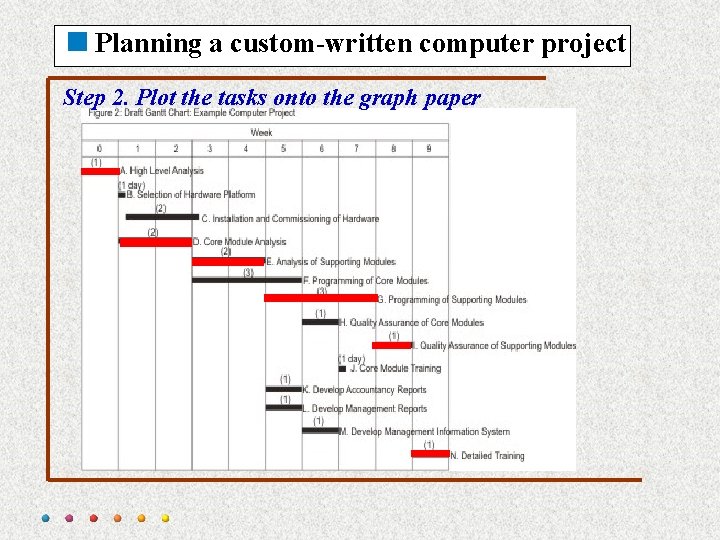
<Planning a custom-written computer project Step 2. Plot the tasks onto the graph paper
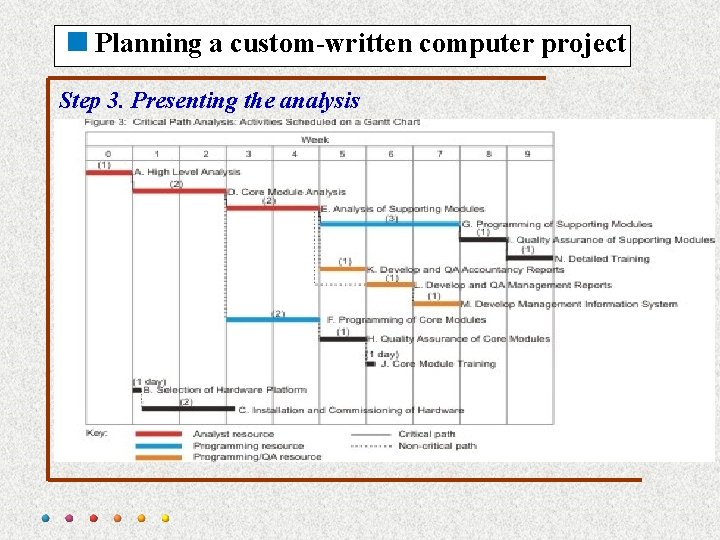
<Planning a custom-written computer project Step 3. Presenting the analysis
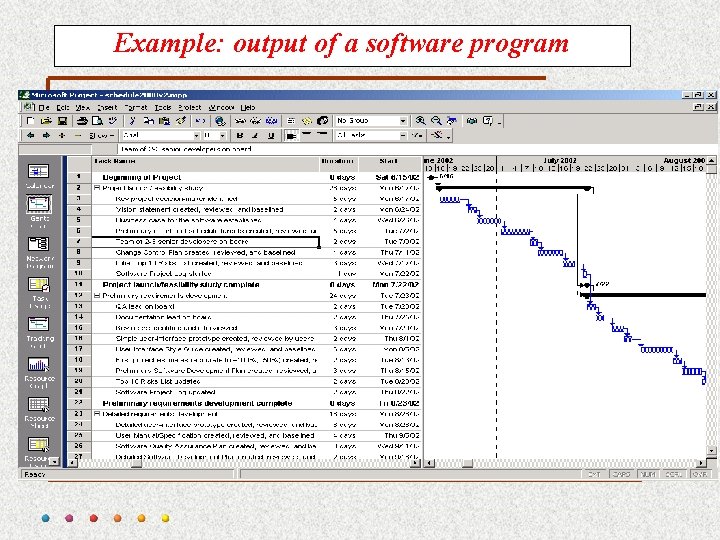
Example: output of a software program
- Slides: 42