
Project Time Management Chapter 6 Fall 2015 Section
- Slides: 45
Project Time Management (Chapter 6) Fall 2015, Section 2 | Week 7 Mon 10/07/15
Reminder � Monday (10/12): Workshop for Microsoft Project Assignment (Due 10/18) (individual) Ø Wednesday (10/14): WBS & Gantt Charts for your group assignment (due 10/25) and Q&A for Workshop for Microsoft Project Assignment Ø Progress Report #1 due 10/11 (individual) Information Technology Project Management, Seventh Edition Copyright 2014 2
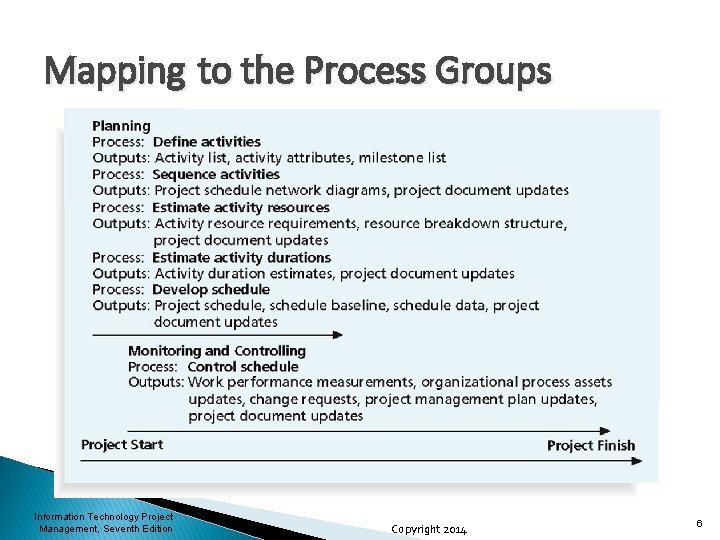
Topic Overview ØThe importance of Project Time Management ØThe processes of Project Time Management: • Defining activities • Sequence activities • Estimate activity resources • Estimate activity durations • Develop schedule • Control schedule Information Technology Project Management, Seventh Edition Copyright 2014 3
The importance of Project Time Management Ø Time has the least flexibility • Passes no matter what happens on a project Ø Schedule issues are one of the biggest reasons for project conflicts • • Especially true in second half of a project Differences in work styles, personalities, cultures often contributing factors o Olympic Games, Soccer World Cup Information Technology Project Management, Seventh Edition Copyright 2014 4
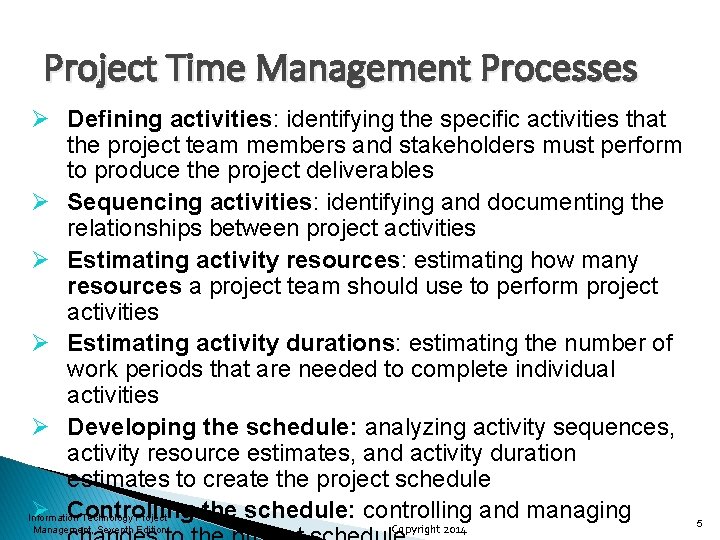
Project Time Management Processes Ø Defining activities: identifying the specific activities that the project team members and stakeholders must perform to produce the project deliverables Ø Sequencing activities: identifying and documenting the relationships between project activities Ø Estimating activity resources: estimating how many resources a project team should use to perform project activities Ø Estimating activity durations: estimating the number of work periods that are needed to complete individual activities Ø Developing the schedule: analyzing activity sequences, activity resource estimates, and activity duration estimates to create the project schedule Ø Controlling the schedule: controlling and managing Information Technology Project Management, Seventh Edition Copyright 2014 5
Mapping to the Process Groups Information Technology Project Management, Seventh Edition Copyright 2014 6
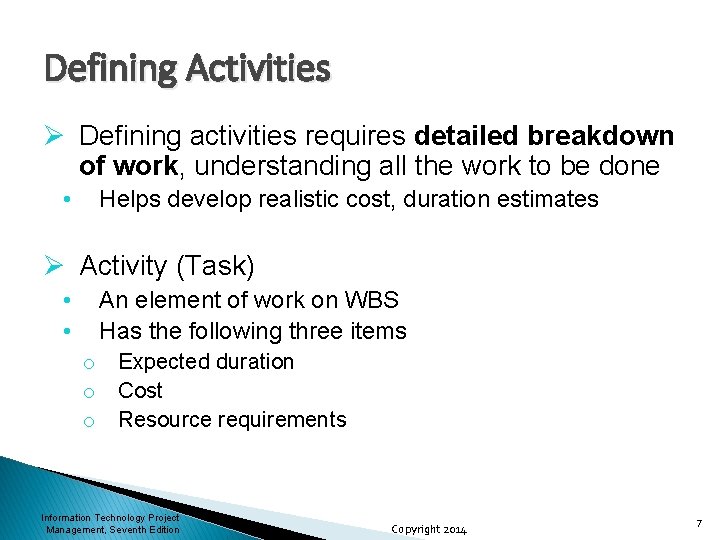
Defining Activities Ø Defining activities requires detailed breakdown of work, understanding all the work to be done • Helps develop realistic cost, duration estimates Ø Activity (Task) • • An element of work on WBS Has the following three items o Expected duration o Cost o Resource requirements Information Technology Project Management, Seventh Edition Copyright 2014 7
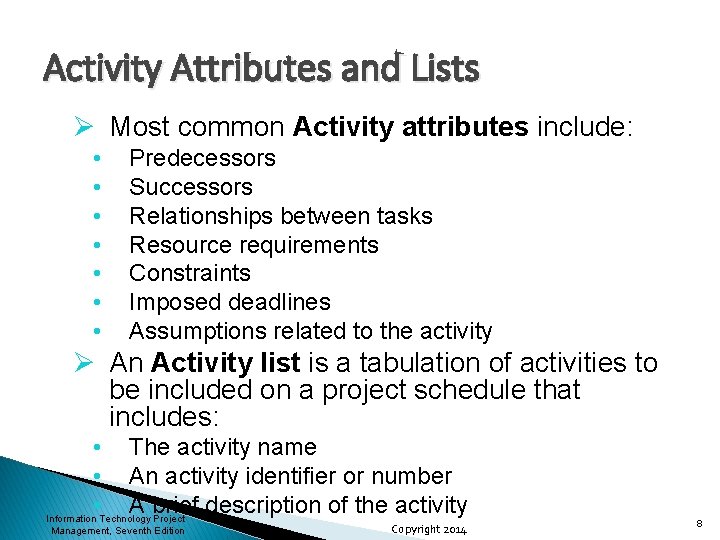
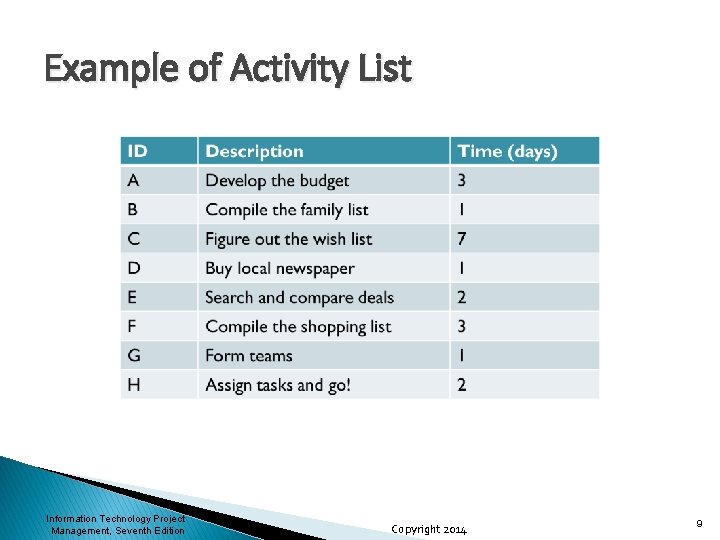
Activity Attributes and Lists Ø Most common Activity attributes include: • • Predecessors Successors Relationships between tasks Resource requirements Constraints Imposed deadlines Assumptions related to the activity Ø An Activity list is a tabulation of activities to be included on a project schedule that includes: • The activity name • An activity identifier or number • A brief description of the activity Information Technology Project Management, Seventh Edition Copyright 2014 8
Example of Activity List Information Technology Project Management, Seventh Edition Copyright 2014 9
Milestones Ø A milestone is a significant event that normally has no duration Ø It often takes several activities and a lot of work to complete a milestone Ø They’re useful tools for setting schedule goals and monitoring progress Ø Examples include obtaining customer sign-off on key documents or completion of specific products Information Technology Project Management, Seventh Edition Copyright 2014 10
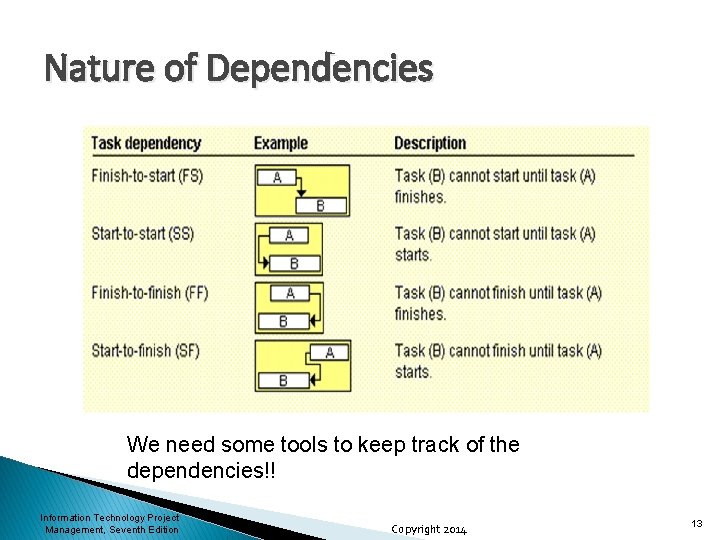
Sequencing Activities Ø Involves reviewing activities and determining dependencies Ø A dependency is the sequencing of project activities or tasks • • • One may depend on the other being complete They may both use the same limited resource They may have to occur at the same time because one creates a perishable input for the other Information Technology Project Management, Seventh Edition Copyright 2014 11
Three types of Dependencies Ø Mandatory dependency: inherent in the nature of the work being performed on a project, sometimes referred to as hard logic Ø Discretionary dependency: defined by the project team; sometimes referred to as soft logic and should be used with care since they may limit later scheduling options Ø External dependency: involve relationships between project and non-project activities Information Technology Project Management, Seventh Edition Copyright 2014 12
Nature of Dependencies We need some tools to keep track of the dependencies!! Information Technology Project Management, Seventh Edition Copyright 2014 13
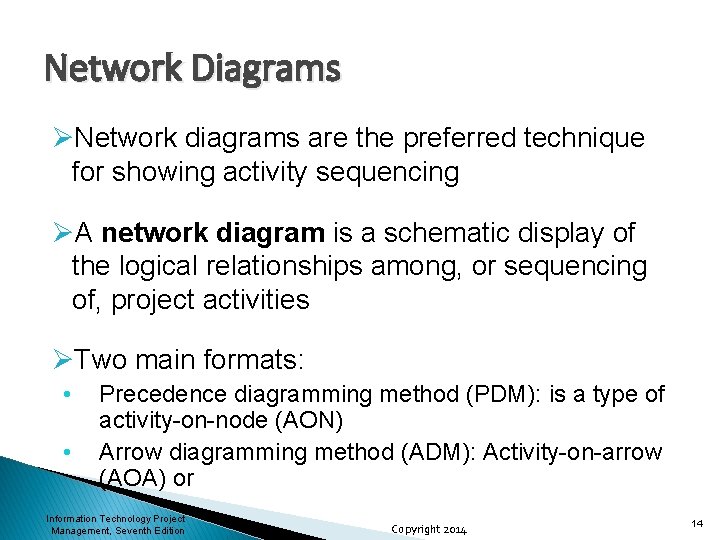
Network Diagrams ØNetwork diagrams are the preferred technique for showing activity sequencing ØA network diagram is a schematic display of the logical relationships among, or sequencing of, project activities ØTwo main formats: • • Precedence diagramming method (PDM): is a type of activity-on-node (AON) Arrow diagramming method (ADM): Activity-on-arrow (AOA) or Information Technology Project Management, Seventh Edition Copyright 2014 14
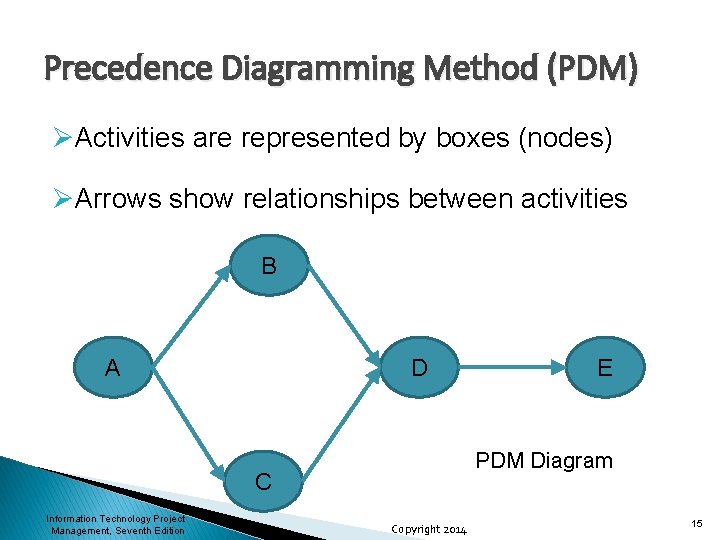
Precedence Diagramming Method (PDM) ØActivities are represented by boxes (nodes) ØArrows show relationships between activities B A D PDM Diagram C Information Technology Project Management, Seventh Edition E Copyright 2014 15
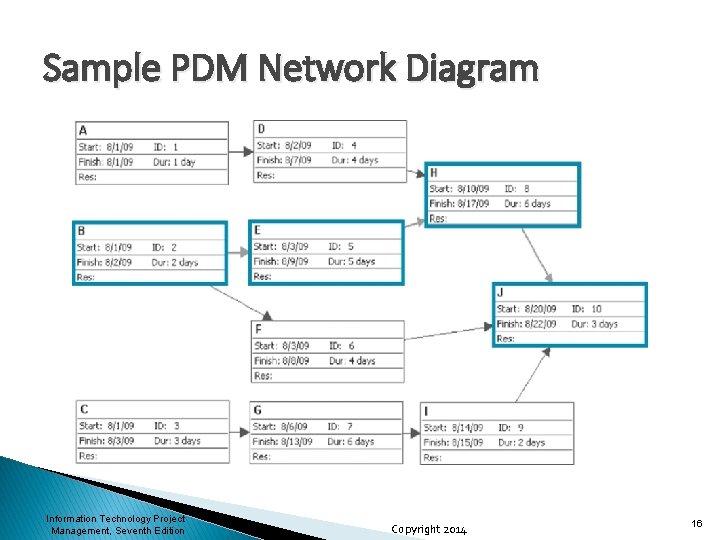
Sample PDM Network Diagram Information Technology Project Management, Seventh Edition Copyright 2014 16
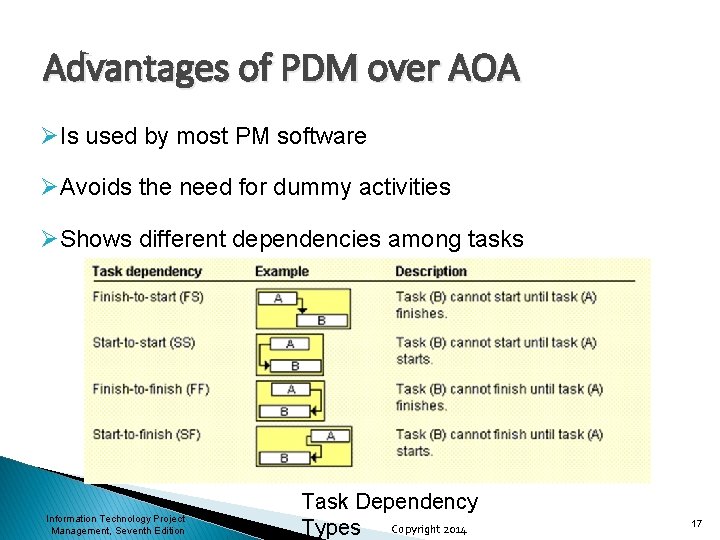
Advantages of PDM over AOA ØIs used by most PM software ØAvoids the need for dummy activities ØShows different dependencies among tasks Information Technology Project Management, Seventh Edition Task Dependency Types Copyright 2014 17
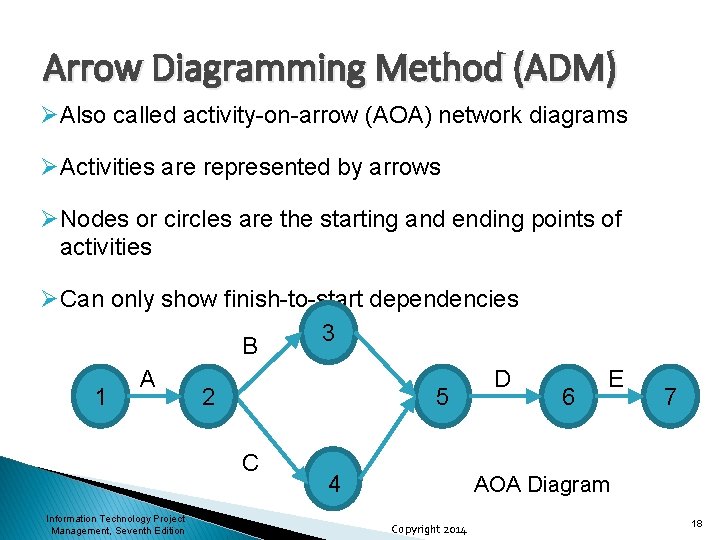
Arrow Diagramming Method (ADM) ØAlso called activity-on-arrow (AOA) network diagrams ØActivities are represented by arrows ØNodes or circles are the starting and ending points of activities ØCan only show finish-to-start dependencies 3 B D A 1 2 5 C Information Technology Project Management, Seventh Edition 4 6 E 7 AOA Diagram Copyright 2014 18
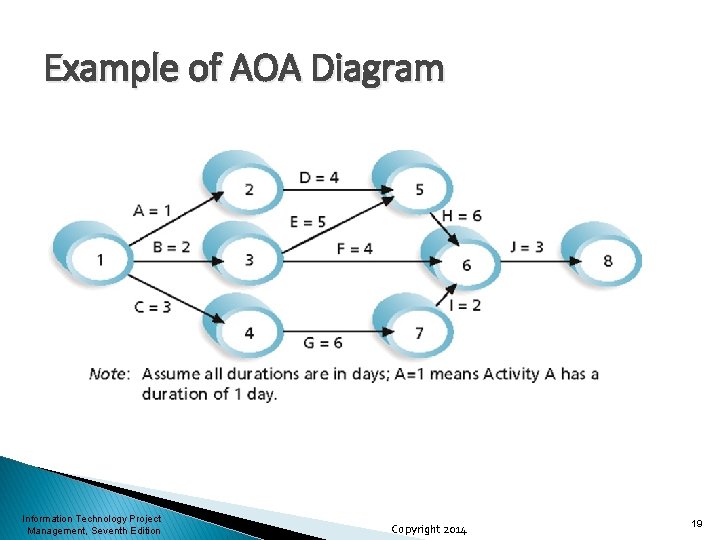
Example of AOA Diagram Information Technology Project Management, Seventh Edition Copyright 2014 19
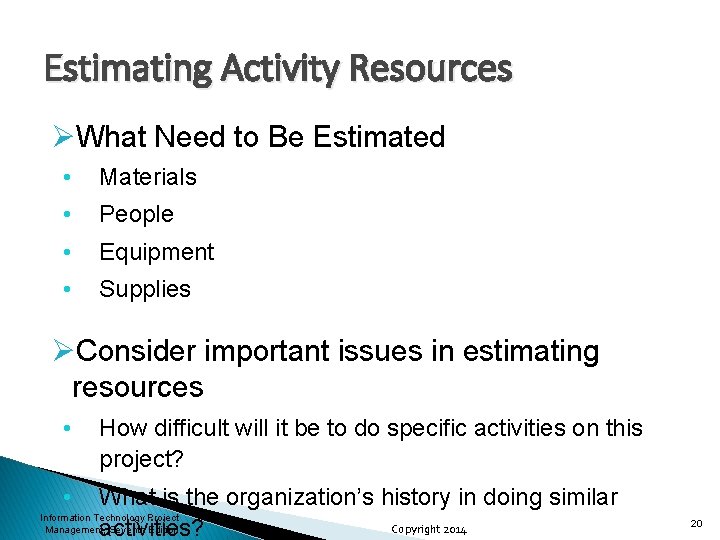
Estimating Activity Resources ØWhat Need to Be Estimated • Materials • People • Equipment • Supplies ØConsider important issues in estimating resources • How difficult will it be to do specific activities on this project? • What is the organization’s history in doing similar Information Technology Project Copyright 2014 Management, Seventh Edition activities? 20
Outputs of Estimating Activity Resources ØActivity resource requirements • Identifies types and quantities of resources required • Should include basis for estimates • Should list any assumptions ØResource breakdown structure • A hierarchical structure that identifies the project’s resources by category and type • Very useful when comparing resource utilization to the schedule updates Information Technology Project Management, Seventh Edition Copyright 2014 21
Activity Duration Estimating ØDuration includes the actual amount of time worked on an activity plus elapsed time ØEffort is the number of workdays or work hours required to complete a task ØEffort does not normally equal duration ØPeople doing the work should help create estimates, and an expert should review them Information Technology Project Management, Seventh Edition Copyright 2014 22
Three-Point Estimates ØInstead of providing activity estimates such as four weeks, it’s often helpful to create a threepoint estimate • An estimate that includes an optimistic, most likely, and pessimistic estimate, such as three weeks for the optimistic, four weeks for the most likely, and five weeks for the pessimistic estimate Information Technology Project Management, Seventh Edition Copyright 2014 23
Program Evaluation and Review Technique (PERT) ØPERT is a network analysis technique used to estimate project duration when there is a high degree of uncertainty about the individual activity duration estimates ØPERT uses probabilistic time estimates • Duration estimates based on using optimistic, most likely, and pessimistic estimates of activity durations, or a three-point estimate Information Technology Project Management, Seventh Edition Copyright 2014 24
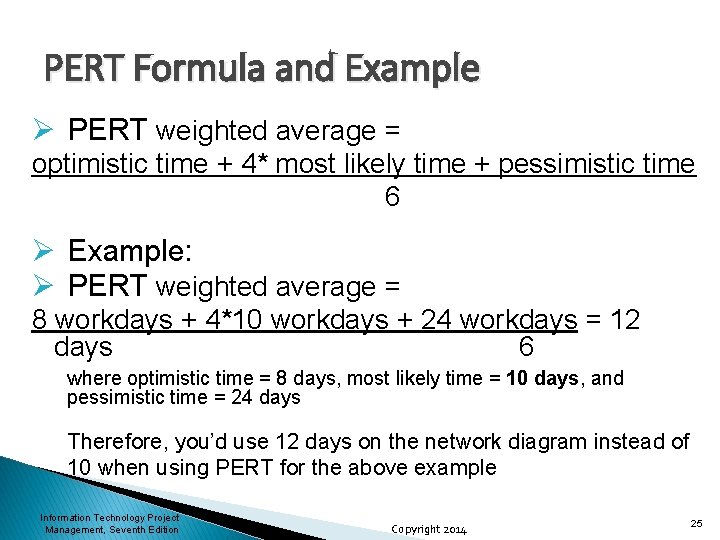
PERT Formula and Example Ø PERT weighted average = optimistic time + 4* most likely time + pessimistic time 6 Ø Example: Ø PERT weighted average = 8 workdays + 4*10 workdays + 24 workdays = 12 days 6 where optimistic time = 8 days, most likely time = 10 days, and pessimistic time = 24 days Therefore, you’d use 12 days on the network diagram instead of 10 when using PERT for the above example Information Technology Project Management, Seventh Edition Copyright 2014 25
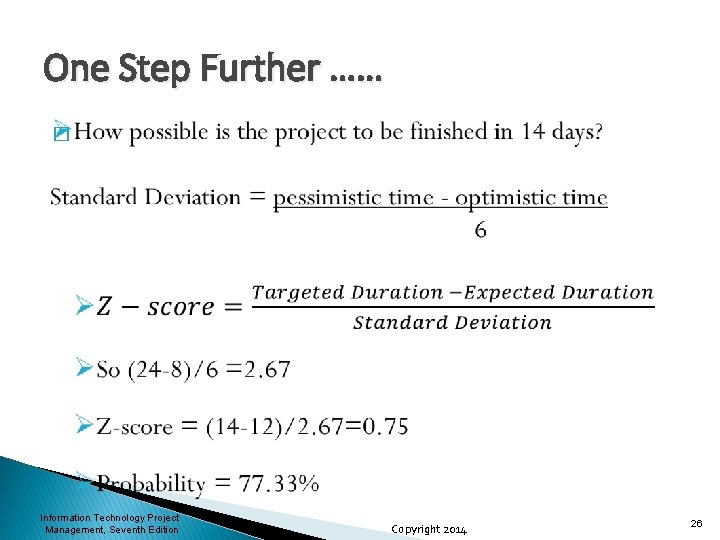
One Step Further …… � Information Technology Project Management, Seventh Edition Copyright 2014 26
Developing the Schedule ØGoals • Decides the start and end date of the project • Provides a basis for monitoring project progress ØTools • Gantt charts & Tracking Gantt charts, • Critical path analysis, • Critical chain scheduling, and • PERT analysis Information Technology Project Management, Seventh Edition Copyright 2014 27
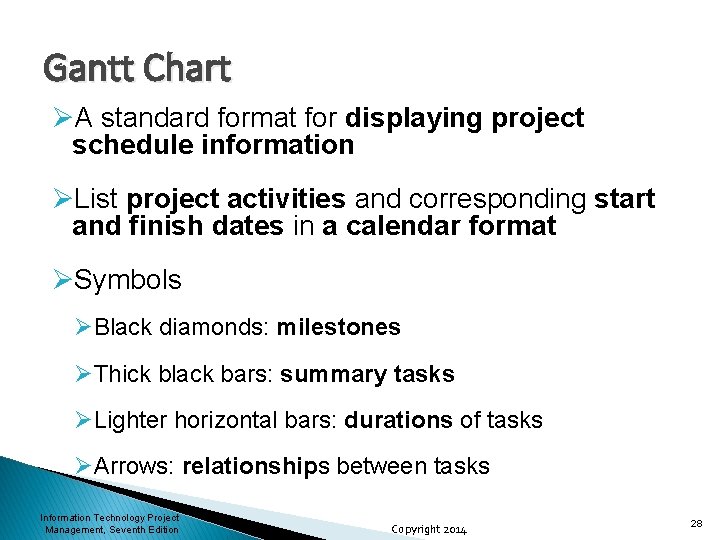
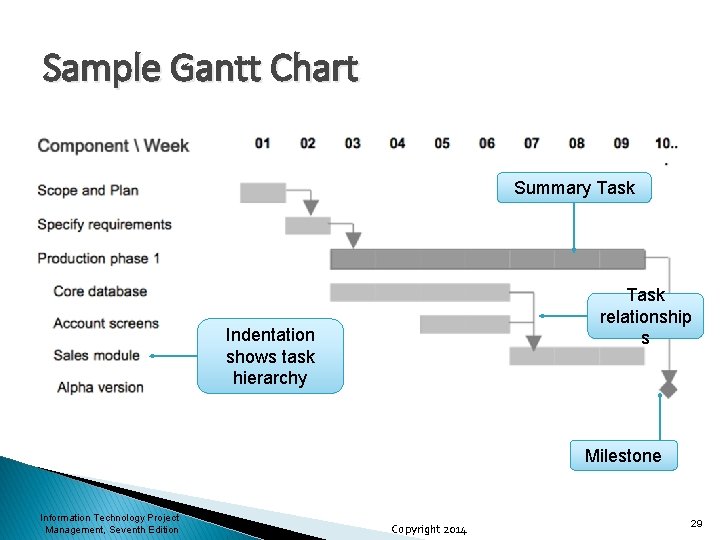
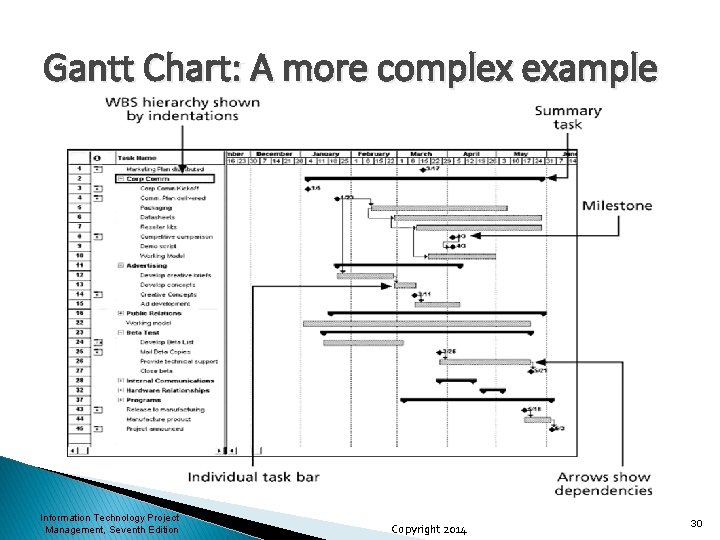
Gantt Chart ØA standard format for displaying project schedule information ØList project activities and corresponding start and finish dates in a calendar format ØSymbols ØBlack diamonds: milestones ØThick black bars: summary tasks ØLighter horizontal bars: durations of tasks ØArrows: relationships between tasks Information Technology Project Management, Seventh Edition Copyright 2014 28
Sample Gantt Chart Summary Task relationship s Indentation shows task hierarchy Milestone Information Technology Project Management, Seventh Edition Copyright 2014 29
Gantt Chart: A more complex example Information Technology Project Management, Seventh Edition Copyright 2014 30
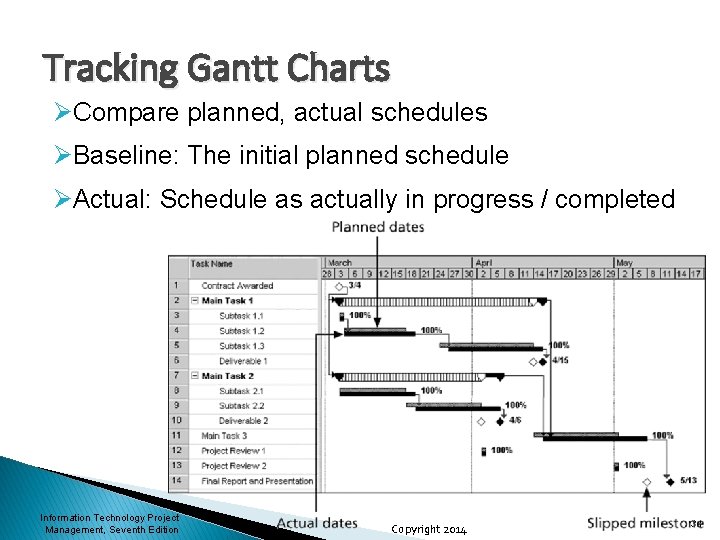
Tracking Gantt Charts ØCompare planned, actual schedules ØBaseline: The initial planned schedule ØActual: Schedule as actually in progress / completed Information Technology Project Management, Seventh Edition Copyright 2014 31
Critical Path Method (CPM) ØBased on network diagraming Ødetermining the earliest completion time of the project ØIs the longest path with the least amount of slack or float • Slack/float: How long an activity can be delayed without delaying succeeding activities or overall project completion ØIf one or more of the activities on the critical path takes longer than planned, the whole project schedule will slip unless the project manager Information Technology Project Management, Seventh Edition Copyright 2014 32
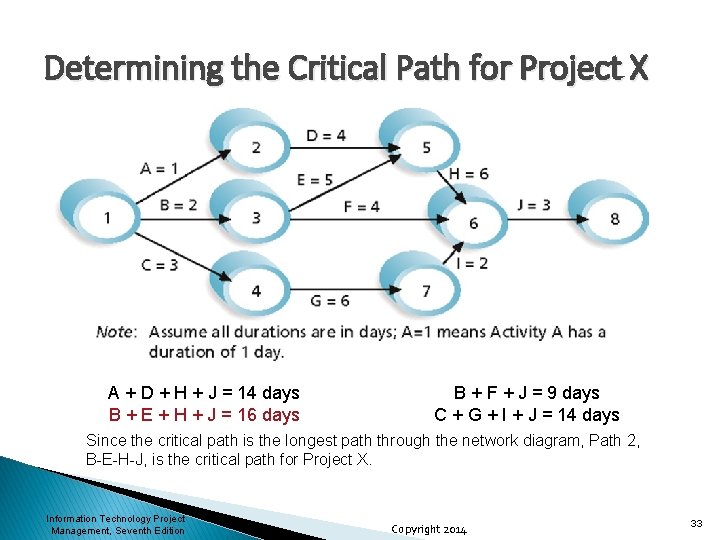
Determining the Critical Path for Project X A + D + H + J = 14 days B + E + H + J = 16 days B + F + J = 9 days C + G + I + J = 14 days Since the critical path is the longest path through the network diagram, Path 2, B-E-H-J, is the critical path for Project X. Information Technology Project Management, Seventh Edition Copyright 2014 33
More on the Critical Path ØThe critical path is not the one with all the critical activities; it only accounts for time ØThere can be more than one critical path if the lengths of two or more paths are the same ØThe critical path can change as the project progresses Information Technology Project Management, Seventh Edition Copyright 2014 34
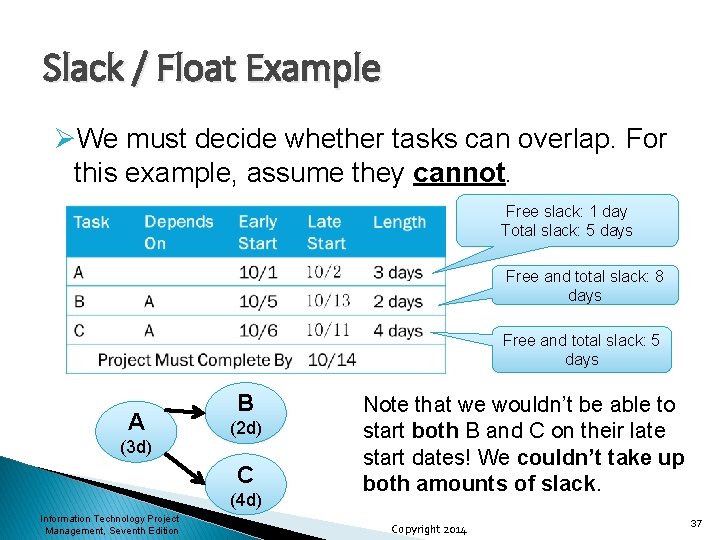
Using CPM to Manage Trade-Offs ØSlack or float is the amount of time an activity may be delayed without delaying a succeeding activity or the project finish date ØFree slack or free float is the amount of time an activity can be delayed without delaying the early start of any immediately following activities ØTotal slack or total float is the amount of time an activity may be delayed from its early start without delaying the planned project finish Copyright 2014 date Information Technology Project Management, Seventh Edition 35
Continue …… ØA forward pass through the network diagram determines the early start and finish dates ØA backward pass determines the late start and finish dates Information Technology Project Management, Seventh Edition Copyright 2014 36
Slack / Float Example ØWe must decide whether tasks can overlap. For this example, assume they cannot. Free slack: 1 day Total slack: 5 days Free and total slack: 8 days Free and total slack: 5 days A (3 d) B (2 d) C (4 d) Information Technology Project Management, Seventh Edition Note that we wouldn’t be able to start both B and C on their late start dates! We couldn’t take up both amounts of slack. Copyright 2014 37
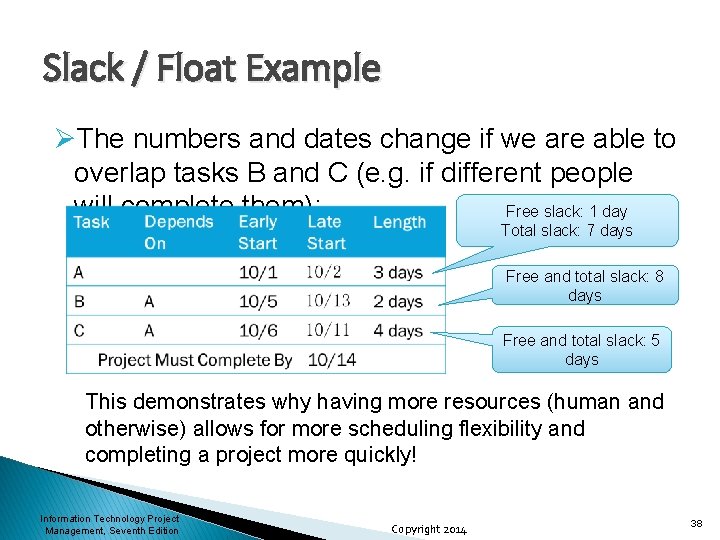
Slack / Float Example ØThe numbers and dates change if we are able to overlap tasks B and C (e. g. if different people will complete them): Free slack: 1 day Total slack: 7 days Free and total slack: 8 days Free and total slack: 5 days This demonstrates why having more resources (human and otherwise) allows for more scheduling flexibility and completing a project more quickly! Information Technology Project Management, Seventh Edition Copyright 2014 38
Using the Critical Path to Shorten a Project Schedule ØThree main techniques for shortening schedules • • • Shortening durations of critical activities/tasks by adding more resources or changing their scope Crashing activities by obtaining the greatest amount of schedule compression for the least incremental cost Fast tracking activities by doing them in parallel or overlapping them Information Technology Project Management, Seventh Edition Copyright 2014 39
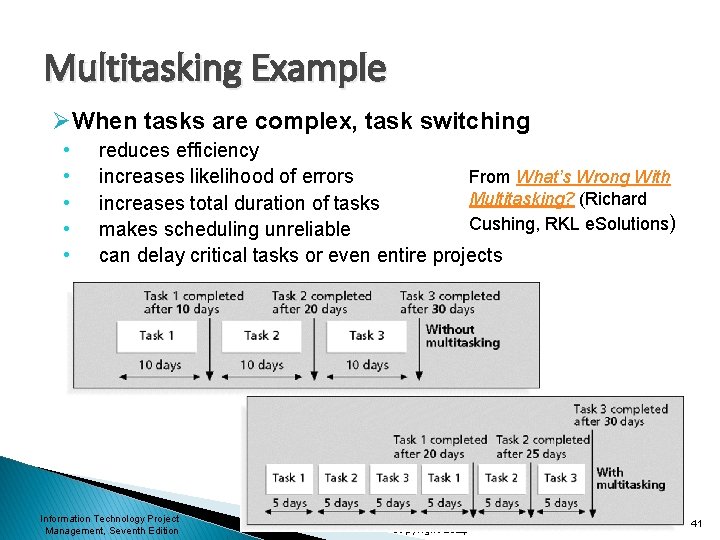
Critical Chain Scheduling ØCritical chain scheduling: • A method of scheduling that considers limited resources when creating a project schedule and includes buffers to protect the project completion date ØUses the Theory of Constraints (TOC) ØAttempts to minimize multitasking • When a resource works on more than one task at a time ØAble to achieve projects 10% to 50% faster and/or cheaper than the traditional methods ØAvoids major impact of Parkinson's Law at the task level while accounting for Murphy's Law at the project level Information Technology Project Management, Seventh Edition Copyright 2014 40
Multitasking Example ØWhen tasks are complex, task switching • • • reduces efficiency From What’s Wrong With increases likelihood of errors Multitasking? (Richard increases total duration of tasks Cushing, RKL e. Solutions) makes scheduling unreliable can delay critical tasks or even entire projects Information Technology Project Management, Seventh Edition Copyright 2014 41
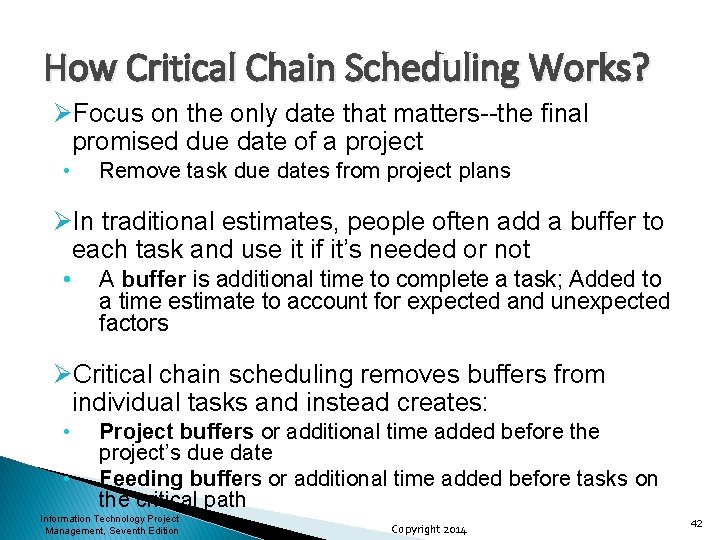
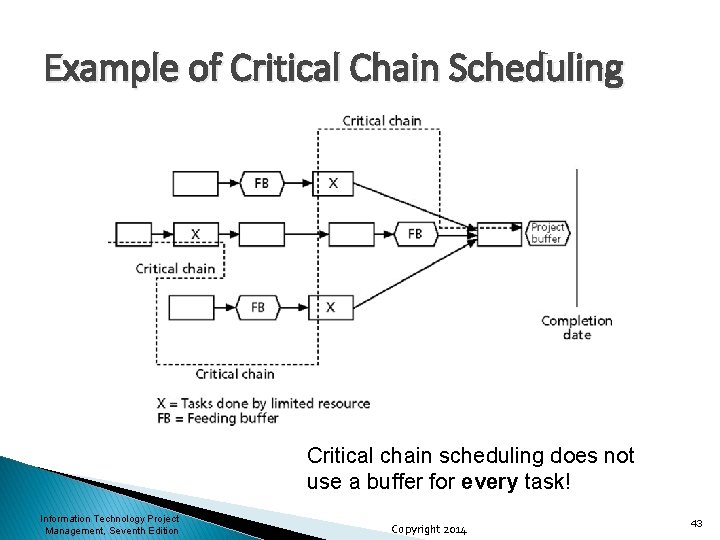
How Critical Chain Scheduling Works? ØFocus on the only date that matters--the final promised due date of a project • Remove task due dates from project plans ØIn traditional estimates, people often add a buffer to each task and use it if it’s needed or not • A buffer is additional time to complete a task; Added to a time estimate to account for expected and unexpected factors ØCritical chain scheduling removes buffers from individual tasks and instead creates: • • Project buffers or additional time added before the project’s due date Feeding buffers or additional time added before tasks on the critical path Information Technology Project Management, Seventh Edition Copyright 2014 42
Example of Critical Chain Scheduling Critical chain scheduling does not use a buffer for every task! Information Technology Project Management, Seventh Edition Copyright 2014 43
Controlling the Schedule ØGoals • Know the status of the schedule • Understand the influence factor • Determine the change • Manage the change ØTools and techniques • Progress reports • A schedule change control system • Project management software • Variance analysis • Performance management Information Technology Project Management, Seventh Edition Copyright 2014 44
Reality Checks on Scheduling ØFirst review the draft schedule or estimated completion date in the project charter ØPrepare a more detailed schedule with the project team ØMake sure the schedule is realistic and followed ØAlert top management well in advance if there are schedule problems Information Technology Project Management, Seventh Edition Copyright 2014 45