
Project Support Actors and Use cases Telematics systems
- Slides: 37
Project Support: Actors and Use cases Telematics systems and their design Doc. Ing. Ondřej Přibyl, Ph. D. Department of applied mathematics Faculty of Transportation sciences, CTU Ondřej Přibyl page 1
Telematics systems and their design Faculty of Transportation Sciences, CTU Project Task 3 Task #: Actors 1) Define graphically all actors in the system and relations among them Task #: Use case analysis 1) For the defined subsystems create structured UC. 2) Demonstrate traceability among requirements and UC Ondřej Přibyl L 6 -7: UML introduction page 2
Actors Ondřej Přibyl page 3
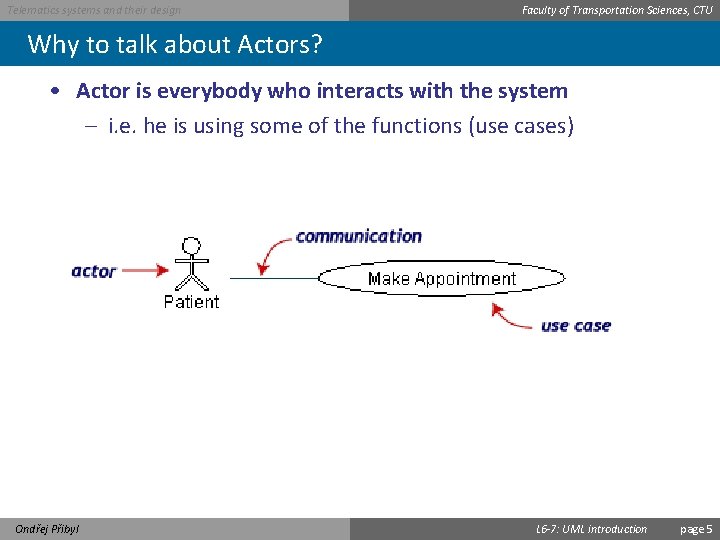
Telematics systems and their design Faculty of Transportation Sciences, CTU What is an actor? Definition • An actor in the UML "specifies a role played by a user or any other system that interacts with the subject. " • An actor is a person, organization, or external system that plays a role in one or more interactions with your system. • Actors are drawn as stick figures Ondřej Přibyl L 6 -7: UML introduction page 4
Telematics systems and their design Faculty of Transportation Sciences, CTU Why to talk about Actors? • Actor is everybody who interacts with the system – i. e. he is using some of the functions (use cases) Ondřej Přibyl L 6 -7: UML introduction page 5
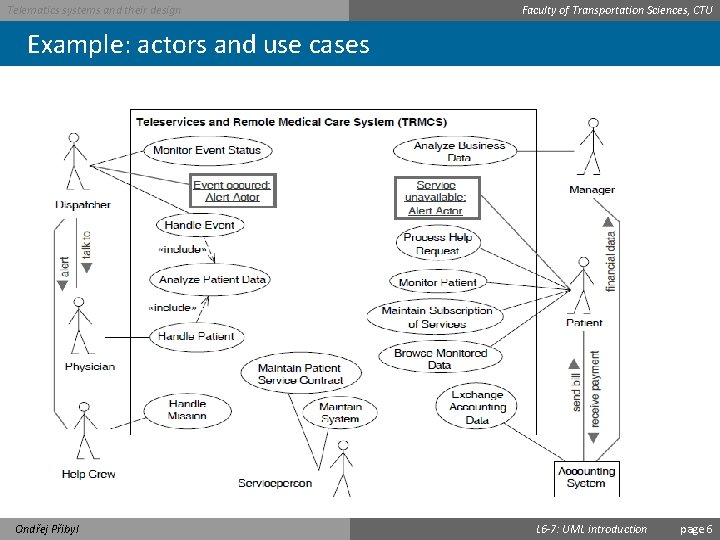
Telematics systems and their design Faculty of Transportation Sciences, CTU Example: actors and use cases Ondřej Přibyl L 6 -7: UML introduction page 6
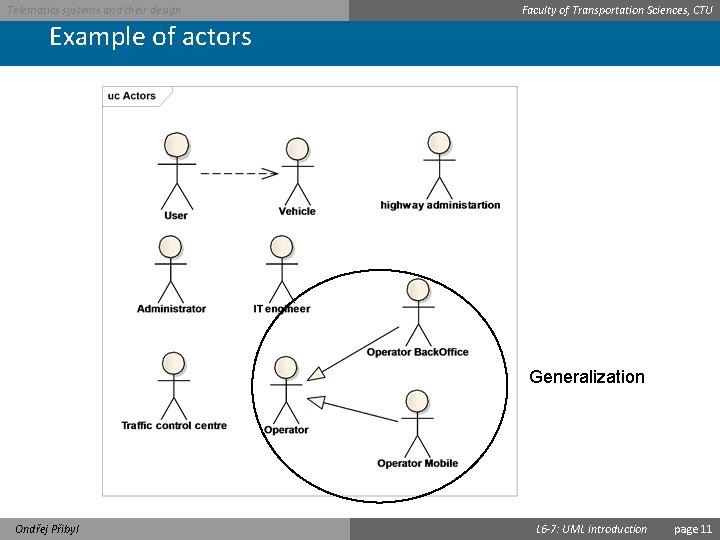
Telematics systems and their design Faculty of Transportation Sciences, CTU Relationships among actors UML 2 does not permit associations between Actors Yet, this constraint is often violated in practice since the generalization/specialization relationship between actors is useful in modeling overlapping behaviours between actors Ondřej Přibyl L 6 -7: UML introduction page 7
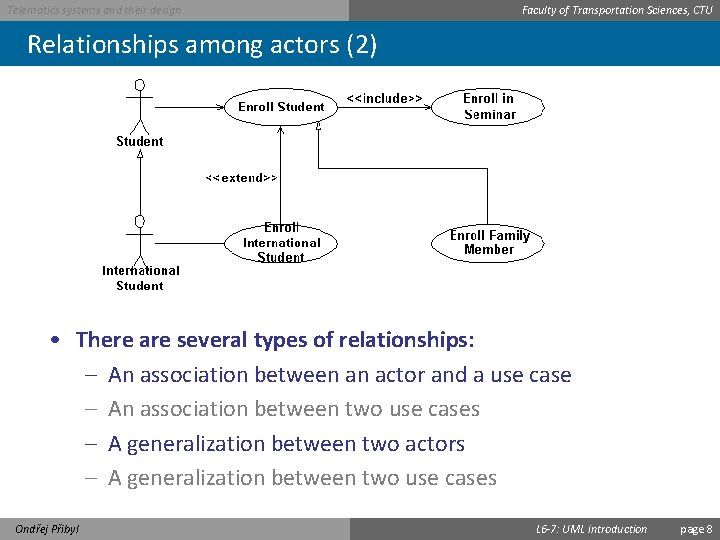
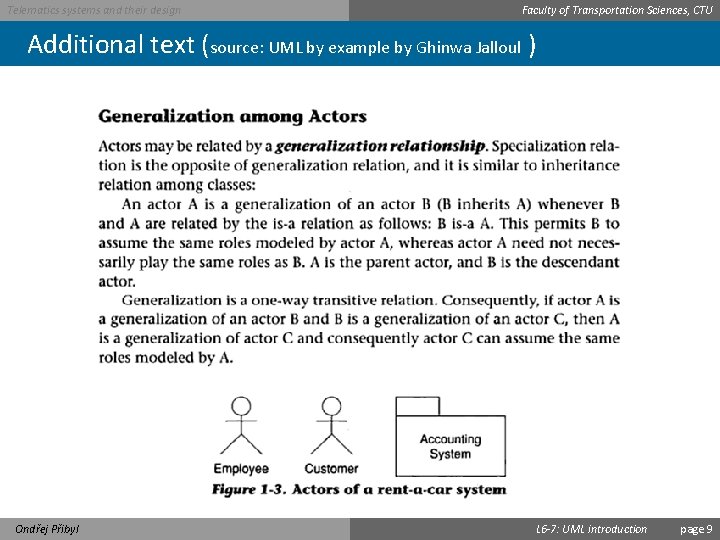
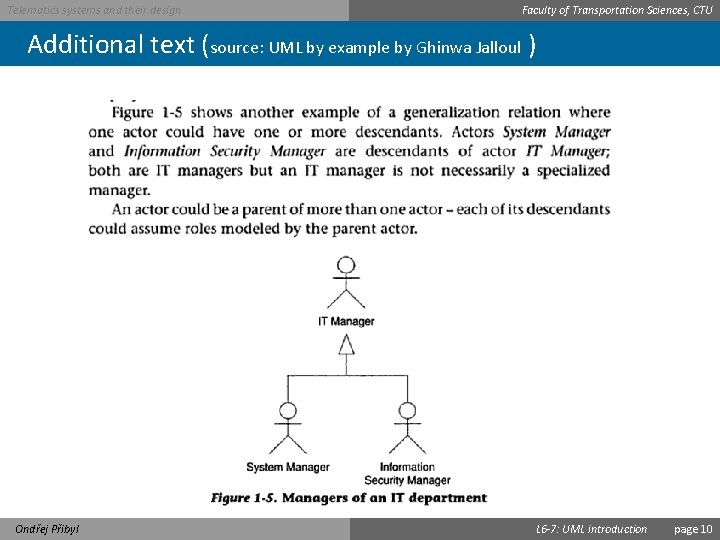
Telematics systems and their design Faculty of Transportation Sciences, CTU Relationships among actors (2) • There are several types of relationships: – An association between an actor and a use case – An association between two use cases – A generalization between two actors – A generalization between two use cases Ondřej Přibyl L 6 -7: UML introduction page 8
Telematics systems and their design Faculty of Transportation Sciences, CTU Additional text (source: UML by example by Ghinwa Jalloul ) Ondřej Přibyl L 6 -7: UML introduction page 9
Telematics systems and their design Faculty of Transportation Sciences, CTU Additional text (source: UML by example by Ghinwa Jalloul ) Ondřej Přibyl L 6 -7: UML introduction page 10
Telematics systems and their design Faculty of Transportation Sciences, CTU Example of actors Generalization Ondřej Přibyl L 6 -7: UML introduction page 11
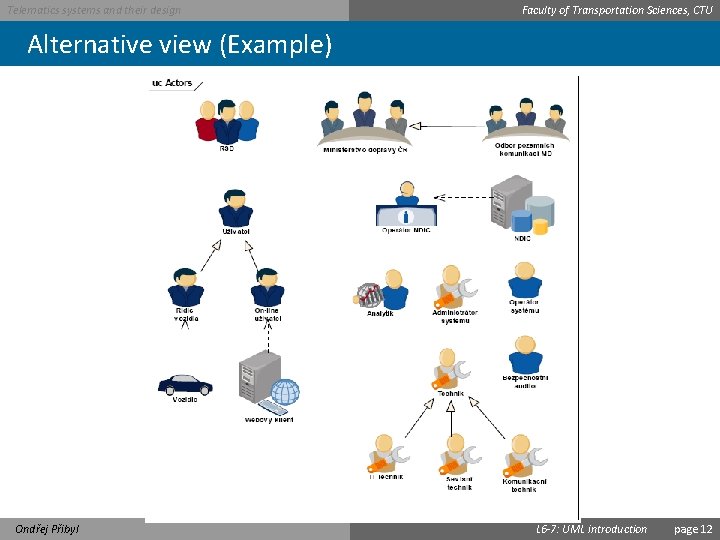
Telematics systems and their design Faculty of Transportation Sciences, CTU Alternative view (Example) Ondřej Přibyl L 6 -7: UML introduction page 12
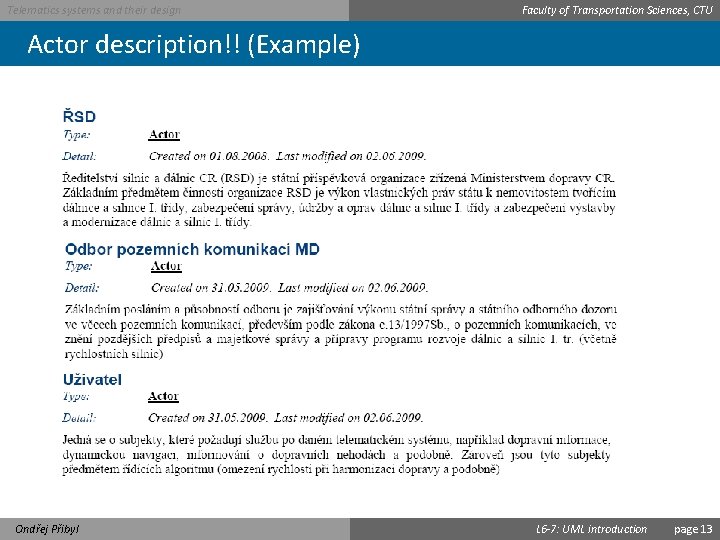
Telematics systems and their design Faculty of Transportation Sciences, CTU Actor description!! (Example) Ondřej Přibyl L 6 -7: UML introduction page 13
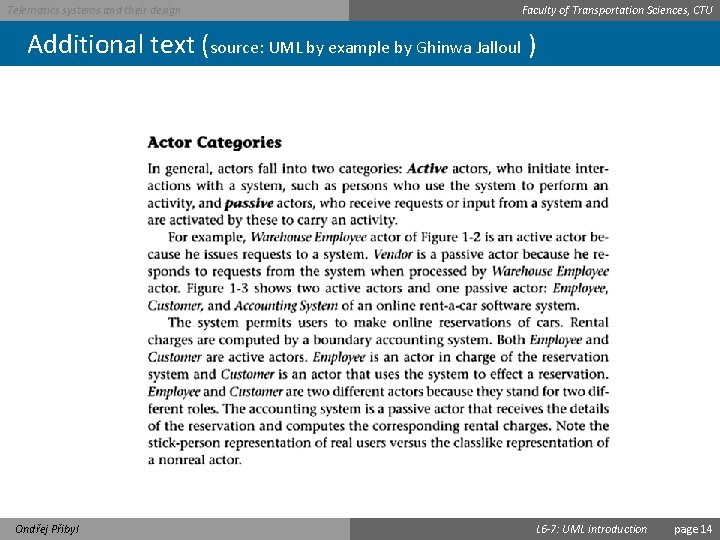
Telematics systems and their design Faculty of Transportation Sciences, CTU Additional text (source: UML by example by Ghinwa Jalloul ) Ondřej Přibyl L 6 -7: UML introduction page 14
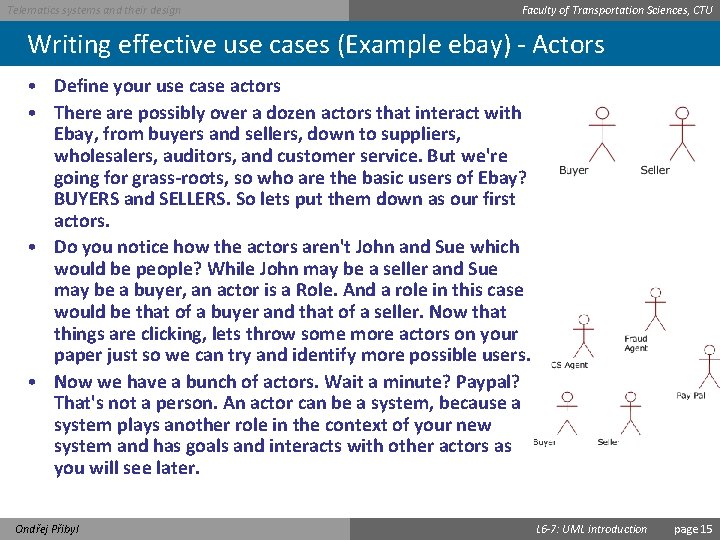
Telematics systems and their design Faculty of Transportation Sciences, CTU Writing effective use cases (Example ebay) - Actors • Define your use case actors • There are possibly over a dozen actors that interact with Ebay, from buyers and sellers, down to suppliers, wholesalers, auditors, and customer service. But we're going for grass-roots, so who are the basic users of Ebay? BUYERS and SELLERS. So lets put them down as our first actors. • Do you notice how the actors aren't John and Sue which would be people? While John may be a seller and Sue may be a buyer, an actor is a Role. And a role in this case would be that of a buyer and that of a seller. Now that things are clicking, lets throw some more actors on your paper just so we can try and identify more possible users. • Now we have a bunch of actors. Wait a minute? Paypal? That's not a person. An actor can be a system, because a system plays another role in the context of your new system and has goals and interacts with other actors as you will see later. Ondřej Přibyl L 6 -7: UML introduction page 15
Telematics systems and their design Faculty of Transportation Sciences, CTU Identifying Actors Look for: – the users who directly use the system – also others who need services from the system To find actors that are people/roles ask: – Who will be a primary user of the system? (primary actor) – Who will need support from the system to do her daily tasks? – Who will maintain, administrate, keep the system working? (secondary actor) – Who or what has an interest in the results that the system produces ? To find actors that are external systems ask: – Which hardware devices does the system need? – With which other systems does the system need to interact with? Ondřej Přibyl L 6 -7: UML introduction page 16
Telematics systems and their design Faculty of Transportation Sciences, CTU Sources • Actor in Wikipedia • Use case in Wikipedia • Use Case document in our course web-sites Ondřej Přibyl L 6 -7: UML introduction page 17
Use Cases Ondřej Přibyl page 18
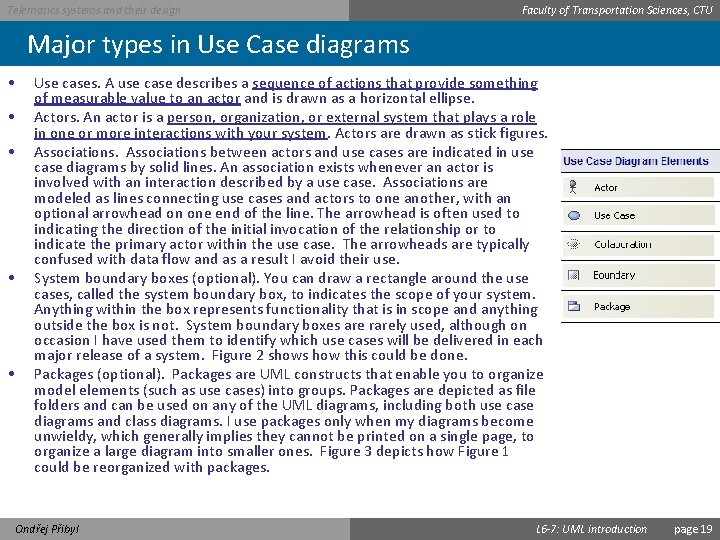
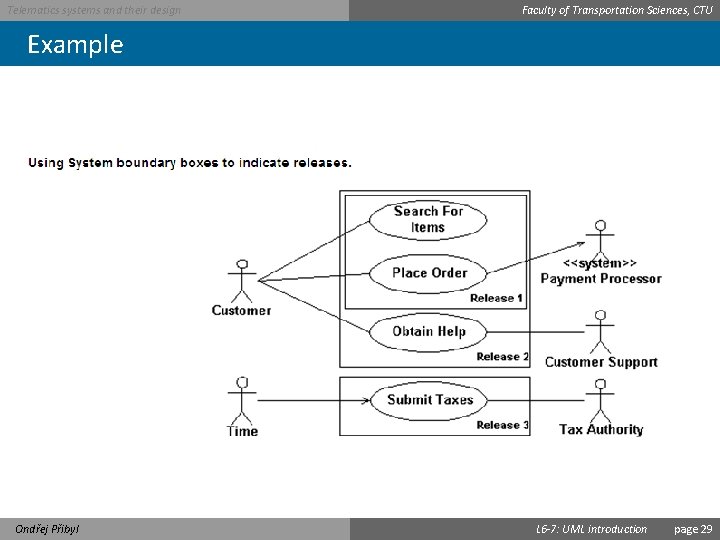
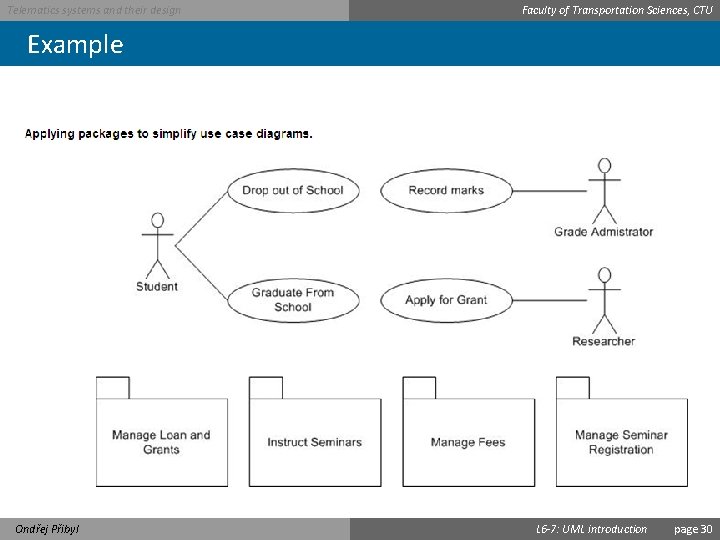
Telematics systems and their design Faculty of Transportation Sciences, CTU Major types in Use Case diagrams • • • Use cases. A use case describes a sequence of actions that provide something of measurable value to an actor and is drawn as a horizontal ellipse. Actors. An actor is a person, organization, or external system that plays a role in one or more interactions with your system. Actors are drawn as stick figures. Associations between actors and use cases are indicated in use case diagrams by solid lines. An association exists whenever an actor is involved with an interaction described by a use case. Associations are modeled as lines connecting use cases and actors to one another, with an optional arrowhead on one end of the line. The arrowhead is often used to indicating the direction of the initial invocation of the relationship or to indicate the primary actor within the use case. The arrowheads are typically confused with data flow and as a result I avoid their use. System boundary boxes (optional). You can draw a rectangle around the use cases, called the system boundary box, to indicates the scope of your system. Anything within the box represents functionality that is in scope and anything outside the box is not. System boundary boxes are rarely used, although on occasion I have used them to identify which use cases will be delivered in each major release of a system. Figure 2 shows how this could be done. Packages (optional). Packages are UML constructs that enable you to organize model elements (such as use cases) into groups. Packages are depicted as file folders and can be used on any of the UML diagrams, including both use case diagrams and class diagrams. I use packages only when my diagrams become unwieldy, which generally implies they cannot be printed on a single page, to organize a large diagram into smaller ones. Figure 3 depicts how Figure 1 could be reorganized with packages. Ondřej Přibyl L 6 -7: UML introduction page 19
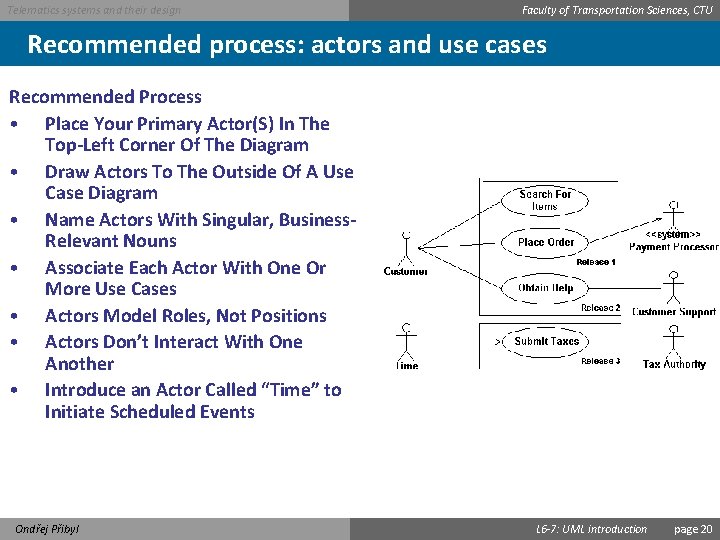
Telematics systems and their design Faculty of Transportation Sciences, CTU Recommended process: actors and use cases Recommended Process • Place Your Primary Actor(S) In The Top-Left Corner Of The Diagram • Draw Actors To The Outside Of A Use Case Diagram • Name Actors With Singular, Business. Relevant Nouns • Associate Each Actor With One Or More Use Cases • Actors Model Roles, Not Positions • Actors Don’t Interact With One Another • Introduce an Actor Called “Time” to Initiate Scheduled Events Ondřej Přibyl L 6 -7: UML introduction page 20
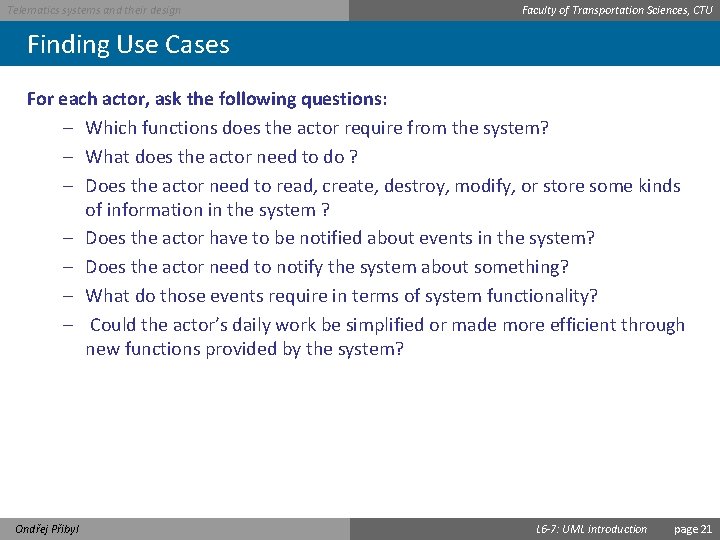
Telematics systems and their design Faculty of Transportation Sciences, CTU Finding Use Cases For each actor, ask the following questions: – Which functions does the actor require from the system? – What does the actor need to do ? – Does the actor need to read, create, destroy, modify, or store some kinds of information in the system ? – Does the actor have to be notified about events in the system? – Does the actor need to notify the system about something? – What do those events require in terms of system functionality? – Could the actor’s daily work be simplified or made more efficient through new functions provided by the system? Ondřej Přibyl L 6 -7: UML introduction page 21
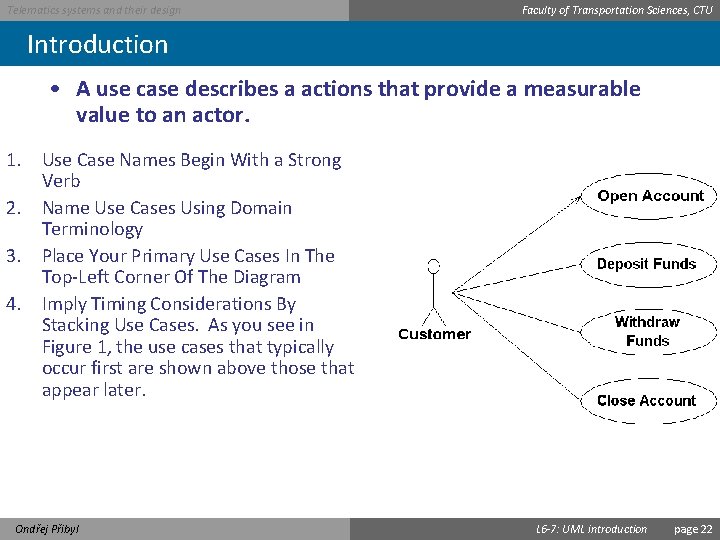
Telematics systems and their design Faculty of Transportation Sciences, CTU Introduction • A use case describes a actions that provide a measurable value to an actor. 1. Use Case Names Begin With a Strong Verb 2. Name Use Cases Using Domain Terminology 3. Place Your Primary Use Cases In The Top-Left Corner Of The Diagram 4. Imply Timing Considerations By Stacking Use Cases. As you see in Figure 1, the use cases that typically occur first are shown above those that appear later. Ondřej Přibyl L 6 -7: UML introduction page 22
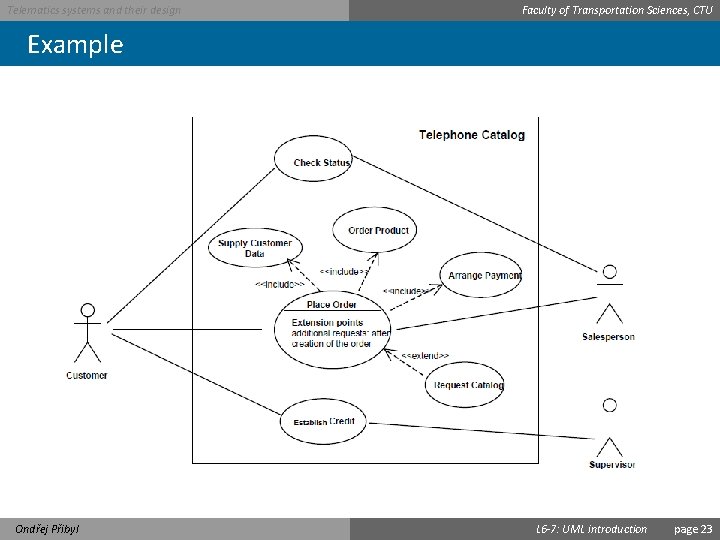
Telematics systems and their design Faculty of Transportation Sciences, CTU Example Ondřej Přibyl L 6 -7: UML introduction page 23
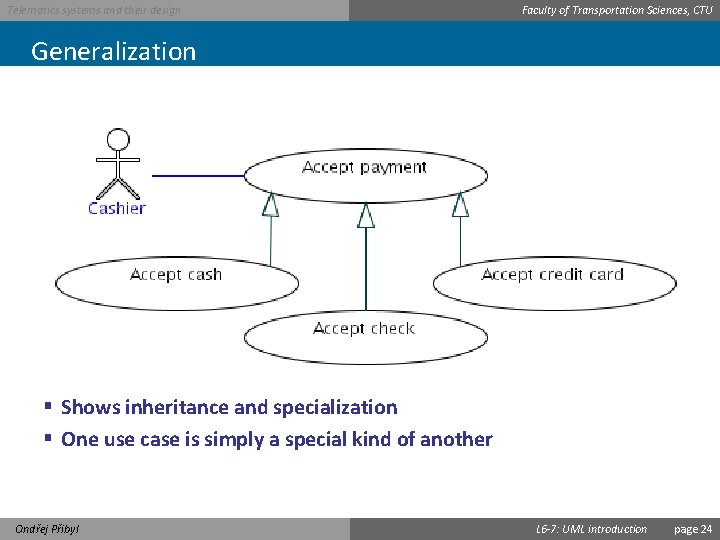
Telematics systems and their design Faculty of Transportation Sciences, CTU Generalization § Shows inheritance and specialization § One use case is simply a special kind of another Ondřej Přibyl L 6 -7: UML introduction page 24
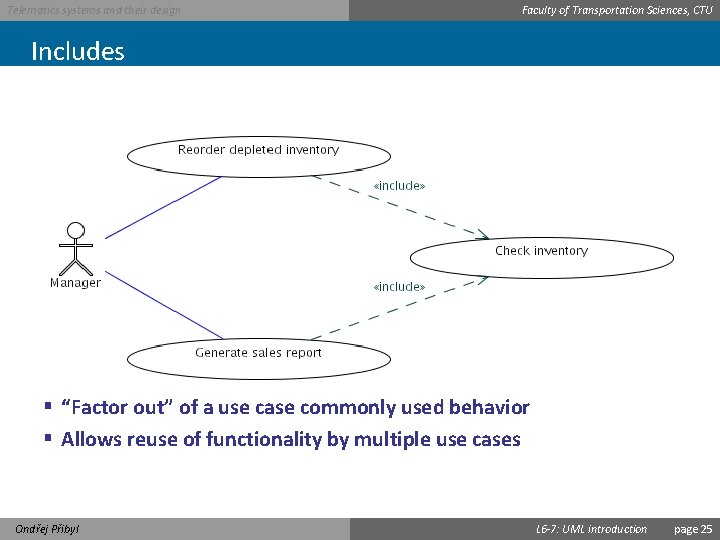
Telematics systems and their design Faculty of Transportation Sciences, CTU Includes § “Factor out” of a use case commonly used behavior § Allows reuse of functionality by multiple use cases Ondřej Přibyl L 6 -7: UML introduction page 25
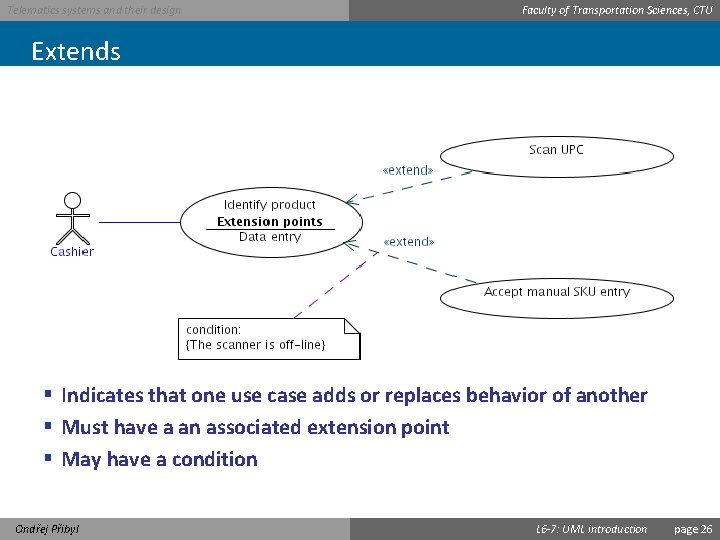
Telematics systems and their design Faculty of Transportation Sciences, CTU Extends § Indicates that one use case adds or replaces behavior of another § Must have a an associated extension point § May have a condition Ondřej Přibyl L 6 -7: UML introduction page 26
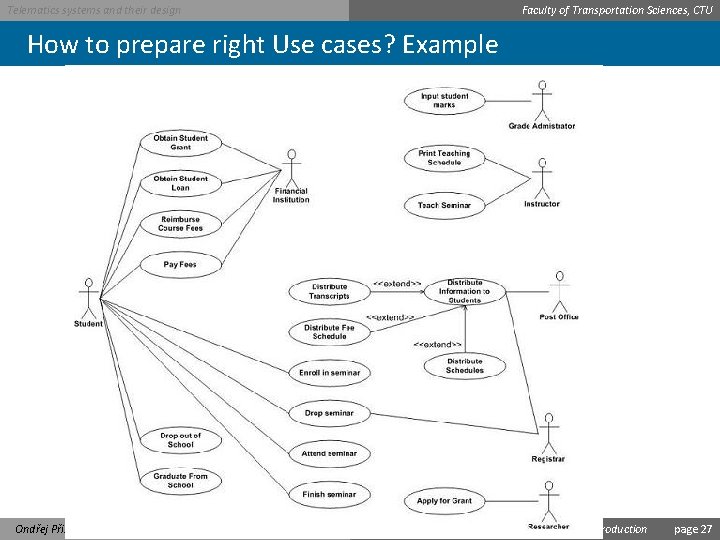
Telematics systems and their design Faculty of Transportation Sciences, CTU How to prepare right Use cases? Example Ondřej Přibyl L 6 -7: UML introduction page 27
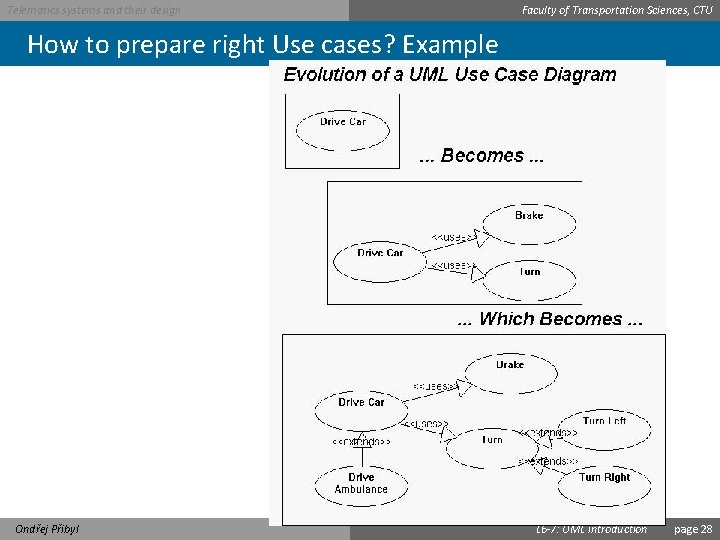
Telematics systems and their design Faculty of Transportation Sciences, CTU How to prepare right Use cases? Example Ondřej Přibyl L 6 -7: UML introduction page 28
Telematics systems and their design Faculty of Transportation Sciences, CTU Example Ondřej Přibyl L 6 -7: UML introduction page 29
Telematics systems and their design Faculty of Transportation Sciences, CTU Example Ondřej Přibyl L 6 -7: UML introduction page 30
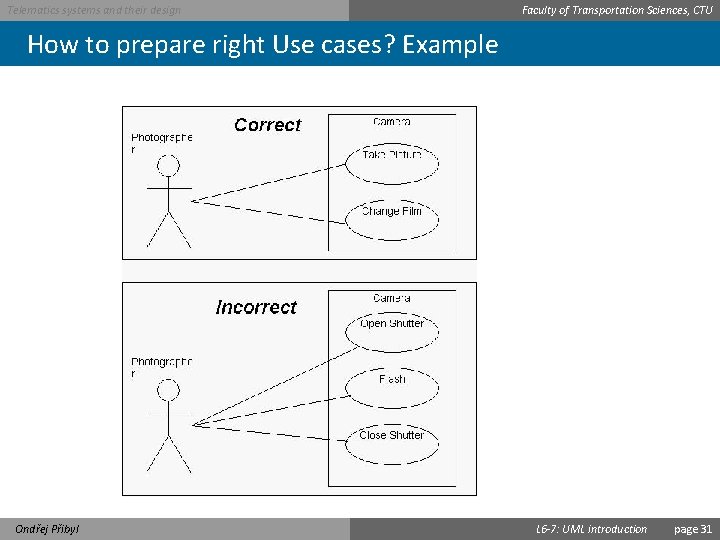
Telematics systems and their design Faculty of Transportation Sciences, CTU How to prepare right Use cases? Example Ondřej Přibyl L 6 -7: UML introduction page 31
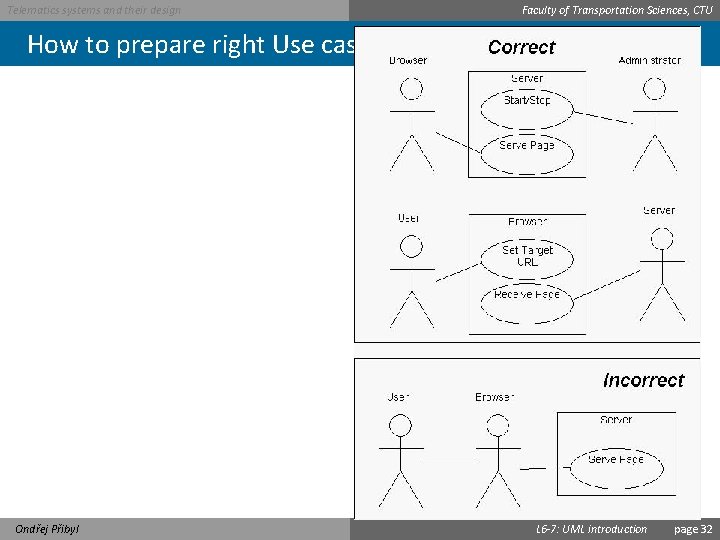
Telematics systems and their design Faculty of Transportation Sciences, CTU How to prepare right Use cases? Example Ondřej Přibyl L 6 -7: UML introduction page 32
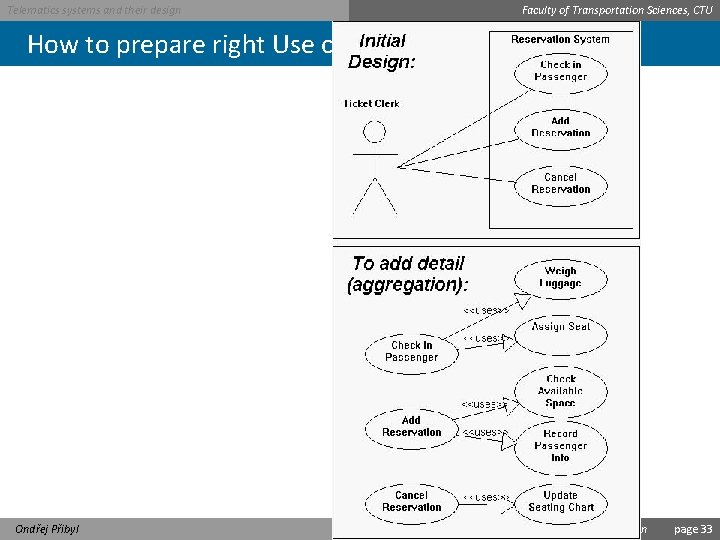
Telematics systems and their design Faculty of Transportation Sciences, CTU How to prepare right Use cases? Example Ondřej Přibyl L 6 -7: UML introduction page 33
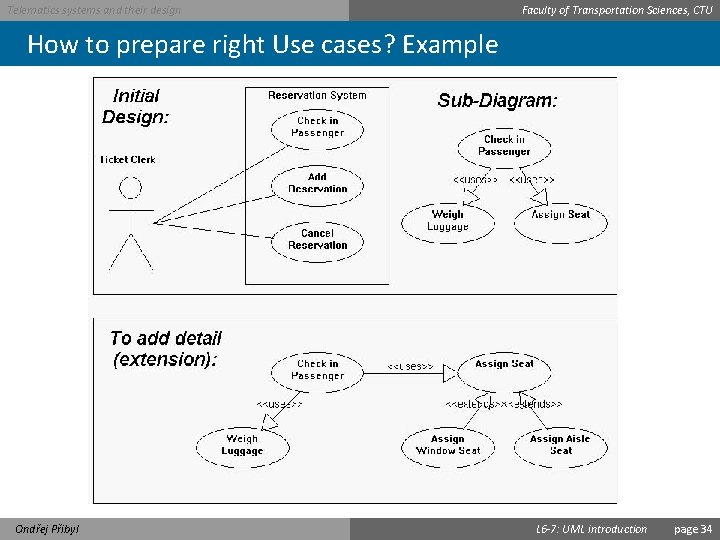
Telematics systems and their design Faculty of Transportation Sciences, CTU How to prepare right Use cases? Example Ondřej Přibyl L 6 -7: UML introduction page 34
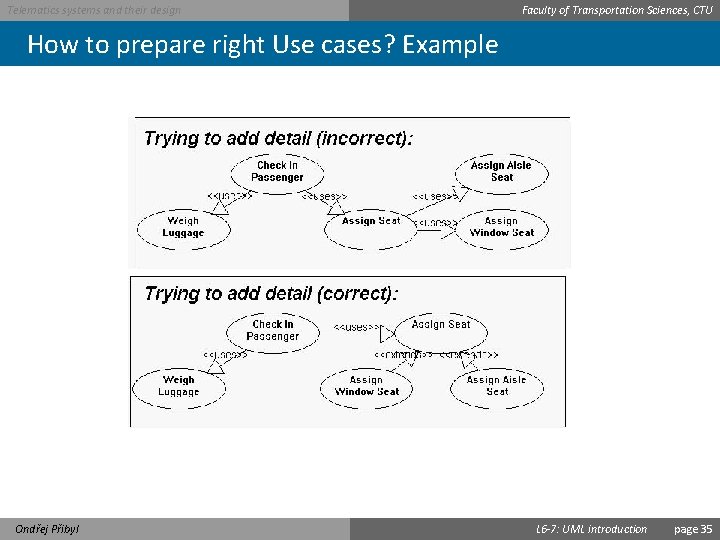
Telematics systems and their design Faculty of Transportation Sciences, CTU How to prepare right Use cases? Example Ondřej Přibyl L 6 -7: UML introduction page 35
Telematics systems and their design Faculty of Transportation Sciences, CTU You are "done" when: • You have named all the primary actors and all the user goals with respect to the system. • You can captured every trigger condition to the system either as a use case trigger or an extension condition. • You have written all the user-goal use cases, along with the summary and subfunction use cases needed to support them. • Each use case is clearly enough written that – the sponsors agree they will be able to tell whether or not it is actually delivered. – the users agree that is what they want or can accept as the system’s behavior. – the developers agree they can actually develop that functionality. • The sponsors agree that the use case set covers all they want (for now). • . . . Ondřej Přibyl L 6 -7: UML introduction page 36
Telematics systems and their design Faculty of Transportation Sciences, CTU Sources • http: //www. oracle. com/technetwork/testcontent/gettingsta rtedwithusecasemodeling-133857. pdf • http: //alistair. cockburn. us/get/2465 • http: //www. gatherspace. com/static/use_case_example. html • http: //www. andrew. cmu. edu/course/90754/umlucdfaq. html • http: //www. objectmentor. com/resources/articles/usecases. pdf • http: //www. mathcs. gordon. edu/courses/cs 211/ATMExample/Use. Cases. html Ondřej Přibyl L 6 -7: UML introduction page 37