
PROJECT MANAGEMENT Time management with software tools By
PROJECT MANAGEMENT Time management with software tools By Tolga Baycan Instructor, Faculty of Business Administration baycan@bilkent. edu. tr fba. bilkent. edu. tr/~tbaycan CS 491 - Project Management 1
Project is. . . a temporary effort undertaken to create a unique product or service. • • • Temporary. There is a ‘begin’ & ‘end’ Product: a part, component or an end item Service: a capability to perform or a result with an outcome or document (renewal of network cabling system, painting a building etc. ) • Development of a new product/service • Effecting a change in the structure, staffing, style of an organization • Developing a new IS • Constructing a building • Implementing a new business process (ex: adding a new branch) CS 491 - Project Management 2
Project Manager is. . . the person assigned by the performing organization to achieve the project objectives in order to balance the project constraints by guiding a project team. Knowledge: PM understands and applies the knowledge, tools and techniques for managing projects. Performance: PM’s ability to do the work while applying the knowledge. Personal skills: PM’s behaviour while performing the project. Attitudes, core personality characteristics and leadership. CS 491 - Project Management 3
Project Team is. . . a team whose members usually belong to different groups, have different functions and are assigned by the project manager to activities for the same project. To obtain a successful project the team must: Select appropriate processes required to meet the project objectives Use a defined approach that can be adopted to meet requirements Comply with requirements to meet stakeholder needs and expectations Balance the demands of scope, time, cost, quality, resources and risk to produce the specified product, service or result. CS 491 - Project Management 4
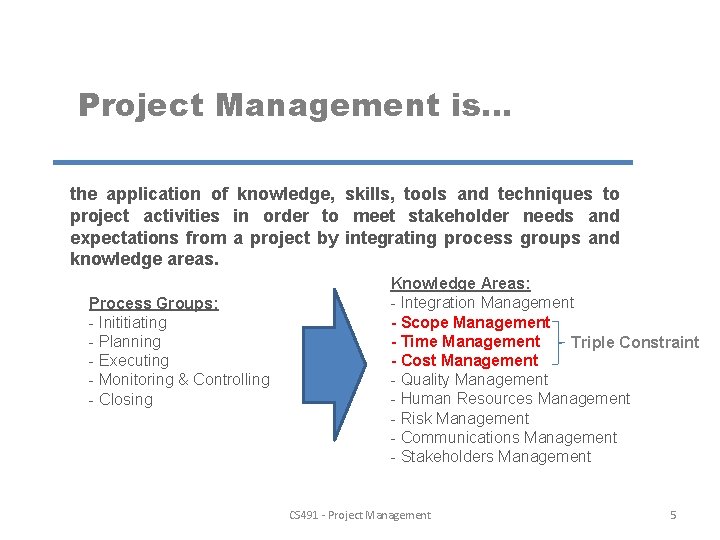
Project Management is. . . the application of knowledge, skills, tools and techniques to project activities in order to meet stakeholder needs and expectations from a project by integrating process groups and knowledge areas. Process Groups: - Inititiating - Planning - Executing - Monitoring & Controlling - Closing Knowledge Areas: - Integration Management - Scope Management - Time Management Triple Constraint - Cost Management - Quality Management - Human Resources Management - Risk Management - Communications Management - Stakeholders Management CS 491 - Project Management 5
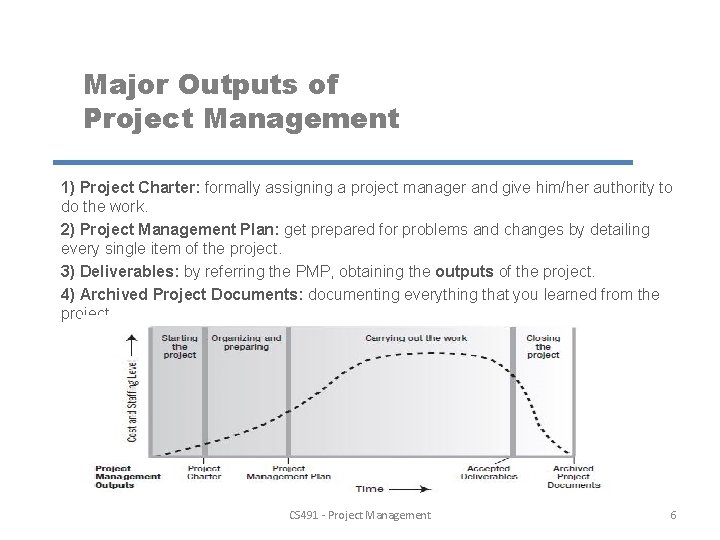
Major Outputs of Project Management 1) Project Charter: formally assigning a project manager and give him/her authority to do the work. 2) Project Management Plan: get prepared for problems and changes by detailing every single item of the project. 3) Deliverables: by referring the PMP, obtaining the outputs of the project. 4) Archived Project Documents: documenting everything that you learned from the project. CS 491 - Project Management 6
Agile Project Management is. . . Managing a project by breaking it up into several stages and involving constant collaboration with stakeholders and continuous improvement and iteration at every stage. Building products that customers really want, using short cycles of work that allow for rapid production and constant revision if necessary. - Customer oriented approach, no uncertainties related with the end product. - Flexibility is high as soon as the customer’s are involved at decision making (taking decisions on critical tasks) process. - Shortens the planning period. If complexity will increase, risks may appear. - More questions & comments from customers. Response time may effect the overall duration of the project. - Organizational culture is important. Is the organizational structure lets the customers be a part of the project? CS 491 - Project Management 7

Work Breakdown Structure, Project Deliverables and Work Packages A WBS (Work Breakdown Structure) is the process of subdividing project deliverables and project work into smaller, more manageable components. Organizes and defines the total scope of the project and represents the work specified in the current approved project scope statement. It is the combination of deliverables & work packages. A Deliverable is a tangible or intangible good or service produced as a result of a project that is intended to be delivered to a customer. A deliverable could be a report, a document, a software product, a server upgrade or any other building block of an overall project. A Work Package is the lowest level of WBS components, it is formed by a group of related tasks/activities within a project. Work packages are the smallest unit of work that a project can be broken down to when creating a WBS. CS 491 - Project Management 8
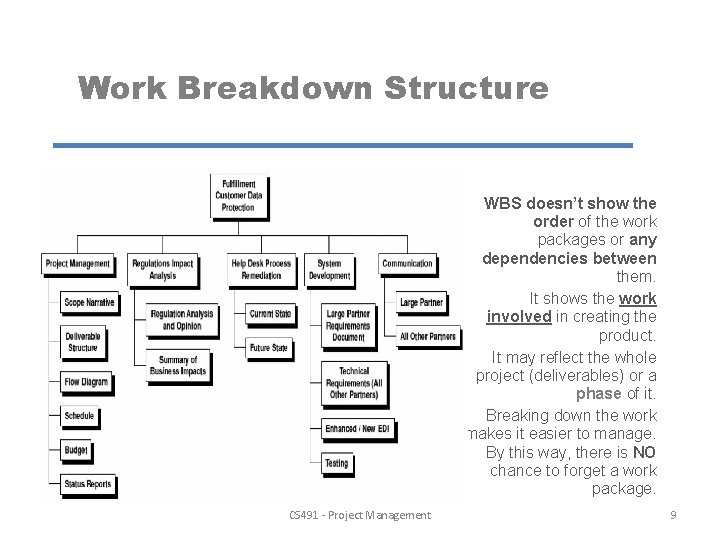
Work Breakdown Structure WBS doesn’t show the order of the work packages or any dependencies between them. It shows the work involved in creating the product. It may reflect the whole project (deliverables) or a phase of it. Breaking down the work makes it easier to manage. By this way, there is NO chance to forget a work package. CS 491 - Project Management 9
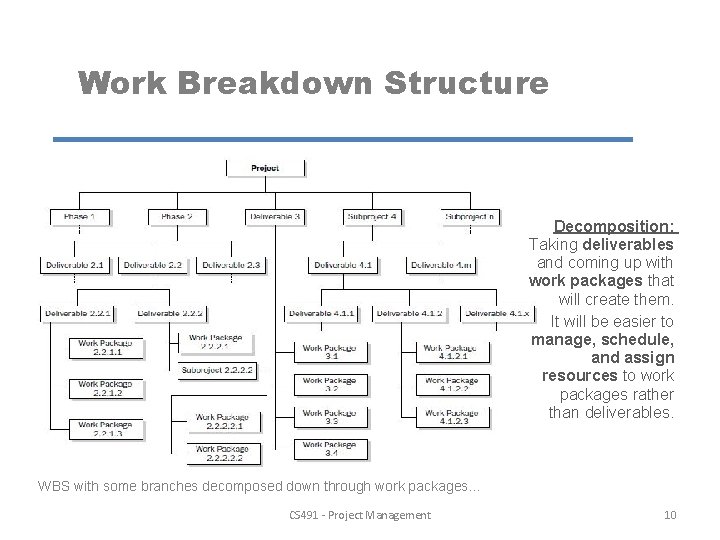
Work Breakdown Structure Decomposition: Taking deliverables and coming up with work packages that will create them. It will be easier to manage, schedule, and assign resources to work packages rather than deliverables. WBS with some branches decomposed down through work packages. . . CS 491 - Project Management 10
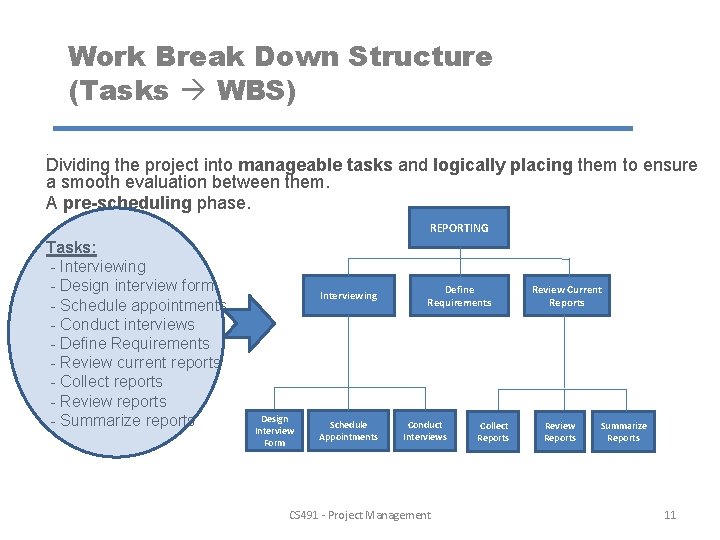
Work Break Down Structure (Tasks WBS). Dividing the project into manageable tasks and logically placing them to ensure a smooth evaluation between them. A pre-scheduling phase. REPORTING Tasks: - Interviewing - Design interview form - Schedule appointments - Conduct interviews - Define Requirements - Review current reports - Collect reports - Review reports - Summarize reports Interviewing Design Interview Form Schedule Appointments Define Requirements Conduct Interviews CS 491 - Project Management Collect Reports Review Current Reports Review Reports Summarize Reports 11
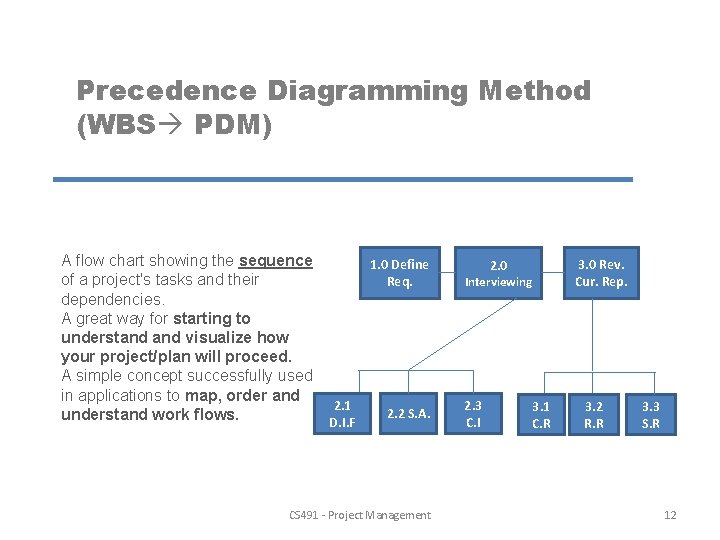
Precedence Diagramming Method (WBS PDM) A flow chart showing the sequence 1. 0 Define of a project's tasks and their Req. dependencies. A great way for starting to understand visualize how your project/plan will proceed. A simple concept successfully used in applications to map, order and 2. 1 2. 2 S. A. understand work flows. D. I. F CS 491 - Project Management 2. 0 Interviewing 2. 3 C. I 3. 1 C. R 3. 0 Rev. Cur. Rep. 3. 2 R. R 3. 3 S. R 12
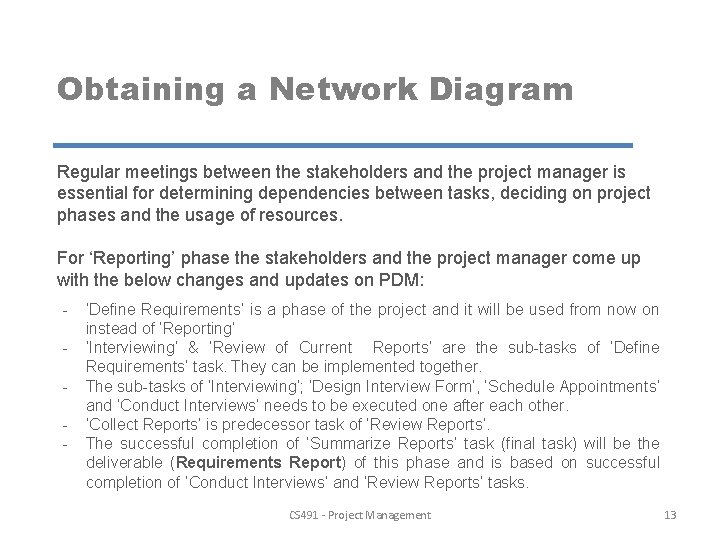
Obtaining a Network Diagram Regular meetings between the stakeholders and the project manager is essential for determining dependencies between tasks, deciding on project phases and the usage of resources. For ‘Reporting’ phase the stakeholders and the project manager come up with the below changes and updates on PDM: - ‘Define Requirements’ is a phase of the project and it will be used from now on instead of ‘Reporting’ ‘Interviewing’ & ‘Review of Current Reports’ are the sub-tasks of ‘Define Requirements’ task. They can be implemented together. The sub-tasks of ‘Interviewing’; ‘Design Interview Form’, ‘Schedule Appointments’ and ‘Conduct Interviews’ needs to be executed one after each other. ‘Collect Reports’ is predecessor task of ‘Review Reports’. The successful completion of ‘Summarize Reports’ task (final task) will be the deliverable (Requirements Report) of this phase and is based on successful completion of ‘Conduct Interviews’ and ‘Review Reports’ tasks. CS 491 - Project Management 13
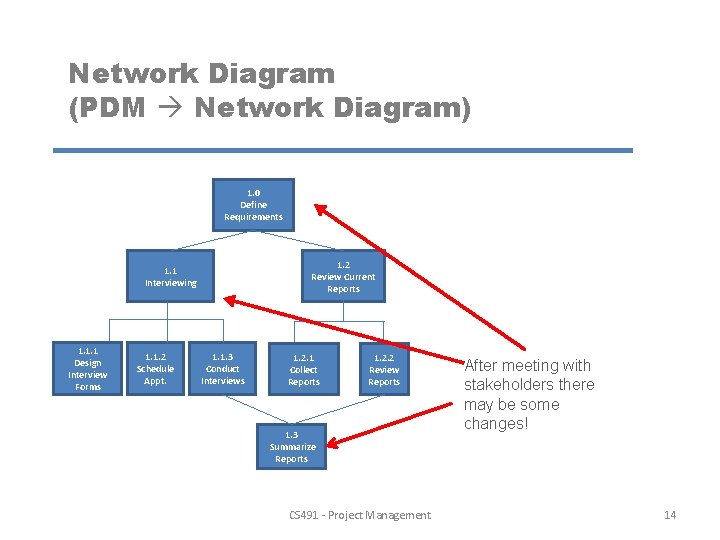
Network Diagram (PDM Network Diagram) 1. 0 Define Requirements 1. 2 Review Current Reports 1. 1 Interviewing 1. 1. 1 Design Interview Forms 1. 1. 2 Schedule Appt. 1. 1. 3 Conduct Interviews 1. 2. 1 Collect Reports 1. 2. 2 Review Reports 1. 3 Summarize Reports CS 491 - Project Management After meeting with stakeholders there may be some changes! 14
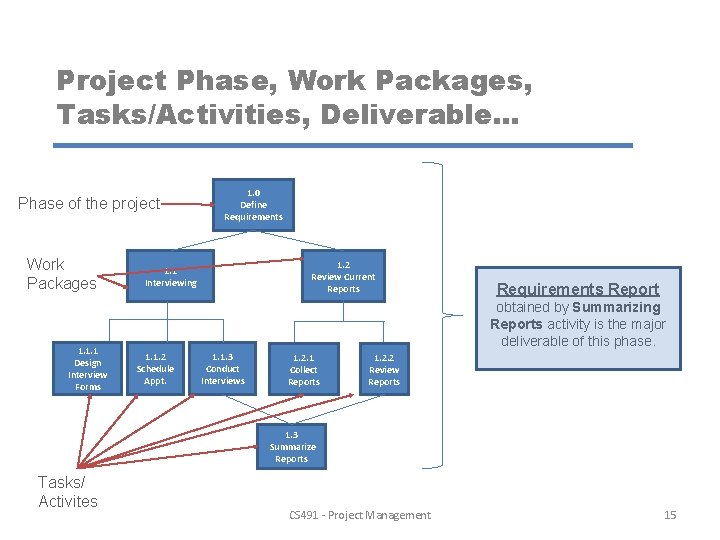
Project Phase, Work Packages, Tasks/Activities, Deliverable. . . Phase of the project Work Packages 1. 1. 1 Design Interview Forms 1. 0 Define Requirements 1. 2 Review Current Reports 1. 1 Interviewing Requirements Report obtained by Summarizing Reports activity is the major deliverable of this phase. 1. 1. 2 Schedule Appt. 1. 1. 3 Conduct Interviews 1. 2. 1 Collect Reports 1. 2. 2 Review Reports 1. 3 Summarize Reports Tasks/ Activites CS 491 - Project Management 15
Project Time Management Scheduling by MS Project The necessary steps to determine the duration and the submission date of the project. CS 491 - Project Management 16
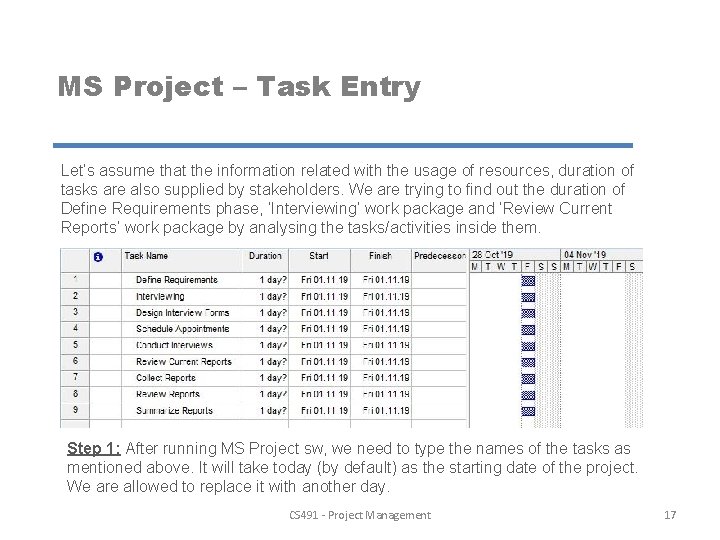
MS Project – Task Entry Let’s assume that the information related with the usage of resources, duration of tasks are also supplied by stakeholders. We are trying to find out the duration of Define Requirements phase, ‘Interviewing’ work package and ‘Review Current Reports’ work package by analysing the tasks/activities inside them. Step 1: After running MS Project sw, we need to type the names of the tasks as mentioned above. It will take today (by default) as the starting date of the project. We are allowed to replace it with another day. CS 491 - Project Management 17
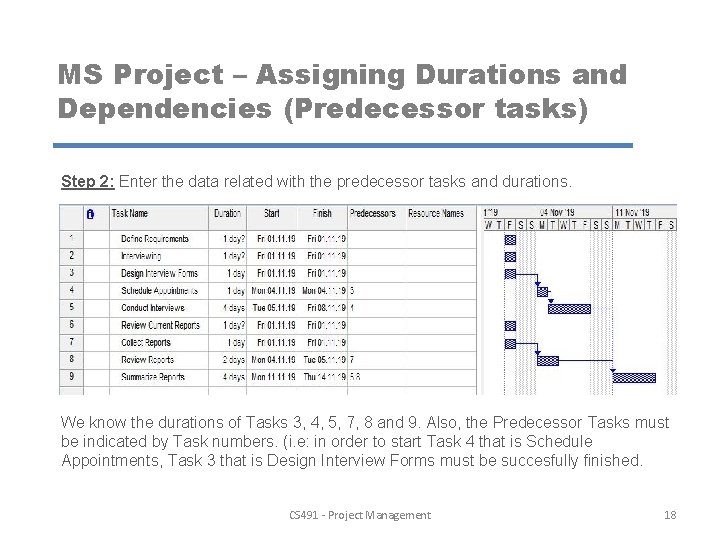
MS Project – Assigning Durations and Dependencies (Predecessor tasks) Step 2: Enter the data related with the predecessor tasks and durations. We know the durations of Tasks 3, 4, 5, 7, 8 and 9. Also, the Predecessor Tasks must be indicated by Task numbers. (i. e: in order to start Task 4 that is Schedule Appointments, Task 3 that is Design Interview Forms must be succesfully finished. CS 491 - Project Management 18
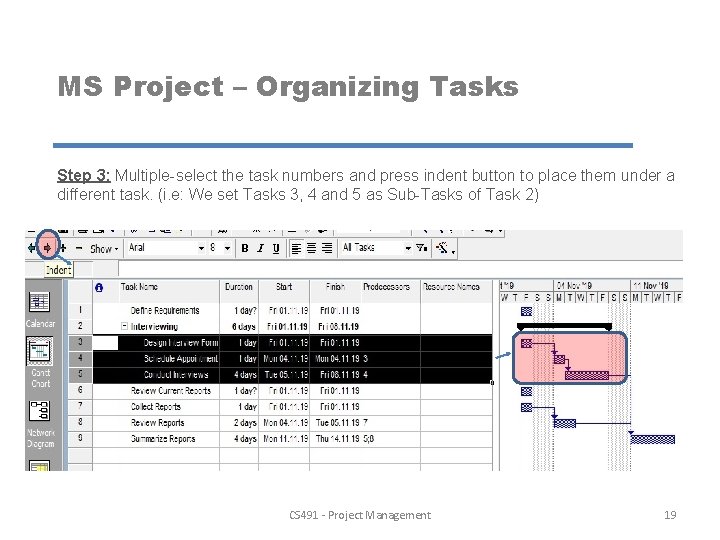
MS Project – Organizing Tasks Step 3: Multiple-select the task numbers and press indent button to place them under a different task. (i. e: We set Tasks 3, 4 and 5 as Sub-Tasks of Task 2) CS 491 - Project Management 19
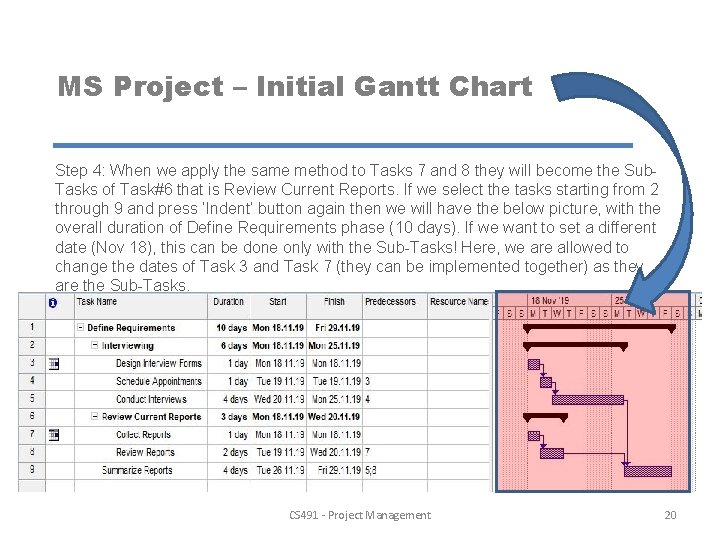
MS Project – Initial Gantt Chart Step 4: When we apply the same method to Tasks 7 and 8 they will become the Sub. Tasks of Task#6 that is Review Current Reports. If we select the tasks starting from 2 through 9 and press ‘Indent’ button again then we will have the below picture, with the overall duration of Define Requirements phase (10 days). If we want to set a different date (Nov 18), this can be done only with the Sub-Tasks! Here, we are allowed to change the dates of Task 3 and Task 7 (they can be implemented together) as they are the Sub-Tasks. CS 491 - Project Management 20
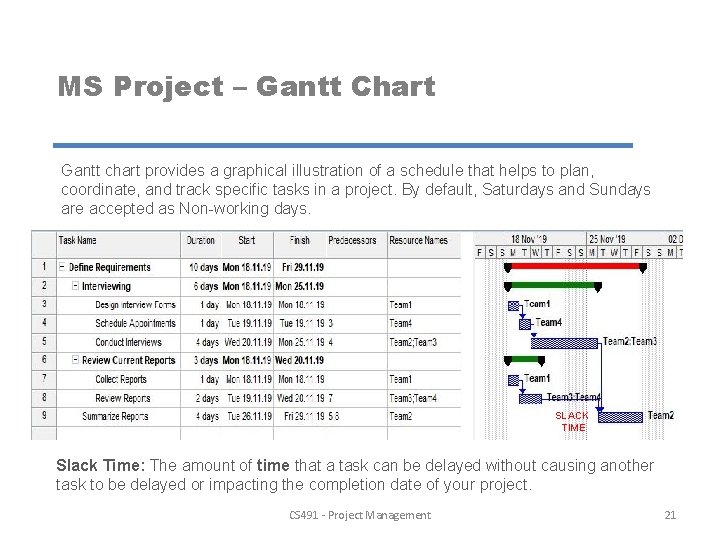
MS Project – Gantt Chart Gantt chart provides a graphical illustration of a schedule that helps to plan, coordinate, and track specific tasks in a project. By default, Saturdays and Sundays are accepted as Non-working days. SLACK TIME Slack Time: The amount of time that a task can be delayed without causing another task to be delayed or impacting the completion date of your project. CS 491 - Project Management 21
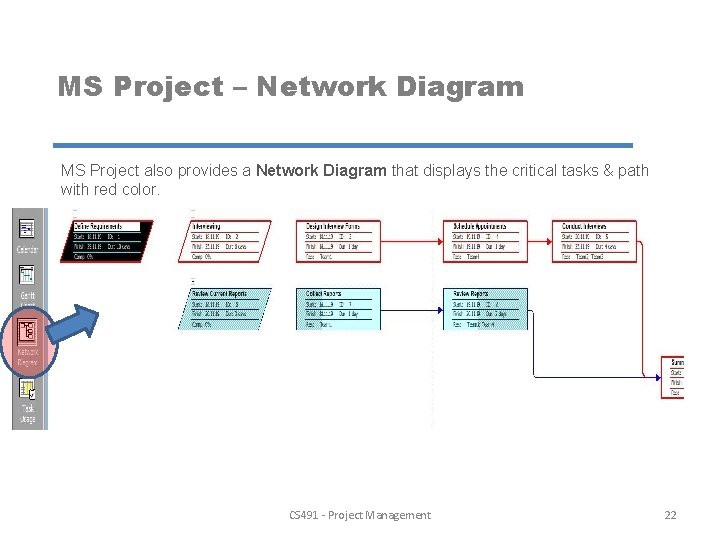
MS Project – Network Diagram MS Project also provides a Network Diagram that displays the critical tasks & path with red color. CS 491 - Project Management 22
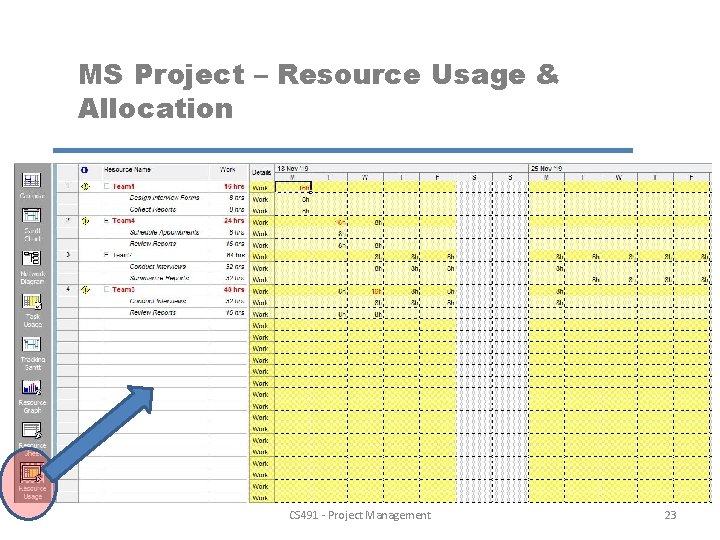
MS Project – Resource Usage & Allocation CS 491 - Project Management 23
Milestones - The project team defines the milestones during project planning in order to identify the appropriate project activities to be accomplished; and to set planned targets. - Milestones can indicate the completion of key project tasks, the commencement or conclusion of the plan. This means that milestones can be inserted at start, finish and notable check points throughout the project schedule. For example, “Scoping Complete” is a milestone that supports the creation of the deliverable “Requirements Document” for a HRIS implementation project. - The milestone represents the completion of a major step in the project that requires the commitment of a certain amount of time, resources and effort. Rules: - Set milestones to 0 days, as stated above milestones are check points NOT activities therefore it should not have a duration - Assign predecessors to your milestones, it will illustrate the exact impact to milestone delivery - Do not set deadline constraints on milestones, this will limit your ability to flexibly replan activities surrounding your milestone - Do not assign resources to milestones - Indent milestones so that they fall under the appropriate WBS element CS 491 - Project Management 24
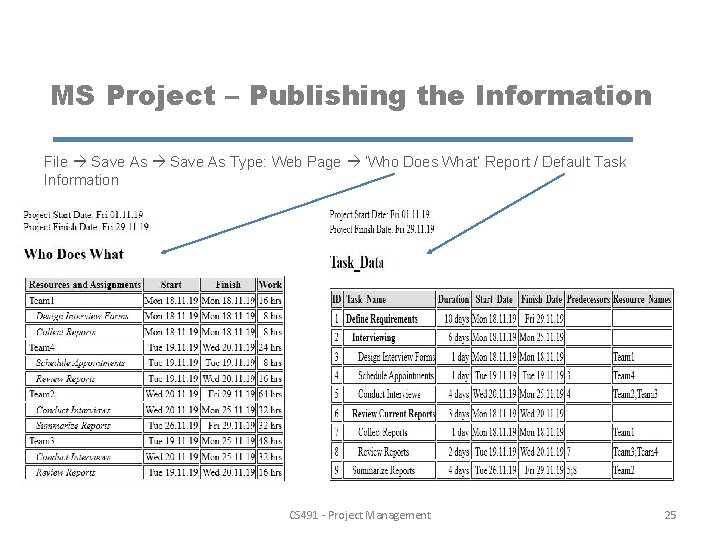
MS Project – Publishing the Information File Save As Type: Web Page ‘Who Does What’ Report / Default Task Information CS 491 - Project Management 25
Pine Valley Furniture Sales Promotion Tracking System Modern Systems Analysis & Design (by Hoffer, George, Valacich) Chapter 3 - Managing the IS Project Definition: Design, Develop and Implement a Tracking System. Assets needs to be tracked repetitively by reading a barcode, any passive and active RFID and feeding read data into Work in Progress models (WIP) or Warehouse Management Systems (WMS) or ERP software. Project Duration: Project is going to start at November 25, 2019 (Development and Implementation phases). The duration and end date of the project needs to be calculated. Project Tasks: Requirements Collection, Screen & Report Design, Database Construction, User Documentation, Software Programming, System Testing and Installation. CS 491 - Project Management 26
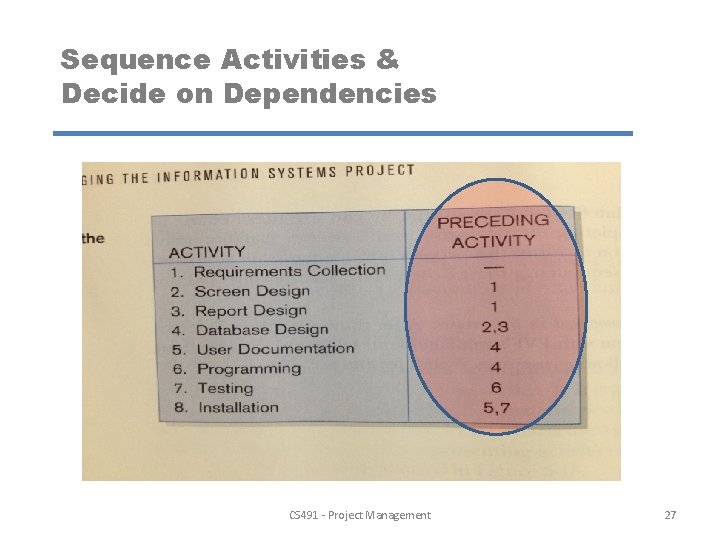
Sequence Activities & Decide on Dependencies CS 491 - Project Management 27
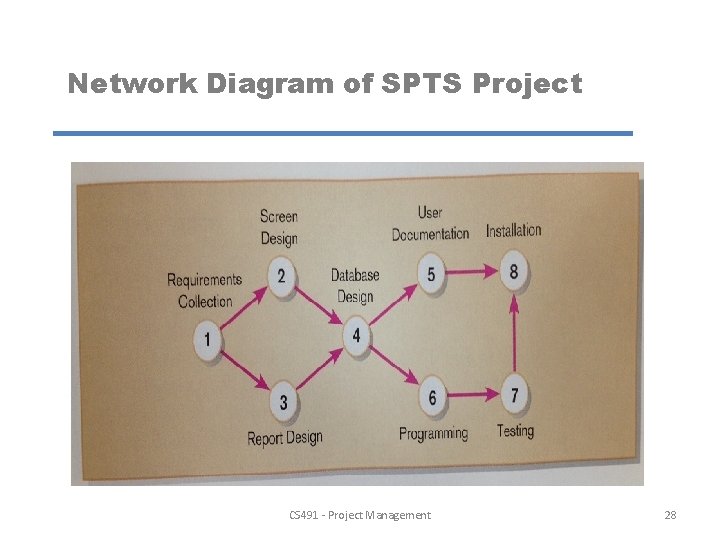
Network Diagram of SPTS Project CS 491 - Project Management 28
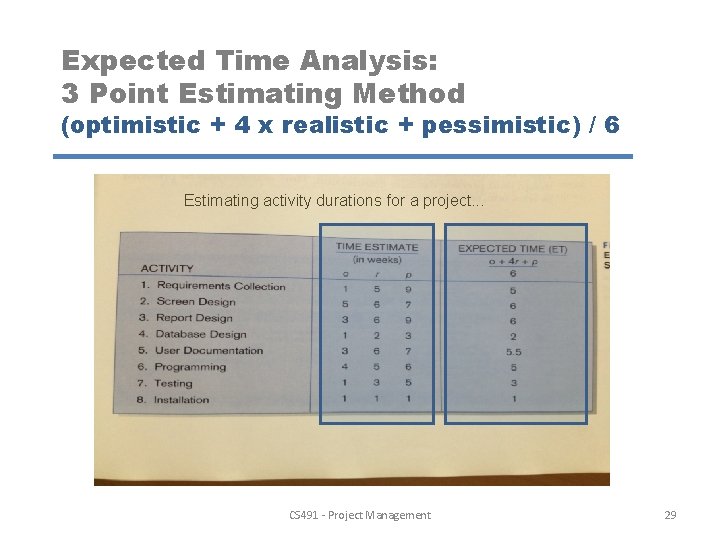
Expected Time Analysis: 3 Point Estimating Method (optimistic + 4 x realistic + pessimistic) / 6 Estimating activity durations for a project. . . CS 491 - Project Management 29
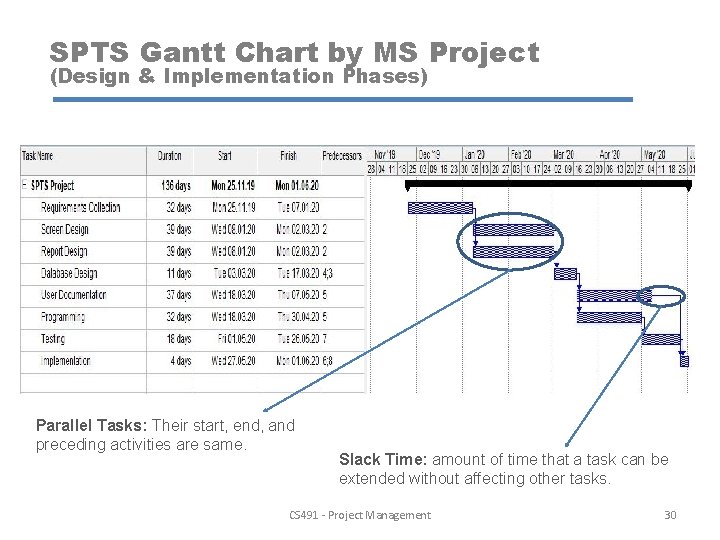
SPTS Gantt Chart by MS Project (Design & Implementation Phases) Parallel Tasks: Their start, end, and preceding activities are same. Slack Time: amount of time that a task can be extended without affecting other tasks. CS 491 - Project Management 30
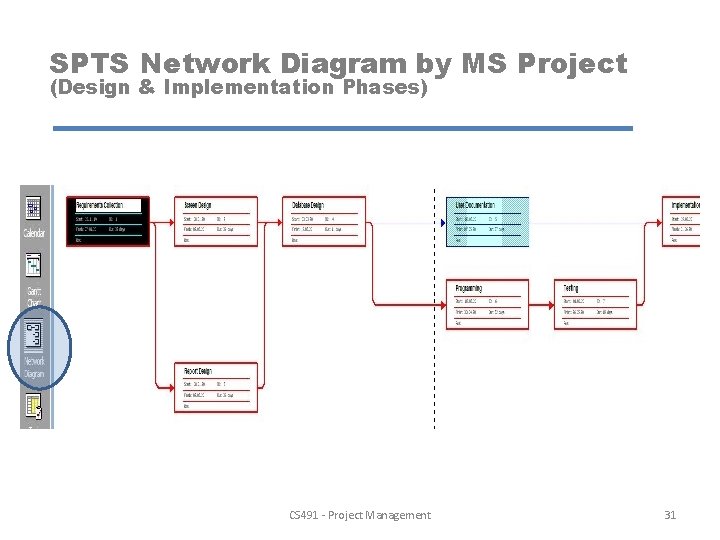
SPTS Network Diagram by MS Project (Design & Implementation Phases) CS 491 - Project Management 31
CPM Critical Path Method Crosschecking the project duration that we calculated at MS Project. . . CS 491 - Project Management 32
Critical Path Method (CPM) Critical Path: An important tool for effective project management in order to schedule a set of project activities. Sequence of task activities order and durations directly affect the completion of a project. Best-known scheduling method. • Sequence of connected activities that produce the longest overall period. (Begin to end that takes the longest time to complete) • It shows the shortest time that a project can be completed. • Any activity on critical path that is delayed in completion delays the entire project. • Tasks that are not on the critical path may contain slack time and allow the project manager some flexibility in scheduling. CS 491 - Project Management 33
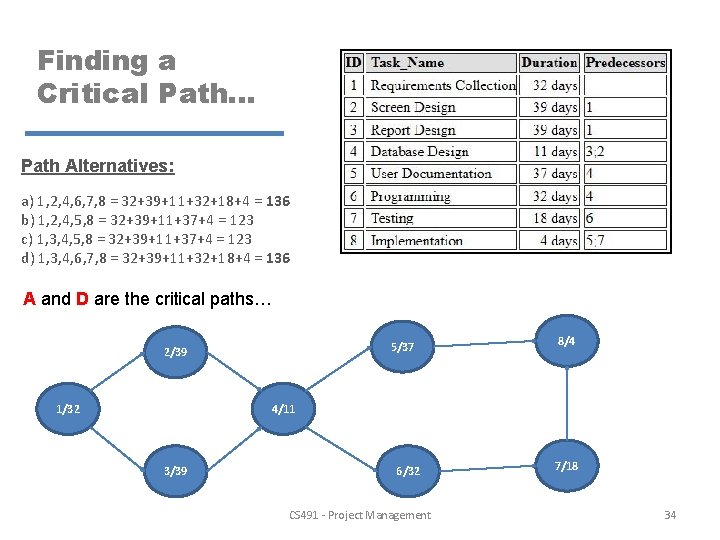
Finding a Critical Path. . . Path Alternatives: a) 1, 2, 4, 6, 7, 8 = 32+39+11+32+18+4 = 136 b) 1, 2, 4, 5, 8 = 32+39+11+37+4 = 123 c) 1, 3, 4, 5, 8 = 32+39+11+37+4 = 123 d) 1, 3, 4, 6, 7, 8 = 32+39+11+32+18+4 = 136 A and D are the critical paths… 5/37 2/39 1/32 8/4 4/11 3/39 6/32 CS 491 - Project Management 7/18 34
- What is a Gantt Chart? - What are the necessary steps for creating a Gantt Chart? CS 491 - Project Management 35
- Slides: 35