
Project management l l Organising planning and scheduling
- Slides: 25
Project management l l Organising, planning and scheduling software projects Objectives • • To introduce software project management and to describe its distinctive characteristics To discuss project planning and the planning process To show graphical schedule representations are used by project management To discuss the notion of risks and the risk management process ©Ian Sommerville 2000 Slide 1
Software project management l Concerned with activities involved in ensuring that software is delivered • • • l on time within the budget in accordance with the requirements Project management is needed because software development is always subject to budget and schedule constraints • Set by the development organisation or the customer ©Ian Sommerville 2000 Slide 2
Project control l Time, both the number of man-months and the schedule l Information, mostly the documentation l Technical, Knowledge, techniques and tools. l Organization, people and team aspects l Quality, not an add-on feature; it has to be built in l Budget for the project, ©Ian Sommerville 2000 Slide 3
Software management distinctions l l l The product is intangible The product is uniquely flexible The product is uniquely complex Software engineering is not recognized as an engineering discipline with the same status as mechanical, electrical engineering, etc. The software development process is not standardised Many software projects are “one-off” projects ©Ian Sommerville 2000 Slide 4
Management activities l l l Proposal writing Project planning and scheduling Project costing Project monitoring and reviews Personnel selection and evaluation Report writing and presentations ©Ian Sommerville 2000 Slide 5
Management Activities Other important details. l l l Process model Organization of project Standards, guidelines, procedures Management activities Risks ©Ian Sommerville 2000 l l l Methods and techniques Quality assurance Work packages Resources Changes Delivery Slide 6
Project staffing l May not be possible to appoint the ideal people to work on a project • • • Project budget may not allow for the use of highly-paid staff Staff with the appropriate experience may not be available An organisation may wish to develop employee skills on a software project » Here’s Bob. He’s new. He’ll be a member of your team. He doesn’t know much yet, but he can brew a mean cup of coffee and has a great personality. l Managers have to work within these constraints • especially when (as is currently the case) there is an international shortage of skilled IT staff ©Ian Sommerville 2000 Slide 7
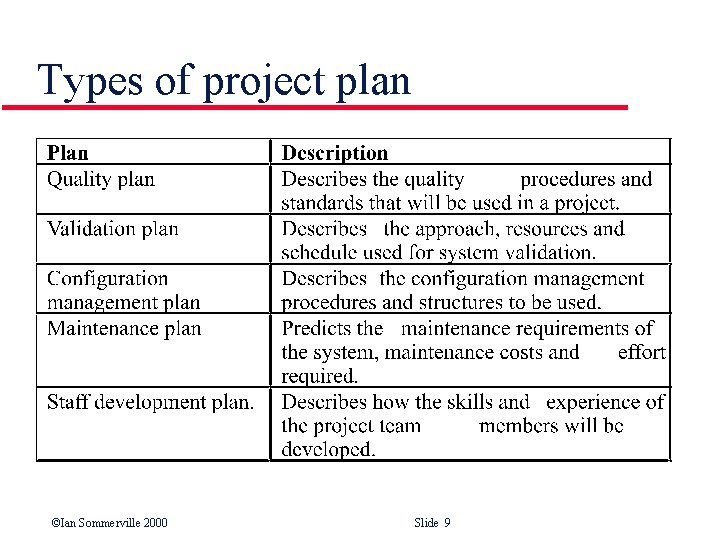
Project planning l l l Probably the most time-consuming project management activity Continuous activity from initial concept through to system delivery Plans must be regularly revised as new information becomes available • l Beware of grumbling developers Various different types of plan may be developed to support the main software project plan that is concerned with schedule and budget ©Ian Sommerville 2000 Slide 8
Types of project plan ©Ian Sommerville 2000 Slide 9
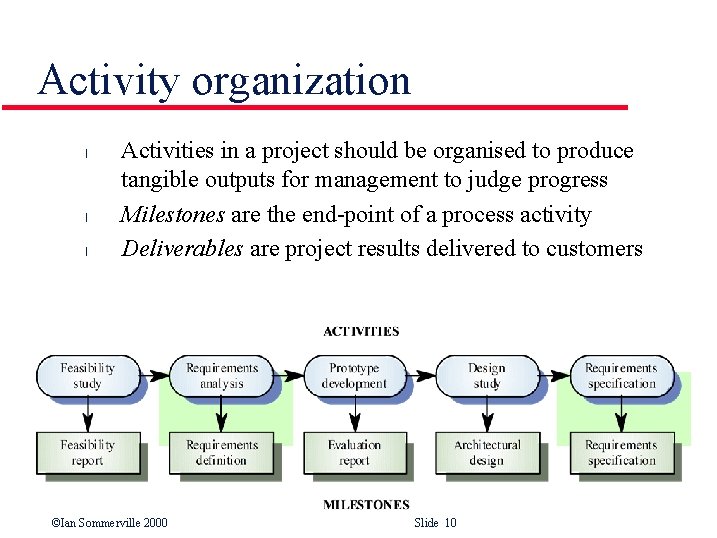
Activity organization l l l Activities in a project should be organised to produce tangible outputs for management to judge progress Milestones are the end-point of a process activity Deliverables are project results delivered to customers ©Ian Sommerville 2000 Slide 10
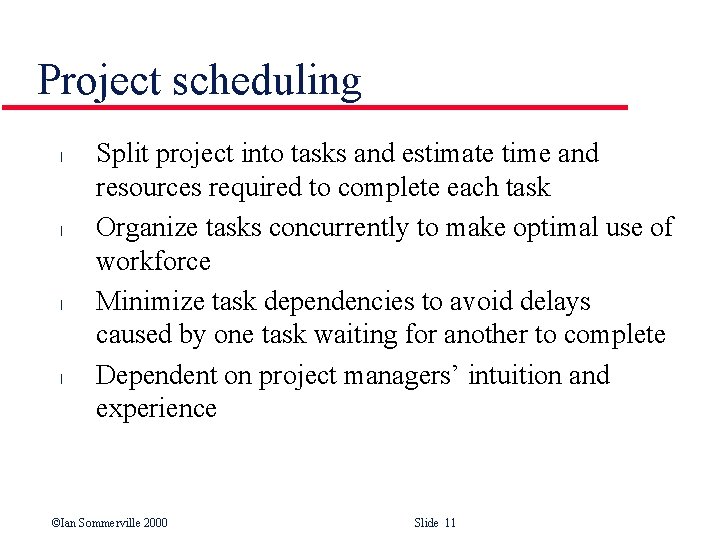
Project scheduling l l Split project into tasks and estimate time and resources required to complete each task Organize tasks concurrently to make optimal use of workforce Minimize task dependencies to avoid delays caused by one task waiting for another to complete Dependent on project managers’ intuition and experience ©Ian Sommerville 2000 Slide 11
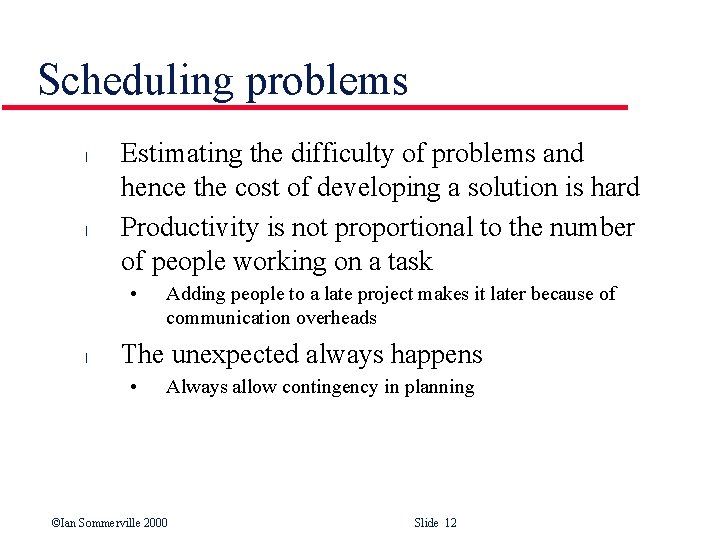
Scheduling problems l l Estimating the difficulty of problems and hence the cost of developing a solution is hard Productivity is not proportional to the number of people working on a task • l Adding people to a late project makes it later because of communication overheads The unexpected always happens • Always allow contingency in planning ©Ian Sommerville 2000 Slide 12
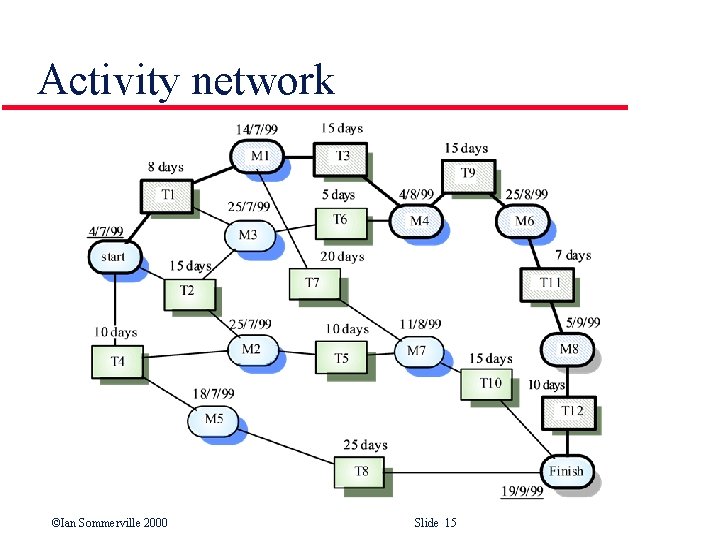
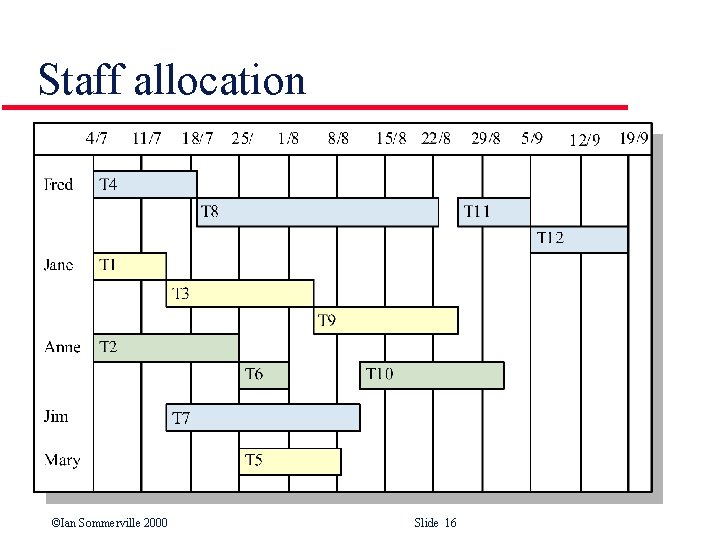
Bar charts and activity networks l l Graphical notations used to illustrate the project schedule Show project breakdown into tasks • • l l Tasks should not be too small They should take about a week or two Activity charts show task dependencies and the critical path Bar charts show schedule against calendar time ©Ian Sommerville 2000 Slide 13
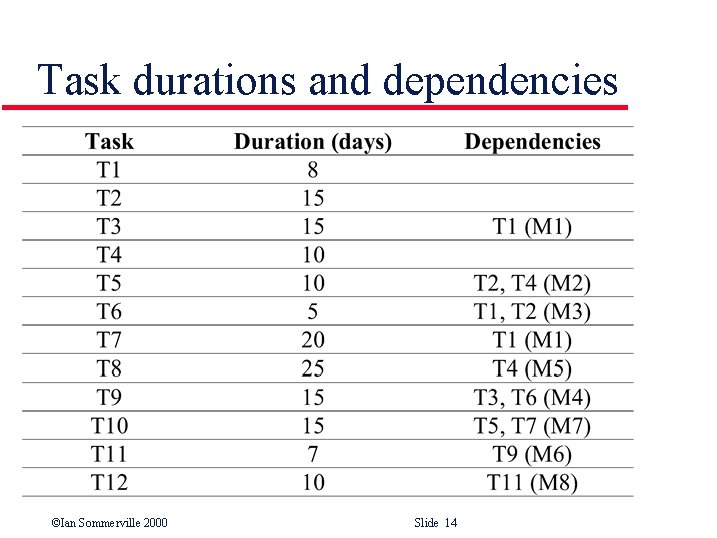
Task durations and dependencies ©Ian Sommerville 2000 Slide 14
Activity network ©Ian Sommerville 2000 Slide 15
Staff allocation ©Ian Sommerville 2000 Slide 16
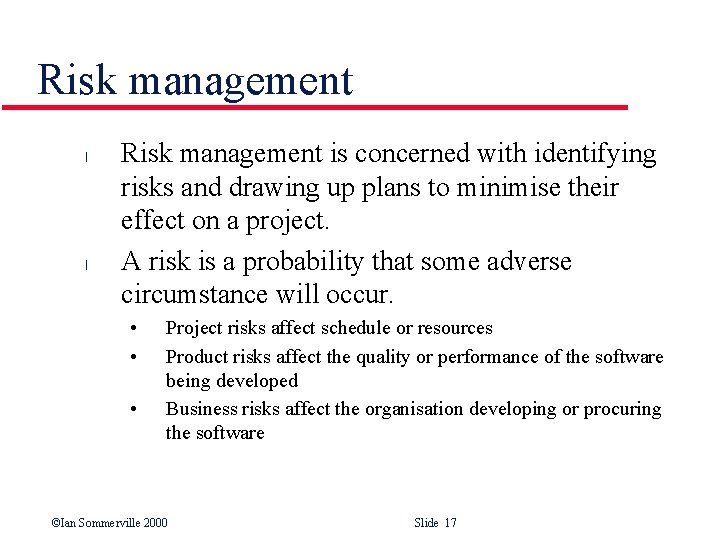
Risk management l l Risk management is concerned with identifying risks and drawing up plans to minimise their effect on a project. A risk is a probability that some adverse circumstance will occur. • • • Project risks affect schedule or resources Product risks affect the quality or performance of the software being developed Business risks affect the organisation developing or procuring the software ©Ian Sommerville 2000 Slide 17
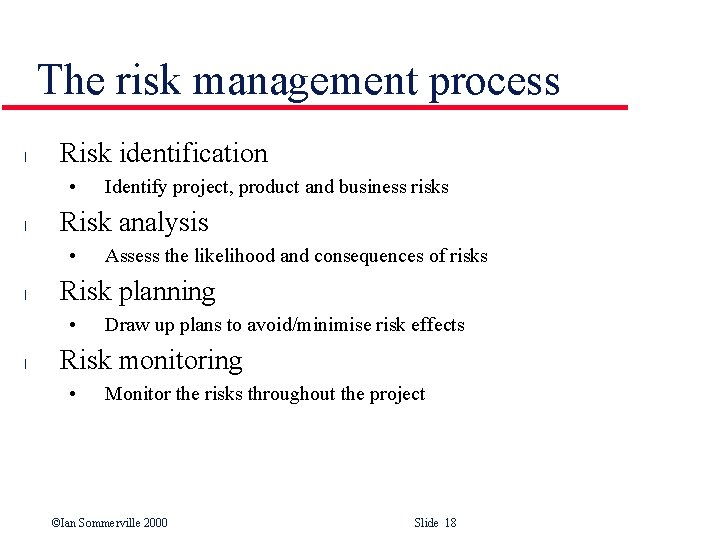
The risk management process l Risk identification • l Risk analysis • l Assess the likelihood and consequences of risks Risk planning • l Identify project, product and business risks Draw up plans to avoid/minimise risk effects Risk monitoring • Monitor the risks throughout the project ©Ian Sommerville 2000 Slide 18
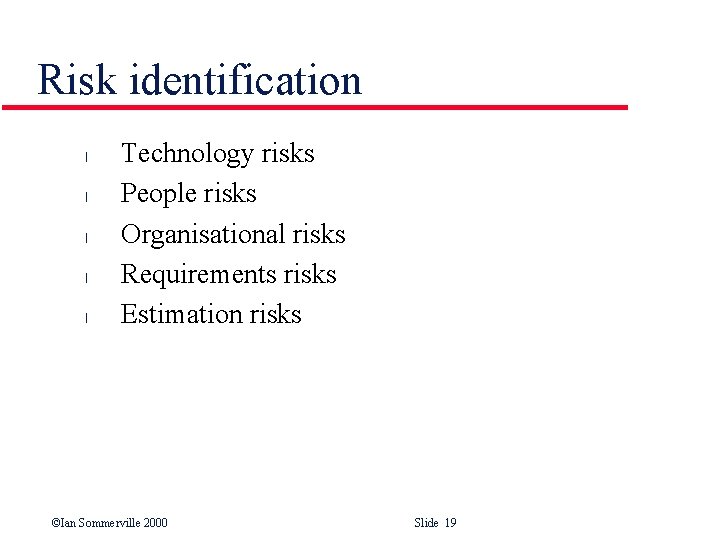
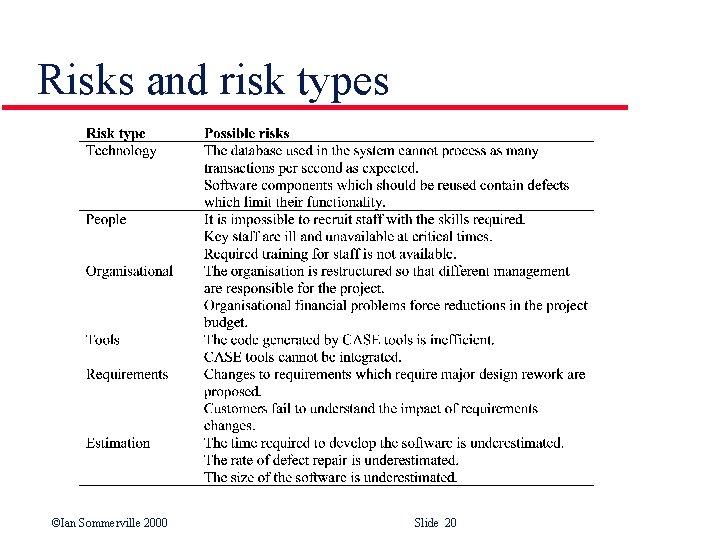
Risk identification l l l Technology risks People risks Organisational risks Requirements risks Estimation risks ©Ian Sommerville 2000 Slide 19
Risks and risk types ©Ian Sommerville 2000 Slide 20
Risk analysis l l Assess probability and seriousness of each risk Probability may be • • • l very low moderate high very high Risk effects might be • • catastrophic serious tolerable insignificant ©Ian Sommerville 2000 Slide 21
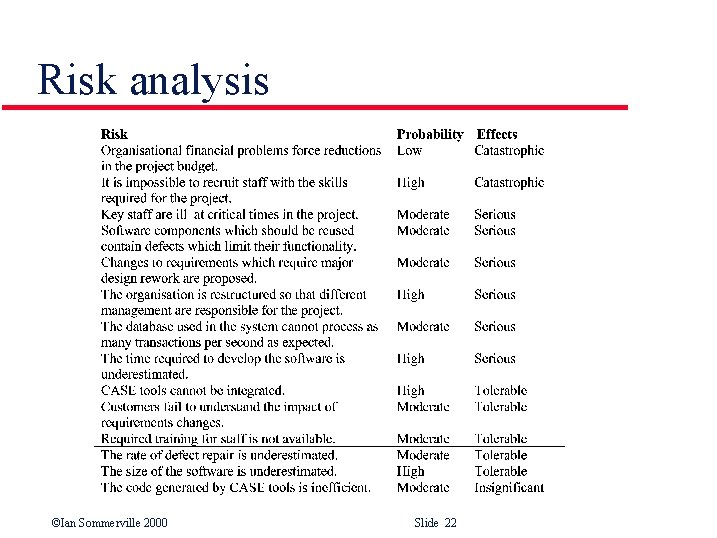
Risk analysis ©Ian Sommerville 2000 Slide 22
Risk planning l l Consider each risk and develop a strategy to manage that risk Avoidance strategies • l Minimisation strategies • l The probability that the risk will arise is reduced The impact of the risk on the project or product will be reduced Contingency plans • If the risk arises, contingency plans are plans to deal with that risk ©Ian Sommerville 2000 Slide 23
Risk monitoring l l l Assess each identified risks regularly to decide whether or not it is becoming less or more probable Also assess whether the effects of the risk have changed Each key risk should be discussed at management progress meetings ©Ian Sommerville 2000 Slide 24
Key points l l l l Good project management is essential for project success The intangible nature of software causes problems for management Managers have diverse roles but their most significant activities are planning, estimating and scheduling Planning and estimating are iterative processes that continue throughout the course of a project A project milestone is a predictable state where some formal report of progress is presented to management. Risks may be project risks, product risks or business risks Risk management is concerned with identifying risks that may affect the project and planning to ensure that these risks do not develop into major threats ©Ian Sommerville 2000 Slide 25