
Project Advice to Accelerate Your SAP Business Planning
Project Advice to Accelerate Your SAP Business Planning and Consolidation Implementation or Migration Project Steve Coan Vantage. Point Business Solutions Produced by Wellesley Information Services, LLC, publisher of SAPinsider. © 2014 Wellesley Information Services.
Disclaimer • • SAP has not endorsed or approved this presentation. This is information based on my experience, insights, and current information (and somewhat educated opinion) on the current and future state of the SAP offering. 1
In This Session • • • Practical, field-tested advice on how to implement BPC successfully and retain your sanity Advice about data integration, validation, and ETL The latest BPC 10. 1 – Classic or Unified BPC upgrade paths and approaches BPC version support matrix and horizon 2
What We’ll Cover • • Ten preparation tips for a successful BPC implementation Five tips for identifying the right data granularity for your project Migration options for moving to BPC 10. 0/10. 1 NW Migration options for moving to BPC 10. 0 MS Migrating from Ev. DRE to EPM Add-In templates SAP’s support strategy for all BPC versions Wrap-up 3
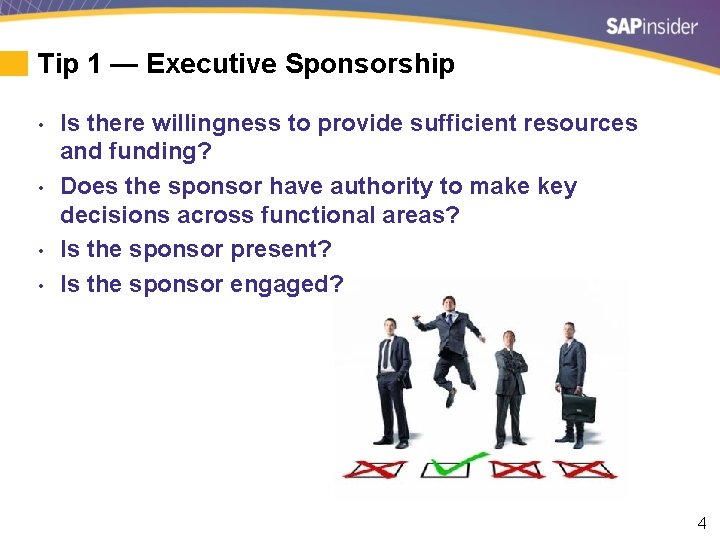
Tip 1 — Executive Sponsorship • • Is there willingness to provide sufficient resources and funding? Does the sponsor have authority to make key decisions across functional areas? Is the sponsor present? Is the sponsor engaged? 4
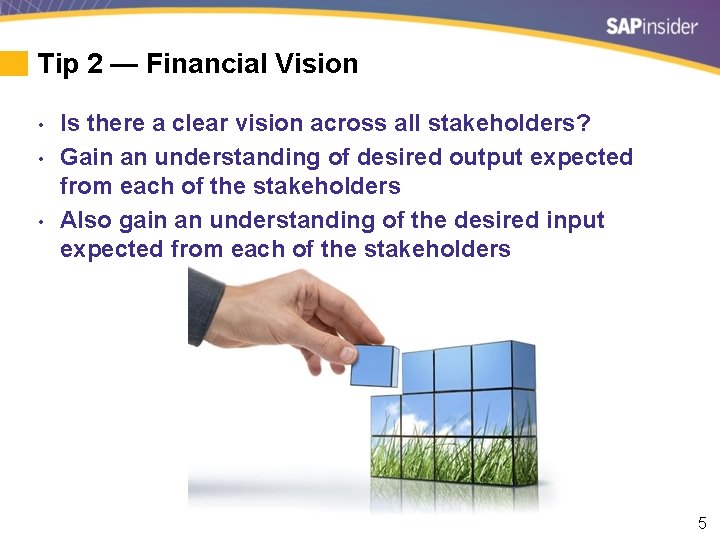
Tip 2 — Financial Vision • • • Is there a clear vision across all stakeholders? Gain an understanding of desired output expected from each of the stakeholders Also gain an understanding of the desired input expected from each of the stakeholders 5
Tip 3 — Communication • • Do you have an effective form of communication in place for the project? Is there a shared directory available for project artifacts? Personal communication is a must Regular core team status meetings keep the project on track 6
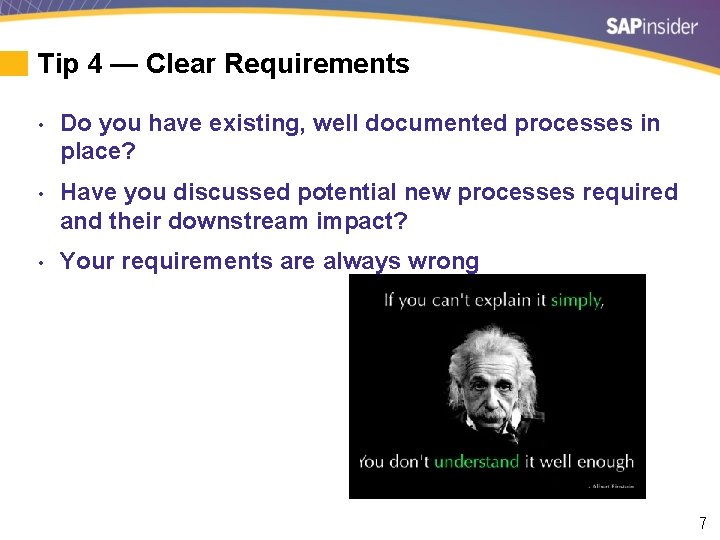
Tip 4 — Clear Requirements • Do you have existing, well documented processes in place? • Have you discussed potential new processes required and their downstream impact? • Your requirements are always wrong 7
Tip 5 — Data • • What is the desired level to plan/analyze, and does your actual data support this desired level? What other metrics are required? 8
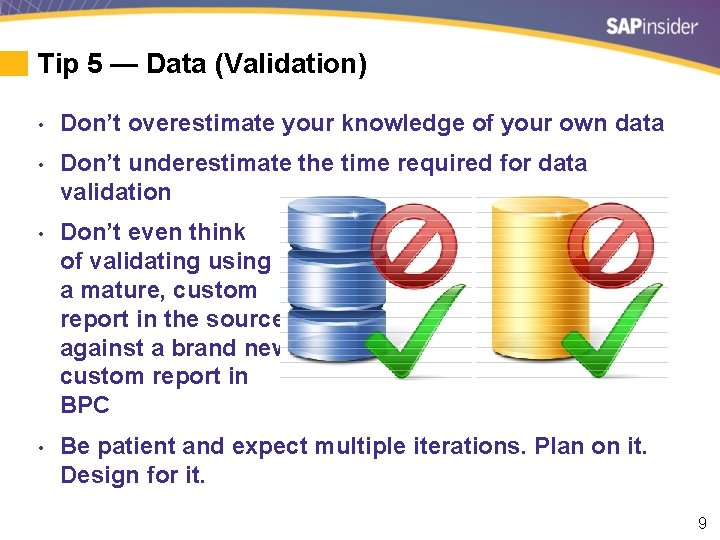
Tip 5 — Data (Validation) • Don’t overestimate your knowledge of your own data • Don’t underestimate the time required for data validation • Don’t even think of validating using a mature, custom report in the source against a brand new custom report in BPC • Be patient and expect multiple iterations. Plan on it. Design for it. 9
Tip 6 — Project Team • • • Do you have the right people for the team? Are they knowledgeable, cooperative, and resultsorientated? Make process owners and subject matter experts available during the whole process To mitigate risk, spread the work rather then relying only on key people Make sure extended team members understand their roles 10
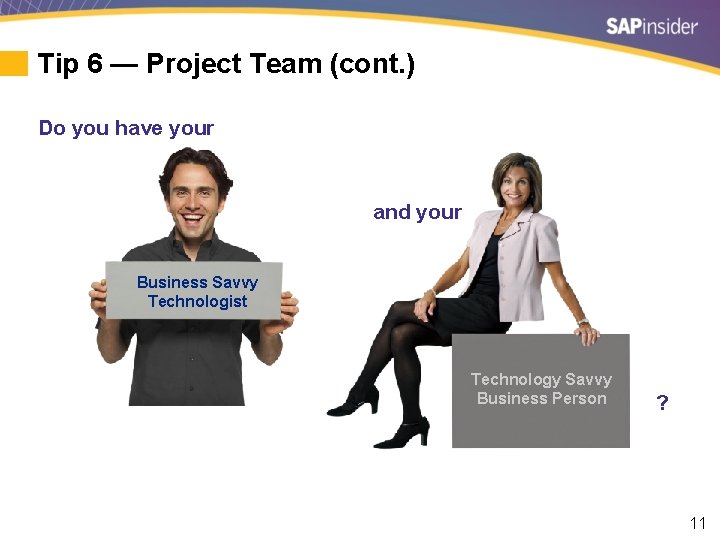
Tip 6 — Project Team (cont. ) Do you have your and your Business Savvy Technologist Technology Savvy Business Person ? 11
Tip 7 — Critical Success Factors • • • CSFs are those few things that must go well for an endeavor to succeed Have stakeholders identified and agreed on CSFs? Have you considered ongoing maintenance and support as a CSF? 12
Tip 8 — Implementation Partner • Have you developed an adequate RFP to assess vendors? • Make arrangements to meet your finalists in person • Find a partner who has done similar projects before. Many times. • Lean on your partner. Avoid the trap of thinking, “We do things differently around here …” 13
Tip 9 — Project Management • Does your organization contain project management skills? • Will the project manager have proper authority over resources? • A good project manager unshackles talented team members to make great deliveries 14
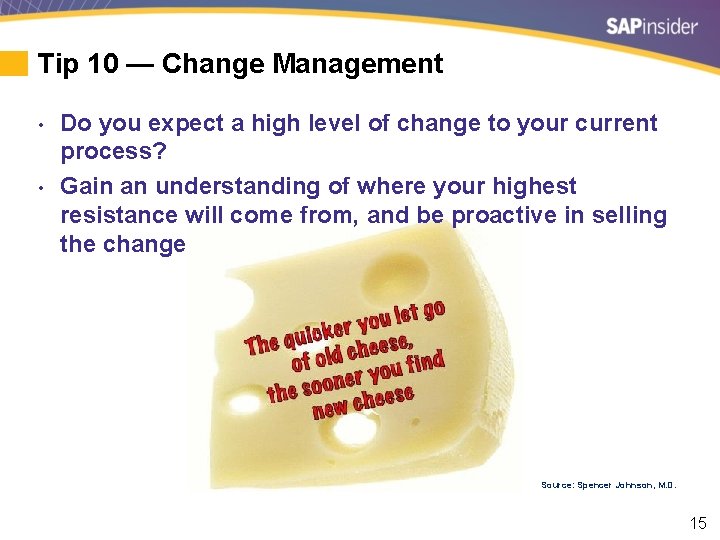
Tip 10 — Change Management • • Do you expect a high level of change to your current process? Gain an understanding of where your highest resistance will come from, and be proactive in selling the change Source: Spencer Johnson, M. D. 15
What We’ll Cover • • Ten preparation tips for a successful BPC implementation Five tips for identifying the right data granularity for your project Migration options for moving to BPC 10. 0/10. 1 NW Migration options for moving to BPC 10. 0 MS Migrating from Ev. DRE to EPM Add-In templates SAP’s support strategy for all BPC versions Wrap-up 16
Data Tip 1 — Keep the Focus on Required Insights • • • What types of questions do you want to ask of your data? Focus on what is required for planning or reporting and not what data is available More is not always better 17
Data Tip 2 — Minimize Movement, Maximize Visibility • Focus on minimizing the data movement from one system to another • Use drill-through for access to transactional data or a Web-enabled transaction that is already sufficient in another system • HANA can handle large volumes easily, but getting all the data into BPC involves multiple ETL steps and adds overhead, time lag, and complexity to the environment 18
Data Tip 3 — Keep Actuals in Focus • • • You can’t report data you don’t diligently capture Plan at the level where comparable actual data is available Don’t confuse what “is” available with what you “would like to be” available s Example: Planned wiper blade sales for Sedans vs. SUVs s Example: Profitability by Product instead of by Brand or Region 19
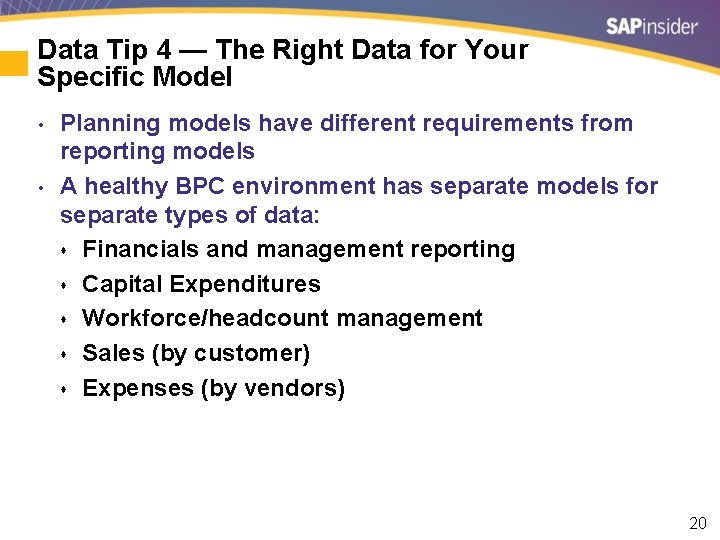
Data Tip 4 — The Right Data for Your Specific Model • • Planning models have different requirements from reporting models A healthy BPC environment has separate models for separate types of data: s Financials and management reporting s Capital Expenditures s Workforce/headcount management s Sales (by customer) s Expenses (by vendors) 20
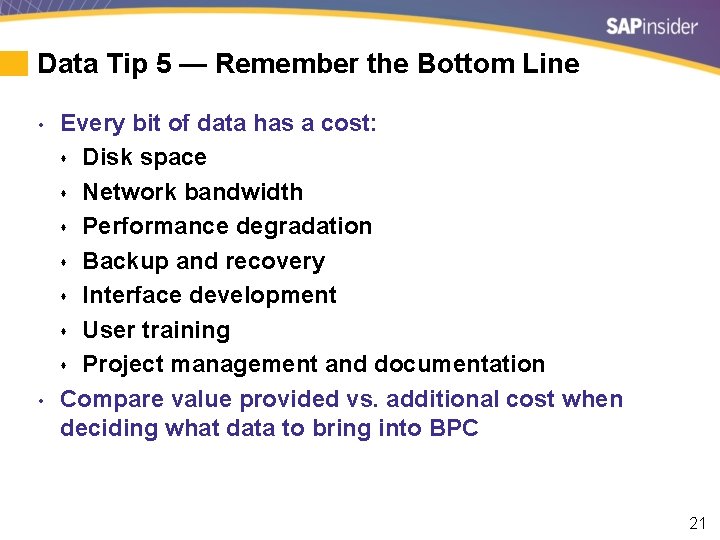
Data Tip 5 — Remember the Bottom Line • • Every bit of data has a cost: s Disk space s Network bandwidth s Performance degradation s Backup and recovery s Interface development s User training s Project management and documentation Compare value provided vs. additional cost when deciding what data to bring into BPC 21
What We’ll Cover • • Ten preparation tips for a successful BPC implementation Five tips for identifying the right data granularity for your project Migration options for moving to BPC 10. 0/10. 1 NW Migration options for moving to BPC 10. 0 MS Migrating from Ev. DRE to EPM Add-In templates SAP’s support strategy for all BPC versions Wrap-up 22
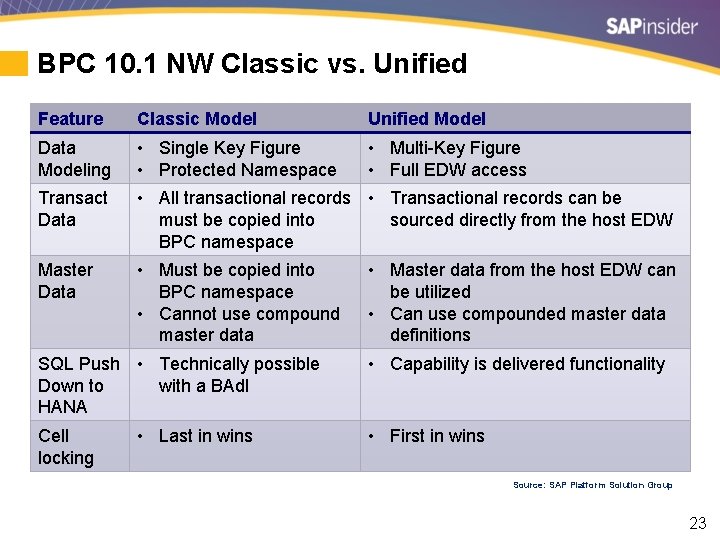
BPC 10. 1 NW Classic vs. Unified Feature Classic Model Unified Model Data Modeling • Single Key Figure • Protected Namespace • Multi-Key Figure • Full EDW access Transact Data • All transactional records • Transactional records can be must be copied into sourced directly from the host EDW BPC namespace Master Data • Must be copied into BPC namespace • Cannot use compound master data SQL Push • Technically possible Down to with a BAd. I HANA Cell locking • Last in wins • Master data from the host EDW can be utilized • Can use compounded master data definitions • Capability is delivered functionality • First in wins Source: SAP Platform Solution Group 23
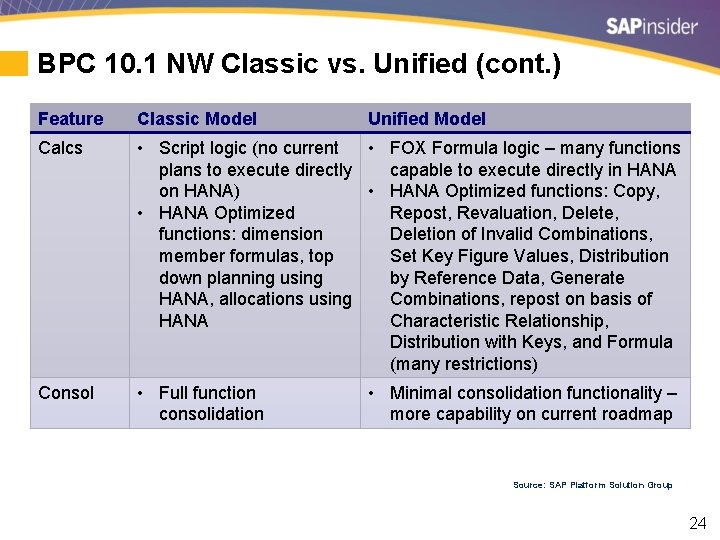
BPC 10. 1 NW Classic vs. Unified (cont. ) Feature Classic Model Unified Model Calcs • Script logic (no current • FOX Formula logic – many functions plans to execute directly capable to execute directly in HANA on HANA) • HANA Optimized functions: Copy, • HANA Optimized Repost, Revaluation, Delete, functions: dimension Deletion of Invalid Combinations, member formulas, top Set Key Figure Values, Distribution down planning using by Reference Data, Generate HANA, allocations using Combinations, repost on basis of HANA Characteristic Relationship, Distribution with Keys, and Formula (many restrictions) Consol • Full function consolidation • Minimal consolidation functionality – more capability on current roadmap Source: SAP Platform Solution Group 24
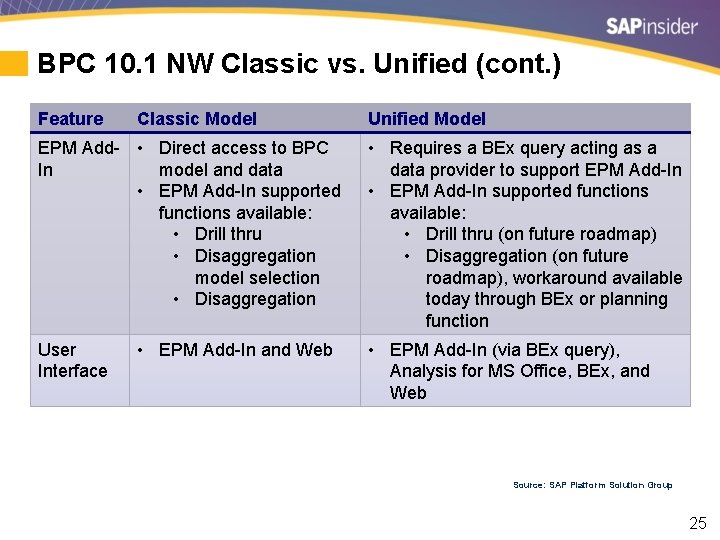
BPC 10. 1 NW Classic vs. Unified (cont. ) Feature Classic Model EPM Add- • Direct access to BPC In model and data • EPM Add-In supported functions available: • Drill thru • Disaggregation model selection • Disaggregation User Interface • EPM Add-In and Web Unified Model • Requires a BEx query acting as a data provider to support EPM Add-In • EPM Add-In supported functions available: • Drill thru (on future roadmap) • Disaggregation (on future roadmap), workaround available today through BEx or planning function • EPM Add-In (via BEx query), Analysis for MS Office, BEx, and Web Source: SAP Platform Solution Group 25
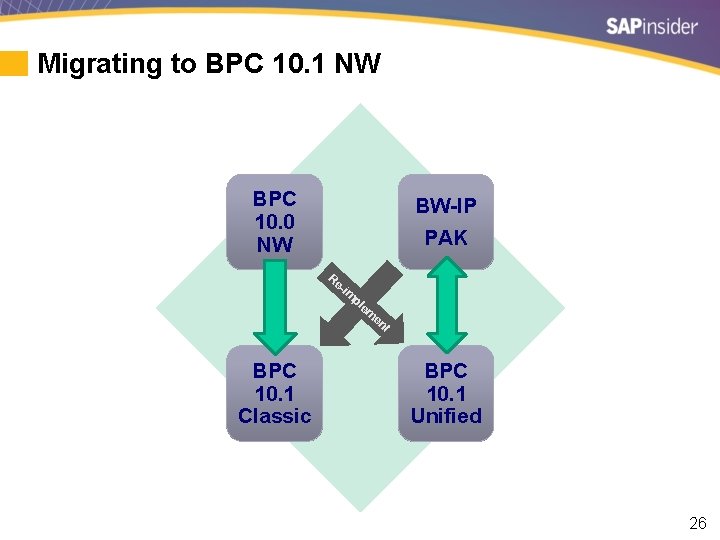
Migrating to BPC 10. 1 NW BPC 10. 0 NW BW-IP PAK Re -im pl em en t BPC 10. 1 Classic BPC 10. 1 Unified 26
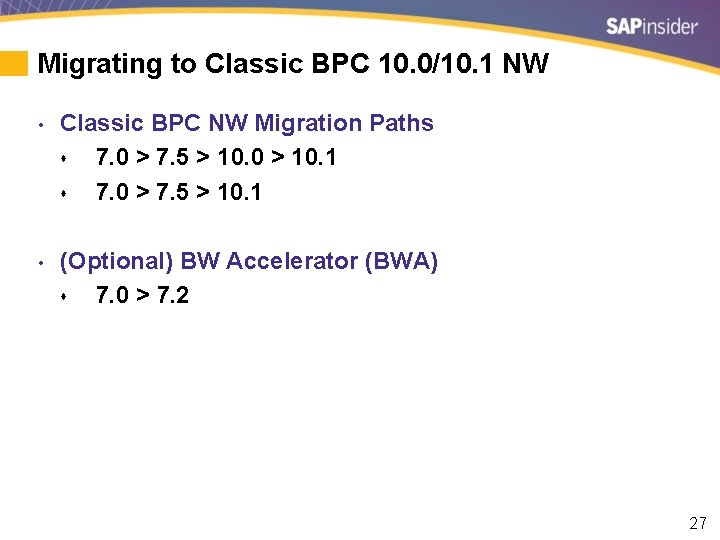
Migrating to Classic BPC 10. 0/10. 1 NW • Classic BPC NW Migration Paths s 7. 0 > 7. 5 > 10. 0 > 10. 1 s 7. 0 > 7. 5 > 10. 1 • (Optional) BW Accelerator (BWA) s 7. 0 > 7. 2 27
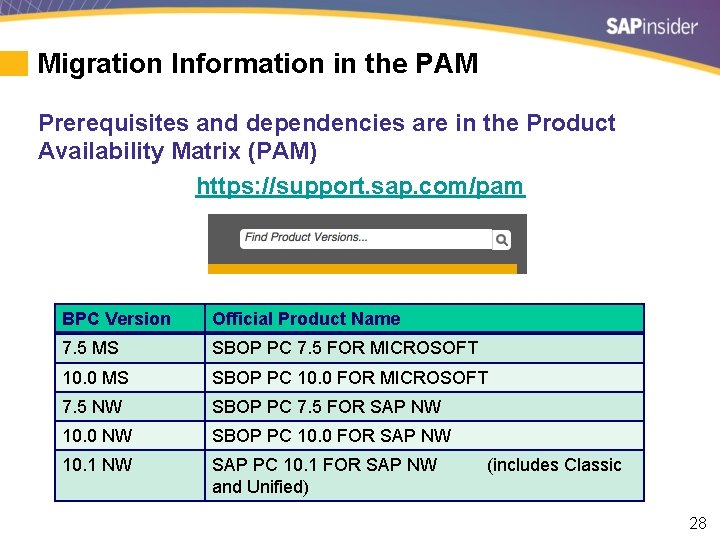
Migration Information in the PAM Prerequisites and dependencies are in the Product Availability Matrix (PAM) https: //support. sap. com/pam BPC Version Official Product Name 7. 5 MS SBOP PC 7. 5 FOR MICROSOFT 10. 0 MS SBOP PC 10. 0 FOR MICROSOFT 7. 5 NW SBOP PC 7. 5 FOR SAP NW 10. 0 NW SBOP PC 10. 0 FOR SAP NW 10. 1 NW SAP PC 10. 1 FOR SAP NW (includes Classic and Unified) 28
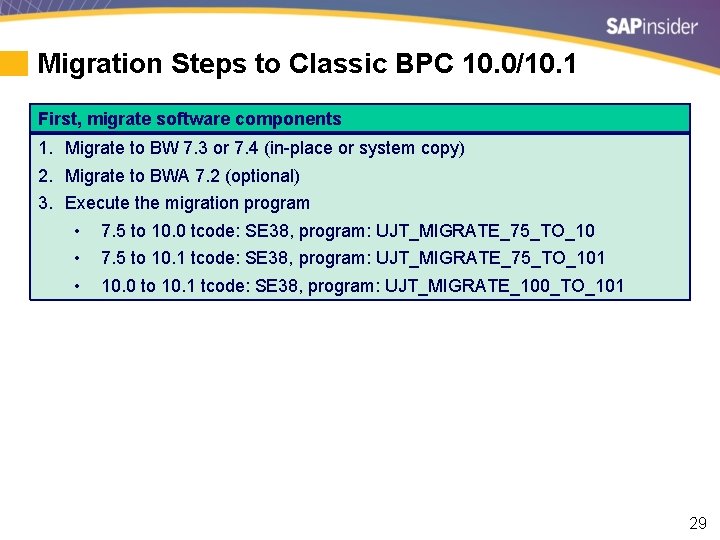
Migration Steps to Classic BPC 10. 0/10. 1 First, migrate software components 1. Migrate to BW 7. 3 or 7. 4 (in-place or system copy) 2. Migrate to BWA 7. 2 (optional) 3. Execute the migration program • 7. 5 to 10. 0 tcode: SE 38, program: UJT_MIGRATE_75_TO_10 • 7. 5 to 10. 1 tcode: SE 38, program: UJT_MIGRATE_75_TO_101 • 10. 0 to 10. 1 tcode: SE 38, program: UJT_MIGRATE_100_TO_101 29
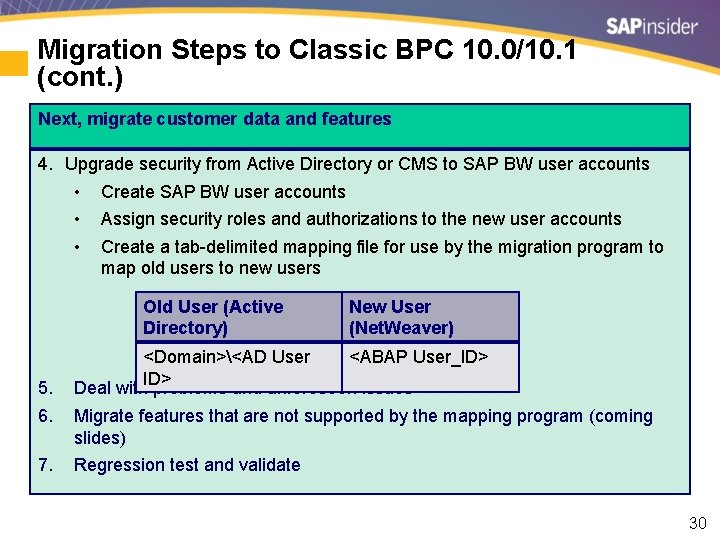
Migration Steps to Classic BPC 10. 0/10. 1 (cont. ) Next, migrate customer data and features 4. Upgrade security from Active Directory or CMS to SAP BW user accounts • Create SAP BW user accounts • Assign security roles and authorizations to the new user accounts • Create a tab-delimited mapping file for use by the migration program to map old users to new users Old User (Active Directory) 5. 6. 7. New User (Net. Weaver) <Domain><AD User <ABAP User_ID> Deal with problems and unforeseen issues Migrate features that are not supported by the mapping program (coming slides) Regression test and validate 30
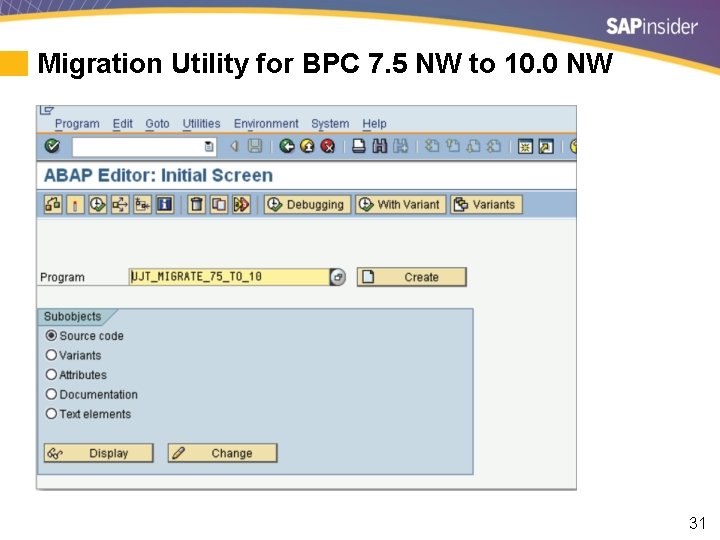
Migration Utility for BPC 7. 5 NW to 10. 0 NW 31
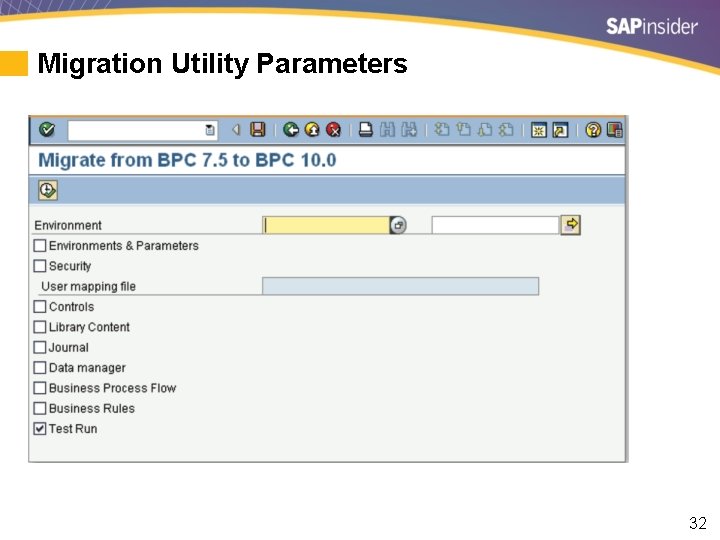
Migration Utility Parameters 32
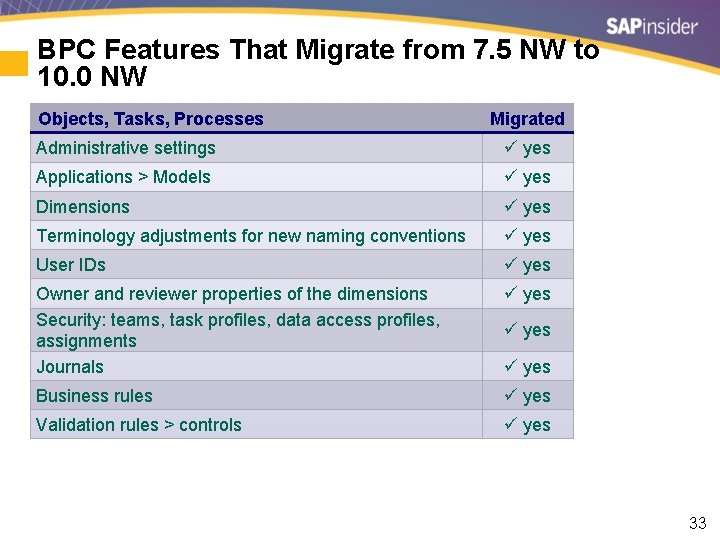
BPC Features That Migrate from 7. 5 NW to 10. 0 NW Objects, Tasks, Processes Migrated Administrative settings yes Applications > Models yes Dimensions yes Terminology adjustments for new naming conventions yes User IDs yes Owner and reviewer properties of the dimensions Security: teams, task profiles, data access profiles, assignments Journals yes Business rules yes Validation rules > controls yes 33
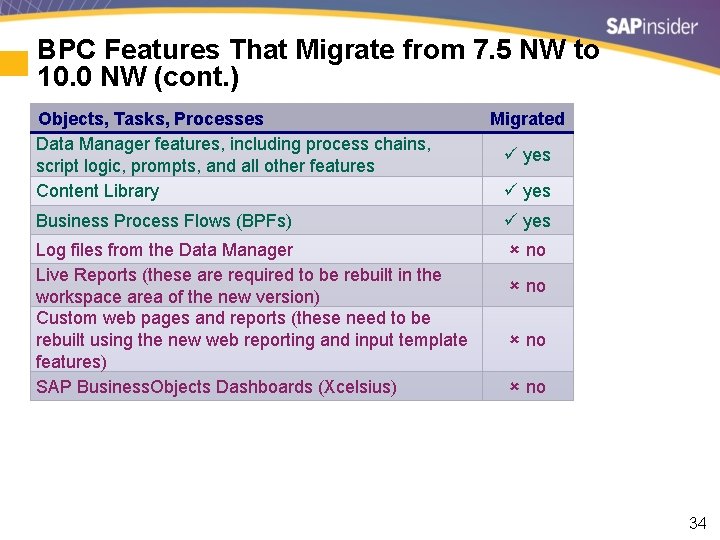
BPC Features That Migrate from 7. 5 NW to 10. 0 NW (cont. ) Objects, Tasks, Processes Data Manager features, including process chains, script logic, prompts, and all other features Content Library Migrated yes Business Process Flows (BPFs) yes Log files from the Data Manager Live Reports (these are required to be rebuilt in the workspace area of the new version) Custom web pages and reports (these need to be rebuilt using the new web reporting and input template features) SAP Business. Objects Dashboards (Xcelsius) no no 34
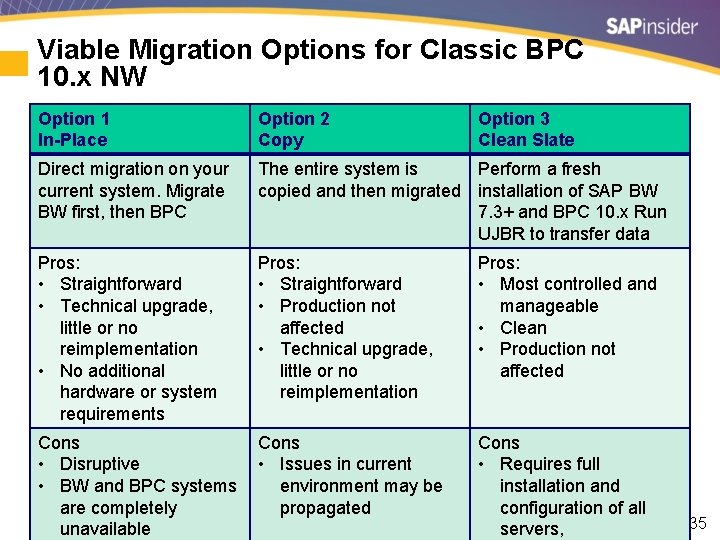
Viable Migration Options for Classic BPC 10. x NW Option 1 In-Place Option 2 Copy Direct migration on your current system. Migrate BW first, then BPC The entire system is Perform a fresh copied and then migrated installation of SAP BW 7. 3+ and BPC 10. x Run UJBR to transfer data Pros: • Straightforward • Technical upgrade, little or no reimplementation • No additional hardware or system requirements Pros: • Straightforward • Production not affected • Technical upgrade, little or no reimplementation Cons • Disruptive • Issues in current • BW and BPC systems environment may be are completely propagated unavailable Option 3 Clean Slate Pros: • Most controlled and manageable • Clean • Production not affected Cons • Requires full installation and configuration of all servers, 35
What We’ll Cover • • Ten preparation tips for a successful BPC implementation Five tips for identifying the right data granularity for your project Migration options for moving to BPC 10. 0/10. 1 NW Migration options for moving to BPC 10. 0 MS Migrating from Ev. DRE to EPM Add-In templates SAP’s support strategy for all BPC versions Wrap-up 36
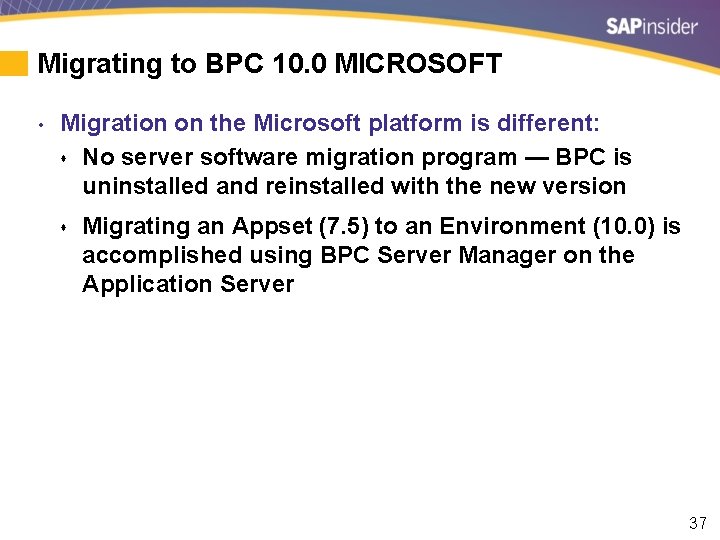
Migrating to BPC 10. 0 MICROSOFT • Migration on the Microsoft platform is different: s No server software migration program — BPC is uninstalled and reinstalled with the new version s Migrating an Appset (7. 5) to an Environment (10. 0) is accomplished using BPC Server Manager on the Application Server 37
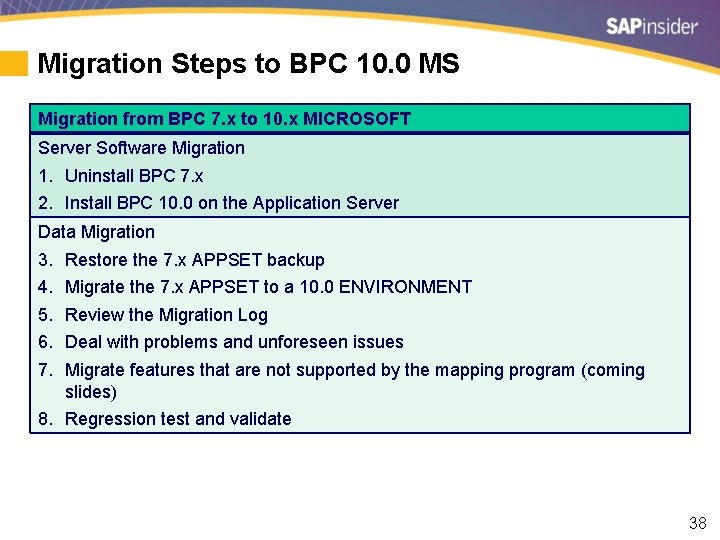
Migration Steps to BPC 10. 0 MS Migration from BPC 7. x to 10. x MICROSOFT Server Software Migration 1. Uninstall BPC 7. x 2. Install BPC 10. 0 on the Application Server Data Migration 3. 4. 5. 6. 7. Restore the 7. x APPSET backup Migrate the 7. x APPSET to a 10. 0 ENVIRONMENT Review the Migration Log Deal with problems and unforeseen issues Migrate features that are not supported by the mapping program (coming slides) 8. Regression test and validate 38
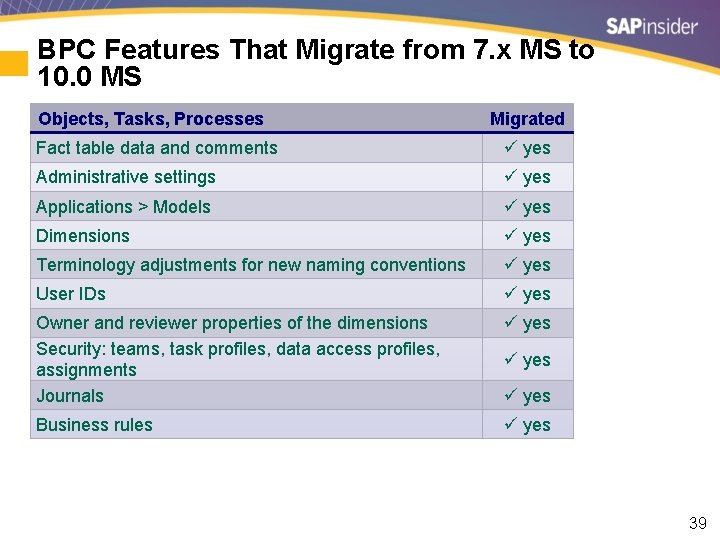
BPC Features That Migrate from 7. x MS to 10. 0 MS Objects, Tasks, Processes Migrated Fact table data and comments yes Administrative settings yes Applications > Models yes Dimensions yes Terminology adjustments for new naming conventions yes User IDs yes Owner and reviewer properties of the dimensions Security: teams, task profiles, data access profiles, assignments Journals yes Business rules yes 39
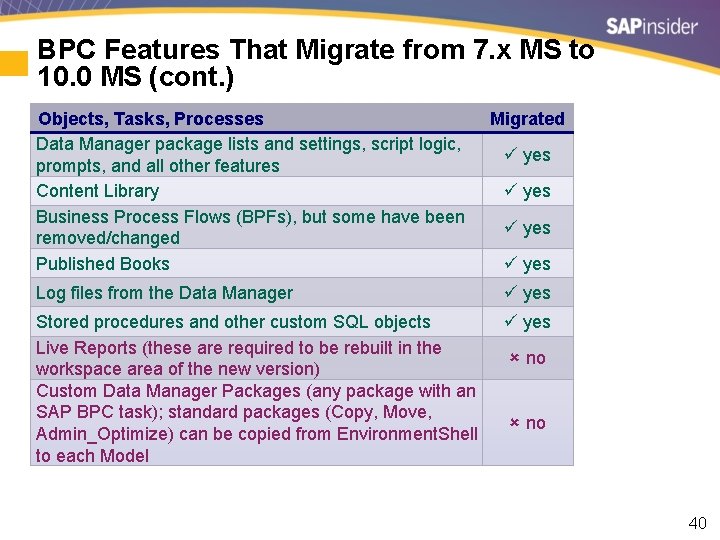
BPC Features That Migrate from 7. x MS to 10. 0 MS (cont. ) Objects, Tasks, Processes Data Manager package lists and settings, script logic, prompts, and all other features Content Library Business Process Flows (BPFs), but some have been removed/changed Published Books Migrated yes Log files from the Data Manager yes Stored procedures and other custom SQL objects Live Reports (these are required to be rebuilt in the workspace area of the new version) Custom Data Manager Packages (any package with an SAP BPC task); standard packages (Copy, Move, Admin_Optimize) can be copied from Environment. Shell to each Model yes no 40
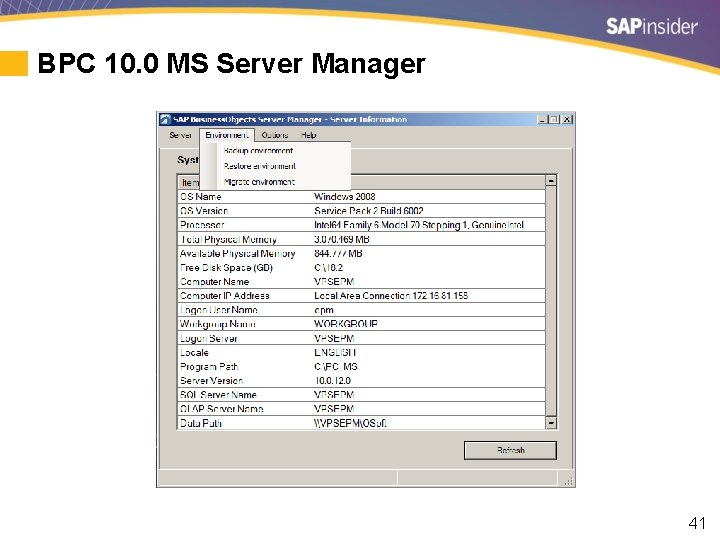
BPC 10. 0 MS Server Manager 41
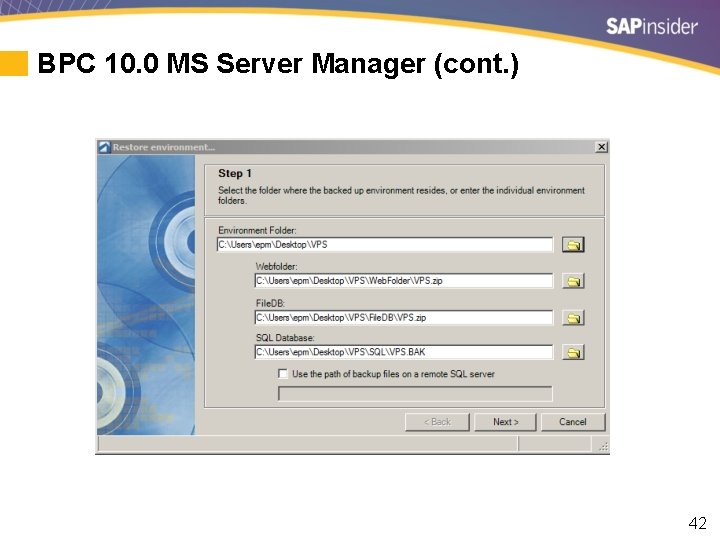
BPC 10. 0 MS Server Manager (cont. ) 42
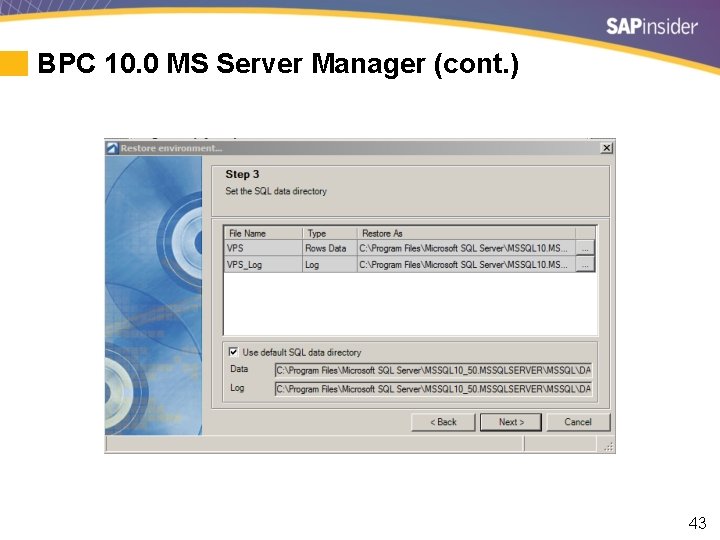
BPC 10. 0 MS Server Manager (cont. ) 43
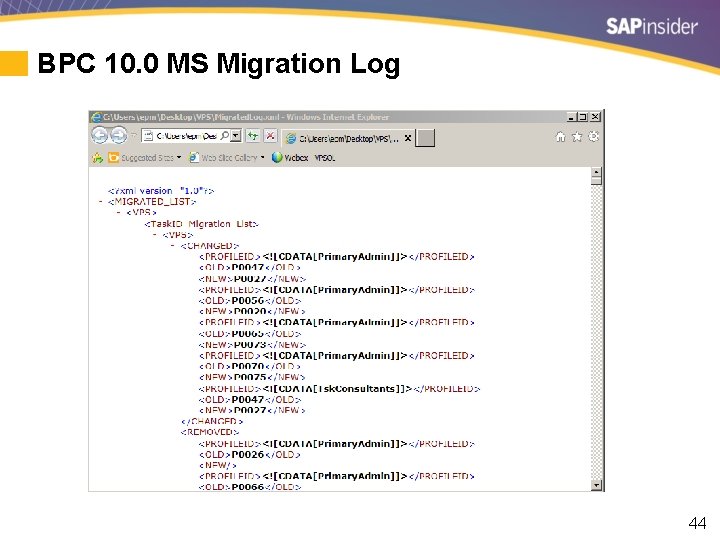
BPC 10. 0 MS Migration Log 44
What We’ll Cover • • Ten preparation tips for a successful BPC implementation Five tips for identifying the right data granularity for your project Migration options for moving to BPC 10. 0/10. 1 NW Migration options for moving to BPC 10. 0 MS Migrating from Ev. DRE to EPM Add-In templates SAP’s support strategy for all BPC versions Wrap-up 45
A Word on Ev. DRE > EPM Add-In Report Migration Don’t worry 46
Ev. DRE Support in the EPM Add-In • Ev. DRE performs very well in the EPM Add-In • There is a very short list of Ev. DRE features and EV functions that are not supported in BPC 10. 0 • Notable: 1. Insert Member functionality 2. Ev. HNV() 3. Ev. MNU() 4. MNU macros (e. g. , MNU_e. Tools_Expand) • Refactoring and testing converted templates can be a time sink 47
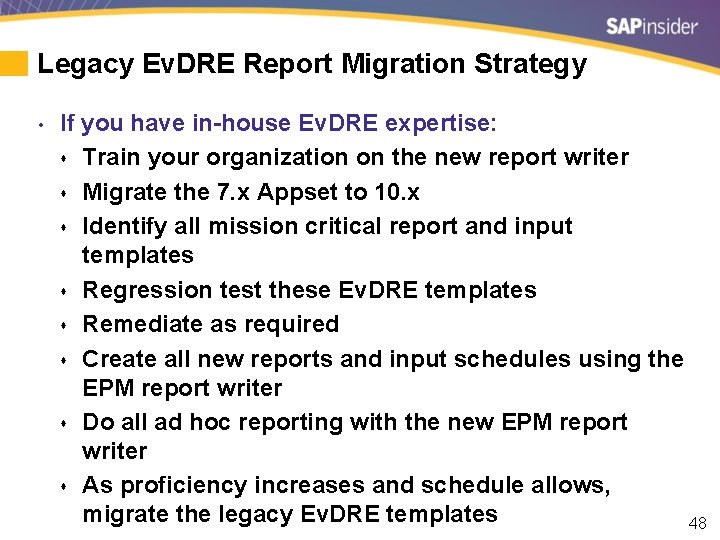
Legacy Ev. DRE Report Migration Strategy • If you have in-house Ev. DRE expertise: s Train your organization on the new report writer s Migrate the 7. x Appset to 10. x s Identify all mission critical report and input templates s Regression test these Ev. DRE templates s Remediate as required s Create all new reports and input schedules using the EPM report writer s Do all ad hoc reporting with the new EPM report writer s As proficiency increases and schedule allows, migrate the legacy Ev. DRE templates 48
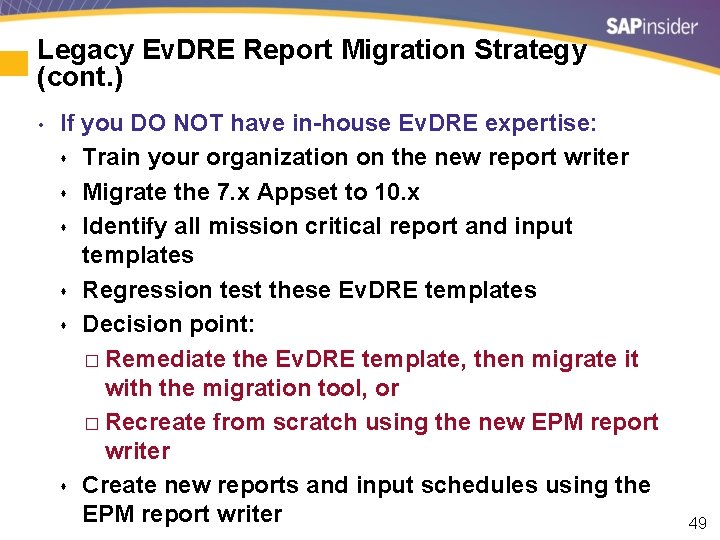
Legacy Ev. DRE Report Migration Strategy (cont. ) • If you DO NOT have in-house Ev. DRE expertise: s Train your organization on the new report writer s Migrate the 7. x Appset to 10. x s Identify all mission critical report and input templates s Regression test these Ev. DRE templates s Decision point: � Remediate the Ev. DRE template, then migrate it with the migration tool, or � Recreate from scratch using the new EPM report writer s Create new reports and input schedules using the EPM report writer 49
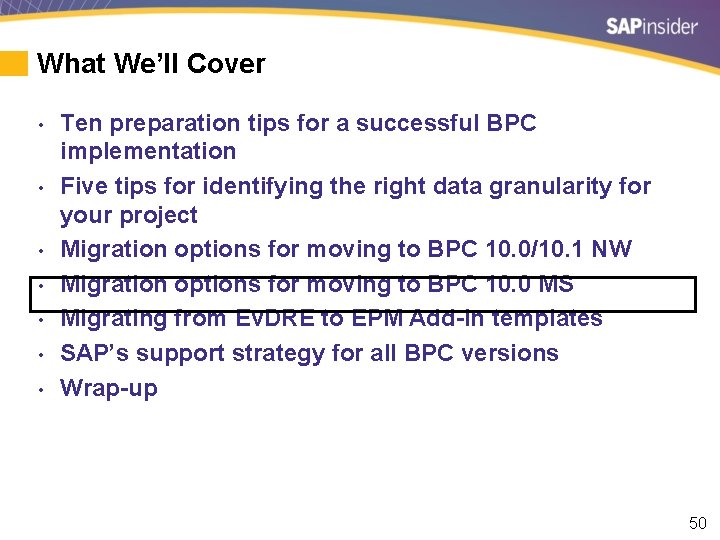
What We’ll Cover • • Ten preparation tips for a successful BPC implementation Five tips for identifying the right data granularity for your project Migration options for moving to BPC 10. 0/10. 1 NW Migration options for moving to BPC 10. 0 MS Migrating from Ev. DRE to EPM Add-In templates SAP’s support strategy for all BPC versions Wrap-up 50
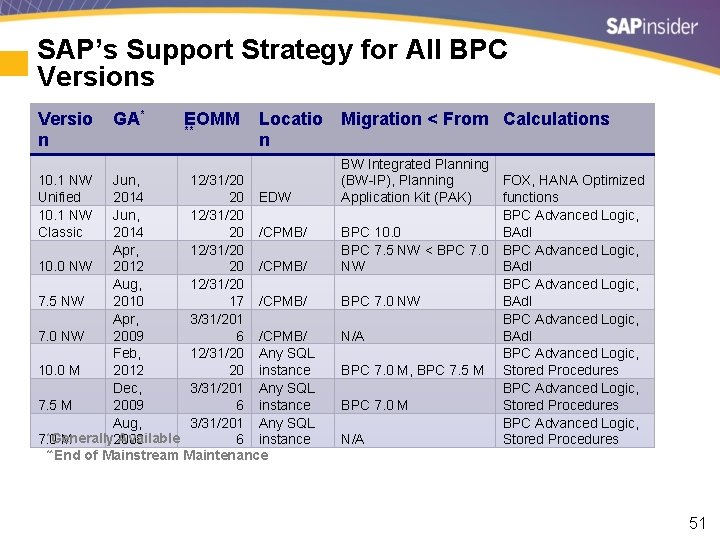
SAP’s Support Strategy for All BPC Versions Versio n 10. 1 NW Unified 10. 1 NW Classic GA* EOMM ** Locatio n Jun, 12/31/20 2014 20 EDW Jun, 12/31/20 2014 20 /CPMB/ Apr, 12/31/20 10. 0 NW 2012 20 /CPMB/ Aug, 12/31/20 7. 5 NW 2010 17 /CPMB/ Apr, 3/31/201 7. 0 NW 2009 6 /CPMB/ Feb, 12/31/20 Any SQL 10. 0 M 2012 20 instance Dec, 3/31/201 Any SQL 7. 5 M 2009 6 instance Aug, 3/31/201 Any SQL *Generally Available 7. 0 M 2008 6 instance **End of Mainstream Maintenance Migration < From Calculations BW Integrated Planning (BW-IP), Planning FOX, HANA Optimized Application Kit (PAK) functions BPC Advanced Logic, BPC 10. 0 BAd. I BPC 7. 5 NW < BPC 7. 0 BPC Advanced Logic, NW BAd. I BPC Advanced Logic, BPC 7. 0 NW BAd. I BPC Advanced Logic, N/A BAd. I BPC Advanced Logic, BPC 7. 0 M, BPC 7. 5 M Stored Procedures BPC Advanced Logic, BPC 7. 0 M Stored Procedures BPC Advanced Logic, N/A Stored Procedures 51
What We’ll Cover • • Ten preparation tips for a successful BPC implementation Five tips for identifying the right data granularity for your project Migration options for moving to BPC 10. 0/10. 1 NW Migration options for moving to BPC 10. 0 MS Migrating from Ev. DRE to EPM Add-In templates SAP’s support strategy for all BPC versions Wrap-up 52
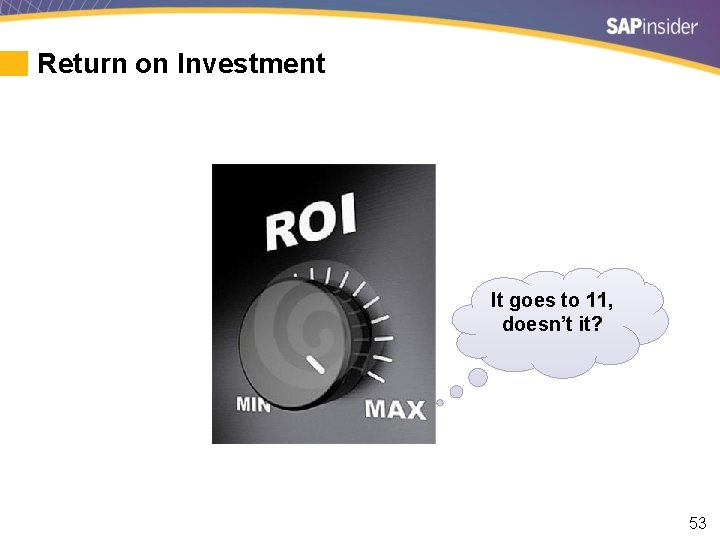
Return on Investment It goes to 11, doesn’t it? 53
How to contact me: Steve Coan scoan@vantagepointsolutions. com Please remember to complete your session evaluation 54
Disclaimer SAP and other SAP products and services mentioned herein as well as their respective logos are trademarks or registered trademarks of SAP SE (or an SAP affiliate company) in Germany and other countries. All other product and service names mentioned are the trademarks of their respective companies. Wellesley Information Services is neither owned nor controlled by SAP SE. 55
- Slides: 56