
Programming with Microsoft Visual Basic 2012 Chapter 11
Programming with Microsoft Visual Basic 2012 Chapter 11: Classes and Objects
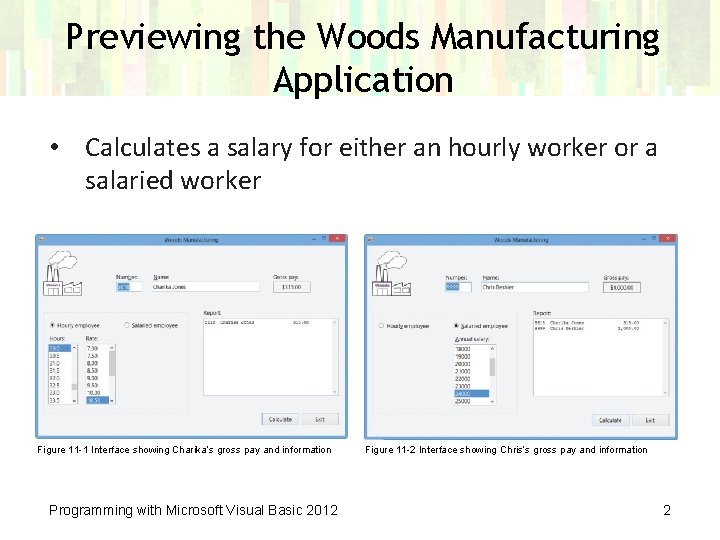
Previewing the Woods Manufacturing Application • Calculates a salary for either an hourly worker or a salaried worker Figure 11 -1 Interface showing Charika’s gross pay and information Programming with Microsoft Visual Basic 2012 Figure 11 -2 Interface showing Chris’s gross pay and information 2
Lesson A Objectives After studying Lesson A, you should be able to: • Explain the terminology used in object-oriented programming • Create a class • Instantiate an object • Add Property procedures to a class • Include data validation in a class • Create a default constructor • Create a parameterized constructor • Include methods other than constructors in a class Programming with Microsoft Visual Basic 2012 3
Object-Oriented Programming Terminology • Object-oriented programming language – Uses objects to accomplish a program’s goal • Class – A pattern or blueprint for an object • Instance – An object created from a class • Instantiated – The process of creating an object from a class • Attributes – Characteristics that describe an object Programming with Microsoft Visual Basic 2012 4
Object-Oriented Programming Terminology (cont. ) • Behaviors – Methods and events that define how the object will act or react • Methods – Operations (actions) that an object is capable of performing • Events – Actions to which an object can respond • Encapsulates – To enclose in a capsule – A class encapsulates all attributes and behaviors of an object it instantiates Programming with Microsoft Visual Basic 2012 5
Creating a Class • Two types of classes used in VB applications: – Built-in classes, such as the Text. Box class – Programmer-defined classes • Class statement – Used to define a class – Defines attributes and behaviors of objects created from the class • After a class has been defined, it can be used to instantiate objects Programming with Microsoft Visual Basic 2012 6
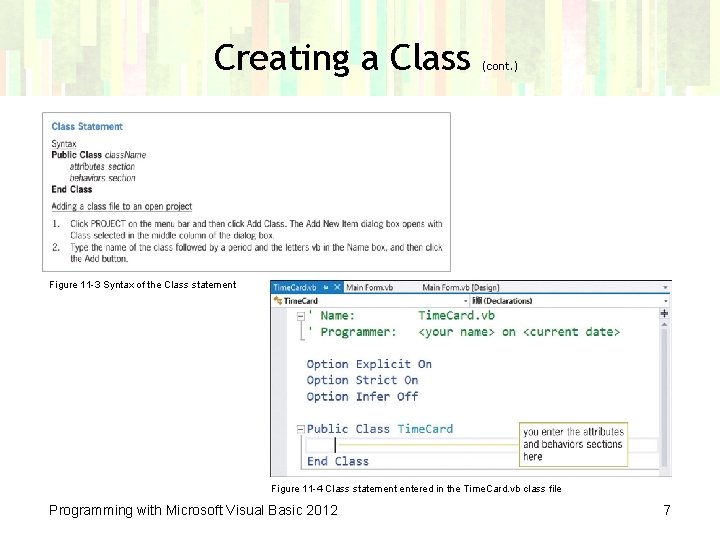
Creating a Class (cont. ) Figure 11 -3 Syntax of the Class statement Figure 11 -4 Class statement entered in the Time. Card. vb class file Programming with Microsoft Visual Basic 2012 7
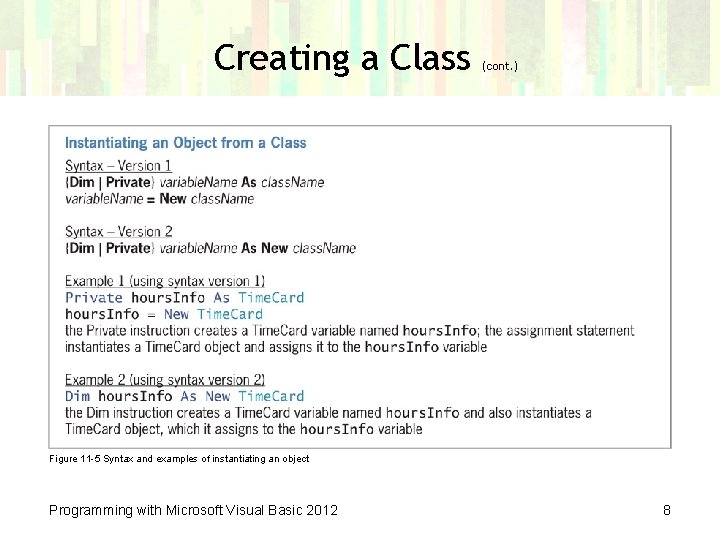
Creating a Class (cont. ) Figure 11 -5 Syntax and examples of instantiating an object Programming with Microsoft Visual Basic 2012 8
Example 1—A Class that Contains Public Variables Only • Norbert Pool & Spa Depot application from Chapter 10 – Input: Length, width, and depth of a pool – Calculates the volume of water required • This program was coded with a structure in Chapter 10 – The structure will be replaced with a class Programming with Microsoft Visual Basic 2012 9
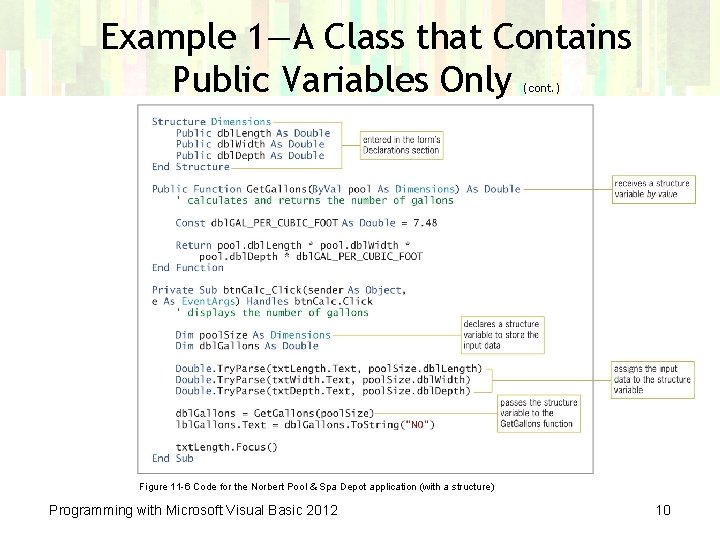
Example 1—A Class that Contains Public Variables Only (cont. ) Figure 11 -6 Code for the Norbert Pool & Spa Depot application (with a structure) Programming with Microsoft Visual Basic 2012 10

Example 1—A Class that Contains Public Variables Only (cont. ) Figure 11 -7 Comments and Option statements entered in the class file Figure 11 -8 Public variables included in the Intelli. Sense list Programming with Microsoft Visual Basic 2012 11

Example 1—A Class that Contains Public Variables Only (cont. ) Figure 11 -9 Class statement, Get. Gallons function, and btn. Calc_Click procedure Programming with Microsoft Visual Basic 2012 12

Example 1—A Class that Contains Public Variables Only (cont. ) Figure 11 -10 Interface showing the number of gallons Programming with Microsoft Visual Basic 2012 13
Example 2—A Class that Contains Private Variables, Public Properties, and Methods • Disadvantages of using Public variables in a class: – A class cannot control the values assigned to its Public variables – This violates the concept of encapsulation, in which class behaviors control a class’s data Programming with Microsoft Visual Basic 2012 14
Example 2—A Class that Contains Private Variables, Public Properties, and Methods (cont. ) Private Variables and Property Procedures • Private class variables – Can only be used within the class – Not visible to the rest of the application • Public property – Used to refer to (expose) the Private variable for use by other parts of the application • Property procedure – Creates a Public property Programming with Microsoft Visual Basic 2012 15
Example 2—A Class that Contains Private Variables, Public Properties, and Methods (cont. ) Private Variables and Property Procedures (cont. ) • Read. Only keyword – Indicates an application can read the property’s value – Cannot set the value • Write. Only keyword – Indicates an application can set the property’s value – But it cannot retrieve the value • Property procedures contain blocks of code: – Get block: Retrieves the contents of the Private variable – Set block: Used to assign a value to the Private variable – Blocks may be used individually or together Programming with Microsoft Visual Basic 2012 16
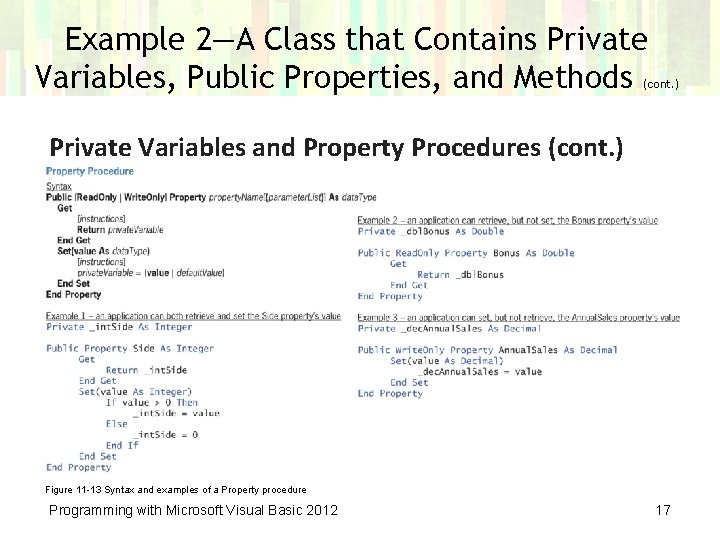
Example 2—A Class that Contains Private Variables, Public Properties, and Methods (cont. ) Private Variables and Property Procedures (cont. ) Figure 11 -13 Syntax and examples of a Property procedure Programming with Microsoft Visual Basic 2012 17
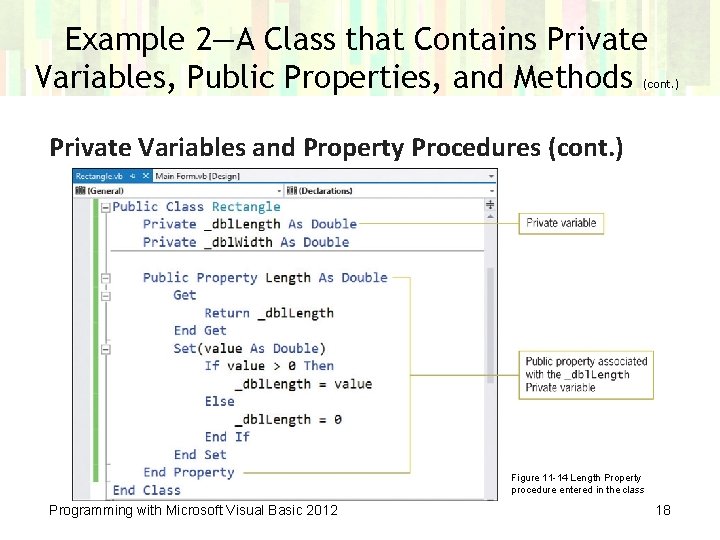
Example 2—A Class that Contains Private Variables, Public Properties, and Methods (cont. ) Private Variables and Property Procedures (cont. ) Figure 11 -14 Length Property procedure entered in the class Programming with Microsoft Visual Basic 2012 18
Example 2—A Class that Contains Private Variables, Public Properties, and Methods (cont. ) Constructors • Constructor – A class method whose purpose is to initialize the class’s Private variables – Processed each time an object is created – Must be coded as a Sub procedure named New • A class can have more than one constructor – The names are the same, but the parameter. Lists must differ • Default constructor – A constructor without parameters Programming with Microsoft Visual Basic 2012 19
Example 2—A Class that Contains Private Variables, Public Properties, and Methods (cont. ) Constructors (cont. ) • Parameterized constructor – A constructor containing one or more parameters • Method’s signature – A method name combined with an optional parameter. List Programming with Microsoft Visual Basic 2012 20
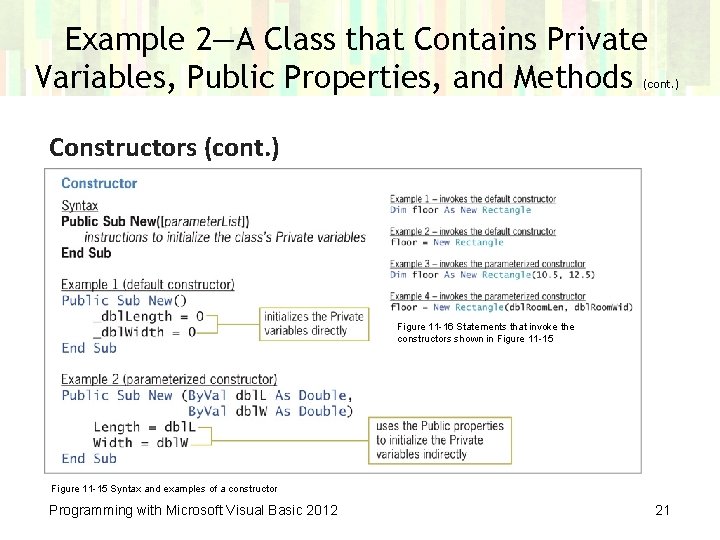
Example 2—A Class that Contains Private Variables, Public Properties, and Methods (cont. ) Constructors (cont. ) Figure 11 -16 Statements that invoke the constructors shown in Figure 11 -15 Syntax and examples of a constructor Programming with Microsoft Visual Basic 2012 21
Example 2—A Class that Contains Private Variables, Public Properties, and Methods (cont. ) Methods Other than Constructors • May be either Sub or Function procedures – Functions return a value; Sub procedures do not • Rules for naming methods: – The name should be entered using Pascal case – The first word in a name should be a verb – Subsequent words should be nouns and adjectives Programming with Microsoft Visual Basic 2012 22
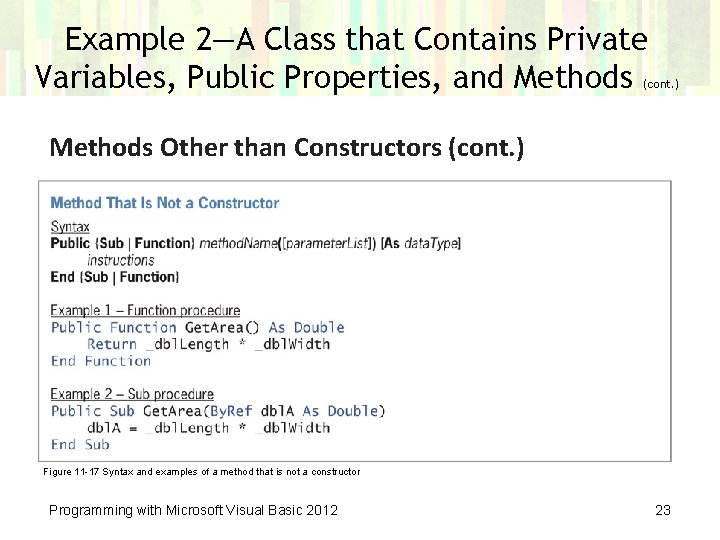
Example 2—A Class that Contains Private Variables, Public Properties, and Methods (cont. ) Methods Other than Constructors (cont. ) Figure 11 -17 Syntax and examples of a method that is not a constructor Programming with Microsoft Visual Basic 2012 23
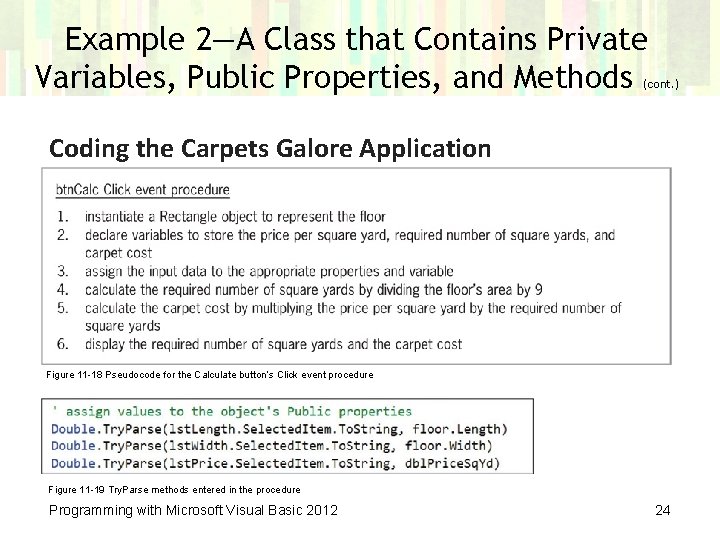
Example 2—A Class that Contains Private Variables, Public Properties, and Methods (cont. ) Coding the Carpets Galore Application Figure 11 -18 Pseudocode for the Calculate button’s Click event procedure Figure 11 -19 Try. Parse methods entered in the procedure Programming with Microsoft Visual Basic 2012 24
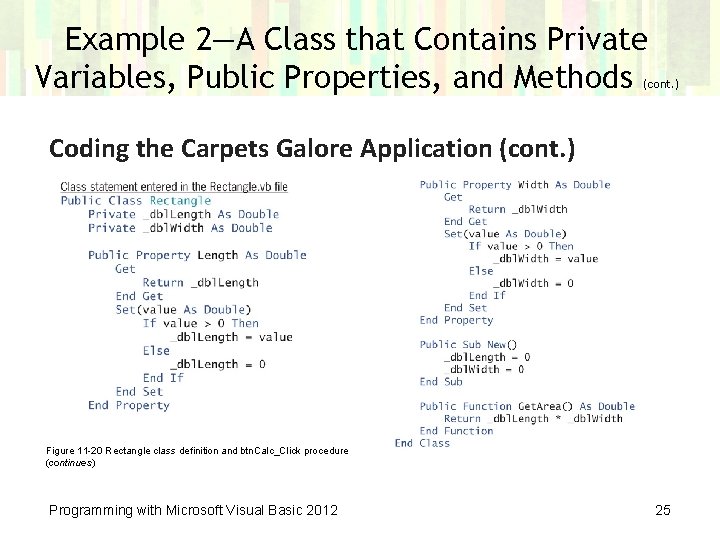
Example 2—A Class that Contains Private Variables, Public Properties, and Methods (cont. ) Coding the Carpets Galore Application (cont. ) Figure 11 -20 Rectangle class definition and btn. Calc_Click procedure (continues) Programming with Microsoft Visual Basic 2012 25
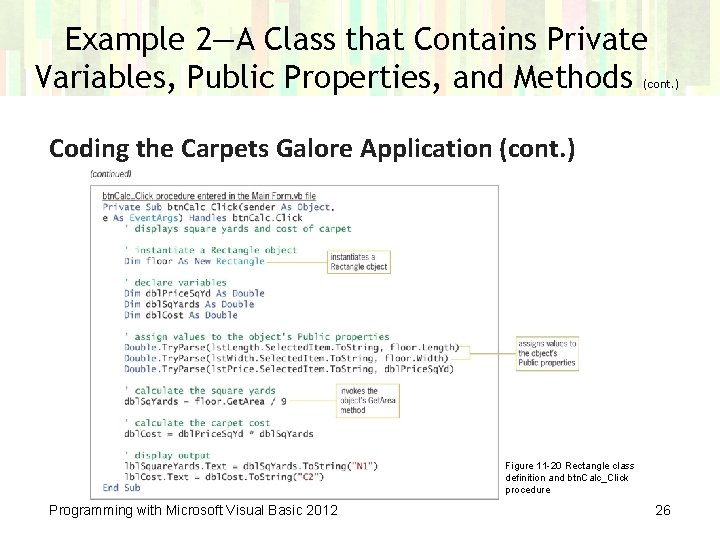
Example 2—A Class that Contains Private Variables, Public Properties, and Methods (cont. ) Coding the Carpets Galore Application (cont. ) Figure 11 -20 Rectangle class definition and btn. Calc_Click procedure Programming with Microsoft Visual Basic 2012 26
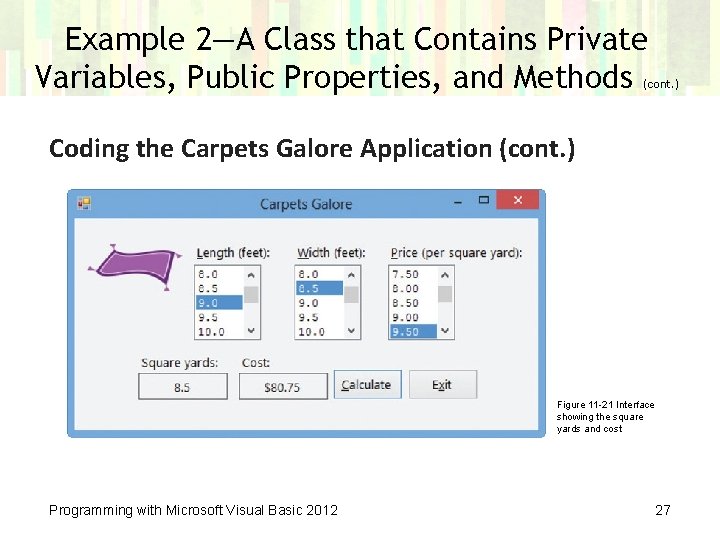
Example 2—A Class that Contains Private Variables, Public Properties, and Methods (cont. ) Coding the Carpets Galore Application (cont. ) Figure 11 -21 Interface showing the square yards and cost Programming with Microsoft Visual Basic 2012 27
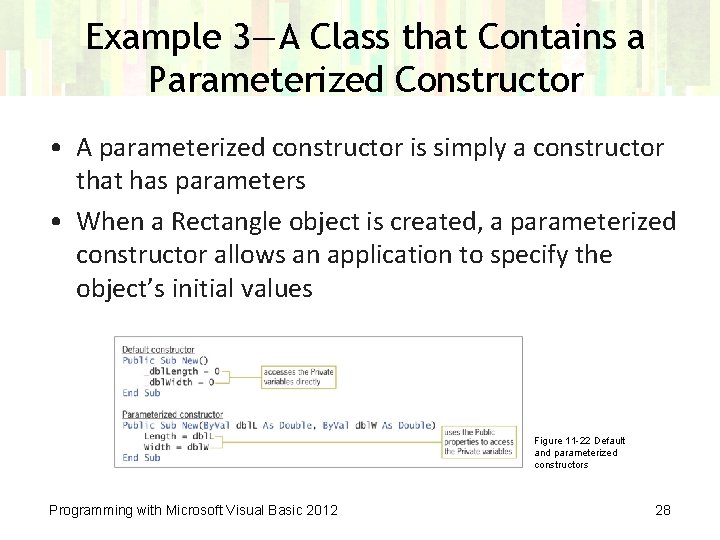
Example 3—A Class that Contains a Parameterized Constructor • A parameterized constructor is simply a constructor that has parameters • When a Rectangle object is created, a parameterized constructor allows an application to specify the object’s initial values Figure 11 -22 Default and parameterized constructors Programming with Microsoft Visual Basic 2012 28
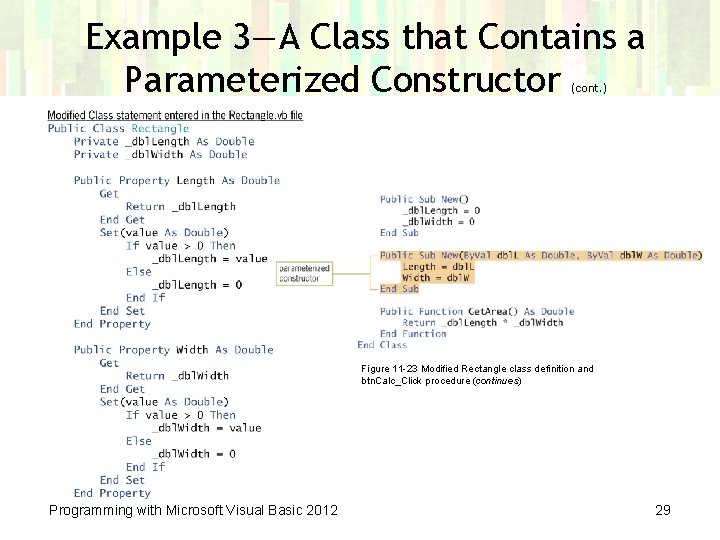
Example 3—A Class that Contains a Parameterized Constructor (cont. ) Figure 11 -23 Modified Rectangle class definition and btn. Calc_Click procedure (continues) Programming with Microsoft Visual Basic 2012 29
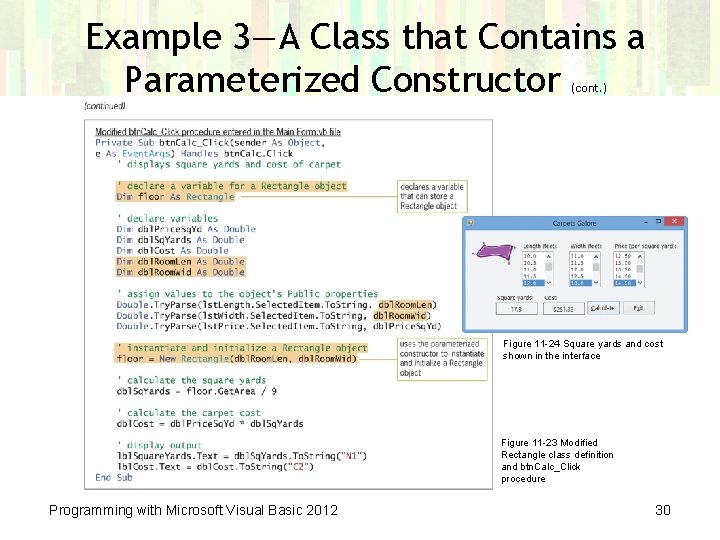
Example 3—A Class that Contains a Parameterized Constructor (cont. ) Figure 11 -24 Square yards and cost shown in the interface Figure 11 -23 Modified Rectangle class definition and btn. Calc_Click procedure Programming with Microsoft Visual Basic 2012 30
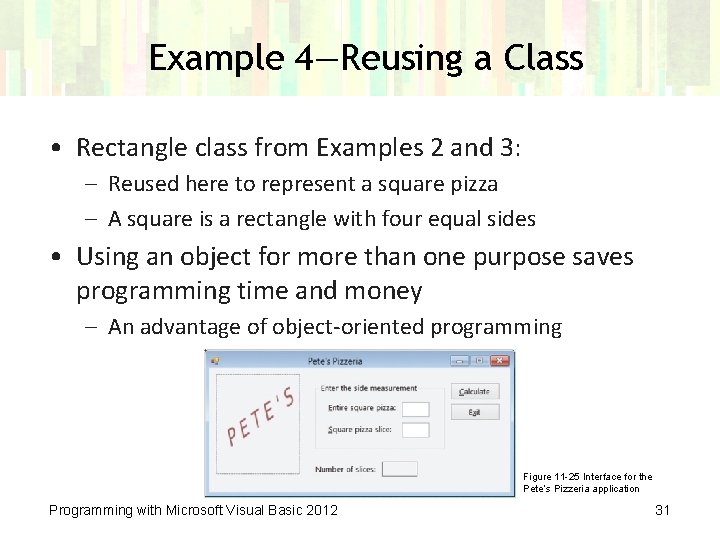
Example 4—Reusing a Class • Rectangle class from Examples 2 and 3: – Reused here to represent a square pizza – A square is a rectangle with four equal sides • Using an object for more than one purpose saves programming time and money – An advantage of object-oriented programming Figure 11 -25 Interface for the Pete’s Pizzeria application Programming with Microsoft Visual Basic 2012 31
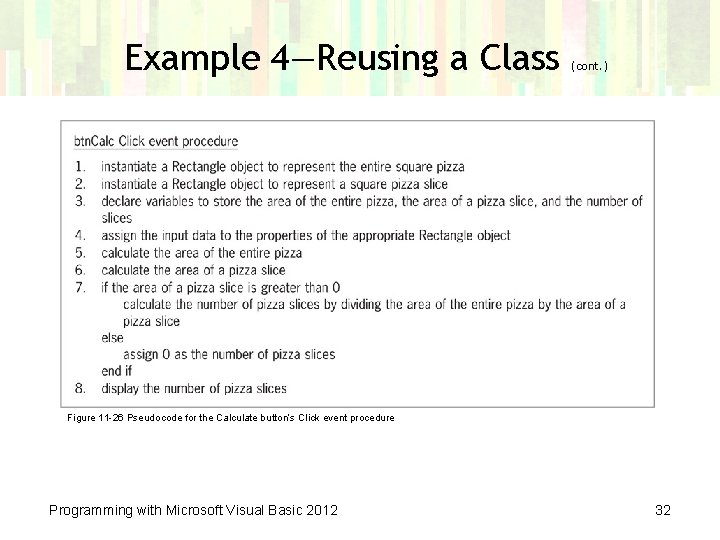
Example 4—Reusing a Class (cont. ) Figure 11 -26 Pseudocode for the Calculate button’s Click event procedure Programming with Microsoft Visual Basic 2012 32
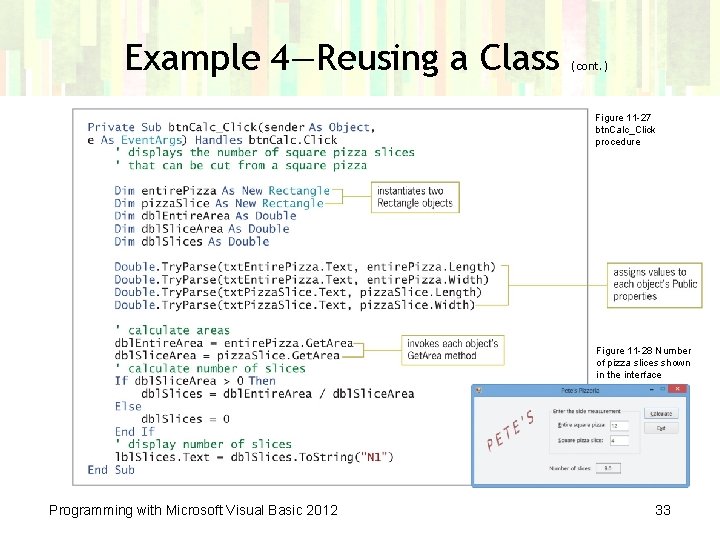
Example 4—Reusing a Class (cont. ) Figure 11 -27 btn. Calc_Click procedure Figure 11 -28 Number of pizza slices shown in the interface Programming with Microsoft Visual Basic 2012 33
Lesson A Summary • The Class statement is used to define a class • Defined classes are added to a PROJECT with a. vb extension • Objects are instantiated from a defined class • The Get block allows an application to retrieve the contents of the Private variable associated with the Property procedure • The Set block allows an application to assign a value to the Private variable associated with the Property procedure Programming with Microsoft Visual Basic 2012 34
Lesson A Summary (cont. ) • A constructor initializes the variables of a class – The constructor method must be named New – The default constructor has no parameters – A class may have many parameterized constructors • A class can have methods other than constructors Programming with Microsoft Visual Basic 2012 35
Lesson B Objectives After studying Lesson B, you should be able to: • Include a Read. Only property in a class • Create an auto-implemented property • Overload a method in a class Programming with Microsoft Visual Basic 2012 36
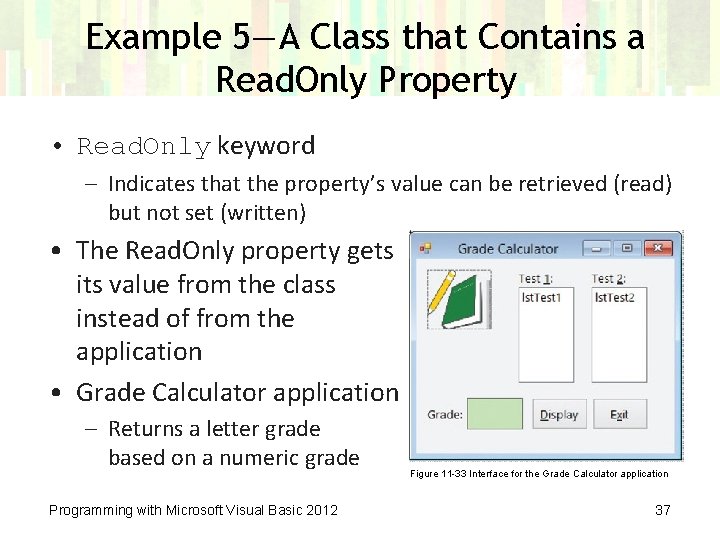
Example 5—A Class that Contains a Read. Only Property • Read. Only keyword – Indicates that the property’s value can be retrieved (read) but not set (written) • The Read. Only property gets its value from the class instead of from the application • Grade Calculator application – Returns a letter grade based on a numeric grade Programming with Microsoft Visual Basic 2012 Figure 11 -33 Interface for the Grade Calculator application 37
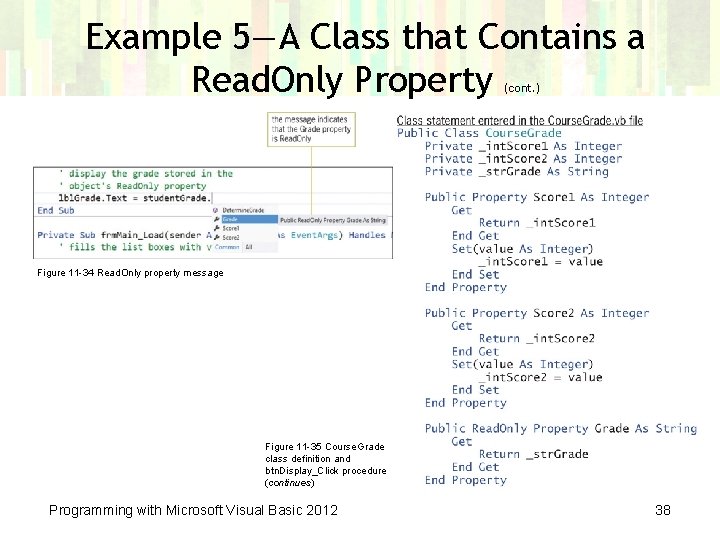
Example 5—A Class that Contains a Read. Only Property (cont. ) Figure 11 -34 Read. Only property message Figure 11 -35 Course. Grade class definition and btn. Display_Click procedure (continues) Programming with Microsoft Visual Basic 2012 38
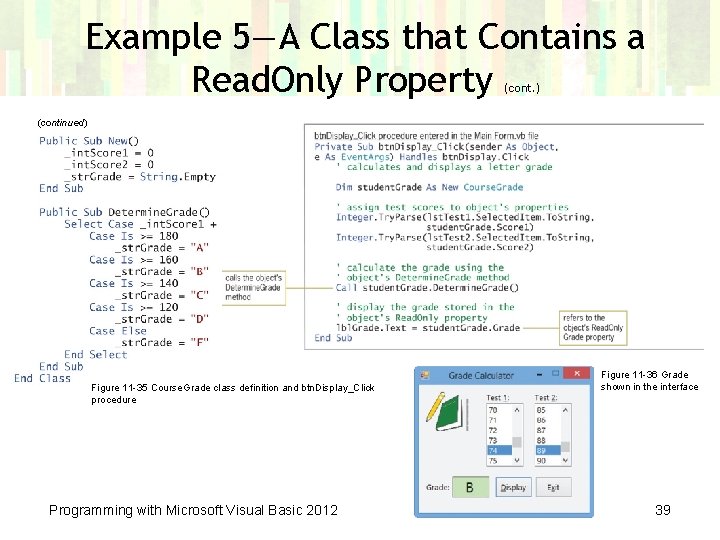
Example 5—A Class that Contains a Read. Only Property (cont. ) (continued) Figure 11 -35 Course. Grade class definition and btn. Display_Click procedure Programming with Microsoft Visual Basic 2012 Figure 11 -36 Grade shown in the interface 39
Example 6—A Class that Contains Auto-Implemented Properties • Auto-implemented properties feature – Enables you to specify the property of a class in one line of code • Visual Basic automatically creates a hidden Private variable that it associates with the property • It also automatically creates hidden Get and Set blocks • It provides a shorter syntax to use when creating a class – You don’t need to create the Private variable associated with a property, nor do you need to enter the property’s Get and Set blocks of code Programming with Microsoft Visual Basic 2012 40
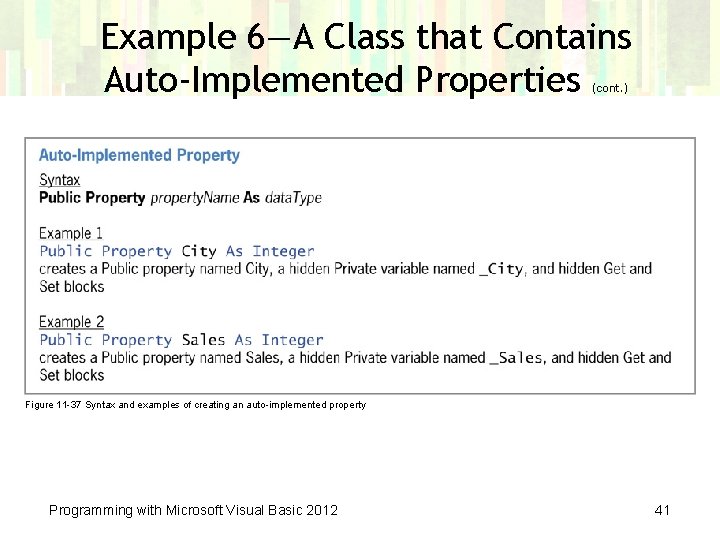
Example 6—A Class that Contains Auto-Implemented Properties (cont. ) Figure 11 -37 Syntax and examples of creating an auto-implemented property Programming with Microsoft Visual Basic 2012 41
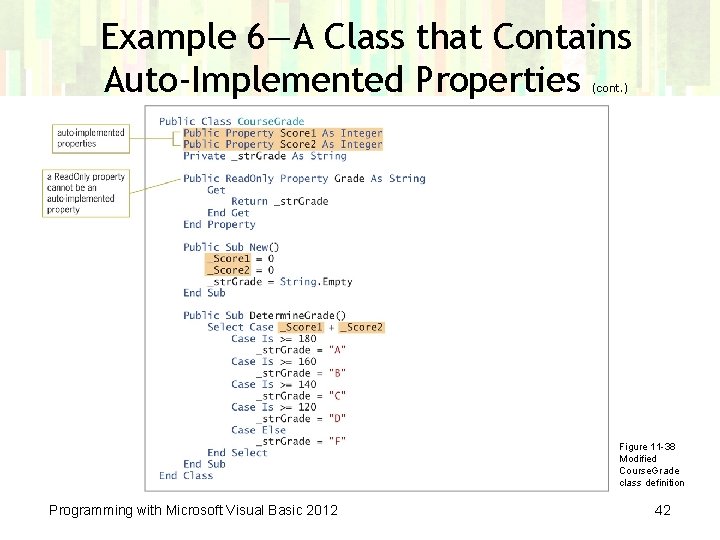
Example 6—A Class that Contains Auto-Implemented Properties (cont. ) Figure 11 -38 Modified Course. Grade class definition Programming with Microsoft Visual Basic 2012 42
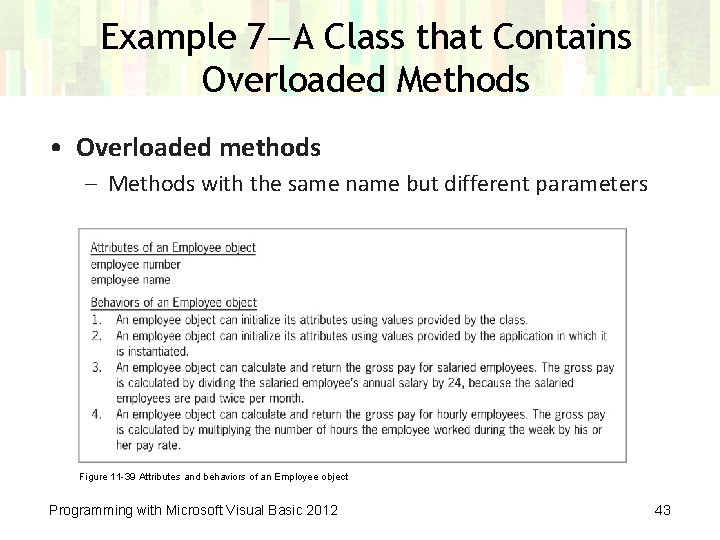
Example 7—A Class that Contains Overloaded Methods • Overloaded methods – Methods with the same name but different parameters Figure 11 -39 Attributes and behaviors of an Employee object Programming with Microsoft Visual Basic 2012 43
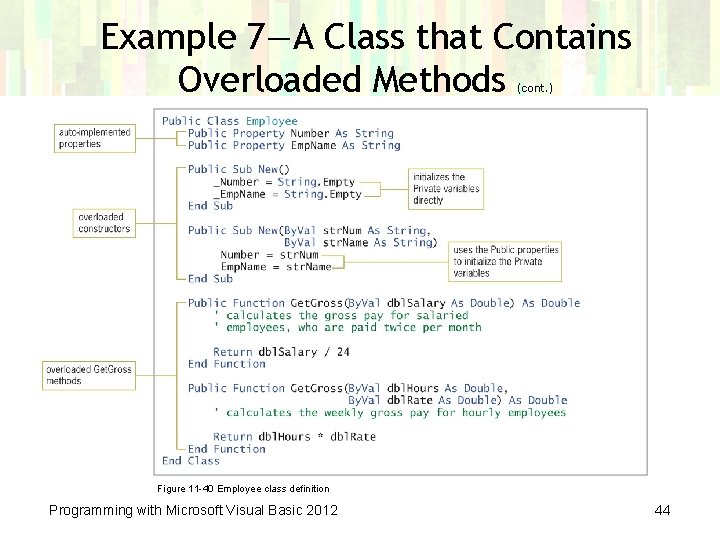
Example 7—A Class that Contains Overloaded Methods (cont. ) Figure 11 -40 Employee class definition Programming with Microsoft Visual Basic 2012 44
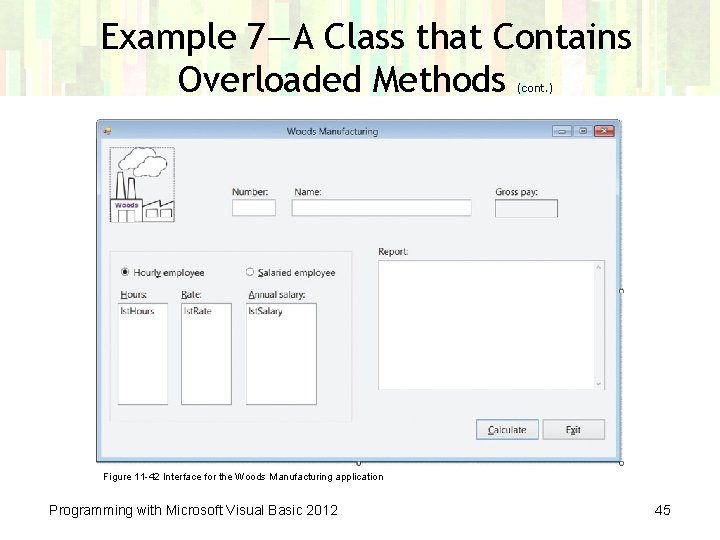
Example 7—A Class that Contains Overloaded Methods (cont. ) Figure 11 -42 Interface for the Woods Manufacturing application Programming with Microsoft Visual Basic 2012 45
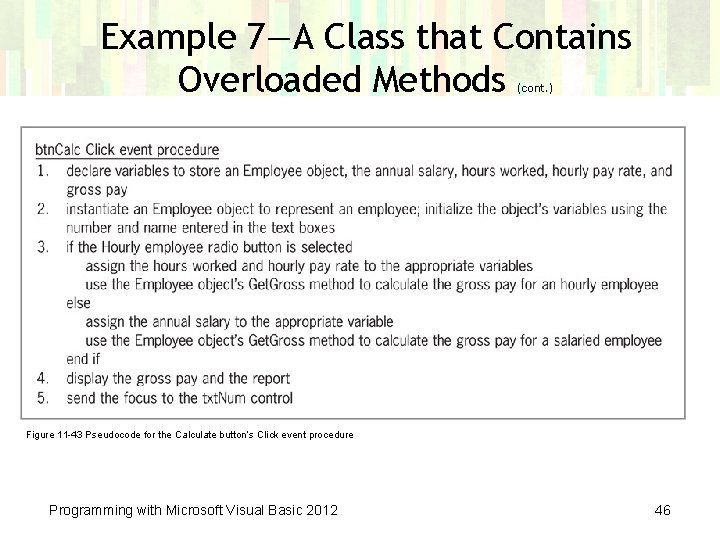
Example 7—A Class that Contains Overloaded Methods (cont. ) Figure 11 -43 Pseudocode for the Calculate button’s Click event procedure Programming with Microsoft Visual Basic 2012 46
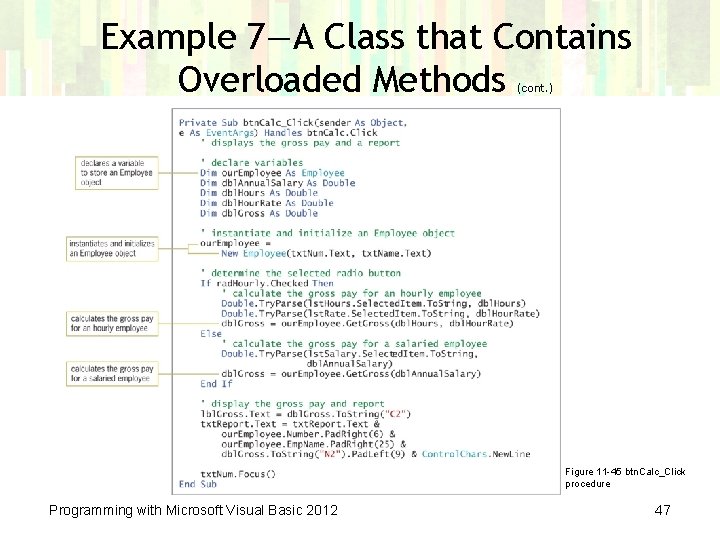
Example 7—A Class that Contains Overloaded Methods (cont. ) Figure 11 -45 btn. Calc_Click procedure Programming with Microsoft Visual Basic 2012 47
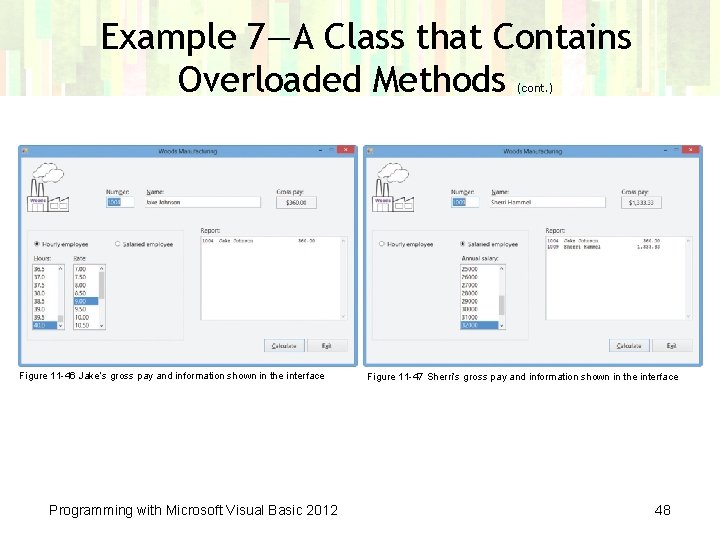
Example 7—A Class that Contains Overloaded Methods (cont. ) Figure 11 -46 Jake’s gross pay and information shown in the interface Programming with Microsoft Visual Basic 2012 Figure 11 -47 Sherri’s gross pay and information shown in the interface 48
Lesson B Summary • Use the Read. Only keyword to create a property whose value an application can only retrieve • To specify the property of a class in one line: – Create an auto-implemented property using the syntax Public Property property. Name As data. Type • To include a parameterized method in a class: – Enter the parameters between the parentheses that follow the method’s name • To create two or more methods that perform the same task but require different parameters: – Overload the methods by giving them the same name but different parameter. Lists Programming with Microsoft Visual Basic 2012 49
Lesson C Objectives After studying Lesson C, you should be able to: • Create a derived class • Refer to the base class using the My. Base keyword • Override a method in the base class Programming with Microsoft Visual Basic 2012 50
Example 8—Using a Base Class and a Derived Class • Inheritance – Using one class to create another • Base class – The original class providing behaviors and attributes • Derived class – The new class that inherits attributes and behaviors from the base class • Inherits clause – Enables a derived class to inherit from a base class – Included in the derived class’s Class statement Programming with Microsoft Visual Basic 2012 51
Example 8—Using a Base Class and a Derived Class (cont. ) • Overriding – Allows a derived class to replace a method inherited from its base class – The base class method header must include the Overridable keyword – The derived class method header must include the Overrides keyword • My. Base keyword – Used to refer to the base class • My. Base. New ([parameter. List]) – Used in a derived class to call its base class’s constructor Programming with Microsoft Visual Basic 2012 52
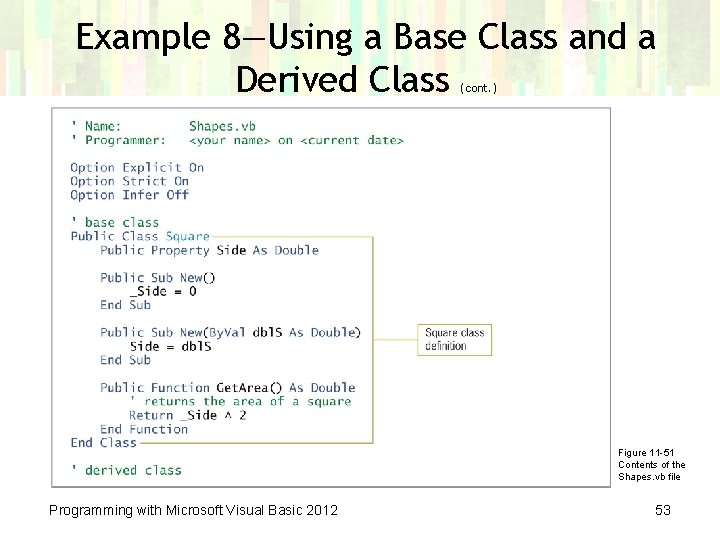
Example 8—Using a Base Class and a Derived Class (cont. ) Figure 11 -51 Contents of the Shapes. vb file Programming with Microsoft Visual Basic 2012 53
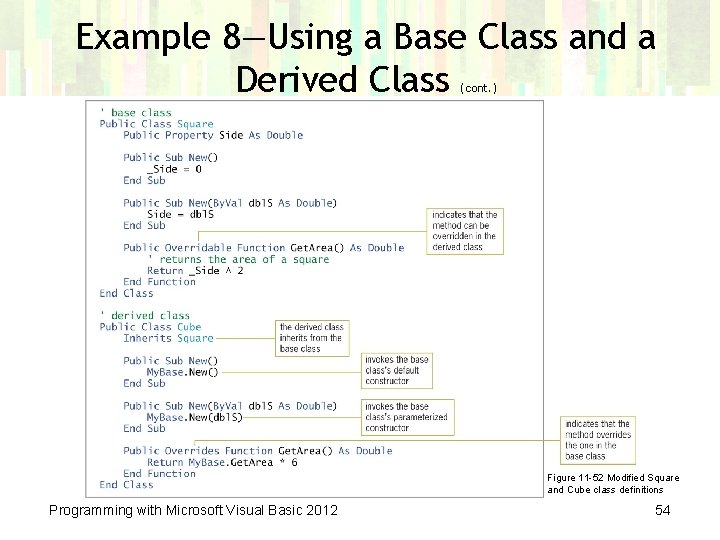
Example 8—Using a Base Class and a Derived Class (cont. ) Figure 11 -52 Modified Square and Cube class definitions Programming with Microsoft Visual Basic 2012 54
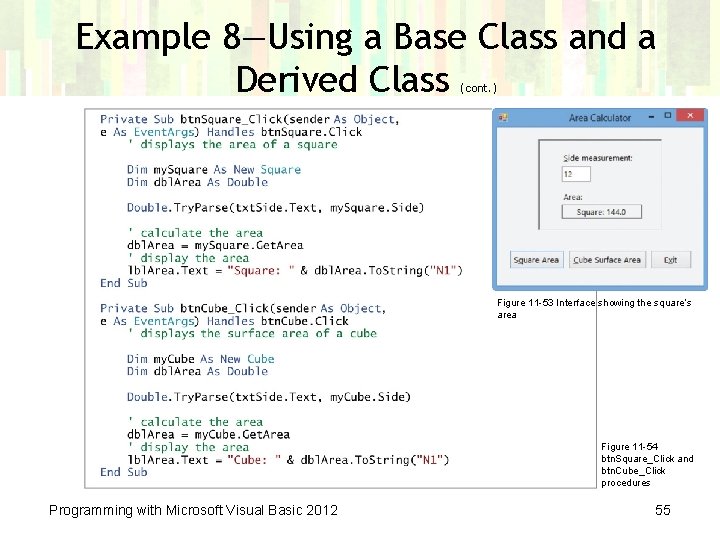
Example 8—Using a Base Class and a Derived Class (cont. ) Figure 11 -53 Interface showing the square’s area Figure 11 -54 btn. Square_Click and btn. Cube_Click procedures Programming with Microsoft Visual Basic 2012 55
Lesson C Summary • To allow a derived class to inherit the attributes and behaviors of a base class: – Enter the Inherits clause immediately below the Public Class clause in the derived class – The Inherits clause is the keyword Inherits followed by the name of the base class • Use the My. Base keyword to refer to the base class • To indicate that a method in the base class can be overridden (replaced) in the derived class: – Use the Overridable keyword in the method’s header in the base class Programming with Microsoft Visual Basic 2012 56
Lesson C Summary (cont. ) • To indicate that a method in the derived class overrides (replaces) a method in the base class: – Use the Overrides keyword in the method’s header in the derived class Programming with Microsoft Visual Basic 2012 57
- Slides: 57