
Programming with Microsoft Visual Basic 2012 Chapter 10
Programming with Microsoft Visual Basic 2012 Chapter 10: Structures and Sequential Access Files

Previewing the CD Collection Application • CD Collection application – Keeps track of a person’s CD collection – Saves each CD’s name, artist’s name, and price – Uses a sequential access file named CDs. txt – Can add information to or remove information from a file Figure 10 -1 CD information added to the list box Figure 10 -2 Contents of the CDs. txt file Programming with Microsoft Visual Basic 2012 2
Lesson A Objectives After studying Lesson A, you should be able to: • Create a structure • Declare and use a structure variable • Pass a structure variable to a procedure • Create an array of structure variables Programming with Microsoft Visual Basic 2012 3
Structures • Structure statement – Enables you to create your own data types – Used to group related items of different data types into one unit – Typically appears in a form’s Declaration section • Structure (or user-defined data type) – A data type created with the Structure statement • Member variables – Variables, constants, or procedures declared within the structure declaration Programming with Microsoft Visual Basic 2012 4
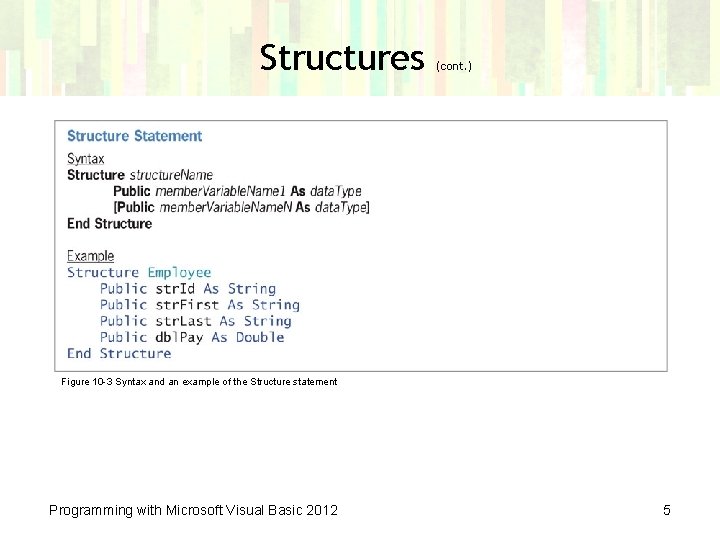
Structures (cont. ) Figure 10 -3 Syntax and an example of the Structure statement Programming with Microsoft Visual Basic 2012 5
Declaring and Using a Structure Variable • Structure variables – Declared using the structure data type • Example: Dim hourly As Employee – hourly is a variable declared with the Employee structure type – To access the member variable in code, use structure. Variable. Name. member. Variable. Name – Example: hourly. dbl. Pay = 26 – Member variables are used like scalar variables Programming with Microsoft Visual Basic 2012 6
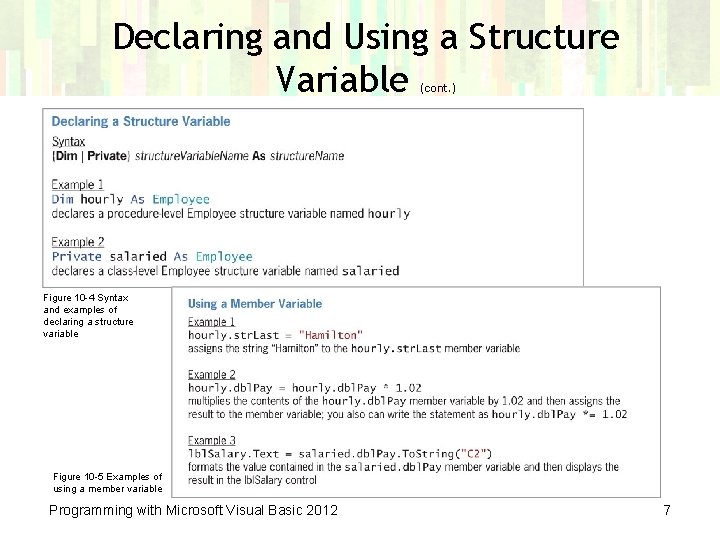
Declaring and Using a Structure Variable (cont. ) Figure 10 -4 Syntax and examples of declaring a structure variable Figure 10 -5 Examples of using a member variable Programming with Microsoft Visual Basic 2012 7
Passing a Structure Variable to a Procedure • Application for the sales manager at Norbert Pool & Spa Depot – Allows the user to enter the length, width, and depth – Calculates the gallons of water needed to fill a pool • Advantages of using a structure to group dimensions: – Three inputs are stored in one structure variable – You pass a single structure variable to a procedure instead of three scalar variables – Your code is structured in a more readable form Programming with Microsoft Visual Basic 2012 8
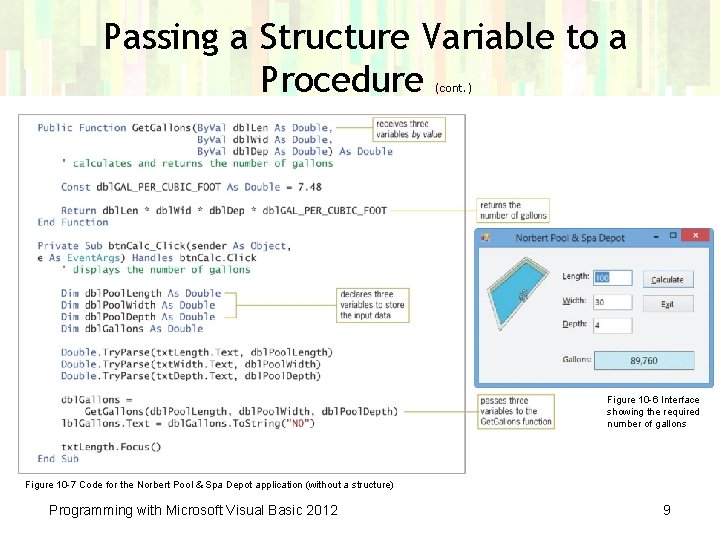
Passing a Structure Variable to a Procedure (cont. ) Figure 10 -6 Interface showing the required number of gallons Figure 10 -7 Code for the Norbert Pool & Spa Depot application (without a structure) Programming with Microsoft Visual Basic 2012 9
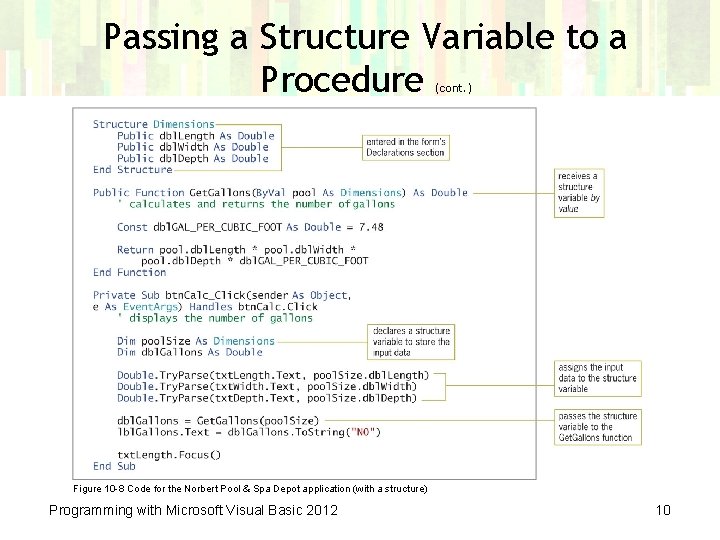
Passing a Structure Variable to a Procedure (cont. ) Figure 10 -8 Code for the Norbert Pool & Spa Depot application (with a structure) Programming with Microsoft Visual Basic 2012 10
Creating an Array of Structure Variables • Three ways to manage pairs of ID-price data: – Two parallel one-dimensional arrays – One two-dimensional array (tabular format) – A one-dimensional array of structure variables • Each structure variable will contain: – A String variable for the ID – An Integer variable for the price Programming with Microsoft Visual Basic 2012 11
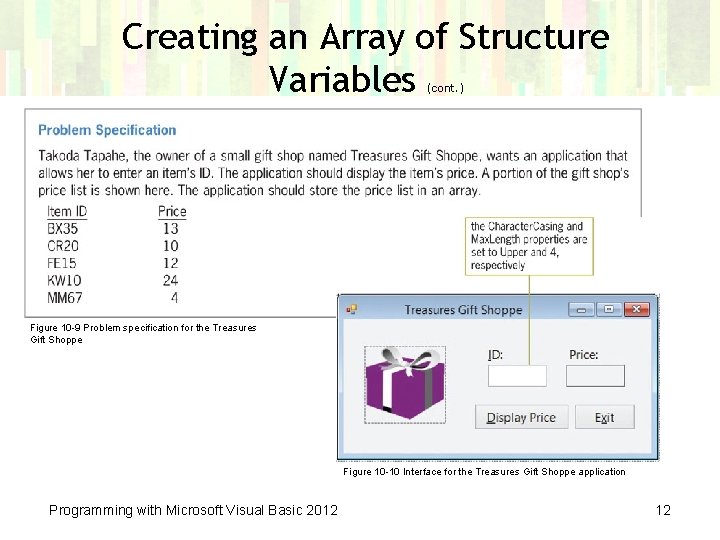
Creating an Array of Structure Variables (cont. ) Figure 10 -9 Problem specification for the Treasures Gift Shoppe Figure 10 -10 Interface for the Treasures Gift Shoppe application Programming with Microsoft Visual Basic 2012 12
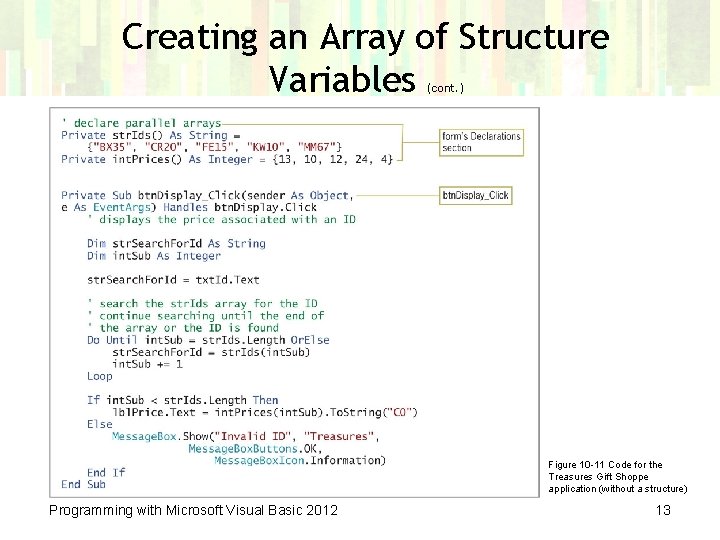
Creating an Array of Structure Variables (cont. ) Figure 10 -11 Code for the Treasures Gift Shoppe application (without a structure) Programming with Microsoft Visual Basic 2012 13
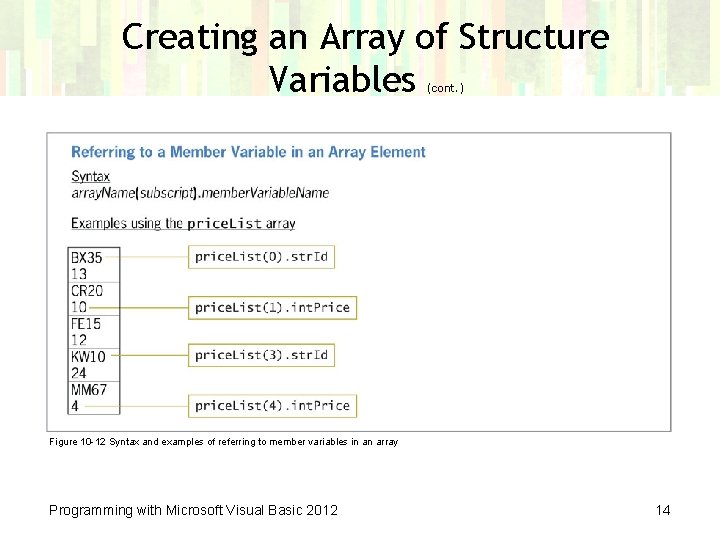
Creating an Array of Structure Variables (cont. ) Figure 10 -12 Syntax and examples of referring to member variables in an array Programming with Microsoft Visual Basic 2012 14
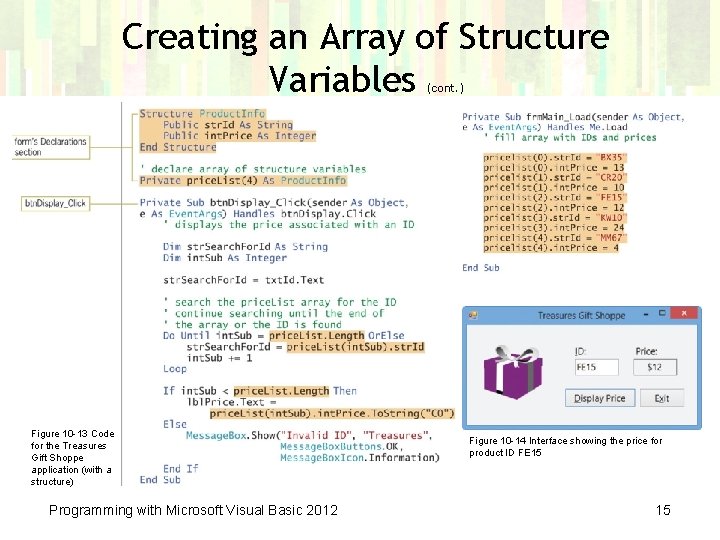
Creating an Array of Structure Variables (cont. ) Figure 10 -13 Code for the Treasures Gift Shoppe application (with a structure) Programming with Microsoft Visual Basic 2012 Figure 10 -14 Interface showing the price for product ID FE 15 15
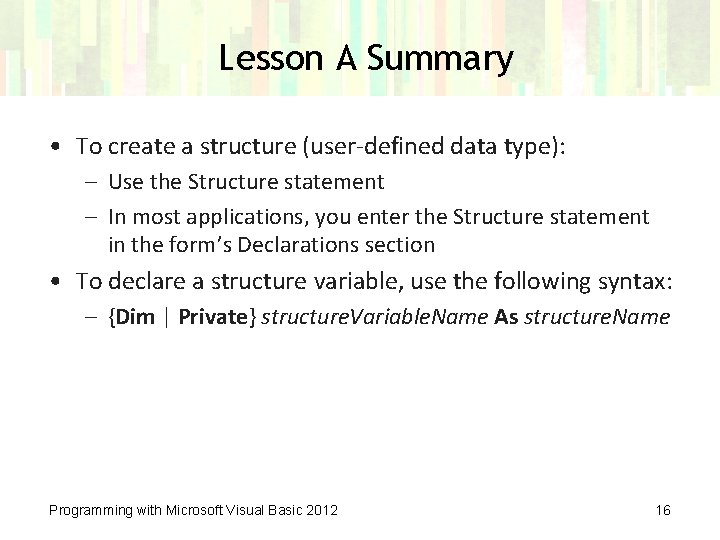
Lesson A Summary • To create a structure (user-defined data type): – Use the Structure statement – In most applications, you enter the Structure statement in the form’s Declarations section • To declare a structure variable, use the following syntax: – {Dim | Private} structure. Variable. Name As structure. Name Programming with Microsoft Visual Basic 2012 16
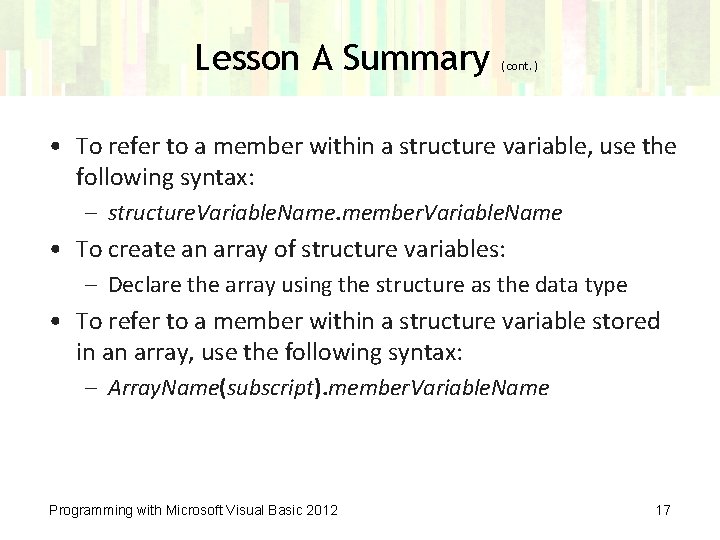
Lesson A Summary (cont. ) • To refer to a member within a structure variable, use the following syntax: – structure. Variable. Name. member. Variable. Name • To create an array of structure variables: – Declare the array using the structure as the data type • To refer to a member within a structure variable stored in an array, use the following syntax: – Array. Name(subscript). member. Variable. Name Programming with Microsoft Visual Basic 2012 17
Lesson B Objectives After studying Lesson B, you should be able to: • Open and close a sequential access file • Write data to a sequential access file • Read data from a sequential access file • Determine whether a sequential access file exists • Test for the end of a sequential access file Programming with Microsoft Visual Basic 2012 18

Sequential Access Files • • • Reading a file means getting data from a file Writing to a file means sending data to a file Output files store application output An application uses data in input files Sequential access files – Composed of lines of text that are both read and written in consecutive order – Also called text files Programming with Microsoft Visual Basic 2012 19
Writing Data to a Sequential Access File • Stream of characters – A sequence of characters • Stream. Writer object – Used to write a stream of characters to a sequential access file – Must declare the Stream. Writer variable • The Game Show Contestants application uses the Stream. Writer variable Programming with Microsoft Visual Basic 2012 20
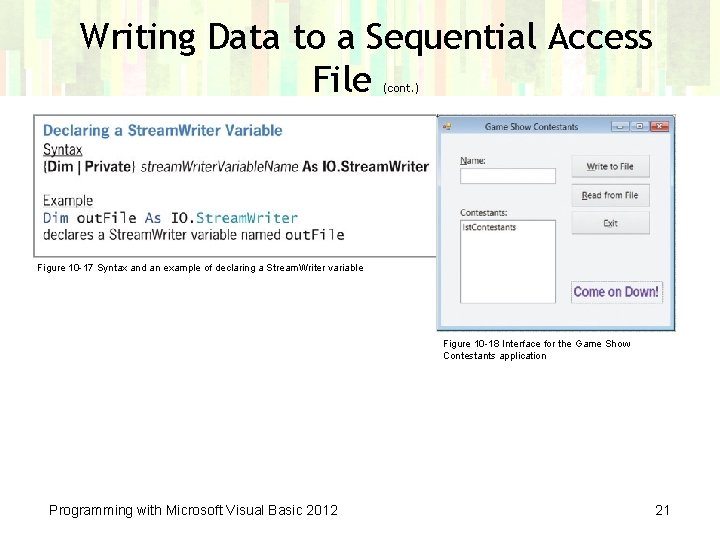
Writing Data to a Sequential Access File (cont. ) Figure 10 -17 Syntax and an example of declaring a Stream. Writer variable Figure 10 -18 Interface for the Game Show Contestants application Programming with Microsoft Visual Basic 2012 21
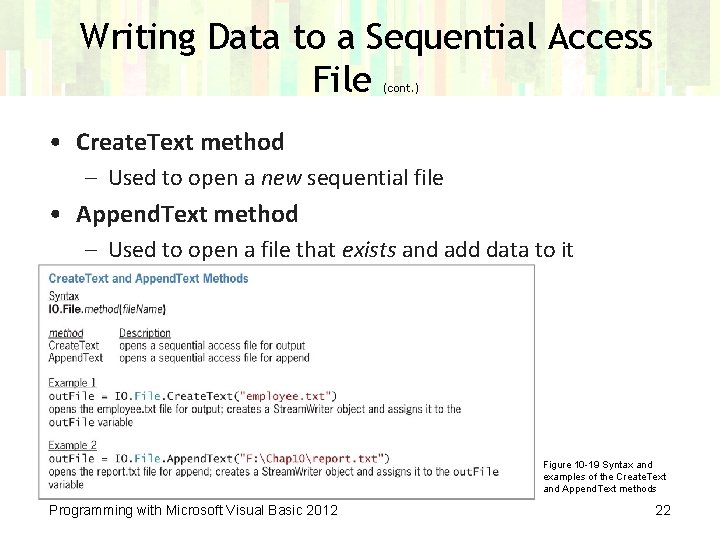
Writing Data to a Sequential Access File (cont. ) • Create. Text method – Used to open a new sequential file • Append. Text method – Used to open a file that exists and add data to it Figure 10 -19 Syntax and examples of the Create. Text and Append. Text methods Programming with Microsoft Visual Basic 2012 22
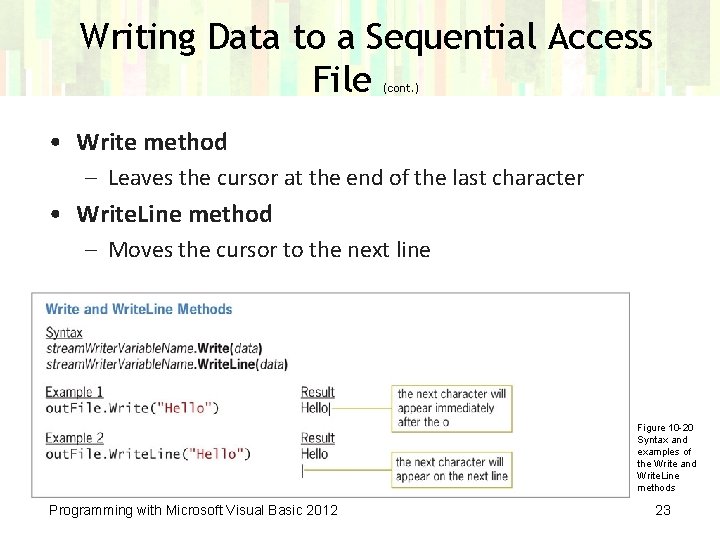
Writing Data to a Sequential Access File (cont. ) • Write method – Leaves the cursor at the end of the last character • Write. Line method – Moves the cursor to the next line Figure 10 -20 Syntax and examples of the Write and Write. Line methods Programming with Microsoft Visual Basic 2012 23
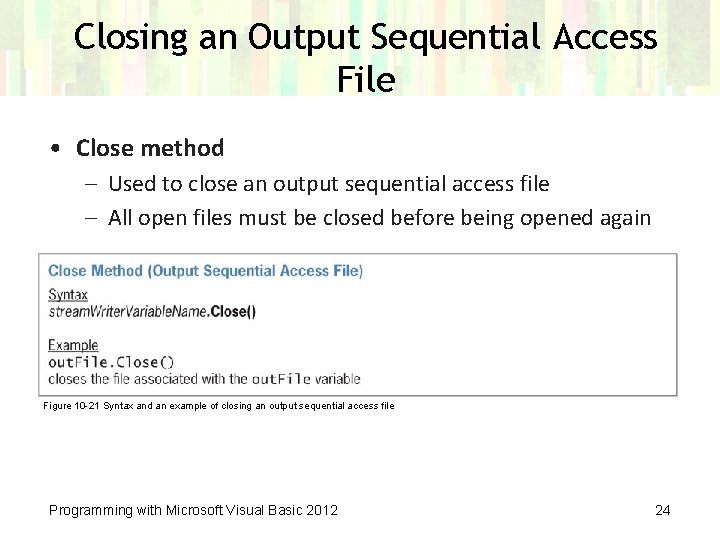
Closing an Output Sequential Access File • Close method – Used to close an output sequential access file – All open files must be closed before being opened again Figure 10 -21 Syntax and an example of closing an output sequential access file Programming with Microsoft Visual Basic 2012 24
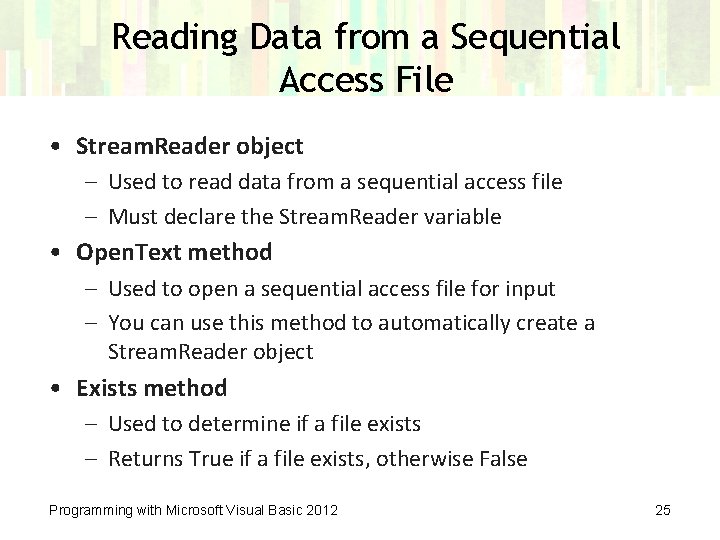
Reading Data from a Sequential Access File • Stream. Reader object – Used to read data from a sequential access file – Must declare the Stream. Reader variable • Open. Text method – Used to open a sequential access file for input – You can use this method to automatically create a Stream. Reader object • Exists method – Used to determine if a file exists – Returns True if a file exists, otherwise False Programming with Microsoft Visual Basic 2012 25
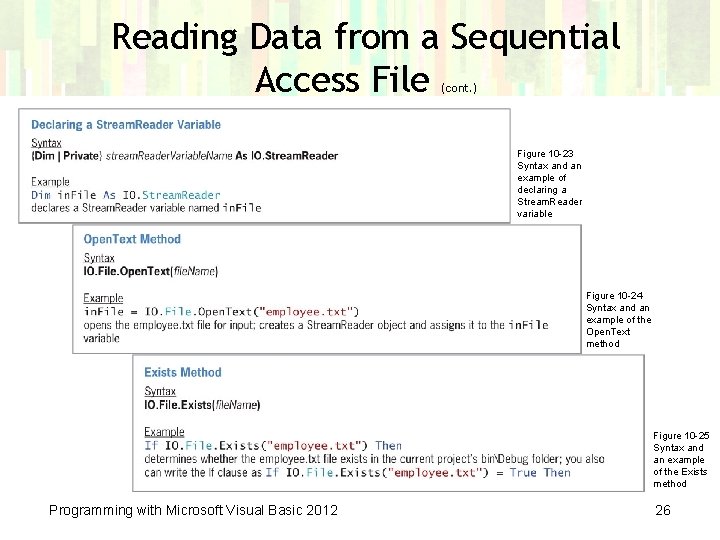
Reading Data from a Sequential Access File (cont. ) Figure 10 -23 Syntax and an example of declaring a Stream. Reader variable Figure 10 -24 Syntax and an example of the Open. Text method Figure 10 -25 Syntax and an example of the Exists method Programming with Microsoft Visual Basic 2012 26
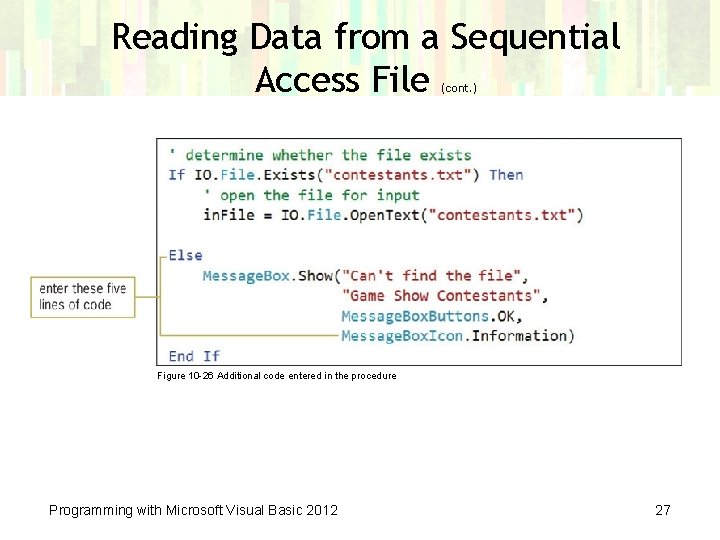
Reading Data from a Sequential Access File (cont. ) Figure 10 -26 Additional code entered in the procedure Programming with Microsoft Visual Basic 2012 27
Reading Data from a Sequential Access File (cont. ) • Line – A sequence (stream) of characters followed by the newline character • Read. Line method – Used to read the contents of a file, one line at a time – Returns the String value containing data in the current line – Returns only data, not including the newline character • Peek method – Determines whether a file contains another character to read Programming with Microsoft Visual Basic 2012 28
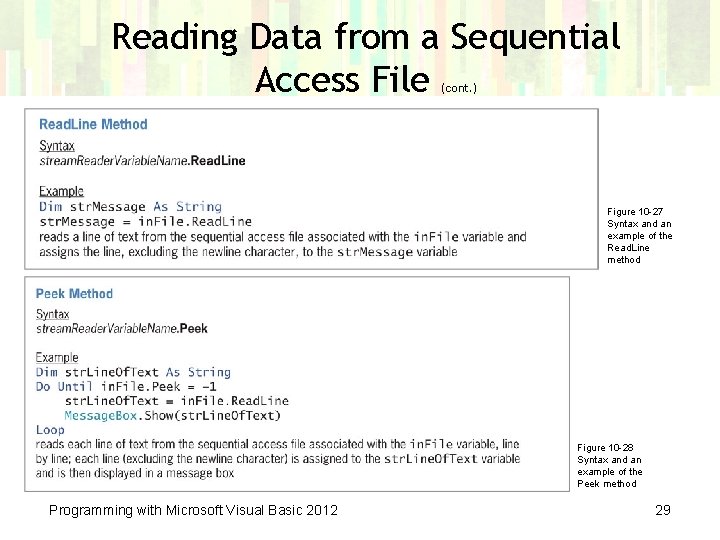
Reading Data from a Sequential Access File (cont. ) Figure 10 -27 Syntax and an example of the Read. Line method Figure 10 -28 Syntax and an example of the Peek method Programming with Microsoft Visual Basic 2012 29
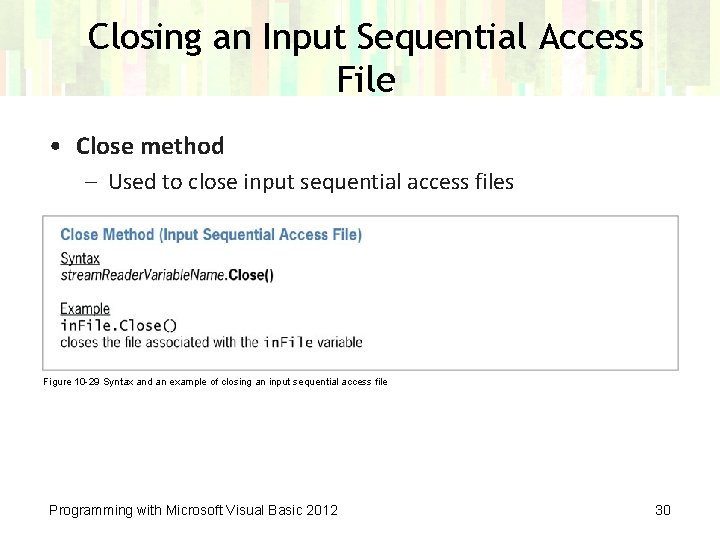
Closing an Input Sequential Access File • Close method – Used to close input sequential access files Figure 10 -29 Syntax and an example of closing an input sequential access file Programming with Microsoft Visual Basic 2012 30
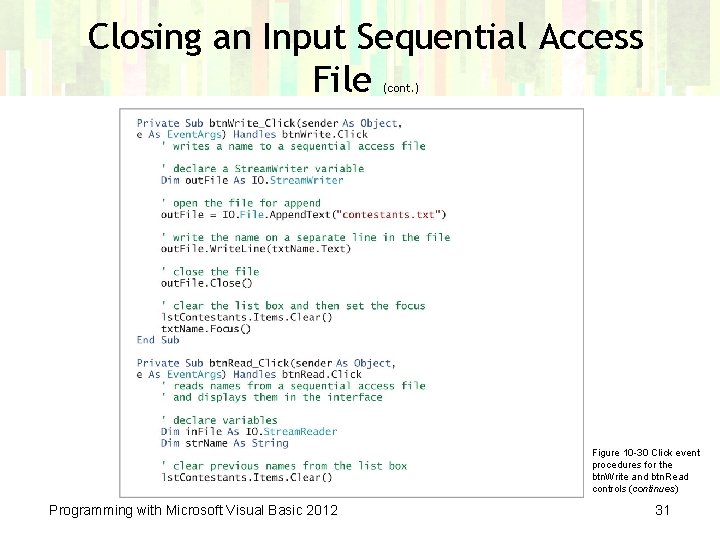
Closing an Input Sequential Access File (cont. ) Figure 10 -30 Click event procedures for the btn. Write and btn. Read controls (continues) Programming with Microsoft Visual Basic 2012 31
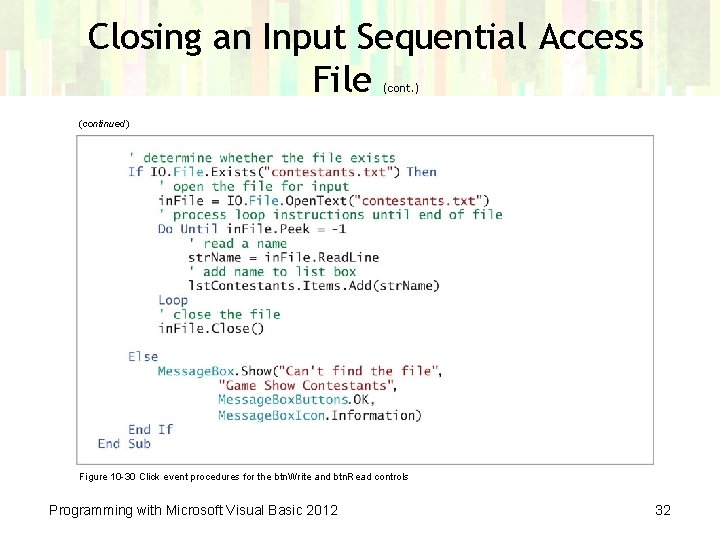
Closing an Input Sequential Access File (cont. ) (continued) Figure 10 -30 Click event procedures for the btn. Write and btn. Read controls Programming with Microsoft Visual Basic 2012 32
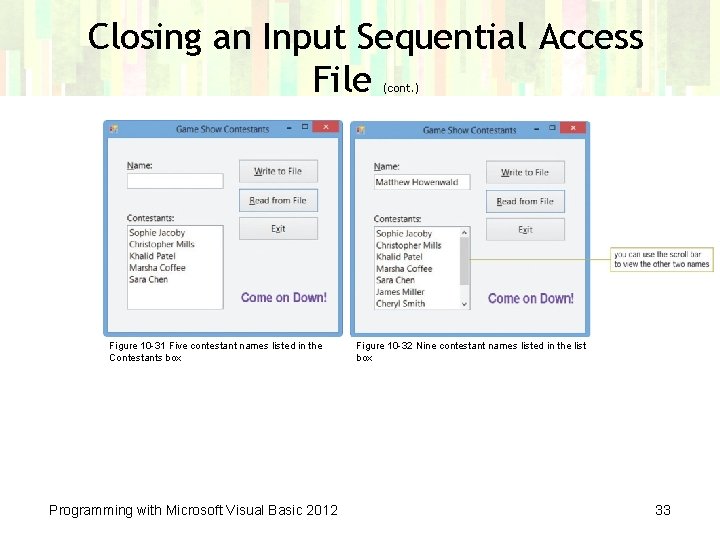
Closing an Input Sequential Access File (cont. ) Figure 10 -31 Five contestant names listed in the Contestants box Programming with Microsoft Visual Basic 2012 Figure 10 -32 Nine contestant names listed in the list box 33
Lesson B Summary • To write data to a sequential access file: – Declare a Stream. Writer variable and then use either the Create. Text method or the Append. Text method to open a sequential access file – Assign the method’s return value to the Stream. Writer variable – Use either the Write method or the Write. Line method to write the data to the file – Close the file using the Close method Programming with Microsoft Visual Basic 2012 34
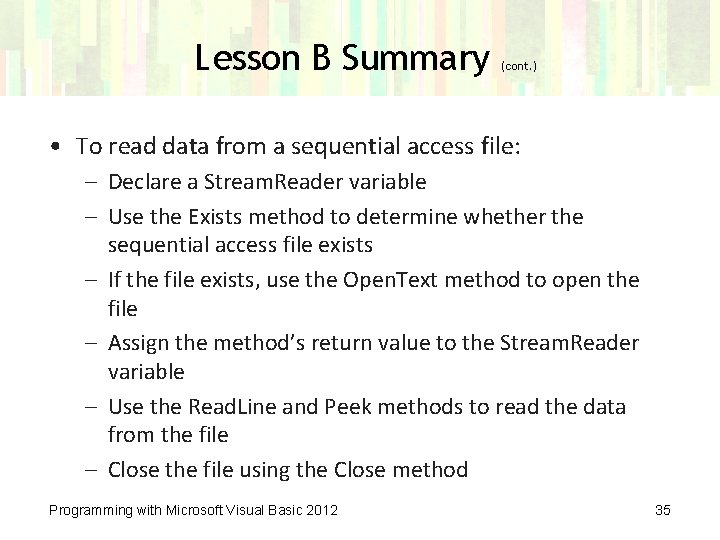
Lesson B Summary (cont. ) • To read data from a sequential access file: – Declare a Stream. Reader variable – Use the Exists method to determine whether the sequential access file exists – If the file exists, use the Open. Text method to open the file – Assign the method’s return value to the Stream. Reader variable – Use the Read. Line and Peek methods to read the data from the file – Close the file using the Close method Programming with Microsoft Visual Basic 2012 35
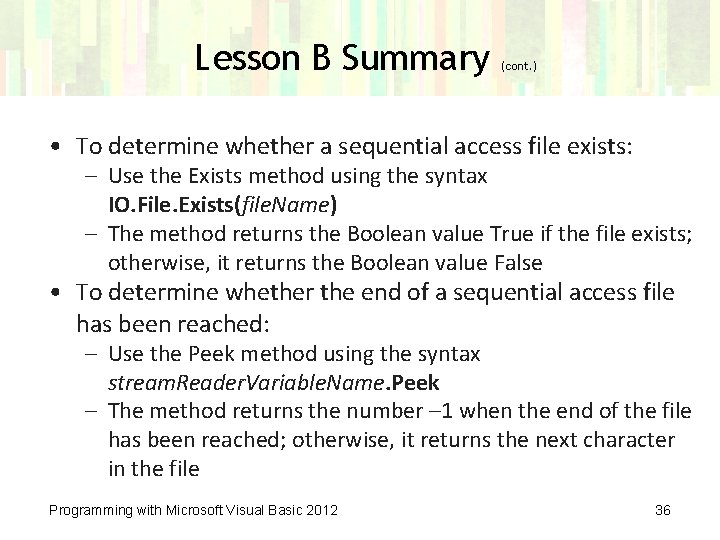
Lesson B Summary (cont. ) • To determine whether a sequential access file exists: – Use the Exists method using the syntax IO. File. Exists(file. Name) – The method returns the Boolean value True if the file exists; otherwise, it returns the Boolean value False • To determine whether the end of a sequential access file has been reached: – Use the Peek method using the syntax stream. Reader. Variable. Name. Peek – The method returns the number – 1 when the end of the file has been reached; otherwise, it returns the next character in the file Programming with Microsoft Visual Basic 2012 36
Lesson C Objectives After studying Lesson C, you should be able to: • Add an item to a list box while an application is running • Align columns of information • Remove an item from a list box while an application is running • Save list box items in a sequential access file • Write records to a sequential access file Programming with Microsoft Visual Basic 2012 37
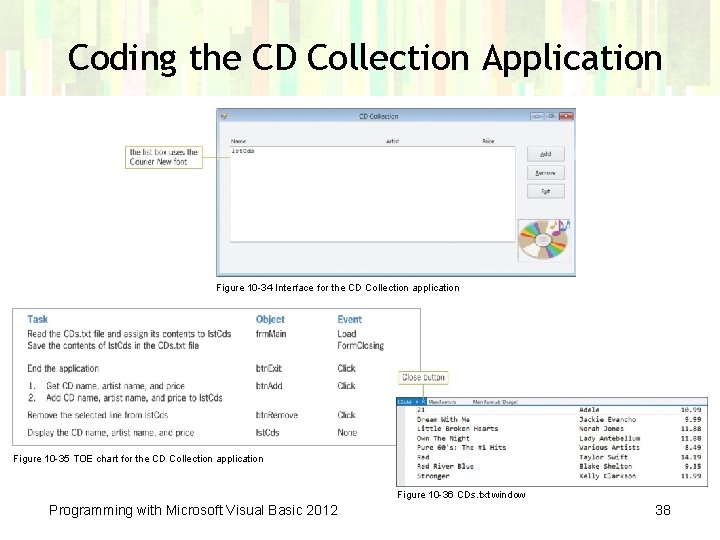
Coding the CD Collection Application Figure 10 -34 Interface for the CD Collection application Figure 10 -35 TOE chart for the CD Collection application Figure 10 -36 CDs. txt window Programming with Microsoft Visual Basic 2012 38
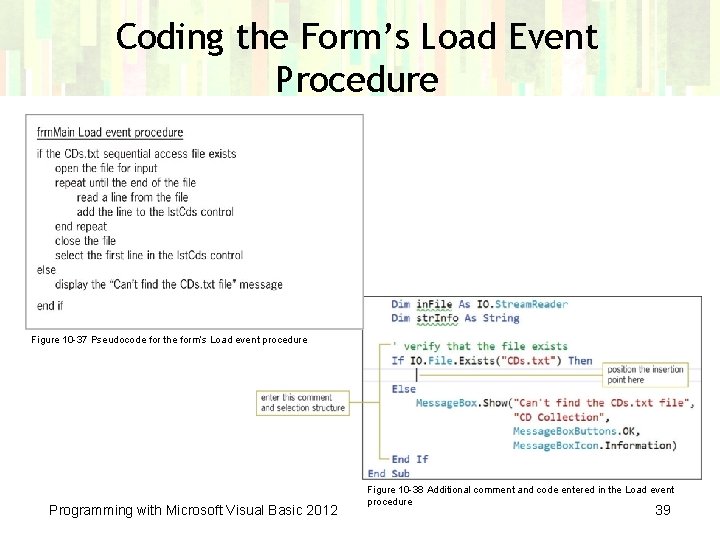
Coding the Form’s Load Event Procedure Figure 10 -37 Pseudocode for the form’s Load event procedure Programming with Microsoft Visual Basic 2012 Figure 10 -38 Additional comment and code entered in the Load event procedure 39
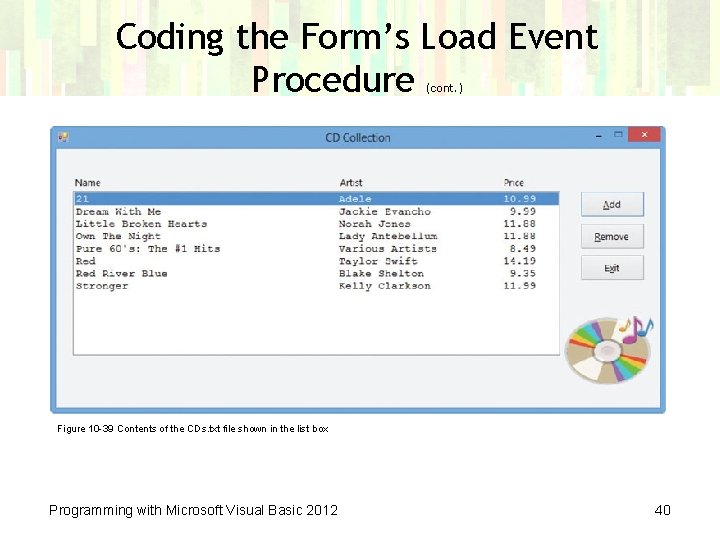
Coding the Form’s Load Event Procedure (cont. ) Figure 10 -39 Contents of the CDs. txt file shown in the list box Programming with Microsoft Visual Basic 2012 40
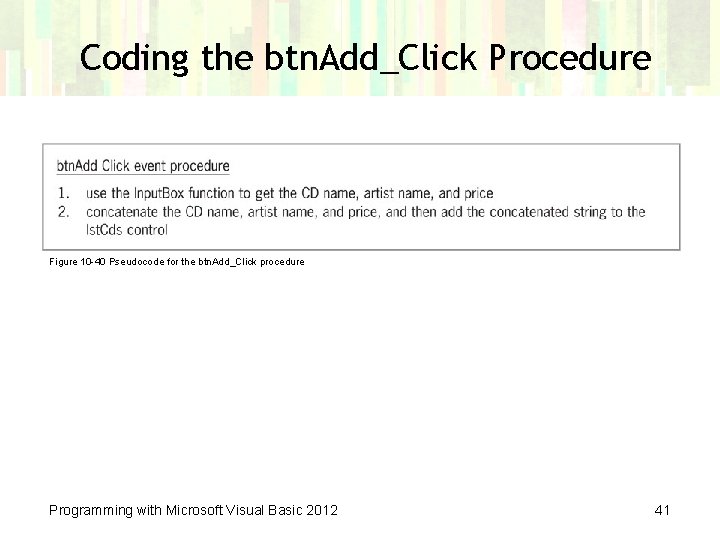
Coding the btn. Add_Click Procedure Figure 10 -40 Pseudocode for the btn. Add_Click procedure Programming with Microsoft Visual Basic 2012 41
Aligning Columns of Information • Pad. Left and Pad. Right methods – Used to pad strings with characters – These methods can be used to align text in a list box or text written to a sequential access file • Strings. Space method – Used to include a specific number of space characters in a string • Syntax: Strings. Space(number) – number is an integer representing the number of spaces to include Programming with Microsoft Visual Basic 2012 42
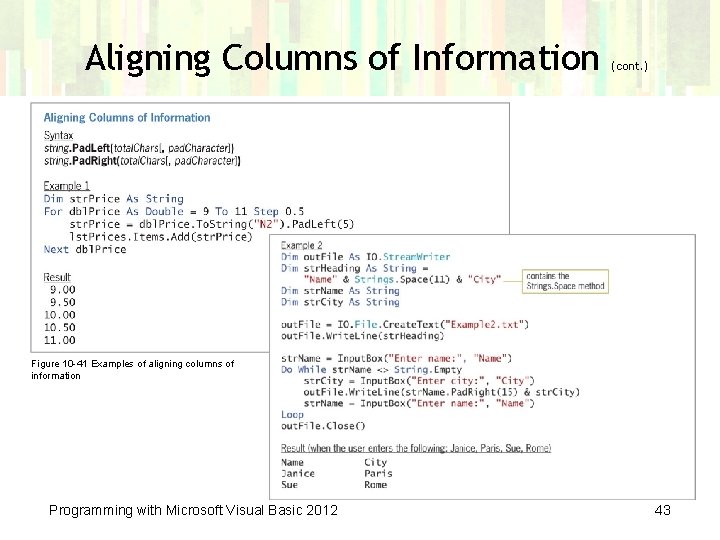
Aligning Columns of Information (cont. ) Figure 10 -41 Examples of aligning columns of information Programming with Microsoft Visual Basic 2012 43
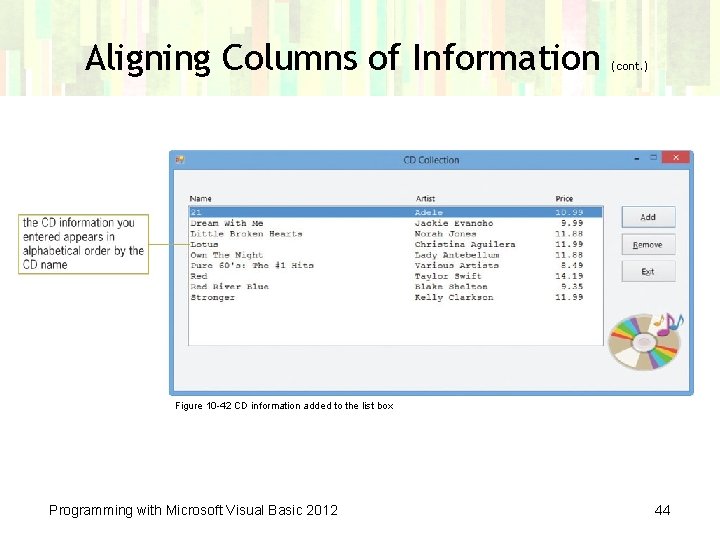
Aligning Columns of Information (cont. ) Figure 10 -42 CD information added to the list box Programming with Microsoft Visual Basic 2012 44
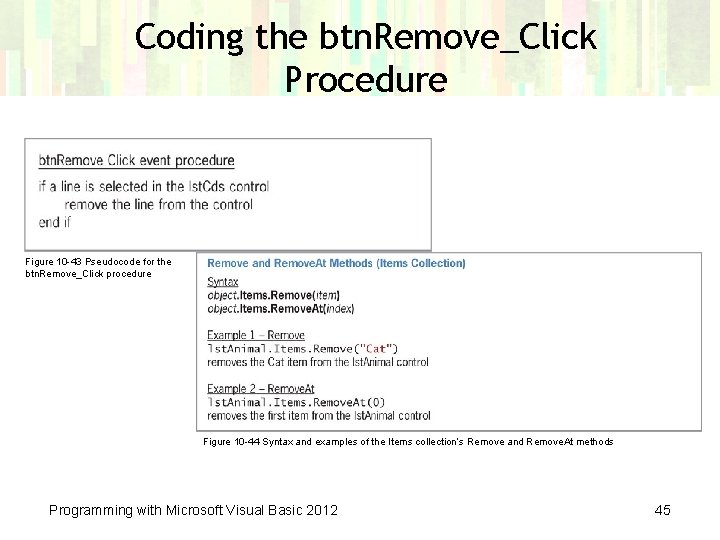
Coding the btn. Remove_Click Procedure Figure 10 -43 Pseudocode for the btn. Remove_Click procedure Figure 10 -44 Syntax and examples of the Items collection’s Remove and Remove. At methods Programming with Microsoft Visual Basic 2012 45
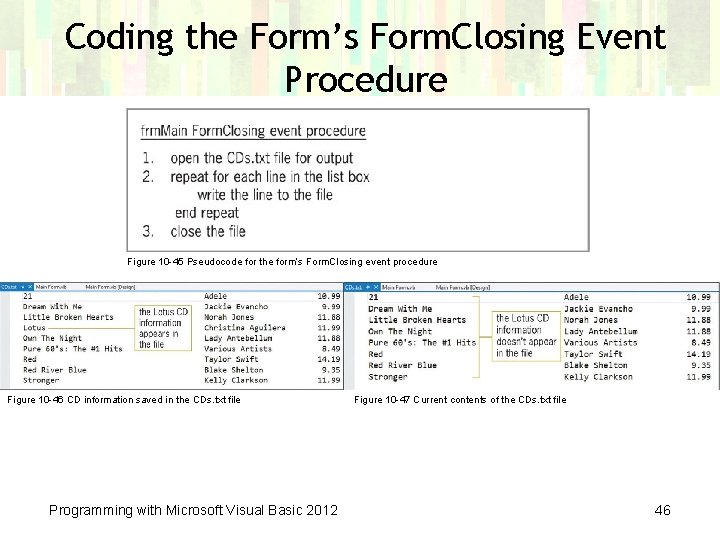
Coding the Form’s Form. Closing Event Procedure Figure 10 -45 Pseudocode for the form’s Form. Closing event procedure Figure 10 -46 CD information saved in the CDs. txt file Programming with Microsoft Visual Basic 2012 Figure 10 -47 Current contents of the CDs. txt file 46
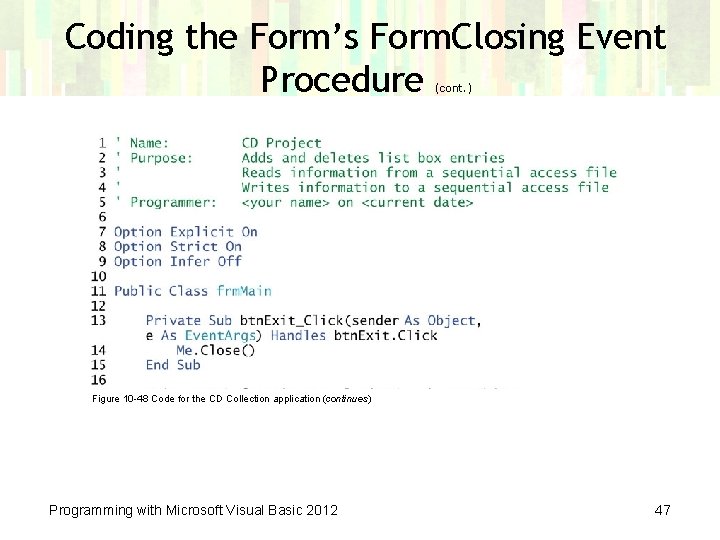
Coding the Form’s Form. Closing Event Procedure (cont. ) Figure 10 -48 Code for the CD Collection application (continues) Programming with Microsoft Visual Basic 2012 47
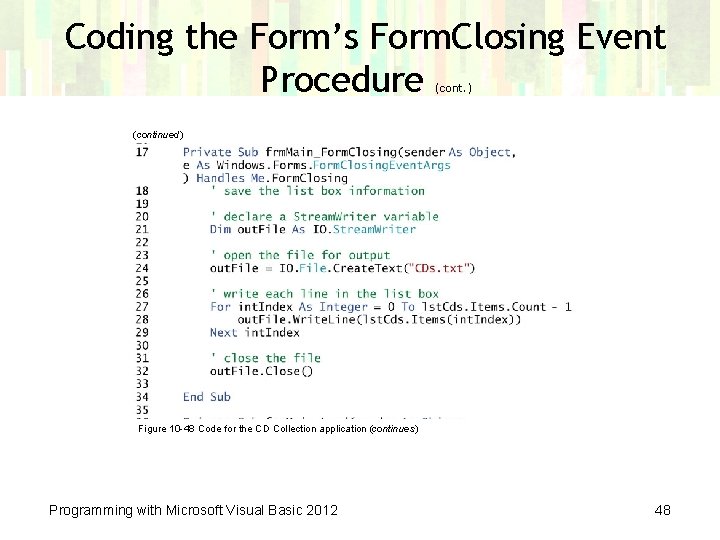
Coding the Form’s Form. Closing Event Procedure (cont. ) (continued) Figure 10 -48 Code for the CD Collection application (continues) Programming with Microsoft Visual Basic 2012 48
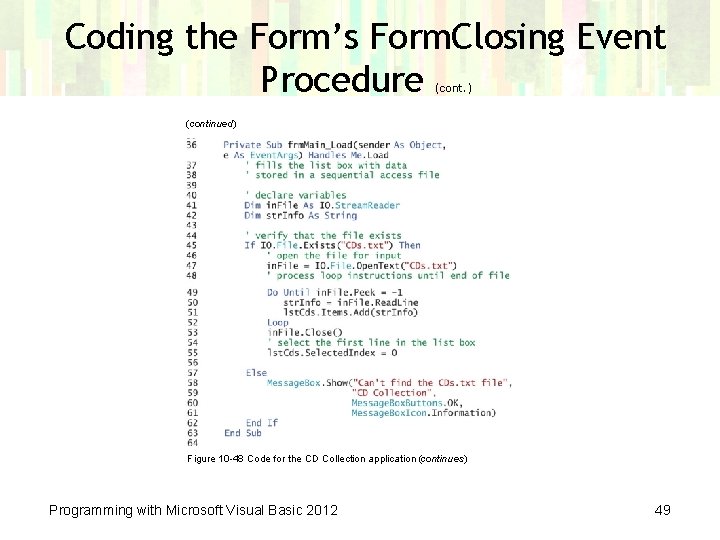
Coding the Form’s Form. Closing Event Procedure (cont. ) (continued) Figure 10 -48 Code for the CD Collection application (continues) Programming with Microsoft Visual Basic 2012 49
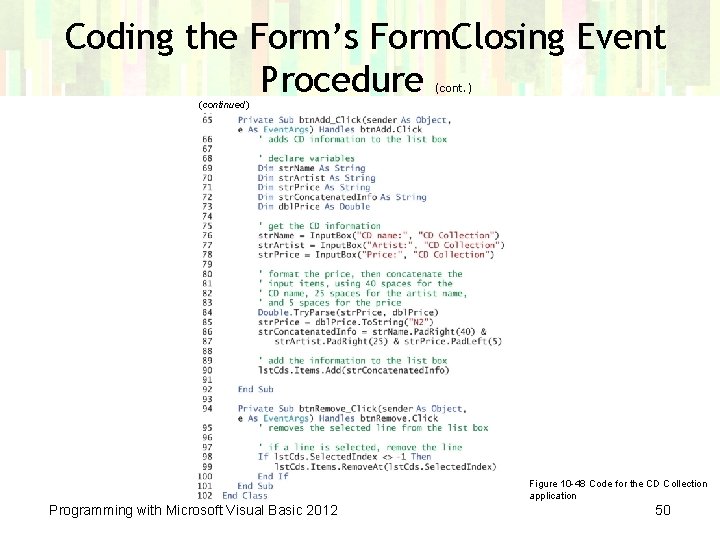
Coding the Form’s Form. Closing Event Procedure (cont. ) (continued) Figure 10 -48 Code for the CD Collection application Programming with Microsoft Visual Basic 2012 50
Lesson C Summary • To align columns of information: – Use the Pad. Left and Pad. Right methods • To align a column of numbers by the decimal point: – Format each number in the column to ensure that each has the same number of digits to the right of the decimal point, and then use the Pad. Left method to right-align the numbers • To include a specific number of spaces in a string: – Use the Strings. Space method using the syntax Strings. Space(number) in which number is an integer that represents the number of spaces to include Programming with Microsoft Visual Basic 2012 51
Lesson C Summary • To remove an item from a list box: – Use either the Items collection’s Remove method or its Remove. At method – The Remove method’s syntax is object. Items. Remove(item) where item is the value of the item you want to remove – The Remove. At method’s syntax is object. Items. Remove. At(index) where index is the index of the item you want removed Programming with Microsoft Visual Basic 2012 52
- Slides: 52