
Programming Mobile Applications with Android 22 26 September
Programming Mobile Applications with Android 22 -26 September, Albacete, Spain Jesus Martínez-Gómez
Programming Mobile Applications wit Android ● Lesson 1. - Introduction to Android – Introduction – Android development requirements. - What do we need to develop Android applications – Setup of Android SDK – Introduction to the emulator. - Advantages and disadvantages – First View to an android application – Android Manifest File. - Permissions management
Programming Mobile Applications wit Android ● Lesson 1. - Introduction to Android – In this lesson we will learn ● Why to develop in Android ? ● What do we need to develop Android applications? ● How to setup the environment for development ? ● When and how to use the emulator? ● What is the manifest file and what are the main permissions?
Programming Mobile Applications wit Android ● What is Android? – Software Platform and a Operative System for mobile devices – Based in the Linux kernel – Allows to code in Java, but also in other languages thanks to the use of native ARM code – Lot of libraries, development tools and documentation
Programming Mobile Applications wit Android ● Why Android? – Approximately … 90% of smartphones are based on th use of Android – Open Source → Huge number of developers – Open Handset Alliance ● – Google, Asus, Garmin, Toshiba, ebay, nvidia, huawei, sony, samsung, intel … Easy to use
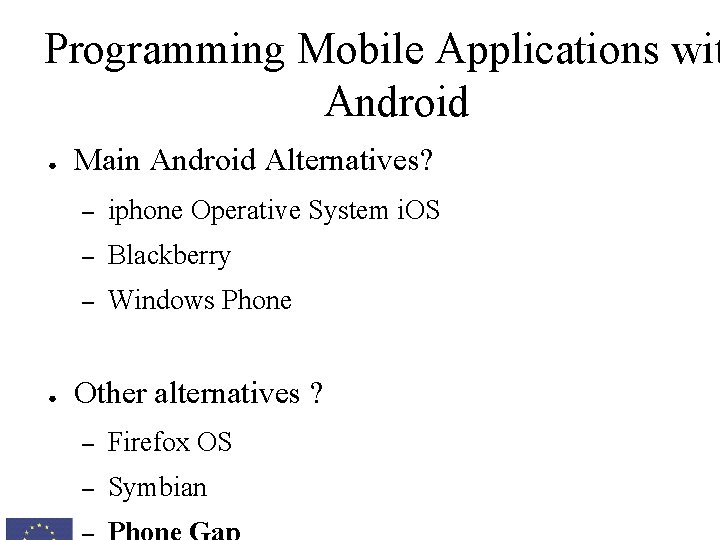
Programming Mobile Applications wit Android ● ● Main Android Alternatives? – iphone Operative System i. OS – Blackberry – Windows Phone Other alternatives ? – Firefox OS – Symbian
Programming Mobile Applications wit Android ● Phone Gap (http: //phonegap. com/) – Source code: HTML, CSS and Java. Script – Cross-platform ● The same application can be released for – – Android Windows Phone i. Phone Blackberry
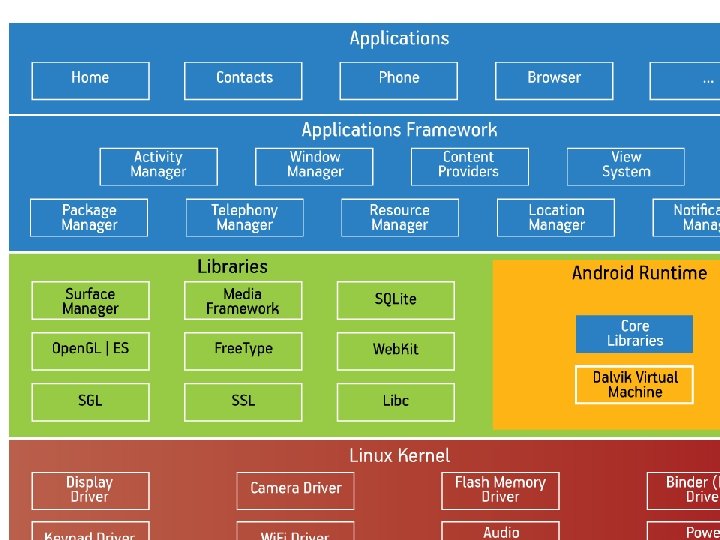
Programming Mobile Applications wit Android ● What is included in Android? – Application Framework – Libraries – Android Runtime – HAL – Applications – Kernel
Programming Mobile Applications wit Android ● Android … some history – Founded in 2003 ● Andy Rubin, Rich Miner, Nick Sears and Chris White – Acquired by Google in the Summer of 2005 – Open Handset Alliance is established in 2007 – Android 1. 0 was released on September 23, 2008 – Since 2010, Nexus series of devices – Lot of versions and updates
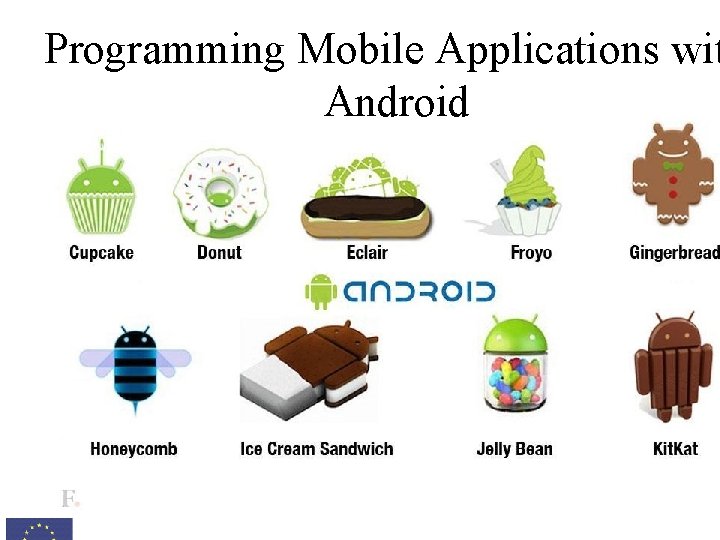
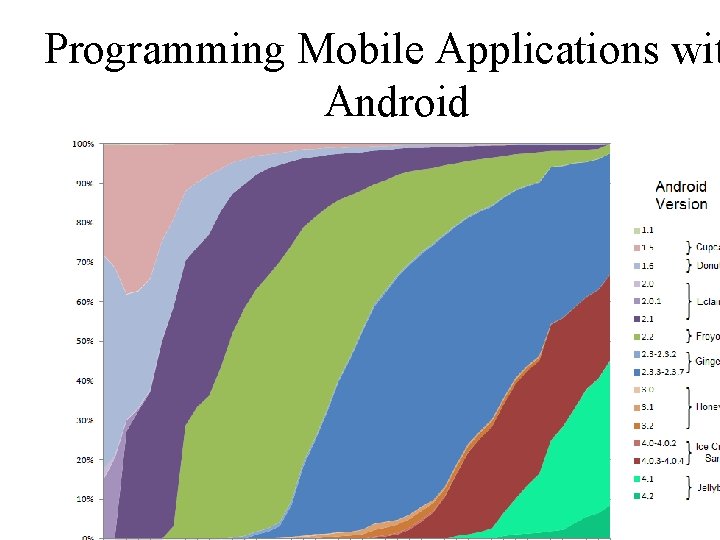
Programming Mobile Applications wit Android ● Android versions – Each new version of android uses the name of some well-known sweets – Main differences between versions ● API level ● Widgets and libraries ● Video and audio support ● Keyboard ● Communication
Programming Mobile Applications wit Android
Programming Mobile Applications wit Android ● Android versions (main releases) – Android 1. 5 Cupcake ● – Android 1. 6 (Donut) ● – VPN support and different display resolutions Android 2. 2 (Froyo) ● – Video record and display Flash and external storage Android 3. 0 (Honeycomb) ● Specific for tablet devices
Programming Mobile Applications wit Android
Programming Mobile Applications wit Android ● Environment setup – Eclipse – Android Development Toolkit Plugin – Android Virtual Device Manager (Emulator) – Smartphone ● For real tests

Programming Mobile Applications wit Android ● Environment setup – Installation Prerequisites ● ● ● Java Development Kit JDK 6 Development environment for building applications, applets, and components using the Java programming language. http: //www. oracle. com/technetwork/javase/downloads/i dex. html

Programming Mobile Applications wit Android ● Environment setup – ● Download the Android Developer Tools that includes: ● Eclipse + ADT Plugin ● Android SDK tools ● Android Platform tools ● A version of the Android Platform ● A version of the Android system image for the emulator https: //developer. android. com/sdk/index. html
Programming Mobile Applications wit Android ● ● Unzip the downloaded file into your file system – Eclipse folder – SDK folder Open the eclipse folder and execute eclipse – We must obtain. . .

Programming Mobile Applications wit Android SDK Manager AVD Manager (emulator)
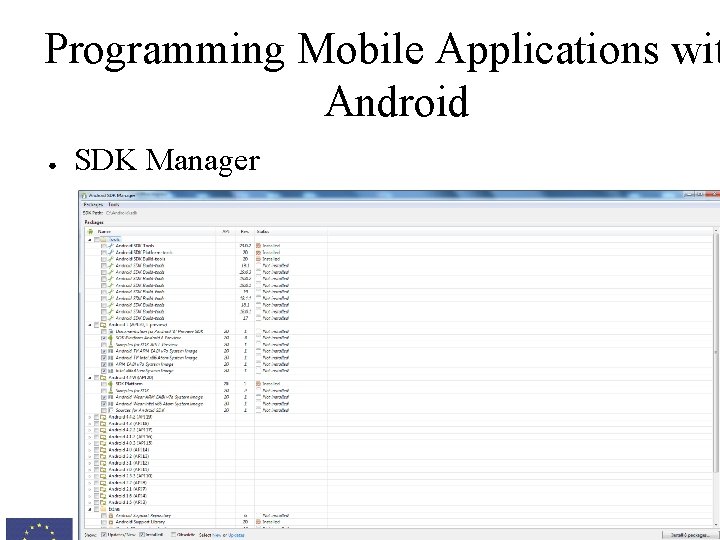
Programming Mobile Applications wit Android ● SDK Manager
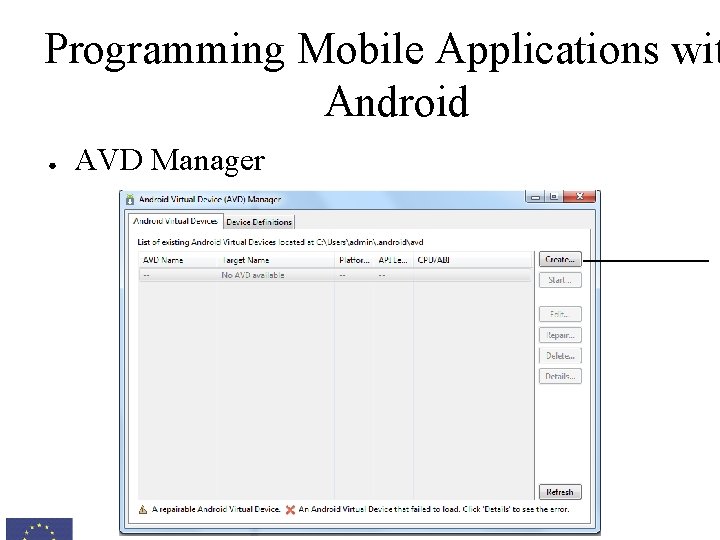
Programming Mobile Applications wit Android ● AVD Manager
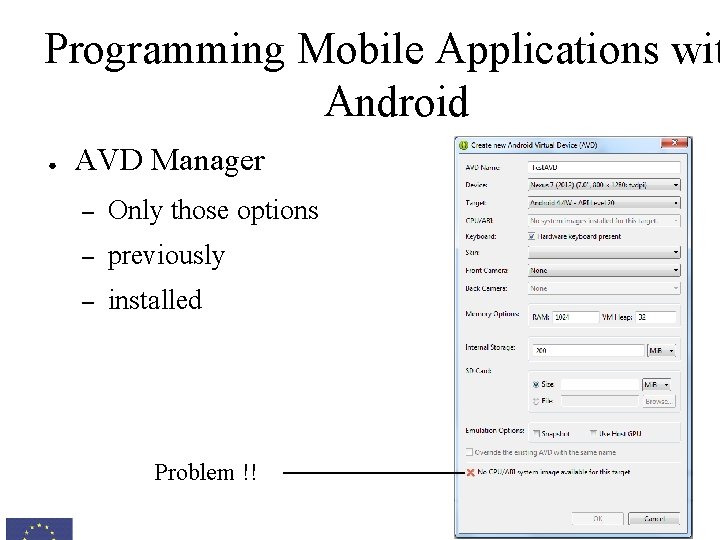
Programming Mobile Applications wit Android ● AVD Manager – Only those options – previously – installed Problem !!

Programming Mobile Applications wit Android ● SDK Manager – We will open it again to install the proposed required packages, and new ones including. . .
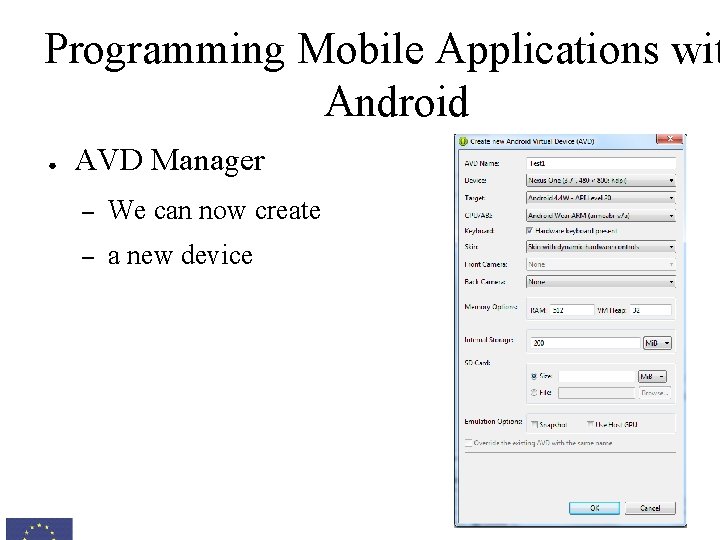
Programming Mobile Applications wit Android ● AVD Manager – We can now create – a new device
Programming Mobile Applications wit Android ● Debugger is another interesting tool for Android development – We can access in real-time to the real value of the application internal parameters – Very useful to find the origin of application errors – We can both debug applications running on the emulator or the physical smartphone ● ● Follow the instruction to install the drivers and set your device for evaluation http: //developer. android. com/tools/device. html
Programming Mobile Applications wit Android ● ● Thanks to the emulator, we can – Evaluate our applications using different platforms – Test non-stable applications – Emulate locations , battery levels, SMS or calls … but on the contrary – Development is very slow – Some characteristics cannot be emulated
Programming Mobile Applications wit Android ● Any android project consist of – – Sources folder → src ● Source code for our programming files ● Java classes Generated files → gen ● – Resources folder → res ● – Files are generated automatically Layouts, images, sounds, text strings, etc Android Manifest file
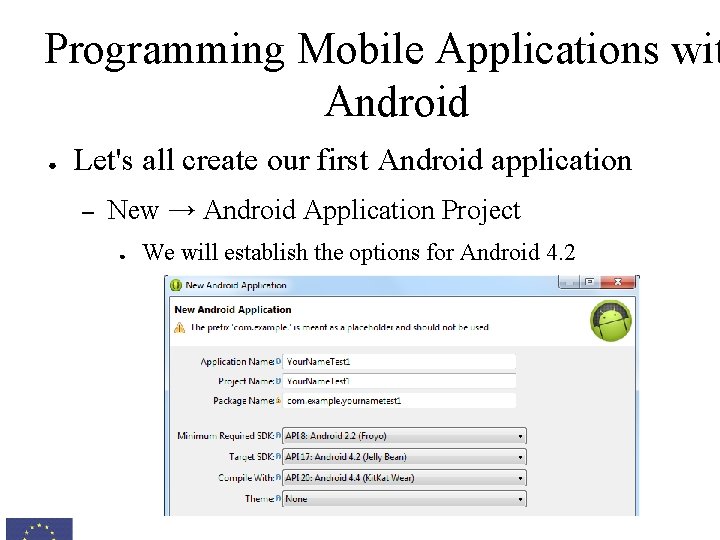
Programming Mobile Applications wit Android ● Let's all create our first Android application – New → Android Application Project ● We will establish the options for Android 4. 2
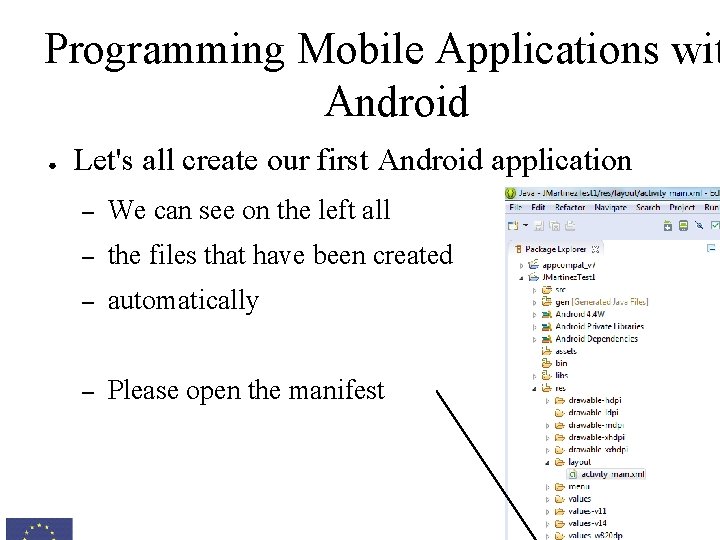
Programming Mobile Applications wit Android ● Let's all create our first Android application – We can see on the left all – the files that have been created – automatically – Please open the manifest
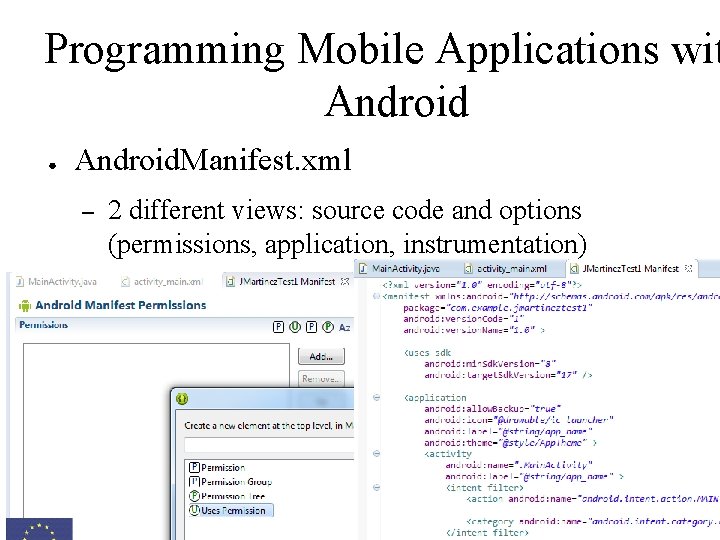
Programming Mobile Applications wit Android ● Android. Manifest. xml – 2 different views: source code and options (permissions, application, instrumentation)
Programming Mobile Applications wit Android ● First Android application – Source code and visual interfaces are separated ● Source Code: . java files located in /src ● Visual Interfaces: layout files located in /res/layout – Out first application will consist of a single screen with our name → No modification in the behavior – Please open the layout file (activity_main. xml)
Programming Mobile Applications wit Android ● First Android application – Source code and visual interfaces are separated ● Source Code: . java files located in /src ● Visual Interfaces: layout files located in /res/layout – Out first application will consist of a single screen with our name → No modification in the behavior – Please open the layout file (activity_main. xml)
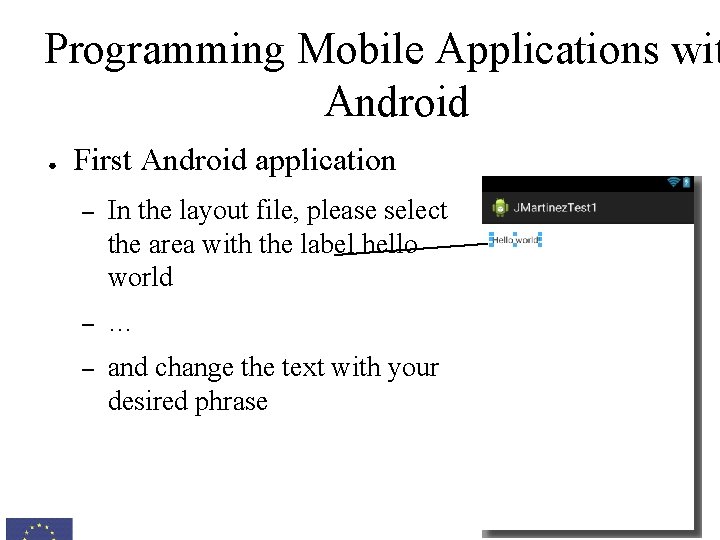
Programming Mobile Applications wit Android ● First Android application – In the layout file, please select the area with the label hello world – … – and change the text with your desired phrase

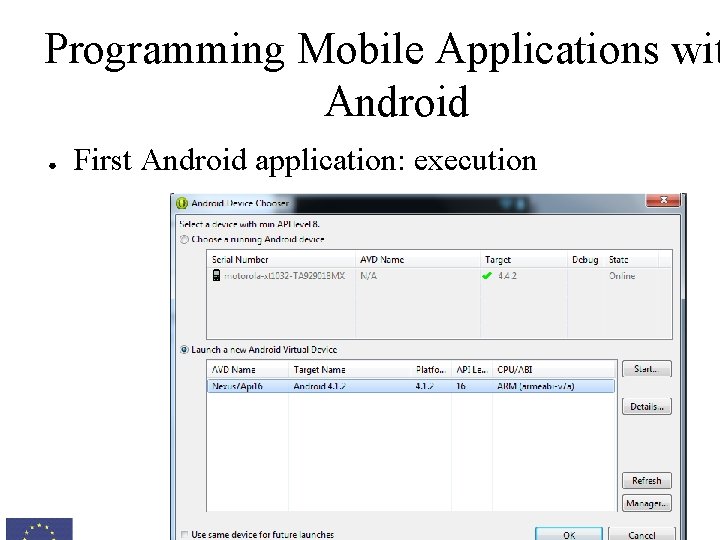
Programming Mobile Applications wit Android ● First Android application – Now we will prepare a emulator for its execution – From the Android SDK Manager, please install the opt from the 4. 1 (Api 16) – Once all the packages have been installed (several step can be required), restart Eclipse – Open the Android Virtual Device Manager, create a ne one with the following configuration ● Name: Nexus 7 Api 16, Device: Nexus 7 ● Target: Android 4. 1. 2
Programming Mobile Applications wit Android ● First Android application: execution – Now, we will run our application ● – Right button over the project → Run As → Android Applica We now find a window to select where to execute the application ● Smartphone → if plugged and configured properly ● Emulator → we need to load
Programming Mobile Applications wit Android ● First Android application: execution
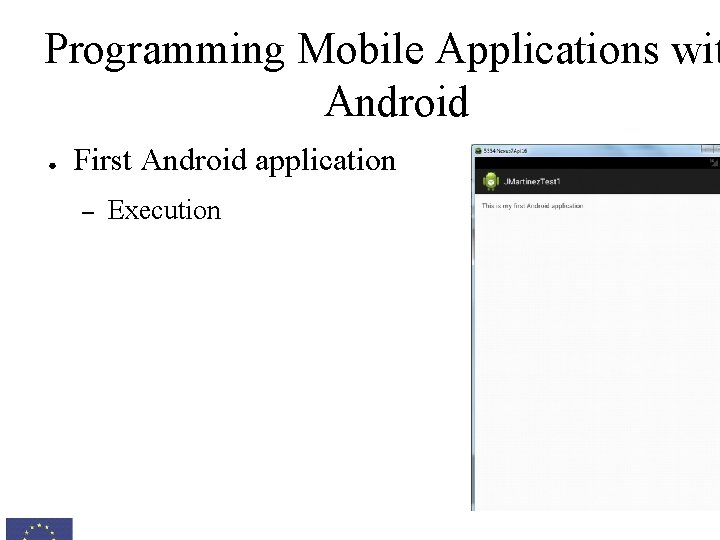
Programming Mobile Applications wit Android ● First Android application – Execution
Programming Mobile Applications wit Android ● Android Manifest File – Configuration file that describes the application ● Permissions that are requested – Access to the Internet, Camera, external storage ● Minimum version of SDK for execution ● Name and logo of the application ● Activities (Windows) including the main one ● Libraries and features used ● Other
Programming Mobile Applications wit Android ● Android Manifest File – Main changes that should be applied: permissions ● Can be added using the GUI or directly my modifying the co ● Basic permissions – – – android. permission. WRITE_EXTERNAL_STORAGE android. permission. INTERNET android. permission. CAMERA android. permission. SEND_SMS android. permission. ACCESS_COARSE_LOCATION. . .
Programming Mobile Applications wit Android ● Android Manifest File – The list of required permission will be listed when the application is being installed ● Include just the permissions that are needed
Programming Mobile Applications wit Android ● Lesson 1. - Introduction to Android – Android Lab I. - Create, compile and execute a hello world application ● ● ● Follow the instructions to prepare your computer fo development Create a new application and discover all the option that are available Execute the application both in the emulator and your mobile phone
Programming Mobile Applications with Android 22 -26 September, Albacete, Spain Jesus Martínez-Gómez
- Slides: 43