
Programmable Controller Basics Memory Data Micro Logix Packaged

Programmable Controller Basics Memory & Data Micro. Logix Packaged Controllers

We are going to discuss. . . 1. Memory 2. Data 3. Data Files
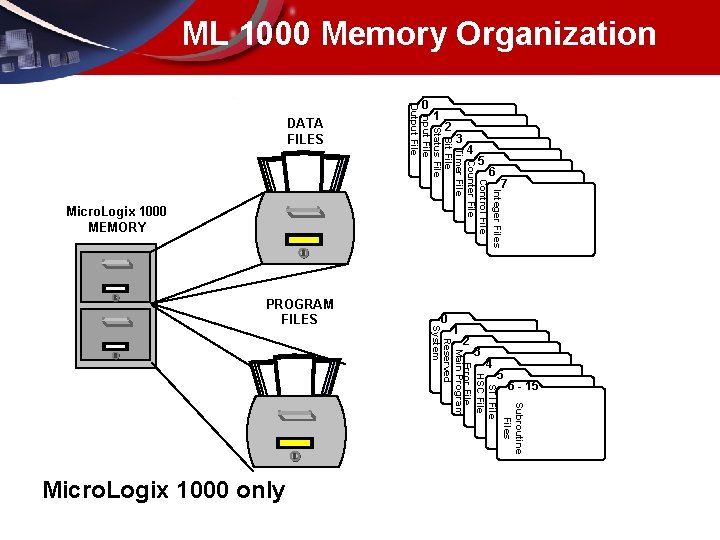
ML 1000 Memory Organization Subroutine Files STI File HSC File Error File Main Program Reserved System Micro. Logix 1000 only 6 - 15 5 4 3 2 1 0 PROGRAM FILES Integer Files Control File Counter File Timer File Bit File Status File Input File Output File Micro. Logix 1000 MEMORY 7 6 5 4 3 2 DATA FILES 1 0
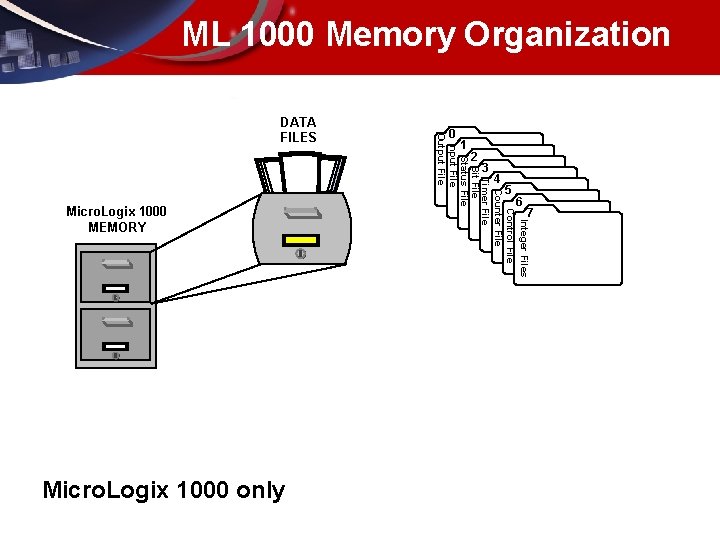
ML 1000 Memory Organization Integer Files Control File Counter File Timer File Bit File Status File Input File Output File Micro. Logix 1000 only 7 6 Micro. Logix 1000 MEMORY 5 4 3 2 1 0 DATA FILES

Memory & Data • MEMORY – – – Bit = 1 or 0 Nibble = 4 bits Byte = 2 nibbles Word(16 bits) 2 bytes Double Word= 2 words • 32 bits – Long Word=2 Double words • 64 bits • DATA – – Octal 0 -7 BCD 0 -9 HEX 0 -F (15) Integer (signed) -32768 to +32767 – Unsigned Integer 65, 535 (32767 + 32767) – Floating Point • IEEE +/- 3. 45 x 1038 to +/ -1. 17 x 10 -38 Underlined text for Micro. Logix 1000 only
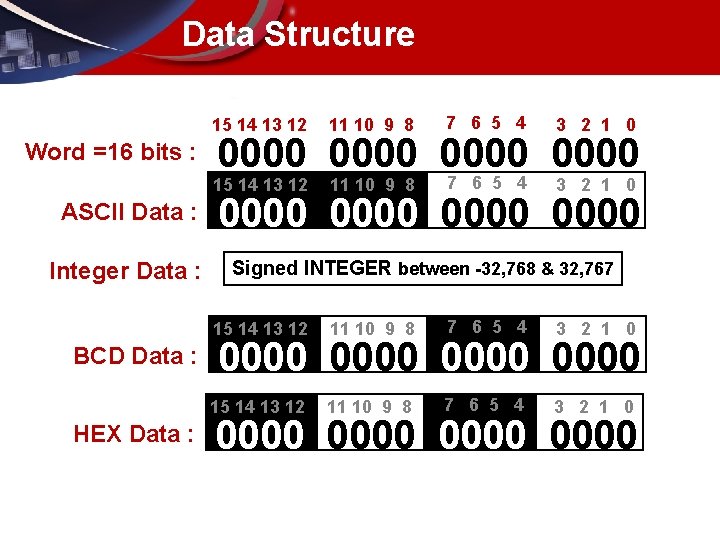
Data Structure 15 14 13 12 Word =16 bits : ASCII Data : Integer Data : BCD Data : HEX Data : 11 10 9 8 7 6 5 4 3 2 1 0 0000 7 6 5 4 15 14 13 12 11 10 9 8 3 2 1 0 0000 Signed INTEGER between -32, 768 & 32, 767 15 14 13 12 11 10 9 8 7 6 5 4 3 2 1 0 0000 0000
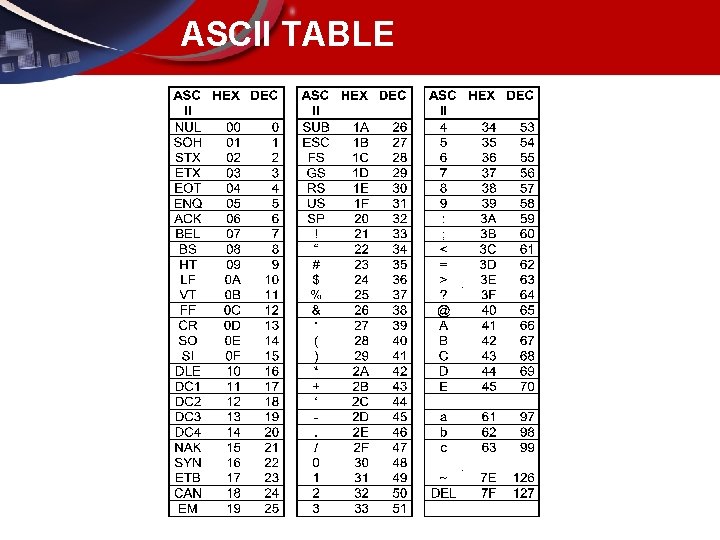
ASCII TABLE
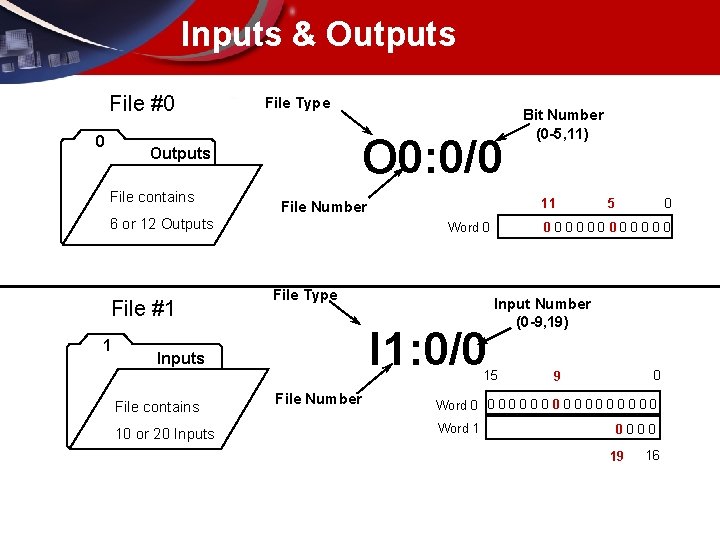
Inputs & Outputs File #0 0 File Type O 0: 0/0 Outputs File contains File #1 1 11 File Number 6 or 12 Outputs File Type I 1: 0/0 10 or 20 Inputs File Number 0 Input Number (0 -9, 19) 15 File contains 5 000000 Word 0 Inputs Bit Number (0 -5, 11) 0 9 Word 0 0 0 0 0 Word 1 0000 19 16
Status File • File #2 – General purpose file that consists of 32 registers (words). These registers are mixed in “word” and “bit” formats depending on the function they represent. The Status file is primarily used for: • Setting system operating features, • Displaying system status and faults – Programming aids consisting of: • • Timebase bits Math overflow flags Index registers Subroutine control
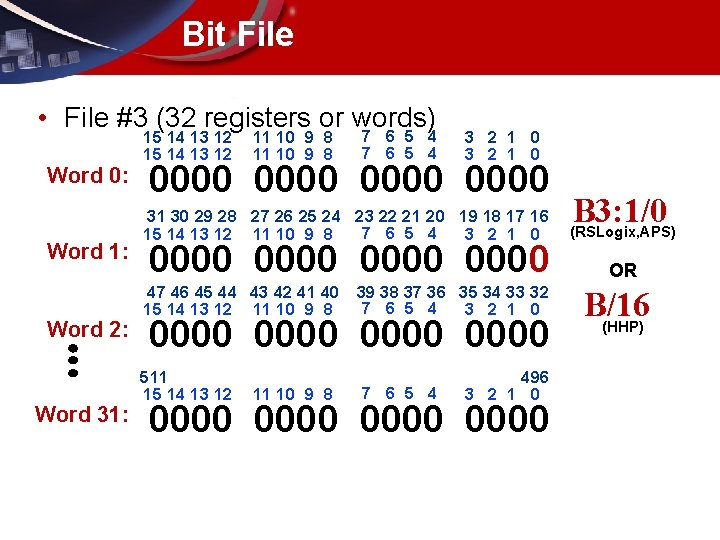
Bit File • File #3 (32 registers or words) Word 0: Word 1: Word 2: Word 31: 15 14 13 12 11 10 9 8 7 6 5 4 3 2 1 0 0000 31 30 29 28 27 26 25 24 23 22 21 20 19 18 17 16 7 6 5 4 15 14 13 12 11 10 9 8 3 2 1 0 0000 47 46 45 44 43 42 41 40 39 38 37 36 35 34 33 32 7 6 5 4 15 14 13 12 11 10 9 8 3 2 1 0 0000 511 15 14 13 12 11 10 9 8 7 6 5 4 496 3 2 1 0 0000 B 3: 1/0 (RSLogix, APS) OR B/16 (HHP)
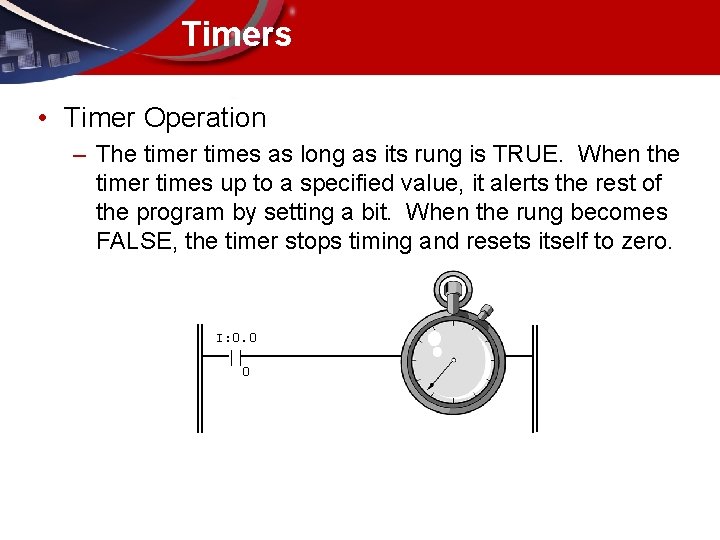
Timers • Timer Operation – The timer times as long as its rung is TRUE. When the timer times up to a specified value, it alerts the rest of the program by setting a bit. When the rung becomes FALSE, the timer stops timing and resets itself to zero. I: 0. 0 || 0
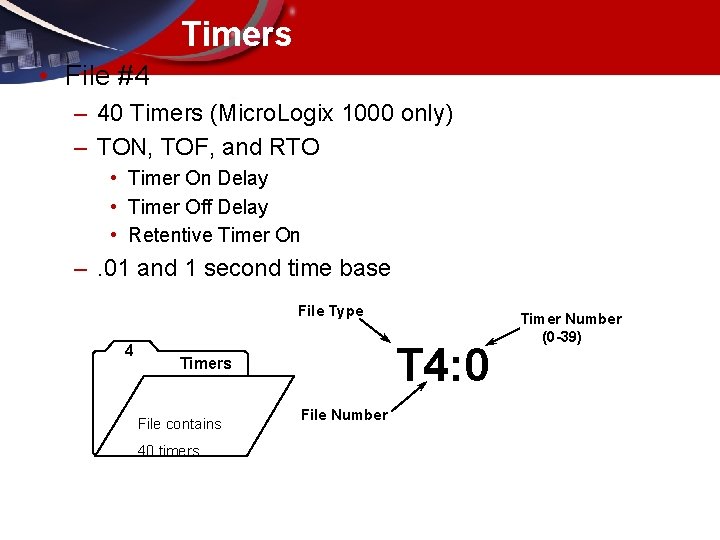
Timers • File #4 – 40 Timers (Micro. Logix 1000 only) – TON, TOF, and RTO • Timer On Delay • Timer Off Delay • Retentive Timer On –. 01 and 1 second time base File Type 4 T 4: 0 Timers File contains 40 timers File Number Timer Number (0 -39)
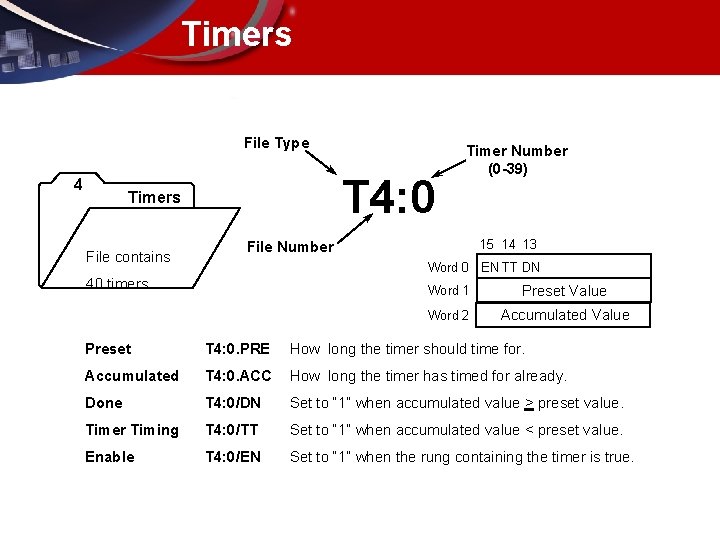
Timers File Type 4 T 4: 0 Timers File contains Timer Number (0 -39) 15 14 13 File Number Word 0 EN TT DN 40 timers Word 1 Preset Value Word 2 Accumulated Value Preset T 4: 0. PRE How long the timer should time for. Accumulated T 4: 0. ACC How long the timer has timed for already. Done T 4: 0/DN Set to “ 1” when accumulated value > preset value. Timer Timing T 4: 0/TT Set to “ 1” when accumulated value < preset value. Enable T 4: 0/EN Set to “ 1” when the rung containing the timer is true.
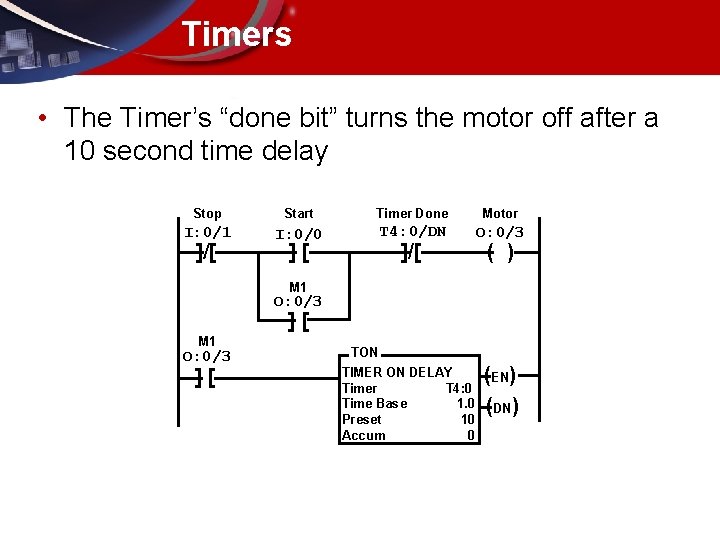
Timers • The Timer’s “done bit” turns the motor off after a 10 second time delay Stop Start Timer Done Motor I: 0/1 I: 0/0 T 4: 0/DN O: 0/3 ]/[ ][ ( ) M 1 O: 0/3 ][ TON TIMER ON DELAY Timer T 4: 0 Time Base 1. 0 Preset 10 Accum 0 (EN) (DN)
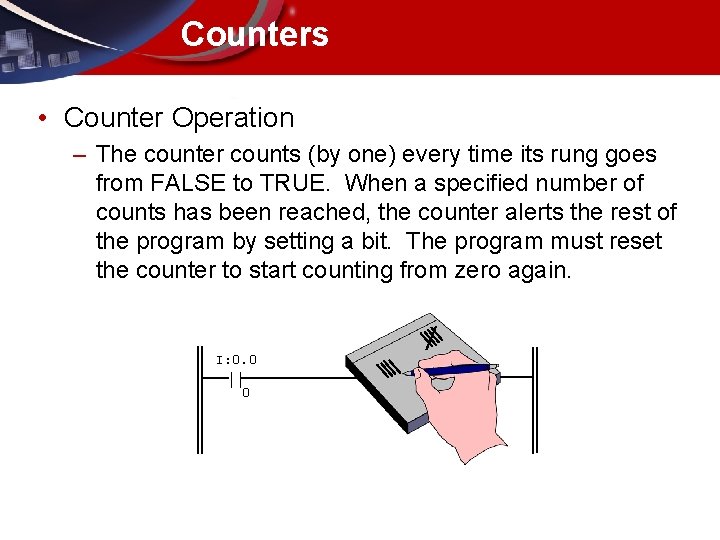
Counters • Counter Operation – The counter counts (by one) every time its rung goes from FALSE to TRUE. When a specified number of counts has been reached, the counter alerts the rest of the program by setting a bit. The program must reset the counter to start counting from zero again. I: 0. 0 || 0
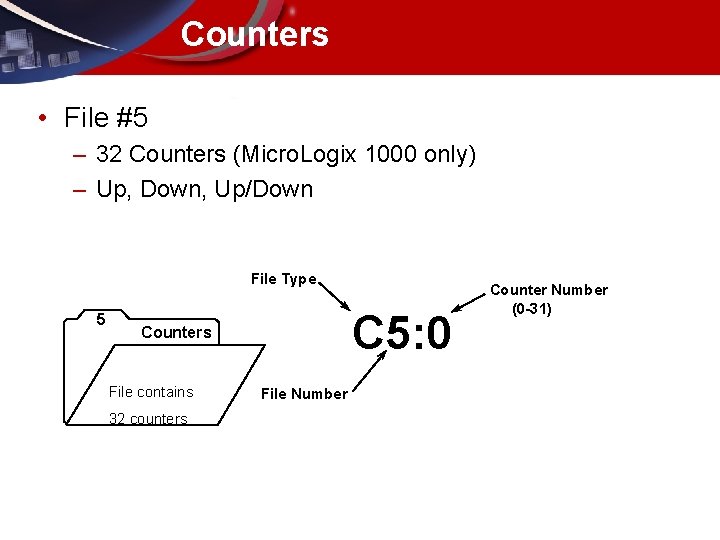
Counters • File #5 – 32 Counters (Micro. Logix 1000 only) – Up, Down, Up/Down File Type 5 C 5: 0 Counters File contains 32 counters File Number Counter Number (0 -31)
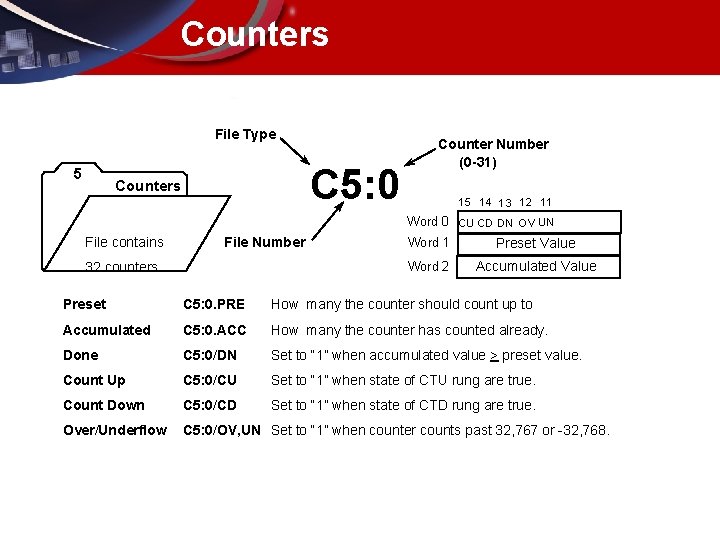
Counters File Type 5 C 5: 0 Counters Counter Number (0 -31) 15 14 13 12 11 Word 0 CU CD DN OV UN File contains File Number 32 counters Word 1 Preset Value Word 2 Accumulated Value Preset C 5: 0. PRE How many the counter should count up to Accumulated C 5: 0. ACC How many the counter has counted already. Done C 5: 0/DN Set to “ 1” when accumulated value > preset value. Count Up C 5: 0/CU Set to “ 1” when state of CTU rung are true. Count Down C 5: 0/CD Set to “ 1” when state of CTD rung are true. Over/Underflow C 5: 0/OV, UN Set to “ 1” when counter counts past 32, 767 or -32, 768.
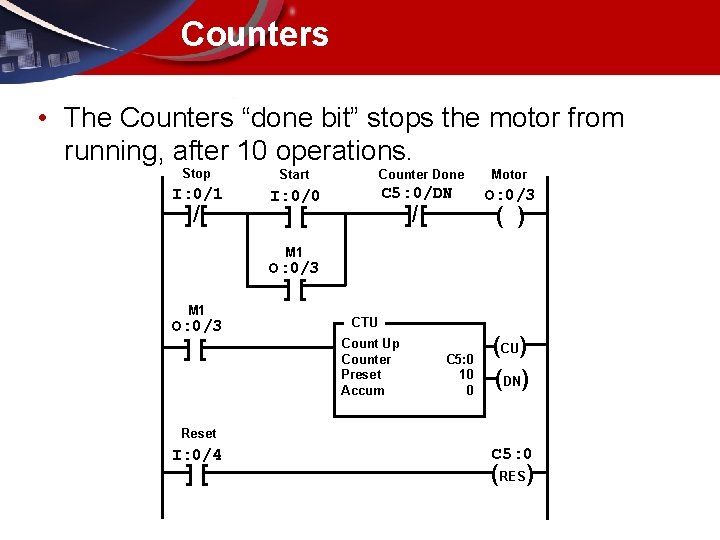
Counters • The Counters “done bit” stops the motor from running, after 10 operations. Stop Start Counter Done Motor I: 0/1 I: 0/0 C 5: 0/DN O: 0/3 ]/[ ][ ( ) M 1 O: 0/3 ][ CTU Count Up Counter Preset Accum C 5: 0 10 0 (CU) (DN) Reset I: 0/4 ][ C 5: 0 (RES)
Control • File #6 – Used for higher level application specific commands. • FIFO/LIFO Stacks • Sequencers • Bit Shifts etc. . – Required to allow the PLC to “manage/control” the application instruction. – 16 Registers (words) in Micro. Logix 1000
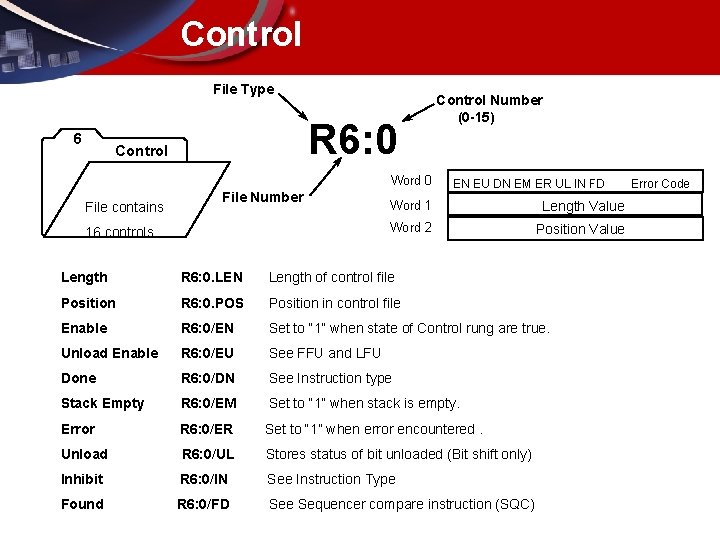
Control File Type 6 R 6: 0 Control Word 0 File contains File Number 16 controls Control Number (0 -15) EN EU DN EM ER UL IN FD Word 1 Length Value Word 2 Position Value Length R 6: 0. LEN Length of control file Position R 6: 0. POS Position in control file Enable R 6: 0/EN Set to “ 1” when state of Control rung are true. Unload Enable R 6: 0/EU See FFU and LFU Done R 6: 0/DN See Instruction type Stack Empty R 6: 0/EM Set to “ 1” when stack is empty. Error R 6: 0/ER Set to “ 1” when error encountered. Unload R 6: 0/UL Stores status of bit unloaded (Bit shift only) Inhibit R 6: 0/IN See Instruction Type Found R 6: 0/FD See Sequencer compare instruction (SQC) Error Code
Integer • File #7 – General purpose data registers (words) – Primarily used for: • • Comparison instructions Math instructions Sequencers FIFO and LIFO stacks – 105 Registers (words) in Micro. Logix 1000
- Slides: 21