
Program Structure II Functions Example Marks to Grades
![Introduction to Functions [ Let’s summarize and introduce more ] Why do we write](https://slidetodoc.com/presentation_image/7729d2d577787dd6f8678caa5842a5c2/image-14.jpg "Introduction to Functions [ Let’s summarize and introduce more ] Why do we write")
- Slides: 33
Program Structure II Functions • • • Example: Marks to Grades Conversion Parameters and Return Statement Use of Variables Comments Flowchart Example: Find Highest Mark Introduction to Variables • • Use of Local Variables and Global Variables Example: Counter Introduction to Computer Programming [Please switch off your phone] http: //www. cs. cityu. edu. hk/~helena 3. Program Structure II - 1
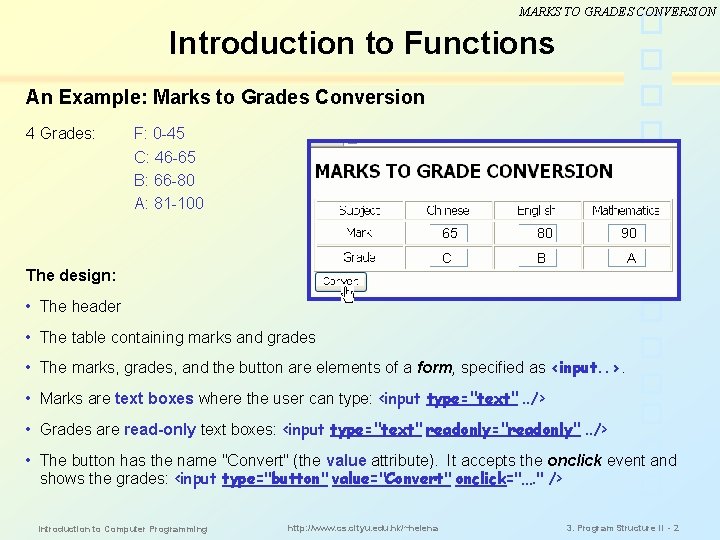
MARKS TO GRADES CONVERSION Introduction to Functions An Example: Marks to Grades Conversion 4 Grades: F: 0 -45 C: 46 -65 B: 66 -80 A: 81 -100 65 80 90 C B A The design: • The header • The table containing marks and grades • The marks, grades, and the button are elements of a form, specified as <input. . >. • Marks are text boxes where the user can type: <input type="text". . /> • Grades are read-only text boxes: <input type="text" readonly="readonly". . /> • The button has the name "Convert" (the value attribute). It accepts the onclick event and shows the grades: <input type="button" value="Convert" onclick="…. " /> Introduction to Computer Programming http: //www. cs. cityu. edu. hk/~helena 3. Program Structure II - 2
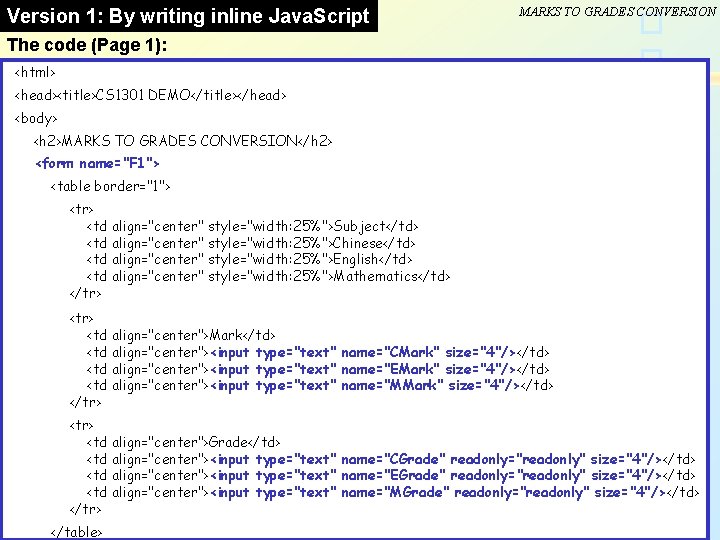
Version 1: By writing inline Java. Script MARKS TO GRADES CONVERSION The code (Page 1): <html> <head><title>CS 1301 DEMO</title></head> <body> <h 2>MARKS TO GRADES CONVERSION</h 2> <form name="F 1"> <table border="1"> <tr> <td align="center" style="width: 25%">Subject</td> <td align="center" style="width: 25%">Chinese</td> <td align="center" style="width: 25%">English</td> <td align="center" style="width: 25%">Mathematics</td> </tr> <td align="center">Mark</td> <td align="center"><input type="text" name="CMark" size="4"/></td> <td align="center"><input type="text" name="EMark" size="4"/></td> <td align="center"><input type="text" name="MMark" size="4"/></td> </tr> <td align="center">Grade</td> <td align="center"><input type="text" name="CGrade" readonly="readonly" size="4"/></td> <td align="center"><input type="text" name="EGrade" readonly="readonly" size="4"/></td> <td align="center"><input type="text" name="MGrade" readonly="readonly" size="4"/></td> </tr> </table> Introduction to Computer Programming http: //www. cs. cityu. edu. hk/~helena 3. Program Structure II - 3
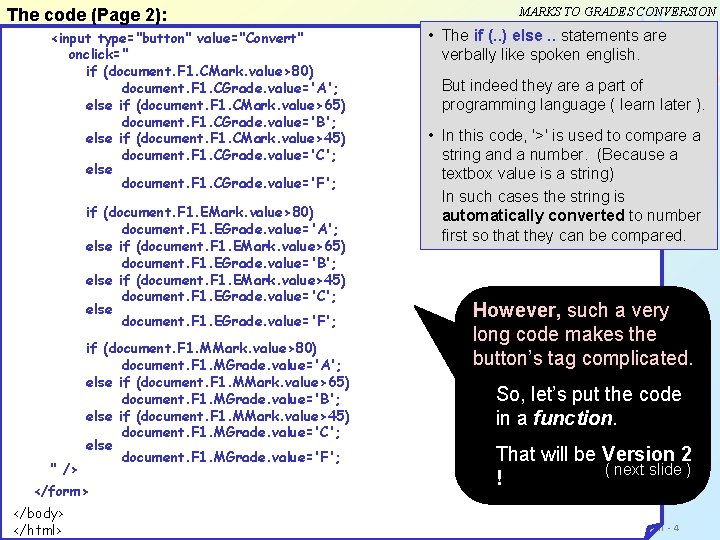
MARKS TO GRADES CONVERSION The code (Page 2): <input type="button" value="Convert" onclick=" if (document. F 1. CMark. value>80) document. F 1. CGrade. value='A'; else if (document. F 1. CMark. value>65) document. F 1. CGrade. value='B'; else if (document. F 1. CMark. value>45) document. F 1. CGrade. value='C'; else document. F 1. CGrade. value='F'; if (document. F 1. EMark. value>80) document. F 1. EGrade. value='A'; else if (document. F 1. EMark. value>65) document. F 1. EGrade. value='B'; else if (document. F 1. EMark. value>45) document. F 1. EGrade. value='C'; else document. F 1. EGrade. value='F'; " /> • The if (. . ) else. . statements are verbally like spoken english. But indeed they are a part of programming language ( learn later ). • In this code, '>' is used to compare a string and a number. (Because a textbox value is a string) In such cases the string is automatically converted to number first so that they can be compared. if (document. F 1. MMark. value>80) document. F 1. MGrade. value='A'; else if (document. F 1. MMark. value>65) document. F 1. MGrade. value='B'; else if (document. F 1. MMark. value>45) document. F 1. MGrade. value='C'; else document. F 1. MGrade. value='F'; </form> </body> Introduction to Computer Programming </html> http: //www. cs. cityu. edu. hk/~helena However, such a very long code makes the button’s tag complicated. So, let’s put the code in a function. That will be Version 2 ( next slide ) ! 3. Program Structure II - 4
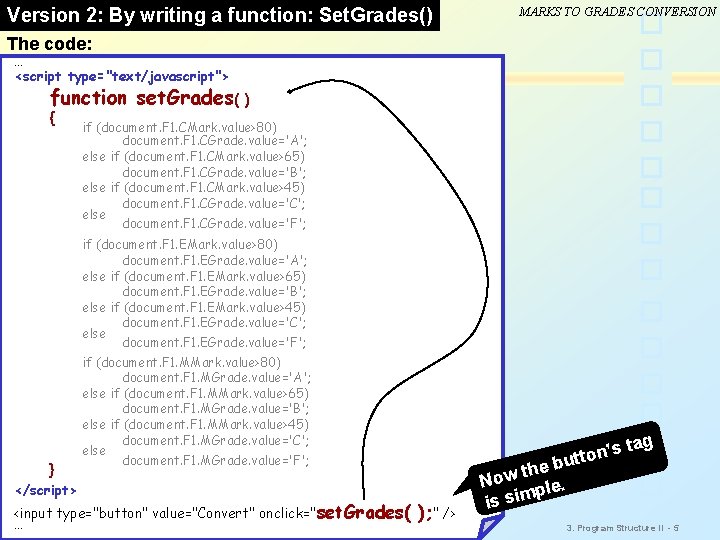
Version 2: By writing a function: Set. Grades() MARKS TO GRADES CONVERSION The code: … <script type="text/javascript"> function set. Grades( { } </script> ) if (document. F 1. CMark. value>80) document. F 1. CGrade. value='A'; else if (document. F 1. CMark. value>65) document. F 1. CGrade. value='B'; else if (document. F 1. CMark. value>45) document. F 1. CGrade. value='C'; else document. F 1. CGrade. value='F'; if (document. F 1. EMark. value>80) document. F 1. EGrade. value='A'; else if (document. F 1. EMark. value>65) document. F 1. EGrade. value='B'; else if (document. F 1. EMark. value>45) document. F 1. EGrade. value='C'; else document. F 1. EGrade. value='F'; if (document. F 1. MMark. value>80) document. F 1. MGrade. value='A'; else if (document. F 1. MMark. value>65) document. F 1. MGrade. value='B'; else if (document. F 1. MMark. value>45) document. F 1. MGrade. value='C'; else document. F 1. MGrade. value='F'; <input type="button" value="Convert" onclick="set. Grades( ); " /> … Introduction to Computer Programming http: //www. cs. cityu. edu. hk/~helena g s ta ’ n o t but the w o N le. p m i is s 3. Program Structure II - 5
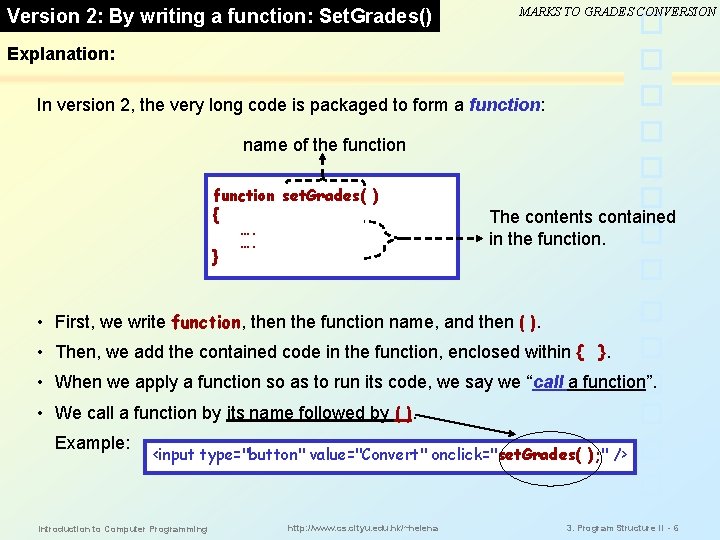
Version 2: By writing a function: Set. Grades() MARKS TO GRADES CONVERSION Explanation: In version 2, the very long code is packaged to form a function: name of the function set. Grades( ) { …. …. } The contents contained in the function. • First, we write function, then the function name, and then ( ). • Then, we add the contained code in the function, enclosed within { }. • When we apply a function so as to run its code, we say we “call a function”. • We call a function by its name followed by ( ). Example: <input type="button" value="Convert" onclick="set. Grades( ); " /> Introduction to Computer Programming http: //www. cs. cityu. edu. hk/~helena 3. Program Structure II - 6
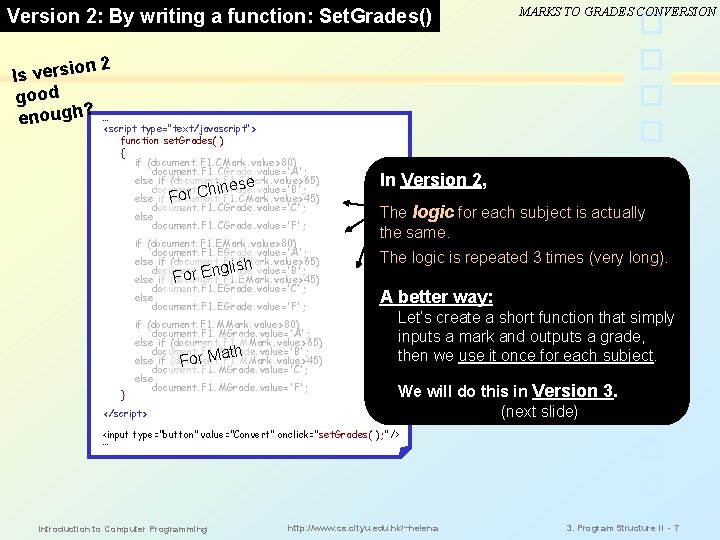
Version 2: By writing a function: Set. Grades() MARKS TO GRADES CONVERSION n 2 Is versio good ? enough …<script type="text/javascript"> function set. Grades( ) { if (document. F 1. CMark. value>80) document. F 1. CGrade. value='A'; else if (document. F 1. CMark. value>65) document. F 1. CGrade. value='B'; nese or Chi else if F (document. F 1. CMark. value>45) document. F 1. CGrade. value='C'; else document. F 1. CGrade. value='F'; if (document. F 1. EMark. value>80) document. F 1. EGrade. value='A'; else if (document. F 1. EMark. value>65) document. F 1. EGrade. value='B'; glish else if (document. F 1. EMark. value>45) For En document. F 1. EGrade. value='C'; else document. F 1. EGrade. value='F'; } if (document. F 1. MMark. value>80) document. F 1. MGrade. value='A'; else if (document. F 1. MMark. value>65) document. F 1. MGrade. value='B'; r Math else if (document. F 1. MMark. value>45) o F document. F 1. MGrade. value='C'; else document. F 1. MGrade. value='F'; </script> In Version 2, The logic for each subject is actually the same. The logic is repeated 3 times (very long). A better way: Let’s create a short function that simply inputs a mark and outputs a grade, then we use it once for each subject. We will do this in Version 3. (next slide) <input type="button" value="Convert" onclick="set. Grades( ); " /> … Introduction to Computer Programming http: //www. cs. cityu. edu. hk/~helena 3. Program Structure II - 7
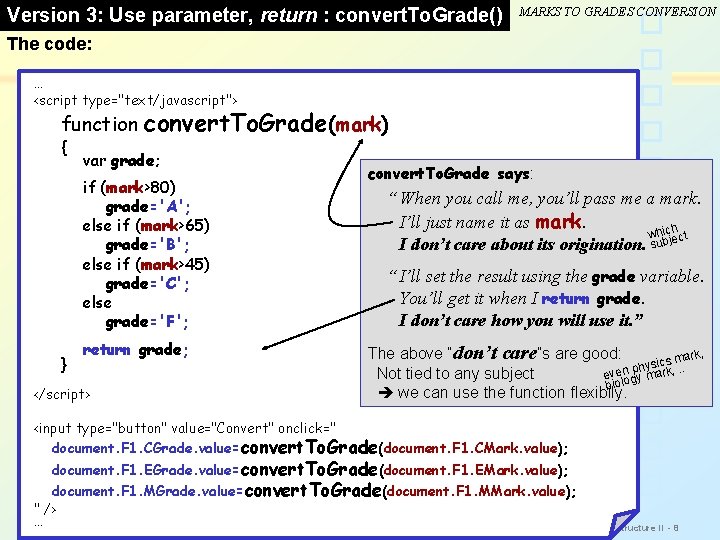
Version 3: Use parameter, return : convert. To. Grade() MARKS TO GRADES CONVERSION The code: … <script type="text/javascript"> function { convert. To. Grade(mark) var grade; if (mark>80) grade='A'; else if (mark>65) grade='B'; else if (mark>45) grade='C'; else grade='F'; } return grade; </script> convert. To. Grade says: “ When you call me, you’ll pass me a mark. I’ll just name it as mark. h whicject b u I don’t care about its origination. s “ I’ll set the result using the grade variable. You’ll get it when I return grade. I don’t care how you will use it. ” The above “don’t care”s are good: rk, cs m. . a i s y h p Not tied to any subject evenogy mark, l o bi we can use the function flexibily. <input type="button" value="Convert" onclick=" document. F 1. CGrade. value=convert. To. Grade(document. F 1. CMark. value); document. F 1. EGrade. value=convert. To. Grade(document. F 1. EMark. value); document. F 1. MGrade. value=convert. To. Grade(document. F 1. MMark. value); " /> …Introduction to Computer Programming http: //www. cs. cityu. edu. hk/~helena 3. Program Structure II -8
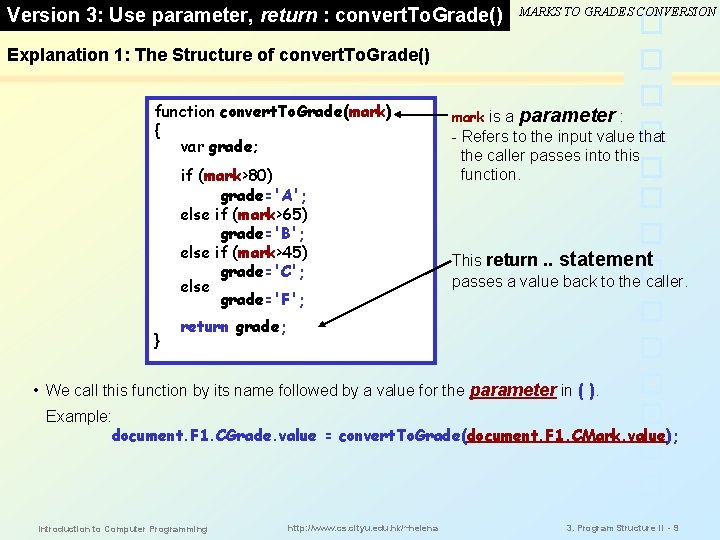
Version 3: Use parameter, return : convert. To. Grade() MARKS TO GRADES CONVERSION Explanation 1: The Structure of convert. To. Grade() function convert. To. Grade(mark) { var grade; if (mark>80) grade='A'; else if (mark>65) grade='B'; else if (mark>45) grade='C'; else grade='F'; } mark is a parameter : - Refers to the input value that the caller passes into this function. This return. . statement passes a value back to the caller. return grade; • We call this function by its name followed by a value for the parameter in ( ). Example: document. F 1. CGrade. value = convert. To. Grade(document. F 1. CMark. value); Introduction to Computer Programming http: //www. cs. cityu. edu. hk/~helena 3. Program Structure II - 9
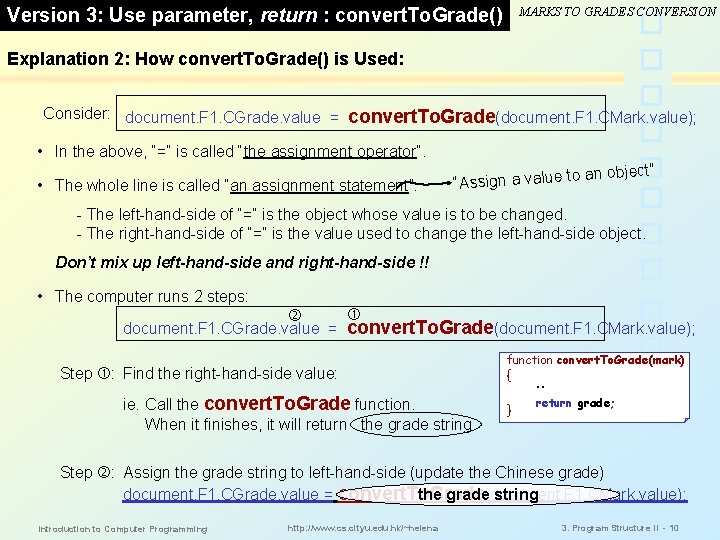
Version 3: Use parameter, return : convert. To. Grade() MARKS TO GRADES CONVERSION Explanation 2: How convert. To. Grade() is Used: Consider: document. F 1. CGrade. value = convert. To. Grade(document. F 1. CMark. value); • In the above, “=” is called “the assignment operator”. • The whole line is called “an assignment statement”: an object” to e lu a v a n ig s s “A - The left-hand-side of “=” is the object whose value is to be changed. - The right-hand-side of “=” is the value used to change the left-hand-side object. Don’t mix up left-hand-side and right-hand-side !! • The computer runs 2 steps: document. F 1. CGrade. value = convert. To. Grade(document. F 1. CMark. value); Step : Find the right-hand-side value: ie. Call the convert. To. Grade function. When it finishes, it will return the grade string. function convert. To. Grade(mark) { . . } return grade; Step : Assign the grade string to left-hand-side (update the Chinese grade) document. F 1. CGrade. value = convert. To. Grade the grade(document. F 1. CMark. value); string Introduction to Computer Programming http: //www. cs. cityu. edu. hk/~helena 3. Program Structure II - 10
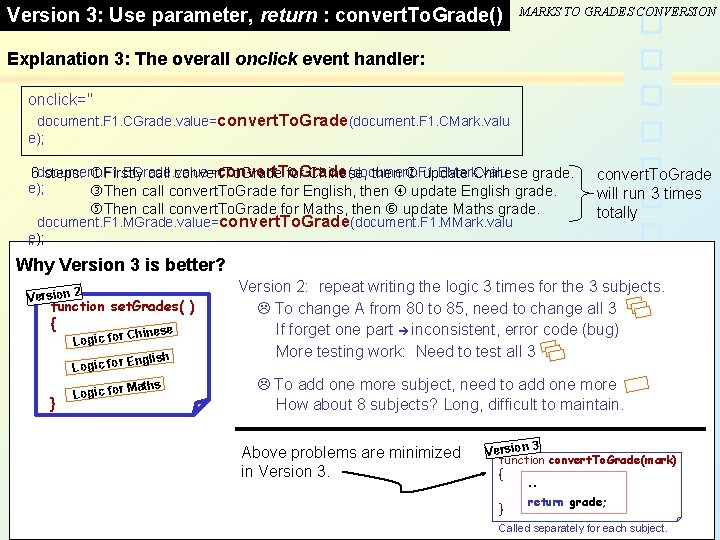
Version 3: Use parameter, return : convert. To. Grade() MARKS TO GRADES CONVERSION Explanation 3: The overall onclick event handler: onclick=" document. F 1. CGrade. value=convert. To. Grade(document. F 1. CMark. valu e); convert. To. Grade (document. F 1. EMark. valu 6 document. F 1. EGrade. value= steps: Firstly call convert. To. Grade for Chinese, then update Chinese grade. e); Then call convert. To. Grade for English, then update English grade. Then call convert. To. Grade for Maths, then update Maths grade. document. F 1. MGrade. value=convert. To. Grade(document. F 1. MMark. valu e); convert. To. Grade will run 3 times totally " Why Version 3 is better? Version 2 function set. Grades( ) { e. } Logic for Chines Logic for English Logic for Maths Version 2: repeat writing the logic 3 times for the 3 subjects. To change A from 80 to 85, need to change all 3 If forget one part inconsistent, error code (bug) More testing work: Need to test all 3 To add one more subject, need to add one more How about 8 subjects? Long, difficult to maintain. Above problems are minimized in Version 3 function convert. To. Grade(mark) { . . } Introduction to Computer Programming http: //www. cs. cityu. edu. hk/~helena return grade; 3. Program Structure II - 11 Called separately for each subject.
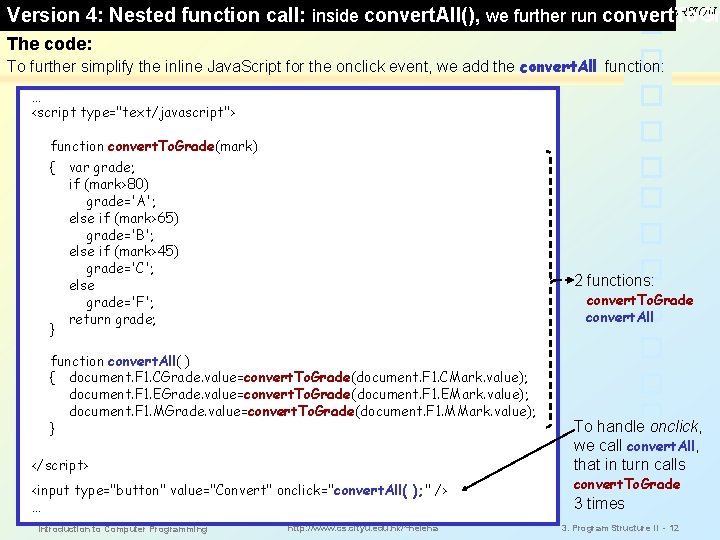
MARKS TO GRADES CONVERSION Version 4: Nested function call: inside convert. All(), we further run convert. To. Gr The code: To further simplify the inline Java. Script for the onclick event, we add the convert. All function: … <script type="text/javascript"> function convert. To. Grade(mark) { var grade; if (mark>80) grade='A'; else if (mark>65) grade='B'; else if (mark>45) grade='C'; else grade='F'; return grade; } 2 functions: convert. To. Grade convert. All function convert. All( ) { document. F 1. CGrade. value=convert. To. Grade(document. F 1. CMark. value); document. F 1. EGrade. value=convert. To. Grade(document. F 1. EMark. value); document. F 1. MGrade. value=convert. To. Grade(document. F 1. MMark. value); } </script> To handle onclick, we call convert. All, that in turn calls <input type="button" value="Convert" onclick="convert. All( ); " /> … 3 times Introduction to Computer Programming http: //www. cs. cityu. edu. hk/~helena convert. To. Grade 3. Program Structure II - 12
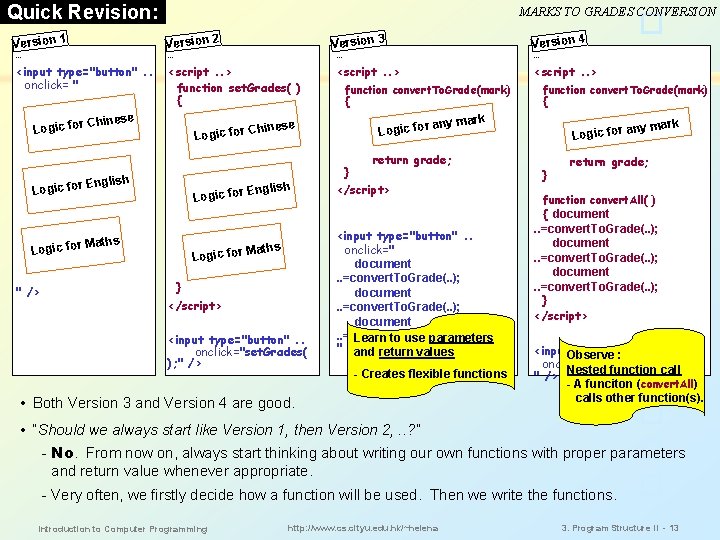
Quick Revision: MARKS TO GRADES CONVERSION Version 1 … Version 2 … <input type="button". . onclick= " <script. . > function set. Grades( ) { Logic for Chinese English Logic for aths L M Logic for } </script> <input type="button". . onclick="set. Grades( ); " /> <script. . > function convert. To. Grade(mark) { Logic for } English Version 4 … <script. . > Chinese Logic for aths ogic for M " /> Version 3 … function convert. To. Grade(mark) { any mark return grade; </script> <input type="button". . onclick=" document. . =convert. To. Grade(. . ); Learn to use parameters " /> and return values - Creates flexible functions • Both Version 3 and Version 4 are good. ny mark a Logic for } return grade; function convert. All( ) { document . . =convert. To. Grade(. . ); document. . =convert. To. Grade(. . ); } </script> <input. Observe type="button". . : onclick=" convert. All( ); " Nested function call " /> - A funciton (convert. All) calls other function(s). • “Should we always start like Version 1, then Version 2, . . ? ” - No. From now on, always start thinking about writing our own functions with proper parameters and return value whenever appropriate. - Very often, we firstly decide how a function will be used. Then we write the functions. Introduction to Computer Programming http: //www. cs. cityu. edu. hk/~helena 3. Program Structure II - 13
Introduction to Functions [ Let’s summarize and introduce more ] Why do we write FUNCTIONS? • Better organization of code. • Functions can be reused: call the same function from different parts. Eg. Add 5 marks as bonus to all subjects: then we can also call convert. All to update all grades. • One single function can serve different sets of input data values. (just need to pass the input values through parameters whenever we call the function). Function Names • Should be descriptive. Bad examples: function Function 1() {. . } function temp() {. . } bad names (not meaningful) • Often composed of 2 or more words: first one is a verb, eg. convert. All, show. Details • A common way: First word starts with lowercase, others start with uppercase. • Some other constraints: CANNOT start with 0 - 9. CANNOT be a keyword. Eg. 9 To 5 and else are wrong Format of Function Definition: { function_name( parameter-list ) To Call a Function: function_name(argument-list) . . . some code. . . (may or may not return a value) } Introduction to Computer Programming http: //www. cs. cityu. edu. hk/~helena 3. Program Structure II - 14
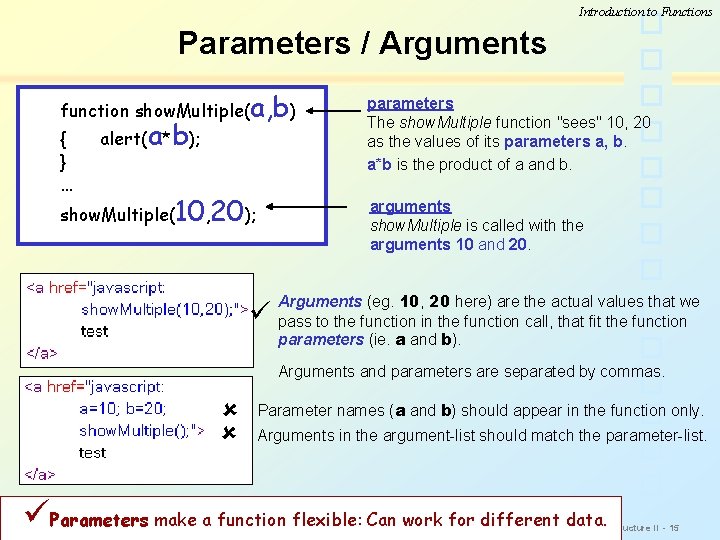
Introduction to Functions Parameters / Arguments function show. Multiple(a, b) { } … alert(a*b); show. Multiple(10, 20); parameters The show. Multiple function "sees" 10, 20 as the values of its parameters a, b. a*b is the product of a and b. arguments show. Multiple is called with the arguments 10 and 20. Arguments (eg. 10, 20 here) are the actual values that we pass to the function in the function call, that fit the function parameters (ie. a and b). Arguments and parameters are separated by commas. Parameter names (a and b) should appear in the function only. Arguments in the argument-list should match the parameter-list. Parameters make a function flexible: Can work for different data. Introduction to Computer Programming http: //www. cs. cityu. edu. hk/~helena 3. Program Structure II - 15
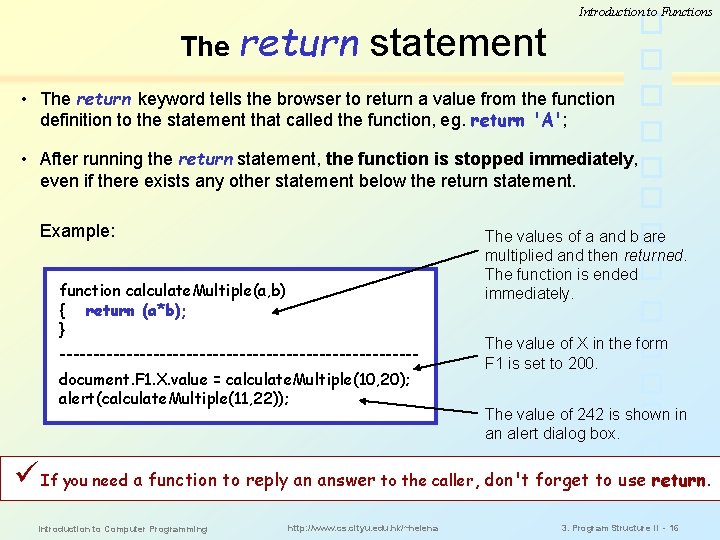
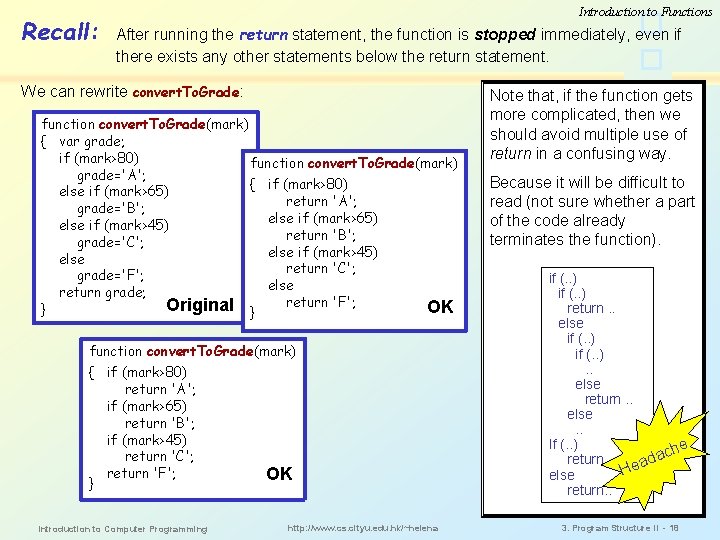
The return Introduction to Functions statement • The return keyword tells the browser to return a value from the function definition to the statement that called the function, eg. return 'A'; • After running the return statement, the function is stopped immediately, even if there exists any other statement below the return statement. Example: The values of a and b are multiplied and then returned. The function is ended immediately. function calculate. Multiple(a, b) { return (a*b); } ---------------------------document. F 1. X. value = calculate. Multiple(10, 20); alert(calculate. Multiple(11, 22)); The value of X in the form F 1 is set to 200. The value of 242 is shown in an alert dialog box. If you need a function to reply an answer to the caller, don't forget to use return. Introduction to Computer Programming http: //www. cs. cityu. edu. hk/~helena 3. Program Structure II - 16
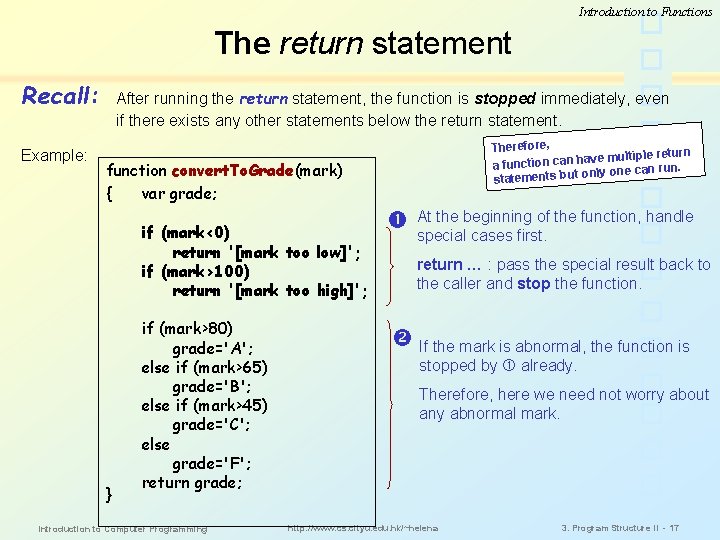
Introduction to Functions The return statement Recall: Example: After running the return statement, the function is stopped immediately, even if there exists any other statements below the return statement. Therefore, rn ave multiple retu a function can h. n only one can ru statements but function convert. To. Grade(mark) { var grade; if (mark<0) return '[mark too low]'; if (mark>100) return '[mark too high]'; } if (mark>80) grade='A'; else if (mark>65) grade='B'; else if (mark>45) grade='C'; else grade='F'; return grade; Introduction to Computer Programming At the beginning of the function, handle special cases first. return … : pass the special result back to the caller and stop the function. If the mark is abnormal, the function is stopped by already. Therefore, here we need not worry about any abnormal mark. http: //www. cs. cityu. edu. hk/~helena 3. Program Structure II - 17
Recall: Introduction to Functions After running the return statement, the function is stopped immediately, even if there exists any other statements below the return statement. We can rewrite convert. To. Grade: function convert. To. Grade(mark) { var grade; if (mark>80) function convert. To. Grade(mark) grade='A'; { if (mark>80) else if (mark>65) return 'A'; grade='B'; else if (mark>65) else if (mark>45) return 'B'; grade='C'; else if (mark>45) else return 'C'; grade='F'; else return grade; return 'F'; Original } OK } function convert. To. Grade(mark) { if (mark>80) return 'A'; if (mark>65) return 'B'; if (mark>45) return 'C'; return 'F'; } Introduction to Computer Programming OK http: //www. cs. cityu. edu. hk/~helena Note that, if the function gets more complicated, then we should avoid multiple use of return in a confusing way. Because it will be difficult to read (not sure whether a part of the code already terminates the function). if (. . ) return. . else if (. . ). . else return. . else. . If (. . ) he c a return. . d Hea else return. . 3. Program Structure II - 18
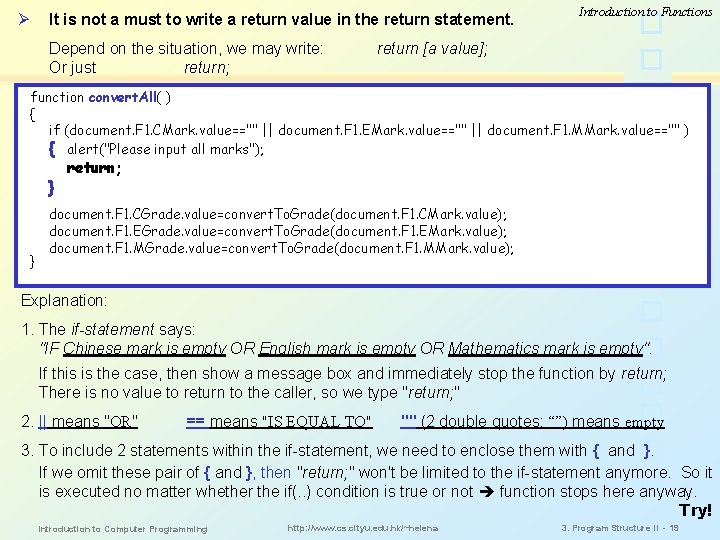
Ø It is not a must to write a return value in the return statement. Depend on the situation, we may write: Or just return; Introduction to Functions return [a value]; function convert. All( ) { if (document. F 1. CMark. value=="" || document. F 1. EMark. value=="" || document. F 1. MMark. value=="" ) { alert("Please input all marks"); } } return; document. F 1. CGrade. value=convert. To. Grade(document. F 1. CMark. value); document. F 1. EGrade. value=convert. To. Grade(document. F 1. EMark. value); document. F 1. MGrade. value=convert. To. Grade(document. F 1. MMark. value); Explanation: 1. The if-statement says: "IF Chinese mark is empty OR English mark is empty OR Mathematics mark is empty". If this is the case, then show a message box and immediately stop the function by return; There is no value to return to the caller, so we type "return; " 2. || means "OR" == means "IS EQUAL TO" "" (2 double quotes: “”) means empty 3. To include 2 statements within the if-statement, we need to enclose them with { and }. If we omit these pair of { and }, then "return; " won't be limited to the if-statement anymore. So it is executed no matter whether the if(. . ) condition is true or not function stops here anyway. Try! Introduction to Computer Programming http: //www. cs. cityu. edu. hk/~helena 3. Program Structure II - 19
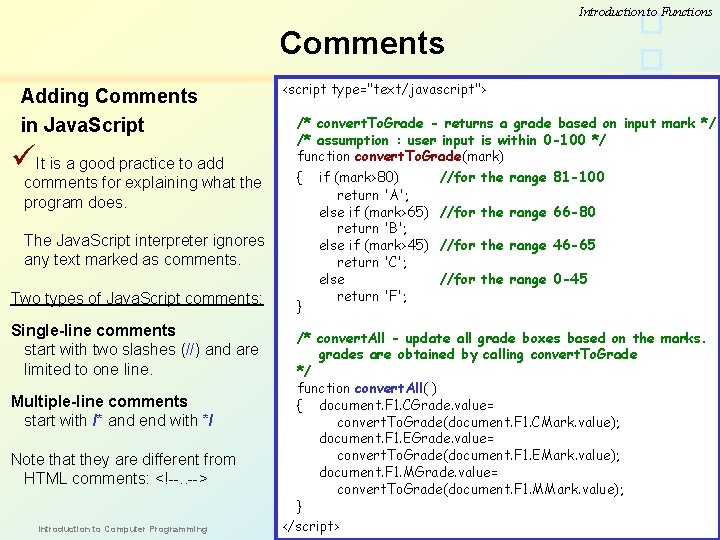
Introduction to Functions Comments Adding Comments in Java. Script It is a good practice to add comments for explaining what the program does. <script type="text/javascript"> /* convert. To. Grade - returns a grade based on input mark */ /* assumption : user input is within 0 -100 */ function convert. To. Grade(mark) { The Java. Script interpreter ignores any text marked as comments. Two types of Java. Script comments: Single-line comments start with two slashes (//) and are limited to one line. Multiple-line comments start with /* and end with */ Note that they are different from HTML comments: <!--. . --> Introduction to Computer Programming } if (mark>80) return 'A'; else if (mark>65) return 'B'; else if (mark>45) return 'C'; else return 'F'; //for the range 81 -100 //for the range 66 -80 //for the range 46 -65 //for the range 0 -45 /* convert. All - update all grade boxes based on the marks. grades are obtained by calling convert. To. Grade */ function convert. All( ) { document. F 1. CGrade. value= convert. To. Grade(document. F 1. CMark. value); document. F 1. EGrade. value= convert. To. Grade(document. F 1. EMark. value); document. F 1. MGrade. value= convert. To. Grade(document. F 1. MMark. value); } http: //www. cs. cityu. edu. hk/~helena 3. Program Structure II - 20 </script>
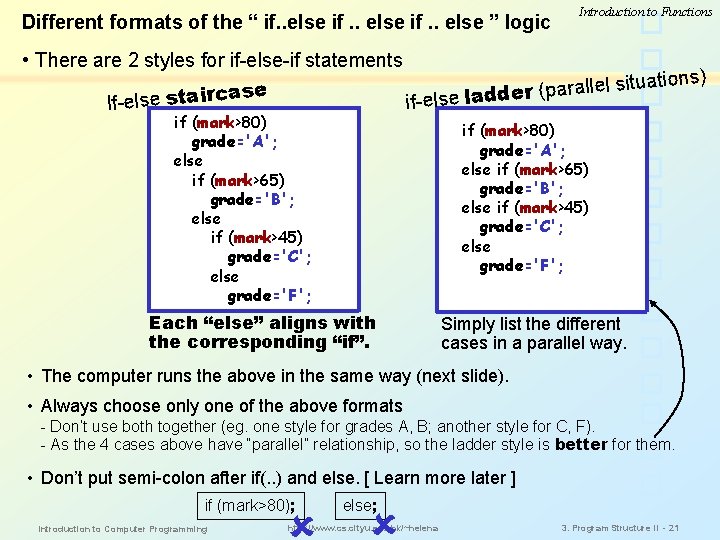
Different formats of the “ if. . else ” logic Introduction to Functions • There are 2 styles for if-else-if statements ons) ti a u it s l e ll a r (p ase if-else ladde If-else stairc if (mark>80) grade='A'; else if (mark>65) grade='B'; else if (mark>45) grade='C'; else grade='F'; Each “else” aligns with the corresponding “if”. Simply list the different cases in a parallel way. • The computer runs the above in the same way (next slide). • Always choose only one of the above formats - Don’t use both together (eg. one style for grades A, B; another style for C, F). - As the 4 cases above have “parallel” relationship, so the ladder style is better for them. • Don’t put semi-colon after if(. . ) and else. [ Learn more later ] if (mark>80); Introduction to Computer Programming else; http: //www. cs. cityu. edu. hk/~helena 3. Program Structure II - 21
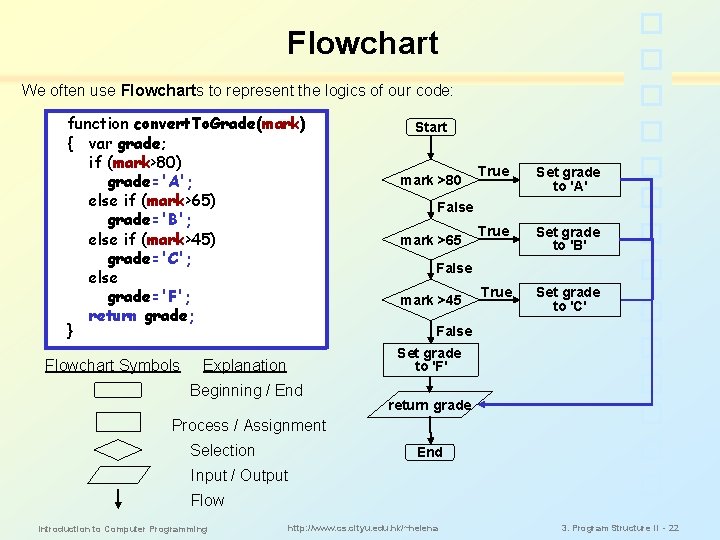
Flowchart We often use Flowcharts to represent the logics of our code: function convert. To. Grade(mark) { var grade; if (mark>80) grade='A'; else if (mark>65) grade='B'; else if (mark>45) grade='C'; else grade='F'; return grade; } Flowchart Symbols Start mark >80 True Set grade to 'A' True Set grade to 'B' True Set grade to 'C' False mark >65 False mark >45 False Set grade to 'F' Explanation Beginning / End return grade Process / Assignment Selection End Input / Output Flow Introduction to Computer Programming http: //www. cs. cityu. edu. hk/~helena 3. Program Structure II - 22
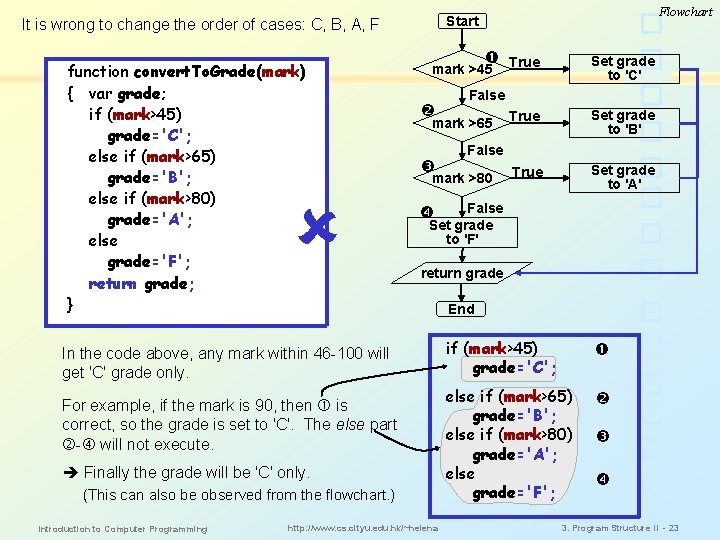
function convert. To. Grade(mark) { var grade; if (mark>45) grade='C'; else if (mark>65) grade='B'; else if (mark>80) grade='A'; else grade='F'; return grade; } True Set grade to 'C' mark >45 False mark >65 True Set grade to 'B' True Set grade to 'A' False mark >80 False Set grade to 'F' return grade In the code above, any mark within 46 -100 will get 'C' grade only. For example, if the mark is 90, then is correct, so the grade is set to 'C'. The else part - will not execute. Finally the grade will be 'C' only. (This can also be observed from the flowchart. ) Introduction to Computer Programming Flowchart Start It is wrong to change the order of cases: C, B, A, F http: //www. cs. cityu. edu. hk/~helena End if (mark>45) grade='C'; else if (mark>65) grade='B'; else if (mark>80) grade='A'; else grade='F'; 3. Program Structure II - 23
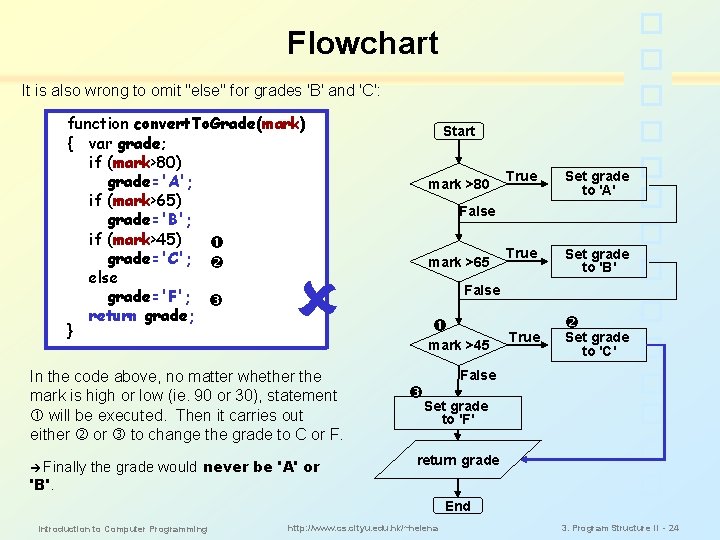
Flowchart It is also wrong to omit "else" for grades 'B' and 'C': function convert. To. Grade(mark) { var grade; if (mark>80) grade='A'; if (mark>65) grade='B'; if (mark>45) grade='C'; else grade='F'; return grade; } Start mark >80 Finally 'B'. the grade would never be 'A' or Set grade to 'A' True Set grade to 'B' False mark >65 In the code above, no matter whether the mark is high or low (ie. 90 or 30), statement will be executed. Then it carries out either or to change the grade to C or F. True False mark >45 True Set grade to 'C' False Set grade to 'F' return grade End Introduction to Computer Programming http: //www. cs. cityu. edu. hk/~helena 3. Program Structure II - 24
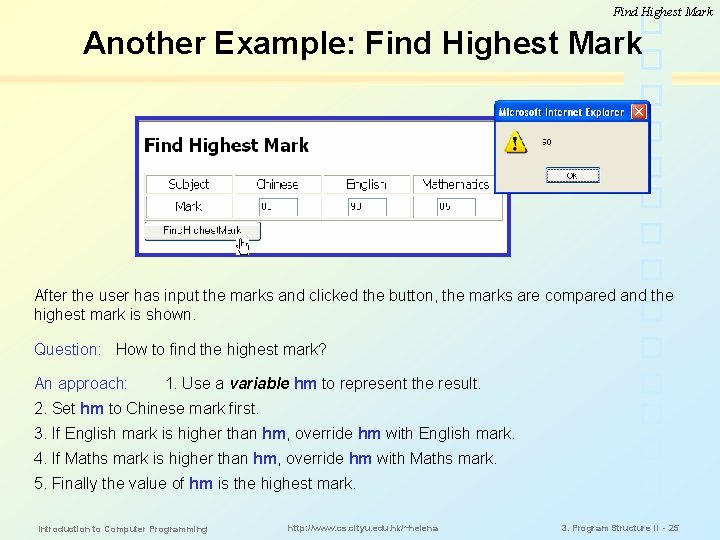
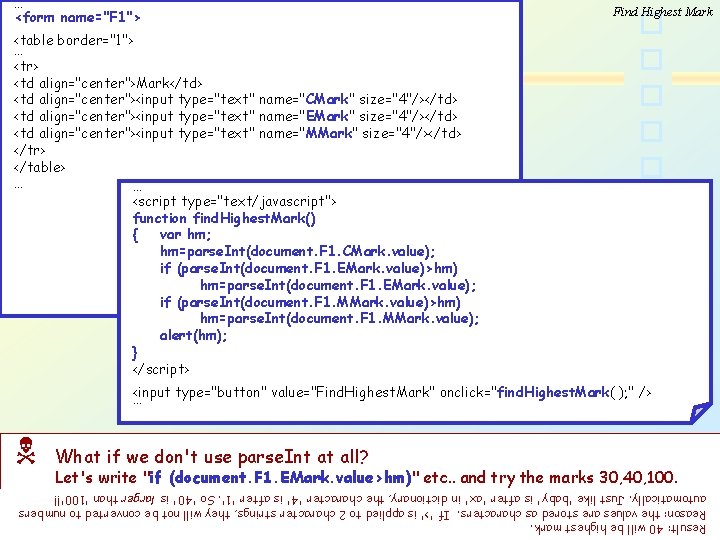
Find Highest Mark Another Example: Find Highest Mark After the user has input the marks and clicked the button, the marks are compared and the highest mark is shown. Question: How to find the highest mark? An approach: 1. Use a variable hm to represent the result. 2. Set hm to Chinese mark first. 3. If English mark is higher than hm, override hm with English mark. 4. If Maths mark is higher than hm, override hm with Maths mark. 5. Finally the value of hm is the highest mark. Introduction to Computer Programming http: //www. cs. cityu. edu. hk/~helena 3. Program Structure II - 25
… <form name="F 1"> Find Highest Mark <table border="1"> … <tr> <td align="center">Mark</td> <td align="center"><input type="text" name="CMark" size="4"/></td> <td align="center"><input type="text" name="EMark" size="4"/></td> <td align="center"><input type="text" name="MMark" size="4"/></td> </tr> </table> … … <script type="text/javascript"> function find. Highest. Mark() { var hm; hm=parse. Int(document. F 1. CMark. value); if (parse. Int(document. F 1. EMark. value)>hm) hm=parse. Int(document. F 1. EMark. value); if (parse. Int(document. F 1. MMark. value)>hm) hm=parse. Int(document. F 1. MMark. value); alert(hm); } </script> <input type="button" value="Find. Highest. Mark" onclick="find. Highest. Mark( ); " /> … What if we don't use parse. Int at all? Let's write "if (document. F 1. EMark. value>hm)" etc. . and try the marks 30, 40, 100. Result: 40 will be highest mark. Reason: the values are stored as characters. If '>' is applied to 2 character strings, they will not be converted to numbers automatically. Just like 'baby' is after 'ax' in dictionary, the character '4' is after '1'. So '40' is larger than '100'!! Introduction to Computer Programming http: //www. cs. cityu. edu. hk/~helena 3. Program Structure II - 26
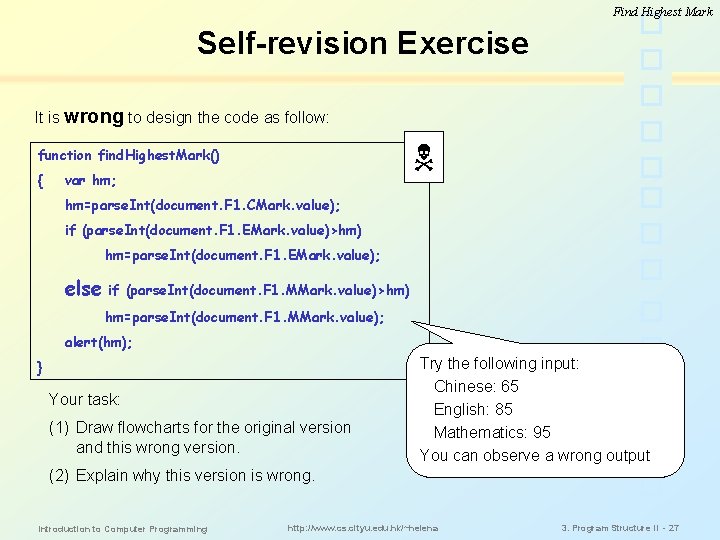
Find Highest Mark Self-revision Exercise It is wrong to design the code as follow: function find. Highest. Mark() { var hm; hm=parse. Int(document. F 1. CMark. value); if (parse. Int(document. F 1. EMark. value)>hm) hm=parse. Int(document. F 1. EMark. value); else if (parse. Int(document. F 1. MMark. value)>hm) hm=parse. Int(document. F 1. MMark. value); alert(hm); } Your task: (1) Draw flowcharts for the original version and this wrong version. Try the following input: Chinese: 65 English: 85 Mathematics: 95 You can observe a wrong output (2) Explain why this version is wrong. Introduction to Computer Programming http: //www. cs. cityu. edu. hk/~helena 3. Program Structure II - 27
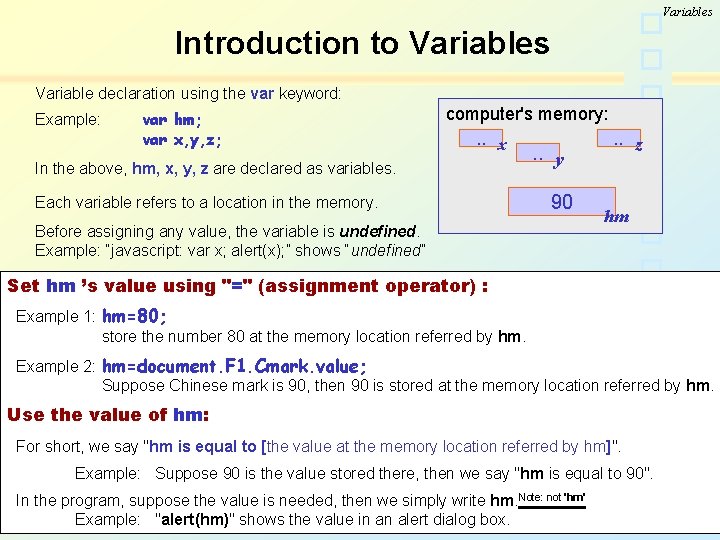
Variables Introduction to Variables Variable declaration using the var keyword: Example: var hm; var x, y, z; computer's memory: . . x In the above, hm, x, y, z are declared as variables. Each variable refers to a location in the memory. Before assigning any value, the variable is undefined. Example: “javascript: var x; alert(x); ” shows “undefined” . . y 90 80 . . z hm Set hm ’s value using "=" (assignment operator) : Example 1: hm=80; store the number 80 at the memory location referred by hm. Example 2: hm=document. F 1. Cmark. value; Suppose Chinese mark is 90, then 90 is stored at the memory location referred by hm. Use the value of hm: For short, we say "hm is equal to [the value at the memory location referred by hm]". Example: Suppose 90 is the value stored there, then we say "hm is equal to 90". In the program, suppose the value is needed, then we simply write hm. Note: not 'hm' Example: "alert(hm)" shows http: //www. cs. cityu. edu. hk/~helena the value in an alert dialog box. 3. Program Structure II Introduction to Computer Programming - 28
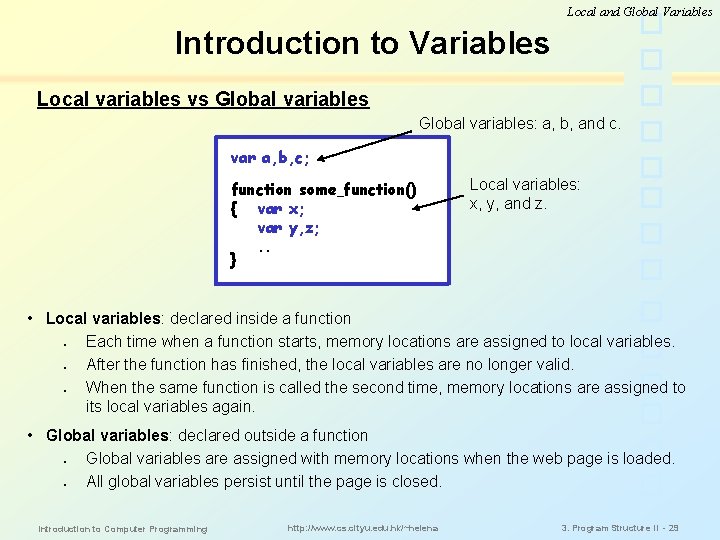
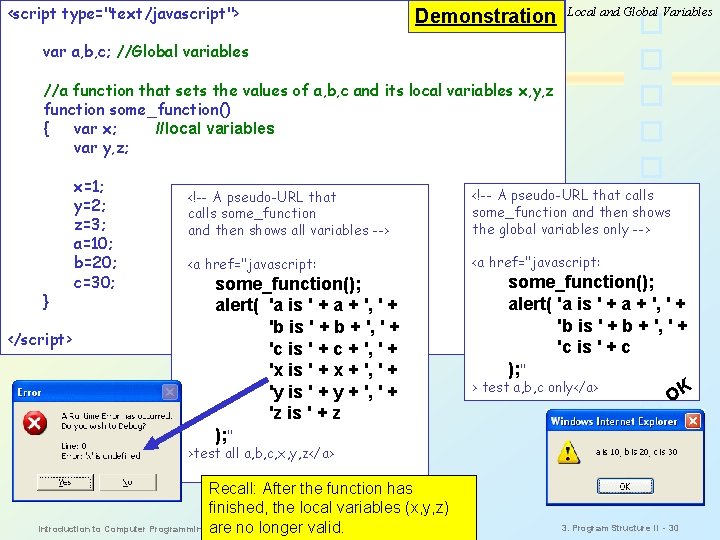
Local and Global Variables Introduction to Variables Local variables vs Global variables: a, b, and c. var a, b, c; function some_function() { var x; var y, z; . . } Local variables: x, y, and z. • Local variables: declared inside a function § Each time when a function starts, memory locations are assigned to local variables. § After the function has finished, the local variables are no longer valid. § When the same function is called the second time, memory locations are assigned to its local variables again. • Global variables: declared outside a function § Global variables are assigned with memory locations when the web page is loaded. § All global variables persist until the page is closed. Introduction to Computer Programming http: //www. cs. cityu. edu. hk/~helena 3. Program Structure II - 29
<script type="text/javascript"> Demonstration Local and Global Variables var a, b, c; //Global variables //a function that sets the values of a, b, c and its local variables x, y, z function some_function() { var x; //local variables var y, z; } </script> x=1; y=2; z=3; a=10; b=20; c=30; <!-- A pseudo-URL that calls some_function and then shows all variables --> <!-- A pseudo-URL that calls some_function and then shows the global variables only --> <a href="javascript: some_function(); alert( 'a is ' + a + ', ' + 'b is ' + b + ', ' + 'c is ' + c + ', ' + 'x is ' + x + ', ' + 'y is ' + y + ', ' + 'z is ' + z ); " some_function(); alert( 'a is ' + a + ', ' + 'b is ' + b + ', ' + 'c is ' + c ); " > test a, b, c only</a> OK >test all a, b, c, x, y, z</a> Recall: After the function has finished, the local variables (x, y, z) http: //www. cs. cityu. edu. hk/~helena Introduction to Computer Programming are no longer valid. 3. Program Structure II - 30
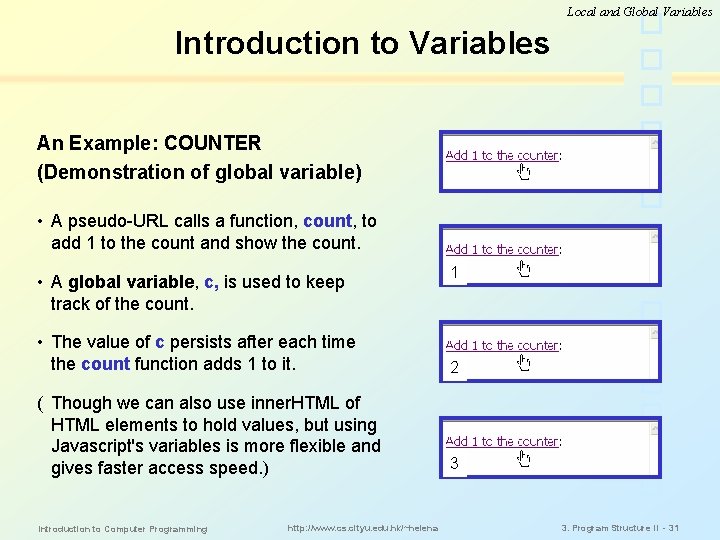
Local and Global Variables Introduction to Variables An Example: COUNTER (Demonstration of global variable) • A pseudo-URL calls a function, count, to add 1 to the count and show the count. • A global variable, c, is used to keep track of the count. 2 1 • The value of c persists after each time the count function adds 1 to it. 2 1 ( Though we can also use inner. HTML of HTML elements to hold values, but using Javascript's variables is more flexible and gives faster access speed. ) 3 2 1 Introduction to Computer Programming http: //www. cs. cityu. edu. hk/~helena 3. Program Structure II - 31
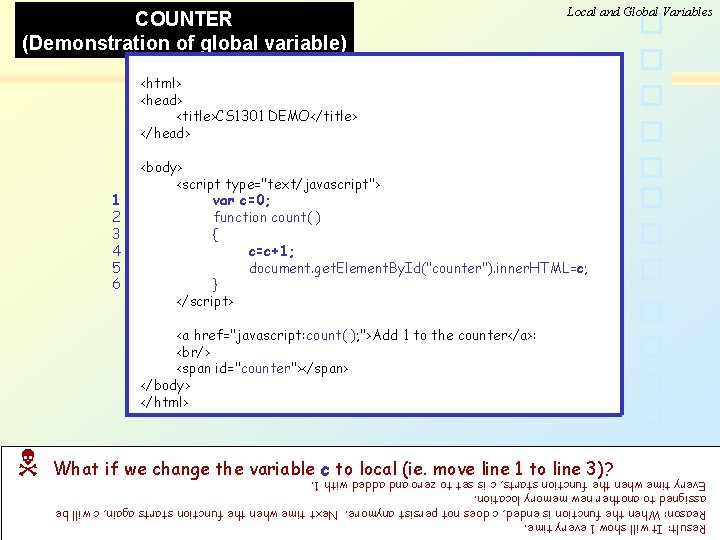
COUNTER (Demonstration of global variable) Local and Global Variables <html> <head> <title>CS 1301 DEMO</title> </head> 1 2 3 4 5 6 <body> <script type="text/javascript"> var c=0; function count( ) { c=c+1; document. get. Element. By. Id("counter"). inner. HTML=c; } </script> <a href="javascript: count( ); ">Add 1 to the counter</a>: <br/> <span id="counter"></span> </body> </html> What if we change the variable c to local (ie. move line 1 to line 3)? Result: It will show 1 every time. Reason: When the function is ended, c does not persist anymore. Next time when the function starts again, c will be assigned to another new memory location. Every time when the function starts, c is set to zero and added with 1. Introduction to Computer Programming http: //www. cs. cityu. edu. hk/~helena 3. Program Structure II - 32
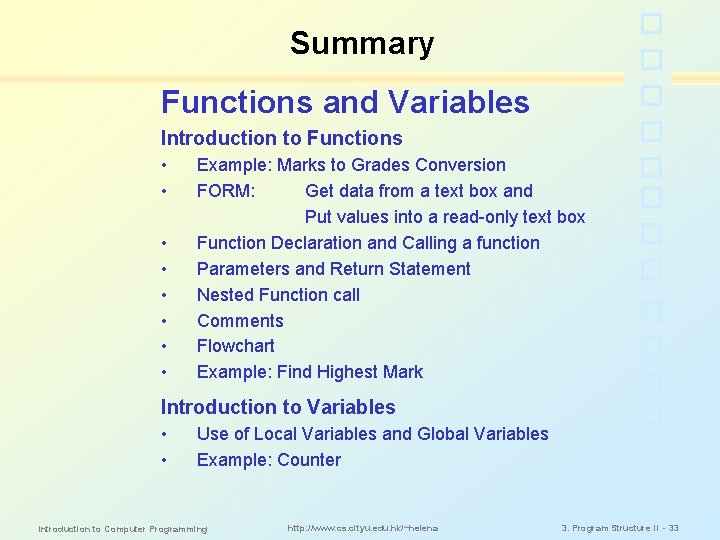
Summary Functions and Variables Introduction to Functions • • Example: Marks to Grades Conversion FORM: Get data from a text box and Put values into a read-only text box Function Declaration and Calling a function Parameters and Return Statement Nested Function call Comments Flowchart Example: Find Highest Mark Introduction to Variables • • Use of Local Variables and Global Variables Example: Counter Introduction to Computer Programming http: //www. cs. cityu. edu. hk/~helena 3. Program Structure II - 33