
Prof Dr Ing Jochen Schiller Computer Systems Telematics
![IEEE 802. 3/Ethernet Frame Format Common frame format PR 7 [byte] SD 1 DA](https://slidetodoc.com/presentation_image/2a55c0cd7d0058e75cbe71d1889b13b3/image-56.jpg "IEEE 802. 3/Ethernet Frame Format Common frame format PR 7 [byte] SD 1 DA")
- Slides: 58
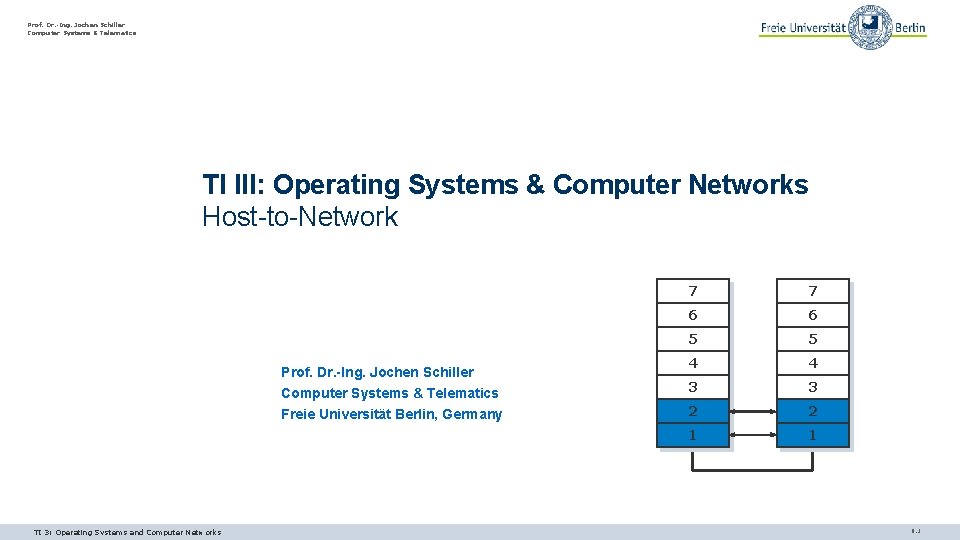
Prof. Dr. -Ing. Jochen Schiller Computer Systems & Telematics TI III: Operating Systems & Computer Networks Host-to-Network Prof. Dr. -Ing. Jochen Schiller Computer Systems & Telematics Freie Universität Berlin, Germany TI 3: Operating Systems and Computer Networks 7 7 6 6 5 5 4 4 3 3 2 2 1 1 9. 1
Content 8. Networked Computer & Internet 9. Host-to-Network 10. Internetworking 11. Transport Layer 12. Applications Ø idden ers h y n Ma point – s e d sli re to mo ation, inform d in the e cover uter Comp rking Netwo st e coudrs ar BSc/1 e r (3 y Sc)! year M 13. Network Security 14. Example TI 3: Operating Systems and Computer Networks 9. 2
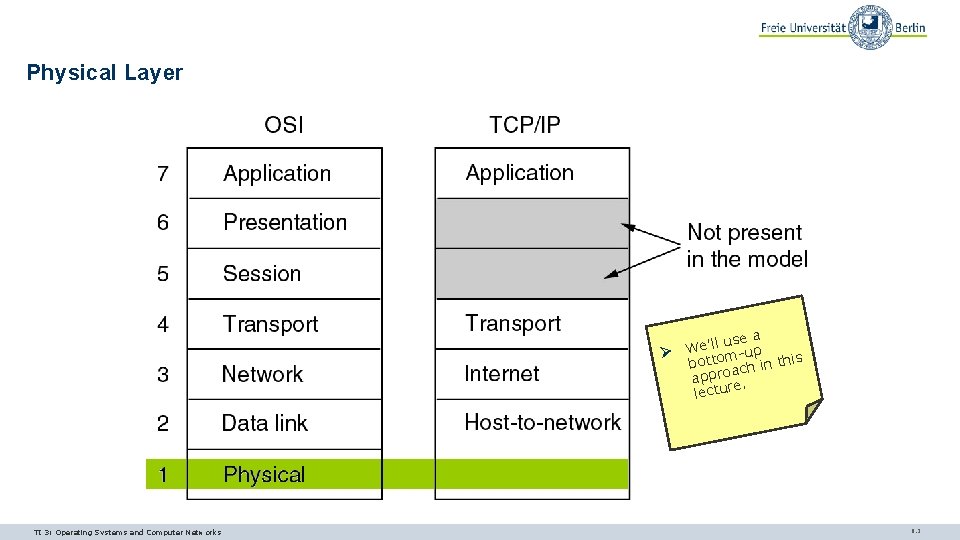
Physical Layer Ø TI 3: Operating Systems and Computer Networks use a We’ll -up m botto ch in this a appro. e lectur 9. 3
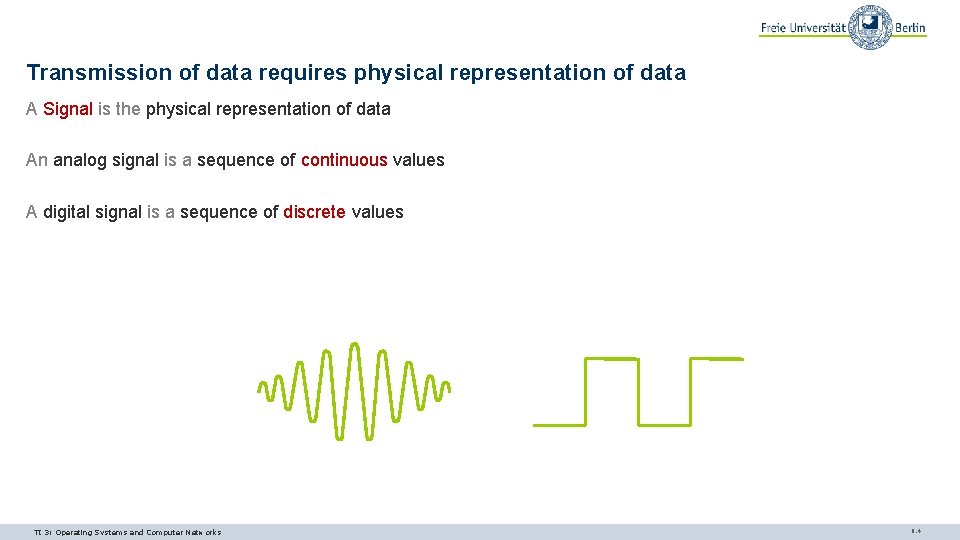
Transmission of data requires physical representation of data A Signal is the physical representation of data An analog signal is a sequence of continuous values A digital signal is a sequence of discrete values TI 3: Operating Systems and Computer Networks 9. 4
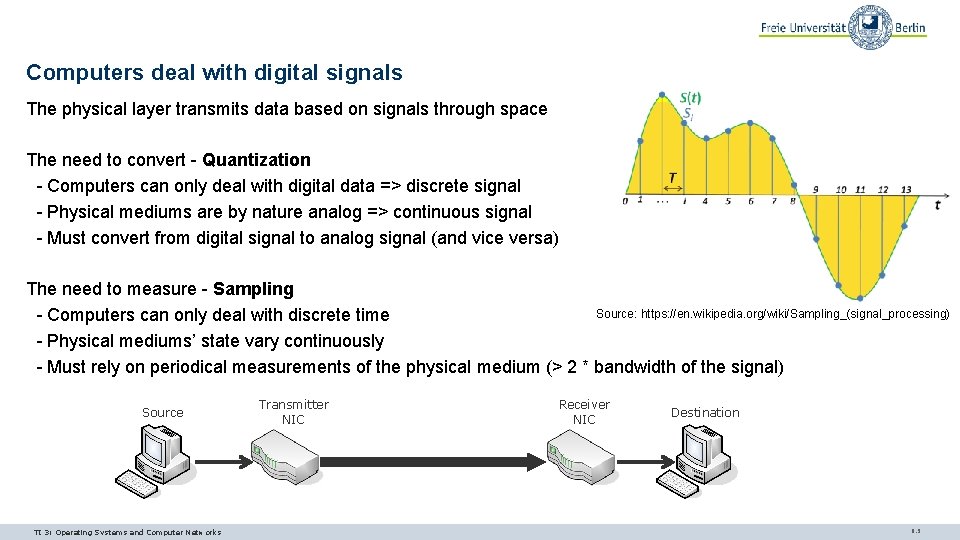
Computers deal with digital signals The physical layer transmits data based on signals through space The need to convert - Quantization - Computers can only deal with digital data => discrete signal - Physical mediums are by nature analog => continuous signal - Must convert from digital signal to analog signal (and vice versa) The need to measure - Sampling Source: https: //en. wikipedia. org/wiki/Sampling_(signal_processing) - Computers can only deal with discrete time - Physical mediums’ state vary continuously - Must rely on periodical measurements of the physical medium (> 2 * bandwidth of the signal) Source TI 3: Operating Systems and Computer Networks Transmitter NIC Receiver NIC Destination 9. 5
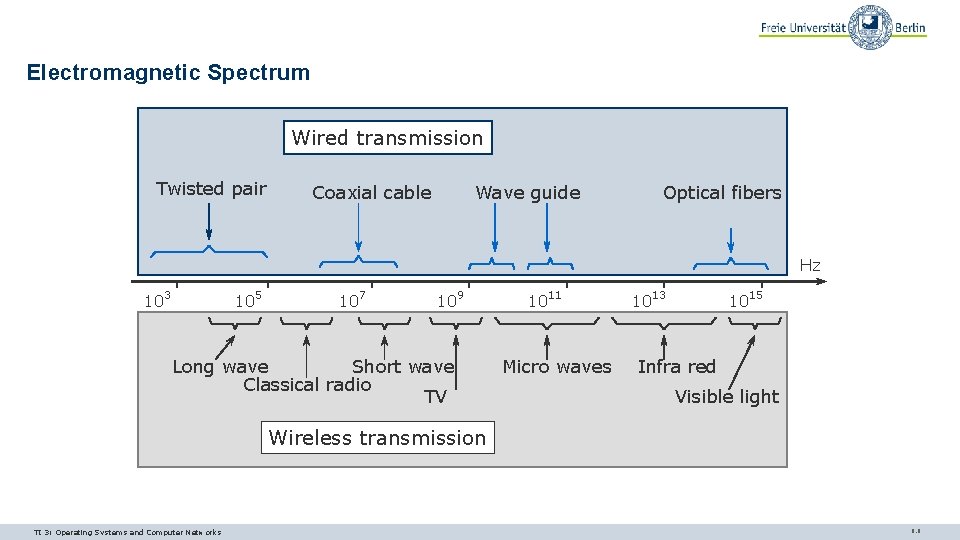
Electromagnetic Spectrum Wired transmission Twisted pair Wave guide Coaxial cable Optical fibers Hz 103 105 107 109 Long wave Short wave Classical radio TV 1011 Micro waves 1013 1015 Infra red Visible light Wireless transmission TI 3: Operating Systems and Computer Networks 9. 6
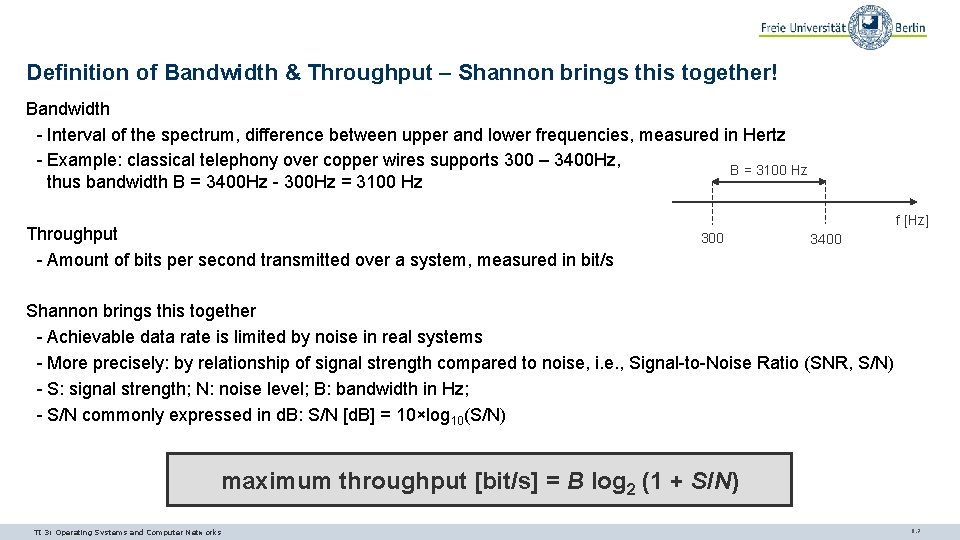
Definition of Bandwidth & Throughput – Shannon brings this together! Bandwidth - Interval of the spectrum, difference between upper and lower frequencies, measured in Hertz - Example: classical telephony over copper wires supports 300 – 3400 Hz, B = 3100 Hz thus bandwidth B = 3400 Hz - 300 Hz = 3100 Hz Throughput - Amount of bits per second transmitted over a system, measured in bit/s f [Hz] 300 3400 Shannon brings this together - Achievable data rate is limited by noise in real systems - More precisely: by relationship of signal strength compared to noise, i. e. , Signal-to-Noise Ratio (SNR, S/N) - S: signal strength; N: noise level; B: bandwidth in Hz; - S/N commonly expressed in d. B: S/N [d. B] = 10×log 10(S/N) maximum throughput [bit/s] = B log 2 (1 + S/N) TI 3: Operating Systems and Computer Networks 9. 7
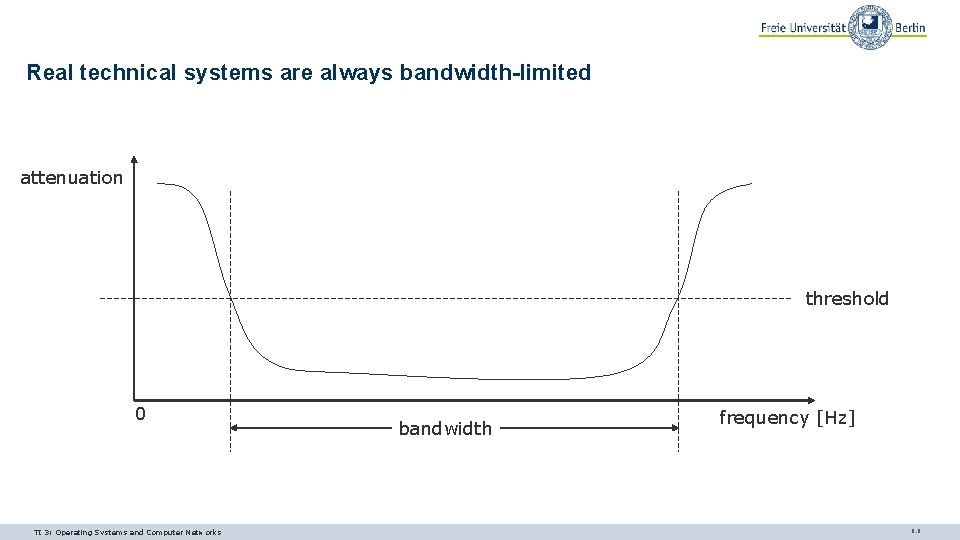
Real technical systems are always bandwidth-limited attenuation threshold 0 TI 3: Operating Systems and Computer Networks bandwidth frequency [Hz] 9. 8
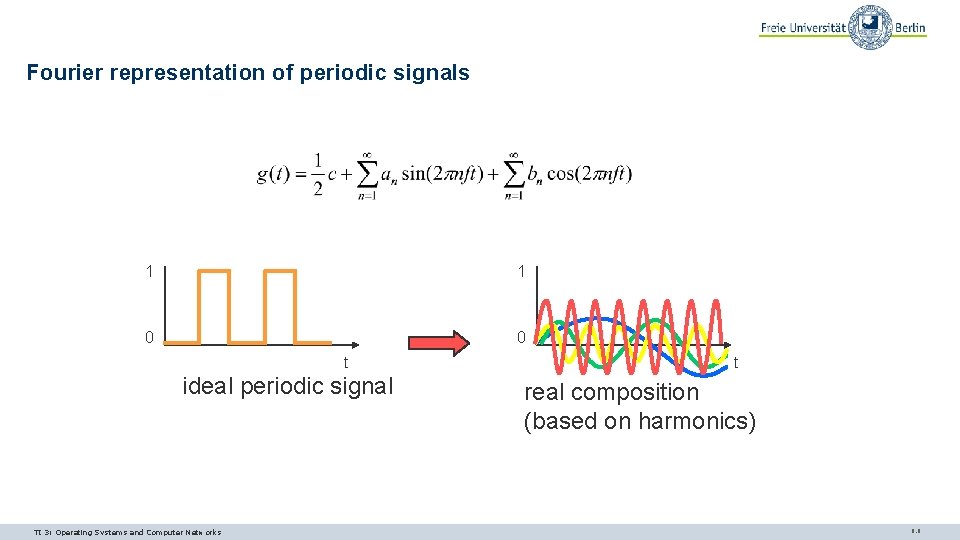
Fourier representation of periodic signals 1 1 0 0 t ideal periodic signal TI 3: Operating Systems and Computer Networks t real composition (based on harmonics) 9. 9
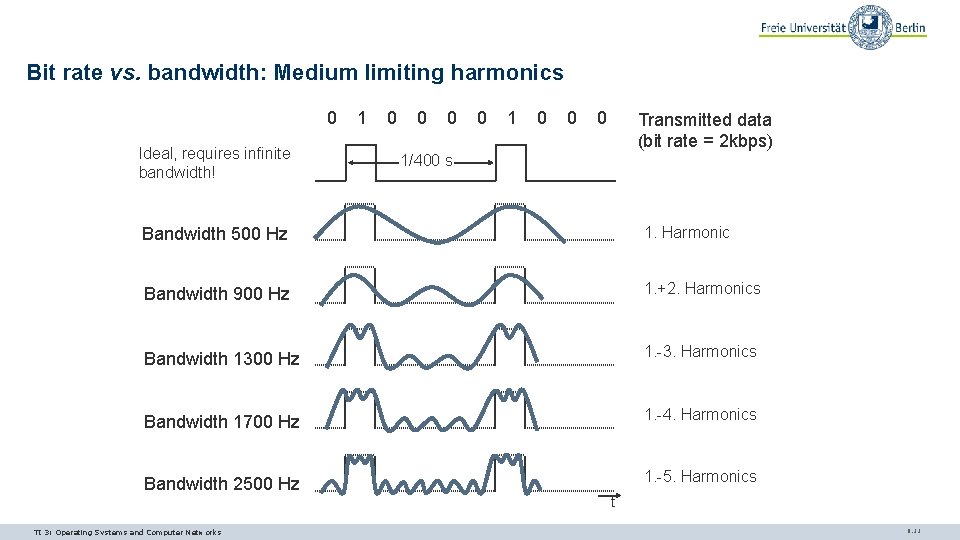
Bit rate vs. bandwidth: Medium limiting harmonics 0 Ideal, requires infinite bandwidth! 1 0 0 0 Transmitted data (bit rate = 2 kbps) 1/400 s Bandwidth 500 Hz 1. Harmonic Bandwidth 900 Hz 1. +2. Harmonics Bandwidth 1300 Hz 1. -3. Harmonics Bandwidth 1700 Hz 1. -4. Harmonics Bandwidth 2500 Hz 1. -5. Harmonics t TI 3: Operating Systems and Computer Networks 9. 11
Questions & Tasks - Where/when do quantization and sampling create errors? Can we avoid these errors? - Taking the classical telephony example: How often should the system sample the signal? - What is the maximum data rate without noise? Is this realistic? - Give simple examples of bandwidth limitations in everyday life! TI 3: Operating Systems and Computer Networks 9. 12
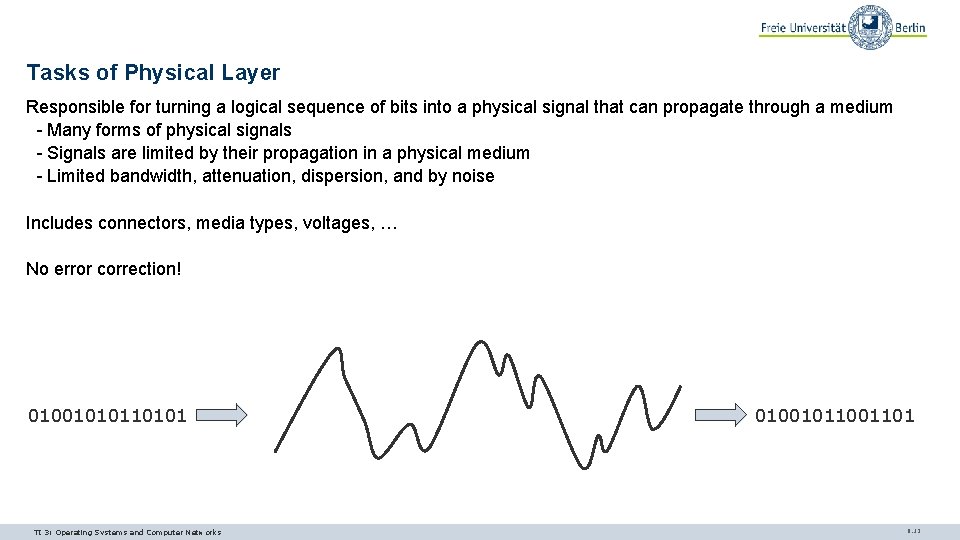
Tasks of Physical Layer Responsible for turning a logical sequence of bits into a physical signal that can propagate through a medium - Many forms of physical signals - Signals are limited by their propagation in a physical medium - Limited bandwidth, attenuation, dispersion, and by noise Includes connectors, media types, voltages, … No error correction! 010010101 TI 3: Operating Systems and Computer Networks 0100101101 9. 13
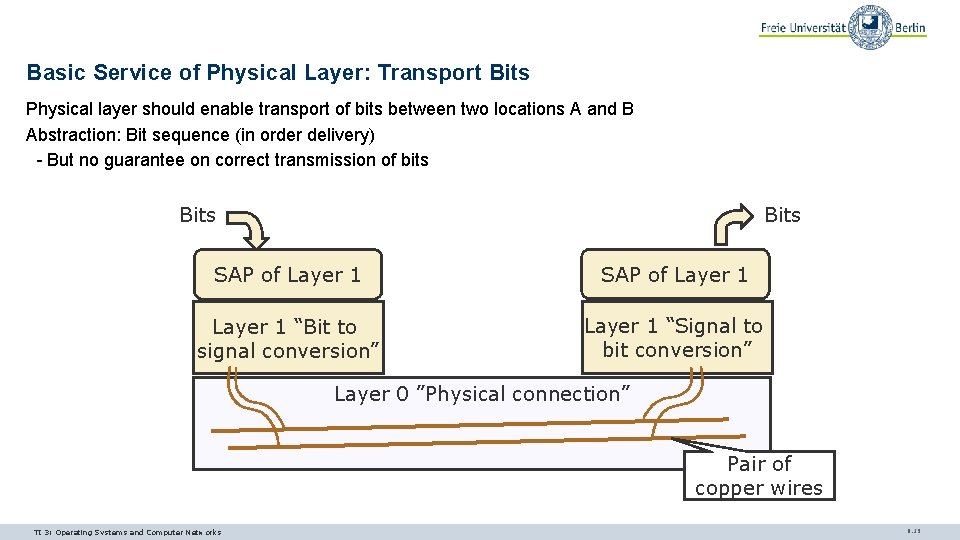
Basic Service of Physical Layer: Transport Bits Physical layer should enable transport of bits between two locations A and B Abstraction: Bit sequence (in order delivery) - But no guarantee on correct transmission of bits Bits SAP of Layer 1 “Bit to signal conversion” Layer 1 “Signal to bit conversion” Layer 0 ”Physical connection” Pair of copper wires TI 3: Operating Systems and Computer Networks 9. 15
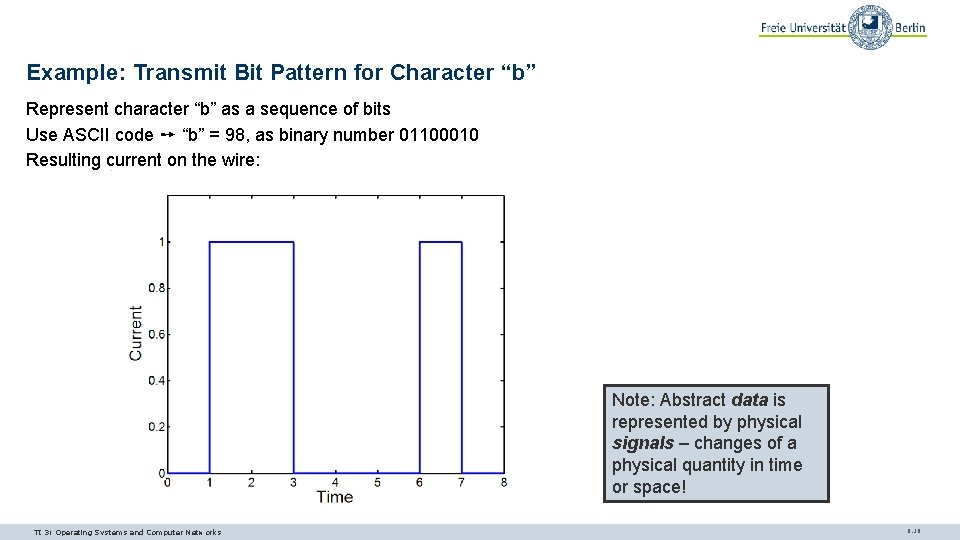
Example: Transmit Bit Pattern for Character “b” Represent character “b” as a sequence of bits Use ASCII code ➙ “b” = 98, as binary number 01100010 Resulting current on the wire: Note: Abstract data is represented by physical signals – changes of a physical quantity in time or space! TI 3: Operating Systems and Computer Networks 9. 16
What Arrives at the Receiver? Typical pattern at the receiver: ØWhat is going on here and how should we convert the signal back to a “b”? TI 3: Operating Systems and Computer Networks 9. 17
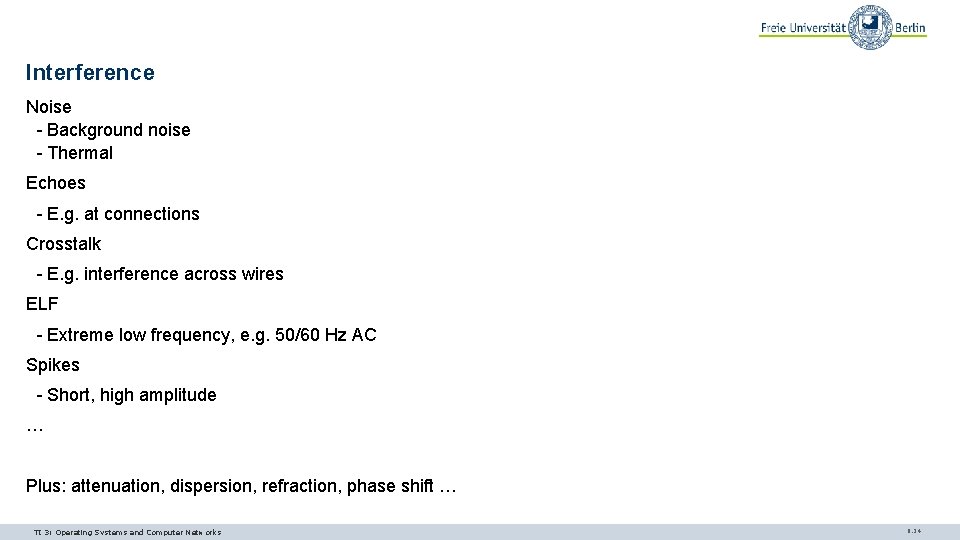
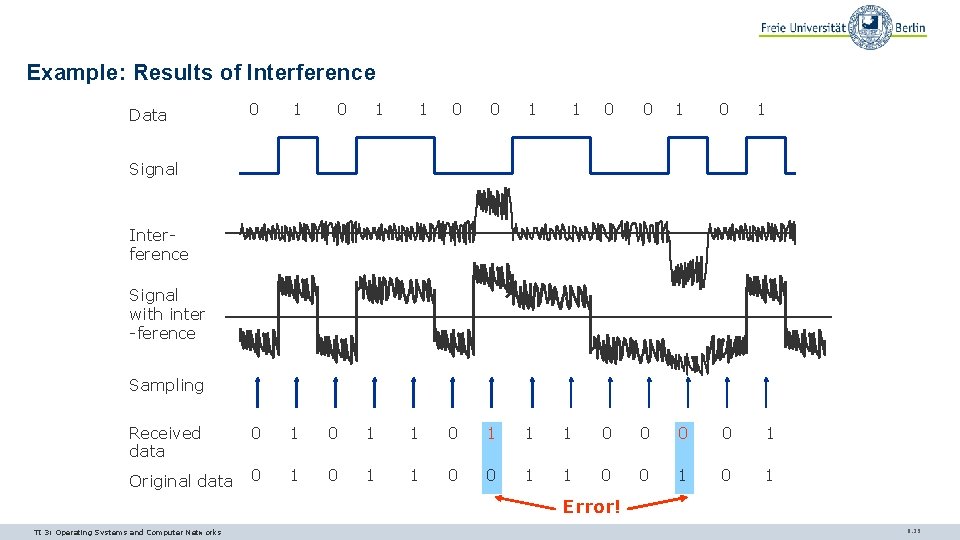
Interference Noise - Background noise - Thermal Echoes - E. g. at connections Crosstalk - E. g. interference across wires ELF - Extreme low frequency, e. g. 50/60 Hz AC Spikes - Short, high amplitude … Plus: attenuation, dispersion, refraction, phase shift … TI 3: Operating Systems and Computer Networks 9. 24
Example: Results of Interference 0 1 Received data 0 1 Original data 0 1 Data 0 1 1 1 0 0 1 0 1 1 0 0 1 0 Signal Interference Signal with inter -ference Sampling Error! TI 3: Operating Systems and Computer Networks 9. 25
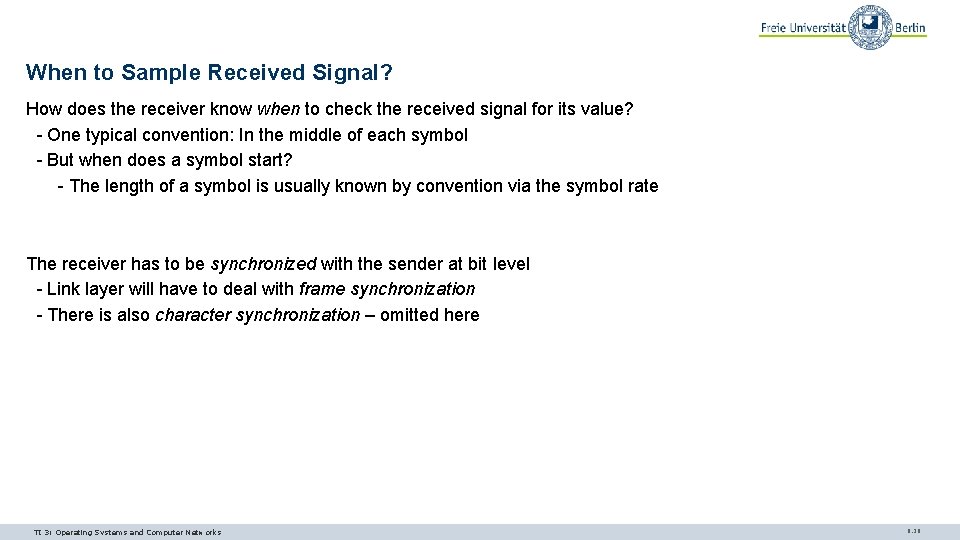
When to Sample Received Signal? How does the receiver know when to check the received signal for its value? - One typical convention: In the middle of each symbol - But when does a symbol start? - The length of a symbol is usually known by convention via the symbol rate The receiver has to be synchronized with the sender at bit level - Link layer will have to deal with frame synchronization - There is also character synchronization – omitted here TI 3: Operating Systems and Computer Networks 9. 26
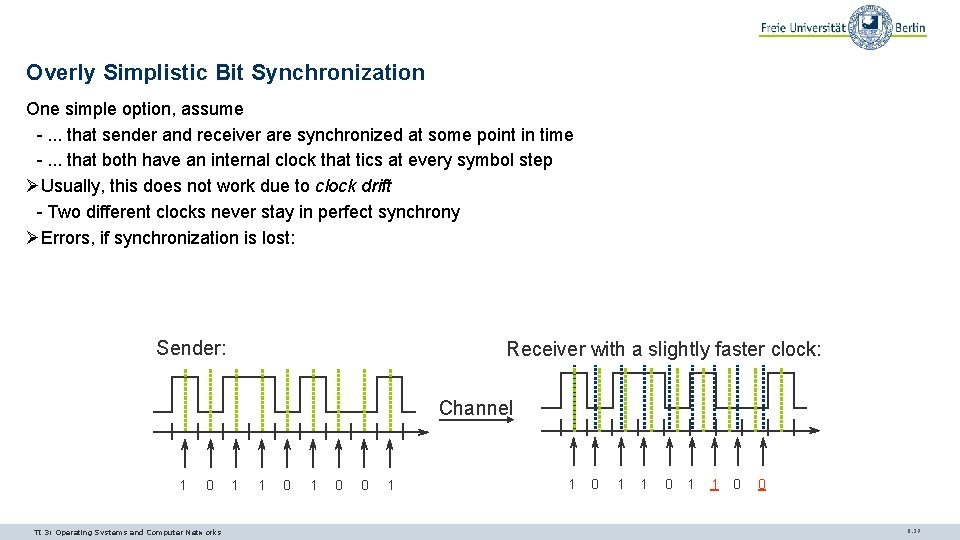
Overly Simplistic Bit Synchronization One simple option, assume -. . . that sender and receiver are synchronized at some point in time -. . . that both have an internal clock that tics at every symbol step ØUsually, this does not work due to clock drift - Two different clocks never stay in perfect synchrony ØErrors, if synchronization is lost: Sender: Receiver with a slightly faster clock: Channel 1 0 TI 3: Operating Systems and Computer Networks 1 1 0 0 1 1 0 0 9. 27
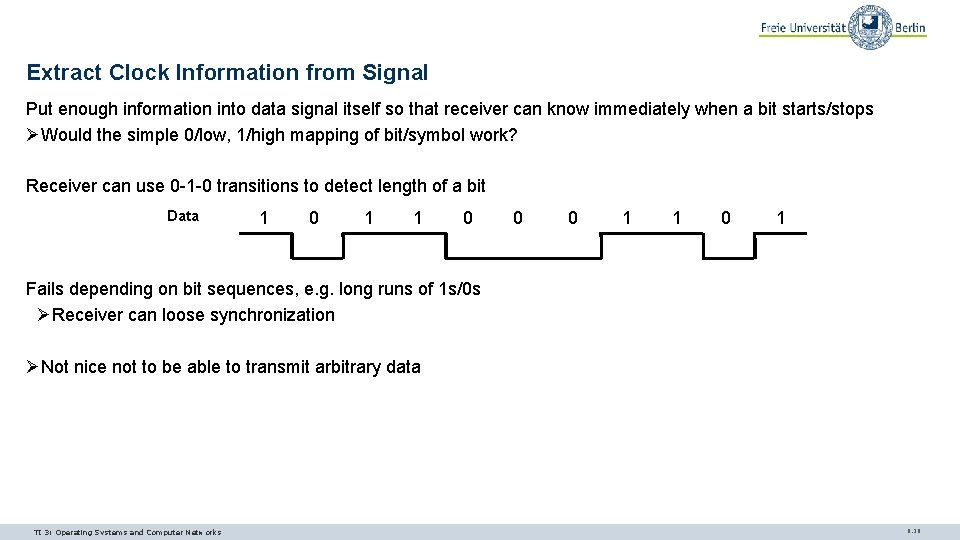
Extract Clock Information from Signal Put enough information into data signal itself so that receiver can know immediately when a bit starts/stops ØWould the simple 0/low, 1/high mapping of bit/symbol work? Receiver can use 0 -1 -0 transitions to detect length of a bit Data 1 0 1 1 0 0 0 1 1 0 1 Fails depending on bit sequences, e. g. long runs of 1 s/0 s ØReceiver can loose synchronization ØNot nice not to be able to transmit arbitrary data TI 3: Operating Systems and Computer Networks 9. 29
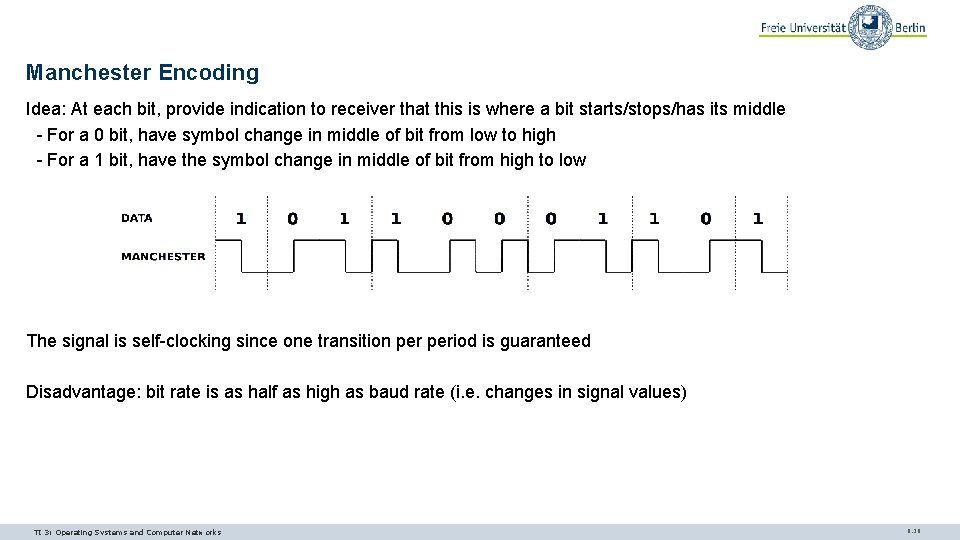
Manchester Encoding Idea: At each bit, provide indication to receiver that this is where a bit starts/stops/has its middle - For a 0 bit, have symbol change in middle of bit from low to high - For a 1 bit, have the symbol change in middle of bit from high to low The signal is self-clocking since one transition period is guaranteed Disadvantage: bit rate is as half as high as baud rate (i. e. changes in signal values) TI 3: Operating Systems and Computer Networks 9. 30
Questions & Tasks - What are sources for errors in received bits? - How to synchronize sender and receiver? - How does the physical layer correct bits? - Check the hidden slides for much more information about media types, baseband/broadband transmission, multiplexing etc. ! - Why can it be problematic to use 0 -1 -0 transitions in the bit stream for synchronization? What could be done without using e. g. Manchester coding? TI 3: Operating Systems and Computer Networks 9. 45
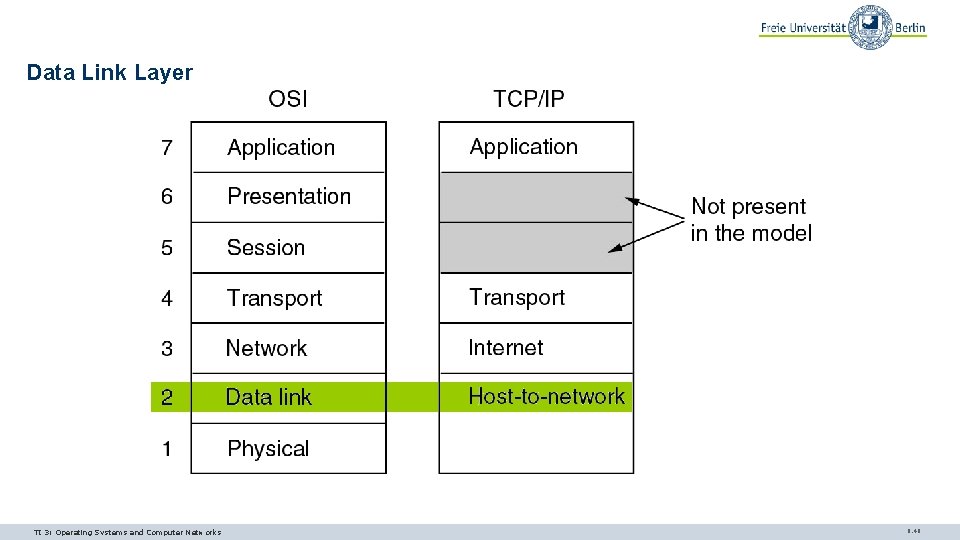
Data Link Layer TI 3: Operating Systems and Computer Networks 9. 46
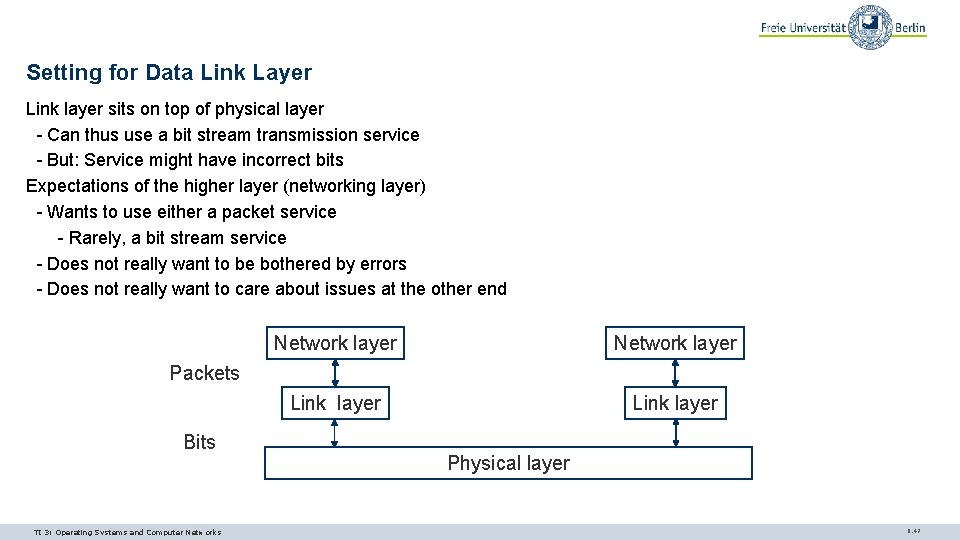
Setting for Data Link Layer Link layer sits on top of physical layer - Can thus use a bit stream transmission service - But: Service might have incorrect bits Expectations of the higher layer (networking layer) - Wants to use either a packet service - Rarely, a bit stream service - Does not really want to be bothered by errors - Does not really want to care about issues at the other end Network layer Link layer Packets Bits TI 3: Operating Systems and Computer Networks Physical layer 9. 47
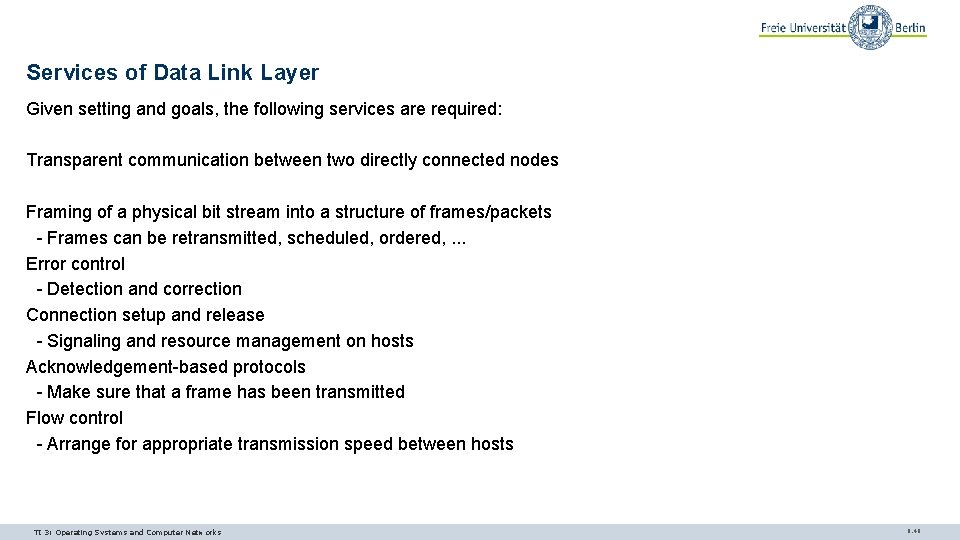
Services of Data Link Layer Given setting and goals, the following services are required: Transparent communication between two directly connected nodes Framing of a physical bit stream into a structure of frames/packets - Frames can be retransmitted, scheduled, ordered, . . . Error control - Detection and correction Connection setup and release - Signaling and resource management on hosts Acknowledgement-based protocols - Make sure that a frame has been transmitted Flow control - Arrange for appropriate transmission speed between hosts TI 3: Operating Systems and Computer Networks 9. 48
FRAMING TI 3: Operating Systems and Computer Networks 9. 49
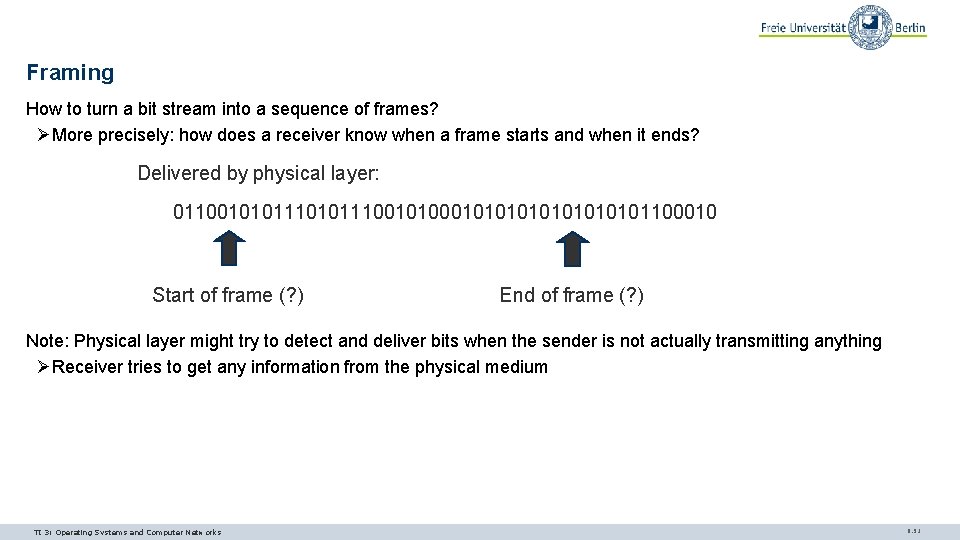
Framing How to turn a bit stream into a sequence of frames? ØMore precisely: how does a receiver know when a frame starts and when it ends? Delivered by physical layer: 0110010101110010101010101100010 Start of frame (? ) End of frame (? ) Note: Physical layer might try to detect and deliver bits when the sender is not actually transmitting anything ØReceiver tries to get any information from the physical medium TI 3: Operating Systems and Computer Networks 9. 51
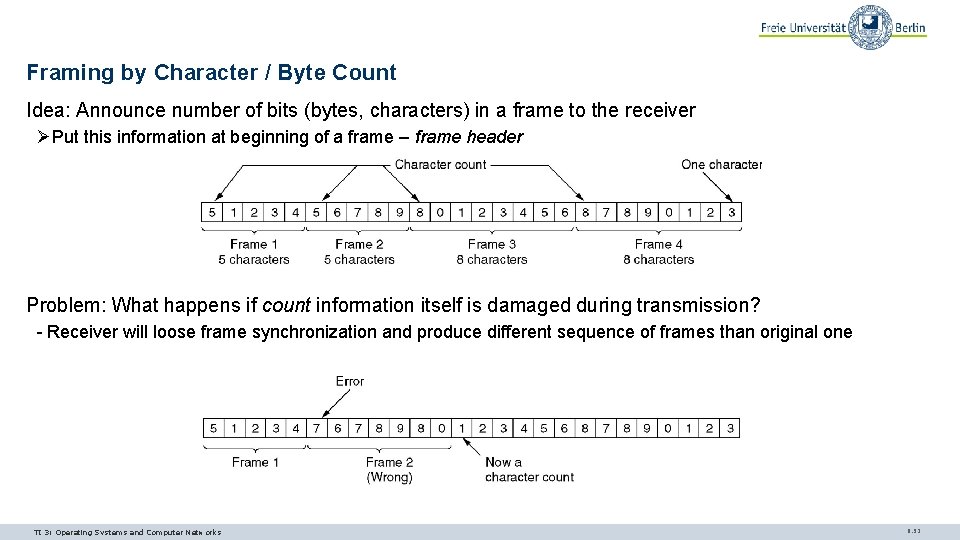
Framing by Character / Byte Count Idea: Announce number of bits (bytes, characters) in a frame to the receiver ØPut this information at beginning of a frame – frame header Problem: What happens if count information itself is damaged during transmission? - Receiver will loose frame synchronization and produce different sequence of frames than original one TI 3: Operating Systems and Computer Networks 9. 52
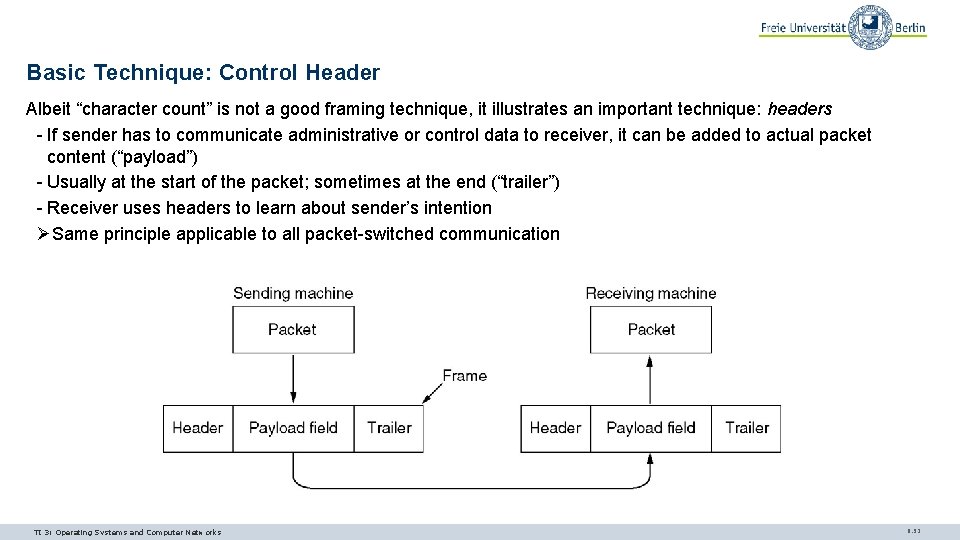
Basic Technique: Control Header Albeit “character count” is not a good framing technique, it illustrates an important technique: headers - If sender has to communicate administrative or control data to receiver, it can be added to actual packet content (“payload”) - Usually at the start of the packet; sometimes at the end (“trailer”) - Receiver uses headers to learn about sender’s intention ØSame principle applicable to all packet-switched communication TI 3: Operating Systems and Computer Networks 9. 53
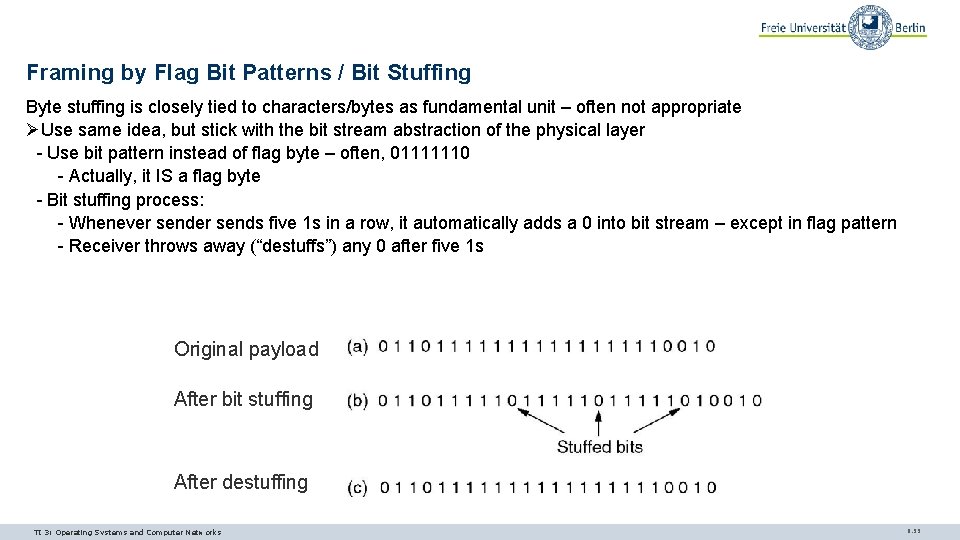
Framing by Flag Bit Patterns / Bit Stuffing Byte stuffing is closely tied to characters/bytes as fundamental unit – often not appropriate ØUse same idea, but stick with the bit stream abstraction of the physical layer - Use bit pattern instead of flag byte – often, 01111110 - Actually, it IS a flag byte - Bit stuffing process: - Whenever sends five 1 s in a row, it automatically adds a 0 into bit stream – except in flag pattern - Receiver throws away (“destuffs”) any 0 after five 1 s Original payload After bit stuffing After destuffing TI 3: Operating Systems and Computer Networks 9. 55
Questions & Tasks - What is the basic service of the Data Link Layer? - Why framing and how to do it? - Given a fixed data rate on the medium – how does bit stuffing influence the available user data rate at the link layer? TI 3: Operating Systems and Computer Networks 9. 57
ERROR CONTROL TI 3: Operating Systems and Computer Networks 9. 58
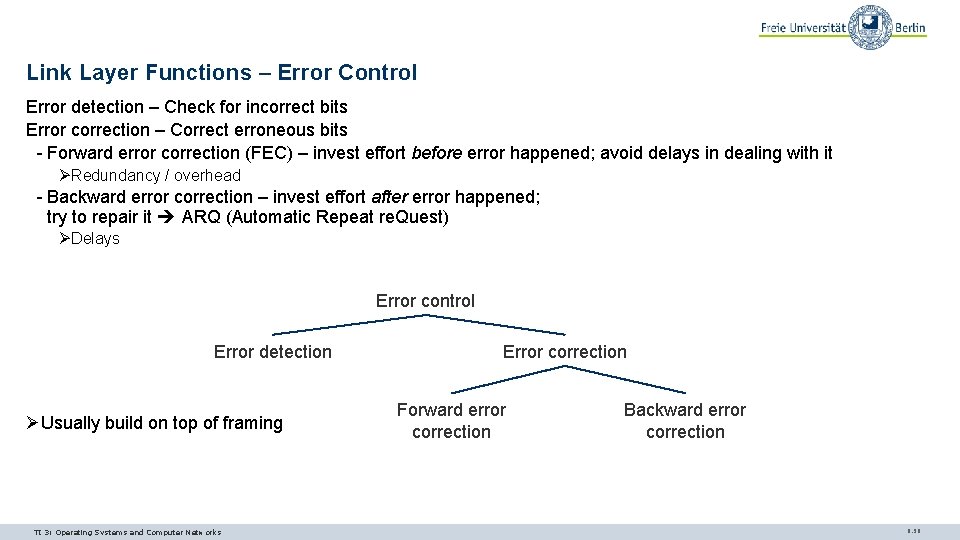
Link Layer Functions – Error Control Error detection – Check for incorrect bits Error correction – Correct erroneous bits - Forward error correction (FEC) – invest effort before error happened; avoid delays in dealing with it ØRedundancy / overhead - Backward error correction – invest effort after error happened; try to repair it ARQ (Automatic Repeat re. Quest) ØDelays Error control Error detection ØUsually build on top of framing TI 3: Operating Systems and Computer Networks Error correction Forward error correction Backward error correction 9. 59
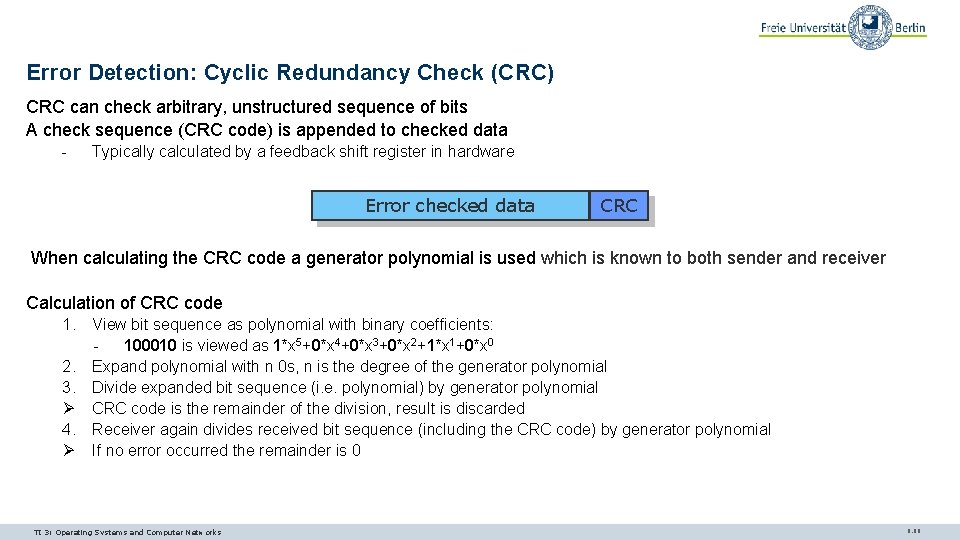
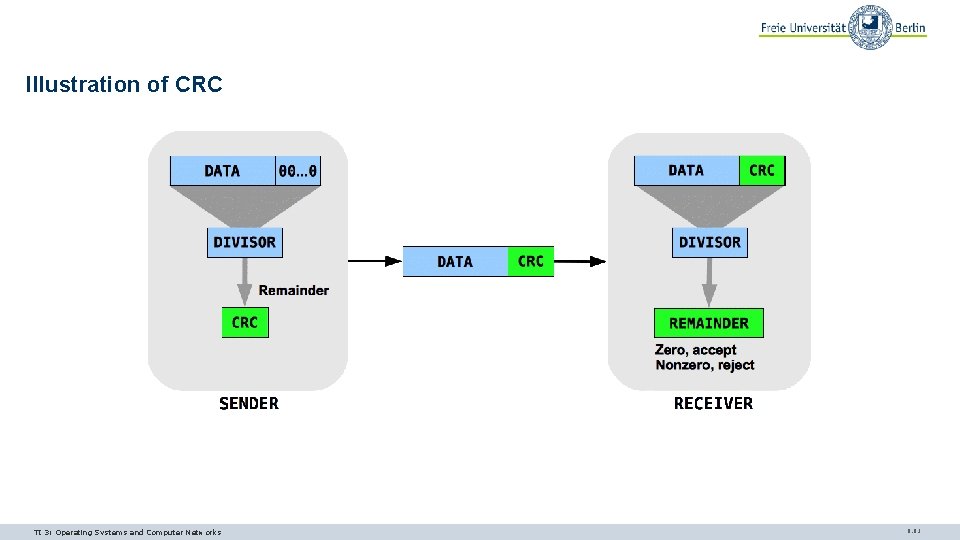
Error Detection: Cyclic Redundancy Check (CRC) CRC can check arbitrary, unstructured sequence of bits A check sequence (CRC code) is appended to checked data - Typically calculated by a feedback shift register in hardware Error checked data CRC When calculating the CRC code a generator polynomial is used which is known to both sender and receiver Calculation of CRC code 1. View bit sequence as polynomial with binary coefficients: - 100010 is viewed as 1*x 5+0*x 4+0*x 3+0*x 2+1*x 1+0*x 0 2. Expand polynomial with n 0 s, n is the degree of the generator polynomial 3. Divide expanded bit sequence (i. e. polynomial) by generator polynomial Ø CRC code is the remainder of the division, result is discarded 4. Receiver again divides received bit sequence (including the CRC code) by generator polynomial Ø If no error occurred the remainder is 0 TI 3: Operating Systems and Computer Networks 9. 60
Illustration of CRC TI 3: Operating Systems and Computer Networks 9. 61
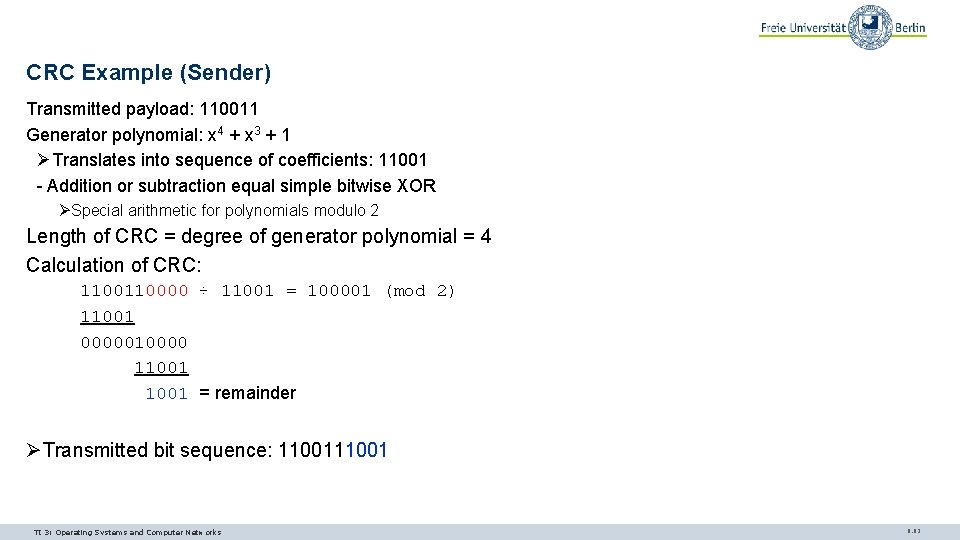
CRC Example (Sender) Transmitted payload: 110011 Generator polynomial: x 4 + x 3 + 1 ØTranslates into sequence of coefficients: 11001 - Addition or subtraction equal simple bitwise XOR ØSpecial arithmetic for polynomials modulo 2 Length of CRC = degree of generator polynomial = 4 Calculation of CRC: 110000 ÷ 11001 = 100001 (mod 2) 11001 0000010000 11001 = remainder ØTransmitted bit sequence: 11001 TI 3: Operating Systems and Computer Networks 9. 62
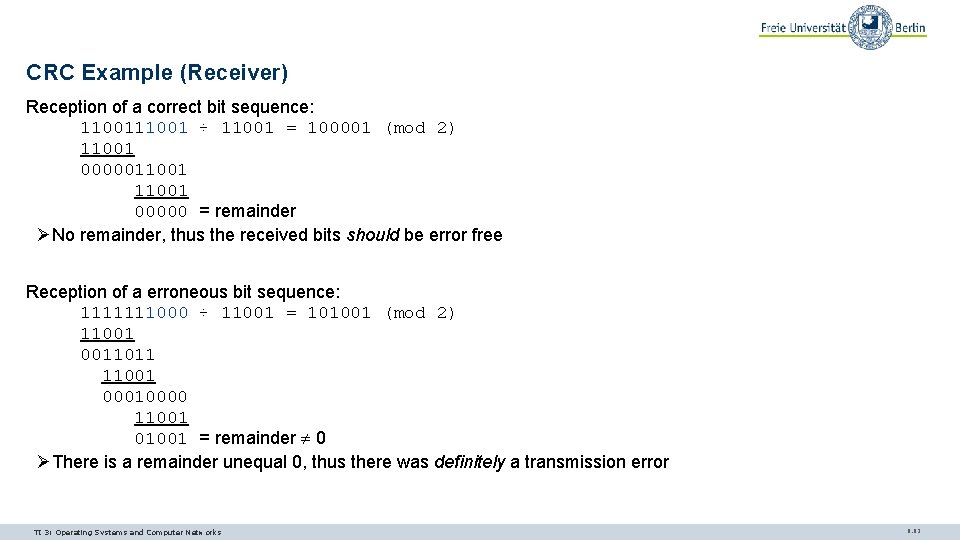
CRC Example (Receiver) Reception of a correct bit sequence: 11001 ÷ 11001 = 100001 (mod 2) 11001 0000011001 00000 = remainder ØNo remainder, thus the received bits should be error free Reception of a erroneous bit sequence: 1111111000 ÷ 11001 = 101001 (mod 2) 11001 0011011 11001 00010000 11001 01001 = remainder 0 ØThere is a remainder unequal 0, thus there was definitely a transmission error TI 3: Operating Systems and Computer Networks 9. 63
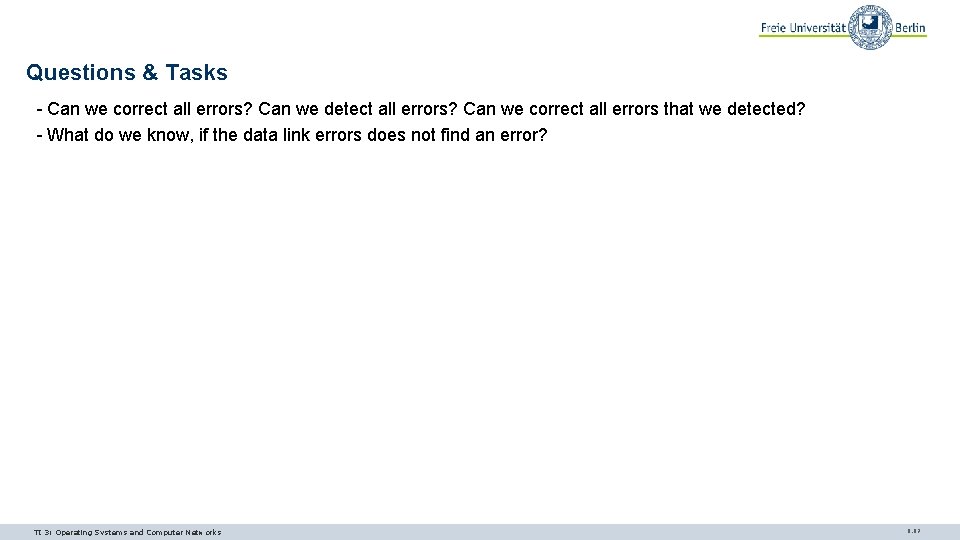
Questions & Tasks - Can we correct all errors? Can we detect all errors? Can we correct all errors that we detected? - What do we know, if the data link errors does not find an error? TI 3: Operating Systems and Computer Networks 9. 67
FLOW CONTROL TI 3: Operating Systems and Computer Networks 9. 68
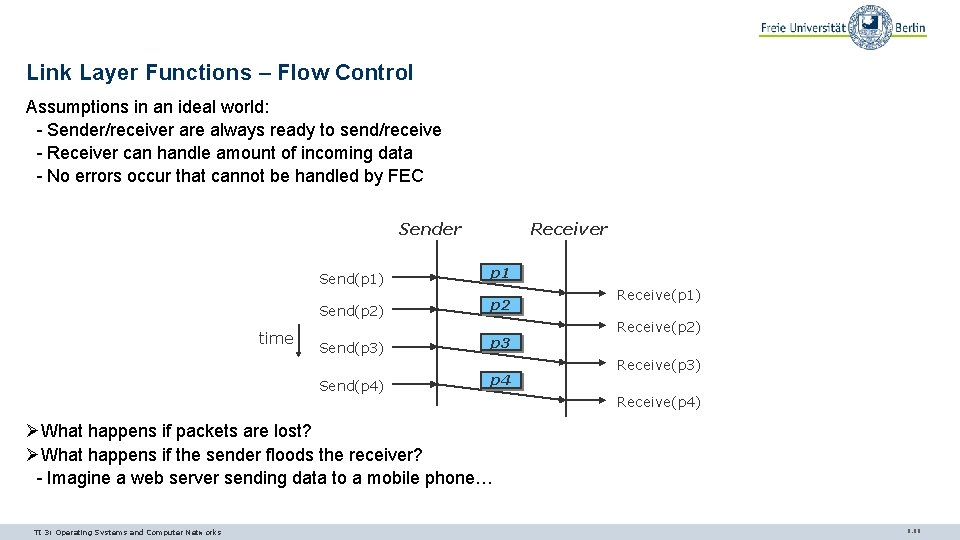
Link Layer Functions – Flow Control Assumptions in an ideal world: - Sender/receiver are always ready to send/receive - Receiver can handle amount of incoming data - No errors occur that cannot be handled by FEC Sender time Receiver Send(p 1) p 1 Send(p 2) p 2 Send(p 3) p 3 Send(p 4) p 4 Receive(p 1) Receive(p 2) Receive(p 3) Receive(p 4) ØWhat happens if packets are lost? ØWhat happens if the sender floods the receiver? - Imagine a web server sending data to a mobile phone… TI 3: Operating Systems and Computer Networks 9. 69
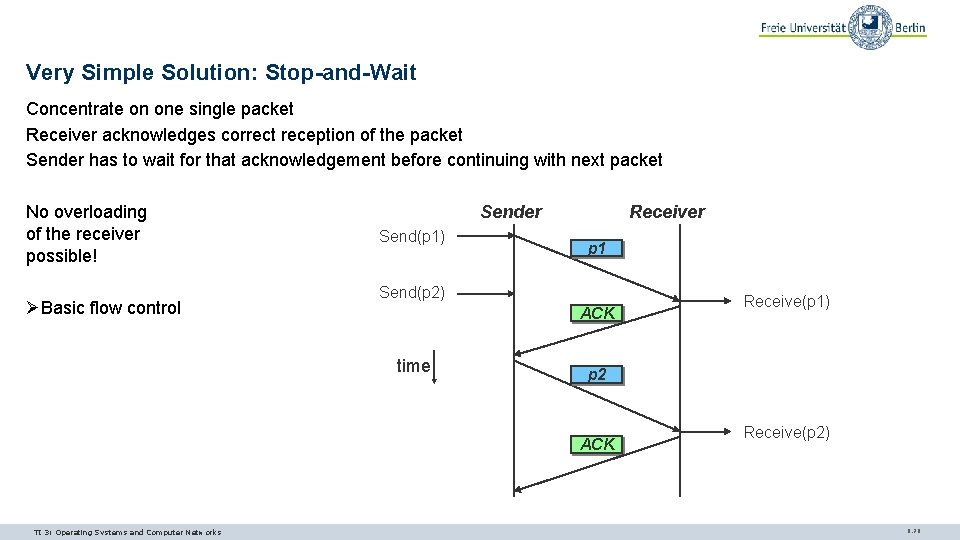
Very Simple Solution: Stop-and-Wait Concentrate on one single packet Receiver acknowledges correct reception of the packet Sender has to wait for that acknowledgement before continuing with next packet No overloading of the receiver possible! ØBasic flow control Sender Send(p 1) Receiver p 1 Send(p 2) ACK time p 2 ACK TI 3: Operating Systems and Computer Networks Receive(p 1) Receive(p 2) 9. 70
Conclusion Most problems in the link layer are due to errors: - Errors in synchronization require non-trivial framing functions - Errors in transmission require mechanisms to - Correct them so as to hide from higher layers - Detect them and repair them afterwards Flow control is often tightly integrated with error control in commonly used protocols ØIt is a separate function and can be implemented separately Connection setup/teardown still has to be addressed ØNecessary to initialize a joint context for sender and receiver TI 3: Operating Systems and Computer Networks 9. 81
NETWORK TOPOLOGIES TI 3: Operating Systems and Computer Networks 9. 82
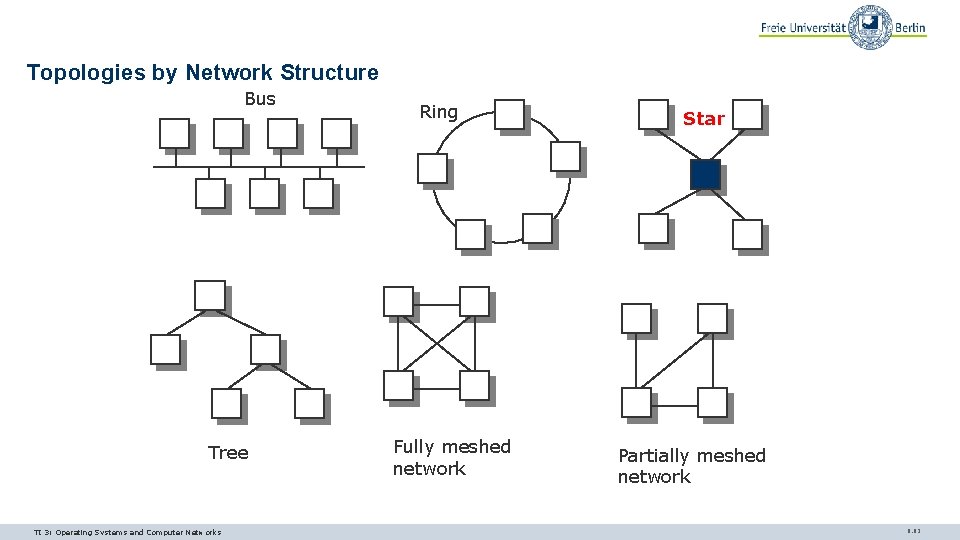
Topologies by Network Structure Bus Tree TI 3: Operating Systems and Computer Networks Ring Fully meshed network Star Partially meshed network 9. 83
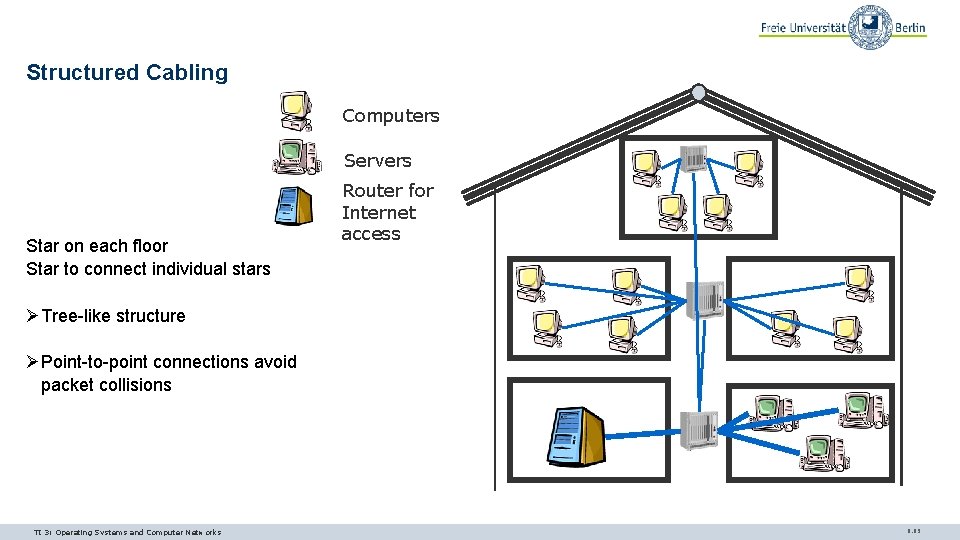
Structured Cabling Computers Servers Star on each floor Star to connect individual stars Router for Internet access ØTree-like structure ØPoint-to-point connections avoid packet collisions TI 3: Operating Systems and Computer Networks 9. 85
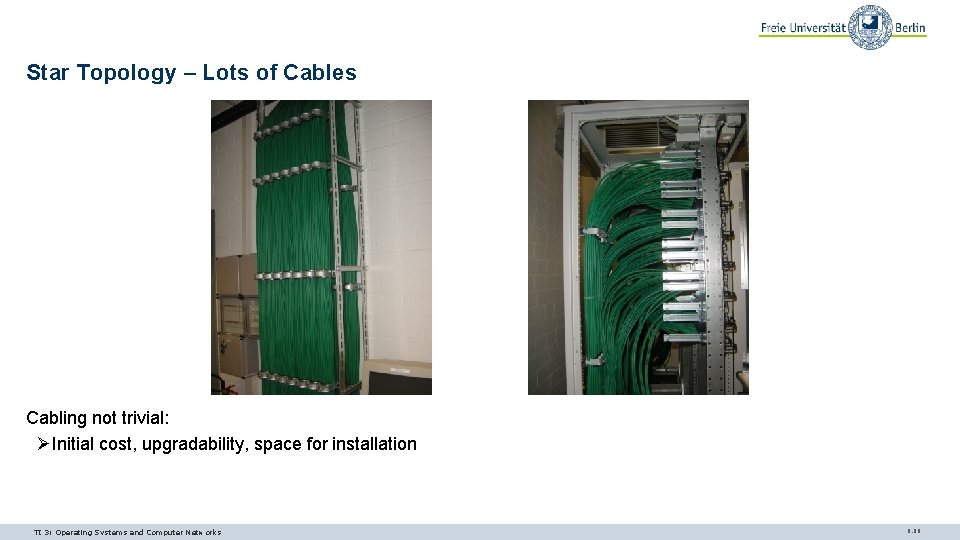
Star Topology – Lots of Cables Cabling not trivial: ØInitial cost, upgradability, space for installation TI 3: Operating Systems and Computer Networks 9. 86
Questions & Tasks - Why do we need flow control at all? - What are disadvantages of the simple stop-and-wait? - If you are interested in advanced flow control schemes have a look at the hidden slides! - A star topology requires a lot of cabling – why is it still attractive? - Give examples for topologies and where you can find them! TI 3: Operating Systems and Computer Networks 9. 87
MEDIUM ACCESS CONTROL TI 3: Operating Systems and Computer Networks 9. 88
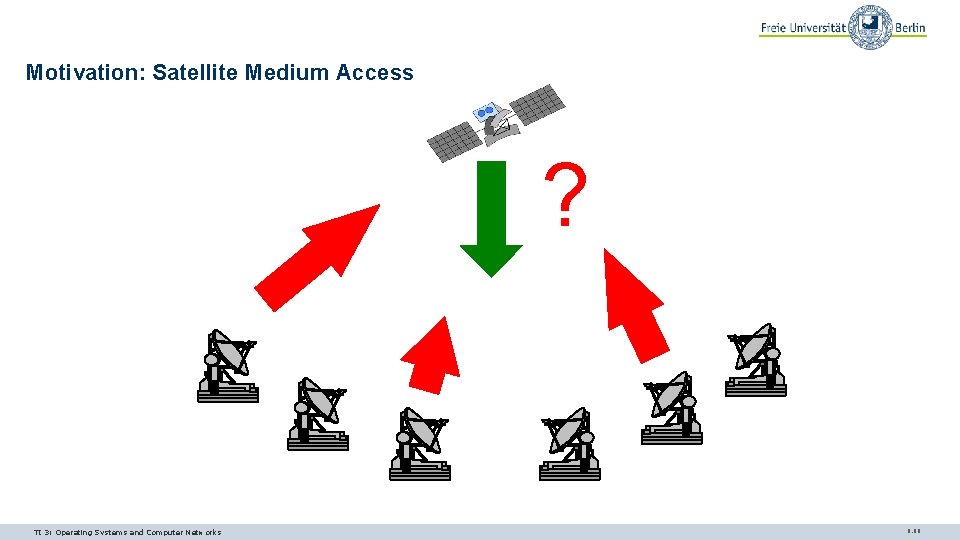
Motivation: Satellite Medium Access ? TI 3: Operating Systems and Computer Networks 9. 89
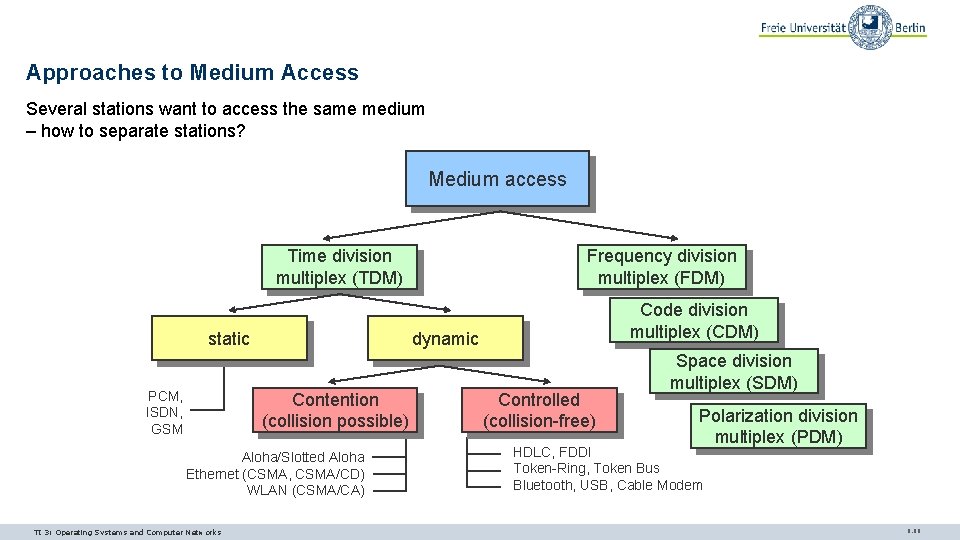
Approaches to Medium Access Several stations want to access the same medium – how to separate stations? Medium access Time division multiplex (TDM) static PCM, ISDN, GSM Code division multiplex (CDM) dynamic Contention (collision possible) Aloha/Slotted Aloha Ethernet (CSMA, CSMA/CD) WLAN (CSMA/CA) TI 3: Operating Systems and Computer Networks Frequency division multiplex (FDM) Controlled (collision-free) Space division multiplex (SDM) Polarization division multiplex (PDM) HDLC, FDDI Token-Ring, Token Bus Bluetooth, USB, Cable Modem 9. 90
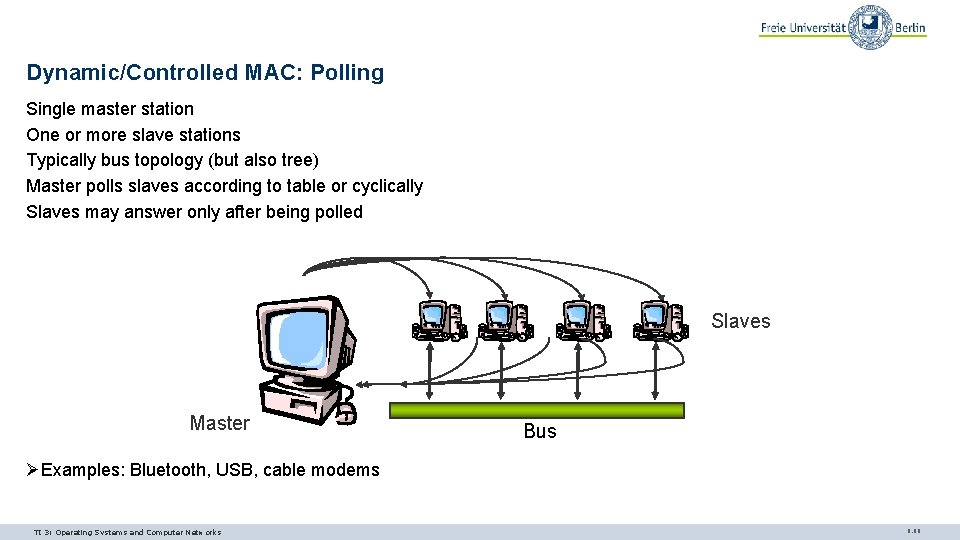
Dynamic/Controlled MAC: Polling Single master station One or more slave stations Typically bus topology (but also tree) Master polls slaves according to table or cyclically Slaves may answer only after being polled Slaves Master Bus ØExamples: Bluetooth, USB, cable modems TI 3: Operating Systems and Computer Networks 9. 98
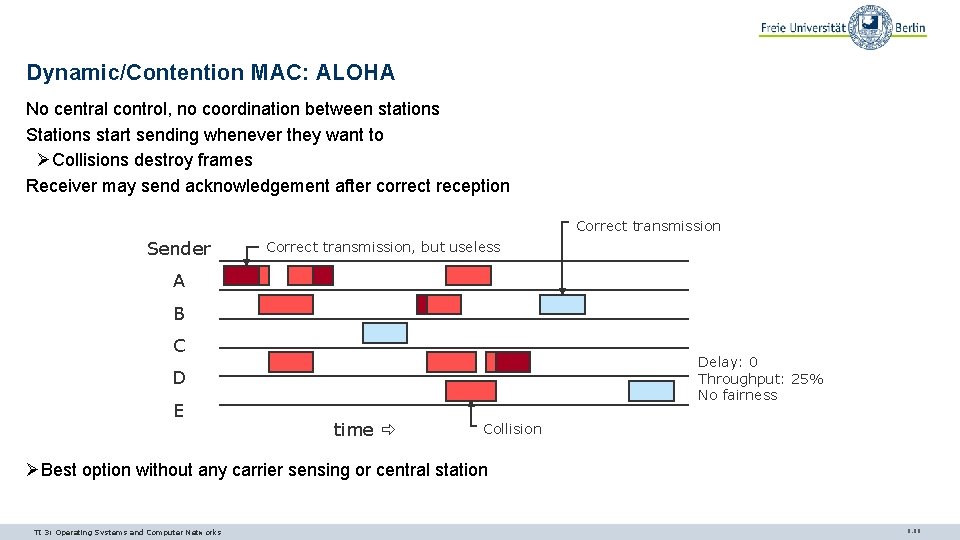
Dynamic/Contention MAC: ALOHA No central control, no coordination between stations Stations start sending whenever they want to ØCollisions destroy frames Receiver may send acknowledgement after correct reception Correct transmission Sender Correct transmission, but useless A B C Delay: 0 Throughput: 25% No fairness D E time Collision ØBest option without any carrier sensing or central station TI 3: Operating Systems and Computer Networks 9. 99
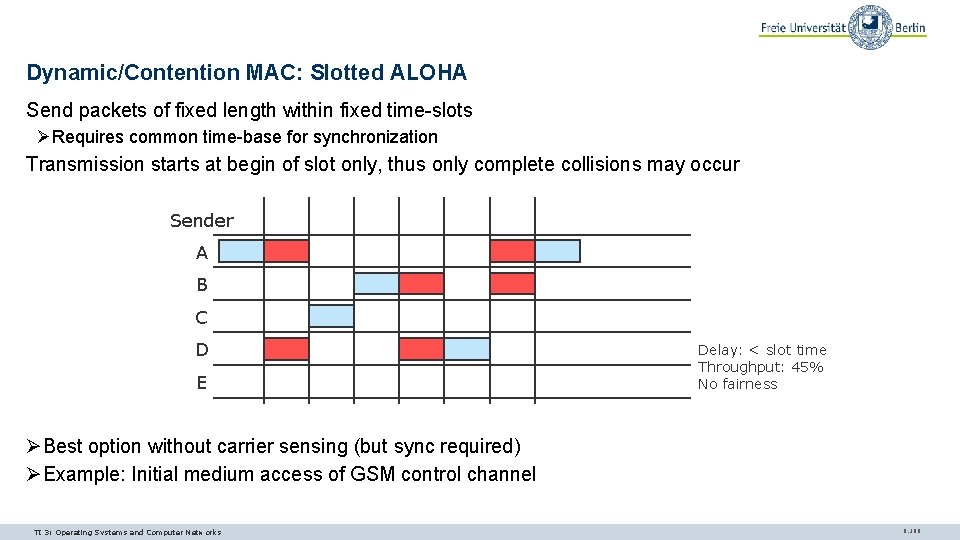
Dynamic/Contention MAC: Slotted ALOHA Send packets of fixed length within fixed time-slots ØRequires common time-base for synchronization Transmission starts at begin of slot only, thus only complete collisions may occur Sender A B C D E Delay: < slot time Throughput: 45% No fairness ØBest option without carrier sensing (but sync required) ØExample: Initial medium access of GSM control channel TI 3: Operating Systems and Computer Networks 9. 100
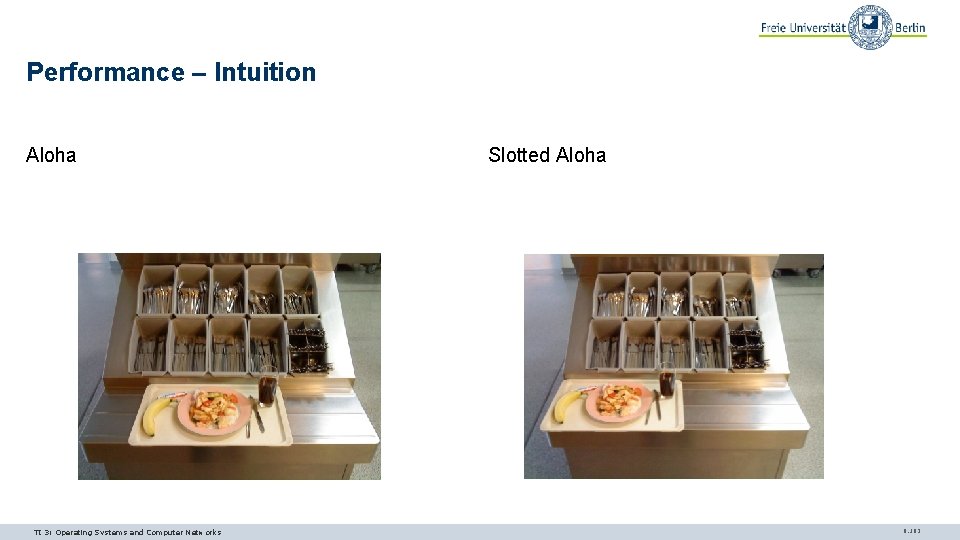
Performance – Intuition Aloha TI 3: Operating Systems and Computer Networks Slotted Aloha 9. 102
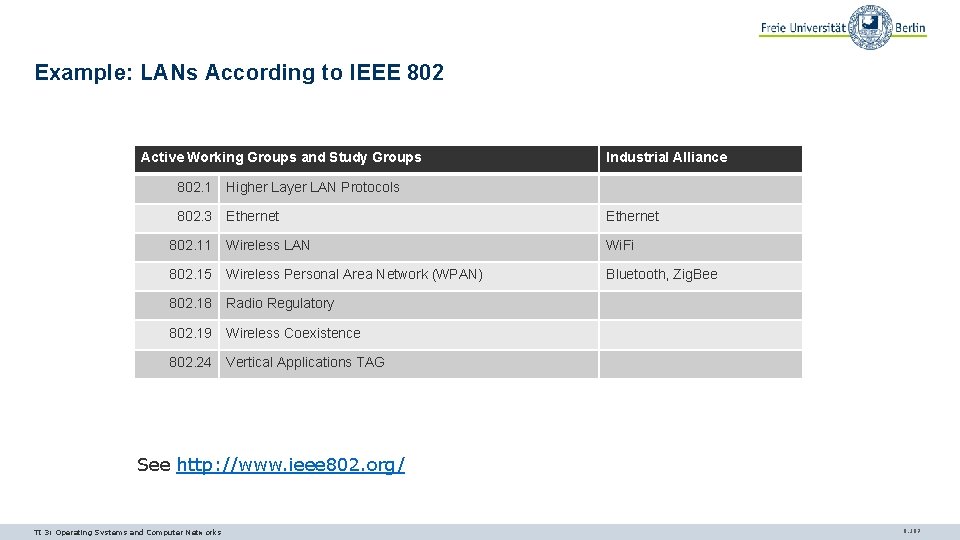
Example: LANs According to IEEE 802 Active Working Groups and Study Groups Industrial Alliance 802. 1 Higher Layer LAN Protocols 802. 3 Ethernet 802. 11 Wireless LAN Wi. Fi 802. 15 Wireless Personal Area Network (WPAN) Bluetooth, Zig. Bee 802. 18 Radio Regulatory 802. 19 Wireless Coexistence 802. 24 Vertical Applications TAG See http: //www. ieee 802. org/ TI 3: Operating Systems and Computer Networks 9. 107
IEEE 802. 3/Ethernet Frame Format Common frame format PR 7 [byte] SD 1 DA 6 SA 6 VLAN 4 Type 2 Data 1500 PAD 46 FCS 4 64 - 1518 (1522 VLAN) PR: Preamble for synchronization SD: Start-of-frame Delimiter DA: Destination MAC Address SA: Source MAC Address VLAN: VLAN tag (if present), 0 x 8100, 3 bit priority, 12 bit ID Type: Protocol type of payload (length if 0 x 0600), e. g. 0 x 0800 for IPv 4, 0 x 86 DD for IPv 6 Data: Payload, max. 1500 byte PAD: Padding, required for short frames FCS: Frame Check Sequence, CRC 32 TI 3: Operating Systems and Computer Networks 9. 109
Content 8. Networked Computer & Internet 9. Host-to-Network 10. Internetworking 11. Transport Layer 12. Applications 13. Network Security 14. Example TI 3: Operating Systems and Computer Networks 9. 112
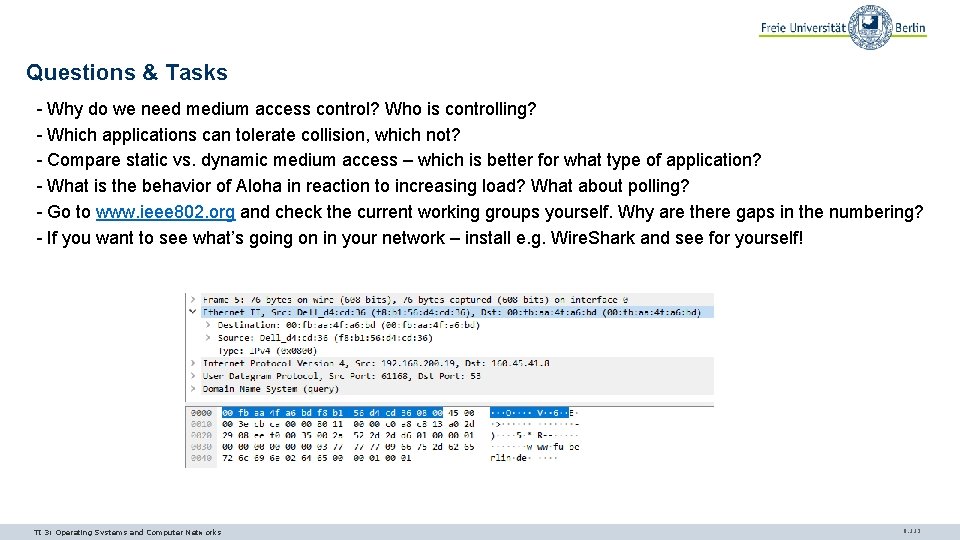
Questions & Tasks - Why do we need medium access control? Who is controlling? - Which applications can tolerate collision, which not? - Compare static vs. dynamic medium access – which is better for what type of application? - What is the behavior of Aloha in reaction to increasing load? What about polling? - Go to www. ieee 802. org and check the current working groups yourself. Why are there gaps in the numbering? - If you want to see what’s going on in your network – install e. g. Wire. Shark and see for yourself! TI 3: Operating Systems and Computer Networks 9. 113