
Prof dr Angelina Njegu Introduction to data modeling







- Slides: 64
Prof. dr Angelina Njeguš Introduction to data modeling
Database lifecycle Data modeling basic elements Agenda Data modeling process Normalization Exercises
Database Design Process
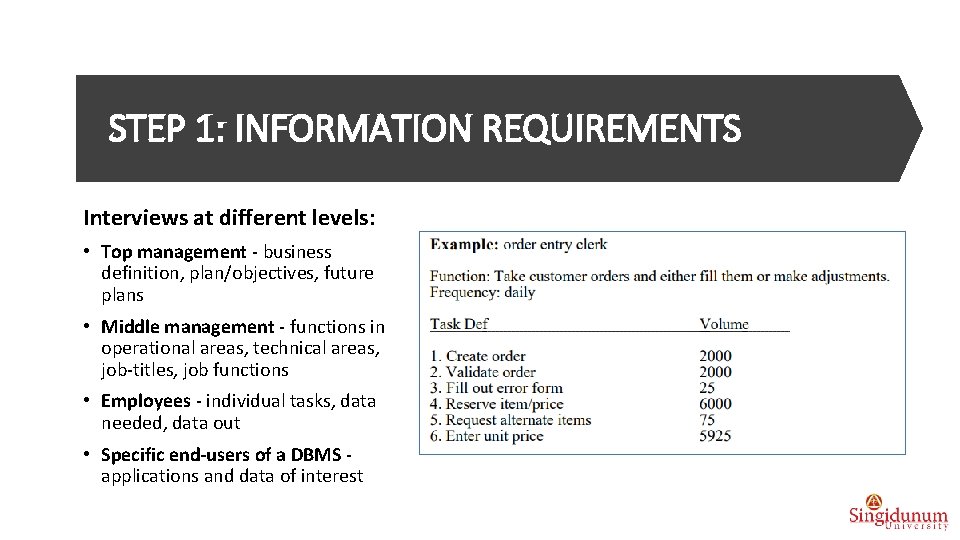
Database life cycle STEP 1: INFORMATION REQUIREMENTS • Purpose - identify the real-world situation in enough detail to be able to define database components. • Collect two types of data: natural data - input to the database, and processing data - output from the database. 1. Organizational objectives (e. g. sell more cars this year, move into to recreational vehicle market) 2. Information system objectives (e. g. keep track of competitors’ products and prices, improve quality and timing of data to management regarding production schedule delays, keep track of vital resources needed to produce and market a product, etc. ) 3. Organizational structure/chart 4. Administrative and operational policies (e. g. annual review of employees, weekly progress reports, monthly inventory check, trip expense submission) 5. Data elements, relationships, constraints, computing environment
STEP 1: INFORMATION REQUIREMENTS Interviews at different levels: • Top management - business definition, plan/objectives, future plans • Middle management - functions in operational areas, technical areas, job-titles, job functions • Employees - individual tasks, data needed, data out • Specific end-users of a DBMS applications and data of interest
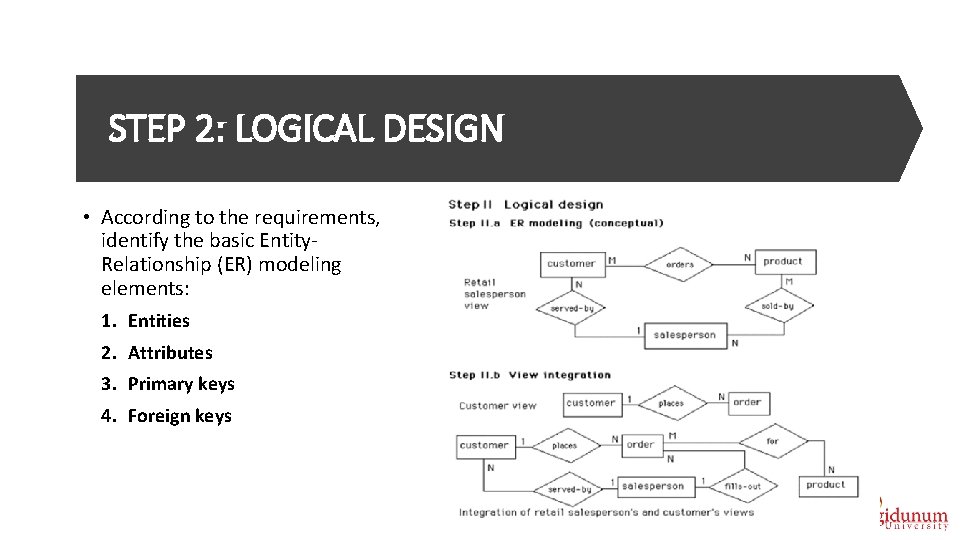
STEP 2: LOGICAL DESIGN • According to the requirements, identify the basic Entity. Relationship (ER) modeling elements: 1. Entities 2. Attributes 3. Primary keys 4. Foreign keys
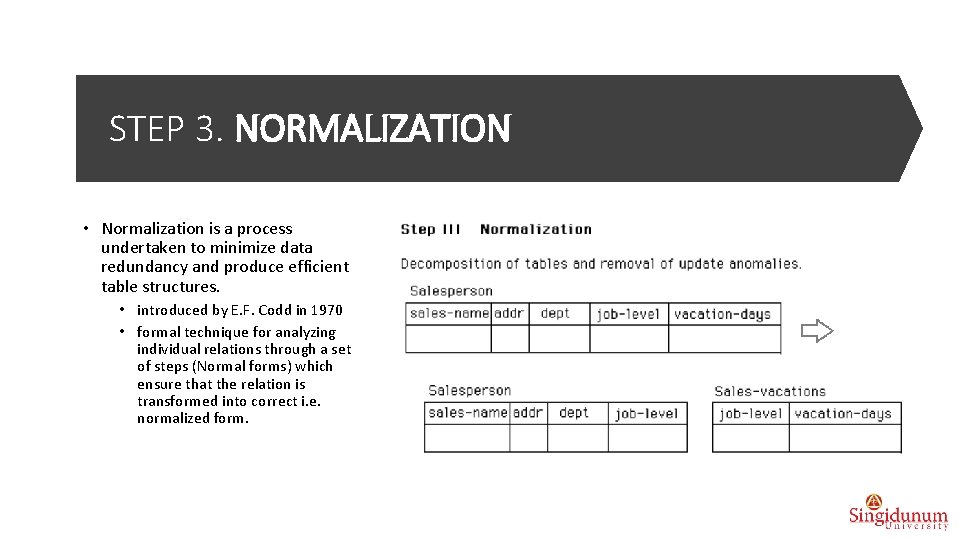
STEP 3. NORMALIZATION • Normalization is a process undertaken to minimize data redundancy and produce efficient table structures. • introduced by E. F. Codd in 1970 • formal technique for analyzing individual relations through a set of steps (Normal forms) which ensure that the relation is transformed into correct i. e. normalized form.
STEP 4. TRANSFORMATIONS FROM ER DIAGRAMS TO SQL TABLES
STEP 5. PHYSICAL DESIGN
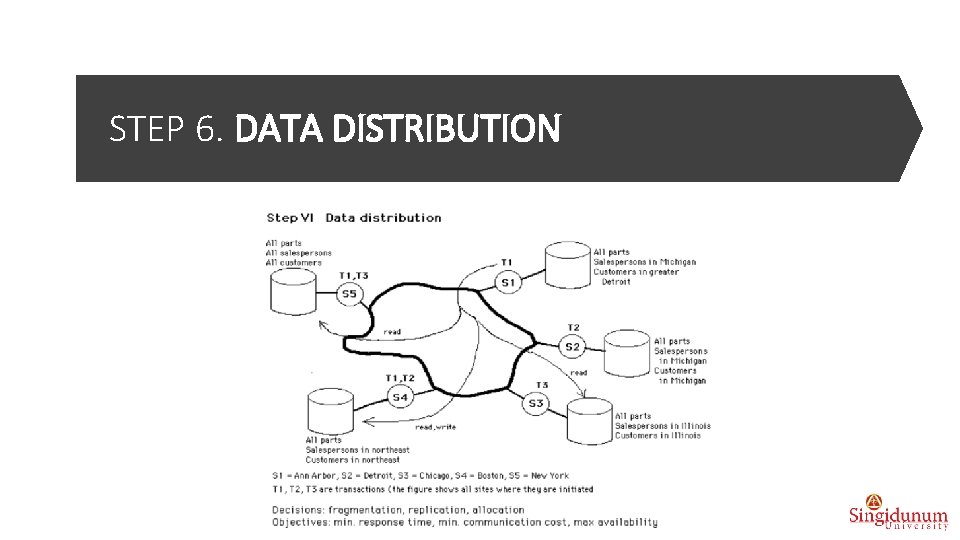
STEP 6. DATA DISTRIBUTION
LOGICAL DESIGN: Data modeling Basic elements • According to the requirements, identify the basic data modeling elements: 1. Entities 2. Attributes 3. Primary keys 4. Foreign keys
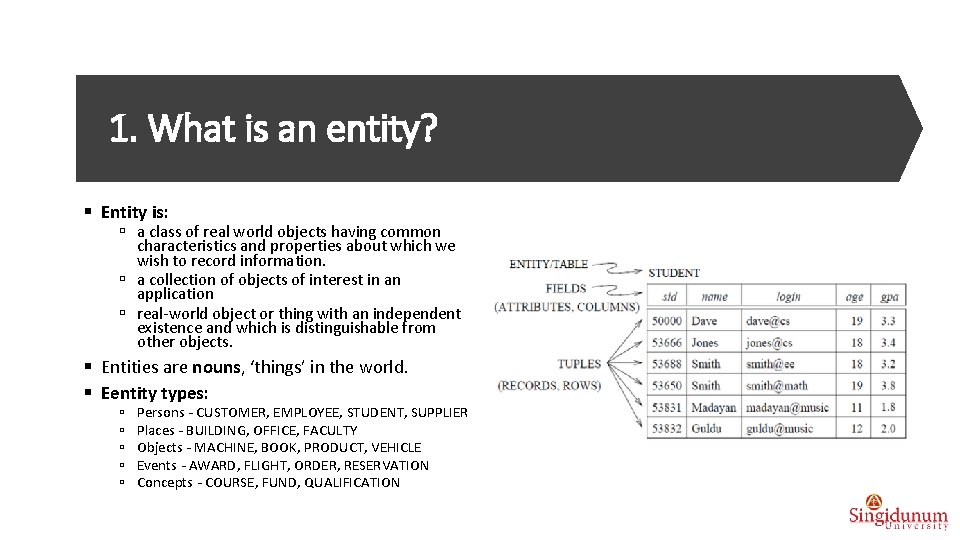
1. What is an entity? § Entity is: ú a class of real world objects having common characteristics and properties about which we wish to record information. ú a collection of objects of interest in an application ú real-world object or thing with an independent existence and which is distinguishable from other objects. § Entities are nouns, ‘things’ in the world. § Eentity types: ú ú ú Persons - CUSTOMER, EMPLOYEE, STUDENT, SUPPLIER Places - BUILDING, OFFICE, FACULTY Objects - MACHINE, BOOK, PRODUCT, VEHICLE Events - AWARD, FLIGHT, ORDER, RESERVATION Concepts - COURSE, FUND, QUALIFICATION
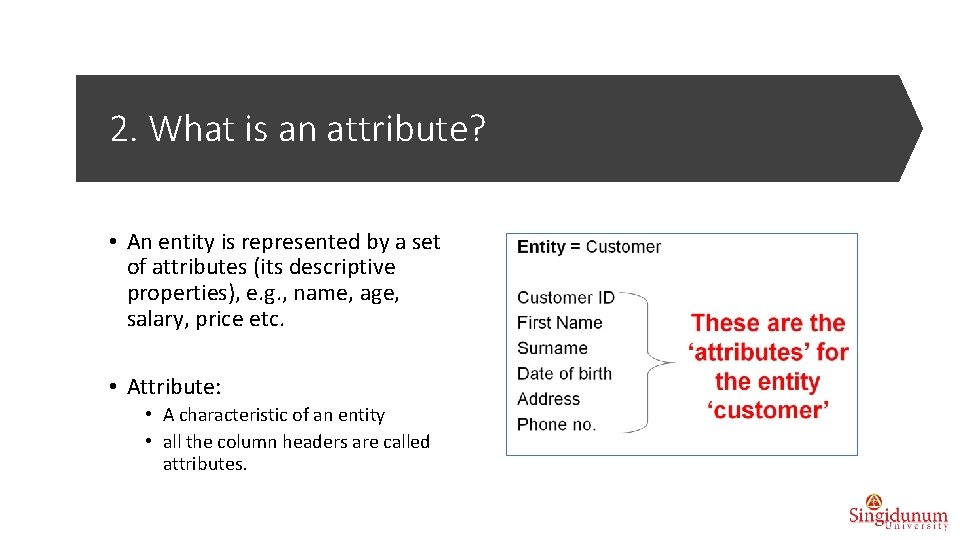
2. What is an attribute? • An entity is represented by a set of attributes (its descriptive properties), e. g. , name, age, salary, price etc. • Attribute: • A characteristic of an entity • all the column headers are called attributes.
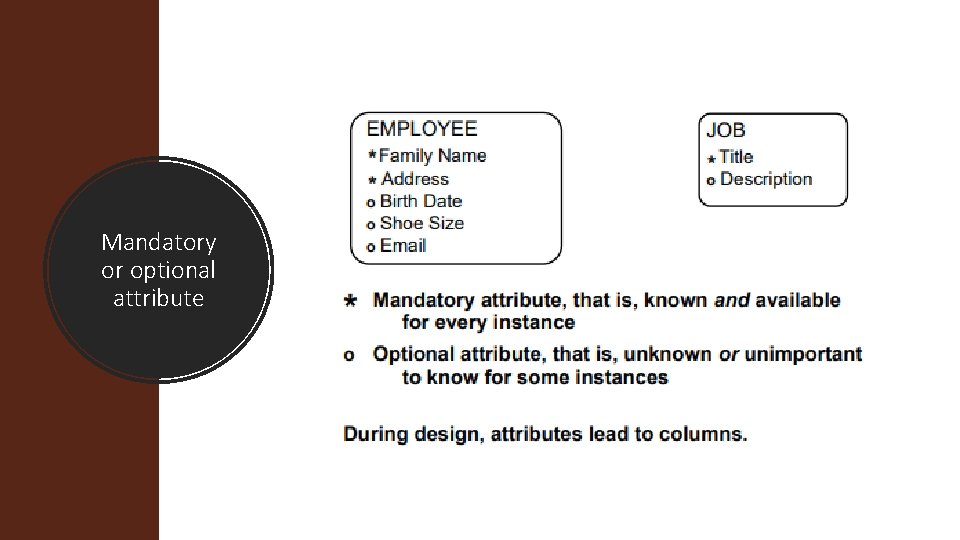
Mandatory or optional attribute
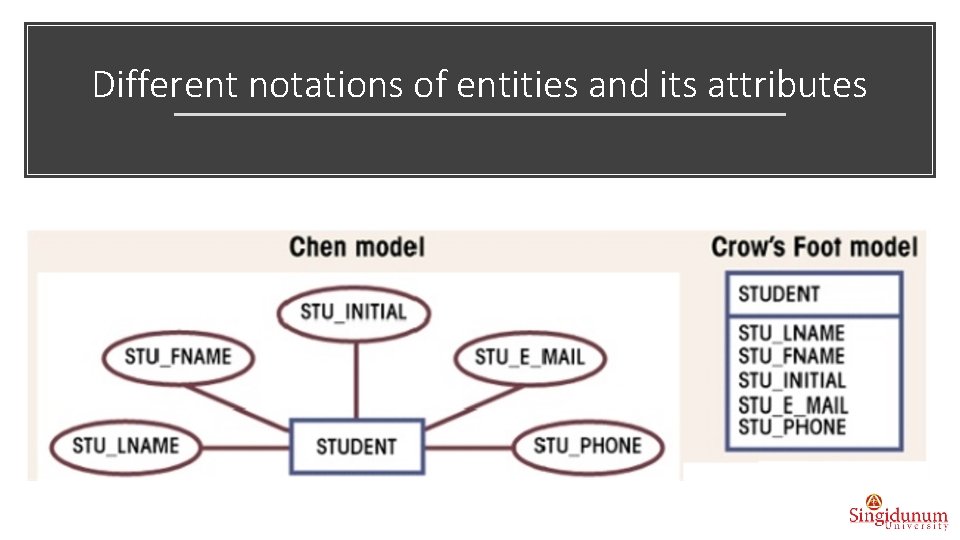
Different notations of entities and its attributes
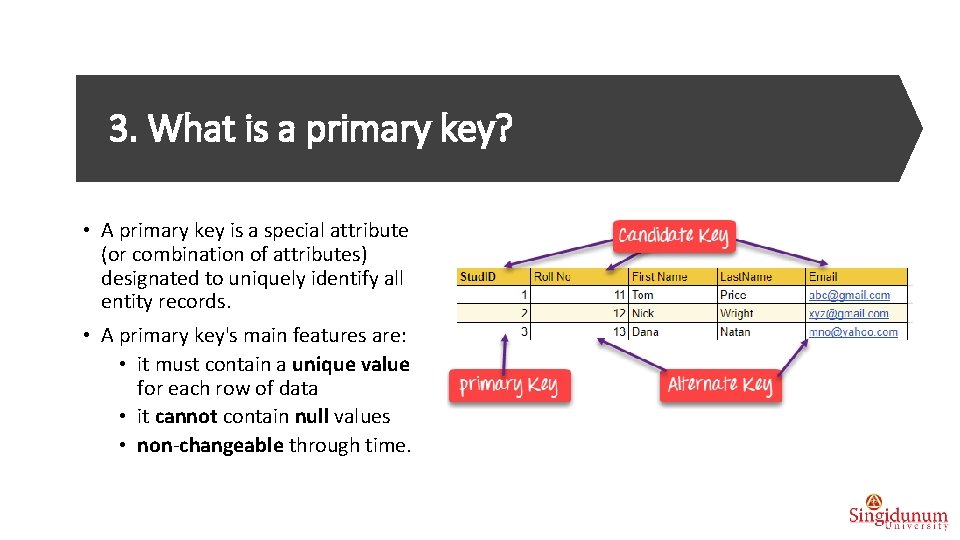
3. What is a primary key? • A primary key is a special attribute (or combination of attributes) designated to uniquely identify all entity records. • A primary key's main features are: • it must contain a unique value for each row of data • it cannot contain null values • non-changeable through time.
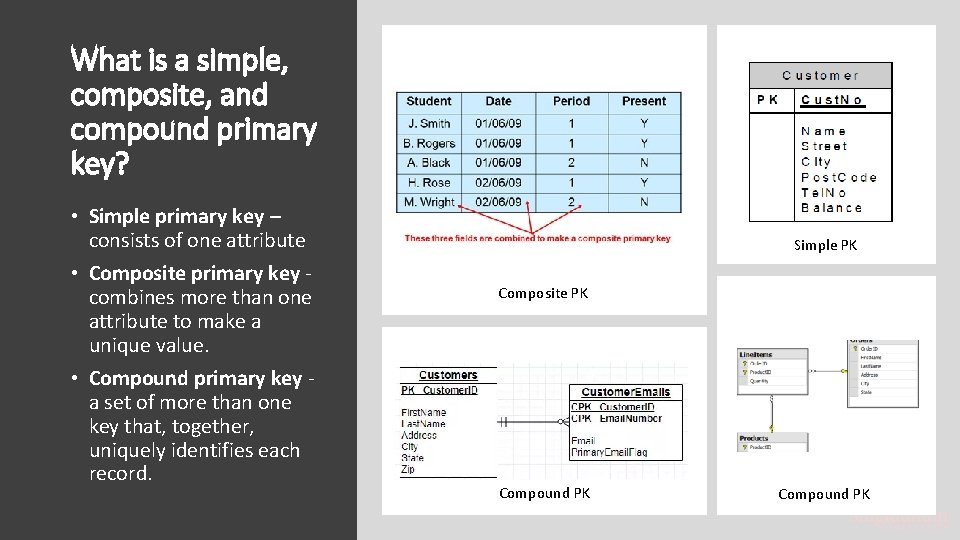
What is a simple, composite, and compound primary key? • Simple primary key – consists of one attribute • Composite primary key combines more than one attribute to make a unique value. • Compound primary key a set of more than one key that, together, uniquely identifies each record. Simple PK Composite PK Compound PK
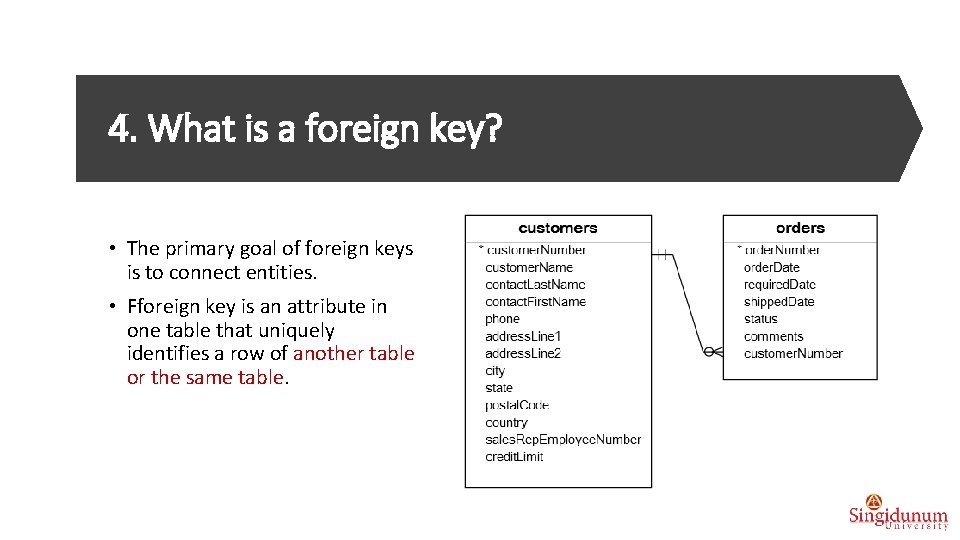
4. What is a foreign key? • The primary goal of foreign keys is to connect entities. • Fforeign key is an attribute in one table that uniquely identifies a row of another table or the same table.
How do we determine a foreign key? § Ask yourself the following questions: 1. Which entities should be linked to each other? 2. Are entities dependent or independent? 3. What is the type of connection between entities? 19
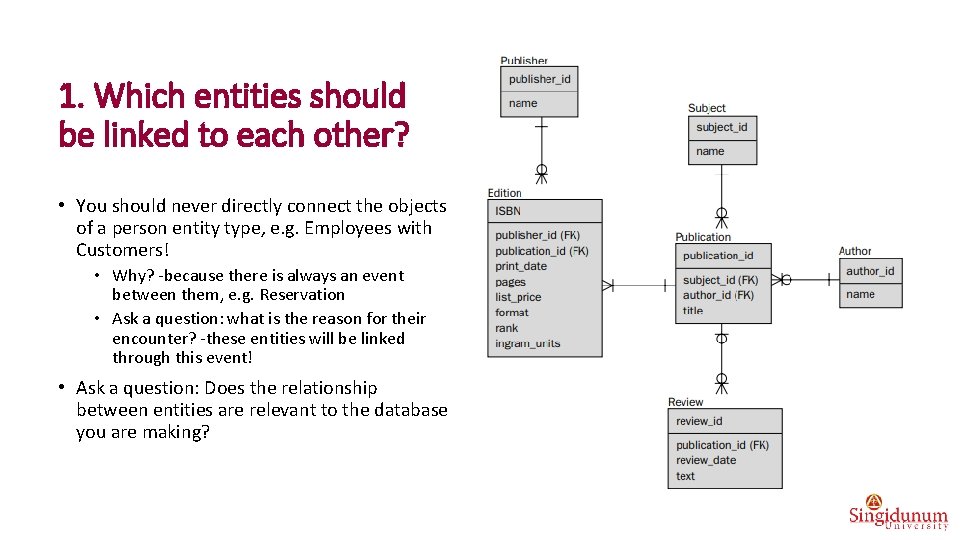
1. Which entities should be linked to each other? • You should never directly connect the objects of a person entity type, e. g. Employees with Customers! • Why? -because there is always an event between them, e. g. Reservation • Ask a question: what is the reason for their encounter? -these entities will be linked through this event! • Ask a question: Does the relationship between entities are relevant to the database you are making?
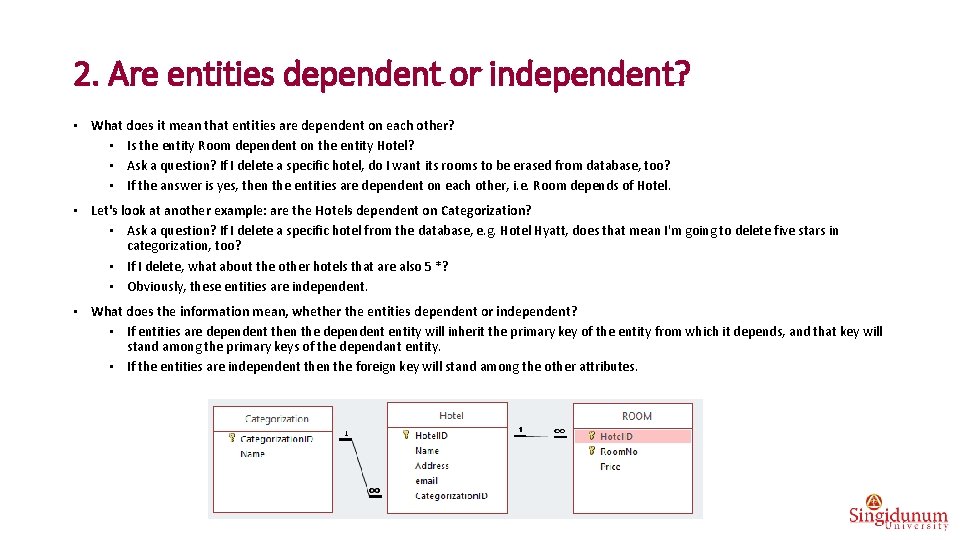
2. Are entities dependent or independent? • What does it mean that entities are dependent on each other? • Is the entity Room dependent on the entity Hotel? • Ask a question? If I delete a specific hotel, do I want its rooms to be erased from database, too? • If the answer is yes, then the entities are dependent on each other, i. e. Room depends of Hotel. • Let's look at another example: are the Hotels dependent on Categorization? • Ask a question? If I delete a specific hotel from the database, e. g. Hotel Hyatt, does that mean I'm going to delete five stars in categorization, too? • If I delete, what about the other hotels that are also 5 *? • Obviously, these entities are independent. • What does the information mean, whether the entities dependent or independent? • If entities are dependent then the dependent entity will inherit the primary key of the entity from which it depends, and that key will stand among the primary keys of the dependant entity. • If the entities are independent then the foreign key will stand among the other attributes.
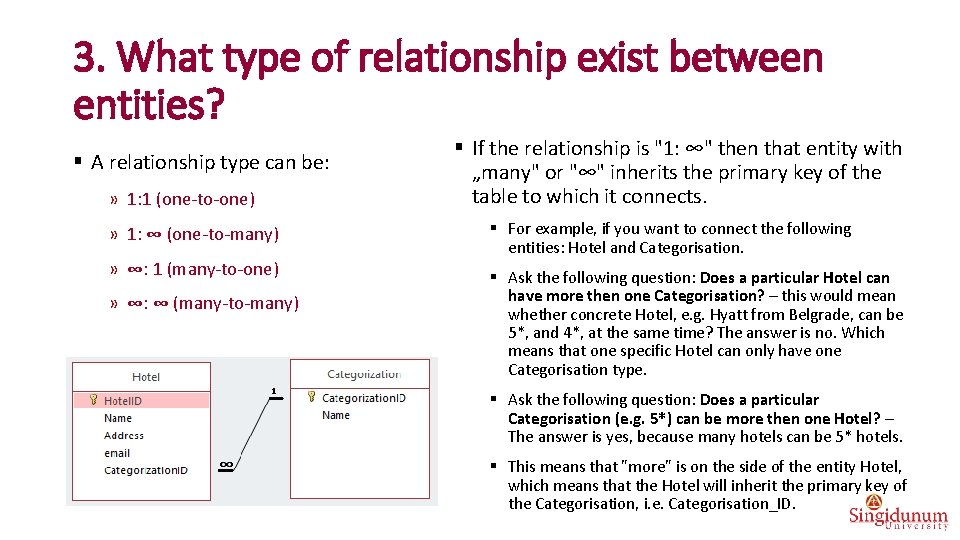
3. What type of relationship exist between entities? § A relationship type can be: » 1: 1 (one-to-one) » 1: ∞ (one-to-many) » ∞: 1 (many-to-one) » ∞: ∞ (many-to-many) § If the relationship is "1: ∞" then that entity with „many" or "∞" inherits the primary key of the table to which it connects. § For example, if you want to connect the following entities: Hotel and Categorisation. § Ask the following question: Does a particular Hotel can have more then one Categorisation? – this would mean whether concrete Hotel, e. g. Hyatt from Belgrade, can be 5*, and 4*, at the same time? The answer is no. Which means that one specific Hotel can only have one Categorisation type. § Ask the following question: Does a particular Categorisation (e. g. 5*) can be more then one Hotel? – The answer is yes, because many hotels can be 5* hotels. § This means that "more" is on the side of the entity Hotel, which means that the Hotel will inherit the primary key of the Categorisation, i. e. Categorisation_ID.
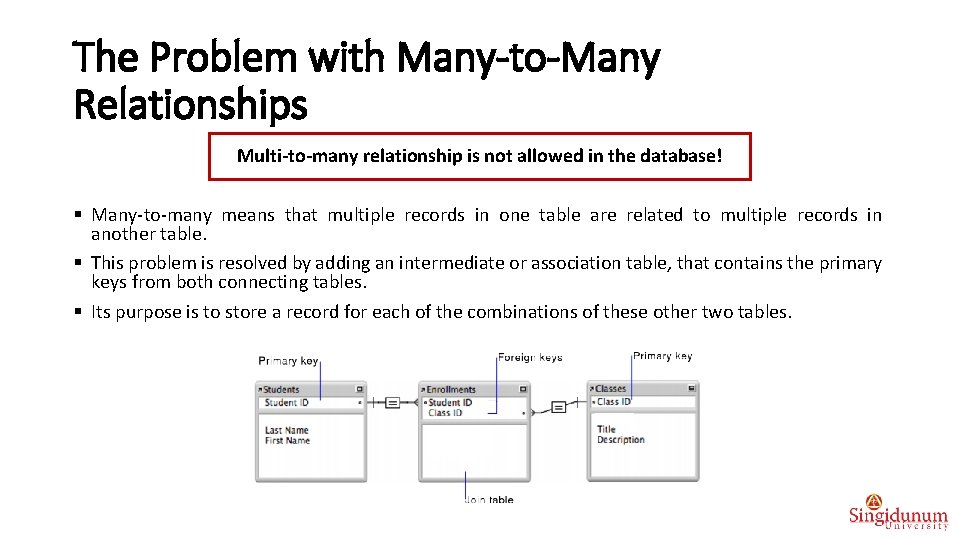
The Problem with Many-to-Many Relationships Multi-to-many relationship is not allowed in the database! § Many-to-many means that multiple records in one table are related to multiple records in another table. § This problem is resolved by adding an intermediate or association table, that contains the primary keys from both connecting tables. § Its purpose is to store a record for each of the combinations of these other two tables.
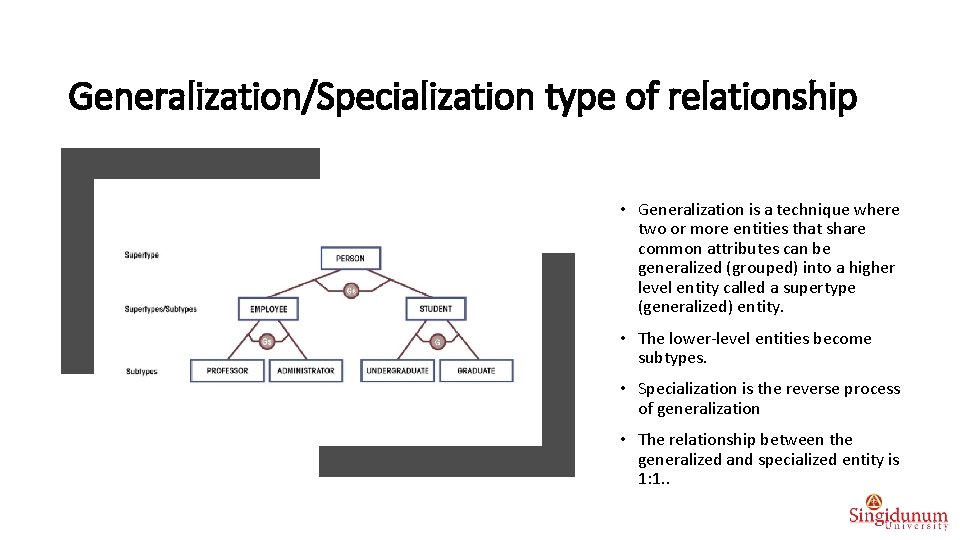
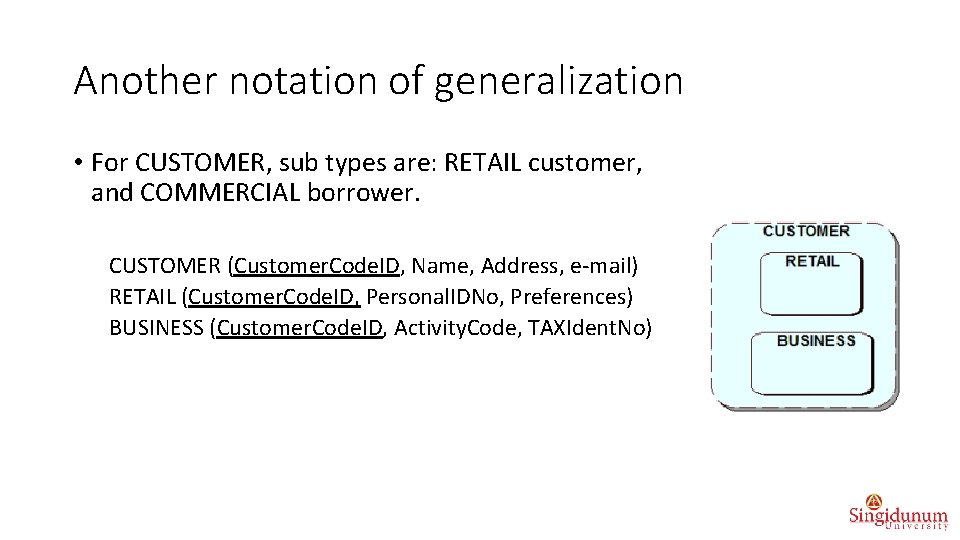
Generalization/Specialization type of relationship • Generalization is a technique where two or more entities that share common attributes can be generalized (grouped) into a higher level entity called a supertype (generalized) entity. • The lower-level entities become subtypes. • Specialization is the reverse process of generalization • The relationship between the generalized and specialized entity is 1: 1. .
Another notation of generalization • For CUSTOMER, sub types are: RETAIL customer, and COMMERCIAL borrower. CUSTOMER (Customer. Code. ID, Name, Address, e-mail) RETAIL (Customer. Code. ID, Personal. IDNo, Preferences) BUSINESS (Customer. Code. ID, Activity. Code, TAXIdent. No)
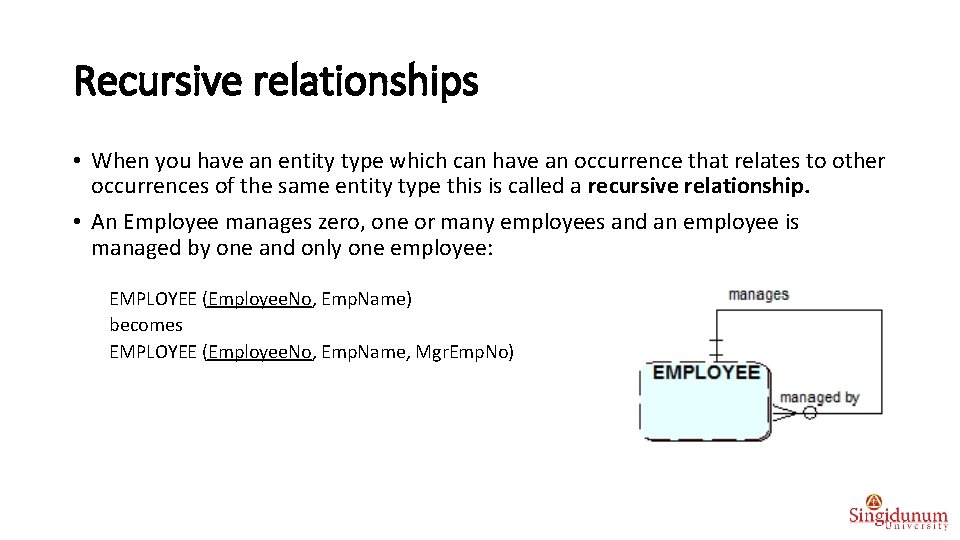
Recursive relationships • When you have an entity type which can have an occurrence that relates to other occurrences of the same entity type this is called a recursive relationship. • An Employee manages zero, one or many employees and an employee is managed by one and only one employee: EMPLOYEE (Employee. No, Emp. Name) becomes EMPLOYEE (Employee. No, Emp. Name, Mgr. Emp. No)
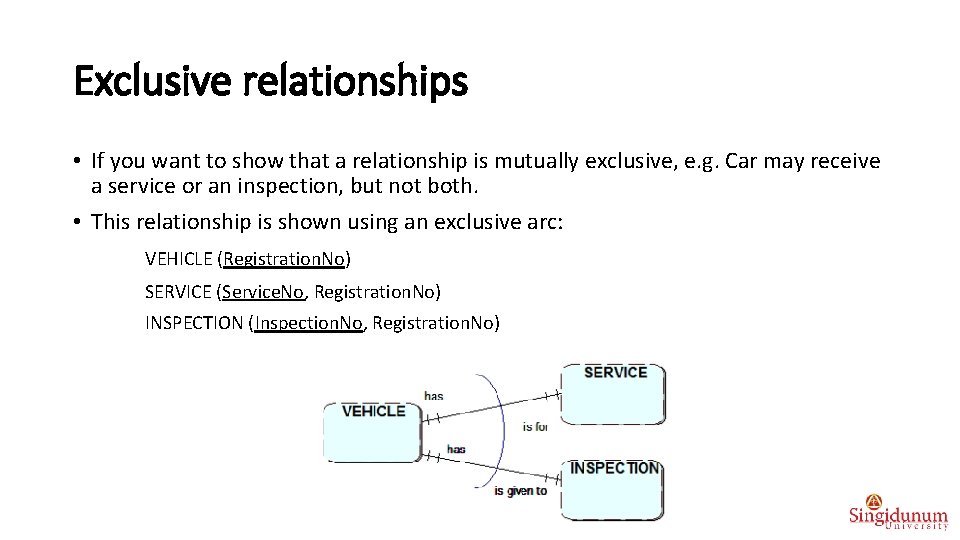
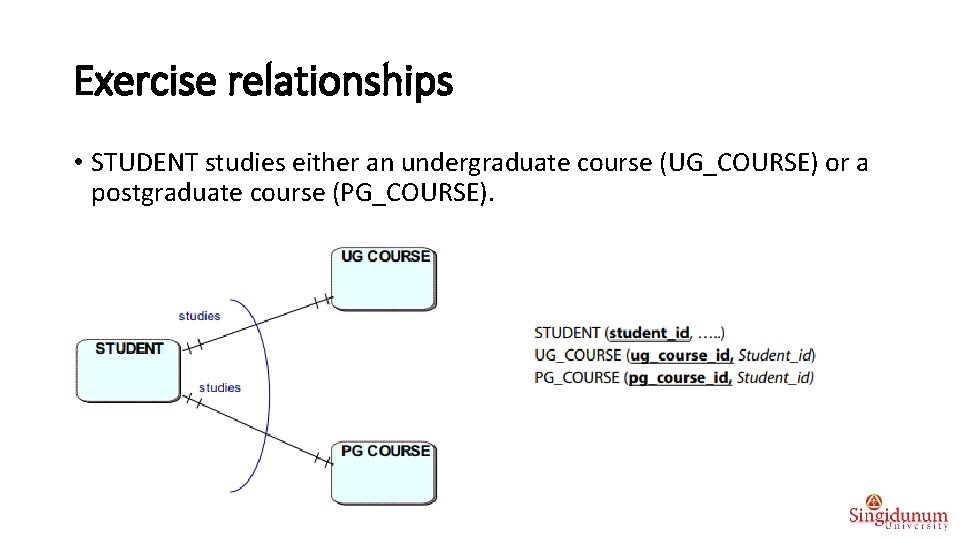
Exclusive relationships • If you want to show that a relationship is mutually exclusive, e. g. Car may receive a service or an inspection, but not both. • This relationship is shown using an exclusive arc: VEHICLE (Registration. No) SERVICE (Service. No, Registration. No) INSPECTION (Inspection. No, Registration. No)
Exercise relationships What type of relationship is between: § § § § § SUPPLIER, and PRODUCT EMPLOYEE, and DEPARTMENT CUSTOMER, CONTRACT, and CAR CUSTOMER, ORDER, EMPLOYEE CUSTOMER, CUSTOMER_COMPANY, and CUSTOMER_INDIVIDUAL PROFESSOR, and COURSE EXAM, COURSE, PROFESSOR, and STUDENT DOCUMENT, ORDER, and INVOICE FILM, ACTOR, GENRE, and DIRECTOR
Exercise relationships • STUDENT studies either an undergraduate course (UG_COURSE) or a postgraduate course (PG_COURSE).
Exercise data models Make a data model, i. e. specify attributes, keys, and relationships: PATIENT schedules APPOINTMENT with a DOCTOR performs TREATMENT PATIENT recives a PRESCRIPTION from a DOCTOR, that contains min 1, and max more DRUGS.
Exercise data models • CUSTOMER makes BOOKING for the CAR_SERVICE of his/her CAR. • CAR_ SERVICE includes TECHNICAL_INSPECTION, MAINTENANCE, and REPAIR • CAR_ SERVICE is done by TECHNICIAN.
Process of data modelling • Data model identifies the basic entities with its attributes, keys and relationships. • The steps of data modeling are: • Identify basic entities of the system • Identify attributes of the entities • Identify primary keys • Identify dependent entities (entities whose existence and identification depend on another entity) • Define relationships and its foreign keys • Do the normalization of the relational data model • Normalization is the technique for analyzing data in order to reduce and even eliminate data redundancy, and improve data integrity.
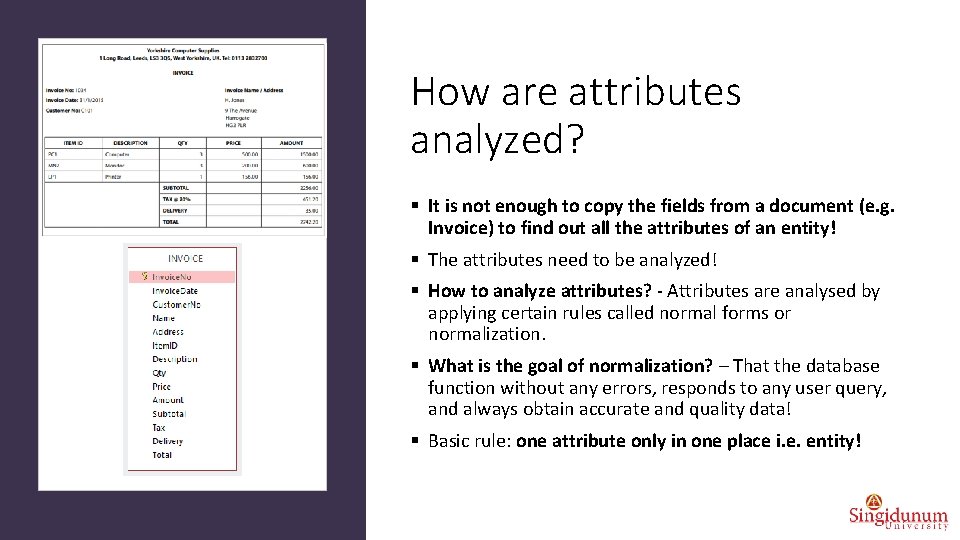
How are attributes analyzed? § It is not enough to copy the fields from a document (e. g. Invoice) to find out all the attributes of an entity! § The attributes need to be analyzed! § How to analyze attributes? - Attributes are analysed by applying certain rules called normal forms or normalization. § What is the goal of normalization? – That the database function without any errors, responds to any user query, and always obtain accurate and quality data! § Basic rule: one attribute only in one place i. e. entity!
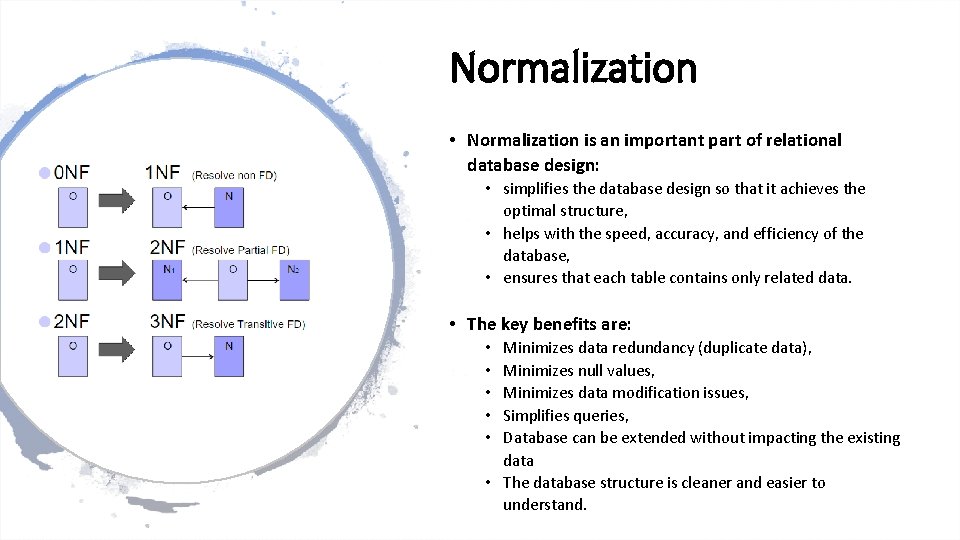
Normalization • Normalization is an important part of relational database design: • simplifies the database design so that it achieves the optimal structure, • helps with the speed, accuracy, and efficiency of the database, • ensures that each table contains only related data. • The key benefits are: Minimizes data redundancy (duplicate data), Minimizes null values, Minimizes data modification issues, Simplifies queries, Database can be extended without impacting the existing data • The database structure is cleaner and easier to understand. • • •
Normal forms § The three most common normal forms in the normalization process are: 1. The first normal form (1 NF) 2. The second normal form (2 NF) 3. The third normal form (3 NF)
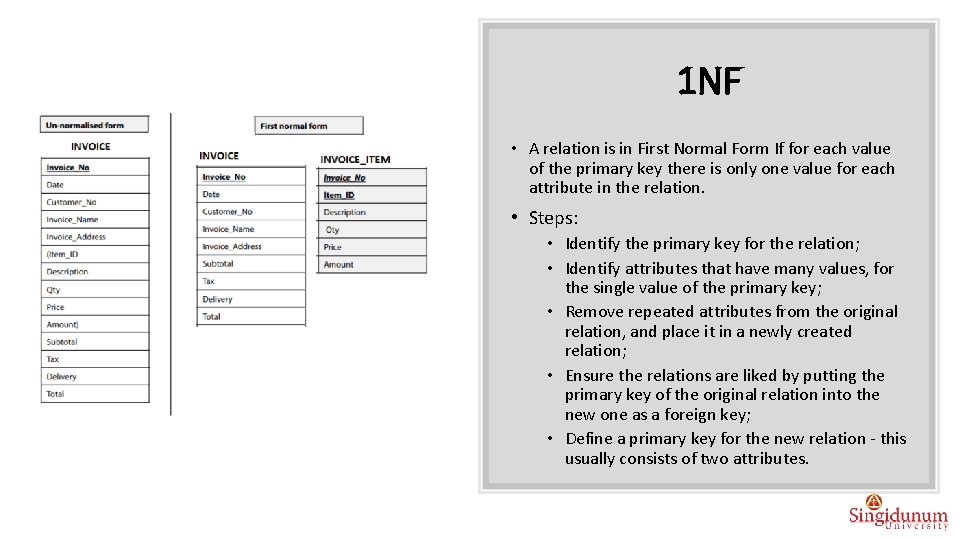
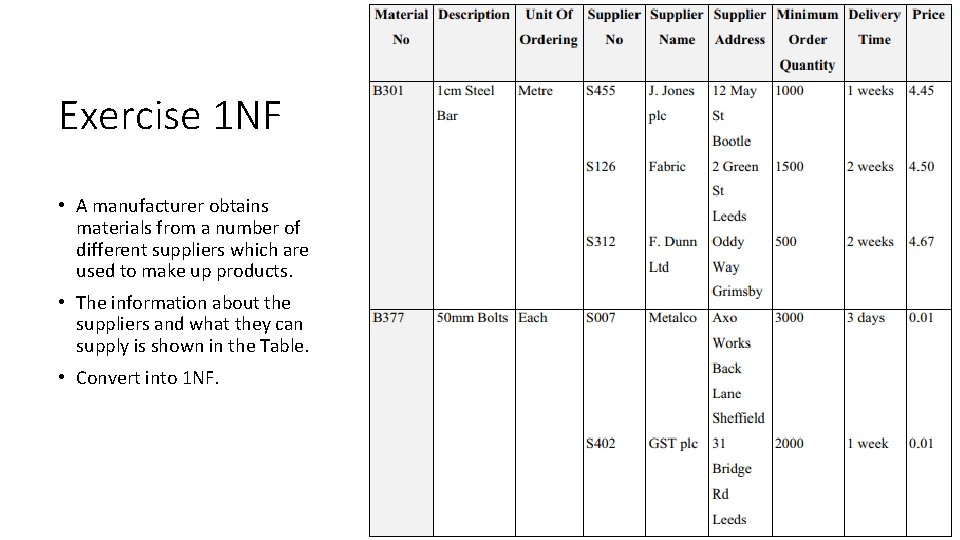
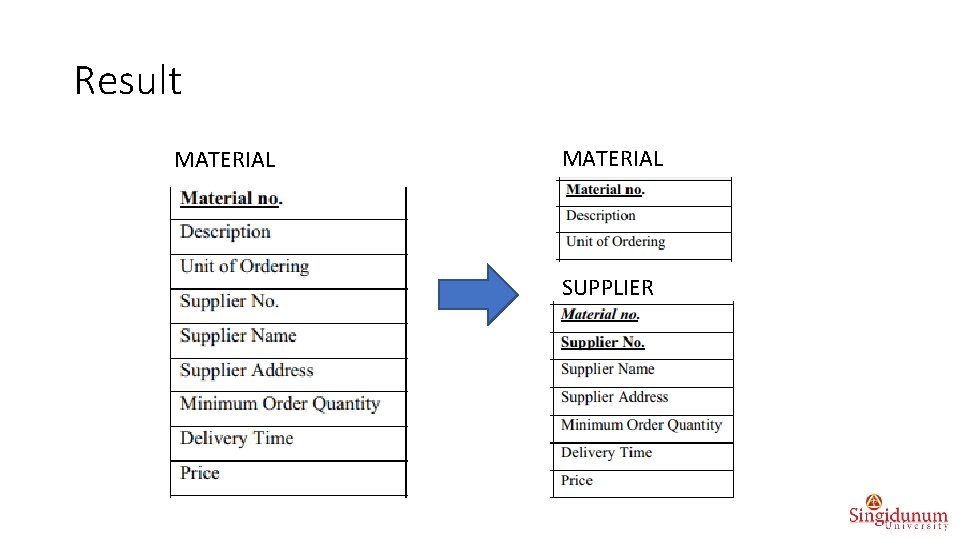
1 NF • A relation is in First Normal Form If for each value of the primary key there is only one value for each attribute in the relation. • Steps: • Identify the primary key for the relation; • Identify attributes that have many values, for the single value of the primary key; • Remove repeated attributes from the original relation, and place it in a newly created relation; • Ensure the relations are liked by putting the primary key of the original relation into the new one as a foreign key; • Define a primary key for the new relation - this usually consists of two attributes.
Exercise 1 NF • A manufacturer obtains materials from a number of different suppliers which are used to make up products. • The information about the suppliers and what they can supply is shown in the Table. • Convert into 1 NF.
Result MATERIAL SUPPLIER
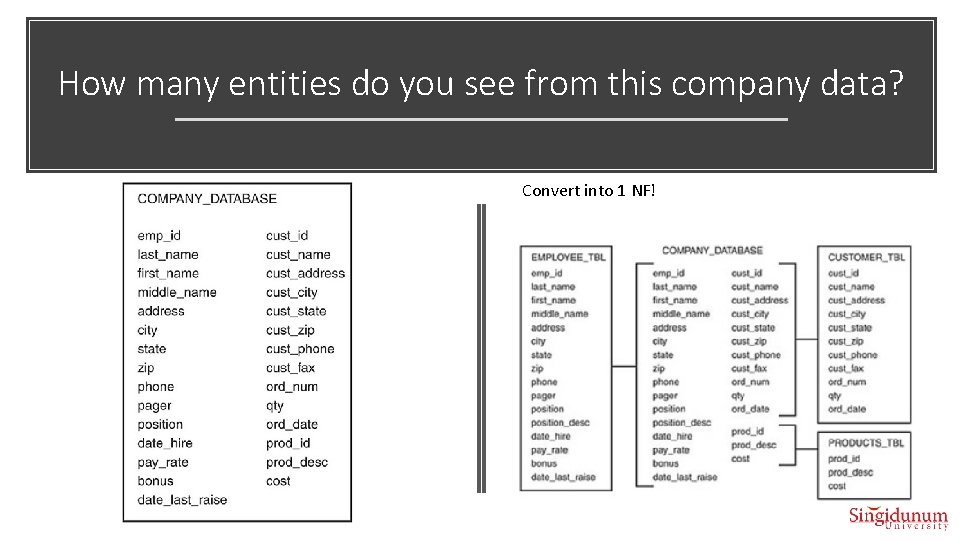
How many entities do you see from this company data? Convert into 1 NF!
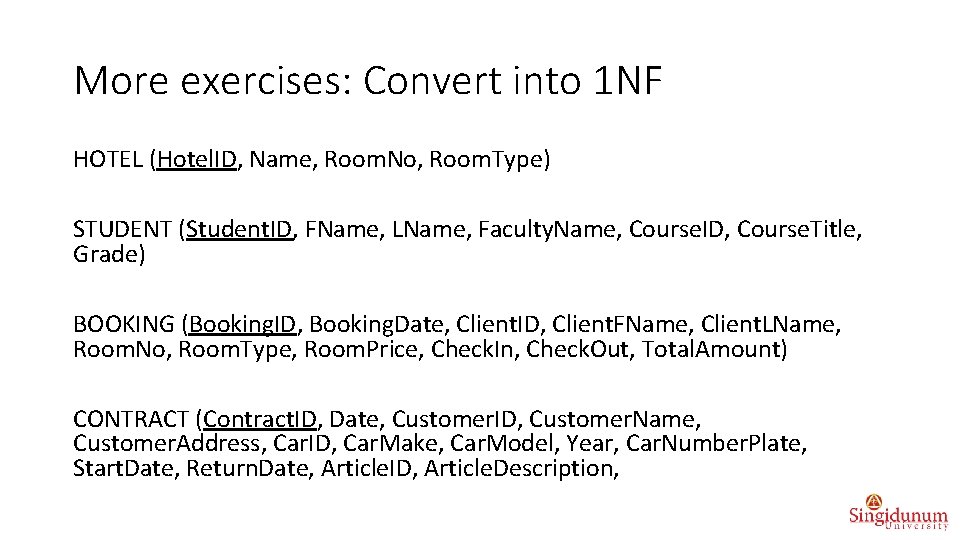
More exercises: Convert into 1 NF HOTEL (Hotel. ID, Name, Room. No, Room. Type) STUDENT (Student. ID, FName, LName, Faculty. Name, Course. ID, Course. Title, Grade) BOOKING (Booking. ID, Booking. Date, Client. ID, Client. FName, Client. LName, Room. No, Room. Type, Room. Price, Check. In, Check. Out, Total. Amount) CONTRACT (Contract. ID, Date, Customer. ID, Customer. Name, Customer. Address, Car. ID, Car. Make, Car. Model, Year, Car. Number. Plate, Start. Date, Return. Date, Article. ID, Article. Description,
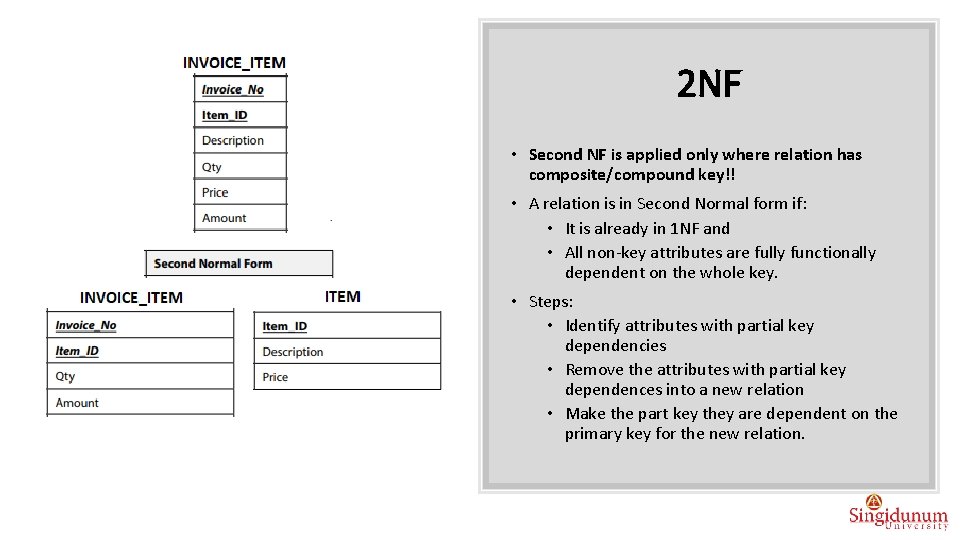
2 NF • Second NF is applied only where relation has composite/compound key!! • A relation is in Second Normal form if: • It is already in 1 NF and • All non-key attributes are fully functionally dependent on the whole key. • Steps: • Identify attributes with partial key dependencies • Remove the attributes with partial key dependences into a new relation • Make the part key they are dependent on the primary key for the new relation.
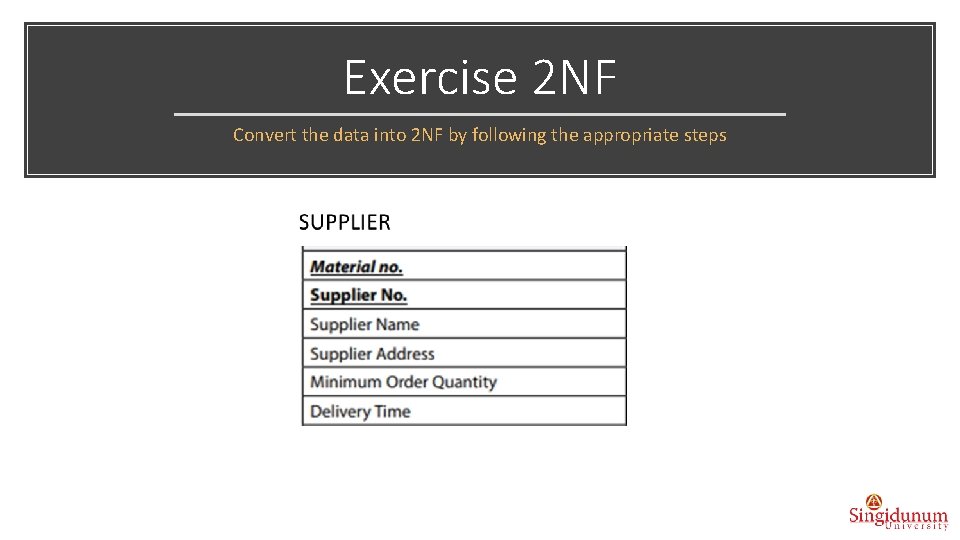
Exercise 2 NF Convert the data into 2 NF by following the appropriate steps
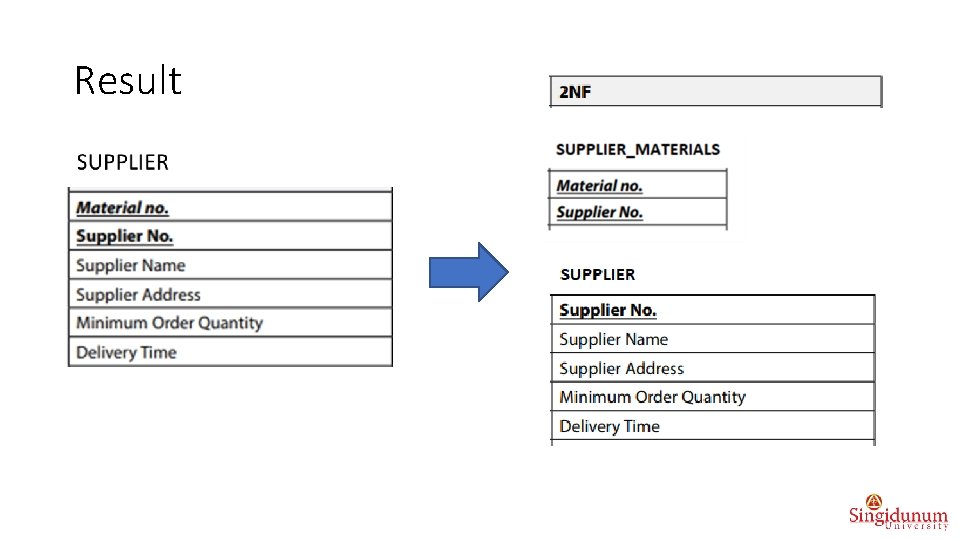
Result
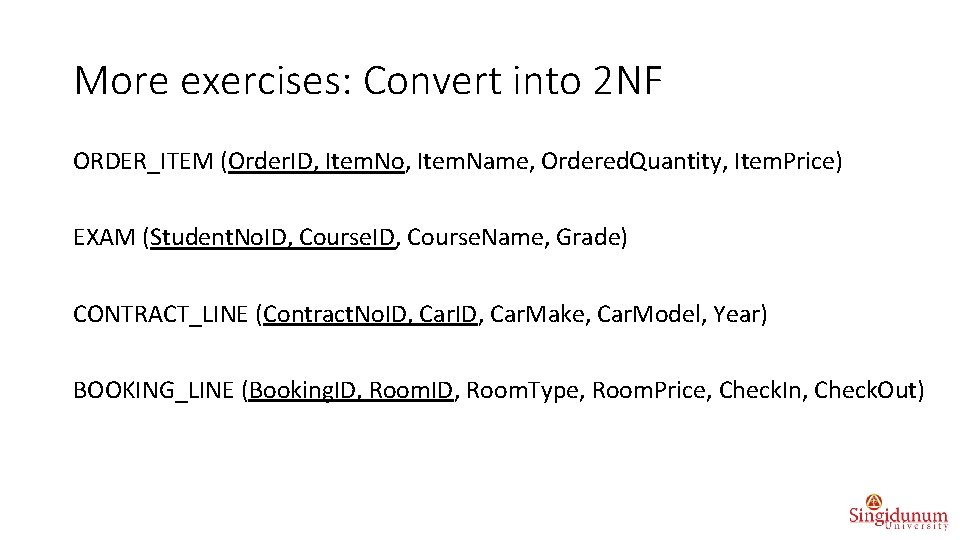
More exercises: Convert into 2 NF ORDER_ITEM (Order. ID, Item. No, Item. Name, Ordered. Quantity, Item. Price) EXAM (Student. No. ID, Course. Name, Grade) CONTRACT_LINE (Contract. No. ID, Car. Make, Car. Model, Year) BOOKING_LINE (Booking. ID, Room. Type, Room. Price, Check. In, Check. Out)
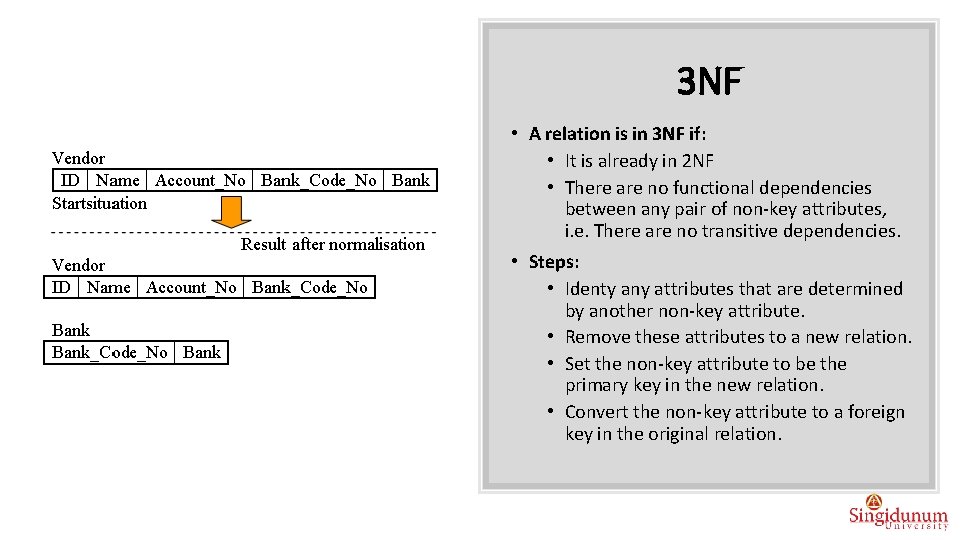
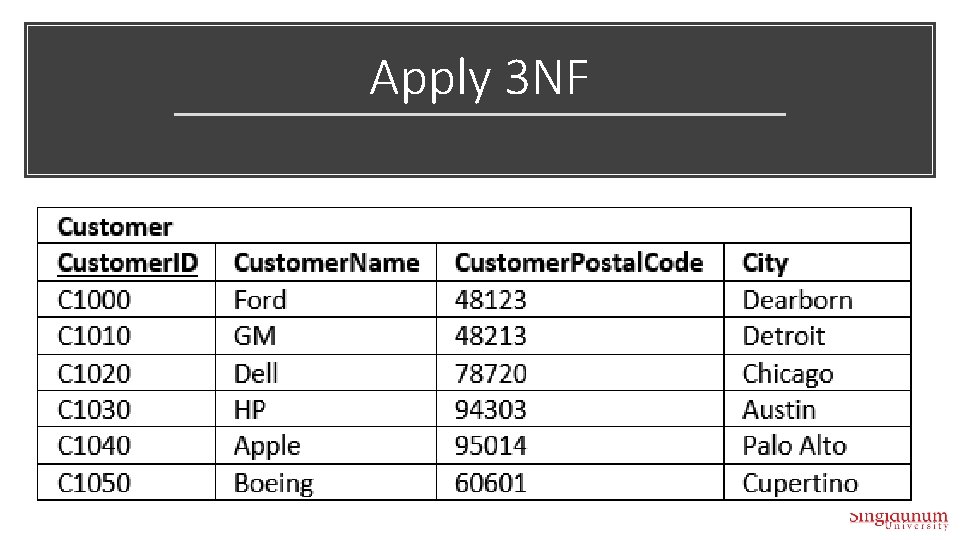
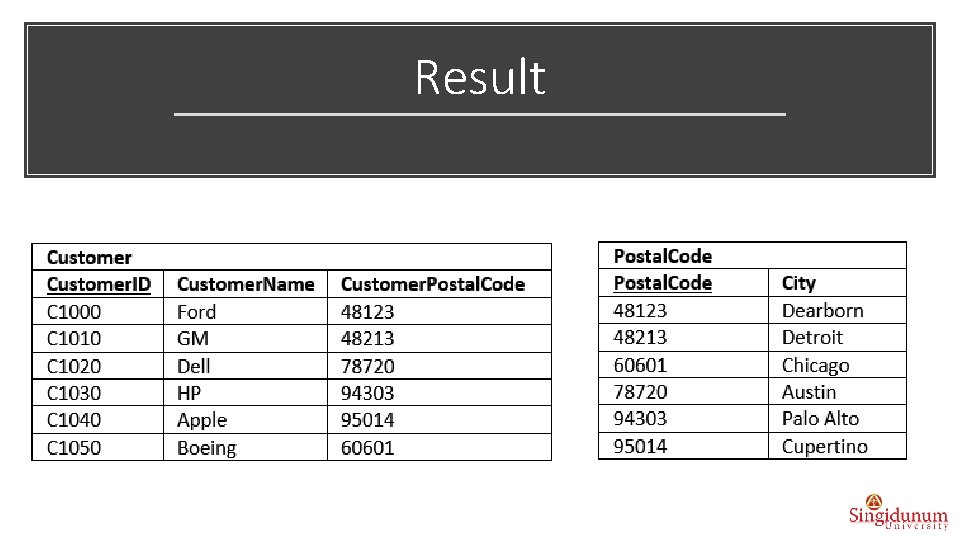
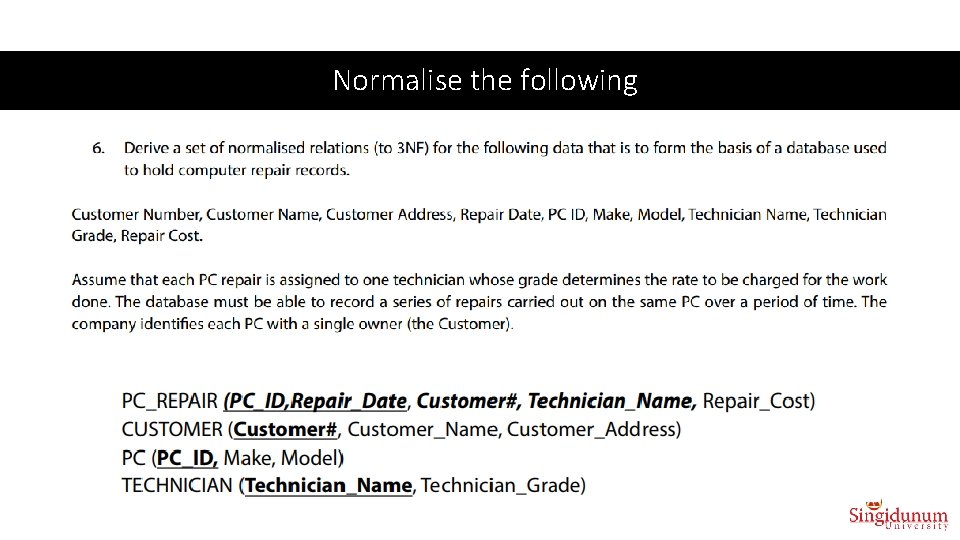
3 NF • A relation is in 3 NF if: • It is already in 2 NF • There are no functional dependencies between any pair of non-key attributes, i. e. There are no transitive dependencies. • Steps: • Identy any attributes that are determined by another non-key attribute. • Remove these attributes to a new relation. • Set the non-key attribute to be the primary key in the new relation. • Convert the non-key attribute to a foreign key in the original relation.
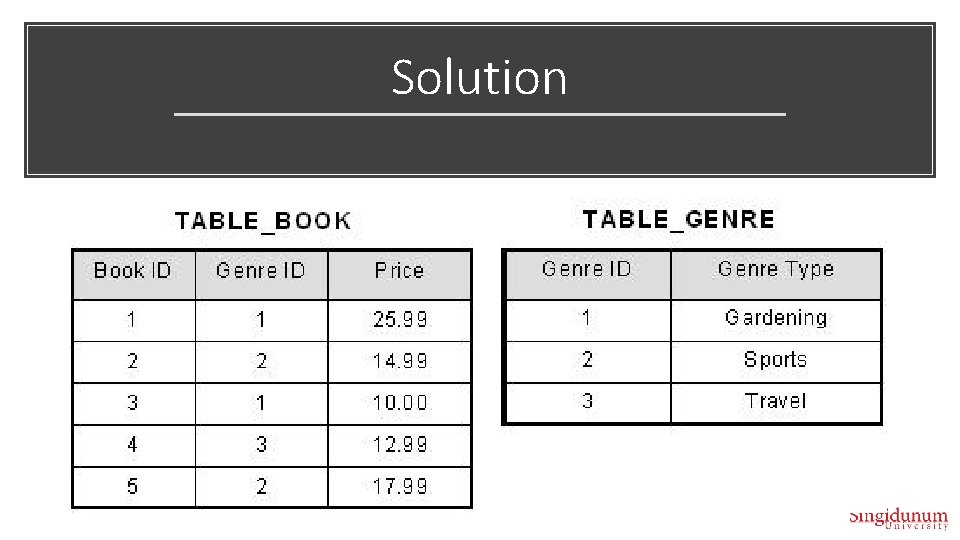
Exercise 3 NF
Solution
Apply 3 NF
Result
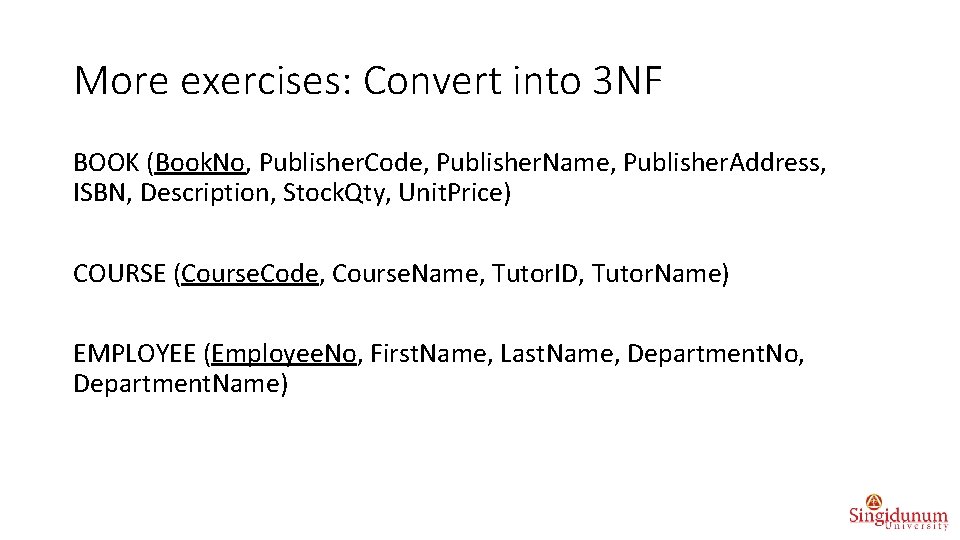
More exercises: Convert into 3 NF BOOK (Book. No, Publisher. Code, Publisher. Name, Publisher. Address, ISBN, Description, Stock. Qty, Unit. Price) COURSE (Course. Code, Course. Name, Tutor. ID, Tutor. Name) EMPLOYEE (Employee. No, First. Name, Last. Name, Department. No, Department. Name)
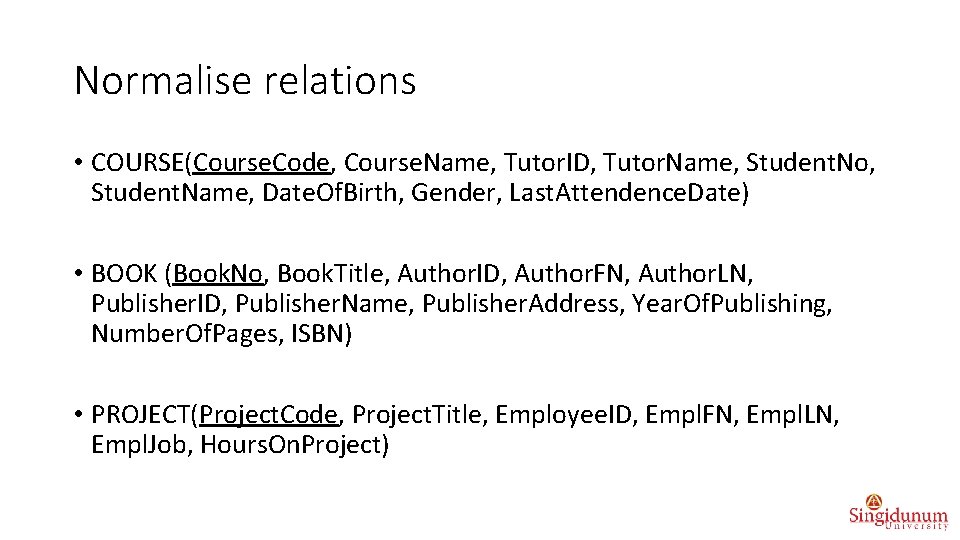
Normalise relations • COURSE(Course. Code, Course. Name, Tutor. ID, Tutor. Name, Student. No, Student. Name, Date. Of. Birth, Gender, Last. Attendence. Date) • BOOK (Book. No, Book. Title, Author. ID, Author. FN, Author. LN, Publisher. ID, Publisher. Name, Publisher. Address, Year. Of. Publishing, Number. Of. Pages, ISBN) • PROJECT(Project. Code, Project. Title, Employee. ID, Empl. FN, Empl. LN, Empl. Job, Hours. On. Project)
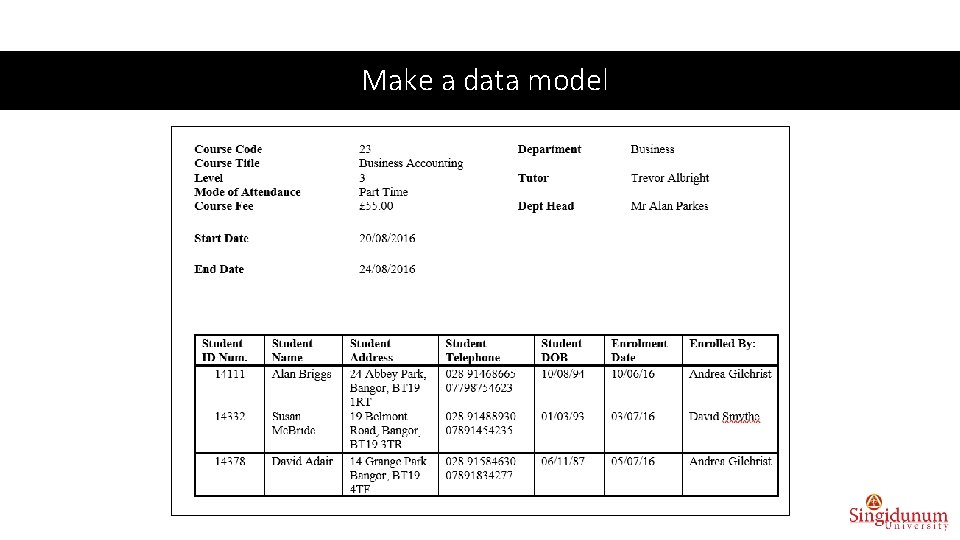
Make a data model
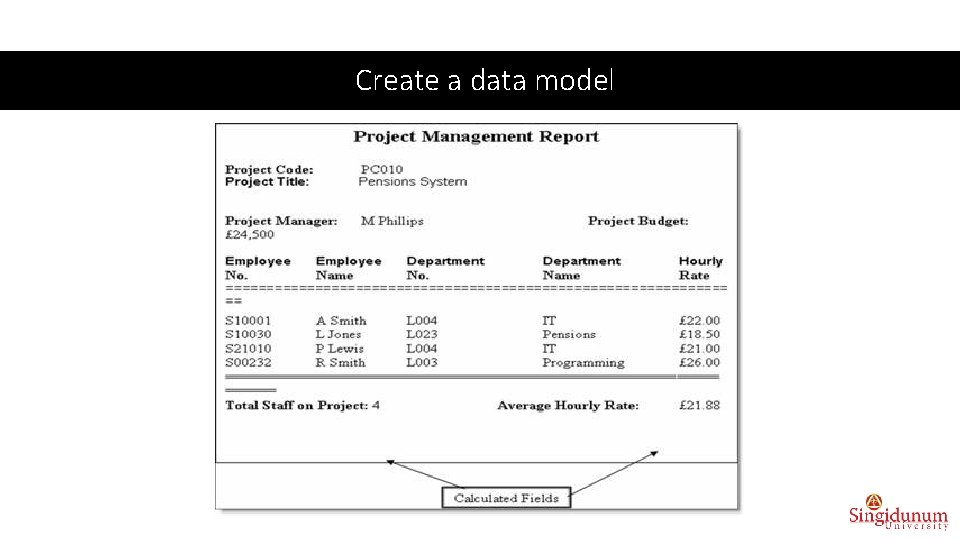
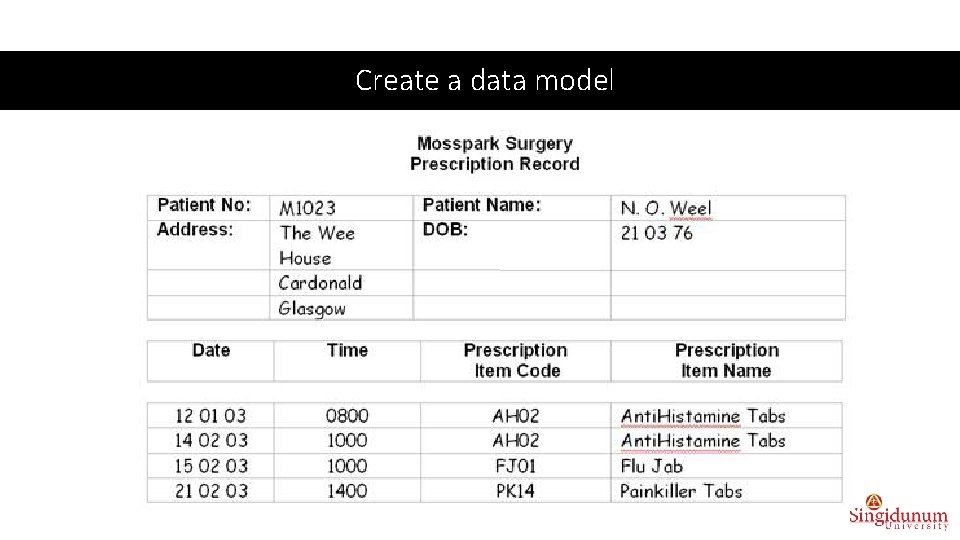
Create a data model
Create a data model
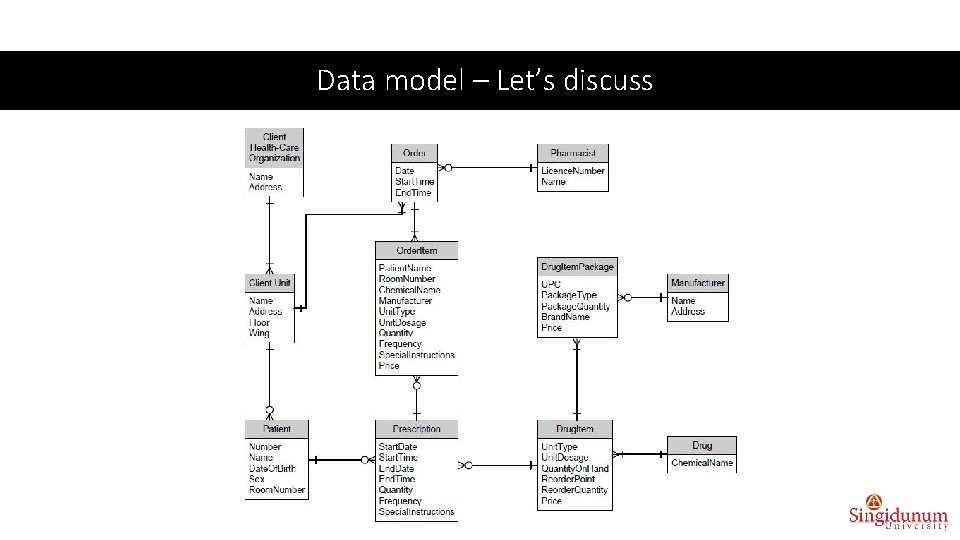
Data model – Let’s discuss
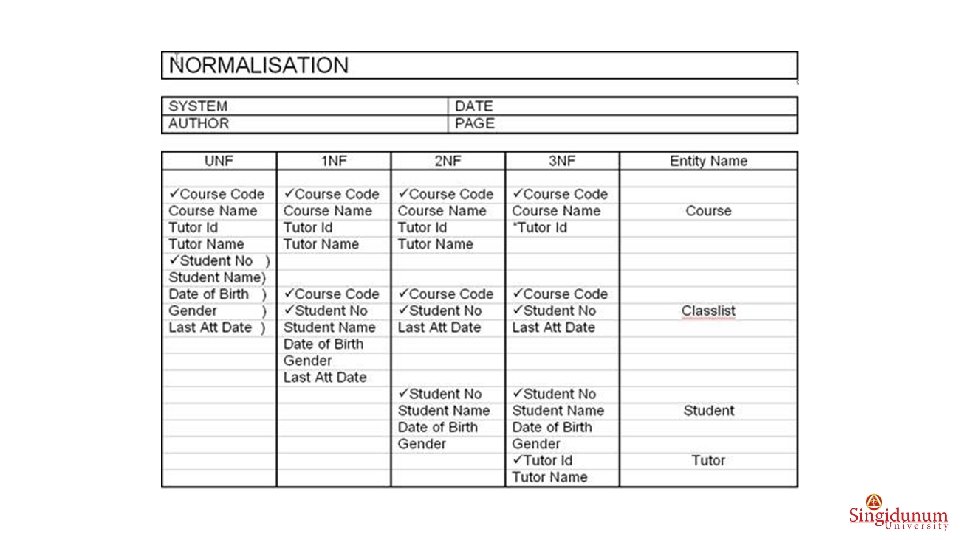
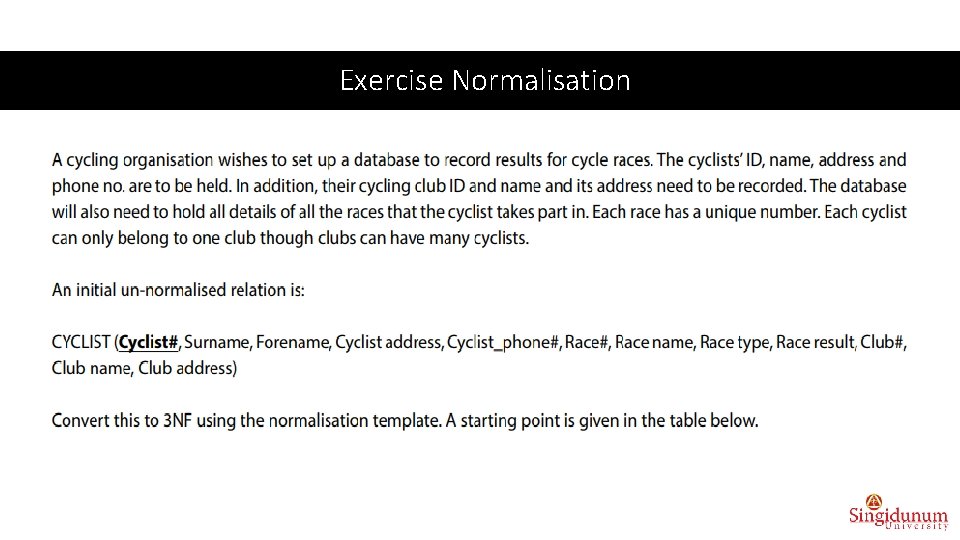
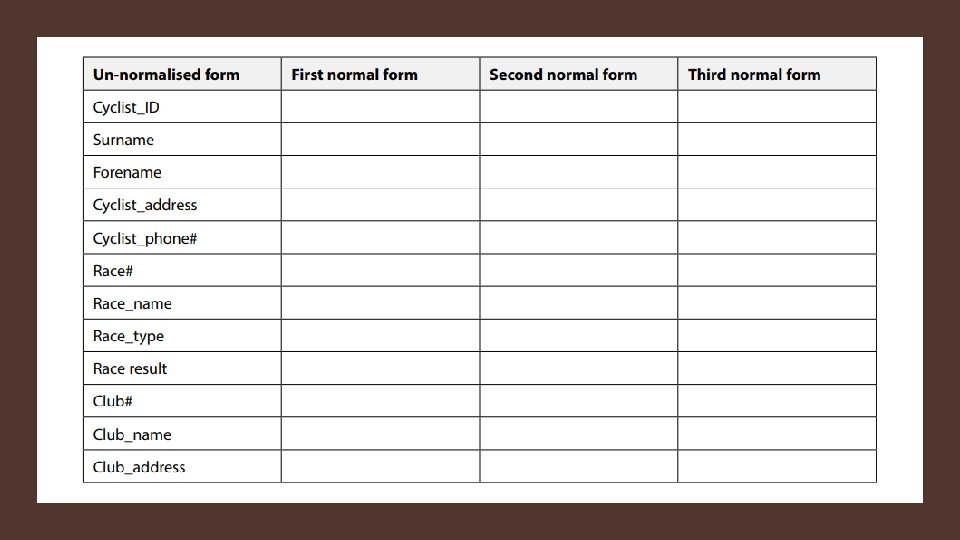
Exercise Normalisation
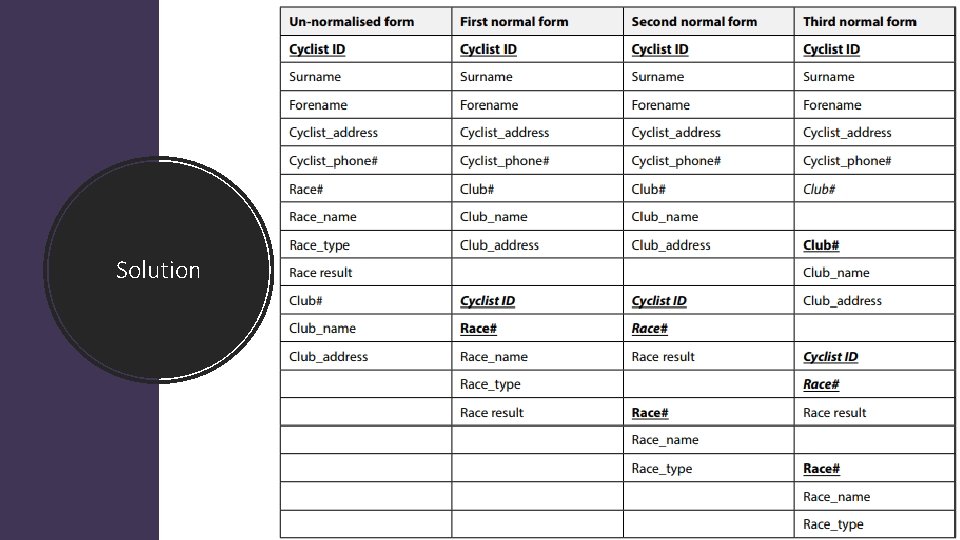
Solution
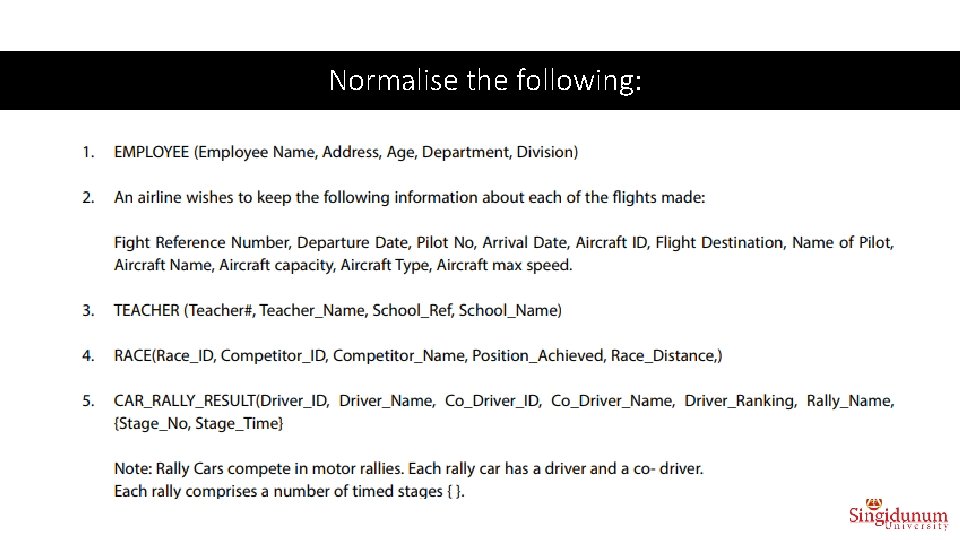
Normalise the following:
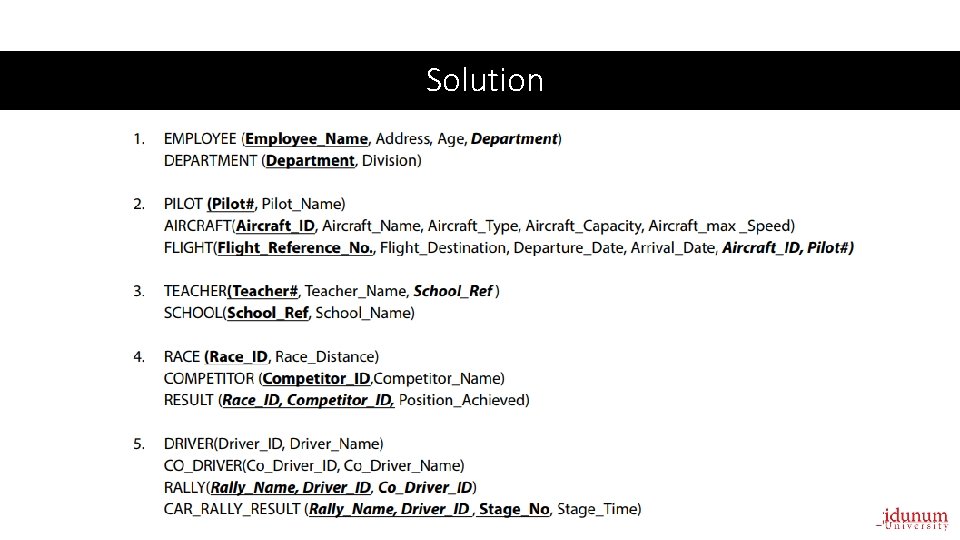
Solution
Normalise the following
• Until now you did data logical model through the following steps: Step 1: Requirements analysis Step 2: Logical design Step 3: Normalization What is the next step? • The next steps are to transform logical model into physical, i. e. to develop database using some DBMS (Data. Base Management System) tool: Step 4: Transform data logical model into SQL tables Step 5: Database development (physical design, queries, forms, reports. . . ) Step 7: Deployment Step 8: Maintenance
Online book Database Design and Implementation A practical Introduction using Oracle SQL by Howard Gould © 2015 Howard Gould & bookboon. com ISBN 978 -87 -403 -1046 -7