
Product Overview OnSite Paging System Basic Structure Input

Product Overview
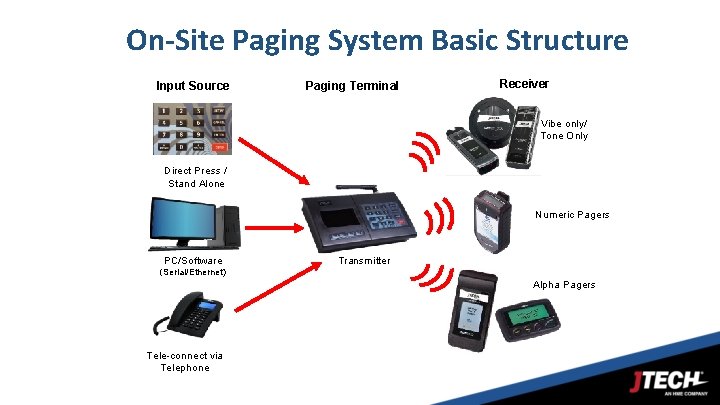
On-Site Paging System Basic Structure Input Source Receiver Paging Terminal Vibe only/ Tone Only Direct Press / Stand Alone Numeric Pagers PC/Software Transmitter (Serial/Ethernet) Alpha Pagers Tele-connect via Telephone 2
How Our Systems Work Our paging systems are made up of three basic components: – Transmitter (Base Station) • Transmitters send a message to a pager – Entry is via a number keypad; computer keyboard; simple button press – Pagers (Receivers) • Pagers receive the message and alert. – Receivers come in many form factors – The main Message types are: » Tone / flash / vibrate only , Numeric, Alpha – Charger Kit (Charger with Power Supplies) • Most pagers are rechargeable and need a place to charge – Each system has its own charger form factor to match the pager. 3

Pagers (Receivers) The Components Standard Functions – – – IQ PAGER Flash, Vibe, Tone & Voice Rechargeable Ni. MH Batteries Smart Charging Battery life of 2 -4 years User replaceable battery packs Out-of-Range Alert function COASTER PAGER BATTERY OPERATED ALPHA PAGER STAFF PAGER COMMPASS PAGER SMARTCALL IQ PAGER RUGGED PAGER
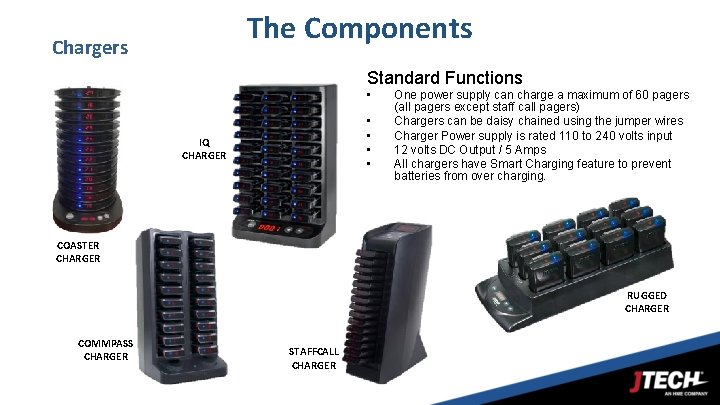
The Components Chargers Standard Functions • • • IQ CHARGER One power supply can charge a maximum of 60 pagers (all pagers except staff call pagers) Chargers can be daisy chained using the jumper wires Charger Power supply is rated 110 to 240 volts input 12 volts DC Output / 5 Amps All chargers have Smart Charging feature to prevent batteries from over charging. COASTER CHARGER RUGGED CHARGER COMMPASS CHARGER STAFFCALL CHARGER
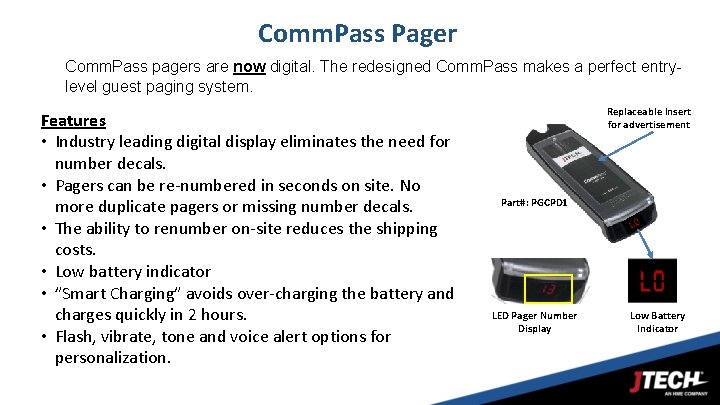
Comm. Pass Pager Comm. Pass pagers are now digital. The redesigned Comm. Pass makes a perfect entrylevel guest paging system. Features • Industry leading digital display eliminates the need for number decals. • Pagers can be re-numbered in seconds on site. No more duplicate pagers or missing number decals. • The ability to renumber on-site reduces the shipping costs. • Low battery indicator • ”Smart Charging” avoids over-charging the battery and charges quickly in 2 hours. • Flash, vibrate, tone and voice alert options for personalization. Replaceable Insert for advertisement Part#: PGCPD 1 LED Pager Number Display Low Battery Indicator
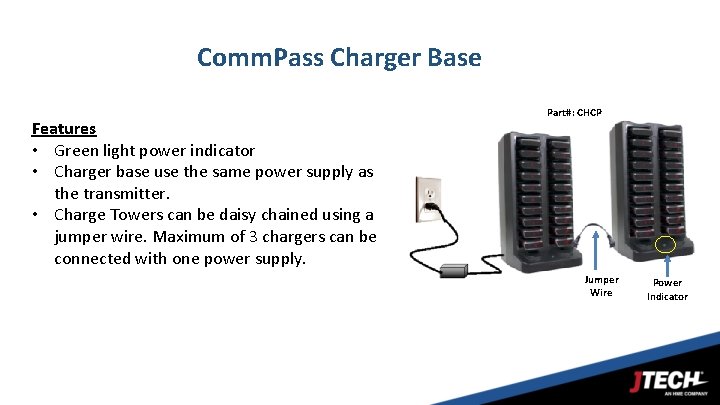
Comm. Pass Charger Base Features • Green light power indicator • Charger base use the same power supply as the transmitter. • Charge Towers can be daisy chained using a jumper wire. Maximum of 3 chargers can be connected with one power supply. Part#: CHCP Jumper Wire Power Indicator
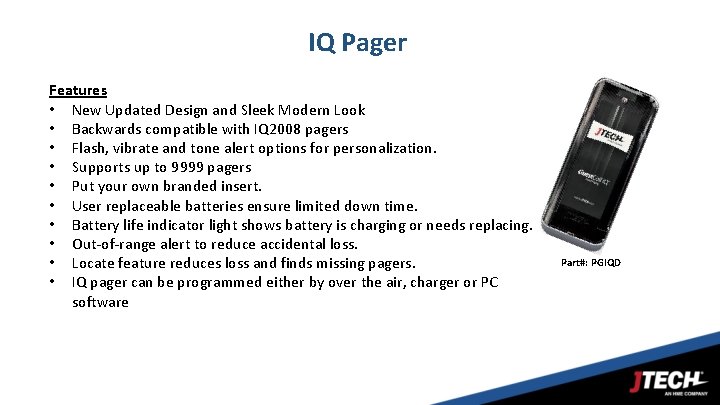
IQ Pager Features • New Updated Design and Sleek Modern Look • Backwards compatible with IQ 2008 pagers • Flash, vibrate and tone alert options for personalization. • Supports up to 9999 pagers • Put your own branded insert. • User replaceable batteries ensure limited down time. • Battery life indicator light shows battery is charging or needs replacing. • Out-of-range alert to reduce accidental loss. • Locate feature reduces loss and finds missing pagers. • IQ pager can be programmed either by over the air, charger or PC software Part#: PGIQD
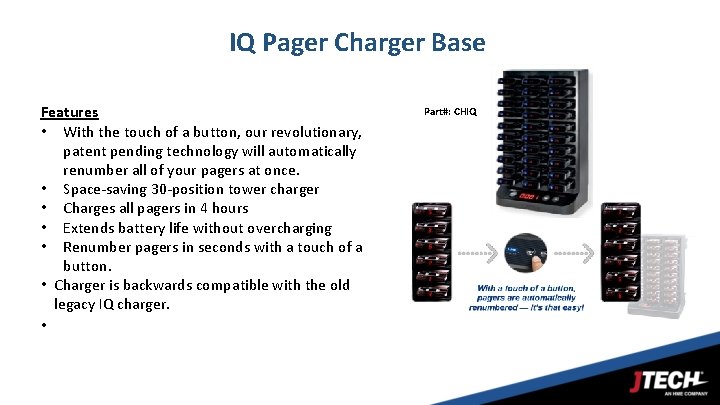
IQ Pager Charger Base Features • With the touch of a button, our revolutionary, patent pending technology will automatically renumber all of your pagers at once. • Space-saving 30 -position tower charger • Charges all pagers in 4 hours • Extends battery life without overcharging • Renumber pagers in seconds with a touch of a button. • Charger is backwards compatible with the old legacy IQ charger. • Part#: CHIQ
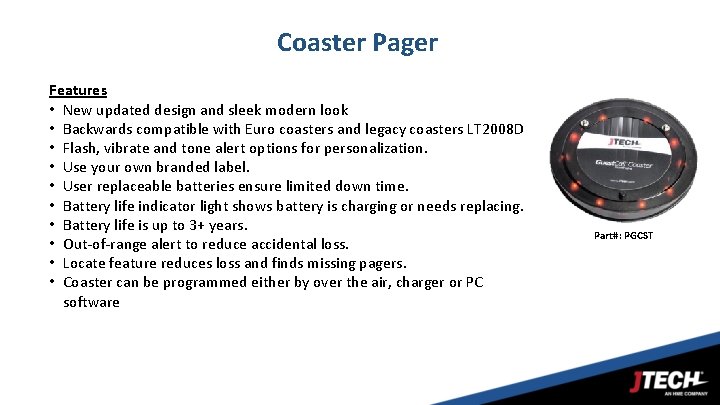
Coaster Pager Features • New updated design and sleek modern look • Backwards compatible with Euro coasters and legacy coasters LT 2008 D • Flash, vibrate and tone alert options for personalization. • Use your own branded label. • User replaceable batteries ensure limited down time. • Battery life indicator light shows battery is charging or needs replacing. • Battery life is up to 3+ years. • Out-of-range alert to reduce accidental loss. • Locate feature reduces loss and finds missing pagers. • Coaster can be programmed either by over the air, charger or PC software Part#: PGCST
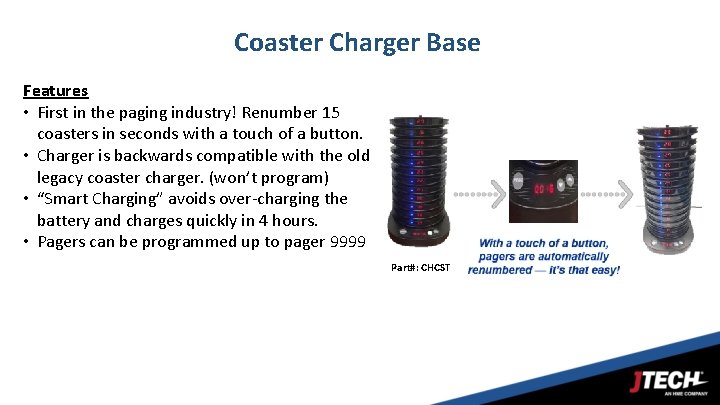
Coaster Charger Base Features • First in the paging industry! Renumber 15 coasters in seconds with a touch of a button. • Charger is backwards compatible with the old legacy coaster charger. (won’t program) • “Smart Charging” avoids over-charging the battery and charges quickly in 4 hours. • Pagers can be programmed up to pager 9999 Part#: CHCST

Rugged Pager Features • New updated design and sleek modern look • Backwards compatible with legacy JTECH rugged and Server. Pass pagers • Industry leading digital display eliminates the need for number decals. • Pagers can be re-numbered in seconds on site. No more duplicate pagers or missing number decals. • Flash, vibrate and tone alert options for personalization. • Battery life indicator light shows battery is charging or needs replacing. • Battery life is up to 3+ years. • Out-of-range alert to reduce accidental loss. • Locate feature reduces loss and finds missing pagers. • Pager can be programmed either by over the air, charger or PC software • 2 clip options Digital Pager Display Part#: • PGRGDM (w/ metal clip) • PGRGDS (w/ Spring Loaded Clip) User Replaceable Clip Metal Clip Spring Loaded
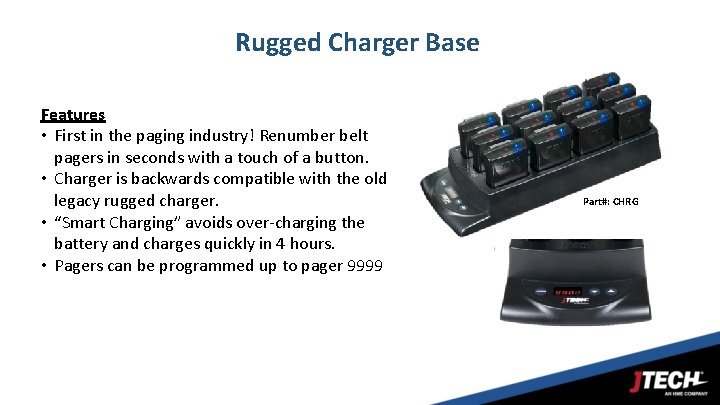
Rugged Charger Base Features • First in the paging industry! Renumber belt pagers in seconds with a touch of a button. • Charger is backwards compatible with the old legacy rugged charger. • “Smart Charging” avoids over-charging the battery and charges quickly in 4 hours. • Pagers can be programmed up to pager 9999 Part#: CHRG
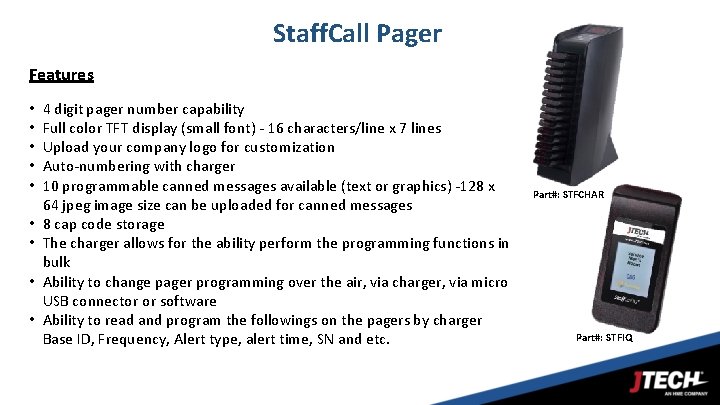
Staff. Call Pager Features • • • 4 digit pager number capability Full color TFT display (small font) - 16 characters/line x 7 lines Upload your company logo for customization Auto-numbering with charger 10 programmable canned messages available (text or graphics) -128 x 64 jpeg image size can be uploaded for canned messages 8 cap code storage The charger allows for the ability perform the programming functions in bulk Ability to change pager programming over the air, via charger, via micro USB connector or software Ability to read and program the followings on the pagers by charger Base ID, Frequency, Alert type, alert time, SN and etc. Part#: STFCHAR Part#: STFIQ
Pager Programming Three ways to program a JTECH pager 1. Using the PC programming software § There are two new software versions ü Core Programming Software ü IQ Alpha Programming Software 2. Using the charger (except for Comm. Pass pager) 3. Over the air programming
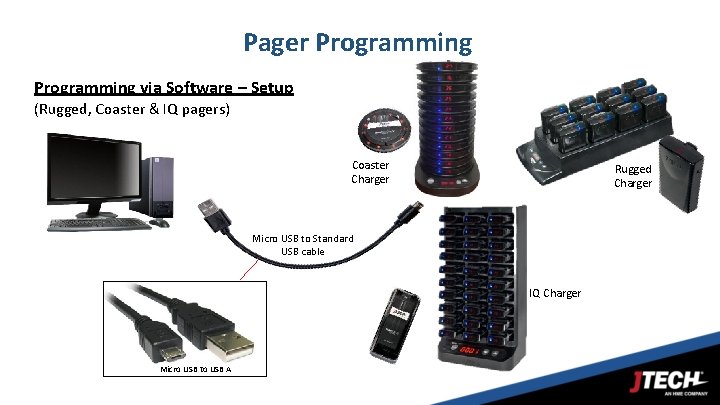
Pager Programming via Software – Setup (Rugged, Coaster & IQ pagers) Coaster Charger Rugged Charger Micro USB to Standard USB cable IQ Charger Micro USB to USB A
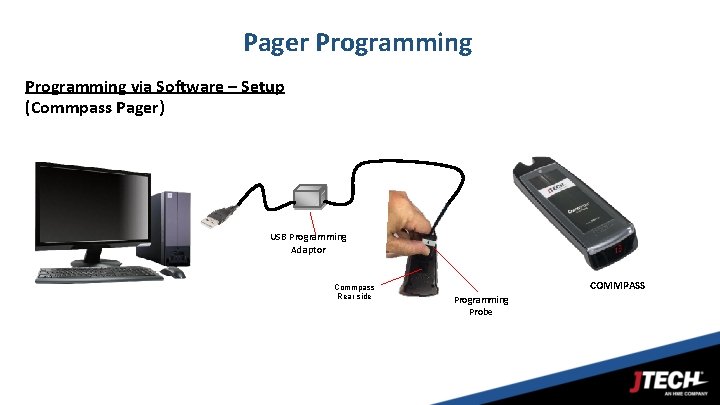
Pager Programming via Software – Setup (Commpass Pager) USB Programming Adaptor Commpass Rear side COMMPASS Programming Probe
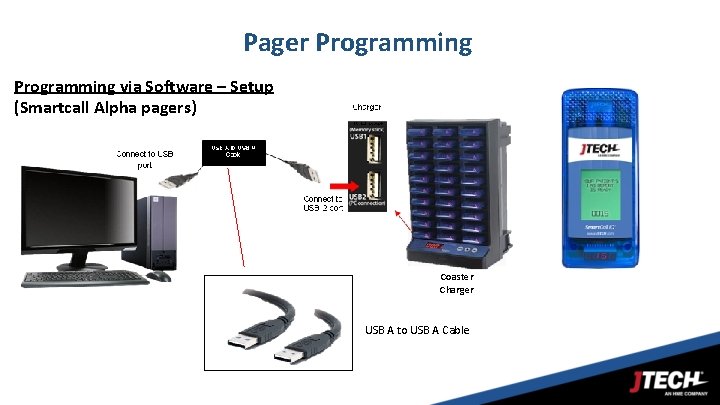
Pager Programming via Software – Setup (Smartcall Alpha pagers) Coaster Charger USB A to USB A Cable
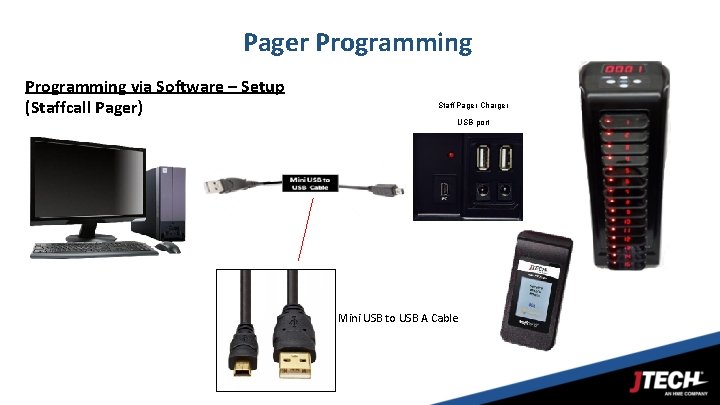
Pager Programming via Software – Setup (Staffcall Pager) Staff Pager Charger USB port Mini USB to USB A Cable
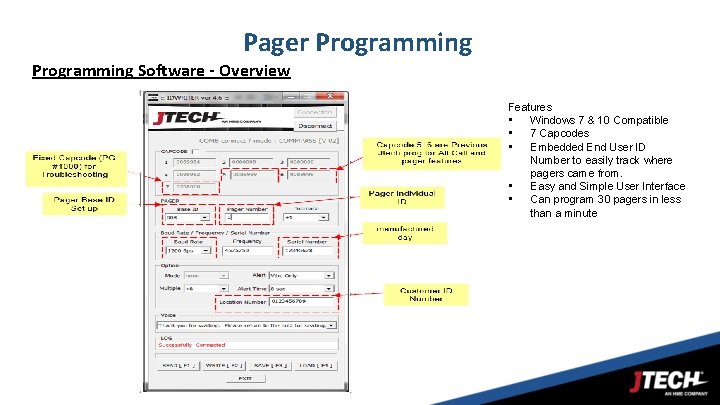
Pager Programming Software - Overview Features • Windows 7 & 10 Compatible • 7 Capcodes • Embedded End User ID Number to easily track where pagers came from. • Easy and Simple User Interface • Can program 30 pagers in less than a minute
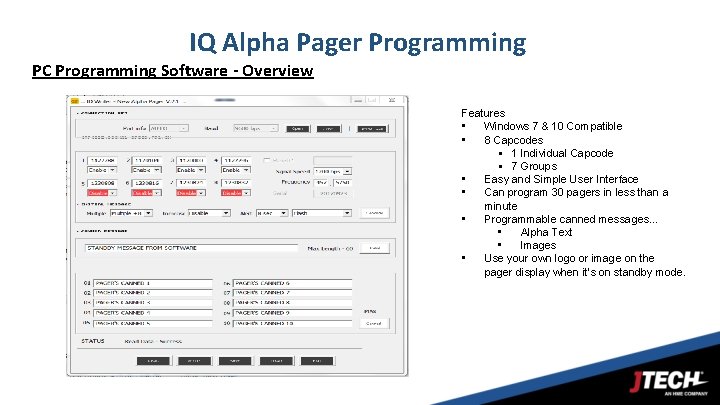
IQ Alpha Pager Programming PC Programming Software - Overview Features • Windows 7 & 10 Compatible • 8 Capcodes § 1 Individual Capcode § 7 Groups • Easy and Simple User Interface • Can program 30 pagers in less than a minute • Programmable canned messages… • Alpha Text • Images • Use your own logo or image on the pager display when it’s on standby mode.
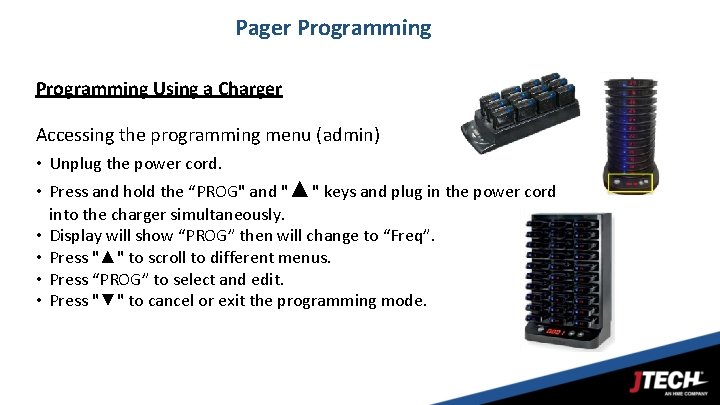
Pager Programming Using a Charger Accessing the programming menu (admin) • Unplug the power cord. • Press and hold the “PROG" and "▲" keys and plug in the power cord into the charger simultaneously. • Display will show “PROG” then will change to “Freq”. • Press "▲" to scroll to different menus. • Press “PROG” to select and edit. • Press "▼" to cancel or exit the programming mode.
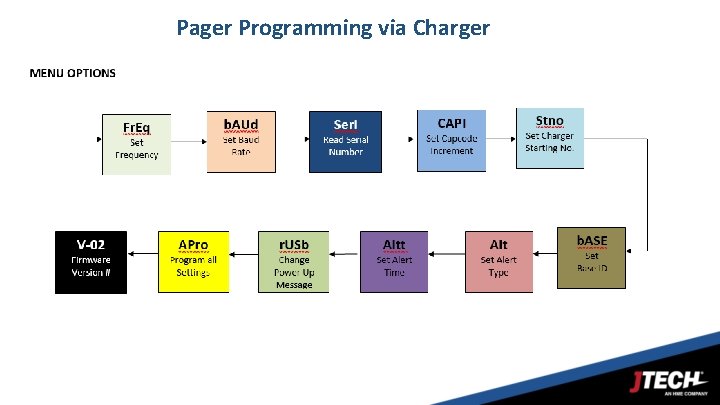
Pager Programming via Charger
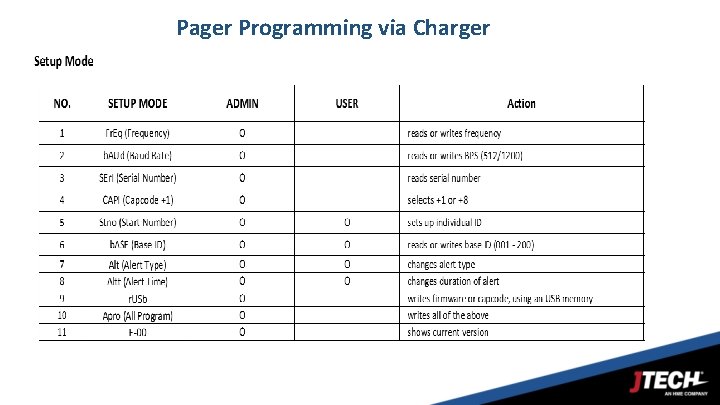
Pager Programming via Charger
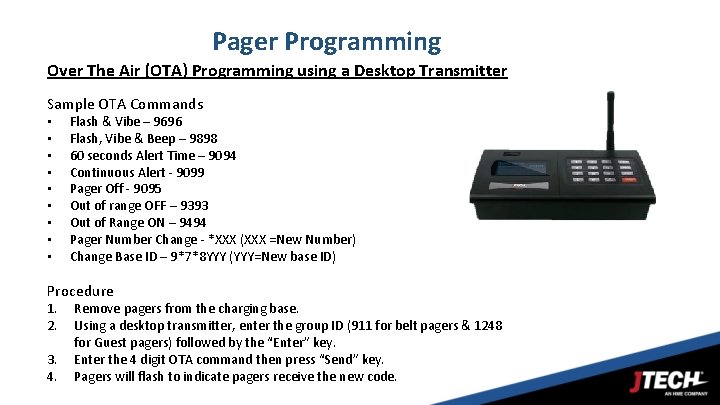
Pager Programming Over The Air (OTA) Programming using a Desktop Transmitter Sample OTA Commands • • • Flash & Vibe – 9696 Flash, Vibe & Beep – 9898 60 seconds Alert Time – 9094 Continuous Alert - 9099 Pager Off - 9095 Out of range OFF – 9393 Out of Range ON – 9494 Pager Number Change - *XXX (XXX =New Number) Change Base ID – 9*7*8 YYY (YYY=New base ID) Procedure 1. 2. 3. 4. Remove pagers from the charging base. Using a desktop transmitter, enter the group ID (911 for belt pagers & 1248 for Guest pagers) followed by the “Enter” key. Enter the 4 digit OTA command then press “Send” key. Pagers will flash to indicate pagers receive the new code.
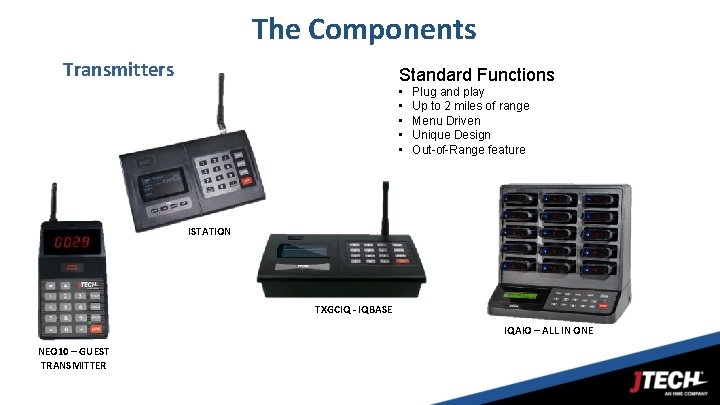
The Components Transmitters Standard Functions • • • Plug and play Up to 2 miles of range Menu Driven Unique Design Out-of-Range feature ISTATION TXGCIQ - IQBASE IQAIO – ALL IN ONE NEO 10 – GUEST TRANSMITTER 26
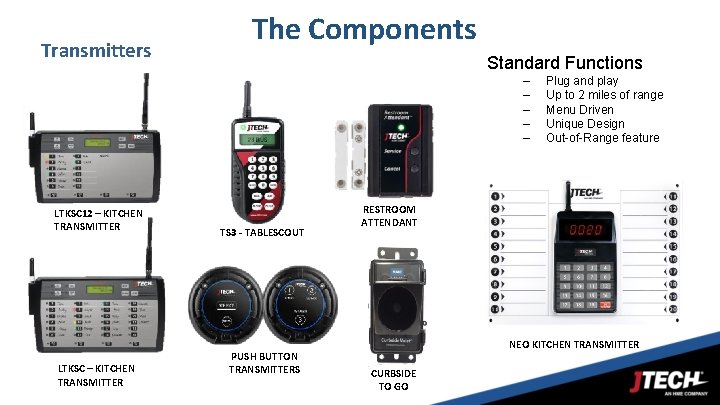
Transmitters The Components Standard Functions – – – LTKSC 12 – KITCHEN TRANSMITTER LTKSC – KITCHEN TRANSMITTER TS 3 - TABLESCOUT PUSH BUTTON TRANSMITTERS Plug and play Up to 2 miles of range Menu Driven Unique Design Out-of-Range feature RESTROOM ATTENDANT NEO KITCHEN TRANSMITTER 27 CURBSIDE TO GO
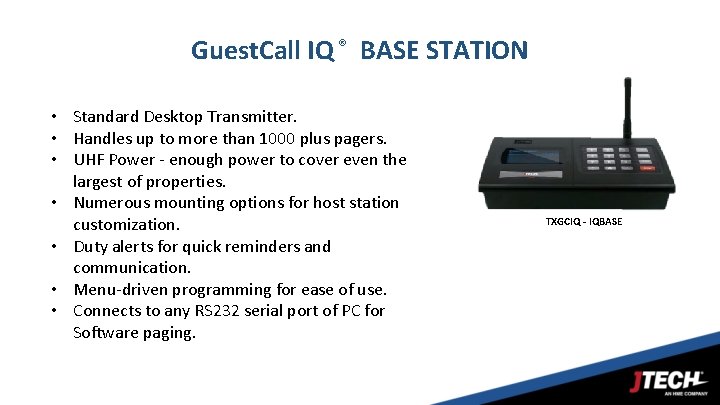
Guest. Call IQ ® BASE STATION • Standard Desktop Transmitter. • Handles up to more than 1000 plus pagers. • UHF Power - enough power to cover even the largest of properties. • Numerous mounting options for host station customization. • Duty alerts for quick reminders and communication. • Menu-driven programming for ease of use. • Connects to any RS 232 serial port of PC for Software paging. TXGCIQ - IQBASE 28
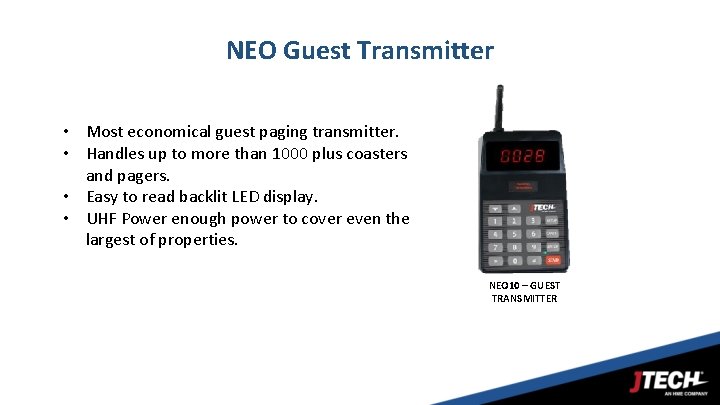
NEO Guest Transmitter • Most economical guest paging transmitter. • Handles up to more than 1000 plus coasters and pagers. • Easy to read backlit LED display. • UHF Power enough power to cover even the largest of properties. NEO 10 – GUEST TRANSMITTER 29
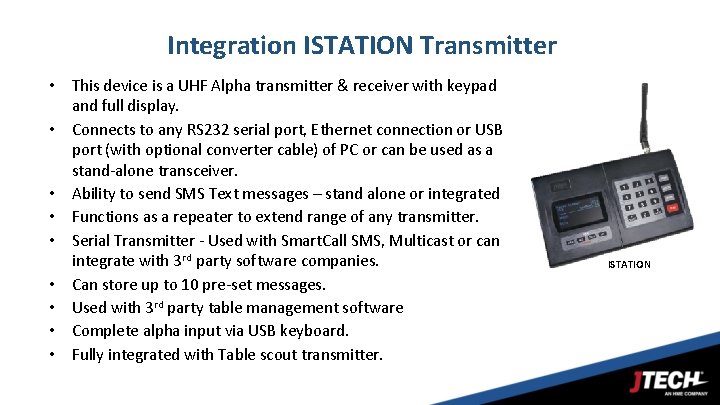
Integration ISTATION Transmitter • This device is a UHF Alpha transmitter & receiver with keypad and full display. • Connects to any RS 232 serial port, Ethernet connection or USB port (with optional converter cable) of PC or can be used as a stand-alone transceiver. • Ability to send SMS Text messages – stand alone or integrated • Functions as a repeater to extend range of any transmitter. • Serial Transmitter - Used with Smart. Call SMS, Multicast or can integrate with 3 rd party software companies. • Can store up to 10 pre-set messages. • Used with 3 rd party table management software • Complete alpha input via USB keyboard. • Fully integrated with Table scout transmitter. 30 ISTATION
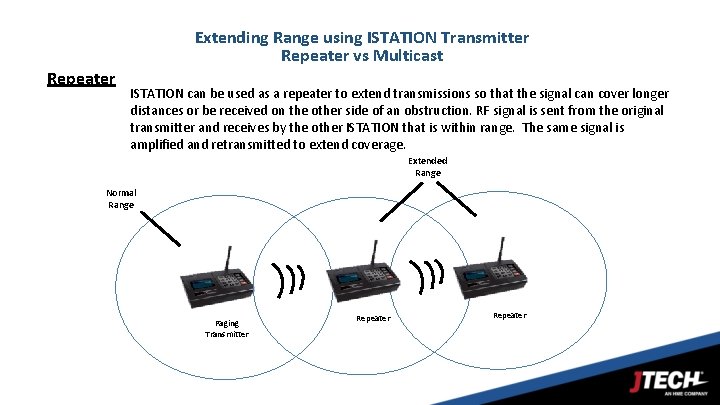
Extending Range using ISTATION Transmitter Repeater vs Multicast Repeater ISTATION can be used as a repeater to extend transmissions so that the signal can cover longer distances or be received on the other side of an obstruction. RF signal is sent from the original transmitter and receives by the other ISTATION that is within range. The same signal is amplified and retransmitted to extend coverage. Extended Range Normal Range Paging Transmitter Repeater
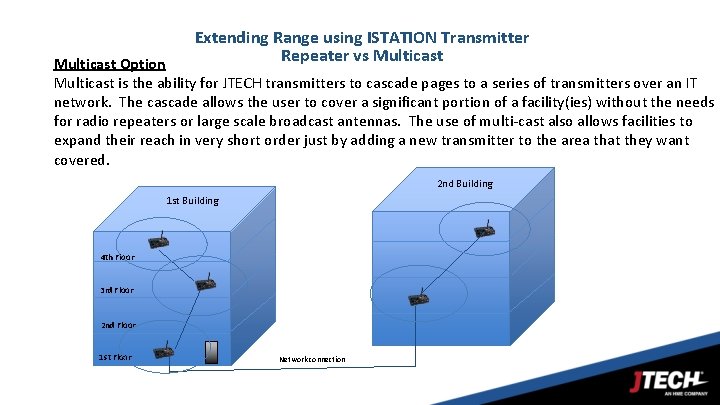
Extending Range using ISTATION Transmitter Repeater vs Multicast Option Multicast is the ability for JTECH transmitters to cascade pages to a series of transmitters over an IT network. The cascade allows the user to cover a significant portion of a facility(ies) without the needs for radio repeaters or large scale broadcast antennas. The use of multi-cast also allows facilities to expand their reach in very short order just by adding a new transmitter to the area that they want covered. 2 nd Building 1 st Building 4 th Floor 3 rd Floor 2 nd Floor 1 st Floor Network connection
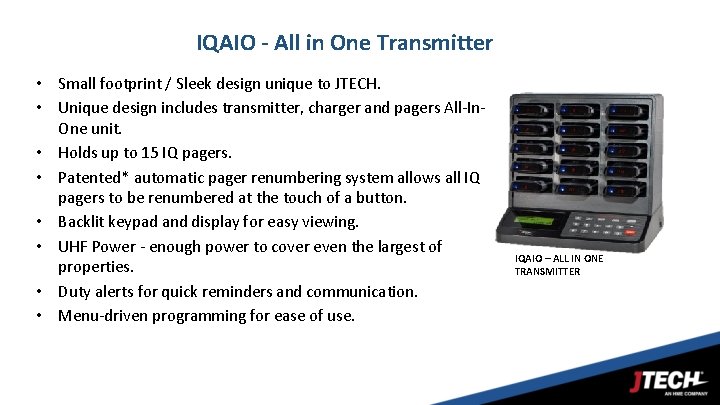
IQAIO - All in One Transmitter • Small footprint / Sleek design unique to JTECH. • Unique design includes transmitter, charger and pagers All-In. One unit. • Holds up to 15 IQ pagers. • Patented* automatic pager renumbering system allows all IQ pagers to be renumbered at the touch of a button. • Backlit keypad and display for easy viewing. • UHF Power - enough power to cover even the largest of properties. • Duty alerts for quick reminders and communication. • Menu-driven programming for ease of use. IQAIO – ALL IN ONE TRANSMITTER
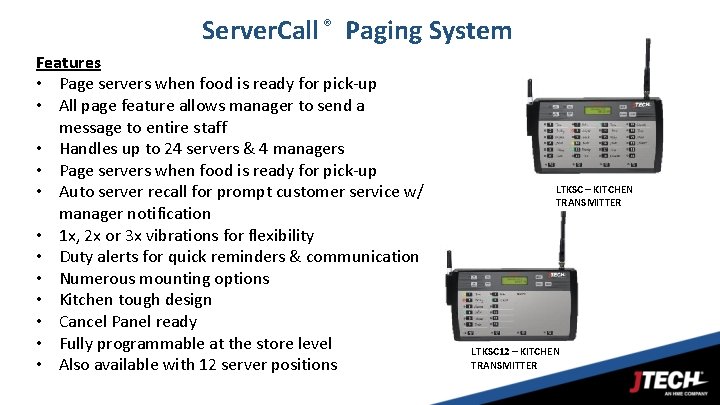
Server. Call ® Paging System Features • Page servers when food is ready for pick-up • All page feature allows manager to send a message to entire staff • Handles up to 24 servers & 4 managers • Page servers when food is ready for pick-up • Auto server recall for prompt customer service w/ manager notification • 1 x, 2 x or 3 x vibrations for flexibility • Duty alerts for quick reminders & communication • Numerous mounting options • Kitchen tough design • Cancel Panel ready • Fully programmable at the store level • Also available with 12 server positions 34 LTKSC – KITCHEN TRANSMITTER LTKSC 12 – KITCHEN TRANSMITTER
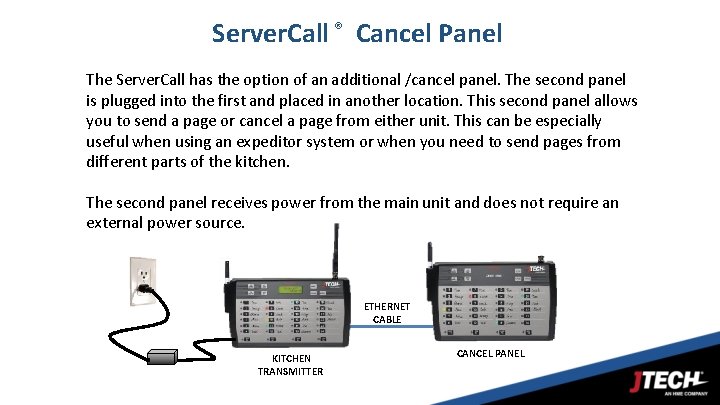
Server. Call ® Cancel Panel The Server. Call has the option of an additional /cancel panel. The second panel is plugged into the first and placed in another location. This second panel allows you to send a page or cancel a page from either unit. This can be especially useful when using an expeditor system or when you need to send pages from different parts of the kitchen. The second panel receives power from the main unit and does not require an external power source. ETHERNET CABLE KITCHEN TRANSMITTER CANCEL PANEL
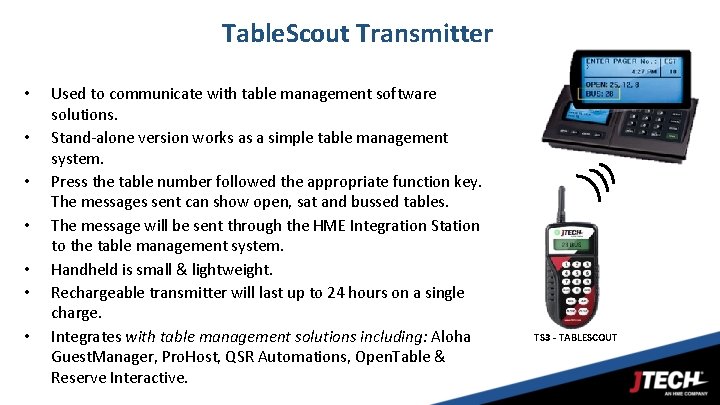
Table. Scout Transmitter • • Used to communicate with table management software solutions. Stand-alone version works as a simple table management system. Press the table number followed the appropriate function key. The messages sent can show open, sat and bussed tables. The message will be sent through the HME Integration Station to the table management system. Handheld is small & lightweight. Rechargeable transmitter will last up to 24 hours on a single charge. Integrates with table management solutions including: Aloha Guest. Manager, Pro. Host, QSR Automations, Open. Table & Reserve Interactive. 36 TS 3 - TABLESCOUT
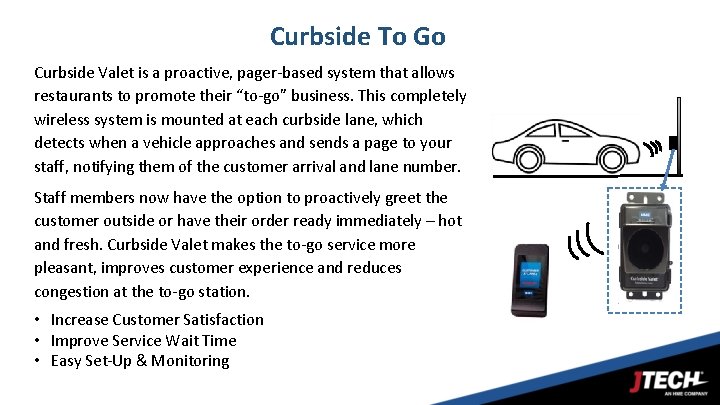
Curbside To Go Curbside Valet is a proactive, pager-based system that allows restaurants to promote their “to-go” business. This completely wireless system is mounted at each curbside lane, which detects when a vehicle approaches and sends a page to your staff, notifying them of the customer arrival and lane number. Staff members now have the option to proactively greet the customer outside or have their order ready immediately – hot and fresh. Curbside Valet makes the to-go service more pleasant, improves customer experience and reduces congestion at the to-go station. • Increase Customer Satisfaction • Improve Service Wait Time • Easy Set-Up & Monitoring 37
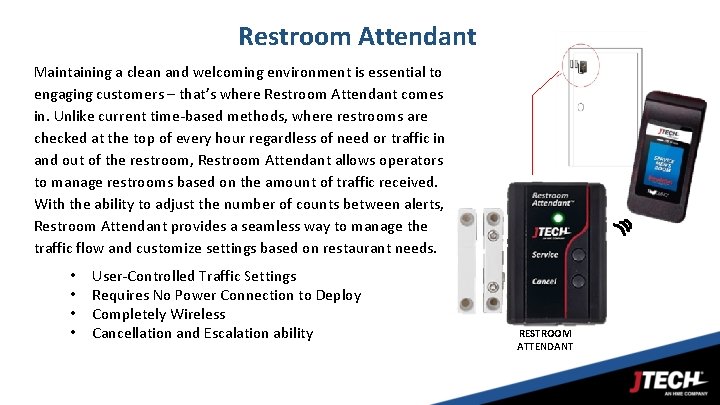
Restroom Attendant Maintaining a clean and welcoming environment is essential to engaging customers – that’s where Restroom Attendant comes in. Unlike current time-based methods, where restrooms are checked at the top of every hour regardless of need or traffic in and out of the restroom, Restroom Attendant allows operators to manage restrooms based on the amount of traffic received. With the ability to adjust the number of counts between alerts, Restroom Attendant provides a seamless way to manage the traffic flow and customize settings based on restaurant needs. • • User-Controlled Traffic Settings Requires No Power Connection to Deploy Completely Wireless Cancellation and Escalation ability RESTROOM ATTENDANT
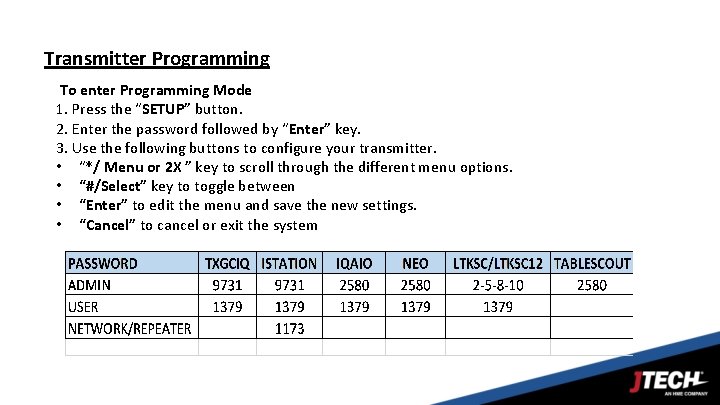
Transmitter Programming To enter Programming Mode 1. Press the “SETUP” button. 2. Enter the password followed by “Enter” key. 3. Use the following buttons to configure your transmitter. • “*/ Menu or 2 X ” key to scroll through the different menu options. • “#/Select” key to toggle between • “Enter” to edit the menu and save the new settings. • “Cancel” to cancel or exit the system
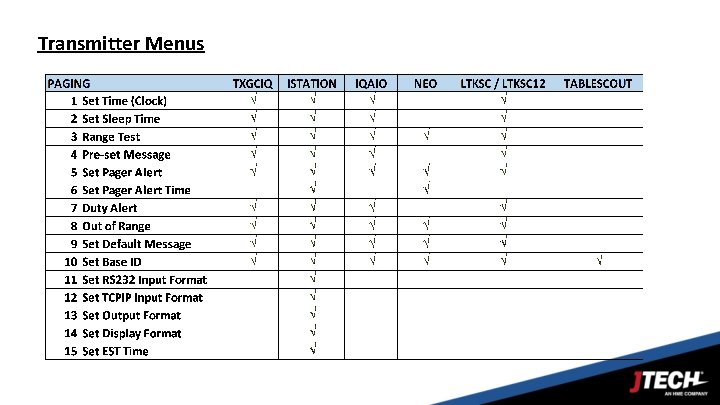
Transmitter Menus
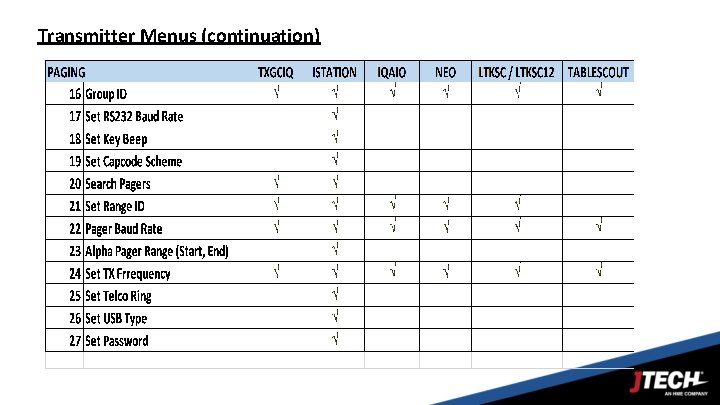
Transmitter Menus (continuation)
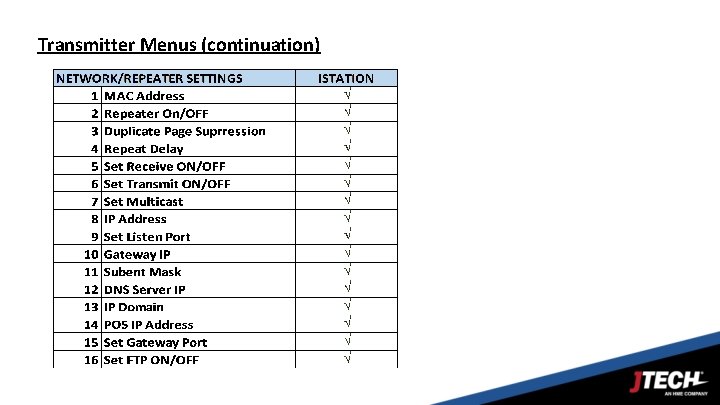
Transmitter Menus (continuation)
- Slides: 42