
Process Description and Control 1 Process the concept


- Slides: 31
Process Description and Control 1
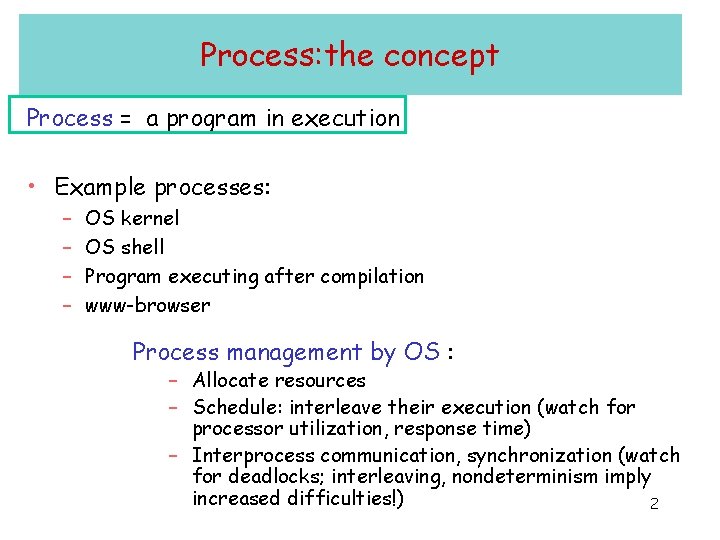
Process: the concept Process = a program in execution • Example processes: – – OS kernel OS shell Program executing after compilation www-browser Process management by OS : – Allocate resources – Schedule: interleave their execution (watch for processor utilization, response time) – Interprocess communication, synchronization (watch for deadlocks; interleaving, nondeterminism imply increased difficulties!) 2
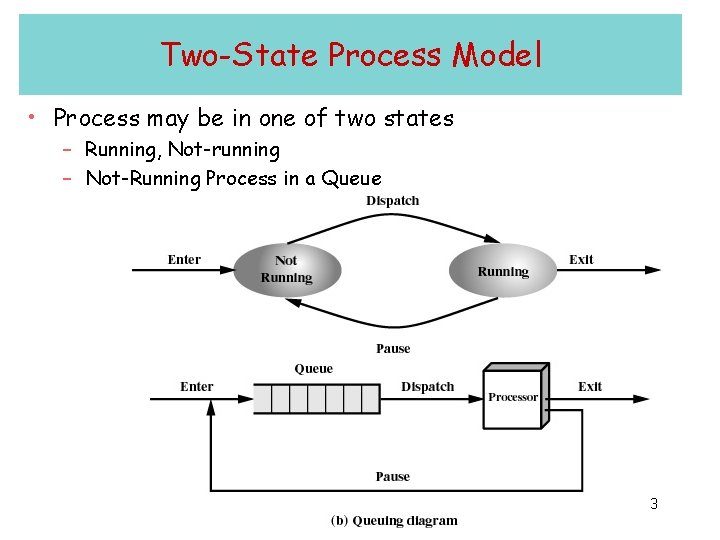
Two-State Process Model • Process may be in one of two states – Running, Not-running – Not-Running Process in a Queue 3
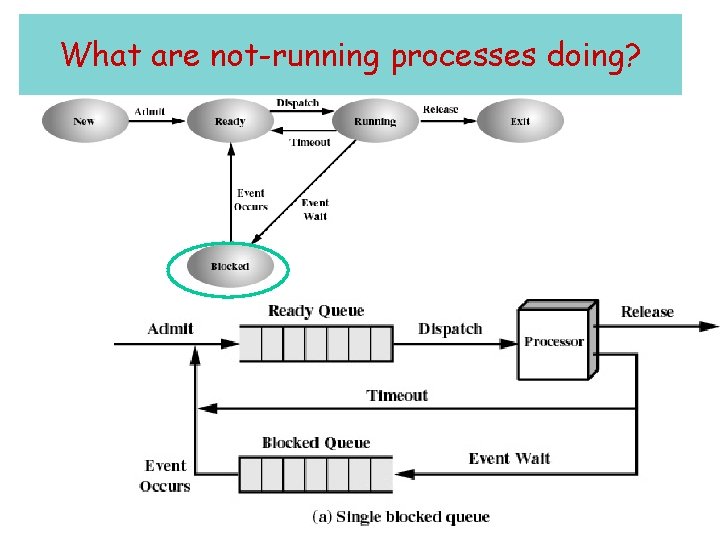
What are not-running processes doing? 4
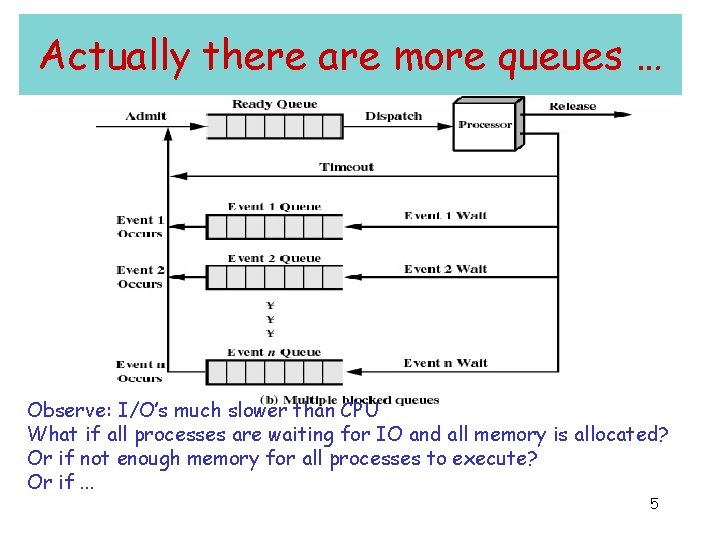
Actually there are more queues … Observe: I/O’s much slower than CPU What if all processes are waiting for IO and all memory is allocated? Or if not enough memory for all processes to execute? Or if. . . 5
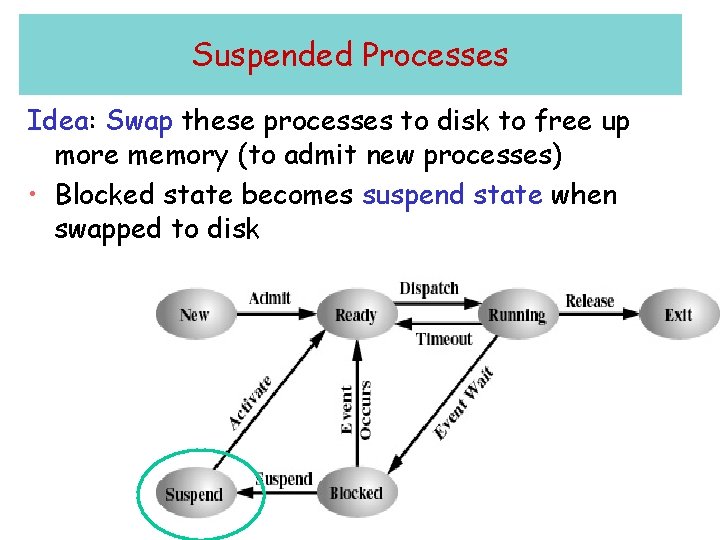
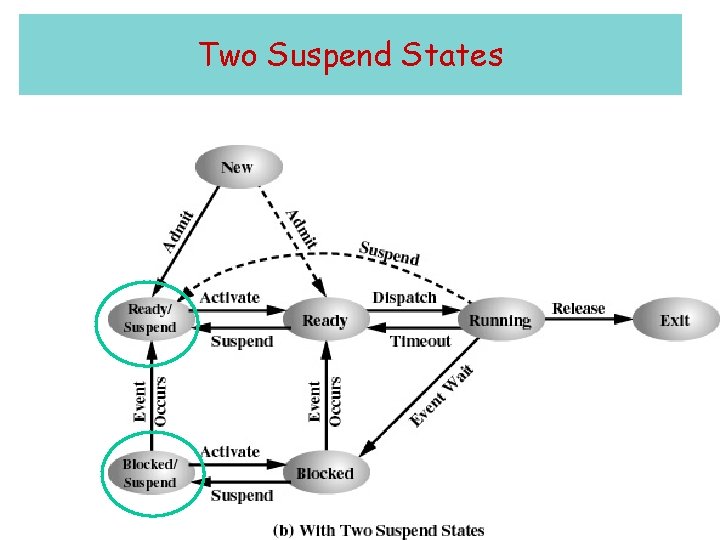
Suspended Processes Idea: Swap these processes to disk to free up more memory (to admit new processes) • Blocked state becomes suspend state when swapped to disk 6
Two Suspend States 7
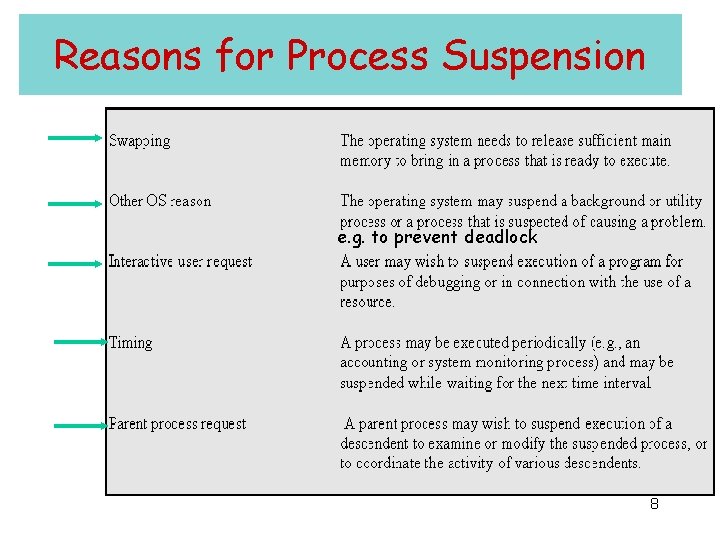
Reasons for Process Suspension e. g. to prevent deadlock 8
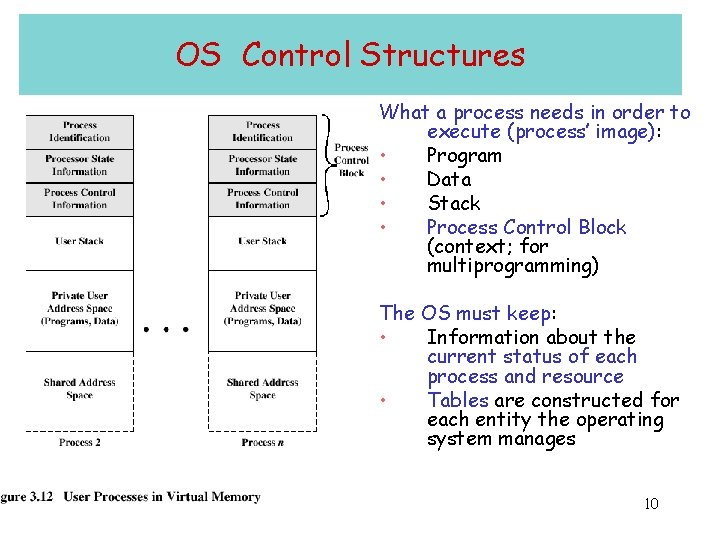
OS Control Structures What a process needs in order to execute (process’ image): • Program • Data • Stack • Process Control Block (context; for multiprogramming) The OS must keep: • Information about the current status of each process and resource • Tables are constructed for each entity the operating system manages 10
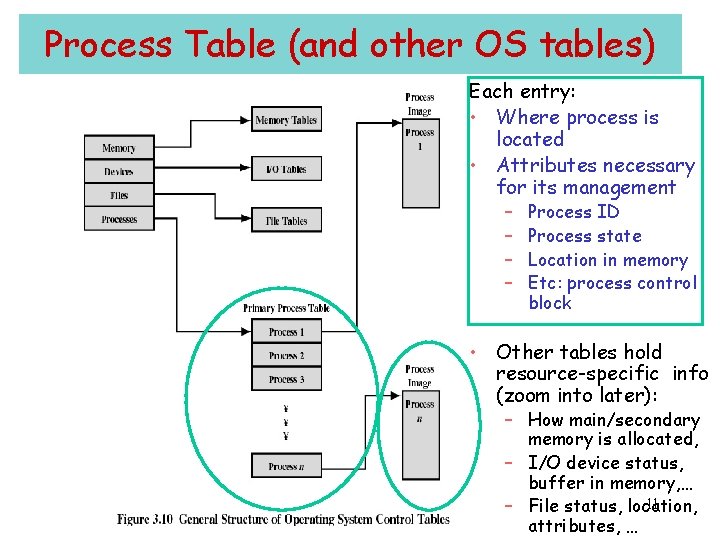
Process Table (and other OS tables) Each entry: • Where process is located • Attributes necessary for its management – – Process ID Process state Location in memory Etc: process control block • Other tables hold resource-specific info (zoom into later): – How main/secondary memory is allocated, – I/O device status, buffer in memory, … 11 – File status, location, attributes, …
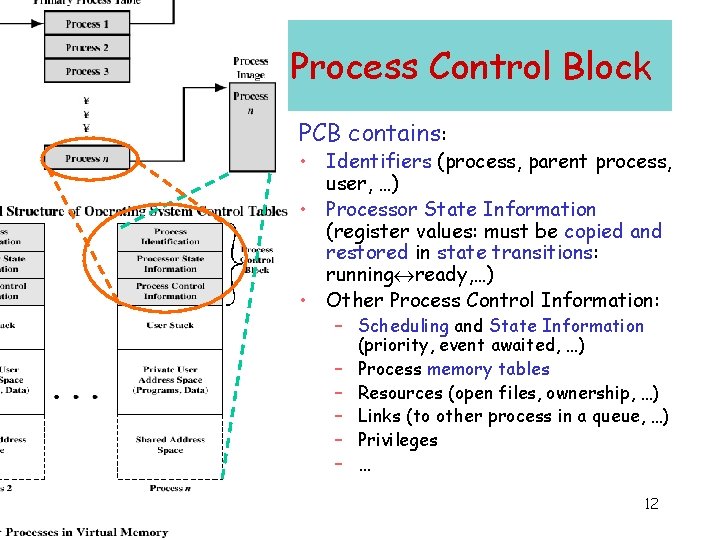
Process Control Block PCB contains: • Identifiers (process, parent process, user, …) • Processor State Information (register values: must be copied and restored in state transitions: running ready, …) • Other Process Control Information: – Scheduling and State Information (priority, event awaited, …) – Process memory tables – Resources (open files, ownership, …) – Links (to other process in a queue, …) – Privileges – … 12
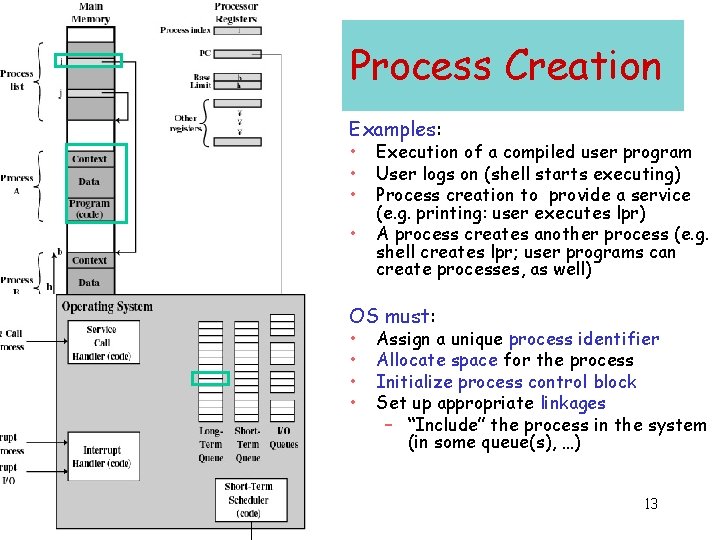
Process Creation Examples: • • Execution of a compiled user program User logs on (shell starts executing) Process creation to provide a service (e. g. printing: user executes lpr) A process creates another process (e. g. shell creates lpr; user programs can create processes, as well) OS must: • • Assign a unique process identifier Allocate space for the process Initialize process control block Set up appropriate linkages – “Include” the process in the system (in some queue(s), …) 13
When to Switch a Running Process • Clock interrupt – process has executed for the maximum allowable time slice • I/O interrupt • Memory fault – memory address is in virtual memory so it must be brought into main memory • Trap – error occurred – may cause process to be moved to Exit state • Supervisor call (or system call) – such as file open 14
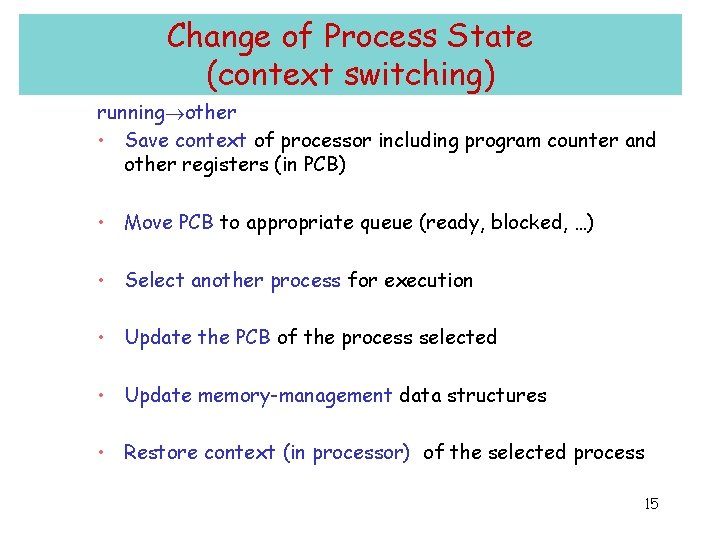
Change of Process State (context switching) running other • Save context of processor including program counter and other registers (in PCB) • Move PCB to appropriate queue (ready, blocked, …) • Select another process for execution • Update the PCB of the process selected • Update memory-management data structures • Restore context (in processor) of the selected process 15
Modes of Execution • User mode – Less-privileged mode – User programs typically execute in this mode • System mode, control mode, or kernel mode – More-privileged mode – Kernel of the operating system 16
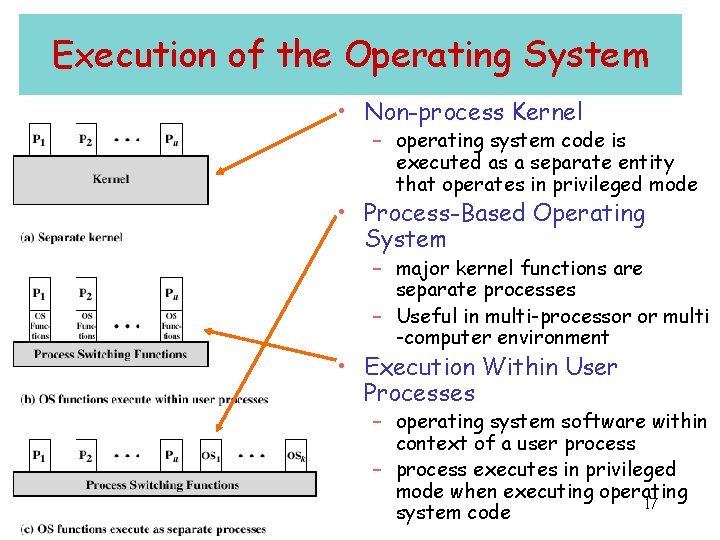
Execution of the Operating System • Non-process Kernel – operating system code is executed as a separate entity that operates in privileged mode • Process-Based Operating System – major kernel functions are separate processes – Useful in multi-processor or multi -computer environment • Execution Within User Processes – operating system software within context of a user process – process executes in privileged mode when executing operating 17 system code
Threads 18
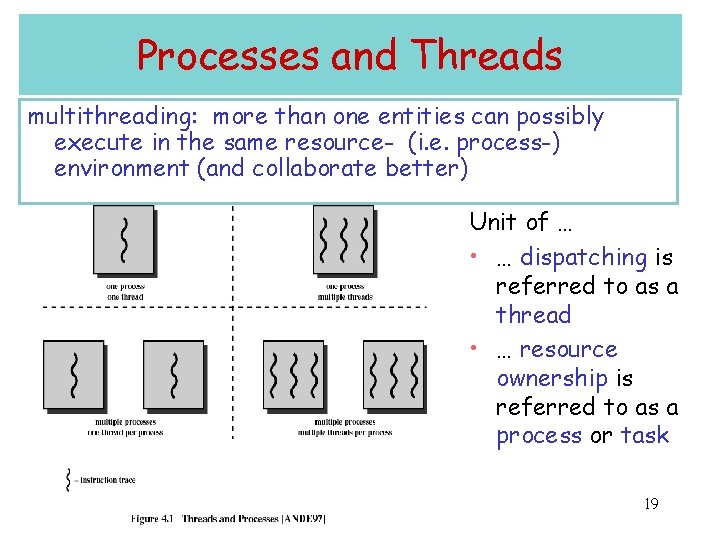
Processes and Threads multithreading: more than one entities can possibly execute in the same resource- (i. e. process-) environment (and collaborate better) Unit of … • … dispatching is referred to as a thread • … resource ownership is referred to as a process or task 19
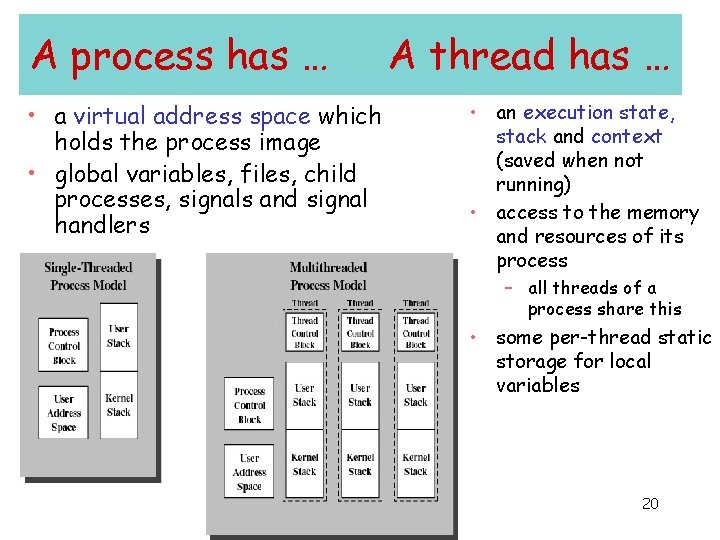
A process has … • a virtual address space which holds the process image • global variables, files, child processes, signals and signal handlers A thread has … • an execution state, stack and context (saved when not running) • access to the memory and resources of its process – all threads of a process share this • some per-thread static storage for local variables 20
Suspension and termination • Suspending a process involves suspending all threads of the process since all threads share the same address space • Termination of a process, terminates all threads within the process 21
Benefits of Threads • Since threads within the same process share memory and files, they can communicate with each other without invoking the kernel • May allow parallelization within a process: – I/O and computation to overlap (remember the historical step from uniprogramming to multiprogramming? ) – concurrent execution in multiprocessors • Takes less time to – create/terminate a thread than a process – switch between two threads within the same process 22
Uses of Threads • Overlap foreground (interactive) with background (processing) work • Asynchronous processing (e. g. backup while editing) • Speed execution (parallelize independent actions) • Modular program structure (must be careful here, not to introduce too much extra overhead) Q: can one achieve parallelism within a process 23 but without using threads?
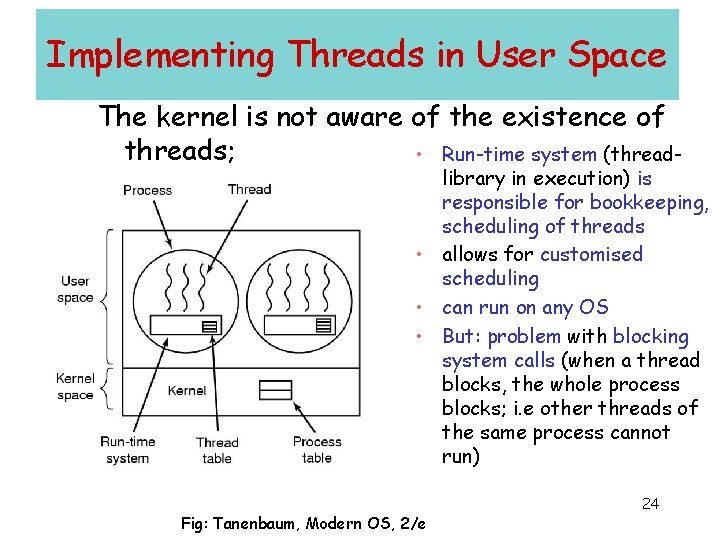
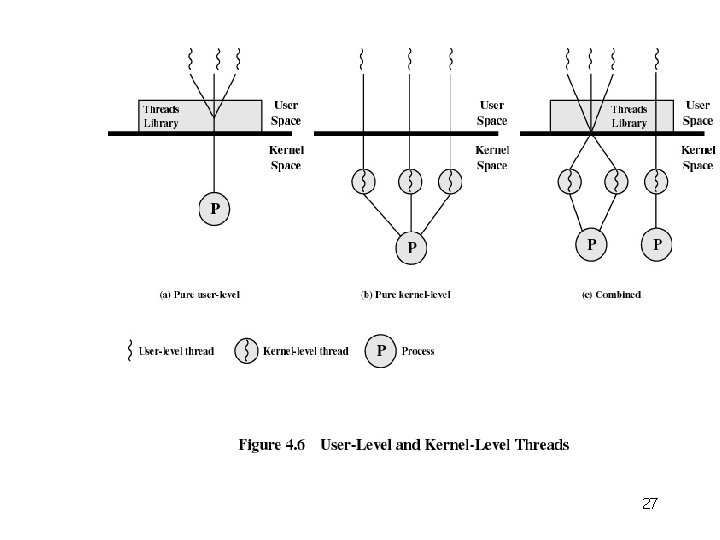
Implementing Threads in User Space The kernel is not aware of the existence of threads; • Run-time system (thread- library in execution) is responsible for bookkeeping, scheduling of threads • allows for customised scheduling • can run on any OS • But: problem with blocking system calls (when a thread blocks, the whole process blocks; i. e other threads of the same process cannot run) Fig: Tanenbaum, Modern OS, 2/e 24
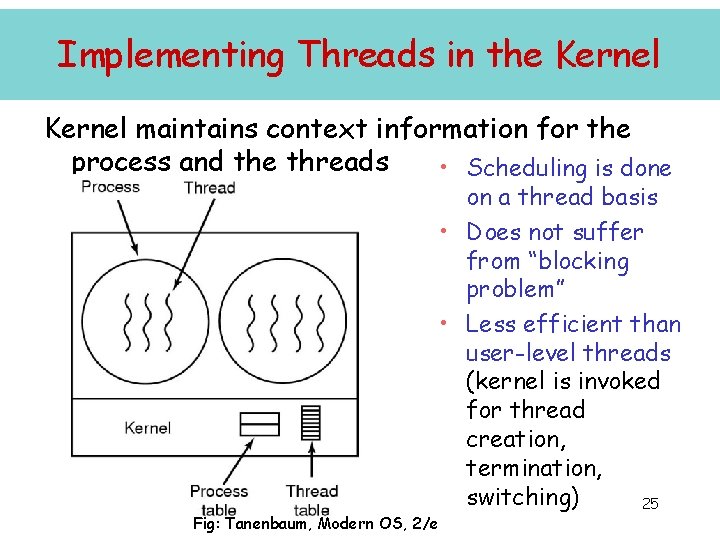
Implementing Threads in the Kernel maintains context information for the process and the threads • Scheduling is done Fig: Tanenbaum, Modern OS, 2/e on a thread basis • Does not suffer from “blocking problem” • Less efficient than user-level threads (kernel is invoked for thread creation, termination, switching) 25
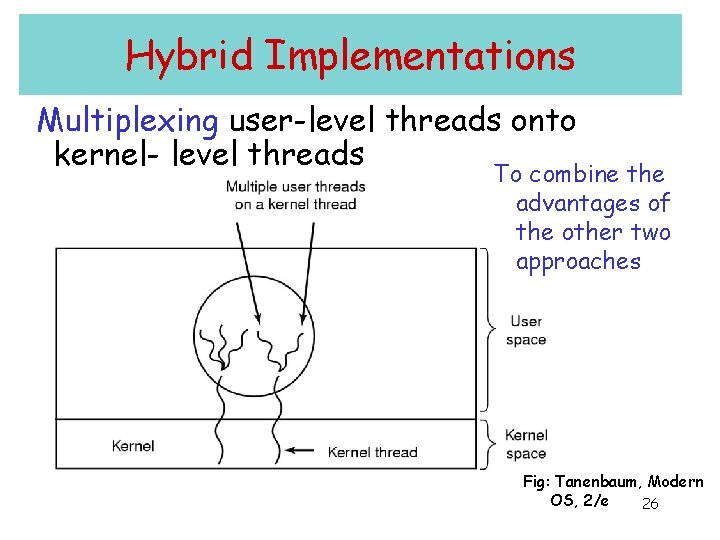
Hybrid Implementations Multiplexing user-level threads onto kernel- level threads To combine the advantages of the other two approaches Fig: Tanenbaum, Modern OS, 2/e 26
27
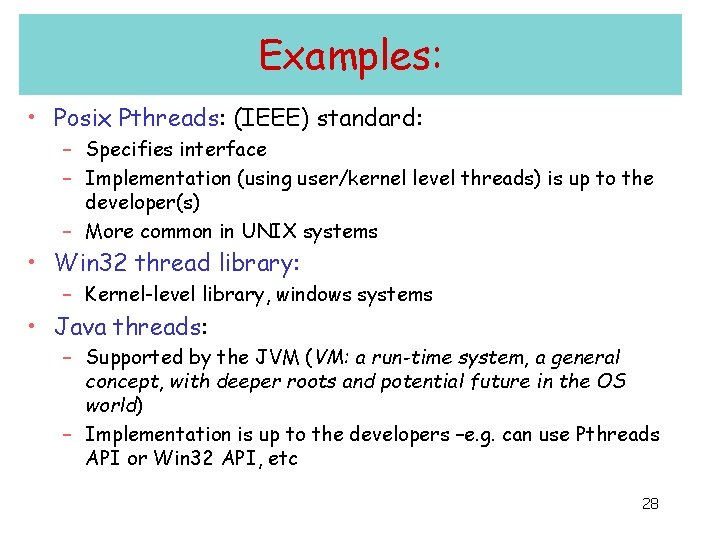
Examples: • Posix Pthreads: (IEEE) standard: – Specifies interface – Implementation (using user/kernel level threads) is up to the developer(s) – More common in UNIX systems • Win 32 thread library: – Kernel-level library, windows systems • Java threads: – Supported by the JVM (VM: a run-time system, a general concept, with deeper roots and potential future in the OS world) – Implementation is up to the developers –e. g. can use Pthreads API or Win 32 API, etc 28
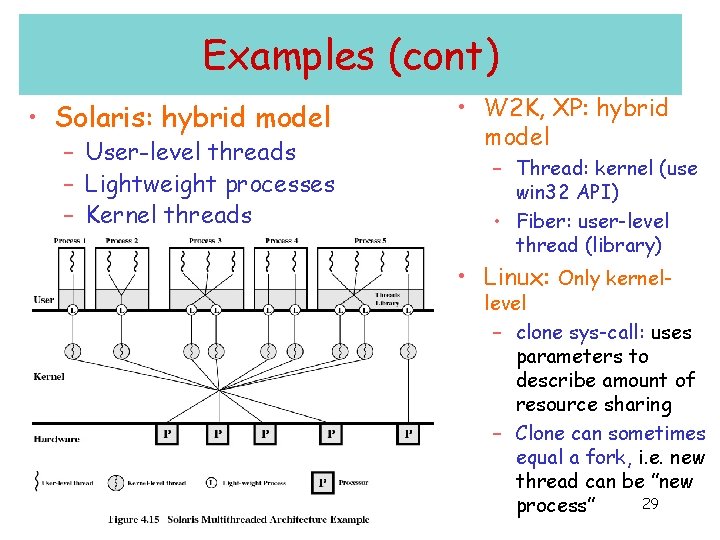
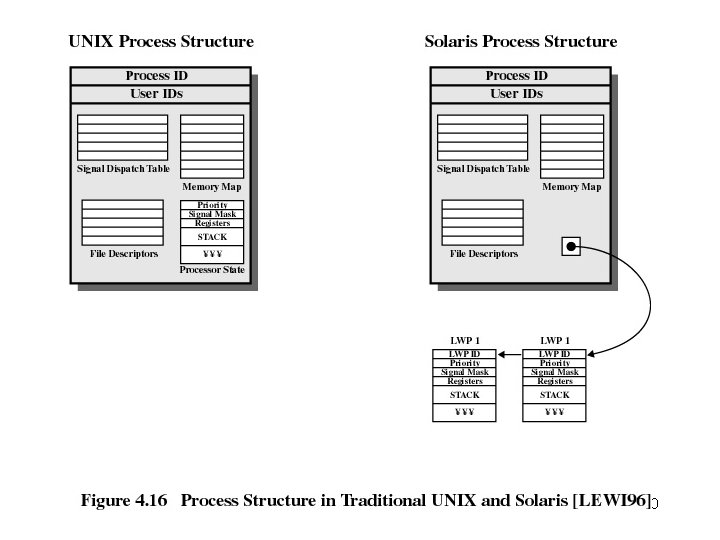
Examples (cont) • Solaris: hybrid model – User-level threads – Lightweight processes – Kernel threads • W 2 K, XP: hybrid model – Thread: kernel (use win 32 API) • Fiber: user-level thread (library) • Linux: Only kernel- level – clone sys-call: uses parameters to describe amount of resource sharing – Clone can sometimes equal a fork, i. e. new thread can be ”new 29 process”
30
Scheduler Activations • Goal – mimic functionality of kernel threads – gain performance of user space threads • Avoids unnecessary user/kernel transitions – Kernel assigns virtual processors to each process – ”signals” (make upcalls) to run-time system upon blocking and unblocking of (user-level) threads – lets runtime system allocate threads to processors • Concern: Fundamental reliance on kernel (lower layer) calling procedures in user space (higher layer) 31