
Presented by Embedded Operating Systems The State of
Presented by: “Embedded Operating Systems: The State of the Art” QNX is a leading provider of real time operating system (RTOS) software, development tools, and services for mission critical embedded applications. Jeff Schaffer Sr. Field Applications Engineer QNX Software Systems jpschaffer@qnx. com 818 -227 -5105
Role of the Embedded OS è Traditional – Permit sharing of common resources of the computer (disks, printers, CPU) – Provide low-level control of I/O devices that may be complex, time dependent, and non-portable – Provide device-independent abstractions (e. g. files, filenames, directories) è Additional Roles – Prevent common causes of system failure and instability; minimize impact when they occur – Extend system life cycles – Isolate problems during development and at runtime 2
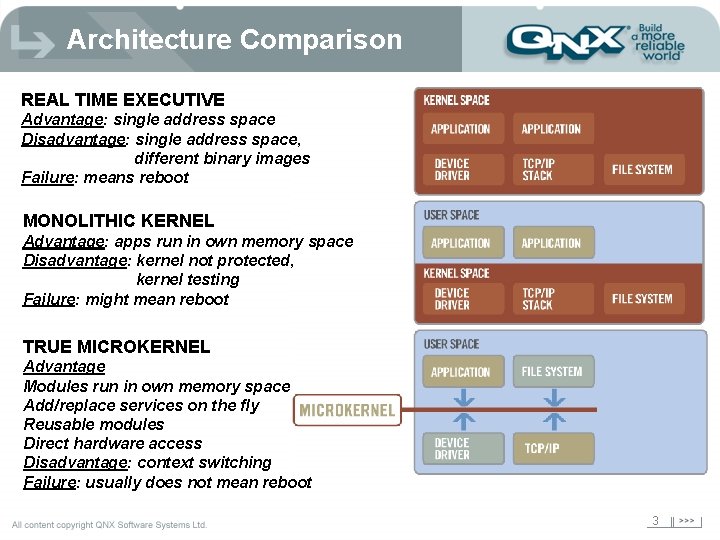
Architecture Comparison REAL TIME EXECUTIVE Advantage: single address space Disadvantage: single address space, different binary images Failure: means reboot MONOLITHIC KERNEL Advantage: apps run in own memory space Disadvantage: kernel not protected, kernel testing Failure: might mean reboot TRUE MICROKERNEL Advantage Modules run in own memory space Add/replace services on the fly Reusable modules Direct hardware access Disadvantage: context switching Failure: usually does not mean reboot 3
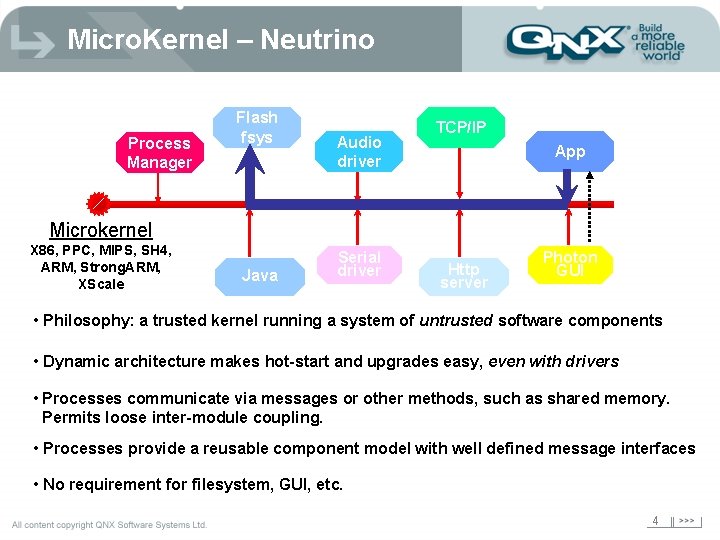
Micro. Kernel – Neutrino Process Manager Flash fsys Audio driver TCP/IP App Microkernel X 86, PPC, MIPS, SH 4, ARM, Strong. ARM, XScale Java Serial driver Http server Photon GUI • Philosophy: a trusted kernel running a system of untrusted software components • Dynamic architecture makes hot-start and upgrades easy, even with drivers • Processes communicate via messages or other methods, such as shared memory. Permits loose inter-module coupling. • Processes provide a reusable component model with well defined message interfaces • No requirement for filesystem, GUI, etc. 4

Typical Forms of IPC Mailboxes Process 1 Pipes Kernel Message Queues Process 1 msg 4 msg 3 msg 2 msg 5 Process address map Shared Memory Process 2 Shared memory object map Process 2 Process address map 5
Which Architecture for me? è Depends on your application and processor! è Simple apps (such as single control loops) generally only need a real-time executive è As system becomes more complex, typically need a more complex operating system architecture è Need to look at factors such as scalability and reliability è Do standards matter? 6
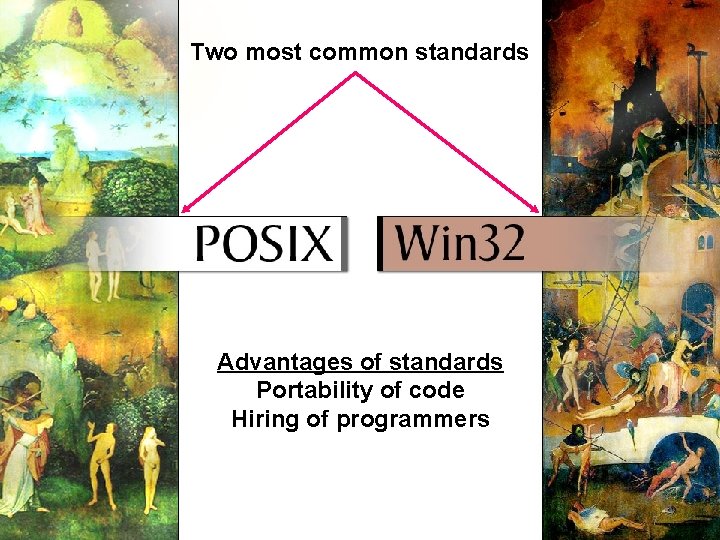
API’s Two most common standards Advantages of standards Portability of code Hiring of programmers 7
Do I need Real-Time? Maybe. . . What is Real Time? Less than 1 second response? Less than 1 millisecond response? Less than 1 microsecond response? 8
Real-Time "A real-time system is one in which the correctness of the computations not only depends upon the logical correctness of the computation but also upon the time at which the result is produced. If the timing constraints of the system are not met, system failure is said to have occurred. " Donald Gillies (comp. realtime FAQ) 9
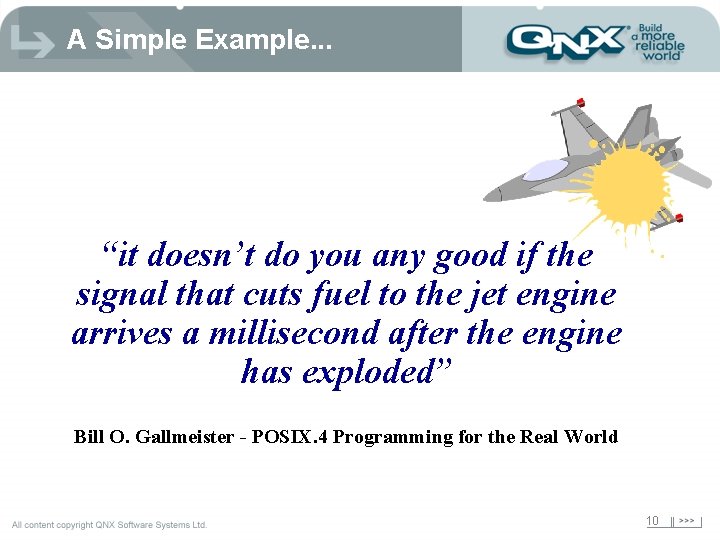
A Simple Example. . . “it doesn’t do you any good if the signal that cuts fuel to the jet engine arrives a millisecond after the engine has exploded” Bill O. Gallmeister - POSIX. 4 Programming for the Real World 10
“Hard” vs. “Soft” Real Time è Hard – absolute deadlines – late responses cannot be tolerated and may have a catastrophic effect on the system – example: flight control è Soft ATM – systems which have reduced constraints on "lateness”; e. g. late responses may still have some value – still must operate very quickly and repeatably – example: cardiac pacemaker 11
Real-time OS Requirements è Operating system factors that permit real-time: – Thread Scheduling – Control of Priority Inversion – Time Spent in Kernel – Interrupt Processing 12
Factor #1: Scheduling è Non real-time scheduling – round-robin – FIFO – adaptive è Real-time scheduling – priority based – sporadic 13
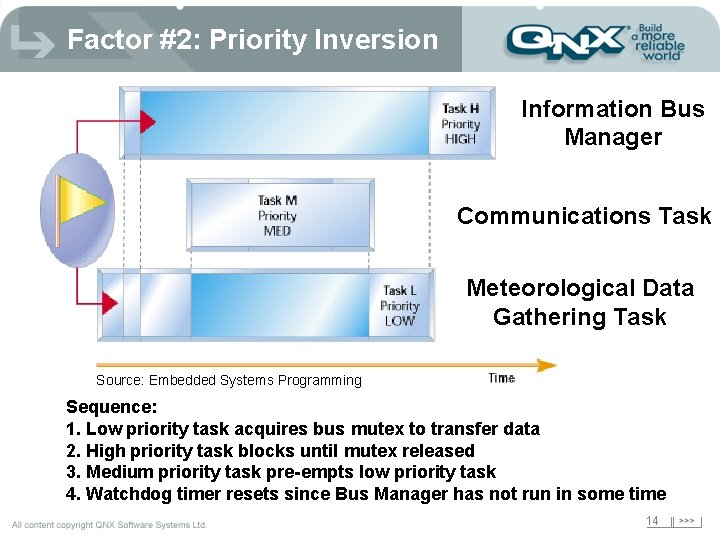
Factor #2: Priority Inversion Information Bus Manager Communications Task Meteorological Data Gathering Task Source: Embedded Systems Programming Sequence: 1. Low priority task acquires bus mutex to transfer data 2. High priority task blocks until mutex released 3. Medium priority task pre-empts low priority task 4. Watchdog timer resets since Bus Manager has not run in some time 14
Factor #3: Kernel Time è Kernel operations must be pre-emptible – if they are not, an unknown amount of time can be spent in the kernel performing an operation on behalf of a user process – can cause real-time process to miss deadline è All kernels have some window (or multiple windows) of time where pre-emption cannot occur è Some operating systems attempt to provide real-time capability by adding “checkpoints” within the kernel so they can be interrupted at these points 15
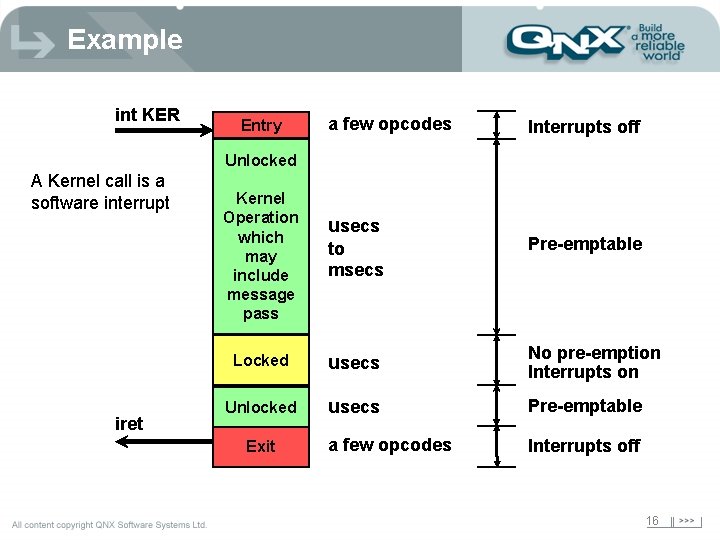
Example int KER Entry a few opcodes Interrupts off Unlocked A Kernel call is a software interrupt iret Kernel Operation which may include message pass usecs to msecs Pre-emptable Locked usecs No pre-emption Interrupts on Unlocked usecs Pre-emptable a few opcodes Interrupts off Exit 16
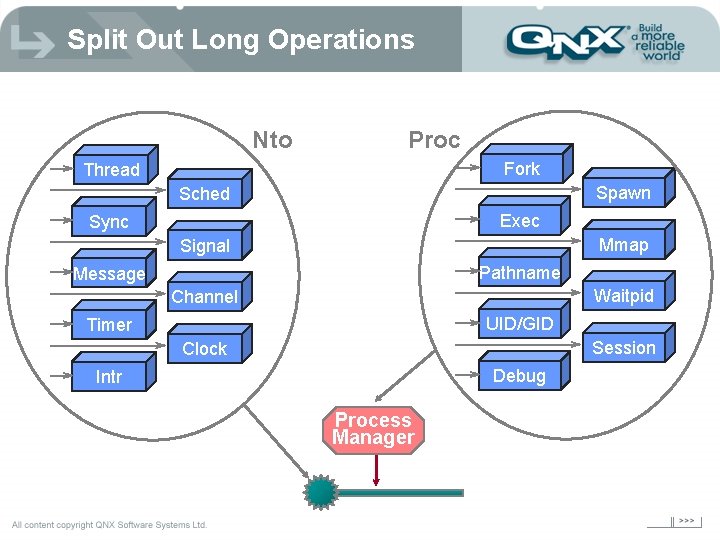
Split Out Long Operations Nto Proc Fork Thread Spawn Sched Exec Sync Mmap Signal Pathname Message Waitpid Channel UID/GID Timer Session Clock Debug Intr Process Manager
Factor #4: Interrupts This is broken down into the following areas: è Method of handling the interrupt processing chain è Handling of Nested Interrupts 18
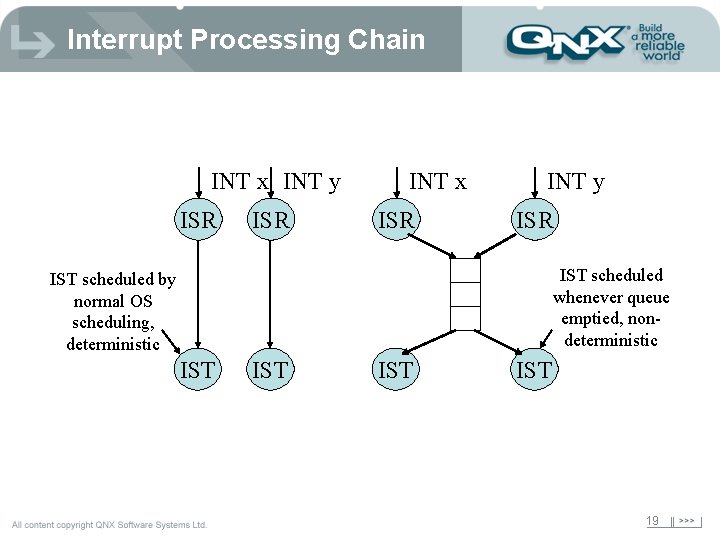
Interrupt Processing Chain INT x INT y ISR INT x ISR INT y ISR IST scheduled whenever queue emptied, nondeterministic IST scheduled by normal OS scheduling, deterministic IST IST 19
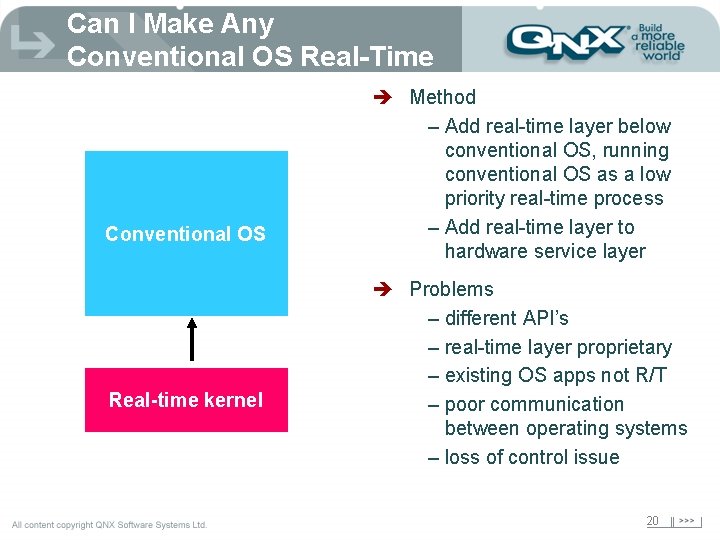
Can I Make Any Conventional OS Real-Time Conventional OS Real-time kernel è Method – Add real-time layer below conventional OS, running conventional OS as a low priority real-time process – Add real-time layer to hardware service layer è Problems – different API’s – real-time layer proprietary – existing OS apps not R/T – poor communication between operating systems – loss of control issue 20
Title of. Scalability presentation Title 2 21
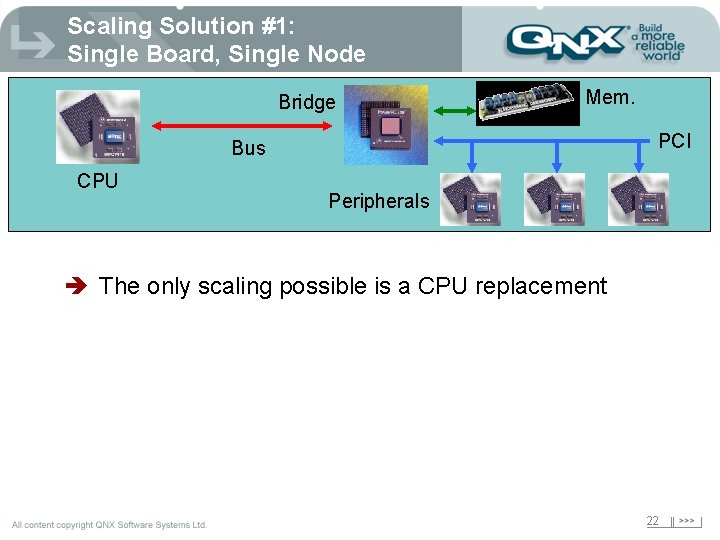
Scaling Solution #1: Single Board, Single Node Bridge Mem. PCI Bus CPU Peripherals è The only scaling possible is a CPU replacement 22
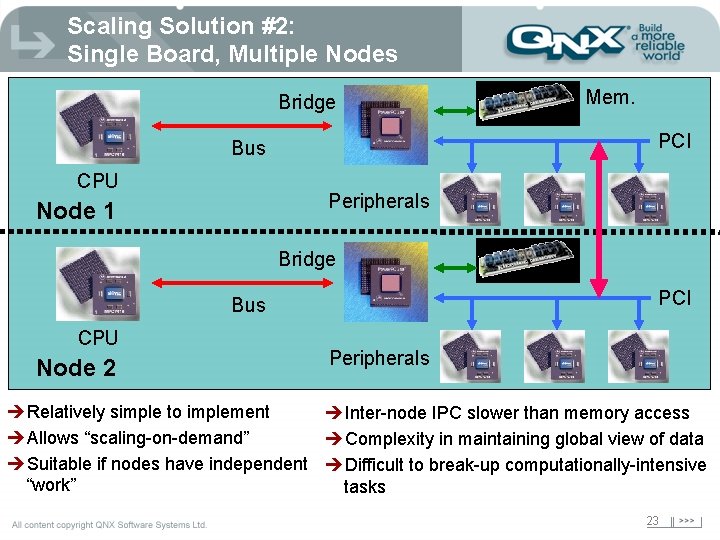
Scaling Solution #2: Single Board, Multiple Nodes Bridge PCI Bus CPU Mem. Peripherals Node 1 Bridge PCI Bus CPU Node 2 Peripherals èRelatively simple to implement èInter-node IPC slower than memory access èAllows “scaling-on-demand” èComplexity in maintaining global view of data èSuitable if nodes have independent èDifficult to break-up computationally-intensive “work” tasks 23
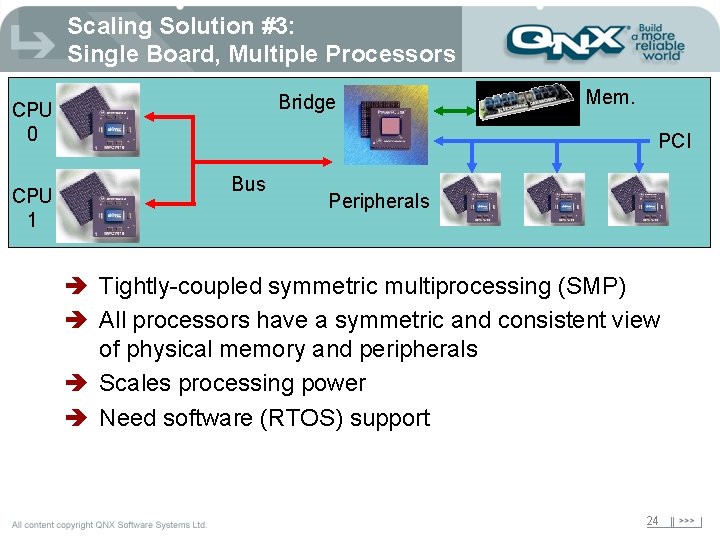
Scaling Solution #3: Single Board, Multiple Processors Bridge CPU 0 CPU 1 Mem. PCI Bus Peripherals è Tightly-coupled symmetric multiprocessing (SMP) è All processors have a symmetric and consistent view of physical memory and peripherals è Scales processing power è Need software (RTOS) support 24
The SMP OS Dilemma è SMP systems to date use desktop operating systems; not responsive enough for real-time requirements • Application servers • Databases • Web servers è Typical real-time operating systems (home-built or commercial), such as are commonly used in routers and switches today, do not have SMP support è SMP capable real-time operating systems run the CPU’s as independent processors with independent operating systems 25
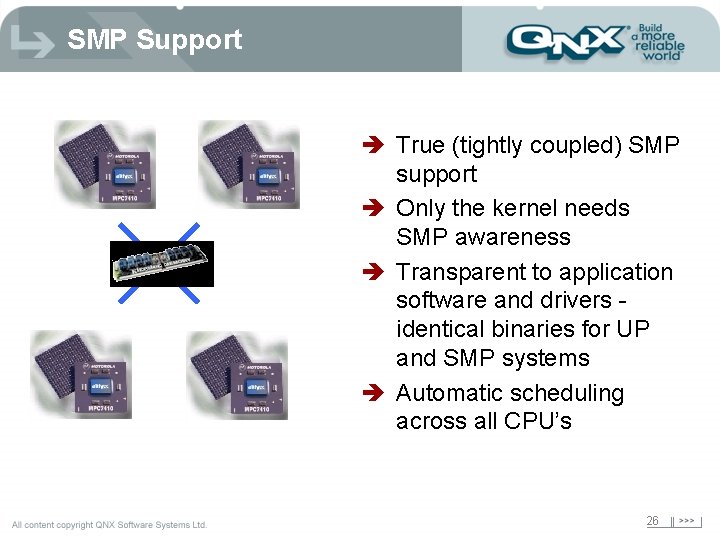
SMP Support è True (tightly coupled) SMP support è Only the kernel needs SMP awareness è Transparent to application software and drivers identical binaries for UP and SMP systems è Automatic scheduling across all CPU’s 26
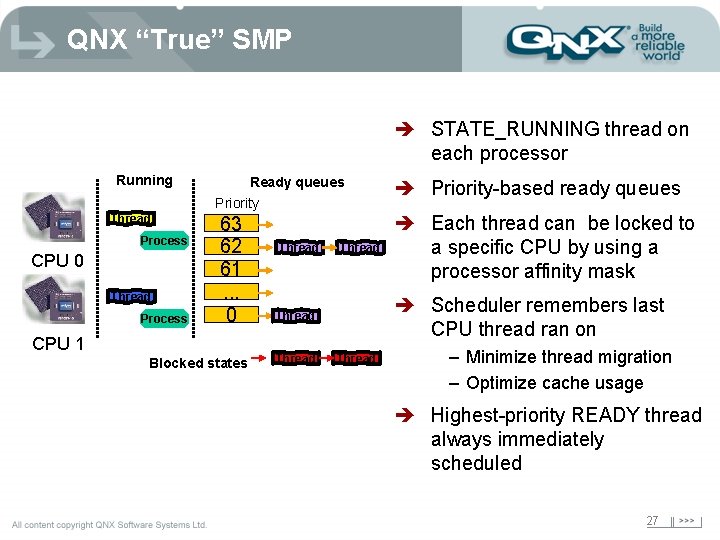
QNX “True” SMP è STATE_RUNNING thread on each processor Running Thread Process CPU 0 Thread Process Ready queues Priority 63 62 61. . . 0 CPU 1 Blocked states Thread è Each thread can be locked to a specific CPU by using a processor affinity mask è Scheduler remembers last CPU thread ran on Thread è Priority-based ready queues Thread – Minimize thread migration – Optimize cache usage è Highest-priority READY thread always immediately scheduled 27
Why Is Cache Important? è Cache efficiency is probably the single largest determinant of performance on SMP è Coherent view of physical memory is maintained using cache snooping è Cache snooping is done at the CPU bus level and so operates at lower speeds than core è Coherency is “invisible” to software 28
Performance Implications è Snoop traffic expected on SMP è Cache hits generally cause no bus transaction è Multiple processors writing to same location degrades performance (ping-pong effect) è Performance degrades when large amount of data modified on one processor and read on the other è Sometimes it is better to have specific threads in a process run on same CPU 29
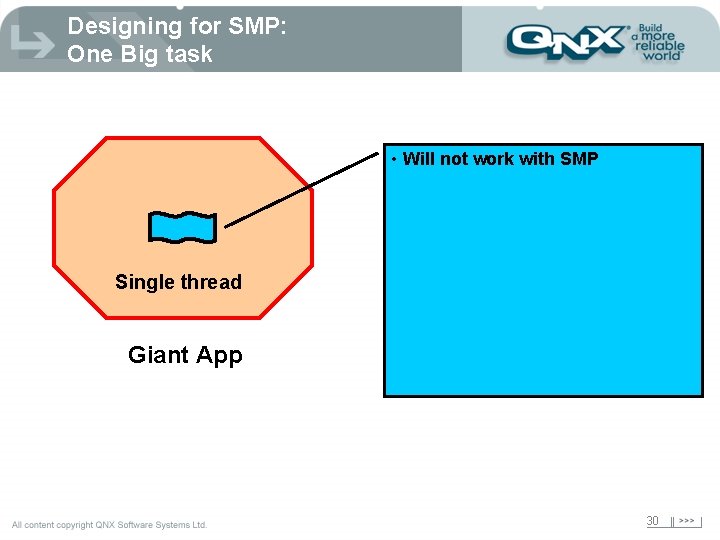
Designing for SMP: One Big task • Will not work with SMP Single thread Giant App 30
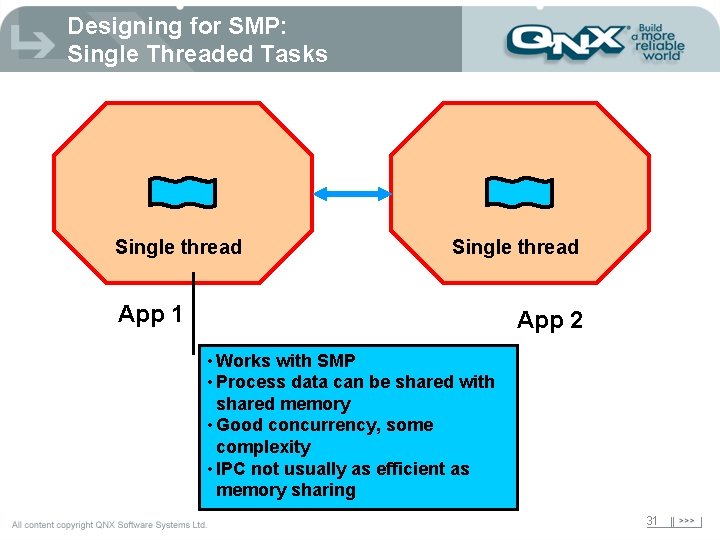
Designing for SMP: Single Threaded Tasks Single thread App 1 App 2 • Works with SMP • Process data can be shared with shared memory • Good concurrency, some complexity • IPC not usually as efficient as memory sharing 31
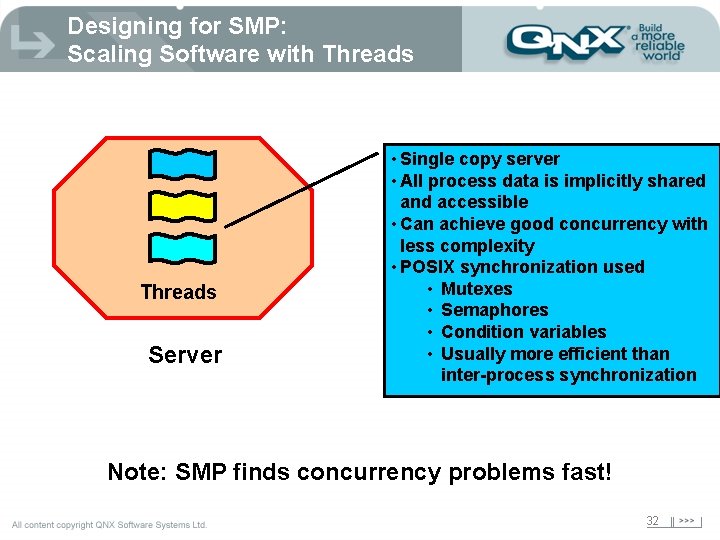
Designing for SMP: Scaling Software with Threads Server • Single copy server • All process data is implicitly shared and accessible • Can achieve good concurrency with less complexity • POSIX synchronization used • Mutexes • Semaphores • Condition variables • Usually more efficient than inter-process synchronization Note: SMP finds concurrency problems fast! 32
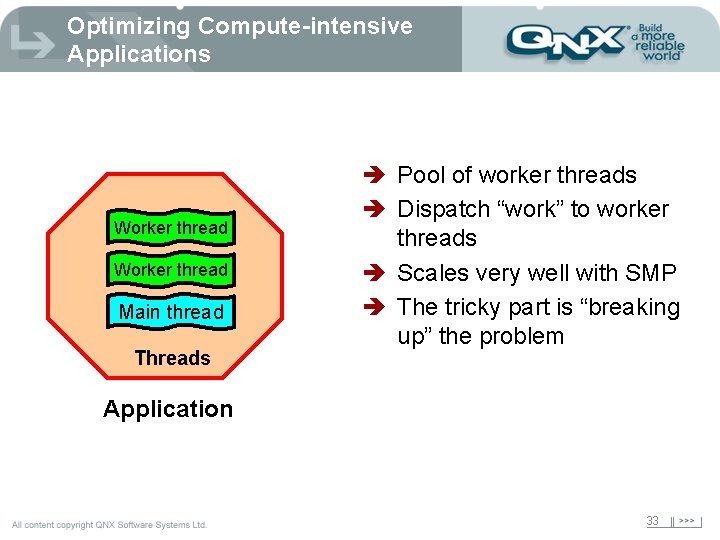
Optimizing Compute-intensive Applications Worker thread Main thread Threads è Pool of worker threads è Dispatch “work” to worker threads è Scales very well with SMP è The tricky part is “breaking up” the problem Application 33
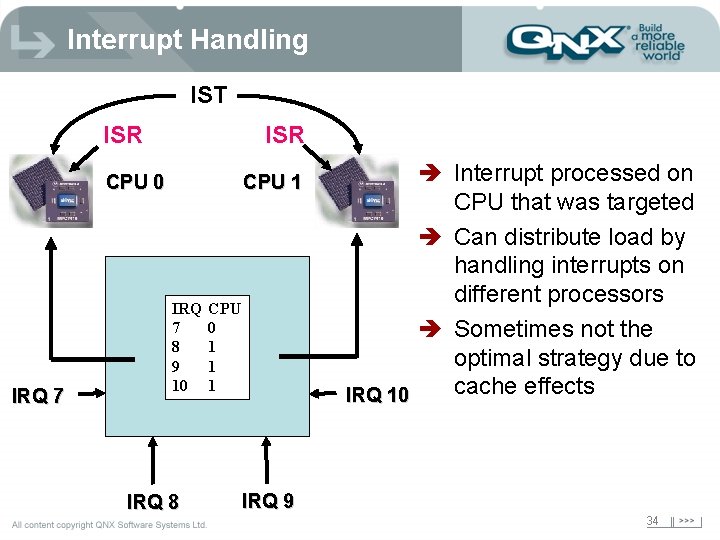
Interrupt Handling IST ISR CPU 0 IRQ 7 CPU 1 IRQ 7 8 9 10 IRQ 8 CPU 0 1 1 1 è Interrupt processed on CPU that was targeted è Can distribute load by handling interrupts on different processors è Sometimes not the optimal strategy due to cache effects IRQ 10 IRQ 9 34
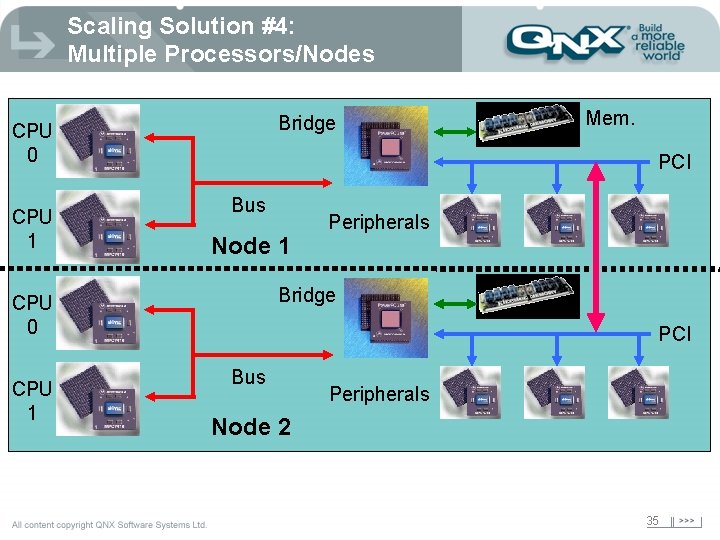
Scaling Solution #4: Multiple Processors/Nodes Bridge CPU 0 CPU 1 PCI Bus Node 1 Peripherals Bridge CPU 0 CPU 1 Mem. PCI Bus Peripherals Node 2 35
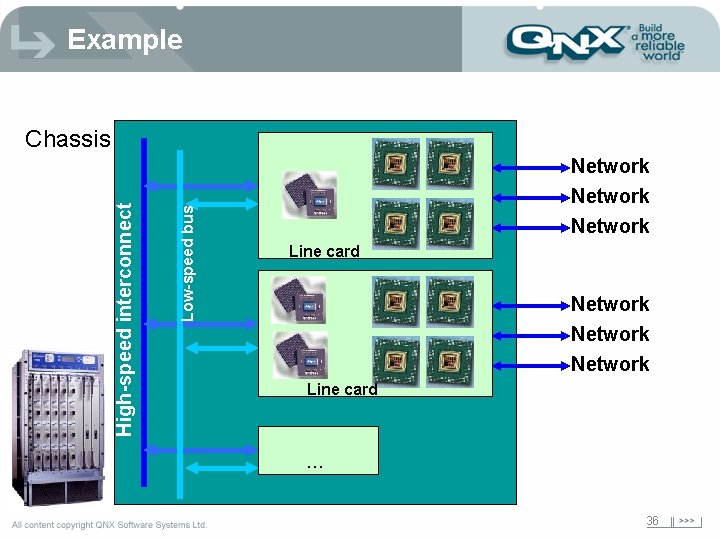
Example Low-speed bus High-speed interconnect Chassis Network Network Line card . . . 36
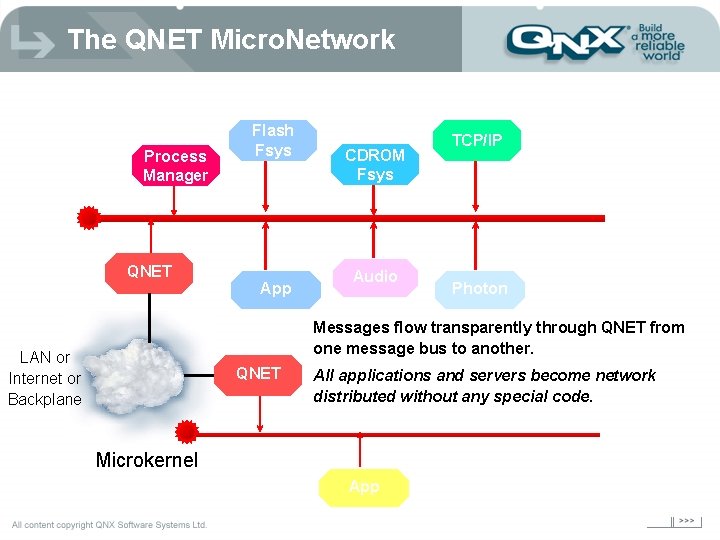
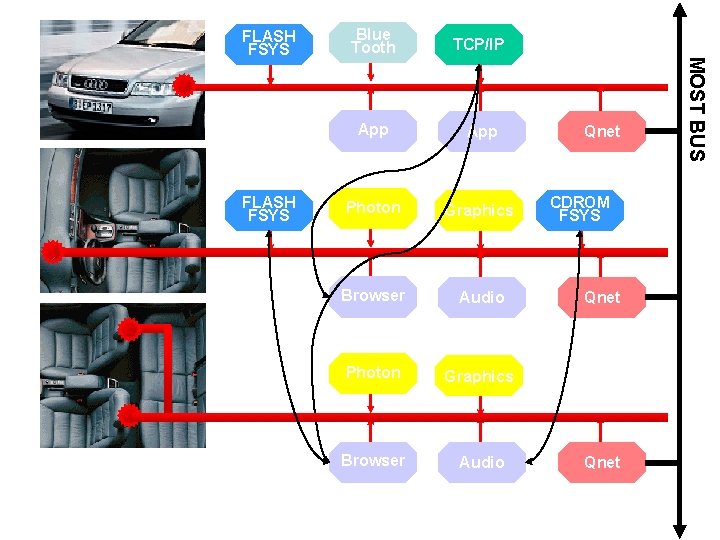
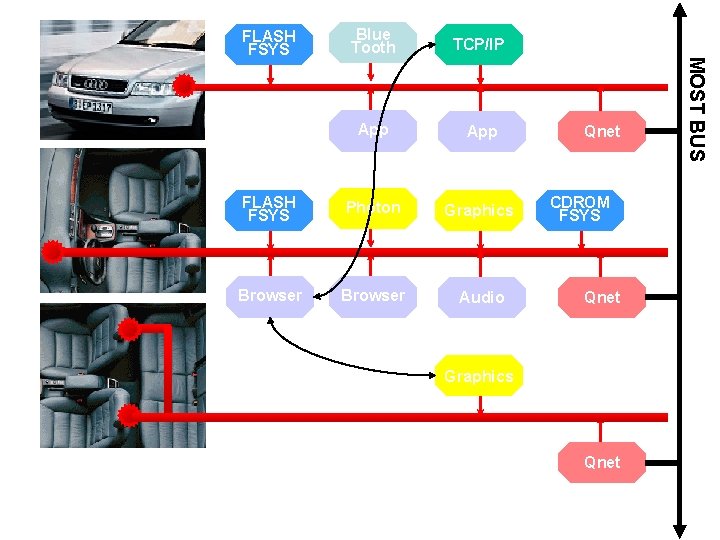
The QNET Micro. Network Process Manager QNET Flash Fsys App CDROM Fsys Audio TCP/IP Photon Messages flow transparently through QNET from one message bus to another. LAN or Internet or Backplane QNET All applications and servers become network distributed without any special code. Microkernel App
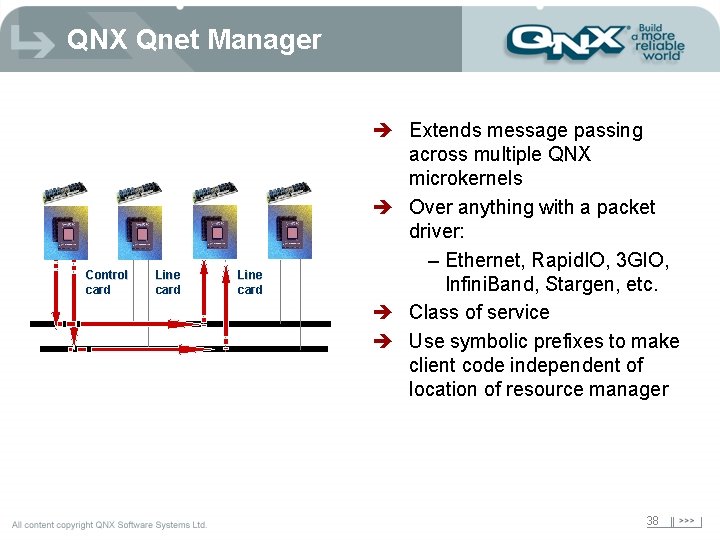
QNX Qnet Manager Control card Line card è Extends message passing across multiple QNX microkernels è Over anything with a packet driver: – Ethernet, Rapid. IO, 3 GIO, Infini. Band, Stargen, etc. è Class of service è Use symbolic prefixes to make client code independent of location of resource manager 38
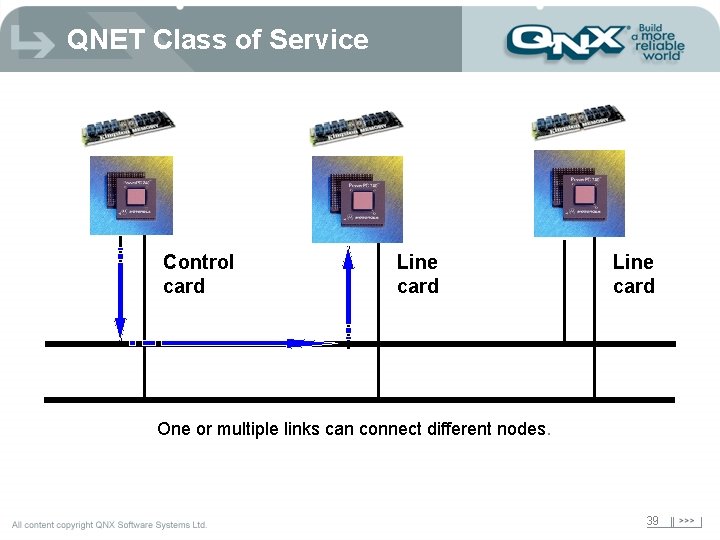
QNET Class of Service Control card Line card One or multiple links can connect different nodes. 39
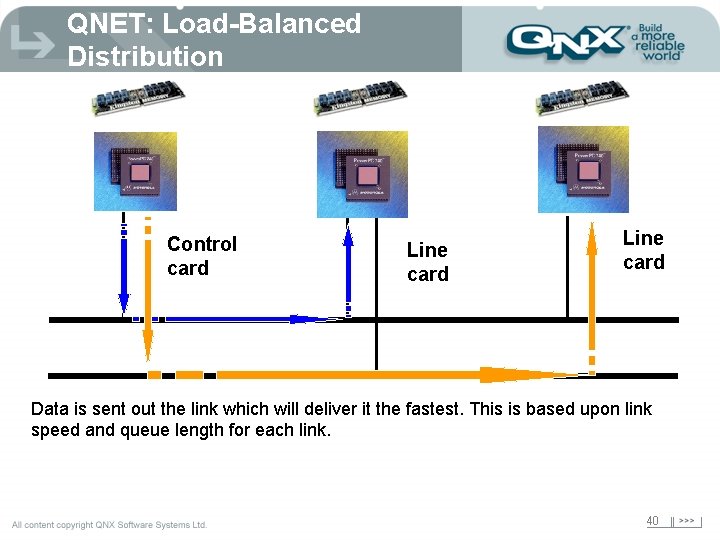
QNET: Load-Balanced Distribution Control card Line card Data is sent out the link which will deliver it the fastest. This is based upon link speed and queue length for each link. 40
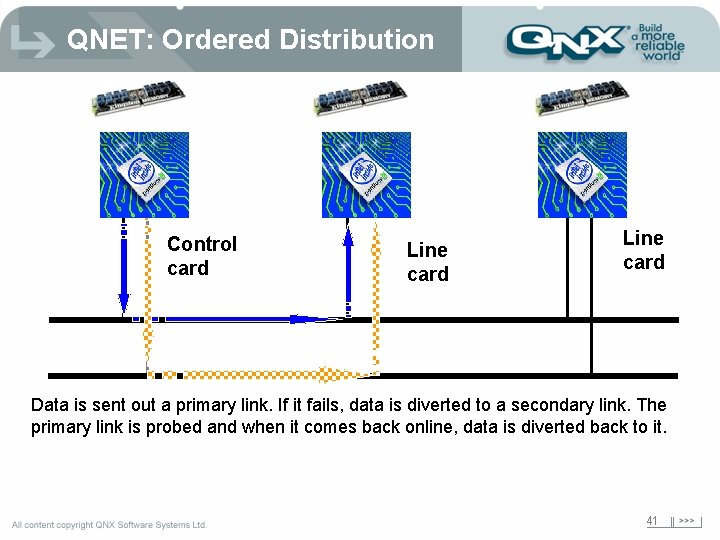
QNET: Ordered Distribution Control card Line card Data is sent out a primary link. If it fails, data is diverted to a secondary link. The primary link is probed and when it comes back online, data is diverted back to it. 41
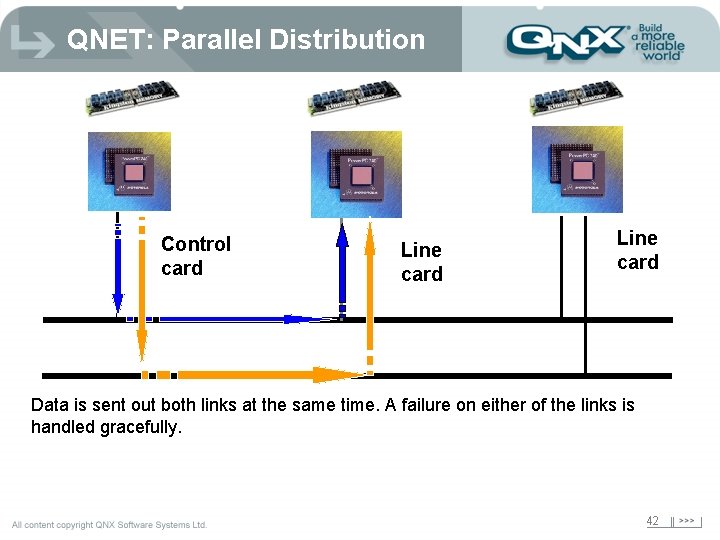
QNET: Parallel Distribution Control card Line card Data is sent out both links at the same time. A failure on either of the links is handled gracefully. 42
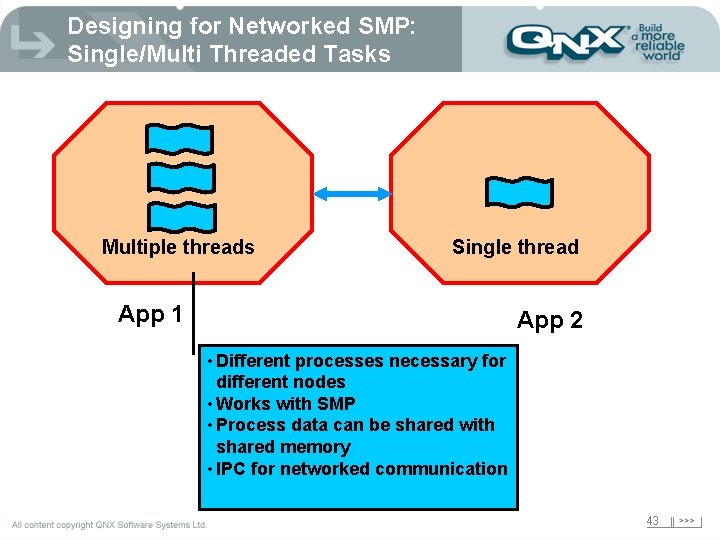
Designing for Networked SMP: Single/Multi Threaded Tasks Multiple threads Single thread App 1 App 2 • Different processes necessary for different nodes • Works with SMP • Process data can be shared with shared memory • IPC for networked communication 43
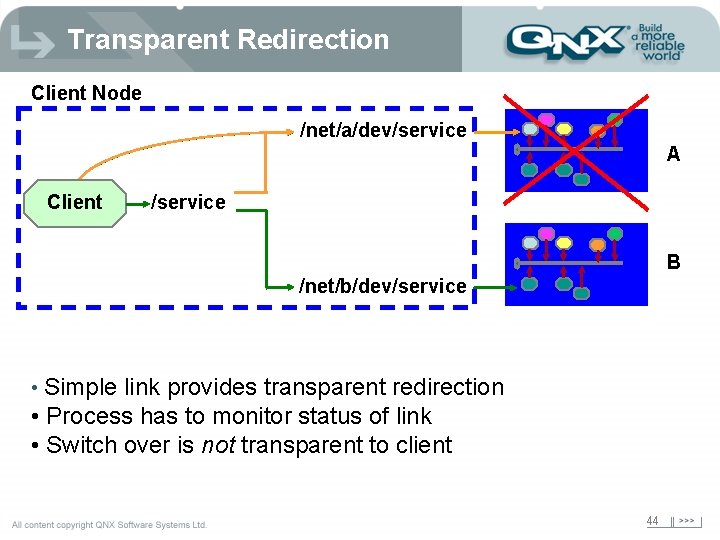
Transparent Redirection Client Node /net/a/dev/service A Client /service B /net/b/dev/service • Simple link provides transparent redirection • Process has to monitor status of link • Switch over is not transparent to client 44
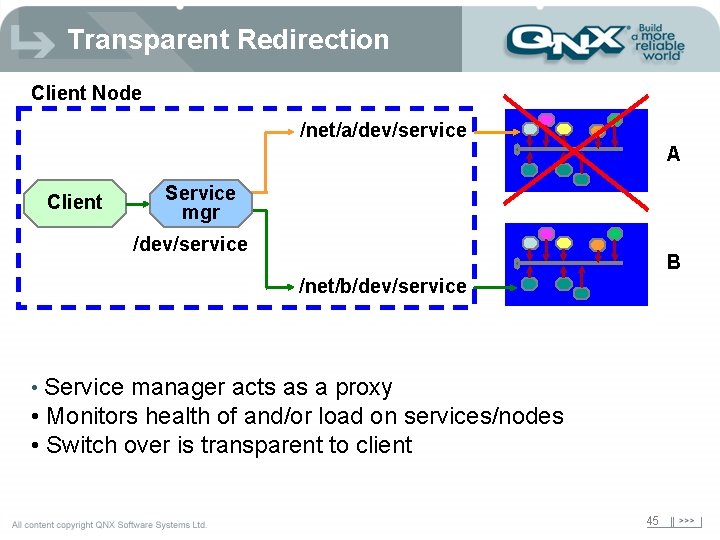
Transparent Redirection Client Node /net/a/dev/service A Client Service mgr /dev/service B /net/b/dev/service • Service manager acts as a proxy • Monitors health of and/or load on services/nodes • Switch over is transparent to client 45
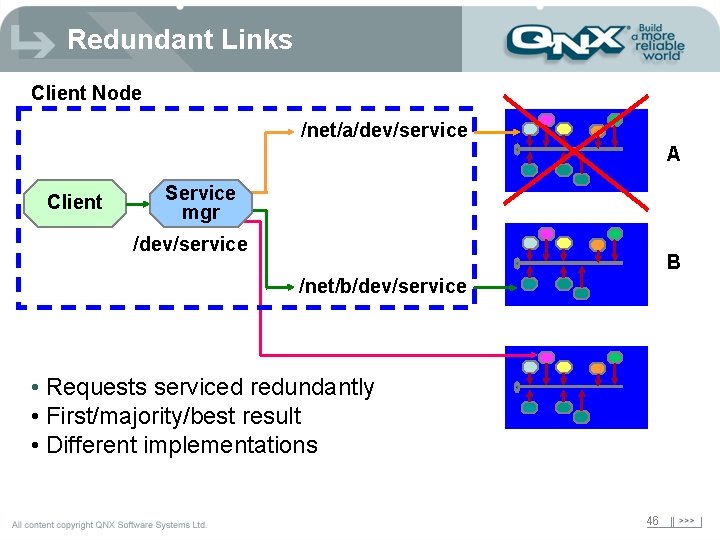
Redundant Links Client Node /net/a/dev/service A Client Service mgr /dev/service B /net/b/dev/service • Requests serviced redundantly • First/majority/best result • Different implementations 46
FLASH FSYS Blue Tooth TCP/IP App Photon Graphics Browser Audio Qnet CDROM FSYS Qnet MOST BUS FLASH FSYS
TCP/IP App FLASH FSYS Photon Graphics Browser Audio Qnet CDROM FSYS Qnet Graphics Qnet MOST BUS Blue Tooth FLASH FSYS
Reliability and Availability Title of presentation Title 2 49
Why? è Embedded systems are different! è Failure in an embedded system can have severe effects - like death … “Pilots really hate to be told they have to reboot their plane while in flight” Walter Shawlee 50
Definitions è MTBF: Mean Time Between Failure – The average number of hours between failures for a large number of components over a long time. (e. g. MIL-HDBK-217) è MTTR: Mean Time To Repair – Total amount of time spent performing all corrective maintenance repairs divided by the number of repairs è MTBI: Mean Time Between Interruptions. – The average number of hours between failures while a redundant component is down. 51
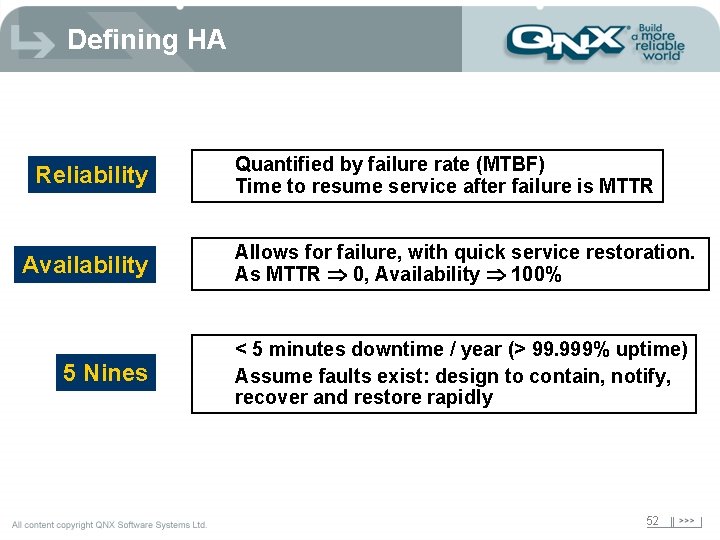
Defining HA Reliability Availability 5 Nines Quantified by failure rate (MTBF) Time to resume service after failure is MTTR Allows for failure, with quick service restoration. As MTTR 0, Availability 100% < 5 minutes downtime / year (> 99. 999% uptime) Assume faults exist: design to contain, notify, recover and restore rapidly 52
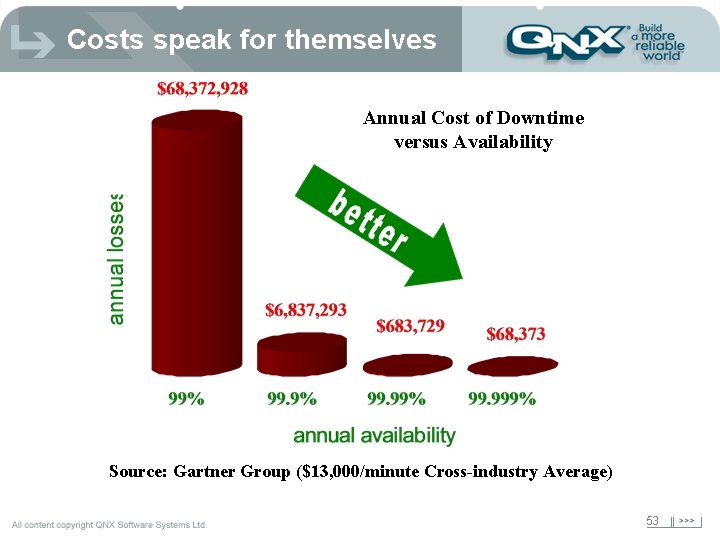
Costs speak for themselves Annual Cost of Downtime versus Availability Source: Gartner Group ($13, 000/minute Cross-industry Average) 53
Availability via Reliability and Repair è low MTTR -> high availability – System is composed of reliable components, that are protected from each other, and that communicate ONLY through well known interfaces. è this leads to – fault isolation – speedy recovery – reset a component not a board/system – dynamic control • stop/start • upgrade 54
Software vs Hardware HA – utilizes redundancy of key components • a single fault cannot cause all redundant components to fail (No SPOF). e. g. mirrored disks, multiple system boards, I/O cards – Active/active, active/spare, active/standby But that’s only part of the problem!!! Software is a Significant Cause of Downtime 55
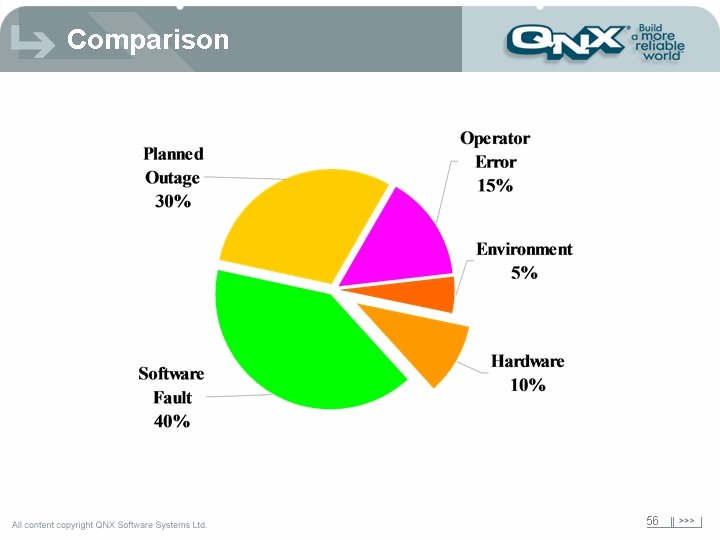
Comparison 56
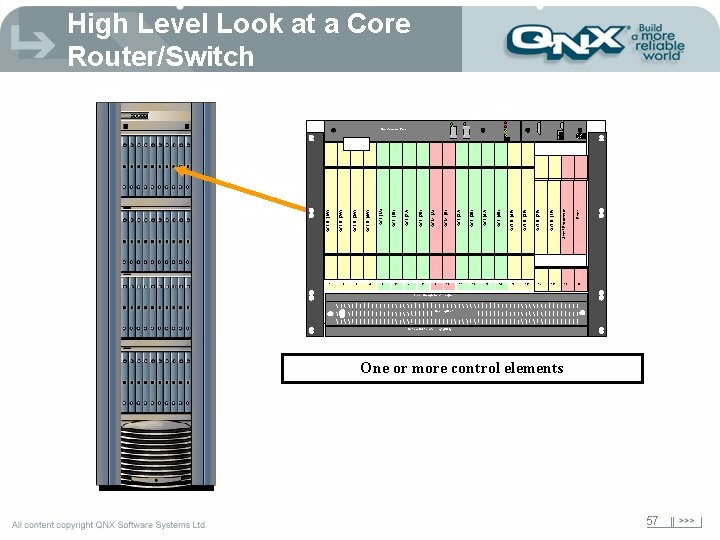
High Level Look at a Core Router/Switch ON ON I I O O 2 3 4 6 8 9 10 11 12 13 14 16 17 18 19 Filler OCLD (1 E) Shelf Processor OCLD (2 E) OCLD (4 E) 15 OCLD (3 E) OCI (4 A) OCI (3 A) OCM (B) OCM (A) OCI (2 A) 7 OCI (2 B) OCI (1 A) 5 OCI (1 B) OCLD (4 W) OCLD (3 W) OCLD (2 W) OCLD (1 W) 1 OCI (4 B) OFF OCI (3 B) Maintenance Panel 20 Fiber Management Trough Cooling Unit Optical Multiplexer Tray (OMX) One or more control elements 57
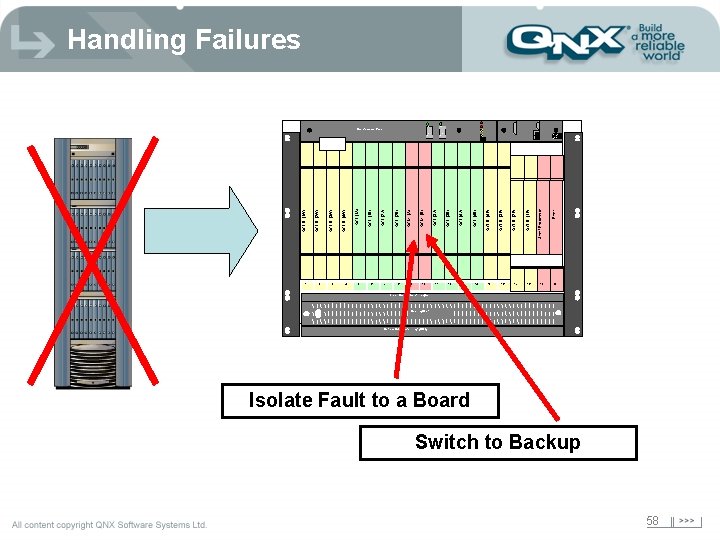
Handling Failures ON ON I I O O 2 3 4 6 8 9 10 11 12 13 14 15 17 19 Filler OCLD (1 E) 18 Shelf Processor OCLD (3 E) 16 OCLD (2 E) OCLD (4 E) OCI (4 A) OCI (3 A) OCM (B) OCM (A) OCI (2 A) 7 OCI (2 B) OCI (1 A) 5 OCI (1 B) OCLD (4 W) OCLD (3 W) OCLD (2 W) OCLD (1 W) 1 OCI (4 B) OFF OCI (3 B) Maintenance Panel 20 Fiber Management Trough Cooling Unit Optical Multiplexer Tray (OMX) Isolate Fault to a Board Switch to Backup 58
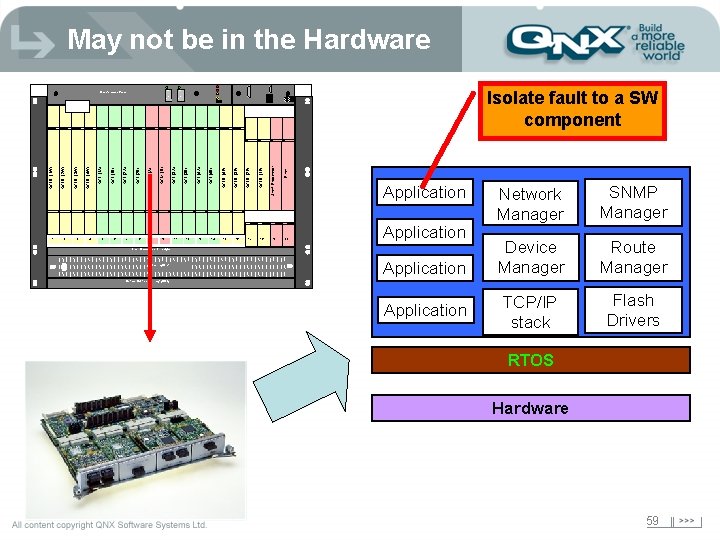
May not be in the Hardware ON 5 8 9 I O 10 11 12 13 15 17 19 Filler OCLD (1 E) 18 Shelf Processor OCLD (3 E) 16 OCLD (2 E) OCI (4 B) 14 OCLD (4 E) OCI (4 A) OFF OCI (3 A) OCM (B) 7 OCM (A) 6 OCI (2 B) OCI (2 A) 4 OCI (1 A) OCLD (3 W) 3 OCI (1 B) 2 OCLD (4 W) OCLD (2 W) OCLD (1 W) 1 Isolate fault to a SW component ON I O OFF OCI (3 B) Maintenance Panel Application 20 Application Fiber Management Trough Cooling Unit Application Network Manager SNMP Manager Device Manager Route Manager TCP/IP stack Flash Drivers Optical Multiplexer Tray (OMX) Application RTOS Hardware 59
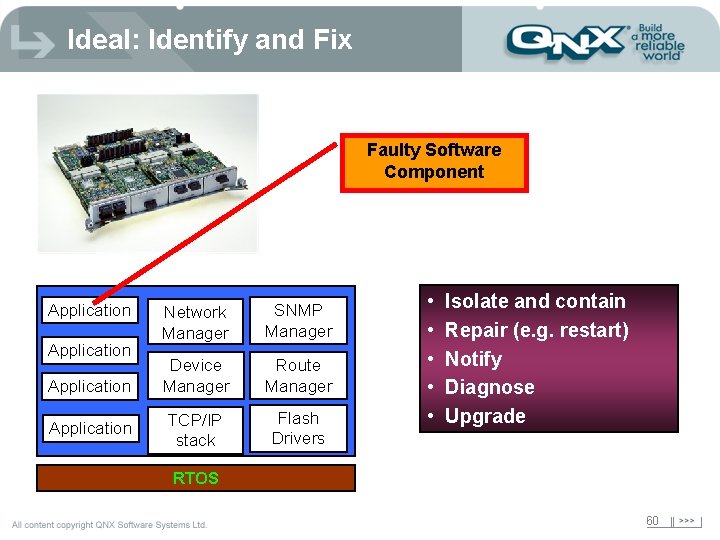
Ideal: Identify and Fix Faulty Software Component Application Network Manager SNMP Manager Device Manager Route Manager TCP/IP stack Flash Drivers • • • Isolate and contain Repair (e. g. restart) Notify Diagnose Upgrade RTOS 60
Component-level recovery rarely done è è Lack of suitable protection and isolation Lack of modularity Tight component coupling Few dynamic capabilities Software failures normally handled by: è Hardware watchdogs è Redundant boards 61
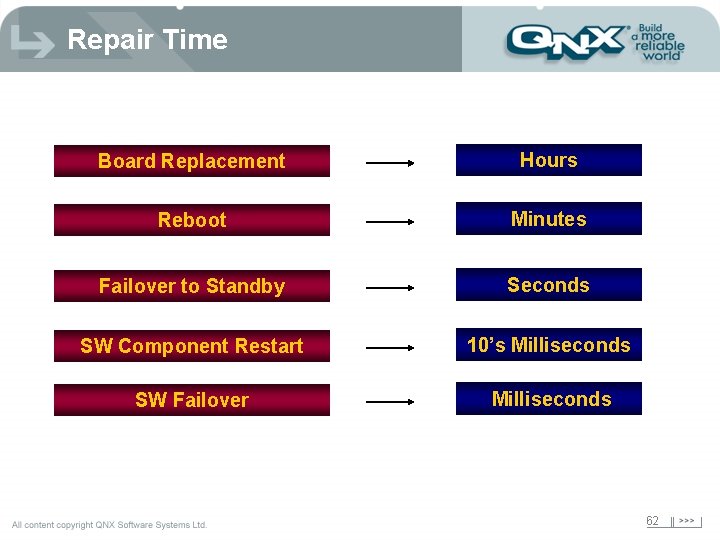
Repair Time Board Replacement Hours Reboot Minutes Failover to Standby Seconds SW Component Restart 10’s Milliseconds SW Failover Milliseconds 62
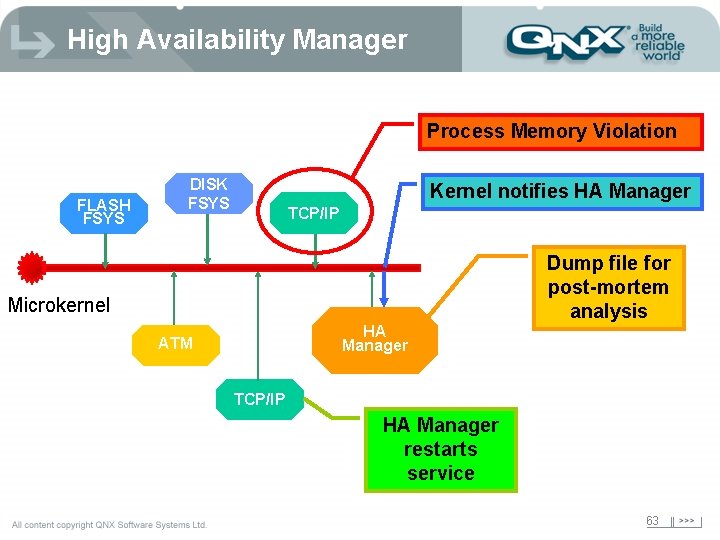
High Availability Manager Process Memory Violation FLASH FSYS DISK FSYS Kernel notifies HA Manager TCP/IP Dump file for post-mortem analysis Microkernel HA Manager ATM TCP/IP HA Manager restarts service 63
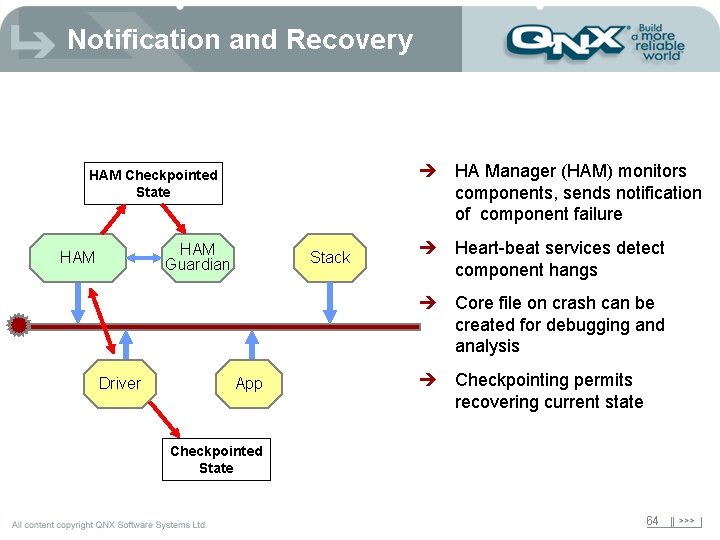
Notification and Recovery è HA Manager (HAM) monitors components, sends notification of component failure HAM Checkpointed State HAM Guardian HAM Stack è Heart-beat services detect component hangs è Core file on crash can be created for debugging and analysis Driver App è Checkpointing permits recovering current state Checkpointed State 64
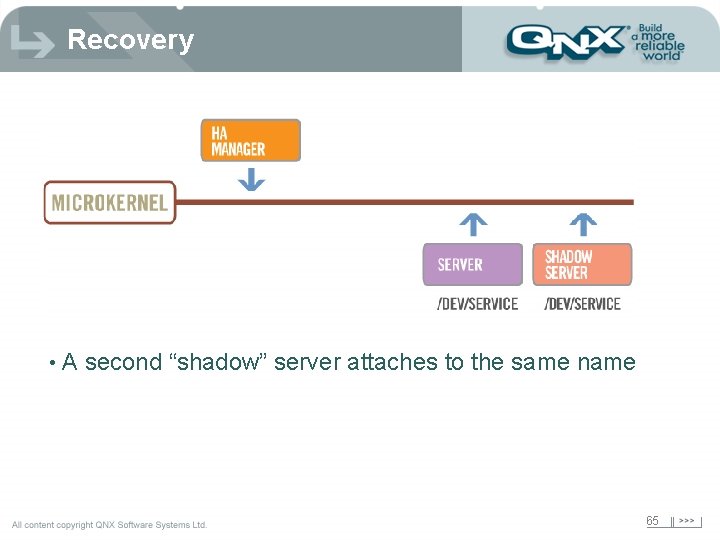
Recovery • A second “shadow” server attaches to the same name 65
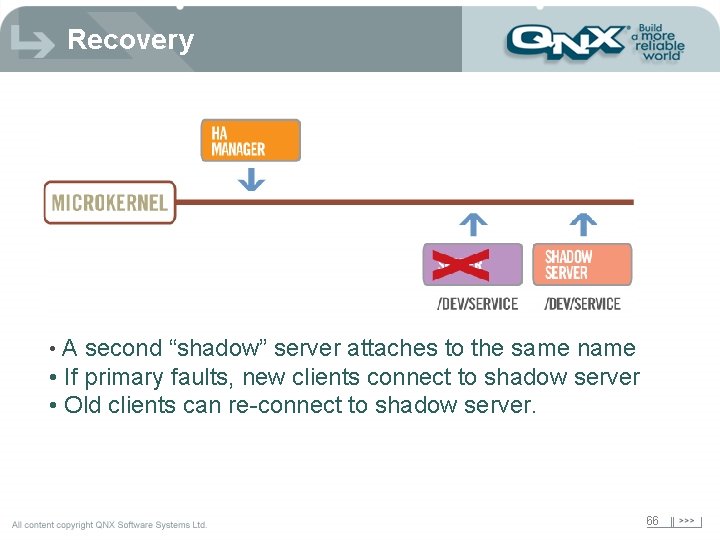
Recovery • A second “shadow” server attaches to the same name • If primary faults, new clients connect to shadow server • Old clients can re-connect to shadow server. 66
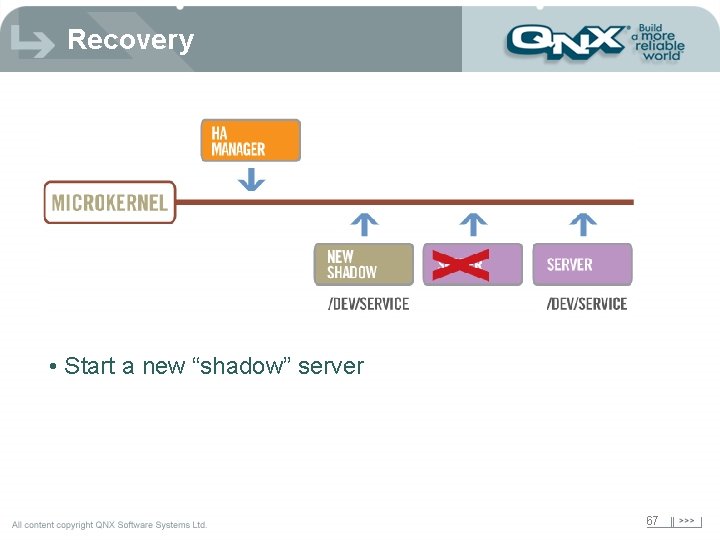
Recovery • Start a new “shadow” server 67
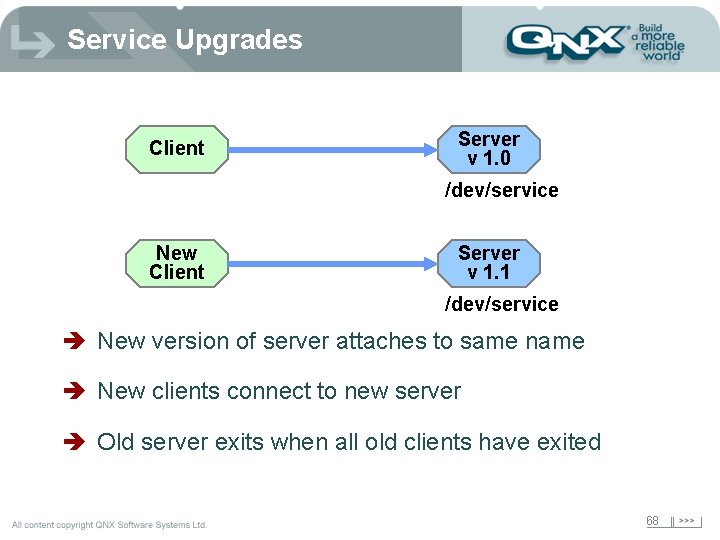
Service Upgrades Client Server v 1. 0 /dev/service New Client Server v 1. 1 /dev/service è New version of server attaches to same name è New clients connect to new server è Old server exits when all old clients have exited 68
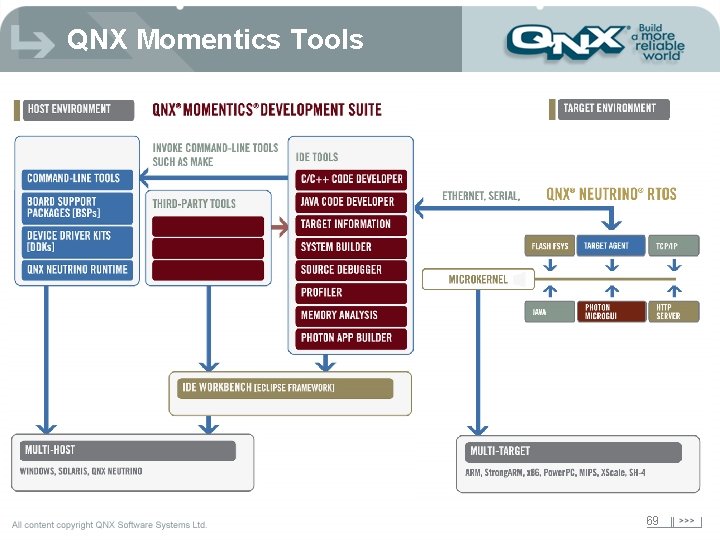
QNX Momentics Tools 69
Design Goals è Tools needed to be easy to learn è Tools which could take advantage of QNX è Tools which could integrate tools from other vendors, company designed tools, and industry specific tools and have them work with our tools and each other è Tools needed to be customizable to the user or the company 70
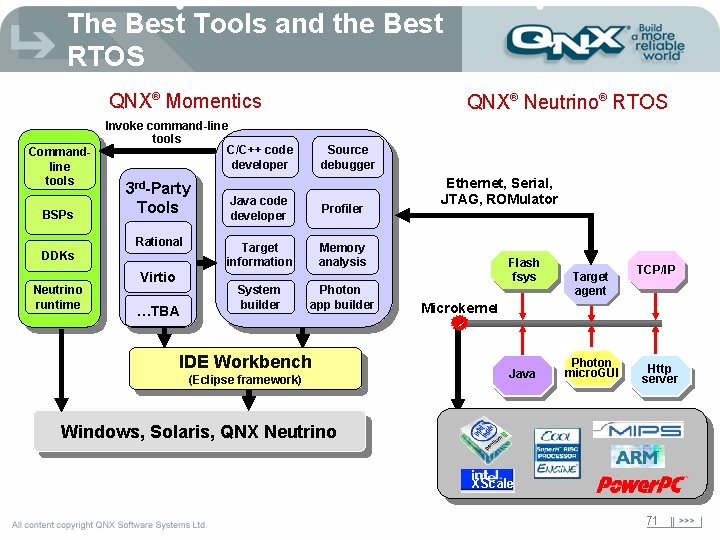
The Best Tools and the Best RTOS QNX® Momentics Commandline tools BSPs Invoke command-line tools C/C++ code developer 3 rd-Party Tools Rational DDKs Neutrino runtime QNX® Neutrino® RTOS Virtio …TBA Source debugger Java code developer Profiler Target information Memory analysis System builder Photon app builder IDE Workbench (Eclipse framework) Ethernet, Serial, JTAG, ROMulator Flash fsys Target agent TCP/IP Microkernel Java Photon micro. GUI Http server Windows, Solaris, QNX Neutrino XScale 71
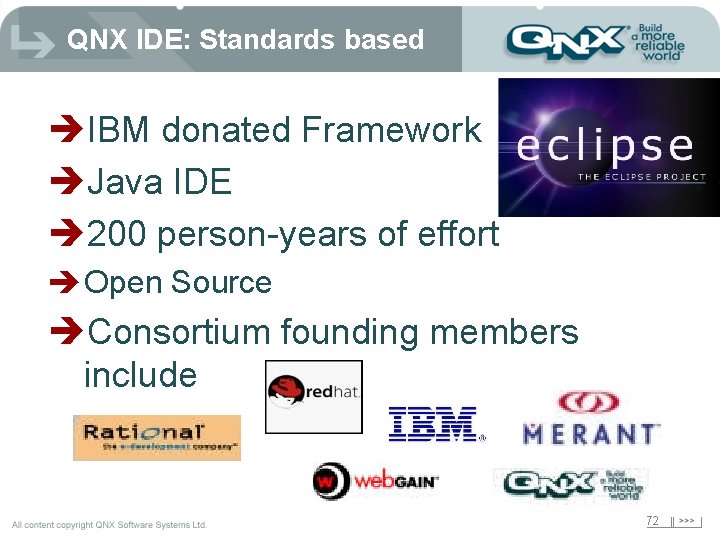
QNX IDE: Standards based èIBM donated Framework èJava IDE è 200 person-years of effort è Open Source èConsortium founding members include 72
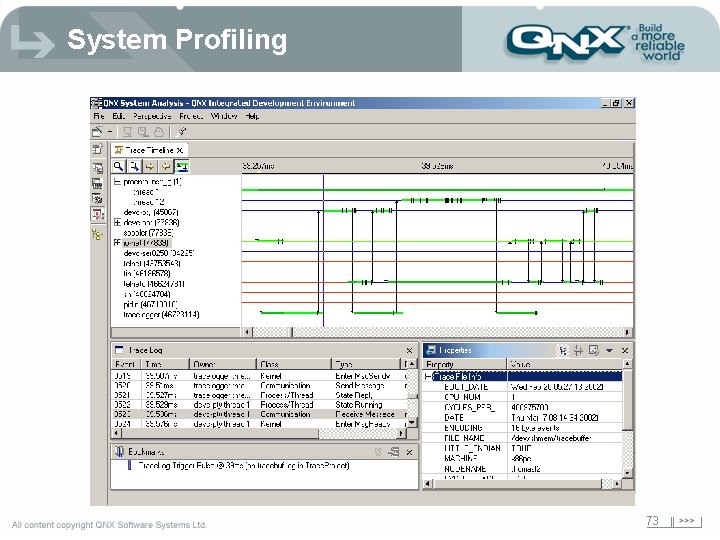
System Profiling 73
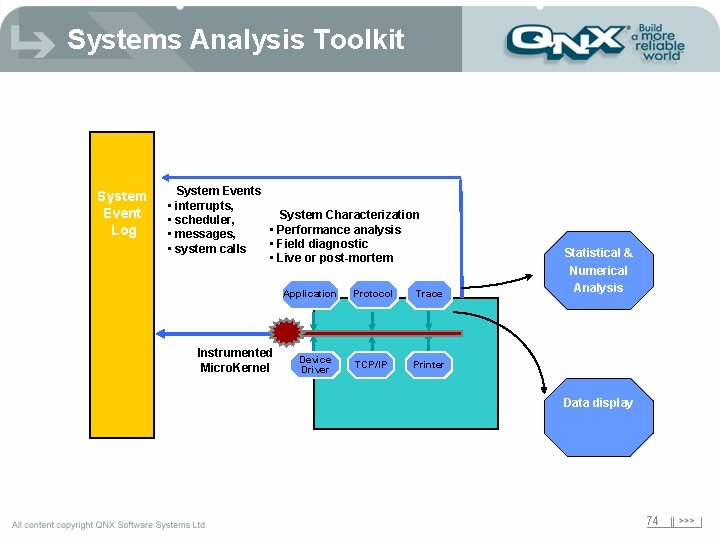
Systems Analysis Toolkit System Event Log System Events • interrupts, System Characterization • scheduler, • Performance analysis • messages, • Field diagnostic • system calls • Live or post-mortem Application Instrumented Micro. Kernel Device Driver Protocol Trace TCP/IP Printer Statistical & Numerical Analysis Data display 74

Providing Technology for Today… Architecture for Tomorrow Irvine Office - 949 -727 -0444 David Weintraub - Regional Sales Manager dweintraub@qnx. com Woodland Hills Office - 818 -227 -5105 Jeff Schaffer - Sr. Field Applications Engineer jpschaffer@qnx. com
- Slides: 75