
PreLive Super User and Managers Briefing You can
Pre-Live Super User and Managers Briefing You can download a copy of this Presentation at: http: //my-ehospital. org/support/information-super-users
Agenda and Introductions Executive welcome Introductions and check-up Briefing Q&A Our largest ever investment in improving healthcare quality
How are you getting on with becoming Super? 1. 2. 3. 4. The 'Art of being a Super User' guidance booklet Your e. Learning modules Your Electronic Patient Record training Sitting in as a 'classroom assistant' on further training 5. Further e. Learning modules 6. Practice and embed your new skills in the 'playground‘ 7. For doctors and clinical nurse specialists there will be personalisation labs 8. Participating in Dress Rehearsals 9. Attend a pre-live Super User/Managers briefing 10. Keeping up to date Our largest ever investment in improving healthcare quality
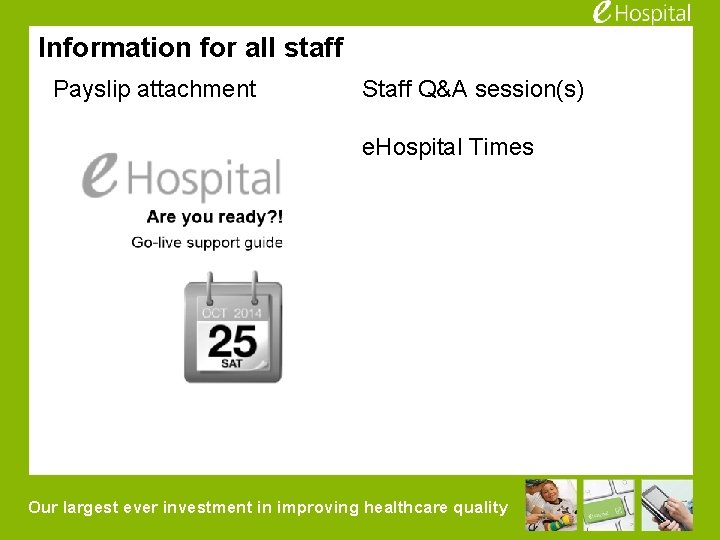
Information for all staff Payslip attachment Staff Q&A session(s) e. Hospital Times Our largest ever investment in improving healthcare quality
Super User / Management Briefing – what we’ll cover Goals for Support Overview of Support What is the Bronze CAM (e. Hospital Command Centre) Roles and Responsibilities Be a Great Super User Zone Support – How to engage your Floor Walkers Prioritising Incident Tickets Reporting Options and Online Ticket Entry Patient Safety Overview of Cutover Operations Issues – Bronze, Silver, Gold Command (Major Incident) You can download a copy of this Presentation at: http: //my-ehospital. org/support/information-super-users Our largest ever investment in improving healthcare quality
Go Live Support Goals • Smooth transition from the current processes to Epic • • Solid Epic readiness Appropriate plan/processes/structure for managing transition Solid end-user and physician support structure Identify and manage issues Timely response to issues Maintain strict Change Control process Communicate to the organisation and our peers appropriately And, above all Minimise the risk to patients, as well as the organisation’s operations by providing quality 24 x 7 support and transition management. Our largest ever investment in improving healthcare quality
The First 10 Days of Go-Live You Should Expect Days 1 -3: ◦ Security, printing, and general workflow reinforcement Days 5 -7: ◦ There may be an increase in frustration on the part of users if issues are not resolved in a timely manner or support is not sufficient Days 7 -10: ◦ The excitement of go-live wears off; be prepared for staff and project team fatigue In general, you will hear different perspectives from users, making it difficult to establish the “facts” Focus on the root cause instead of the symptoms Our largest ever investment in improving healthcare quality
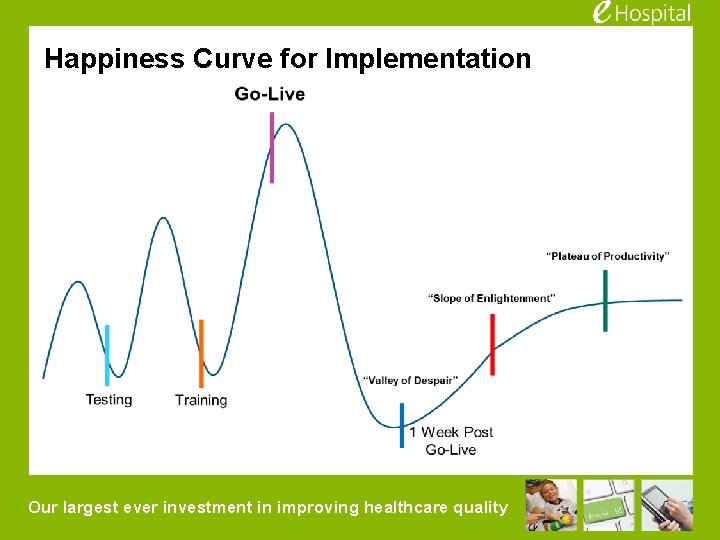
Happiness Curve for Implementation Our largest ever investment in improving healthcare quality
Before Go-Live The organisation as a whole will be increasingly anxious Some individuals will be outspoken in opposition to the project and/or the go-live date The project team will feel overwhelmed You will see some end user resistance to training People will question your scope or sequence Our largest ever investment in improving healthcare quality
Overview of Support Bronze CAM Command Center Support Staff – Located in the Deakin Centre Project Leadership, Application Functionality support, Security Infrastructure, Production Applications, EDI PC/Printer Support, Systems/Network Security and HP Support Roles Super Users – Support End Users Floor Walker – Float Support for Super Users Zone Leader – Support Floor Walkers in their assigned Zone (Territory) Bronze CAM Commander w/ Deputy Silver Command Gold Command 24 X 7 scheduled from 23 -10 -14 thru 28 -11 -14 Daily Communication schedule 06: 45 and 18: 45 Shift Transition Meeting for Inpatient areas 09: 30 and 21: 30 Silver Leadership Meeting 10: 00 Outpatient Leadership Huddle (M-F) TBD Floor Walker and Command Center staff will have pagers and phones for communication as assigned. Incident management ticketing system is called SAMANAGE for tracking issues and resolution Our largest ever investment in improving healthcare quality
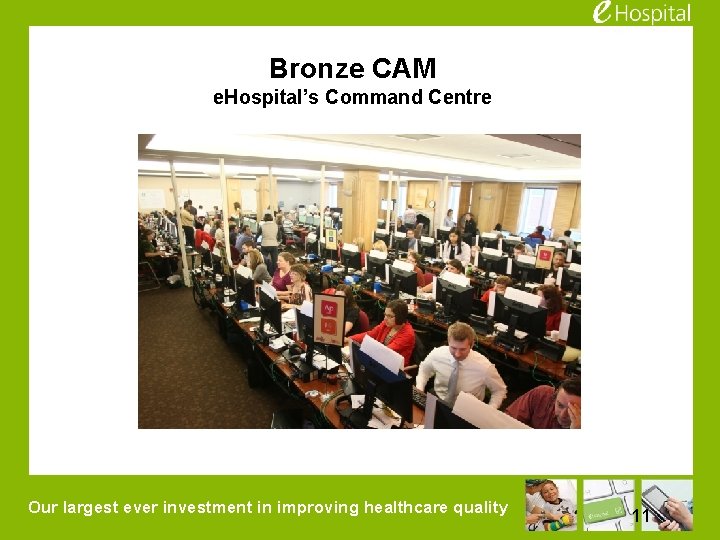
Bronze CAM e. Hospital’s Command Centre Our largest ever investment in improving healthcare quality 11
Bronze CAM (Deakin Command Centre) • • • Purpose is to provide support and issue resolution over the go-live period. Reports in to Silver Command. The issues reported in by Super Users and Floor Walker are tracked and resolved as Incident Tickets. Level 3 of the Deakin Centre 24/7 Operation planned from 24 Oct to end Nov Designed to seat 150 staff covering Ø Ø Ø Leadership from CUH Epic Corporation Experts CUH Builder (Ticket Resolver) Teams HP A Priority 1 Call-In Service Desk. Ticket Resolver Teams – Will involved HP, Security, Epic application modules ASAP ED Beacon Cancer Beaker Pathology Bridges Interfacing Clin Doc/Stork/ICU Clinical doucmentation including ICU and Obstetrics Cupid Cardiology HIM Coding, Chart and Film Tracking Inpatient Orders Kaleidoscope Ophthalmology Op. Time/Anesthesia Theatres Outpatient Clinicals Outpatients PAS Patient Administration Phoenix Transplant Radiology Willow Pharmacy Our largest ever investment in improving healthcare quality
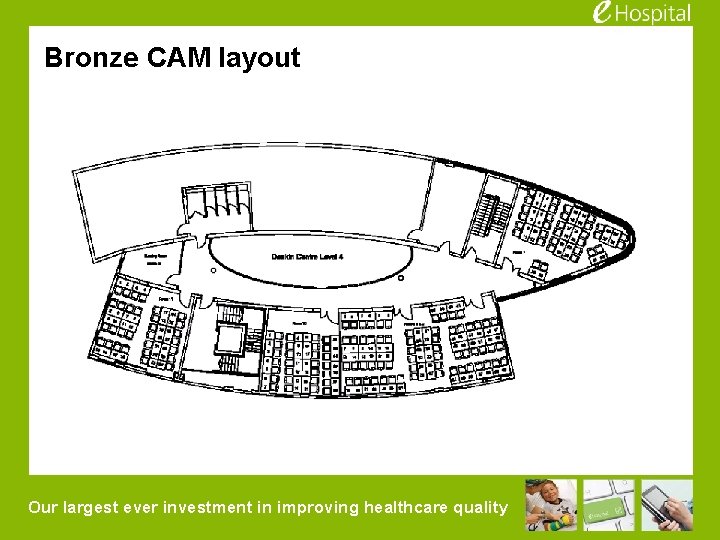
Bronze CAM layout Our largest ever investment in improving healthcare quality

End User Support Flow End User needs help with Epic Super User provides support If Super User isn’t available or can’t resolve If Floorwalker isn’t available or can’t resolve Floorwalker provides support Online incident ticket is created. If necessary, a Priority 1 phone call is raised with Bronze CAM service desk Our largest ever investment in improving healthcare quality
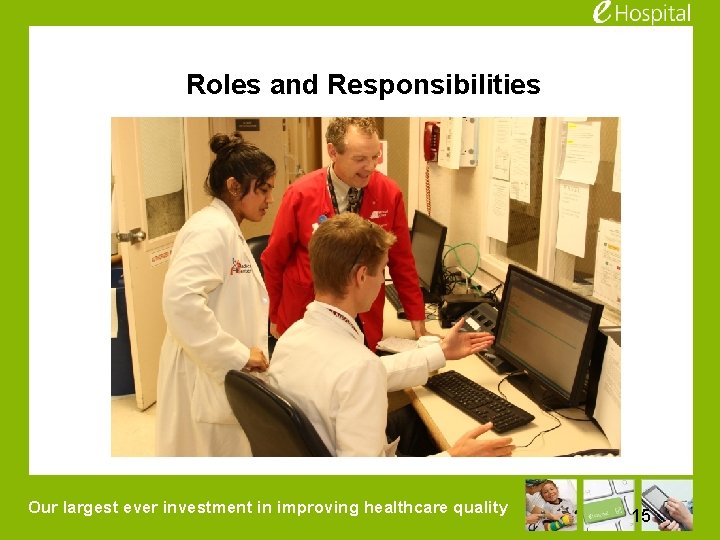
Roles and Responsibilities Our largest ever investment in improving healthcare quality 15
Roles & Responsibilities, Super User Provide courteous, calm and reassuring support to end users during shift. n Frontline support and frontline champion for Epic in your department. n Reduce fear and anxiety– Epic is a tool, it does not replace thinking and judgment • Patient safety and good clinical practice must prevail n Answer questions and provide workflow assistance. n Consult Floor Walker if unable to resolve end user concerns n Huddle with Floor Walker for updates as they make rounds after the Shift Transition meetings 06: 45 and 18: 45. Shift meeting minutes and new tips and tricks online should be posted by 09: 00 and 21: 00. n Consult the e. Hospital website for latest tip and tricks, project updates and other information. Communicate, Review and Post daily Go-live Updates in department n Identify trends and communicate with your Floor Walker n Document Enhancement suggestions and review with Manager. n Wear e. Hospital armbands for easy identification. n Our largest ever investment in improving healthcare quality
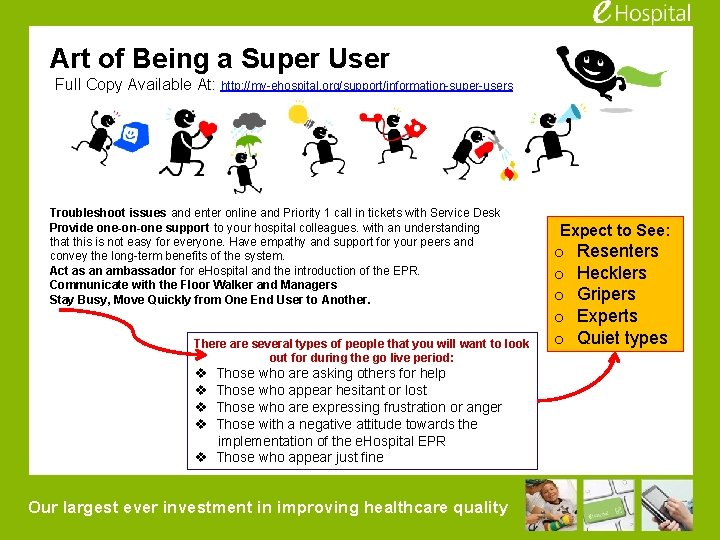
Art of Being a Super User Full Copy Available At: http: //my-ehospital. org/support/information-super-users Troubleshoot issues and enter online and Priority 1 call in tickets with Service Desk Provide one-on-one support to your hospital colleagues. with an understanding that this is not easy for everyone. Have empathy and support for your peers and convey the long-term benefits of the system. Act as an ambassador for e. Hospital and the introduction of the EPR. Communicate with the Floor Walker and Managers Stay Busy, Move Quickly from One End User to Another. There are several types of people that you will want to look out for during the go live period: v v Those who are asking others for help Those who appear hesitant or lost Those who are expressing frustration or anger Those with a negative attitude towards the implementation of the e. Hospital EPR v Those who appear just fine Our largest ever investment in improving healthcare quality Expect to See: o o o Resenters Hecklers Gripers Experts Quiet types
If All Else Fails. . . Our largest ever investment in improving healthcare quality
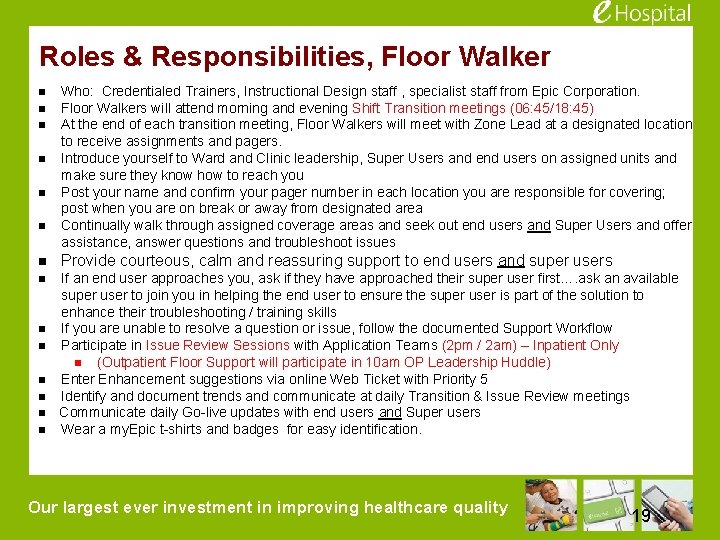
Roles & Responsibilities, Floor Walker n n n Who: Credentialed Trainers, Instructional Design staff , specialist staff from Epic Corporation. Floor Walkers will attend morning and evening Shift Transition meetings (06: 45/18: 45) At the end of each transition meeting, Floor Walkers will meet with Zone Lead at a designated location to receive assignments and pagers. Introduce yourself to Ward and Clinic leadership, Super Users and end users on assigned units and make sure they know how to reach you Post your name and confirm your pager number in each location you are responsible for covering; post when you are on break or away from designated area Continually walk through assigned coverage areas and seek out end users and Super Users and offer assistance, answer questions and troubleshoot issues n Provide courteous, calm and reassuring support to end users and super users n If an end user approaches you, ask if they have approached their super user first…. ask an available super user to join you in helping the end user to ensure the super user is part of the solution to enhance their troubleshooting / training skills If you are unable to resolve a question or issue, follow the documented Support Workflow Participate in Issue Review Sessions with Application Teams (2 pm / 2 am) – Inpatient Only n (Outpatient Floor Support will participate in 10 am OP Leadership Huddle) Enter Enhancement suggestions via online Web Ticket with Priority 5 Identify and document trends and communicate at daily Transition & Issue Review meetings Communicate daily Go-live updates with end users and Super users Wear a my. Epic t-shirts and badges for easy identification. n n n Our largest ever investment in improving healthcare quality 19
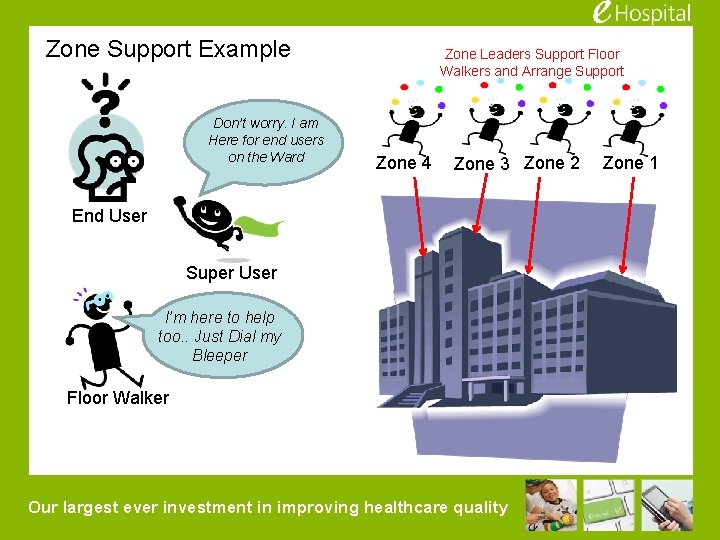
Zone Support Example Don’t worry. I am Here for end users on the Ward Zone Leaders Support Floor Walkers and Arrange Support Zone 4 Zone 3 Zone 2 End User Super User I’m here to help too. . Just Dial my Bleeper Floor Walker Our largest ever investment in improving healthcare quality Zone 1
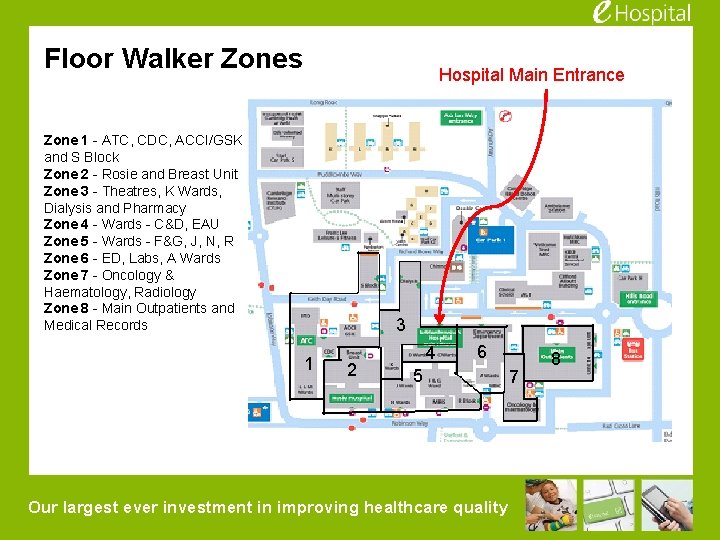
Floor Walker Zones Hospital Main Entrance Zone 1 - ATC, CDC, ACCI/GSK and S Block Zone 2 - Rosie and Breast Unit Zone 3 - Theatres, K Wards, Dialysis and Pharmacy Zone 4 - Wards - C&D, EAU Zone 5 - Wards - F&G, J, N, R Zone 6 - ED, Labs, A Wards Zone 7 - Oncology & Haematology, Radiology Zone 8 - Main Outpatients and Medical Records 3 1 2 2 4 6 5 Our largest ever investment in improving healthcare quality 7 8
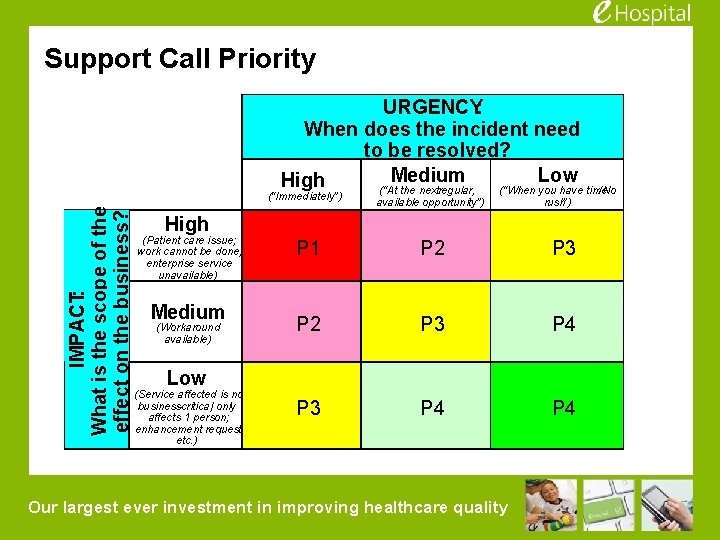
Support Call Priority URGENCY: When does the incident need to be resolved? Medium Low High IMPACT: What is the scope of the effect on the business? (“Immediately”) (“At the nextregular, available opportunity”) (“When you have time /No rush”) High (Patient care issue; work cannot be done; enterprise service unavailable) Medium (Workaround available) P 1 P 2 P 3 P 4 Low (Service affected is not business-critical; only affects 1 person; enhancement request, etc. ) Our largest ever investment in improving healthcare quality
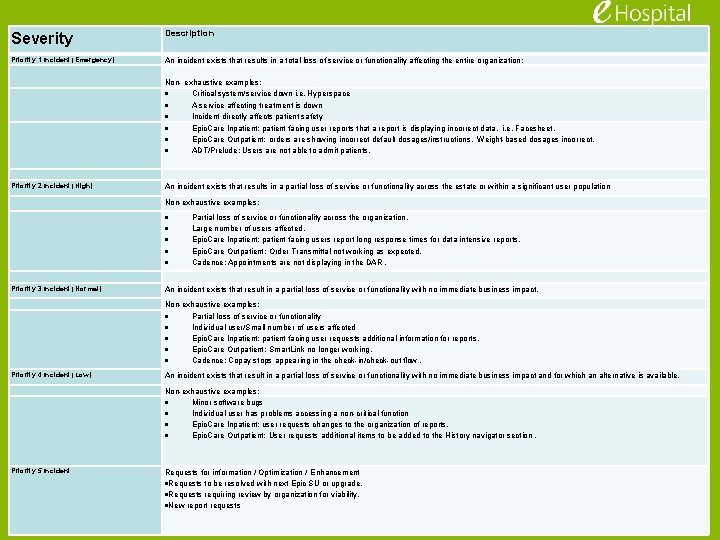
Severity Description Priority 1 Incident (Emergency) An incident exists that results in a total loss of service or functionality affecting the entire organization: Non- exhaustive examples: Critical system/service down i. e. Hyperspace A service affecting treatment is down Incident directly affects patient safety Priority 2 Incident (High) Epic. Care Inpatient: patient facing user reports that a report is displaying incorrect data. i. e. Facesheet. Epic. Care Outpatient: orders are showing incorrect default dosages/instructions. Weight-based dosages incorrect. ADT/Prelude: Users are not able to admit patients. An incident exists that results in a partial loss of service or functionality across the estate or within a significant user population Non-exhaustive examples: Priority 3 Incident (Normal) Partial loss of service or functionality across the organization. Large number of users affected. Epic. Care Inpatient: patient facing users report long response times for data intensive reports. Epic. Care Outpatient: Order Transmittal not working as expected. Cadence: Appointments are not displaying in the DAR. An incident exists that result in a partial loss of service or functionality with no immediate business impact. Non-exhaustive examples: Partial loss of service or functionality Individual user/Small number of users affected Epic. Care Inpatient: patient facing user requests additional information for reports. Epic. Care Outpatient: Smart. Link no longer working. Cadence: Copay stops appearing in the check-in/check-out flow. Priority 4 Incident (Low) An incident exists that result in a partial loss of service or functionality with no immediate business impact and for which an alternative is available. Non-exhaustive examples: Minor software bugs Individual user has problems accessing a non-critical function Epic. Care Inpatient: user requests changes to the organization of reports. Epic. Care Outpatient: User requests additional items to be added to the History navigator section. Priority 5 Incident Requests for information / Optimization / Enhancement Requests to be resolved with next Epic SU or upgrade. Requests requiring review by organization for viability. New report requests Our largest ever investment in improving healthcare quality
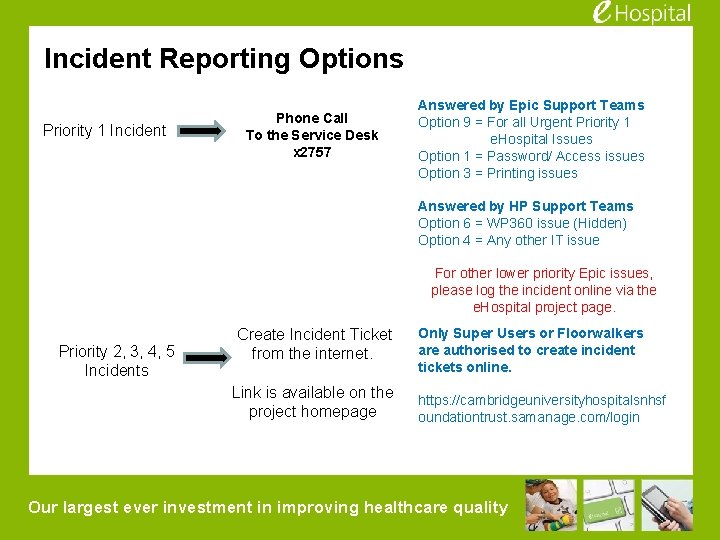
Incident Reporting Options Priority 1 Incident Phone Call To the Service Desk x 2757 Answered by Epic Support Teams Option 9 = For all Urgent Priority 1 e. Hospital Issues Option 1 = Password/ Access issues Option 3 = Printing issues Answered by HP Support Teams Option 6 = WP 360 issue (Hidden) Option 4 = Any other IT issue For other lower priority Epic issues, please log the incident online via the e. Hospital project page. Priority 2, 3, 4, 5 Incidents Create Incident Ticket from the internet. Link is available on the project homepage Only Super Users or Floorwalkers are authorised to create incident tickets online. https: //cambridgeuniversityhospitalsnhsf oundationtrust. samanage. com/login Our largest ever investment in improving healthcare quality
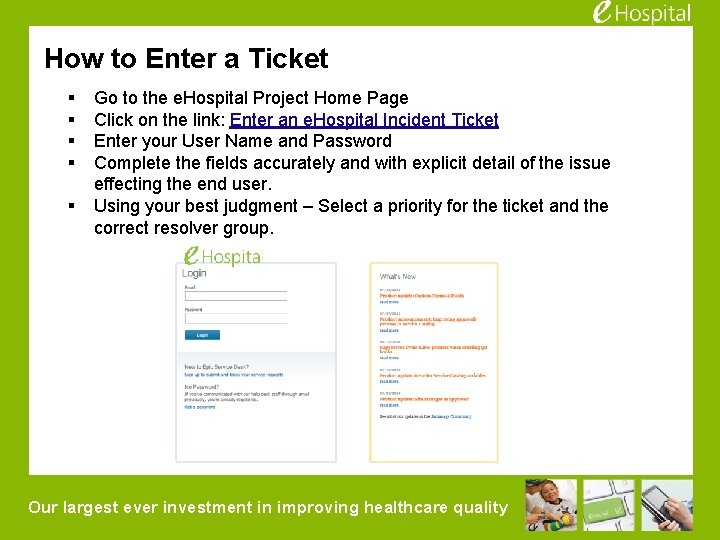
How to Enter a Ticket § § § Go to the e. Hospital Project Home Page Click on the link: Enter an e. Hospital Incident Ticket Enter your User Name and Password Complete the fields accurately and with explicit detail of the issue effecting the end user. Using your best judgment – Select a priority for the ticket and the correct resolver group. Our largest ever investment in improving healthcare quality
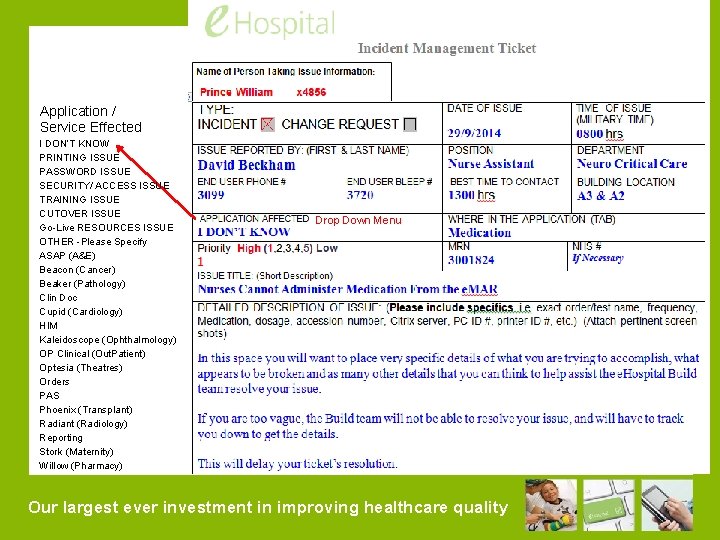
Application / Service Effected I DON’T KNOW PRINTING ISSUE PASSWORD ISSUE SECURITY/ ACCESS ISSUE TRAINING ISSUE CUTOVER ISSUE Go-Live RESOURCES ISSUE OTHER -Please Specify ASAP (A&E) Beacon (Cancer) Beaker (Pathology) Clin Doc Cupid (Cardiology) HIM Kaleidoscope (Ophthalmology) OP Clinical (Out. Patient) Optesia (Theatres) Orders PAS Phoenix (Transplant) Radiant (Radiology) Reporting Stork (Maternity) Willow (Pharmacy) Drop Down Menu Our largest ever investment in improving healthcare quality
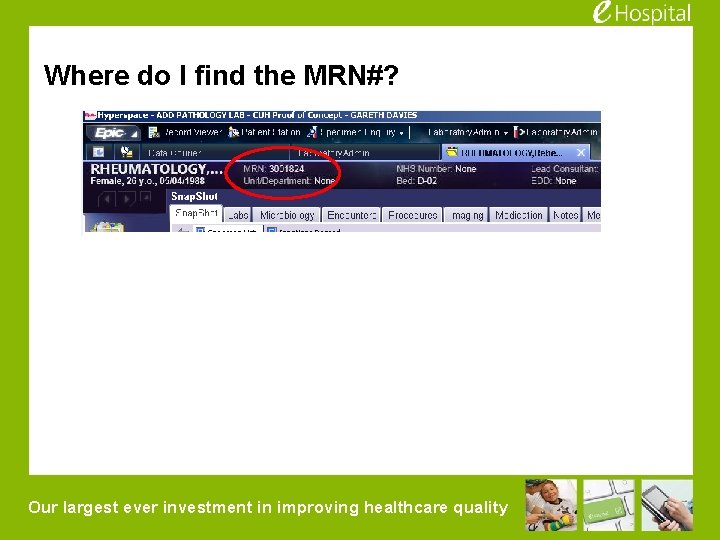
Where do I find the MRN#? Our largest ever investment in improving healthcare quality
Patient Safety and the Electronic Patient Record.
Patient Safety & the Electronic Patient Record 1. Enter information into the software accurately and completely. 2. Read information displayed carefully. 3. Confirm the accuracy of critically important medical information (e. g. allergies, medications, relevant histories, problems, lab pathology results, radiology results) presented by the software, just as one would with paper records Our largest ever investment in improving healthcare quality
Patient Safety & the Electronic Patient Record 4. Use the software only in the way designed – do not try and use fields / screens in a way that they not intended to be used 5. Please remember, the care of the patient is paramount – if the computer “won’t let you” then ignore it and carry on caring for the patient. Our largest ever investment in improving healthcare quality
Reporting Potential Patient Safety Incidents at Go-Live 1. Tell your Super User or e. Hospital Floor walker • • They will triage the incident to establish if the issue involves e. Hospital. If yes – they will make a PRIORITY 1 call to the e. Hospital command centre to be escalated. AND 2. Follow existing Incident Measures • • Inform the person in charge. Take appropriate immediate action Inform your senior management staff Submit an RMIS (Risk Management Information System) incident form. Our largest ever investment in improving healthcare quality
Do Not Send Training Questions to the Service Desk (Phone Support is for Priority 1 Ticketing Only) Priority 1 issues must be called into the Service Desk Our largest ever investment in improving healthcare quality
Super Users Overview of Cutover
Terminology • Conversions v The process of historical data conversion for all patient information held in legacy systems, to be conducted in the days and weeks prior to go live v A mixture of automatic conversions and manual conversions. Trust resources will be required to assist with manual conversions • Cutover v The manual input of data in the immediate hours leading up to go live, for live in-patients at the time of go live and those that will attend outpatients in the first 2 weeks after go live v Trust resources will be required to assist with entering cutover data Our largest ever investment in improving healthcare quality
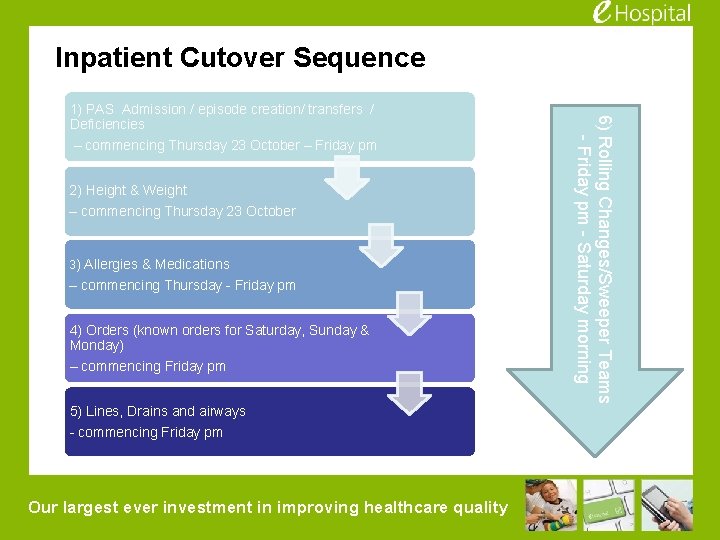
Inpatient Cutover Sequence 2) Height & Weight – commencing Thursday 23 October 3) Allergies & Medications – commencing Thursday - Friday pm 4) Orders (known orders for Saturday, Sunday & Monday) – commencing Friday pm 5) Lines, Drains and airways - commencing Friday pm Our largest ever investment in improving healthcare quality 6) Rolling Changes/Sweeper Teams - Friday pm - Saturday morning 1) PAS Admission / episode creation/ transfers / Deficiencies – commencing Thursday 23 October – Friday pm
What happens after Cutover? • 12 midnight – 2 am Saturday 25 October – Cease entering data into Epic. Complete ‘Assurance Checks’ that we have the data we expect to have in Epic, all interfaces are switched over etc and we are safe to go live • ‘At First Logon’ – Users are requested to perform a series of ‘at first logon’, and at varies stages within the first few hours. These range from assurance checks to data entry. – Super users are asked to be familiar with these requirements and assist staff with these checks as required. ‘Tip sheets’ will be provided on the e. Hospital Project Page Our largest ever investment in improving healthcare quality
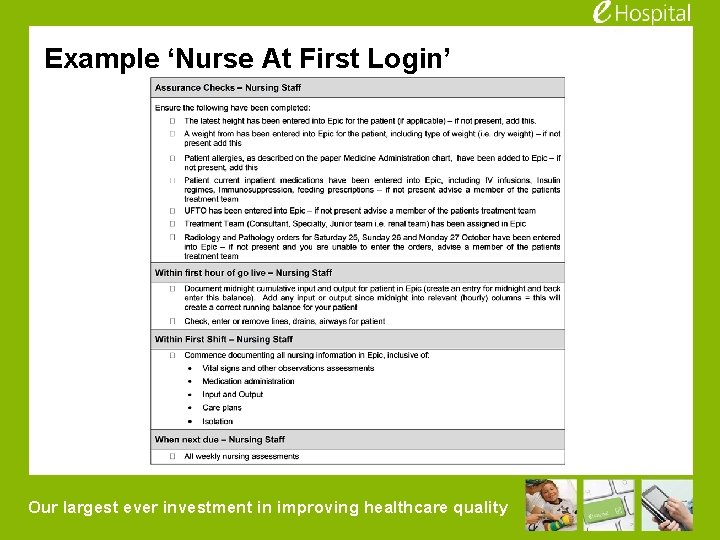
Example ‘Nurse At First Login’ Our largest ever investment in improving healthcare quality
Major Incident How will Bronze / Silver / Gold Command Work? Our largest ever investment in improving healthcare quality
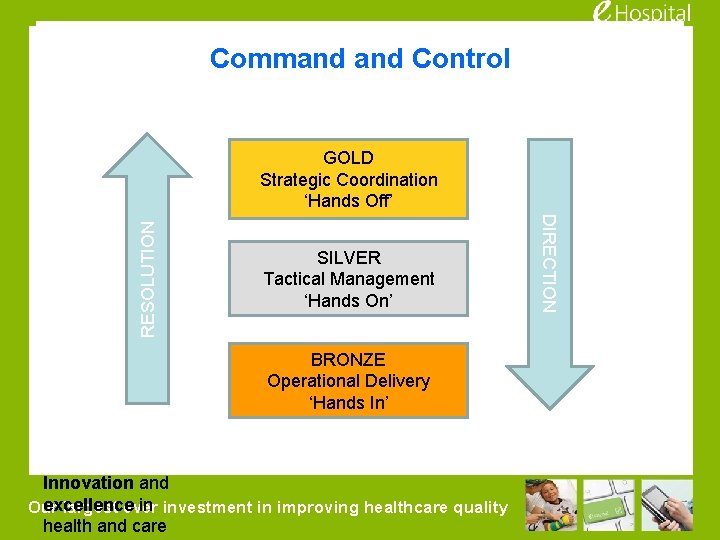
Command Control SILVER Tactical Management ‘Hands On’ BRONZE Operational Delivery ‘Hands In’ Innovation and excellence in investment in improving healthcare quality Our largest ever health and care DIRECTION RESOLUTION GOLD Strategic Coordination ‘Hands Off’
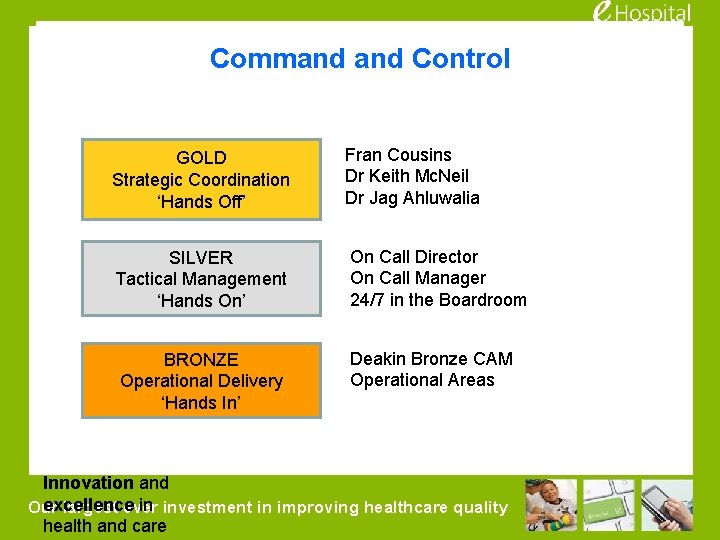
Command Control GOLD Strategic Coordination ‘Hands Off’ Fran Cousins Dr Keith Mc. Neil Dr Jag Ahluwalia SILVER Tactical Management ‘Hands On’ On Call Director On Call Manager 24/7 in the Boardroom BRONZE Operational Delivery ‘Hands In’ Deakin Bronze CAM Operational Areas Innovation and excellence in investment in improving healthcare quality Our largest ever health and care
Operations Escalation If an end users discovers an operational issue, they should check in with the super user to see if it potentially involves Epic. If so, the super user needs to enter a ticket online with e. Hospital The end user will then escalate the operational issue to the person in charge on their ward or clinic. Following normal procedures. Our largest ever investment in improving healthcare quality 41
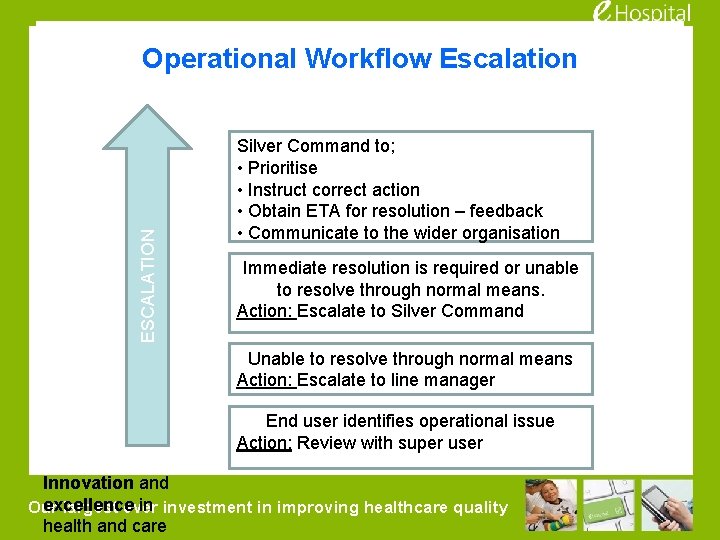
ESCALATION Operational Workflow Escalation Silver Command to; • Prioritise • Instruct correct action • Obtain ETA for resolution – feedback • Communicate to the wider organisation Immediate resolution is required or unable to resolve through normal means. Action: Escalate to Silver Command Unable to resolve through normal means Action: Escalate to line manager End user identifies operational issue Action: Review with super user Innovation and excellence in investment in improving healthcare quality Our largest ever health and care
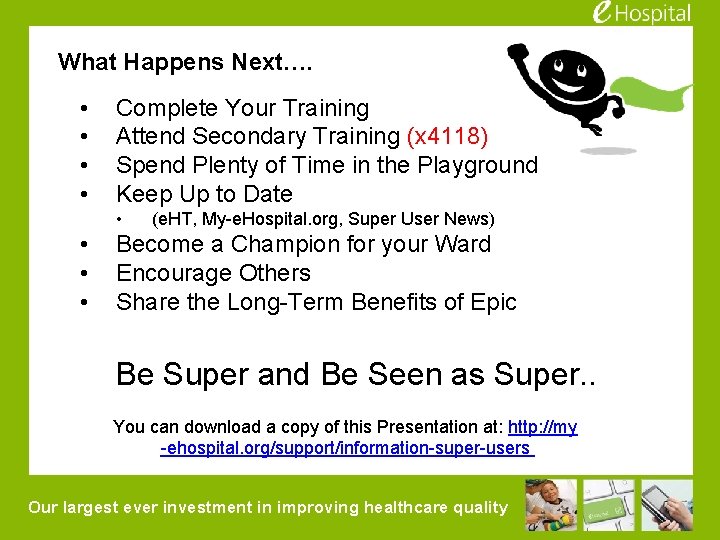
What Happens Next…. • • Complete Your Training Attend Secondary Training (x 4118) Spend Plenty of Time in the Playground Keep Up to Date • • (e. HT, My-e. Hospital. org, Super User News) Become a Champion for your Ward Encourage Others Share the Long-Term Benefits of Epic Be Super and Be Seen as Super. . You can download a copy of this Presentation at: http: //my -ehospital. org/support/information-super-users Our largest ever investment in improving healthcare quality
Our largest ever investment in improving healthcare quality
- Slides: 44