
Precisely My Point Leverage Attribute Clustering and Zone

Precisely My Point: Leverage Attribute Clustering and Zone Mapping in Oracle Database 12. 1. 0. 2

My Credentials § § § § 30+ years of database-centric IT experience Oracle DBA since 2001 Oracle 9 i, 10 g, 11 g OCP Oracle ACE Director > 100 articles on databasejournal. com and ioug. org Oracle-centric blog (Generally, It Depends) Regular speaker at Oracle Open. World, IOUG COLLABORATE, and OTN ACE Tours § Oracle University instructor – core Oracle DBA courses

Coming Soon To a Bookstore Near You … Coming in June 2015 from Oracle Press: Oracle Database Upgrade, Migration & Transformation Tips & Techniques • Covers everything you need to know to upgrade, migrate, and transform any Oracle 10 g or 11 g database to Oracle 12 c • Discusses strategy and tactics of planning Oracle migration, transformation, and upgrade projects • Explores latest transformation features: • Recovery Manager (RMAN) • Oracle Golden. Gate • Cross-Platform Transportable Tablespaces • Cross-Platform Transport (CPT) • Full Transportable Export (FTE) • Includes detailed sample code
Our Agenda § Attribute Clustering § Improving physical I/O for tables and table partitions § Limiting the need for those nasty indexes § Zone Mapping § Accurately ascertaining exactly where data is located on spinning disk § Enabling I/O pruning § Improving query performance without expensive alternative index structures § Q+A
Attribute Clustering: Ordering Data for Faster Retrieval 5
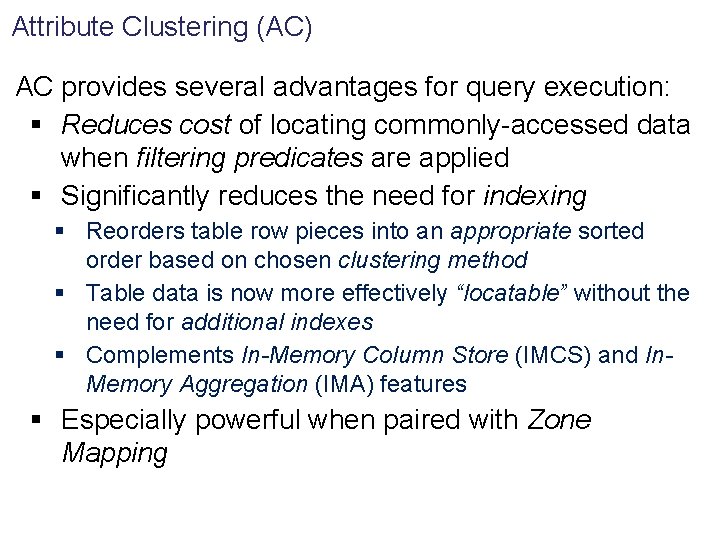
Attribute Clustering (AC) AC provides several advantages for query execution: § Reduces cost of locating commonly-accessed data when filtering predicates are applied § Significantly reduces the need for indexing § Reorders table row pieces into an appropriate sorted order based on chosen clustering method § Table data is now more effectively “locatable” without the need for additional indexes § Complements In-Memory Column Store (IMCS) and In. Memory Aggregation (IMA) features § Especially powerful when paired with Zone Mapping
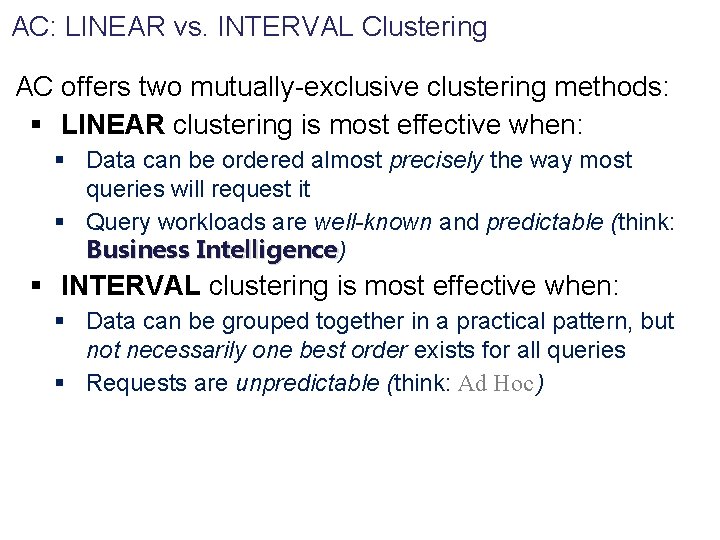
AC: LINEAR vs. INTERVAL Clustering AC offers two mutually-exclusive clustering methods: § LINEAR clustering is most effective when: § Data can be ordered almost precisely the way most queries will request it § Query workloads are well-known and predictable (think: Business Intelligence) Intelligence § INTERVAL clustering is most effective when: § Data can be grouped together in a practical pattern, but not necessarily one best order exists for all queries § Requests are unpredictable (think: Ad Hoc )
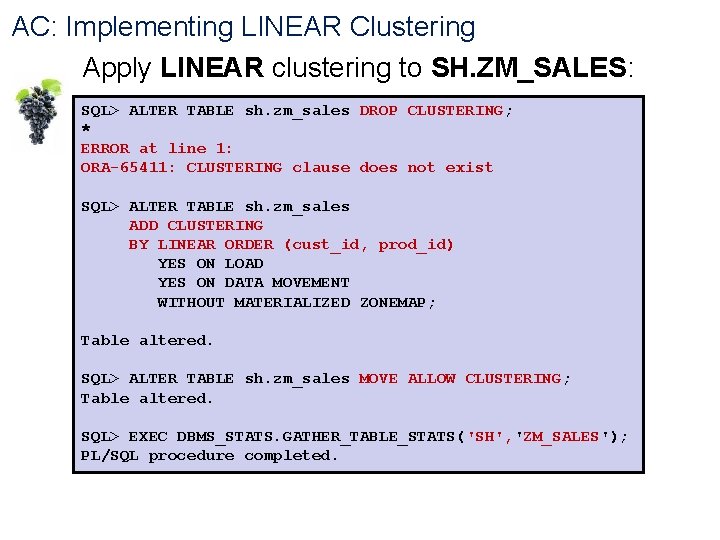
AC: Implementing LINEAR Clustering Apply LINEAR clustering to SH. ZM_SALES: SQL> ALTER TABLE sh. zm_sales DROP CLUSTERING; * ERROR at line 1: ORA-65411: CLUSTERING clause does not exist SQL> ALTER TABLE sh. zm_sales ADD CLUSTERING BY LINEAR ORDER (cust_id, prod_id) YES ON LOAD YES ON DATA MOVEMENT WITHOUT MATERIALIZED ZONEMAP; Table altered. SQL> ALTER TABLE sh. zm_sales MOVE ALLOW CLUSTERING; Table altered. SQL> EXEC DBMS_STATS. GATHER_TABLE_STATS('SH', 'ZM_SALES'); PL/SQL procedure completed.
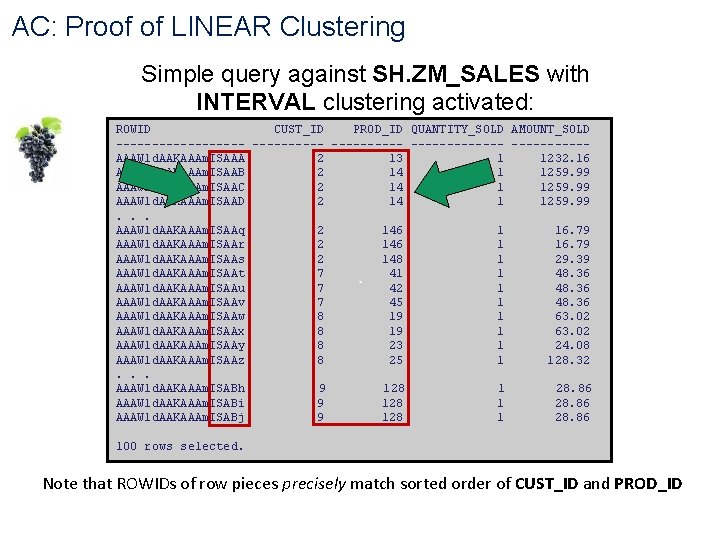
AC: Proof of LINEAR Clustering Simple query against SH. ZM_SALES with INTERVAL clustering activated: ROWID CUST_ID cust_id, PROD_ID QUANTITY_SOLD SQL> SELECT ROWID, prod_id, AMOUNT_SOLD ---------- -------quantity_sold, 2 amount_sold AAAW 1 d. AAKAAAm. ISAAA 13 1 1232. 16 AAAW 1 d. AAKAAAm. ISAAB 14 1 1259. 99 FROM sh. sales 2 AAAW 1 d. AAKAAAm. ISAAC 2 14 1 1259. 99 WHERE rownum < 101; AAAW 1 d. AAKAAAm. ISAAD 2 14 1 1259. 99. . . AAAW 1 d. AAKAAAm. ISAAq 2 146 1 16. 79 AAAW 1 d. AAKAAAm. ISAAr 2 146 1 16. 79 AAAW 1 d. AAKAAAm. ISAAs 2 148 1 29. 39 AAAW 1 d. AAKAAAm. ISAAt 7 41 1 48. 36 AAAW 1 d. AAKAAAm. ISAAu 7 42 1 48. 36 ` ` AAAW 1 d. AAKAAAm. ISAAv 7 45 1 48. 36 AAAW 1 d. AAKAAAm. ISAAw 8 19 1 63. 02 AAAW 1 d. AAKAAAm. ISAAx 8 19 1 63. 02 AAAW 1 d. AAKAAAm. ISAAy 8 23 1 24. 08 AAAW 1 d. AAKAAAm. ISAAz 8 25 1 128. 32. . . AAAW 1 d. AAKAAAm. ISABh 9 128 1 28. 86 AAAW 1 d. AAKAAAm. ISABi 9 128 1 28. 86 AAAW 1 d. AAKAAAm. ISABj 9 128 1 28. 86 100 rows selected. Note that ROWIDs of row pieces precisely match sorted order of CUST_ID and PROD_ID
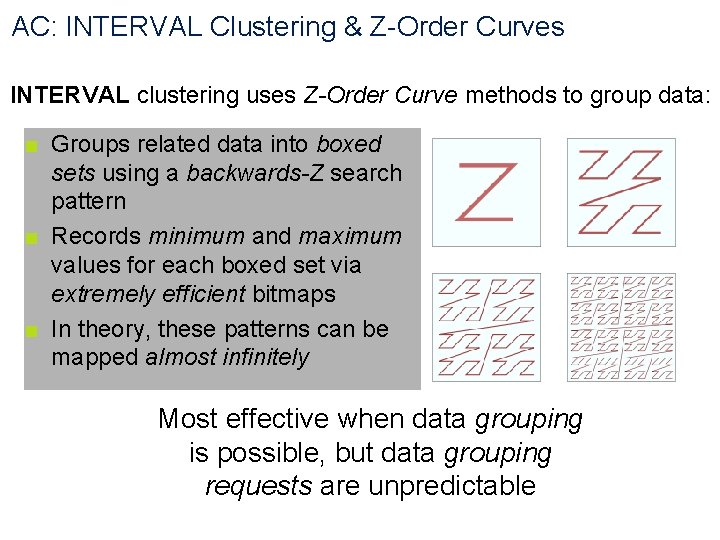
AC: INTERVAL Clustering & Z-Order Curves INTERVAL clustering uses Z-Order Curve methods to group data: ■ Groups related data into boxed sets using a backwards-Z search pattern ■ Records minimum and maximum values for each boxed set via extremely efficient bitmaps ■ In theory, these patterns can be mapped almost infinitely Most effective when data grouping is possible, but data grouping requests are unpredictable
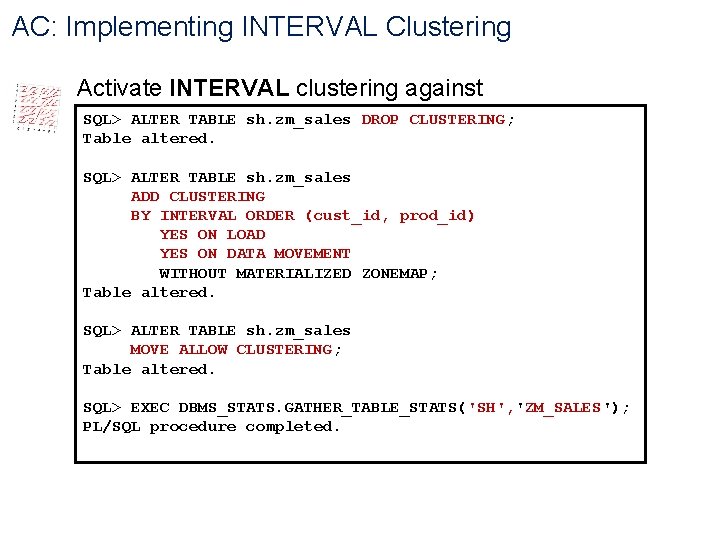
AC: Implementing INTERVAL Clustering Activate INTERVAL clustering against SQL> ALTER TABLE sh. zm_sales DROP CLUSTERING; SH. ZM_SALES: Table altered. SQL> ALTER TABLE sh. zm_sales ADD CLUSTERING BY INTERVAL ORDER (cust_id, prod_id) YES ON LOAD YES ON DATA MOVEMENT WITHOUT MATERIALIZED ZONEMAP; Table altered. SQL> ALTER TABLE sh. zm_sales MOVE ALLOW CLUSTERING; Table altered. SQL> EXEC DBMS_STATS. GATHER_TABLE_STATS('SH', 'ZM_SALES'); PL/SQL procedure completed.
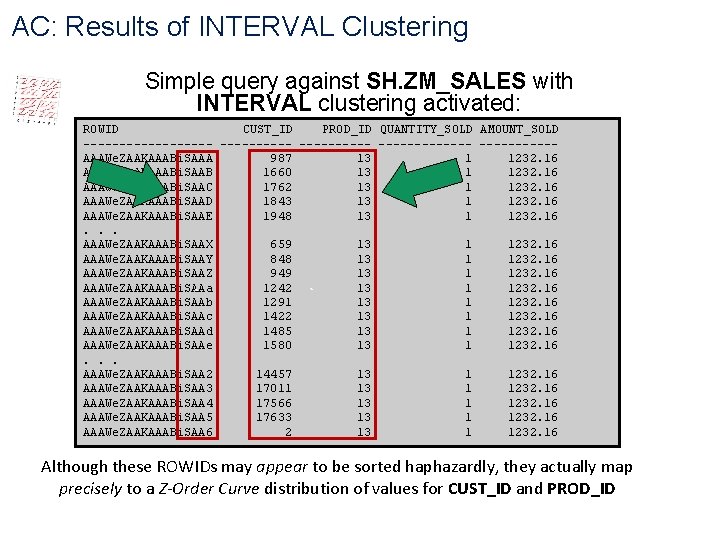
AC: Results of INTERVAL Clustering Simple query against SH. ZM_SALES with INTERVAL clustering activated: ROWID CUST_ID PROD_ID QUANTITY_SOLD AMOUNT_SOLD SQL> SELECT ROWID, cust_id, prod_id, -----------------------------AAAWe. ZAAKAAABi. SAAA 987 13 1 1232. 16 quantity_sold, amount_sold AAAWe. ZAAKAAABi. SAAB 1660 13 1 1232. 16 FROM sh. sales AAAWe. ZAAKAAABi. SAAC 1762 13 1 1232. 16 AAAWe. ZAAKAAABi. SAAD 1843 13 1 1232. 16 WHERE rownum < 101; AAAWe. ZAAKAAABi. SAAE 1948 13 1 1232. 16. . . AAAWe. ZAAKAAABi. SAAX 659 13 1 1232. 16 AAAWe. ZAAKAAABi. SAAY 848 13 1 1232. 16 AAAWe. ZAAKAAABi. SAAZ 949 13 1 1232. 16 AAAWe. ZAAKAAABi. SAAa 1242 13 1 1232. 16 ` ` AAAWe. ZAAKAAABi. SAAb 1291 13 1 1232. 16 AAAWe. ZAAKAAABi. SAAc 1422 13 1 1232. 16 AAAWe. ZAAKAAABi. SAAd 1485 13 1 1232. 16 AAAWe. ZAAKAAABi. SAAe 1580 13 1 1232. 16. . . AAAWe. ZAAKAAABi. SAA 2 14457 13 1 1232. 16 AAAWe. ZAAKAAABi. SAA 3 17011 13 1 1232. 16 AAAWe. ZAAKAAABi. SAA 4 17566 13 1 1232. 16 AAAWe. ZAAKAAABi. SAA 5 17633 13 1 1232. 16 AAAWe. ZAAKAAABi. SAA 6 2 13 1 1232. 16 Although these ROWIDs may appear to be sorted haphazardly, they actually map precisely to a Z-Order Curve distribution of values for CUST_ID and PROD_ID
AC: JOIN Ordered Clustering AC now also makes it possible to order data within a fact table based on how it’s ordered in one or more underlying dimensions § Fact table data can be ordered based on commonly used dimensional data to enhance its retrieval speed § The fact table’s primary keys columns or other non -key columns can be completely ignored when ordering table data This has never really been possible before!
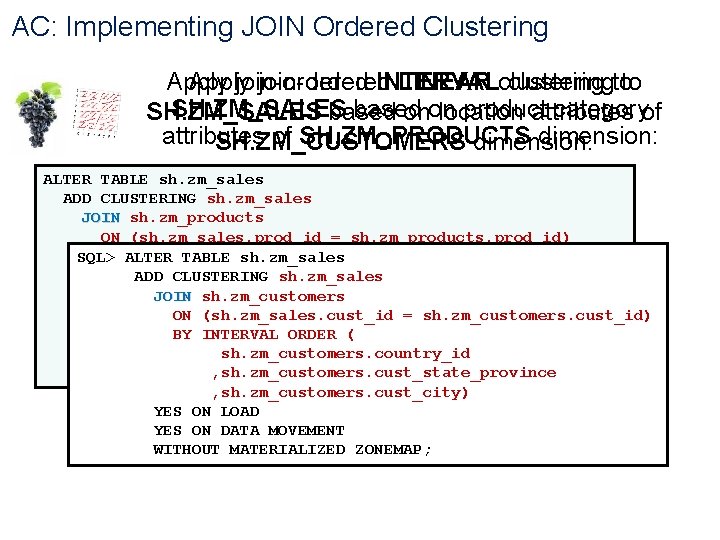
AC: Implementing JOIN Ordered Clustering Apply join-ordered INTERVAL clusteringtoto Apply join-ordered LINEAR clustering SH. ZM_SALES based product categoryof SH. ZM_SALES based onon location attributes of SH. ZM_PRODUCTS dimension: SH. ZM_CUSTOMERS dimension: ALTER TABLE sh. zm_sales ADD CLUSTERING sh. zm_sales JOIN sh. zm_products JOIN ON (sh. zm_sales. prod_id = sh. zm_products. prod_id) BY LINEAR ORDER ( SQL> ALTER TABLE sh. zm_sales sh. zm_products. prod_id ADD CLUSTERING sh. zm_sales , sh. zm_products. prod_category JOIN sh. zm_customers JOIN , sh. zm_products. prod_subcategory) ON (sh. zm_sales. cust_id = sh. zm_customers. cust_id) YES ON LOAD BY INTERVAL ORDER ( YES ON DATA MOVEMENT sh. zm_customers. country_id WITHOUT MATERIALIZED ZONEMAP; , sh. zm_customers. cust_state_province , sh. zm_customers. cust_city) YES ON LOAD YES ON DATA MOVEMENT WITHOUT MATERIALIZED ZONEMAP;
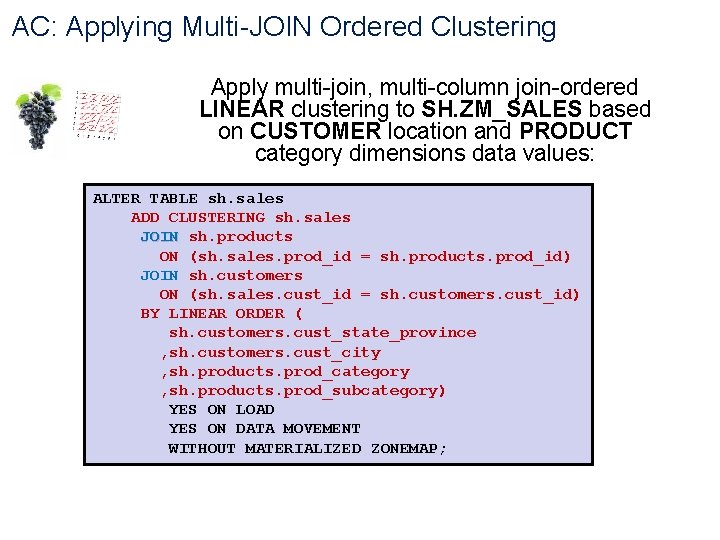
AC: Applying Multi-JOIN Ordered Clustering Apply multi-join, multi-column join-ordered LINEAR clustering to SH. ZM_SALES based on CUSTOMER location and PRODUCT category dimensions data values: ALTER TABLE sh. sales ADD CLUSTERING sh. sales JOIN sh. products JOIN ON (sh. sales. prod_id = sh. products. prod_id) JOIN sh. customers ON (sh. sales. cust_id = sh. customers. cust_id) BY LINEAR ORDER ( sh. customers. cust_state_province , sh. customers. cust_city , sh. products. prod_category , sh. products. prod_subcategory) YES ON LOAD YES ON DATA MOVEMENT WITHOUT MATERIALIZED ZONEMAP;
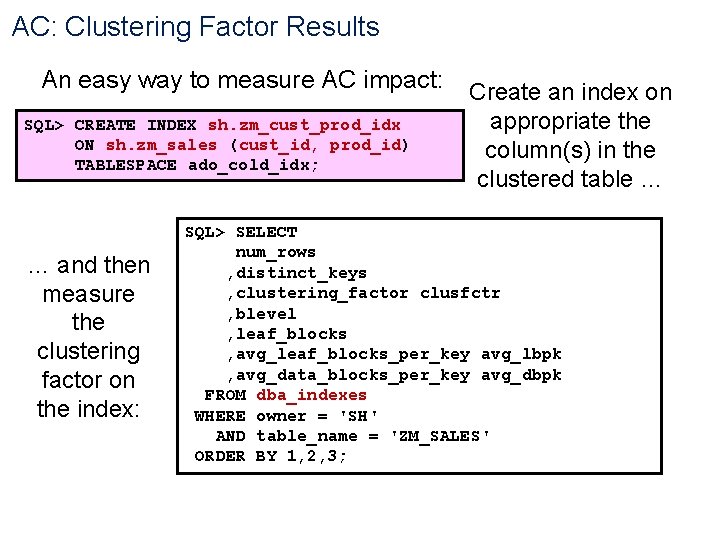
AC: Clustering Factor Results An easy way to measure AC impact: SQL> CREATE INDEX sh. zm_cust_prod_idx ON sh. zm_sales (cust_id, prod_id) TABLESPACE ado_cold_idx; … and then measure the clustering factor on the index: Create an index on appropriate the column(s) in the clustered table … SQL> SELECT num_rows , distinct_keys , clustering_factor clusfctr , blevel , leaf_blocks , avg_leaf_blocks_per_key avg_lbpk , avg_data_blocks_per_key avg_dbpk FROM dba_indexes WHERE owner = 'SH' AND table_name = 'ZM_SALES' ORDER BY 1, 2, 3;
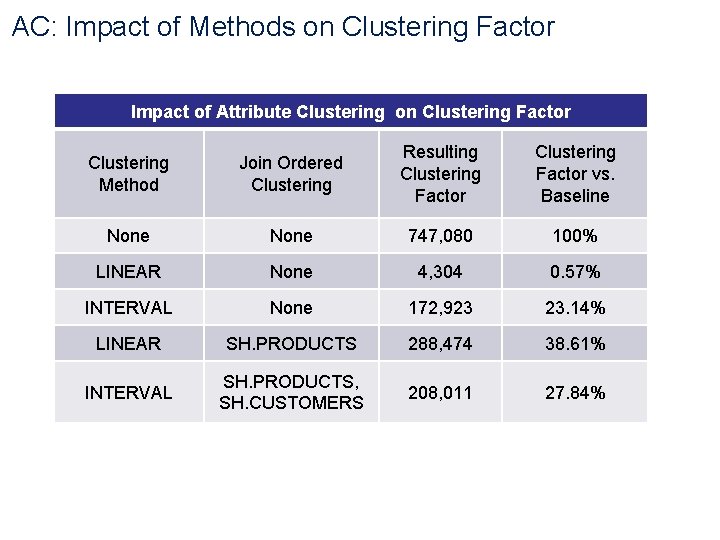
AC: Impact of Methods on Clustering Factor Impact of Attribute Clustering on Clustering Factor Clustering Method Join Ordered Clustering Resulting Clustering Factor vs. Baseline None 747, 080 100% LINEAR None 4, 304 0. 57% INTERVAL None 172, 923 23. 14% LINEAR SH. PRODUCTS 288, 474 38. 61% INTERVAL SH. PRODUCTS, SH. CUSTOMERS 208, 011 27. 84%
Zone Mapping: Uber-Fast Data Retrieval from Spinning Disk 18
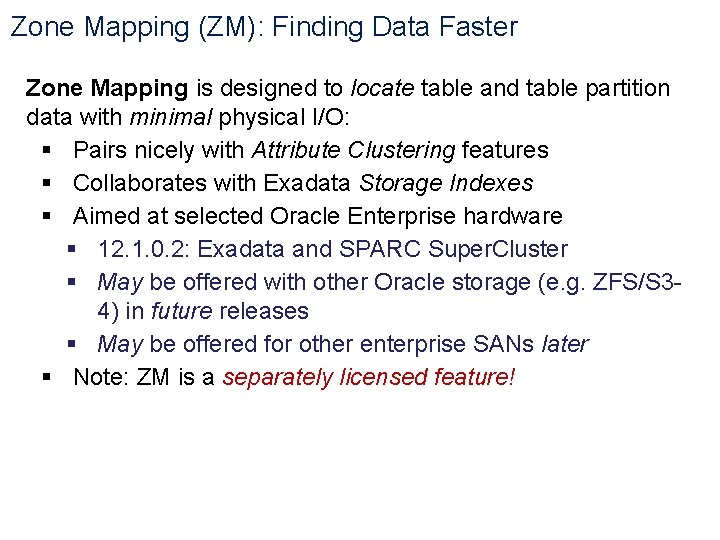
Zone Mapping (ZM): Finding Data Faster Zone Mapping is designed to locate table and table partition data with minimal physical I/O: § Pairs nicely with Attribute Clustering features § Collaborates with Exadata Storage Indexes § Aimed at selected Oracle Enterprise hardware § 12. 1. 0. 2: Exadata and SPARC Super. Cluster § May be offered with other Oracle storage (e. g. ZFS/S 34) in future releases § May be offered for other enterprise SANs later § Note: ZM is a separately licensed feature!
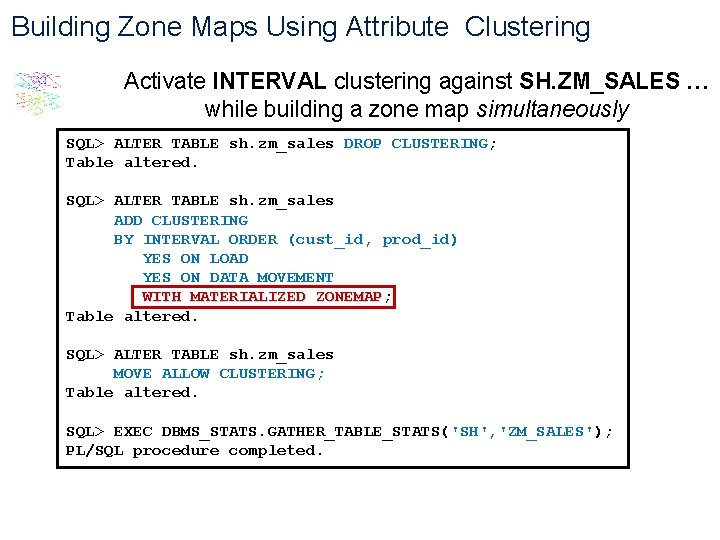
Building Zone Maps Using Attribute Clustering Activate INTERVAL clustering against SH. ZM_SALES … while building a zone map simultaneously SQL> ALTER TABLE sh. zm_sales DROP CLUSTERING; Table altered. SQL> ALTER TABLE sh. zm_sales ADD CLUSTERING BY INTERVAL ORDER (cust_id, prod_id) YES ON LOAD YES ON DATA MOVEMENT WITH MATERIALIZED ZONEMAP; MATERIALIZED ZONEMAP Table altered. SQL> ALTER TABLE sh. zm_sales MOVE ALLOW CLUSTERING; Table altered. SQL> EXEC DBMS_STATS. GATHER_TABLE_STATS('SH', 'ZM_SALES'); PL/SQL procedure completed.
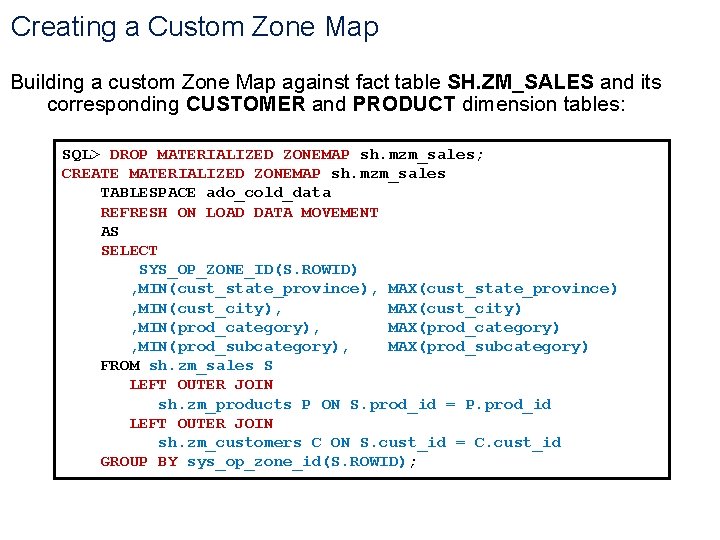
Creating a Custom Zone Map Building a custom Zone Map against fact table SH. ZM_SALES and its corresponding CUSTOMER and PRODUCT dimension tables: SQL> DROP MATERIALIZED ZONEMAP sh. mzm_sales; CREATE MATERIALIZED ZONEMAP sh. mzm_sales TABLESPACE ado_cold_data REFRESH ON LOAD DATA MOVEMENT AS SELECT SYS_OP_ZONE_ID(S. ROWID) , MIN(cust_state_province), MAX(cust_state_province) , MIN(cust_city), MAX(cust_city) , MIN(prod_category), MAX(prod_category) , MIN(prod_subcategory), MAX(prod_subcategory) FROM sh. zm_sales S LEFT OUTER JOIN sh. zm_products P ON S. prod_id = P. prod_id LEFT OUTER JOIN sh. zm_customers C ON S. cust_id = C. cust_id GROUP BY sys_op_zone_id(S. ROWID);

Putting It All Together: Attribute Clustering + Zone Mapping 22
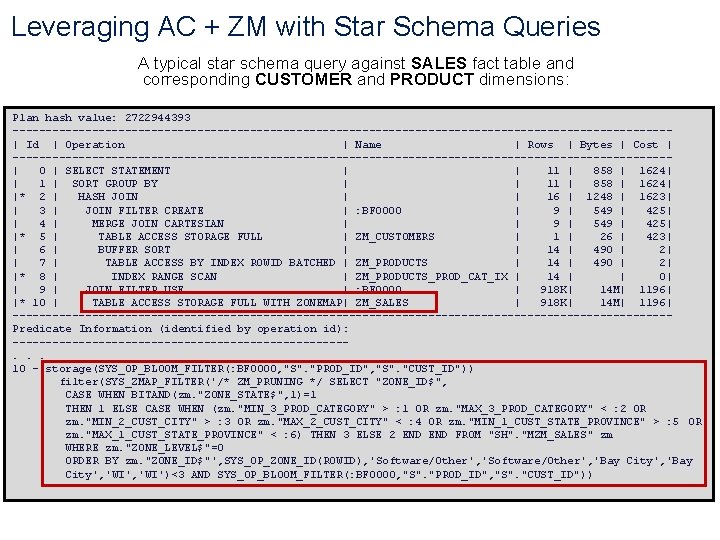
Leveraging AC + ZM with Star Schema Queries A typical star schema query against SALES fact table and corresponding CUSTOMER and PRODUCT dimensions: Plan hash value: 2722944393 SELECT -------------------------------------------------- C. cust_state_province | Id | Operation | Name | Rows | Bytes | Cost | -------------------------------------------------- , C. cust_city | , P. prod_category 0 | SELECT STATEMENT | | 11 | 858 | 1624| | 1 | SORT GROUP BY | | 11 | 858 | 1624| , P. prod_subcategory |* 2 | HASH JOIN | | 16 | 1248 | 1623| | , SUM(S. quantity_sold) 3 | JOIN FILTER CREATE | : BF 0000 | 9 | 549 | 425| | , SUM(S. amount_sold) 4 | MERGE JOIN CARTESIAN | | 9 | 549 | 425| |* FROM 5 | TABLE ACCESS STORAGE FULL | ZM_CUSTOMERS | 1 | 26 | 423| | 6 | BUFFER SORT | | 14 | 490 | 2| | sh. zm_sales S 7 | TABLE ACCESS BY INDEX ROWID BATCHED | ZM_PRODUCTS | 14 | 490 | 2| |* , sh. zm_products P 8 | INDEX RANGE SCAN | ZM_PRODUCTS_PROD_CAT_IX | 14 | | 0| | , sh. zm_customers C 9 | JOIN FILTER USE | : BF 0000 | 918 K| 14 M| 1196| |* 10 | TABLE ACCESS STORAGE FULL WITH ZONEMAP| ZM_SALES | 918 K| 14 M| 1196| WHERE S. prod_id = P. prod_id -------------------------------------------------- AND S. cust_id = C. cust_id Predicate Information (identified by operation id): ------------------------- AND C. cust_city = 'Bay City'. . . AND C. cust_state_province = 'WI' 10 - storage(SYS_OP_BLOOM_FILTER(: BF 0000, "S". "PROD_ID", "S". "CUST_ID")) AND P. prod_category = 'Software/Other' filter(SYS_ZMAP_FILTER('/* ZM_PRUNING */ SELECT "ZONE_ID$", GROUP BY CASE WHEN BITAND(zm. "ZONE_STATE$", 1)=1 THEN 1 ELSE CASE WHEN (zm. "MIN_3_PROD_CATEGORY" > : 1 OR zm. "MAX_3_PROD_CATEGORY" < : 2 OR P. prod_category, P. prod_subcategory zm. "MIN_2_CUST_CITY" > : 3 OR zm. "MAX_2_CUST_CITY" < : 4 OR zm. "MIN_1_CUST_STATE_PROVINCE" > : 5 OR , C. cust_state_province, C. cust_city zm. "MAX_1_CUST_STATE_PROVINCE" < : 6) THEN 3 ELSE 2 END FROM "SH". "MZM_SALES" zm ORDER BY WHERE zm. "ZONE_LEVEL$"=0 P. prod_category, P. prod_subcategory ORDER BY zm. "ZONE_ID$"', SYS_OP_ZONE_ID(ROWID), 'Software/Other', 'Bay City', 'WI')<3 AND SYS_OP_BLOOM_FILTER(: BF 0000, "S". "PROD_ID", "S". "CUST_ID")) , C. cust_state_province, C. cust_city;
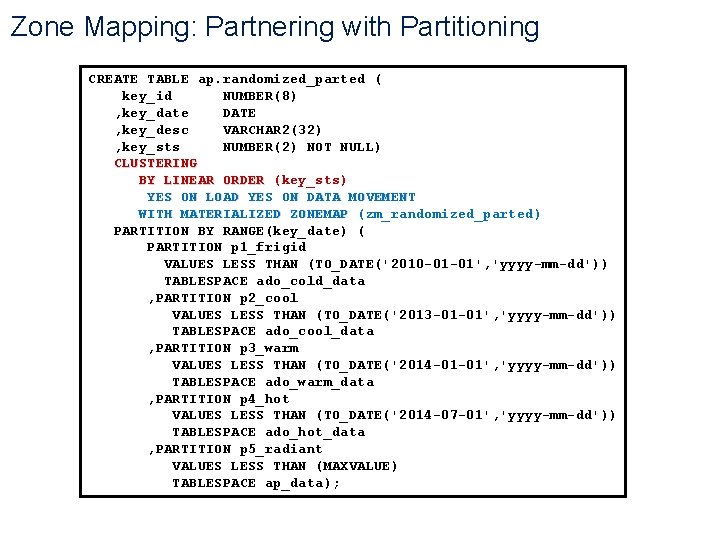
Zone Mapping: Partnering with Partitioning CREATE TABLE ap. randomized_parted ( key_id NUMBER(8) , key_date DATE , key_desc VARCHAR 2(32) , key_sts NUMBER(2) NOT NULL) CLUSTERING BY LINEAR ORDER (key_sts) BY LINEAR ORDER YES ON LOAD YES ON DATA MOVEMENT WITH MATERIALIZED ZONEMAP (zm_randomized_parted) WITH MATERIALIZED ZONEMAP PARTITION BY RANGE(key_date) ( PARTITION p 1_frigid VALUES LESS THAN (TO_DATE('2010 -01 -01', 'yyyy-mm-dd')) TABLESPACE ado_cold_data , PARTITION p 2_cool VALUES LESS THAN (TO_DATE('2013 -01 -01', 'yyyy-mm-dd')) TABLESPACE ado_cool_data , PARTITION p 3_warm VALUES LESS THAN (TO_DATE('2014 -01 -01', 'yyyy-mm-dd')) TABLESPACE ado_warm_data , PARTITION p 4_hot VALUES LESS THAN (TO_DATE('2014 -07 -01', 'yyyy-mm-dd')) TABLESPACE ado_hot_data , PARTITION p 5_radiant VALUES LESS THAN (MAXVALUE) TABLESPACE ap_data);
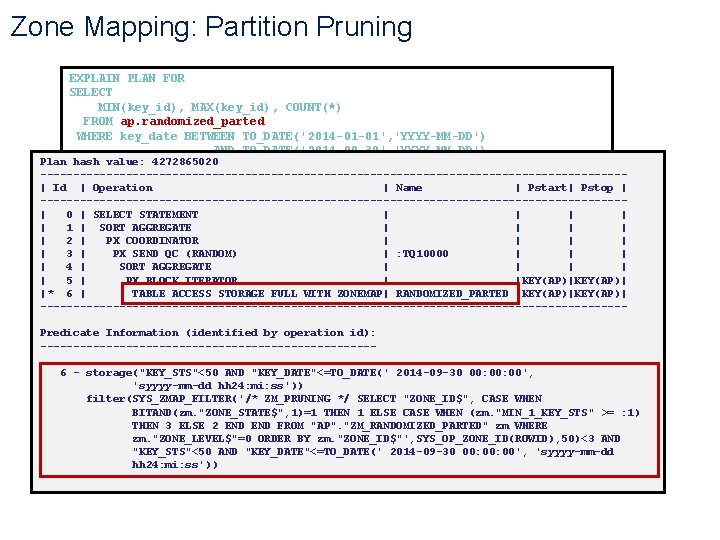
Zone Mapping: Partition Pruning EXPLAIN PLAN FOR SELECT MIN(key_id), MAX(key_id), COUNT(*) FROM ap. randomized_parted WHERE key_date BETWEEN TO_DATE('2014 -01 -01', 'YYYY-MM-DD') AND TO_DATE('2014 -09 -30', 'YYYY-MM-DD') Plan hash value: 4272865020 AND key_sts < 50; -------------------------------------------- | Id | Operation | Name | Pstart| Pstop | SELECT plan_table_output -------------------------------------------- FROM TABLE(DBMS_XPLAN. DISPLAY(FORMAT => 'BASIC PREDICATE PARTITION')); | 0 | SELECT STATEMENT | | | | 1 | SORT AGGREGATE | | | | 2 | PX COORDINATOR | | | | 3 | PX SEND QC (RANDOM) | : TQ 10000 | | | | 4 | SORT AGGREGATE | | | | 5 | PX BLOCK ITERATOR |KEY(AP)| |* 6 | TABLE ACCESS STORAGE FULL WITH ZONEMAP| RANDOMIZED_PARTED |KEY(AP)| --------------------------------------------Predicate Information (identified by operation id): ------------------------- 6 - storage("KEY_STS"<50 AND "KEY_DATE"<=TO_DATE(' 2014 -09 -30 00: 00', 'syyyy-mm-dd hh 24: mi: ss')) filter(SYS_ZMAP_FILTER('/* ZM_PRUNING */ SELECT "ZONE_ID$", CASE WHEN BITAND(zm. "ZONE_STATE$", 1)=1 THEN 1 ELSE CASE WHEN (zm. "MIN_1_KEY_STS" >= : 1) THEN 3 ELSE 2 END FROM "AP". "ZM_RANDOMIZED_PARTED" zm WHERE zm. "ZONE_LEVEL$"=0 ORDER BY zm. "ZONE_ID$"', SYS_OP_ZONE_ID(ROWID), 50)<3 AND "KEY_STS"<50 AND "KEY_DATE"<=TO_DATE(' 2014 -09 -30 00: 00', 'syyyy-mm-dd hh 24: mi: ss'))
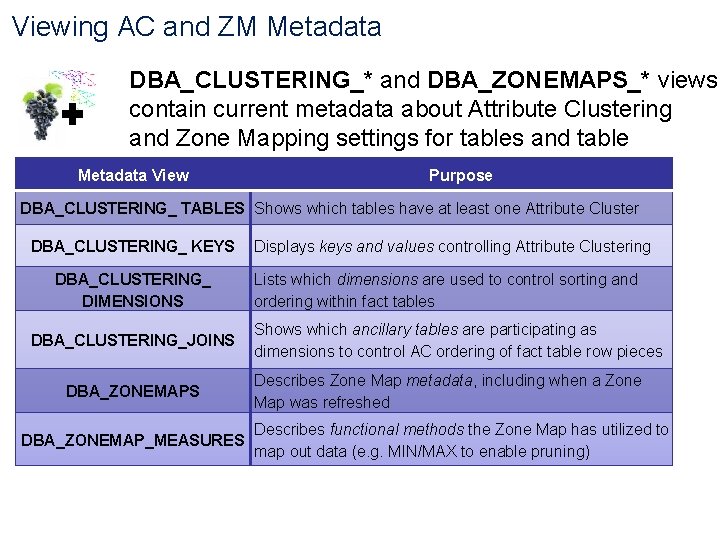
Viewing AC and ZM Metadata DBA_CLUSTERING_* and DBA_ZONEMAPS_* views contain current metadata about Attribute Clustering and Zone Mapping settings for tables and table partitions: Metadata View Purpose DBA_CLUSTERING_ TABLES Shows which tables have at least one Attribute Cluster DBA_CLUSTERING_ KEYS DBA_CLUSTERING_ DIMENSIONS DBA_CLUSTERING_JOINS DBA_ZONEMAP_MEASURES Displays keys and values controlling Attribute Clustering Lists which dimensions are used to control sorting and ordering within fact tables Shows which ancillary tables are participating as dimensions to control AC ordering of fact table row pieces Describes Zone Map metadata, including when a Zone Map was refreshed Describes functional methods the Zone Map has utilized to map out data (e. g. MIN/MAX to enable pruning)
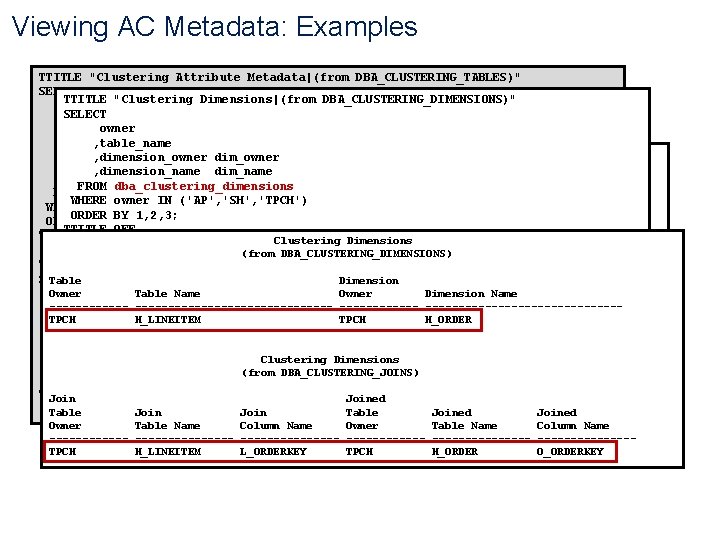
Viewing AC Metadata: Examples TTITLE "Clustering Attribute Metadata|(from DBA_CLUSTERING_TABLES)" SELECT TTITLE "Clustering Dimensions|(from DBA_CLUSTERING_DIMENSIONS)" owner SELECT , table_name owner , clustering_type cls_type , table_name , on_load cls_onld Clustering Attribute Metadata , dimension_owner dim_owner , on_datamovement cls_ondm (from DBA_CLUSTERING_TABLES) , dimension_name dim_name , with_zonemap wzmap FROM dba_clustering_dimensions FROM dba_clustering_tables Cluster With WHERE owner IN ('AP', 'SH', 'TPCH') Table Cluster On Data Zone WHERE owner IN ('AP', 'SH', 'TPCH') ORDER BY 1, 2, 3; Owner Table Name Type Loads? Moves? Map? ORDER BY 1, 2; TTITLE OFF --------------------- -------TTITLE OFF Clustering Dimensions SH ZM_SALES LINEAR YES NO (from DBA_CLUSTERING_DIMENSIONS) TTITLE "Clustering Dimensions|(from DBA_CLUSTERING_JOINS)" TPCH H_LINEITEM INTERVAL YES NO TTITLE "Clustering Columns Metadata|(from DBA_CLUSTERING_KEYS)" SELECT Table Dimension owner Owner Table Name Owner Dimension Name detail_owner Clustering Columns Metadata , table_name --------------------- , position (from DBA_CLUSTERING_KEYS) , tab 1_owner TPCH H_LINEITEM TPCH H_ORDER , detail_name table_name , tab 1_name , detail_column_name Table Pos , tab 1_column FROM dba_clustering_keys Owner Table Name # Column Name , tab 2_owner Clustering Dimensions --------------------- WHERE owner IN ('AP', 'SH', 'TPCH') (from DBA_CLUSTERING_JOINS) , tab 2_name SH ZM_SALES 1 CUST_ID ORDER BY 1, 2, 3; , tab 2_column SH ZM_SALES 2 PROD_ID TTITLE OFF Join Joined FROM dba_clustering_joins TPCH H_ORDER 1 O_ORDERDATE Table Joined WHERE tab 1_owner IN ('AP', 'SH', 'TPCH') TPCH H_ORDER 2 O_ORDERSTATUS Owner Table Name Column Name ORDER BY 1, 2, 3; --------------- --------------TTITLE OFF TPCH H_LINEITEM L_ORDERKEY TPCH H_ORDER O_ORDERKEY
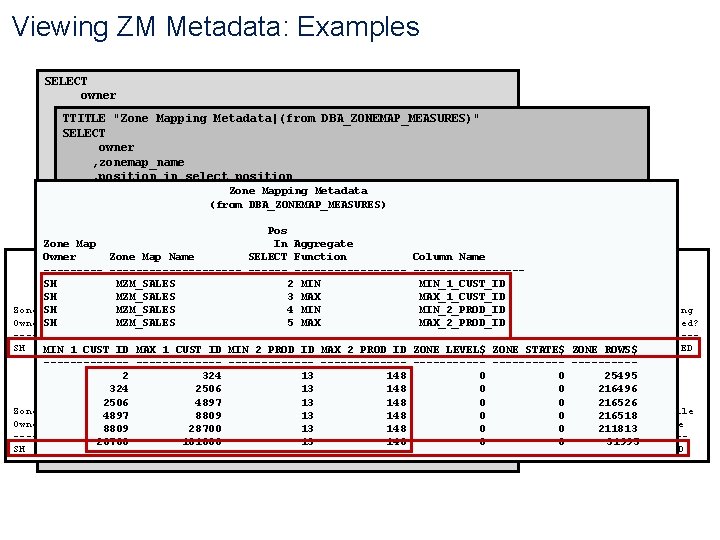
Viewing ZM Metadata: Examples SELECT owner , zonemap_name TTITLE "Zone Mapping Metadata|(from DBA_ZONEMAP_MEASURES)" , fact_owner SELECT , fact_table owner , scale , zonemap_name , hierarchical , position_in_select position , with_clustering , agg_function Zone Mapping Metadata , pruning (from DBA_ZONEMAP_MEASURES) , agg_column_name FROM dba_zonemaps FROM dba_zonemap_measures WHERE owner IN ('AP', 'SH', 'TPCH') Pos WHERE owner IN ('AP', 'SH', 'TPCH') ORDER BY 1, 2, 3, 4; Zone Map In Aggregate ORDER BY 1, 2, 3; Owner Zone Map Name SELECT Function Column Name Zone Mapping Metadata TTITLE OFF SELECT --------------- -------- (from DBA_ZONEMAPS) owner SH MZM_SALES 2 MIN MIN_1_CUST_ID Zone SELECT SH MZM_SALES 3 MAX MAX_1_CUST_ID Fact Map , zonemap_name min_1_cust_id Zone Map Table Scale With Pruning SH MZM_SALES 4 MIN MIN_2_PROD_ID , refresh_mode , max_1_cust_id Owner Zone Map Name Owner Fact Table Name Scale Fctr Clst? Enabled? SH MZM_SALES 5 MAX MAX_2_PROD_ID , refresh_method , min_2_prod_id ----------------- ------------ , last_refresh_method last_rfsh_mthd SH MZM_SALES SH ZM_SALES 10 NO ENABLED , max_2_prod_id MIN_1_CUST_ID MAX_1_CUST_ID MIN_2_PROD_ID MAX_2_PROD_ID ZONE_LEVEL$ ZONE_STATE$ ZONE_ROWS$ , TO_CHAR(last_refresh_time, "yyyy-mm-dd. mi: ss") last_rfsh_dtm ------------- ----------- , zone_level$ , invalid Zone Mapping Metadata 2 324 13 148 0 0 25495 , zone_state$ , stale (from DBA_ZONEMAPS) 324 2506 13 148 0 0 216496 , zone_rows$ Last , unusable 2506 4897 13 148 0 0 216526 FROM sh. mzm_sales Zone Map Refresh Last Compile , compile_state 4897 8809 13 148 0 0 216518 ORDER BY 1, 2, 3, 4; Owner Zone Map Name Mode Method Refresh Dtm Invalid? Stale? Unusable State FROM dba_zonemaps 8809 28700 13 148 0 0 211813 ------------- ----------- -------- WHERE owner IN ('AP', 'SH', 'TPCH') 28700 101000 13 148 0 0 31995 SH MZM_SALES LOAD DATAMOVEMENT FORCE COMPLETE 2015 -02 -19. NO NO VALID ORDER BY 1, 2, 3, 4;
- Slides: 28