
Practical IT Research that Drives Measurable Results Collaboration
Practical IT Research that Drives Measurable Results Collaboration and Desktop Productivity Software Survey: Microsoft Dominates both Markets Info-Tech Research Group 1
Executive Summary Info-Tech recently surveyed our panelists’ experiences with Desktop Productivity and Collaboration software (click here for more details). This document highlights the more important findings of the study. Key findings from the survey include: – Microsoft Office dominates the market and will continue to do so. Users of alternative suites have no choice but to support Microsoft file formats. – Software Assurance (SA) coverage is still prevalent amongst Office users. • If you are currently on 2003 and plan an upgrade to 2010, keep SA coverage until 2010 is released. However, if you are not currently on SA and only upgrade every 5 -6 years, do not purchase your licenses with SA coverage. – Most organizations will have Microsoft Share. Point deployed, even if complimented by collaboration platforms from other vendors. – Integration is the key consideration for selection and deployment of collaboration platforms. Info-Tech Research Group 2
Where Productivity are they? Collaboration Appendix Where are they? Are they satisfied? Where are they going? How are they getting there? How did they get there? Where are they going? Why are they going there? Demographics
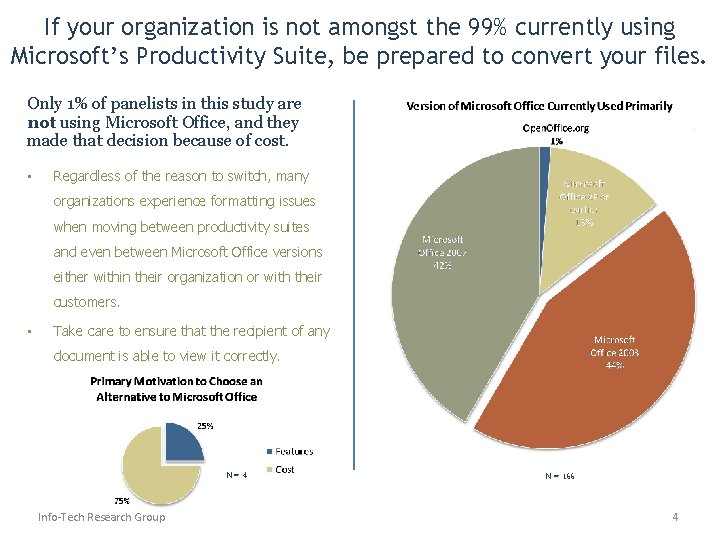
If your organization is not amongst the 99% currently using Microsoft’s Productivity Suite, be prepared to convert your files. Only 1% of panelists in this study are not using Microsoft Office, and they made that decision because of cost. • Regardless of the reason to switch, many organizations experience formatting issues when moving between productivity suites and even between Microsoft Office versions either within their organization or with their customers. • Take care to ensure that the recipient of any document is able to view it correctly. N=4 Info-Tech Research Group N = 166 4
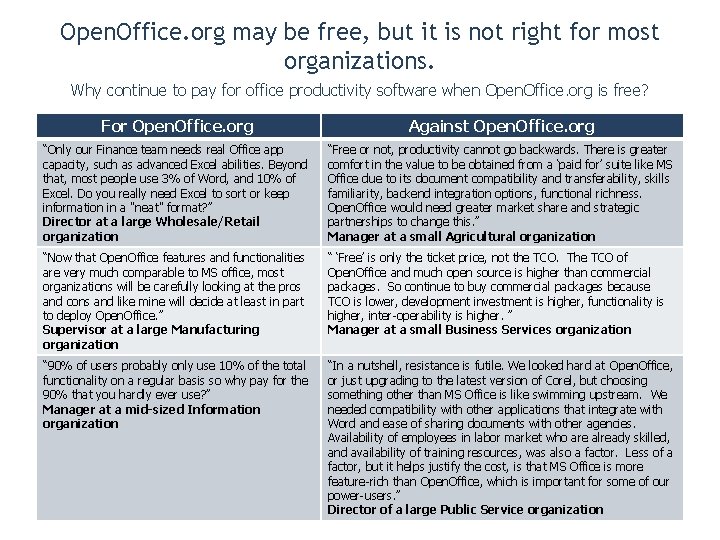
Open. Office. org may be free, but it is not right for most organizations. Why continue to pay for office productivity software when Open. Office. org is free? For Open. Office. org Against Open. Office. org “Only our Finance team needs real Office app capacity, such as advanced Excel abilities. Beyond that, most people use 3% of Word, and 10% of Excel. Do you really need Excel to sort or keep information in a "neat" format? ” Director at a large Wholesale/Retail organization “Free or not, productivity cannot go backwards. There is greater comfort in the value to be obtained from a ‘paid for’ suite like MS Office due to its document compatibility and transferability, skills familiarity, backend integration options, functional richness. Open. Office would need greater market share and strategic partnerships to change this. ” Manager at a small Agricultural organization “Now that Open. Office features and functionalities are very much comparable to MS office, most organizations will be carefully looking at the pros and cons and like mine will decide at least in part to deploy Open. Office. ” Supervisor at a large Manufacturing organization “ ‘Free’ is only the ticket price, not the TCO. The TCO of Open. Office and much open source is higher than commercial packages. So continue to buy commercial packages because TCO is lower, development investment is higher, functionality is higher, inter-operability is higher. ” Manager at a small Business Services organization “ 90% of users probably only use 10% of the total functionality on a regular basis so why pay for the 90% that you hardly ever use? ” Manager at a mid-sized Information organization “In a nutshell, resistance is futile. We looked hard at Open. Office, or just upgrading to the latest version of Corel, but choosing something other than MS Office is like swimming upstream. We needed compatibility with other applications that integrate with Word and ease of sharing documents with other agencies. Availability of employees in labor market who are already skilled, and availability of training resources, was also a factor. Less of a factor, but it helps justify the cost, is that MS Office is more feature-rich than Open. Office, which is important for some of our power-users. ” Director of a large Public Service organization

Productivity Where are they? Are they satisfied? Where are they going? How are they getting there? Collaboration Where are they? How did they get there? Where are they going? Why are they going there? Appendix Demographics
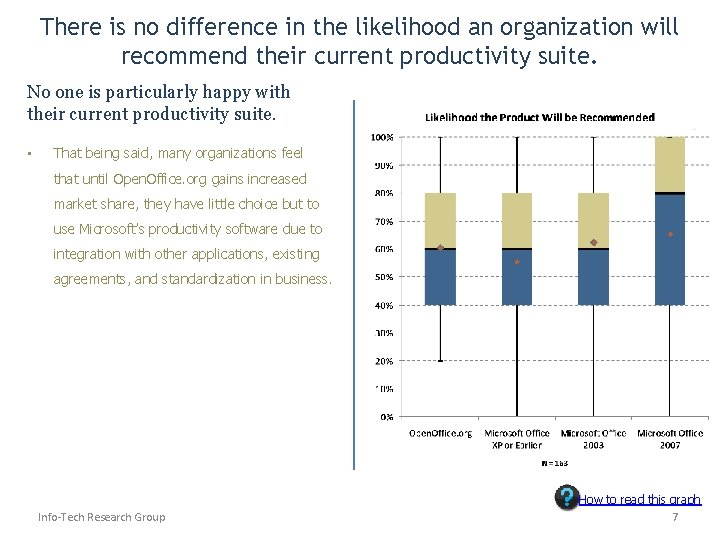
There is no difference in the likelihood an organization will recommend their current productivity suite. No one is particularly happy with their current productivity suite. • That being said, many organizations feel that until Open. Office. org gains increased market share, they have little choice but to use Microsoft’s productivity software due to integration with other applications, existing agreements, and standardization in business. Info-Tech Research Group How to read this graph 7
Productivity Where are they? Are they satisfied? Where are they going? Collaboration Where are they? How did they get there? Where are they going? Appendix Demographics How are they getting there? Why are they going there?
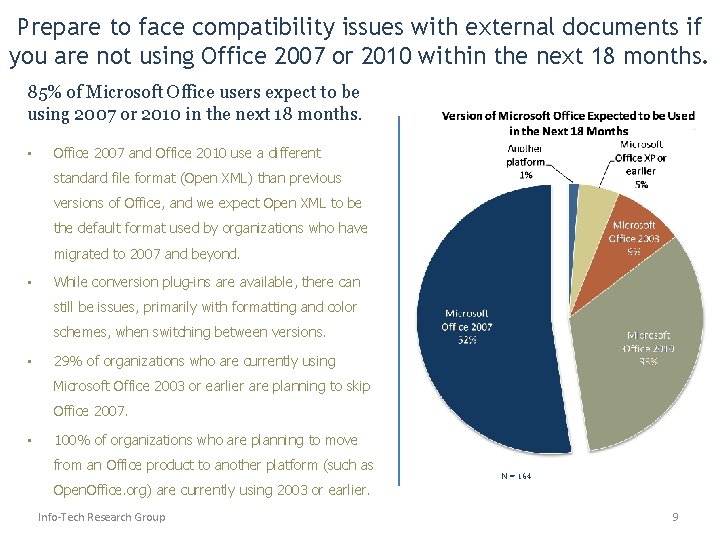
Prepare to face compatibility issues with external documents if you are not using Office 2007 or 2010 within the next 18 months. 85% of Microsoft Office users expect to be using 2007 or 2010 in the next 18 months. • Office 2007 and Office 2010 use a different standard file format (Open XML) than previous versions of Office, and we expect Open XML to be the default format used by organizations who have migrated to 2007 and beyond. • While conversion plug-ins are available, there can still be issues, primarily with formatting and color schemes, when switching between versions. • 29% of organizations who are currently using Microsoft Office 2003 or earlier are planning to skip Office 2007. • 100% of organizations who are planning to move from an Office product to another platform (such as N = 164 Open. Office. org) are currently using 2003 or earlier. Info-Tech Research Group 9
Productivity Where are they? Are they satisfied? Where are they going? How are they getting there? Collaboration Where are they? How did they get there? Where are they going? Why are they going there? Appendix Demographics
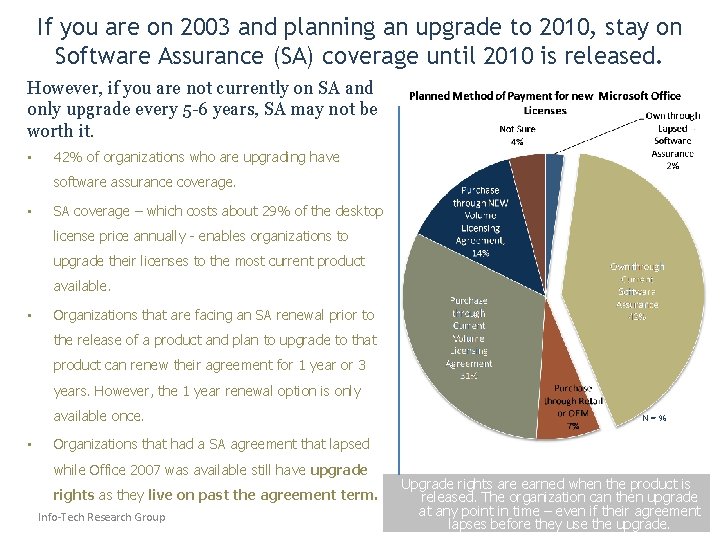
If you are on 2003 and planning an upgrade to 2010, stay on Software Assurance (SA) coverage until 2010 is released. However, if you are not currently on SA and only upgrade every 5 -6 years, SA may not be worth it. • 42% of organizations who are upgrading have software assurance coverage. • SA coverage – which costs about 29% of the desktop license price annually - enables organizations to upgrade their licenses to the most current product available. • Organizations that are facing an SA renewal prior to the release of a product and plan to upgrade to that product can renew their agreement for 1 year or 3 years. However, the 1 year renewal option is only available once. • N = 96 Organizations that had a SA agreement that lapsed while Office 2007 was available still have upgrade rights as they live on past the agreement term. Info-Tech Research Group Upgrade rights are earned when the product is released. The organization can then upgrade at any point in time – even if their agreement 11 lapses before they use the upgrade.
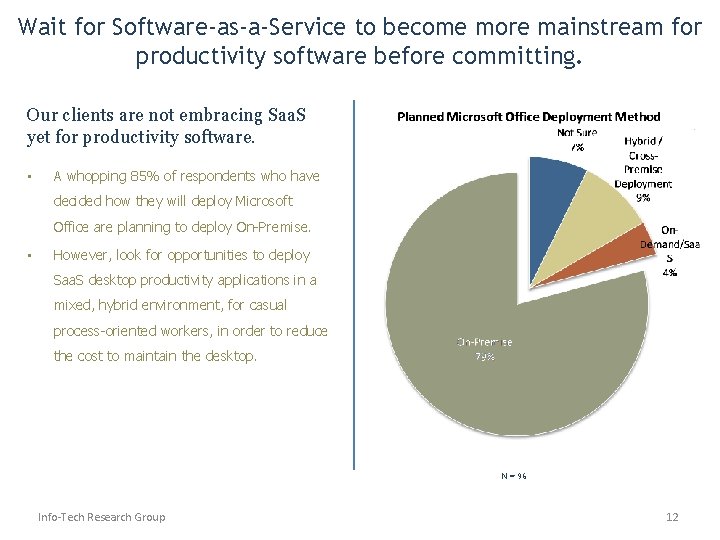
Wait for Software-as-a-Service to become more mainstream for productivity software before committing. Our clients are not embracing Saa. S yet for productivity software. • A whopping 85% of respondents who have decided how they will deploy Microsoft Office are planning to deploy On-Premise. • However, look for opportunities to deploy Saa. S desktop productivity applications in a mixed, hybrid environment, for casual process-oriented workers, in order to reduce the cost to maintain the desktop. N = 96 Info-Tech Research Group 12
Productivity Where are they? Where Collaboration are they? Appendix Are they satisfied? Where are they going? How are they getting there? How did they get there? Where are they going? Why are they going there? Demographics
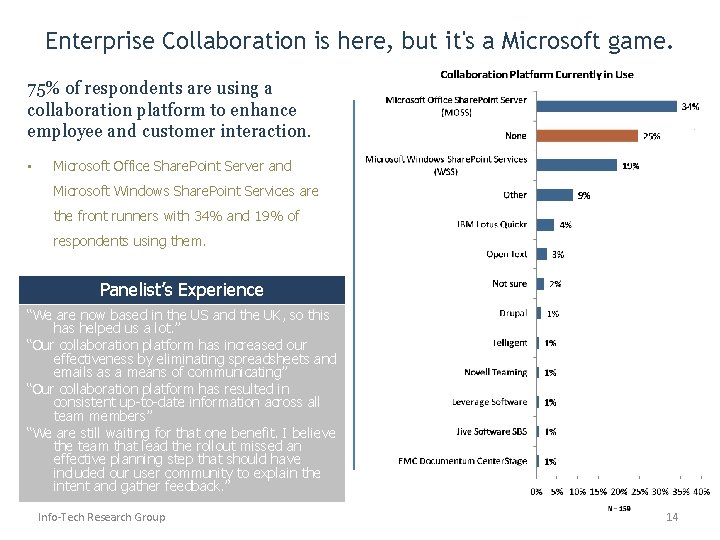
Enterprise Collaboration is here, but it's a Microsoft game. 75% of respondents are using a collaboration platform to enhance employee and customer interaction. • Microsoft Office Share. Point Server and Microsoft Windows Share. Point Services are the front runners with 34% and 19% of respondents using them. Panelist’s Experience “We are now based in the US and the UK, so this has helped us a lot. ” “Our collaboration platform has increased our effectiveness by eliminating spreadsheets and emails as a means of communicating” “Our collaboration platform has resulted in consistent up-to-date information across all team members” “We are still waiting for that one benefit. I believe the team that lead the rollout missed an effective planning step that should have included our user community to explain the intent and gather feedback. ” Info-Tech Research Group 14
Productivity Where are they? Are they satisfied? Where are they going? How are they getting there? Collaboration Where are they? How did they get there? Where are they going? Why are they going there? Appendix Demographics
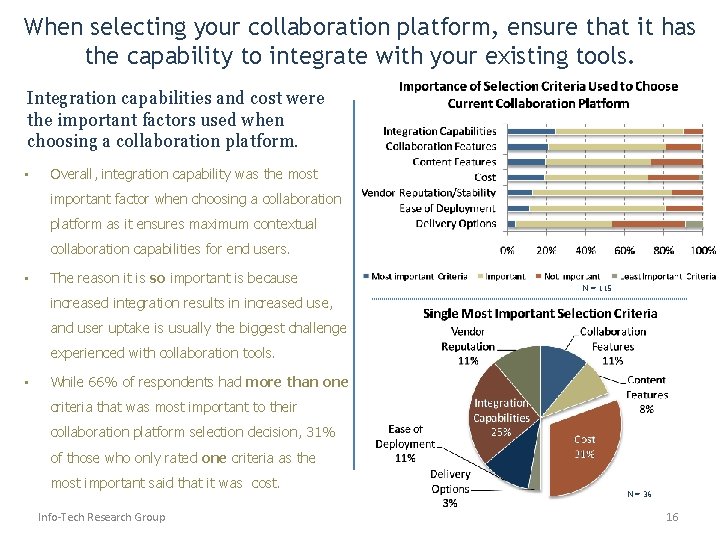
When selecting your collaboration platform, ensure that it has the capability to integrate with your existing tools. Integration capabilities and cost were the important factors used when choosing a collaboration platform. • Overall, integration capability was the most important factor when choosing a collaboration platform as it ensures maximum contextual collaboration capabilities for end users. • The reason it is so important is because N = 115 increased integration results in increased use, and user uptake is usually the biggest challenge experienced with collaboration tools. • While 66% of respondents had more than one criteria that was most important to their collaboration platform selection decision, 31% of those who only rated one criteria as the most important said that it was cost. Info-Tech Research Group N = 36 16
Productivity Where are they? Are they satisfied? Where are they going? How are they getting there? Collaboration Where are they? How did they get there? Where are they going? Why are they going there? Appendix Demographics
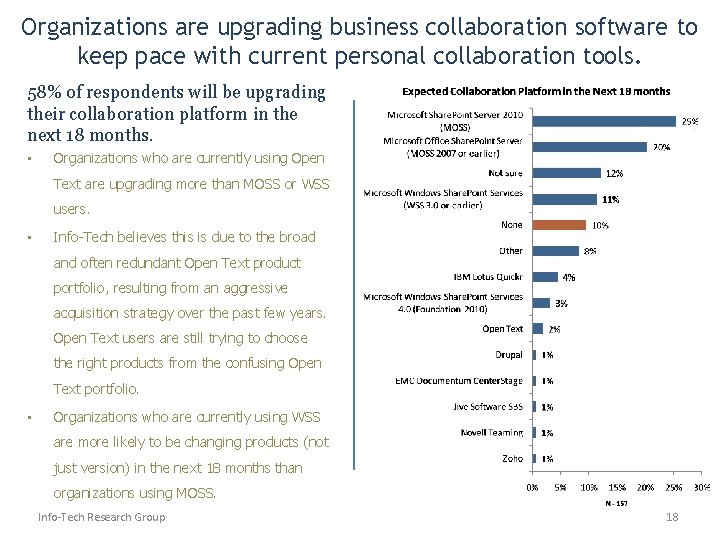
Organizations are upgrading business collaboration software to keep pace with current personal collaboration tools. 58% of respondents will be upgrading their collaboration platform in the next 18 months. • Organizations who are currently using Open Text are upgrading more than MOSS or WSS users. • Info-Tech believes this is due to the broad and often redundant Open Text product portfolio, resulting from an aggressive acquisition strategy over the past few years. Open Text users are still trying to choose the right products from the confusing Open Text portfolio. • Organizations who are currently using WSS are more likely to be changing products (not just version) in the next 18 months than organizations using MOSS. Info-Tech Research Group 18
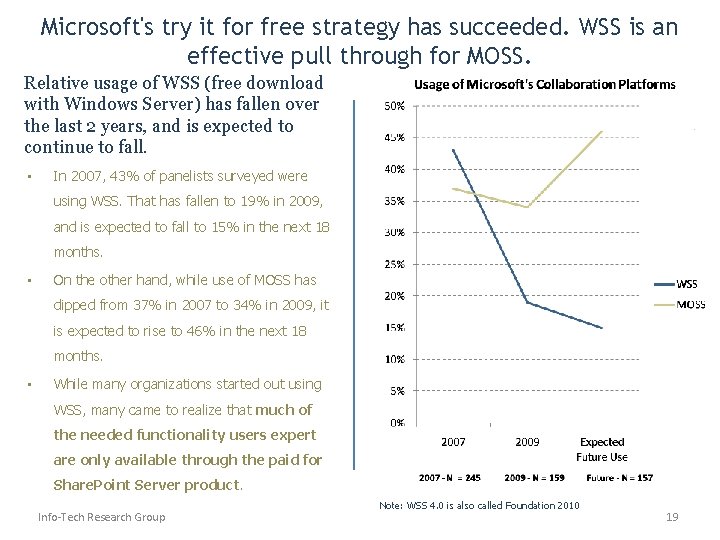
Microsoft's try it for free strategy has succeeded. WSS is an effective pull through for MOSS. Relative usage of WSS (free download with Windows Server) has fallen over the last 2 years, and is expected to continue to fall. • In 2007, 43% of panelists surveyed were using WSS. That has fallen to 19% in 2009, and is expected to fall to 15% in the next 18 months. • On the other hand, while use of MOSS has dipped from 37% in 2007 to 34% in 2009, it is expected to rise to 46% in the next 18 months. • While many organizations started out using WSS, many came to realize that much of the needed functionality users expert are only available through the paid for Share. Point Server product. Info-Tech Research Group Note: WSS 4. 0 is also called Foundation 2010 19
Productivity Collaboration Appendix Where are they? Are they satisfied? How did they get there? Where are they going? How are they getting there? Where are they going? Why are they going there? Demographics
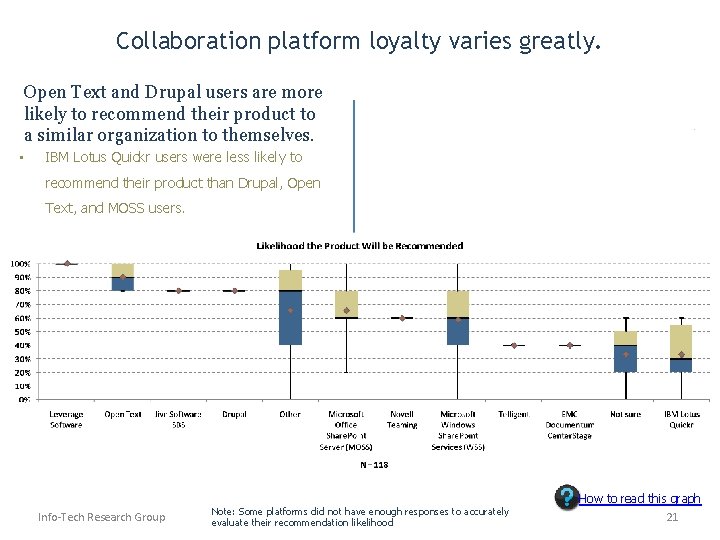
Collaboration platform loyalty varies greatly. Open Text and Drupal users are more likely to recommend their product to a similar organization to themselves. • IBM Lotus Quickr users were less likely to recommend their product than Drupal, Open Text, and MOSS users. Info-Tech Research Group Note: Some platforms did not have enough responses to accurately evaluate their recommendation likelihood How to read this graph 21
Productivity Where are they? Are they satisfied? Where are they going? How are they getting there? Collaboration Where are they? How did they get there? Where are they going? Why are they going there? Appendix Demographics
Industry Info-Tech Research Group 23
Business orientation N = 55 N = 73 Info-Tech Research Group N = 55 24
Number of employees Info-Tech Research Group 25
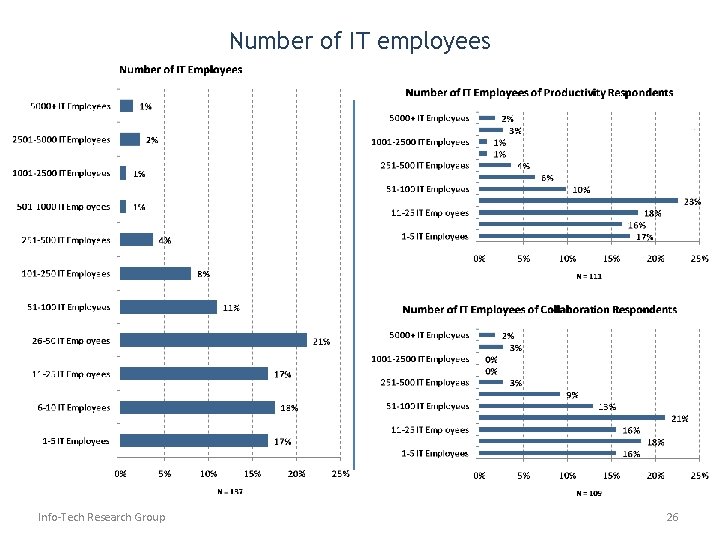
Number of IT employees Info-Tech Research Group 26
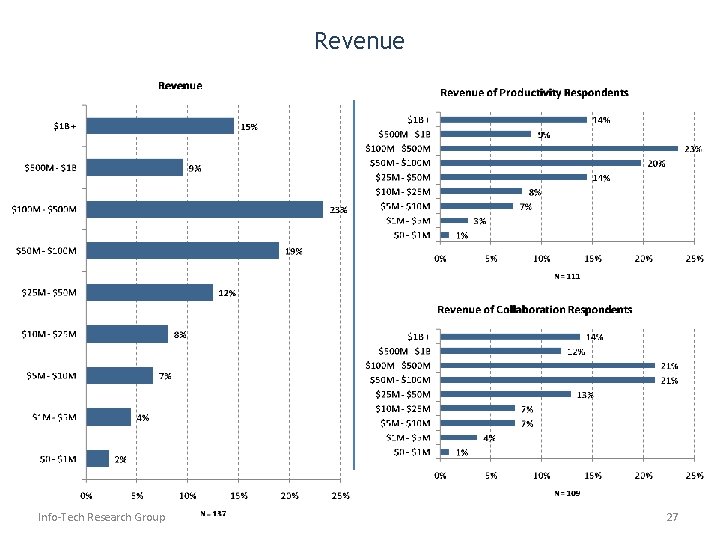
Revenue Info-Tech Research Group 27
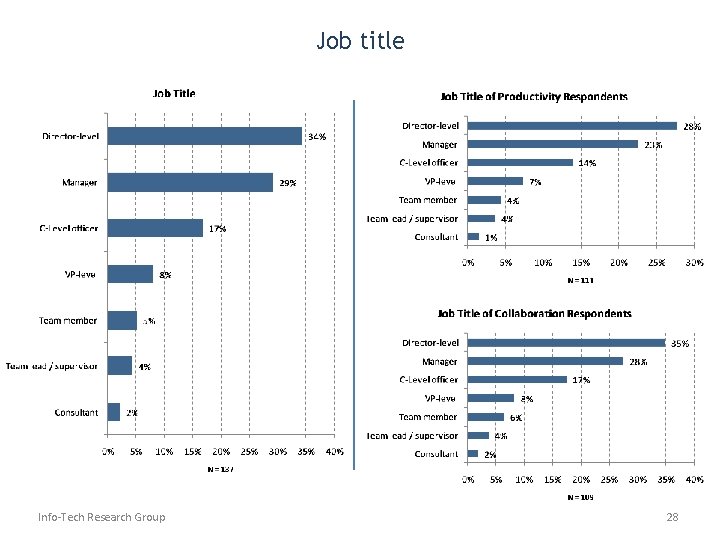
Job title Info-Tech Research Group 28
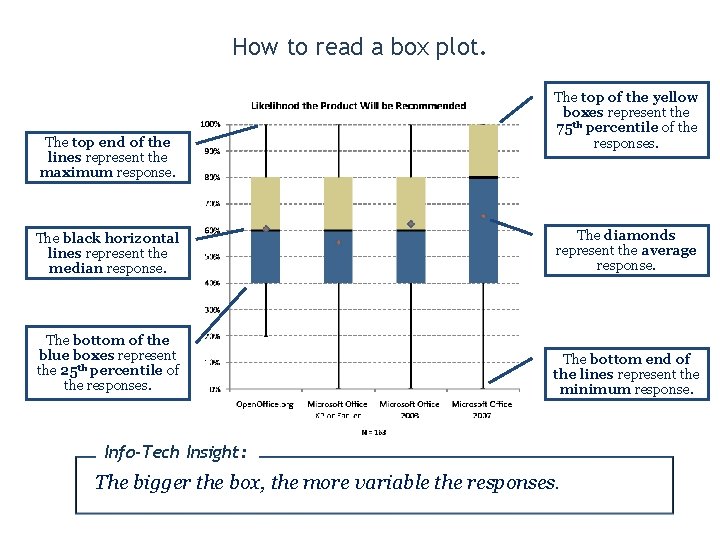
How to read a box plot. The top end of the lines represent the maximum response. The top of the yellow boxes represent the 75 th percentile of the responses. The black horizontal lines represent the median response. The diamonds represent the average response. The bottom of the blue boxes represent the 25 th percentile of the responses. The bottom end of the lines represent the minimum response. Info-Tech Insight: The bigger the box, the more variable the responses.
Like This? Want More? Watch your inbox. • Within the coming weeks, Info-Tech will be launching several more short surveys that will offer similar results to these. • Topics to be covered include: – – – Business Intelligence Help Desk Marketing Automation Windows 7 And more…. • If you participate, you will receive the results for every project you participated in. • To ensure you are included or for more information please email Scott Koopman Info-Tech Insight: To learn more or to sign up click HERE
- Slides: 30