
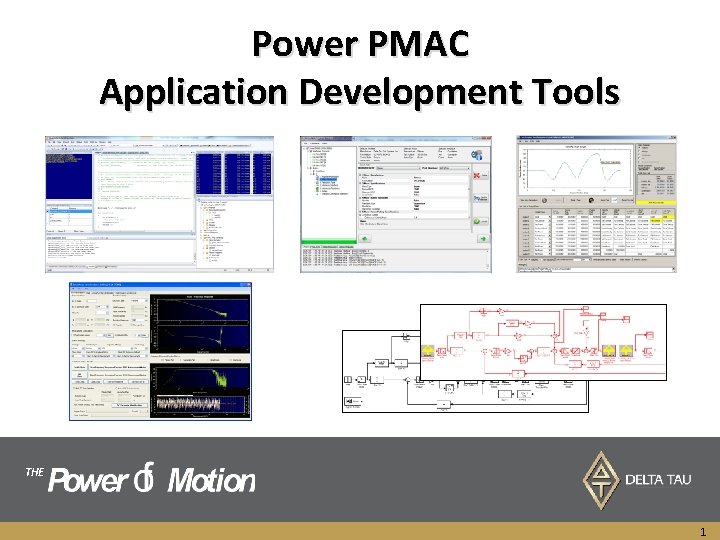
Power PMAC Application Development Tools THE 1 Power




- Slides: 68
Power PMAC Application Development Tools THE 1
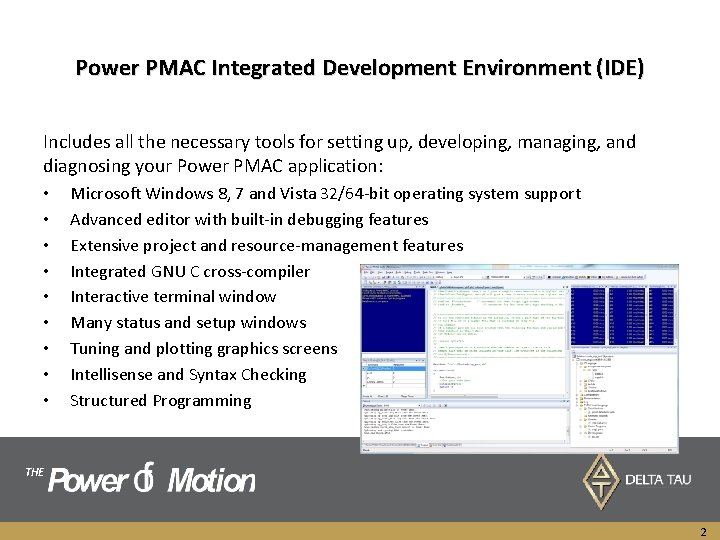
Power PMAC Integrated Development Environment (IDE) Includes all the necessary tools for setting up, developing, managing, and diagnosing your Power PMAC application: • • • Microsoft Windows 8, 7 and Vista 32/64 -bit operating system support Advanced editor with built-in debugging features Extensive project and resource-management features Integrated GNU C cross-compiler Interactive terminal window Many status and setup windows Tuning and plotting graphics screens Intellisense and Syntax Checking Structured Programming THE 2
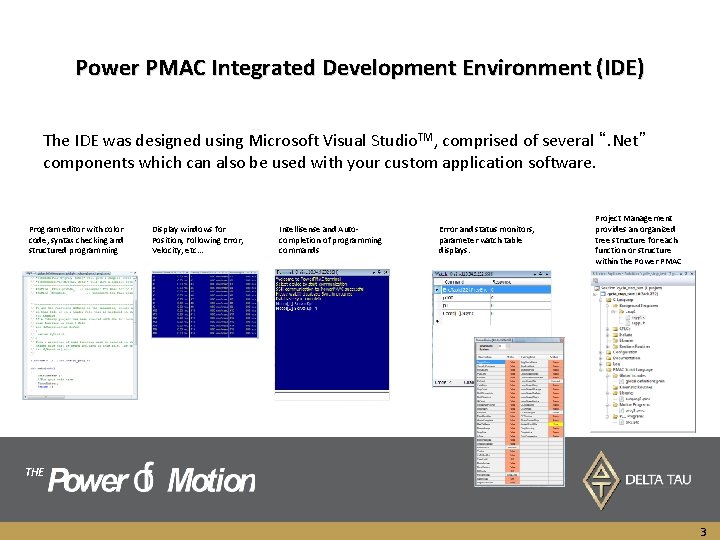
Power PMAC Integrated Development Environment (IDE) The IDE was designed using Microsoft Visual Studio. TM, comprised of several “. Net” components which can also be used with your custom application software. Program editor with color code, syntax checking and structured programming Display windows for Position, Following Error, Velocity, etc… Intellisense and Autocompletion of programming commands Error and status monitors, parameter watch table displays. Project Management provides an organized tree structure for each function or structure within the Power PMAC THE 3
Power PMAC Project Structure • Project Overview THE 4
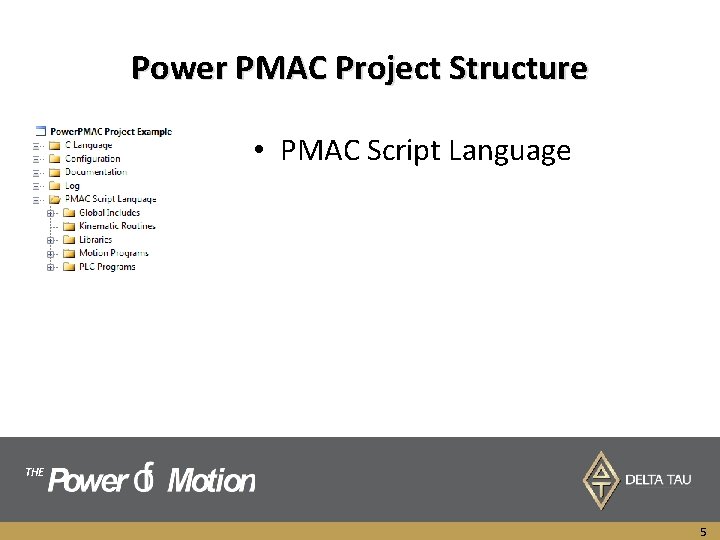
Power PMAC Project Structure • PMAC Script Language THE 5
Power PMAC Project Structure • C Language THE 6
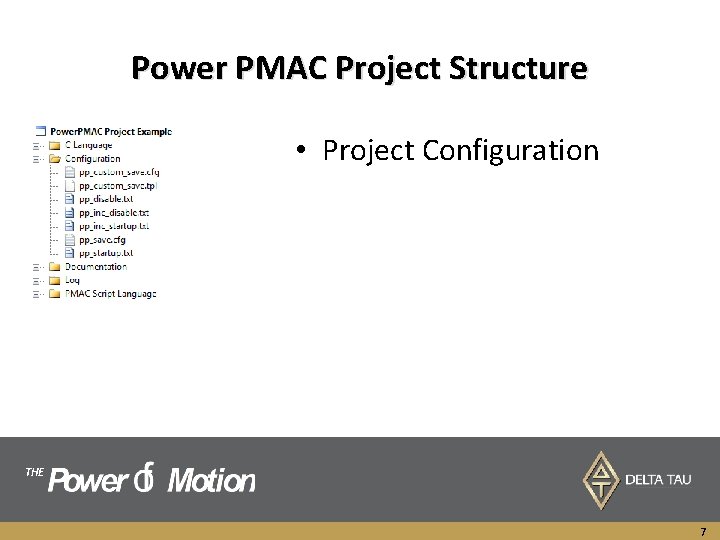
Power PMAC Project Structure • Project Configuration THE 7
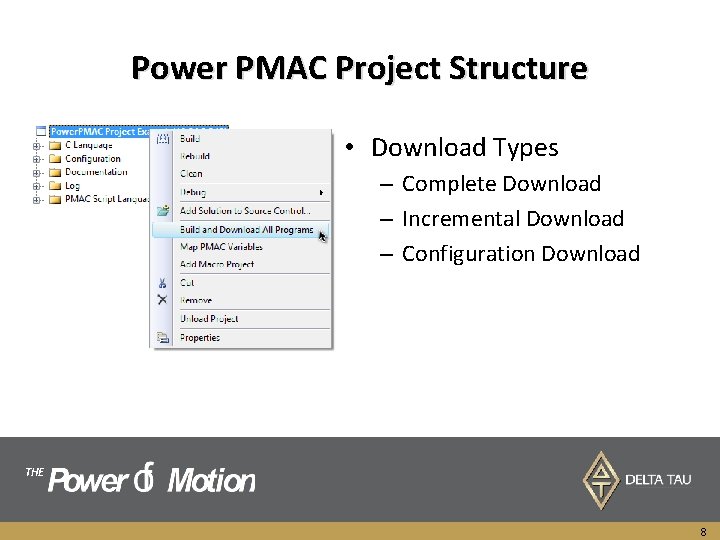
Power PMAC Project Structure • Download Types – Complete Download – Incremental Download – Configuration Download THE 8
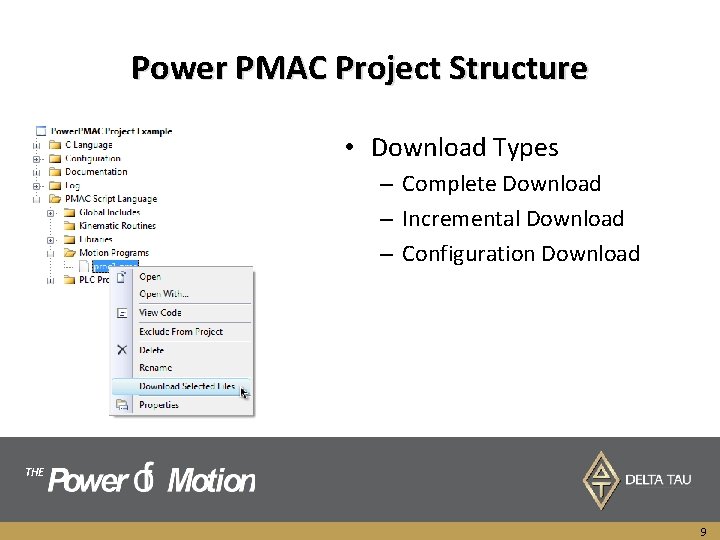
Power PMAC Project Structure • Download Types – Complete Download – Incremental Download – Configuration Download THE 9
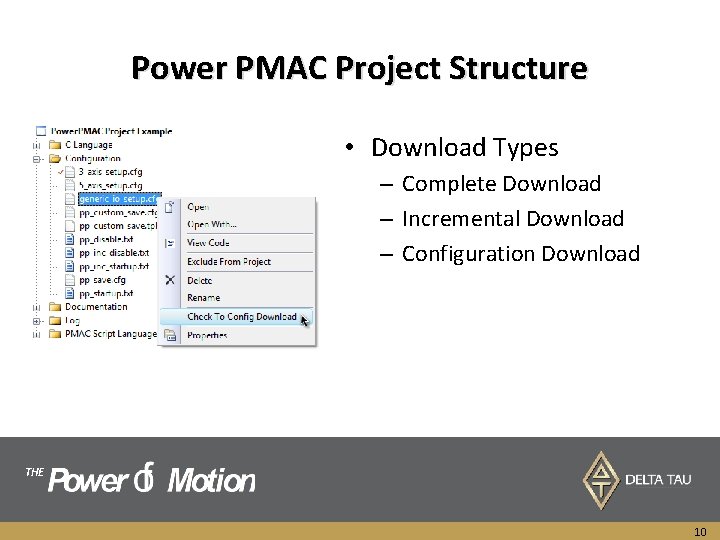
Power PMAC Project Structure • Download Types – Complete Download – Incremental Download – Configuration Download THE 10
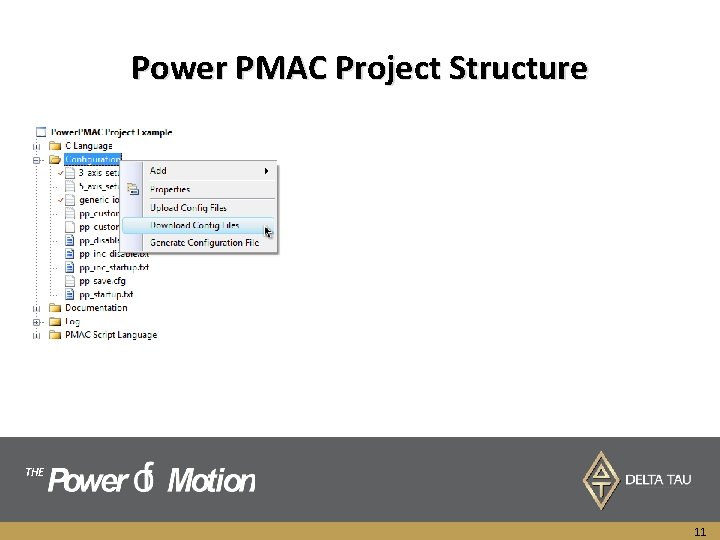
Power PMAC Project Structure THE 11
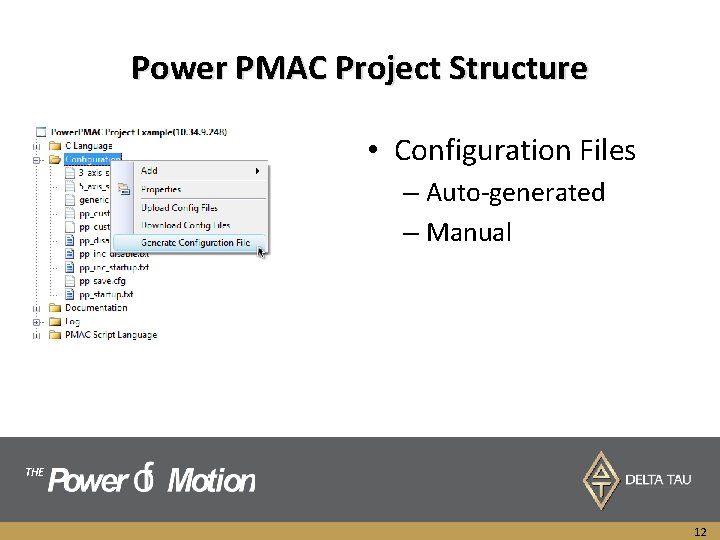
Power PMAC Project Structure • Configuration Files – Auto-generated – Manual THE 12
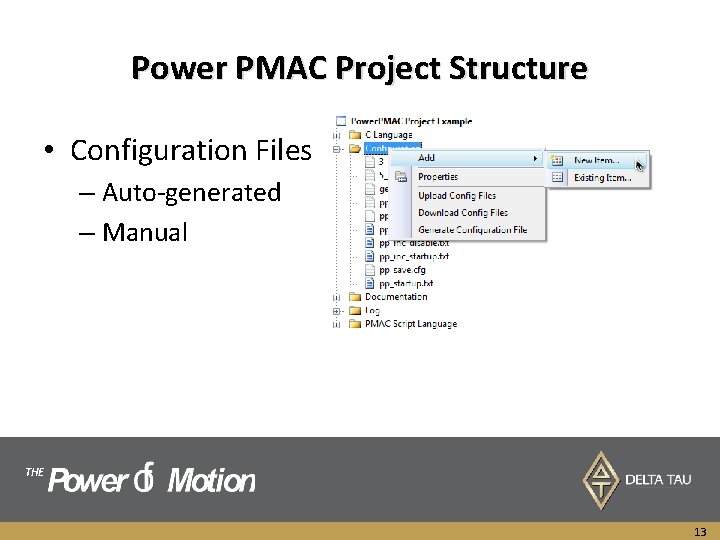
Power PMAC Project Structure • Configuration Files – Auto-generated – Manual THE 13
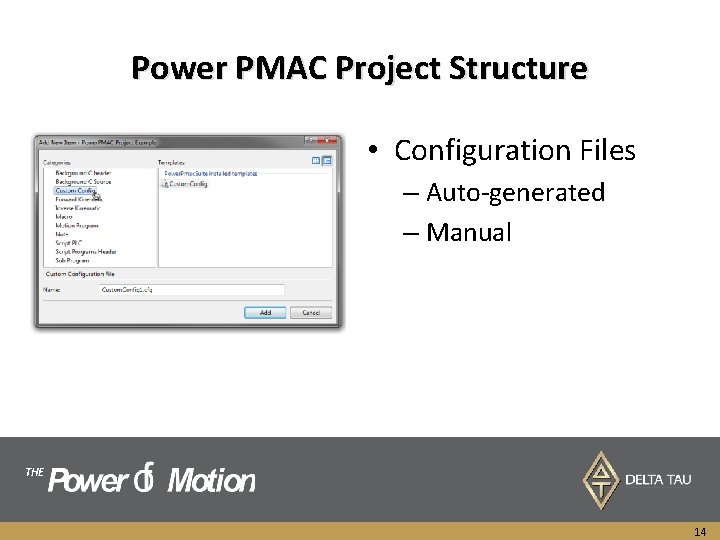
Power PMAC Project Structure • Configuration Files – Auto-generated – Manual THE 14
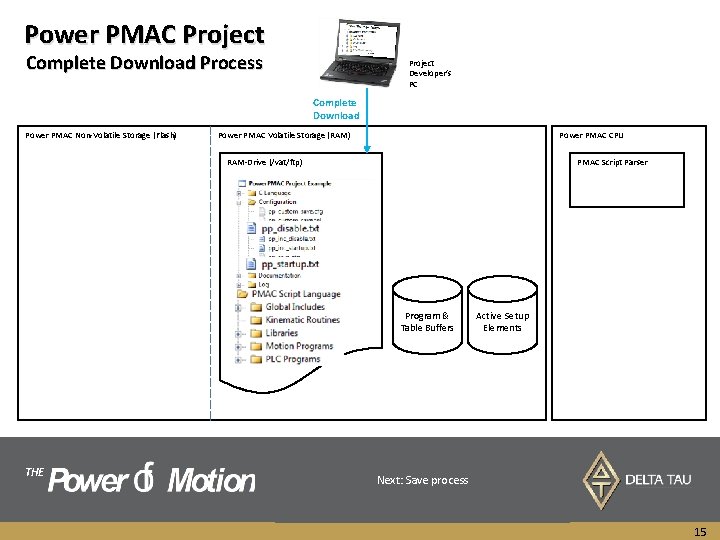
Power PMAC Project Complete Download Process Project Developer’s PC Complete Download Power PMAC Non-Volatile Storage (Flash) Power PMAC Volatile Storage (RAM) Power PMAC CPU RAM-Drive (/vat/ftp) PMAC Script Parser Program & Table Buffers THE Active Setup Elements Files within the Configuration folder control the First , online commands within pp_disable. txt is parsed download process this point. Since all of these Next, At last, all the files online withinfrom commands the PMAC Script within Language pp_startup. txt folderfiles are and commands canset affect active setup All Cexecuted. Language. These programs which are to be compiled and settings are user customizable, download and power parsed ABuild copy parsed and of the Download executed. and project, downloaded After isincluding initiated pp_startup. txt to compiled PMAC. from the The C-programs, Power execution, files are PMAC any is buffers. Next: Save Thisappropriate process is the place cross-compiler to stop any areelements compiled and on the PC using downloaded Background Cin programs up alphabetical canthe be. Developer’s set very order toflexible. start within on power each. PMAC. up folder, are transferred to IDE RAM on drive (volatile) on PCPower motion andand make header sure files the machine are generated is in a safe state It is important starting from to make executed. Global sure Includes download folder. of new before changing any parameters is safe for the machine. 15
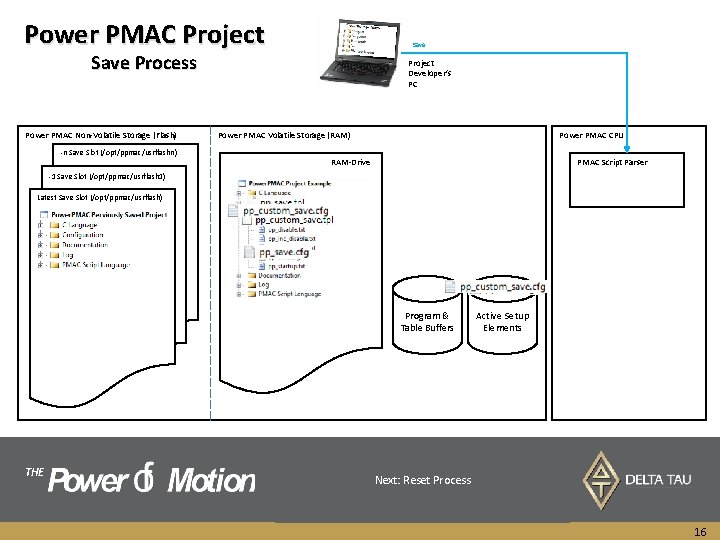
Power PMAC Project Save Process Power PMAC Non-Volatile Storage (Flash) -n Save Slot (/opt/ppmac/usrflashn) Project Developer’s PC Power PMAC Volatile Storage (RAM) Power PMAC CPU RAM-Drive PMAC Script Parser -1 Save Slot (/opt/ppmac/usrflash 1) Latest Save Slot (/opt/ppmac/usrflash) Program & Table Buffers THE Active Setup Elements pp_save. tpl pp_custome_save. tpl file is called fileand is called processed, and processed, which generates which A save If an slot IDEis project prepared is connected on the non-volatile at this point, memory the for the pp_save. cfg generates file. the. The pp_custom_save. cfg pp_save. tpl is maintained file. by A copy of the active project is made from RAM-Drive pp_save. cfg saving theand project pp_custom_save. cfg by shifting the previous are updated copiesonofthe The Delta pp_custom_save. tpl SAVE Taucommand Next: updated is. Reset received is maintained as. Process aslot part byin. Power ofthe by thenon-volatile user PMAC firmware. and can and placed intoisthe prepared saved projects. to reflect Power the latest PMACversion. maintains These a maximum files are only of 5 be pp_save. cfg used to storeincludes desired memory all non-saved location. of the “Saved elements Structure such as last forsaved reference statesand of the notproject meant to in abe. FIFO modified. fashion. user Elements” variablesas and noted userinbuffer the PPSRM. contents. 16
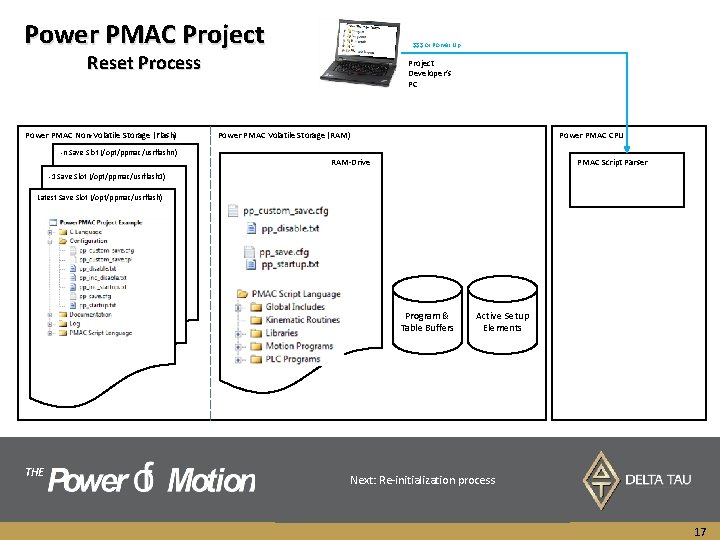
Power PMAC Project $$$ or Power Up Reset Process Power PMAC Non-Volatile Storage (Flash) -n Save Slot (/opt/ppmac/usrflashn) Project Developer’s PC Power PMAC Volatile Storage (RAM) Power PMAC CPU RAM-Drive PMAC Script Parser -1 Save Slot (/opt/ppmac/usrflash 1) Latest Save Slot (/opt/ppmac/usrflash) Program & Table Buffers THE Active Setup Elements Next, online commands within pp_disable. txt is parsed Next, At last, all the filesonline withincommands the PMAC Script within. Language pp_startup. txt folderare and executed. These is commands caniswill affect active First, the pp_save. cfg parsed. This update allsetup of the Second, the pp_custom_save. cfg parsed. This will A parsed $$$ copy parsed command of and the executed. and latest isdownloaded received saved Afterproject by pp_startup. txt to Power PMAC. is copied PMAC Theexecution, from or files hardware the are nonany elements and buffers. Thisin is. Power theprocess place towere stop any saved elements PMAC’s active Next: Re-initialization update allstructure of the user register values which defined downloaded Background Cinprograms alphabetical order to within on power eachcycle. up folder, are has completed volatile the memory bootset to cycle thestart after RAM-drive. a power motion and make surememory. the machine is in a safe by pp_custom_save. tpl which is maintained by state user. starting fromexecuted. Global Includes folder. before changing any parameters. 17
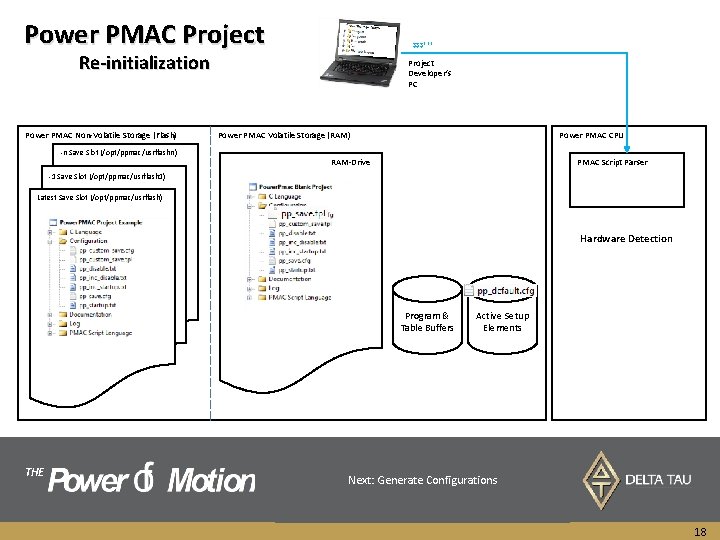
Power PMAC Project $$$*** Re-initialization Power PMAC Non-Volatile Storage (Flash) -n Save Slot (/opt/ppmac/usrflashn) Project Developer’s PC Power PMAC Volatile Storage (RAM) Power PMAC CPU RAM-Drive PMAC Script Parser -1 Save Slot (/opt/ppmac/usrflash 1) Latest Save Slot (/opt/ppmac/usrflash) Hardware Detection Program & Table Buffers THE Active Setup Elements Next, pp_save. tpl is parsed and executed. This time the resulting structures, instead ofthe are stored AAll Hardware blank non-volatile $$$*** project command detection ismemory placed process is received into contents ispp_save. cfg, executed. RAM-Drive. by (project, Power. Based PMAC active This upon empty setup or in pp_default. cfg. Next: Thismedia Generate file isattached hardware Configurations specific and later can project elements, external detected is embedded storage hardware, buffers) and indefault the with firmware values Power. Pmac. Factory. Reset hardware will andbe it isassigned are notcleared specific to be active usedsetup for folder auto-generation elements is detected to and any andhardware. structures during reset. of user boot configurations (Motors, process. ECT, which C. S. ). will be explained later. 18
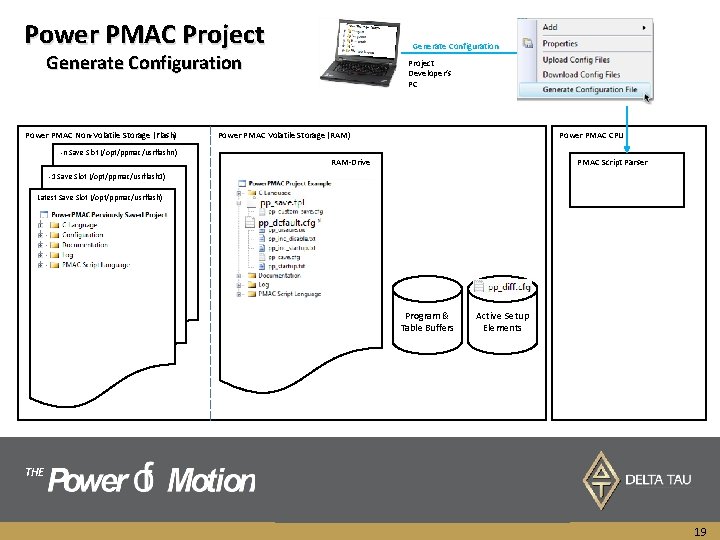
Power PMAC Project Generate Configuration Power PMAC Non-Volatile Storage (Flash) -n Save Slot (/opt/ppmac/usrflashn) Project Developer’s PC Power PMAC Volatile Storage (RAM) Power PMAC CPU RAM-Drive PMAC Script Parser -1 Save Slot (/opt/ppmac/usrflash 1) Latest Save Slot (/opt/ppmac/usrflash) Program & Table Buffers THE Active Setup Elements The output of the pp_save. tpl is compared with A copy of the pp_diff. cfg is uploaded to project and is The pp_default. cfg Generate difference Configuration isfile. placed The in difference isaselected file called would from pp_diff. cfg be theany context saved and it stored under project’s Configuration folder with user setup which has been modified factory menu iselement placed for Configuration in project’s Configuration folder of thefrom folder. project. specified filename. default. 19
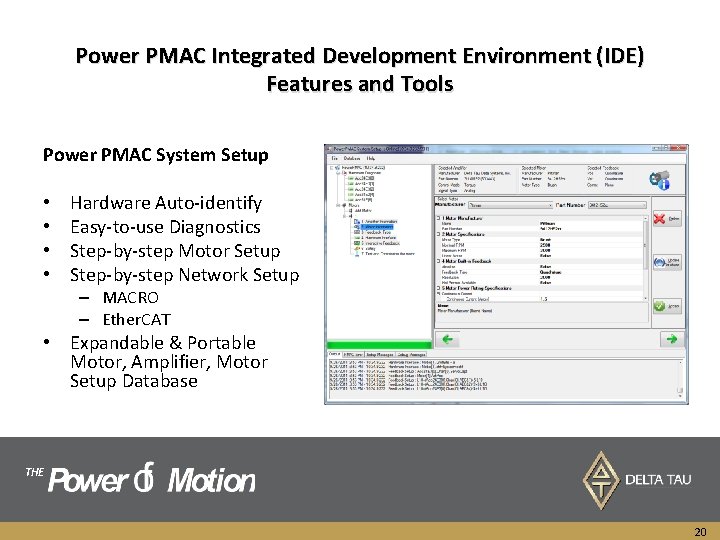
Power PMAC Integrated Development Environment (IDE) Features and Tools Power PMAC System Setup • • Hardware Auto-identify Easy-to-use Diagnostics Step-by-step Motor Setup Step-by-step Network Setup – MACRO – Ether. CAT • Expandable & Portable Motor, Amplifier, Motor Setup Database THE 20
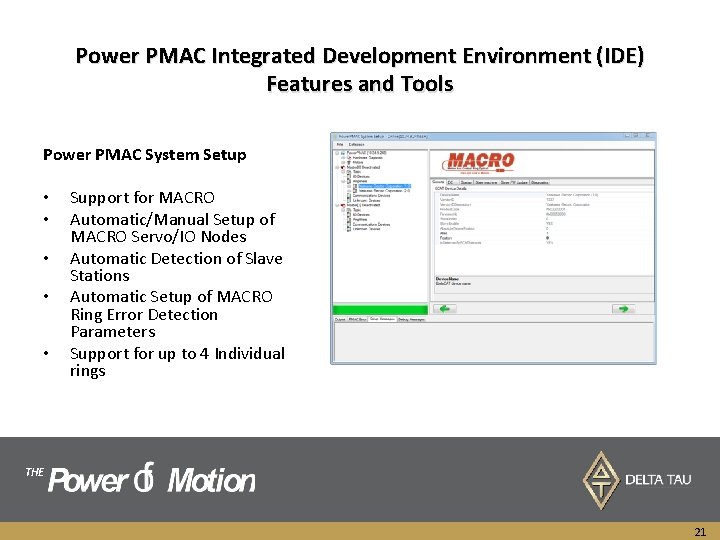
Power PMAC Integrated Development Environment (IDE) Features and Tools Power PMAC System Setup • • • Support for MACRO Automatic/Manual Setup of MACRO Servo/IO Nodes Automatic Detection of Slave Stations Automatic Setup of MACRO Ring Error Detection Parameters Support for up to 4 Individual rings THE 21
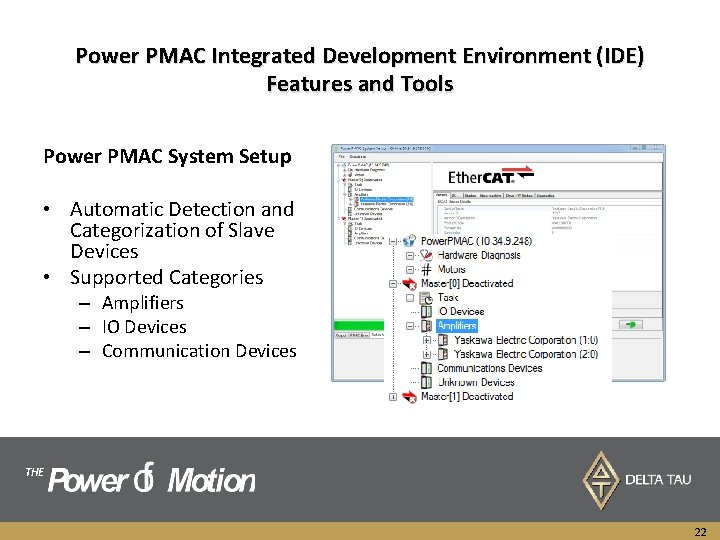
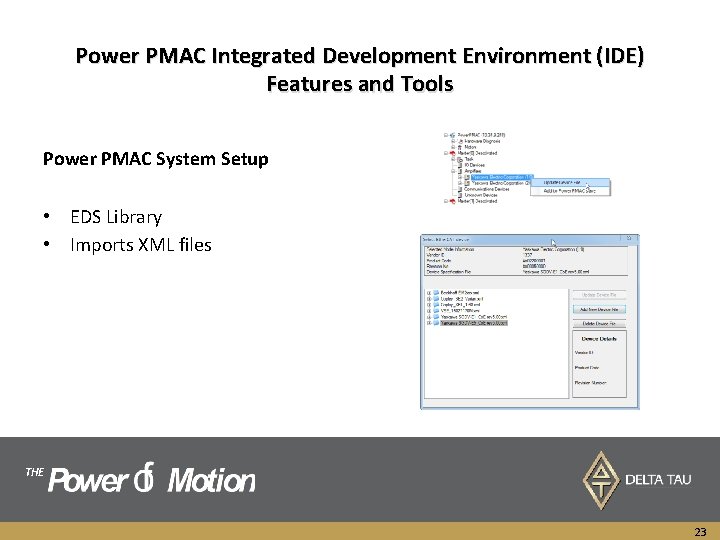
Power PMAC Integrated Development Environment (IDE) Features and Tools Power PMAC System Setup • Automatic Detection and Categorization of Slave Devices • Supported Categories – Amplifiers – IO Devices – Communication Devices THE 22
Power PMAC Integrated Development Environment (IDE) Features and Tools Power PMAC System Setup • EDS Library • Imports XML files THE 23
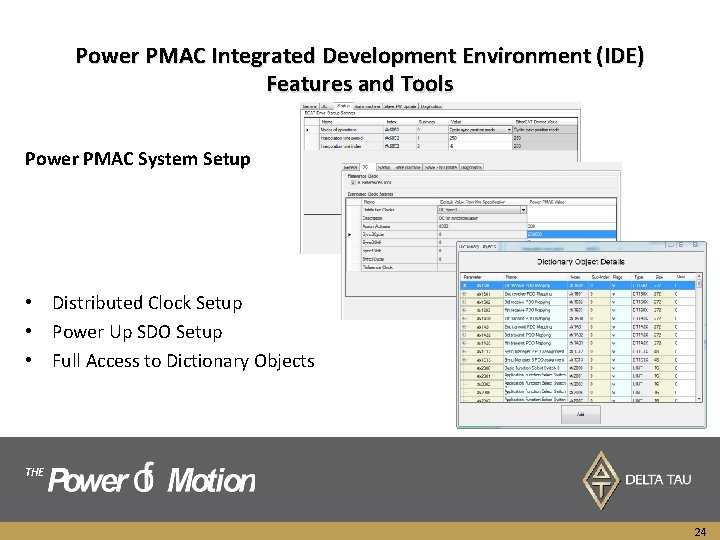
Power PMAC Integrated Development Environment (IDE) Features and Tools Power PMAC System Setup • Distributed Clock Setup • Power Up SDO Setup • Full Access to Dictionary Objects THE 24
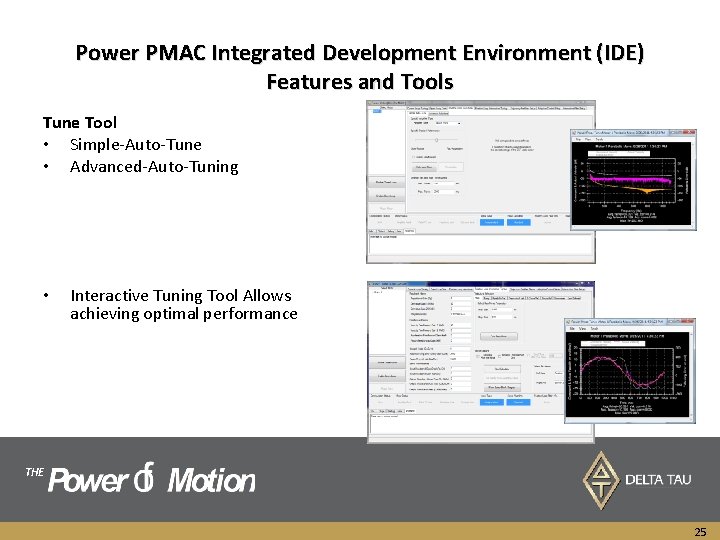
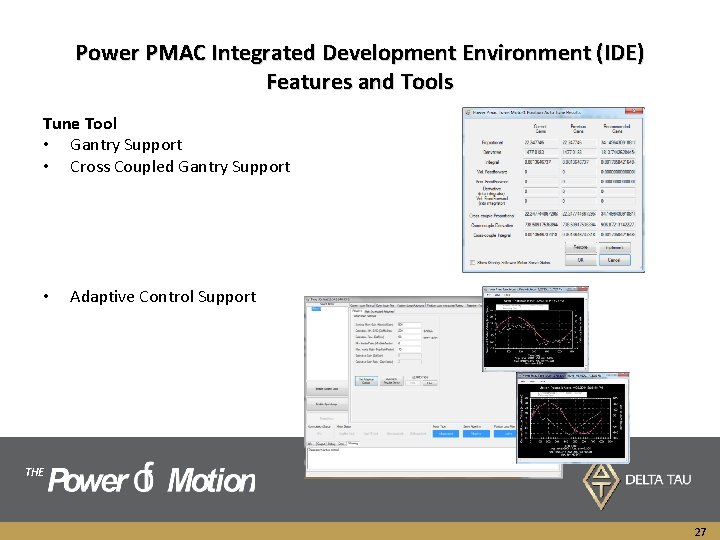
Power PMAC Integrated Development Environment (IDE) Features and Tools Tune Tool • Simple-Auto-Tune • Advanced-Auto-Tuning • Interactive Tuning Tool Allows achieving optimal performance THE 25
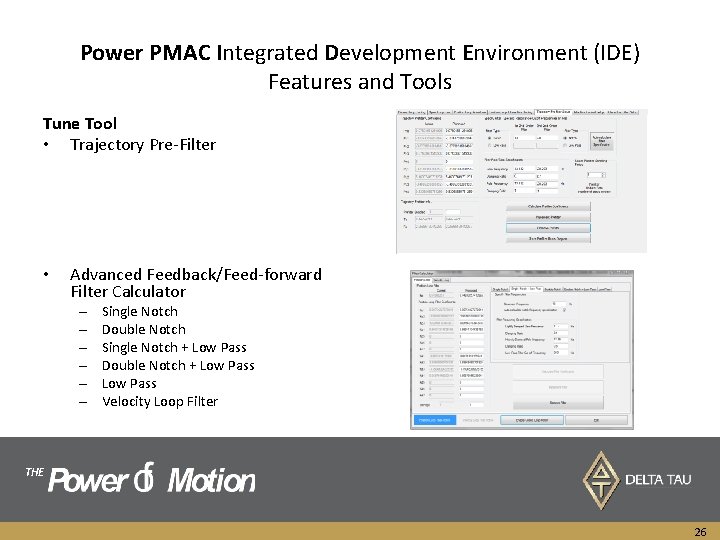
Power PMAC Integrated Development Environment (IDE) Features and Tools Tune Tool • Trajectory Pre-Filter • Advanced Feedback/Feed-forward Filter Calculator – – – Single Notch Double Notch Single Notch + Low Pass Double Notch + Low Pass Velocity Loop Filter THE 26
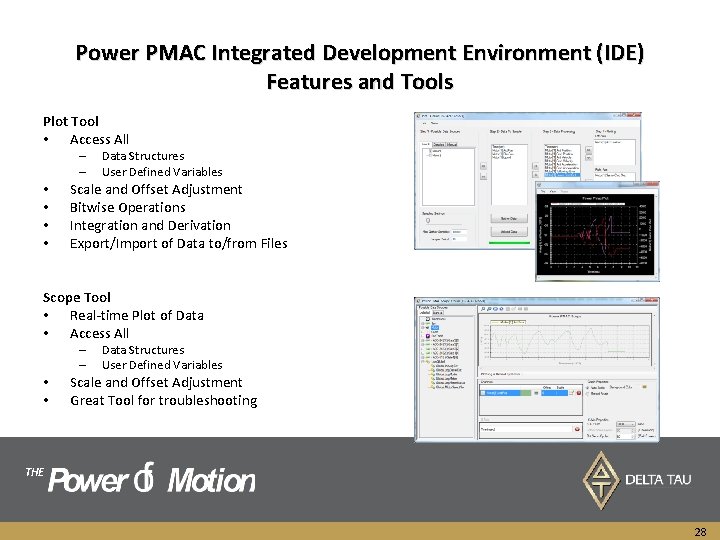
Power PMAC Integrated Development Environment (IDE) Features and Tools Tune Tool • Gantry Support • Cross Coupled Gantry Support • Adaptive Control Support THE 27
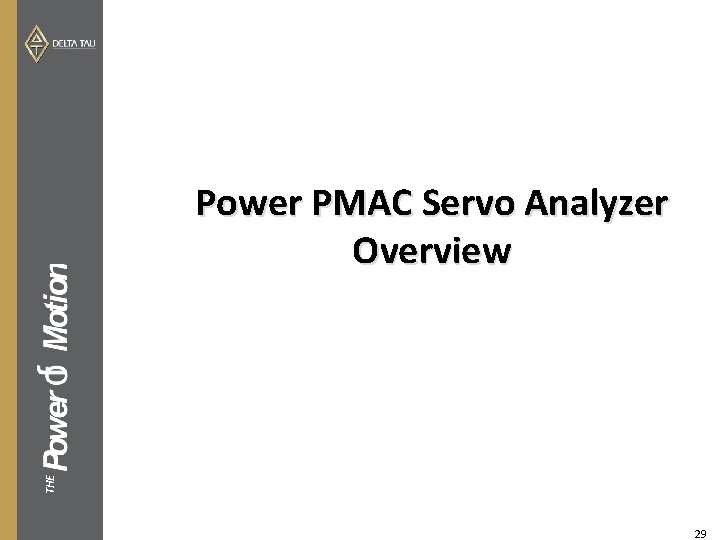
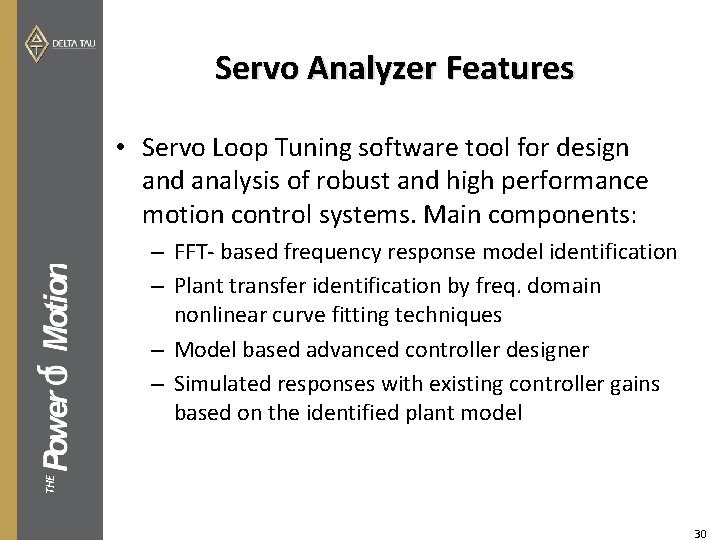
Power PMAC Integrated Development Environment (IDE) Features and Tools Plot Tool • Access All – – • • Data Structures User Defined Variables Scale and Offset Adjustment Bitwise Operations Integration and Derivation Export/Import of Data to/from Files Scope Tool • Real-time Plot of Data • Access All – – • • Data Structures User Defined Variables Scale and Offset Adjustment Great Tool for troubleshooting THE 28
THE Power PMAC Servo Analyzer Overview 29
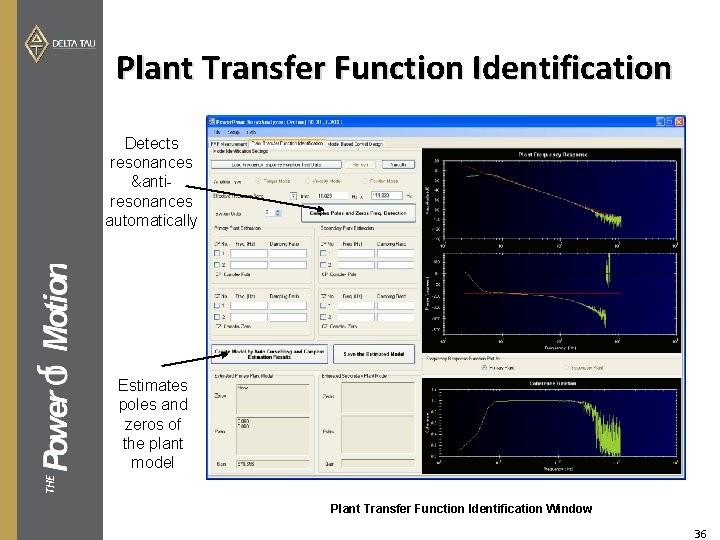
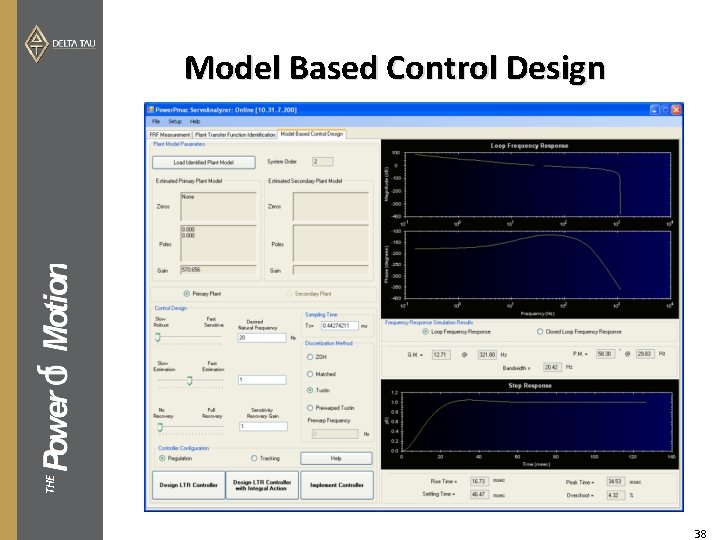
Servo Analyzer Features • Servo Loop Tuning software tool for design and analysis of robust and high performance motion control systems. Main components: THE – FFT- based frequency response model identification – Plant transfer identification by freq. domain nonlinear curve fitting techniques – Model based advanced controller designer – Simulated responses with existing controller gains based on the identified plant model 30
Servo Analyzer Features • Servo Loop Tuning software tool for design and analysis of robust and high performance motion control systems. • Main components: THE – FFT- based frequency response model identification – Plant transfer identification by freq. domain nonlinear curve fitting techniques 31
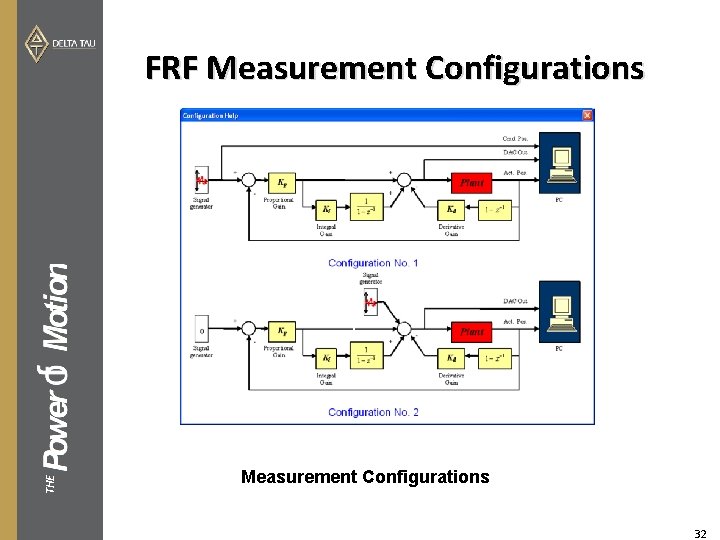
THE FRF Measurement Configurations 32
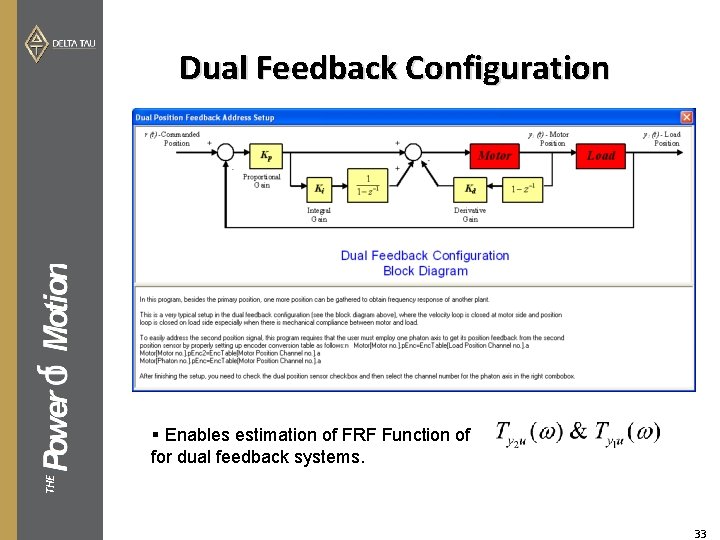
Dual Feedback Configuration THE § Enables estimation of FRF Function of for dual feedback systems. 33
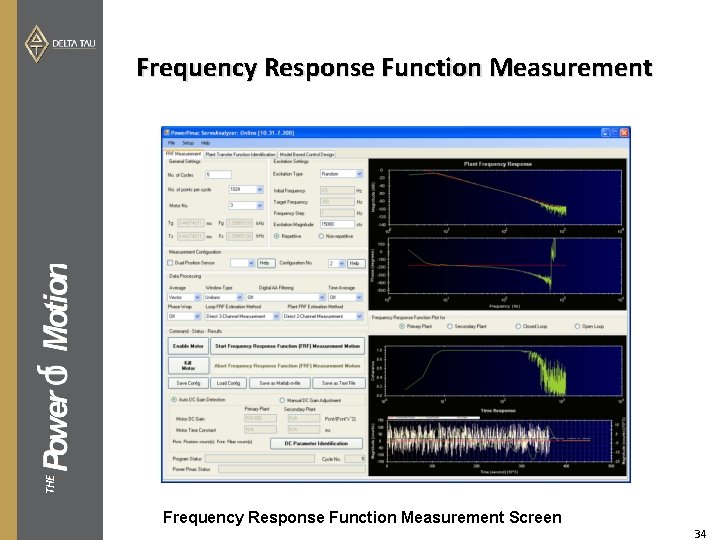
THE Frequency Response Function Measurement Screen 34
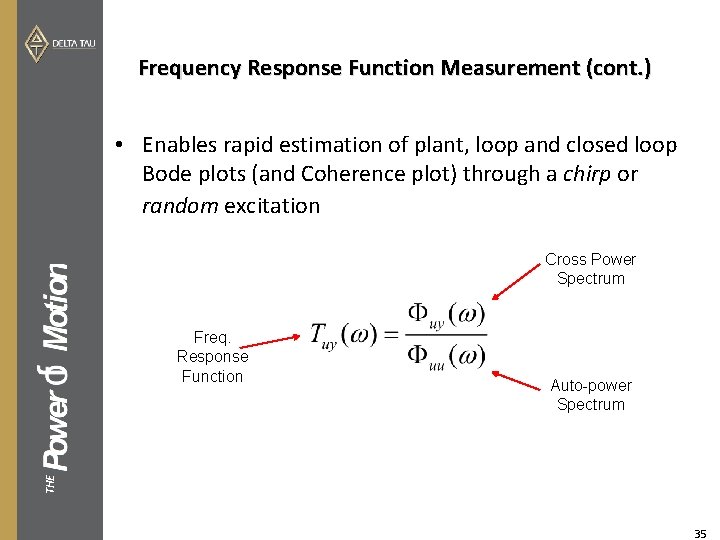
Frequency Response Function Measurement (cont. ) • Enables rapid estimation of plant, loop and closed loop Bode plots (and Coherence plot) through a chirp or random excitation Cross Power Spectrum Auto-power Spectrum THE Freq. Response Function 35
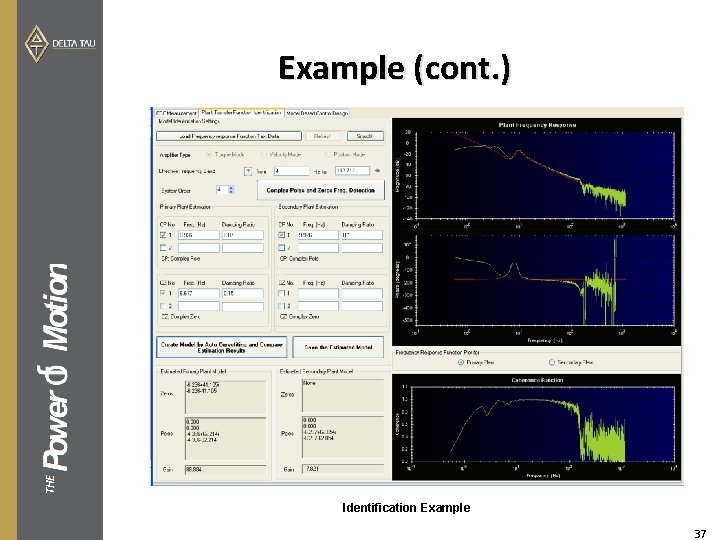
Plant Transfer Function Identification Detects resonances &antiresonances automatically THE Estimates poles and zeros of the plant model Plant Transfer Function Identification Window 36
THE Example (cont. ) Identification Example 37
THE Model Based Control Design 38
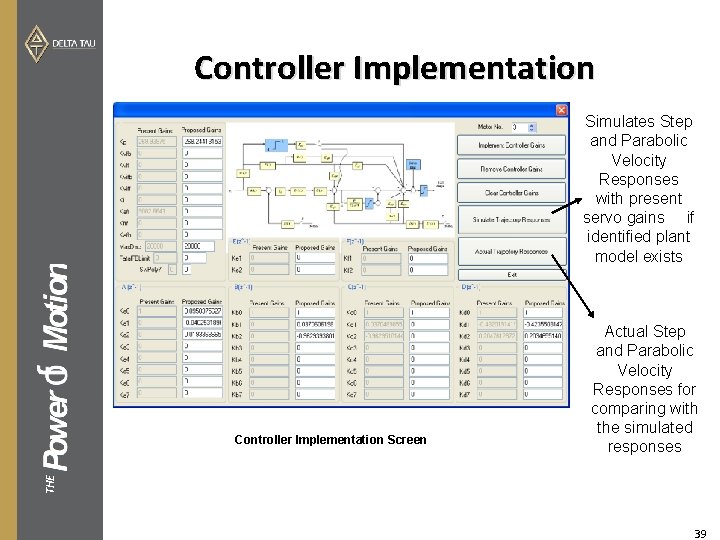
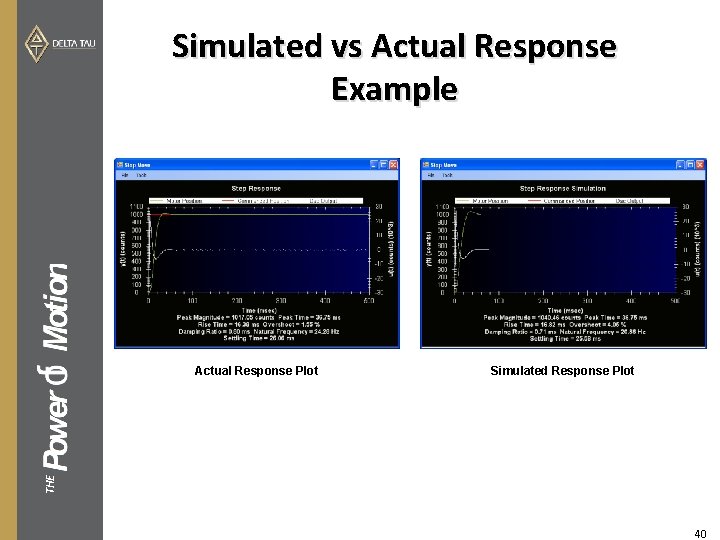
Controller Implementation Simulates Step and Parabolic Velocity Responses with present servo gains if identified plant model exists THE Controller Implementation Screen Actual Step and Parabolic Velocity Responses for comparing with the simulated responses 39
Simulated vs Actual Response Example Simulated Response Plot THE Actual Response Plot 40
Power PMAC Cam Sculptor Overview THE
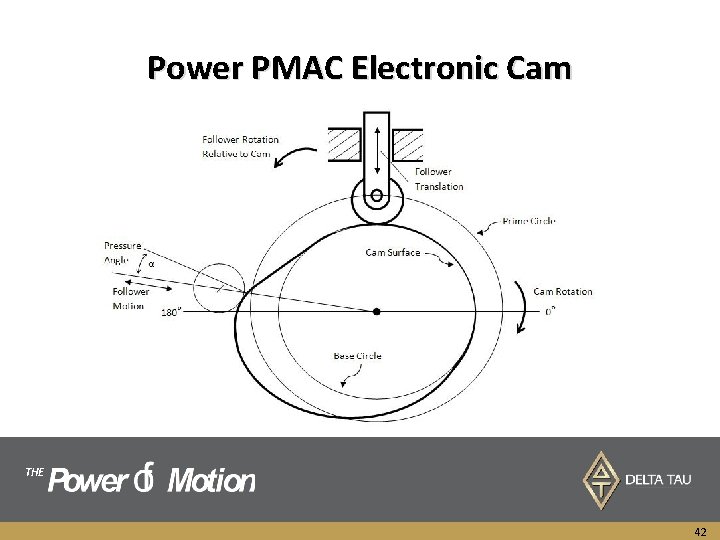
Power PMAC Electronic Cam THE 42
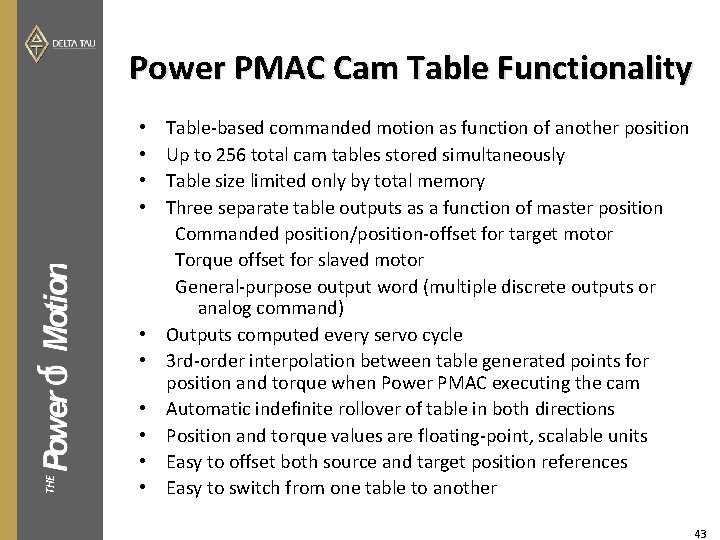
Power PMAC Cam Table Functionality • • THE • • • Table-based commanded motion as function of another position Up to 256 total cam tables stored simultaneously Table size limited only by total memory Three separate table outputs as a function of master position Commanded position/position-offset for target motor Torque offset for slaved motor General-purpose output word (multiple discrete outputs or analog command) Outputs computed every servo cycle 3 rd-order interpolation between table generated points for position and torque when Power PMAC executing the cam Automatic indefinite rollover of table in both directions Position and torque values are floating-point, scalable units Easy to offset both source and target position references Easy to switch from one table to another 43
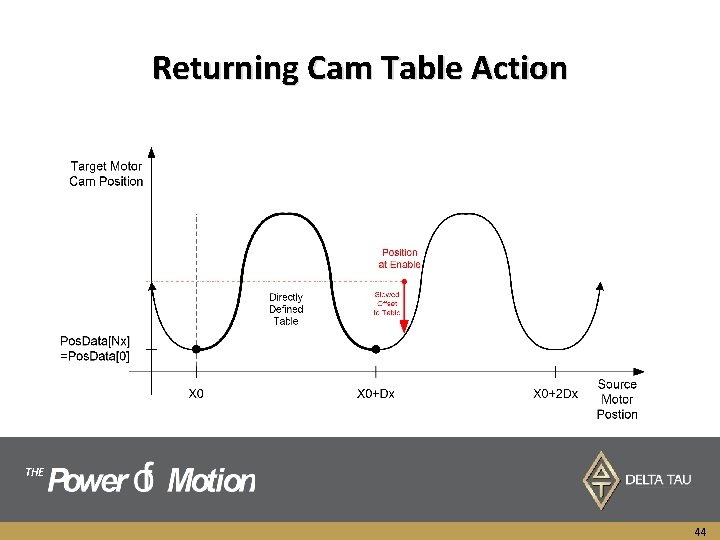
Returning Cam Table Action THE 44
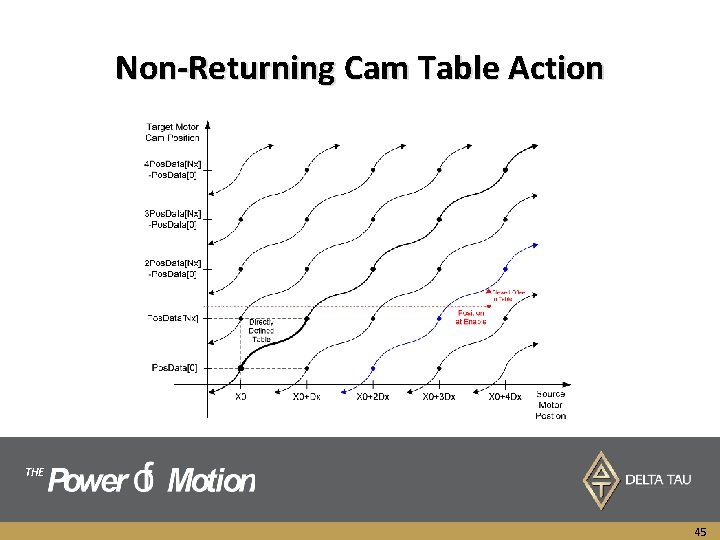
Non-Returning Cam Table Action THE 45
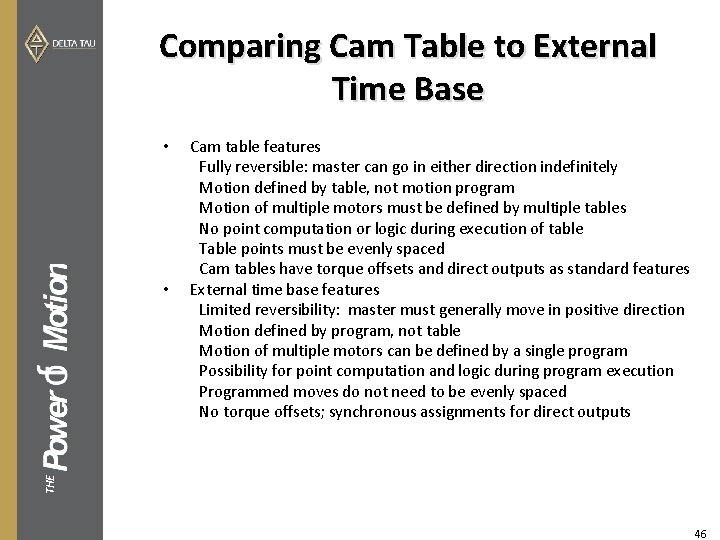
Comparing Cam Table to External Time Base • THE • Cam table features Fully reversible: master can go in either direction indefinitely Motion defined by table, not motion program Motion of multiple motors must be defined by multiple tables No point computation or logic during execution of table Table points must be evenly spaced Cam tables have torque offsets and direct outputs as standard features External time base features Limited reversibility: master must generally move in positive direction Motion defined by program, not table Motion of multiple motors can be defined by a single program Possibility for point computation and logic during program execution Programmed moves do not need to be evenly spaced No torque offsets; synchronous assignments for direct outputs 46
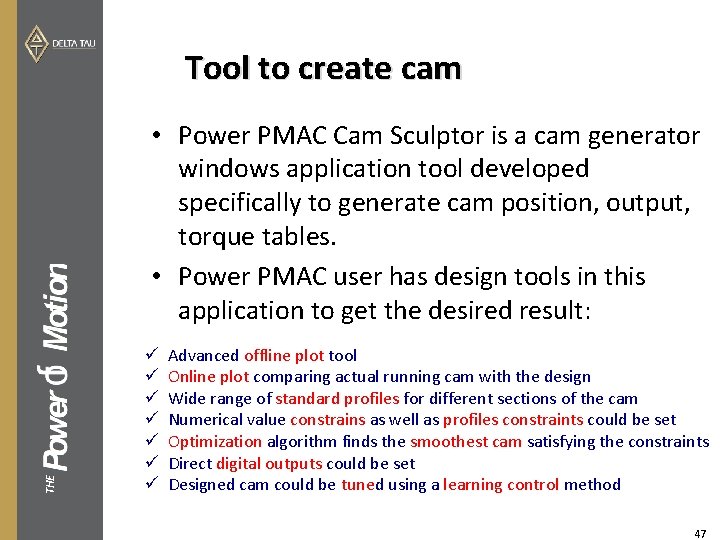
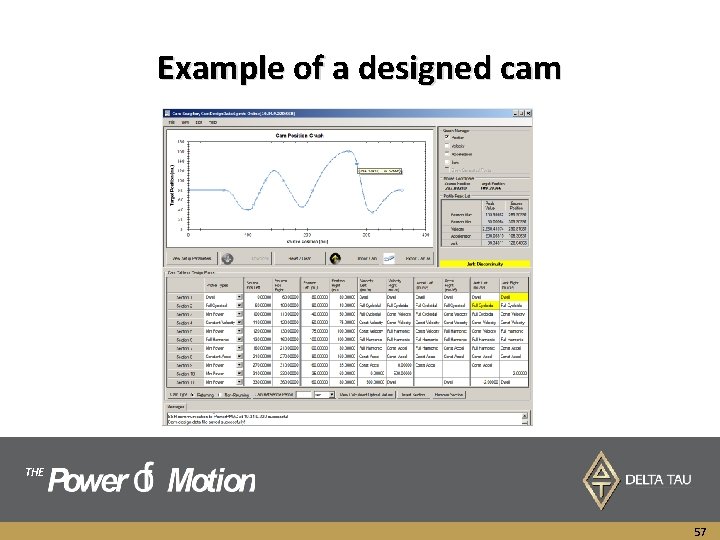
Tool to create cam THE • Power PMAC Cam Sculptor is a cam generator windows application tool developed specifically to generate cam position, output, torque tables. • Power PMAC user has design tools in this application to get the desired result: ü ü ü ü Advanced offline plot tool Online plot comparing actual running cam with the design Wide range of standard profiles for different sections of the cam Numerical value constrains as well as profiles constraints could be set Optimization algorithm finds the smoothest cam satisfying the constraints Direct digital outputs could be set Designed cam could be tuned using a learning control method 47
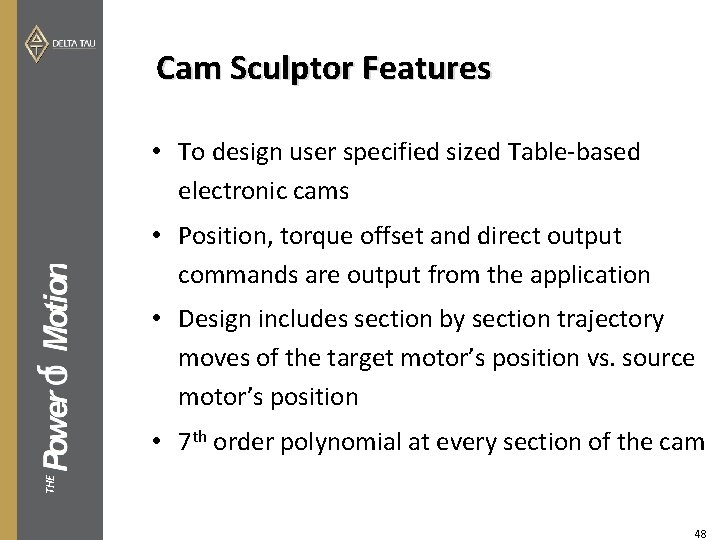
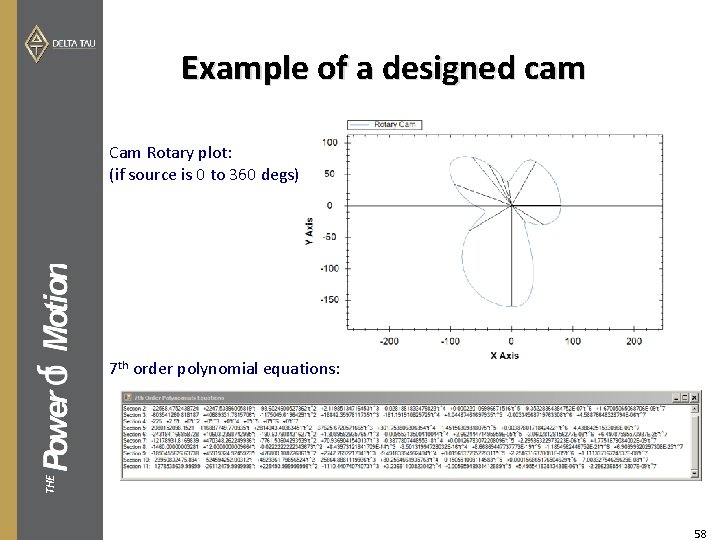
Cam Sculptor Features • To design user specified sized Table-based electronic cams • Position, torque offset and direct output commands are output from the application • Design includes section by section trajectory moves of the target motor’s position vs. source motor’s position THE • 7 th order polynomial at every section of the cam 48
Cam Sculptor Features • User can set a standard profile move to every desired section or set unrestrained • User can set a number constraint to the velocity, acceleration or jerk values of every section end point or set unrestrained THE • Cam Sculptor runs an optimization curve fitting algorithm to find a minimal power trajectory for the unrestrained sections • Optimized Min. Power trajectory guarantees the minimum changes on the acceleration and jerk plots and thus least shake of the machine and minimum motor effort 49
Cam Sculptor Features • Direct digital output can be set up for any cam point so flags go high as the cam is running • Cam iterative learning-control algorithm can be used to automatically find torque offset values at every cam point to overcome external un-modelled disturbances • Cam Sculptor come with a sophisticated plotting tool portraying the position, velocity, acceleration and jerk plots as well as a rotary mechanical cam. • Generated cam’s design, equations and generated points can be THE saved or exported to Power PMAC Suite IDE for further project development 50
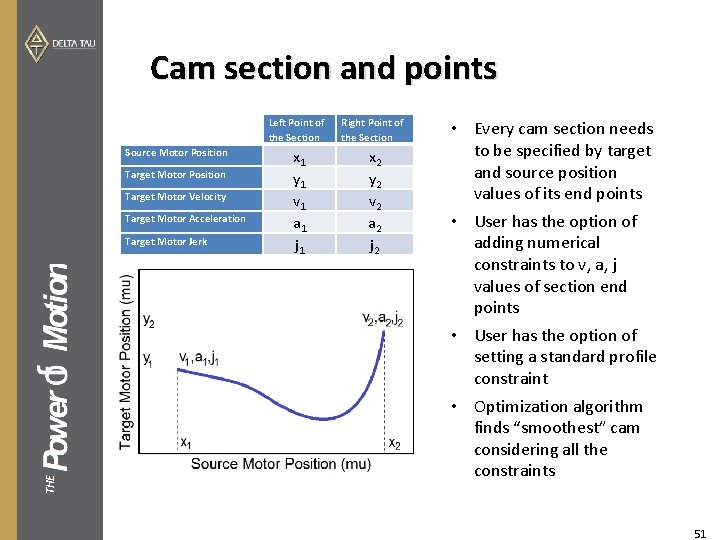
Cam section and points Source Motor Position Target Motor Velocity Target Motor Acceleration THE Target Motor Jerk Left Point of the Section Right Point of the Section x 1 y 1 v 1 a 1 j 1 x 2 y 2 v 2 a 2 j 2 • Every cam section needs to be specified by target and source position values of its end points • User has the option of adding numerical constraints to v, a, j values of section end points • User has the option of setting a standard profile constraint • Optimization algorithm finds “smoothest” cam considering all the constraints 51
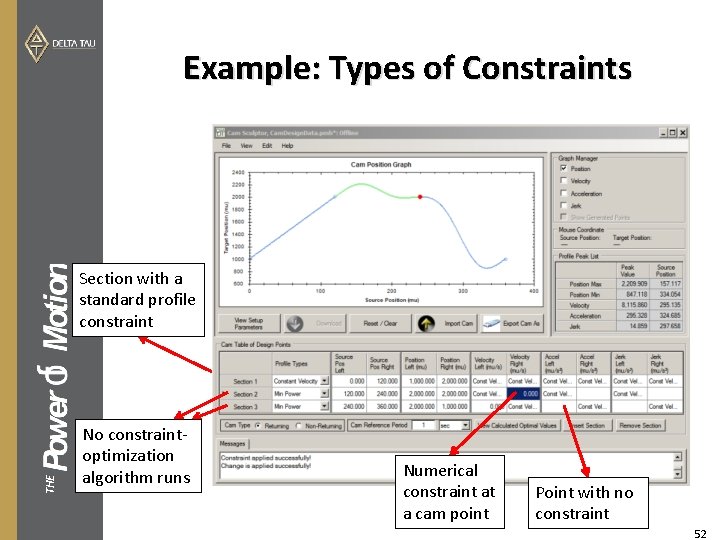
Example: Types of Constraints THE Section with a standard profile constraint No constraintoptimization algorithm runs Numerical constraint at a cam point Point with no constraint 52
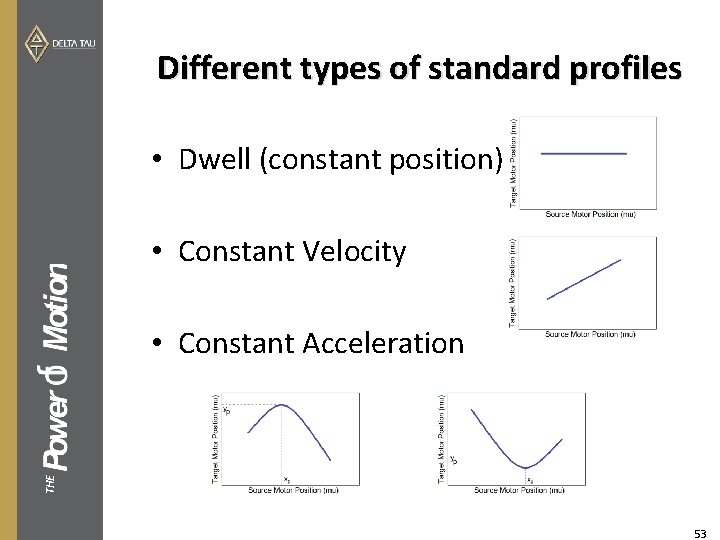
Different types of standard profiles • Dwell (constant position) • Constant Velocity THE • Constant Acceleration 53
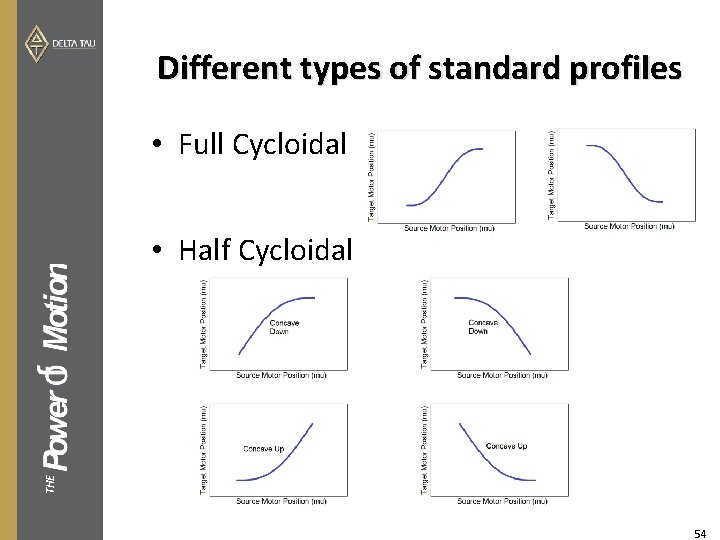
Different types of standard profiles • Full Cycloidal THE • Half Cycloidal 54
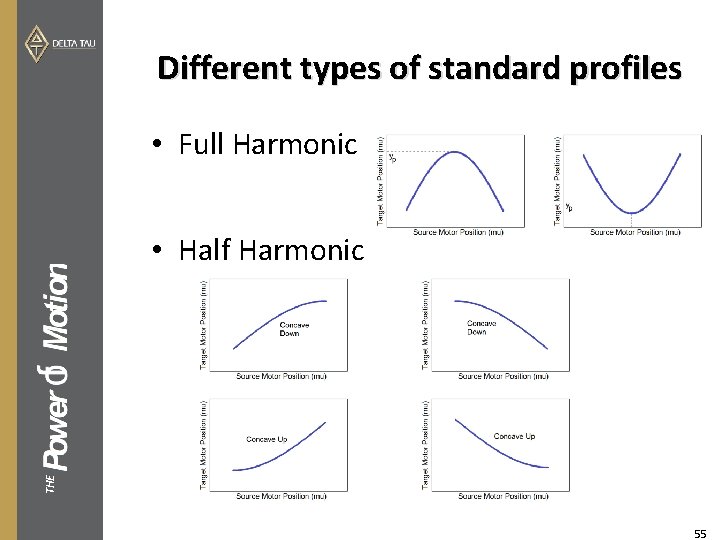
Different types of standard profiles • Full Harmonic THE • Half Harmonic 55
Un-constrained section THE • Cam Sculptor application uses a 7 th order polynomial profile type called “Min. Power” for sections that do not have any standard profile constraint. Optimal values for v, a, j for the end points of this section are calculated minimizing the peak of jerk overall the whole cam. 56
Example of a designed cam THE 57
Example of a designed cam Cam Rotary plot: (if source is 0 to 360 degs) THE 7 th order polynomial equations: 58
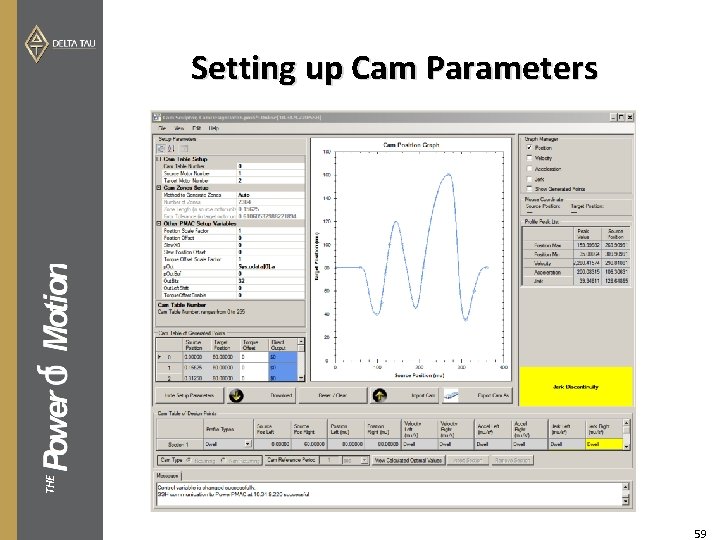
THE Setting up Cam Parameters 59
Method to Generate Cam Zones/Points • Auto (cam sculptor determines how many zones to generate to get a min error threshold of 0. 005 comparing to a linear interpolation between points. Also considering generating points so they possibly coincide the cam user points for direct output setup. • Number of zones (explicitly determined by user) • Zone length (in the source motor units) • Error tolerance (the maximum error between a linear interpolation between the generated points and the original cam designed equations) THE 60
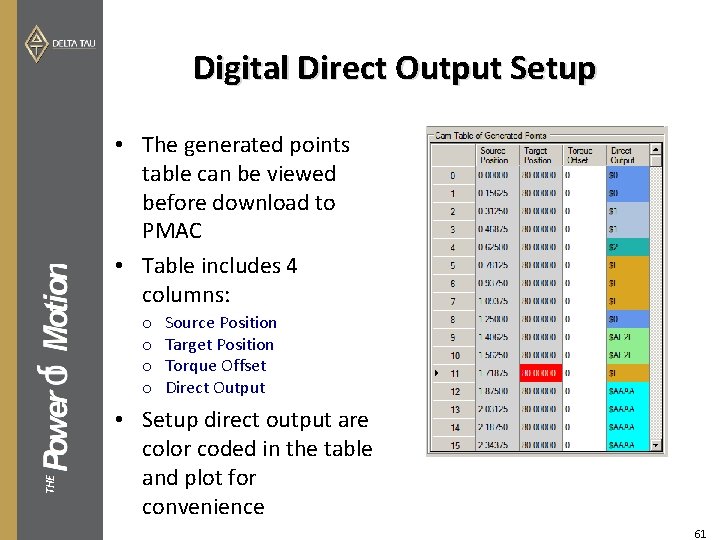
Digital Direct Output Setup • The generated points table can be viewed before download to PMAC • Table includes 4 columns: THE o o Source Position Target Position Torque Offset Direct Output • Setup direct output are color coded in the table and plot for convenience 61
Downloading Cam to PMAC • After the cam is designed and parameters are setup carefully, the table of generated points can be downloaded to PMAC in two ways: o Clicking on the “Download” button o Exporting the designed cam (saving the. pmh file) which later be imported as a “Global Includes” file to a Power PMAC Suite IDE project THE 62
How to use MATLAB® Embedded Coder (Real-Time Workshop) Generated Code in Power PMAC THE MATLAB ® and Simulink® are registered trademarks of Mathworks Inc.
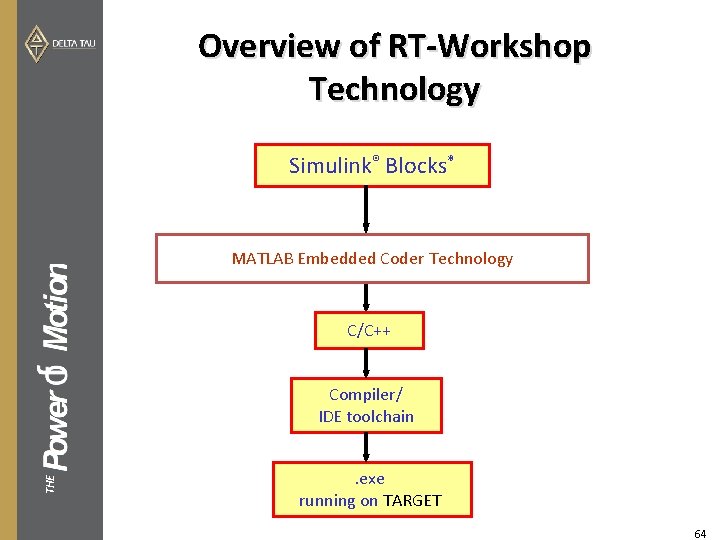
Overview of RT-Workshop Technology Simulink® Blocks* MATLAB Embedded Coder Technology C/C++ THE Compiler/ IDE toolchain. exe running on TARGET 64
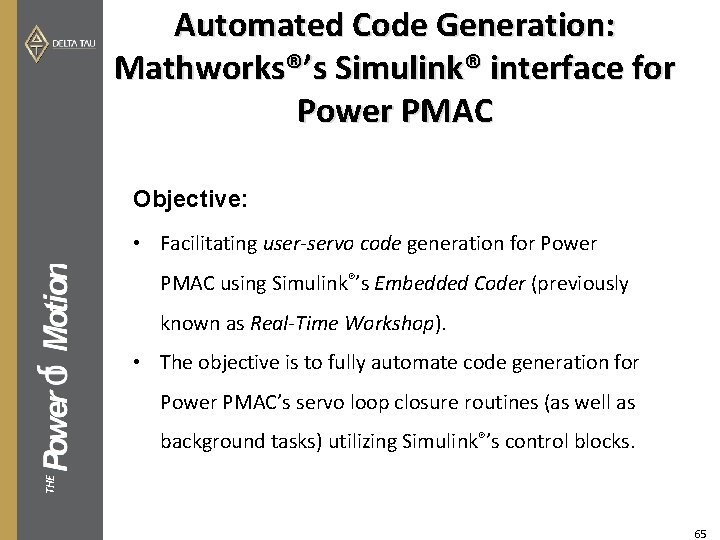
Automated Code Generation: Mathworks®’s Simulink® interface for Power PMAC Objective: • Facilitating user-servo code generation for Power PMAC using Simulink®’s Embedded Coder (previously known as Real-Time Workshop). • The objective is to fully automate code generation for Power PMAC’s servo loop closure routines (as well as THE background tasks) utilizing Simulink®’s control blocks. 65
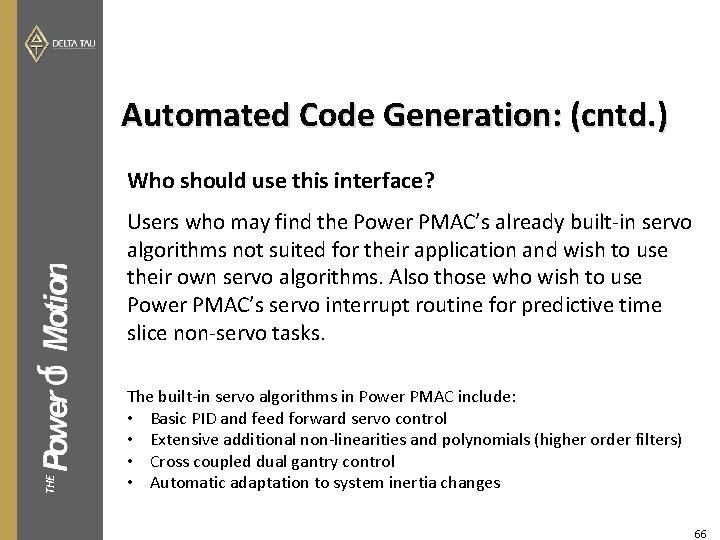
Automated Code Generation: (cntd. ) Who should use this interface? THE Users who may find the Power PMAC’s already built-in servo algorithms not suited for their application and wish to use their own servo algorithms. Also those who wish to use Power PMAC’s servo interrupt routine for predictive time slice non-servo tasks. The built-in servo algorithms in Power PMAC include: • Basic PID and feed forward servo control • Extensive additional non-linearities and polynomials (higher order filters) • Cross coupled dual gantry control • Automatic adaptation to system inertia changes 66
Automated Code Generation: (cntd. ) Requirements: • Knowledge on MATLAB® and Simulink® • Useful to know C Programming Language (not required) • Computer running MATLAB®, Simulink Coder, Embedded Coder and Power PMAC IDE THE This interface has been tested and verified on Windows 7, 32 bit and 64 bit for MATLAB® Release 2012 a. 67
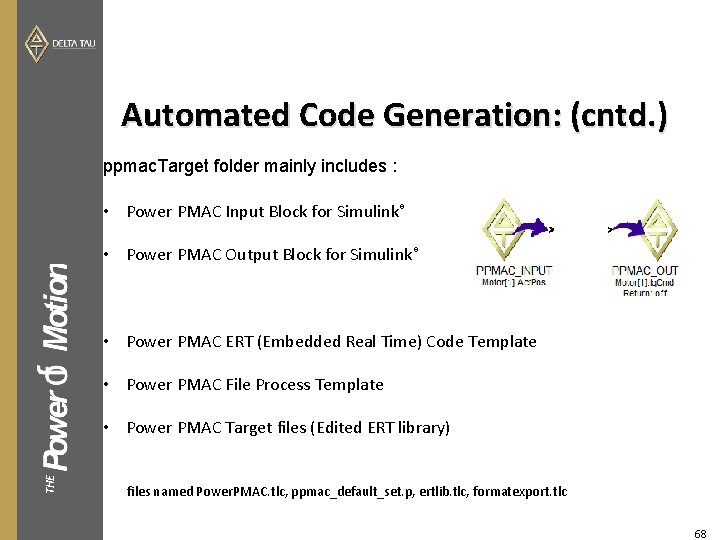
Automated Code Generation: (cntd. ) ppmac. Target folder mainly includes : • Power PMAC Input Block for Simulink® • Power PMAC Output Block for Simulink® • Power PMAC ERT (Embedded Real Time) Code Template • Power PMAC File Process Template THE • Power PMAC Target files (Edited ERT library) files named Power. PMAC. tlc, ppmac_default_set. p, ertlib. tlc, formatexport. tlc 68