
POSTGRESQL DATABASE Table of Contents Introduction Features Architecture
POSTGRESQL DATABASE
Table of Contents Introduction Features Architecture Configuration Parameters User Accessible files Backups Restore and Recovery
Introduction Postgre. SQL is an object-relational database management system(ORDBMS) It is developed at the University of California at Berkeley Computer Science Department. It runs on all major operating systems, including LINUX, UNIX and WINDOWS.
Features Foreign Data Wrappers BRIN Indexing Sorting optimization Row Level Security Multi Version Concurrency Control (MVCC) Routine Vacuuming Parallel VACUUMing
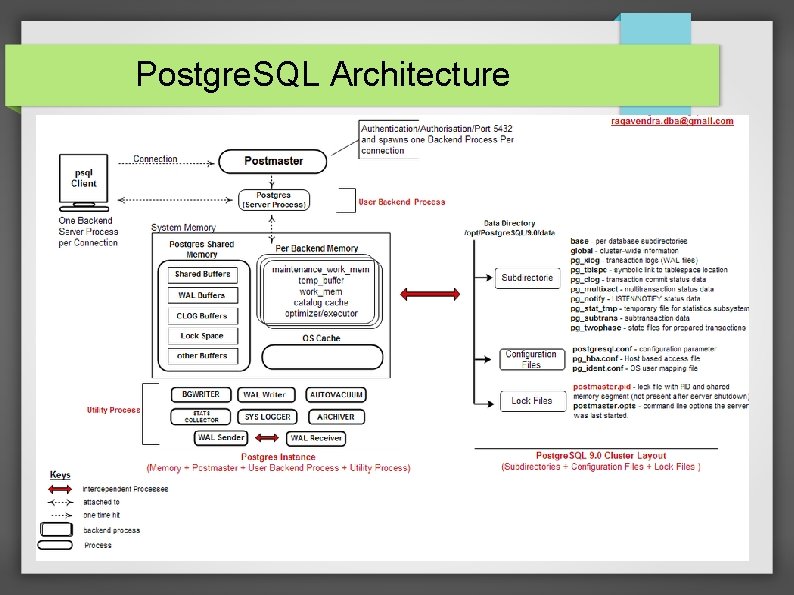
Postgre. SQL Architecture
Architecture Fundamentals Postgre. SQL is so called object-oriented because it consists of many sub systems that can interact and work together to access the database. These sub systems are: Client Processes. Server Processes. Database Control. Utility Processes.
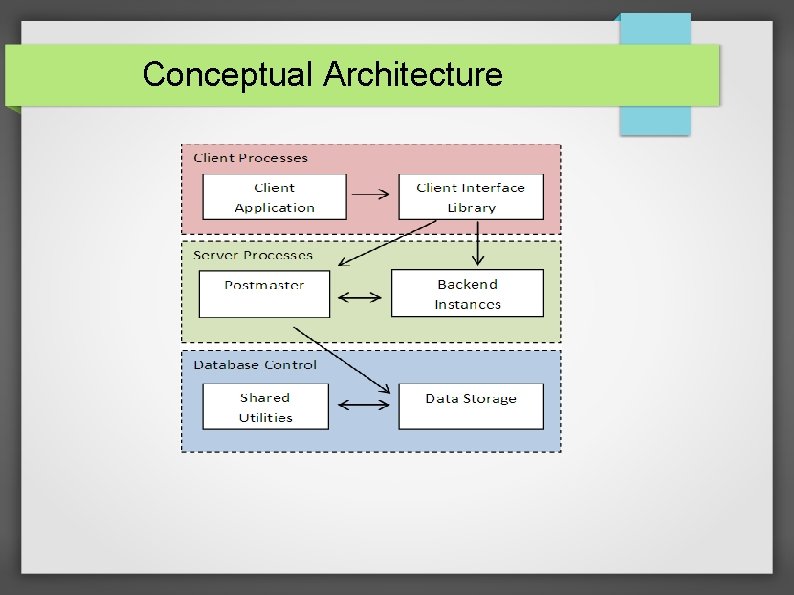
Conceptual Architecture
Client Processes It is the first sub system of Postgre. SQL architecture and has two sub components. Client application. Client Interface Library. Client Application: It is whichever medium the user is using to interact with the database. Client Interface Library: For the database to understand exactly what the user wants, the interface library is used. It is an API, a list of different applications that can talk to the database.
Server Processes The Postgre. SQL server is made of two separate objects. Postmaster. Backend Server Process(postgres server).

Postmaster
Postmaster The postmaster receives all front end requests to access the database and then chooses a backend instance to match up the front end. It does this by creating the backend instance and then link front end to it. After this link is established, the front end and the backend instance can then communicate without having to go through postmaster, freeing it up to listen more requests. When postmaster is not currently receiving a call or creating a backend process, it sits operational, waiting for another event to occur. Whereas backend instance that is started by postmaster and gets ended when the user logs off.
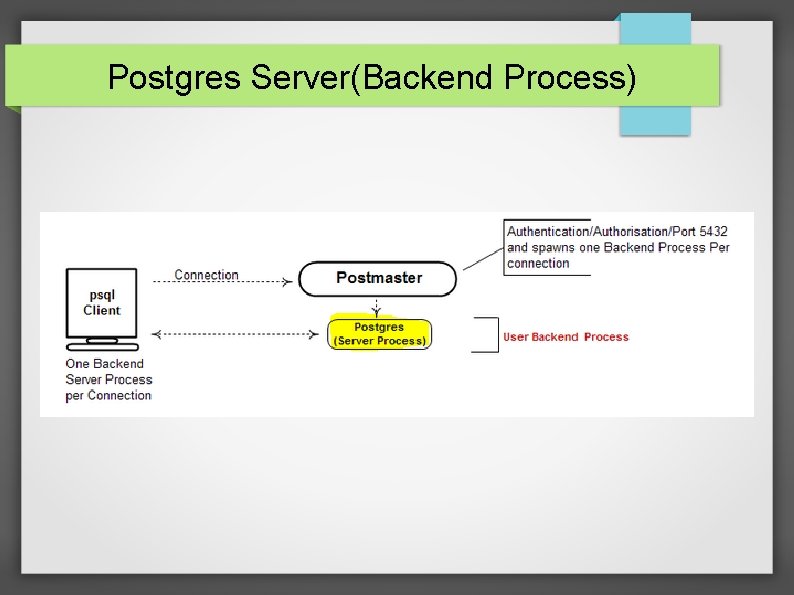
Postgres Server(Backend Process)
Postgres Server(Backend Process) Generally it uses a pipe filter architecture. This is because each component of server performs a highly specific task on input and passes its result to a successor in a sequential order. At the beginning it is provided with a query, and incrementally transforms it into a set of data that is provided to the client. Each process makes use of a separate data table, whether it be for symbols or libraries. In fact, the Executor Stage even goes so far as to access the data tables themselves.
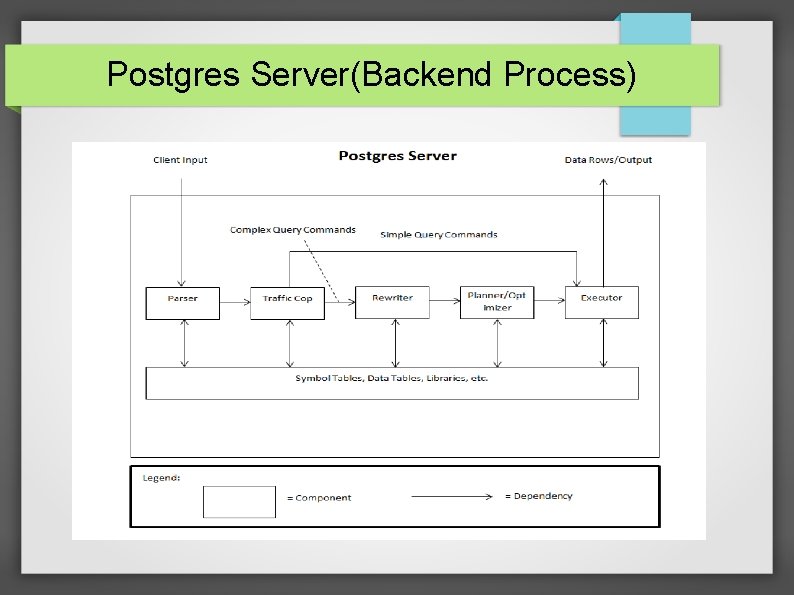
Postgres Server(Backend Process)
Postgres Server(Backend Process) Whenever a client passes a query through the server process, it undergoes the following stages: Parsing Stage Planning Stage Executor Stage
Postgres Server(Backend Process) Parsing Stage: In this stage the client sends the input and the parser parses it, and does the following jobs: Checks the SQL Syntax Makes a look in the catalog. Builds the query tree
Postgres Server(Backend Process) Traffic Cop: The traffic cop is the agent that is responsible for differentiating between simple and complex query commands. Transaction control commands such as BEGIN and ROLLBACK are simple enough so as to not need additional processing, whereas other commands such as SELECT and JOIN are passed on to the rewriter. This discrimination reduces the processing time by performing minimal optimization on the simple commands, and devoting more time to the complex ones.
Postgres Server(Backend Process) Rewriter: The beginning of this stage is composed of a rewriting of the parse tree received from the Parsing Stage. This involves expansion of subqueries into lower order commands.
Postgres Server(Backend Process) Planner : The planner does the following: If there is a certain number of possibilities less than a threshold amount, it will exhaustively consider every possible path of the parse tree and find the one that is least computationally complex. Otherwise it will use a genetic algorithm to find an efficient path
Postgres Server(Backend Process) Executor Stage : The executor in this stage receives the plan tree from the planner and does the following: It extracts the data necessary from the database tables. The executor recursively goes through plan, which is a tree, and performs the required action at each node. If information about the sub-path is necessary, the executor will proceed to the children before executing the node, otherwise the node’s action can be executed immediately. At this stage, “the executor mechanism is used to evaluate all four basic SQL query types: SELECT,
Database Control
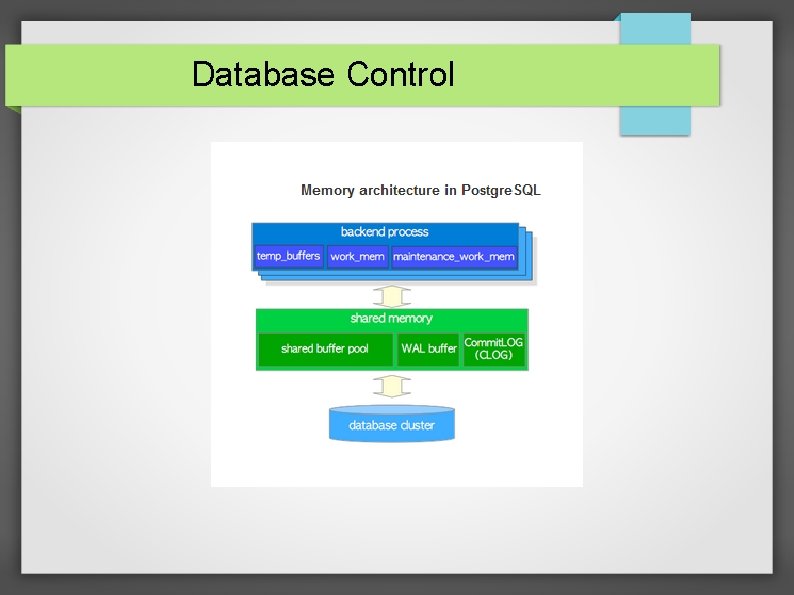
Database Control Memory architecture in Postgre. SQL can be classified into two broad categories: Local memory area – allocated by each backend process for its own use. Shared memory area – used by all processes of a Postgre. SQL server. In the following subsections, those are briefly described.
Shared Memory Area
Shared Memory Area We need shared memory in postgre. SQL to mainly enable communication between postmaster and postgres server processes as : child processes cannot propagate information. shared memory is available to share the same information to all processes And also we need shared memory to cache pages.
Shared Memory Area While the backend server instances take care of clients, there are many services that are offered over the entire system. These utilities are used by most of the subsystems in Postgre. SQL
Shared Memory Area
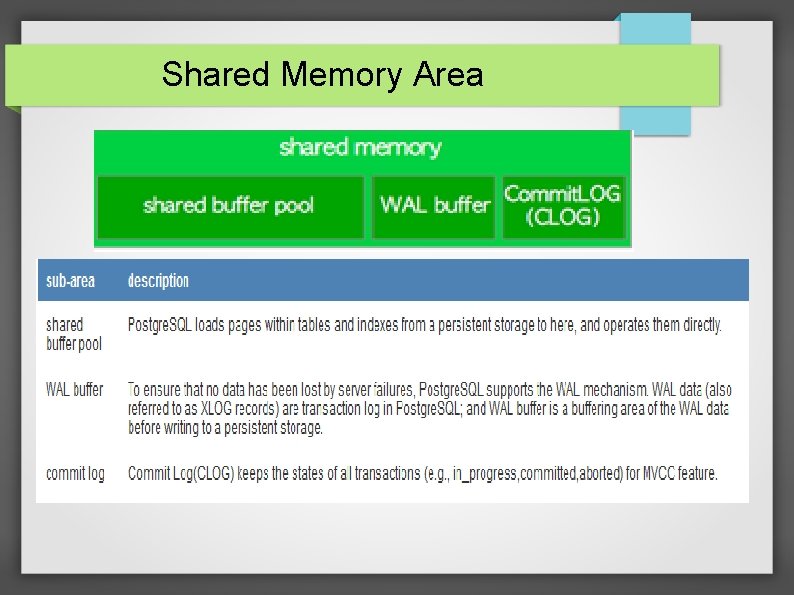
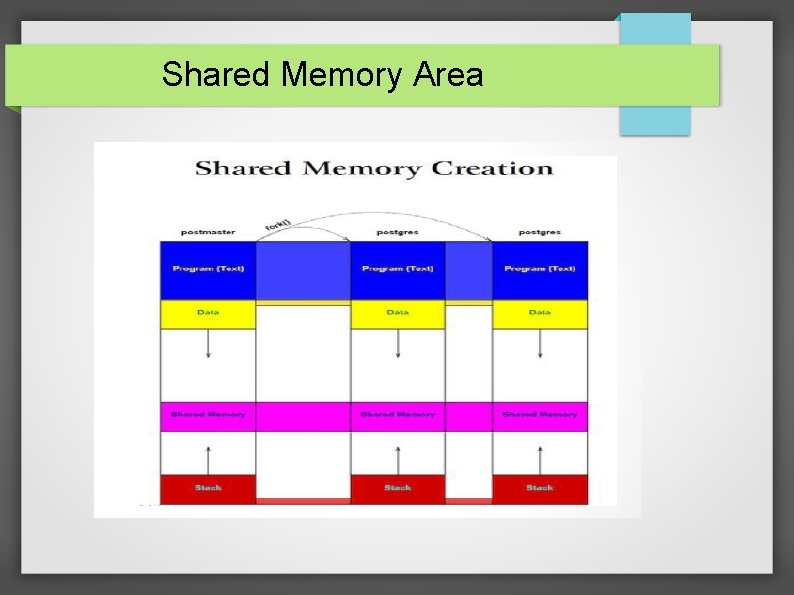
Shared Memory Creation When the server handles the incoming request, the postmaster calls fork() to create a child for handling the incoming request. So here we have the entire copy of the postmaster process except the “pid” configuration parameter. A shared memory area is allocated by a Postgre. SQL server when it starts up. This area is also divided into several fix sized sub-areas.
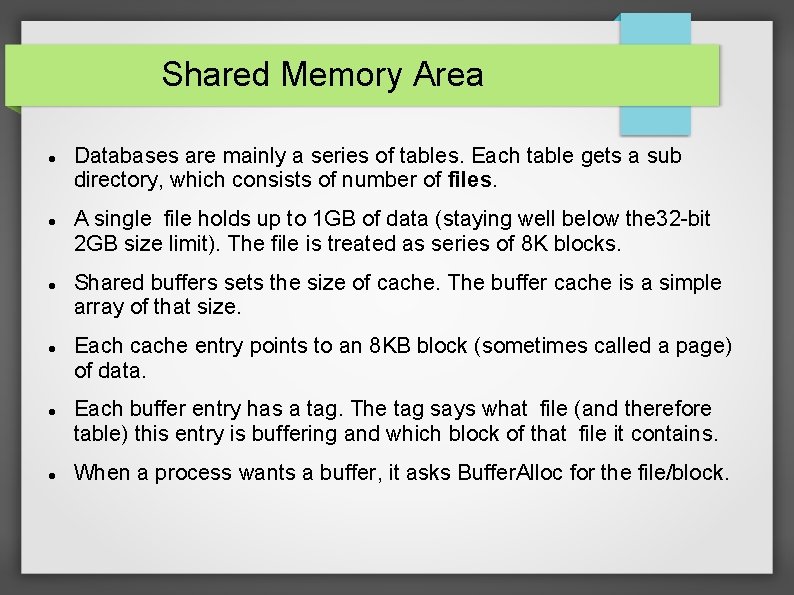
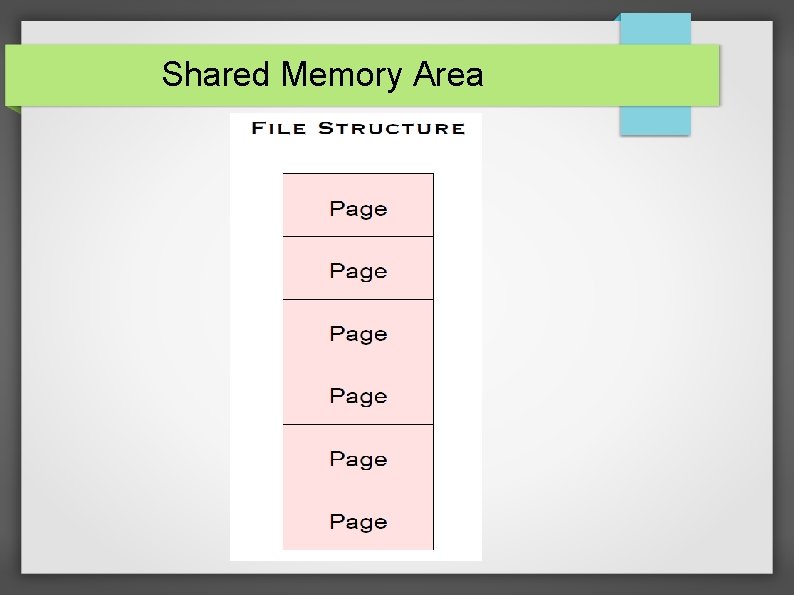
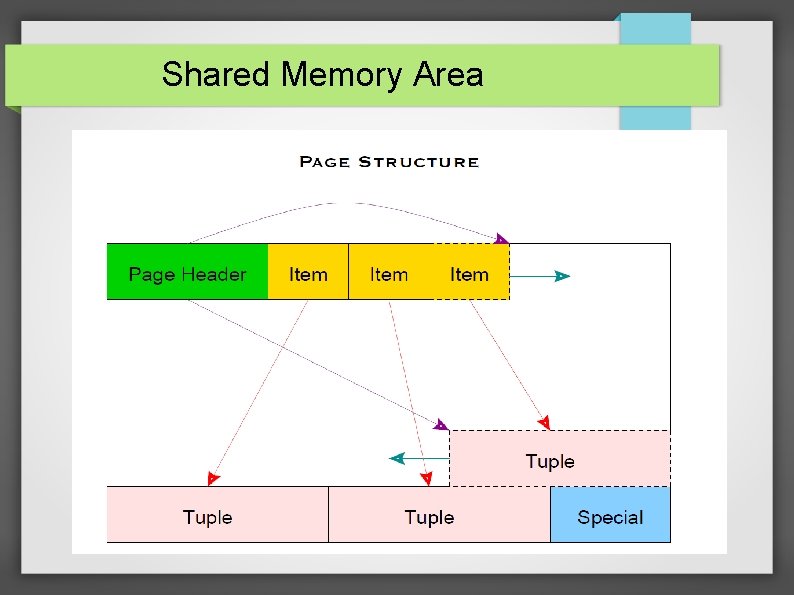
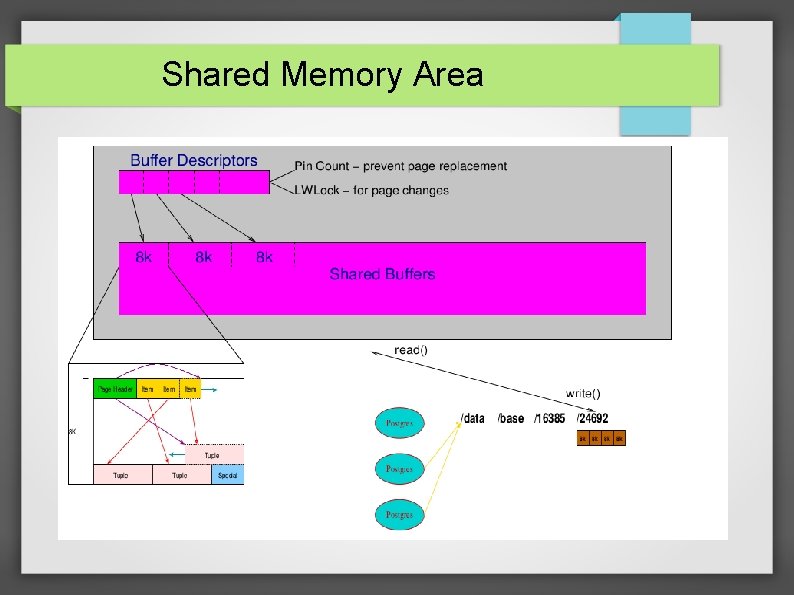
Shared Memory Area Databases are mainly a series of tables. Each table gets a sub directory, which consists of number of files. A single file holds up to 1 GB of data (staying well below the 32 -bit 2 GB size limit). The file is treated as series of 8 K blocks. Shared buffers sets the size of cache. The buffer cache is a simple array of that size. Each cache entry points to an 8 KB block (sometimes called a page) of data. Each buffer entry has a tag. The tag says what file (and therefore table) this entry is buffering and which block of that file it contains. When a process wants a buffer, it asks Buffer. Alloc for the file/block.
Shared Memory Area
Shared Memory Area
Shared Memory Area
Shared Memory Area
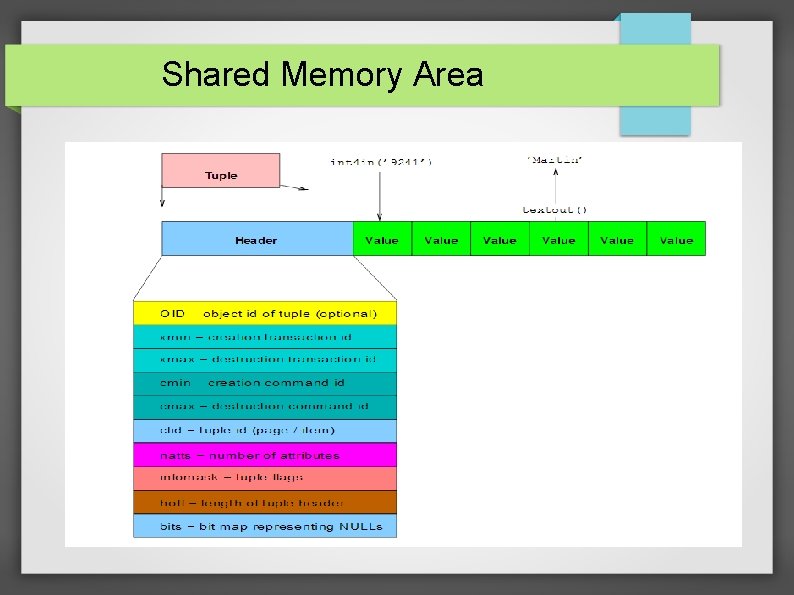
Tuples Tuple headers contain: xmin: transaction ID of inserting transaction xmax: transaction ID of replacing/deleting transaction (initially NULL) forward link: link to newer version of same logical row, if any Basic idea: tuple is visible if xmin is valid and xmax is not. "Valid"means "either committed or the current transaction".
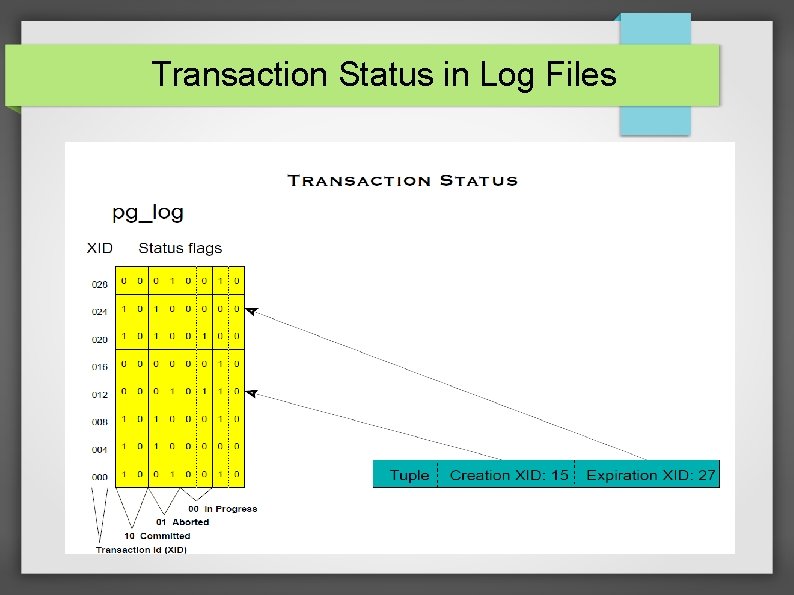
Transaction Status in Log Files
Shared Memory Area Shared Buffers: When pages from a table or index are read from the OS, they are read into shared_buffers. The backends reference the pages and their contents right there in shared memory. It's default value is 32 MB. It's minimum value is 128 KB
Shared Memory Area WAL Buffers: These are for buffering data to be written to the WAL files. The amount of shared memory used for WAL data that has not yet been written to disk. The default setting of -1 selects a size equal to 1/32 nd (about 3%) of shared_buffers The default value is -1.
Shared Memory Area CLOG Buffers: These contain the status of the transactions in the xlog whether they are committed or rolled back. It is used for recovering the server state in times of crash. They can be recovered by simply replaying the uncommitted transactions or rolled back transactions.
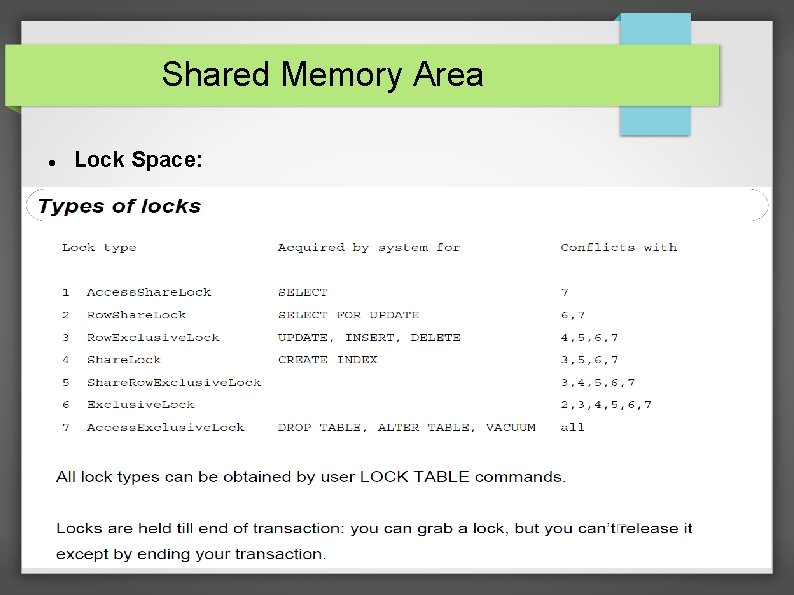
Shared Memory Area Lock Space:
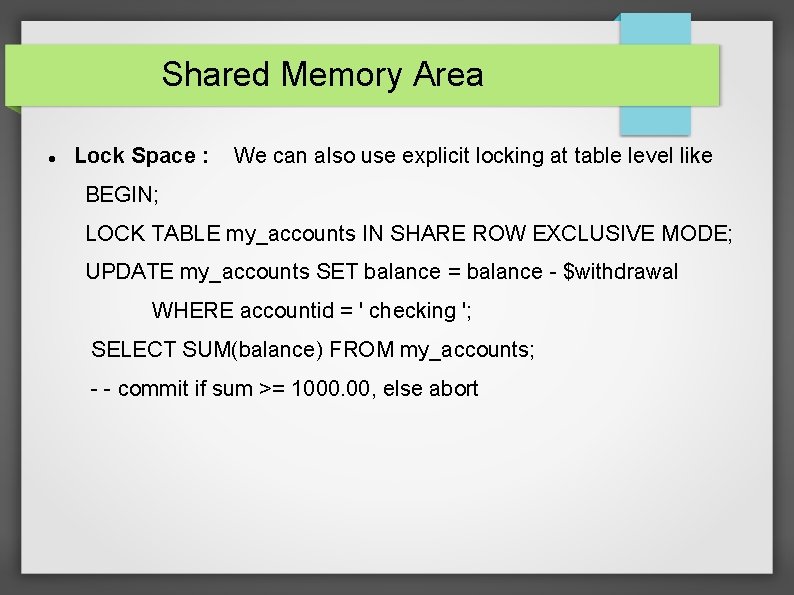
Shared Memory Area Lock Space : We can also use explicit locking at table level like BEGIN; LOCK TABLE my_accounts IN SHARE ROW EXCLUSIVE MODE; UPDATE my_accounts SET balance = balance - $withdrawal WHERE accountid = ' checking '; SELECT SUM(balance) FROM my_accounts; - - commit if sum >= 1000. 00, else abort
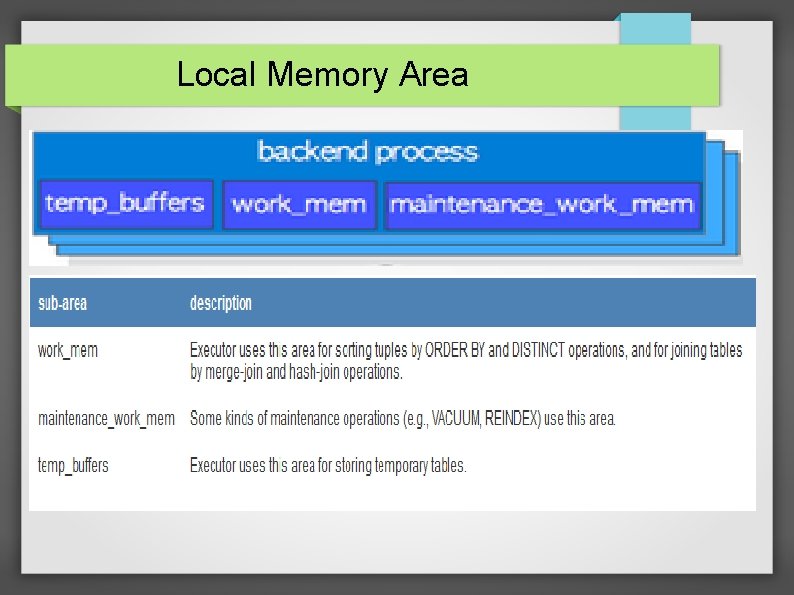
Local Memory Area
Local Memory Area Each backend process allocates a local memory area for query processing. Each area is divided into several sub-areas – whose sizes are either fixed or variable.
Local Memory Area temp_buffers: Sets the maximum number of temporary buffers used by each database session. These are session local buffers used only for access to temporary tables. The default is eight megabytes (8 MB). The min value is 800 KB. Executor uses this area for storing temporary tables.
Local Memory Area Work-mem: Specifies the amount of memory to be used by internal sort operations and hash tables before writing to temporary disk files. The value defaults to four megabytes (4 MB). Executor uses this area for sorting tuples by ORDER BY and DISTINCT operations, and for joining tables by merge-join and hash-join operations.
Local Memory Area maintenance_work_mem: Specifies the maximum amount of memory to be used by maintenance operations, such as VACUUM, CREATE INDEX, and ALTER TABLE ADD FOREIGN KEY. It defaults to 64 megabytes (64 MB).
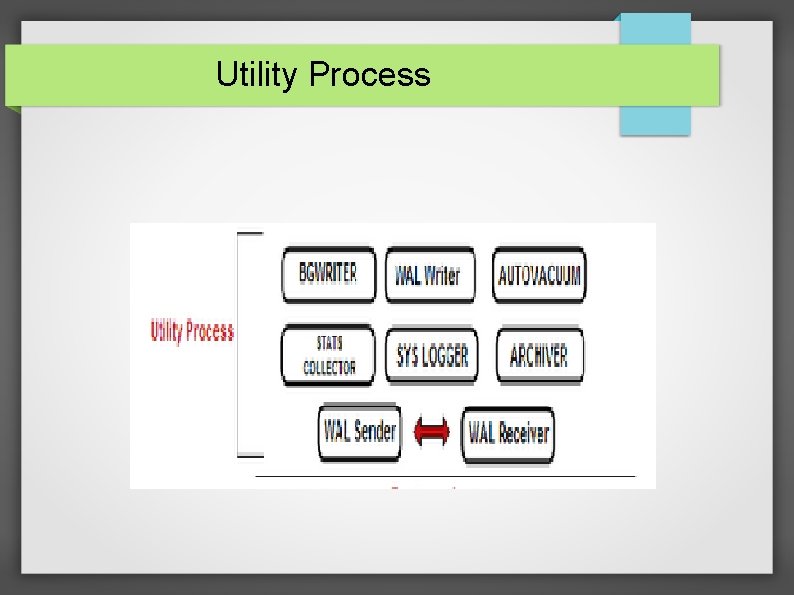
Utility Process
Utility Process BG Writer: There is a separate server process called the background writer, whose function is to issue writes of “dirty” (new or modified) shared buffers. It writes shared buffers so server processes handling user queries need not to wait for a write to occur.
BG Writer The parameters of BG writer are: bgwriter_delay: Specifies the delay between activity rounds for the background writer. In each round the writer issues writes for some number of dirty buffers. The default value is 200 milliseconds
BG Writer bgwriter_lru_maxpages : In each round, no more than this many buffers will be written by the background writer. The default value is 100 buffers. bgwriter_lru_multiplier : The number of dirty buffers written in each round is based on the number of new buffers that have been needed by server processes during recent rounds. The average recent need is multiplied by bgwriter_lru_multiplier. The default is 2. 0.
Utility Process WAL Writer : The main function of WAL writer is to flush WAL segments to disk. The main point to be noted is that this will be far more than the checkpoint frequency. The default value is 200 ms.
Utility Process Auto Vacuum : Postgre. SQL has an optional but highly recommended feature called autovacuum, whose purpose is to automate the execution of VACUUM and ANALYZE commands. When enabled, autovacuum checks for tables that have had a large number of inserted, updated or deleted tuples. These checks use the statistics collection facility, therefore, autovacuum cannot be used unless “track_counts” is set to true.
Auto Vacuum The parameters involved in auto vacuum are: auto_vacuum: It enables vacuum sub processes It is “on” by default. autovacuum_max_workers : Specifies the maximum number of autovacuum processes that may be running at any one time. The default is three autovacuum_naptime: Specifies the minimum delay between autovacuum runs on
Utility Process Stats Collector : The statistics collector is a subsystem designed to collect statistics on server activity. The statistics collector, when enabled, can record statistics regarding the table and index accesses of the database, the usage of user-defined functions, and commands being executed by any server process.
Utility Process Sys Logger : It is one type of method like “stderr”, “csv-log”, which displays the logging messages which are contained in log files. In computing, syslog is a standard for message logging. If this parameter(syslog_facility) is enabled the we can choose from LOCAL 0, LOCAL 1, LOCAL 2, LOCAL 3, LOCAL 4, LOCAL 5, LOCAL 6, LOCAL 7. Here LOCAL 1 etc are keywords for a facility code. Facility code is nothing but it is used to specify the type of program that is logging the message.
Utility Process Archiver: In this section we have the following parameters archive_mode : It allows archiving to be done. It's default value is off. archive_command : It is the local shell command to execute archive a log file segment archive_timeout : It forces a log file segment to switch after a number of seconds. Its default value is 0
Utility Process WAL Sender: Specifies the maximum number of concurrent connections from standby servers or streaming base backup clients. The default for this parameter “max_wal_senders” is zero, meaning replication is disabled.
Utility Process WAL Receiver : It receives the WAL files on the stand by from the primary. It has one parameter called “wal_receiver_status_interval” which specifies the minimum frequency of the wal receiver process on the stand by to send information about the replication progress to the primary. We can see this process by using “pg_stat_replication_view”.
Data Directory
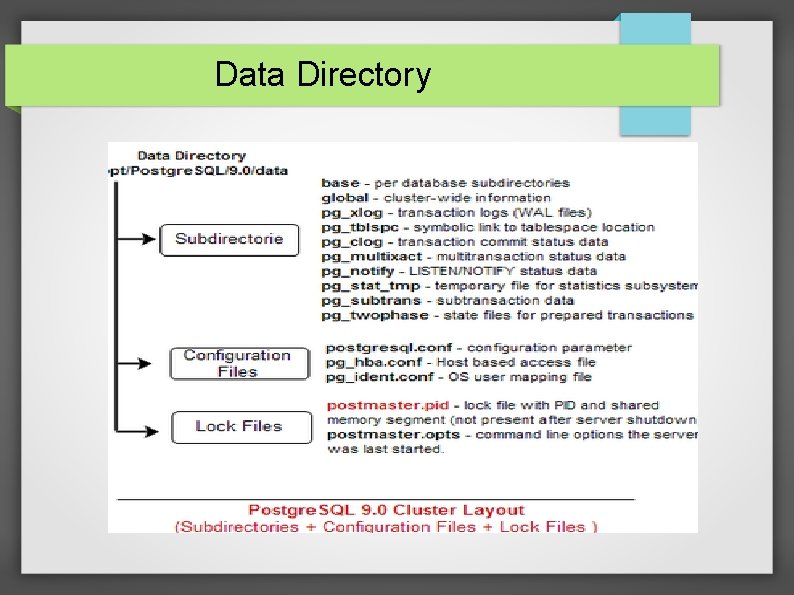
Data Directory The Postgre. SQL contain Cluster Layout which is shown above. It contains: Sub-Directories. Configuration Files. Lock Files.
Data Directory PGDATA – base directory for the Database Server: traditionally it contains configuration and data files + data directory(example location: /var/lib/pgsql/data ) Multiple clusters, managed by different server instances, can exist on the same machine. Configuration files and pid file location can be configured any where, it can reside under PGDATA also
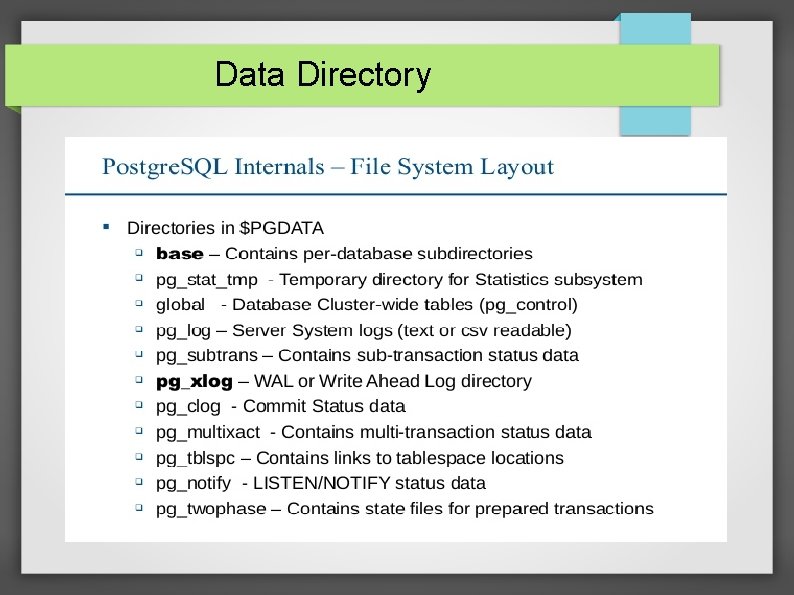
Data Directory
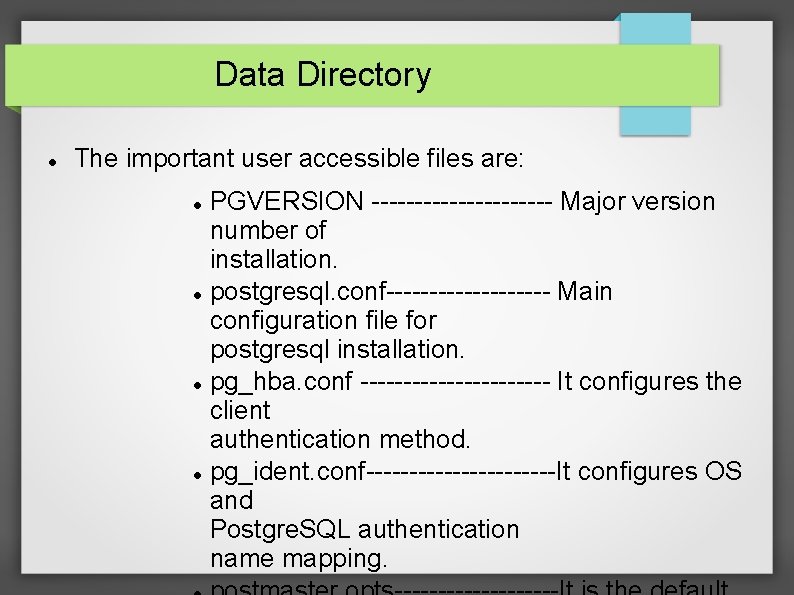
Data Directory The important user accessible files are: PGVERSION ----------- Major version number of installation. postgresql. conf---------- Main configuration file for postgresql installation. pg_hba. conf ----------- It configures the client authentication method. pg_ident. conf-----------It configures OS and Postgre. SQL authentication name mapping.

- Slides: 62