
Position Control Human Resource Services French Administration Building
Position Control Human Resource Services French Administration Building, Room 139 Forms and Processes BPPM 58 October 2018
Introduction • “Position Control is the process of creating and modifying positions with WSU’s Higher Education Payroll Personnel System (HEPPS. )”- BPPM 58 • “A position is a specific set of duties and responsibilities that are identified and assigned a position number. ”- BPPM 58 • Position Control creates, modifies and abolishes positions for Faculty, Graduates, Administrative Professionals and Civil Service only. • In October 2013 Position Control moved from the Budget Office to Human Resource Services. • Budget Office retained accrual policies and budget analysis. • Peak seasons occur during the beginning and ending of semesters, and especially when the fiscal year rolls to a new year in the summer months.
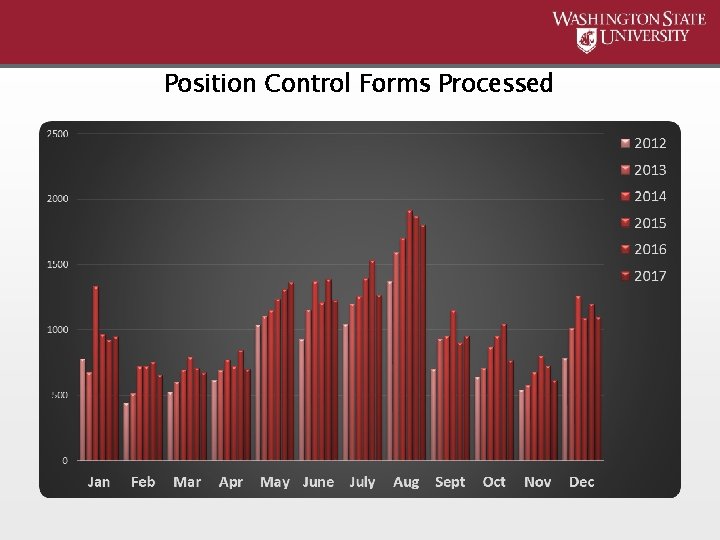
Position Control Forms Processed
Position Control What it does and how it works • When a form is received it is logged into an Access database and a confirmation email is sent. • Preferred method is email, but forms can be received by interdepartmental mail (mail code 1014) or by courier to French Administration, Room 139. • Please include the position(s) number in the subject line or body of the email so Position Control can search for it if need be. • Access assists with keeping track of when forms are received and how many forms are received each month. • Position Control works off the same schedule as Payroll. • Please utilize the Payroll Document Schedule • Payroll website → DEPTPay users → Payroll Document Schedule • Changes will update in AIS nightly per the Payroll Document Schedule • Forms are processed according to the effective date: • First half (1 st through 15 th) • Second half (16 th through last day of the month)
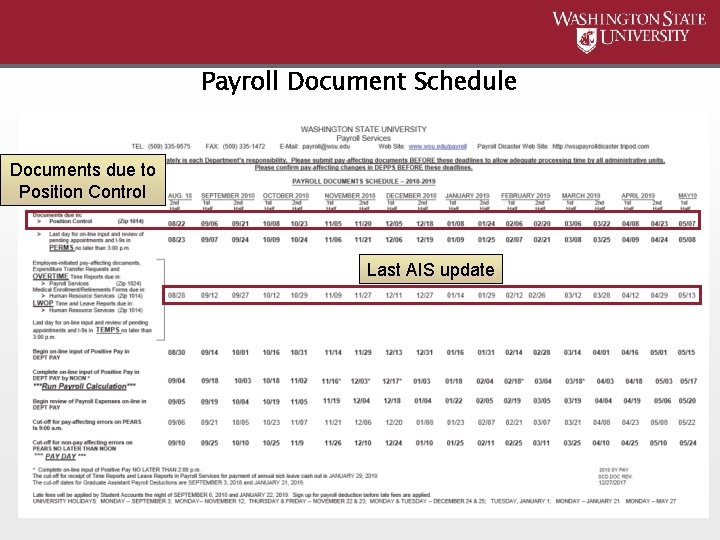
Payroll Document Schedule Documents due to Position Control Last AIS update
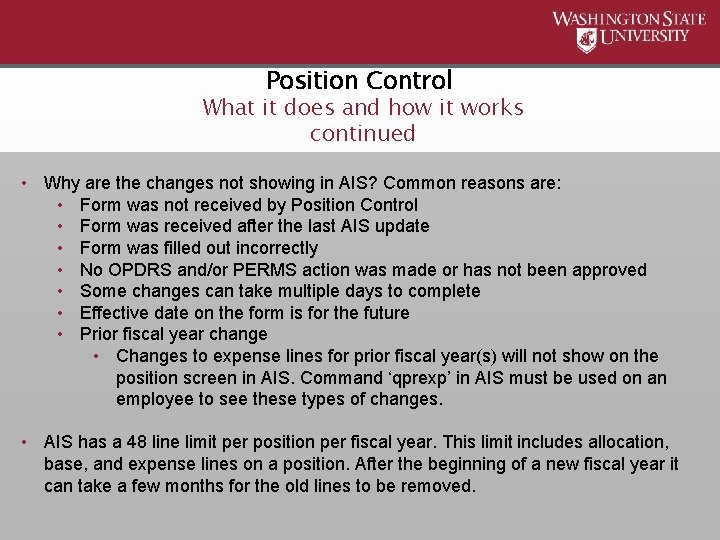
Position Control What it does and how it works continued • Why are the changes not showing in AIS? Common reasons are: • Form was not received by Position Control • Form was received after the last AIS update • Form was filled out incorrectly • No OPDRS and/or PERMS action was made or has not been approved • Some changes can take multiple days to complete • Effective date on the form is for the future • Prior fiscal year change • Changes to expense lines for prior fiscal year(s) will not show on the position screen in AIS. Command ‘qprexp’ in AIS must be used on an employee to see these types of changes. • AIS has a 48 line limit per position per fiscal year. This limit includes allocation, base, and expense lines on a position. After the beginning of a new fiscal year it can take a few months for the old lines to be removed.
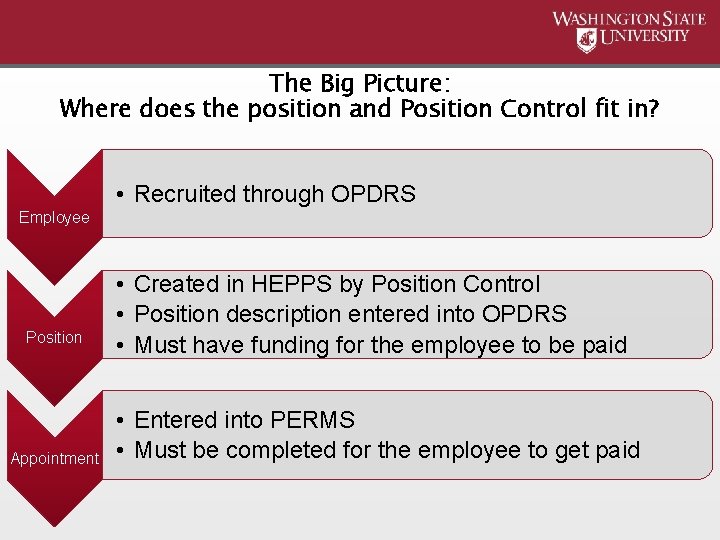
The Big Picture: Where does the position and Position Control fit in? • Recruited through OPDRS Employee Position Appointment • Created in HEPPS by Position Control • Position description entered into OPDRS • Must have funding for the employee to be paid • Entered into PERMS • Must be completed for the employee to get paid
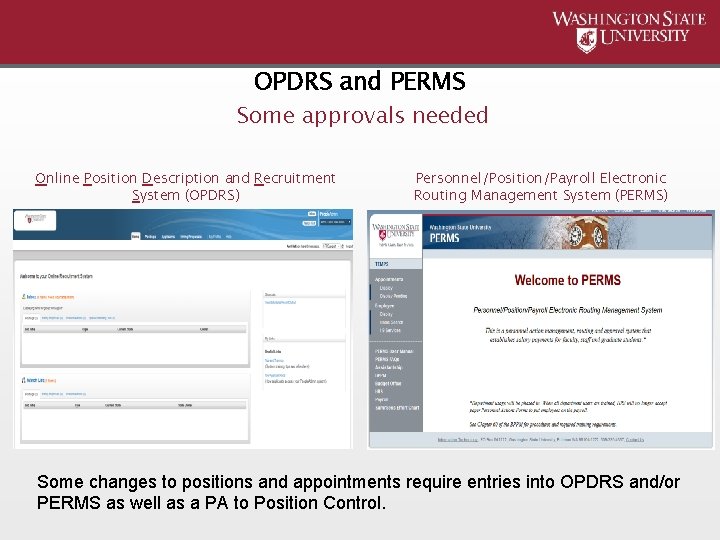
OPDRS and PERMS Some approvals needed Online Position Description and Recruitment System (OPDRS) Personnel/Position/Payroll Electronic Routing Management System (PERMS) Some changes to positions and appointments require entries into OPDRS and/or PERMS as well as a PA to Position Control.
Why is this important? • All three components are linked together. • Positions have to be set in the approved configuration for the employee to be appointed to the position through PERMS. • If all three components do not align properly it could result in an employee not getting paid. • The position cycle must be open in order for the employee to get paid. This is especially important for cyclic and summer positions. • Please remember the form has to be created, routed for approval, processed by Position Control, and then some forms must be sent to Payroll before the action is complete. This may take more time than anticipated.
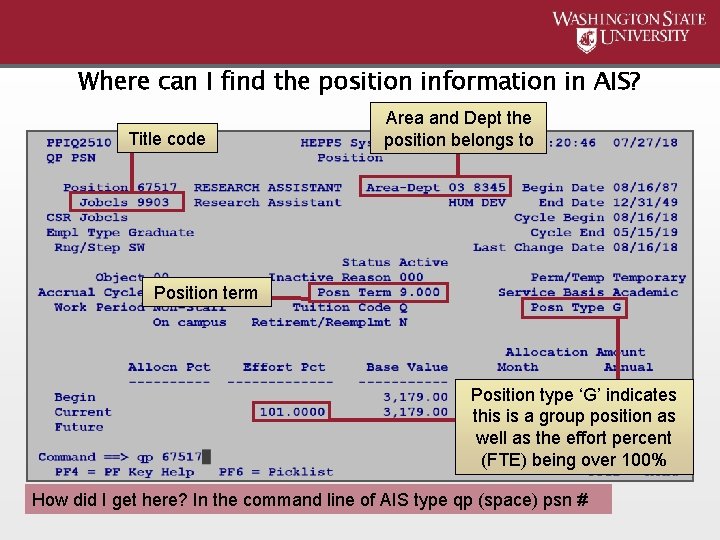
Where can I find the position information in AIS? Title code Area and Dept the position belongs to Position term Position type ‘G’ indicates this is a group position as well as the effort percent (FTE) being over 100% How did I get here? In the command line of AIS type qp (space) psn #
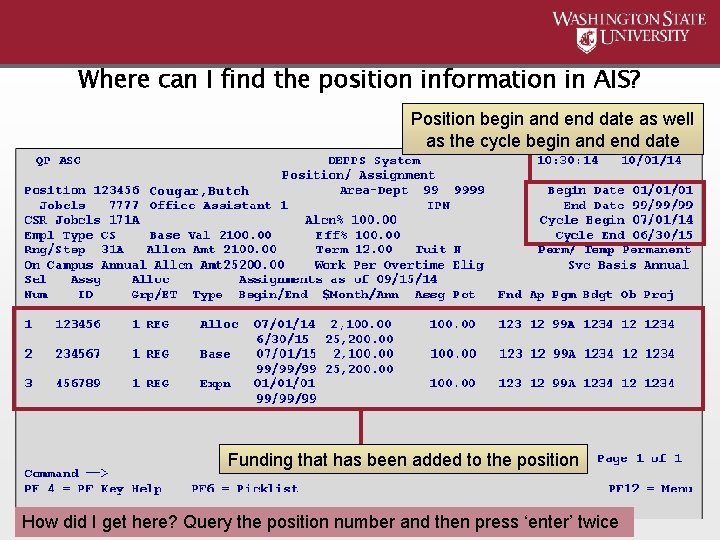
Where can I find the position information in AIS? Position begin and end date as well as the cycle begin and end date Cougar, Butch Funding that has been added to the position How did I get here? Query the position number and then press ‘enter’ twice
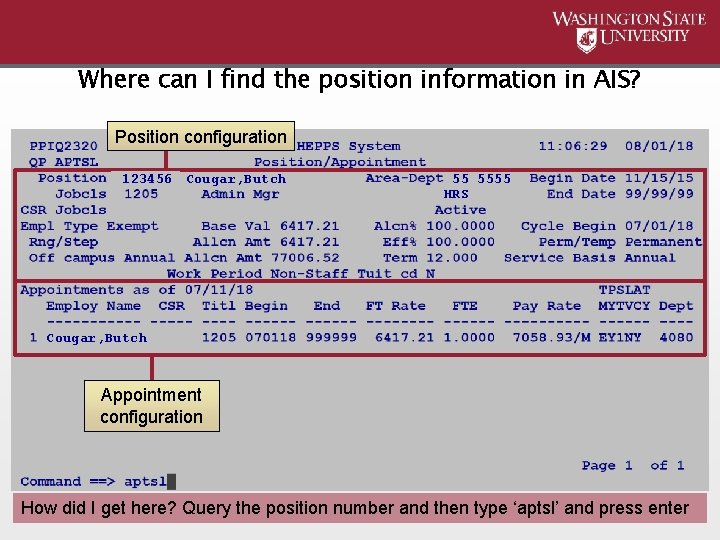
Where can I find the position information in AIS? Position configuration 123456 Cougar, Butch 55 5555 HRS Cougar, Butch Appointment configuration How did I get here? Query the position number and then type ‘aptsl’ and press enter

Position Control Forms Position Identifying Description Change Form (PID) What a PID form does: • Changes the name only – does not link to the appointment • Acts like a label • Does NOT change funding Form Facts: • BPPM 58. 04 • 20 character limit – long names will be shortened. Examples: • Thompson-Wheeler, Le. Ann → Thompson-Wheeler, L. • Featherman, Christopher Michael → Featherman, Chris M. • Names are entered last name first, first name last • No approval signatures required on the form • Can only be changed from the current date moving forward
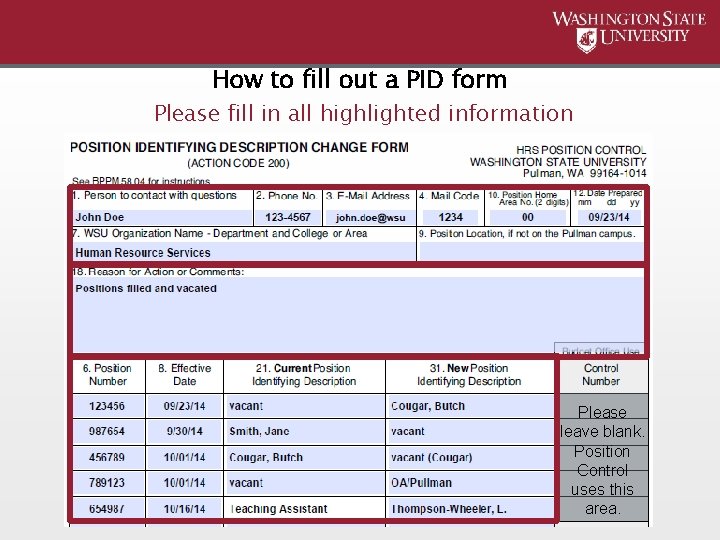
How to fill out a PID form Please fill in all highlighted information Please leave blank. Position Control uses this area.
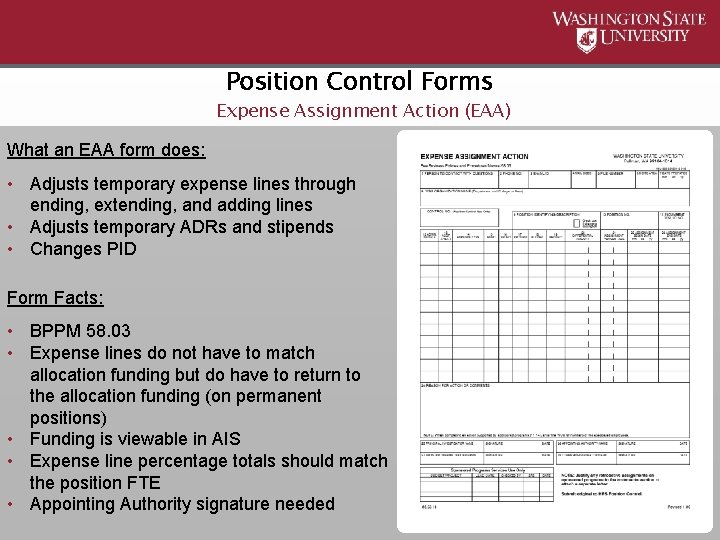
Position Control Forms Expense Assignment Action (EAA) What an EAA form does: • Adjusts temporary expense lines through ending, extending, and adding lines • Adjusts temporary ADRs and stipends • Changes PID Form Facts: • BPPM 58. 03 • Expense lines do not have to match allocation funding but do have to return to the allocation funding (on permanent positions) • Funding is viewable in AIS • Expense line percentage totals should match the position FTE • Appointing Authority signature needed
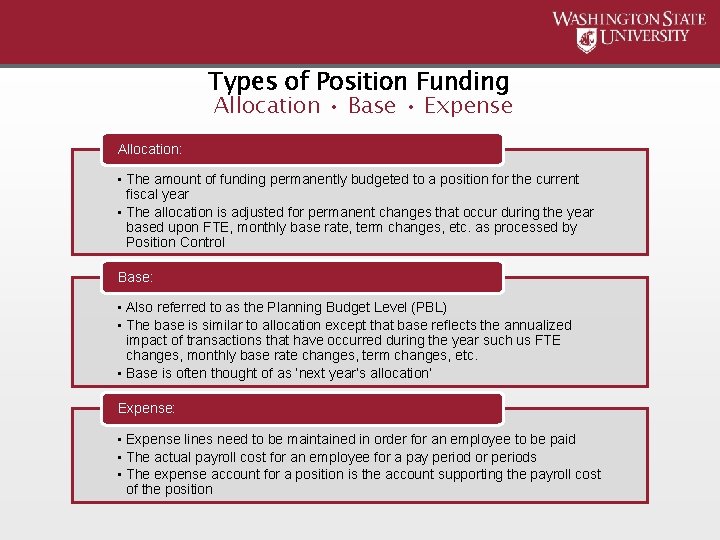
Types of Position Funding Allocation • Base • Expense Allocation: • The amount of funding permanently budgeted to a position for the current fiscal year • The allocation is adjusted for permanent changes that occur during the year based upon FTE, monthly base rate, term changes, etc. as processed by Position Control Base: • Also referred to as the Planning Budget Level (PBL) • The base is similar to allocation except that base reflects the annualized impact of transactions that have occurred during the year such us FTE changes, monthly base rate changes, term changes, etc. • Base is often thought of as ‘next year’s allocation’ Expense: • Expense lines need to be maintained in order for an employee to be paid • The actual payroll cost for an employee for a pay period or periods • The expense account for a position is the account supporting the payroll cost of the position
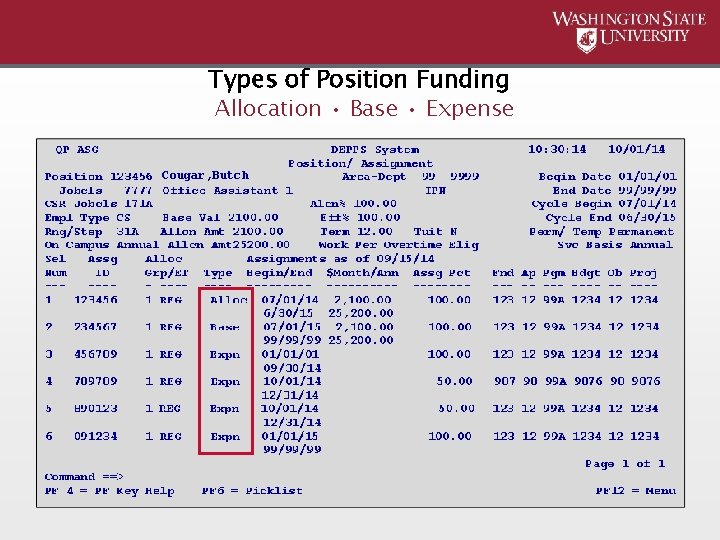
Types of Position Funding Allocation • Base • Expense Cougar, Butch
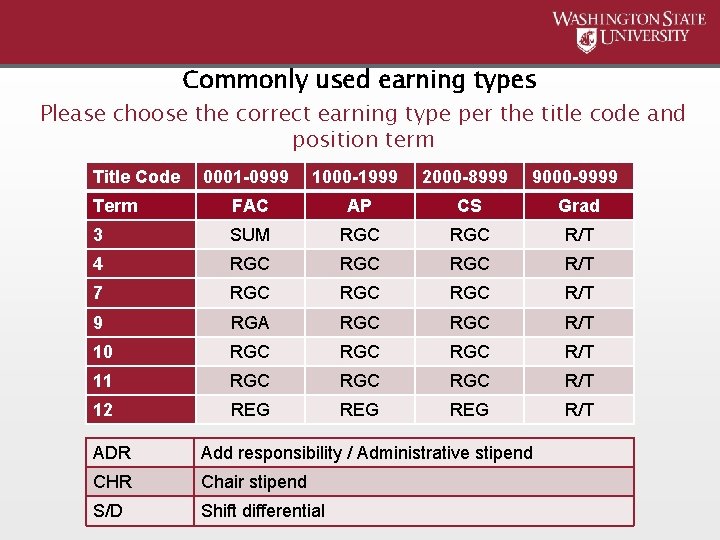
Commonly used earning types Please choose the correct earning type per the title code and position term Title Code 0001 -0999 1000 -1999 2000 -8999 9000 -9999 Term FAC AP CS Grad 3 SUM RGC R/T 4 RGC RGC R/T 7 RGC RGC R/T 9 RGA RGC R/T 10 RGC RGC R/T 11 RGC RGC R/T 12 REG REG R/T ADR Add responsibility / Administrative stipend CHR Chair stipend S/D Shift differential
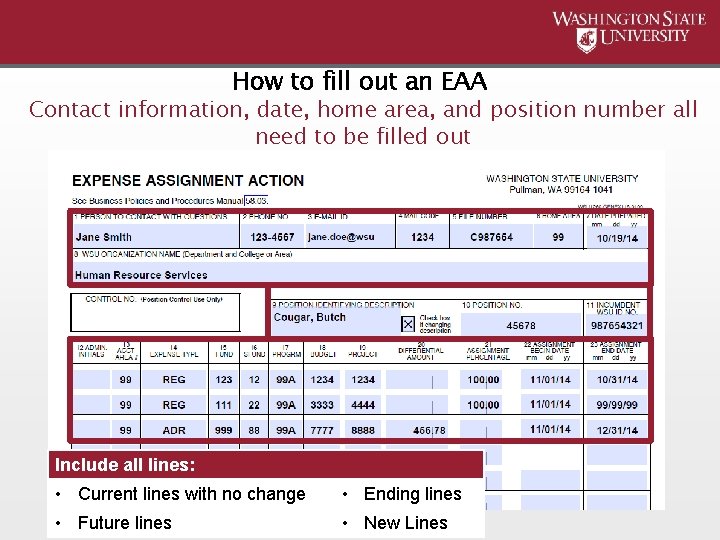
How to fill out an EAA Contact information, date, home area, and position number all need to be filled out Include all lines: • Current lines with no change • Ending lines • Future lines • New Lines
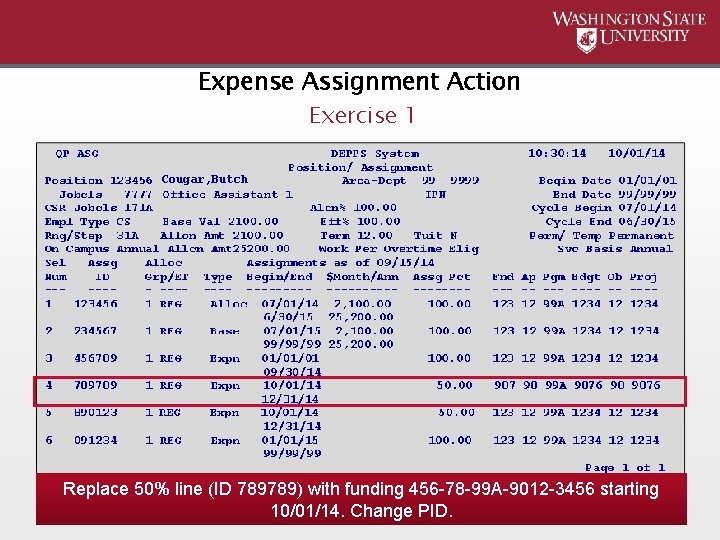
Expense Assignment Action Exercise 1 Cougar, Butch Replace 50% line (ID 789789) with funding 456 -78 -99 A-9012 -3456 starting 10/01/14. Change PID.
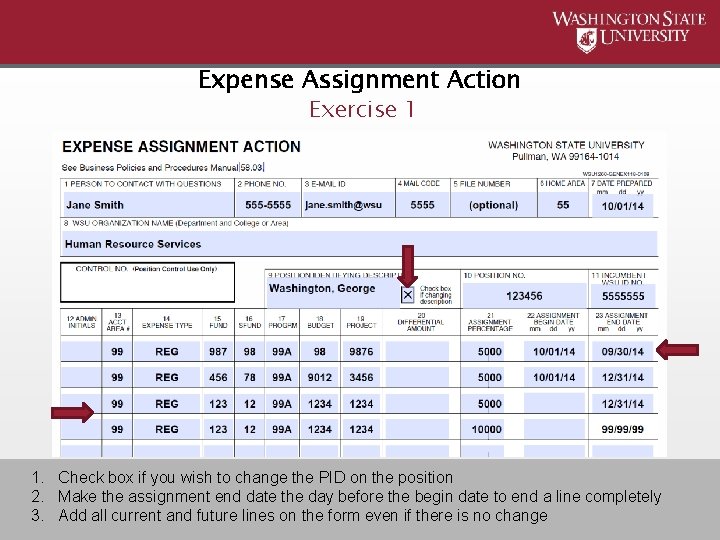
Expense Assignment Action Exercise 1 1. Check box if you wish to change the PID on the position 2. Make the assignment end date the day before the begin date to end a line completely 3. Add all current and future lines on the form even if there is no change
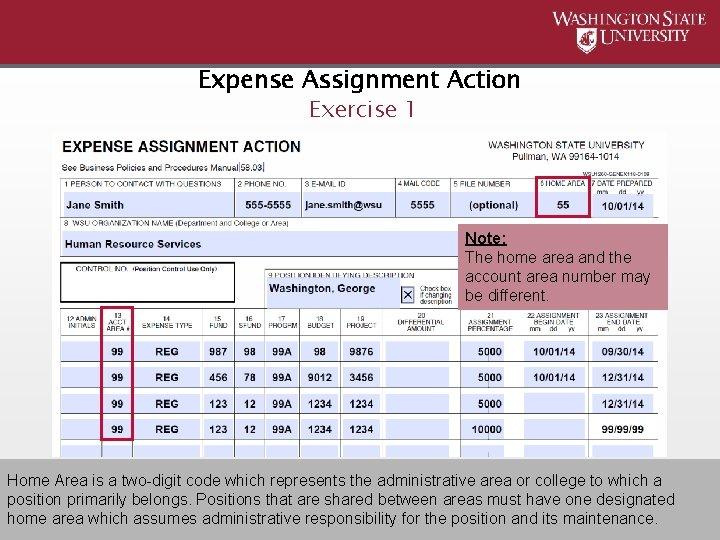
Expense Assignment Action Exercise 1 Note: The home area and the account area number may be different. Home Area is a two-digit code which represents the administrative area or college to which a position primarily belongs. Positions that are shared between areas must have one designated home area which assumes administrative responsibility for the position and its maintenance.
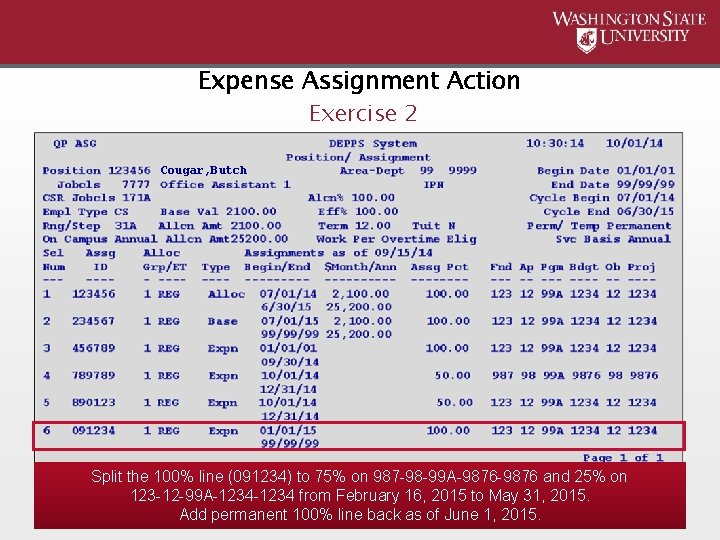
Expense Assignment Action Exercise 2 Cougar, Butch Split the 100% line (091234) to 75% on 987 -98 -99 A-9876 and 25% on 123 -12 -99 A-1234 from February 16, 2015 to May 31, 2015. Add permanent 100% line back as of June 1, 2015.
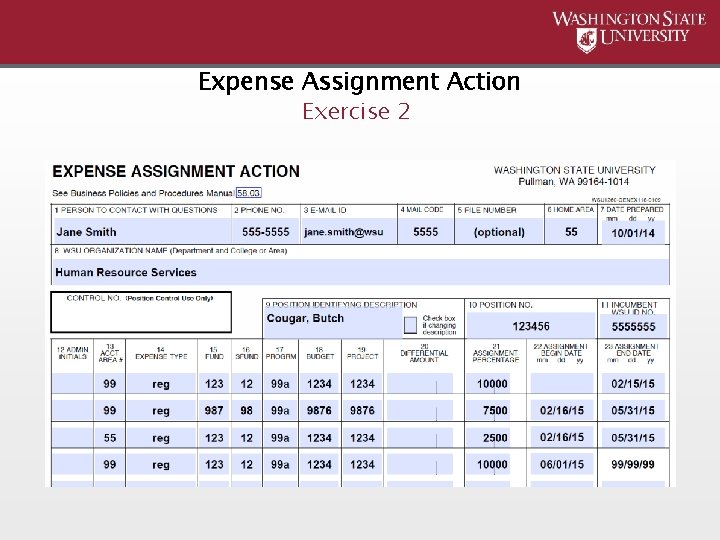
Expense Assignment Action Exercise 2
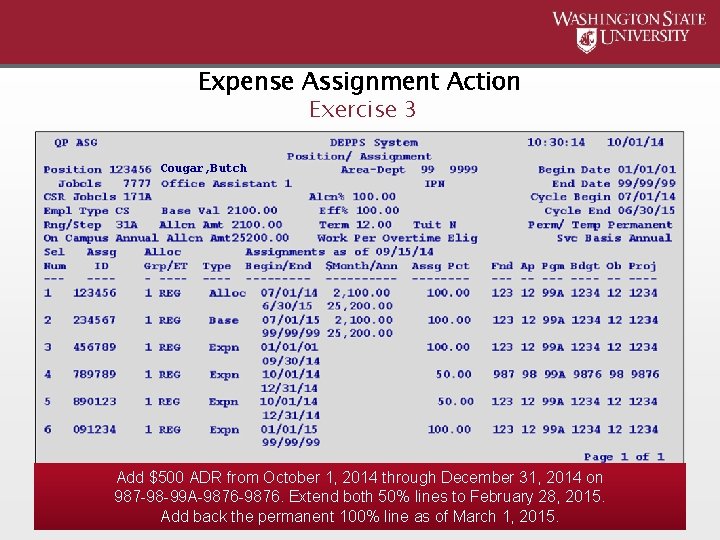
Expense Assignment Action Exercise 3 Cougar, Butch Add $500 ADR from October 1, 2014 through December 31, 2014 on 987 -98 -99 A-9876. Extend both 50% lines to February 28, 2015. Add back the permanent 100% line as of March 1, 2015.
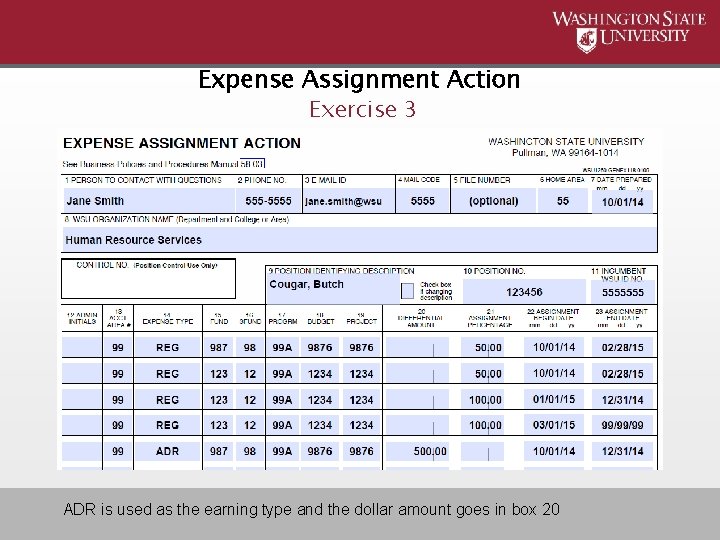
Expense Assignment Action Exercise 3 ADR is used as the earning type and the dollar amount goes in box 20
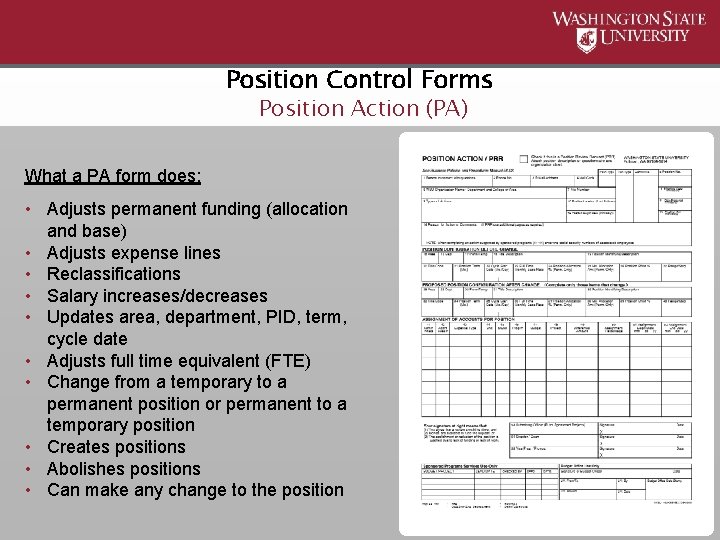
Position Control Forms Position Action (PA) What a PA form does: • Adjusts permanent funding (allocation and base) • Adjusts expense lines • Reclassifications • Salary increases/decreases • Updates area, department, PID, term, cycle date • Adjusts full time equivalent (FTE) • Change from a temporary to a permanent position or permanent to a temporary position • Creates positions • Abolishes positions • Can make any change to the position
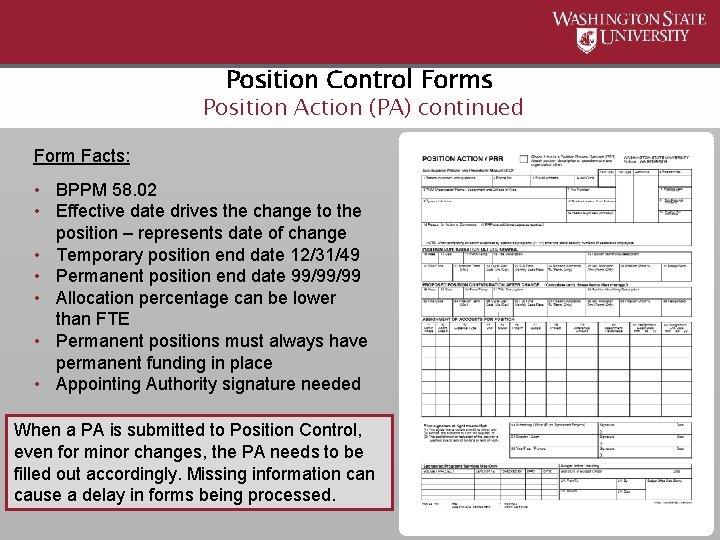
Position Control Forms Position Action (PA) continued Form Facts: • BPPM 58. 02 • Effective date drives the change to the position – represents date of change • Temporary position end date 12/31/49 • Permanent position end date 99/99/99 • Allocation percentage can be lower than FTE • Permanent positions must always have permanent funding in place • Appointing Authority signature needed When a PA is submitted to Position Control, even for minor changes, the PA needs to be filled out accordingly. Missing information cause a delay in forms being processed.
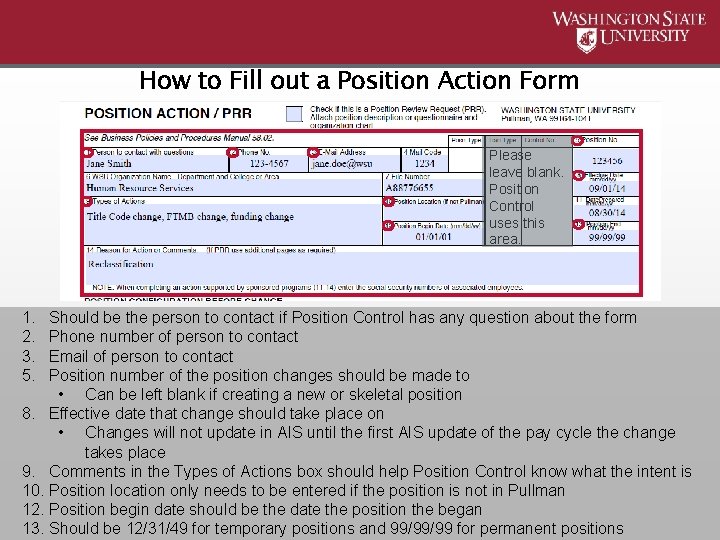
How to Fill out a Position Action Form Please leave blank. Position Control uses this area. 1. 2. 3. 5. Should be the person to contact if Position Control has any question about the form Phone number of person to contact Email of person to contact Position number of the position changes should be made to • Can be left blank if creating a new or skeletal position 8. Effective date that change should take place on • Changes will not update in AIS until the first AIS update of the pay cycle the change takes place 9. Comments in the Types of Actions box should help Position Control know what the intent is 10. Position location only needs to be entered if the position is not in Pullman 12. Position begin date should be the date the position the began 13. Should be 12/31/49 for temporary positions and 99/99/99 for permanent positions
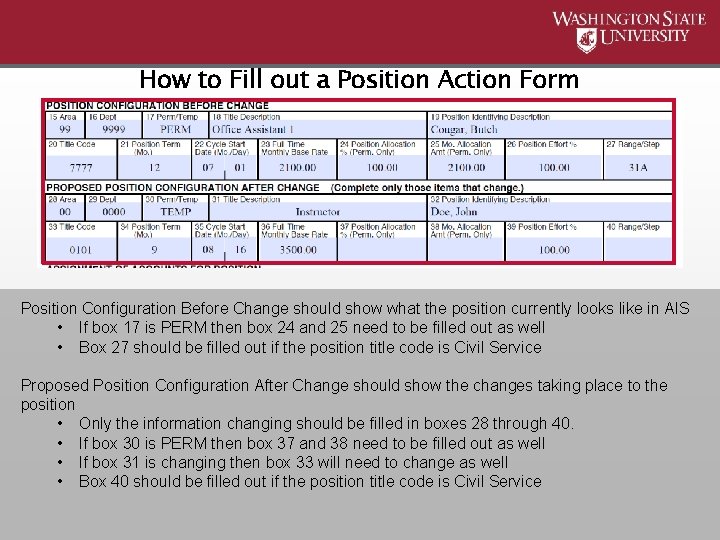
How to Fill out a Position Action Form Position Configuration Before Change should show what the position currently looks like in AIS • If box 17 is PERM then box 24 and 25 need to be filled out as well • Box 27 should be filled out if the position title code is Civil Service Proposed Position Configuration After Change should show the changes taking place to the position • Only the information changing should be filled in boxes 28 through 40. • If box 30 is PERM then box 37 and 38 need to be filled out as well • If box 31 is changing then box 33 will need to change as well • Box 40 should be filled out if the position title code is Civil Service
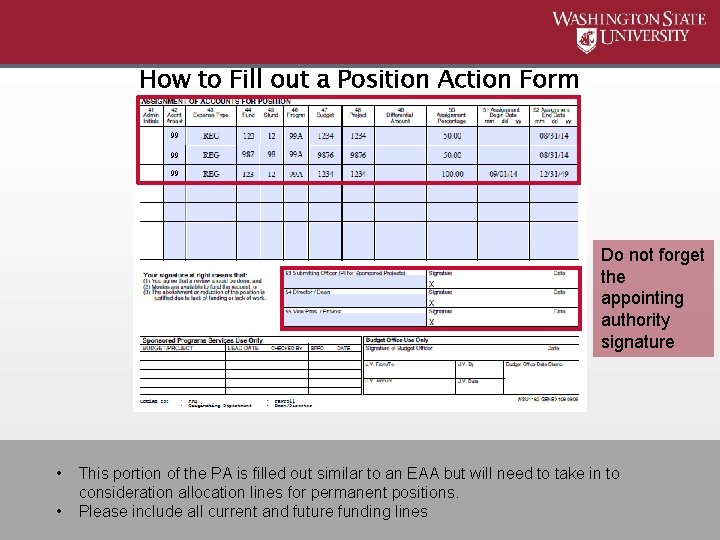
How to Fill out a Position Action Form 99 99 99 Do not forget the appointing authority signature • • This portion of the PA is filled out similar to an EAA but will need to take in to consideration allocation lines for permanent positions. Please include all current and future funding lines
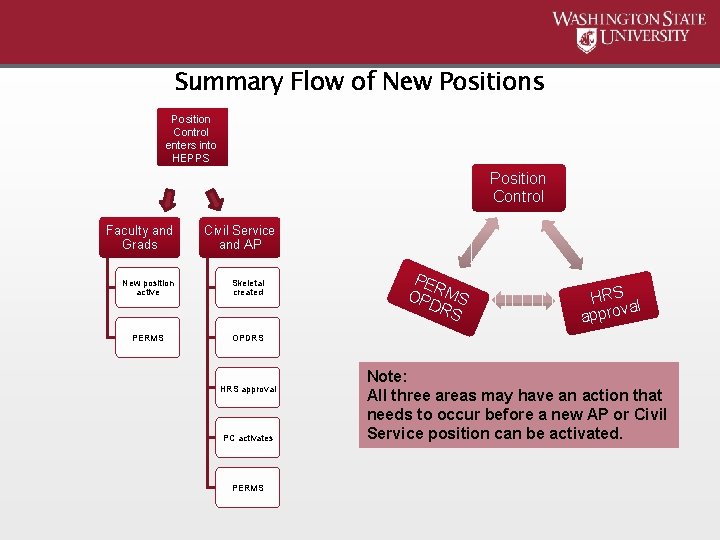
Summary Flow of New Positions Position Control enters into HEPPS Position Control Faculty and Grads Civil Service and AP New position active Skeletal created PERMS OPDRS HRS approval PC activates PERMS PE OP RMS DR S HRS l va appro Note: All three areas may have an action that needs to occur before a new AP or Civil Service position can be activated.
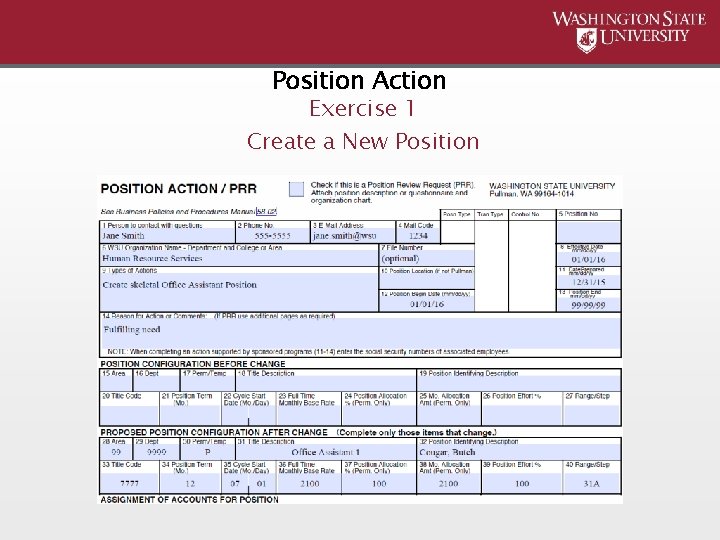
Position Action Exercise 1 Create a New Position
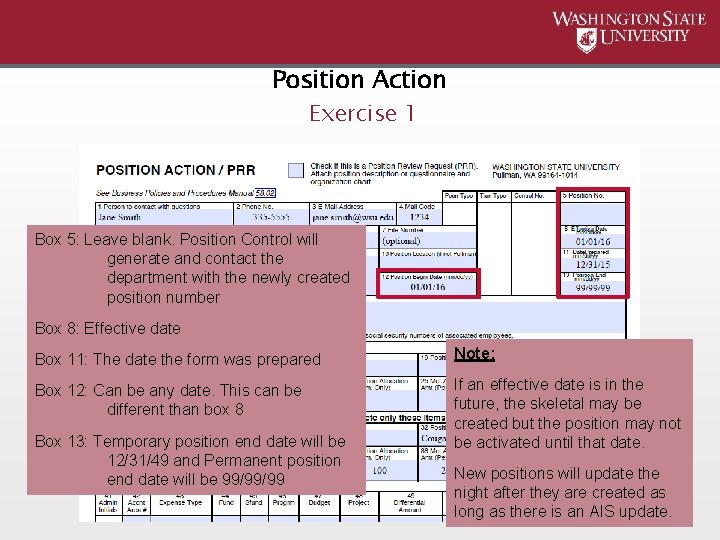
Position Action Exercise 1 Box 5: Leave blank. Position Control will generate and contact the department with the newly created position number Box 8: Effective date Box 11: The date the form was prepared Note: Box 12: Can be any date. This can be different than box 8 If an effective date is in the future, the skeletal may be created but the position may not be activated until that date. Box 13: Temporary position end date will be 12/31/49 and Permanent position end date will be 99/99/99 New positions will update the night after they are created as long as there is an AIS update.
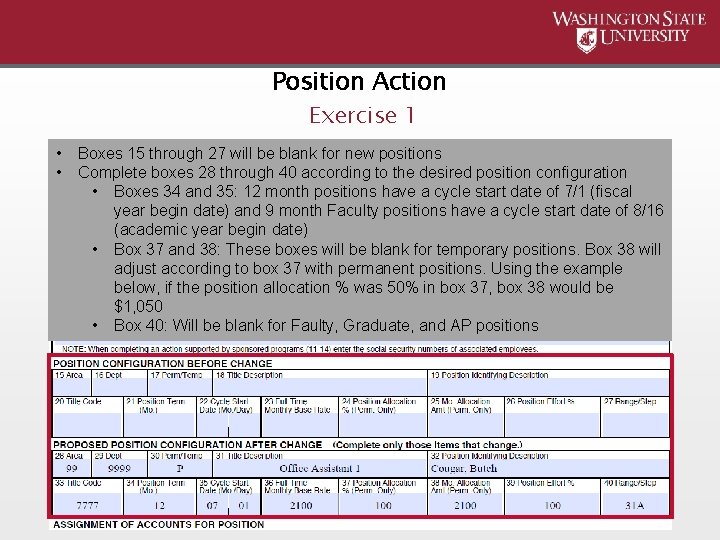
Position Action Exercise 1 • • Boxes 15 through 27 will be blank for new positions Complete boxes 28 through 40 according to the desired position configuration • Boxes 34 and 35: 12 month positions have a cycle start date of 7/1 (fiscal year begin date) and 9 month Faculty positions have a cycle start date of 8/16 (academic year begin date) • Box 37 and 38: These boxes will be blank for temporary positions. Box 38 will adjust according to box 37 with permanent positions. Using the example below, if the position allocation % was 50% in box 37, box 38 would be $1, 050 • Box 40: Will be blank for Faulty, Graduate, and AP positions
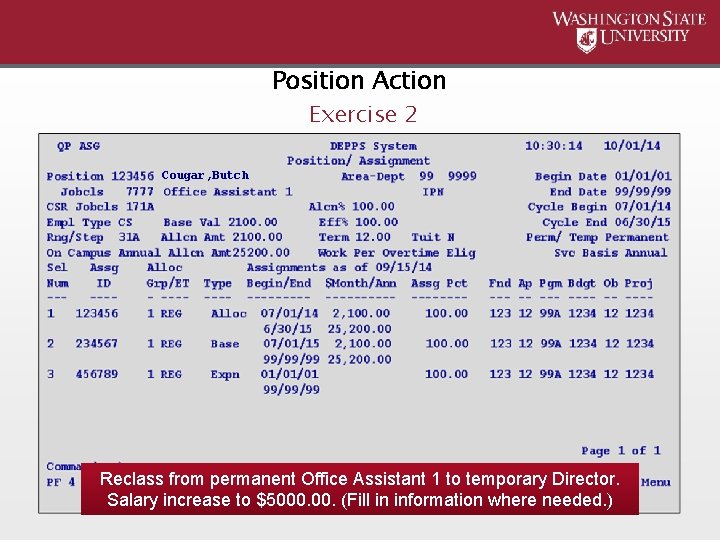
Position Action Exercise 2 Cougar, Butch Reclass from permanent Office Assistant 1 to temporary Director. Salary increase to $5000. (Fill in information where needed. )
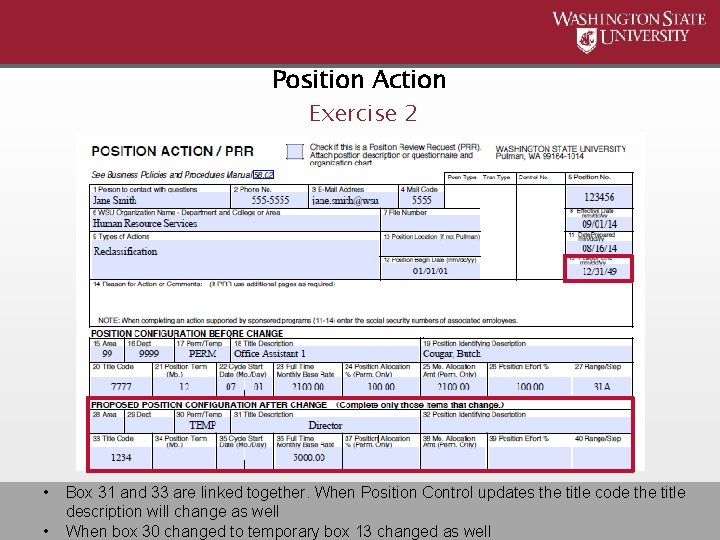
Position Action Exercise 2 • • Box 31 and 33 are linked together. When Position Control updates the title code the title description will change as well When box 30 changed to temporary box 13 changed as well
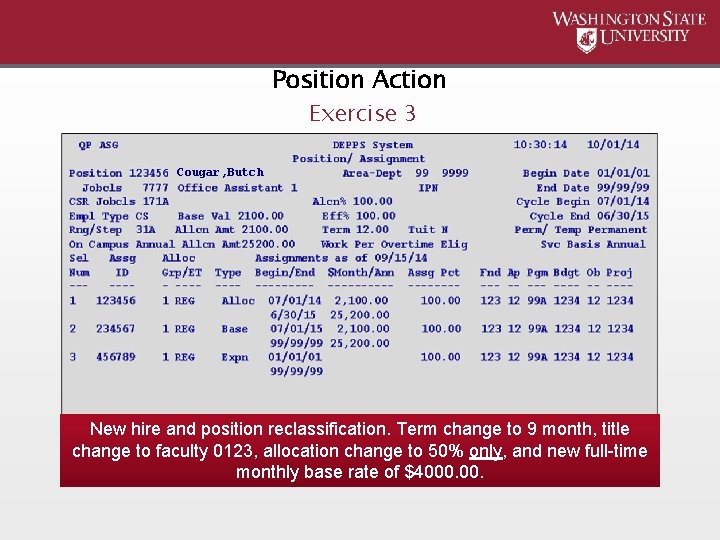
Position Action Exercise 3 Cougar, Butch New hire and position reclassification. Term change to 9 month, title change to faculty 0123, allocation change to 50% only, and new full-time monthly base rate of $4000.
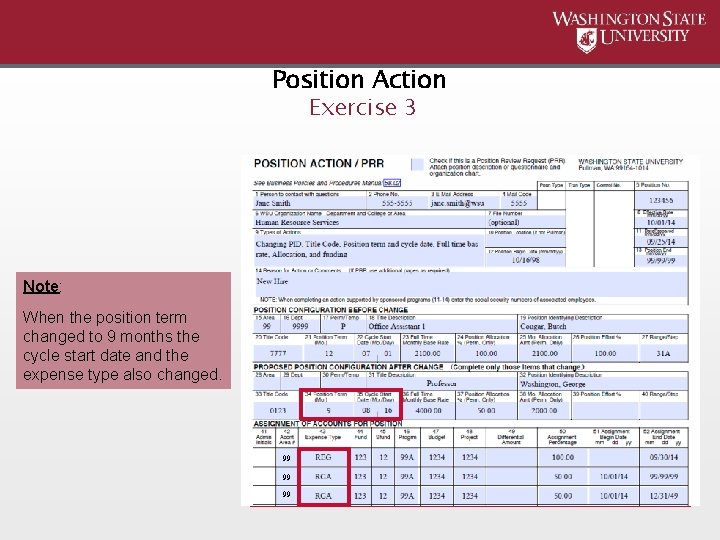
Position Action Exercise 3 Note: When the position term changed to 9 months the cycle start date and the expense type also changed. 99 99 99
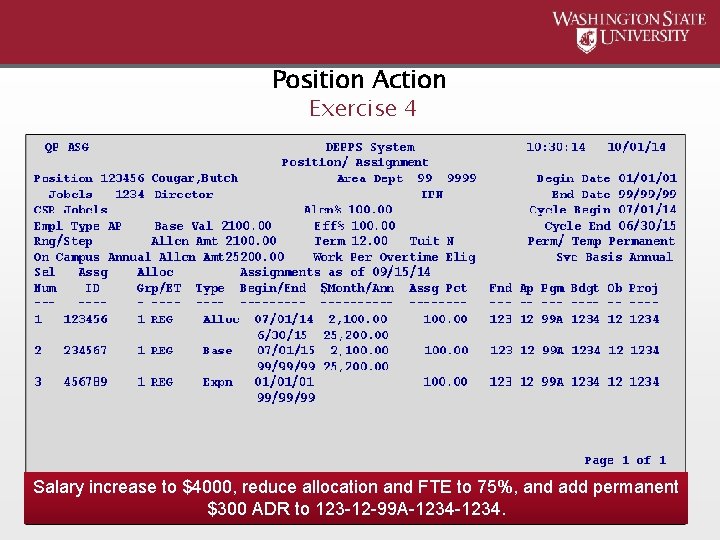
Position Action Exercise 4 Cougar, Butch Salary increase to $4000, reduce allocation and FTE to 75%, and add permanent $300 ADR to 123 -12 -99 A-1234.
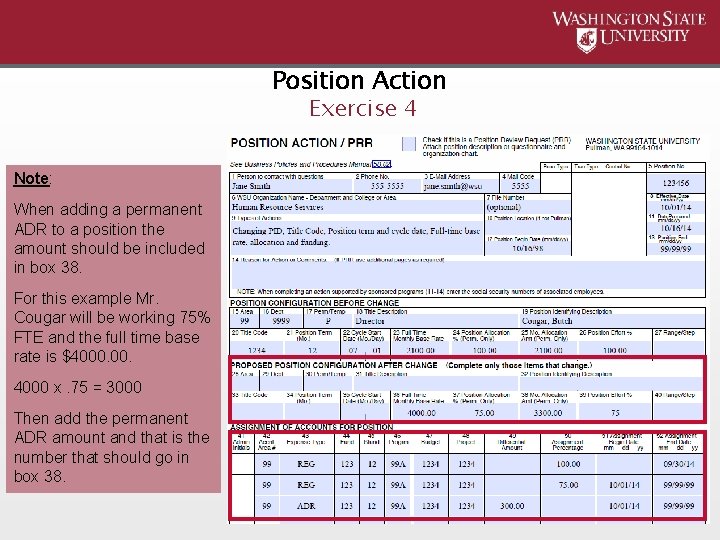
Position Action Exercise 4 Note: When adding a permanent ADR to a position the amount should be included in box 38. For this example Mr. Cougar will be working 75% FTE and the full time base rate is $4000 x. 75 = 3000 Then add the permanent ADR amount and that is the number that should go in box 38.
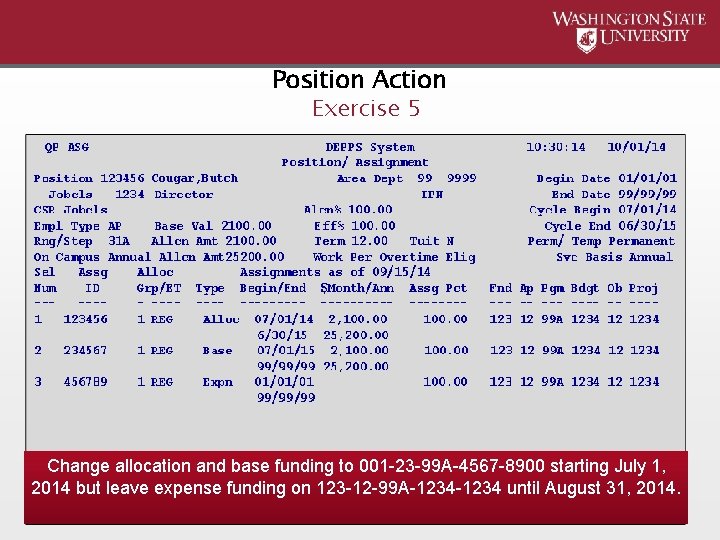
Position Action Exercise 5 Cougar, Butch Change allocation and base funding to 001 -23 -99 A-4567 -8900 starting July 1, 2014 but leave expense funding on 123 -12 -99 A-1234 until August 31, 2014.
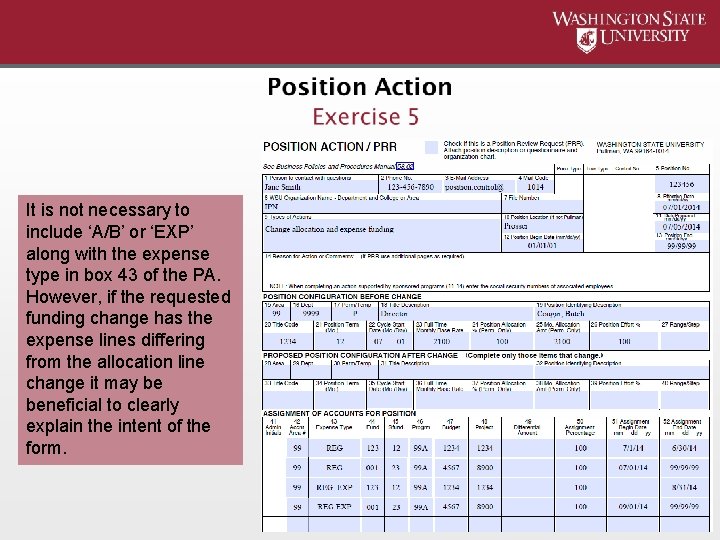
It is not necessary to include ‘A/B’ or ‘EXP’ along with the expense type in box 43 of the PA. However, if the requested funding change has the expense lines differing from the allocation line change it may be beneficial to clearly explain the intent of the form.
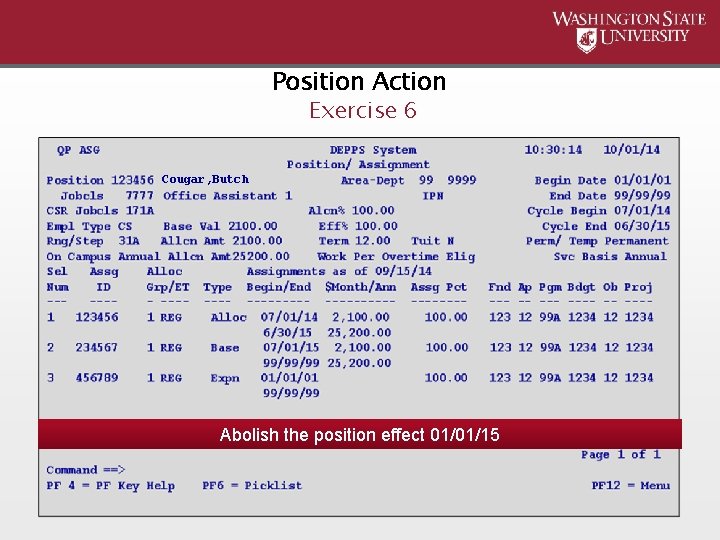
Position Action Exercise 6 Cougar, Butch Abolish the position effect 01/01/15
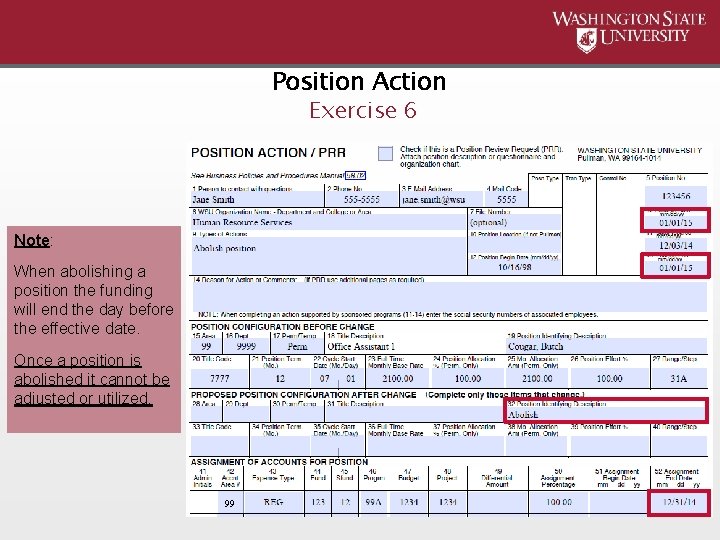
Position Action Exercise 6 Note: When abolishing a position the funding will end the day before the effective date. Once a position is abolished it cannot be adjusted or utilized. 99
Thank you for attending Position Control training! For form submission and questions: Position Control position. control@wsu. edu or (509) 335 -4521 HRS front desk will transfer For accrual questions: Anne-Lise Brooks (Budget Office) adbrooks@wsu. edu

This has been a WSU Training Videoconference If you wish to have your attendance documented in your training history, please notify Human Resource Services within 24 hours of today's date: hrstraining@wsu. edu
- Slides: 47