
Police Cover ASTRO XTS 3000 Model II Training








- Slides: 37
Police Cover ASTRO™ XTS 3000 Model II Training for: Marin County Law Enforcement ASTRO™ XTS 3000 Model II Marin Emergency Radio Authority
Copyrights/Disclaimer Documentation Copyrights No duplication or distribution of this document or any portion thereof shall take place without the express written permission of Motorola. No part of this manual may be reproduced, distributed, or transmitted in any form or by any means, electronic or mechanical, for any purpose without the express written permission of Motorola. Disclaimer The information in this document is carefully examined, and is believed to be entirely reliable. However no responsibility is assumed for inaccuracies. Furthermore, Motorola reserves the right to make changes to any products herein to improve readability, function, or design. Motorola does not assume any liability arising out of the applications or use of any product or circuit described herein; nor does it cover any license under its patent rights nor the rights of others. Motorola, ASTRO, Call Alert, Private Conversation, Smart. Zone are trademarks of Motorola, Inc. Motorola © 2001. All rights reserved. ASTRO™ XTS 3000 Model II Marin Emergency Radio Authority
Welcome This Tutorial has been prepared exclusively for you, keeping in mind your system configuration and radio layout. The explanation for each function is a step-by-step guiding process, specifically designed for easy comprehension and implementation. However, for indepth system or radio information, you should consult your system administrator. Keep in mind that each radio and each system is customer configurable. ASTRO™ XTS 3000 Model II Marin Emergency Radio Authority
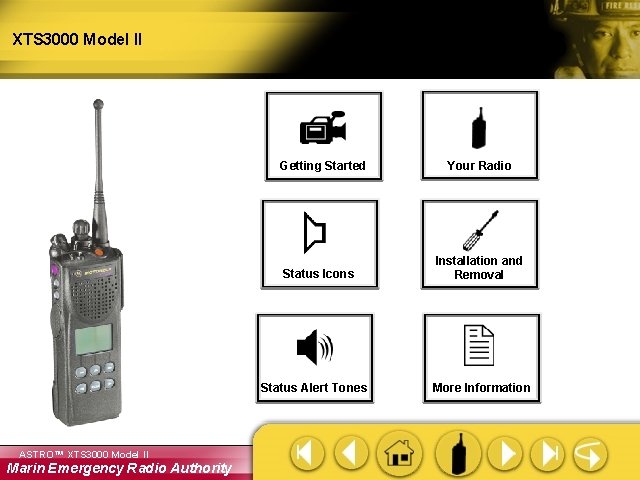
XTS 3000 Model II Getting Started Status Icons Status Alert Tones ASTRO™ XTS 3000 Model II Marin Emergency Radio Authority Your Radio Installation and Removal More Information
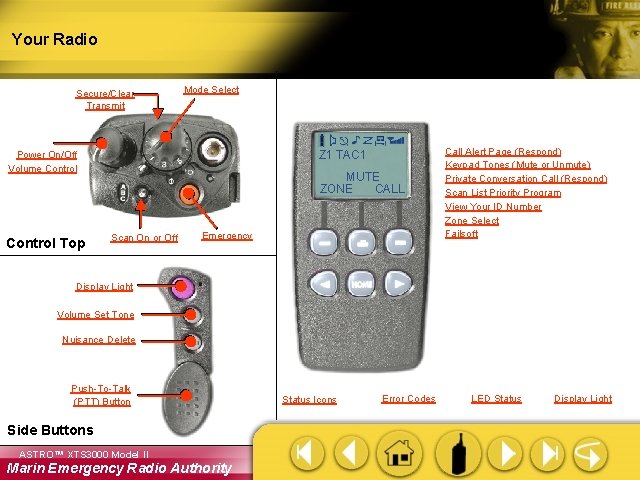
Your Radio Secure/Clear Transmit Mode Select Z 1 TAC 1 Power On/Off Volume Control Top MUTE ZONE CALL Scan On or Off Emergency Call Alert Page (Respond) Keypad Tones (Mute or Unmute) Private Conversation Call (Respond) Scan List Priority Program View Your ID Number Zone Select Failsoft Display Light Volume Set Tone Nuisance Delete Push-To-Talk (PTT) Button Side Buttons ASTRO™ XTS 3000 Model II Marin Emergency Radio Authority Status Icons Error Codes LED Status Display Light
Getting Started ASTRO™ XTS 3000 Model II Marin Emergency Radio Authority
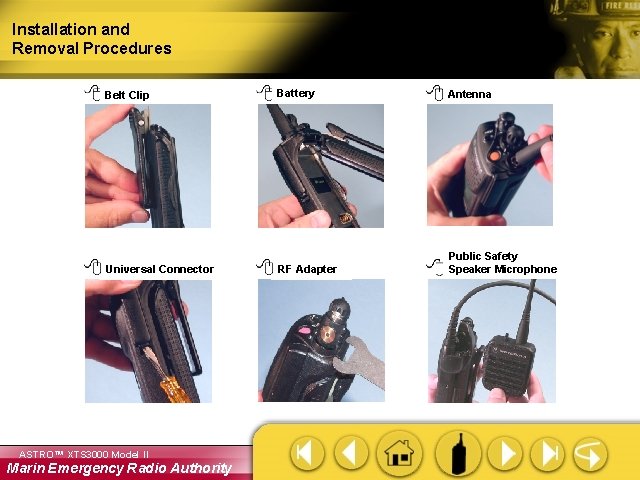
Installation and Removal Procedures Belt Clip Battery Antenna Universal Connector RF Adapter Public Safety Speaker Microphone ASTRO™ XTS 3000 Model II Marin Emergency Radio Authority
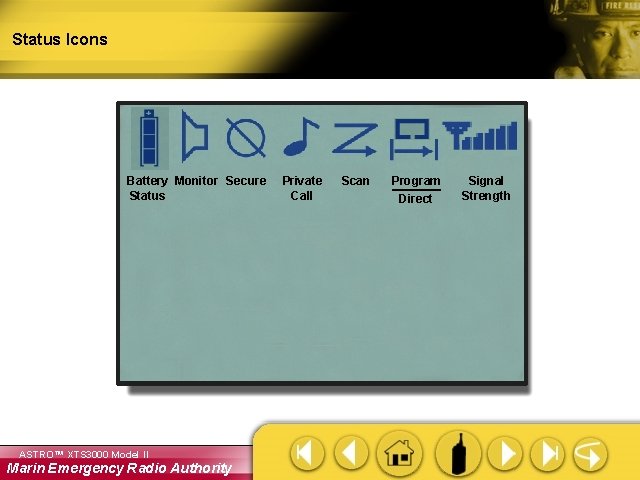
Status Icons Battery Monitor Secure Status ASTRO™ XTS 3000 Model II Marin Emergency Radio Authority Private Call Scan Program Direct Signal Strength
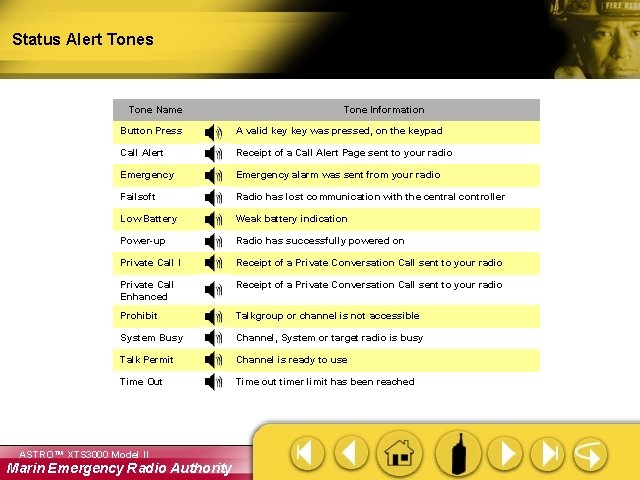
Status Alert Tones Tone Name Tone Information Button Press A valid key was pressed, on the keypad Call Alert Receipt of a Call Alert Page sent to your radio Emergency alarm was sent from your radio Failsoft Radio has lost communication with the central controller Low Battery Weak battery indication Power-up Radio has successfully powered on Private Call I Receipt of a Private Conversation Call sent to your radio Private Call Enhanced Receipt of a Private Conversation Call sent to your radio Prohibit Talkgroup or channel is not accessible System Busy Channel, System or target radio is busy Talk Permit Channel is ready to use Time Out Time out timer limit has been reached ASTRO™ XTS 3000 Model II Marin Emergency Radio Authority
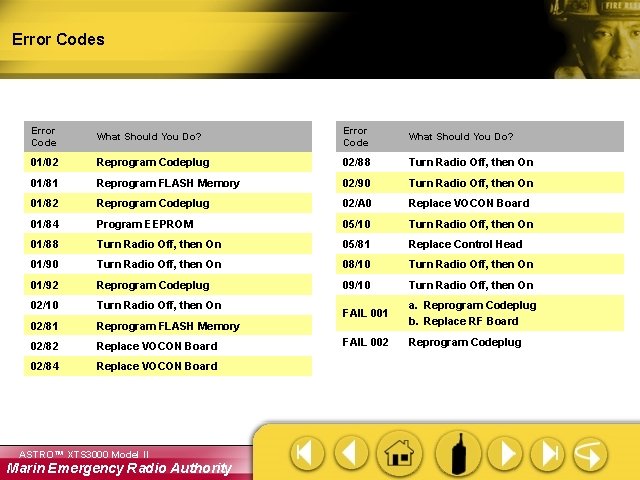
Error Codes Error Code What Should You Do? 01/02 Reprogram Codeplug 02/88 Turn Radio Off, then On 01/81 Reprogram FLASH Memory 02/90 Turn Radio Off, then On 01/82 Reprogram Codeplug 02/A 0 Replace VOCON Board 01/84 Program EEPROM 05/10 Turn Radio Off, then On 01/88 Turn Radio Off, then On 05/81 Replace Control Head 01/90 Turn Radio Off, then On 08/10 Turn Radio Off, then On 01/92 Reprogram Codeplug 09/10 Turn Radio Off, then On 02/10 Turn Radio Off, then On FAIL 001 02/81 Reprogram FLASH Memory a. Reprogram Codeplug b. Replace RF Board 02/82 Replace VOCON Board FAIL 002 Reprogram Codeplug 02/84 Replace VOCON Board ASTRO™ XTS 3000 Model II Marin Emergency Radio Authority
LED Status RED GREEN • Solid - PTT is pressed, radio is transmitting • Flashing - Radio is receiving in Conventional mode - Weak battery while transmitting • Solid - Self-test being performed • Flashing - Incoming Private Call RED LED ASTRO™ XTS 3000 Model II Marin Emergency Radio Authority GREEN LED
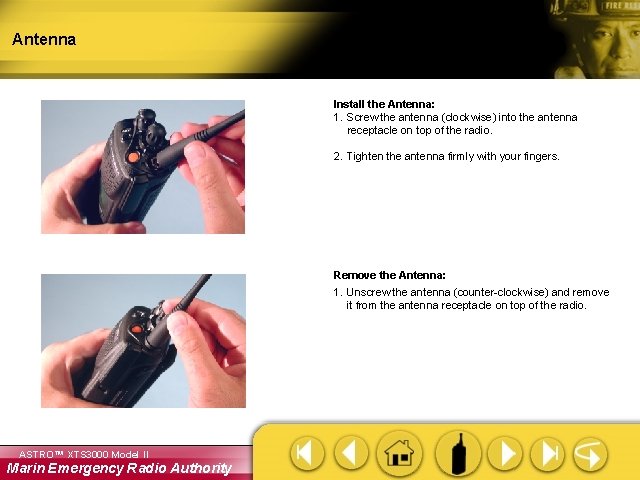
Antenna Install the Antenna: 1. Screw the antenna (clockwise) into the antenna receptacle on top of the radio. 2. Tighten the antenna firmly with your fingers. Remove the Antenna: 1. Unscrew the antenna (counter-clockwise) and remove it from the antenna receptacle on top of the radio. ASTRO™ XTS 3000 Model II Marin Emergency Radio Authority
Charging the Battery The battery must be charged before use. Memory effect is a phenomenon that causes a loss in battery capacity or voltage due to repetitive shallow discharging or long-term overcharging. This memory effect has been greatly reduced in your batteries through the use of new cell technology. It is still recommended, however, that you discharge your battery as much as possible before recharging it. Recharging after each shift is good standard practice. When charging a battery that is attached to your radio, turn the radio off to ensure a full charge. Battery procedures continued on next panel. ASTRO™ XTS 3000 Model II Marin Emergency Radio Authority
Battery Install the Battery: 1. Turn off the radio and hold it with the back of the radio facing upward. 2. Align the three slots at the top of the battery with the three tabs on the back of the radio. 3. Push the battery down toward the radio until the battery clicks into place. Remove the Battery: 1. Turn the radio off. 2. Hold the radio with the back of the radio facing upward. 3. Push the battery release button on the bottom of the radio. 4. Lift the battery away from the radio and remove. ASTRO™ XTS 3000 Model II Marin Emergency Radio Authority
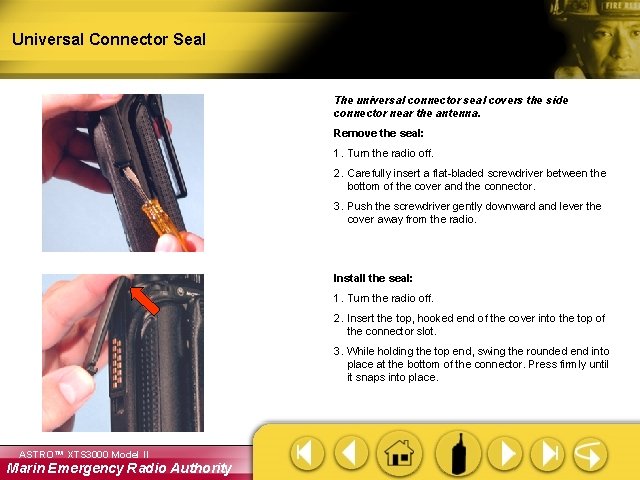
Universal Connector Seal The universal connector seal covers the side connector near the antenna. Remove the seal: 1. Turn the radio off. 2. Carefully insert a flat-bladed screwdriver between the bottom of the cover and the connector. 3. Push the screwdriver gently downward and lever the cover away from the radio. Install the seal: 1. Turn the radio off. 2. Insert the top, hooked end of the cover into the top of the connector slot. 3. While holding the top end, swing the rounded end into place at the bottom of the connector. Press firmly until it snaps into place. ASTRO™ XTS 3000 Model II Marin Emergency Radio Authority
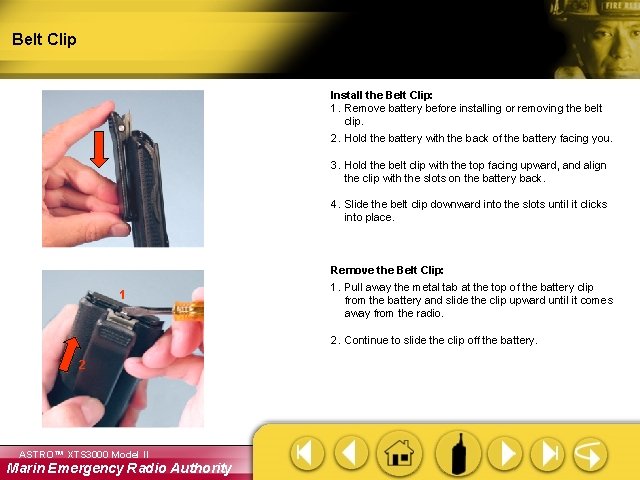
Belt Clip Install the Belt Clip: 1. Remove battery before installing or removing the belt clip. 2. Hold the battery with the back of the battery facing you. 3. Hold the belt clip with the top facing upward, and align the clip with the slots on the battery back. 4. Slide the belt clip downward into the slots until it clicks into place. Remove the Belt Clip: 1 1. Pull away the metal tab at the top of the battery clip from the battery and slide the clip upward until it comes away from the radio. 2. Continue to slide the clip off the battery. 2 ASTRO™ XTS 3000 Model II Marin Emergency Radio Authority
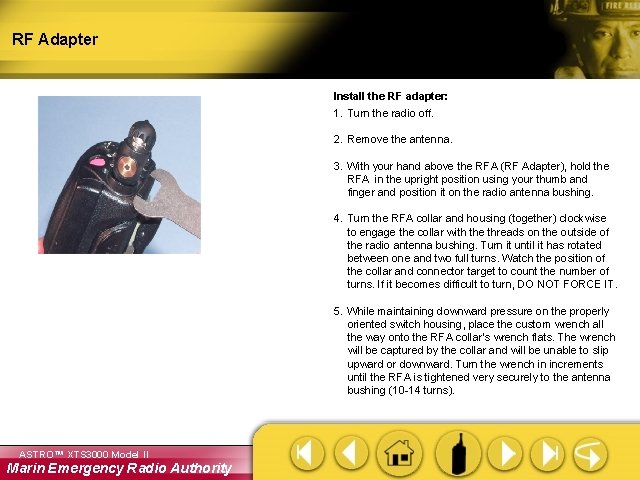
RF Adapter Install the RF adapter: 1. Turn the radio off. 2. Remove the antenna. 3. With your hand above the RFA (RF Adapter), hold the RFA in the upright position using your thumb and finger and position it on the radio antenna bushing. 4. Turn the RFA collar and housing (together) clockwise to engage the collar with the threads on the outside of the radio antenna bushing. Turn it until it has rotated between one and two full turns. Watch the position of the collar and connector target to count the number of turns. If it becomes difficult to turn, DO NOT FORCE IT. 5. While maintaining downward pressure on the properly oriented switch housing, place the custom wrench all the way onto the RFA collar’s wrench flats. The wrench will be captured by the collar and will be unable to slip upward or downward. Turn the wrench in increments until the RFA is tightened very securely to the antenna bushing (10 -14 turns). ASTRO™ XTS 3000 Model II Marin Emergency Radio Authority
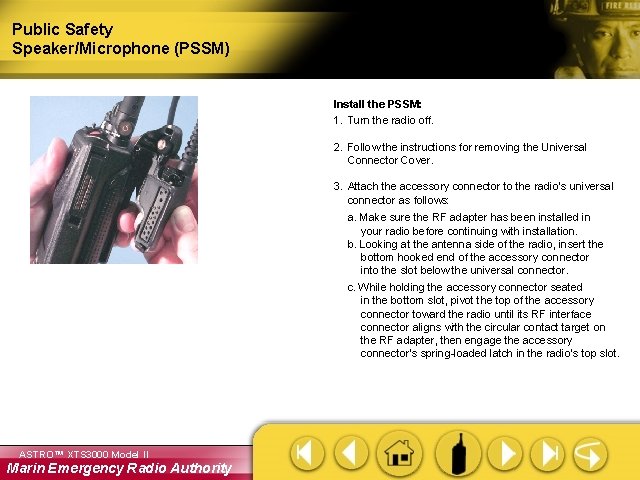
Public Safety Speaker/Microphone (PSSM) Install the PSSM: 1. Turn the radio off. 2. Follow the instructions for removing the Universal Connector Cover. 3. Attach the accessory connector to the radio’s universal connector as follows: a. Make sure the RF adapter has been installed in your radio before continuing with installation. b. Looking at the antenna side of the radio, insert the bottom hooked end of the accessory connector into the slot below the universal connector. c. While holding the accessory connector seated in the bottom slot, pivot the top of the accessory connector toward the radio until its RF interface connector aligns with the circular contact target on the RF adapter, then engage the accessory connector’s spring-loaded latch in the radio’s top slot. ASTRO™ XTS 3000 Model II Marin Emergency Radio Authority
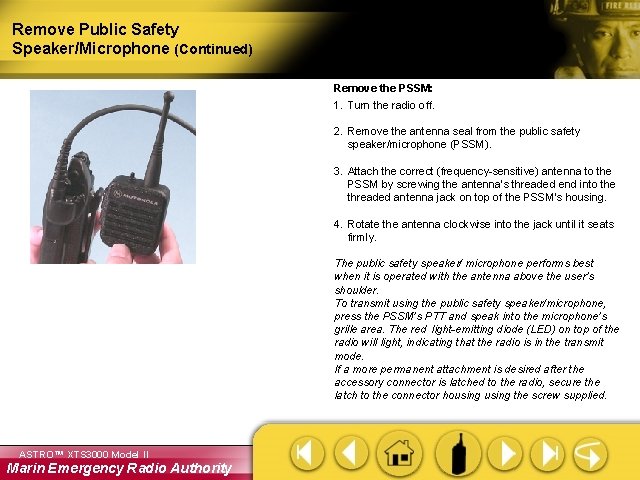
Remove Public Safety Speaker/Microphone (Continued) Remove the PSSM: 1. Turn the radio off. 2. Remove the antenna seal from the public safety speaker/microphone (PSSM). 3. Attach the correct (frequency-sensitive) antenna to the PSSM by screwing the antenna’s threaded end into the threaded antenna jack on top of the PSSM’s housing. 4. Rotate the antenna clockwise into the jack until it seats firmly. The public safety speaker/ microphone performs best when it is operated with the antenna above the user’s shoulder. To transmit using the public safety speaker/microphone, press the PSSM’s PTT and speak into the microphone’s grille area. The red light-emitting diode (LED) on top of the radio will light, indicating that the radio is in the transmit mode. If a more permanent attachment is desired after the accessory connector is latched to the radio, secure the latch to the connector housing the screw supplied. ASTRO™ XTS 3000 Model II Marin Emergency Radio Authority
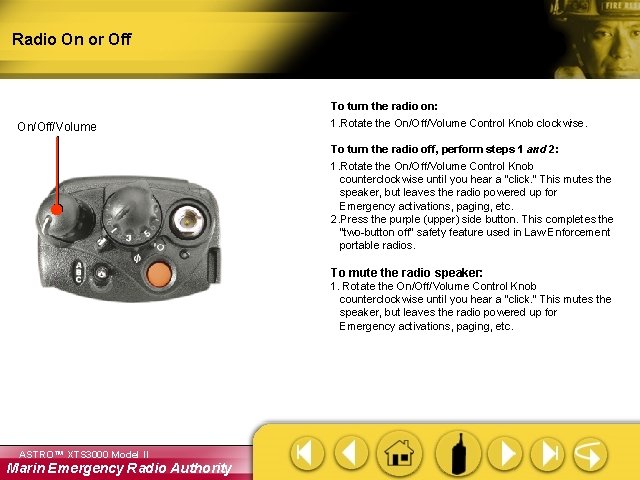
Radio On or Off To turn the radio on: On/Off/Volume 1. Rotate the On/Off/Volume Control Knob clockwise. To turn the radio off, perform steps 1 and 2: 1. Rotate the On/Off/Volume Control Knob counterclockwise until you hear a "click. “ This mutes the speaker, but leaves the radio powered up for Emergency activations, paging, etc. 2. Press the purple (upper) side button. This completes the “two-button off” safety feature used in Law Enforcement portable radios. To mute the radio speaker: 1. Rotate the On/Off/Volume Control Knob counterclockwise until you hear a "click. “ This mutes the speaker, but leaves the radio powered up for Emergency activations, paging, etc. ASTRO™ XTS 3000 Model II Marin Emergency Radio Authority
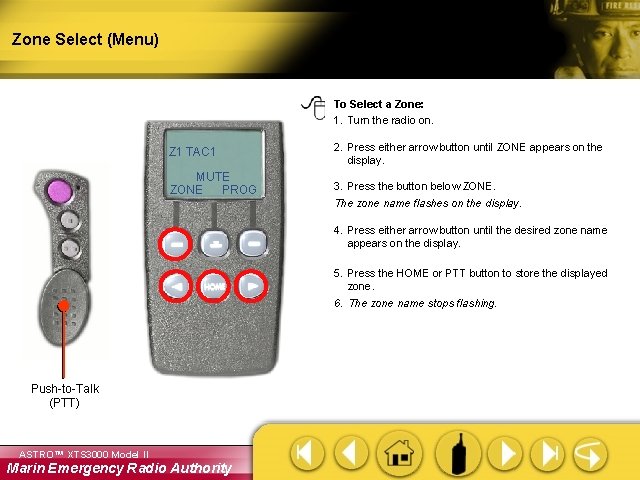
Zone Select (Menu) To Select a Zone: 1. Turn the radio on. Z 1 TAC 1 MUTE ZONE PROG 2. Press either arrow button until ZONE appears on the display. 3. Press the button below ZONE. The zone name flashes on the display. 4. Press either arrow button until the desired zone name appears on the display. 5. Press the HOME or PTT button to store the displayed zone. 6. The zone name stops flashing. Push-to-Talk (PTT) ASTRO™ XTS 3000 Model II Marin Emergency Radio Authority
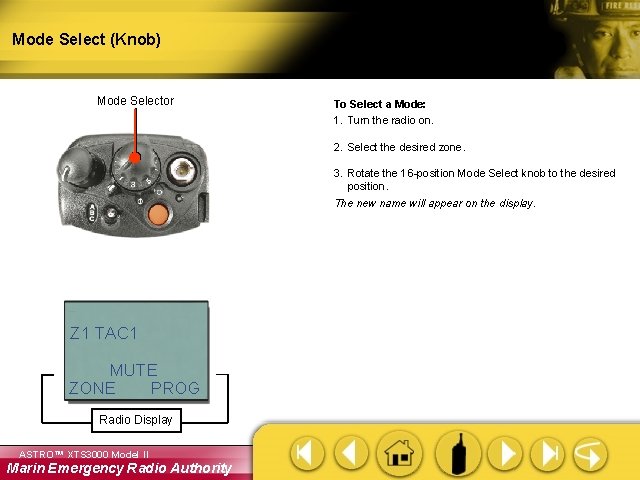
Mode Select (Knob) Mode Selector To Select a Mode: 1. Turn the radio on. 2. Select the desired zone. 3. Rotate the 16 -position Mode Select knob to the desired position. The new name will appear on the display. Z 1 TAC 1 MUTE ZONE PROG Radio Display ASTRO™ XTS 3000 Model II Marin Emergency Radio Authority
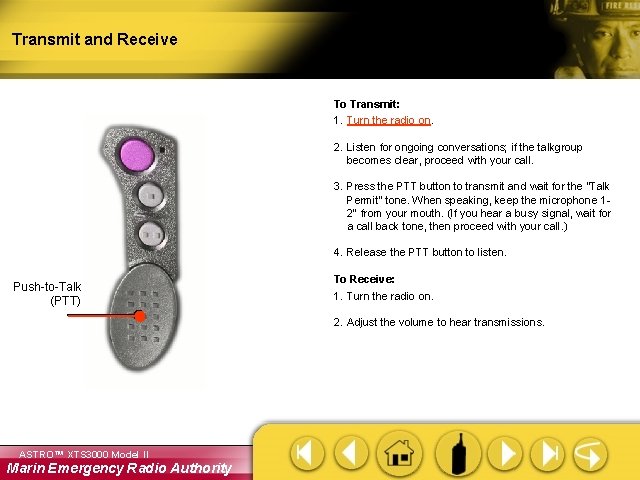
Transmit and Receive To Transmit: 1. Turn the radio on. 2. Listen for ongoing conversations; if the talkgroup becomes clear, proceed with your call. 3. Press the PTT button to transmit and wait for the “Talk Permit” tone. When speaking, keep the microphone 12" from your mouth. (If you hear a busy signal, wait for a call back tone, then proceed with your call. ) 4. Release the PTT button to listen. Push-to-Talk (PTT) To Receive: 1. Turn the radio on. 2. Adjust the volume to hear transmissions. ASTRO™ XTS 3000 Model II Marin Emergency Radio Authority
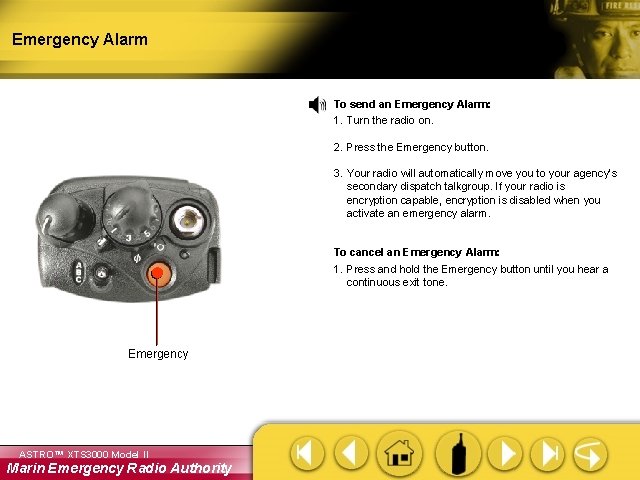
Emergency Alarm To send an Emergency Alarm: 1. Turn the radio on. 2. Press the Emergency button. 3. Your radio will automatically move you to your agency’s secondary dispatch talkgroup. If your radio is encryption capable, encryption is disabled when you activate an emergency alarm. To cancel an Emergency Alarm: 1. Press and hold the Emergency button until you hear a continuous exit tone. Emergency ASTRO™ XTS 3000 Model II Marin Emergency Radio Authority
Scan On or Off (ABC Switch) To turn Scan on: 1. Turn the radio on. 2. Toggle the ABC Scan switch to the “A” or “C” positions to enable Scan. The Scan icon “ “ will be displayed indicating Scan is active. To turn Scan off: 1. Turn the radio on. Scan Switch Z 1 TAC 1 MUTE ZONE PROG Radio Display ASTRO™ XTS 3000 Model II Marin Emergency Radio Authority 2. Toggle the ABC Scan switch back to the “B” position to disenable Scan. The Scan icon “ “ will no longer be displayed indicating Scan has been deactivated.
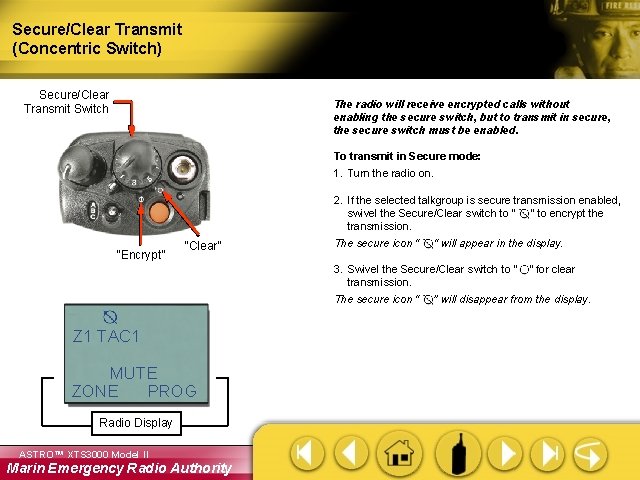
Secure/Clear Transmit (Concentric Switch) Secure/Clear Transmit Switch The radio will receive encrypted calls without enabling the secure switch, but to transmit in secure, the secure switch must be enabled. To transmit in Secure mode: 1. Turn the radio on. “Encrypt” “Clear” 2. If the selected talkgroup is secure transmission enabled, swivel the Secure/Clear switch to “ “ to encrypt the transmission. The secure icon “ “ will appear in the display. 3. Swivel the Secure/Clear switch to “ ” for clear transmission. The secure icon “ ” will disappear from the display. Z 1 TAC 1 MUTE ZONE PROG Radio Display ASTRO™ XTS 3000 Model II Marin Emergency Radio Authority
Display Light (Top Side Button) To turn the Display Light on: Display Light Button 1. Turn the radio on. 2. Press the Display Light button. The light will turn off automatically after a preset time. To turn the Display Light off manually: 1. Press the Display Light button. ASTRO™ XTS 3000 Model II Marin Emergency Radio Authority
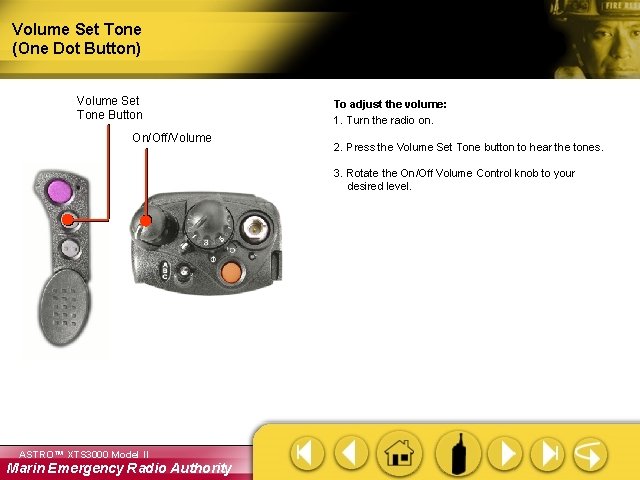
Volume Set Tone (One Dot Button) Volume Set Tone Button On/Off/Volume To adjust the volume: 1. Turn the radio on. 2. Press the Volume Set Tone button to hear the tones. 3. Rotate the On/Off Volume Control knob to your desired level. ASTRO™ XTS 3000 Model II Marin Emergency Radio Authority
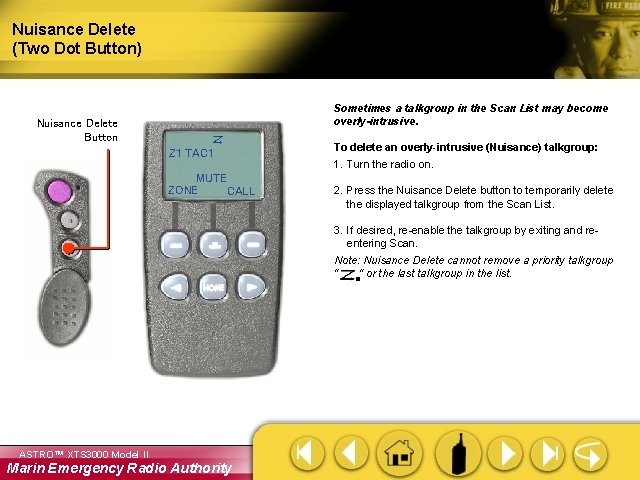
Nuisance Delete (Two Dot Button) Sometimes a talkgroup in the Scan List may become overly-intrusive. Nuisance Delete Button Z 1 TAC 1 MUTE ZONE CALL To delete an overly-intrusive (Nuisance) talkgroup: 1. Turn the radio on. 2. Press the Nuisance Delete button to temporarily delete the displayed talkgroup from the Scan List. 3. If desired, re-enable the talkgroup by exiting and reentering Scan. Note: Nuisance Delete cannot remove a priority talkgroup “ “ or the last talkgroup in the list. ASTRO™ XTS 3000 Model II Marin Emergency Radio Authority
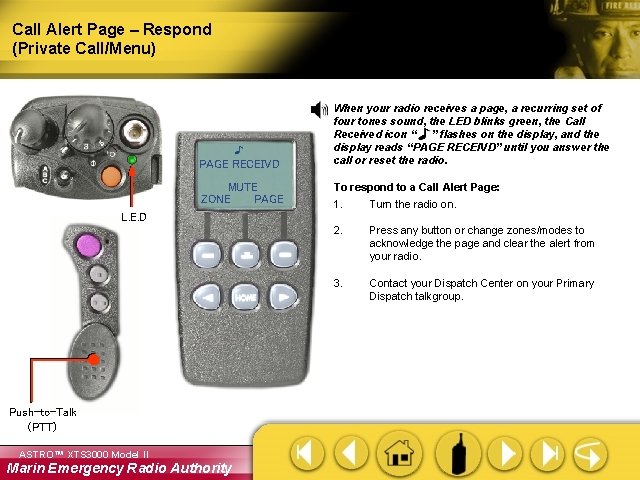
Call Alert Page – Respond (Private Call/Menu) PAGE RECEIVD MUTE ZONE PAGE When your radio receives a page, a recurring set of four tones sound, the LED blinks green, the Call Received icon “ ” flashes on the display, and the display reads “PAGE RECEIVD” until you answer the call or reset the radio. To respond to a Call Alert Page: 1. Turn the radio on. 2. Press any button or change zones/modes to acknowledge the page and clear the alert from your radio. 3. Contact your Dispatch Center on your Primary Dispatch talkgroup. L. E. D Push-to-Talk (PTT) ASTRO™ XTS 3000 Model II Marin Emergency Radio Authority
ID Number (View Your) (Menu) To view your ID number: 1. Turn the radio on. MY ID: 701234 CALL 2. Press either arrow button until CALL appears on the display. 3. Press the button below CALL. The last incoming or outgoing ID appears. 4. Press the left arrow button to view MY ID #. 5. Press the HOME button to return to the home display. ASTRO™ XTS 3000 Model II Marin Emergency Radio Authority
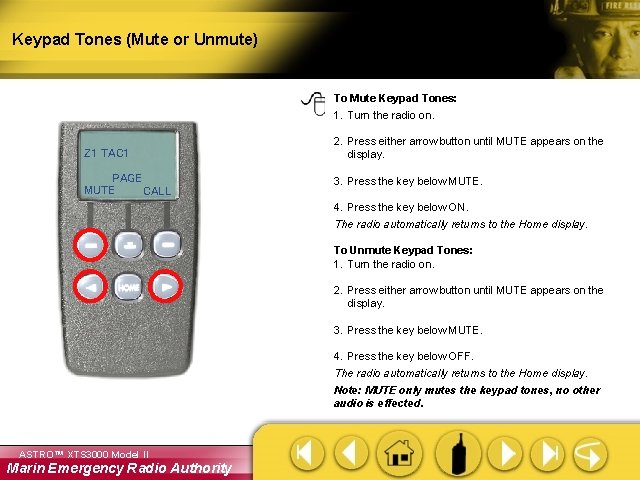
Keypad Tones (Mute or Unmute) To Mute Keypad Tones: 1. Turn the radio on. Z 1 TAC 1 2. Press either arrow button until MUTE appears on the display. PAGE MUTE CALL 3. Press the key below MUTE. 4. Press the key below ON. The radio automatically returns to the Home display. To Unmute Keypad Tones: 1. Turn the radio on. 2. Press either arrow button until MUTE appears on the display. 3. Press the key below MUTE. 4. Press the key below OFF. The radio automatically returns to the Home display. Note: MUTE only mutes the keypad tones, no other audio is effected. ASTRO™ XTS 3000 Model II Marin Emergency Radio Authority
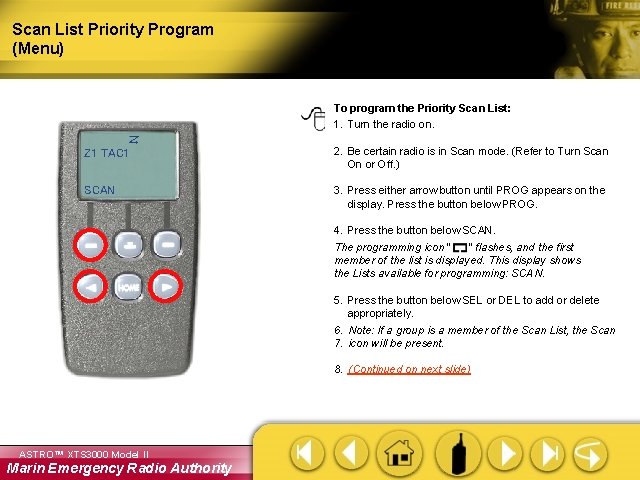
Scan List Priority Program (Menu) To program the Priority Scan List: 1. Turn the radio on. Z 1 TAC 1 2. Be certain radio is in Scan mode. (Refer to Turn Scan On or Off. ) SCAN 3. Press either arrow button until PROG appears on the display. Press the button below PROG. 4. Press the button below SCAN. The programming icon “ ” flashes, and the first member of the list is displayed. This display shows the Lists available for programming: SCAN. 5. Press the button below SEL or DEL to add or delete appropriately. 6. Note: If a group is a member of the Scan List, the Scan 7. icon will be present. 8. (Continued on next slide) ASTRO™ XTS 3000 Model II Marin Emergency Radio Authority
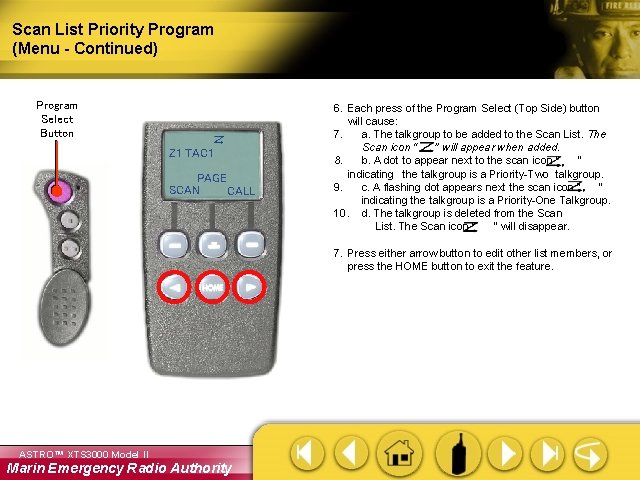
Scan List Priority Program (Menu - Continued) Program Select Button Z 1 TAC 1 PAGE SCAN CALL 6. Each press of the Program Select (Top Side) button will cause: 7. a. The talkgroup to be added to the Scan List. The Scan icon “ ” will appear when added. 8. b. A dot to appear next to the scan icon “ ” indicating the talkgroup is a Priority-Two talkgroup. 9. c. A flashing dot appears next the scan icon “ ” indicating the talkgroup is a Priority-One Talkgroup. 10. d. The talkgroup is deleted from the Scan List. The Scan icon “ ” will disappear. 7. Press either arrow button to edit other list members, or press the HOME button to exit the feature. ASTRO™ XTS 3000 Model II Marin Emergency Radio Authority
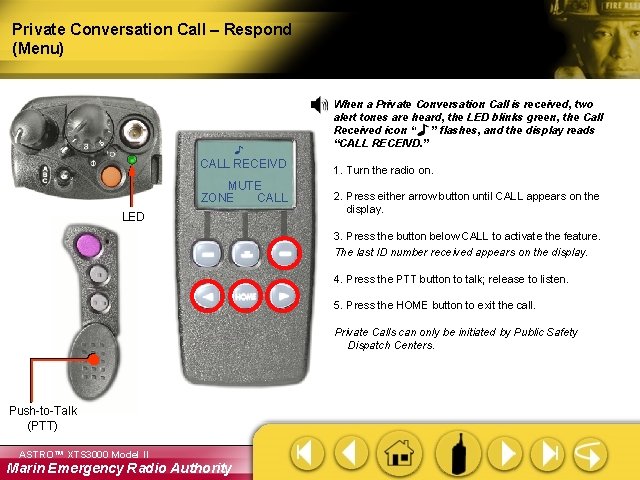
Private Conversation Call – Respond (Menu) When a Private Conversation Call is received, two alert tones are heard, the LED blinks green, the Call Received icon “ ” flashes, and the display reads “CALL RECEIVD. ” CALL RECEIVD MUTE ZONE CALL LED 1. Turn the radio on. 2. Press either arrow button until CALL appears on the display. 3. Press the button below CALL to activate the feature. The last ID number received appears on the display. 4. Press the PTT button to talk; release to listen. 5. Press the HOME button to exit the call. Private Calls can only be initiated by Public Safety Dispatch Centers. Push-to-Talk (PTT) ASTRO™ XTS 3000 Model II Marin Emergency Radio Authority
Display Light (Autolight) To turn the Display Light on: 1. Turn the radio on. Z 1 TAC 1 MUTE ZONE PROG ASTRO™ XTS 3000 Model II Marin Emergency Radio Authority 2. Press any button. The light will turn off automatically after a preset time.
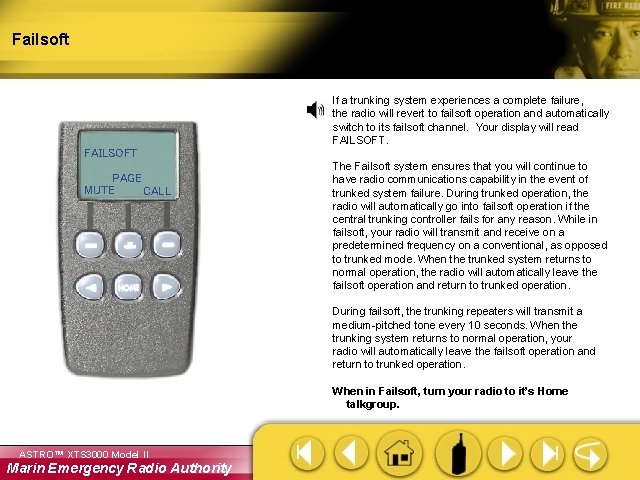
Failsoft If a trunking system experiences a complete failure, the radio will revert to failsoft operation and automatically switch to its failsoft channel. Your display will read FAILSOFT PAGE MUTE CALL The Failsoft system ensures that you will continue to have radio communications capability in the event of trunked system failure. During trunked operation, the radio will automatically go into failsoft operation if the central trunking controller fails for any reason. While in failsoft, your radio will transmit and receive on a predetermined frequency on a conventional, as opposed to trunked mode. When the trunked system returns to normal operation, the radio will automatically leave the failsoft operation and return to trunked operation. During failsoft, the trunking repeaters will transmit a medium-pitched tone every 10 seconds. When the trunking system returns to normal operation, your radio will automatically leave the failsoft operation and return to trunked operation. When in Failsoft, turn your radio to it’s Home talkgroup. ASTRO™ XTS 3000 Model II Marin Emergency Radio Authority