
Point Sprites Slide Set 7 04 Overview Points


- Slides: 18
Point Sprites Slide Set 7. 04
Overview • Points are rendered as squares • Textures can be painted onto points • The system will provide coordinates for fragments relative to the point • Blending settings allow for transparent parts 2
Pixels Rendered as Squares • The size of the square can be adjusted in the vertex shader • Each pixel in the square counts as a fragment • Fragment shader is called for each one in turn • So, a size 15 point will result in about 225 calls to the fragment shader 3
Point Relative Coordinates • The fragment shader can provide the coordinates of each fragment relative to the total square • gl_Point. Coord is a vec 2 • The following is needed to enable point sprites: • gl. Enable(0 x 8861); • According to the documentation, it either should not be needed OR an appropriate symbolic constant should be defined. • However, no such luck • gl_Point. Coord can be used as texture coordinates to sample a texture 4
Three Examples • 11 -point-sprites. B is the basic example • 11 -point-sprites has groups of sprites with different textures and adds some simple animation • 12 -point-sprites-2 presents an example from the text of a sprite computed in the fragment shader • We will use that example to discuss issues of blending colors 5
Message. Callback • A callback function invoked when GLFW detects an error 6
Overview of Code: 11 -point-sprites. B • • Points class Create shape with points Buffers Create textures Display Callbacks main • Set up error callback • Some code commented out to try to set ‘emulation level’ 7
Points Shape • An extension of the cs 4722: : shape class that represents a set of points • Initialize with a list of positions 8
Run 11 -point-sprites. B • Texture 0: square texture, computed • Textures 1 and 2: texture images with transparancy 9
Blending for Transparency • To allow for transparent parts of the texture, some configuration is needed in the driver • gl. Enable(GL_BLEND); • gl. Blend. Func(GL_SRC_ALPHA, GL_ONE_MINUS_SRC_ALPHA); • The first configuration instructs the fragment shader to blend a color already stored for a fragment with the color being assigned • The second configuration instructs the fragment shader to use the alpha component of the color being assigned to blend the two colors 10
Fragment Blending • Assignment is implemented as needed, behind the scenes • So, the assignment operator invokes a function • The image buffer is filled with the background color to start with • This is what the first fragment will be blended with 11
Fragment Blending Details • gl. Blend. Func(GL_SRC_ALPHA, GL_ONE_MINUS_SRC_ALPHA); • If the color being assigned has alpha = 1 then the other color receives weight 0 and the new color replaces the one already there • If the color being assigned has alpha = 0 then the other color receives weight 1 and the old color remains unchanged • Other effects might be interesting, but we’ll just show these cases in examples 12
Run 11 -point-sprites. B Again • • • Enable blending Specify blending function See transparency Increase number of points to 50 Notices some overlaps are transparent and some are not • Discuss more fully in next example 13
Run 11 -point-sprites • Multiple shapes with several points each • Texture is assigned in rotation using % 3 (modulo 3) • Animating using rotation • Rotation is around the rotation center, so sprites are orbiting 14
Analytic Coloring • A pattern can be computed in the fragment shader • 12 -point-sprites-2 • No textures used 15
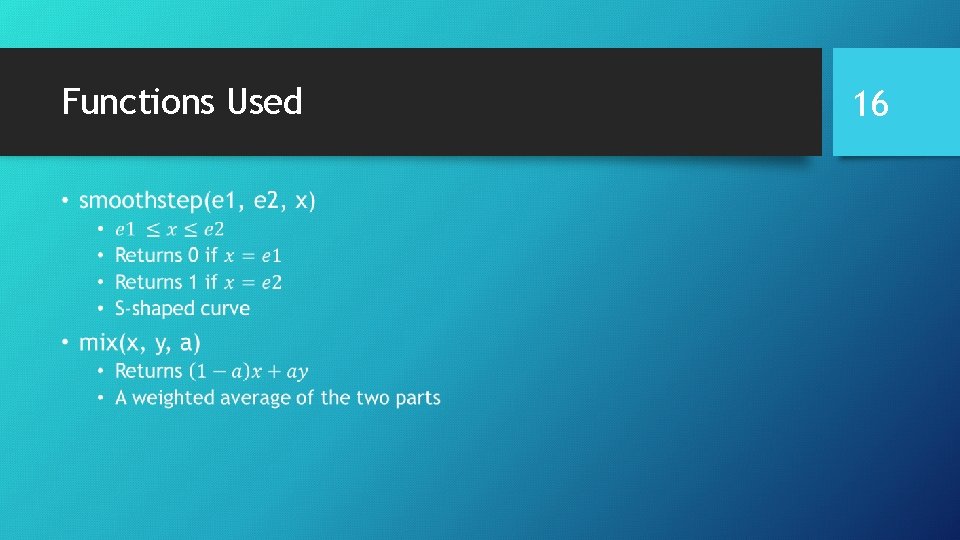
Functions Used • 16
Analytic Coloring • Color is based on distance from the center of the point • Beyond a certain distance, the fragment is discarded • Otherwise, two colors are mixed • One has some transparency • The alpha channels are different from the code in the text • But this seems to work better 17
Blending Problems • There are two statements that compute z when setting up the points • One sets z to increase from point to point in the list • One sets z to decrease • Blending does not work in the second case • Depth testing is the problem • For blending to work properly, you may have to make sure that primitives are rendered from back to front 18