
PNF Onboarding Plug and Play Stages Design Time
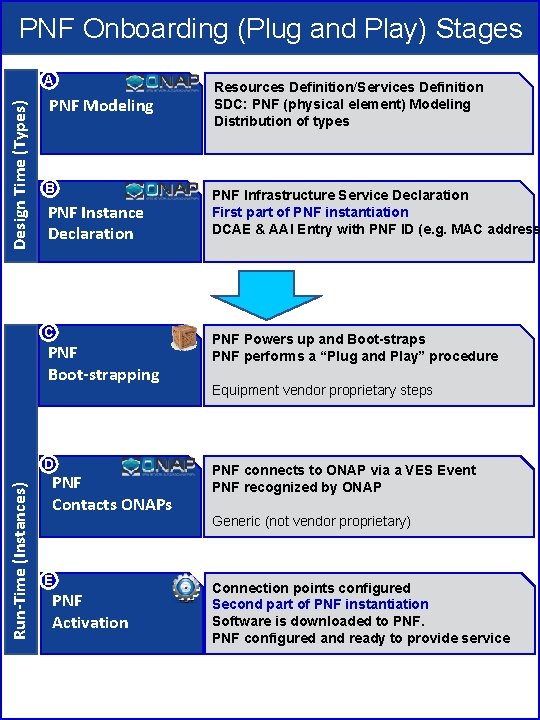
PNF Onboarding (Plug and Play) Stages Design Time (Types) A PNF Modeling B PNF Instance Declaration C PNF Boot-strapping Run-Time (Instances) D PNF Contacts ONAPs E PNF Activation Resources Definition/Services Definition SDC: PNF (physical element) Modeling Distribution of types PNF Infrastructure Service Declaration First part of PNF instantiation DCAE & AAI Entry with PNF ID (e. g. MAC address PNF Powers up and Boot-straps PNF performs a “Plug and Play” procedure Equipment vendor proprietary steps PNF connects to ONAP via a VES Event PNF recognized by ONAP Generic (not vendor proprietary) Connection points configured Second part of PNF instantiation Software is downloaded to PNF configured and ready to provide service
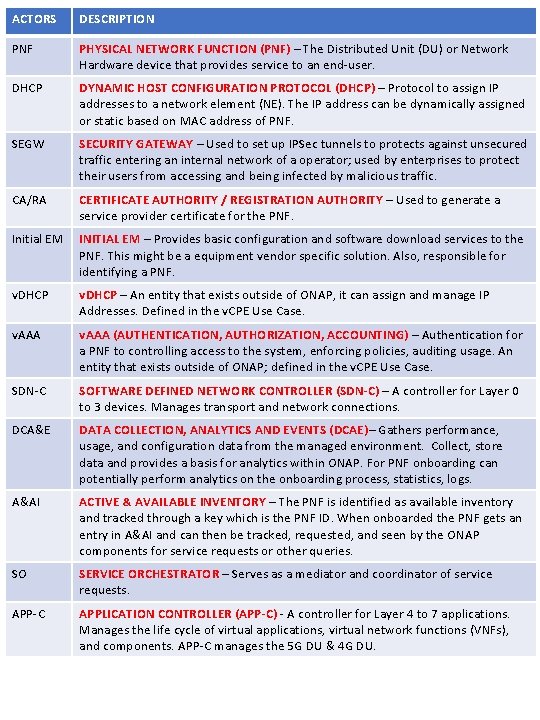
ACTORS DESCRIPTION PNF PHYSICAL NETWORK FUNCTION (PNF) – The Distributed Unit (DU) or Network Hardware device that provides service to an end-user. DHCP DYNAMIC HOST CONFIGURATION PROTOCOL (DHCP) – Protocol to assign IP addresses to a network element (NE). The IP address can be dynamically assigned or static based on MAC address of PNF. SEGW SECURITY GATEWAY – Used to set up IPSec tunnels to protects against unsecured traffic entering an internal network of a operator; used by enterprises to protect their users from accessing and being infected by malicious traffic. CA/RA CERTIFICATE AUTHORITY / REGISTRATION AUTHORITY – Used to generate a service provider certificate for the PNF. Initial EM INITIAL EM – Provides basic configuration and software download services to the PNF. This might be a equipment vendor specific solution. Also, responsible for identifying a PNF. v. DHCP – An entity that exists outside of ONAP, it can assign and manage IP Addresses. Defined in the v. CPE Use Case. v. AAA (AUTHENTICATION, AUTHORIZATION, ACCOUNTING) – Authentication for a PNF to controlling access to the system, enforcing policies, auditing usage. An entity that exists outside of ONAP; defined in the v. CPE Use Case. SDN-C SOFTWARE DEFINED NETWORK CONTROLLER (SDN-C) – A controller for Layer 0 to 3 devices. Manages transport and network connections. DCA&E DATA COLLECTION, ANALYTICS AND EVENTS (DCAE)– Gathers performance, usage, and configuration data from the managed environment. Collect, store data and provides a basis for analytics within ONAP. For PNF onboarding can potentially perform analytics on the onboarding process, statistics, logs. A&AI ACTIVE & AVAILABLE INVENTORY – The PNF is identified as available inventory and tracked through a key which is the PNF ID. When onboarded the PNF gets an entry in A&AI and can then be tracked, requested, and seen by the ONAP components for service requests or other queries. SO SERVICE ORCHESTRATOR – Serves as a mediator and coordinator of service requests. APP-C APPLICATION CONTROLLER (APP-C) - A controller for Layer 4 to 7 applications. Manages the life cycle of virtual applications, virtual network functions (VNFs), and components. APP-C manages the 5 G DU & 4 G DU.
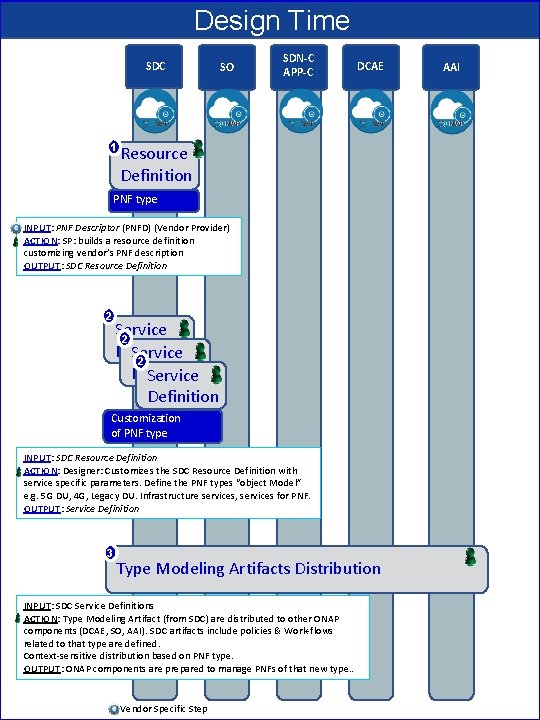
Design Time SDC 1 SO SDN-C APP-C DCAE Resource Definition PNF type INPUT: PNF Descriptor (PNFD) (Vendor Provider) ACTION: SP: builds a resource definition customizing vendor’s PNF description OUTPUT: SDC Resource Definition 2 Service 2 Definition Service Definition Customization of PNF type INPUT: SDC Resource Definition ACTION: Designer: Customizes the SDC Resource Definition with service specific parameters. Define the PNF types “object Model” e. g. 5 G DU, 4 G, Legacy DU. Infrastructure services, services for PNF. OUTPUT: Service Definition 3 Type Modeling Artifacts Distribution INPUT: SDC Service Definitions ACTION: Type Modeling Artifact (from SDC) are distributed to other ONAP components (DCAE, SO, AAI). SDC artifacts include policies & Work-flows related to that type are defined. Context-sensitive distribution based on PNF type. OUTPUT: ONAP components are prepared to manage PNFs of that new type. . Vendor Specific Step AAI
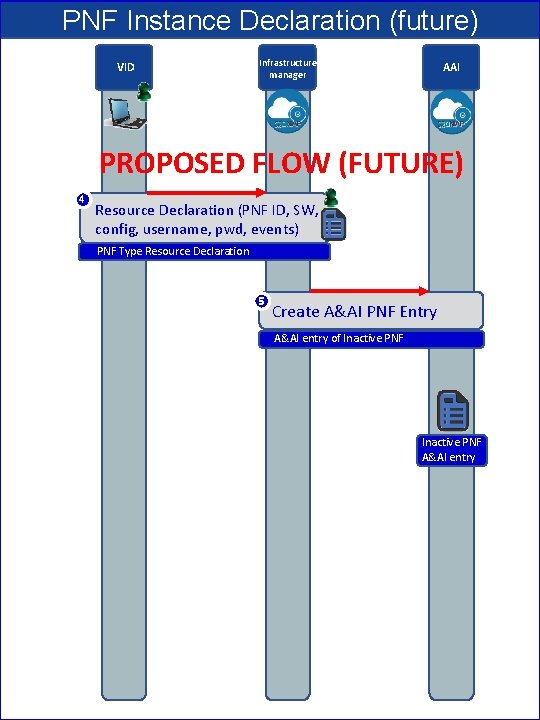
PNF Instance Declaration (future) VID Infrastructure manager AAI PROPOSED FLOW (FUTURE) 4 Resource Declaration (PNF ID, SW, config, username, pwd, events) PNF Type Resource Declaration 5 Create A&AI PNF Entry A&AI entry of Inactive PNF A&AI entry
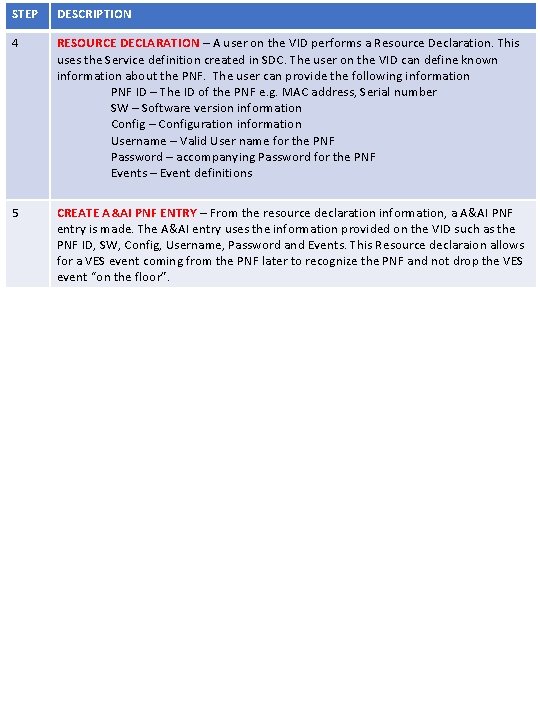
STEP DESCRIPTION 4 RESOURCE DECLARATION – A user on the VID performs a Resource Declaration. This uses the Service definition created in SDC. The user on the VID can define known information about the PNF. The user can provide the following information PNF ID – The ID of the PNF e. g. MAC address, Serial number SW – Software version information Config – Configuration information Username – Valid User name for the PNF Password – accompanying Password for the PNF Events – Event definitions 5 CREATE A&AI PNF ENTRY – From the resource declaration information, a A&AI PNF entry is made. The A&AI entry uses the information provided on the VID such as the PNF ID, SW, Config, Username, Password and Events. This Resource declaraion allows for a VES event coming from the PNF later to recognize the PNF and not drop the VES event “on the floor”.

PNF Bootstrapping Steps Factory Software Local DHCP SEGW CA/RA 6 Preplanning, Pre-provisioning Work order updated w/ Correlation ID 7 HW Install 8 9 DHCP Discover VLAN Scanning IPv 4/IPv 6 discovery DHCP Response PNF IP@(m)*, Initial EM IP@ (m), SEGW IP@(o), CA IP@(o) *Temporary PNF IP@ 10 IPSec Tunnel Setup (optional) 11 Certificate Enrollment (optional) 12 Identity Service (Identifies NE), Gives ONAP IP@ 13 ONAP Bootstrap Software Download 14 PNF Restart Activates SW Vendor Specific Step Initial EM
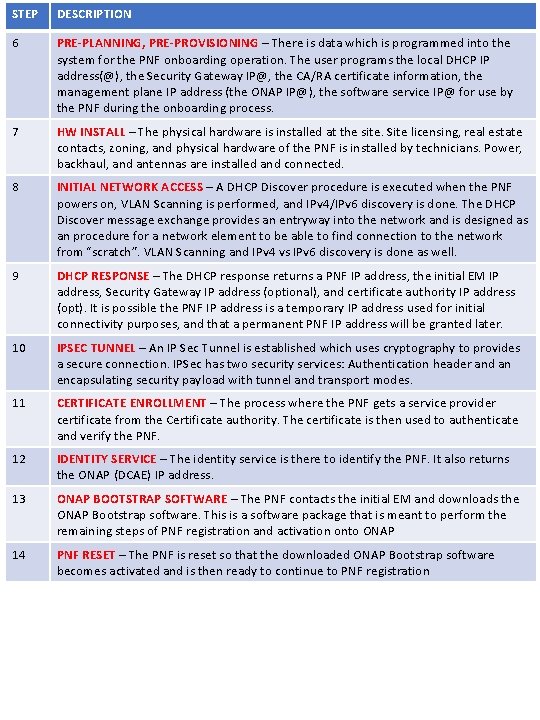
STEP DESCRIPTION 6 PRE-PLANNING, PRE-PROVISIONING – There is data which is programmed into the system for the PNF onboarding operation. The user programs the local DHCP IP address(@), the Security Gateway IP@, the CA/RA certificate information, the management plane IP address (the ONAP IP@), the software service IP@ for use by the PNF during the onboarding process. 7 HW INSTALL – The physical hardware is installed at the site. Site licensing, real estate contacts, zoning, and physical hardware of the PNF is installed by technicians. Power, backhaul, and antennas are installed and connected. 8 INITIAL NETWORK ACCESS – A DHCP Discover procedure is executed when the PNF powers on, VLAN Scanning is performed, and IPv 4/IPv 6 discovery is done. The DHCP Discover message exchange provides an entryway into the network and is designed as an procedure for a network element to be able to find connection to the network from “scratch”. VLAN Scanning and IPv 4 vs IPv 6 discovery is done as well. 9 DHCP RESPONSE – The DHCP response returns a PNF IP address, the initial EM IP address, Security Gateway IP address (optional), and certificate authority IP address (opt). It is possible the PNF IP address is a temporary IP address used for initial connectivity purposes, and that a permanent PNF IP address will be granted later. 10 IPSEC TUNNEL – An IP Sec Tunnel is established which uses cryptography to provides a secure connection. IPSec has two security services: Authentication header and an encapsulating security payload with tunnel and transport modes. 11 CERTIFICATE ENROLLMENT – The process where the PNF gets a service provider certificate from the Certificate authority. The certificate is then used to authenticate and verify the PNF. 12 IDENTITY SERVICE – The identity service is there to identify the PNF. It also returns the ONAP (DCAE) IP address. 13 ONAP BOOTSTRAP SOFTWARE – The PNF contacts the initial EM and downloads the ONAP Bootstrap software. This is a software package that is meant to perform the remaining steps of PNF registration and activation onto ONAP 14 PNF RESET – The PNF is reset so that the downloaded ONAP Bootstrap software becomes activated and is then ready to continue to PNF registration
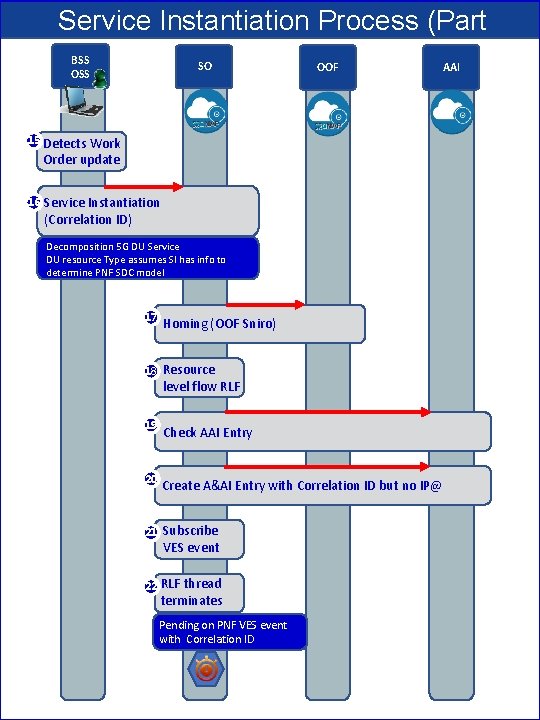
Service Instantiation Process (Part 1) OOF BSS SO AAI OSS 15 Detects Work Order update 16 Service Instantiation (Correlation ID) Decomposition 5 G DU Service DU resource Type assumes SI has info to determine PNF SDC model 17 Homing (OOF Sniro) 18 Resource level flow RLF 19 Check AAI Entry 20 Create A&AI Entry with Correlation ID but no IP@ 21 Subscribe VES event 22 RLF thread terminates Pending on PNF VES event with Correlation ID
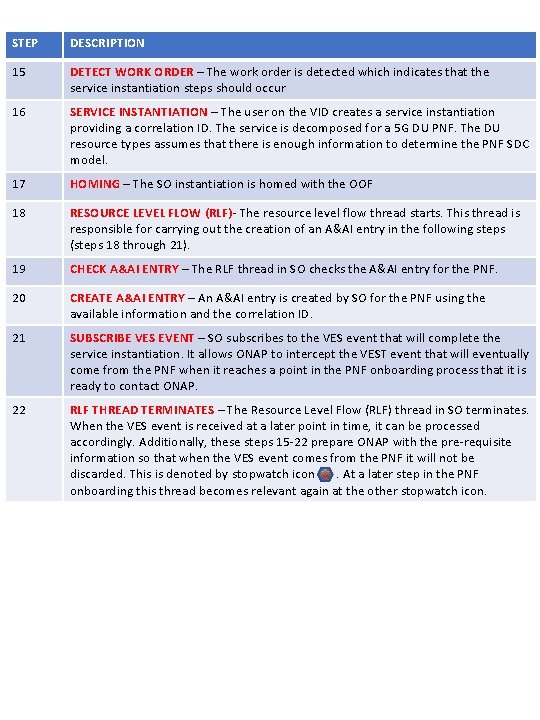
STEP DESCRIPTION 15 DETECT WORK ORDER – The work order is detected which indicates that the service instantiation steps should occur 16 SERVICE INSTANTIATION – The user on the VID creates a service instantiation providing a correlation ID. The service is decomposed for a 5 G DU PNF. The DU resource types assumes that there is enough information to determine the PNF SDC model. 17 HOMING – The SO instantiation is homed with the OOF 18 RESOURCE LEVEL FLOW (RLF)- The resource level flow thread starts. This thread is responsible for carrying out the creation of an A&AI entry in the following steps (steps 18 through 21). 19 CHECK A&AI ENTRY – The RLF thread in SO checks the A&AI entry for the PNF. 20 CREATE A&AI ENTRY – An A&AI entry is created by SO for the PNF using the available information and the correlation ID. 21 SUBSCRIBE VES EVENT – SO subscribes to the VES event that will complete the service instantiation. It allows ONAP to intercept the VEST event that will eventually come from the PNF when it reaches a point in the PNF onboarding process that it is ready to contact ONAP. 22 RLF THREAD TERMINATES – The Resource Level Flow (RLF) thread in SO terminates. When the VES event is received at a later point in time, it can be processed accordingly. Additionally, these steps 15 -22 prepare ONAP with the pre-requisite information so that when the VES event comes from the PNF it will not be discarded. This is denoted by stopwatch icon. At a later step in the PNF onboarding this thread becomes relevant again at the other stopwatch icon.
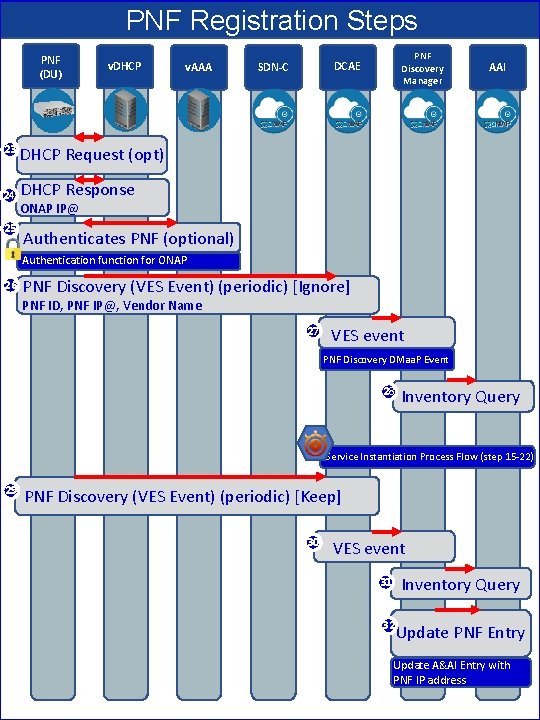
PNF Registration Steps PNF (DU) 23 24 25 v. DHCP v. AAA PNF Discovery Manager DCAE SDN-C AAI DHCP Request (opt) DHCP Response ONAP IP@ Authenticates PNF (optional) Authentication function for ONAP 26 PNF Discovery (VES Event) (periodic) [Ignore] PNF ID, PNF IP@, Vendor Name 27 VES event PNF Discovery DMaa. P Event 28 Inventory Query Service Instantiation Process Flow (step 15 -22) 29 PNF Discovery (VES Event) (periodic) [Keep] 30 VES event 31 Inventory Query 32 Update PNF Entry Update A&AI Entry with PNF IP address
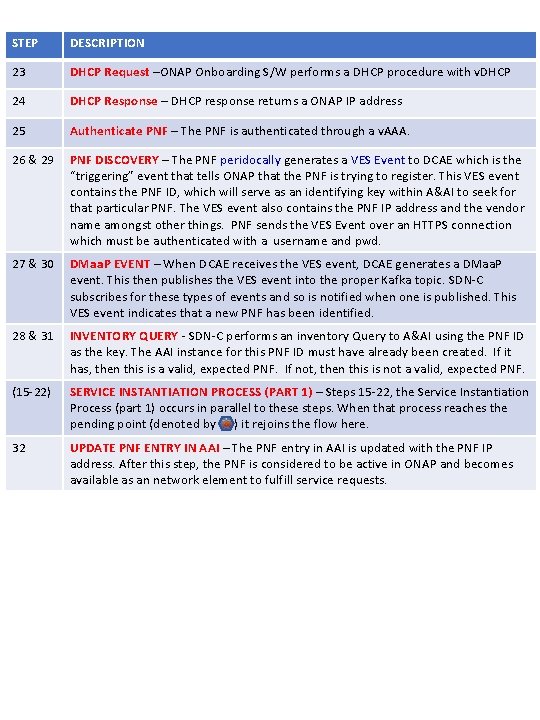
STEP DESCRIPTION 23 DHCP Request –ONAP Onboarding S/W performs a DHCP procedure with v. DHCP 24 DHCP Response – DHCP response returns a ONAP IP address 25 Authenticate PNF – The PNF is authenticated through a v. AAA. 26 & 29 PNF DISCOVERY – The PNF peridocally generates a VES Event to DCAE which is the “triggering” event that tells ONAP that the PNF is trying to register. This VES event contains the PNF ID, which will serve as an identifying key within A&AI to seek for that particular PNF. The VES event also contains the PNF IP address and the vendor name amongst other things. PNF sends the VES Event over an HTTPS connection which must be authenticated with a username and pwd. 27 & 30 DMaa. P EVENT – When DCAE receives the VES event, DCAE generates a DMaa. P event. This then publishes the VES event into the proper Kafka topic. SDN-C subscribes for these types of events and so is notified when one is published. This VES event indicates that a new PNF has been identified. 28 & 31 INVENTORY QUERY - SDN-C performs an inventory Query to A&AI using the PNF ID as the key. The AAI instance for this PNF ID must have already been created. If it has, then this is a valid, expected PNF. If not, then this is not a valid, expected PNF. (15 -22) SERVICE INSTANTIATION PROCESS (PART 1) – Steps 15 -22, the Service Instantiation Process (part 1) occurs in parallel to these steps. When that process reaches the pending point (denoted by ) it rejoins the flow here. 32 UPDATE PNF ENTRY IN AAI – The PNF entry in AAI is updated with the PNF IP address. After this step, the PNF is considered to be active in ONAP and becomes available as an network element to fulfill service requests.
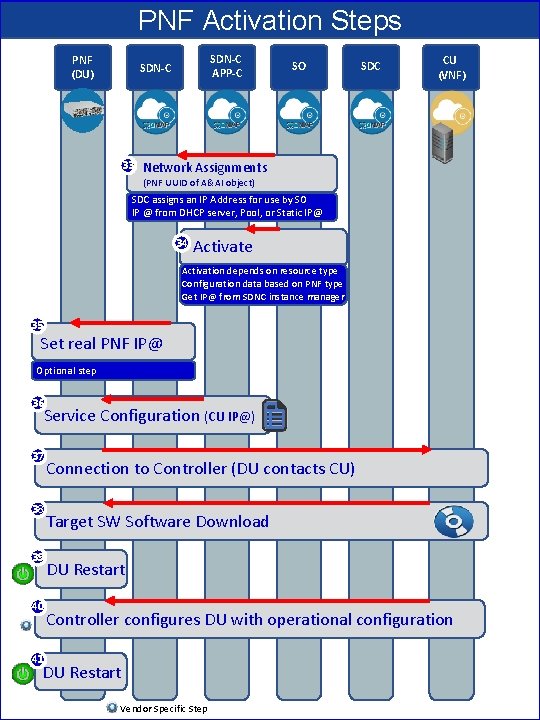
PNF Activation Steps PNF (DU) SDN-C APP-C SDN-C 33 SO SDC CU (VNF) Network Assignments (PNF UUID of A&AI object) SDC assigns an IP Address for use by SO IP @ from DHCP server, Pool, or Static IP@ 34 Activate Activation depends on resource type Configuration data based on PNF type Get IP@ from SDNC instance manager 35 Set real PNF IP@ Optional step 36 Service Configuration (CU IP@) 37 38 39 40 Connection to Controller (DU contacts CU) Target SW Software Download DU Restart Controller configures DU with operational configuration 41 DU Restart Vendor Specific Step
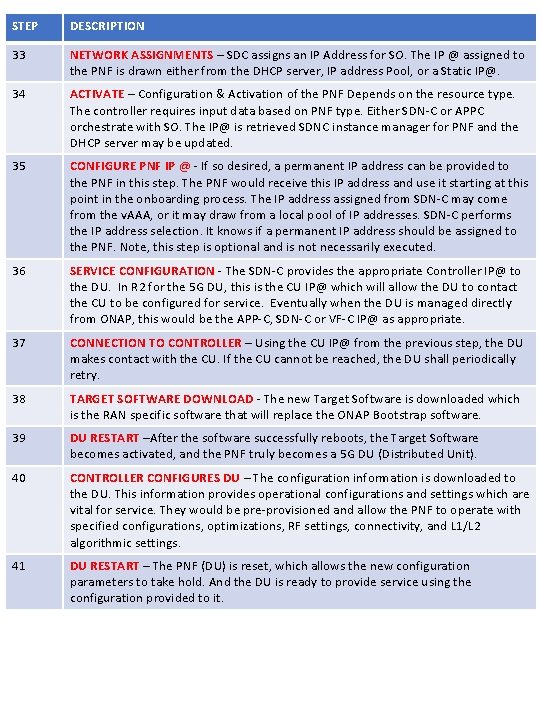
STEP DESCRIPTION 33 NETWORK ASSIGNMENTS – SDC assigns an IP Address for SO. The IP @ assigned to the PNF is drawn either from the DHCP server, IP address Pool, or a Static IP@. 34 ACTIVATE – Configuration & Activation of the PNF Depends on the resource type. The controller requires input data based on PNF type. Either SDN-C or APPC orchestrate with SO. The IP@ is retrieved SDNC instance manager for PNF and the DHCP server may be updated. 35 CONFIGURE PNF IP @ - If so desired, a permanent IP address can be provided to the PNF in this step. The PNF would receive this IP address and use it starting at this point in the onboarding process. The IP address assigned from SDN-C may come from the v. AAA, or it may draw from a local pool of IP addresses. SDN-C performs the IP address selection. It knows if a permanent IP address should be assigned to the PNF. Note, this step is optional and is not necessarily executed. 36 SERVICE CONFIGURATION - The SDN-C provides the appropriate Controller IP@ to the DU. In R 2 for the 5 G DU, this is the CU IP@ which will allow the DU to contact the CU to be configured for service. Eventually when the DU is managed directly from ONAP, this would be the APP-C, SDN-C or VF-C IP@ as appropriate. 37 CONNECTION TO CONTROLLER – Using the CU IP@ from the previous step, the DU makes contact with the CU. If the CU cannot be reached, the DU shall periodically retry. 38 TARGET SOFTWARE DOWNLOAD - The new Target Software is downloaded which is the RAN specific software that will replace the ONAP Bootstrap software. 39 DU RESTART –After the software successfully reboots, the Target Software becomes activated, and the PNF truly becomes a 5 G DU (Distributed Unit). 40 CONTROLLER CONFIGURES DU – The configuration information is downloaded to the DU. This information provides operational configurations and settings which are vital for service. They would be pre-provisioned and allow the PNF to operate with specified configurations, optimizations, RF settings, connectivity, and L 1/L 2 algorithmic settings. 41 DU RESTART – The PNF (DU) is reset, which allows the new configuration parameters to take hold. And the DU is ready to provide service using the configuration provided to it.

Backup Slides Meeting Notes & Email Exchanges
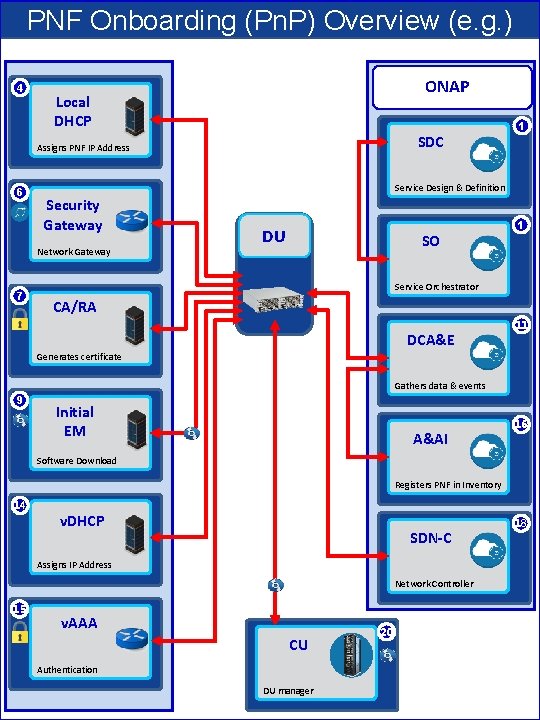
PNF Onboarding (Pn. P) Overview (e. g. ) 4 ONAP Local DHCP SDC Assigns PNF IP Address 6 Service Design & Definition Security Gateway Network Gateway 7 1 DU SO 1 Service Orchestrator CA/RA DCA&E 11 Generates certificate Gathers data & events 9 Initial EM A&AI 16 Software Download Registers PNF in Inventory 14 v. DHCP SDN-C Assigns IP Address Network Controller 15 v. AAA CU Authentication DU manager 20 18
- Slides: 15